

Introducing G2.ai, the future of software buying.Try now

Float.com Reviews & Product Details

Pricing

Pricing provided by Float.com.

Starter

Starting at $7.00
Per Month

Float.com Media

Float.com Demo - Schedule resources
Easily see who’s working on what and when, with a live schedule to plan and allocate work.
Float.com Demo - Plan capacity
Balance workloads and prevent burnout with a live view of availability, time off, and scheduled work.
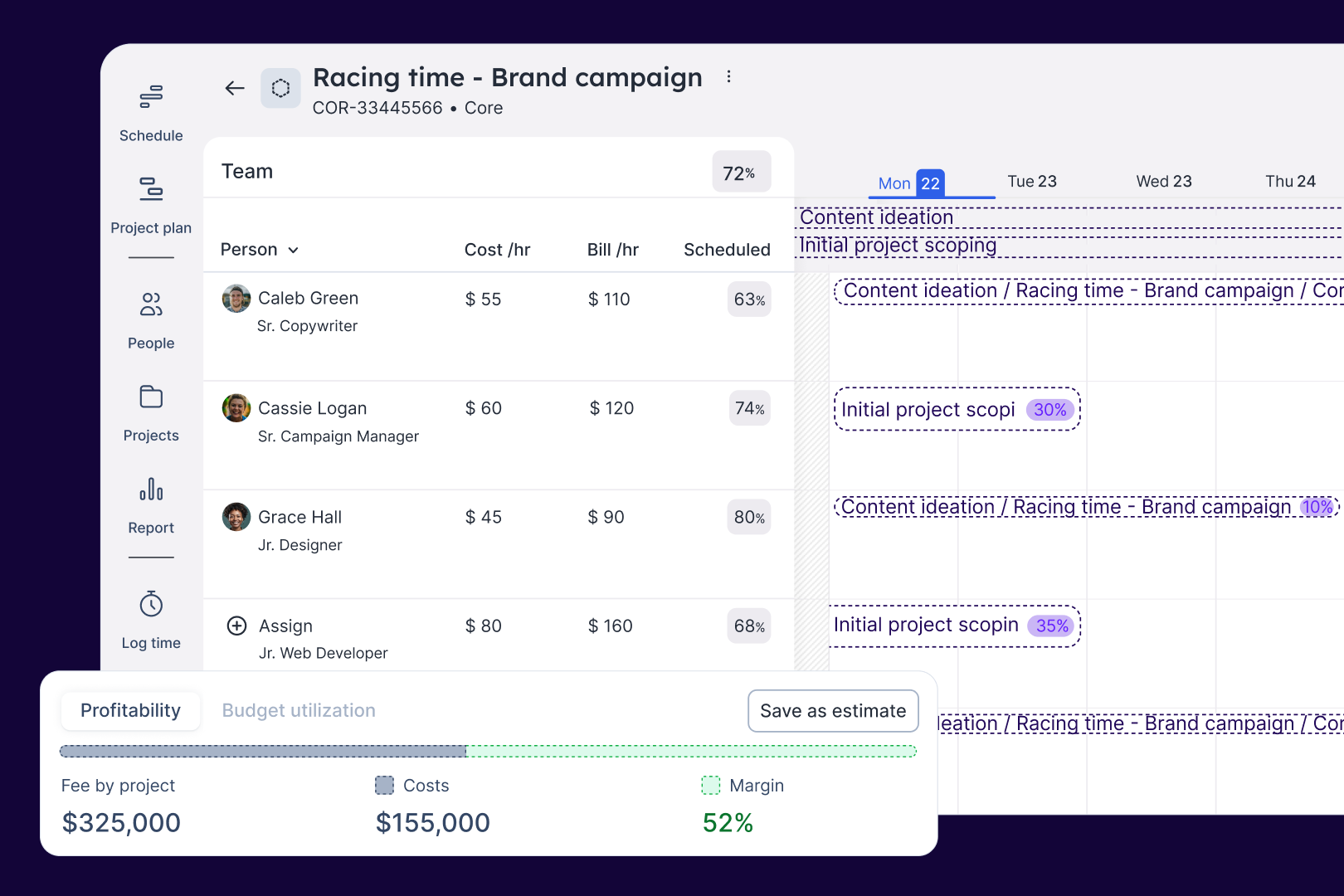
Float.com Demo - Estimate work
Quickly price new projects with confidence. Build budgets, align resourcing, and track scope changes—monitoring estimates against actuals to deliver profitable projects.
Float.com Demo - Scope projects
Align what you need with what you have to create project schedules that keep work on track with the right people, budgets, and timelines.
Float.com Demo - Track time
Simplify timesheets with pre-filled hours so your actuals data is more accurate and always on time!
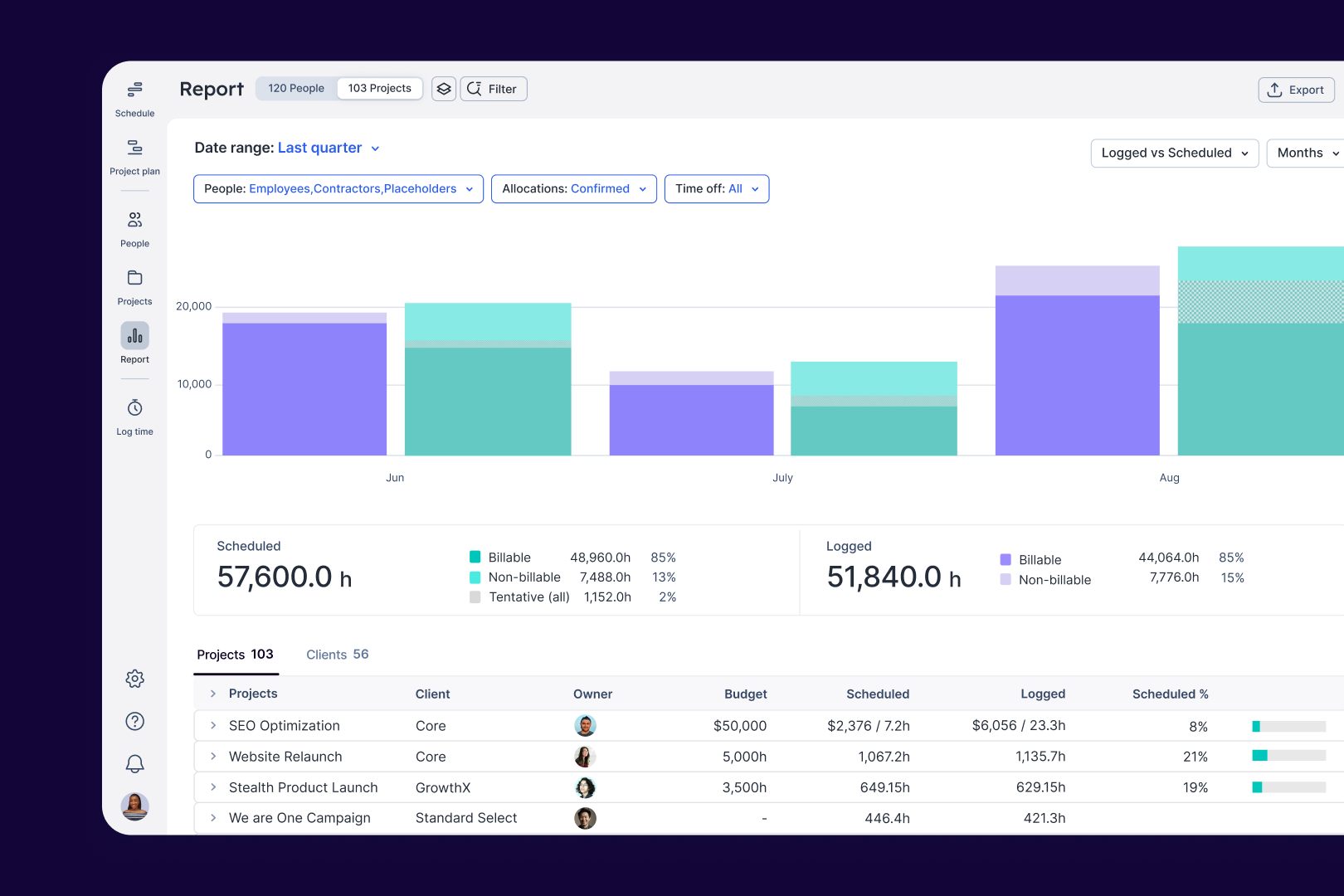
Float.com Demo - Report
Make informed decisions with live insights into team utilization and budget spend to understand how resourcing affects project margins and profitability.
The best teams in the world don’t just wing it. They use Float to get the essential data and context they need when resourcing client work, so they can build winning teams and deliver profitable projects.
Play Float.com Video
The best teams in the world don’t just wing it. They use Float to get the essential data and context they need when resourcing client work, so they can build winning teams and deliver profitable projects.
New: finance & estimations in Float. Stop guessing and start knowing. With Float's finance & estimation features, you can price accurately, protect margins, and deliver profitable projects every time.
Play Float.com Video
New: finance & estimations in Float. Stop guessing and start knowing. With Float's finance & estimation features, you can price accurately, protect margins, and deliver profitable projects every time.
Product Avatar Image

Have you used Float.com before?

Answer a few questions to help the Float.com community

Float.com Reviews (1,997)

View 1 Video Reviews
Reviews

Float.com Reviews (1,997)

View 1 Video Reviews
4.3
1,998 reviews

Pros & Cons

Generated from real user reviews
View All Pros and Cons
Search reviews
Filter Reviews
Clear Results
G2 reviews are authentic and verified.
Verified User in Hospital & Health Care
UH
Enterprise (> 1000 emp.)
"Floats like a butterfly! Easy to use."
What do you like best about Float.com?

User-friendly interface. Simple and clean. Review collected by and hosted on G2.com.

What do you dislike about Float.com?

More sort capabilities would be helpful. Review collected by and hosted on G2.com.

Verified User in Marketing and Advertising
UM
Mid-Market (51-1000 emp.)
"Easy and convenient to use"
What do you like best about Float.com?

Can see what I'm booked to work on weeks in advance. Can also see what my team is working on, all in one place. Review collected by and hosted on G2.com.

What do you dislike about Float.com?

Not connected to timesheets so end up having to duplicate info. Review collected by and hosted on G2.com.

JB
Resource planning intern
Mid-Market (51-1000 emp.)
"Intuitive and infinitely helpful software, let down by occasional performance issues and with room"
What do you like best about Float.com?

Float is an incredibly intuitive piece of software to use, with a simple calendar-like interface that everyone can understand. I have found that this aspect of the software is helpful in promoting its adoption within our teams. The experience is consistent across the product, which has allowed me to discover more and more features in and enrich the experience of using the product. Review collected by and hosted on G2.com.

What do you dislike about Float.com?

The performance of the software is occasionally a bit lacklustre. For example, I often find myself accidentally clicking somewhere on the screen which prompts a dialogue box to open to enter a new task. This problem is especially pronounced when using a trackpad, and isn’t something that I experience elsewhere. Additionally, the interface seems to have a strange way of ‘splitting’ tasks that occur across multiple days. I have found that it often leaves blank gaps that give the illusion that a team member is working more hours per day than they actually are.

There are a few features that I would like to see when going forward. Firstly, I think it would be good if there were different options when ‘resizing’ a task. Currently, the task can be resized independently across both axes (i.e. how many hours per day, and across how many days). I think it would be good if there were an option for these to affect each other – i.e. the total number of hours allocated to the project remains the same and could be allocated fewer hours across more days, or more hours across fewer days. Review collected by and hosted on G2.com.

JP
Lead Designer
Mid-Market (51-1000 emp.)
"Good simple project tracker"
What do you like best about Float.com?

I like the clean UI, the ease of use and the simplicity of it. Review collected by and hosted on G2.com.

What do you dislike about Float.com?

I'd like more options and controls. I can only view a week at a time and only my calendar (this might be due to my organization's settings). Review collected by and hosted on G2.com.

Verified User in Marketing and Advertising
UM
Mid-Market (51-1000 emp.)
"Float Review"
What do you like best about Float.com?

The easy, intuitive nature makes this easily adaptable across a large team Review collected by and hosted on G2.com.

What do you dislike about Float.com?

I would like the option to integrate with my team members' calendars Review collected by and hosted on G2.com.

LP
Production Coordinator
Small-Business (50 or fewer emp.)
"Great Value, Good Potential"
What do you like best about Float.com?

I really like how intuitive Float is. I like how you can overview many different projects at the same time and keep track of the progress on each of them.

It's also very useful that you can get reports for overtime, holidays and production time spent on each job. Review collected by and hosted on G2.com.

What do you dislike about Float.com?

I think it still has a lots of areas to improve (but so fat it's going in the right direction!).

I think the reports part could be improved as it includes too much information.

I also think the font used on the pencils is not very easy to read.

I think it would also help if we could see the details of each booking when we hoover over it with our mouse. Review collected by and hosted on G2.com.

Jennifer  L.
JL
User Researcher
Mid-Market (51-1000 emp.)
"User review of Float"
What do you like best about Float.com?

I find Float incredibly easy to use. I can easily see what I'm meant to be working on and when, and I like that I can change the way I view the information. i.e. by person, by project, etc. The different views are clear and uncluttered and I like that there aren't any unnecessary frills. There is good help available if needed, like video tutorials etc. as well. In my current role I am only a user but I imagine I will use more functions of the software when I move up to a higher level role. Review collected by and hosted on G2.com.

What do you dislike about Float.com?

If I had to say I disliked something, I would have a hard time finding something to dislike! Review collected by and hosted on G2.com.

Amanda F.
AF
Digital Producer
Marketing and Advertising
Small-Business (50 or fewer emp.)
"One of the better project management tools out there"
What do you like best about Float.com?

I like that you can split bookings so every day is defined with the precise hours required on that resource, rather than a large blanket booking. I like that there are unlimited colour choices for each user, and one can easily identify each resource's role in the company. I like that you can easily see when someone is overallocated. Review collected by and hosted on G2.com.

What do you dislike about Float.com?

I dislike the extra step that one must take to add a new client and new project. It's an additional step that I find too cumbersome and not user friendly. I also don't like that there isn't a simple "duplicate" button, rather, you must split it and then move it to a different resource. Review collected by and hosted on G2.com.

RK
Small-Business (50 or fewer emp.)
"Awesome Team Management App"
What do you like best about Float.com?

Ease of use, and quick learning. it increases my productivity greatly. Ever since i started using Float, i have grown more and more dependent on it. It is now a go-to tool. Review collected by and hosted on G2.com.

What do you dislike about Float.com?

Use interface is a bit outdated/dull. it could be improved and polished. The filtering feature could also be reworked to speed up the filtering process. Review collected by and hosted on G2.com.

Joshua Y.
JY
Project Manager
Architecture & Planning
Small-Business (50 or fewer emp.)
"Works great for most of what we do - wish they would add some functionality"
What do you like best about Float.com?

I love that it integrates with your project budget. It shows you how much you're over or under your projected target given how many hours you put into float. It's clean and looks great and is fairly easy to read (unless you zoom out and you project title gets truncated). It's easy to add and modify tasks and setup is fairy self-explanatory minus a few quirks. Review collected by and hosted on G2.com.

What do you dislike about Float.com?

I hate that you can't lock items into place and that when you move items around they don't automatically push out the schedule. I get that the method used here works for a lot of situations, but it'd be nice to add in some functionality. Right now, youre budget isn't the constraint. You can move hours around willy nilly and that number fluctuates. I'd like to see an option where you set your budgeted hours and the program rigidly holds to that, pushing the schedule out as needed to accommodate. And I like that you can see your budgeted hours as a percentage but the functionality is super light with regards to accuracy. We update our Float schedule every week and it's a pain to get accurate numbers given the "hours per day" model. If you end up spending 11.5 hours in a week on one project or task, you have to put them all in a single day to be accurate. Review collected by and hosted on G2.com.

Pricing Options

Pricing provided by Float.com.

Starter

Starting at $7.00
Per Month

Pro

Starting at $12.00
Per Month

Enterprise

Contact Us
Float.com Comparisons
Product Avatar Image
Resource Guru
Compare Now
Product Avatar Image
Kantata Professional Services Automation (formerly Mavenlink+ Kimble)
Compare Now
Product Avatar Image
Teamwork.com
Compare Now
Float.com Features
Ease of Completing Timesheets
Tracking Time to Project/Task
Billable Time Rate Management
Time Tracking
Business Tool Integration
Automated Reminders
User, Role, and Access Management
Reporting
Performance and Reliability
Product Avatar Image
Float.com