Learn More About E-Signature Software
E-signature software overview
E-signature software allows users to receive, sign, and send documents virtually, eliminating the need for physical distribution. Sending a contract or another document requiring electronic signatures becomes even more convenient when one can ensure that those documents are shared and stored securely.
Aside from the paperless work environment that e-signature software helps create, the tool also alleviates the burden of waiting for the recipient to sign and send the contract without confirming if the document has been received or sent.
According to the Electronic Signature & Records Association, it can be a sound, symbol, or process. E-signatures can be captured on a computer, tablet, or mobile device. They verify and validate the intentions of the signer while also providing records retention.
Since signing and tracking documents on the go can be convenient or perhaps a necessity, e-signature providers continue to add greater functionality to their products through native iOS, Windows, Android apps, or mobile browsers. The highest-rated e-signature platforms for distributed teams tend to pair mobile signing with real-time status tracking and automated reminders, features that reviewers in multi-region organizations cite most often when explaining why they maintained or increased their subscription.
E-signature software provides users with an efficient alternative to the traditional methods of preparing, sending, signing, and verifying documents, agreements, and contracts. It provides an enhanced customer experience, improved workflow efficiencies, and an effective method to stand up to legal muster. Buyers comparing options often look for a legal transaction software e-signature audit trail, since a tamper-evident record is a baseline requirement in regulated industries such as banking, insurance, and legal services. Based on G2 reviews, Sales teams, HR teams, Legal teams, and Property management professionals evaluate e-signature software by comparing audit trail completeness, multi-signer workflow flexibility, device compatibility, and pricing structure at scale.
Nevertheless, due to the sensitivity of the documents exchanged and signed with an electronic signature solution, most products adhere to strict industry standards for authenticity, security, and encryption. Enterprise e-signature platforms evaluated for performance stability under high traffic volumes are also assessed by reviewers on uptime consistency, advanced workflow throughput, and whether enterprise tiers include bulk sending and conditional routing without degrading speed, criteria that matter most to procurement, legal, and financial services teams processing large document volumes.
Some e-signature solutions come equipped (or facilitate the integration) with solutions that offer e-notary functionality. While both solutions support the data integrity of sensitive documents, electronic notarization goes beyond encrypting and securing electronic signatures. Both solutions support sharing and storing documents, but document generation further allows users to create complex document types, including text-based and graphics.
Additionally, many e-signature products offer out-of-the-box integration with popular CRM or document management tools. Integrating an e-signature product with the user's CRM software or content management system can make the contract signing process more efficient and easier to manage.
Who uses e-signature software?
Given the vast applicability e-signatures offer to businesses, a wide variety of stakeholder groups use this software. Below are a few examples:
-
Sales teams: E-signature software assists sales teams in quickly sending sales agreements, purchase orders, or contracts to vendors and increases the efficiency of the signing process. Sales professionals are tasked daily with communicating with prospective clients and sharing sensitive sales contract documents.
-
HR teams: E-signature software allows human resource professionals to efficiently interact with potential employees by sharing, reviewing, and receiving employment offers and other HR documents directly with the prospect. HR professionals can easily send documentation to potential employees with e-signature platforms and track where potential employees are in the signing process.
-
Legal teams: Legal professionals constantly send and receive legal documents. E-signature software allows legal teams to effectively access the plethora of documents they regularly require to take action and tailor them accordingly.
-
Property management professionals: Real estate and property management professionals are tasked with sending, reviewing, and receiving several different types of documents daily to perform their duties. This software allows property management workers to quickly send lease agreements, among other industry-relevant documents, to current or future tenants and track the tenant’s progress in signing documents.
-
Procurement and supply chain teams: Among their responsibilities, supply chain professionals are consistently tasked with reviewing and signing documents such as contracts, licenses, and purchase agreements. E-signature solutions enable supply chain professionals to streamline their contract management processes and consolidate all document signing activities to one location.
-
Insurance professionals: Insurance professionals are constantly tasked with providing customers with applications, insurance claims, and renewals, among other documents, which can be inconvenient to deliver and receive in physical forms. E-signature software enables insurance workers to quickly provide their customers with digital copies to expedite the document signing process and ensure that customers are adequately protected.
-
Financial services: In the financial services sector, workers are required to review agreements or financial documents regularly. These tools allow finance workers to easily review and sign documents in a remote setting, including on a mobile device, which helps them streamline the process for what can be complex financial deals. Financial services professionals must adhere to various industry regulations, and e-signature software ensures compliance, saving workers time and resources.
What are the types of e-signature software?
There are three main types of e-signature software. They are:
-
Simple electronic signatures (SES): SESs are the most basic type of e-signature. They include a scanned image of a handwritten signature, a checkbox, or a typed name at the end of an electronic document. They are often considered less secure compared to the other types since they don’t provide a strong level of authentication or verification of the signer’s identity. SESs are not legally binding as they provide little to no protection against fraud. However, they may be used across various low-security signing scenarios.
-
Advanced electronic signatures (AES): AESs are more secure than simple e-signatures and have additional features to enhance the authentication and integrity of the signed electronic document. They incorporate cryptographic techniques that help secure the signer’s identity and may use digital certificates, biometrics, or other advanced authentication methods. Many countries recognize them as legally binding.
-
Qualified electronic signatures (QES): QESs are the highest level of e-signature in terms of security and legal standing. They meet the regulatory requirements and standards set by authorities in various jurisdictions. QESs typically involve stringent authentication procedures and may even require the use of secure signature creation devices (SSCDs) such as USB tokens or smart cards. They are widely recognized as an equivalent to handwritten signatures and are used for transactions that require a high level of trust and security.
Benefits of e-signature software
E-signature software can have its own set of benefits, as mentioned below.
-
Increase workflow efficiencies: E-signature solutions allow users to create and share documents digitally with the signer, enabling the workforce to focus on more strenuous tasks. E-signature tools enable users to reuse already created templates, send documents virtually through cloud-based solutions, and get notified when documents have been seen, signed, and returned, saving time and manual effort. The best e-signature platforms for teams managing complex workflows without IT staff tend to offer configurable multi-signer routing and reusable templates that require no technical setup, which G2 reviewers consistently identify as the features that reduce onboarding friction most
-
Improve customer experience: Rather than constantly checking physical mailboxes, meeting with the signatory, and ensuring receipt of the agreement, these automation solutions enable the signer to virtually receive, review, and sign the document, providing a better user experience to all parties involved. Reviewers describe the e-signature software business value realized in the first 3 months of deployment as most visible in reduced contract turnaround time and lower administrative overhead, with template automation and automated reminders cited as the changes that produce the fastest measurable return.
-
Provide audit trail and compliance: E-signature tools provide businesses with an easy method for tracking the movement of their documents and detecting changes or edits made to documents and agreements. These tools provide an audit trail where companies can see who signed the document, when it was signed, where it was signed, and who it was shared with.
-
Increase cost efficiency: E-signature solutions eliminate the paper trail of contracts, which reduces printing and physical file storage needs. This reduces the environmental impact businesses have and allows businesses to save on office and administrative expenses such as paper, printers, fax machines, and pens.
-
Improve productivity: Another key benefit of electronic signature software is improving productivity by allocating less time to sign, send, and process contracts or agreements in person. In addition to the reduced time needed to sign and process documents, e-signature platforms help businesses cut administrative expenses and allow employees to focus on high business priorities rather than shipping and receiving contracts.
-
Allow ease of scalability: E-signature software allows businesses to easily scale up software usage to additional users, teams, or the entire enterprise due to its ease of use. Because signing documents electronically is relatively easy to train users on, compared to more in-depth software, businesses can scale up their software usage to increase productivity in other business areas.
The most reliable e-signature solutions show implementation success and user satisfaction ratings that correlate strongly with intuitive onboarding, pre-built integrations, and responsive human support rather than chatbot-only channels.
What are the features of E-signature software?
The following are some core features within e-signature platforms that can help users make the most of them:
-
Document signing: The tool lets the signer easily and intuitively sign documents virtually. This feature enables businesses to focus on higher-priority tasks rather than obtaining, reviewing, signing, and sending documents. E-signature solutions are user-friendly and expedite the signing process.
-
Progress tracking: This technology allows interested parties to track documents and identify if the document has been received, opened, and signed in real-time. This feature provides businesses greater visibility into the signer’s activities and allows them to understand when agreements will be signed and delivered more accurately.
-
Regulatory compliance: Signatures often adhere to strict regulations, permissions, and legal standards. E-signature software allows signers to focus on work tasks rather than worry about regulatory compliance of an agreement, as these tools typically have regulatory compliance embedded within the software.
-
Document creation and templates: Agreements and documents often have nuanced differences and vary depending on their use case. However, e-signature solutions allow users to use premade templates or create templates to customize agreements for the individual signer quickly.
-
Mobile accessibility: Users can easily send, review, and sign documents on mobile devices or mobile apps. This allows users to freely review and sign agreements independently, rather than being physically present in front of the interested parties or on a computer.
-
Bulk digital signatures: Users can send documents and agreements requiring thousands of signers simultaneously. E-signature platforms enable businesses to send documents in bulk to various parties, increasing the efficiency of the signing process and enhancing document management processes. This feature saves companies countless hours of sending, receiving, and tracking the status of documents.
-
Document repository: Another key feature of e-signature tools is retaining all documents or agreements and storing them within the solution or on a third-party platform. Businesses can enhance their document management capabilities by having a solution that stores all documents securely and is accessible for future use cases such as contract negotiations, renewals, or legal matters.
-
Signature creation: A core feature of e-signature software is creating and customizing signature blocks and initials for signers to use. Signature creation can occur on all required electronic document types or forms and can be individualized for the user. This allows businesses to sign documents electronically and create an authentic signature at any point in the document workflow.
-
Custom branding: Many e-signature solutions allow businesses to implement custom branding in the various types of documents that will be shared, signed, and stored. This feature enables businesses to leverage their brand in documents or agreements and have consistent brand marketing throughout their documents.
-
File sharing: Besides signing documents, e-signature tools enable businesses to quickly share files with multiple parties in real-time. This allows companies to efficiently share and send any type of document to interested parties without physically moving.
-
API integrations: E-signature software can also leverage API integrations to enable users to create and update documents, forms, or templates and integrate them into other business processes or workflows by leveraging an all-in-one e-signature system. API integrations provide businesses with an effective way to seamlessly integrate the document signing process into any other core aspect of their business.
-
Reminders and expirations: Another feature offered within e-signature solutions is the ability to remind signers of documents or agreements waiting to be signed and notify them of expiration dates for digital documents. Users can be notified through various mediums, including SMS and email. This feature assists in progressing the document signing process, increases turnaround time, and ensures interested parties do not miss contract renewals or offer period expirations.
E-signature software pricing
E-signature software is often priced in tiers, with lower-tier options providing a limited number of users and, in some cases, limited documents and restricted access to all the features encompassed within the tool.
The tiers are typically structured, with the lowest tier offering a single-user license and the ability to sign and upload a specific volume of documents. As the tiers increase, businesses are typically offered additional licenses and features to leverage, such as additional templates, integration options, or custom branding.
The ongoing cost is the subscription cost to use the e-signature software. These tools usually run on a subscription model, meaning users will pay a monthly or annual rate. Furthermore, some vendors charge for additional per–usage features, such as API document capabilities (charged per document) or bulk document signings.
Additionally, when considering implementing e-signature software, businesses should take advantage of the free trials offered by vendors to access the features provided by each e-signature software solution before making a purchasing decision.
Pricing for e-signature software ranges based on the number of users and desired features. Still, some providers offer a free plan with limited functionality, while others provide a basic plan that can be charged as low as $10 per month per user.
As the tiered plans increase in functionality and number of users, so does the pricing, with plans going upwards of $80-$140 a month with the potential to further increase based on a business’ needs or the number of users. Businesses should consider the number of users that intend to use the e-signature solution, as this may be a good negotiating strategy when discussing pricing plans.
How to choose the best e-signature software
Requirements gathering (RFI/RFP) for e-signature software
Requirements gathering for an e-signature solution is critical to ensure the business is leveraging a product that meets its needs. To do so, companies must evaluate the software based on their critical needs, as given below.
Compare e-signature software products
Create a long list
Long lists are created by eliminating software options that do not provide critical functionality. To make a long list for an e-signature vendor, a buyer should look at the essential functionalities and determine which products provide the necessary functionality. Common functionalities provided by e-signature software include document creation and templatizing, the ability to integrate with existing software, mobile accessibility, scalability, customization, and reporting.
A typical long list should not contain more than 10 products unless there are many similar options. In this case, buyers can use additional details, such as the geographical presence or industry regulations and standards, to eliminate vendors.
Create a shortlist
From the long list of vendors, it is helpful to narrow down the list and develop a shorter list of contenders, preferably no more than three to five. With this list in hand, businesses can produce a matrix to compare the features and pricing of the various solutions.
Conduct demos.
To ensure the comparison is thorough, the user should demo, or free trial where applicable, each solution on the shortlist with the same use case and datasets. This will allow the business to evaluate like for like and see how each vendor stacks up against the competition.
Selection of e-signature software
Choose a selection team
E-signature software can be widely used across an organization, from the HR department to sales, marketing, and legal teams. It is important to consider input from a member of each employee group that intends to leverage the software, as each group may have differing needs and applications for the software.
The selection team for the e-signature tool should include a senior member from each department that will leverage the software, such as a senior sales member, a legal representative, an HR employee, and an IT professional to ensure software compatibility. This selection team will ensure that all use cases and potential applications of the software can be assessed and ensure the compliance of a potential e-signature solution.
Negotiation
When negotiating a software contract, it is crucial to minimize risk in terms of performance or security and accurately assess the business needs relating to this software. As most solutions are priced based on the number of licenses, with the potential for additional charges based on desired features, businesses need to estimate the number of licenses they may require. If the company has cash flow, it may behoove them to ask for a discount in return for an annual upfront payment rather than a monthly fee.
Buyers should also determine if they need assistance implementing or integrating the e-signature software with another system. Lastly, businesses should also decide how long they will need this software to better negotiate with longer-term contracts.
Final decision
The final decision should be made based on all the information gathered previously. Businesses should seek to prioritize needs and select the tool that meets most of, if not all of, their requirements. Companies should remember that there is likely no perfect software, but there is likely one that best meets the needs of their business.
E-signature software trends
Increased focus on security and compliance
To promote acceptance of e-signature technology, many vendors strive to meet or exceed industry security standards such as the Digital Signature Algorithm (DSA), a Federal Information Processing Standard for digital signatures adopted in 1993. Measures such as these ensure guidelines for the secure transferral and signature of contracts using modern encryption technologies.
Companies using e-signature software are subject to a variety of compliance requirements. Per the E-SIGN Act, financial institutions must maintain accessible electronic records of documents for a period of time. HR departments also must ensure that their use of electronic signatures for employee onboarding is compliant with the Health Insurance Portability and Accountability Act (HIPAA) of 1996.
Most e-signature products offer detailed information about their security standards and technology. If security features are the primary concern when choosing an e-signature solution, the buyer should select a product that provides advanced document encryption capabilities and secure access and authentication features.
Artificial intelligence and integration of apps
Many e-signature software vendors have begun to leverage innovative technologies such as artificial intelligence to provide analytics into the document signing process. As businesses continue to aggregate data on the document signing experience, they can begin to analyze their customers’ experience and dissect what areas of the document may be most scrutinized or reviewed the longest.
The use of this technology is further evidenced by the countless applications that can be integrated with e-signature solutions, which further streamlines the process and helps centralize management. Integrating e-signature software with other business applications may lead to enhanced customer insights, as businesses can analyze which deals were signed the fastest and cross reference that with the customer’s experience through the sales process.
Enhanced authentication
As the world grows increasingly concerned with security and the potential for breaches, e-signature software is also exploring methods to secure the process further and prevent unauthentic signatures. Vendors have begun exploring and leveraging biometric electronic signatures to help prevent a user from faking someone’s signature.
One form of biometric e-signature is handwritten, meaning a user would manually draw their signature on a touch screen or using a stylus device. Another form becoming more popular is fingerprint-based, in which a reader would use a fingerprint reader to confirm their identity and sign the documents. Unfortunately, these biometric authentication factors still have flaws, like the availability of touch screens or fingerprint scanning devices when the signing process occurs.
Additionally, the most accessible fingerprint device, a smartphone’s fingerprint reader, leverages a 2D print scan, which is relatively easy to fabricate, leading to concerns about reusable signatures with this technology. More sophisticated fingerprint-reading devices use a 3D scanning process. However, these are less likely to be available during the signing process as they are less commonly used. Nevertheless, as technology continues to advance and the threat of security breaches remains, e-signature software vendors may explore advanced authentication practices to improve security and verify the signing of digital documents.
E-Signature Software FAQs
Most Popular FAQs
Which e-signature software has the best reviews?
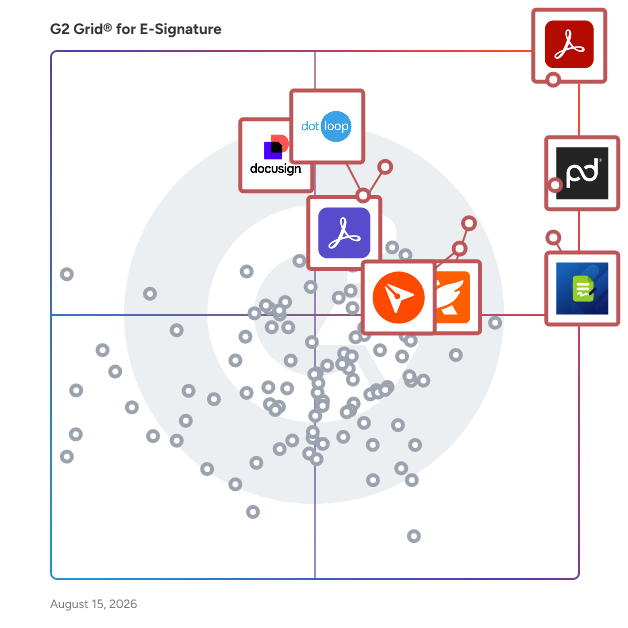
The best reviewed e-signature software combines consistently high star ratings with a large base of verified reviews, and a few products stand out on both counts.
-
DocuSeal: A free, open-source e-signature tool that reviewers rate among the highest in the category for ease of setup and everyday signing.
-
SignWell: Lightweight signing tool that lets small teams prepare and send documents in minutes, with a free tier to start.
-
Jotform Sign: An e-signature product built on form workflows, useful for teams that collect data and signatures in the same step.
-
PandaDoc: Document platform that pairs signatures with templates, quotes, and proposals for sales and client-facing teams.
What is e-signature software used for?
E-signature software is used to send, sign, and track legally binding documents electronically instead of printing, scanning, or mailing paper. The most common jobs users describe are getting contracts, agreements, client paperwork, and HR documents signed faster, keeping an audit trail of who signed and when, and letting remote teams and customers complete paperwork from any device.
Which e-signature software is most user-friendly?
The most user-friendly e-signature software keeps the signing flow short enough that new users and outside signers need no training, and a few products earn the strongest ease-of-use scores from reviewers.
-
Signeasy: Clean, simple signing app that reviewers praise for making documents easy to complete on desktop or mobile.
-
DottedSign: A straightforward tool for signing and requesting signatures that keeps every document organized in one place.
-
Mekari Sign: Easy-to-use platform with bulk sending and certified digital signatures, popular for high-volume HR and sales paperwork.
What is the best free eSignature software?
Several e-signature products offer genuinely usable free plans, and free access is one of the things their reviewers mention most.
-
DocuSeal: Free and open-source, with the option to self-host, which makes it the most-cited no-cost starting point in the category.
-
SignWell: Offers a free tier that lets a business try sending and signing real documents before committing to a paid plan.
-
DottedSign: Provides a free entry plan for signing and requesting signatures, which users often keep until their volume grows.
Which e-signature app is best for legal documents?
Compliance and security features are important for finding the best e-signature app for legal documents. Here are a few options for you:
-
Secure Signing - Stands out for its top-notch security and authentication features
-
Adobe Acrobat Sign - Known for its high compliance with legal standards and rich feature set.
-
PandaDoc - Known for its strong security measures and ease of use.
Small Business FAQs
What is the most affordable e-signature software for SMBs?
The most affordable e-signature options for SMBs are the ones whose reviewers specifically call out pricing and value, and comparing plans on the e-signature tools rated by small businesses page is a quick way to shortlist them.
-
pdfFiller: A low-cost tool for filling, editing, and signing PDFs that covers most small-business paperwork in one subscription.
-
DocHub: An inexpensive, browser-based option that small teams adopt for quick edits and signatures without new software to install.
-
eZsign: Budget-friendly signing platform that reviewers describe as simple to set up and painless to run day to day.
What is the best e-signature software for startups?
The best e-signature software for startups gets contracts and proposals out the door fast without requiring an admin to manage it.
-
PandaDoc: Combines signatures with reusable templates and quotes, so early sales teams can build and send deals from one place.
-
Qwilr: Turns proposals into interactive web pages with built-in accept-and-sign and engagement analytics for founders selling their first deals.
-
Signeasy: A simple signing tool that new users pick up immediately, useful when nobody on the team has time to learn software.
Which e-signature software is the most user-friendly for startups?
For startups, the most user-friendly e-signature tools are the ones a new hire can send a document with in the first five minutes.
-
Mekari Sign: Scores among the highest in the category for ease of use, with bulk sending that saves time as document volume grows.
-
Signaturely: A minimal, intuitive signing tool that reviewers say requires no training to get contracts signed.
-
BoldSign: Pairs a clean sending experience with straightforward setup, so small teams are productive on day one.
Why do small businesses switch e-signature software?
Small businesses most often switch e-signature software because their current tool costs more than the handful of documents they send each month justifies. A common thread in G2 reviews is frustration with per-envelope or per-user pricing, feature limits on lower tiers, and paying for enterprise capabilities that never get used. Switchers typically move toward simpler tools with free or flat-rate plans, and because most products in the category can be live in under a day, the cost of moving is low.
How long does it take a small business to start using e-signature software?
Most small businesses are sending their first documents the same day they sign up. The majority of reviewers report going live in less than a day, and most of the rest within a month, since setup usually amounts to uploading a document, placing signature fields, and adding recipients. Tools with reusable templates shorten this further, because common documents like engagement letters, NDAs, and client agreements only need to be prepared once.
Enterprise FAQs
What is the best-rated e-signature software for tech enterprises?
Tech enterprises rate e-signature platforms highest when they combine dependable signing with the security and admin depth larger IT teams require, and the enterprise e-signature software page shows how each product scores at that scale.
-
Docusign: The most widely deployed platform in the category, rated strongly by technology companies for meeting requirements at scale.
-
Adobe Acrobat: A staple in large tech organizations that keeps PDF editing, signing, and security in one familiar toolset.
-
Box: A secure content platform with native signing, granular permissions, and audit trails that IT teams already trust for sensitive files.
What is the most reliable e-signature software tool for enterprises?
The most reliable enterprise e-signature tools are the ones large organizations rate highly for consistently meeting requirements with minimal admin overhead.
-
Signify: Earns the strongest satisfaction and support scores among enterprise reviewers in the category, particularly for high-volume HR document workflows.
-
OneSpan Sign: A security-focused platform whose users highlight dependable, immediate signing and strong protection for regulated workflows.
-
Scrive: Low-maintenance platform that admins say practically runs itself, with certified and bank-ID signing for compliance-heavy processes.
What is the best-reviewed e-signature software for enterprise app integration?
The best-reviewed options for enterprise app integration are the platforms whose users repeatedly praise how well signing connects to the CRM, contract, and productivity systems they already run.
-
Adobe Acrobat Sign: Adobe's enterprise signing product, adopted for how it plugs signature workflows into wider business application stacks.
-
GetAccept: Combines e-signature with digital sales rooms and CRM integration, so deals, documents, and signatures stay in one flow.
-
Juro: A contract automation platform with solid integrations and bulk sending, built for legal and ops teams managing contracts at volume.
What security features do enterprises look for in e-signature software?
Enterprises look first for a complete, tamper-evident audit trail showing who signed, when, and from where, since that is what makes a signature defensible. G2 reviewers most often point to legally compliant digital certificates, granular permission and role controls, secure sharing, and recognized compliance standards as the features that matter in evaluations. Identity verification options such as certified or bank-ID signing come up frequently in regulated industries, where proving the signer's identity is as important as capturing the signature.
How do enterprises drive adoption of e-signature software across teams?
Enterprises drive adoption by making signing appear inside the tools employees already use rather than asking them to visit another system. Reviews from larger organizations credit integrations with existing document, CRM, and HR systems, shared template libraries that standardize common agreements, and low-friction signing experiences that external recipients can complete without accounts. Products that score well on ease of administration also matter here, because central teams can manage users, branding, and compliance settings without slowing individual departments down.
What is the best electronic signature tool for enterprise companies?
For enterprise companies, I looked for e-signature tools that are scalable, can handle workflows, and offer strong integration.
-
Adobe Acrobat: Best pick for when compliance, audit trails, and PDF-native workflows are non-negotiable.
-
Docusign: Best choice when vendor recognition, global footprint, and a 350+ integration ecosystem carry weight with enterprise stakeholders.
-
PandaDoc: Worth shortlisting when e-signature is part of a broader proposal, CPQ, or sales document workflow rather than a standalone signing tool.
-
Signeasy: A clean, focused signing experience worth considering for enterprise teams that want user sentiment over market presence.
What are the most reliable e-signature systems for remote teams?
For remote teams, I focused on async-friendly workflows, strong mobile support, and a signing loop that works across time zones and devices.
-
Docusign: The audit trail, mobile app, and integrations give remote teams a dependable signing loop regardless of time zone or device.
-
Dropbox Sign: An async-first workflow that fits distributed teams. Native Dropbox and Google Workspace integration removes tool-switching friction, and automatic reminders keep signing chains moving without manual follow-up.
-
SignNow: Straightforward setup and reliable multi-signer routing. It handles sequential and parallel signing workflows without a complex admin layer.
-
Scrive: The right call for remote teams in regulated European environments. It has strong eIDAS compliance, qualified electronic signatures, and identity verification for situations where a simple click-to-sign is not legally sufficient.
What are the best e-signature software for small businesses?
When the team is small, the right e-signature tool earns its place by getting documents signed fast without requiring a dedicated admin to manage it.
-
Adobe Acrobat: Suits small businesses that work heavily with PDFs. Day-to-day editing, signing, scanning, and converting are all native, so teams are not piecing together multiple tools.
-
PandaDoc: Proposals, contracts, and e-signatures all live in one place, so a sole owner or a small sales team can go from template to signed agreement without switching tools.
-
Jotform Sign: works especially well for small businesses that collect signatures as part of a form-based workflow. The form-plus-signature approach removes a step that most other tools require.
-
Foxit PDF Editor: Suits small businesses that need full PDF editing alongside e-signatures. The interface is familiar enough that adoption doesn't require training.
What's the best e-signature solution for document security?
When security is the primary concern, I look for certificate-based signatures, tamper-evident seals, strong audit records, and compliance certifications that hold up under scrutiny.
-
WaiverElectronic: Is secure because of its cloud-based storage. Signed waivers are stored securely and retrievable in seconds, removing the liability risk of paper records kept in binders or filing cabinets.
-
Revv: Is compliant with ESIGN Act, UETA, and eIDAS. Provides real-time tracking, date-and-time-stamped signer records, and IP address capture, and two-factor authentication via SMS and email.
-
RSign: The data gathered during signing is secured and retrieved for future audit trails and to meet regulatory compliance and legal evidence requirements.
-
Roger: Every agreement is tracked, timestamped, and stored, providing reliable record-keeping and document control.
Which e-signature platform is best for contract signing?
For contract signing specifically, I want a tool that handles the full lifecycle, not just the final signature, so the focus shifts to template management, approval routing, and CRM integration alongside the signing step.
-
PandaDoc: Native document editor, approval routing, contract templates, and CRM integrations mean the entire contract lifecycle lives in one place, not split across tools.
-
Docusign: Intelligent Agreement Management platform extends plain signing into contract tracking and lifecycle management, the best fit when legal, sales, and procurement need a shared, auditable contract record at scale.
-
Oneflow: Interactive HTML-based contracts that can be negotiated and signed in the same live document, eliminating the PDF-redline loop.
-
GetAccept: A sales-contract platform with deal rooms, video messaging, and e-signature in one flow. The right pick for B2B sales teams where the signing experience is part of the buyer journey, not just the final step.
What are the best-rated electronic signature services for startups?
For startups, the best e-signature tool is usually the one that gets you signing fast today while leaving room to scale.
-
Dropbox Sign: Provides a frictionless entry point for a startup, a simple API for embedding signing into products, and a brand counterparties already trust when they receive a document.
-
PandaDoc: Easy to move from template to signed contract. Basic plan covers e-signatures, and growth tiers add CRM and analytics without a steep jump.
-
Signeasy: For early teams where everyone wears multiple hats, Signeasy's low onboarding bar and solid mobile app mean anyone can send a document for signature without needing a tutorial.
Which e-signature app is best for legal documents?
For legal documents, the priority shifts from convenience to evidentiary weight, audit integrity, long-term validation, qualified signatures, and compliance with specific legal frameworks.
-
Adobe Acrobat: Certificate-based digital signatures, long-term validation (LTV), and full ESIGN/eIDAS compliance.
-
OneSpan Sign: Strong chain-of-custody records, qualified electronic signatures, and identity proofing.
-
Docusign: Detailed signer audit trails and tamper-evident seals. Docusign's legal standing documentation is critical when documents may face litigation.
-
Legalesign: Provides in-depth audit logs and batch sending for regulated industries.
What are the top e-signature solutions for healthcare providers?
For healthcare, I would look for e-signature platforms with HIPAA eligibility, BAA availability, audit records, and integrations with clinical and practice management systems.
-
Adobe Acrobat Sign: HIPAA Business Associate Agreements available, strong audit trails, and form-field capabilities suited to clinical document workflows.
-
Docusign: HIPAA-eligible with configurable BAAs, SOC 2 certification, and deep integration options for EHR and practice management platforms.
-
Sertifi: Best for compliance-heavy industries including healthcare, with the added capability of secure payment collection alongside signing, useful for practices handling treatment consent and billing in the same workflow.
What are the best e-signature software for Mac users?
Mac users benefit most from e-signature tools that feel native to the ecosystem, either through a polished Mac app, tight Finder and iCloud integration, or a design language that aligns with macOS sensibilities.
-
Adobe Acrobat: A native Mac app with Apple Silicon optimization and tight macOS integration.
-
Dropbox Sign: Works seamlessly on Mac through the browser or the Dropbox desktop app.
-
Signeasy: The iOS and Mac companion app makes it a natural fit for Apple ecosystem users who sign across iPhone, iPad, and Mac without adjusting their workflow.
-
Foxit PDF Editor: Best for Mac users who want full PDF editing plus e-signatures without an Adobe subscription.
What's the top e-signature service for real estate firms?
For real estate, the right e-signature tool depends on whether the team needs a purpose-built transaction platform or a general e-signature product that integrates cleanly into existing CRM and transaction management workflows.
-
Dotloop: MLS form libraries, transaction management, and agent collaboration are native, not bolted on, making it suitable for residential brokerages.
-
Docusign: Deep integrations with transaction management platforms round out the picture for real estate agents.
-
PandaDoc: A strong fit for commercial real estate teams running proposals, LOIs, and lease agreements. The emplate library and CRM integrations support the full deal cycle well beyond the closing signature.
-
Lightico: Strong in mortgage and lending workflows where borrowers complete forms on their phones. Worth evaluating for real estate firms.
Reviewed and edited by Jigmee Bhutia