# Best Visitor Management Software for Small Business

  *By [Nana Serwah Nkrahene](https://research.g2.com/insights/author/nana-nkrahene)*

   Products classified in the overall Visitor Management category are similar in many regards and help companies of all sizes solve their business problems. However, small business features, pricing, setup, and installation differ from businesses of other sizes, which is why we match buyers to the right Small Business Visitor Management to fit their needs. Compare product ratings based on reviews from enterprise users or connect with one of G2&#39;s buying advisors to find the right solutions within the Small Business Visitor Management category.

In addition to qualifying for inclusion in the Visitor Management Software category, to qualify for inclusion in the Small Business Visitor Management Software category, a product must have at least 10 reviews left by a reviewer from a small business.


## How Many Visitor Management Software Products Does G2 Track?
**Total Products under this Category:** 216

### Category Stats (May 2026)
- **Average Rating**: 4.5/5 (↓0.01 vs Apr 2026)
- **New Reviews This Quarter**: 69
- **Buyer Segments**: Enterprise 37% │ Small-Business 34% │ Mid-Market 30%
- **Top Trending Product**: PULT (+0.03)
*Last updated: May 18, 2026*

  
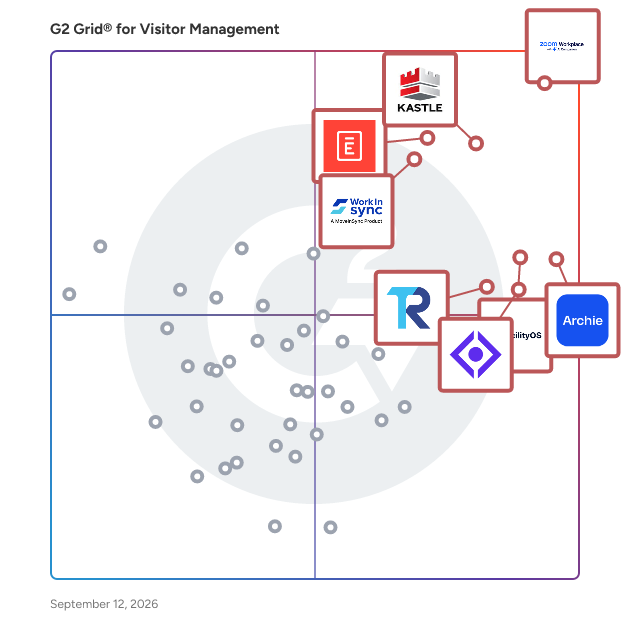
## How Does G2 Rank Visitor Management Software Products?

**Why You Can Trust G2's Software Rankings:**

- 30 Analysts and Data Experts
- 63,300+ Authentic Reviews
- 216+ Products
- Unbiased Rankings

G2's software rankings are built on verified user reviews, rigorous moderation, and a consistent research methodology maintained by a team of analysts and data experts. Each product is measured using the same transparent criteria, with no paid placement or vendor influence. While reviews reflect real user experiences, which can be subjective, they offer valuable insight into how software performs in the hands of professionals. Together, these inputs power the G2 Score, a standardized way to compare tools within every category.


---

**Sponsored**

### Envoy Visitors

Envoy Visitors creates a warm welcome for guests while safeguarding people, property, and ideas. Envoy makes it easy with touchless sign-in, badge printing, legal documents, granting wifi access, and notifying hosts. Envoy Protect confirms everyone walking through your door is healthy with a health screen before they leave home, and allows you to set capacity limits and conduct contract tracking.


[Visit website](https://www.g2.com/external_clickthroughs/record?secure%5Bad_program%5D=ppc&amp;secure%5Bad_slot%5D=category_product_list&amp;secure%5Bcategory_id%5D=358&amp;secure%5Bdisplayable_resource_id%5D=358&amp;secure%5Bdisplayable_resource_type%5D=Category&amp;secure%5Bmedium%5D=sponsored&amp;secure%5Bplacement_reason%5D=page_category&amp;secure%5Bplacement_resource_ids%5D%5B%5D=358&amp;secure%5Bprioritized%5D=false&amp;secure%5Bproduct_id%5D=18769&amp;secure%5Bresource_id%5D=358&amp;secure%5Bresource_type%5D=Category&amp;secure%5Bsource_type%5D=category_page&amp;secure%5Bsource_url%5D=https%3A%2F%2Fwww.g2.com%2Fcategories%2Fvisitor-management%3Fpage%3D4&amp;secure%5Btoken%5D=9a31beb0ccd38c1c0c0581bb2419a55f172715bfc5816497e2691a4ce04af3df&amp;secure%5Burl%5D=https%3A%2F%2Fenvoy.com%2Fdemo-g2-visitor-management&amp;secure%5Burl_type%5D=book_demo)

---

  ## What Are the Top-Rated Visitor Management Software Products in 2026?
### 1. [Zoom Workplace](https://www.g2.com/products/zoom-workplace/reviews)
  Goodbye app overload. Hello effortless work. Work can be complicated. Your tools shouldn&#39;t be. Zoom Workplace connects all the ways you collaborate — from meetings to docs to chat and more — with built-in AI and seamless integrations that help teams focus and work flawlessly. Zoom Communications: Unified, Effortless Connection for Modern Work Bring every way your teams communicate—meetings, chat, calls, email, and scheduling—into one seamless experience. With Zoom, collaboration happens faster and more naturally across channels, without switching apps or losing context. From spontaneous chats to scheduled meetings and calls, everything stays connected, searchable, and secure—powered by one intuitive platform built for how modern teams work. Zoom Productivity: Workflows Connected, Work Effortless Transform how work gets done with AI-first collaboration that keeps people, content, and actions in one place. From brainstorming on whiteboards to co-creating in docs, sharing clips, and automating follow-ups, Zoom connects every step of your workflow. With Zoom Hub and integrated video management, knowledge stays organized, accessible, and actionable—so teams can move from idea to outcome without friction. Zoom Spaces: Smarter, Connected Workplaces for Every Team Bring your physical and hybrid environments to life with intelligent, connected spaces. Zoom Spaces unifies meeting rooms, desk reservations, digital signage, and visitor management into one seamless experience—making it simple to collaborate, navigate, and manage the workplace. Whether employees are remote, hybrid, or on-site, Zoom creates a consistent, secure, and flexible environment that keeps teams connected wherever work happens. Zoom Employee Engagement: Connect, Inspire, and Empower Every Employee Foster belonging and alignment with Workvivo by Zoom—a modern employee experience platform that unites communication, culture, and community in one place. From company-wide updates to recognition, feedback, and social engagement, Workvivo gives every employee a voice and a sense of connection. Built right into Zoom Workplace, it helps organizations strengthen culture, boost engagement, and keep teams informed and inspired—no matter where they work.


  **Average Rating:** 4.5/5.0
  **Total Reviews:** 53,417
**How Do G2 Users Rate Zoom Workplace?**

- **Has the product been a good partner in doing business?:** 9.1/10 (Category avg: 9.2/10)
- **Dashboard:** 8.4/10 (Category avg: 8.8/10)
- **Integration:** 8.5/10 (Category avg: 8.5/10)
- **Automation:** 8.1/10 (Category avg: 8.6/10)

**Who Is the Company Behind Zoom Workplace?**

- **Seller:** [Zoom](https://www.g2.com/sellers/zoom-a5000ea1-6d30-4ab4-b591-20723189ac97)
- **Company Website:** https://www.zoom.com
- **Year Founded:** 2011
- **HQ Location:** San Jose, CA
- **Twitter:** @zoom (1,043,921 Twitter followers)
- **LinkedIn® Page:** https://www.linkedin.com/company/2532259/ (13,251 employees on LinkedIn®)

**Who Uses This Product?**
  - **Who Uses This:** Owner, Software Engineer
  - **Top Industries:** Information Technology and Services, Computer Software
  - **Company Size:** 51% Small-Business, 31% Mid-Market


#### What Are Zoom Workplace's Pros and Cons?

**Pros:**

- Ease of Use (4633 reviews)
- Video Conferencing (2761 reviews)
- Video Quality (2115 reviews)
- Reliability (2005 reviews)
- Screen Sharing (1696 reviews)

**Cons:**

- Limited Features (1265 reviews)
- Zoom Issues (1209 reviews)
- Meeting Issues (1180 reviews)
- Connection Issues (877 reviews)
- Video Issues (804 reviews)

### 2. [Kastle](https://www.g2.com/products/kastle/reviews)
  Kastle offers unparalleled property technology solutions, safeguarding premier commercial real estate, multifamily communities, enterprise clients, and school and government facilities. Integrating advanced access control, video surveillance, and visitor management technologies, we ensure enhanced security and superior performance. As tens of thousands trust our services daily, we stand out as a partner dedicated to innovation, leadership, and comprehensive managed security services. Discover the Kastle difference at kastle.com.


  **Average Rating:** 4.6/5.0
  **Total Reviews:** 168
**How Do G2 Users Rate Kastle?**

- **Has the product been a good partner in doing business?:** 9.3/10 (Category avg: 9.2/10)
- **Dashboard:** 8.1/10 (Category avg: 8.8/10)
- **Integration:** 7.5/10 (Category avg: 8.5/10)
- **Automation:** 7.5/10 (Category avg: 8.6/10)

**Who Is the Company Behind Kastle?**

- **Seller:** [Kastle Systems ](https://www.g2.com/sellers/kastle-systems)
- **Company Website:** https://www.kastle.com
- **Year Founded:** 1972
- **HQ Location:** Falls Church, VA
- **Twitter:** @KastleSystems (2,062 Twitter followers)
- **LinkedIn® Page:** https://www.linkedin.com/company/kastle-systems (698 employees on LinkedIn®)

**Who Uses This Product?**
  - **Who Uses This:** Office Manager, Property Manager
  - **Top Industries:** Commercial Real Estate, Real Estate
  - **Company Size:** 50% Mid-Market, 39% Small-Business


#### What Are Kastle's Pros and Cons?

**Pros:**

- Ease of Use (56 reviews)
- Customer Support (54 reviews)
- Helpful (49 reviews)
- Access Control (27 reviews)
- Reliability (18 reviews)

**Cons:**

- Poor Customer Support (22 reviews)
- Access Issues (16 reviews)
- Expensive (10 reviews)
- Inaccurate Detection (10 reviews)
- Miscommunication (9 reviews)

### 3. [Envoy Visitors](https://www.g2.com/products/envoy-visitors/reviews)
  Envoy Visitors creates a warm welcome for guests while safeguarding people, property, and ideas. Envoy makes it easy with touchless sign-in, badge printing, legal documents, granting wifi access, and notifying hosts. Envoy Protect confirms everyone walking through your door is healthy with a health screen before they leave home, and allows you to set capacity limits and conduct contract tracking.


  **Average Rating:** 4.7/5.0
  **Total Reviews:** 426
**How Do G2 Users Rate Envoy Visitors?**

- **Has the product been a good partner in doing business?:** 9.5/10 (Category avg: 9.2/10)
- **Dashboard:** 9.3/10 (Category avg: 8.8/10)
- **Integration:** 8.9/10 (Category avg: 8.5/10)
- **Automation:** 9.0/10 (Category avg: 8.6/10)

**Who Is the Company Behind Envoy Visitors?**

- **Seller:** [Envoy](https://www.g2.com/sellers/envoy)
- **Company Website:** https://envoy.com
- **Year Founded:** 2013
- **HQ Location:** San Francisco, California
- **Twitter:** @envoy (3,944 Twitter followers)
- **LinkedIn® Page:** https://www.linkedin.com/company/3554116/ (440 employees on LinkedIn®)

**Who Uses This Product?**
  - **Who Uses This:** Receptionist, Facilities Manager
  - **Top Industries:** Information Technology and Services, Computer Software
  - **Company Size:** 55% Mid-Market, 27% Enterprise


#### What Are Envoy Visitors's Pros and Cons?

**Pros:**

- Ease of Use (21 reviews)
- Features (8 reviews)
- Convenience (6 reviews)
- Helpful (6 reviews)
- Simple (6 reviews)

**Cons:**

- Lack of Customization (4 reviews)
- Limited Customization (4 reviews)
- Expensive (3 reviews)
- Internet Dependency (3 reviews)
- Insufficient Information (2 reviews)

### 4. [The Receptionist](https://www.g2.com/products/the-receptionist/reviews)
  The Receptionist for iPad, now Sign In App, helps protect your time when you&#39;re in the office. Our system handles tasks like guest check-in and notifications, visitor information storage, and badge printing so you can focus on making more meaningful connections with your visitors. With Sign In App, you can create unique, customizable, button-based visitor workflows to match your visitor types and business policies. The system also includes message forwarding, the capture and storage of visitor logs, drag-and-drop badge creation and printing, photo and signature capture, NDA and legal agreement sign-offs, compliance verification, and emergency evacuation notifications that can alert everyone checked into your office of an important event. Our contactless check-in features allow you to check in visitors, have them answer questions, and sign agreements from their mobile devices without having to touch an iPad. Thousands of companies and millions of visitors worldwide rely on our cloud-based visitor check-in solution to help harmonize their visitor and delivery traffic and turn every visit into an advantage.


  **Average Rating:** 4.8/5.0
  **Total Reviews:** 425
**How Do G2 Users Rate The Receptionist?**

- **Has the product been a good partner in doing business?:** 9.6/10 (Category avg: 9.2/10)
- **Dashboard:** 9.5/10 (Category avg: 8.8/10)
- **Integration:** 8.8/10 (Category avg: 8.5/10)
- **Automation:** 9.1/10 (Category avg: 8.6/10)

**Who Is the Company Behind The Receptionist?**

- **Seller:** [Sign In Solutions](https://www.g2.com/sellers/sign-in-solutions)
- **Company Website:** https://signinapp.com/
- **Year Founded:** 2015
- **HQ Location:** St. Petersburg, Florida &amp; Northampton, United Kingdom
- **Twitter:** @signinapp (451 Twitter followers)
- **LinkedIn® Page:** https://www.linkedin.com/company/signinapp/ (60 employees on LinkedIn®)

**Who Uses This Product?**
  - **Who Uses This:** Office Manager, IT Manager
  - **Top Industries:** Mental Health Care, Hospital &amp; Health Care
  - **Company Size:** 52% Mid-Market, 41% Small-Business


#### What Are The Receptionist's Pros and Cons?

**Pros:**

- Ease of Use (17 reviews)
- Easy Setup (15 reviews)
- Customer Support (8 reviews)
- Implementation Ease (7 reviews)
- Intuitive (7 reviews)

**Cons:**

- Limited Customization (4 reviews)
- Expensive (3 reviews)
- Lack of Customization (3 reviews)
- Insufficient Information (2 reviews)
- Limited Features (2 reviews)

### 5. [Archie](https://www.g2.com/products/archie-archie/reviews)
  Archie powers thousands of modern offices and shared workspaces worldwide, offering an integrated solution that includes meeting room and desk booking, visitor management, workspace analytics, and coworking software. A modern UI, powerful admin features, and an unparalleled user experience set Archie apart from other solutions. Both SMBs and enterprises love Archie’s extensive features, which include visual floor plans, visitor logs, check-in and check-out tracking, meeting room scheduling, seat assignment, multi-location management, smart automations, real-time notifications, a white label mobile app, SSO and SCIM, an open API, and much, much more. Archie also natively integrates with productivity tools (Slack, Teams, Google Calendar, and more), physical access systems (Kisi, Brivo, Salto, and more), payment providers, accounting software (QuickBooks and Xero), WiFi networks (Cisco, Ubiquiti, Aruba, and more), and many other solutions. Whether you’re looking for room and desk booking to power your hybrid office, visitor management for efficiency and compliance, or the right software to grow your coworking business, Archie is the solution for you.


  **Average Rating:** 4.9/5.0
  **Total Reviews:** 230
**How Do G2 Users Rate Archie?**

- **Has the product been a good partner in doing business?:** 9.2/10 (Category avg: 9.2/10)
- **Dashboard:** 9.5/10 (Category avg: 8.8/10)
- **Integration:** 9.3/10 (Category avg: 8.5/10)
- **Automation:** 9.3/10 (Category avg: 8.6/10)

**Who Is the Company Behind Archie?**

- **Seller:** [Archie](https://www.g2.com/sellers/archie)
- **Company Website:** https://archieapp.co/
- **Year Founded:** 2016
- **HQ Location:** Montreal, Canada
- **LinkedIn® Page:** https://www.linkedin.com/company/archieapp/ (23 employees on LinkedIn®)

**Who Uses This Product?**
  - **Who Uses This:** Graphic Designer
  - **Top Industries:** Marketing and Advertising, Real Estate
  - **Company Size:** 44% Mid-Market, 37% Small-Business


#### What Are Archie's Pros and Cons?

**Pros:**

- Ease of Use (71 reviews)
- Easy Booking (61 reviews)
- Seat Reservation (47 reviews)
- Desk Management (36 reviews)
- Reservation Ease (36 reviews)

**Cons:**

- Missing Features (21 reviews)
- Limited Features (16 reviews)
- Limited Customization (12 reviews)
- Lack of Customization (9 reviews)
- Booking Issues (7 reviews)

### 6. [Visitly](https://www.g2.com/products/visitly/reviews)
  Visitly is a cloud-based visitor and contractor management platform built for security conscious organizations. From a single centralized dashboard, security teams, facility managers, and operations leaders manage visitor check-ins, contractor compliance, employee sign-ins, badge printing, document signing, and compliance workflows across multiple locations. VISITOR MANAGEMENT: Visitly modernizes front desk operations with customizable visitor flows, contactless QR code check-in, real-time host notifications via Slack, Microsoft Teams, Google Chat, and Webex, digital NDA and document signing, automatic badge printing, and pre-registration for individuals and groups up to 200 visitors. Facial recognition identifies returning visitors instantly, pre-filling their details for a seamless experience. SECURITY &amp; SCREENING: Visitly goes beyond basic check-in with advanced watchlist screening, Smart ID Validation that extracts and verifies government-issued IDs, Sex Offender Registry checks, facial recognition watchlists, and off-business-hours access controls. Hosts can approve or deny visitor entry in real time, and the system triggers instant alerts when flagged individuals attempt to sign in. COMPLIANCE &amp; AUDIT READINESS: Visitly is SOC 2 Type II certified, ISO 27001 certified, GDPR compliant, CCPA compliant, and HIPAA ready. Every visitor interaction generates a complete audit trail with timestamps, digital signatures, photos, and ID scans. Data retention controls let organizations auto-purge visitor records to meet regulatory requirements. Export logs instantly for audits. MULTI-LOCATION MANAGEMENT: Manage visitor policies, devices, and settings across 1 location or 500+ from a centralized portal. Customize check-in flows, branding, and security rules per location while maintaining global oversight. Roles-based access and custom permissions ensures the right people have the right access. EMPLOYEE &amp; CONTRACTOR MANAGEMENT: Visitly isn’t just for visitors. Employees check in and out via the MyVisitly app or iPad kiosk. Contractors follow custom compliance flows. Mailroom management tracks deliveries with AI-powered smart scanning. Emergency evacuation lists provide real-time headcounts of everyone on site. INTEGRATIONS: Visitly integrates with Microsoft Entra ID (Azure AD), Okta, OneLogin, Google Workspace, and SAML2 for SSO and directory sync. Notifications flow through Slack, Microsoft Teams, Google Chat, and Webex. Guest WiFi credentials auto-provision via Arista Networks and Cisco Meraki. Webhooks enable custom integrations with any system. Trusted by security-forward organizations including SentinelOne, Delta Airlines, Hitachi, Hyundai, Daltile, KUFPEC, and Turion Space. Deployed across manufacturing, defense, healthcare, technology, energy, logistics and many more industries in 25+ countries. Schedule an enterprise demo at visitly.io.


  **Average Rating:** 4.4/5.0
  **Total Reviews:** 81
**How Do G2 Users Rate Visitly?**

- **Has the product been a good partner in doing business?:** 8.8/10 (Category avg: 9.2/10)
- **Dashboard:** 8.4/10 (Category avg: 8.8/10)
- **Integration:** 8.1/10 (Category avg: 8.5/10)
- **Automation:** 8.5/10 (Category avg: 8.6/10)

**Who Is the Company Behind Visitly?**

- **Seller:** [Visitly](https://www.g2.com/sellers/visitly)
- **Company Website:** https://www.visitly.io/
- **Year Founded:** 2018
- **HQ Location:** San Francisco, California
- **Twitter:** @visitlyio (5 Twitter followers)
- **LinkedIn® Page:** https://www.linkedin.com/company/33252095 (25 employees on LinkedIn®)

**Who Uses This Product?**
  - **Top Industries:** Manufacturing
  - **Company Size:** 63% Mid-Market, 32% Small-Business


#### What Are Visitly's Pros and Cons?

**Pros:**

- Features (2 reviews)
- Customer Support (1 reviews)
- Ease of Use (1 reviews)
- Easy Setup (1 reviews)
- Implementation Ease (1 reviews)

**Cons:**

- Internet Dependency (1 reviews)
- Privacy Concerns (1 reviews)

### 7. [Qminder](https://www.g2.com/products/qminder/reviews)
  Qminder is the leading in-person service platform that helps brick-and-mortar organizations manage appointments, walk-ins, and queues with structure, clarity, and data-driven insights. Built for public sector agencies, healthcare providers, and retail teams, Qminder modernizes front-desk operations while improving the visitor experience. From self-check-in to post-visit feedback, Qminder delivers full visibility into every in-person interaction. With Service Intelligence tools, teams can track live service data - like wait times, volumes, and staff activity - while two-way communication and real-time alerts help reduce confusion and no-shows. Why Qminder? \* Quick onboarding - launch in under a week \* Flexible setup - tailored workflows and APIs \* Better visibility - monitor and optimize in real time \* Reduced manual tasks - eliminate paper, spreadsheets, and guesswork \* Loved by teams - easy to use, easy to scale Built for brick-and-mortar industries Qminder powers service operations for: \* Government offices and public agencies \* Hospitals and healthcare networks \* Retail chains and customer service centers \* Banks and financial institutions \* Universities and student service departments Key features to support every part of the in-person service experience For your visitors - make every visit feel smooth, informed, and frustration-free: \* Visitor website with branded UX \* Appointment scheduling \* Virtual and physical check-in for visitors \* Two-way messaging and visitor notifications \* Feedback collection and satisfaction tracking For your service teams - equip staff with the right tools to stay organized and in control: \* Walk-in and queue management \* Real-time dashboards and role-based clerk tools \* Custom fields and segmentation for tailored workflows For your organization - gain visibility and control across all locations and services: \* Real-time insights and analytics across verticals \* Smart filters by location, staff, service line, and time range \* Seamless integrations with CRM and BI tools \* Exportable data and service KPI analytics \* Full audit logs and data export for compliance Qminder is fully compliant with HIPAA, TX-RAMP, SOC 2 Type II, and GDPR, meeting the highest security standards for public and enterprise use. No setup fees. Transparent pricing. And 1+ billion in-person service interactions (and counting). Whether you’re a city hall, hospital, or retail chain - Qminder brings calm to the chaos of the front desk.


  **Average Rating:** 4.6/5.0
  **Total Reviews:** 244
**How Do G2 Users Rate Qminder?**

- **Has the product been a good partner in doing business?:** 9.3/10 (Category avg: 9.2/10)
- **Dashboard:** 9.0/10 (Category avg: 8.8/10)
- **Integration:** 8.9/10 (Category avg: 8.5/10)
- **Automation:** 8.8/10 (Category avg: 8.6/10)

**Who Is the Company Behind Qminder?**

- **Seller:** [Qminder](https://www.g2.com/sellers/qminder)
- **Company Website:** https://www.qminder.com
- **Year Founded:** 2011
- **HQ Location:** London, UK
- **Twitter:** @Qminder (541 Twitter followers)
- **LinkedIn® Page:** https://www.linkedin.com/company/2368669/ (20 employees on LinkedIn®)

**Who Uses This Product?**
  - **Top Industries:** Higher Education, Hospital &amp; Health Care
  - **Company Size:** 52% Small-Business, 30% Mid-Market


#### What Are Qminder's Pros and Cons?

**Pros:**

- Ease of Use (19 reviews)
- Helpful (14 reviews)
- Simple (9 reviews)
- Efficiency (7 reviews)
- Convenience (6 reviews)

**Cons:**

- Access Issues (3 reviews)
- Insufficient Information (3 reviews)
- Technical Issues (3 reviews)
- Unnecessary Features (3 reviews)
- Update Issues (3 reviews)

### 8. [Eptura Visitor](https://www.g2.com/products/eptura-visitor/reviews)
  Eptura Visitor is a visitor management system that helps organizations automate guest registration, enhance physical security, and maintain compliance with global privacy regulations. It is designed for front desk, facilities, and security teams in enterprise environments, including corporate offices, manufacturing sites, healthcare facilities, and financial institutions. The solution supports the full visitor lifecycle-from pre-registration and screening to check-in, access control, and emergency management. Eptura Visitor integrates with existing building systems and access control platforms to deliver a seamless, secure, and professional experience for guests, while providing organizations with real-time visibility into who is on-site. Eptura Visitor is part of the Eptura worktech platform, which connects people, places, and assets to create smarter, safer, and more efficient workplaces. It is especially valuable for organizations with high visitor volumes, multi-location operations, or strict compliance requirements. - Digital logbook and real-time monitoring: Track and record all visitors from entry to exit across locations. Searchable logs support audits and compliance. - Pre-registration and custom workflows: Screen visitors before arrival, send personalized invitations, and generate QR codes for condition-based access. Tailor check-in flows by visitor type. Autonomous check-in and access control integration: Enable self-service check-in via kiosks or mobile devices. Easily integrate with existing access control systems for secure, touchless entry. - Emergency management tools: Send alerts during evacuations, conduct roll calls across devices, and generate post-incident reports to support safety protocols and compliance. - Data privacy and compliance: Offers regional data hosting, customizable retention policies, and full support for GDPR and other global standards. Hosted on Microsoft Azure, Eptura Visitor ensures enterprise-grade security, reliability, and scalability. The solution helps organizations create a secure working environment, automate visitor management, and reduce operational overhead while improving the guest experience.


  **Average Rating:** 4.6/5.0
  **Total Reviews:** 170
**How Do G2 Users Rate Eptura Visitor?**

- **Has the product been a good partner in doing business?:** 9.3/10 (Category avg: 9.2/10)
- **Dashboard:** 9.1/10 (Category avg: 8.8/10)
- **Integration:** 8.5/10 (Category avg: 8.5/10)
- **Automation:** 8.9/10 (Category avg: 8.6/10)

**Who Is the Company Behind Eptura Visitor?**

- **Seller:** [Eptura](https://www.g2.com/sellers/eptura)
- **Company Website:** https://eptura.com/
- **Year Founded:** 2002
- **HQ Location:** Atlanta, US
- **Twitter:** @Epturawork (290 Twitter followers)
- **LinkedIn® Page:** https://www.linkedin.com/company/iofficecorp/ (775 employees on LinkedIn®)

**Who Uses This Product?**
  - **Top Industries:** Hospitality, Information Technology and Services
  - **Company Size:** 56% Mid-Market, 31% Enterprise


#### What Are Eptura Visitor's Pros and Cons?

**Pros:**

- Ease of Use (10 reviews)
- Features (5 reviews)
- Efficiency (4 reviews)
- Reliability (4 reviews)
- Simple (4 reviews)

**Cons:**

- Expensive (3 reviews)
- Connectivity Issues (2 reviews)
- Slow Loading (2 reviews)
- Slow Performance (2 reviews)
- Access Issues (1 reviews)

### 9. [FacilityOS](https://www.g2.com/products/facilityos/reviews)
  FacilityOS is a global leader in facility, asset and visitor management. The integrated FacilityOS platform is supported by robust reporting, turnkey onboarding, and extensive configurability and empowers organizations to streamline and automate operations to achieve regulatory compliance, enforce safety protocols, and drive site security requirements. FacilityOS is comprised of interoperable modules for visitor management, emergency and evacuation management, contractor compliance management, asset and logistics management, and PIAM and access control. Each FacilityOS module can function independently or in combination to maximize the platform&#39;s impact. **Visitor Management** Pre-loaded and pre-configured on enterprise-level hardware, VisitorOS is uniquely placed to meet the specific needs of your organization and its critical entry points. Keeping your people safe and company in compliance has never been easier. **Emergency and Evacuation Management** EmergencyOS improves the efficiency and speed of your evacuations and optimizes emergency management preparedness. Reduce risk, minimize downtime, and avoid costly penalties with digitized emergency alerts, evacuations and reporting. **Contractor Compliance Management** ContractorOS is a powerful compliance management solution that centralizes contractor and vendor oversight. By automating document collection, approvals, and tracking, it reduces administrative burden and ensures compliance across all facilities. **Asset and Logistics Management** Designed to optimize chain of custody processes, LogisticsOS combines user-friendly functionality with powerful tracking and clear audit trails to help eliminate lost items and improve accountability across your organization. **Physical Identity and Access Management** SecurityOS extends the benefits of Access Control to visitors, contractors and other temporary guests enabling you to securely issue, track and manage physical facility access. Streamline and automate permission provisioning while increasing control and visibility. Powered by proven technology, people and processes, FacilityOS is reimagining how organizations can keep their people and their facilities safe, secure and compliant.


  **Average Rating:** 4.7/5.0
  **Total Reviews:** 261
**How Do G2 Users Rate FacilityOS?**

- **Has the product been a good partner in doing business?:** 9.7/10 (Category avg: 9.2/10)
- **Dashboard:** 9.2/10 (Category avg: 8.8/10)
- **Integration:** 8.5/10 (Category avg: 8.5/10)
- **Automation:** 8.8/10 (Category avg: 8.6/10)

**Who Is the Company Behind FacilityOS?**

- **Seller:** [FacilityOS](https://www.g2.com/sellers/facilityos)
- **Company Website:** https://www.facilityos.com/
- **Year Founded:** 2014
- **HQ Location:** North York, Ontario
- **LinkedIn® Page:** https://www.linkedin.com/company/ilobby-visitor-management/ (208 employees on LinkedIn®)

**Who Uses This Product?**
  - **Who Uses This:** Security Manager
  - **Top Industries:** Manufacturing, Food Production
  - **Company Size:** 64% Mid-Market, 25% Enterprise


#### What Are FacilityOS's Pros and Cons?

**Pros:**

- Ease of Use (75 reviews)
- Customer Support (48 reviews)
- Simple (41 reviews)
- Implementation Ease (35 reviews)
- Easy Setup (33 reviews)

**Cons:**

- Limited Functionality (10 reviews)
- Limited Features (9 reviews)
- Expensive (8 reviews)
- Access Issues (6 reviews)
- Connectivity Issues (6 reviews)

### 10. [MRI OnLocation for People Presence](https://www.g2.com/products/mri-onlocation/reviews)
  Join enterprise organizations in 52 countries that use our cloud-based software to track and manage visitors, contractors, employees, and evacuations. MRI OnLocation for People Presence is armed with a rich, unified source of people presence information, empowering you to make more strategic, data-driven decisions that mitigate risk, reduce overheads, and streamline operations. Your organization’s information is safe with our secure ISO:27001 certified application. Offering 100+ features including touchless guest management, hybrid tools for desk booking and scheduling, customizable sign-in questionnaires, and access control rules all within one application. Use all features or just those that are best suited to your organization.


  **Average Rating:** 4.7/5.0
  **Total Reviews:** 56
**How Do G2 Users Rate MRI OnLocation for People Presence?**

- **Has the product been a good partner in doing business?:** 9.6/10 (Category avg: 9.2/10)
- **Dashboard:** 9.8/10 (Category avg: 8.8/10)
- **Integration:** 8.3/10 (Category avg: 8.5/10)
- **Automation:** 9.0/10 (Category avg: 8.6/10)

**Who Is the Company Behind MRI OnLocation for People Presence?**

- **Seller:** [MRI Software](https://www.g2.com/sellers/mri-software)
- **Year Founded:** 1971
- **HQ Location:** Solon, OH
- **Twitter:** @mrisoftware (2,776 Twitter followers)
- **LinkedIn® Page:** https://www.linkedin.com/company/751259/ (4,262 employees on LinkedIn®)

**Who Uses This Product?**
  - **Company Size:** 58% Mid-Market, 32% Small-Business


### 11. [Greetly](https://www.g2.com/products/greetly/reviews)
  Greetly is the only fully customizable visitor management system serving enterprise and SMB clients across the globe. Greetly&#39;s digital receptionist app saves valuable time and dollars by modernizing customer’s office receptionist capabilities by managing their visiting customers, vendors and interview candidates, as well as package and food deliveries, facility tours, secured facility entry/exit and more. From instant visitor notifications and collecting eSignatures, to printing visitor badges, Greetly can be customized to the branding and unique receptionist needs of every work environment. Greetly’s solutions are used by several brands including DHL, Office Evolution, the United States Airforce, the Dallas Cowboys and Randstad. The company was named “Best ROI” by G2 and a Key Company within the visitor management space by QY Research. To learn more, visit https://www.greetly.com/.


  **Average Rating:** 4.8/5.0
  **Total Reviews:** 21
**How Do G2 Users Rate Greetly?**

- **Has the product been a good partner in doing business?:** 9.9/10 (Category avg: 9.2/10)

**Who Is the Company Behind Greetly?**

- **Seller:** [OfficeSpace Software](https://www.g2.com/sellers/officespace-software)
- **Year Founded:** 2006
- **HQ Location:** Alpharetta, Georgia
- **Twitter:** @OfficeSpaceSw (1,883 Twitter followers)
- **LinkedIn® Page:** https://www.linkedin.com/company/314276/ (243 employees on LinkedIn®)

**Who Uses This Product?**
  - **Company Size:** 76% Small-Business, 14% Mid-Market


### 12. [VeriScan](https://www.g2.com/products/veriscan/reviews)
  VeriScan is a sophisticated adaptive AI-powered identity verification platform specifically designed to assist organizations with high-volume ID verification, fraud prevention, age verification, and compliance needs. This versatile solution is engineered to handle over 21 million verifications monthly across more than 20,000 locations globally, making it an essential tool for businesses that require reliable and efficient identity management. Targeted primarily at industries such as logistics, retail, finance, and security, VeriScan caters to organizations that need to authenticate identities swiftly and accurately. The platform is particularly beneficial for environments where age verification is critical, such as bars, clubs, and online services that require compliance with legal age restrictions. Additionally, its robust fraud prevention capabilities are vital for businesses looking to mitigate risks associated with identity theft and unauthorized access. One of the standout features of the VeriScan platform is its proprietary library, which continuously updates and optimizes itself as new IDs are scanned. This ensures that the system remains current with the latest identification formats and security features, enhancing its ability to detect fraudulent documents. The platform also offers comprehensive identity verification and ID authentication services, allowing organizations to confidently verify the identities of their customers and visitors. Furthermore, VeriScan integrates seamlessly with third-party databases, including DMV records and sex offender registries, providing an extra layer of security and compliance. VeriScan is compatible with multiple operating systems, including Windows, iOS, and Android, making it accessible for a wide range of devices. This flexibility allows users to implement the platform in various settings, whether on-site at a physical location or remotely. The user-friendly interface simplifies the verification process, enabling staff to conduct checks quickly and efficiently, thereby improving overall operational workflows. By leveraging advanced AI technology, VeriScan not only enhances the accuracy of identity verification but also streamlines the process, allowing organizations to focus on their core operations while maintaining robust security measures. The platform&#39;s ability to adapt to evolving threats and regulatory requirements positions it as a valuable asset for any organization committed to safeguarding against identity fraud and ensuring compliance with industry standards.


  **Average Rating:** 4.5/5.0
  **Total Reviews:** 100
**How Do G2 Users Rate VeriScan?**

- **Has the product been a good partner in doing business?:** 9.2/10 (Category avg: 9.2/10)
- **Dashboard:** 8.4/10 (Category avg: 8.8/10)
- **Integration:** 7.9/10 (Category avg: 8.5/10)
- **Automation:** 7.0/10 (Category avg: 8.6/10)

**Who Is the Company Behind VeriScan?**

- **Seller:** [IDScan.net](https://www.g2.com/sellers/idscan-net)
- **Company Website:** https://idscan.net/
- **Year Founded:** 2003
- **HQ Location:** New Orleans, LA
- **Twitter:** @IDscan_net (829 Twitter followers)
- **LinkedIn® Page:** https://www.linkedin.com/company/idscan-net/ (67 employees on LinkedIn®)

**Who Uses This Product?**
  - **Who Uses This:** General Manager, Manager
  - **Top Industries:** Retail, Alternative Medicine
  - **Company Size:** 67% Small-Business, 29% Mid-Market


#### What Are VeriScan's Pros and Cons?

**Pros:**

- Ease of Use (7 reviews)
- Verification Efficiency (5 reviews)
- Fraud Prevention (4 reviews)
- Easy Setup (3 reviews)
- Convenience (2 reviews)

**Cons:**

- Complexity (2 reviews)
- Poor Interface Design (2 reviews)
- Slow Loading (2 reviews)
- Slow Performance (2 reviews)
- Update Issues (2 reviews)

### 13. [WorkInSync](https://www.g2.com/products/workinsync/reviews)
  WorkInSync is an AI-powered SaaS solution designed to help companies manage hybrid workplaces while optimising CRE Costs and improving Employee experience. This innovative platform addresses the evolving needs of modern work environments by facilitating seamless transitions between remote and in-office work. At its core, WorkInSync serves as a comprehensive workplace management solution that addresses the evolving needs of modern organizations transitioning to flexible work models. The platform&#39;s foundation rests on its intelligent workspace management capabilities. Through features like employee scheduling, hotdesking, and workspace reservations, WorkInSync enables organizations to efficiently allocate office resources. The system extends beyond basic space management to encompass desk booking, meeting room management, parking facilities, visitor management, employee commute and cafeteria services, creating an integrated ecosystem that handles all aspects of workplace operations. Central to WorkInSync&#39;s functionality are its Team Calendar and Floor Plan layout features. These tools provide employees with real-time visibility into their colleagues&#39; schedules and seating arrangements, fostering spontaneous collaboration and strengthening team dynamics in hybrid work environments. The platform&#39;s integration capabilities connect with over 45 popular workplace tools, including Microsoft Teams, Outlook, Google Workspace, and various HRMS systems through Active Directory, ensuring seamless incorporation into existing organizational workflows. WorkInSync maintains enterprise-grade security standards with ISO 27001, ISO 27701, and SOC 2 Type 2 certifications, protecting sensitive organizational data. Available on both web browsers and mobile devices (iOS and Android), the platform offers extensive customization options with over 1,800 configurations to accommodate unique enterprise requirements. Organizations can expect rapid deployment with a 15-day implementation timeline for standard setups, supported by 24/7 customer service and dedicated account management. With a user base of over 600,000 employees across more than 300 companies globally(including 79 Fortune 500 Companies), WorkInSync is positioned as a robust solution for organizations looking to adapt to the future of work. By prioritizing flexibility, collaboration, and data-driven decision-making, WorkInSync stands out as a comprehensive tool that meets the demands of modern workplaces while supporting employee well-being and productivity.


  **Average Rating:** 4.6/5.0
  **Total Reviews:** 235
**How Do G2 Users Rate WorkInSync?**

- **Has the product been a good partner in doing business?:** 9.3/10 (Category avg: 9.2/10)
- **Dashboard:** 9.7/10 (Category avg: 8.8/10)
- **Integration:** 9.6/10 (Category avg: 8.5/10)
- **Automation:** 9.2/10 (Category avg: 8.6/10)

**Who Is the Company Behind WorkInSync?**

- **Seller:** [MoveInSync](https://www.g2.com/sellers/moveinsync)
- **Company Website:** https://www.moveinsync.com/
- **Year Founded:** 2009
- **HQ Location:** Bangalore
- **LinkedIn® Page:** https://www.linkedin.com/company/1853336/ (888 employees on LinkedIn®)

**Who Uses This Product?**
  - **Who Uses This:** Software Engineer, Associate
  - **Top Industries:** Information Technology and Services, Computer Software
  - **Company Size:** 47% Mid-Market, 41% Enterprise


#### What Are WorkInSync's Pros and Cons?

**Pros:**

- Easy Booking (29 reviews)
- Convenience (20 reviews)
- Ease of Use (17 reviews)
- Reservation Ease (15 reviews)
- Scheduling Ease (15 reviews)

**Cons:**

- Booking Issues (8 reviews)
- Check-in Issues (4 reviews)
- Slow Loading (4 reviews)
- User Interface Issues (4 reviews)
- Booking Limitations (3 reviews)

### 14. [WaitWell](https://www.g2.com/products/waitwell/reviews)
  WaitWell is a secure, scalable platform for queue management and appointment scheduling that helps organizations improve customer flow and service delivery across single or multi-location operations. Customers can book appointments or join virtual queues through QR codes, web, SMS, or kiosks, receiving real-time updates and turn notifications for a smoother experience. Staff have access to real-time dashboards and AI-powered insights, including an AI chatbot that can assist customers. These tools help teams quickly spot bottlenecks, optimize staffing, and improve overall operational efficiency. With secure payment processing, open API integrations (CRM, EHR, and more), and HIPAA/SOC 2 compliance, WaitWell simplifies operations while delivering smarter, more responsive service experiences.


  **Average Rating:** 4.7/5.0
  **Total Reviews:** 96
**How Do G2 Users Rate WaitWell?**

- **Has the product been a good partner in doing business?:** 9.5/10 (Category avg: 9.2/10)
- **Dashboard:** 9.5/10 (Category avg: 8.8/10)
- **Integration:** 9.0/10 (Category avg: 8.5/10)
- **Automation:** 9.2/10 (Category avg: 8.6/10)

**Who Is the Company Behind WaitWell?**

- **Seller:** [WaitWell Inc.](https://www.g2.com/sellers/waitwell-inc)
- **Company Website:** https://waitwellsoftware.com
- **Year Founded:** 2020
- **HQ Location:** Calgary, Canada
- **Twitter:** @WaitWell2 (91 Twitter followers)
- **LinkedIn® Page:** https://www.linkedin.com/company/waitwell (15 employees on LinkedIn®)

**Who Uses This Product?**
  - **Who Uses This:** Triage Specialist
  - **Top Industries:** Higher Education, Education Management
  - **Company Size:** 50% Small-Business, 27% Mid-Market


#### What Are WaitWell's Pros and Cons?

**Pros:**

- Ease of Use (33 reviews)
- Customer Support (18 reviews)
- Easy Setup (17 reviews)
- User-Friendly (17 reviews)
- Positive Experiences (12 reviews)

**Cons:**

- Data Inaccuracy (5 reviews)
- Limited Customization (5 reviews)
- Missing Features (5 reviews)
- Customization Difficulty (4 reviews)
- Difficult Navigation (3 reviews)

### 15. [Nexudus](https://www.g2.com/products/nexudus/reviews)
  Nexudus is a comprehensive software solution designed for coworking and flexible workspace operators to enhance operational efficiency, drive revenue, and offer a tailored online experience for their members. This all-in-one platform addresses the unique challenges faced by coworking spaces, allowing operators to streamline processes and focus on delivering exceptional service. Nexudus is designed primarily for coworking and flex space operators, helping them efficiently manage their flexible workspaces and meet the needs of their members. The platform is especially valuable for those looking to optimize operations while fostering community engagement. With versatile features, Nexudus supports critical tasks such as billing, meeting room bookings, member onboarding, and event ticketing—essential for a thriving coworking environment. What sets Nexudus apart is its powerful automation, powered by artificial intelligence. By automating routine tasks, the platform saves valuable time and resources, enabling operators to focus on growth. Nexudus also integrates CRM, community engagement, access management, and security into a single platform, reducing the need for multiple tools and simplifying management. With over 60 native integrations, Nexudus offers flexibility to tailor your tech stack to meet your business needs, ensuring seamless data management and improved workflows. Trusted by more than 3,000 coworking spaces in 90+ countries, Nexudus empowers operators to scale their businesses and deliver smart, seamless experiences. Ready to take your coworking space to the next level? Reach out today to learn how Nexudus can streamline your operations, enhance your member experience, and drive growth. Our team is here to support you every step of the way.


  **Average Rating:** 4.3/5.0
  **Total Reviews:** 45
**How Do G2 Users Rate Nexudus?**

- **Has the product been a good partner in doing business?:** 9.1/10 (Category avg: 9.2/10)
- **Dashboard:** 9.5/10 (Category avg: 8.8/10)
- **Integration:** 9.4/10 (Category avg: 8.5/10)
- **Automation:** 8.8/10 (Category avg: 8.6/10)

**Who Is the Company Behind Nexudus?**

- **Seller:** [Nexudus](https://www.g2.com/sellers/nexudus)
- **Company Website:** https://www.nexudus.com
- **Year Founded:** 2012
- **HQ Location:** London
- **Twitter:** @Nexudus (2,040 Twitter followers)
- **LinkedIn® Page:** https://www.linkedin.com/company/2276493/ (54 employees on LinkedIn®)

**Who Uses This Product?**
  - **Top Industries:** Commercial Real Estate, Hospitality
  - **Company Size:** 70% Small-Business, 26% Mid-Market


#### What Are Nexudus's Pros and Cons?

**Pros:**

- Helpful (9 reviews)
- Customer Support (8 reviews)
- Ease of Use (8 reviews)
- Daily Use (6 reviews)
- Features (6 reviews)

**Cons:**

- Difficult Learning (4 reviews)
- Software Bugs (4 reviews)
- Missing Features (3 reviews)
- Poor Interface Design (3 reviews)
- User Interface Issues (3 reviews)

### 16. [Sine by Honeywell](https://www.g2.com/products/sine-by-honeywell/reviews)
  Sine transforms how humans move through buildings. From visitor check-ins to contractor onboarding and ongoing compliance, we smooth out the complexity so your facility stays safe, compliant and efficient. The result? Your building operates like the sophisticated system it is, with humans as part of the harmony, not the chaos.


  **Average Rating:** 4.5/5.0
  **Total Reviews:** 68
**How Do G2 Users Rate Sine by Honeywell?**

- **Has the product been a good partner in doing business?:** 9.0/10 (Category avg: 9.2/10)
- **Dashboard:** 8.8/10 (Category avg: 8.8/10)
- **Integration:** 7.6/10 (Category avg: 8.5/10)
- **Automation:** 8.5/10 (Category avg: 8.6/10)

**Who Is the Company Behind Sine by Honeywell?**

- **Seller:** [Honeywell](https://www.g2.com/sellers/honeywell)
- **Company Website:** https://www.honeywell.com
- **HQ Location:** Charlotte, North Carolina
- **Twitter:** @HoneywellNow (2,543 Twitter followers)
- **LinkedIn® Page:** https://www.linkedin.com/company/honeywell/ (131,214 employees on LinkedIn®)
- **Ownership:** HON

**Who Uses This Product?**
  - **Top Industries:** Facilities Services, Food &amp; Beverages
  - **Company Size:** 57% Mid-Market, 29% Small-Business


#### What Are Sine by Honeywell's Pros and Cons?

**Pros:**

- Ease of Use (3 reviews)
- Customer Support (2 reviews)
- Daily Use (2 reviews)
- Reliability (2 reviews)
- Easy Setup (1 reviews)

**Cons:**

- Limited Options (1 reviews)
- Poor Customer Support (1 reviews)

### 17. [Swiftlane](https://www.g2.com/products/swiftlane/reviews)
  Swiftlane combines convenience and high security to ensure every community is a safe, desirable place to live. Our cloud-based end-to-end smart technology provides access to every point in a building using face recognition access, mobile access, video intercom, visitor PINs, key card access, and voice unlock.


  **Average Rating:** 4.5/5.0
  **Total Reviews:** 28
**How Do G2 Users Rate Swiftlane?**

- **Has the product been a good partner in doing business?:** 10.0/10 (Category avg: 9.2/10)
- **Integration:** 10.0/10 (Category avg: 8.5/10)

**Who Is the Company Behind Swiftlane?**

- **Seller:** [Swiftlane](https://www.g2.com/sellers/swiftlane)
- **Year Founded:** 2019
- **HQ Location:** San Francisco, US
- **LinkedIn® Page:** https://www.linkedin.com/company/swiftlane (44 employees on LinkedIn®)

**Who Uses This Product?**
  - **Top Industries:** Real Estate
  - **Company Size:** 46% Small-Business, 18% Mid-Market


#### What Are Swiftlane's Pros and Cons?

**Pros:**

- Ease of Use (15 reviews)
- Access (11 reviews)
- Easy Setup (8 reviews)
- Convenience (7 reviews)
- Reliability (4 reviews)

**Cons:**

- Technical Issues (3 reviews)
- Access Issues (1 reviews)
- Display Issues (1 reviews)
- Internet Dependency (1 reviews)
- Limited Features (1 reviews)

### 18. [SwipedOn](https://www.g2.com/products/swipedon/reviews)
  The world&#39;s easiest-to-use workplace sign in system. SwipedOn helps you manage visitors, staff, and workplace resources on both Apple and Android devices. Meet your compliance and safety requirements with features like emergency evacuation mode, ID badge printing, document upload, digital agreements, instant notifications, contact tracing, remote working, a dedicated employee app, and more. Streamline your reception desk with the smart, simple visitor management solution that&#39;s trusted by over 9,000 workplaces worldwide. See why SwipedOn is consistently rated the fastest to implement, easiest to use, and best value workplace management system on the market. If you get stuck, you’ll never be left hanging, our world-class customer care team has an average response time of under 3 minutes. Truly unbeatable.


  **Average Rating:** 4.8/5.0
  **Total Reviews:** 160
**How Do G2 Users Rate SwipedOn?**

- **Has the product been a good partner in doing business?:** 9.7/10 (Category avg: 9.2/10)
- **Dashboard:** 9.2/10 (Category avg: 8.8/10)
- **Integration:** 8.5/10 (Category avg: 8.5/10)
- **Automation:** 9.0/10 (Category avg: 8.6/10)

**Who Is the Company Behind SwipedOn?**

- **Seller:** [Sign In Solutions](https://www.g2.com/sellers/sign-in-solutions)
- **Year Founded:** 2015
- **HQ Location:** St. Petersburg, Florida &amp; Northampton, United Kingdom
- **Twitter:** @signinapp (451 Twitter followers)
- **LinkedIn® Page:** https://www.linkedin.com/company/signinapp/ (60 employees on LinkedIn®)

**Who Uses This Product?**
  - **Who Uses This:** IT Manager
  - **Top Industries:** Construction, Education Management
  - **Company Size:** 60% Mid-Market, 32% Small-Business


#### What Are SwipedOn's Pros and Cons?

**Pros:**

- Ease of Use (3 reviews)
- User Interface (3 reviews)
- Convenience (2 reviews)
- Intuitive (2 reviews)
- Notifications (2 reviews)

**Cons:**

- Cancellation Issues (2 reviews)
- Expensive (2 reviews)
- Inadequate Reporting (2 reviews)
- Limited Customization (2 reviews)
- Poor Reporting (2 reviews)

### 19. [VAMS](https://www.g2.com/products/vams/reviews)
  VAMS is the World’s largest Visitor Management Platform that manages over 100+mn annual check-ins. It is a fit-for-purpose solution in public buildings—chiefly, commercial and corporate institutes. We understand &quot;people flow.&quot; We customize public access. We accelerate daily schedules. We adapt to your technology. Our visitor access management systems integrate with many third-party applications. Secure: Our solution keeps vigil and ensures data privacy for visitors Safe: Our solution transforms your workplace into a caregiving one Efficient: Our solution saves time at doors and gateways Seamless: Our central dashboard dispenses data insights everywhere Brand: A digital publicist: Giving professional gravitas


  **Average Rating:** 4.7/5.0
  **Total Reviews:** 395
**How Do G2 Users Rate VAMS?**

- **Has the product been a good partner in doing business?:** 9.4/10 (Category avg: 9.2/10)
- **Dashboard:** 9.4/10 (Category avg: 8.8/10)
- **Integration:** 9.1/10 (Category avg: 8.5/10)
- **Automation:** 9.3/10 (Category avg: 8.6/10)

**Who Is the Company Behind VAMS?**

- **Seller:** [VAMS Global Inc](https://www.g2.com/sellers/vams-global-inc)
- **Year Founded:** 2010
- **HQ Location:** New York
- **Twitter:** @vams_global (6 Twitter followers)
- **LinkedIn® Page:** https://www.linkedin.com/company/vamsglobal/ (76 employees on LinkedIn®)

**Who Uses This Product?**
  - **Who Uses This:** Receptionist, Reception
  - **Top Industries:** Information Technology and Services, Pharmaceuticals
  - **Company Size:** 51% Mid-Market, 26% Small-Business


#### What Are VAMS's Pros and Cons?

**Pros:**

- Ease of Use (2 reviews)
- Simple (2 reviews)
- Access (1 reviews)
- Easy Setup (1 reviews)

**Cons:**

- Slow Loading (2 reviews)
- Booking Issues (1 reviews)

### 20. [Sign In App](https://www.g2.com/products/sign-in-solutions-sign-in-app/reviews)
  Sign In App is the smart and safe way to manage visitors, staff and workplace resources. Built for the modern workplace, Sign In App’s cloud-based solution delivers a seamless visitor experience, enhancing security and helping organizations meet compliance requirements - all in one, intuitive system. Welcome guests with a smooth, professional sign-in experience, collect signed NDAs and share bespoke terms &amp; policies, all while ensuring compliance with data regulations. Sign In App’s free smartphone and web-based Companion app enables staff to sign in and out, complete evacuation roll calls and book desks, rooms and resources with ease. Try free for 15 days and see why Sign In App is trusted by over 21,000 workplaces globally to help them streamline their sign-in process and enhance workplace safety. Get set up in minutes and if you need any help, our team is on hand to help 24 hours a day, 5 days a week via live chat.


  **Average Rating:** 4.6/5.0
  **Total Reviews:** 221
**How Do G2 Users Rate Sign In App?**

- **Has the product been a good partner in doing business?:** 9.4/10 (Category avg: 9.2/10)
- **Dashboard:** 10.0/10 (Category avg: 8.8/10)
- **Integration:** 8.3/10 (Category avg: 8.5/10)
- **Automation:** 9.4/10 (Category avg: 8.6/10)

**Who Is the Company Behind Sign In App?**

- **Seller:** [Sign In Solutions](https://www.g2.com/sellers/sign-in-solutions)
- **Company Website:** https://signinapp.com/
- **Year Founded:** 2015
- **HQ Location:** St. Petersburg, Florida &amp; Northampton, United Kingdom
- **Twitter:** @signinapp (451 Twitter followers)
- **LinkedIn® Page:** https://www.linkedin.com/company/signinapp/ (60 employees on LinkedIn®)

**Who Uses This Product?**
  - **Who Uses This:** Owner
  - **Top Industries:** Health, Wellness and Fitness, Education Management
  - **Company Size:** 84% Small-Business, 13% Mid-Market


#### What Are Sign In App's Pros and Cons?

**Pros:**

- Ease of Use (24 reviews)
- Booking Management (12 reviews)
- Appointment Management (10 reviews)
- Reminders Feature (9 reviews)
- Easy Scheduling (8 reviews)

**Cons:**

- Booking Issues (8 reviews)
- Calendar Issues (5 reviews)
- Appointment Management (4 reviews)
- Messaging Issues (4 reviews)
- Technical Issues (4 reviews)

### 21. [Eptura Workplace](https://www.g2.com/products/eptura-workplace/reviews)
  Eptura Workplace is a comprehensive workplace management solution designed to optimize office environments and enhance employee experiences. It offers tools for space planning, desk and room booking, and real-time occupancy analytics, enabling organizations to effectively manage their workspaces and support hybrid work models. Key Features and Functionality: - Space Planning: Utilize interactive floorplans and digital twins to visualize and optimize office layouts, ensuring efficient use of space. - Desk and Room Booking: Enable employees to reserve workspaces and meeting rooms via a mobile app, facilitating collaboration and flexibility. - Occupancy Analytics: Monitor real-time data on space utilization to make informed decisions about office configurations and resource allocation. - Move Management: Plan and execute office moves seamlessly, tracking schedules and notifying employees when their new spaces are ready. - Visitor Management: Streamline guest check-ins and ensure workplace security with integrated visitor management tools. Primary Value and Solutions Provided: Eptura Workplace addresses the challenges of managing dynamic office environments by providing a unified platform that enhances space utilization, supports hybrid work arrangements, and improves overall operational efficiency. By offering real-time insights and user-friendly tools, it empowers organizations to create adaptable and productive workplaces that meet the evolving needs of their workforce.


  **Average Rating:** 4.3/5.0
  **Total Reviews:** 164
**How Do G2 Users Rate Eptura Workplace?**

- **Has the product been a good partner in doing business?:** 8.8/10 (Category avg: 9.2/10)
- **Dashboard:** 8.3/10 (Category avg: 8.8/10)
- **Integration:** 9.5/10 (Category avg: 8.5/10)
- **Automation:** 9.0/10 (Category avg: 8.6/10)

**Who Is the Company Behind Eptura Workplace?**

- **Seller:** [Eptura](https://www.g2.com/sellers/eptura)
- **Year Founded:** 2002
- **HQ Location:** Atlanta, US
- **Twitter:** @Epturawork (290 Twitter followers)
- **LinkedIn® Page:** https://www.linkedin.com/company/iofficecorp/ (775 employees on LinkedIn®)

**Who Uses This Product?**
  - **Top Industries:** Computer Software, Internet
  - **Company Size:** 65% Mid-Market, 24% Enterprise


#### What Are Eptura Workplace's Pros and Cons?

**Pros:**

- Customer Support (1 reviews)
- Ease of Use (1 reviews)


### 22. [Vizmo](https://www.g2.com/products/vizmo/reviews)
  Smartice Pvt. Ltd. is a Bengaluru-based technology company operating under the brand Vizmo. Founded with a mission to redefine the future of work, Vizmo develops cutting-edge solutions for Workplace Management and Security, enabling organizations to build environments where productivity thrives, operations run smoothly, and people love to work. Workplace Solutions Vizmo offers a comprehensive suite of workplace tools designed to streamline every aspect of the modern office: Visitor Management — a Software-as-a-Service and IoT-based solution that enables organizations to sign in visitors, notify hosts of visitor arrivals, and automatically print visitor badges while logging all relevant data. The platform delivers seamless check-ins, insightful visitor analytics, and a blocklist feature to restrict unauthorized individuals — keeping the workplace secure at any scale. Desk Booking — provides flexibility for teams, optimizes space management, and reduces real estate costs with a smart desk booking solution that adapts to the evolving needs of modern workplaces. Room Management — enables effortless room booking with touch screen kiosks, real-time availability updates, and an easy-to-use interface for streamlined meetings. Factory Solutions Vizmo extends its expertise to industrial and manufacturing environments with purpose-built security and operational tools: Access Control — ensures only authorized personnel enter restricted zones, protecting sensitive equipment, production areas, and proprietary processes. Vehicle Management — tracks the entry and exit of trucks, delivery vans, and employee vehicles, reducing gate congestion, improving logistics, and maintaining site security. Guard Patrolling — a digital patrolling system that ensures guards complete their rounds on time, reduces missed checkpoints, and increases accountability across large factory premises. Video Surveillance — an advanced surveillance solution that integrates smart analytics, cloud access, and real-time monitoring to safeguard factory properties and shop floors. Analytics — delivers graphical insights on visitor trends, access patterns, and occupancy across factory locations, helping security and operations teams make informed decisions. LinkedIn Command Centre — brings all systems including CCTV, access control, fire alarms, and analytics into one unified platform, helping teams respond faster and monitor everything in real time. Security Inspections — identifies potential risks, verifies safety procedures, and ensures equipment and personnel comply with safety standards through regular digital inspection workflows. From modernizing the front desk to securing the factory floor, Vizmo delivers an integrated, intelligent platform that helps businesses of all sizes operate safer, smarter, and more efficiently.


  **Average Rating:** 4.8/5.0
  **Total Reviews:** 15
**How Do G2 Users Rate Vizmo?**

- **Has the product been a good partner in doing business?:** 9.3/10 (Category avg: 9.2/10)
- **Dashboard:** 9.8/10 (Category avg: 8.8/10)
- **Integration:** 9.6/10 (Category avg: 8.5/10)
- **Automation:** 9.7/10 (Category avg: 8.6/10)

**Who Is the Company Behind Vizmo?**

- **Seller:** [Smartice Pvt Ltd](https://www.g2.com/sellers/smartice-pvt-ltd)
- **Year Founded:** 2017
- **HQ Location:** Bengaluru, Karnataka
- **Twitter:** @Vizmo_VMS (60 Twitter followers)
- **LinkedIn® Page:** https://www.linkedin.com/company/vizmo-visitor-management/ (55 employees on LinkedIn®)

**Who Uses This Product?**
  - **Top Industries:** Computer Software, Information Technology and Services
  - **Company Size:** 67% Small-Business, 20% Mid-Market


### 23. [Sign In Solutions](https://www.g2.com/products/sign-in-solutions/reviews)
  Sign In Solutions is a global leader in visitor management and workplace access technology. Headquartered in the U.S. with offices across North America, the UK, and Australia, we serve over 18,000 organizations worldwide. Our enterprise-grade platform is purpose-built to help high-compliance, high-security industries manage access intelligently across every location, entry point, and environment. At its core, Sign In Solutions delivers the Visitor Management 2.0 vision: a future-focused strategy that combines compliance, safety, and experience into a unified, cross-platform system. We help organizations move beyond fragmented tools with a cohesive solution that enforces access controls, streamlines compliance, and provides real-time oversight of all workplace interactions - physical and virtual. Key capabilities include: •&amp;nbsp;Threat-based screening, pre-registration, and identity verification •&amp;nbsp;Access control integrations with secure credentialing •&amp;nbsp;Centralized policy enforcement and compliance workflows •&amp;nbsp;Real-time dashboards, reporting, and audit-ready logs •&amp;nbsp;Support for global standards including DFARS, NISPOM, CMMC, SEAD, and more Designed to scale, Sign In Solutions gives security, IT, and facilities teams the tools they need to operationalize their policies - without compromising on user experience. Our platform ensures your workforce and visitors are managed consistently, securely, and seamlessly no matter the complexity of your environment. Languages Supported: Our platform supports multiple languages including English, French, Spanish, German, and others to ensure consistent experiences and policy delivery across global deployments. Sign In Solutions stands apart with its ability to unify risk management, compliance, and user experience across complex enterprise ecosystems. Where traditional tools fall short - adding friction, risk, or inconsistency - we provide a scalable, integrated platform that enhances control and clarity. Our configurable architecture allows organizations to adapt rapidly to new compliance mandates, security threats, or operational shifts - while delivering a smooth, professional experience at every point of entry.


  **Average Rating:** 4.6/5.0
  **Total Reviews:** 236
**How Do G2 Users Rate Sign In Solutions?**

- **Has the product been a good partner in doing business?:** 9.6/10 (Category avg: 9.2/10)
- **Dashboard:** 9.0/10 (Category avg: 8.8/10)
- **Integration:** 8.8/10 (Category avg: 8.5/10)
- **Automation:** 9.2/10 (Category avg: 8.6/10)

**Who Is the Company Behind Sign In Solutions?**

- **Seller:** [Sign In Solutions](https://www.g2.com/sellers/sign-in-solutions)
- **Company Website:** https://signinapp.com/
- **Year Founded:** 2015
- **HQ Location:** St. Petersburg, Florida &amp; Northampton, United Kingdom
- **Twitter:** @signinapp (451 Twitter followers)
- **LinkedIn® Page:** https://www.linkedin.com/company/signinapp/ (60 employees on LinkedIn®)

**Who Uses This Product?**
  - **Top Industries:** Food Production, Non-Profit Organization Management
  - **Company Size:** 62% Mid-Market, 24% Enterprise


#### What Are Sign In Solutions's Pros and Cons?

**Pros:**

- Ease of Use (2 reviews)
- Features (2 reviews)
- Helpful (2 reviews)
- Notifications (2 reviews)
- Visibility (2 reviews)

**Cons:**

- Complex Setup (2 reviews)
- Check-in Issues (1 reviews)
- Complexity (1 reviews)
- Inadequate Notification System (1 reviews)
- Inadequate Reporting (1 reviews)

### 24. [Tactic](https://www.g2.com/products/tactic/reviews)
  Tactic is an intuitive workspace management platform that makes hybrid work simple. We help companies optimize their desk booking, room scheduling, and visitor management in one easy-to-use system. With powerful integrations and real-time occupancy data, Tactic enables teams to collaborate seamlessly, reduce overhead, and improve employee satisfaction. We’re trusted by leading organizations like Redbull, HPE, and the United Nations. Let Tactic streamline your workspace today! 💬 Want instant answers? Chat with Tessa, our AI sales assistant @ www.gettactic.com/ask-tessa


  **Average Rating:** 4.6/5.0
  **Total Reviews:** 552
**How Do G2 Users Rate Tactic?**

- **Has the product been a good partner in doing business?:** 9.5/10 (Category avg: 9.2/10)
- **Dashboard:** 9.4/10 (Category avg: 8.8/10)
- **Integration:** 9.3/10 (Category avg: 8.5/10)
- **Automation:** 9.5/10 (Category avg: 8.6/10)

**Who Is the Company Behind Tactic?**

- **Seller:** [Tactic](https://www.g2.com/sellers/tactic)
- **Company Website:** https://gettactic.com
- **Year Founded:** 2021
- **HQ Location:** Lehi, US
- **Twitter:** @tacticsoftware (276 Twitter followers)
- **LinkedIn® Page:** https://www.linkedin.com/company/gettactic/ (25 employees on LinkedIn®)

**Who Uses This Product?**
  - **Who Uses This:** Customer Concierge, Data Entry Specialist
  - **Top Industries:** Outsourcing/Offshoring, Accounting
  - **Company Size:** 72% Mid-Market, 15% Small-Business


#### What Are Tactic's Pros and Cons?

**Pros:**

- Ease of Use (62 reviews)
- Seat Reservation (28 reviews)
- Helpful (27 reviews)
- Intuitive (27 reviews)
- User Interface (22 reviews)

**Cons:**

- Slow Loading (17 reviews)
- Booking Issues (12 reviews)
- Login Issues (11 reviews)
- User Interface Issues (10 reviews)
- Check-in Issues (9 reviews)

### 25. [Veris Welcome](https://www.g2.com/products/veris-welcome/reviews)
  Veris Welcome is your one-stop solution for efficient and secure visitor management. Designed to create a safe and welcoming environment for both your employees and guests, ensuring a smooth visitor experience from start to finish. \&gt;Streamlined Visitor Registration Our user-friendly registration app simplifies the check-in process, accommodating various visitor information needs \&gt;Health and Safety Monitoring Veris Welcome supports health and safety measures, now tailored to various requirements, ensuring a secure environment \&gt;Efficient Communication Our Visitor Management System offers instant notifications for guest arrivals, eliminating inefficiencies associated with manual communication \&gt;Comprehensive Visitor Tracking From arrival to departure, Veris Welcome provides real-time updates, allowing you to monitor visitor movements at every stage and enhance workplace security Veris Welcome has redefined the visitor management experience, offering a solution that is adaptable, efficient, and secure for future-focused enterprises. Choose Veris Welcome to transform how you manage and welcome your guests today!


  **Average Rating:** 4.7/5.0
  **Total Reviews:** 84
**How Do G2 Users Rate Veris Welcome?**

- **Has the product been a good partner in doing business?:** 9.4/10 (Category avg: 9.2/10)
- **Dashboard:** 9.3/10 (Category avg: 8.8/10)
- **Integration:** 8.9/10 (Category avg: 8.5/10)
- **Automation:** 9.3/10 (Category avg: 8.6/10)

**Who Is the Company Behind Veris Welcome?**

- **Seller:** [Digicred Technologies](https://www.g2.com/sellers/digicred-technologies-16d3a44c-92bd-44e6-95de-dbe3d3202a5b)
- **Year Founded:** 2016
- **HQ Location:** Gurugram, IN
- **LinkedIn® Page:** https://www.linkedin.com/company/veris-digicredtechnologies/ (61 employees on LinkedIn®)

**Who Uses This Product?**
  - **Top Industries:** Information Technology and Services, Real Estate
  - **Company Size:** 49% Mid-Market, 34% Enterprise


    ## What Is Visitor Management Software?
  [Office Management Software](https://www.g2.com/categories/office-management-software)
  ## What Software Categories Are Similar to Visitor Management Software?
    - [Meeting Room Booking Systems](https://www.g2.com/categories/meeting-room-booking-systems)
    - [Space Management Software](https://www.g2.com/categories/space-management)
    - [Desk Booking Software](https://www.g2.com/categories/desk-booking)

  
---

## How Do You Choose the Right Visitor Management Software?

### What You Should Know About Visitor Management Software

### What is Visitor Management Software?

Visitor management software tracks and manages visitors entering and leaving a business’ office. These tools are designed to make the visitor sign-in process more seamless, which in turn can improve the overall visitor experience. Some solutions offer self-sign-in for visitors. Others are administered by staff, which gives them the ability to manage assets such as access cards and keys. Visitor management software typically has the ability to notify the necessary employee that the visitor has arrived. This software can also document and gather specific information about those visitors’ whereabouts within the building. Overall, these solutions are designed to increase building security and protect its facilities and employees.

**Key Benefits of Visitor Management Software**

- Enhances a business’s overall security
- Speeds up the check-in process with features such as the ability to scan identification cards

### Why Use Visitor Management Software?

Visitor management software offers a number of benefits to its users, including but not limited to the following:

**Improved office security —** A visitor management software solution can enhance a building’s existing security system. These solutions require all visitors to sign in, which notifies the necessary party when someone enters and exits the office.

**Streamlined visitor check-in process —** There is no longer any need for building staff to manually check identification cards or place a call to the office informing them that a visitor has arrived. These solutions allow for driver’s licenses or other forms of identification to be scanned in right to the platform. They can also ping the necessary employee that their visitor has arrived.

**Dependable information —** Visitor management software stores information about incoming and outgoing visitors. If there is ever an emergency within the building, authorities can review the software to see exactly who has visited the office.

### Who Uses Visitor Management Software?

Visitor management software can be used by any business that regularly expects visitors. The following businesses are just a few that can benefit from visitor management software.

**Corporate offices —** Large office buildings typically house multiple offices. These offices will regularly have visitors, whether they are clients coming in for a meeting or candidates for job interviews. These solutions can help visitors find the correct office to make their appointment on time.

**College campuses —** Some campuses may have areas restricted to staff and faculty only. Visitor management software will ensure that only authorized faculty and staff will be allowed into those areas on the university campus.

**Elementary and high schools —** K–12 schools typically require their visitors to wear ID badges when entering the school. Visitor management software can help to manage these ID badges.

### Kinds of Visitor Management Software

As all visitor management software has the same purpose, the different types of solutions don’t vary much. Users may encounter two different options in the way this software is administered.

**Self-service visitor management —** This type of visitor management software lets visitors sign in themselves. Visitors can enter their information on the device, and once it is submitted, the software will send a notification to the employee expecting that visitor.

**Staff-administered visitor management —** These solutions are administered by members of building staff. Building staff can check in visitors and quickly scan in any necessary forms of identification. Staff can then call the employee expecting the visitor to inform them they have arrived.

### Visitor Management Software Features

The following features are commonly found in visitor management software:

**Visitor management and reporting —** This is arguably the most valuable feature of this type of software. This feature retains information about visitors to your office, such as the precise time they enter the office, along with the exact duration of the visit. This data can be used to track down the precise location of specific visitors and create reports on visitor flow.

**Self check-in —** This allows visitors to check themselves in, as opposed to needing to check in with building staff. The visitor management solution is typically set up on a tablet kiosk and requires them to enter in information such as their name, email, and purpose of visit.

**Notifications —** Once a visitor is signed in using the software, it can ping the employee expecting the visitor that they have arrived.

**Preregistration —** Businesses can use this software to preregister their guests. Using these tools, businesses can email their visitors to gather the necessary information needed prior to their visit.

### Trends Related to Visitor Management Software

The following trends are on the rise in the visitor management software industry.

**Increased self-service —** Thanks to technology like QR codes, visitor management software is continuing to evolve to include more self-service options. With these advances, receptionists and other building staff no longer need to conduct multiple steps to check in a single visitor. Staff can even manage multiple buildings through video displays and network links, thanks to self-service visitor management software.

**Wider range of identification options —** Providing a visitor with credentials is crucial for a workplace that experiences a constant flow of visitors. Visitor management software is evolving and beginning to provide more types of credentials to visitors. This can include mobile credentials, QR codes, or the typical visitor’s badge. This speeds up the check-in process, as visitors will have been pre-vetted prior to their visit.

### Potential Issues with Visitor Management Software

As with any kind of technology, visitor management software can come with its issues. The following are a few potential issues a business might face when using visitor management software.

**Cost —** While tracking visitors with pen and paper is time consuming and can potentially lead to human error, it is incredibly cheap. Visitor management software can be very expensive, especially for enterprise-sized businesses. Some solutions will require integrating hardware, such as cameras, driver’s license readers, business card scanners, and potentially more.

**Sensitive information can be complicated to protect —** Visitor data is often pretty sensitive. Required pieces of information can range from email to driver’s license numbers. If the solution you select is cloud-based, it will need to be encrypted in order to protect your visitors’ identities. That encrypted data will also need to be backed up. And of course, your business is liable for protecting visitors’ information.

### Software and Services Related to Visitor Management Software

Most software solutions need to integrate with other categories of software to ensure it is performing to the best of its abilities. The following solutions can typically work in tandem with visitor management software.

[**Backup software**](https://www.g2.com/categories/backup) **—** These tools offer protection for a business’ data, by copying that data from servers, databases, computers and any other device. In case of user error, corrupt disaster, or any other kind of issue, this ensures that businesses can still access their valuable data. Backup software can work in tandem with visitor management software to make sure visitors’ information is always protected.

[**Data security software**](https://www.g2.com/categories/data-security) **—** Another way businesses can protect their visitors’ data is to make sure it is secure. Data security software protects and encrypts data, directories, and systems from threats, hacks, and overall system failure. These solutions can integrate with visitor management software to ensure that sensitive data is always safe.