Introducing G2.ai, the future of software buying.Try now

Best Mind Mapping Software

Nana Serwah Nkrahene
NSN
Researched and written by Nana Serwah Nkrahene

Mind mapping software are specialized diagramming tools that allow users to organize brainstorming sessions into topics and relationships. The best mind mapping software enables users to create diagrams that break down thought processes into topics, subtopics, and relationships between them by arranging them into simple words and lines. While this can be done by hand, mind mapping tools are available on multiple devices, allow for easy digital storage, and can offer other features that facilitate collaboration.

Diagramming software options can also make mind maps, and some products offer specific mind map templates within their feature set. However, diagramming software are also capable of making several types of diagrams, such as organizational charts and floor plans, while dedicated mind mapping tools are intended only for mind maps. There can also be overlap between mind mapping solutions and collaborative whiteboard software, but the latter are much more freeform in what users can do in the editable workspace they provide.

To qualify for inclusion in the Mind Mapping category, a product must:

Offer users an open, editable workspace
Provide users with tools to record ideas and draw relationships between them in a diagram format
Allow users to save and share their mind maps
Specifically and intentionally facilitate the creation of mind maps
Show More
Show Less

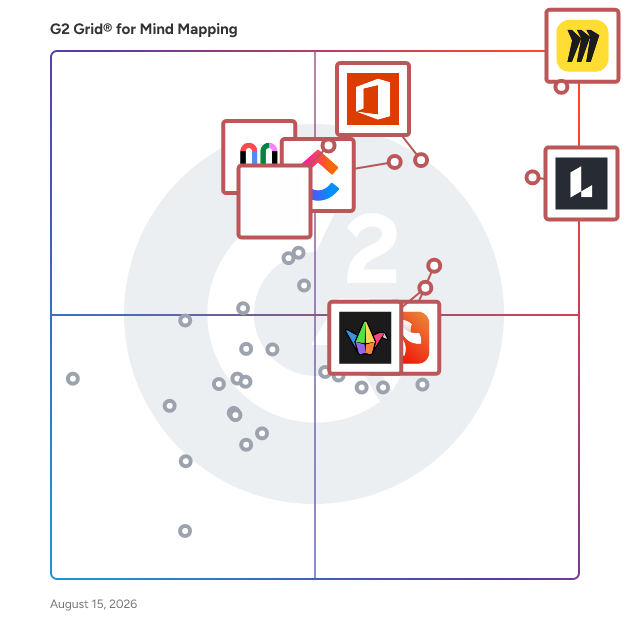
Best Mind Mapping Software At A Glance

Leader:
Highest Performer:
Easiest to Use:
Best Free Software:
Show LessShow More
Easiest to Use:
Best Free Software:

G2 takes pride in showing unbiased reviews on user satisfaction in our ratings and reports. We do not allow paid placements in any of our ratings, rankings, or reports. Learn about our scoring methodologies.

Coming Soon
Get Trending Mind Mapping Products in Your Inbox

A weekly snapshot of rising stars, new launches, and what everyone's buzzing about.

Sample Trending Products Newsletter
No filters applied
82 Listings in Mind Mapping Available
(10,675)4.7 out of 5
Optimized for quick response
3rd Easiest To Use in Mind Mapping software
View top Consulting Services for Miro
Save to My Lists
100% Off: Free forever
  • Overview
    Expand/Collapse Overview
  • Product Description
    How are these determined?Information
    This description is provided by the seller.

    Miro is the AI Innovation Workspace that brings teams and AI together to plan, co-create, and build the next big thing faster. Cross-functional teams flow from early discovery to final delivery on a s

    Users
    • Product Manager
    • Project Manager
    Industries
    • Information Technology and Services
    • Computer Software
    Market Segment
    • 41% Small-Business
    • 30% Mid-Market
  • Pros and Cons
    Expand/Collapse Pros and Cons
  • Miro Pros and Cons
    How are these determined?Information
    Pros and Cons are compiled from review feedback and grouped into themes to provide an easy-to-understand summary of user reviews.
    Pros
    Ease of Use
    2,912
    Team Collaboration
    2,445
    Features
    1,794
    Real-time Collaboration
    1,733
    Real-Time Collaboration
    1,671
    Cons
    Missing Features
    1,019
    Board Management
    707
    Limited Features
    703
    Learning Curve
    685
    Slow Loading
    610
  • User Satisfaction
    Expand/Collapse User Satisfaction
  • Miro features and usability ratings that predict user satisfaction
    9.0
    Has the product been a good partner in doing business?
    Average: 9.1
    8.7
    Quality of Support
    Average: 8.7
  • Seller Details
    Expand/Collapse Seller Details
  • Seller Details
    Seller
    Miro
    Company Website
    Year Founded
    2011
    HQ Location
    San Francisco, California
    Twitter
    @MiroHQ
    38,448 Twitter followers
    LinkedIn® Page
    www.linkedin.com
    2,376 employees on LinkedIn®
Product Description
How are these determined?Information
This description is provided by the seller.

Miro is the AI Innovation Workspace that brings teams and AI together to plan, co-create, and build the next big thing faster. Cross-functional teams flow from early discovery to final delivery on a s

Users
  • Product Manager
  • Project Manager
Industries
  • Information Technology and Services
  • Computer Software
Market Segment
  • 41% Small-Business
  • 30% Mid-Market
Miro Pros and Cons
How are these determined?Information
Pros and Cons are compiled from review feedback and grouped into themes to provide an easy-to-understand summary of user reviews.
Pros
Ease of Use
2,912
Team Collaboration
2,445
Features
1,794
Real-time Collaboration
1,733
Real-Time Collaboration
1,671
Cons
Missing Features
1,019
Board Management
707
Limited Features
703
Learning Curve
685
Slow Loading
610
Miro features and usability ratings that predict user satisfaction
9.0
Has the product been a good partner in doing business?
Average: 9.1
8.7
Quality of Support
Average: 8.7
Seller Details
Seller
Miro
Company Website
Year Founded
2011
HQ Location
San Francisco, California
Twitter
@MiroHQ
38,448 Twitter followers
LinkedIn® Page
www.linkedin.com
2,376 employees on LinkedIn®
(7,471)4.5 out of 5
Optimized for quick response
5th Easiest To Use in Mind Mapping software
Save to My Lists
Entry Level Price:Free
  • Overview
    Expand/Collapse Overview
  • Product Description
    How are these determined?Information
    This description is provided by the seller.

    Lucid is a Work Acceleration Platform powered by visual collaboration. Its enterprise offering is the Lucid Visual Collaboration Suite, which combines Lucidchart for intelligent diagramming and Lucids

    Users
    • Software Engineer
    • Product Manager
    Industries
    • Computer Software
    • Information Technology and Services
    Market Segment
    • 39% Small-Business
    • 34% Mid-Market
  • Pros and Cons
    Expand/Collapse Pros and Cons
  • Lucid Visual Collaboration Suite Pros and Cons
    How are these determined?Information
    Pros and Cons are compiled from review feedback and grouped into themes to provide an easy-to-understand summary of user reviews.
    Pros
    Ease of Use
    1,067
    Team Collaboration
    624
    Easy Creation
    556
    Real-time Collaboration
    545
    Real-Time Collaboration
    521
    Cons
    Learning Curve
    352
    Missing Features
    251
    Diagramming Issues
    202
    Not Intuitive
    198
    Limited Features
    193
  • User Satisfaction
    Expand/Collapse User Satisfaction
  • Lucid Visual Collaboration Suite features and usability ratings that predict user satisfaction
    9.0
    Has the product been a good partner in doing business?
    Average: 9.1
    8.8
    Quality of Support
    Average: 8.7
  • Seller Details
    Expand/Collapse Seller Details
  • Seller Details
    Company Website
    Year Founded
    2010
    HQ Location
    South Jordan, UT
    Twitter
    @LucidSoftware
    14,634 Twitter followers
    LinkedIn® Page
    www.linkedin.com
    1,315 employees on LinkedIn®
Product Description
How are these determined?Information
This description is provided by the seller.

Lucid is a Work Acceleration Platform powered by visual collaboration. Its enterprise offering is the Lucid Visual Collaboration Suite, which combines Lucidchart for intelligent diagramming and Lucids

Users
  • Software Engineer
  • Product Manager
Industries
  • Computer Software
  • Information Technology and Services
Market Segment
  • 39% Small-Business
  • 34% Mid-Market
Lucid Visual Collaboration Suite Pros and Cons
How are these determined?Information
Pros and Cons are compiled from review feedback and grouped into themes to provide an easy-to-understand summary of user reviews.
Pros
Ease of Use
1,067
Team Collaboration
624
Easy Creation
556
Real-time Collaboration
545
Real-Time Collaboration
521
Cons
Learning Curve
352
Missing Features
251
Diagramming Issues
202
Not Intuitive
198
Limited Features
193
Lucid Visual Collaboration Suite features and usability ratings that predict user satisfaction
9.0
Has the product been a good partner in doing business?
Average: 9.1
8.8
Quality of Support
Average: 8.7
Seller Details
Company Website
Year Founded
2010
HQ Location
South Jordan, UT
Twitter
@LucidSoftware
14,634 Twitter followers
LinkedIn® Page
www.linkedin.com
1,315 employees on LinkedIn®

This is how G2 Deals can help you:

  • Easily shop for curated – and trusted – software
  • Own your own software buying journey
  • Discover exclusive deals on software
(10,745)4.7 out of 5
Optimized for quick response
2nd Easiest To Use in Mind Mapping software
View top Consulting Services for ClickUp
Save to My Lists
Entry Level Price:Free
  • Overview
    Expand/Collapse Overview
  • Product Description
    How are these determined?Information
    This description is provided by the seller.

    ClickUp is the world’s first Converged AI Workspace, bringing together all work apps, data, and workflows. ClickUp eliminates all forms of work sprawl to provide 100% context and a single place for hu

    Users
    • CEO
    • Project Manager
    Industries
    • Marketing and Advertising
    • Computer Software
    Market Segment
    • 77% Small-Business
    • 18% Mid-Market
    User Sentiment
    How are these determined?Information
    These insights, currently in beta, are compiled from user reviews and grouped to display a high-level overview of the software.
    • ClickUp is a platform for time tracking and task management, designed to consolidate tasks, documents, and project tracking in a single platform with built-in integrations, automations, and customization options.
    • Reviewers like the platform's high level of flexibility and customization, its ability to handle workflow management, and its integrated workspace that boosts employee connectivity and productivity.
    • Reviewers experienced occasional lags in system performance, found the mobile app not responsive, and mentioned that the platform can feel overwhelming due to the wide range of features and settings.
  • Pros and Cons
    Expand/Collapse Pros and Cons
  • ClickUp Pros and Cons
    How are these determined?Information
    Pros and Cons are compiled from review feedback and grouped into themes to provide an easy-to-understand summary of user reviews.
    Pros
    Ease of Use
    3,810
    Task Management
    2,950
    Features
    2,790
    Project Management
    2,546
    Organization
    2,302
    Cons
    Missing Features
    1,863
    Learning Curve
    1,558
    Limited Features
    1,133
    Slow Loading
    1,054
    Not Intuitive
    1,023
  • User Satisfaction
    Expand/Collapse User Satisfaction
  • ClickUp features and usability ratings that predict user satisfaction
    9.0
    Has the product been a good partner in doing business?
    Average: 9.1
    8.9
    Quality of Support
    Average: 8.7
  • Seller Details
    Expand/Collapse Seller Details
  • Seller Details
    Seller
    ClickUp
    Company Website
    Year Founded
    2017
    HQ Location
    San Diego, California
    Twitter
    @clickup
    68,174 Twitter followers
    LinkedIn® Page
    www.linkedin.com
    1,420 employees on LinkedIn®
Product Description
How are these determined?Information
This description is provided by the seller.

ClickUp is the world’s first Converged AI Workspace, bringing together all work apps, data, and workflows. ClickUp eliminates all forms of work sprawl to provide 100% context and a single place for hu

Users
  • CEO
  • Project Manager
Industries
  • Marketing and Advertising
  • Computer Software
Market Segment
  • 77% Small-Business
  • 18% Mid-Market
User Sentiment
How are these determined?Information
These insights, currently in beta, are compiled from user reviews and grouped to display a high-level overview of the software.
  • ClickUp is a platform for time tracking and task management, designed to consolidate tasks, documents, and project tracking in a single platform with built-in integrations, automations, and customization options.
  • Reviewers like the platform's high level of flexibility and customization, its ability to handle workflow management, and its integrated workspace that boosts employee connectivity and productivity.
  • Reviewers experienced occasional lags in system performance, found the mobile app not responsive, and mentioned that the platform can feel overwhelming due to the wide range of features and settings.
ClickUp Pros and Cons
How are these determined?Information
Pros and Cons are compiled from review feedback and grouped into themes to provide an easy-to-understand summary of user reviews.
Pros
Ease of Use
3,810
Task Management
2,950
Features
2,790
Project Management
2,546
Organization
2,302
Cons
Missing Features
1,863
Learning Curve
1,558
Limited Features
1,133
Slow Loading
1,054
Not Intuitive
1,023
ClickUp features and usability ratings that predict user satisfaction
9.0
Has the product been a good partner in doing business?
Average: 9.1
8.9
Quality of Support
Average: 8.7
Seller Details
Seller
ClickUp
Company Website
Year Founded
2017
HQ Location
San Diego, California
Twitter
@clickup
68,174 Twitter followers
LinkedIn® Page
www.linkedin.com
1,420 employees on LinkedIn®
(453)4.6 out of 5
9th Easiest To Use in Mind Mapping software
Save to My Lists
Entry Level Price:Free
  • Overview
    Expand/Collapse Overview
  • Product Description
    How are these determined?Information
    This description is provided by the seller.

    FigJam is the space where teams turn possibilities into real plans. Use FigJam’s flexible, open canvas to shape stronger solutions to tough problems, get stakeholders on the same page, and keep spri

    Users
    • Product Designer
    • Product Manager
    Industries
    • Computer Software
    • Information Technology and Services
    Market Segment
    • 49% Small-Business
    • 34% Mid-Market
  • Pros and Cons
    Expand/Collapse Pros and Cons
  • FigJam Pros and Cons
    How are these determined?Information
    Pros and Cons are compiled from review feedback and grouped into themes to provide an easy-to-understand summary of user reviews.
    Pros
    Ease of Use
    8
    Features
    7
    Team Collaboration
    6
    Templates
    6
    Simple
    4
    Cons
    Limited Features
    4
    Missing Features
    4
    Expensive
    3
    Access Limitations
    2
    Limited Customization
    2
  • User Satisfaction
    Expand/Collapse User Satisfaction
  • FigJam features and usability ratings that predict user satisfaction
    8.9
    Has the product been a good partner in doing business?
    Average: 9.1
    8.7
    Quality of Support
    Average: 8.7
  • Seller Details
    Expand/Collapse Seller Details
  • Seller Details
    Seller
    Figma
    Year Founded
    2012
    HQ Location
    San Francisco, California
    Twitter
    @figma
    522,496 Twitter followers
    LinkedIn® Page
    www.linkedin.com
    2,712 employees on LinkedIn®
Product Description
How are these determined?Information
This description is provided by the seller.

FigJam is the space where teams turn possibilities into real plans. Use FigJam’s flexible, open canvas to shape stronger solutions to tough problems, get stakeholders on the same page, and keep spri

Users
  • Product Designer
  • Product Manager
Industries
  • Computer Software
  • Information Technology and Services
Market Segment
  • 49% Small-Business
  • 34% Mid-Market
FigJam Pros and Cons
How are these determined?Information
Pros and Cons are compiled from review feedback and grouped into themes to provide an easy-to-understand summary of user reviews.
Pros
Ease of Use
8
Features
7
Team Collaboration
6
Templates
6
Simple
4
Cons
Limited Features
4
Missing Features
4
Expensive
3
Access Limitations
2
Limited Customization
2
FigJam features and usability ratings that predict user satisfaction
8.9
Has the product been a good partner in doing business?
Average: 9.1
8.7
Quality of Support
Average: 8.7
Seller Details
Seller
Figma
Year Founded
2012
HQ Location
San Francisco, California
Twitter
@figma
522,496 Twitter followers
LinkedIn® Page
www.linkedin.com
2,712 employees on LinkedIn®
Entry Level Price:Free
  • Overview
    Expand/Collapse Overview
  • Product Description
    How are these determined?Information
    This description is provided by the seller.

    Visio is an innovative solution that helps you visualize data-connected business process flows with dozens of ready-to-use templates and thousands of customizable shapes. Work visually from anywhe

    Users
    • Consultant
    • Graduate Engineering Trainee
    Industries
    • Information Technology and Services
    • Hospital & Health Care
    Market Segment
    • 43% Enterprise
    • 31% Mid-Market
  • Pros and Cons
    Expand/Collapse Pros and Cons
  • Visio Pros and Cons
    How are these determined?Information
    Pros and Cons are compiled from review feedback and grouped into themes to provide an easy-to-understand summary of user reviews.
    Pros
    Ease of Use
    10
    Simple
    5
    Easy Creation
    4
    Intuitive
    4
    Options
    3
    Cons
    Limited Features
    3
    Editing Limitations
    2
    Expensive
    2
    Learning Curve
    2
    Limited Color Options
    2
  • User Satisfaction
    Expand/Collapse User Satisfaction
  • Visio features and usability ratings that predict user satisfaction
    8.4
    Has the product been a good partner in doing business?
    Average: 9.1
    8.0
    Quality of Support
    Average: 8.7
  • Seller Details
    Expand/Collapse Seller Details
  • Seller Details
    Seller
    Microsoft
    Year Founded
    1975
    HQ Location
    Redmond, Washington
    Twitter
    @microsoft
    13,263,534 Twitter followers
    LinkedIn® Page
    www.linkedin.com
    220,934 employees on LinkedIn®
    Ownership
    MSFT
Product Description
How are these determined?Information
This description is provided by the seller.

Visio is an innovative solution that helps you visualize data-connected business process flows with dozens of ready-to-use templates and thousands of customizable shapes. Work visually from anywhe

Users
  • Consultant
  • Graduate Engineering Trainee
Industries
  • Information Technology and Services
  • Hospital & Health Care
Market Segment
  • 43% Enterprise
  • 31% Mid-Market
Visio Pros and Cons
How are these determined?Information
Pros and Cons are compiled from review feedback and grouped into themes to provide an easy-to-understand summary of user reviews.
Pros
Ease of Use
10
Simple
5
Easy Creation
4
Intuitive
4
Options
3
Cons
Limited Features
3
Editing Limitations
2
Expensive
2
Learning Curve
2
Limited Color Options
2
Visio features and usability ratings that predict user satisfaction
8.4
Has the product been a good partner in doing business?
Average: 9.1
8.0
Quality of Support
Average: 8.7
Seller Details
Seller
Microsoft
Year Founded
1975
HQ Location
Redmond, Washington
Twitter
@microsoft
13,263,534 Twitter followers
LinkedIn® Page
www.linkedin.com
220,934 employees on LinkedIn®
Ownership
MSFT
(336)4.9 out of 5
4th Easiest To Use in Mind Mapping software
Save to My Lists
Entry Level Price:Free
  • Overview
    Expand/Collapse Overview
  • Product Description
    How are these determined?Information
    This description is provided by the seller.

    Dostoevsky said that beauty will save the world. Padlet offers beautiful boards and canvases for visual thinkers and learners. Use boards to collect, organize, and present anything. Use sandboxes

    Users
    • Teacher
    Industries
    • Education Management
    • Primary/Secondary Education
    Market Segment
    • 49% Small-Business
    • 43% Mid-Market
  • Pros and Cons
    Expand/Collapse Pros and Cons
  • Padlet Pros and Cons
    How are these determined?Information
    Pros and Cons are compiled from review feedback and grouped into themes to provide an easy-to-understand summary of user reviews.
    Pros
    Ease of Use
    141
    Features
    64
    Simple
    60
    Sharing
    59
    Intuitive
    55
    Cons
    Access Limitations
    39
    Missing Features
    26
    Limited Features
    25
    Restrictions
    17
    Expensive
    15
  • User Satisfaction
    Expand/Collapse User Satisfaction
  • Padlet features and usability ratings that predict user satisfaction
    9.6
    Has the product been a good partner in doing business?
    Average: 9.1
    9.3
    Quality of Support
    Average: 8.7
  • Seller Details
    Expand/Collapse Seller Details
  • Seller Details
    Seller
    Padlet
    Year Founded
    2012
    HQ Location
    San Francisco, US
    Twitter
    @padlet
    73,956 Twitter followers
    LinkedIn® Page
    www.linkedin.com
    74 employees on LinkedIn®
Product Description
How are these determined?Information
This description is provided by the seller.

Dostoevsky said that beauty will save the world. Padlet offers beautiful boards and canvases for visual thinkers and learners. Use boards to collect, organize, and present anything. Use sandboxes

Users
  • Teacher
Industries
  • Education Management
  • Primary/Secondary Education
Market Segment
  • 49% Small-Business
  • 43% Mid-Market
Padlet Pros and Cons
How are these determined?Information
Pros and Cons are compiled from review feedback and grouped into themes to provide an easy-to-understand summary of user reviews.
Pros
Ease of Use
141
Features
64
Simple
60
Sharing
59
Intuitive
55
Cons
Access Limitations
39
Missing Features
26
Limited Features
25
Restrictions
17
Expensive
15
Padlet features and usability ratings that predict user satisfaction
9.6
Has the product been a good partner in doing business?
Average: 9.1
9.3
Quality of Support
Average: 8.7
Seller Details
Seller
Padlet
Year Founded
2012
HQ Location
San Francisco, US
Twitter
@padlet
73,956 Twitter followers
LinkedIn® Page
www.linkedin.com
74 employees on LinkedIn®
Entry Level Price:Free
  • Overview
    Expand/Collapse Overview
  • Product Description
    How are these determined?Information
    This description is provided by the seller.

    Freehand by InVision is the only visual collaboration platform built for full organizations. With pre-built templates, organized spaces tor project management, and interactive widgets and reactions. F

    Users
    • Product Designer
    • UX Designer
    Industries
    • Computer Software
    • Design
    Market Segment
    • 40% Small-Business
    • 33% Mid-Market
  • User Satisfaction
    Expand/Collapse User Satisfaction
  • Freehand features and usability ratings that predict user satisfaction
    8.5
    Has the product been a good partner in doing business?
    Average: 9.1
    8.6
    Quality of Support
    Average: 8.7
  • Seller Details
    Expand/Collapse Seller Details
  • Seller Details
    Seller
    Miro
    Year Founded
    2011
    HQ Location
    San Francisco, California
    Twitter
    @MiroHQ
    38,470 Twitter followers
    LinkedIn® Page
    www.linkedin.com
    2,376 employees on LinkedIn®
Product Description
How are these determined?Information
This description is provided by the seller.

Freehand by InVision is the only visual collaboration platform built for full organizations. With pre-built templates, organized spaces tor project management, and interactive widgets and reactions. F

Users
  • Product Designer
  • UX Designer
Industries
  • Computer Software
  • Design
Market Segment
  • 40% Small-Business
  • 33% Mid-Market
Freehand features and usability ratings that predict user satisfaction
8.5
Has the product been a good partner in doing business?
Average: 9.1
8.6
Quality of Support
Average: 8.7
Seller Details
Seller
Miro
Year Founded
2011
HQ Location
San Francisco, California
Twitter
@MiroHQ
38,470 Twitter followers
LinkedIn® Page
www.linkedin.com
2,376 employees on LinkedIn®
(1,442)4.6 out of 5
11th Easiest To Use in Mind Mapping software
View top Consulting Services for Mural
Save to My Lists
Entry Level Price:Free
  • Overview
    Expand/Collapse Overview
  • Product Description
    How are these determined?Information
    This description is provided by the seller.

    Mural is a visual collaboration platform specifically designed to enhance the productivity and effectiveness of go-to-market (GTM) teams. As an interactive workspace, Mural enables teams to create per

    Users
    • UX Designer
    • Product Manager
    Industries
    • Information Technology and Services
    • Management Consulting
    Market Segment
    • 45% Enterprise
    • 35% Small-Business
    User Sentiment
    How are these determined?Information
    These insights, currently in beta, are compiled from user reviews and grouped to display a high-level overview of the software.
    • Mural is a visual workspace tool that enables teams to collaborate and communicate effectively, with customization options to suit unique business needs.
    • Reviewers like the ease of use, the ability to collaborate in real time, the variety of features including timers, voting, and chat, and the pre-built templates that save time and boost productivity.
    • Reviewers mentioned performance issues with larger boards, a less smooth experience on mobile devices, a potentially overwhelming number of features for new users, and the lack of offline access.
  • Pros and Cons
    Expand/Collapse Pros and Cons
  • Mural Pros and Cons
    How are these determined?Information
    Pros and Cons are compiled from review feedback and grouped into themes to provide an easy-to-understand summary of user reviews.
    Pros
    Ease of Use
    140
    Team Collaboration
    108
    Features
    74
    Real-Time Collaboration
    74
    Templates
    65
    Cons
    Missing Features
    38
    Learning Curve
    33
    Not Intuitive
    27
    Limited Features
    26
    Slow Performance
    21
  • User Satisfaction
    Expand/Collapse User Satisfaction
  • Mural features and usability ratings that predict user satisfaction
    9.1
    Has the product been a good partner in doing business?
    Average: 9.1
    8.9
    Quality of Support
    Average: 8.7
  • Seller Details
    Expand/Collapse Seller Details
  • Seller Details
    Seller
    Mural
    Company Website
    Year Founded
    2011
    HQ Location
    San Francisco, California
    Twitter
    @MURAL
    13,745 Twitter followers
    LinkedIn® Page
    www.linkedin.com
    556 employees on LinkedIn®
Product Description
How are these determined?Information
This description is provided by the seller.

Mural is a visual collaboration platform specifically designed to enhance the productivity and effectiveness of go-to-market (GTM) teams. As an interactive workspace, Mural enables teams to create per

Users
  • UX Designer
  • Product Manager
Industries
  • Information Technology and Services
  • Management Consulting
Market Segment
  • 45% Enterprise
  • 35% Small-Business
User Sentiment
How are these determined?Information
These insights, currently in beta, are compiled from user reviews and grouped to display a high-level overview of the software.
  • Mural is a visual workspace tool that enables teams to collaborate and communicate effectively, with customization options to suit unique business needs.
  • Reviewers like the ease of use, the ability to collaborate in real time, the variety of features including timers, voting, and chat, and the pre-built templates that save time and boost productivity.
  • Reviewers mentioned performance issues with larger boards, a less smooth experience on mobile devices, a potentially overwhelming number of features for new users, and the lack of offline access.
Mural Pros and Cons
How are these determined?Information
Pros and Cons are compiled from review feedback and grouped into themes to provide an easy-to-understand summary of user reviews.
Pros
Ease of Use
140
Team Collaboration
108
Features
74
Real-Time Collaboration
74
Templates
65
Cons
Missing Features
38
Learning Curve
33
Not Intuitive
27
Limited Features
26
Slow Performance
21
Mural features and usability ratings that predict user satisfaction
9.1
Has the product been a good partner in doing business?
Average: 9.1
8.9
Quality of Support
Average: 8.7
Seller Details
Seller
Mural
Company Website
Year Founded
2011
HQ Location
San Francisco, California
Twitter
@MURAL
13,745 Twitter followers
LinkedIn® Page
www.linkedin.com
556 employees on LinkedIn®
(73)4.6 out of 5
8th Easiest To Use in Mind Mapping software
Save to My Lists
Entry Level Price:$35.00
  • Overview
    Expand/Collapse Overview
  • Product Description
    How are these determined?Information
    This description is provided by the seller.

    Wondershare EdrawMind is a cross-platform mind mapping software with many advanced features including a streamlined and intuitive ribbon interface; rich exquisite built-in mind map templates, clip art

    Users
    No information available
    Industries
    • Information Technology and Services
    • Computer Software
    Market Segment
    • 81% Small-Business
    • 12% Mid-Market
  • Pros and Cons
    Expand/Collapse Pros and Cons
  • Wondershare EdrawMind Pros and Cons
    How are these determined?Information
    Pros and Cons are compiled from review feedback and grouped into themes to provide an easy-to-understand summary of user reviews.
    Pros
    Ease of Use
    32
    Templates
    18
    Intuitive
    13
    Features
    12
    Ease of Learning
    9
    Cons
    Limited Features
    6
    Learning Curve
    4
    Expensive
    3
    Limited Templates
    3
    Slow Loading
    3
  • User Satisfaction
    Expand/Collapse User Satisfaction
  • Wondershare EdrawMind features and usability ratings that predict user satisfaction
    9.3
    Has the product been a good partner in doing business?
    Average: 9.1
    8.3
    Quality of Support
    Average: 8.7
  • Seller Details
    Expand/Collapse Seller Details
  • Seller Details
    Year Founded
    2003
    HQ Location
    Shenzen, CN
    Twitter
    @Wondershare
    14,111 Twitter followers
    LinkedIn® Page
    www.linkedin.com
    634 employees on LinkedIn®
    Ownership
    SHE: 300624
Product Description
How are these determined?Information
This description is provided by the seller.

Wondershare EdrawMind is a cross-platform mind mapping software with many advanced features including a streamlined and intuitive ribbon interface; rich exquisite built-in mind map templates, clip art

Users
No information available
Industries
  • Information Technology and Services
  • Computer Software
Market Segment
  • 81% Small-Business
  • 12% Mid-Market
Wondershare EdrawMind Pros and Cons
How are these determined?Information
Pros and Cons are compiled from review feedback and grouped into themes to provide an easy-to-understand summary of user reviews.
Pros
Ease of Use
32
Templates
18
Intuitive
13
Features
12
Ease of Learning
9
Cons
Limited Features
6
Learning Curve
4
Expensive
3
Limited Templates
3
Slow Loading
3
Wondershare EdrawMind features and usability ratings that predict user satisfaction
9.3
Has the product been a good partner in doing business?
Average: 9.1
8.3
Quality of Support
Average: 8.7
Seller Details
Year Founded
2003
HQ Location
Shenzen, CN
Twitter
@Wondershare
14,111 Twitter followers
LinkedIn® Page
www.linkedin.com
634 employees on LinkedIn®
Ownership
SHE: 300624
(187)4.6 out of 5
10th Easiest To Use in Mind Mapping software
Save to My Lists
Entry Level Price:Free
  • Overview
    Expand/Collapse Overview
  • Product Description
    How are these determined?Information
    This description is provided by the seller.

    Whimsical is the whiteboard for thinking and planning. It’s built for teams to move from chaos to clarity and turn ideas into action. Start from scratch or describe what you need and let AI build i

    Users
    • Product Manager
    • CEO
    Industries
    • Computer Software
    • Information Technology and Services
    Market Segment
    • 57% Small-Business
    • 31% Mid-Market
  • Pros and Cons
    Expand/Collapse Pros and Cons
  • Whimsical Pros and Cons
    How are these determined?Information
    Pros and Cons are compiled from review feedback and grouped into themes to provide an easy-to-understand summary of user reviews.
    Pros
    Ease of Use
    30
    Features
    16
    User Interface
    12
    Easy Creation
    11
    Useful
    10
    Cons
    Limited Customization
    5
    Access Limitations
    4
    Color Customization
    4
    Expensive
    4
    Insufficient Learning Resources
    4
  • User Satisfaction
    Expand/Collapse User Satisfaction
  • Whimsical features and usability ratings that predict user satisfaction
    9.6
    Has the product been a good partner in doing business?
    Average: 9.1
    8.7
    Quality of Support
    Average: 8.7
  • Seller Details
    Expand/Collapse Seller Details
  • Seller Details
    Seller
    Whimsical
    Year Founded
    2017
    HQ Location
    Denver, Colorado
    Twitter
    @whimsical
    14,485 Twitter followers
    LinkedIn® Page
    www.linkedin.com
    40 employees on LinkedIn®
Product Description
How are these determined?Information
This description is provided by the seller.

Whimsical is the whiteboard for thinking and planning. It’s built for teams to move from chaos to clarity and turn ideas into action. Start from scratch or describe what you need and let AI build i

Users
  • Product Manager
  • CEO
Industries
  • Computer Software
  • Information Technology and Services
Market Segment
  • 57% Small-Business
  • 31% Mid-Market
Whimsical Pros and Cons
How are these determined?Information
Pros and Cons are compiled from review feedback and grouped into themes to provide an easy-to-understand summary of user reviews.
Pros
Ease of Use
30
Features
16
User Interface
12
Easy Creation
11
Useful
10
Cons
Limited Customization
5
Access Limitations
4
Color Customization
4
Expensive
4
Insufficient Learning Resources
4
Whimsical features and usability ratings that predict user satisfaction
9.6
Has the product been a good partner in doing business?
Average: 9.1
8.7
Quality of Support
Average: 8.7
Seller Details
Seller
Whimsical
Year Founded
2017
HQ Location
Denver, Colorado
Twitter
@whimsical
14,485 Twitter followers
LinkedIn® Page
www.linkedin.com
40 employees on LinkedIn®
(349)4.8 out of 5
1st Easiest To Use in Mind Mapping software
Save to My Lists
  • Overview
    Expand/Collapse Overview
  • Product Description
    How are these determined?Information
    This description is provided by the seller.

    SketchWow provides (non creative types) a fun way to quickly condense and communicate your ideas, concepts and stories (in a simple and casual way) using a fresh & engaging, hand drawn look. No du

    Users
    • Owner
    • CEO
    Industries
    • Consulting
    • Marketing and Advertising
    Market Segment
    • 86% Small-Business
    • 9% Mid-Market
  • Pros and Cons
    Expand/Collapse Pros and Cons
  • SketchWow Pros and Cons
    How are these determined?Information
    Pros and Cons are compiled from review feedback and grouped into themes to provide an easy-to-understand summary of user reviews.
    Pros
    Templates
    86
    Ease of Use
    78
    Easy Creation
    77
    Presentations
    51
    Intuitive
    48
    Cons
    Steep Learning Curve
    15
    Learning Curve
    13
    Limited Templates
    8
    Lack of Templates
    7
    Not Intuitive
    7
  • User Satisfaction
    Expand/Collapse User Satisfaction
  • SketchWow features and usability ratings that predict user satisfaction
    9.3
    Has the product been a good partner in doing business?
    Average: 9.1
    9.6
    Quality of Support
    Average: 8.7
  • Seller Details
    Expand/Collapse Seller Details
  • Seller Details
    Seller
    SketchWow
    Year Founded
    2020
    HQ Location
    N/A
    LinkedIn® Page
    www.linkedin.com
    1 employees on LinkedIn®
Product Description
How are these determined?Information
This description is provided by the seller.

SketchWow provides (non creative types) a fun way to quickly condense and communicate your ideas, concepts and stories (in a simple and casual way) using a fresh & engaging, hand drawn look. No du

Users
  • Owner
  • CEO
Industries
  • Consulting
  • Marketing and Advertising
Market Segment
  • 86% Small-Business
  • 9% Mid-Market
SketchWow Pros and Cons
How are these determined?Information
Pros and Cons are compiled from review feedback and grouped into themes to provide an easy-to-understand summary of user reviews.
Pros
Templates
86
Ease of Use
78
Easy Creation
77
Presentations
51
Intuitive
48
Cons
Steep Learning Curve
15
Learning Curve
13
Limited Templates
8
Lack of Templates
7
Not Intuitive
7
SketchWow features and usability ratings that predict user satisfaction
9.3
Has the product been a good partner in doing business?
Average: 9.1
9.6
Quality of Support
Average: 8.7
Seller Details
Seller
SketchWow
Year Founded
2020
HQ Location
N/A
LinkedIn® Page
www.linkedin.com
1 employees on LinkedIn®
(349)4.4 out of 5
7th Easiest To Use in Mind Mapping software
Save to My Lists
Entry Level Price:$59.00
  • Overview
    Expand/Collapse Overview
  • Product Description
    How are these determined?Information
    This description is provided by the seller.

    Aha! is the world's #1 product development software. We help more than 1 million product builders go from discovery to delivery and bring their strategy to life. Our suite of tools includes Aha! Roadm

    Users
    • Product Manager
    • Product Owner
    Industries
    • Computer Software
    • Information Technology and Services
    Market Segment
    • 47% Mid-Market
    • 31% Enterprise
    User Sentiment
    How are these determined?Information
    These insights, currently in beta, are compiled from user reviews and grouped to display a high-level overview of the software.
    • Aha! is a product management tool that centralizes tracking of roadmaps, allows creation of various reports, and integrates with other tools like Azure and Jira.
    • Reviewers frequently mention the ease of use, flexibility, and the ability to streamline and centralize tracking of roadmaps, as well as the valuable insights provided by the ideas portal.
    • Users experienced limitations in reporting, particularly with pivot reports, and some found the user interface confusing and the software on the pricier side.
  • Pros and Cons
    Expand/Collapse Pros and Cons
  • Aha! Pros and Cons
    How are these determined?Information
    Pros and Cons are compiled from review feedback and grouped into themes to provide an easy-to-understand summary of user reviews.
    Pros
    Customer Support
    39
    Ease of Use
    33
    Features
    28
    Helpful
    25
    Project Management
    22
    Cons
    Learning Curve
    24
    Steep Learning Curve
    14
    Complex Usability
    13
    Learning Difficulty
    13
    Complexity
    11
  • User Satisfaction
    Expand/Collapse User Satisfaction
  • Aha! features and usability ratings that predict user satisfaction
    9.2
    Has the product been a good partner in doing business?
    Average: 9.1
    9.2
    Quality of Support
    Average: 8.7
  • Seller Details
    Expand/Collapse Seller Details
  • Seller Details
    Seller
    Aha! Labs
    Company Website
    Year Founded
    2013
    HQ Location
    Menlo Park, CA
    Twitter
    @aha_io
    22,346 Twitter followers
    LinkedIn® Page
    www.linkedin.com
    349 employees on LinkedIn®
Product Description
How are these determined?Information
This description is provided by the seller.

Aha! is the world's #1 product development software. We help more than 1 million product builders go from discovery to delivery and bring their strategy to life. Our suite of tools includes Aha! Roadm

Users
  • Product Manager
  • Product Owner
Industries
  • Computer Software
  • Information Technology and Services
Market Segment
  • 47% Mid-Market
  • 31% Enterprise
User Sentiment
How are these determined?Information
These insights, currently in beta, are compiled from user reviews and grouped to display a high-level overview of the software.
  • Aha! is a product management tool that centralizes tracking of roadmaps, allows creation of various reports, and integrates with other tools like Azure and Jira.
  • Reviewers frequently mention the ease of use, flexibility, and the ability to streamline and centralize tracking of roadmaps, as well as the valuable insights provided by the ideas portal.
  • Users experienced limitations in reporting, particularly with pivot reports, and some found the user interface confusing and the software on the pricier side.
Aha! Pros and Cons
How are these determined?Information
Pros and Cons are compiled from review feedback and grouped into themes to provide an easy-to-understand summary of user reviews.
Pros
Customer Support
39
Ease of Use
33
Features
28
Helpful
25
Project Management
22
Cons
Learning Curve
24
Steep Learning Curve
14
Complex Usability
13
Learning Difficulty
13
Complexity
11
Aha! features and usability ratings that predict user satisfaction
9.2
Has the product been a good partner in doing business?
Average: 9.1
9.2
Quality of Support
Average: 8.7
Seller Details
Seller
Aha! Labs
Company Website
Year Founded
2013
HQ Location
Menlo Park, CA
Twitter
@aha_io
22,346 Twitter followers
LinkedIn® Page
www.linkedin.com
349 employees on LinkedIn®
(202)4.7 out of 5
12th Easiest To Use in Mind Mapping software
Save to My Lists
Entry Level Price:Free
  • Overview
    Expand/Collapse Overview
  • Product Description
    How are these determined?Information
    This description is provided by the seller.

    Klaxoon is a an online all-in one work collaboration platform that boosts engagement levels, at all times. With a unique range of 9 visual collaboration tools and services, Klaxoon empowers people to

    Users
    No information available
    Industries
    • Information Technology and Services
    • Banking
    Market Segment
    • 58% Enterprise
    • 24% Mid-Market
  • User Satisfaction
    Expand/Collapse User Satisfaction
  • Klaxoon features and usability ratings that predict user satisfaction
    9.2
    Has the product been a good partner in doing business?
    Average: 9.1
    9.6
    Quality of Support
    Average: 8.7
  • Seller Details
    Expand/Collapse Seller Details
  • Seller Details
    Year Founded
    2006
    HQ Location
    San Diego, CA
    Twitter
    @wrike
    13,652 Twitter followers
    LinkedIn® Page
    www.linkedin.com
    1,291 employees on LinkedIn®
    Ownership
    Symphony Technology Group (STG)
Product Description
How are these determined?Information
This description is provided by the seller.

Klaxoon is a an online all-in one work collaboration platform that boosts engagement levels, at all times. With a unique range of 9 visual collaboration tools and services, Klaxoon empowers people to

Users
No information available
Industries
  • Information Technology and Services
  • Banking
Market Segment
  • 58% Enterprise
  • 24% Mid-Market
Klaxoon features and usability ratings that predict user satisfaction
9.2
Has the product been a good partner in doing business?
Average: 9.1
9.6
Quality of Support
Average: 8.7
Seller Details
Year Founded
2006
HQ Location
San Diego, CA
Twitter
@wrike
13,652 Twitter followers
LinkedIn® Page
www.linkedin.com
1,291 employees on LinkedIn®
Ownership
Symphony Technology Group (STG)
(223)4.4 out of 5
15th Easiest To Use in Mind Mapping software
Save to My Lists
Entry Level Price:Starting at $6.00
  • Overview
    Expand/Collapse Overview
  • Product Description
    How are these determined?Information
    This description is provided by the seller.

    Gliffy's diagramming applications make it easy to communicate and collaborate at the speed of your ideas. Whether you're using Gliffy in Confluence and Jira or jumping into our standalone diagramming

    Users
    • Business Analyst
    • Software Engineer
    Industries
    • Information Technology and Services
    • Computer Software
    Market Segment
    • 43% Small-Business
    • 35% Mid-Market
  • Pros and Cons
    Expand/Collapse Pros and Cons
  • Gliffy Pros and Cons
    How are these determined?Information
    Pros and Cons are compiled from review feedback and grouped into themes to provide an easy-to-understand summary of user reviews.
    Pros
    Diagramming
    3
    Ease of Use
    3
    Easy Sharing
    2
    Sharing
    2
    Creativity Freedom
    1
    Cons
    Chart Limitations
    1
    Diagramming Issues
    1
    Expensive
    1
    Intuitiveness
    1
    Learning Curve
    1
  • User Satisfaction
    Expand/Collapse User Satisfaction
  • Gliffy features and usability ratings that predict user satisfaction
    8.7
    Has the product been a good partner in doing business?
    Average: 9.1
    8.8
    Quality of Support
    Average: 8.7
  • Seller Details
    Expand/Collapse Seller Details
  • Seller Details
    Seller
    Perforce
    Year Founded
    1995
    HQ Location
    Minneapolis, MN
    Twitter
    @perforce
    5,101 Twitter followers
    LinkedIn® Page
    www.linkedin.com
    1,684 employees on LinkedIn®
Product Description
How are these determined?Information
This description is provided by the seller.

Gliffy's diagramming applications make it easy to communicate and collaborate at the speed of your ideas. Whether you're using Gliffy in Confluence and Jira or jumping into our standalone diagramming

Users
  • Business Analyst
  • Software Engineer
Industries
  • Information Technology and Services
  • Computer Software
Market Segment
  • 43% Small-Business
  • 35% Mid-Market
Gliffy Pros and Cons
How are these determined?Information
Pros and Cons are compiled from review feedback and grouped into themes to provide an easy-to-understand summary of user reviews.
Pros
Diagramming
3
Ease of Use
3
Easy Sharing
2
Sharing
2
Creativity Freedom
1
Cons
Chart Limitations
1
Diagramming Issues
1
Expensive
1
Intuitiveness
1
Learning Curve
1
Gliffy features and usability ratings that predict user satisfaction
8.7
Has the product been a good partner in doing business?
Average: 9.1
8.8
Quality of Support
Average: 8.7
Seller Details
Seller
Perforce
Year Founded
1995
HQ Location
Minneapolis, MN
Twitter
@perforce
5,101 Twitter followers
LinkedIn® Page
www.linkedin.com
1,684 employees on LinkedIn®
Entry Level Price:Free
  • Overview
    Expand/Collapse Overview
  • Product Description
    How are these determined?Information
    This description is provided by the seller.

    About AYOA AYOA is a revolutionary AI-powered productivity platform and mind mapping software that brings visual thinking, project planning, and task management together in one neuro-inclusive work

    Users
    No information available
    Industries
    • Information Technology and Services
    Market Segment
    • 43% Small-Business
    • 41% Mid-Market
  • Pros and Cons
    Expand/Collapse Pros and Cons
  • AYOA Pros and Cons
    How are these determined?Information
    Pros and Cons are compiled from review feedback and grouped into themes to provide an easy-to-understand summary of user reviews.
    Pros
    Task Management
    6
    Ease of Use
    4
    Team Collaboration
    4
    Customer Support
    3
    Diagramming
    3
    Cons
    Diagramming Issues
    2
    Missing Features
    2
    Board Management
    1
    Expensive
    1
    Inadequate Data Management
    1
  • User Satisfaction
    Expand/Collapse User Satisfaction
  • AYOA features and usability ratings that predict user satisfaction
    8.8
    Has the product been a good partner in doing business?
    Average: 9.1
    8.8
    Quality of Support
    Average: 8.7
  • Seller Details
    Expand/Collapse Seller Details
  • Seller Details
    HQ Location
    Penarth, Wales
    LinkedIn® Page
    www.linkedin.com
    31 employees on LinkedIn®
Product Description
How are these determined?Information
This description is provided by the seller.

About AYOA AYOA is a revolutionary AI-powered productivity platform and mind mapping software that brings visual thinking, project planning, and task management together in one neuro-inclusive work

Users
No information available
Industries
  • Information Technology and Services
Market Segment
  • 43% Small-Business
  • 41% Mid-Market
AYOA Pros and Cons
How are these determined?Information
Pros and Cons are compiled from review feedback and grouped into themes to provide an easy-to-understand summary of user reviews.
Pros
Task Management
6
Ease of Use
4
Team Collaboration
4
Customer Support
3
Diagramming
3
Cons
Diagramming Issues
2
Missing Features
2
Board Management
1
Expensive
1
Inadequate Data Management
1
AYOA features and usability ratings that predict user satisfaction
8.8
Has the product been a good partner in doing business?
Average: 9.1
8.8
Quality of Support
Average: 8.7
Seller Details
HQ Location
Penarth, Wales
LinkedIn® Page
www.linkedin.com
31 employees on LinkedIn®

Learn More About Mind Mapping Software

What is Mind Mapping Software?

Mind mapping software are specialized diagramming tools that allow users to organize brainstorming sessions into topics and relationships. Mind maps are diagrams that break down thought processes into topics, subtopics, and relationships between them by arranging them into simple words and lines. While this can be done by hand, mind mapping tools are available on multiple devices, allow for easy digital storage, and offer other features that facilitate collaboration.

Online mind mapping software is widely available and easily accessible to those who are budget conscious, as many tools offer free versions with limited functionality. Free mind mapping software is excellent for students or those looking for a casual mind mapping product.

What are the Common Features of Mind Mapping Software?

The following are some core features within mind mapping software that can help users get the most out of this tool:

Custom styling: Mind maps are fully customizable, down to the font choice, color preference, and overall style of the mind map. This is incredibly appealing to creatives who value customization.

Export/Import: Mind maps are easily shared with others by importing and exporting in various file formats, such as png, pdf, and img.

Templates: Most mind mapping products provide easy-to-use templates for beginners or users who don’t enjoy the manual task of creating a mind map from scratch. While convenient to use, templates can also help to keep a mind map organized and focused.

Integrations: Mind mapping software typically features integrations with other common software tools, such as Microsoft Office, PowerPoint, Dropbox, and more. These integrations allow users to easily import content into a mind map as well as integrate a mind map into their other projects.

What are the Benefits of Mind Mapping Software?

Assists in collaboration: Mind mapping software is perfect for those who want an easy way to collaborate with their team. This software often supports real-time collaboration, where multiple users can work on a mind map simultaneously. If team members are working asynchronously, users can leave comments and suggestions to be viewed when convenient. Also, users can embed images, links, and documents to share with others. Collaborative mind mapping can be a valuable addition to any company that relies on successful teamwork on a regular basis.

Boosts creativity: Mind mapping software can help boost creativity by providing users with a tool that enables them to use visual stimuli to help process thoughts and ideas, helping the brain process information differently. 

Promotes critical thinking: While mind mapping tools can boost creativity, they can also help with critical thinking. Mind maps allow users to visually explore relationships between thoughts and ideas, and perspectives. This is helpful when problem solving as the visual stimuli can assist in the generation of solutions and outcomes.

Enables flexibility: Mind mapping tools are largely cross-platform in nature. They can be web-based or available via mobile apps suitable for different operating systems (Android and iOS) and devices (Windows, macOS, and Linux). The flexibility makes it an ideal collaboration tool, as users can work together without compromising on their tech preferences. This flexibility also allows users to transition between devices, moving work from a laptop to a mobile device or iPad. 

Who Uses Mind Mapping Software?

Writers: Anyone who writes, whether professionally or leisurely, can benefit from mind mapping software as it can help spark ideas and inspiration for content. It can also be used to provide structure and help conceptualize rough drafts.

Marketing and product teams: Mind mapping software can assist marketing and product teams by providing them with the tools to conceptualize, strategize, and execute their product development initiatives and marketing campaigns. The collaboration features available with mind mapping tools can help teams work off of a central idea and gather ideas and input from everyone involved in a project.

Project managers: Project managers can utilize mind mapping software to organize and supervise projects from inception to completion. For example, project managers can use mind maps to create Gantt charts, assisting in project planning, monitoring, and execution.

Educators: Mind mapping software can be incredibly useful for academic professionals, especially educators. These tools can aid in planning course materials as well as leading brainstorming sessions in class.

Students: Students can benefit from mind mapping software, especially when used as a study tool or project planner for assignments.

What are the Alternatives to Mind Mapping Software?

Below are some alternatives to mind mapping software that can replace this type of software, either partially or completely:

Diagramming software: Diagramming software can be used to make mind maps, and some products offer specific mind map templates within their feature set. However, diagramming software is also capable of producing several types of diagrams, such as org charts, concept maps, and floor plans. At the same time, dedicated mind mapping tools are intended only for mind maps. 

Collaborative whiteboard software: There can be an overlap between mind mapping tools and collaborative whiteboard tools, but the latter is much more freeform in what users can do in the editable workspace they provide. However, both tools have the functionality to create flow charts, mind maps, and simple task management workflows.

Challenges with Mind Mapping Software

Software solutions can come with their own set of challenges. Here are some common issues users may face when using mind maps. 

Time consuming: Creating a “proper” mind map takes a significant amount of time and effort. For users looking for a quick way to brainstorm or ideate, mind maps can be either useful or frustrating, depending on the individual’s preferences. Users who enjoy the process of creating and assembling a mind map are more likely to appreciate this kind of software. However, for those who would prefer less manual work, many mind mapping tools come equipped with templates for convenience.

Easily overcomplicated: It’s possible to overcomplicate mind maps, especially when a user is getting too focused on every little detail. With too many branches, it can be easy to lose focus on the main topic or task at hand. 

Prone to disorganization: New adopters of mind maps may find that it can be easy for a mind map to become disorganized. Templates can be used to stay organized, reduce clutter, and increase focus. 

Lacks space for elaboration: While mind maps can be broken down into components and include written text, they aren’t really suitable for extremely complex ideas or intensive note-taking. 

How to Buy Mind Mapping Software

Requirements Gathering (RFI/RFP) for Mind Mapping software

Whether a company is just starting to explore mind mapping software or looking for a more appropriate solution for its needs, g2.com can help inform buyers of the market and assist them in selecting the best software for their business.

The first step in deciding which kind of mind mapping software a buyer should look at is assessing the organization's needs as a whole. Does the organization already use this kind of software? If so, what works and what doesn’t? Is this the first time the organization will be using mind mapping software? A few points to consider are:

Company size: Buyers will need to ensure that the products they are looking at will suit the size and needs of the organization. When purchasing software, it’s essential to ensure the product has the appropriate scalability to adapt to changing needs. Mind mapping software is collaborative in nature, making the tool easily adaptable for teams and groups of users in addition to individuals. 

Use case: There are many different use cases for mind mapping software. Before committing to a product, buyers should know the different use cases they intend to use the product for. Mind mapping software features can vary slightly from product to product, so knowing which features are critical for a particular use case is key. 

Compare Mind Mapping Products

Create a long list

The first step to finding the perfect software is to create a preliminary list of products that fit the buyer’s general needs. The next step is to narrow down the list by selecting key features that are must haves or requirements for the buyer. G2.com provides information about the best mind mapping software, allowing buyers to filter options and user reviews to help narrow the product list to a more relevant selection.

Create a short list

Creating a short list of products is an important step in the buying process. While it may be daunting to filter through various products, users can get help by utilizing G2’s compare feature. This feature will take products of choice and display them side by side so the buyer can easily determine which software ticks the important boxes on the list.

Conduct demos

Once the buyer has narrowed down the product list, the next step is to conduct a demo. Demos allow buyers to see a product and its features in more detail. To ensure a buyer gets the most out of a demo, it’s essential to prepare. Buyers should have a business scenario ready to test each product thoroughly. Additionally, buyers should inquire about cost, vendor support, and any concerns they have about the product. Adequate preparation will make it easier for a buyer to compare products after demos have been completed.

Selection of Mind Mapping Software

Choose a selection team

Mind mapping software benefits a wide variety of professionals and teams within organizations. While individual contributors only need to assess products for themselves, enterprises should select three to five team members from various teams and seniority levels to be part of the selection team. The more varied the selection team is, the better a company can assess how well a product will meet its needs.

Negotiation

Once the selection team has narrowed down their software picks, it’s time to discuss customization options, pricing, and the type of support needed from the vendor. It’s always important to address pricing options, even when they are listed on a vendor’s website. Many software vendors will provide discounts and custom pricing options based on what the buyer is looking to purchase.

Final decision

Once a buyer has made the final decision on a product and is ready to move forward with a purchase, it is recommended that the buyer conducts a final demo, inquires about a trial run, and determines what the next steps are if the product doesn’t ultimately fit their needs. It's also important to look into the kind of support the vendor provides following implementation. Most vendors will provide customer support services to ensure a pleasant customer experience. These steps can give a buyer an additional sense of security and confidence when making a final decision.