Top Free Mind Mapping Software

How Many Mind Mapping Software Products Does G2 Track?

Total Products under this Category: 91

Category Stats (Oct 2026)

  • Average Rating: 4.48/5 The average rating of products in this category, based on all submitted ratings
  • Top Trending Product: Lucid Visual Collaboration Suite (+0.13%) - Among all products in this category, Lucid Visual Collaboration Suite recorded the largest rating increase compared to last month

Last updated: October 17, 2026

How Does G2 Rank Mind Mapping Software Products?

Why You Can Trust G2's Software Rankings:

  • 30 Analysts and Data Experts
  • 45,200+ Authentic Reviews
  • 91+ Products
  • Unbiased Rankings

G2's software rankings are built on verified user reviews, rigorous moderation, and a consistent research methodology maintained by a team of analysts and data experts. Each product is measured using the same transparent criteria, with no paid placement or vendor influence. While reviews reflect real user experiences, which can be subjective, they offer valuable insight into how software performs in the hands of professionals. Together, these inputs power the G2 Score, a standardized way to compare tools within every category.

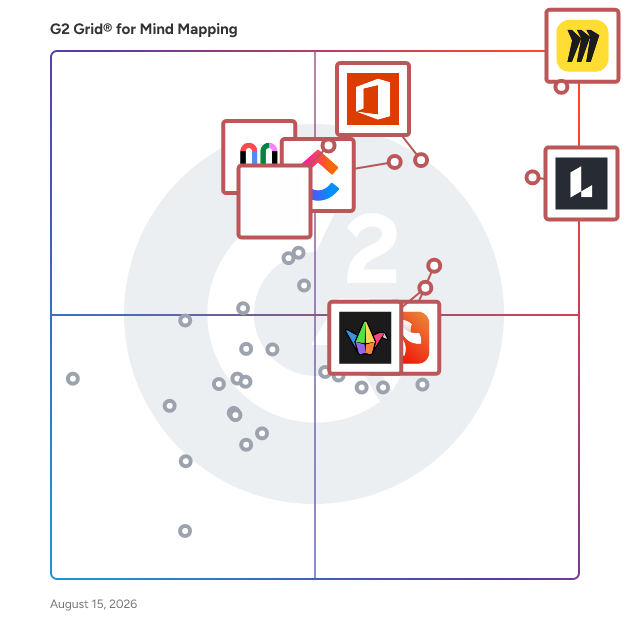
G2 Grid® for Mind Mapping Software

G2 Grid® for Mind Mapping Software plotting products by satisfaction and market presence

Highlighted products: Miro, Lucid Visual Collaboration Suite, Visio, ClickUp, FigJam, Xmind, Padlet, and Mural.

Underlying data: [Grid® JSON](https://www.g2.com/categories/mind-mapping-software/grids.json?focus%5B%5D=miro&focus%5B%5D=lucid-software-inc-lucid-visual-collaboration-suite&focus%5B%5D=visio&focus%5B%5D=clickup&focus%5B%5D=fig-jam&focus%5B%5D=xmind&focus%5B%5D=padlet&focus%5B%5D=mural)

Miro

Miro is the collaborative workspace where agents and teams converge to think, decide, and build together. As AI accelerates work, the challenge for organizations isn't doing more; it's turning individual output into scaled impact. Serving more than 100 million users across 250,000 customers, Miro’s shared, secure canvas surfaces the context that empowers teams to solve harder problems, make better decisions, and move work forward faster. Founded in 2011, Miro currently employs 1,600 people in 13 hubs around the world. To learn more, visit miro.com Key AI capabilities include Flows, which are visual AI workflows that automate multi-step processes while empowering teams with full visibility and control at every step; Sidekicks, which are conversational AI co-creators with expertise on specific tasks, jobs, or processes that move work forward; and Your AI and Knowledge, a collaborative integration layer that connects and enhances existing enterprise AI capabilities without leaving the platform. The Model Context Protocol (MCP) extends the ecosystem by accelerating agentic code, leveraging context from Miro to generate code in agents powered by Miro’s own MCP server. Miro for Product Acceleration is a comprehensive solution of integrated AI-first products designed to help product teams make smarter decisions about what to build and move faster. All of these capabilities are built on one platform with a shared data model, advanced security and compliance controls, and responsible AI certification at the forefront. By embedding AI where teamwork happens, Miro keeps teams in the flow of work, accelerates processes, and ultimately transforms organizations.

Average Rating: 4.6/5.0

Total Reviews: 13,492

G2 Deal: Get Miro free forever!

Miro is a visual workspace for innovation. Dream, design, and build the future together with your distributed team! Over 60 million users depend on Miro to collaborate on product development and speed up time to market. This free forever deal lets anyone start fast with our 2500+ Miro templates.

Price: Free forever

View this exclusive G2 deal

How Do G2 Users Rate Miro?

  • Has the product been a good partner in doing business?: 9.0/10 (Category avg: 9.0/10)
  • Quality of Support: 8.7/10 (Category avg: 8.7/10)

Who Is the Company Behind Miro?

  • Seller: Miro
  • Company Website:
  • Year Founded: 2011
  • HQ Location: San Francisco, California
  • Twitter: @MiroHQ
    38,406 Twitter followers
  • LinkedIn® Page: www.linkedin.com
    1,883 employees on LinkedIn®

Who Uses This Product?

  • Who Uses This: Product Manager, Project Manager
  • Top Industries: Computer Software, Information Technology and Services
  • Company Size: 39% Small, 29% Medium

What Do G2 Reviewers Say About Miro?

AI-generated summary from verified user reviews

Pros
  • Users praise Miro for its ease of use, making collaboration and idea sharing straightforward and efficient.
  • Users value the effortless collaboration Miro offers, facilitating seamless teamwork and idea management in one visual space.
  • Users value Miro's intuitive features and flexibility, enhancing productivity and creativity with seamless visualizations.
  • Users love the real-time collaboration in Miro, enhancing teamwork and idea sharing seamlessly across projects.
  • Users appreciate Miro's versatile templates that simplify project planning and enhance collaborative workflows seamlessly.
Cons
  • Users express a need for missing features, particularly for a unified overview and better control on boards.
  • Users find that Miro's embedding in Confluence pages appears cluttered, detracting from the overall presentation quality.
  • Users find Miro's limited features restrictive, especially on the free plan and for larger teams, increasing costs significantly.
  • Users face a steep learning curve with Miro, making initial usage challenging despite its powerful functionality.
  • Users report slow loading times and inefficiencies when navigating large boards and documents in Miro.

What Are Recent G2 Reviews of Miro?

What Are G2 Users Discussing About Miro?

Lucid Visual Collaboration Suite

Lucid is a Work Acceleration Platform powered by visual collaboration that helps teams see and build the future. Serving more than 100 million users and 99% of the Fortune 500, its enterprise offering is the Lucid Visual Collaboration Suite, which combines Lucidchart for intelligent diagramming and Lucidspark for virtual whiteboarding. With an infinite, universal canvas, cross-functional teams can switch seamlessly between purpose-built toolsets to visualize complex systems, ideate, plan, and build better ideas faster. Key enterprise capabilities include powerful, optional accelerators that specialize the platform for specific initiatives. The Cloud Accelerator automatically generates up-to-date, customizable cloud infrastructure documentation. The Process Accelerator delivers increased governance and standardization for maintaining organizational processes. Additionally, core features have built-in AI capabilities and extensive integrations with industry leaders like Atlassian, Google, Microsoft, and Slack. The Lucid Suite facilitates seamless remote and hybrid collaboration across the entire enterprise, from IT and engineering to marketing and operations. Organizations use team hubs as a virtual home base for creating and sharing documentation, keeping work visible to the right people. Backed by enhanced enterprise security and premium support options, the Lucid Suite accelerates strategic initiatives such as technology innovation, faster decision-making, and operational excellence, ultimately driving large-scale organizational change.

Average Rating: 4.5/5.0

Total Reviews: 8,903

How Do G2 Users Rate Lucid Visual Collaboration Suite?

  • Has the product been a good partner in doing business?: 9.0/10 (Category avg: 9.0/10)
  • Quality of Support: 9.0/10 (Category avg: 8.7/10)

Who Is the Company Behind Lucid Visual Collaboration Suite?

  • Seller: Lucid Software Inc.
  • Company Website:
  • Year Founded: 2010
  • HQ Location: South Jordan, UT
  • Twitter: @LucidSoftware
    14,511 Twitter followers
  • LinkedIn® Page: www.linkedin.com
    1,380 employees on LinkedIn®

Who Uses This Product?

  • Who Uses This: Software Engineer, Student
  • Top Industries: Information Technology and Services, Computer Software
  • Company Size: 40% Small, 35% Medium

What Do G2 Reviewers Say About Lucid Visual Collaboration Suite?

AI-generated summary from verified user reviews

Pros
  • Users appreciate the ease of use of Lucid Visual Collaboration Suite, finding it intuitive and simple for diagramming tasks.
  • Users value the intelligent diagramming capabilities of Lucid Visual Collaboration Suite, enhancing creativity and collaboration effortlessly.
  • Users appreciate the effective team collaboration features of Lucid Visual Collaboration Suite, enhancing productivity and seamless communication.
  • Users find the ease of creation in Lucid Visual Collaboration Suite essential for efficient teamwork and project planning.
  • Users appreciate the user-friendly interface and extensive features of Lucid Visual Collaboration Suite for efficient diagram design.
Cons
  • Users find a steep learning curve in mastering Lucid Visual Collaboration Suite, requiring time to fully utilize its features.
  • Users find the limited features for free accounts restrict their ability to fully explore the suite's potential.
  • Users face diagramming issues, including limited shapes and performance lags, hindering smooth collaboration and presentations.
  • Users often find the limited features in the basic plan restrictive, hindering their overall collaboration experience.

What Are Recent G2 Reviews of Lucid Visual Collaboration Suite?

What Are G2 Users Discussing About Lucid Visual Collaboration Suite?

Visio

Visio is an innovative solution that helps you visualize data-connected business process flows with dozens of ready-to-use templates and thousands of customizable shapes. Work visually from anywhere, at any time. Microsoft Visio helps professionals create detailed flowcharts, organizational charts, and network diagrams. With an intuitive interface and extensive templates, it simplifies visual data representation. Integrated with Microsoft 365, Visio supports real-time collaboration, making it ideal for business process modeling and IT infrastructure mapping.

Average Rating: 4.2/5.0

Total Reviews: 677

How Do G2 Users Rate Visio?

  • Has the product been a good partner in doing business?: 8.5/10 (Category avg: 9.0/10)
  • Quality of Support: 8.1/10 (Category avg: 8.7/10)

Who Is the Company Behind Visio?

  • Seller: Microsoft
  • Year Founded: 1975
  • HQ Location: Redmond, Washington
  • Twitter: @microsoft
    13,091,739 Twitter followers
  • LinkedIn® Page: www.linkedin.com
    232,750 employees on LinkedIn®
  • Ownership: MSFT

Who Uses This Product?

  • Who Uses This: Consultant, Graduate Engineering Trainee
  • Top Industries: Information Technology and Services, Hospital & Health Care
  • Company Size: 42% Large, 33% Medium

What Do G2 Reviewers Say About Visio?

AI-generated summary from verified user reviews

Pros
  • Users appreciate the ease of use of Visio, benefiting from its user-friendly interface and seamless Microsoft integration.
  • Users love the wide variety of templates and customization options available in Visio, enhancing their design experience.
  • Users love the variety of shapes in Visio, making it easy to create diverse diagrams and charts effectively.
  • Users find Visio to be simple and user-friendly, making diagram creation easy and efficient for various tasks.
  • Users enjoy the user-friendly interface of Visio, making professional diagram creation quick and seamless.
Cons
  • Users find the high cost of Visio to be a significant concern, impacting their overall satisfaction.
  • Users find the learning curve steep for beginners, impacting their initial experience with Visio.
  • Users find the limited features of Visio inconvenient, impacting usability and overall experience compared to competitors.
  • Users note the limited color options in Visio, hindering creativity and customization in their designs.
  • Users find the limited icons in Visio restricting, lacking essential symbols and requiring additional paid options.

What Are Recent G2 Reviews of Visio?

What Are G2 Users Discussing About Visio?

AI can help you find the answers. G2 helps you trust them.

Connect G2 to Claude or ChatGPT for answers grounded in G2's trusted reviews, comparisons, and pricing from real user insights.

How it works

ClickUp

ClickUp is the world’s first Converged AI Workspace, bringing together all work apps, data, and workflows. ClickUp eliminates all forms of work sprawl to provide 100% context and a single place for humans and agents to work, together. Trusted by more than 20 million users worldwide, ClickUp is on a mission to maximize human productivity.

Average Rating: 4.6/5.0

Total Reviews: 14,183

How Do G2 Users Rate ClickUp?

  • Has the product been a good partner in doing business?: 9.0/10 (Category avg: 9.0/10)
  • Quality of Support: 8.8/10 (Category avg: 8.7/10)

Who Is the Company Behind ClickUp?

  • Seller: ClickUp
  • Company Website:
  • Year Founded: 2017
  • HQ Location: San Diego, California
  • Twitter: @clickup
    69,539 Twitter followers
  • LinkedIn® Page: www.linkedin.com
    7,082 employees on LinkedIn®

Who Uses This Product?

  • Who Uses This: CEO, Project Manager
  • Top Industries: Marketing and Advertising, Computer Software
  • Company Size: 77% Small, 19% Medium

What Do G2 Reviewers Say About ClickUp?

AI-generated summary from verified user reviews

Pros
  • Users find ClickUp to be incredibly easy and simple to use, streamlining tasks and enhancing productivity effortlessly.
  • Users value the flexibility in task management, enabling customized workflows for personal, team, and project tasks.
  • Users appreciate the abundance of features in ClickUp, making task management seamless and efficient.
  • Users appreciate ClickUp for its streamlined management tasks, enabling better organization and efficiency in project handling.
  • Users appreciate ClickUp for its streamlined organization, making team management and project tracking efficient and effortless.
Cons
  • Users find the missing features in ClickUp frustrating, particularly the lack of basic tools like subfolders.
  • Users experience a learning curve with ClickUp, finding the plethora of features daunting at first.
  • Users note limited features in ClickUp, with missing basic options and a complex setup process hindering ease of use.
  • Users find ClickUp not intuitive, feeling overwhelmed by its many features and struggling with initial setup and performance.
  • Users experience slow loading times in ClickUp, which affects their productivity when managing multiple tasks and fields.

What Are Recent G2 Reviews of ClickUp?

What Are G2 Users Discussing About ClickUp?

Xmind

Xmind is an AI-powered mind mapping and brainstorming software solution designed to assist users in generating, organizing, and presenting ideas visually. This versatile tool caters to a wide range of users, including teams, students, and professionals, making it an effective resource for project planning, creative thinking, learning, and collaboration across various devices such as desktop, web, and mobile platforms. Since its inception in 2006, Xmind has gained the trust of millions of users as a visual thinking platform that integrates intelligent AI features with rich structural options. The software enhances productivity by providing real-time collaboration capabilities, allowing users to brainstorm and develop ideas efficiently. Whether you're working on a group project, preparing for a presentation, or simply organizing your thoughts, Xmind offers a comprehensive suite of tools to facilitate the creative process. One of the standout features of Xmind is its AI-powered mind mapping capabilities. Users can generate structured mind maps in seconds from various sources, including plain text, documents, YouTube videos, or websites. The AI-assisted co-editing feature allows users to expand branches, rewrite content, and organize logic in real-time, making collaboration seamless. Additionally, built-in AI brainstorming tools guide users through idea generation from multiple perspectives, while the Map Refine feature helps polish the language and structure of the mind maps. For added privacy, the Data Mask function enables users to blur or hide sensitive content before sharing their maps publicly. Xmind also supports advanced mind mapping structures, offering multiple styles such as Mind Map, Timeline, Matrix, and Org Chart, among others. Users can switch between topic-level structures within a single map, accommodating various logical frameworks. The flexible viewing options, including Outline, Mind Map, and Pitch modes, allow users to present their ideas in the most effective format for their audience. Collaboration is further enhanced through features like Team Spaces, which provide a centralized workspace for sharing maps, templates, and projects. Real-time collaboration enables co-editing and commenting on mind maps, ensuring that teams can work together regardless of their location. Xmind's cross-platform support ensures that users can access their projects on web, macOS, Windows, iOS, iPadOS, and Android devices, all while maintaining synchronization. With public share links, users can easily publish and embed their mind maps across various platforms and documents. In terms of security, Xmind is certified secure with ISO/IEC 27001 and SOC 2 Type II compliance, ensuring that user data is protected through end-to-end encryption and robust access controls. This makes it an enterprise-ready solution that prioritizes user privacy and data security. Whether you are a student brainstorming ideas for a class project, a team strategizing for a business initiative, or an individual looking to visualize your thoughts, Xmind provides a powerful and user-friendly platform for mind mapping that leverages AI to enhance the creative process.

Average Rating: 4.5/5.0

Total Reviews: 460

How Do G2 Users Rate Xmind?

  • Has the product been a good partner in doing business?: 8.7/10 (Category avg: 9.0/10)
  • Quality of Support: 8.2/10 (Category avg: 8.7/10)

Who Is the Company Behind Xmind?

  • Seller: Xmind
  • Year Founded: 2006
  • HQ Location: Hong Kong, Central — 26/F., Beautiful Group Tower, 77 Connaught Road Central
  • Twitter: @XmindHQ
    9,225 Twitter followers
  • LinkedIn® Page: www.linkedin.com
    83 employees on LinkedIn®
  • Phone: (852) 2115 9628

Who Uses This Product?

  • Who Uses This: Student, Software Engineer
  • Top Industries: Information Technology and Services, Computer Software
  • Company Size: 49% Small, 14% Medium

What Do G2 Reviewers Say About Xmind?

AI-generated summary from verified user reviews

Pros
  • Users find Xmind's intuitive design and ease of use makes mapping and brainstorming efficient and straightforward.
  • Users highlight the easy setup of Xmind, allowing for a quick and seamless start to their projects.
  • Users love the ease of use of Xmind, allowing for organized concept mapping with minimal effort and setup.
  • Users find the mind mapping features of Xmind invaluable for visualizing and summarizing complex concepts for study.
  • Users love the intuitive design and organization features of Xmind, making it ideal for efficient mind mapping.
Cons
  • Users express frustration over missing features in the free version, hindering their overall experience and functionality.
  • Users are frustrated by the high costs and unclear pricing model of Xmind, making it less accessible.
  • Users often find Xmind to be expensive, especially due to its subscription model and limited export options without upgrades.
  • Users express frustration over limited customization, wishing for more flexible layout options and organizational structures in Xmind.
  • Users find the limited features in XMind's free version restrictive, hindering their creative and collaborative potential.

What Are Recent G2 Reviews of Xmind?

What Are G2 Users Discussing About Xmind?

Padlet

Dostoevsky said that beauty will save the world. Padlet offers beautiful boards and canvases for visual thinkers and learners. Use boards to collect, organize, and present anything. Use sandboxes for whiteboarding, lessons, and activities. Over 40 million people every month actively use Padlet around the world. Here are some of the ways they use it: -Collaborate on files with clients -Store instructional videos -Share marketing assets -Manage real-estate listings on a map -Create interactive lessons -Design collaborative worksheets -Make slideshows -Build meeting agendas -Solicit feedback -Brainstorm ideas -And more Dostoevsky would have loved Padlet.

Average Rating: 4.9/5.0

Total Reviews: 348

How Do G2 Users Rate Padlet?

  • Has the product been a good partner in doing business?: 9.5/10 (Category avg: 9.0/10)
  • Quality of Support: 9.4/10 (Category avg: 8.7/10)

Who Is the Company Behind Padlet?

  • Seller: Padlet
  • Year Founded: 2012
  • HQ Location: San Francisco, US
  • Twitter: @padlet
    73,244 Twitter followers
  • LinkedIn® Page: www.linkedin.com
    79 employees on LinkedIn®

Who Uses This Product?

  • Who Uses This: Teacher
  • Top Industries: Education Management, Primary/Secondary Education
  • Company Size: 49% Small, 43% Medium

What Do G2 Reviewers Say About Padlet?

AI-generated summary from verified user reviews

Pros
  • Users find Padlet incredibly easy to use, appreciating its intuitive design and supportive interface for all skill levels.
  • Users value Padlet's easy sharing capabilities, enhancing collaboration and making resource sharing effortless and efficient.
  • Users appreciate the ease of use and engagement Padlet provides, fostering student expression and interaction seamlessly.
  • Users value the interactivity of Padlet, enhancing collaboration and engagement during discussions and content sharing.
  • Users value the real-time collaboration in Padlet, enhancing interaction and resource sharing among students and educators.
Cons
  • Users express frustration over access limitations, as the free account only permits 3 Padlets, hindering effective usage.
  • Users find the limited Padlet count in the free version challenging, especially for educators managing multiple classes.
  • Users express frustration with the lack of features in the free version of Padlet, limiting their usability in teaching.
  • Users find the limited features of Padlet's free account restrictive, impacting their ability to manage multiple classes effectively.
  • Users find Padlet expensive, with limited free options that restrict full feature access, especially for students.

What Are Recent G2 Reviews of Padlet?

What Are G2 Users Discussing About Padlet?

Whimsical

Whimsical is the whiteboard for thinking and planning. It’s built for teams to move from chaos to clarity and turn ideas into action. Start from scratch or describe what you need and let AI build it. From sticky notes, sketches, and mind maps to process diagrams, flowcharts, wireframes, and presentations, Whimsical makes it seamless to create stunning visuals without the friction. It’s faster than heavy design tools built for high-fidelity prototyping and simpler than complex diagramming software tailored for formal documentation, so you go from 0 to 1 in record time. Whether you’re collaborating with your team, external stakeholders or clients, Whimsical lets you communicate high-level ideas without worrying about the pixels. Turn abstract concepts and messy thoughts into “aha moments” of shared understanding, and keep everybody aligned and moving in the same direction.

Average Rating: 4.6/5.0

Total Reviews: 183

How Do G2 Users Rate Whimsical?

  • Has the product been a good partner in doing business?: 9.7/10 (Category avg: 9.0/10)
  • Quality of Support: 8.7/10 (Category avg: 8.7/10)

Who Is the Company Behind Whimsical?

  • Seller: Whimsical
  • Year Founded: 2017
  • HQ Location: Denver, Colorado
  • Twitter: @whimsical
    14,428 Twitter followers
  • LinkedIn® Page: www.linkedin.com
    31 employees on LinkedIn®

Who Uses This Product?

  • Who Uses This: Product Manager, CEO
  • Top Industries: Computer Software, Information Technology and Services
  • Company Size: 57% Small, 31% Medium

What Do G2 Reviewers Say About Whimsical?

AI-generated summary from verified user reviews

Pros
  • Users love the ease of use in Whimsical, enabling quick mock-ups and effective team collaboration.
  • Users love the unique and versatile features of Whimsical, enhancing brainstorming and visual collaboration effortlessly.
  • Users find easy creation of flow charts and wireframes in Whimsical a significant advantage for project management.
  • Users love the user-friendly interface of Whimsical, facilitating collaborative and versatile visual project management.
  • Users appreciate the diverse range of visual collaboration tools and user-friendly interface of Whimsical for various projects.
Cons
  • Users find the limited customization options in Whimsical hinder their ability to effectively present their work.
  • Users find the limited free plan insufficient for their needs, impacting their experience with Whimsical.
  • Users desire more color customization options in Whimsical, hindering theme creation and company branding alignment.
  • Users find Whimsical expensive, especially for teams needing multiple licenses, which can be a barrier for some.
  • Users find insufficient learning resources hinder effective onboarding, making it challenging for newcomers to utilize Whimsical fully.

What Are Recent G2 Reviews of Whimsical?

What Are G2 Users Discussing About Whimsical?

Mindomo

Mindomo is a powerful online diagramming and visual collaboration platform designed to help individuals and teams organize ideas, plan projects, manage tasks, and turn complex information into clear, structured visuals. With support for mind maps, concept maps, timelines, Gantt charts, flowcharts, fishbone diagrams, organizational charts, and outlines, Mindomo provides everything you need in one intuitive workspace. Whether you’re brainstorming new ideas, building a business strategy, preparing for exams, or managing tasks across teams, Mindomo helps you move from scattered thoughts to actionable plans. Mindomo is a cross-platform tool: cloud-based mind mapping software, mobile apps for Android and iOS and Desktop app. Mindomo enables real-time collaboration, making it easy for remote teams and individuals to work together seamlessly. Users can co-edit diagrams, leave comments, assign tasks, and track progress. All within the same visual environment. This makes it an ideal solution for project management, strategic planning, knowledge management, and online learning. Mindomo also integrates AI-powered features that allow users to generate mind maps instantly from prompts, create structured analyses like SWOT or pros and cons, or convert plain text into fully organized visual diagrams in seconds. These tools accelerate brainstorming sessions and improve productivity while maintaining clarity and structure. Unlike traditional note-taking or static diagramming tools, Mindomo transforms visual maps into interactive presentations with a single click. This built-in presentation mode automatically converts your mind map into structured slides, making it easy to share ideas in meetings, classrooms, or workshops without switching platforms. Designed for businesses, schools, universities, consultants, and creative professionals, Mindomo enhances critical thinking, improves information retention, and simplifies decision-making. Its flexible templates and intuitive interface make it suitable for beginners while offering advanced features for power users. Whether you’re organizing projects, facilitating workshops, studying complex subjects, or leading strategic initiatives, Mindomo is your all-in-one solution for mind mapping, visual planning, and collaborative productivity.

Average Rating: 4.9/5.0

Total Reviews: 103

How Do G2 Users Rate Mindomo?

  • Has the product been a good partner in doing business?: 10.0/10 (Category avg: 9.0/10)
  • Quality of Support: 9.7/10 (Category avg: 8.7/10)

Who Is the Company Behind Mindomo?

Who Uses This Product?

  • Who Uses This: Founder, Owner
  • Top Industries: Information Technology and Services, Consumer Services
  • Company Size: 79% Small, 15% Medium

What Do G2 Reviewers Say About Mindomo?

AI-generated summary from verified user reviews

Pros
  • Users find Mindomo's ease of use enhances project organization, enabling effective management of long-term tasks visually.
  • Users find that Mindomo excels at organization, making complex ideas easy to categorize and collaborate on efficiently.
  • Users value the flexible views and organizational features of Mindomo, enhancing project management and learning experiences.
  • Users value the real-time collaboration features of Mindomo, enhancing teamwork and idea organization during workshops.
  • Users find task management very easy with Mindomo, enjoying effective tracking and collaboration features for their projects.
Cons
  • Users find the mobile compatibility lacking, particularly with poor editing and limited Gantt chart functionality.
  • Users find the learning curve steep, especially for newcomers struggling to master Mindomo's features initially.
  • Users find the limited customization options frustrating, especially when trying to achieve specific formatting and design preferences.
  • Users find the interface not intuitive, making it challenging to navigate and learn effectively.
  • Users experience quality issues with Mindomo, facing unnecessary branches generated by AI that require manual removal.

What Are Recent G2 Reviews of Mindomo?

What Are G2 Users Discussing About Mindomo?

Wondershare EdrawMind

Wondershare EdrawMind is a cross-platform mind mapping software with many advanced features including a streamlined and intuitive ribbon interface; rich exquisite built-in mind map templates, clip art, and examples; stunning theme styles; auto-create slideshow modes; professional Gantt chart view, etc. You can also share and export files easily.

Average Rating: 4.5/5.0

Total Reviews: 73

How Do G2 Users Rate Wondershare EdrawMind?

  • Has the product been a good partner in doing business?: 9.3/10 (Category avg: 9.0/10)
  • Quality of Support: 8.3/10 (Category avg: 8.7/10)

Who Is the Company Behind Wondershare EdrawMind?

  • Seller: Wondershare
  • Year Founded: 2003
  • HQ Location: Shenzen, CN
  • Twitter: @Wondershare
    14,154 Twitter followers
  • LinkedIn® Page: www.linkedin.com
    639 employees on LinkedIn®
  • Ownership: SHE: 300624

Who Uses This Product?

  • Top Industries: Information Technology and Services, Computer Software
  • Company Size: 81% Small, 12% Medium

What Do G2 Reviewers Say About Wondershare EdrawMind?

AI-generated summary from verified user reviews

Pros
  • Users commend the ease of use of Wondershare EdrawMind, finding it comprehensive and visually appealing for mind mapping.
  • Users love the array of templates offered by EdrawMind, enhancing creativity and efficiency in their projects.
  • Users admire the user-friendly features of Wondershare EdrawMind, highlighting impressive designs and helpful templates.
  • Users love the intuitive interface of Wondershare EdrawMind, making mind mapping quick and effortless.
  • Users find the ease of learning in EdrawMind invaluable for organizing thoughts and studying complex subjects efficiently.
Cons
  • Users find limited features for customization frustrating, impacting the overall appeal and usability of EdrawMind.
  • Users find the steep learning curve challenging, requiring time to master the software's advanced features effectively.
  • Users find the cost to be high for Wondershare EdrawMind, especially compared to similar alternatives available.
  • Users find the limited templates and customization options hinder their ability to create visually appealing mind maps.
  • Users report experiencing slow loading times, particularly when accessing files online or using the web version.

What Are Recent G2 Reviews of Wondershare EdrawMind?

What Are G2 Users Discussing About Wondershare EdrawMind?

Gliffy

Gliffy's diagramming applications make it easy to communicate and collaborate at the speed of your ideas. Whether you're using Gliffy in Confluence and Jira or jumping into our standalone diagramming tool, Gliffy Online, you'll find an intuitive way to draw diagrams. Drag and drop your way to professional-looking flowcharts, UML diagrams, entity-relationship diagrams, and more in just a few clicks. Plus, you can now build your diagrams using code with Mermaid js. Use a template to make a mind map or concept map while brainstorming. Embed an easy-to-update org chart in the tools your team already uses. Visualize your cloud architecture or IT networks and add them to your team's documentation and use Gliffy's data linking feature to add real life data directly into your diagrams. Whatever you're planning, project managing, or dreaming up, Gliffy can help you bring it to life. Diagram with your team in real time directly in Confluence Cloud for easier, more efficient working sessions. Gliffy is the most popular diagramming app in the Atlassian Ecosystem, with over 18 million users diagramming in Confluence alone. Gliffy is trusted by teams of all sizes — making it a leading enterprise diagramming solution. You can see if Gliffy is the right fit for your team by starting a trial via the Atlassian Marketplace or signing up for a two-week free trial of Gliffy Online on gliffy.com.

Average Rating: 4.4/5.0

Total Reviews: 221

How Do G2 Users Rate Gliffy?

  • Has the product been a good partner in doing business?: 8.7/10 (Category avg: 9.0/10)
  • Quality of Support: 8.8/10 (Category avg: 8.7/10)

Who Is the Company Behind Gliffy?

  • Seller: Perforce
  • Year Founded: 1995
  • HQ Location: Minneapolis, MN
  • Twitter: @perforce
    5,090 Twitter followers
  • LinkedIn® Page: www.linkedin.com
    2,009 employees on LinkedIn®

Who Uses This Product?

  • Who Uses This: Business Analyst, Software Engineer
  • Top Industries: Computer Software, Information Technology and Services
  • Company Size: 44% Small, 36% Medium

What Do G2 Reviewers Say About Gliffy?

AI-generated summary from verified user reviews

Pros
  • Users appreciate the automation features of Gliffy, making diagram creation effortless and efficient without clutter.
  • Users find Gliffy intuitive for creating diagrams, appreciating its smart guides and automatic MermaidCode conversion.
  • Users find Gliffy super intuitive, making it easy to create diagrams efficiently and with minimal effort.
  • Users love the easy creation of diagrams in Gliffy, benefiting from intuitive tools and automatic features.
  • Users find Gliffy to be super intuitive for creating diagrams, with easy features that enhance usability and maintain clarity.
Cons
  • Users often face line issues when importing, causing shifts in thickness, labels, and fonts that require additional adjustments.
  • Users experience missing features when importing from other tools, leading to frustrating tweaks needed for adjustments.
  • Users experience quality issues when importing from less-standardized tools, requiring extra tweaks for line thickness and fonts.

What Are Recent G2 Reviews of Gliffy?

What Are G2 Users Discussing About Gliffy?

Klaxoon

Klaxoon by Wrike is the ultimate visual collaboration platform designed to boost collective intelligence and seamlessly align hybrid and remote teams. In today’s fast-paced business environment, keeping dispersed teams engaged and productive can be a challenge. Klaxoon by Wrike solves this by transforming everyday meetings into high-performance, action-oriented work sessions. By bridging the gap between creative ideation and project delivery, it ensures that your team's best ideas are instantly captured, organized, and executed.

Average Rating: 4.6/5.0

Total Reviews: 307

How Do G2 Users Rate Klaxoon?

  • Has the product been a good partner in doing business?: 9.3/10 (Category avg: 9.0/10)
  • Quality of Support: 9.3/10 (Category avg: 8.7/10)

Who Is the Company Behind Klaxoon?

  • Seller: Wrike, Inc.
  • Company Website:
  • Year Founded: 2006
  • HQ Location: San Diego, CA
  • Twitter: @wrike
    13,574 Twitter followers
  • LinkedIn® Page: www.linkedin.com
    1,257 employees on LinkedIn®

Who Uses This Product?

  • Top Industries: Banking, Information Technology and Services
  • Company Size: 52% Large, 26% Medium

What Do G2 Reviewers Say About Klaxoon?

AI-generated summary from verified user reviews

Pros
  • Users find Klaxoon to have an intuitive ease of use, making setup and collaboration smooth and engaging.
  • Users appreciate the real-time collaboration capabilities of Klaxoon, enhancing interaction and turning abstract ideas into organized visuals.
  • Users love the ease of team collaboration in Klaxoon, appreciating its intuitive setup and responsive features.
  • Users appreciate the interactive and engaging features of Klaxoon, enhancing collaboration and making meetings more dynamic.
  • Users enjoy the effective sharing capabilities of Klaxoon, enhancing collaboration and interaction in projects.
Cons
  • Users find Klaxoon's learning curve steep, as the abundance of features can overwhelm first-time users.
  • Users find it challenging to navigate different boards, which complicates organizing and segmenting project work streams effectively.
  • Users find difficult navigation in Klaxoon challenging, complicating the segmentation of project work streams efficiently.
  • Users find Klaxoon's insufficient tutorials can make the platform overwhelming for first-time users.
  • Users find Klaxoon's limited templates restricts initial productivity and complicates the onboarding process for newcomers.

What Are Recent G2 Reviews of Klaxoon?

Aha!

Aha! is the world's #1 product management software. We help more than 1 million product builders to bring their strategy to life. Our integrated tools empower teams to go from discovery to delivery with AI. The suite includes Aha! Roadmaps, Aha! Discovery, Aha! Ideas, Aha! Whiteboards, Aha! Builder, Aha! Develop, Aha! Teamwork, and Aha! Knowledge. Product teams rely on our expertise, Elle (the AI assistant), and training programs via Aha! Academy to do their best work. We are proud to be a very different type of high-growth SaaS company. The business is self-funded, profitable, and 100% remote. We are recognized as one of the best fully remote companies to work for, champion the Bootstrap Movement, and have given over $1.5M to people in need through Aha! Cares. Learn more at www.aha.io.

Average Rating: 4.4/5.0

Total Reviews: 362

How Do G2 Users Rate Aha!?

  • Has the product been a good partner in doing business?: 9.2/10 (Category avg: 9.0/10)
  • Quality of Support: 9.2/10 (Category avg: 8.7/10)

Who Is the Company Behind Aha!?

  • Seller: Aha! Labs
  • Company Website:
  • Year Founded: 2013
  • HQ Location: Menlo Park, CA
  • Twitter: @aha_io
    22,142 Twitter followers
  • LinkedIn® Page: www.linkedin.com
    149 employees on LinkedIn®

Who Uses This Product?

  • Who Uses This: Product Manager, Senior Product Manager
  • Top Industries: Computer Software, Information Technology and Services
  • Company Size: 47% Medium, 31% Large

What Do G2 Reviewers Say About Aha!?

AI-generated summary from verified user reviews

Pros
  • Users commend Aha! for its excellent customer support, especially during implementation and the trial phase.
  • Users value the ease of use of Aha!, appreciating its clarity and intuitive design for efficient project management.
  • Users appreciate the clarity and intuitive design of Aha!, enabling effective product management throughout the development lifecycle.
  • Users value the smooth integration with Azure DevOps, enhancing their product management capabilities effectively.
  • Users value the customization options in Aha!, allowing seamless integration and adaptation to specific workflows and needs.
Cons
  • Users struggle with a steep learning curve, making it difficult to find settings and configure the tool effectively.
  • Users find limited features in Aha!, hindering customizability and integration with other development tools.
  • Users note missing features in Aha!, highlighting issues with Gantt intuitiveness and user management limitations.
  • Users find difficult navigation in Aha!, often struggling to locate settings and configurations effectively.
  • Users find the learning difficulty significant due to less intuitive Gantt features and lack of support tools.

What Are Recent G2 Reviews of Aha!?

What Are G2 Users Discussing About Aha!?

AYOA

About AYOA AYOA is a revolutionary AI-powered productivity platform and mind mapping software that brings visual thinking, project planning, and task management together in one neuro-inclusive workspace. Founded on the principles of organic mind mapping and cognitive science, we've created an all-in-one productivity solution that supports neurodivergent individuals, students, business professionals, and creative teams seeking better organisation, collaboration, and workflow efficiency. Comprehensive Productivity Solution AYOA combines four powerful tools in one seamless digital workspace: mind mapping software for structured planning and visual learning, online whiteboards for creative brainstorming and ideation, task management boards for project execution and team collaboration, and AI-powered features that eliminate blank page syndrome and boost productivity. Unlike traditional project management tools or basic mind mapping apps, AYOA adapts to different thinking styles and learning preferences, whether you're a visual learner, linear thinker, neurodivergent professional, or student managing complex coursework. Our organic mind mapping methodology follows curved branches that mirror natural thought patterns, scientifically proven to enhance memory retention, information processing, and creative problem-solving. Neuro-Inclusive Design for Neurodivergent Users At the heart of AYOA is our commitment to neurodiversity, accessibility, and inclusive design. We've developed every feature to support different cognitive approaches and learning styles, making AYOA the ideal productivity tool for individuals with dyslexia, ADHD, autism, dyspraxia, and other neurodivergent conditions. Our accessibility features include customisable fonts for dyslexia support, adjustable background colours to reduce visual stress, Auto Focus mode that minimises distractions for ADHD users, the Idea Bank for capturing racing thoughts without immediate organisation, and voice note capabilities for verbal processors. AYOA is DSA-approved software (Disabled Students' Allowance), supporting thousands of university students across the UK, and meets WCAG 2.1 international accessibility standards with full screen reader compatibility for visually impaired users. AI-Enhanced Mind Mapping and Whiteboarding Our artificial intelligence capabilities distinguish AYOA from traditional mind mapping software, brainstorming tools, and project management platforms. Generate comprehensive mind maps instantly from simple prompts or topics, create structured digital whiteboards for SWOT analysis, pros and cons evaluation, or strategic planning sessions, and transform visual ideas into actionable task lists with automated workflows. AI-powered content generation helps overcome writer's block, supports essay planning for students, accelerates business strategy development, and enhances creative brainstorming for marketing teams and designers. Flexible Task Management and Collaboration AYOA's task management features provide multiple viewing options to suit different work styles and project types. Workflow view offers Kanban-style boards for agile project management and visual task tracking, Canvas view provides spatial organisation for creative projects and complex planning, and Gantt chart timelines enable detailed project scheduling and deadline management. Collaborate seamlessly with team members through real-time editing, built-in chat functionality, project sharing capabilities, and free account collaboration that allows your entire team to work together regardless of subscription level. Enterprise-Grade Security We prioritise data protection and information security for all users. AYOA is ISO 27001 certified for information security management, uses 256-bit TLS encryption for all data transmission, and hosts information securely within Amazon EC2 cloud infrastructure with 24/7 monitoring. We maintain GDPR compliance and never share user data or generated content to train AI models. Available as a browser-based web application plus native mobile apps for iOS and Android, AYOA provides consistent cross-platform access with automatic cloud synchronisation. Whether you're searching for mind mapping software, project management tools, collaborative whiteboards, neurodivergent-friendly productivity apps, or AI-powered planning assistants, AYOA provides the visual clarity, creative flexibility, and structured execution you need. Stop imagining productivity and experience it with AYOA.

Average Rating: 4.4/5.0

Total Reviews: 63

How Do G2 Users Rate AYOA?

  • Has the product been a good partner in doing business?: 8.8/10 (Category avg: 9.0/10)
  • Quality of Support: 8.8/10 (Category avg: 8.7/10)

Who Is the Company Behind AYOA?

Who Uses This Product?

  • Top Industries: Information Technology and Services
  • Company Size: 44% Small, 41% Medium

What Do G2 Reviewers Say About AYOA?

AI-generated summary from verified user reviews

Pros
  • Users find AYOA's ease of use and intuitive design enhances productivity and project coordination effectively.
  • Users value the intuitive task management features of AYOA, enhancing productivity through visual and effective organization.
  • Users value the effective mind mapping capabilities of AYOA, enhancing project coordination and brainstorming sessions.
  • Users love the ability to convert mind map branches into tasks, enhancing productivity and organization effortlessly.
  • Users love AYOA for its effective organization features, enabling clear task ownership and real-time progress tracking.
Cons
  • Users struggle with diagramming issues, as it's easy to forget map organization and names among numerous maps.
  • While Ayoa’s interface is user-friendly, some users may face learning curve challenges when transitioning to digital management tools.
  • Users are frustrated by the lack of comprehensive features due to paywalls and potential categorization challenges.
  • Users note that AYOA can be expensive due to paywalled features, limiting access to its full potential.
  • Users face integration issues, finding AYOA insufficient for complex projects and reliant on other tools.

What Are Recent G2 Reviews of AYOA?

What Are G2 Users Discussing About AYOA?

MindManager

MindManager is a powerful visualization tool and mind mapping software. Because with the right map, you can go anywhere. Transform scattered ideas and data into dynamic visual mind maps, flowcharts, concept maps, matrices, and other diagrams. MindManager gets you and your team on the path to personal and organizational success.

Average Rating: 4.5/5.0

Total Reviews: 188

How Do G2 Users Rate MindManager?

  • Has the product been a good partner in doing business?: 8.7/10 (Category avg: 9.0/10)
  • Quality of Support: 8.6/10 (Category avg: 8.7/10)

Who Is the Company Behind MindManager?

  • Seller: Corel Corporation
  • Year Founded: 2006
  • HQ Location: Bellevue, WA
  • Twitter: @corelsoftware
    83 Twitter followers
  • LinkedIn® Page: www.linkedin.com
    1 employees on LinkedIn®

Who Uses This Product?

  • Who Uses This: Project Manager, CEO
  • Top Industries: Information Technology and Services, Computer Software
  • Company Size: 47% Small, 31% Medium

What Do G2 Reviewers Say About MindManager?

AI-generated summary from verified user reviews

Pros
  • Users value the deep integrations with business tools, enhancing collaboration and workflow efficiency in MindManager.
  • Users admire the versatility of MindManager for effective visualization and seamless business tool integration.
Cons
  • Users find the complex setup of MindManager to be daunting, hindering prompt and effective usage.
  • Users find the steep learning curve of MindManager challenging, making it complex and potentially overwhelming to navigate.

What Are Recent G2 Reviews of MindManager?

What Are G2 Users Discussing About MindManager?

MindMap AI

MindMap AI is an AI mind map generator that turns thoughts, PDFs, documents, images, audio, video, and webpages into editable mind maps grounded in the source content, using a visible Thinking Mode reasoning step to keep maps accurate. It is used by more than 750,000 people worldwide and is operated by 3axislabs, Inc., a Delaware corporation. What makes MindMap AI different: Unlike one-shot AI generators, MindMap AI keeps working on the map after creation. Users refine maps through continuous AI chat, expanding branches, summarizing sections, and restructuring on request, and manual edits are preserved rather than overwritten by the AI. Every map stays grounded in the user's actual content instead of invented structure. The full manual editor is free on every plan. Creating maps: Maps can be generated from a text prompt, PDF, document, image, audio file, video file, meeting transcript, Markdown, CSV, or any webpage via the browser extension. Thinking Mode shows the AI's reasoning while it builds the map, and generation works in 29+ languages, including right-to-left scripts. Retrying a generation is free. Editing and customization: Each project switches between four structures on the same data: Mind Map, Logic Chart, Org Chart, and Outline view. The editor supports drag-and-drop restructuring, node-level styling, themes, relationship arrows for concept maps, summary brackets, tags, widgets, and images inside nodes. Manual editing is unlimited and free on every plan, with unlimited projects, nodes, and file storage. Working with AI: The AI copilot chat can expand any branch, summarize long sections, reorganize structure, restyle the map, and answer questions about the map's content. Chat history is kept per project, and AI changes never overwrite the user's manual layout and edits. Import and export: MindMap AI imports from XMind, MindManager, Coggle, FreeMind, Freeplane, SimpleMind, and Mapify, so teams can migrate existing map libraries. Maps export to PNG, SVG, PDF, Markdown, CSV, and the MindMap AI project format. Teams and sharing: Shared team workspaces support email invitations, live sync across editors, public and private share links, and iframe embedding for wikis and internal sites. Platforms and integrations: MindMap AI runs on the web, on native iOS and Android apps, and through browser extensions, with cross-device sync. It also works inside Claude (via the Claude connector directory) and ChatGPT (via the ChatGPT app store) through its MCP connector, so users can create, edit, and export their maps directly from an AI assistant conversation. The MCP server follows the open Model Context Protocol standard and can be added manually to other MCP-compatible tools. Pricing: The Free plan is free forever, includes monthly renewing AI credits, and includes unlimited maps and full manual editing. Basic ($4.99 per month billed annually, or $9.99 monthly) and Pro ($7.99 per month billed annually, or $14.99 monthly) add larger monthly AI credit allowances, larger uploads, and additional export formats. Payments are processed by Stripe. Who uses MindMap AI: Students and educators use it to turn lectures, readings, and study material into visual summaries. Professionals use it for meeting synthesis, research organization, project planning, and presentations. Teams use shared workspaces to brainstorm and keep a single living map instead of scattered notes.

Average Rating: 4.7/5.0

Total Reviews: 32

How Do G2 Users Rate MindMap AI?

  • Has the product been a good partner in doing business?: 9.5/10 (Category avg: 9.0/10)
  • Quality of Support: 8.0/10 (Category avg: 8.7/10)

Who Is the Company Behind MindMap AI?

  • Seller: 3axislabs
  • Year Founded: 2024
  • HQ Location: Wilmington, USA
  • LinkedIn® Page: www.linkedin.com
    8 employees on LinkedIn®

Who Uses This Product?

  • Company Size: 81% Small, 9% Medium

What Do G2 Reviewers Say About MindMap AI?

AI-generated summary from verified user reviews

Pros
  • Users commend the ease of use of MindMap AI, creating quick and clear visual representations effortlessly.
  • Users value the simplicity and intuitiveness of MindMap AI, making it accessible for efficient idea mapping.
  • Users love how MindMap AI offers time-saving benefits, quickly transforming chaotic ideas into organized visual maps.
  • Users find MindMap AI to be easy to create mind maps quickly, enhancing their productivity and workflow.
  • Users find MindMap AI's interface to be highly intuitive, seamlessly facilitating the organization of complex ideas.
Cons
  • Users face quality issues with MindMap AI, including inaccurate suggestions and unclear credit usage for uploads.
  • Users find the limited access to credits frustrating, as it shortens their enjoyment of MindMap AI.
  • Users find MindMap AI to be expensive, struggling with limited credits and wishing for more affordable options.
  • Users are frustrated by the lack of transparency in credit usage when uploading documents, impacting their overall experience.
  • Users criticize the insufficient tutorials for using MindMap AI, leading to a lack of understanding in its functionality.

What Are Recent G2 Reviews of MindMap AI?

Neeraja Prakash
NP
Researched and written by Neeraja Prakash
Updated March 10, 2025