Best Voice Recognition Software

How Many Voice Recognition Software Products Does G2 Track?

Total Products under this Category: 292

Category Stats (Sep 2026)

  • Average Rating: 4.5/5 (↑0.02 vs Aug 2026) The average rating of products in this category, based on all submitted ratings
  • Top Trending Product: Communication Recording Agent (+3.57%) - Among all products in this category, Communication Recording Agent recorded the largest rating increase compared to last month

Last updated: September 01, 2026

How Does G2 Rank Voice Recognition Software Products?

Why You Can Trust G2's Software Rankings:

  • 30 Analysts and Data Experts
  • 4,900+ Authentic Reviews
  • 292+ Products
  • Unbiased Rankings

G2's software rankings are built on verified user reviews, rigorous moderation, and a consistent research methodology maintained by a team of analysts and data experts. Each product is measured using the same transparent criteria, with no paid placement or vendor influence. While reviews reflect real user experiences, which can be subjective, they offer valuable insight into how software performs in the hands of professionals. Together, these inputs power the G2 Score, a standardized way to compare tools within every category.

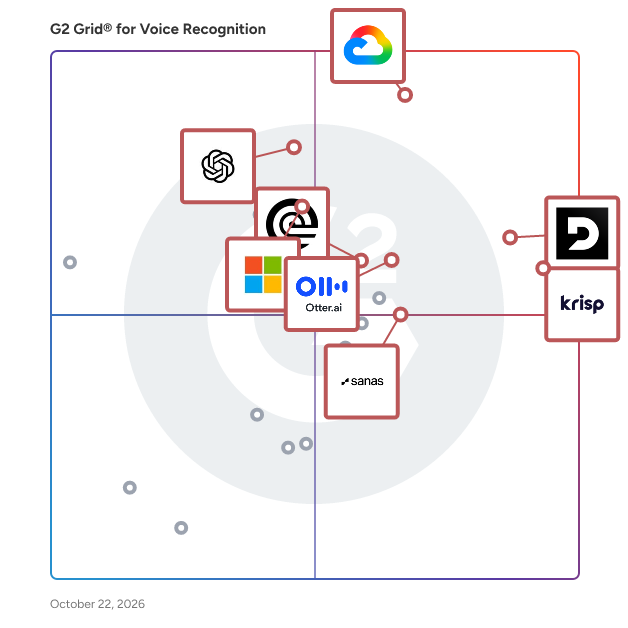
G2 Grid® for Voice Recognition Software

G2 Grid® for Voice Recognition Software plotting products by satisfaction and market presence

Highlighted products: Google Cloud Speech-to-Text, Krisp, Deepgram, OpenAI Whisper, Otter.ai, Azure AI Speech, Rev, and AssemblyAI - Speech to Text API.

Underlying data: [Grid® JSON](https://www.g2.com/categories/voice-recognition/grids.json?focus%5B%5D=google-cloud-speech-to-text&focus%5B%5D=krisp&focus%5B%5D=deepgram&focus%5B%5D=openai-whisper&focus%5B%5D=otter-ai&focus%5B%5D=azure-ai-speech&focus%5B%5D=rev&focus%5B%5D=assemblyai-speech-to-text-api)

Google Cloud Speech-to-Text

Google Cloud’s Speech API processes more than 1 billion voice minutes per month with close to human levels of understanding for many commonly spoken languages. Powered by the best of Google's AI research and technology, Google Cloud's Speech-to-Text API helps you accurately transcribe speech into text in 73 languages and 137 different local variants. Leverage Google’s most advanced deep learning neural network algorithms for automatic speech recognition (ASR) and deploy ASR wherever you need it, whether in the cloud with the API, on-premises with Speech-to-Text On-Prem, or locally on any device with Speech On-Device.

Average Rating: 4.5/5.0

Total Reviews: 311

How Do G2 Users Rate Google Cloud Speech-to-Text?

  • Has the product been a good partner in doing business?: 8.9/10 (Category avg: 8.8/10)
  • Ease of Admin: 8.9/10 (Category avg: 8.6/10)
  • Ease of Setup: 8.7/10 (Category avg: 8.8/10)
  • Quality of Support: 8.8/10 (Category avg: 8.8/10)

Who Is the Company Behind Google Cloud Speech-to-Text?

  • Seller: Google
  • Year Founded: 1998
  • HQ Location: Mountain View, CA
  • Twitter: @google
    31,899,995 Twitter followers
  • LinkedIn® Page: www.linkedin.com
    301,144 employees on LinkedIn®
  • Ownership: NASDAQ:GOOG

Who Uses This Product?

  • Who Uses This: Data Engineer, Senior Software Engineer
  • Top Industries: Information Technology and Services, Computer Software
  • Company Size: 45% Small, 37% Medium

What Do G2 Reviewers Say About Google Cloud Speech-to-Text?

AI-generated summary from verified user reviews

Pros
  • Users love the ease of use of Google Cloud Speech-to-Text, appreciating its simple setup and fast transcription.
  • Users appreciate the accuracy and speed of transcription in Google Cloud Speech-to-Text for efficient meeting summaries.
  • Users recognize the high transcription accuracy of Google Cloud Speech-to-Text, enhancing their efficiency during meetings and live applications.
  • Users rave about the accuracy of Google Cloud Speech-to-Text, especially with various accents and real-time transcriptions.
  • Users appreciate the real-time transcription feature of Google Cloud Speech-to-Text for its speed and accuracy in meetings.
Cons
  • Users note that the cost can quickly become expensive when handling high volumes of audio processing.
  • Users note that pricing can escalate significantly with high audio processing volumes, affecting budget considerations.
  • Users report accuracy issues, often requiring manual corrections for transcriptions, especially in challenging environments and dialects.
  • Users find the complexity of managing access and navigating multiple Google products frustrating and time-consuming.
  • Users note that the cost can increase significantly with higher audio processing volumes, which may be a concern.

What Are Recent G2 Reviews of Google Cloud Speech-to-Text?

Deepgram

Enterprise Voice AI platform designed for developers building voice-first products using speech-to-text, text-to-speech, or speech-to-speech APIs. Over 200,000 developers build with Deepgram's voice-native foundational models, accessed via APIs or self-managed software. Start building with $200 in free credits! Beyond that, developers can: 🔊 Process live-streaming or pre-recorded audio with superior accuracy 🗣️ Convert text into natural-sounding AI voices for enterprise use cases with text-to-speech ⚡️ Easily build voice agents with our unified Voice Agent API 🌎 Accurately transcribe audio in over 36+ languages ⚙️ Train custom models for unique use cases 🔑 Access deep NLU with a unified API 💻 Build in any programming language with our SDKs ✅ Deploy on-prem or on DG’s managed cloud 📈 Get scalable GPU infra for training and inference

Average Rating: 4.6/5.0

Total Reviews: 477

How Do G2 Users Rate Deepgram?

  • Has the product been a good partner in doing business?: 9.1/10 (Category avg: 8.8/10)
  • Ease of Admin: 8.9/10 (Category avg: 8.6/10)
  • Ease of Setup: 8.9/10 (Category avg: 8.8/10)
  • Quality of Support: 8.8/10 (Category avg: 8.8/10)

Who Is the Company Behind Deepgram?

  • Seller: Deepgram
  • Company Website:
  • Year Founded: 2015
  • HQ Location: San Francisco, California
  • Twitter: @DeepgramAI
    10,837 Twitter followers
  • LinkedIn® Page: www.linkedin.com
    371 employees on LinkedIn®

Who Uses This Product?

  • Who Uses This: Software Engineer, CEO
  • Top Industries: Computer Software, Information Technology and Services
  • Company Size: 80% Small, 19% Medium

What Do G2 Reviewers Say About Deepgram?

AI-generated summary from verified user reviews

Pros
  • Users praise the high accuracy of Deepgram, benefiting from fast and reliable speech-to-text transcriptions.
  • Users praise Deepgram for its fast and reliable transcriptions, making transcription tasks significantly easier and quicker.
  • Users appreciate the ease of use of Deepgram, thanks to its simple API and efficient transcription services.
  • Users commend Deepgram for its excellent transcription accuracy and user-friendly integration, enhancing their audio processing experience.
  • Users commend Deepgram for its fast and accurate real-time transcription, enhancing analysis and live applications effortlessly.
Cons
  • Users are frustrated by the limited language support which hinders the platform's versatility and usability.
  • Users find the pricing issues concerning, especially for large projects and tight budgets, making it less accessible.
  • Users find the pricing high, making it challenging for startups and students with limited budgets.
  • Users experience inaccuracy issues with Deepgram, including missed words and limited language support that hinder transcription quality.
  • Users note the limited language support of Deepgram, though enhancements are in progress to address this issue.

What Are Recent G2 Reviews of Deepgram?

What Are G2 Users Discussing About Deepgram?

Krisp

Krisp is a voice productivity and real-time AI communication platform that helps teams, contact centers, and developers deliver clearer conversations through real-time noise suppression, accent conversion, voice translation, transcription, summarization, and other AI-driven voice features. It provides a privacy-first, scalable audio solutions for calls, meetings, customer support, and embedded voice applications. Krisp brings together three AI-powered products in one platform—AI Meeting Assistant, AI Call Center, and Real-Time AI Voice SDK. It runs on-device or in the cloud and integrates seamlessly with all major conferencing platforms and developer environments. AI Meeting Assistant - Live transcription and recording without required bots - AI-generated meeting summaries, action items, and CRM sync - Noise, echo, and background voice cancellation for crisp audio - Multilingual support and custom vocabulary for industry terms AI Call Center - Real-time accent conversion for global customer communication - Instant voice translation across 80+ languages - AI Agent Assist for live knowledge prompts, after-call summaries, and coaching - Advanced noise, echo, and voice cancellation for clear, effective calls Real-Time AI Voice SDK - Voice isolation and turn-taking for natural voice AI interactions - Outbound Background Voice Cancellation (BVC) for real-time communication - Inbound and outbound Noise Cancellation (NC) - Accent Conversion for calls - Cross-platform libraries and wrappers for web, mobile, desktop, and server deployments Krisp is SOC 2, GDPR, HIPAA, and PCI-DSS certified and does not store voice data. Deployed on more than 200 million devices and processing over 80 billion minutes of conversations each month, it gives organizations a unified way to improve meeting productivity, raise contact center performance, and build advanced voice-enabled products

Average Rating: 4.7/5.0

Total Reviews: 1,591

How Do G2 Users Rate Krisp?

  • Has the product been a good partner in doing business?: 8.8/10 (Category avg: 8.8/10)
  • Ease of Admin: 9.0/10 (Category avg: 8.6/10)
  • Ease of Setup: 9.3/10 (Category avg: 8.8/10)
  • Quality of Support: 8.9/10 (Category avg: 8.8/10)

Who Is the Company Behind Krisp?

  • Seller: Krisp Technologies, Inc.
  • Company Website:
  • Year Founded: 2017
  • HQ Location: Berkeley, California
  • Twitter: @krispHQ
    6,531 Twitter followers
  • LinkedIn® Page: www.linkedin.com
    393 employees on LinkedIn®

Who Uses This Product?

  • Who Uses This: Software Engineer, CEO
  • Top Industries: Computer Software, Information Technology and Services
  • Company Size: 53% Small, 20% Medium

What Do G2 Reviewers Say About Krisp?

AI-generated summary from verified user reviews

Pros
  • Users appreciate the ease of use of Krisp, finding the setup simple and integration seamless in daily meetings.
  • Users appreciate the effective noise cancellation of Krisp, enhancing focus during online meetings in noisy environments.
  • Users value the efficient voice transcription of Krisp, which enhances meeting management and note-taking significantly.
  • Users value Krisp's high reliability for noise cancellation, ensuring clear communication even in noisy environments.
  • Users commend Krisp for its easy setup, facilitating seamless integration with various platforms and enhancing focus on meetings.
Cons
  • Users experience audio issues like choppy sound and latency, especially when using heavy filtering on Krisp.
  • Users report inaccurate transcription, particularly in Hindi, limiting effectiveness and raising concerns over pricing in India.
  • Users find the transcription accuracy to be poor, often resulting in incorrect transcriptions during meetings.
  • Users note that AI inaccuracy can disrupt meetings with incorrect transcripts and misidentified speakers.
  • Users report noise issues with Krisp, including mic problems and occasional distortion during meetings.

What Are Recent G2 Reviews of Krisp?

What Are G2 Users Discussing About Krisp?

OpenAI Whisper

Whisper is a general-purpose speech recognition model. It is trained on a large dataset of diverse audio and is also a multitasking model that can perform multilingual speech recognition, speech translation, and language identification.

Average Rating: 4.3/5.0

Total Reviews: 50

How Do G2 Users Rate OpenAI Whisper?

  • Has the product been a good partner in doing business?: 9.3/10 (Category avg: 8.8/10)
  • Ease of Admin: 8.8/10 (Category avg: 8.6/10)
  • Ease of Setup: 8.4/10 (Category avg: 8.8/10)
  • Quality of Support: 8.2/10 (Category avg: 8.8/10)

Who Is the Company Behind OpenAI Whisper?

  • Seller: OpenAI
  • Year Founded: 2015
  • HQ Location: San Francisco, CA
  • Twitter: @OpenAI
    4,941,980 Twitter followers
  • LinkedIn® Page: www.linkedin.com
    10,438 employees on LinkedIn®

Who Uses This Product?

  • Top Industries: Computer Software
  • Company Size: 63% Small, 27% Medium

What Do G2 Reviewers Say About OpenAI Whisper?

AI-generated summary from verified user reviews

Pros
  • Users praise the high accuracy of OpenAI Whisper, even in challenging noisy environments, meeting their needs effectively.
  • Users appreciate the clear documentation of OpenAI Whisper, facilitating simple setup and integration into workflows.
  • Users appreciate the implementation ease of OpenAI Whisper, thanks to its clear documentation and smooth integration.
  • Users appreciate the strong multilingual support of OpenAI Whisper, enhancing its reliability across diverse accents and audio conditions.
  • Users praise the noise cancellation of OpenAI Whisper, appreciating its accuracy in noisy environments.
Cons
  • Users find the slow processing of long audio files to be frustrating and time-consuming with OpenAI Whisper.
  • Users note the improvement needed in Whisper's processing speed and capabilities for large files and live transcription.
  • Users experience slow performance with OpenAI Whisper, especially with large files and during real-time transcription.

What Are Recent G2 Reviews of OpenAI Whisper?

Otter.ai

Otter.ai is the leading AI Meeting Assistant that helps sales, marketing, product, finance, operations design, customer success, customer support and cross functional teams automatically record, transcribe, and summarize all their meetings, making it easy to recall action items and easily share key insights. Otter integrates with leading video conference platforms, including Zoom, Microsoft Teams, and Google Meet, to automatically join and generate meeting notes. Otter AI Chat is like having ChatGPT for your meetings, it allows meeting participants to ask Otter questions about the meeting, including “what did I miss”, or “write a follow-up email to all participants”. Otter offers iOS and Android Apps to make it easy to record and transcribe in-person meetings. Otter also allows users to import and transcribe pre-recorded audio and video files. Designed specifically for the workflow of sales teams, OtterPilot for Sales shortens sales cycles by capturing critical information in real-time and automating follow-up emails and sentiment analysis. OtterPilot for Sales integrates with Salesforce and Hubspot to help automate call reporting. Improve win rates by sharing best practices and coaching reps based on data-driven insights. Boost productivity and free up time by automating tedious tasks like note-taking and data entry so SDRs, Sale Reps, Account Executives, Customer Success Managers, Sales Leaders and CROs can focus all of their attention on the customer and closing more deals. Otter.ai has over 15 million registered users and has transcribed over a billion meetings. Otter was named a top AI App by The Wall Street Journal in June 2023.

Average Rating: 4.4/5.0

Total Reviews: 499

How Do G2 Users Rate Otter.ai?

  • Has the product been a good partner in doing business?: 8.5/10 (Category avg: 8.8/10)
  • Ease of Admin: 8.6/10 (Category avg: 8.6/10)
  • Ease of Setup: 9.0/10 (Category avg: 8.8/10)
  • Quality of Support: 8.4/10 (Category avg: 8.8/10)

Who Is the Company Behind Otter.ai?

  • Seller: Otter.ai
  • Company Website:
  • HQ Location: Mountain View, California
  • Twitter: @otter_ai
    17,074 Twitter followers
  • LinkedIn® Page: www.linkedin.com
    298 employees on LinkedIn®

Who Uses This Product?

  • Who Uses This: CEO, Account Executive
  • Top Industries: Computer Software, Marketing and Advertising
  • Company Size: 70% Small, 20% Medium

What Do G2 Reviewers Say About Otter.ai?

AI-generated summary from verified user reviews

Pros
  • Users appreciate the ease of use of Otter.ai, finding it simple to transcribe and summarize conversations.
  • Users appreciate the helpfulness of Otter.ai, streamlining note-taking and enhancing meeting summaries for easy reference.
  • Users appreciate the high accuracy of Otter.ai's transcripts, ensuring reliable and precise speech-to-text conversions.
  • Users find Otter.ai's efficient transcription invaluable for summarizing meetings and accurately capturing speaker discussions.
  • Users value the effective meeting organization by Otter.ai, relishing easy access to notes and key action points.
Cons
  • Users often face recording issues with Otter.ai, leading to confusion and manual recording requirements for accuracy.
  • Users experience accuracy issues with heavy accents, background noise, and overlapping speech, affecting transcription quality.
  • Users experience accuracy issues with Otter.ai, especially with accents, background noise, and multiple speakers.
  • Users report AI inaccuracy in transcriptions with accents, simultaneous speakers, and challenging terminology impacting their experience.
  • Users find that Otter.ai has missing features in post-meeting summaries and speaker identification, affecting usability and efficiency.

What Are Recent G2 Reviews of Otter.ai?

What Are G2 Users Discussing About Otter.ai?

Azure AI Speech

Azure AI Speech is a comprehensive suite of AI-powered speech services designed to enhance applications with advanced voice capabilities. It offers developers tools to integrate features such as speech-to-text, text-to-speech, speech translation, and speaker recognition into their applications, enabling natural and efficient voice interactions. Key Features and Functionality: - Speech-to-Text: Accurately transcribe spoken language into text in real-time or through batch processing, supporting over 140 languages and dialects. - Text-to-Speech: Convert written text into natural-sounding speech using a variety of prebuilt neural voices, with options to create custom voices that reflect a brand's unique identity. - Speech Translation: Facilitate real-time, multi-language communication by translating spoken audio into different languages, supporting a wide range of language pairs. - Speaker Recognition: Identify and verify individual speakers based on their voice characteristics, enhancing security and personalization in applications. - Voice Live API: Enable low-latency, high-quality speech-to-speech interactions for voice agents, integrating speech recognition, generative AI, and text-to-speech functionalities into a single, unified interface. Primary Value and Solutions Provided: Azure AI Speech empowers developers to create voice-enabled applications that offer natural and engaging user experiences. By leveraging its multilingual support and customizable voice options, businesses can enhance accessibility, improve customer service through interactive voice response systems, and expand their reach to a global audience. The service's flexibility allows deployment in the cloud or at the edge, ensuring seamless integration into various platforms and devices.

Average Rating: 4.0/5.0

Total Reviews: 67

How Do G2 Users Rate Azure AI Speech?

  • Has the product been a good partner in doing business?: 8.5/10 (Category avg: 8.8/10)
  • Ease of Admin: 7.9/10 (Category avg: 8.6/10)
  • Ease of Setup: 8.1/10 (Category avg: 8.8/10)
  • Quality of Support: 8.1/10 (Category avg: 8.8/10)

Who Is the Company Behind Azure AI Speech?

  • Seller: Microsoft
  • Year Founded: 1975
  • HQ Location: Redmond, Washington
  • Twitter: @microsoft
    13,091,739 Twitter followers
  • LinkedIn® Page: www.linkedin.com
    232,750 employees on LinkedIn®
  • Ownership: MSFT

Who Uses This Product?

  • Top Industries: Information Technology and Services, Computer Software
  • Company Size: 50% Small, 25% Large

What Do G2 Reviewers Say About Azure AI Speech?

AI-generated summary from verified user reviews

Pros
  • Users appreciate the high accuracy of Azure AI Speech, delivering precise results even in noisy environments.
  • Users value the multilingual capabilities of Azure AI Speech, enhancing scalability and integration within the Microsoft ecosystem.
  • Users value the high accuracy of Azure AI Speech in speech-to-text conversion, enhancing transcription for clear audio.
  • Users praise the seamless integrations of Azure AI Speech with Microsoft tools, enhancing efficiency and functionality.
  • Users appreciate the ease of use of Azure AI Speech, praising its seamless integration and efficient setup process.
Cons
  • Users find Azure AI Speech's inaccuracy in pronunciation and word conversion frustrating, especially in non-English languages.
  • Users find that Azure AI Speech struggles with accent recognition, particularly in noisy environments with multiple speakers.
  • Users report integration issues that complicate setup and limit functionality, especially for non-technical users.
  • Users experience noise issues with Azure AI Speech, particularly in noisy environments or with heavy accents, affecting accuracy.
  • Users find the poor documentation of Azure AI Speech challenging, hindering smooth setup and integration processes.

What Are Recent G2 Reviews of Azure AI Speech?

What Are G2 Users Discussing About Azure AI Speech?

Rev

Rev is the Investigative Platform that turns digital evidence into a searchable, citable record, built for attorneys, prosecutors, law enforcement, and investigators who are drowning in evidence. Body-worn camera footage, dash cam video, jail calls, 911 recordings, witness interviews, photos, and depositions pile up faster than any team can review by hand, and Rev exists to close that gap between the evidence teams have and the time they have to work through it. Rev combines industry-leading speech recognition, purpose-built for the hardest audio environments in legal and law enforcement, with AI that cites every finding back to a timestamp or image in the original source file. Nothing is generated without being verifiable. That distinction matters: legal transcription accuracy is table stakes, but a citation that can't be traced back to the record isn't useful in a courtroom, a suppression hearing, or an internal affairs review. Every result Rev produces is built to hold up under that kind of scrutiny. What sets Rev apart is what happens after transcription. Investigators and attorneys can search across dozens of files at once instead of reviewing one recording at a time, surfacing the inconsistency or the corroborating detail before opposing counsel or the other side finds it first. Rev also analyzes images and video stills for relevant visual evidence, and it drafts reports, memos, and case documents directly from the record, cutting down the time spent moving information from a recording into a usable document. All of this happens without replacing the judgment of the professional responsible for the case. Rev keeps humans in control by design, and when precision is non-negotiable, optional human review adds another layer of assurance. Security is built in, not bolted on. Rev meets CJIS, HIPAA, and SOC 2 compliance standards and shares zero data with third-party LLMs. Evidence stays in a closed loop, and nothing trains a third-party model, ever. That makes Rev usable in environments where general-purpose AI tools create real ethical and security risk for legal and investigative teams working with sensitive case data. The result is faster case review, fewer missed details, fewer overtime hours, and more time spent on analysis and decision-making instead of playback and paperwork. Responsibility for judgment stays exactly where it belongs, with the people trained to exercise it.

Average Rating: 4.7/5.0

Total Reviews: 620

How Do G2 Users Rate Rev?

  • Has the product been a good partner in doing business?: 9.5/10 (Category avg: 8.8/10)
  • Ease of Admin: 9.4/10 (Category avg: 8.6/10)
  • Ease of Setup: 9.6/10 (Category avg: 8.8/10)
  • Quality of Support: 9.2/10 (Category avg: 8.8/10)

Who Is the Company Behind Rev?

  • Seller: Rev.com
  • Company Website:
  • Year Founded: 2010
  • HQ Location: Austin, Texas
  • Twitter: @rev
    10,643 Twitter followers
  • LinkedIn® Page: www.linkedin.com
    3,968 employees on LinkedIn®

Who Uses This Product?

  • Who Uses This: Owner, Attorney
  • Top Industries: Marketing and Advertising, Media Production
  • Company Size: 59% Small, 23% Medium

What Do G2 Reviewers Say About Rev?

AI-generated summary from verified user reviews

Pros
  • Users appreciate the accuracy of Rev's transcriptions, noting its efficiency and convenience in handling interviews.
  • Users appreciate the time-saving and flexible transcription capabilities of Rev, making it an invaluable tool for various needs.
  • Users love the ease of use of Rev, enabling efficient editing and seamless audio-video synchronization for projects.
  • Users appreciate the high accuracy of transcriptions from Rev, making it easy and efficient for audio and video editing.
  • Users find Rev to be a time-saving resource, transforming tedious transcription into a quick and efficient process.
Cons
  • Users find that Rev has inaccurate transcription issues, especially with unclear audio, requiring manual edits for accuracy.
  • Users note that AI in Rev can struggle with inaccuracy in recognizing handwriting and distinguishing speakers, affecting transcript quality.
  • Users experience inaccuracy in transcriptions with Rev, especially in noisy environments requiring manual corrections.
  • Users experience poor transcription accuracy with Rev, particularly in speaker identification that can lead to confusion in transcripts.
  • Users experience recording limitations, as accuracy drops with poor sound quality and timestamps are often incomplete.

What Are Recent G2 Reviews of Rev?

What Are G2 Users Discussing About Rev?

AssemblyAI - Speech to Text API

Founded in 2017 and headquartered in San Francisco, AssemblyAI is a Voice AI platform serving over 200,000 developers worldwide. AssemblyAI specializes in providing speech recognition and understanding capabilities through API-based services, with a focus on conversation intelligence and voice agent applications. Companies ranging from early-stage startups to Fortune 500 enterprises across technology, healthcare, legal, and telecommunications industries rely on this comprehensive speech processing API. Developers leverage AssemblyAI's API to build speech-to-text transcription, speaker diarization, sentiment analysis, entity recognition, and summarization into their product lines. Core features include real-time and batch audio processing, automatic language detection across 40+ languages, PII redaction for compliance requirements, and custom vocabulary support. By addressing the challenge of extracting actionable insights from voice data at scale, AssemblyAI enables organizations to automate conversation analysis, improve quality assurance processes, enhance customer experience monitoring, and build voice-enabled applications. Common implementations include call center analytics, meeting transcription services, voice assistant development, and compliance recording systems. AssemblyAI's accuracy in multi-speaker environments and specialized conversation intelligence features accurately identifies and separates different speakers in conversations while maintaining high transcription accuracy, even with background noise, accents, and technical terminology. Unlike general-purpose speech recognition services, the API provides purpose-built features for conversation analysis and enables rapid integration into your ecosystems, typically allowing developers to implement production-ready voice capabilities within days rather than months. Operating on a usage-based pricing model, AssemblyAI offers flexible billing options with zero commitments required for customers of all sizes. Developers can start for free and pay as they go, with no upfront commitments—only paying for what they use. Our API provides production-ready access with high default concurrency and automatic scaling, including unlimited concurrency options and customizable rate limits for any workload. Get started with AssemblyAI today—sign up for free and receive $50 in credits to explore our Voice AI capabilities.

Average Rating: 4.6/5.0

Total Reviews: 124

How Do G2 Users Rate AssemblyAI - Speech to Text API?

  • Has the product been a good partner in doing business?: 9.0/10 (Category avg: 8.8/10)
  • Ease of Admin: 8.6/10 (Category avg: 8.6/10)
  • Ease of Setup: 9.0/10 (Category avg: 8.8/10)
  • Quality of Support: 8.9/10 (Category avg: 8.8/10)

Who Is the Company Behind AssemblyAI - Speech to Text API?

  • Seller: AssemblyAI
  • Company Website:
  • Year Founded: 2017
  • HQ Location: San Francisco, California
  • Twitter: @AssemblyAI
    45,724 Twitter followers
  • LinkedIn® Page: www.linkedin.com
    109 employees on LinkedIn®

Who Uses This Product?

  • Who Uses This: CTO, CEO
  • Top Industries: Computer Software, Information Technology and Services
  • Company Size: 71% Small, 14% Medium

What Do G2 Reviewers Say About AssemblyAI - Speech to Text API?

AI-generated summary from verified user reviews

Pros
  • Users commend the high accuracy of AssemblyAI's Speech to Text API, ensuring reliable transcriptions for various applications.
  • Users value the ease of use in AssemblyAI's Speech to Text API, praising its straightforward setup and seamless integration.
  • Users value the outstanding transcription accuracy of AssemblyAI, even with noisy or low-quality audio inputs.
  • Users love the speed and reliability of AssemblyAI, enabling quick access to accurate transcriptions and timestamps.
  • Users commend the exceptional accuracy and advanced features of AssemblyAI, enhancing their transcription and QA processes significantly.
Cons
  • Users note that limited language support hampers their experience, especially for multiple languages and specific dialects.
  • Users report issues with inaccuracy, particularly with similar voices, technical terms, heavy accents, and fast speech.
  • Users find pricing issues significant, especially for advanced features and real-time transcription costs affecting usage decisions.
  • Users face slow processing with transcription latency, making real-time conversations challenging and unreliable for timely responses.
  • Users find that improvement is needed in workflow, punctuation, and the complexity of websocket setup.

What Are Recent G2 Reviews of AssemblyAI - Speech to Text API?

What Are G2 Users Discussing About AssemblyAI - Speech to Text API?

IBM Watson Speech to Text

Watson Speech to Text is a cloud-native solution that uses deep-learning AI algorithms to apply knowledge about grammar, language structure, and audio/voice signal composition to create customizable speech recognition for optimal text transcription. Check out Watson Speech to Text in action, with our free trial: https://ibm.biz/speechtotexttrial Live demo also available - http://ibm.biz/speechtotextdemo

Average Rating: 4.1/5.0

Total Reviews: 17

How Do G2 Users Rate IBM Watson Speech to Text?

  • Has the product been a good partner in doing business?: 8.1/10 (Category avg: 8.8/10)
  • Ease of Admin: 7.9/10 (Category avg: 8.6/10)
  • Ease of Setup: 8.3/10 (Category avg: 8.8/10)
  • Quality of Support: 8.6/10 (Category avg: 8.8/10)

Who Is the Company Behind IBM Watson Speech to Text?

  • Seller: IBM
  • Year Founded: 1911
  • HQ Location: Armonk, New York, United States
  • Twitter: @IBMSecurity
    74,660 Twitter followers
  • LinkedIn® Page: www.linkedin.com
    344,328 employees on LinkedIn®
  • Ownership: SWX:IBM

Who Uses This Product?

  • Top Industries: Information Technology and Services
  • Company Size: 47% Small, 41% Medium

What Do G2 Reviewers Say About IBM Watson Speech to Text?

AI-generated summary from verified user reviews

Pros
  • Users appreciate the high accuracy of IBM Watson Speech to Text, effectively transcribing speech even in diverse conditions.
  • Users appreciate the real-time transcription capability of IBM Watson, ensuring accuracy and efficiency in converting speech to text.
  • Users appreciate the multilingual support of IBM Watson Speech to Text, enhancing accessibility for diverse users and applications.
  • Users value the accuracy and reliability of IBM Watson Speech to Text for transcribing multilingual audio in real time.
  • Users praise the high transcription accuracy of IBM Watson Speech to Text, enhancing usability in various applications.
Cons
  • Users struggle with the high-cost at scale of IBM Watson Speech to Text, making budgeting challenging for large projects.
  • Users face internet dependency issues with IBM Watson Speech to Text, limiting functionality and complicating usage without connectivity.
  • Users report frequent noise issues that hinder the effectiveness of IBM Watson Speech to Text, complicating usability.
  • Users find the complex and laggy interface challenging, especially for beginners, affecting overall usability.
  • Users find that accent recognition can require additional tuning, especially when processing large audio volumes, impacting costs.

What Are Recent G2 Reviews of IBM Watson Speech to Text?

What Are G2 Users Discussing About IBM Watson Speech to Text?

Amazon Transcribe

Amazon Transcribe is a fully managed automatic speech recognition (ASR) service that enables developers to integrate speech-to-text capabilities into their applications effortlessly. Powered by advanced machine learning models, it delivers high-accuracy transcriptions for both streaming and recorded audio across a wide range of languages. Organizations across various industries utilize Amazon Transcribe to automate manual transcription tasks, extract valuable insights, enhance accessibility, and improve the discoverability of audio and video content. Key Features and Functionality: - Real-Time and Batch Transcription: Supports both live audio streams and pre-recorded files, providing flexibility for different use cases. - Custom Vocabulary and Language Models: Allows users to add domain-specific terminology and train custom language models to improve transcription accuracy. - Speaker Diarization: Identifies and labels different speakers in an audio file, facilitating clear attribution in conversations. - Automatic Punctuation and Formatting: Enhances readability by adding punctuation and formatting numbers appropriately. - Content Redaction: Automatically detects and redacts sensitive information, such as personally identifiable information (PII), to maintain privacy and compliance. - Channel Identification: Processes multi-channel audio files and provides a single transcript annotated with respective channel labels, beneficial for contact centers and media applications. - Language Identification: Automatically detects the dominant language in an audio file, streamlining workflows involving multilingual content. Primary Value and Problem Solved: Amazon Transcribe addresses the challenge of converting speech into accurate, readable text, enabling businesses to unlock the value hidden within their audio data. By automating transcription processes, it reduces the time and resources required for manual transcription, enhances content accessibility, and facilitates the analysis of customer interactions, meetings, and media content. This leads to improved customer experiences, better compliance with privacy regulations through automated redaction, and the ability to derive actionable insights from audio and video materials.

Average Rating: 3.9/5.0

Total Reviews: 16

How Do G2 Users Rate Amazon Transcribe?

  • Has the product been a good partner in doing business?: 8.3/10 (Category avg: 8.8/10)
  • Ease of Admin: 7.5/10 (Category avg: 8.6/10)
  • Ease of Setup: 7.7/10 (Category avg: 8.8/10)
  • Quality of Support: 7.7/10 (Category avg: 8.8/10)

Who Is the Company Behind Amazon Transcribe?

  • Seller: Amazon Web Services (AWS)
  • Year Founded: 2006
  • HQ Location: Seattle, WA
  • Twitter: @awscloud
    2,232,483 Twitter followers
  • LinkedIn® Page: www.linkedin.com
    147,094 employees on LinkedIn®
  • Ownership: NASDAQ: AMZN

Who Uses This Product?

  • Company Size: 38% Small, 31% Medium

What Do G2 Reviewers Say About Amazon Transcribe?

AI-generated summary from verified user reviews

Pros
  • Users find Amazon Transcribe's ease of use a significant advantage, seamlessly integrating into their existing toolsets.
  • Users find the accuracy of Amazon Transcribe impressive, delivering reliable results for various transcription needs.
  • Users find that Amazon Transcribe’s AI technology significantly streamlines their tasks and enhances project outcomes.
  • Users appreciate the easy integration with AWS services, enhancing their transcription capabilities effortlessly.
  • Users appreciate the cost-effective pricing model of Amazon Transcribe, benefiting from its pay-per-user structure.
Cons
  • Users find Amazon Transcribe expensive for large volumes of data, suggesting alternatives like custom model deployments for cost savings.
  • Users highlight the inaccurate transcription due to lack of dialect-specific options, impacting translation quality significantly.
  • Users criticize the limited language support, especially the lack of dialect-specific options for translations.
  • Users find the poor transcription accuracy problematic, leading to increased effort in refining translations due to dialect issues.
  • Users criticize the poor translation accuracy due to the lack of dialect-specific options in Amazon Transcribe.

What Are Recent G2 Reviews of Amazon Transcribe?

Speechmatics

Speechmatics: Best-in-Market Speech-to-Text & Voice AI for Enterprises Speechmatics delivers industry-leading Speech-to-Text and Voice AI solutions, designed for enterprises that demand best-in-class accuracy, security, and flexibility. Our enterprise-grade APIs provide real-time and batch transcription with unmatched precision—across the widest range of languages, dialects, and accents. Built on Foundational Speech Technology, Speechmatics powers mission-critical voice applications, from media & entertainment to contact centers, financial services, healthcare and beyond. With on-premises and cloud deployment options, businesses can ensure data security and compliance while unlocking the full potential of their voice data. Trusted by global leaders, Speechmatics is the go-to solution for enterprises looking to transcribe, analyze, and understand speech with unrivaled accuracy. 🔹Unmatched Accuracy – Industry-best transcription across diverse languages & accents 🔹Flexible Deployment – Cloud, on-prem, and hybrid solutions 🔹Enterprise-Grade Security – Full control over your data 🔹Real-Time & Batch Processing – Instant or large-scale transcription Power your Speech-to-Text and Voice AI applications with Speechmatics today. 🚀

Average Rating: 4.7/5.0

Total Reviews: 69

How Do G2 Users Rate Speechmatics?

  • Has the product been a good partner in doing business?: 9.3/10 (Category avg: 8.8/10)
  • Ease of Admin: 9.0/10 (Category avg: 8.6/10)
  • Ease of Setup: 8.8/10 (Category avg: 8.8/10)
  • Quality of Support: 9.2/10 (Category avg: 8.8/10)

Who Is the Company Behind Speechmatics?

  • Seller: Speechmatics
  • Company Website:
  • Year Founded: 2006
  • HQ Location: Cambridge, England‎
  • Twitter: @Speechmatics
    3,902 Twitter followers
  • LinkedIn® Page: www.linkedin.com
    116 employees on LinkedIn®

Who Uses This Product?

  • Top Industries: Computer Software, Broadcast Media
  • Company Size: 54% Small, 30% Medium

What Do G2 Reviewers Say About Speechmatics?

AI-generated summary from verified user reviews

Pros
  • Users praise the exceptional accuracy of Speechmatics, enhancing efficiency and reliability in various transcription tasks.
  • Users praise the exceptional transcription accuracy of Speechmatics, making their workflows more efficient and seamless.
  • Users appreciate the ease of use of Speechmatics, benefiting from a straightforward interface and quick customer support.
  • Users appreciate the accuracy and simplicity of Speechmatics, enhancing productivity with hassle-free audio transcriptions.
  • Users highlight the efficiency of Speechmatics, noting its quick, accurate transcriptions that enhance productivity.
Cons
  • Users find limited features frustrating, such as restricted file uploads and missing functionalities for their transcription needs.
  • Users note the limited language support in Speechmatics, particularly for diverse local languages from Africa.
  • Users experience slow performance due to high latencies, which can hinder effective use in call centers.
  • Users face a limited selection of language options in Speechmatics, lacking support for diverse local languages.
  • Users find the missing features in Speechmatics limit functionality, wishing for improvements like extended transcription history and better documentation.

What Are Recent G2 Reviews of Speechmatics?

Notta

Notta is an AI meeting assistant that transforms voice conversations into searchable knowledge and ready-to-share deliverables, capturing every meeting—online, in-person, or from uploaded files. Available across web, iOS, Android, desktop, Apple Watch, and as a Chrome extension, it enables seamless capture wherever work happens. At its core is Notta Brain, an advanced AI layer that goes beyond transcription by automatically turning conversations into structured summaries, action items, infographics, and presentation-ready slide decks—significantly reducing the time needed for post-meeting work. Notta offers flexible usage with both bot-assisted recording and a bot-free experience via Notta Desktop, which discreetly captures meetings across Zoom, Microsoft Teams, Google Meet, and 40+ apps without disrupting the flow. Supporting transcription in 58 languages, it is built for global teams working across regions and time zones. With powerful search, organization, and export capabilities, users can quickly extract insights and repurpose content into shareable formats. Designed for executives, sales, customer success, consultants, and fast-moving teams, Notta turns every conversation into structured knowledge, because other tools give you a transcript, but Notta gives you the deliverable.

Average Rating: 4.2/5.0

Total Reviews: 410

How Do G2 Users Rate Notta?

  • Has the product been a good partner in doing business?: 9.1/10 (Category avg: 8.8/10)
  • Ease of Admin: 9.0/10 (Category avg: 8.6/10)
  • Ease of Setup: 8.9/10 (Category avg: 8.8/10)
  • Quality of Support: 8.9/10 (Category avg: 8.8/10)

Who Is the Company Behind Notta?

  • Seller: Notta
  • Year Founded: 2019
  • HQ Location: Tokyo, Japan
  • Twitter: @NottaOfficial
    961 Twitter followers
  • LinkedIn® Page: www.linkedin.com
    26 employees on LinkedIn®

Who Uses This Product?

  • Top Industries: Consulting, Information Technology and Services
  • Company Size: 63% Small, 8% Medium

What Do G2 Reviewers Say About Notta?

AI-generated summary from verified user reviews

Pros
  • Users appreciate the accurate and quick transcription of Notta, along with its intuitive interface for easy organization.
  • Users appreciate the accurate and quick transcription feature of Notta, enhancing their organization and collaboration efforts.
  • Users appreciate the accuracy and speed of Notta's transcriptions, finding them intuitive and easy to organize.
  • Users appreciate the ease of use of Notta, finding it simple and efficient for transcription and note management.
  • Users love the top accuracy of Notta's transcription, highlighting its speaker identification and editing features.
Cons
  • Users experience inaccurate transcriptions when audio quality is poor, affecting overall effectiveness and reliability.
  • Users experience inaccurate transcription with Notta, noting frequent errors and a lack of control over speech cleanup.
  • Users report inaccuracy issues with multiple speakers, accents, and noisy audio, necessitating additional edits for clarity.
  • Users find Notta to be quite expensive, especially when frequent transactions and limited features are considered.
  • Users find the pricing too high, preferring more flexible payment options rather than annual commitments.

What Are Recent G2 Reviews of Notta?

What Are G2 Users Discussing About Notta?

Gladia

From async to live streaming, Gladia's API empowers your platform with accurate, multilingual speech-to-text and actionable insights. Over 300,000+ users and over 700+ enterprise customers, including Attention, Aircall, Circleback, Method Financial, Recall, and VEED.IO trust us to deliver fast and accurate transcriptions that can be easily scaled and integrated into existing tech stacks. With Gladia, you can accelerate your roadmap with top-tier models for speech recognition and analysis, with industry-leading performance.

Average Rating: 4.8/5.0

Total Reviews: 23

How Do G2 Users Rate Gladia?

  • Has the product been a good partner in doing business?: 10.0/10 (Category avg: 8.8/10)
  • Ease of Admin: 9.2/10 (Category avg: 8.6/10)
  • Ease of Setup: 9.0/10 (Category avg: 8.8/10)
  • Quality of Support: 9.3/10 (Category avg: 8.8/10)

Who Is the Company Behind Gladia?

  • Seller: Gladia
  • Year Founded: 2022
  • HQ Location: Paris, Île-de-France
  • LinkedIn® Page: www.linkedin.com
    59 employees on LinkedIn®

Who Uses This Product?

  • Top Industries: Computer Software
  • Company Size: 65% Small, 26% Medium

What Do G2 Reviewers Say About Gladia?

AI-generated summary from verified user reviews

Pros
  • Users praise Gladia for its high accuracy and real-time processing, enabling reliable transcriptions across various languages.
  • Users admire the multilingual support of Gladia, enabling impressive transcription across 120 languages with high accuracy.
  • Users praise the easy API setup of Gladia, facilitating quick integration and impressive transcription accuracy.
  • Users praise Gladia for its fast and accurate transcriptions, making the transcription process smooth and efficient.
  • Users commend the speed and accuracy of Gladia's transcription service, enhancing their workflow with minimal effort.
Cons
  • Users find the costs prohibitive for large volumes of transcription, diminishing Gladia's overall value.
  • Users note that improvement is needed in Gladia's features like diarisation and multilingual support, as well as service reliability.
  • Users find that the pricing issues with Gladia can become significant for larger transcription volumes, affecting overall value.
  • Users experience user interface issues, finding it challenging to navigate, particularly if they're not tech-savvy.
  • Users note the missing features in Gladia, especially lacking diarisation and unique enterprise integrations.

What Are Recent G2 Reviews of Gladia?

Mihup

Mihup Interaction Analytics analyses 100% of customer conversations, uncovering their voice while revealing sales, service, and renewal opportunities for contact center teams to capitalise on. Its AI comes pre-trained on domain-specific contact centre context for faster, effective insights. The product evaluates every conversation against audit parameters and flags compliance breaches immediately. It also tracks agent effectiveness helping them level up with comprehensive coaching capabilities. What’s also important is Mihup Interaction Analytics’ ability to recommend approaches to close sales, enhance service delivery, and optimise processes, thanks to a fine-tuned Generative AI model. The flexible underpinning of the platform allows it to quickly introduce features expected in rapidly evolving industries like BFSI, fintech, e-commerce, and travel tech. With end-to-end automation offered out-of-the-box, Mihup Interaction Analytics accelerates insights, quality audit efficiency, and agent performance improvement. In addition, it delivers next best approaches and unified customer context. Get an enterprise-ready solution with customisable insights and dashboards. We help you go live in weeks, not months.

Average Rating: 4.7/5.0

Total Reviews: 67

How Do G2 Users Rate Mihup?

  • Has the product been a good partner in doing business?: 9.2/10 (Category avg: 8.8/10)
  • Ease of Admin: 9.4/10 (Category avg: 8.6/10)
  • Ease of Setup: 9.2/10 (Category avg: 8.8/10)
  • Quality of Support: 9.2/10 (Category avg: 8.8/10)

Who Is the Company Behind Mihup?

Who Uses This Product?

  • Who Uses This: Quality Analyst
  • Top Industries: Financial Services, Consumer Services
  • Company Size: 59% Medium, 25% Small

What Do G2 Reviewers Say About Mihup?

AI-generated summary from verified user reviews

Pros
  • Users value the accuracy of Mihup, enhancing customer understanding and service quality through efficient analysis.
  • Users find Mihup's platform to be easy to use, enhancing call evaluation and report generation effortlessly.
  • Users appreciate the easy implementation and user-friendly features of Mihup, enhanced by excellent customer support.
  • Users appreciate the proactive customer support from Mihup, enhancing their experience with knowledgeable guidance and assistance.
  • Users commend Mihup for its incredible efficiency, enhancing productivity through seamless interactions and quick, accurate responses.
Cons
  • Users find the user interface issues of Mihup detract from an otherwise smooth and efficient experience.
  • Users find the complexity of setup for Mihup challenging, especially with advanced filters and large datasets.
  • Users find the initial setup time-consuming and suggest improved documentation and communication for better onboarding.
  • Users find the learning curve challenging, requiring time to understand features and customize responses effectively.
  • Users find the poor UI design of Mihup cluttered and challenging, impacting overall experience with the product.

What Are Recent G2 Reviews of Mihup?

HTK (Hidden Markov Model Toolkit)

HTK (Hidden Markov Model Toolkit) is a comprehensive software suite designed for building and manipulating Hidden Markov Models (HMMs). Developed by the Cambridge University Engineering Department, HTK is primarily utilized in speech recognition research but has also been applied to areas such as speech synthesis, character recognition, and DNA sequencing. Key Features and Functionality: - HMM Training and Evaluation: HTK provides tools for training HMMs using labeled data and evaluating their performance, facilitating the development of accurate models for various applications. - Acoustic Model Training: The toolkit supports the creation of acoustic models essential for speech recognition systems, enabling the modeling of speech sounds and their variations. - Modular Design: HTK's modular architecture allows researchers to extend and customize its functionalities, making it adaptable to specific project requirements. - Comprehensive Documentation: Accompanied by a detailed manual, HTK offers extensive guidance on its usage, aiding both novice and experienced users in effectively utilizing the toolkit. Primary Value and User Solutions: HTK addresses the need for a robust and flexible platform in the field of speech recognition and related disciplines. By offering a suite of tools for HMM training and evaluation, it enables researchers and developers to construct and refine models tailored to their specific applications. Its adaptability and comprehensive documentation make it a valuable resource for advancing research and development in pattern recognition and machine learning domains.

Average Rating: 3.7/5.0

Total Reviews: 11

How Do G2 Users Rate HTK (Hidden Markov Model Toolkit)?

  • Ease of Admin: 6.7/10 (Category avg: 8.6/10)
  • Ease of Setup: 5.0/10 (Category avg: 8.8/10)
  • Quality of Support: 8.1/10 (Category avg: 8.8/10)

Who Is the Company Behind HTK (Hidden Markov Model Toolkit)?

Who Uses This Product?

  • Company Size: 63% Small, 19% Medium

What Do G2 Reviewers Say About HTK (Hidden Markov Model Toolkit)?

AI-generated summary from verified user reviews

Pros
  • Users value the ease of use of HTK, finding it an accessible tool for research in speech recognition.
  • Users appreciate HTK's robust versatility for various applications in speech recognition research.
Cons
  • Users find the usage difficulty of HTK challenging, particularly for those who are new to the toolkit.

What Are Recent G2 Reviews of HTK (Hidden Markov Model Toolkit)?

What Are G2 Users Discussing About HTK (Hidden Markov Model Toolkit)?

Tian Lin
TL
Researched and written by Tian Lin
Updated April 15, 2026

Learn More About Voice Recognition Software

What is Voice Recognition Software?

Voice recognition software, also known as automatic speech recognition (ASR) software or speech recognition, is a computer program or system designed to convert spoken language or audio input into written text. 

However, ASR software offers a range of features beyond speech recognition, including transcription services, voice command processing, etc. It utilizes advanced algorithms and machine learning techniques to analyze and interpret audio signals, identifying words and phrases and accurately transcribing them into text. 

This technology facilitates natural and efficient human-computer interaction by enabling voice commands, transcription services, voice assistants, and various applications across industries, including accessibility, customer service, and automation.

What are the Common Features of Voice Recognition Software?

The following are some essential aspects of voice recognition software that can assist users in several ways:

Speech-to-text conversion: The tool can accurately translate spoken words, phrases, and commands into written text, promoting effective communication and automating numerous processes using natural language input.

Natural language processing (NLP): This feature considers the context, recognizes various accents, and deciphers speech subtleties, allowing the software to comprehend and respond to human communication with more accuracy and contextual relevance.

Voice commands: This feature allows users to interact with various devices and apps using spoken commands. This simple engagement style allows for hands-free control, particularly useful when physical input is unfeasible or cumbersome, such as when operating smart home appliances, navigating GPS systems, or managing chores on a computer or mobile device.

What are the Benefits of Voice Recognition Software?

The following are some of the benefits of voice recognition software.

Automation: Voice recognition software significantly reduces the need for manual data entry, transcription, and repetitive tasks that involve converting spoken words into written text. 

For example, it can automate medical transcription in healthcare, allowing healthcare professionals to focus more on patient care than documentation. In business, it can expedite the creation of written documents from spoken notes, improving overall productivity.

Improved accessibility: This software is vital for individuals with disabilities. For those with mobility impairments or conditions that limit their ability to type, this technology enables them to interact with computers, smartphones, and other devices using their voice. It empowers them to access information, communicate, and perform tasks independently, enhancing their overall quality of life and participation in personal and professional activities.

Enhanced user experience: It allows for natural language interactions with devices and applications. Instead of navigating complex menus or interfaces, users can simply speak commands or questions in a conversational manner. This makes the technology more user-friendly and approachable, particularly for those who may not be tech-savvy. It also enhances customer experiences in applications like voice assistants, making interactions more human and intuitive.

Time saving: For professionals who rely on transcription services, it can significantly reduce the time required to convert audio recordings into written documents. This time-saving aspect can increase efficiency and enable faster turnaround times in various industries, such as journalism, legal, and research. 

Additionally, for everyday users, it expedites tasks like composing emails, creating documents, and taking notes, allowing them to be more productive in less time.

Who Uses Voice Recognition Software?

The following personas use voice recognition software.

Customer support representatives: Customer support representatives often use voice recognition software in call centers to assist customers efficiently. It enables them to transcribe and analyze customer interactions, ensuring accurate records and providing insights for improving service quality. This technology streamlines the workflow, allowing representatives to focus on resolving customer issues promptly.

Sales teams: Sales teams benefit from voice recognition software, allowing them to dictate and transcribe sales notes, emails, and follow-up tasks. By automating documentation processes, sales professionals can maintain more comprehensive records of customer interactions, leading to improved customer relationships and sales performance.

Content creators: Content creators, including writers, journalists, and bloggers, leverage voice recognition software to transform spoken ideas into written content quickly. This streamlines the content creation process, increases productivity, and allows creators to capture ideas on the go, whether in the field or traveling.

Automotive and IoT developers: Developers working on automotive infotainment systems and internet of things (IoT) devices integrate voice recognition software to create voice-activated features. This enhances user experience by allowing drivers and users to interact with technology hands-free, ensuring safety and convenience.

Software ​​and Services Related to Voice Recognition Software

In addition to speech recognition software, the following related software can be utilized:

Natural language processing (NLP) software: Although these two software categories are sometimes confused, they are different. While voice recognition simply gathers and transcribes speech information, NLP software is more concerned with interpreting the information.

Voice recognition and NLP software combine to create the voice-operated systems we use daily. Voice recognition software handles the process of gathering auditory commands. Natural language processing, on the other hand, understands what was said and what has to be done with the information provided.

Natural language generation (NLG) software: Like NLP software, voice recognition software is frequently used with NLG products. NLG tools process data and create responses, auditory or otherwise.

Many applications will use voice recognition and natural language processing to intake and process commands that are then handed to an NLG application that outputs a response for the user.

Transcription services: An audio recording may be sent to a transcription service, turning it into a written document. Professional transcribers are used by most, if not all, of the services; this means that an actual human will be listening to the audio, preventing mistakes and improving accuracy. These services may be pricey, so companies that would want to transcribe internally and cut expenses should give voice recognition software some thought.

Challenges with Voice Recognition Software

Software solutions can come with their own set of challenges. 

Accents and dialects: One of the most challenging problems for voice recognition software is effectively recognizing and interpreting speech with various accents and dialects. 

People from various backgrounds or linguistic origins may pronounce words differently, utilize different vocabularies, or speak differently. To attain great accuracy, ASR systems must often be trained on a wide range of accents and dialects. Failure to accommodate this variability can result in misinterpretations, mistakes, and annoyance for users who do not have a standard dialect. It's a continuing struggle since language is dynamic and ever-changing.

Background noise: In noisy environments, voice recognition software may face difficulties comprehending spoken language. The software's ability to precisely record and transcribe spoken words may be hampered by background noise, including discussions, traffic, machinery, or ambient sounds. 

This problem is especially noticeable in settings like manufacturing facilities, crowded public areas, and call centers where it could be challenging to get clear audio input. While there are efforts to mitigate this issue through advanced techniques like audio filtering and noise cancellation, it still poses a significant challenge in some situations.

Continuous learning: To increase accuracy, voice recognition software uses data training and machine learning. For these systems to function as intended or improve upon it, ongoing learning and modification are necessary. 

As new words, phrases, and dialects appear, the software's language models must be updated regularly. Individual users could also gain from specialized training to consider their particular speaking patterns. Because of the constant need for updates and training, users and developers may find it difficult to allocate the time and resources necessary to maintain maximum performance.

How to Buy Voice Recognition Software

Requirements gathering (RFI/RFP) for voice recognition software

First, pinpoint your organization's needs and prioritize them for voice recognition, considering factors like transcription, voice commands, or customer service automation. 

Next, create a request for information (RFI ) or request for proposal (RFP) tailored to voice recognition software, including project goals and evaluation criteria. Finally, distribute the RFI/RFP to potential software vendors, seeking detailed responses that address how their solutions meet your voice recognition needs and objectives.

Compare Voice Recognition Software Products

Create a long list

Start by conducting comprehensive market research specifically focused on voice recognition software providers. Explore industry reports, user reviews, and trusted recommendations to identify a diverse array of potential vendors. 

Next, contact these vendors, requesting essential information about their voice recognition solutions, such as product brochures, case studies, and references. Once you've gathered this data, perform an initial evaluation to compile a list of potential solutions that closely match your organization's unique requirements and objectives, considering factors like pricing, features, and scalability.

Create a short list

Narrow your choices by assessing the voice recognition software solutions on your long list. Dive deeper with product demonstrations, conversations with vendor representatives, and further research into their performance track record and customer feedback. 

Additionally, consider running a proof of concept (PoC) or pilot project with select vendors to evaluate how well their solutions perform in your real-world environment. 

Lastly, prioritize scalability by ensuring the chosen solutions meet your organization's future needs and assess their compatibility for seamless integration with your existing systems.

Conduct demos

To evaluate voice recognition software effectively, start by crafting a targeted demo script tailored to your organization's needs. Include use cases like voice command testing, transcription accuracy assessment, and integration testing to assess the software's suitability. 

Ask vendors about key features, customization options, training needs, and ongoing support during the demos. Focus on aspects such as ease of use, response time, and the overall user experience. 

Additionally, engage end-users or relevant stakeholders in the demo process to gather their feedback and impressions, which are vital in assessing usability and overall user satisfaction.

Selection of Voice Recognition Software

Choose a selection team

Assemble a cross-functional team that includes representatives from IT, operations, user experience, and any other relevant departments. Ensuring that end-users have a voice in the selection process is important.

Negotiation

Negotiate with the selected vendor(s) regarding licensing terms, pricing, and any additional services or support required. Seek competitive pricing based on your organization's budget.

Final decision

For the final selection of voice recognition software, identify the key decision-maker or decision-making team accountable for the final choice. Thoroughly evaluate all collected information, including vendor responses, demo outcomes, and end-user feedback. 

Ensure the selected solution aligns with your organization's strategic objectives and budgetary considerations. Lastly, formulate a precise implementation plan specifying timelines, assigning responsibilities, and addressing training prerequisites. Effectively communicate the decision and implementation strategy to all pertinent stakeholders to seamlessly integrate the chosen voice recognition software.

Voice Recognition Software FAQs

Small Business FAQs

What is the most affordable Voice Recognition Software for SMBs?

Affordability is a key consideration for small and medium-sized businesses evaluating voice recognition tools, explore the top-rated SMB options on G2 to compare pricing and value across vendors.

  • Otter.ai: Offers a freemium plan and low-cost paid tiers that make it accessible for small teams seeking automated meeting transcription without a large budget.
  • Krisp: Provides a free individual tier and competitively priced plans that are popular with freelancers and small businesses needing noise cancellation on calls.
  • AssemblyAI - Speech to Text API: Features a pay-as-you-go pricing model that scales with usage, making it a cost-effective choice for SMBs with variable transcription needs.
  • Gladia: A speech API with developer-friendly pricing tiers suited for startups and small teams that need real-time transcription capabilities without committing to enterprise contracts.

What is the best Voice Recognition Software for startups?

Startups need voice recognition tools that are fast to set up, developer-friendly, and scalable, see G2's small business voice recognition rankings for verified startup reviews and ratings.

  • Deepgram: A startup-favored API with flexible pricing and extensive documentation that lets early-stage teams embed voice transcription and voice AI directly into their products.
  • AssemblyAI - Speech to Text API: Designed for fast integration with clear developer documentation and modular AI features that allow startups to add transcription, summarization, and analysis with minimal overhead.
  • Otter.ai: Helps startup teams keep aligned across remote and hybrid environments by automatically recording and transcribing meetings, syncing notes, and generating summaries.
  • Gladia: Offers a lightweight, API-first approach to speech recognition that suits lean startup engineering teams looking for flexible, scalable audio processing.

Which Voice Recognition Software is the most user-friendly for startups?

Ease of use is consistently cited as a top priority by startup reviewers in this category, visit G2's small business voice recognition page to filter by ease-of-use ratings.

  • Otter.ai: Consistently earns top ease-of-use scores among SMB reviewers with its intuitive interface, one-click meeting recording, and automatic note-sharing features that require no technical setup.
  • Krisp: Praised by startup users for its plug-and-play setup that integrates with any conferencing tool, delivering immediate noise cancellation without configuration complexity.
  • Rev: Offers a simple upload-and-receive workflow for transcription that requires no technical knowledge, making it ideal for non-developer startup employees who need reliable transcripts quickly.

How does voice recognition software help small businesses improve productivity?

Voice recognition software helps small businesses reduce manual documentation, speed up communication, and free teams to focus on higher-value work, see how SMBs are using these tools on G2's small business voice recognition page.

Small business reviewers frequently cite time savings from automated meeting transcription as the primary productivity benefit, converting hour-long calls into structured notes and action items without manual effort. 

Tools like Otter.ai and Krisp help remote-first teams stay aligned and minimize the administrative overhead of recapping conversations. For product and engineering teams at startups, API-based tools like Deepgram and AssemblyAI eliminate the need to build custom speech recognition infrastructure, accelerating development timelines significantly.

What are the most recommended voice recognition tools for solopreneurs and micro-teams?

Solopreneurs and micro-teams benefit most from voice recognition tools that are low-cost, easy to set up, and work out of the box.

  • Otter.ai: An ideal solo-use transcription assistant that records, transcribes, and organizes meeting notes automatically, helping individual practitioners manage client calls without a support team.
  • Krisp: Popular among solopreneurs who work from home or shared spaces, providing instant noise removal on client and partner calls to maintain a professional audio presence.
  • Rev: A reliable on-demand transcription option for micro-teams that need accurate transcripts for client deliverables, podcasts, or legal documentation without ongoing software subscriptions.

Enterprise FAQs

What are the best-rated Voice Recognition Software for tech enterprises?

Technology enterprises require voice recognition platforms with high accuracy, scalable APIs, and enterprise-grade security—explore G2's enterprise voice recognition rankings for detailed ratings from enterprise reviewers in tech.

  • Speechmatics: A high-accuracy, enterprise-ready ASR platform with a 4.85 average star rating that supports complex deployment environments and is trusted by global technology organizations.
  • Deepgram: An enterprise-scalable voice AI platform used by tech companies for real-time transcription, voice agent development, and high-volume audio processing at competitive latency.
  • Mihup: An enterprise conversational AI platform with a perfect 5.0 average rating from its enterprise reviewers, recognized for call center automation and customer engagement capabilities.
  • AssemblyAI - Speech to Text API: A widely adopted enterprise transcription API in the technology sector, praised for its developer ecosystem, compliance-ready infrastructure, and rich AI feature set.

What are the most reliable Voice Recognition Software tools for enterprises?

Reliability in enterprise voice recognition means consistent uptime, strong support SLAs, and accurate performance under production load—review verified enterprise ratings on G2's enterprise voice recognition page.

  • Speechmatics: Delivers industry-leading accuracy across 50+ languages with flexible on-premises and cloud deployment options, earning high reliability ratings from enterprise customers in production environments.
  • Google Cloud Speech-to-Text: Backed by Google's global infrastructure, this enterprise speech API offers high availability and seamless integration with GCP services, trusted by large organizations for mission-critical transcription workloads.
  • Azure AI Speech: Microsoft's enterprise speech recognition service with robust SLA guarantees, deep integration with Microsoft 365 and Azure ecosystems, and support for custom speech model training.
  • Deepgram: Provides enterprise-grade SLAs, dedicated support, and consistently fast transcription latency, making it a reliable backbone for enterprise voice AI infrastructure.

What are the best-reviewed Voice Recognition Software for enterprise app integration?

Enterprises evaluating voice recognition software for app integration prioritize robust APIs, webhook support, and compatibility with existing tech stacks—visit G2's enterprise voice recognition category to compare integration-focused reviews.

  • Deepgram: Offers a versatile set of REST and WebSocket APIs for real-time and batch speech processing, widely integrated into enterprise customer service platforms, voice agents, and telephony systems.
  • AssemblyAI - Speech to Text API: Provides a full suite of integration-ready endpoints with pre-built connectors and a well-documented SDK, enabling enterprise developers to embed transcription and audio intelligence into existing applications quickly.
  • IBM Watson Speech to Text: A veteran enterprise speech solution designed for deep IBM Cloud and hybrid cloud integration, preferred by organizations with existing IBM infrastructure and compliance requirements.
  • Azure AI Speech: Tightly integrated with Microsoft's enterprise application suite—including Teams, Dynamics, and Power Platform—making it the natural choice for organizations standardizing on the Microsoft stack.

What should enterprise teams look for when evaluating voice recognition vendors?

Enterprise procurement teams evaluating voice recognition solutions should assess accuracy benchmarks, language support, deployment flexibility, compliance certifications, and support quality before committing—use G2's enterprise voice recognition category to compare vendors side by side using verified review data.

Enterprise reviewers in this category consistently flag transcription accuracy across accents and languages, low-latency real-time processing, and responsive technical support as the most critical evaluation criteria. 

Security and data residency requirements are especially prominent for organizations in regulated industries such as financial services, healthcare, and insurance, all well-represented segments in the reviewer base. Teams should also evaluate whether vendors support custom model training, as enterprises with domain-specific vocabulary in legal, medical, or technical fields frequently require model customization to achieve acceptable accuracy levels.

Which voice recognition platforms offer the best multilingual support for global enterprises?

Global enterprises operating across regions require voice recognition platforms with broad language coverage and consistent cross-language accuracy—see enterprise reviewer ratings for multilingual support on G2's enterprise voice recognition page.

  • Speechmatics: Recognized by enterprise reviewers as one of the strongest performers for multilingual transcription, supporting over 50 languages with high accuracy, including less-resourced languages often underserved by competing platforms.
  • Google Cloud Speech-to-Text: Supports 125+ languages and language variants, leveraging Google's deep learning infrastructure to deliver broad coverage for multinational enterprise deployments.
  • Azure AI Speech: Provides extensive language support with neural voice models across dozens of locales, and allows custom speech model training to improve accuracy for specific regional accents or domain vocabularies.
  • Deepgram: Offers multilingual transcription capabilities with expanding language support, particularly valued by global enterprises building AI-powered customer interaction systems.

Last updated on April 24, 2026