Introducing G2.ai, the future of software buying.Try now

Best Heatmap Tools

Alanna Iwuh
A
Researched and written by Alanna Iwuh

Heatmap tools report on how web or mobile visitors behave when interacting within a singular web page on a website or mobile device. Marketers and web developers use heatmaps to visualize where visitors click, hover, and scroll on a web page. Heat maps visually represent the recorded clicks and mouse movements of the website or mobile visitor and create in-page data for marketers and UI/UX designers to analyze. This information shows how well or poorly the page’s design draws the viewer’s attention and where designs can be improved, thus increasing engagement and conversion.

Heatmap tools are deployed on top of existing web development infrastructure and web content management software. Often, these products include features of digital analytics software or other conversion rate optimization software, such as product analytics software and session replay software. While products in this category have expanded to address heat maps for both web visitors using PC or tablets and mobile devices or mobile apps, features like mobile app analytics software have been an additional product offering for optimizing mobile experiences.

To qualify for inclusion in the Heatmap Tools category, a product must:

Create or overlay heat maps of or onto screenshots of existing web pages or mobile interfaces
Track, monitor, or record the number of clicks on specific elements or areas of a web page
Collect data on a per-page or individual user sessions basis
Offer report filtration via specific behaviors or visitor demographic
Show More
Show Less

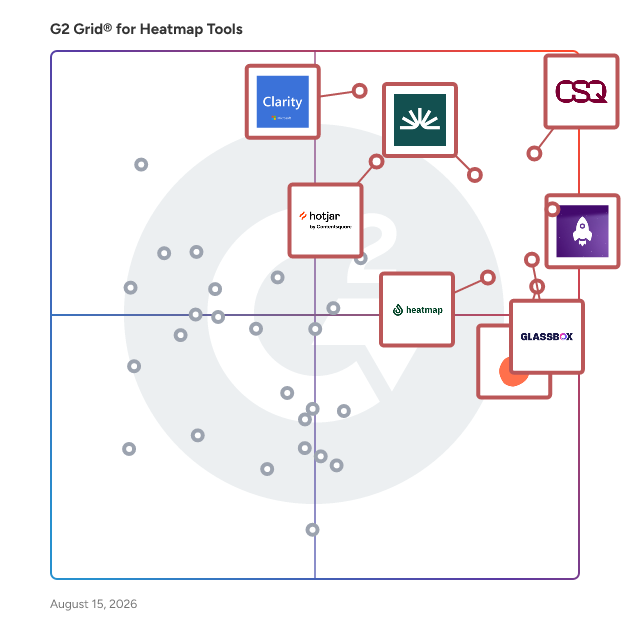
Featured Heatmap Tools At A Glance

Free Plan Available:
FullSession
Sponsored
Leader:
Highest Performer:
Easiest to Use:
Top Trending:
Show LessShow More
Highest Performer:
Easiest to Use:
Top Trending:

G2 takes pride in showing unbiased reviews on user satisfaction in our ratings and reports. We do not allow paid placements in any of our ratings, rankings, or reports. Learn about our scoring methodologies.

Coming Soon
Get Trending Heatmap Tools Products in Your Inbox

A weekly snapshot of rising stars, new launches, and what everyone's buzzing about.

Sample Trending Products Newsletter
No filters applied
81 Listings in Heatmap Tools Available
(2,246)4.6 out of 5
4th Easiest To Use in Heatmap Tools software
Save to My Lists
Entry Level Price:Free
  • Overview
    Expand/Collapse Overview
  • Product Description
    How are these determined?Information
    This description is provided by the seller.

    LogRocket combines session replay, product analytics, and error tracking – empowering software teams to create the ideal product experience.

    Users
    • Software Engineer
    • CTO
    Industries
    • Computer Software
    • Information Technology and Services
    Market Segment
    • 61% Small-Business
    • 29% Mid-Market
  • Pros and Cons
    Expand/Collapse Pros and Cons
  • LogRocket Pros and Cons
    How are these determined?Information
    Pros and Cons are compiled from review feedback and grouped into themes to provide an easy-to-understand summary of user reviews.
    Pros
    Session Replay
    400
    Ease of Use
    311
    User Insights
    212
    User Behavior Tracking
    207
    Insights
    204
    Cons
    Session Management
    152
    Missing Features
    85
    Expensive
    84
    Filtering Issues
    79
    Search Difficulty
    70
  • User Satisfaction
    Expand/Collapse User Satisfaction
  • LogRocket features and usability ratings that predict user satisfaction
    7.9
    Data Quantification
    Average: 8.6
    8.9
    Monitoring
    Average: 8.8
    9.1
    Has the product been a good partner in doing business?
    Average: 9.2
    8.3
    Webpage Element Analysis
    Average: 8.8
  • Seller Details
    Expand/Collapse Seller Details
  • Seller Details
    Company Website
    Year Founded
    2016
    HQ Location
    Boston, Massachusetts
    Twitter
    @LogRocket
    14,933 Twitter followers
    LinkedIn® Page
    www.linkedin.com
    519 employees on LinkedIn®
Product Description
How are these determined?Information
This description is provided by the seller.

LogRocket combines session replay, product analytics, and error tracking – empowering software teams to create the ideal product experience.

Users
  • Software Engineer
  • CTO
Industries
  • Computer Software
  • Information Technology and Services
Market Segment
  • 61% Small-Business
  • 29% Mid-Market
LogRocket Pros and Cons
How are these determined?Information
Pros and Cons are compiled from review feedback and grouped into themes to provide an easy-to-understand summary of user reviews.
Pros
Session Replay
400
Ease of Use
311
User Insights
212
User Behavior Tracking
207
Insights
204
Cons
Session Management
152
Missing Features
85
Expensive
84
Filtering Issues
79
Search Difficulty
70
LogRocket features and usability ratings that predict user satisfaction
7.9
Data Quantification
Average: 8.6
8.9
Monitoring
Average: 8.8
9.1
Has the product been a good partner in doing business?
Average: 9.2
8.3
Webpage Element Analysis
Average: 8.8
Seller Details
Company Website
Year Founded
2016
HQ Location
Boston, Massachusetts
Twitter
@LogRocket
14,933 Twitter followers
LinkedIn® Page
www.linkedin.com
519 employees on LinkedIn®
(806)4.9 out of 5
Optimized for quick response
1st Easiest To Use in Heatmap Tools software
Save to My Lists
  • Overview
    Expand/Collapse Overview
  • Product Description
    How are these determined?Information
    This description is provided by the seller.

    Glassbox is a customer intelligence and digital experience analytics platform designed to help enterprises understand, optimize, and enhance the customer experience and digital accessibility of their

    Users
    • Digital Analyst
    • Product Owner
    Industries
    • Financial Services
    • Insurance
    Market Segment
    • 77% Enterprise
    • 18% Mid-Market
  • Pros and Cons
    Expand/Collapse Pros and Cons
  • Glassbox Pros and Cons
    How are these determined?Information
    Pros and Cons are compiled from review feedback and grouped into themes to provide an easy-to-understand summary of user reviews.
    Pros
    Ease of Use
    210
    Session Replay
    190
    Insights
    173
    Helpful
    132
    Customer Understanding
    122
    Cons
    Session Issues
    70
    Not Intuitive
    65
    Learning Curve
    62
    Session Management
    62
    Missing Features
    54
  • User Satisfaction
    Expand/Collapse User Satisfaction
  • Glassbox features and usability ratings that predict user satisfaction
    9.9
    Data Quantification
    Average: 8.6
    9.9
    Monitoring
    Average: 8.8
    9.9
    Has the product been a good partner in doing business?
    Average: 9.2
    9.9
    Webpage Element Analysis
    Average: 8.8
  • Seller Details
    Expand/Collapse Seller Details
  • Seller Details
    Seller
    Glassbox
    Company Website
    Year Founded
    2010
    HQ Location
    London
    Twitter
    @GlassboxDigital
    1,823 Twitter followers
    LinkedIn® Page
    www.linkedin.com
    269 employees on LinkedIn®
Product Description
How are these determined?Information
This description is provided by the seller.

Glassbox is a customer intelligence and digital experience analytics platform designed to help enterprises understand, optimize, and enhance the customer experience and digital accessibility of their

Users
  • Digital Analyst
  • Product Owner
Industries
  • Financial Services
  • Insurance
Market Segment
  • 77% Enterprise
  • 18% Mid-Market
Glassbox Pros and Cons
How are these determined?Information
Pros and Cons are compiled from review feedback and grouped into themes to provide an easy-to-understand summary of user reviews.
Pros
Ease of Use
210
Session Replay
190
Insights
173
Helpful
132
Customer Understanding
122
Cons
Session Issues
70
Not Intuitive
65
Learning Curve
62
Session Management
62
Missing Features
54
Glassbox features and usability ratings that predict user satisfaction
9.9
Data Quantification
Average: 8.6
9.9
Monitoring
Average: 8.8
9.9
Has the product been a good partner in doing business?
Average: 9.2
9.9
Webpage Element Analysis
Average: 8.8
Seller Details
Seller
Glassbox
Company Website
Year Founded
2010
HQ Location
London
Twitter
@GlassboxDigital
1,823 Twitter followers
LinkedIn® Page
www.linkedin.com
269 employees on LinkedIn®

This is how G2 Deals can help you:

  • Easily shop for curated – and trusted – software
  • Own your own software buying journey
  • Discover exclusive deals on software
(828)4.5 out of 5
Optimized for quick response
9th Easiest To Use in Heatmap Tools software
Save to My Lists
  • Overview
    Expand/Collapse Overview
  • Product Description
    How are these determined?Information
    This description is provided by the seller.

    Fullstory is a behavioral data and analytics platform that helps technology leaders and digital experience teams understand their digital story so they can drive better digital experiences. Customer-c

    Users
    • Product Manager
    • Senior Product Manager
    Industries
    • Computer Software
    • Information Technology and Services
    Market Segment
    • 50% Mid-Market
    • 29% Small-Business
  • Pros and Cons
    Expand/Collapse Pros and Cons
  • Fullstory Pros and Cons
    How are these determined?Information
    Pros and Cons are compiled from review feedback and grouped into themes to provide an easy-to-understand summary of user reviews.
    Pros
    Ease of Use
    35
    Customer Support
    31
    Helpful
    26
    Insights
    26
    Session Replay
    21
    Cons
    Learning Curve
    18
    Limitations
    10
    Expensive
    9
    Difficulty
    8
    Limited Features
    8
  • User Satisfaction
    Expand/Collapse User Satisfaction
  • Fullstory features and usability ratings that predict user satisfaction
    8.1
    Data Quantification
    Average: 8.6
    8.6
    Monitoring
    Average: 8.8
    8.8
    Has the product been a good partner in doing business?
    Average: 9.2
    8.7
    Webpage Element Analysis
    Average: 8.8
  • Seller Details
    Expand/Collapse Seller Details
  • Seller Details
    Seller
    Fullstory
    Company Website
    Year Founded
    2014
    HQ Location
    Atlanta, GA
    Twitter
    @fullstory
    4,927 Twitter followers
    LinkedIn® Page
    www.linkedin.com
    554 employees on LinkedIn®
Product Description
How are these determined?Information
This description is provided by the seller.

Fullstory is a behavioral data and analytics platform that helps technology leaders and digital experience teams understand their digital story so they can drive better digital experiences. Customer-c

Users
  • Product Manager
  • Senior Product Manager
Industries
  • Computer Software
  • Information Technology and Services
Market Segment
  • 50% Mid-Market
  • 29% Small-Business
Fullstory Pros and Cons
How are these determined?Information
Pros and Cons are compiled from review feedback and grouped into themes to provide an easy-to-understand summary of user reviews.
Pros
Ease of Use
35
Customer Support
31
Helpful
26
Insights
26
Session Replay
21
Cons
Learning Curve
18
Limitations
10
Expensive
9
Difficulty
8
Limited Features
8
Fullstory features and usability ratings that predict user satisfaction
8.1
Data Quantification
Average: 8.6
8.6
Monitoring
Average: 8.8
8.8
Has the product been a good partner in doing business?
Average: 9.2
8.7
Webpage Element Analysis
Average: 8.8
Seller Details
Seller
Fullstory
Company Website
Year Founded
2014
HQ Location
Atlanta, GA
Twitter
@fullstory
4,927 Twitter followers
LinkedIn® Page
www.linkedin.com
554 employees on LinkedIn®
(334)4.6 out of 5
3rd Easiest To Use in Heatmap Tools software
Save to My Lists
Entry Level Price:Free
  • Overview
    Expand/Collapse Overview
  • Product Description
    How are these determined?Information
    This description is provided by the seller.

    Lucky Orange’s powerful suite of website analytics tools including website heatmaps and session recordings coupled with its Discovery AI assistant make it easy to pinpoint opportunities to optimize yo

    Users
    • Owner
    • CEO
    Industries
    • Retail
    • Marketing and Advertising
    Market Segment
    • 84% Small-Business
    • 12% Mid-Market
  • Pros and Cons
    Expand/Collapse Pros and Cons
  • Lucky Orange Pros and Cons
    How are these determined?Information
    Pros and Cons are compiled from review feedback and grouped into themes to provide an easy-to-understand summary of user reviews.
    Pros
    Insights
    56
    Ease of Use
    51
    Session Replay
    45
    Heatmaps
    38
    User Behavior Tracking
    37
    Cons
    Recording Issues
    20
    Expensive
    16
    Learning Curve
    12
    Plan Limitations
    12
    Dashboard Issues
    11
  • User Satisfaction
    Expand/Collapse User Satisfaction
  • Lucky Orange features and usability ratings that predict user satisfaction
    8.1
    Data Quantification
    Average: 8.6
    8.9
    Monitoring
    Average: 8.8
    9.2
    Has the product been a good partner in doing business?
    Average: 9.2
    8.5
    Webpage Element Analysis
    Average: 8.8
  • Seller Details
    Expand/Collapse Seller Details
  • Seller Details
    Company Website
    Year Founded
    2012
    HQ Location
    Overland Park, KS
    Twitter
    @luckyorange
    10,721 Twitter followers
    LinkedIn® Page
    www.linkedin.com
    21 employees on LinkedIn®
Product Description
How are these determined?Information
This description is provided by the seller.

Lucky Orange’s powerful suite of website analytics tools including website heatmaps and session recordings coupled with its Discovery AI assistant make it easy to pinpoint opportunities to optimize yo

Users
  • Owner
  • CEO
Industries
  • Retail
  • Marketing and Advertising
Market Segment
  • 84% Small-Business
  • 12% Mid-Market
Lucky Orange Pros and Cons
How are these determined?Information
Pros and Cons are compiled from review feedback and grouped into themes to provide an easy-to-understand summary of user reviews.
Pros
Insights
56
Ease of Use
51
Session Replay
45
Heatmaps
38
User Behavior Tracking
37
Cons
Recording Issues
20
Expensive
16
Learning Curve
12
Plan Limitations
12
Dashboard Issues
11
Lucky Orange features and usability ratings that predict user satisfaction
8.1
Data Quantification
Average: 8.6
8.9
Monitoring
Average: 8.8
9.2
Has the product been a good partner in doing business?
Average: 9.2
8.5
Webpage Element Analysis
Average: 8.8
Seller Details
Company Website
Year Founded
2012
HQ Location
Overland Park, KS
Twitter
@luckyorange
10,721 Twitter followers
LinkedIn® Page
www.linkedin.com
21 employees on LinkedIn®
(46)4.5 out of 5
8th Easiest To Use in Heatmap Tools software
View top Consulting Services for Microsoft Clarity
Save to My Lists
  • Overview
    Expand/Collapse Overview
  • Product Description
    How are these determined?Information
    This description is provided by the seller.

    Clarity is a free, easy-to-use tool that captures how real people actually use your site. Setup is easy, and you'll start getting data in minutes. With advanced heatmaps, session recordings, and power

    Users
    No information available
    Industries
    • Information Technology and Services
    • Computer Software
    Market Segment
    • 61% Small-Business
    • 26% Mid-Market
  • Pros and Cons
    Expand/Collapse Pros and Cons
  • Microsoft Clarity Pros and Cons
    How are these determined?Information
    Pros and Cons are compiled from review feedback and grouped into themes to provide an easy-to-understand summary of user reviews.
    Pros
    Ease of Use
    4
    Recording
    4
    Insights
    3
    Session Recordings
    3
    Analytics
    2
    Cons
    Recording Issues
    2
    UX Issues
    2
    Customization Difficulty
    1
    Delays
    1
    Error Management
    1
  • User Satisfaction
    Expand/Collapse User Satisfaction
  • Microsoft Clarity features and usability ratings that predict user satisfaction
    7.8
    Data Quantification
    Average: 8.6
    8.5
    Monitoring
    Average: 8.8
    9.3
    Has the product been a good partner in doing business?
    Average: 9.2
    8.2
    Webpage Element Analysis
    Average: 8.8
  • Seller Details
    Expand/Collapse Seller Details
  • Seller Details
    Seller
    Microsoft
    Year Founded
    1975
    HQ Location
    Redmond, Washington
    Twitter
    @microsoft
    13,090,087 Twitter followers
    LinkedIn® Page
    www.linkedin.com
    220,934 employees on LinkedIn®
    Ownership
    MSFT
Product Description
How are these determined?Information
This description is provided by the seller.

Clarity is a free, easy-to-use tool that captures how real people actually use your site. Setup is easy, and you'll start getting data in minutes. With advanced heatmaps, session recordings, and power

Users
No information available
Industries
  • Information Technology and Services
  • Computer Software
Market Segment
  • 61% Small-Business
  • 26% Mid-Market
Microsoft Clarity Pros and Cons
How are these determined?Information
Pros and Cons are compiled from review feedback and grouped into themes to provide an easy-to-understand summary of user reviews.
Pros
Ease of Use
4
Recording
4
Insights
3
Session Recordings
3
Analytics
2
Cons
Recording Issues
2
UX Issues
2
Customization Difficulty
1
Delays
1
Error Management
1
Microsoft Clarity features and usability ratings that predict user satisfaction
7.8
Data Quantification
Average: 8.6
8.5
Monitoring
Average: 8.8
9.3
Has the product been a good partner in doing business?
Average: 9.2
8.2
Webpage Element Analysis
Average: 8.8
Seller Details
Seller
Microsoft
Year Founded
1975
HQ Location
Redmond, Washington
Twitter
@microsoft
13,090,087 Twitter followers
LinkedIn® Page
www.linkedin.com
220,934 employees on LinkedIn®
Ownership
MSFT
(43)4.8 out of 5
2nd Easiest To Use in Heatmap Tools software
View top Consulting Services for Heatmap
Save to My Lists
Entry Level Price:$29.00
  • Overview
    Expand/Collapse Overview
  • Product Description
    How are these determined?Information
    This description is provided by the seller.

    Heatmap is the premier on-site behavioral analytics platform for ecommerce. It uniquely links user behavior to revenue, showing brands exactly where they're losing or making money and how to optimize

    Users
    No information available
    Industries
    • Food & Beverages
    • Marketing and Advertising
    Market Segment
    • 67% Small-Business
    • 28% Mid-Market
  • Pros and Cons
    Expand/Collapse Pros and Cons
  • Heatmap Pros and Cons
    How are these determined?Information
    Pros and Cons are compiled from review feedback and grouped into themes to provide an easy-to-understand summary of user reviews.
    Pros
    Heatmaps
    30
    Ease of Use
    23
    Customer Support
    14
    Recording
    13
    Easy Setup
    12
    Cons
    Filtering Issues
    5
    Limited Reporting
    5
    Dashboard Issues
    4
    Export Limitations
    4
    Limited Features
    4
  • User Satisfaction
    Expand/Collapse User Satisfaction
  • Heatmap features and usability ratings that predict user satisfaction
    9.3
    Data Quantification
    Average: 8.6
    9.3
    Monitoring
    Average: 8.8
    8.8
    Has the product been a good partner in doing business?
    Average: 9.2
    9.3
    Webpage Element Analysis
    Average: 8.8
  • Seller Details
    Expand/Collapse Seller Details
  • Seller Details
    Seller
    HeatMap
    Year Founded
    2023
    HQ Location
    New York City, US
    Twitter
    @heatmapme
    833 Twitter followers
    LinkedIn® Page
    www.linkedin.com
    42 employees on LinkedIn®
Product Description
How are these determined?Information
This description is provided by the seller.

Heatmap is the premier on-site behavioral analytics platform for ecommerce. It uniquely links user behavior to revenue, showing brands exactly where they're losing or making money and how to optimize

Users
No information available
Industries
  • Food & Beverages
  • Marketing and Advertising
Market Segment
  • 67% Small-Business
  • 28% Mid-Market
Heatmap Pros and Cons
How are these determined?Information
Pros and Cons are compiled from review feedback and grouped into themes to provide an easy-to-understand summary of user reviews.
Pros
Heatmaps
30
Ease of Use
23
Customer Support
14
Recording
13
Easy Setup
12
Cons
Filtering Issues
5
Limited Reporting
5
Dashboard Issues
4
Export Limitations
4
Limited Features
4
Heatmap features and usability ratings that predict user satisfaction
9.3
Data Quantification
Average: 8.6
9.3
Monitoring
Average: 8.8
8.8
Has the product been a good partner in doing business?
Average: 9.2
9.3
Webpage Element Analysis
Average: 8.8
Seller Details
Seller
HeatMap
Year Founded
2023
HQ Location
New York City, US
Twitter
@heatmapme
833 Twitter followers
LinkedIn® Page
www.linkedin.com
42 employees on LinkedIn®
(689)4.6 out of 5
Optimized for quick response
5th Easiest To Use in Heatmap Tools software
Save to My Lists
Entry Level Price:Free
  • Overview
    Expand/Collapse Overview
  • Product Description
    How are these determined?Information
    This description is provided by the seller.

    Mouseflow: Affordable Behavioral Analytics for UX Friction & CRO Mouseflow is the intuitive and affordable behavioral analytics platform that cuts the fluff to reveal the truth behind user beha

    Users
    • CEO
    • Owner
    Industries
    • Marketing and Advertising
    • Computer Software
    Market Segment
    • 68% Small-Business
    • 23% Mid-Market
  • Pros and Cons
    Expand/Collapse Pros and Cons
  • Mouseflow Pros and Cons
    How are these determined?Information
    Pros and Cons are compiled from review feedback and grouped into themes to provide an easy-to-understand summary of user reviews.
    Pros
    Ease of Use
    60
    Insights
    39
    Heatmaps
    31
    Session Replay
    29
    Analytics
    28
    Cons
    Missing Features
    20
    Limitations
    16
    Expensive
    13
    Session Management
    12
    Data Inaccuracy
    11
  • User Satisfaction
    Expand/Collapse User Satisfaction
  • Mouseflow features and usability ratings that predict user satisfaction
    8.2
    Data Quantification
    Average: 8.6
    8.7
    Monitoring
    Average: 8.8
    8.9
    Has the product been a good partner in doing business?
    Average: 9.2
    8.4
    Webpage Element Analysis
    Average: 8.8
  • Seller Details
    Expand/Collapse Seller Details
  • Seller Details
    Seller
    Mouseflow
    Company Website
    Year Founded
    2010
    HQ Location
    Copenhagen, Denmark
    Twitter
    @mouseflow
    1,765 Twitter followers
    LinkedIn® Page
    www.linkedin.com
    64 employees on LinkedIn®
Product Description
How are these determined?Information
This description is provided by the seller.

Mouseflow: Affordable Behavioral Analytics for UX Friction & CRO Mouseflow is the intuitive and affordable behavioral analytics platform that cuts the fluff to reveal the truth behind user beha

Users
  • CEO
  • Owner
Industries
  • Marketing and Advertising
  • Computer Software
Market Segment
  • 68% Small-Business
  • 23% Mid-Market
Mouseflow Pros and Cons
How are these determined?Information
Pros and Cons are compiled from review feedback and grouped into themes to provide an easy-to-understand summary of user reviews.
Pros
Ease of Use
60
Insights
39
Heatmaps
31
Session Replay
29
Analytics
28
Cons
Missing Features
20
Limitations
16
Expensive
13
Session Management
12
Data Inaccuracy
11
Mouseflow features and usability ratings that predict user satisfaction
8.2
Data Quantification
Average: 8.6
8.7
Monitoring
Average: 8.8
8.9
Has the product been a good partner in doing business?
Average: 9.2
8.4
Webpage Element Analysis
Average: 8.8
Seller Details
Seller
Mouseflow
Company Website
Year Founded
2010
HQ Location
Copenhagen, Denmark
Twitter
@mouseflow
1,765 Twitter followers
LinkedIn® Page
www.linkedin.com
64 employees on LinkedIn®
(326)4.3 out of 5
11th Easiest To Use in Heatmap Tools software
View top Consulting Services for Hotjar
Save to My Lists
Entry Level Price:Free
  • Overview
    Expand/Collapse Overview
  • Product Description
    How are these determined?Information
    This description is provided by the seller.

    Hotjar, part of the Contentsquare group, provides Product Experience Insights that show how users behave and what they feel strongly about, so product teams can deliver real value to them.

    Users
    • Product Manager
    • Digital Marketing Specialist
    Industries
    • Marketing and Advertising
    • Computer Software
    Market Segment
    • 51% Small-Business
    • 38% Mid-Market
  • Pros and Cons
    Expand/Collapse Pros and Cons
  • Hotjar Pros and Cons
    How are these determined?Information
    Pros and Cons are compiled from review feedback and grouped into themes to provide an easy-to-understand summary of user reviews.
    Pros
    Ease of Use
    12
    Features
    11
    Heatmaps
    10
    Helpful
    10
    Session Replay
    9
    Cons
    Recording Issues
    4
    Difficult Filtering
    3
    Expensive
    3
    Filtering Issues
    3
    Inadequate Filtering
    3
  • User Satisfaction
    Expand/Collapse User Satisfaction
  • Hotjar features and usability ratings that predict user satisfaction
    8.1
    Data Quantification
    Average: 8.6
    8.7
    Monitoring
    Average: 8.8
    8.7
    Has the product been a good partner in doing business?
    Average: 9.2
    8.9
    Webpage Element Analysis
    Average: 8.8
  • Seller Details
    Expand/Collapse Seller Details
  • Seller Details
    Year Founded
    2012
    HQ Location
    Paris
    Twitter
    @Contentsquare
    6,619 Twitter followers
    LinkedIn® Page
    www.linkedin.com
    1,813 employees on LinkedIn®
Product Description
How are these determined?Information
This description is provided by the seller.

Hotjar, part of the Contentsquare group, provides Product Experience Insights that show how users behave and what they feel strongly about, so product teams can deliver real value to them.

Users
  • Product Manager
  • Digital Marketing Specialist
Industries
  • Marketing and Advertising
  • Computer Software
Market Segment
  • 51% Small-Business
  • 38% Mid-Market
Hotjar Pros and Cons
How are these determined?Information
Pros and Cons are compiled from review feedback and grouped into themes to provide an easy-to-understand summary of user reviews.
Pros
Ease of Use
12
Features
11
Heatmaps
10
Helpful
10
Session Replay
9
Cons
Recording Issues
4
Difficult Filtering
3
Expensive
3
Filtering Issues
3
Inadequate Filtering
3
Hotjar features and usability ratings that predict user satisfaction
8.1
Data Quantification
Average: 8.6
8.7
Monitoring
Average: 8.8
8.7
Has the product been a good partner in doing business?
Average: 9.2
8.9
Webpage Element Analysis
Average: 8.8
Seller Details
Year Founded
2012
HQ Location
Paris
Twitter
@Contentsquare
6,619 Twitter followers
LinkedIn® Page
www.linkedin.com
1,813 employees on LinkedIn®
(491)4.7 out of 5
Optimized for quick response
14th Easiest To Use in Heatmap Tools software
Save to My Lists
Entry Level Price:Free
  • Overview
    Expand/Collapse Overview
  • Product Description
    How are these determined?Information
    This description is provided by the seller.

    Contentsquare is the AI-powered, all-in-one experience intelligence platform that helps teams understand why customers engage or abandon—and what to do about it. Trusted by 2,000+ enterprise brands

    Users
    • Web Analyst
    • Digital Analyst
    Industries
    • Retail
    • Apparel & Fashion
    Market Segment
    • 47% Enterprise
    • 30% Mid-Market
  • Pros and Cons
    Expand/Collapse Pros and Cons
  • Contentsquare Pros and Cons
    How are these determined?Information
    Pros and Cons are compiled from review feedback and grouped into themes to provide an easy-to-understand summary of user reviews.
    Pros
    Insights
    25
    Analytics
    18
    Ease of Use
    15
    Customer Understanding
    14
    Helpful
    14
    Cons
    Complex Features
    8
    Improvements Needed
    7
    Missing Features
    5
    Complexity
    4
    Confusing Usability
    4
  • User Satisfaction
    Expand/Collapse User Satisfaction
  • Contentsquare features and usability ratings that predict user satisfaction
    8.9
    Data Quantification
    Average: 8.6
    8.8
    Monitoring
    Average: 8.8
    9.3
    Has the product been a good partner in doing business?
    Average: 9.2
    9.1
    Webpage Element Analysis
    Average: 8.8
  • Seller Details
    Expand/Collapse Seller Details
  • Seller Details
    Company Website
    Year Founded
    2012
    HQ Location
    Paris
    Twitter
    @Contentsquare
    6,619 Twitter followers
    LinkedIn® Page
    www.linkedin.com
    1,813 employees on LinkedIn®
Product Description
How are these determined?Information
This description is provided by the seller.

Contentsquare is the AI-powered, all-in-one experience intelligence platform that helps teams understand why customers engage or abandon—and what to do about it. Trusted by 2,000+ enterprise brands

Users
  • Web Analyst
  • Digital Analyst
Industries
  • Retail
  • Apparel & Fashion
Market Segment
  • 47% Enterprise
  • 30% Mid-Market
Contentsquare Pros and Cons
How are these determined?Information
Pros and Cons are compiled from review feedback and grouped into themes to provide an easy-to-understand summary of user reviews.
Pros
Insights
25
Analytics
18
Ease of Use
15
Customer Understanding
14
Helpful
14
Cons
Complex Features
8
Improvements Needed
7
Missing Features
5
Complexity
4
Confusing Usability
4
Contentsquare features and usability ratings that predict user satisfaction
8.9
Data Quantification
Average: 8.6
8.8
Monitoring
Average: 8.8
9.3
Has the product been a good partner in doing business?
Average: 9.2
9.1
Webpage Element Analysis
Average: 8.8
Seller Details
Company Website
Year Founded
2012
HQ Location
Paris
Twitter
@Contentsquare
6,619 Twitter followers
LinkedIn® Page
www.linkedin.com
1,813 employees on LinkedIn®
(317)4.7 out of 5
7th Easiest To Use in Heatmap Tools software
Save to My Lists
Entry Level Price:Free
  • Overview
    Expand/Collapse Overview
  • Product Description
    How are these determined?Information
    This description is provided by the seller.

    Plerdy CRO, SEO & A/B Testing Tools — a powerful toolkit designed to enhance conversions, refine user experience, and optimize your online store’s performance. 🚀 A/B Testing Tool With Plerdy's

    Users
    • Owner
    • CEO
    Industries
    • Marketing and Advertising
    • Information Technology and Services
    Market Segment
    • 90% Small-Business
    • 6% Mid-Market
  • Pros and Cons
    Expand/Collapse Pros and Cons
  • Plerdy Pros and Cons
    How are these determined?Information
    Pros and Cons are compiled from review feedback and grouped into themes to provide an easy-to-understand summary of user reviews.
    Pros
    Heatmaps
    19
    Ease of Use
    18
    Insights
    15
    Valuable Insights
    14
    SEO Optimization
    13
    Cons
    Learning Curve
    14
    Steep Learning Curve
    8
    Complexity
    6
    Interface Usability
    5
    Complex Features
    4
  • User Satisfaction
    Expand/Collapse User Satisfaction
  • Plerdy features and usability ratings that predict user satisfaction
    9.1
    Data Quantification
    Average: 8.6
    9.2
    Monitoring
    Average: 8.8
    9.5
    Has the product been a good partner in doing business?
    Average: 9.2
    9.3
    Webpage Element Analysis
    Average: 8.8
  • Seller Details
    Expand/Collapse Seller Details
  • Seller Details
    Seller
    Plerdy
    Year Founded
    2017
    HQ Location
    Lviv, Lvivska
    Twitter
    @plerdy_com
    114 Twitter followers
    LinkedIn® Page
    www.linkedin.com
    15 employees on LinkedIn®
Product Description
How are these determined?Information
This description is provided by the seller.

Plerdy CRO, SEO & A/B Testing Tools — a powerful toolkit designed to enhance conversions, refine user experience, and optimize your online store’s performance. 🚀 A/B Testing Tool With Plerdy's

Users
  • Owner
  • CEO
Industries
  • Marketing and Advertising
  • Information Technology and Services
Market Segment
  • 90% Small-Business
  • 6% Mid-Market
Plerdy Pros and Cons
How are these determined?Information
Pros and Cons are compiled from review feedback and grouped into themes to provide an easy-to-understand summary of user reviews.
Pros
Heatmaps
19
Ease of Use
18
Insights
15
Valuable Insights
14
SEO Optimization
13
Cons
Learning Curve
14
Steep Learning Curve
8
Complexity
6
Interface Usability
5
Complex Features
4
Plerdy features and usability ratings that predict user satisfaction
9.1
Data Quantification
Average: 8.6
9.2
Monitoring
Average: 8.8
9.5
Has the product been a good partner in doing business?
Average: 9.2
9.3
Webpage Element Analysis
Average: 8.8
Seller Details
Seller
Plerdy
Year Founded
2017
HQ Location
Lviv, Lvivska
Twitter
@plerdy_com
114 Twitter followers
LinkedIn® Page
www.linkedin.com
15 employees on LinkedIn®
Entry Level Price:Free
  • Overview
    Expand/Collapse Overview
  • Product Description
    How are these determined?Information
    This description is provided by the seller.

    Smartlook is an analytics solution for websites, iOS/Android apps, and various app frameworks, that answers the "whys" behind your users' actions. Learn more about our features ↩️ Brands can easil

    Users
    • CEO
    • Owner
    Industries
    • Computer Software
    • Marketing and Advertising
    Market Segment
    • 85% Small-Business
    • 12% Mid-Market
  • Pros and Cons
    Expand/Collapse Pros and Cons
  • Smartlook Pros and Cons
    How are these determined?Information
    Pros and Cons are compiled from review feedback and grouped into themes to provide an easy-to-understand summary of user reviews.
    Pros
    Ease of Use
    4
    Insights
    4
    User Interface
    3
    Analytics
    2
    Customization
    2
    Cons
    Frustration
    2
    Cluttered Interface
    1
    Complex Features
    1
    Dashboard Issues
    1
    Data Retention
    1
  • User Satisfaction
    Expand/Collapse User Satisfaction
  • Smartlook features and usability ratings that predict user satisfaction
    8.5
    Data Quantification
    Average: 8.6
    9.0
    Monitoring
    Average: 8.8
    9.0
    Has the product been a good partner in doing business?
    Average: 9.2
    8.7
    Webpage Element Analysis
    Average: 8.8
  • Seller Details
    Expand/Collapse Seller Details
  • Seller Details
    Seller
    Cisco
    Year Founded
    1984
    HQ Location
    San Jose, CA
    Twitter
    @Cisco
    721,851 Twitter followers
    LinkedIn® Page
    www.linkedin.com
    95,148 employees on LinkedIn®
    Ownership
    NASDAQ:CSCO
Product Description
How are these determined?Information
This description is provided by the seller.

Smartlook is an analytics solution for websites, iOS/Android apps, and various app frameworks, that answers the "whys" behind your users' actions. Learn more about our features ↩️ Brands can easil

Users
  • CEO
  • Owner
Industries
  • Computer Software
  • Marketing and Advertising
Market Segment
  • 85% Small-Business
  • 12% Mid-Market
Smartlook Pros and Cons
How are these determined?Information
Pros and Cons are compiled from review feedback and grouped into themes to provide an easy-to-understand summary of user reviews.
Pros
Ease of Use
4
Insights
4
User Interface
3
Analytics
2
Customization
2
Cons
Frustration
2
Cluttered Interface
1
Complex Features
1
Dashboard Issues
1
Data Retention
1
Smartlook features and usability ratings that predict user satisfaction
8.5
Data Quantification
Average: 8.6
9.0
Monitoring
Average: 8.8
9.0
Has the product been a good partner in doing business?
Average: 9.2
8.7
Webpage Element Analysis
Average: 8.8
Seller Details
Seller
Cisco
Year Founded
1984
HQ Location
San Jose, CA
Twitter
@Cisco
721,851 Twitter followers
LinkedIn® Page
www.linkedin.com
95,148 employees on LinkedIn®
Ownership
NASDAQ:CSCO
Entry Level Price:$20.00
  • Overview
    Expand/Collapse Overview
  • Product Description
    How are these determined?Information
    This description is provided by the seller.

    Zoho PageSense is a conversion optimization and personalization platform, designed to boost website conversions and revenue by tracking the visitor journey. The platform combines the power of web anal

    Users
    No information available
    Industries
    • Marketing and Advertising
    Market Segment
    • 55% Small-Business
    • 26% Mid-Market
  • Pros and Cons
    Expand/Collapse Pros and Cons
  • Zoho PageSense Pros and Cons
    How are these determined?Information
    Pros and Cons are compiled from review feedback and grouped into themes to provide an easy-to-understand summary of user reviews.
    Pros
    Capabilities
    1
    Centralization Management
    1
    Customization
    1
    Ease of Use
    1
    Feature Enhancement
    1
    Cons
    Communication Delays
    1
    Data Delays
    1
    Delays
    1
    Inadequate Analytics
    1
    Integration Issues
    1
  • User Satisfaction
    Expand/Collapse User Satisfaction
  • Zoho PageSense features and usability ratings that predict user satisfaction
    8.9
    Data Quantification
    Average: 8.6
    8.9
    Monitoring
    Average: 8.8
    8.7
    Has the product been a good partner in doing business?
    Average: 9.2
    8.7
    Webpage Element Analysis
    Average: 8.8
  • Seller Details
    Expand/Collapse Seller Details
  • Seller Details
    Seller
    Zoho
    Year Founded
    1996
    HQ Location
    Austin, TX
    Twitter
    @Zoho
    136,279 Twitter followers
    LinkedIn® Page
    www.linkedin.com
    29,500 employees on LinkedIn®
    Phone
    +1 (888) 900-9646
Product Description
How are these determined?Information
This description is provided by the seller.

Zoho PageSense is a conversion optimization and personalization platform, designed to boost website conversions and revenue by tracking the visitor journey. The platform combines the power of web anal

Users
No information available
Industries
  • Marketing and Advertising
Market Segment
  • 55% Small-Business
  • 26% Mid-Market
Zoho PageSense Pros and Cons
How are these determined?Information
Pros and Cons are compiled from review feedback and grouped into themes to provide an easy-to-understand summary of user reviews.
Pros
Capabilities
1
Centralization Management
1
Customization
1
Ease of Use
1
Feature Enhancement
1
Cons
Communication Delays
1
Data Delays
1
Delays
1
Inadequate Analytics
1
Integration Issues
1
Zoho PageSense features and usability ratings that predict user satisfaction
8.9
Data Quantification
Average: 8.6
8.9
Monitoring
Average: 8.8
8.7
Has the product been a good partner in doing business?
Average: 9.2
8.7
Webpage Element Analysis
Average: 8.8
Seller Details
Seller
Zoho
Year Founded
1996
HQ Location
Austin, TX
Twitter
@Zoho
136,279 Twitter followers
LinkedIn® Page
www.linkedin.com
29,500 employees on LinkedIn®
Phone
+1 (888) 900-9646
(267)4.8 out of 5
Optimized for quick response
Save to My Lists
  • Overview
    Expand/Collapse Overview
  • Product Description
    How are these determined?Information
    This description is provided by the seller.

    Silktide is an all-in-one platform for analyzing and improving websites. It combines tools for accessibility, content quality, marketing performance, legal compliance, and user behavior—making it easi

    Users
    • Web Developer
    Industries
    • Government Administration
    • Higher Education
    Market Segment
    • 45% Enterprise
    • 35% Mid-Market
    User Sentiment
    How are these determined?Information
    These insights, currently in beta, are compiled from user reviews and grouped to display a high-level overview of the software.
    • Silktide is a platform designed to improve website accessibility, content quality, and SEO, while also providing user-friendly tools for site management and maintenance.
    • Reviewers frequently mention the platform's user-friendly interface, comprehensive accessibility reports, and the ability to easily locate and fix errors, making it an efficient tool for large-scale site management.
    • Users experienced some difficulties with the platform's interface being dense initially, the lack of control over what is exported in reports, and the time-consuming process of rescanning pages after edits.
  • Pros and Cons
    Expand/Collapse Pros and Cons
  • Silktide Pros and Cons
    How are these determined?Information
    Pros and Cons are compiled from review feedback and grouped into themes to provide an easy-to-understand summary of user reviews.
    Pros
    Ease of Use
    63
    Helpful
    52
    Customer Support
    48
    Accessibility
    46
    Accessibility Features
    37
    Cons
    Complex Usability
    20
    Difficult Navigation
    14
    Limited Features
    10
    Missing Features
    10
    Navigation Difficulty
    10
  • User Satisfaction
    Expand/Collapse User Satisfaction
  • Silktide features and usability ratings that predict user satisfaction
    8.8
    Data Quantification
    Average: 8.6
    9.3
    Monitoring
    Average: 8.8
    9.7
    Has the product been a good partner in doing business?
    Average: 9.2
    9.3
    Webpage Element Analysis
    Average: 8.8
  • Seller Details
    Expand/Collapse Seller Details
  • Seller Details
    Seller
    Silktide
    Company Website
    Year Founded
    2001
    HQ Location
    United Kingdom
    Twitter
    @silktide
    2,126 Twitter followers
    LinkedIn® Page
    www.linkedin.com
    57 employees on LinkedIn®
Product Description
How are these determined?Information
This description is provided by the seller.

Silktide is an all-in-one platform for analyzing and improving websites. It combines tools for accessibility, content quality, marketing performance, legal compliance, and user behavior—making it easi

Users
  • Web Developer
Industries
  • Government Administration
  • Higher Education
Market Segment
  • 45% Enterprise
  • 35% Mid-Market
User Sentiment
How are these determined?Information
These insights, currently in beta, are compiled from user reviews and grouped to display a high-level overview of the software.
  • Silktide is a platform designed to improve website accessibility, content quality, and SEO, while also providing user-friendly tools for site management and maintenance.
  • Reviewers frequently mention the platform's user-friendly interface, comprehensive accessibility reports, and the ability to easily locate and fix errors, making it an efficient tool for large-scale site management.
  • Users experienced some difficulties with the platform's interface being dense initially, the lack of control over what is exported in reports, and the time-consuming process of rescanning pages after edits.
Silktide Pros and Cons
How are these determined?Information
Pros and Cons are compiled from review feedback and grouped into themes to provide an easy-to-understand summary of user reviews.
Pros
Ease of Use
63
Helpful
52
Customer Support
48
Accessibility
46
Accessibility Features
37
Cons
Complex Usability
20
Difficult Navigation
14
Limited Features
10
Missing Features
10
Navigation Difficulty
10
Silktide features and usability ratings that predict user satisfaction
8.8
Data Quantification
Average: 8.6
9.3
Monitoring
Average: 8.8
9.7
Has the product been a good partner in doing business?
Average: 9.2
9.3
Webpage Element Analysis
Average: 8.8
Seller Details
Seller
Silktide
Company Website
Year Founded
2001
HQ Location
United Kingdom
Twitter
@silktide
2,126 Twitter followers
LinkedIn® Page
www.linkedin.com
57 employees on LinkedIn®
  • Overview
    Expand/Collapse Overview
  • Product Description
    How are these determined?Information
    This description is provided by the seller.

    UXCam is a product analytics platform with integrated AI analyst, for mobile apps and websites. The company serves companies in 50+ countries and processes 100B+ data points every month. With UXCam

    Users
    • CEO
    • Product Manager
    Industries
    • Financial Services
    • Computer Software
    Market Segment
    • 56% Small-Business
    • 29% Mid-Market
  • Pros and Cons
    Expand/Collapse Pros and Cons
  • UXCam Pros and Cons
    How are these determined?Information
    Pros and Cons are compiled from review feedback and grouped into themes to provide an easy-to-understand summary of user reviews.
    Pros
    Customer Support
    8
    Session Replay
    8
    Error Tracking
    6
    User Behavior Tracking
    6
    Ease of Use
    5
    Cons
    Dashboard Issues
    3
    Search Difficulty
    3
    Cluttered Interface
    2
    Data Overload
    2
    Filtering Issues
    2
  • User Satisfaction
    Expand/Collapse User Satisfaction
  • UXCam features and usability ratings that predict user satisfaction
    8.6
    Data Quantification
    Average: 8.6
    8.6
    Monitoring
    Average: 8.8
    9.2
    Has the product been a good partner in doing business?
    Average: 9.2
    8.0
    Webpage Element Analysis
    Average: 8.8
  • Seller Details
    Expand/Collapse Seller Details
  • Seller Details
    Seller
    UXCam
    Year Founded
    2014
    HQ Location
    San Francisco, California
    Twitter
    @uxcam
    2,170 Twitter followers
    LinkedIn® Page
    www.linkedin.com
    84 employees on LinkedIn®
Product Description
How are these determined?Information
This description is provided by the seller.

UXCam is a product analytics platform with integrated AI analyst, for mobile apps and websites. The company serves companies in 50+ countries and processes 100B+ data points every month. With UXCam

Users
  • CEO
  • Product Manager
Industries
  • Financial Services
  • Computer Software
Market Segment
  • 56% Small-Business
  • 29% Mid-Market
UXCam Pros and Cons
How are these determined?Information
Pros and Cons are compiled from review feedback and grouped into themes to provide an easy-to-understand summary of user reviews.
Pros
Customer Support
8
Session Replay
8
Error Tracking
6
User Behavior Tracking
6
Ease of Use
5
Cons
Dashboard Issues
3
Search Difficulty
3
Cluttered Interface
2
Data Overload
2
Filtering Issues
2
UXCam features and usability ratings that predict user satisfaction
8.6
Data Quantification
Average: 8.6
8.6
Monitoring
Average: 8.8
9.2
Has the product been a good partner in doing business?
Average: 9.2
8.0
Webpage Element Analysis
Average: 8.8
Seller Details
Seller
UXCam
Year Founded
2014
HQ Location
San Francisco, California
Twitter
@uxcam
2,170 Twitter followers
LinkedIn® Page
www.linkedin.com
84 employees on LinkedIn®
(157)4.5 out of 5
Optimized for quick response
Save to My Lists
  • Overview
    Expand/Collapse Overview
  • Product Description
    How are these determined?Information
    This description is provided by the seller.

    Acquia Web Governance, formerly known as Monsido, is a leading web governance solution designed to enable organizations to deliver a superior and inclusive user experience across their digital presenc

    Users
    No information available
    Industries
    • Government Administration
    • Higher Education
    Market Segment
    • 50% Mid-Market
    • 26% Enterprise
  • Pros and Cons
    Expand/Collapse Pros and Cons
  • Acquia Web Governance Pros and Cons
    How are these determined?Information
    Pros and Cons are compiled from review feedback and grouped into themes to provide an easy-to-understand summary of user reviews.
    Pros
    Ease of Use
    10
    Accessibility
    8
    Accessibility Features
    6
    Error Detection
    6
    Problem Solving
    6
    Cons
    Complex Usability
    3
    Integration Difficulty
    3
    Integration Issues
    3
    Learning Curve
    3
    Training Required
    3
  • User Satisfaction
    Expand/Collapse User Satisfaction
  • Acquia Web Governance features and usability ratings that predict user satisfaction
    9.2
    Data Quantification
    Average: 8.6
    9.2
    Monitoring
    Average: 8.8
    9.1
    Has the product been a good partner in doing business?
    Average: 9.2
    9.2
    Webpage Element Analysis
    Average: 8.8
  • Seller Details
    Expand/Collapse Seller Details
  • Seller Details
    Seller
    Acquia
    Company Website
    Year Founded
    2007
    HQ Location
    Boston, MA
    Twitter
    @Acquia
    45,178 Twitter followers
    LinkedIn® Page
    www.linkedin.com
    1,084 employees on LinkedIn®
Product Description
How are these determined?Information
This description is provided by the seller.

Acquia Web Governance, formerly known as Monsido, is a leading web governance solution designed to enable organizations to deliver a superior and inclusive user experience across their digital presenc

Users
No information available
Industries
  • Government Administration
  • Higher Education
Market Segment
  • 50% Mid-Market
  • 26% Enterprise
Acquia Web Governance Pros and Cons
How are these determined?Information
Pros and Cons are compiled from review feedback and grouped into themes to provide an easy-to-understand summary of user reviews.
Pros
Ease of Use
10
Accessibility
8
Accessibility Features
6
Error Detection
6
Problem Solving
6
Cons
Complex Usability
3
Integration Difficulty
3
Integration Issues
3
Learning Curve
3
Training Required
3
Acquia Web Governance features and usability ratings that predict user satisfaction
9.2
Data Quantification
Average: 8.6
9.2
Monitoring
Average: 8.8
9.1
Has the product been a good partner in doing business?
Average: 9.2
9.2
Webpage Element Analysis
Average: 8.8
Seller Details
Seller
Acquia
Company Website
Year Founded
2007
HQ Location
Boston, MA
Twitter
@Acquia
45,178 Twitter followers
LinkedIn® Page
www.linkedin.com
1,084 employees on LinkedIn®