

Introducing G2.ai, the future of software buying.Try now

Float.com Reviews & Product Details

Pricing

Pricing provided by Float.com.

Starter

Starting at $7.00
Per Month

Float.com Media

Float.com Demo - Schedule resources
Easily see who’s working on what and when, with a live schedule to plan and allocate work.
Float.com Demo - Plan capacity
Balance workloads and prevent burnout with a live view of availability, time off, and scheduled work.
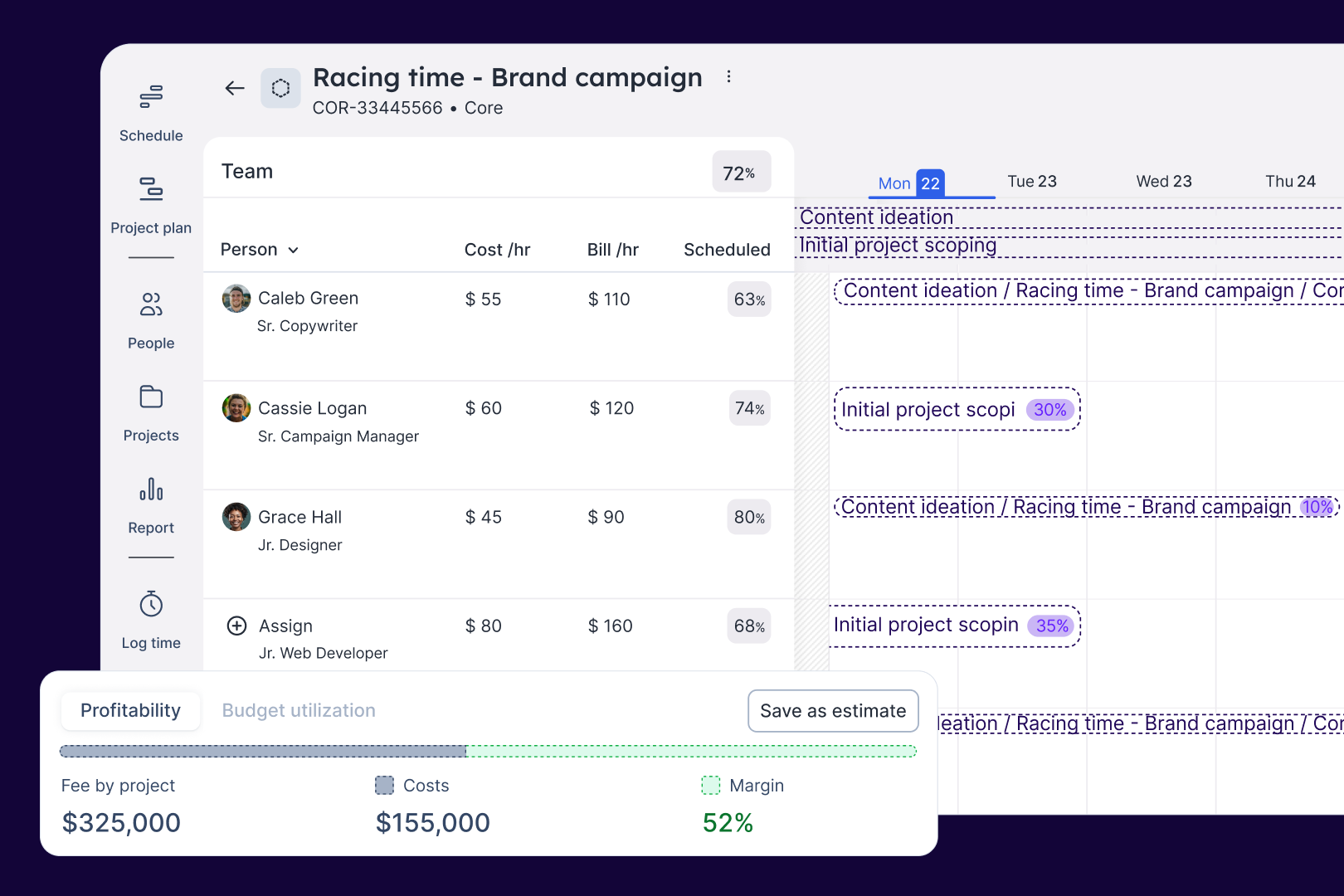
Float.com Demo - Estimate work
Quickly price new projects with confidence. Build budgets, align resourcing, and track scope changes—monitoring estimates against actuals to deliver profitable projects.
Float.com Demo - Scope projects
Align what you need with what you have to create project schedules that keep work on track with the right people, budgets, and timelines.
Float.com Demo - Track time
Simplify timesheets with pre-filled hours so your actuals data is more accurate and always on time!
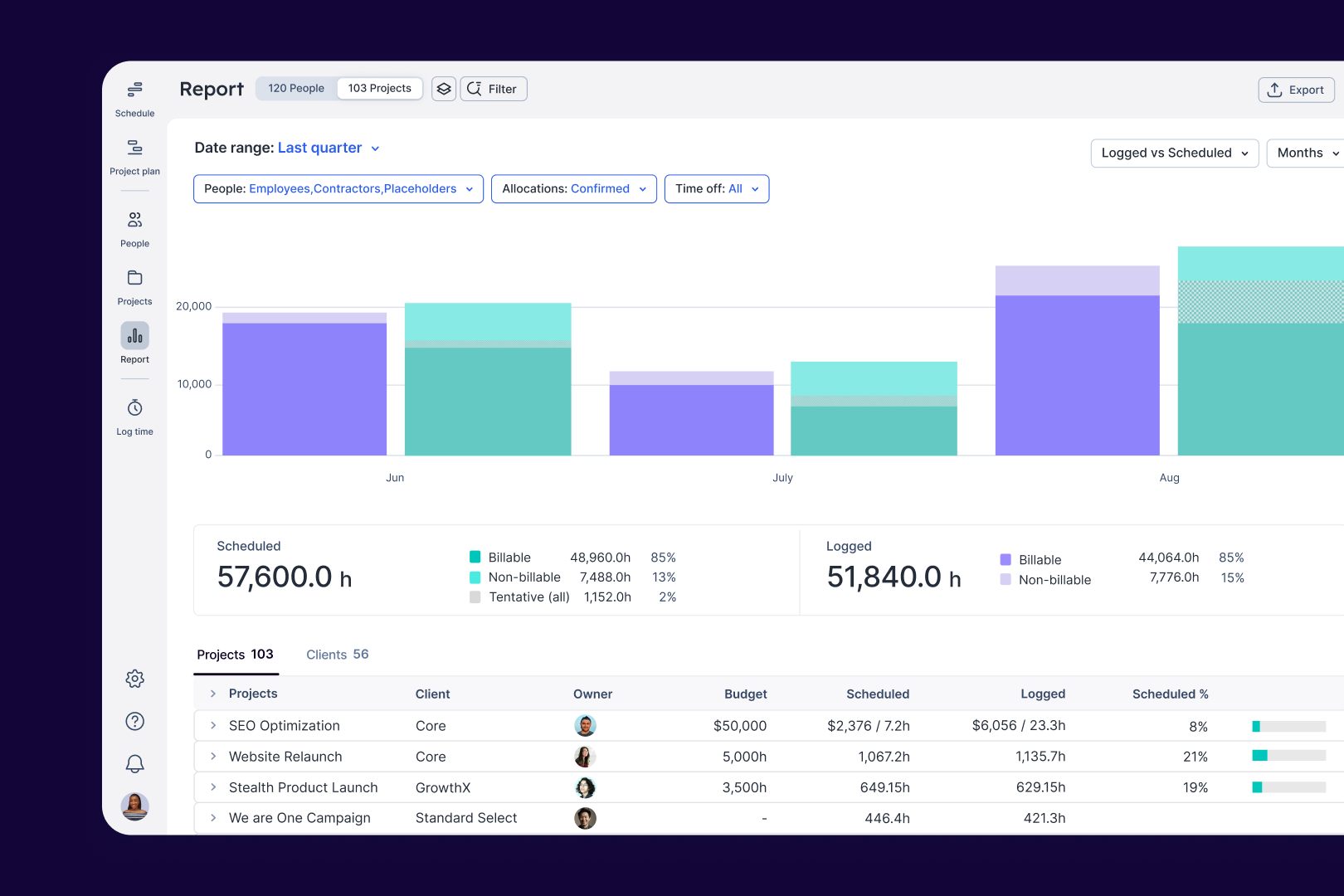
Float.com Demo - Report
Make informed decisions with live insights into team utilization and budget spend to understand how resourcing affects project margins and profitability.
The best teams in the world don’t just wing it. They use Float to get the essential data and context they need when resourcing client work, so they can build winning teams and deliver profitable projects.
Play Float.com Video
The best teams in the world don’t just wing it. They use Float to get the essential data and context they need when resourcing client work, so they can build winning teams and deliver profitable projects.
New: finance & estimations in Float. Stop guessing and start knowing. With Float's finance & estimation features, you can price accurately, protect margins, and deliver profitable projects every time.
Play Float.com Video
New: finance & estimations in Float. Stop guessing and start knowing. With Float's finance & estimation features, you can price accurately, protect margins, and deliver profitable projects every time.
Product Avatar Image

Have you used Float.com before?

Answer a few questions to help the Float.com community

Float.com Reviews (1,996)

View 1 Video Reviews
Reviews

Float.com Reviews (1,997)

View 1 Video Reviews
4.3
1,997 reviews

Review Summary

Generated using AI from real user reviews
Users consistently praise Float.com for its ease of use and intuitive interface, which simplifies scheduling and resource management. The platform's ability to provide a clear overview of team availability and project timelines enhances collaboration and efficiency. However, some users note that the reporting features could be more robust, limiting deeper insights into project performance.

Pros & Cons

Generated from real user reviews
View All Pros and Cons
Search reviews
Filter Reviews
Clear Results
G2 reviews are authentic and verified.
Eiti S.
ES
Director
Small-Business (50 or fewer emp.)
"Clean, Responsive UI Makes Float a Joy to Use"
What do you like best about Float.com?

What i most like about Float its the UI, its clean, responsive and easy to use. I wish their ui team made more apps Review collected by and hosted on G2.com.

What do you dislike about Float.com?

I don`t like much the limitation for placeholders. As it has a lot of tools to make forecasts projects, when i`m forecasting a big project i`m not able to proper fill the spots because i would need to pay $10 for each new placeholder. Review collected by and hosted on G2.com.

Response from Alexandria Petigna of Float.com

Hi Eiti, thank you for the kind words. I noticed you mentioned placeholders. I wonder if using our unassigned roles feature for creating/estimating your projects might work better. Here's the information if you're interested: https://support.float.com/en/articles/12132579-role-based-planning-unassigned-roles

Verified User in Consulting
UC
Enterprise (> 1000 emp.)
"Great for Tracking Team Progress"
What do you like best about Float.com?

This tool lets me keep track of what my colleagues are working on. It's a great time and effort organization tool to avoid double booking of projects. Review collected by and hosted on G2.com.

What do you dislike about Float.com?

In my opinion, the user interface could use some improvement. I find it somewhat challenging to manage the scheduling, and I think a few adjustments could make the experience smoother. Review collected by and hosted on G2.com.

Katie R.
KR
Consultant
Small-Business (50 or fewer emp.)
"Easy to Use with Helpful Colour Coding and Cost Calculation"
What do you like best about Float.com?

It easy to use and the colour coding and ability to input fees and calculate costs of work done is really helpful. The data produced is also difficult. Review collected by and hosted on G2.com.

What do you dislike about Float.com?

I don't like how on the schedule 15 minutes would we 0.25 hours but on the log it would be 00:15. It makes it difficult to flick between the two. Review collected by and hosted on G2.com.

Luke M.
LM
Senior Designer
Small-Business (50 or fewer emp.)
"Effortless Team Scheduling and Priority Tracking with Float"
What do you like best about Float.com?

Float is great to see my schedule at a glance to understand what the team's priorities are for a given week or month. Being able to see my fellow teammates' schedules is also valuable to know if they're heads-down on something big and shouldn't be bothered, or if they're more open for collaboration. Review collected by and hosted on G2.com.

What do you dislike about Float.com?

I often use Float in split view, so the screen is quite narrow. When this happens some of the UI is no longer visible, such as the "Today" button. Review collected by and hosted on G2.com.

EW
Architect
Small-Business (50 or fewer emp.)
"Intuitive Scheduling Made Easy, Minor Limitations for Short Tasks"
What do you like best about Float.com?

Float's interface is very simple and intuitive - in the best way. You can easily manipulate your schedule in real time and cross reference against other people's schedules. I always have Float open to see changes in real time. Review collected by and hosted on G2.com.

What do you dislike about Float.com?

I am unable to adjust my schedule to items that are less than 15 minutes, which is a minuscule inconvenience for items that are 10 minutes. Review collected by and hosted on G2.com.

KR
Software Developer
Mid-Market (51-1000 emp.)
"Time log process made easy, Resource Management is super easy"
What do you like best about Float.com?

Easy-to-use interface, Modern UI, Good user experience. Also, the feature Resource booking is something not available anywhere else and this is a super handful feature for the organisation like us who want to keep track of each resource and want to utilize the resource effectively. Review collected by and hosted on G2.com.

What do you dislike about Float.com?

Currently, there is not anything that I dislike about float. Review collected by and hosted on G2.com.

Verified User in Online Media
AO
Mid-Market (51-1000 emp.)
"Project management made easy, but display could be improved"
What do you like best about Float.com?

Float allows me to easily access all the projects I manage as a digital project manager, as well as the availability of all my team members. Thanks to this, I can adjust their schedule without difficulty.

I also appreciate the ability to display only the details of certain projects, while others remain visible in gray, without displaying their details. This makes reading much clearer.

I also like that my team members can indicate when an "allocation" is completed, which helps to better distinguish tasks that have already been handled from those that remain to be accomplished.

Finally, the project plan view proves to be very practical for working in agile mode, especially with sprints, as it allows for easily adding milestones and phases. Review collected by and hosted on G2.com.

What do you dislike about Float.com?

A very recurring problem is causing me to lose a lot of time: when I modify an allocation several times, part of the text contained in the "Notes" section is deleted after clicking "update". This leads to situations where members regularly inform me that they do not have access to all the information they need to complete their tasks.

It would also be more convenient if, on the "Project Plan" interface, when a "milestone" is added to a project, it is only visible in the "Project Plan" interface and only by the members involved in that project. This would prevent overloading other company members who are not participating in this project with information that does not concern them.

Still regarding the "Project Plan" tab, I found the old functionality more suited to my needs. I regret that when selecting a project in "Project Plan", it is no longer possible to see in gray the allocations assigned to members in other projects. Since this interface change, I use this view much less, whereas it was previously extremely useful to me. Review collected by and hosted on G2.com.

Response from Alexandria Petigna of Float.com

Hi there,

Thank you for sharing your feedback with us; it’s very valuable for us to understand both your needs and any friction points you’re experiencing. I’m working with our Support team to understand whether your issue with the “Notes” section might actually be a bug that we can fix for you.

Regarding the feedback you highlighted regarding the Project planning experience, as well as the new “Project view,” I completely understand. What I can say is that as of now, you can continue to use the “old” Project plan view. Instead of clicking on the project name, which now takes you into the new view, you need to click the double arrows in the lower right-hand corner of the card to expand the plan. If you do want to try out the newer Project view, you still have the option of viewing the other project allocations on this view.

Follow the instructions here: https://support.float.com/en/articles/11405498-project-view#h_a17c320fa7

Please let us know if you’d like any more guidance around how to access the “old” Project plan view or how to better make use of the new Project view. We’d also love to collect any additional feedback you have. You can do this by reaching out to our support team via email (support@float.com) or in-app chat. Thank you!

Xiao Z.
XZ
Lead Environmental Consultant
Mid-Market (51-1000 emp.)
"My overall experience with Float has been positive"
What do you like best about Float.com?

What I like best about Float is its ease of use . The interface is clean and intuitive, making it simple to manage schedules and track workloads. Review collected by and hosted on G2.com.

What do you dislike about Float.com?

1 The delete tool in Float isn’t very intuitive or easy to use.

2 When managing larger teams, the interface can get a bit crowded, making it slightly harder to view overall capacity at a glance. Review collected by and hosted on G2.com.

GN
Brand Protection Analyst
Mid-Market (51-1000 emp.)
"It's easy to update your timely hours as well as time off hours."
What do you like best about Float.com?

I like Float’s intuitive scheduling and resource management features. They make it easy to track who’s doing what and optimize team workflows. Review collected by and hosted on G2.com.

What do you dislike about Float.com?

Float can be pricey, especially for smaller teams, and some users find its interface a bit complex to navigate initially. Review collected by and hosted on G2.com.

Sam K A.
SA
Engineering supervisor
Enterprise (> 1000 emp.)
"Effortless to Use and Incredibly Intuitive for Teams"
What do you like best about Float.com?

It's very easy to use, I was able to show my team how to implement it without any trouble. The interactivity is very natural. Review collected by and hosted on G2.com.

What do you dislike about Float.com?

I don't use it to manage projects, just stand-alone tasks. I would like to have this as an option, instead of having treat each task as a project. Review collected by and hosted on G2.com.

Pricing Options

Pricing provided by Float.com.

Starter

Starting at $7.00
Per Month

Pro

Starting at $12.00
Per Month

Enterprise

Contact Us
Float.com Comparisons
Product Avatar Image
Resource Guru
Compare Now
Product Avatar Image
Kantata Professional Services Automation (formerly Mavenlink+ Kimble)
Compare Now
Product Avatar Image
Teamwork.com
Compare Now
Float.com Features
Ease of Completing Timesheets
Tracking Time to Project/Task
Billable Time Rate Management
Time Tracking
Business Tool Integration
Automated Reminders
User, Role, and Access Management
Reporting
Performance and Reliability
Product Avatar Image
Float.com