# Best Work Management Software for Small Business

  *By [Subhransu Sahu](https://research.g2.com/insights/author/subhransu-sahu)*

   Products classified in the overall Work Management category are similar in many regards and help companies of all sizes solve their business problems. However, small business features, pricing, setup, and installation differ from businesses of other sizes, which is why we match buyers to the right Small Business Work Management to fit their needs. Compare product ratings based on reviews from enterprise users or connect with one of G2&#39;s buying advisors to find the right solutions within the Small Business Work Management category.

In addition to qualifying for inclusion in the Work Management Software category, to qualify for inclusion in the Small Business Work Management Software category, a product must have at least 10 reviews left by a reviewer from a small business.


## Category Overview

**Total Products under this Category:** 181


## Trust & Credibility Stats

**Why You Can Trust G2's Software Rankings:**

- 30 Analysts and Data Experts
- 136,500+ Authentic Reviews
- 181+ Products
- Unbiased Rankings

G2's software rankings are built on verified user reviews, rigorous moderation, and a consistent research methodology maintained by a team of analysts and data experts. Each product is measured using the same transparent criteria, with no paid placement or vendor influence. While reviews reflect real user experiences, which can be subjective, they offer valuable insight into how software performs in the hands of professionals. Together, these inputs power the G2 Score, a standardized way to compare tools within every category.


---

**Sponsored**

### Wrike

Wrike is a comprehensive work management platform designed to help teams and organizations streamline their collaboration, project planning, and task execution. By centralizing all work-related activities in one accessible location, Wrike aims to simplify complex workflows, enhance productivity, and empower users to focus on their most impactful tasks. This platform caters to a diverse range of industries and team sizes, making it a versatile solution for any organization looking to improve its operational efficiency. The target audience for Wrike includes project managers, team leaders, and organizations of all sizes seeking to optimize their workflows. Whether in marketing, IT, or product development, teams can leverage Wrike&#39;s features to manage projects more effectively. Specific use cases encompass tracking project progress, assigning tasks, setting deadlines, and facilitating communication among team members. By providing a unified space for collaboration, Wrike helps eliminate silos and fosters a culture of transparency and accountability, which is crucial for successful project execution. Key features of Wrike include customizable dashboards, real-time collaboration tools, and advanced reporting capabilities. Users can create tailored workflows that align with their specific processes, ensuring that the platform adapts to their unique needs. The ability to visualize project timelines through Gantt charts and Kanban boards allows teams to monitor progress at a glance, making it easier to identify bottlenecks and adjust plans accordingly. Furthermore, Wrike&#39;s integration with popular tools such as Slack, Google Drive, and Microsoft Teams enhances its functionality, allowing users to work seamlessly across different applications and improving overall efficiency. The benefits of using Wrike extend beyond mere task management. By centralizing communication and documentation, teams can reduce the time spent on administrative tasks and focus on delivering results. The platform&#39;s scalability means that it can grow alongside an organization, accommodating increasing workloads and team expansions without compromising performance. With over 20,000 customers, including well-known brands like Estée Lauder and Siemens, Wrike has established itself as a reliable partner for organizations aiming to thrive in a competitive landscape, ensuring that teams can work smarter and achieve their goals more effectively.


[Visit website](https://www.g2.com/external_clickthroughs/record?secure%5Bad_program%5D=paid_promo&amp;secure%5Bad_slot%5D=category_product_list&amp;secure%5Bcategory_id%5D=2360&amp;secure%5Bmedium%5D=sponsored&amp;secure%5Bprioritized%5D=false&amp;secure%5Bproduct_id%5D=1382&amp;secure%5Bresource_id%5D=2360&amp;secure%5Bresource_type%5D=Category&amp;secure%5Bsource_type%5D=category_page&amp;secure%5Bsource_url%5D=https%3A%2F%2Fwww.g2.com%2Fcategories%2Fwork-management%2Fsmall-business&amp;secure%5Btoken%5D=0b93b19098f593fd111eb49d6c951edc1ef079953fa6db001c5e44f3e062f577&amp;secure%5Burl%5D=https%3A%2F%2Fwww.wrike.com%2Ffeatures%2F&amp;secure%5Burl_type%5D=paid_promos)

---

## Top-Rated Products (Ranked by G2 Score)
### 1. [Slack](https://www.g2.com/products/slack/reviews)
  Slack is your single workspace that connects you with the people and tools you work with everyday, no matter where you are or what you do. With Slack you get real-time messaging through calls and chat, a searchable record of all your files and conversations, and integrations with a growing number of handy bots and apps. Now everyone can finally be on the same page and get their work done. Slack: It’s where work happens.


  **Average Rating:** 4.5/5.0
  **Total Reviews:** 37,079

**User Satisfaction Scores:**

- **Has the product been a good partner in doing business?:** 9.1/10 (Category avg: 9.2/10)
- **Planning:** 8.6/10 (Category avg: 8.9/10)
- **Procedures:** 8.6/10 (Category avg: 8.5/10)
- **Insights:** 8.5/10 (Category avg: 8.5/10)


**Seller Details:**

- **Seller:** [Salesforce](https://www.g2.com/sellers/salesforce)
- **Company Website:** https://www.salesforce.com/
- **Year Founded:** 1999
- **HQ Location:** San Francisco, CA
- **Twitter:** @salesforce (581,281 Twitter followers)
- **LinkedIn® Page:** https://www.linkedin.com/company/3185/ (88,363 employees on LinkedIn®)

**Reviewer Demographics:**
  - **Who Uses This:** Software Engineer, Project Manager
  - **Top Industries:** Computer Software, Information Technology and Services
  - **Company Size:** 41% Small-Business, 41% Mid-Market


#### Pros & Cons

**Pros:**

- Ease of Use (3620 reviews)
- Team Collaboration (3150 reviews)
- Communication (2994 reviews)
- Integrations (2216 reviews)
- Features (1937 reviews)

**Cons:**

- Notification Issues (1137 reviews)
- Missing Features (941 reviews)
- Limited Features (757 reviews)
- Overwhelming Experience (752 reviews)
- Channel Management (688 reviews)

### 2. [Asana](https://www.g2.com/products/asana/reviews)
  Asana is a leading work management platform for human + AI collaboration. Over 170,000 customers like Accenture, Amazon, Anthropic, and Suzuki rely on Asana to align teams and accelerate organizational impact. Whether it’s managing strategic initiatives, cross-functional programs, or company-wide goals, Asana helps organizations bring clarity to complexity—turning plans into action with AI working alongside teams every step of the way. To learn more, visit www.asana.com.


  **Average Rating:** 4.4/5.0
  **Total Reviews:** 12,982

**User Satisfaction Scores:**

- **Has the product been a good partner in doing business?:** 8.7/10 (Category avg: 9.2/10)
- **Planning:** 8.9/10 (Category avg: 8.9/10)
- **Procedures:** 8.3/10 (Category avg: 8.5/10)
- **Insights:** 8.3/10 (Category avg: 8.5/10)


**Seller Details:**

- **Seller:** [Asana](https://www.g2.com/sellers/asana)
- **Company Website:** https://asana.com
- **Year Founded:** 2008
- **HQ Location:** San Francisco, CA
- **Twitter:** @Asana (120,040 Twitter followers)
- **LinkedIn® Page:** https://www.linkedin.com/company/807257/ (4,246 employees on LinkedIn®)

**Reviewer Demographics:**
  - **Who Uses This:** Project Manager, Owner
  - **Top Industries:** Marketing and Advertising, Information Technology and Services
  - **Company Size:** 56% Small-Business, 31% Mid-Market


#### Pros & Cons

**Pros:**

- Ease of Use (1525 reviews)
- Task Management (1464 reviews)
- Project Management (1348 reviews)
- Team Collaboration (1197 reviews)
- Task Tracking (1107 reviews)

**Cons:**

- Learning Curve (605 reviews)
- Missing Features (597 reviews)
- Limited Features (531 reviews)
- Not Intuitive (384 reviews)
- Task Management (374 reviews)

### 3. [monday Work Management](https://www.g2.com/products/monday-com/reviews)
  monday work management is a flexible, AI-powered platform that empowers organizations to plan, execute, and scale any type of work in one place. It connects every level of work — from everyday tasks to company-wide initiatives — giving teams the freedom to work their way and leaders the visibility and control to turn strategy into impact.  More than 245K customers worldwide, from fast-growing startups to Fortune 500 emterprises, rely on monday work management to operate smarter, move faster, and collaborate seamlessly across departments. Start your 14-day free trial and see monday work management in action.


  **Average Rating:** 4.7/5.0
  **Total Reviews:** 14,860

**User Satisfaction Scores:**

- **Has the product been a good partner in doing business?:** 9.1/10 (Category avg: 9.2/10)
- **Planning:** 9.1/10 (Category avg: 8.9/10)
- **Procedures:** 8.7/10 (Category avg: 8.5/10)
- **Insights:** 8.6/10 (Category avg: 8.5/10)


**Seller Details:**

- **Seller:** [monday.com](https://www.g2.com/sellers/monday-com-d88207e4-9e92-412d-903b-61cd13ca592b)
- **Company Website:** https://monday.com/
- **Year Founded:** 2012
- **HQ Location:** Tel Aviv
- **Twitter:** @mondaydotcom (40,849 Twitter followers)
- **LinkedIn® Page:** https://www.linkedin.com/company/mondaydotcom (3,774 employees on LinkedIn®)

**Reviewer Demographics:**
  - **Who Uses This:** Project Manager, CEO
  - **Top Industries:** Marketing and Advertising, Information Technology and Services
  - **Company Size:** 61% Small-Business, 30% Mid-Market


#### Pros & Cons

**Pros:**

- Ease of Use (4038 reviews)
- Team Collaboration (2777 reviews)
- Project Management (2737 reviews)
- Organization (2658 reviews)
- Task Management (2417 reviews)

**Cons:**

- Missing Features (1721 reviews)
- Learning Curve (1186 reviews)
- Limited Features (1036 reviews)
- Not Intuitive (835 reviews)
- Limited Customization (746 reviews)

### 4. [ClickUp](https://www.g2.com/products/clickup/reviews)
  ClickUp is the world’s first Converged AI Workspace, bringing together all work apps, data, and workflows. ClickUp eliminates all forms of work sprawl to provide 100% context and a single place for humans and agents to work, together. Trusted by more than 20 million users worldwide, ClickUp is on a mission to maximize human productivity.


  **Average Rating:** 4.7/5.0
  **Total Reviews:** 11,423

**User Satisfaction Scores:**

- **Has the product been a good partner in doing business?:** 9.0/10 (Category avg: 9.2/10)
- **Planning:** 9.1/10 (Category avg: 8.9/10)
- **Procedures:** 8.6/10 (Category avg: 8.5/10)
- **Insights:** 8.5/10 (Category avg: 8.5/10)


**Seller Details:**

- **Seller:** [ClickUp](https://www.g2.com/sellers/clickup)
- **Company Website:** https://ClickUp.com
- **Year Founded:** 2017
- **HQ Location:** San Diego, California
- **Twitter:** @clickup (68,823 Twitter followers)
- **LinkedIn® Page:** https://www.linkedin.com/company/12949663/ (1,525 employees on LinkedIn®)

**Reviewer Demographics:**
  - **Who Uses This:** CEO, Project Manager
  - **Top Industries:** Marketing and Advertising, Computer Software
  - **Company Size:** 77% Small-Business, 18% Mid-Market


#### Pros & Cons

**Pros:**

- Ease of Use (4222 reviews)
- Task Management (3221 reviews)
- Features (3118 reviews)
- Project Management (2788 reviews)
- Organization (2589 reviews)

**Cons:**

- Missing Features (2040 reviews)
- Learning Curve (1753 reviews)
- Limited Features (1335 reviews)
- Not Intuitive (1183 reviews)
- Slow Loading (1155 reviews)

### 5. [Smartsheet](https://www.g2.com/products/smartsheet/reviews)
  Smartsheet is an Intelligent Work Management Platform that revolutionizes how you manage projects, portfolios, and processes. The Smartsheet AI-powered platform delivers adaptability, sophisticated experiences, and enterprise-grade rigor to support work across industries — from service delivery to construction, clinical trials, and marketing campaigns. Designed to meet demanding requirements, it helps organizations drive efficiency, accelerate innovation, and stay competitive. Over 85% of Fortune 500 companies trust Smartsheet to align their resources to improve efficiency, agility, and collaboration in today’s ever-changing world of work.


  **Average Rating:** 4.4/5.0
  **Total Reviews:** 21,279

**User Satisfaction Scores:**

- **Has the product been a good partner in doing business?:** 8.6/10 (Category avg: 9.2/10)
- **Planning:** 8.6/10 (Category avg: 8.9/10)
- **Procedures:** 8.1/10 (Category avg: 8.5/10)
- **Insights:** 7.9/10 (Category avg: 8.5/10)


**Seller Details:**

- **Seller:** [Smartsheet](https://www.g2.com/sellers/smartsheet)
- **Company Website:** https://www.smartsheet.com/
- **Year Founded:** 2005
- **HQ Location:** Bellevue, WA
- **Twitter:** @Smartsheet (26,435 Twitter followers)
- **LinkedIn® Page:** https://www.linkedin.com/company/167700/ (4,150 employees on LinkedIn®)

**Reviewer Demographics:**
  - **Who Uses This:** Project Manager, Senior Project Manager
  - **Top Industries:** Information Technology and Services, Construction
  - **Company Size:** 41% Mid-Market, 34% Small-Business


#### Pros & Cons

**Pros:**

- Ease of Use (2360 reviews)
- Project Management (1666 reviews)
- Team Collaboration (1516 reviews)
- Automation (1235 reviews)
- Project Tracking (1229 reviews)

**Cons:**

- Learning Curve (1183 reviews)
- Missing Features (899 reviews)
- Not Intuitive (842 reviews)
- Limited Features (739 reviews)
- Limited Customization (554 reviews)

### 6. [Quickbase](https://www.g2.com/products/quickbase/reviews)
  Quickbase is an AI-driven platform designed to help businesses streamline their operations by adapting to their unique workflows and processes. Unlike traditional off-the-shelf software, which often requires users to conform to predefined structures, Quickbase empowers organizations to create customized solutions that align with their specific needs. This flexibility is crucial for companies seeking to eliminate inefficiencies and reduce the burden of &#39;Gray Work&#39; - what we call the time-consuming tasks and manual processes that arise from using rigid software systems. The target audience for Quickbase includes businesses of all sizes across various industries that are looking to enhance their operational efficiency. Whether it&#39;s a 50 person small business or a large enterprise, organizations can benefit from a platform that allows them to connect disparate data sources, automate repetitive tasks, and scale their competitive advantages. Quickbase is particularly valuable for teams that rely on collaboration and data-driven decision-making, as it fosters an environment where information flows seamlessly and processes are optimized. Key features of Quickbase include its intuitive interface, which allows users to build custom applications without extensive coding knowledge. This user-friendly design enables teams to quickly adapt the platform to their specific workflows, ensuring that they can address unique challenges without the need for extensive IT support. Additionally, Quickbase offers powerful automation capabilities, allowing users to set up triggers and workflows that reduce manual effort and streamline operations. The platform also supports integration with various data sources, enabling businesses to consolidate their information and gain valuable insights. One of the standout benefits of Quickbase is its ability to scale with your business. As organizations grow and evolve, their processes often become more complex. Quickbase&#39;s adaptable nature ensures that users can modify their applications and workflows as needed, without the constraints typically associated with traditional software. This flexibility not only saves time but also fosters innovation, as teams can experiment with new processes and tools that enhance their productivity. By prioritizing user-centric design and adaptability, Quickbase stands out in the crowded landscape of business software solutions. It provides organizations with the tools they need to optimize their operations, reduce inefficiencies, and ultimately drive growth. With Quickbase, businesses can focus on what truly matters—leveraging their unique processes to gain a competitive edge in their respective markets.


  **Average Rating:** 4.4/5.0
  **Total Reviews:** 1,327

**User Satisfaction Scores:**

- **Has the product been a good partner in doing business?:** 8.7/10 (Category avg: 9.2/10)
- **Planning:** 8.4/10 (Category avg: 8.9/10)
- **Procedures:** 8.4/10 (Category avg: 8.5/10)
- **Insights:** 8.3/10 (Category avg: 8.5/10)


**Seller Details:**

- **Seller:** [Quickbase](https://www.g2.com/sellers/quickbase)
- **Company Website:** https://quickbase.com/
- **Year Founded:** 2012
- **HQ Location:** Boston, MA
- **Twitter:** @quickbase (5,154 Twitter followers)
- **LinkedIn® Page:** https://www.linkedin.com/company/2845325/ (858 employees on LinkedIn®)

**Reviewer Demographics:**
  - **Who Uses This:** Project Manager, Project Coordinator
  - **Top Industries:** Construction, Information Technology and Services
  - **Company Size:** 43% Mid-Market, 32% Small-Business


#### Pros & Cons

**Pros:**

- Ease of Use (314 reviews)
- Customization (216 reviews)
- Customizability (182 reviews)
- Flexibility (156 reviews)
- Customization Options (146 reviews)

**Cons:**

- Learning Curve (121 reviews)
- Missing Features (93 reviews)
- Not Intuitive (91 reviews)
- Limited Features (90 reviews)
- Limited Customization (74 reviews)

### 7. [Teamwork.com](https://www.g2.com/products/teamwork-com/reviews)
  Combining powerful project management and easily streamlined operations - we’re the only platform built for managing client projects, profitably. Deliver work on time and on budget, eliminate client chaos, and understand profitability, all in one platform. Headquartered in Cork, Ireland and founded by a team who have run an agency before, Teamwork.com has more than 20,000 customers around the world with a global team of over 350 employees. Learn more at teamwork.com.


  **Average Rating:** 4.4/5.0
  **Total Reviews:** 1,173

**User Satisfaction Scores:**

- **Has the product been a good partner in doing business?:** 9.0/10 (Category avg: 9.2/10)
- **Planning:** 8.2/10 (Category avg: 8.9/10)
- **Procedures:** 8.3/10 (Category avg: 8.5/10)
- **Insights:** 8.0/10 (Category avg: 8.5/10)


**Seller Details:**

- **Seller:** [Teamwork](https://www.g2.com/sellers/teamwork)
- **Company Website:** https://www.teamwork.com
- **Year Founded:** 2007
- **HQ Location:** Cork
- **Twitter:** @teamwork (1 Twitter followers)
- **LinkedIn® Page:** https://www.linkedin.com/company/1042291/ (548 employees on LinkedIn®)

**Reviewer Demographics:**
  - **Who Uses This:** Project Manager, Owner
  - **Top Industries:** Marketing and Advertising, Information Technology and Services
  - **Company Size:** 57% Small-Business, 31% Mid-Market


#### Pros & Cons

**Pros:**

- Project Management (52 reviews)
- Task Management (51 reviews)
- Team Collaboration (50 reviews)
- Ease of Use (45 reviews)
- Task Tracking (44 reviews)

**Cons:**

- Learning Curve (22 reviews)
- Missing Features (19 reviews)
- Limited Features (18 reviews)
- Complexity (16 reviews)
- Not Intuitive (16 reviews)

### 8. [Confluence](https://www.g2.com/products/confluence/reviews)
  Confluence is the AI-powered collaborative workspace for all teams. Equipped with intelligent AI agents to save time on tedious tasks, brainstorm new ideas, and help you quickly find the answers you need, Confluence is where knowledge becomes impact. Versatile content types like pages, live docs, whiteboards, and databases help teams move seamlessly from ideation to execution. Confluence integrates with the Atlassian suite of products like Jira Software, Trello, and Loom to enable both synchronous and async work and to push work forward.


  **Average Rating:** 4.1/5.0
  **Total Reviews:** 4,204

**User Satisfaction Scores:**

- **Has the product been a good partner in doing business?:** 8.5/10 (Category avg: 9.2/10)
- **Planning:** 8.9/10 (Category avg: 8.9/10)
- **Procedures:** 8.7/10 (Category avg: 8.5/10)
- **Insights:** 8.4/10 (Category avg: 8.5/10)


**Seller Details:**

- **Seller:** [Atlassian](https://www.g2.com/sellers/atlassian)
- **Company Website:** https://www.atlassian.com/
- **Year Founded:** 2002
- **HQ Location:** Sydney and San Francisco
- **Twitter:** @Atlassian (106,006 Twitter followers)
- **LinkedIn® Page:** https://www.linkedin.com/company/atlassian (21,797 employees on LinkedIn®)

**Reviewer Demographics:**
  - **Who Uses This:** Software Engineer, Product Manager
  - **Top Industries:** Computer Software, Information Technology and Services
  - **Company Size:** 48% Mid-Market, 34% Enterprise


#### Pros & Cons

**Pros:**

- Ease of Use (304 reviews)
- Team Collaboration (213 reviews)
- Organization (160 reviews)
- Integrations (158 reviews)
- Collaboration Efficiency (147 reviews)

**Cons:**

- Not Intuitive (84 reviews)
- Slow Performance (84 reviews)
- Page Management (71 reviews)
- Learning Curve (64 reviews)
- Complexity (59 reviews)

### 9. [Keka](https://www.g2.com/products/keka/reviews)
  Keka is a global People and Project Operations Platform designed for growing businesses to align teams, drive performance, and streamline HR, payroll, and project delivery. From hiring and onboarding to time tracking, performance reviews, payroll, and project billing, Keka brings everything together in one flexible, modular system that works across countries, roles, and industries. Built for real-world adoption across HR, finance, and delivery teams, Keka supports both desk and frontline workforces, simplifies compliance in every region, and offers project-level insights for service businesses. Whether you’re managing people, processing payroll, or running billable projects, Keka helps your business scale with clarity—not complexity.


  **Average Rating:** 4.5/5.0
  **Total Reviews:** 1,810

**User Satisfaction Scores:**

- **Has the product been a good partner in doing business?:** 8.8/10 (Category avg: 9.2/10)
- **Planning:** 8.5/10 (Category avg: 8.9/10)
- **Procedures:** 8.8/10 (Category avg: 8.5/10)
- **Insights:** 8.4/10 (Category avg: 8.5/10)


**Seller Details:**

- **Seller:** [Keka Technologies](https://www.g2.com/sellers/keka-technologies)
- **Company Website:** https://www.keka.com
- **Year Founded:** 2015
- **HQ Location:** Seattle, US
- **Twitter:** @kekahr_official (1,151 Twitter followers)
- **LinkedIn® Page:** https://www.linkedin.com/company/6417440/ (1,213 employees on LinkedIn®)

**Reviewer Demographics:**
  - **Who Uses This:** HR Manager, HR Executive
  - **Top Industries:** Information Technology and Services, Computer Software
  - **Company Size:** 73% Mid-Market, 21% Small-Business


#### Pros & Cons

**Pros:**

- Ease of Use (538 reviews)
- Intuitive (315 reviews)
- Helpful (288 reviews)
- Simple (271 reviews)
- User Interface (271 reviews)

**Cons:**

- Missing Features (127 reviews)
- Limited Features (123 reviews)
- Limited Customization (119 reviews)
- Slow Loading (113 reviews)
- Poor Customer Support (99 reviews)

### 10. [Zoho Sprints](https://www.g2.com/products/zoho-sprints/reviews)
  Zoho Sprints is a free online agile project management tool for Scrum teams. Add user stories to your backlog, estimate and prioritize work items, stay on track with personalized scrum boards and swimlanes, get actionable insights from velocity, burn up and burn down charts, collaborate with your team on a social feed, and schedule your review and retrospective meetings from one place.


  **Average Rating:** 4.5/5.0
  **Total Reviews:** 175

**User Satisfaction Scores:**

- **Has the product been a good partner in doing business?:** 8.9/10 (Category avg: 9.2/10)


**Seller Details:**

- **Seller:** [Zoho](https://www.g2.com/sellers/zoho-b00ca9d5-bca8-41b5-a8ad-275480841704)
- **Year Founded:** 1996
- **HQ Location:** Austin, TX
- **Twitter:** @Zoho (137,251 Twitter followers)
- **LinkedIn® Page:** https://www.linkedin.com/company/38373/ (30,531 employees on LinkedIn®)
- **Phone:** +1 (888) 900-9646 

**Reviewer Demographics:**
  - **Who Uses This:** CEO, Project Manager
  - **Top Industries:** Computer Software, Information Technology and Services
  - **Company Size:** 76% Small-Business, 20% Mid-Market


### 11. [Workfront](https://www.g2.com/products/workfront/reviews)
  Adobe Workfront is the leader in collaborative work management and marketing work management. Workfront connects strategy to delivery, integrating people and data across the enterprise, and manages work from start to finish to help teams deliver measurable outcomes. At every stage of planning, executing, and automating work, Workfront enables the business capabilities companies need to deliver exceptional customer experiences and to connect planning processes to execution workflows.


  **Average Rating:** 4.1/5.0
  **Total Reviews:** 1,138

**User Satisfaction Scores:**

- **Has the product been a good partner in doing business?:** 8.4/10 (Category avg: 9.2/10)
- **Planning:** 9.0/10 (Category avg: 8.9/10)
- **Procedures:** 8.7/10 (Category avg: 8.5/10)
- **Insights:** 8.6/10 (Category avg: 8.5/10)


**Seller Details:**

- **Seller:** [Adobe](https://www.g2.com/sellers/adobe)
- **Company Website:** https://adobe.com
- **Year Founded:** 1982
- **HQ Location:** San Jose, CA
- **Twitter:** @Adobe (956,297 Twitter followers)
- **LinkedIn® Page:** https://www.linkedin.com/company/1480/ (41,539 employees on LinkedIn®)

**Reviewer Demographics:**
  - **Who Uses This:** Project Manager, Senior Project Manager
  - **Top Industries:** Marketing and Advertising, Information Technology and Services
  - **Company Size:** 48% Enterprise, 35% Mid-Market


#### Pros & Cons

**Pros:**

- Project Management (117 reviews)
- Ease of Use (100 reviews)
- Team Collaboration (87 reviews)
- Task Management (86 reviews)
- Organization (72 reviews)

**Cons:**

- Learning Curve (83 reviews)
- Not Intuitive (49 reviews)
- Complexity (44 reviews)
- Slow Performance (36 reviews)
- Limited Features (33 reviews)

### 12. [Hive](https://www.g2.com/products/hive-hive-hive/reviews)
  We help teams move faster. Hive&#39;s best-in-class project management platform includes all of the tools you need and want -- and if not, we will build them for you. With flexible project views and endless customizations, Hive offers project management on your terms, success guaranteed. Join thousands of companies moving faster with Hive’s powerful project and process management software.


  **Average Rating:** 4.6/5.0
  **Total Reviews:** 647

**User Satisfaction Scores:**

- **Has the product been a good partner in doing business?:** 9.4/10 (Category avg: 9.2/10)
- **Planning:** 8.9/10 (Category avg: 8.9/10)
- **Procedures:** 8.6/10 (Category avg: 8.5/10)
- **Insights:** 8.5/10 (Category avg: 8.5/10)


**Seller Details:**

- **Seller:** [Hive](https://www.g2.com/sellers/hive-a8fc1992-3c13-4b7c-bff1-ccef60fc94b6)
- **Company Website:** https://hive.com/
- **Year Founded:** 2016
- **HQ Location:** New York, New York
- **Twitter:** @hive (3,365 Twitter followers)
- **LinkedIn® Page:** https://www.linkedin.com/company/6473048/ (62 employees on LinkedIn®)

**Reviewer Demographics:**
  - **Who Uses This:** Project Manager, Graphic Designer
  - **Top Industries:** Marketing and Advertising, Information Technology and Services
  - **Company Size:** 63% Small-Business, 29% Mid-Market


#### Pros & Cons

**Pros:**

- Project Management (169 reviews)
- Ease of Use (163 reviews)
- Team Collaboration (146 reviews)
- Features (128 reviews)
- Organization (111 reviews)

**Cons:**

- Missing Features (77 reviews)
- Learning Curve (49 reviews)
- Limited Features (49 reviews)
- Not Intuitive (38 reviews)
- Complexity (36 reviews)

### 13. [GanttPRO](https://www.g2.com/products/ganttpro-ganttpro/reviews)
  GanttPRO is intuitive online Gantt chart software for robust project management. The tool meets the needs of project, product, and portfolio managers from different spheres. GanttPRO offers task, deadline, cost, resource, and portfolio management, team collaboration, time logging, baselines, advanced export and sharing features. Robust import from MS Project and Excel as well as ready-made professional templates allows starting projects right away.


  **Average Rating:** 4.8/5.0
  **Total Reviews:** 524

**User Satisfaction Scores:**

- **Has the product been a good partner in doing business?:** 9.1/10 (Category avg: 9.2/10)
- **Planning:** 9.8/10 (Category avg: 8.9/10)
- **Procedures:** 9.5/10 (Category avg: 8.5/10)
- **Insights:** 9.3/10 (Category avg: 8.5/10)


**Seller Details:**

- **Seller:** [GanttPRO](https://www.g2.com/sellers/ganttpro)
- **Year Founded:** 2015
- **HQ Location:** Krakow, PL
- **Twitter:** @GanttPROcom (733 Twitter followers)
- **LinkedIn® Page:** https://www.linkedin.com/company/ganttpro/ (19 employees on LinkedIn®)

**Reviewer Demographics:**
  - **Who Uses This:** Student, Project Manager
  - **Top Industries:** Higher Education, Computer Software
  - **Company Size:** 76% Small-Business, 12% Enterprise


#### Pros & Cons

**Pros:**

- Ease of Use (50 reviews)
- Project Management (48 reviews)
- Team Collaboration (35 reviews)
- Intuitive (27 reviews)
- User Interface (26 reviews)

**Cons:**

- Missing Features (9 reviews)
- Expensive (7 reviews)
- Learning Curve (7 reviews)
- Limited Customization (7 reviews)
- Billing Issues (5 reviews)

### 14. [Basecamp](https://www.g2.com/products/basecamp/reviews)
  Basecamp is the #1 collaboration tool for hundreds of thousands of teams worldwide. Teams use Basecamp to work on projects, communicate, and get work organized every day. Whether with teammates across the room, or clients across the world, Basecamp is the best tool to get things done. Basecamp makes it easy for teams to see what everyone is working on, collaborate on documents, schedule projects, and more without meetings or emails. Not convinced? Read our thousands of reviews and sign up for free.


  **Average Rating:** 4.1/5.0
  **Total Reviews:** 5,342

**User Satisfaction Scores:**

- **Has the product been a good partner in doing business?:** 8.7/10 (Category avg: 9.2/10)
- **Planning:** 8.4/10 (Category avg: 8.9/10)
- **Procedures:** 8.4/10 (Category avg: 8.5/10)
- **Insights:** 8.2/10 (Category avg: 8.5/10)


**Seller Details:**

- **Seller:** [37signals](https://www.g2.com/sellers/37signals)
- **Year Founded:** 1999
- **HQ Location:** Chicago, IL
- **Twitter:** @basecamp (6,914 Twitter followers)
- **LinkedIn® Page:** https://www.linkedin.com/company/98003/ (176 employees on LinkedIn®)

**Reviewer Demographics:**
  - **Who Uses This:** Project Manager, Marketing Manager
  - **Top Industries:** Marketing and Advertising, Information Technology and Services
  - **Company Size:** 50% Small-Business, 34% Mid-Market


#### Pros & Cons

**Pros:**

- Ease of Use (163 reviews)
- Team Collaboration (154 reviews)
- Project Management (128 reviews)
- Task Management (88 reviews)
- Organization (79 reviews)

**Cons:**

- Missing Features (65 reviews)
- Limited Features (49 reviews)
- Limited Functionality (38 reviews)
- Task Management (31 reviews)
- Lack of Features (30 reviews)

### 15. [Wrike](https://www.g2.com/products/wrike/reviews)
  Wrike is a comprehensive work management platform designed to help teams and organizations streamline their collaboration, project planning, and task execution. By centralizing all work-related activities in one accessible location, Wrike aims to simplify complex workflows, enhance productivity, and empower users to focus on their most impactful tasks. This platform caters to a diverse range of industries and team sizes, making it a versatile solution for any organization looking to improve its operational efficiency. The target audience for Wrike includes project managers, team leaders, and organizations of all sizes seeking to optimize their workflows. Whether in marketing, IT, or product development, teams can leverage Wrike&#39;s features to manage projects more effectively. Specific use cases encompass tracking project progress, assigning tasks, setting deadlines, and facilitating communication among team members. By providing a unified space for collaboration, Wrike helps eliminate silos and fosters a culture of transparency and accountability, which is crucial for successful project execution. Key features of Wrike include customizable dashboards, real-time collaboration tools, and advanced reporting capabilities. Users can create tailored workflows that align with their specific processes, ensuring that the platform adapts to their unique needs. The ability to visualize project timelines through Gantt charts and Kanban boards allows teams to monitor progress at a glance, making it easier to identify bottlenecks and adjust plans accordingly. Furthermore, Wrike&#39;s integration with popular tools such as Slack, Google Drive, and Microsoft Teams enhances its functionality, allowing users to work seamlessly across different applications and improving overall efficiency. The benefits of using Wrike extend beyond mere task management. By centralizing communication and documentation, teams can reduce the time spent on administrative tasks and focus on delivering results. The platform&#39;s scalability means that it can grow alongside an organization, accommodating increasing workloads and team expansions without compromising performance. With over 20,000 customers, including well-known brands like Estée Lauder and Siemens, Wrike has established itself as a reliable partner for organizations aiming to thrive in a competitive landscape, ensuring that teams can work smarter and achieve their goals more effectively.


  **Average Rating:** 4.2/5.0
  **Total Reviews:** 4,444

**User Satisfaction Scores:**

- **Has the product been a good partner in doing business?:** 8.5/10 (Category avg: 9.2/10)
- **Planning:** 8.5/10 (Category avg: 8.9/10)
- **Procedures:** 8.2/10 (Category avg: 8.5/10)
- **Insights:** 8.0/10 (Category avg: 8.5/10)


**Seller Details:**

- **Seller:** [Wrike, Inc.](https://www.g2.com/sellers/wrike-inc)
- **Company Website:** https://www.wrike.com
- **Year Founded:** 2006
- **HQ Location:** San Diego, CA
- **Twitter:** @wrike (13,594 Twitter followers)
- **LinkedIn® Page:** https://www.linkedin.com/company/612239/ (1,291 employees on LinkedIn®)

**Reviewer Demographics:**
  - **Who Uses This:** Project Manager, Marketing Manager
  - **Top Industries:** Marketing and Advertising, Information Technology and Services
  - **Company Size:** 43% Mid-Market, 35% Small-Business


#### Pros & Cons

**Pros:**

- Project Management (477 reviews)
- Team Collaboration (456 reviews)
- Task Management (450 reviews)
- Organization (383 reviews)
- Ease of Use (331 reviews)

**Cons:**

- Learning Curve (305 reviews)
- Not Intuitive (239 reviews)
- Missing Features (203 reviews)
- Limited Features (190 reviews)
- Complex Usability (171 reviews)

### 16. [SmartSuite](https://www.g2.com/products/smartsuite-smartsuite/reviews)
  SmartSuite is transforming how organizations get work done by providing a collaborative Work Management platform that enables teams to plan, track and manage workflows - whether it be a project, an ongoing process or routine everyday tasks. SmartSuite helps coordinate people and work across all levels of an organization to ensure that team members have the information they need to accomplish the work that matters most. Team members can create the perfect workflow in minutes or choose from over 200 industry leading templates that can be quickly tailored to their exact needs. From simple to complex and everything in between, we have you covered!


  **Average Rating:** 4.8/5.0
  **Total Reviews:** 42

**User Satisfaction Scores:**

- **Has the product been a good partner in doing business?:** 9.9/10 (Category avg: 9.2/10)
- **Planning:** 9.1/10 (Category avg: 8.9/10)
- **Procedures:** 9.3/10 (Category avg: 8.5/10)
- **Insights:** 9.0/10 (Category avg: 8.5/10)


**Seller Details:**

- **Seller:** [SmartSuite](https://www.g2.com/sellers/smartsuite)
- **Year Founded:** 2019
- **HQ Location:** Newport Beach, US
- **Twitter:** @hellosmartsuite (495 Twitter followers)
- **LinkedIn® Page:** https://www.linkedin.com/company/hellosmartsuite/ (49 employees on LinkedIn®)

**Reviewer Demographics:**
  - **Top Industries:** Marketing and Advertising, Information Technology and Services
  - **Company Size:** 81% Small-Business, 14% Mid-Market


#### Pros & Cons

**Pros:**

- Ease of Use (3 reviews)
- Flexibility (3 reviews)
- Efficiency (2 reviews)
- Intuitive (2 reviews)
- Customer Support (1 reviews)

**Cons:**

- Expensive (2 reviews)

### 17. [Flat](https://www.g2.com/products/flat-flat/reviews)
  Flat is simple, delightful, collaborative work tracking for teams. Describe, track, and discuss work in a shared space that’s as easy to use as your notes app.


  **Average Rating:** 4.9/5.0
  **Total Reviews:** 13

**User Satisfaction Scores:**

- **Has the product been a good partner in doing business?:** 9.8/10 (Category avg: 9.2/10)
- **Planning:** 9.4/10 (Category avg: 8.9/10)
- **Procedures:** 8.7/10 (Category avg: 8.5/10)
- **Insights:** 7.9/10 (Category avg: 8.5/10)


**Seller Details:**

- **Seller:** [Flat](https://www.g2.com/sellers/flat)
- **HQ Location:** N/A
- **LinkedIn® Page:** https://www.linkedin.com/company/No-Linkedin-Presence-Added-Intentionally-By-DataOps (1 employees on LinkedIn®)

**Reviewer Demographics:**
  - **Top Industries:** Computer Software
  - **Company Size:** 100% Small-Business


#### Pros & Cons

**Pros:**

- Ease of Use (10 reviews)
- Intuitive (7 reviews)
- Simple (7 reviews)
- Team Collaboration (7 reviews)
- Customer Support (5 reviews)

**Cons:**

- Missing Features (4 reviews)
- Limited Features (2 reviews)
- Organizational Issues (2 reviews)
- App Limitations (1 reviews)
- Difficult Filtering (1 reviews)

### 18. [Productive](https://www.g2.com/products/productive/reviews)
  Productive is the all-in-one professional services automation platform built for agencies, consultancies, and service businesses. Manage projects, resources, and finances in one place — with real-time visibility across your entire company. Sales Pipeline Easily manage your sales funnel and win more deals with a simple CRM solution. You won&#39;t ever forget to follow up on that potential business opportunity. When the deal is won, convert it into a project, and continue working in the same tool. Project Management Assign work, collaborate, and organize agency projects. Project Management features are integrated with Time Tracking and Task Management so you will run projects faster and more elegantly. Resource Planning Organize and plan a work schedule for your entire agency. Find bottlenecks that cost money and consume time. Avoid collisions, burnouts, and overbooking with resource planning features. Powerful Business Insights Build customizable reports from scratch by focusing on what&#39;s important for you: Actual Utilization by People, Revenue &amp; Profitability by Client, Invoiced Revenue by Months, Overtime by People, Profitability by Months, etc. Billing and Invoicing Automatically track invoiced amounts and be confident you’ve billed everything you need. Simply generate invoices using tracked time on billable services.


  **Average Rating:** 4.6/5.0
  **Total Reviews:** 68

**User Satisfaction Scores:**

- **Has the product been a good partner in doing business?:** 9.5/10 (Category avg: 9.2/10)
- **Planning:** 8.2/10 (Category avg: 8.9/10)
- **Procedures:** 7.9/10 (Category avg: 8.5/10)
- **Insights:** 8.6/10 (Category avg: 8.5/10)


**Seller Details:**

- **Seller:** [Productive](https://www.g2.com/sellers/productive)
- **Year Founded:** 2014
- **HQ Location:** Claymont, US
- **LinkedIn® Page:** https://www.linkedin.com/company/productive-io/ (153 employees on LinkedIn®)

**Reviewer Demographics:**
  - **Top Industries:** Marketing and Advertising, Computer Software
  - **Company Size:** 81% Small-Business, 16% Mid-Market


#### Pros & Cons

**Pros:**

- Ease of Use (10 reviews)
- Customizability (8 reviews)
- Team Collaboration (7 reviews)
- User Interface (7 reviews)
- Customer Support (6 reviews)

**Cons:**

- Lack of Integrations (3 reviews)
- Missing Features (3 reviews)
- Organization Difficulties (3 reviews)
- Challenging Reporting (2 reviews)
- Complex Usability (2 reviews)

### 19. [Scoro](https://www.g2.com/products/scoro/reviews)
  Scoro is a professional services automation (PSA) software purpose-built for consultancies, agencies, IT firms, architecture companies, and other professional services businesses. It unites projects, resources, and finances in one system, so you don’t need to juggle multiple tools for planning, tracking, and billing for your work. Core features include: - CRM &amp; pipeline – Get a complete overview of your sales funnel and upcoming work - Quote-to-cash – Estimate scope, track progress and budget burn, and bill for work in one system - Capacity &amp; resource planning – Plan ahead with live heatmaps and utilization forecasts - Time &amp; expense tracking – Log time with built-in timers and auto-populated timesheets - Cost &amp; profit forecasts – Understand margins with role or service-level insights - Billing &amp; invoicing – Automate time &amp; material, fixed-fee, and retainer billing - Revenue forecasting – Track project income based on pipeline and committed work - AI-powered insights &amp; actions – Save time with automation and data-driven suggestions - Live dashboards – Monitor progress, profitability, and capacity in real time By uniting this data, Scoro gives you end-to-end visibility across your business. Helping you spot risks sooner, allocate resources smarter, and protect profitability as you scale.


  **Average Rating:** 4.5/5.0
  **Total Reviews:** 479

**User Satisfaction Scores:**

- **Has the product been a good partner in doing business?:** 9.0/10 (Category avg: 9.2/10)
- **Planning:** 8.9/10 (Category avg: 8.9/10)
- **Procedures:** 8.5/10 (Category avg: 8.5/10)
- **Insights:** 8.5/10 (Category avg: 8.5/10)


**Seller Details:**

- **Seller:** [Scoro](https://www.g2.com/sellers/scoro)
- **Company Website:** https://www.scoro.com
- **Year Founded:** 2013
- **HQ Location:** London
- **Twitter:** @ScoroSoftware (8,222 Twitter followers)
- **LinkedIn® Page:** https://www.linkedin.com/company/294623/ (143 employees on LinkedIn®)

**Reviewer Demographics:**
  - **Who Uses This:** Project Manager, CEO
  - **Top Industries:** Marketing and Advertising, Information Technology and Services
  - **Company Size:** 66% Small-Business, 24% Mid-Market


#### Pros & Cons

**Pros:**

- Ease of Use (55 reviews)
- Project Management (49 reviews)
- Project Tracking (44 reviews)
- Time Tracking (38 reviews)
- Task Management (35 reviews)

**Cons:**

- Learning Curve (28 reviews)
- Missing Features (13 reviews)
- Not Intuitive (13 reviews)
- Steep Learning Curve (12 reviews)
- Complexity (11 reviews)

### 20. [Backlog](https://www.g2.com/products/backlog/reviews)
  Backlog is an all-in-one online tool designed for project management, task tracking, version control, and bug tracking. This comprehensive solution enables teams to seamlessly integrate project and code management, allowing them to plan work, monitor progress, and release code all within a single platform. By consolidating these functions, Backlog enhances collaboration and efficiency, making it an ideal choice for teams looking to streamline their workflows and improve project outcomes. Backlog caters to professionals who require robust tools for managing complex projects. It is particularly beneficial for teams that operate in agile environments, where flexibility and rapid iteration are essential. With its diverse range of features, Backlog supports various use cases, from tracking tasks and managing bugs to overseeing version control and facilitating team communication. This versatility makes it suitable for both small startups and larger organizations, ensuring that teams of all sizes can benefit from its capabilities. One of the standout features of Backlog is its subtask management system, which allows users to break down larger tasks into manageable components. This functionality promotes clarity and accountability, enabling team members to focus on specific aspects of a project without losing sight of the overall objectives. Additionally, customizable statuses provide teams with the ability to tailor their workflow according to their unique processes, enhancing adaptability and responsiveness to changing project requirements. Backlog also includes visual project management tools such as Kanban-style boards and Gantt charts, which facilitate tracking progress and managing timelines. Burndown charts offer insights into project velocity, helping teams assess their performance and make data-driven decisions. Furthermore, the integration of Git and SVN allows for seamless version control, ensuring that code changes are tracked and managed effectively. The inclusion of Wikis fosters knowledge sharing and documentation, creating a centralized repository of information that can be easily accessed by all team members. Overall, Backlog stands out in the project management category by offering a comprehensive suite of tools that cater specifically to the needs of software development teams. Its ability to unify project and code management in one platform not only enhances transparency but also breaks down silos, enabling teams to work more efficiently and simplify complex projects. By providing a structured yet flexible environment for collaboration, Backlog empowers teams to achieve their goals and deliver high-quality results.


  **Average Rating:** 4.6/5.0
  **Total Reviews:** 384

**User Satisfaction Scores:**

- **Has the product been a good partner in doing business?:** 8.9/10 (Category avg: 9.2/10)
- **Planning:** 9.2/10 (Category avg: 8.9/10)
- **Procedures:** 9.2/10 (Category avg: 8.5/10)
- **Insights:** 9.2/10 (Category avg: 8.5/10)


**Seller Details:**

- **Seller:** [Nulab Inc.](https://www.g2.com/sellers/nulab-inc-9c44ff5b-8b59-4627-9703-f685e195f1ff)
- **Year Founded:** 2004
- **HQ Location:** Fukuoka, Japan
- **Twitter:** @nulabinc (2,188 Twitter followers)
- **LinkedIn® Page:** https://www.linkedin.com/company/729787/ (131 employees on LinkedIn®)

**Reviewer Demographics:**
  - **Who Uses This:** Software Engineer, Software Developer
  - **Top Industries:** Information Technology and Services, Computer Software
  - **Company Size:** 45% Mid-Market, 44% Small-Business


#### Pros & Cons

**Pros:**

- Task Management (81 reviews)
- Ease of Use (77 reviews)
- Project Management (77 reviews)
- Task Tracking (77 reviews)
- Features (49 reviews)

**Cons:**

- Slow Performance (26 reviews)
- Slow Loading (23 reviews)
- Slow Speed (21 reviews)
- Limited Features (11 reviews)
- Notification Issues (11 reviews)

### 21. [Bordio](https://www.g2.com/products/bordio/reviews)
  Bordio is work management software for teams across all industries. Here you can add teams and invite your teammates, create projects, manage tasks and events and organize your teamwork. Whether you&#39;re working with people inside your team or bringing in outside partners and clients, Bordio has got you covered. It&#39;s designed to handle everything from your daily tasks to those big projects, keeping everything running smoothly so you can focus on what really matters. Bordio doesn&#39;t just stop at organizing your tasks; it goes the extra mile by helping you manage your team&#39;s workload effectively. With features that let you track the time spent on tasks and meetings, setting up recurring tasks, and keeping an eye on daily progress, it&#39;s easier than ever to keep everyone on track. Plus, with the ability to chat right in the task window, you&#39;ll never lose track of those important conversations and decisions. Keep the communication clear and make sure everyone&#39;s on the same page. Say goodbye to juggling multiple apps for notes, file storage, and calendars. With Bordio, you can upload files directly to tasks, keep all your project-related notes tidy, and even sync up with your Google Calendar. And with the mobile app, you can keep tabs on everything, no matter where you are. Bordio makes managing your team&#39;s work not just doable but downright easy.


  **Average Rating:** 5.0/5.0
  **Total Reviews:** 59

**User Satisfaction Scores:**

- **Has the product been a good partner in doing business?:** 10.0/10 (Category avg: 9.2/10)
- **Planning:** 10.0/10 (Category avg: 8.9/10)
- **Procedures:** 10.0/10 (Category avg: 8.5/10)


**Seller Details:**

- **Seller:** [Bordio](https://www.g2.com/sellers/bordio)
- **Year Founded:** 2021
- **HQ Location:** Riga, LV
- **LinkedIn® Page:** https://www.linkedin.com/company/bordio/ (5 employees on LinkedIn®)

**Reviewer Demographics:**
  - **Top Industries:** Automotive, Building Materials
  - **Company Size:** 98% Small-Business, 2% Mid-Market


#### Pros & Cons

**Pros:**

- Ease of Use (1 reviews)
- Flexibility (1 reviews)
- Management Ease (1 reviews)
- Multi-User Access (1 reviews)
- Project Management (1 reviews)

**Cons:**

- App Functionality (1 reviews)
- App Limitations (1 reviews)
- Connectivity Issues (1 reviews)
- Glitches (1 reviews)
- Limited Features (1 reviews)

### 22. [Freedcamp](https://www.g2.com/products/freedcamp/reviews)
  The most user-friendly online experience for managing any type of Project. Contains one of the most comprehensive feature sets on the market while allowing you to only install the ones your team really needs. Offers innovative new user interfaces that reduce the amount of time required to stay on top of Projects. Ideal for businesses and freelancers are ready to get organized with ease. Check intro video here - https://www.youtube.com/watch?v=2oTmkmh88Bc&amp;feature=youtu.be


  **Average Rating:** 4.5/5.0
  **Total Reviews:** 151

**User Satisfaction Scores:**

- **Has the product been a good partner in doing business?:** 9.3/10 (Category avg: 9.2/10)
- **Planning:** 8.9/10 (Category avg: 8.9/10)
- **Procedures:** 7.5/10 (Category avg: 8.5/10)
- **Insights:** 8.8/10 (Category avg: 8.5/10)


**Seller Details:**

- **Seller:** [Freedcamp](https://www.g2.com/sellers/freedcamp)
- **Year Founded:** 2009
- **HQ Location:** Santa Barbara, CA
- **LinkedIn® Page:** https://www.linkedin.com/company/1831132/ (6 employees on LinkedIn®)

**Reviewer Demographics:**
  - **Top Industries:** Non-Profit Organization Management, Marketing and Advertising
  - **Company Size:** 72% Small-Business, 20% Mid-Market


#### Pros & Cons

**Pros:**

- Project Management (9 reviews)
- Task Management (8 reviews)
- Ease of Use (7 reviews)
- Task Assignment (7 reviews)
- Task Tracking (7 reviews)

**Cons:**

- Budgeting/Accounting Issues (1 reviews)
- Limited Features (1 reviews)

### 23. [Float.com](https://www.g2.com/products/float-com/reviews)
  Float.com is the #1 software for profitable resource management, designed to give Operations and Finance leaders the insight and foresight they need to achieve profitable delivery at scale, with the right talent in place.&amp;nbsp; Unlike disconnected spreadsheets or complex PSAs, Float offers a single, clear source of truth to plan, resource, and report on client work. With its robust scheduling interface, accurate forecasting, and built-in financial insights, you can keep your people and profit on track. 4,500+ of the best professional services teams worldwide already choose Float to: ✔️&amp;nbsp;Schedule resources: easily see who’s working on what and when, with a live schedule to plan and allocate work. ✔️&amp;nbsp;Plan capacity: balance workloads and prevent burnout with a live view of availability, time off, and scheduled work. ✔️&amp;nbsp;Estimate work: quickly price new projects with confidence. Build budgets, align resourcing, and track scope changes—monitoring estimates against actuals to deliver profitable projects. ✔️&amp;nbsp;Scope projects: align what you need with what you have to create project schedules that keep work on track with the right people, budgets, and timelines. ✔️&amp;nbsp;Track time: simplify timesheets with pre-filled hours so your actuals data is more accurate and always on time. ✔️&amp;nbsp;Report: make informed decisions with live insights into how team utilization and resourcing impact margins and budget performance.


  **Average Rating:** 4.3/5.0
  **Total Reviews:** 2,005

**User Satisfaction Scores:**

- **Has the product been a good partner in doing business?:** 8.9/10 (Category avg: 9.2/10)
- **Planning:** 8.3/10 (Category avg: 8.9/10)
- **Procedures:** 8.0/10 (Category avg: 8.5/10)
- **Insights:** 7.9/10 (Category avg: 8.5/10)


**Seller Details:**

- **Seller:** [Float.com](https://www.g2.com/sellers/float-com)
- **Company Website:** https://www.float.com
- **Year Founded:** 2011
- **HQ Location:** Remote, OO
- **Twitter:** @float (1,594 Twitter followers)
- **LinkedIn® Page:** https://www.linkedin.com/company/5301969/ (62 employees on LinkedIn®)

**Reviewer Demographics:**
  - **Who Uses This:** Project Manager, Software Developer
  - **Top Industries:** Marketing and Advertising, Information Technology and Services
  - **Company Size:** 45% Mid-Market, 45% Small-Business


#### Pros & Cons

**Pros:**

- Ease of Use (352 reviews)
- User Interface (169 reviews)
- Intuitive (158 reviews)
- Scheduling Management (156 reviews)
- Visibility (146 reviews)

**Cons:**

- Limited Features (75 reviews)
- Scheduling Issues (63 reviews)
- Task Management (49 reviews)
- Missing Features (48 reviews)
- Limited Functionality (46 reviews)

### 24. [Worksection](https://www.g2.com/products/worksection/reviews)
  Unlock the full potential of your team with Worksection, the ultimate online project management tool designed to streamline workflows and supercharge collaboration. Tailored for small to medium-sized teams, its intuitive interface ensures everyone, from tech newbies to seasoned pros, can hit the ground running. Join over 1,600 forward-thinking marketing agencies, design studios, software developers, law firms, and architectural offices already transforming their businesses with Worksection. If you bill by the hour, this is your secret weapon. Tackle complex projects effortlessly with built-in time tracking, efficient task management, Gantt charts, Kanban boards, and a hub for all your communications. Dive into detailed reports that offer deep insights into your team’s performance, empowering you to make smart, data-driven decisions. And when you need it, rely on our friendly support to keep you moving forward. Transform how you manage projects today with Worksection.


  **Average Rating:** 4.8/5.0
  **Total Reviews:** 120

**User Satisfaction Scores:**

- **Has the product been a good partner in doing business?:** 9.8/10 (Category avg: 9.2/10)
- **Planning:** 9.9/10 (Category avg: 8.9/10)
- **Procedures:** 9.2/10 (Category avg: 8.5/10)
- **Insights:** 9.0/10 (Category avg: 8.5/10)


**Seller Details:**

- **Seller:** [Worksection](https://www.g2.com/sellers/worksection)
- **Year Founded:** 2008
- **HQ Location:** Kiev, UA
- **Twitter:** @worksection (238 Twitter followers)
- **LinkedIn® Page:** https://www.linkedin.com/company/1230921/ (23 employees on LinkedIn®)

**Reviewer Demographics:**
  - **Top Industries:** Marketing and Advertising, Civic &amp; Social Organization
  - **Company Size:** 76% Small-Business, 19% Mid-Market


#### Pros & Cons

**Pros:**

- Ease of Use (6 reviews)
- Project Management (6 reviews)
- Task Management (6 reviews)
- Task Tracking (6 reviews)
- Management Ease (5 reviews)

**Cons:**

- Limited Features (4 reviews)
- Mobile App Limitations (4 reviews)
- Missing Features (3 reviews)
- Poor Integration (3 reviews)
- App Functionality (2 reviews)

### 25. [Zenzap](https://www.g2.com/products/zenzap/reviews)
  Zenzap is a professional work chat app that helps you separate work from personal life by providing a secure, organized space for team communication. It’s built for companies that want the speed and simplicity of text messaging but need the structure, security, and control required for a business. Instead of mixing important updates with personal texts or getting lost in complicated software, Zenzap offers a straightforward way to keep teams connected and aligned. Zenzap lets you create specific group chats for different topics, projects, or locations, ensuring that information is always easy to find and that conversations stay organized. Zenzap also bridges the gap between talking and action; users can turn a message into a task instantly, within the chat. To prevent burnout, Zenzap offers working hours settings, that let you automatically pause notifications when an employee is off the clock. You need your work chat app to protect company data and be GDPR compliant. Unlike personal chat apps, where contacts, chat history, and files live on an employee&#39;s personal phone, Zenzap keeps all data in the business&#39;s control. Admins can add or remove staff in a single click, ensuring they don’t take data with them when they leave the company. Additionally, Zenzap streamlines daily operations by integrating with the tools you already use, preventing the need to switch between different apps just to stay updated on statuses, updates, and events. If you’re looking for a team chat app, you will find that Zenzap removes the noise of email and the risk of texting. It is a solution for managers who want to lead with clarity and teams who want to communicate without barriers. Key features and value propositions include: - Organized Work Chat: Conversations are organized into dedicated topics, replacing messy large group texts so teams can actually find what they need. - Business-Grade Security: The platform ensures that all chat history, files, and contact lists belong to the company, not the employee. - Respect for Personal Time: Stop notifications when the workday ends, helping staff switch off and maintain a healthy work-life balance. - Tasks within Chat: Users can turn messages into to-dos directly within the chat, keeping the team accountable and ensuring nothing slips through the cracks. - System Integrations: Connects with other tools to get automated updates right in the team chat, keeping workflows smooth.


  **Average Rating:** 4.6/5.0
  **Total Reviews:** 84

**User Satisfaction Scores:**

- **Has the product been a good partner in doing business?:** 8.9/10 (Category avg: 9.2/10)
- **Planning:** 7.8/10 (Category avg: 8.9/10)
- **Procedures:** 8.2/10 (Category avg: 8.5/10)
- **Insights:** 7.4/10 (Category avg: 8.5/10)


**Seller Details:**

- **Seller:** [Zenzap](https://www.g2.com/sellers/zenzap)
- **Company Website:** https://www.zenzap.co
- **Year Founded:** 2022
- **HQ Location:** Tel Aviv
- **LinkedIn® Page:** https://www.linkedin.com/company/zenzap/ (44 employees on LinkedIn®)

**Reviewer Demographics:**
  - **Who Uses This:** Director, Owner
  - **Top Industries:** Health, Wellness and Fitness, Computer Software
  - **Company Size:** 91% Small-Business, 9% Mid-Market


#### Pros & Cons

**Pros:**

- Ease of Use (33 reviews)
- Features (24 reviews)
- Communication (18 reviews)
- Organization (14 reviews)
- Simple (14 reviews)

**Cons:**

- Missing Features (13 reviews)
- Organizational Issues (5 reviews)
- Connectivity Issues (4 reviews)
- Limitations (4 reviews)
- Not Intuitive (4 reviews)


## Parent Category

[Project, Portfolio &amp; Program Management Software](https://www.g2.com/categories/project-portfolio-program-management)


## Related Categories

- [Project Management Software](https://www.g2.com/categories/project-management)
- [Task Management Software](https://www.g2.com/categories/task-management-software)
- [Project Collaboration Software](https://www.g2.com/categories/project-collaboration)


---

## Buyer Guide

### What You Should Know About Work Management Software

### Work management software buying insights at a glance

[Work management software](https://www.g2.com/categories/work-management) enables organizations to coordinate projects, tasks, and operational processes across teams. These platforms provide a centralized workspace where teams can assign responsibilities, monitor deadlines, and track progress throughout the lifecycle of work. By consolidating planning, collaboration, and execution in a single system, work management software helps organizations maintain clarity around priorities and responsibilities. It acts as a foundation for coordinating work across multiple teams and functions, maintaining operational alignment as the volume and complexity of work grow.

According to G2 review data, work management software receives consistently high ratings across usability and support indicators. The category averages 4.53 out of 5 stars and an average likelihood-to-recommend score of 9.05 out of 10. Ease-of-use metrics are also strong, including 6.31/7 for Ease of Use, 6.24/7 for Ease of Setup, and 6.28/7 for Quality of Support. These ratings indicate that many organizations are able to implement work management solutions effectively once teams establish clear workflows.

Review trends suggest that organizations evaluating the best work management software often prioritize both flexibility and visibility. Buyers look for platforms that allow teams to customize workflows while maintaining clear oversight of tasks, deadlines, and project progress. The most effective work management platforms typically combine collaboration features, workflow automation, and reporting capabilities that support coordinated work across departments.

Organizations adopt work management software to coordinate projects, manage tasks, and maintain visibility into ongoing work. These platforms support cross-team collaboration, enable structured workflows for recurring operational processes, and provide managers with insight into workloads and project timelines. By centralizing work tracking in a shared system, work management tools help reduce communication gaps and improve coordination across teams.

Pricing for work management solutions typically depends on the number of users, the level of workflow automation, integrations, and the reporting functionality included in each plan. Entry-level options often focus on task management and collaboration for smaller teams, while enterprise work management systems provide more advanced automation, analytics, and governance features designed to support large organizations.

### Top 5 FAQs from software buyers

- What capabilities should organizations evaluate when selecting work management software?
- How does work management software differ from [project management platforms](https://www.g2.com/categories/project-management)?
- Which integrations are most valuable for work management tools?
- Can work management systems support multiple workflows across departments?
- What is the best work management software for coordinating cross-functional teams?

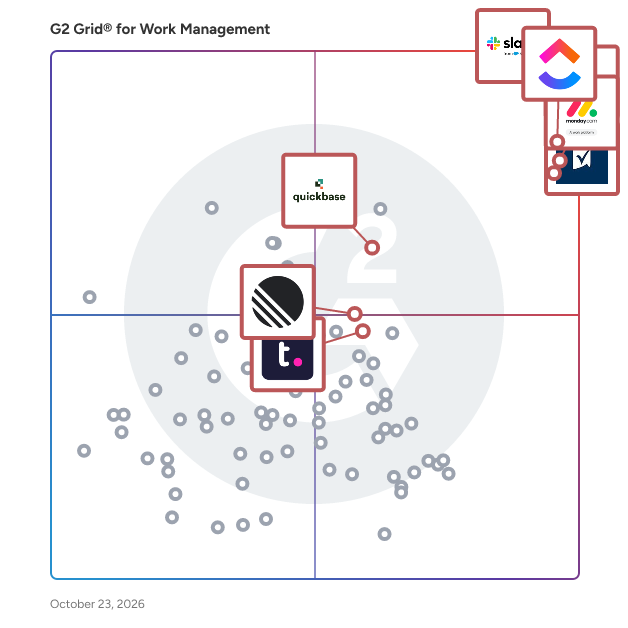
G2’s top-rated work management software, based on G2 review data, includes [Slack](https://www.g2.com/products/slack/reviews), [Asana](https://www.g2.com/products/asana/reviews), [Smartsheet](https://www.g2.com/products/smartsheet/reviews), [monday Work Management](https://www.g2.com/products/monday-com/reviews), and [ClickUp](https://www.g2.com/products/clickup/reviews).

### What are the top-reviewed work management software on G2?

[**Slack**](https://www.g2.com/products/slack/reviews)

- Number of Reviews: 1713
- Satisfaction: 100
- Market Presence: 99
- G2 Score: 100

[**Asana**](https://www.g2.com/products/asana/reviews)

- Number of Reviews: 3217
- Satisfaction: 98
- Market Presence: 87
- G2 Score: 93

[**Smartsheet**](https://www.g2.com/products/smartsheet/reviews)

- Number of Reviews: 5990
- Satisfaction: 98
- Market Presence: 85
- G2 Score: 91

[**monday Work Management**](https://www.g2.com/products/monday-com/reviews)

- Number of Reviews: 7739
- Satisfaction: 100
- Market Presence: 82
- G2 Score: 91

[**ClickUp**](https://www.g2.com/products/clickup/reviews)

- Number of Reviews: 5702
- Satisfaction: 92
- Market Presence: 81
- G2 Score: 86

Satisfaction reflects how users rate their experience with the product based on review signals such as usability, support quality, and likelihood to recommend. ([Source 2](https://www.g2.com/reports/5ea7e79b-a3bf-4700-a833-6bd58a7d37e2/preview?tab=scores))

Market Presence represents a product’s footprint in the market using signals such as company size, user adoption, and product growth indicators. ([Source 2](https://www.g2.com/reports/5ea7e79b-a3bf-4700-a833-6bd58a7d37e2/preview?tab=scores))

G2 Score combines Satisfaction and Market Presence to provide a category-level comparison between products. ([Source 2](https://www.g2.com/reports/5ea7e79b-a3bf-4700-a833-6bd58a7d37e2/preview?tab=scores))

Learn more about how G2 calculates these scores. ([Source 1](https://documentation.g2.com/docs/research-scoring-methodologies))

### What I Often See in Work Management Software

#### Feedback Pros: What Users Consistently Appreciate

- **Flexible workflow customization supports different projects and operational processes**

_“What I like best about monday Work Management is its clear visual structure and flexibility. It makes it easy to track tasks, responsibilities, and deadlines in one centralized place, while still allowing customization to fit different workflows. The automation features also help reduce manual follow-ups and improve overall team transparency and efficiency.”_

- [monday Work Management Review](https://www.g2.com/products/monday-com/reviews/monday-work-management-review-12416698), Verified User in Consumer Goods

- **Clear task organization improves visibility into responsibilities and deadlines**

_“I really like how ClickUp keeps me in the loop with my projects and those from other teams. The &#39;followers&#39; feature is really helpful for that. I also enjoy receiving notifications in my inbox and email. These features help me review what&#39;s happening from a broader perspective and remind me of things I have forgotten.”_

- [ClickUp Review](https://www.g2.com/products/clickup/reviews/clickup-review-12398953), Ricardo J.

- **Collaboration features help teams coordinate work across projects efficiently**

_“Confluence&#39;s enterprise collaboration features are the best because of their adaptability and integration with all your work processes, facilitating tasks automation and the resolution of problems related to your work processes. I can also say that Confluence stands out for its AI capabilities to create secure and professional work environments for active collaboration among all its users, facilitating communication and the transmission of professional ideas.”_

- [Confluence Review](https://www.g2.com/products/confluence/reviews/confluence-review-12419363), Karen C.

#### Cons: Where Many Platforms Fall Short

- **Advanced features may require additional setup or training**

_“One downside is that I wish the AI functionality (excluding the Super Agents - those are amazing) had stronger memory and training capabilities. Right now, it’s incredibly helpful in the moment, but it doesn’t retain long-term context about our brand voice, processes, or recurring workflows the way a fully trainable AI model can. If ClickUp’s AI could be trained on our internal documentation and retain memory across projects and time, it would become even more powerful. That would allow us to centralize not just project management, but also strategic thinking and content support, eliminating the need for additional AI tools. The AI is strong, but the ability to personalize and “teach” it over time would take it from helpful to indispensable.”_

- [ClickUp Review](https://www.g2.com/products/clickup/reviews/clickup-review-10453135), Danielle W.

- **Reporting capabilities sometimes require configuration to surface useful insights**

_“One thing I’ve noticed is that when there are too many tasks and notifications, it can feel slightly overwhelming, especially during busy sprints. It takes some effort to organize projects properly in the beginning; otherwise, things can look cluttered. Also, some advanced features like automation and detailed reporting are limited unless you upgrade, which can be a drawback for smaller teams or startups.”_

- [Asana Review](https://www.g2.com/products/asana/reviews/asana-review-12330470), Radhika R.

- **Performance may slow when managing large volumes of projects or tasks**

_“High-volume workspace often leads to &quot;notification fatigue and constant pings from numerous channels. The real-time nature of Slack can create a &quot;hyper-responsive&quot; environment where employees feel pressured to respond instantly, often at the expense of deep work and thoughtful decision-making.”_

- [Slack Review](https://www.g2.com/products/slack/reviews/slack-review-12438507), Venkat R.

### My Expert Takeaway on Work Management Software in 2026

Analysis of G2 review data indicates that work management software performs particularly well in areas that support sustained adoption. The category averages 4.53 out of 5 stars, alongside a 9.05 out of 10 likelihood-to-recommend score, suggesting that organizations frequently see operational benefits once these platforms become embedded in daily workflows.

Organizations that gain the most value from work management tools typically use them to structure operational processes rather than relying solely on basic task tracking. Defining clear workflow stages, assigning ownership, and automating routine coordination activities help teams maintain visibility into work progress while reducing manual oversight.

Industry trends within the review data show strong adoption among technology organizations, marketing teams, and professional services firms, where projects often involve multiple stakeholders and overlapping responsibilities. In these environments, work management systems provide a centralized view of tasks, deadlines, and ownership, helping teams coordinate complex initiatives.

Usability also appears to influence adoption patterns. Platforms that receive higher recommendation scores often combine customizable workflows with interfaces that remain accessible to everyday users. Metrics such as Ease of Use (6.31/7) and Quality of Support (6.28/7) indicate that many organizations are able to implement work management solutions without significant onboarding challenges.

Organizations evaluating the best work management software frequently prioritize three factors: the ability to customize workflows, visibility into project progress and workload distribution, and integrations with collaboration or productivity tools. Platforms that perform well across these areas often become central systems for coordinating work across teams.

### Work Management Software FAQs

#### Who are the leaders in work management software?

Several vendors consistently rank among the leaders in the work management software category, based on platform adoption, collaboration capabilities, and user satisfaction, as reflected in G2 review data. Commonly recognized leaders include:

- [Slack](https://www.g2.com/products/slack/reviews) is widely used as a collaboration hub that connects conversations, workflows, and integrations with productivity and project tools.
- [Asana](https://www.g2.com/products/asana/reviews) is known for structured project planning features such as timelines, task dependencies, and cross-team coordination workflows.
- [Smartsheet](https://www.g2.com/products/smartsheet/reviews) is often adopted by organizations that need spreadsheet-style work management combined with automation and reporting.

These platforms are frequently referenced in G2 review data when organizations evaluate the best work management software for managing tasks, projects, and cross-team collaboration.

#### What is the best work management tool for cross-functional teams?

Cross-functional teams typically need platforms that allow multiple departments to collaborate on shared projects while maintaining visibility into responsibilities. Popular work management tools for cross-team collaboration include:

- [monday Work Management](https://www.g2.com/products/monday-work-management/reviews) provides customizable workflow boards and dashboards that help teams track work across multiple departments.
- [ClickUp](https://www.g2.com/products/clickup/reviews) offers shared workspaces, automation rules, and reporting tools to coordinate projects across teams.
- [Teamwork.com](https://www.g2.com/products/teamwork/reviews) focuses on project coordination with task tracking, timelines, and collaboration tools for distributed teams.

These work management platforms are commonly adopted by organizations that manage projects involving multiple stakeholders.

#### What is the most affordable work management software for SMBs?

[Small and midsize businesses](https://www.g2.com/categories/work-management/small-business) often prioritize work management systems that are easy to implement while still supporting task tracking and workflow automation. Affordable options frequently chosen by SMB teams include:

- [Slack](https://www.g2.com/products/slack/reviews) provides channel-based collaboration, integrations, and lightweight workflow automation that help smaller teams coordinate work and communication.
- [Asana](https://www.g2.com/products/asana/reviews) offers structured project tracking with timelines, task assignments, and workflow visibility designed for growing teams.
- [monday Work Management](https://www.g2.com/products/monday-work-management/reviews) provides flexible workflow customization with entry-level plans suited to small organizations.

#### What is the top-rated work management platform for enterprises?

Large organizations typically need work management platforms that support complex workflows, integrations, and reporting capabilities. Platforms commonly used by enterprise teams include:

- [Smartsheet](https://www.g2.com/products/smartsheet/reviews) is frequently adopted for large-scale project coordination, reporting, and operational workflow management.
- [Wrike](https://www.g2.com/products/wrike/reviews) is known for advanced reporting dashboards and workflow customization used by large teams.
- [monday Work Management](https://www.g2.com/products/monday-work-management/reviews) provides scalable workflow automation and visibility across multiple departments.

#### What platform integrates work management with collaboration tools?

Many organizations prefer work management software that connects with communication platforms, document tools, and productivity apps. Platforms with strong collaboration integrations include:

- [Slack](https://www.g2.com/products/slack/reviews) integrates communication channels with task updates, workflow automation, and productivity tools.
- [Confluence](https://www.g2.com/products/confluence/reviews) provides documentation-driven workflows that enable teams to manage work alongside shared knowledge and collaboration spaces.
- [ClickUp](https://www.g2.com/products/clickup/reviews) connects task management with collaboration tools through integrations with communication and [productivity platforms](https://www.g2.com/categories/collaboration-productivity).

#### Sources

1. [G2 Research Scoring Methodologies](https://documentation.g2.com/docs/research-scoring-methodologies)
2. [G2 Market Presence Score Overview](https://www.g2.com/reports/5ea7e79b-a3bf-4700-a833-6bd58a7d37e2/preview?tab=scores)

**Researched By:** [Subhransu Sahu](https://research.g2.com/insights/author/subhransu-sahu)

Last updated on: March 16, 2026


