Best Online Form Builder Software - Page 6

How Many Online Form Builder Software Products Does G2 Track?

Total Products under this Category: 479

Category Stats (Sep 2026)

  • Average Rating: 4.48/5 The average rating of products in this category, based on all submitted ratings
  • Top Trending Product: Rizer (+6.25%) - Among all products in this category, Rizer recorded the largest rating increase compared to last month

Last updated: September 01, 2026

How Does G2 Rank Online Form Builder Software Products?

Why You Can Trust G2's Software Rankings:

  • 30 Analysts and Data Experts
  • 110,300+ Authentic Reviews
  • 479+ Products
  • Unbiased Rankings

G2's software rankings are built on verified user reviews, rigorous moderation, and a consistent research methodology maintained by a team of analysts and data experts. Each product is measured using the same transparent criteria, with no paid placement or vendor influence. While reviews reflect real user experiences, which can be subjective, they offer valuable insight into how software performs in the hands of professionals. Together, these inputs power the G2 Score, a standardized way to compare tools within every category.

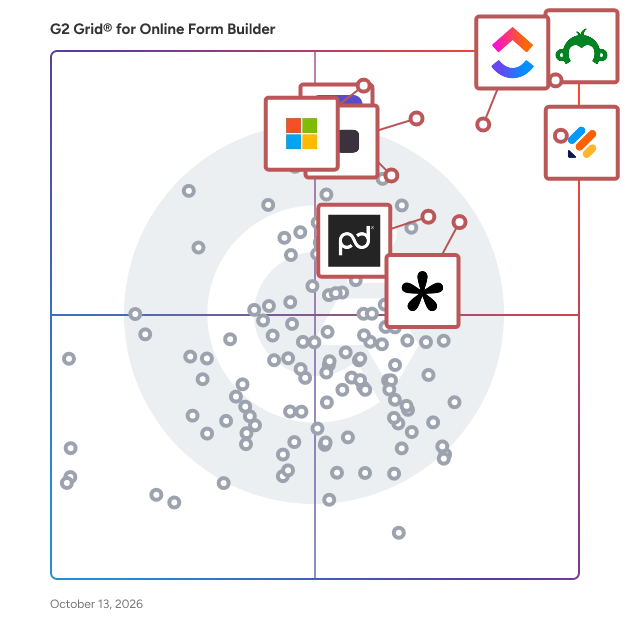
G2 Grid® for Online Form Builder Software

G2 Grid® for Online Form Builder Software plotting products by satisfaction and market presence

Highlighted products: SurveyMonkey, Jotform, ClickUp, Typeform, Microsoft Forms, Tally, ActiveCampaign, and Adobe Acrobat Sign.

Underlying data: [Grid® JSON](https://www.g2.com/categories/online-form-builder/grids.json?focus%5B%5D=surveymonkey&focus%5B%5D=jotform&focus%5B%5D=clickup&focus%5B%5D=typeform&focus%5B%5D=microsoft-forms&focus%5B%5D=tally-forms-tally&focus%5B%5D=activecampaign&focus%5B%5D=adobe-acrobat-sign)

Heyflow

Heyflow is the AI-first funnel platform for performance marketers, agencies, ecom brands, and growth teams. Building a funnel or landing page is no longer the hard part: turning paid traffic into real revenue, leads, and bookings is. This is exactly what Heyflow helps you achieve: Using data from over $2B in ad spend and 150,000 real funnels and landing pages, Heyflow AI builds highly-converting funnels, landing pages, advertorial and pre-sell pages, product finders, discovery quizzes, and anything else that needs to convert. Hosting, admin, and integrations all ship natively, meaning you can focus on getting real leads, conversions, and revenue, while the platform handles the rest. 3,000+ teams use Heyflow today, from high-growth scale-ups to global brands. ✓ Convert Heyflow AI is trained on 150,000+ real funnels and over $2B in paid traffic. It knows which questions to ask, which proof points to show, and in what order, before you run a single test. Higher CVR compounds across the full funnel: better ROAS, lower CAC, and more headroom to scale without increasing spend. ✓ Build Generate complete funnels, landing pages, and product quizzes from a single prompt. Heyflow AI produces a ready-to-run flow: questions, structure, sequencing, not a blank canvas. Refine anything in the visual editor with 40+ conversion-tested elements, conditional logic, and Map View to see your entire flow at a glance. ✓ Design Instant brand match: paste a URL or drop in a screenshot and Heyflow configures fonts, colors, and styling to your brand automatically. Need a custom element: a trust bar, countdown, or product widget? Describe it or drop in a reference, and Heyflow builds it. No designer required. ✓ Optimize AI scans your live flow and surfaces concrete improvements that you apply in one click. Run A/B tests with custom traffic splits to pressure-test what's working. Page-level analytics show exactly where a flow is leaking, and why. Partial submission captures data even when visitors drop off mid-journey, so no lead is wasted. ✓ Qualify Lead quality is built into the platform, not bolted on. Network-level phone validation checks with the carrier that a number is real before it ever reaches your CRM. SMS OTP verification adds a second layer. The result: cleaner lists, lower CAC, fewer wasted follow-ups. ✓ Integrate Connect to your existing stack via 50+ native integrations: server-side tracking, CRM sync, analytics, and automated replies. UTM parameters and URL data pass through automatically, so attribution stays clean from ad click to conversion. Already working in an AI stack? Connect Claude, ChatGPT or Cursor to the Heyflow MCP, and it doesn’t just build inside our infrastructure. It can ask the platform what’s working before you spend a dollar of ad budget finding out the hard way.

Average Rating: 4.5/5.0

Total Reviews: 62

How Do G2 Users Rate Heyflow?

  • Has the product been a good partner in doing business?: 7.7/10 (Category avg: 9.1/10)
  • CMS Support: 7.5/10 (Category avg: 8.5/10)
  • Design: 8.5/10 (Category avg: 8.7/10)
  • Embedded Forms: 8.2/10 (Category avg: 8.9/10)

Who Is the Company Behind Heyflow?

  • Seller: Heyflow
  • Year Founded: 2020
  • HQ Location: Hamburg
  • Twitter: @heyflowapp
    78 Twitter followers
  • LinkedIn® Page: www.linkedin.com
    66 employees on LinkedIn®

Who Uses This Product?

  • Who Uses This: CEO
  • Top Industries: Marketing and Advertising, Automotive
  • Company Size: 78% Small, 11% Medium

What Do G2 Reviewers Say About Heyflow?

AI-generated summary from verified user reviews

Pros
  • Users praise Heyflow's user-friendly interface, enabling non-coders to easily design and optimize their funnels.
  • Users praise Heyflow for its easy setup, highlighting its intuitive interface and low learning curve for quick deployment.
  • Users find Heyflow incredibly intuitive, making it easy for anyone to start using without prior experience.
  • Users praise Heyflow's excellent customer support, consistently noting prompt and helpful assistance throughout their experience.
  • Users commend the easy implementation of Heyflow, enabling quick setup and efficient lead generation without coding hassles.
Cons
  • Users find the learning curve steep, requiring significant time and effort to fully grasp Heyflow's capabilities.
  • Users find Heyflow's pricing expensive, with limited flows prompting frustration and a need for more affordable tiers.
  • Users face integration issues with Heyflow, experiencing limitations in domains and flow options that hinder usability.
  • Users find the missing essential features in Heyflow frustrating, leading to poor support experiences and dissatisfaction.
  • Users feel that Heyflow's poor visualization limits effective analytics reporting and hampers overall user experience.

What Are Recent G2 Reviews of Heyflow?

What Are G2 Users Discussing About Heyflow?

Landingi

Landingi is an AI landing page operation system built for marketers who need to create, launch, manage, and optimize landing pages at scale. It supports every stage of campaign execution using landing pages – from creation and publishing to integration, optimization, and conversion improvement. At the core of the platform is Landingi’s AI ecosystem: Lunar, Solis, and Orbit. These tools support marketers across the full landing page workflow and turn AI into a practical execution layer, not just an add-on. Lunar is an AI landing page generator that helps marketers create landing pages faster, reducing the time needed to move from idea to launch-ready asset. It accelerates campaign creation and removes much of the manual work involved in building pages from scratch. Solis is an AI agent that supports landing page optimization by analyzing user behavior and page performance. It helps teams identify what may be limiting results and speeds up the implementation of changes that support better conversion outcomes. Orbit (coming soon) extends Landingi into AI-native workflows through MCP. It connects Landingi capabilities with a marketer’s preferred AI environment, making it easier to work with landing page creation and optimization in a more connected and efficient way. Together, Lunar, Solis, and Orbit give marketers AI support across design, execution, optimization, and conversion-focused improvements. This helps reduce operational friction, improve speed, and maintain control over campaign workflows. Beyond AI, Landingi provides the operational features teams need to scale. Marketers can create and manage Programmatic Landing Pages for large-volume campaigns, run A/B tests to compare variants and improve results, and use Smart Sections to update repeated page elements across multiple landing pages faster. The platform also supports scheduling, making it easier to control when pages go live or expire, and Dynamic Text Replacement (DTR), which helps align page content with ad intent and improve message match. Landingi also supports multi-language pages with automatic translations into 35 languages. To support campaign execution, Landingi also provides a pixel-perfect drag-and-drop editor for building landing pages, including mobile views. With 400+ ready-to-use templates designed for different industries and campaign goals, teams can create high-converting pages faster and with less effort. Landingi also offers 170+ integrations that connect the platform with the rest of the marketing stack, including analytics, CRM, email marketing, advertising, and automation tools. This helps teams automate workflows, improve campaign efficiency, and keep landing page operations aligned with their broader marketing systems. Landingi is also built for teams that need reliability, security, and compliance alongside speed. The platform highlights enterprise-grade infrastructure, including 99.96% uptime, and positions infrastructure stability as a core part of campaign performance. For enterprise environments, Landingi emphasizes system reliability, data security, integrations, and scalability. It also communicates GDPR compliance and states support for DORA requirements, alongside features such as 2FA, audit logs, secure AWS-based infrastructure, and regular external penetration testing. As a result, Landingi gives marketers the infrastructure to run landing page operations with more speed, consistency, and control.

Average Rating: 4.5/5.0

Total Reviews: 382

How Do G2 Users Rate Landingi?

  • Has the product been a good partner in doing business?: 8.9/10 (Category avg: 9.1/10)
  • CMS Support: 7.5/10 (Category avg: 8.5/10)
  • Design: 8.6/10 (Category avg: 8.7/10)
  • Embedded Forms: 9.2/10 (Category avg: 8.9/10)

Who Is the Company Behind Landingi?

  • Seller: Landingi
  • Company Website:
  • Year Founded: 2013
  • HQ Location: Dallas, US
  • Twitter: @landingiapp
    2,100 Twitter followers
  • LinkedIn® Page: www.linkedin.com
    28 employees on LinkedIn®

Who Uses This Product?

  • Who Uses This: CEO, Owner
  • Top Industries: Marketing and Advertising, Computer Software
  • Company Size: 90% Small, 10% Medium

What Do G2 Reviewers Say About Landingi?

AI-generated summary from verified user reviews

Pros
  • Users appreciate the ease of use of Landingi, allowing quick and effortless landing page creation.
  • Users love the easy integration and creation of landing pages for both web and mobile experiences.
  • Users value the easy setup of Landingi, facilitating quick and efficient landing page creation for web and mobile.
  • Users appreciate the ease of creation with Landingi, enabling quick and effortless landing page development.
  • Users praise the quick and effective customer support of Landingi, simplifying their experience and ensuring success.
Cons
  • Users find limited features in Landingi, often needing to seek third-party solutions for advanced needs.
  • Users find the missing features in Landingi, such as shortcuts and mobile options, limit its usability.
  • Users find Landingi to be expensive, particularly with many basic functions requiring extra payments.
  • Users face limited functionality with multi-page landing creation and frequent session timeouts that hinder productivity.
  • Users find contact form options limited and functionality reduced for multi-page landing pages, needing third-party integrations.

What Are Recent G2 Reviews of Landingi?

What Are G2 Users Discussing About Landingi?

Plumsail Forms

Plumsail Forms is a form-building solution designed to create public-facing web forms and customize SharePoint forms within Microsoft 365 or on-premises environments. It enables users to design responsive, feature-rich forms without the need for coding expertise, facilitating efficient data collection and integration across various platforms. Key Features and Functionality: - Drag-and-Drop Designer: Easily build complex forms with a user-friendly interface that supports multiple steps, data tables, and custom business logic. - Public Forms: Create forms for applications, registrations, surveys, and more, which can be embedded on any website or shared via direct links. - SharePoint Forms Customization: Replace default SharePoint forms with customized ones, adding layouts, advanced controls, and conditional logic to enhance functionality. - Integration with Third-Party Services: Automate form data processing by connecting with services like Power Automate, Make, or Zapier, enabling seamless data flow to thousands of applications. - Data Storage Options: Save form submissions to platforms such as SharePoint, Airtable, or other specified destinations, allowing external users to submit or modify data without direct access to internal systems. - Responsive Design: Ensure forms are accessible and functional across various devices, including desktops, tablets, and smartphones. Primary Value and User Solutions: Plumsail Forms addresses the need for efficient and customizable form creation, enabling organizations to collect and process data effectively. By offering integration with existing systems and automating workflows, it reduces manual data entry, minimizes errors, and enhances user engagement. Its flexibility in design and deployment makes it suitable for a wide range of applications, from simple surveys to complex data collection processes, thereby improving operational efficiency and data accuracy.

Average Rating: 4.6/5.0

Total Reviews: 45

How Do G2 Users Rate Plumsail Forms?

  • Has the product been a good partner in doing business?: 9.0/10 (Category avg: 9.1/10)
  • CMS Support: 8.7/10 (Category avg: 8.5/10)
  • Design: 9.1/10 (Category avg: 8.7/10)
  • Embedded Forms: 8.2/10 (Category avg: 8.9/10)

Who Is the Company Behind Plumsail Forms?

  • Seller: Plumsail
  • Year Founded: 2011
  • HQ Location: Wilmington, Delaware
  • LinkedIn® Page: www.linkedin.com
    21 employees on LinkedIn®

Who Uses This Product?

  • Top Industries: Information Technology and Services
  • Company Size: 45% Medium, 45% Small

What Do G2 Reviewers Say About Plumsail Forms?

AI-generated summary from verified user reviews

Pros
  • Users value the helpful customer support of Plumsail Forms, quickly resolving issues and providing assistance when needed.
  • Users value the ease of use of Plumsail Forms, appreciating its intuitive drag-and-drop feature and sleek layout.
  • Users praise the seamless integrations of Plumsail Forms, enhancing workflow and simplifying complex processes efficiently.
  • Users appreciate the intuitive form building and professional results of Plumsail Forms, enhancing their workflow significantly.
  • Users love the affordable pricing of Plumsail Forms, appreciating its transparent model for unlimited SharePoint use.
Cons
  • Users desire more customization options for field positioning, feeling limited by the current capabilities of Plumsail Forms.
  • Users find complex features of Plumsail Forms overwhelming, leading to a challenging user experience.
  • Users report formatting issues, such as mandatory phone number formats and unclear settings for certain controls.
  • Users find the steep learning curve challenging, especially for entry-level IT agents working with JavaScript and data sources.
  • Users find limited options for data sources in Plumsail Forms, seeking alternatives beyond Excel online.

What Are Recent G2 Reviews of Plumsail Forms?

Formsort

Formsort is a low-code form builder designed to empower product and marketing teams to create and optimize high-conversion forms without extensive development time. It enables the construction of various forms, including onboarding processes, check-ins, and quizzes, with a focus on enhancing user experience and conversion rates. Formsort offers advanced customization features, allowing complete control over form design to align with a brand's identity. The platform supports conditional logic, enabling forms to adapt based on user responses, and integrates seamlessly with existing technology stacks through native integrations with tools like BigQuery, PostgreSQL, Redshift, Salesforce, and Google Sheets. Formsort also emphasizes data privacy and security, being SOC 2 Type II certified and HIPAA compliant, making it suitable for industries requiring stringent data protection. By providing a user-friendly interface and robust features, Formsort addresses the need for efficient, customizable, and secure form creation, helping businesses improve conversion rates and streamline data collection processes.

Average Rating: 4.9/5.0

Total Reviews: 31

How Do G2 Users Rate Formsort?

  • Has the product been a good partner in doing business?: 9.9/10 (Category avg: 9.1/10)
  • CMS Support: 9.3/10 (Category avg: 8.5/10)
  • Design: 9.1/10 (Category avg: 8.7/10)
  • Embedded Forms: 9.8/10 (Category avg: 8.9/10)

Who Is the Company Behind Formsort?

  • Seller: Formsort
  • Year Founded: 2019
  • HQ Location: New York, NY
  • Twitter: @formsort
    15 Twitter followers
  • LinkedIn® Page: www.linkedin.com
    8 employees on LinkedIn®

Who Uses This Product?

  • Top Industries: Hospital & Health Care, Health, Wellness and Fitness
  • Company Size: 66% Small, 25% Medium

What Do G2 Reviewers Say About Formsort?

AI-generated summary from verified user reviews

Pros
  • Users value the advanced customizability of Formsort, enabling complex logic without coding skills for prototype creation.
  • Users appreciate the customization options in Formsort, enabling easy creation of advanced forms without coding skills.
  • Users love the versatility of Formsort, enabling advanced logic creation without needing coding skills.
Cons
  • Users find the steep learning curve challenging, especially for designing visually appealing forms.

What Are Recent G2 Reviews of Formsort?

What Are G2 Users Discussing About Formsort?

Ninja Forms

Use Ninja Forms to create beautiful, user-friendly WordPress forms that will make you feel like a professional web developer! Drag and drop fields. Easy row and column layouts. Multi-page forms. Conditional forms. You don’t have to be a designer to create forms that will blend beautifully with your WordPress website. Want more advanced features? Use our add-ons to create an upload form, send email from your form, securely accept payments from Paypal or credit card, or integrate your form with any ESP. Whether you're a beginner or a long-time WordPress user, you'll be able to create professional-looking forms with Ninja Forms!

Average Rating: 4.3/5.0

Total Reviews: 16

How Do G2 Users Rate Ninja Forms?

  • Has the product been a good partner in doing business?: 8.8/10 (Category avg: 9.1/10)

Who Is the Company Behind Ninja Forms?

  • Seller: Ninja Forms
  • Year Founded: 2014
  • HQ Location: Cleveland, Tennessee
  • Twitter: @ninjaforms
    2,572 Twitter followers
  • LinkedIn® Page: www.linkedin.com

Who Uses This Product?

  • Top Industries: Marketing and Advertising
  • Company Size: 81% Small, 25% Medium

What Are Recent G2 Reviews of Ninja Forms?

What Are G2 Users Discussing About Ninja Forms?

altaFlow

altaFlow generates custom docs with a click, integrates eSignatures, creates webforms, and more without coding. It’s the ultimate tool to simplify, automate, and elevate your workflows.

Average Rating: 4.5/5.0

Total Reviews: 56

How Do G2 Users Rate altaFlow?

  • Has the product been a good partner in doing business?: 9.3/10 (Category avg: 9.1/10)

Who Is the Company Behind altaFlow?

  • Seller: airSlate
  • Company Website:
  • Year Founded: 2006
  • HQ Location: Brookline, Massachusetts
  • Twitter: @airSlate
    1,234 Twitter followers
  • LinkedIn® Page: www.linkedin.com
    816 employees on LinkedIn®

Who Uses This Product?

  • Top Industries: Financial Services, Higher Education
  • Company Size: 52% Medium, 41% Small

What Do G2 Reviewers Say About altaFlow?

AI-generated summary from verified user reviews

Pros
  • Users find altaFlow to be extremely user-friendly, with quick implementation and excellent customer support for seamless navigation.
  • Users commend the excellent customer support of altaFlow, praising its responsiveness and helpfulness when needed.
  • Users find altaFlow to be very intuitive and user-friendly, facilitating easy navigation and quick implementation.
  • Users value the time-saving features of altaFlow, allowing for quick implementation and efficient workflow management.
Cons
  • Users report frequent bot issues leading to significant slowdowns and response time delays during complex workflows.
  • Users find the complexity of settings in altaFlow overwhelming, making navigation and understanding challenging.
  • Users find difficult editing a major inconvenience, as it requires restarting the entire signing process for changes.
  • Users find it challenging to navigate altaFlow due to the complexity of its various offerings and features.
  • Users find the difficult setup of altaFlow can be time-consuming, impacting initial user experience despite its advantages.

What Are Recent G2 Reviews of altaFlow?

What Are G2 Users Discussing About altaFlow?

SurveyVista

Automate Data Collection and Unlock Deeper Insights in Salesforce SurveyVista is a 100% native Salesforce Survey, Form, and Assessment Solution, revolutionizing how businesses collect, integrate, understand, and act on feedback—securely and in real time, all within Salesforce. Built entirely on Salesforce, SurveyVista inherits Salesforce’s robust compliance certifications (HIPAA, SOC, ISO, GDPR), ensuring the highest standards of security and data protection. _______________________________ Collect – Capture Feedback Effortlessly - Automate data collection with surveys and forms that seamlessly integrate into Salesforce. - Increase response rates with multi-channel distribution via email, SMS, WhatsApp, and landing pages. - Customize branded, intuitive surveys, forms, and assessments that reflect your organization's look and feel. Integrate – Seamlessly Connect Feedback to Salesforce - Map responses directly to Salesforce records, eliminating manual data entry and ensuring real-time data availability. - Pre-fill & personalize surveys and forms with Salesforce data, improving accuracy and streamlining end-user experiences. - Keep all feedback secure within your Salesforce org, ensuring compliance and maintaining a 360º view of customer and employee sentiment. Understand – Gain Meaningful Insights from Feedback - Analyze trends with AI-powered analytics, turning raw feedback into actionable intelligence. - Uncover key drivers behind CSAT, CES, and NPS using built-in reporting and sentiment analysis. - Leverage pre-built dashboards in Salesforce to track response trends, identify sentiment shifts, and spot improvement areas. Act – Turn Insights into Meaningful Change - Automate follow-ups and workflows based on survey responses to drive engagement and retention. - Trigger actions within Salesforce based on feedback insights, such as case creation for low CSAT scores. - Enhance customer and employee experiences by addressing feedback in real-time and continuously optimizing interactions. _______________________________ Who is SurveyVista For? - Sales & CX Leaders looking to automate feedback collection and enhance customer experience within Salesforce. - HR Teams need to monitor employee satisfaction and engagement. - Nonprofits & Healthcare Organizations streamlining program registrations, patient intake, volunteer feedback, grant application & approval, and more. - Product & Marketing Teams gathering data-driven insights to inform business strategies. Try SurveyVista Today - Explore a free trial to see how SurveyVista can transform your data collection. - Schedule a personalized demo to upload your own feedback data and unlock tailored insights. - Experience the power of SurveyVista—your complete feedback and data collection solution for Salesforce. Get SurveyVista Now! (https://surveyvista.com/?utm_source=G2&utm_medium=listing&utm_campaign=G2) AppExchange: https://sforce.co/3VaUH32

Average Rating: 4.9/5.0

Total Reviews: 36

How Do G2 Users Rate SurveyVista?

  • Has the product been a good partner in doing business?: 9.7/10 (Category avg: 9.1/10)
  • CMS Support: 8.8/10 (Category avg: 8.5/10)
  • Design: 9.3/10 (Category avg: 8.7/10)
  • Embedded Forms: 9.7/10 (Category avg: 8.9/10)

Who Is the Company Behind SurveyVista?

  • Seller: Ardira
  • Year Founded: 2019
  • HQ Location: Santa Clara, CA
  • LinkedIn® Page: www.linkedin.com
    33 employees on LinkedIn®

Who Uses This Product?

  • Top Industries: Non-Profit Organization Management
  • Company Size: 58% Medium, 36% Small

What Do G2 Reviewers Say About SurveyVista?

AI-generated summary from verified user reviews

Pros
  • Users consistently praise SurveyVista's exceptional customer support, noting quick, effective responses and problem-solving capabilities.
  • Users praise the seamless Salesforce integration of SurveyVista, enhancing data collection and reporting efficiency.
  • Users find SurveyVista to be incredibly helpful, enhancing feedback collection and customer support significantly.
  • Users highlight the seamless Salesforce integration of SurveyVista, significantly enhancing efficiency and streamlining workflows effectively.
  • Users find SurveyVista's user-friendly interface empowers them to efficiently collect and manage feedback and information.
Cons
  • Users find the learning curve steep due to complex features, but helpful resources improve the experience.
  • Users find the complex features of SurveyVista challenging, requiring advanced skills for effective survey management.
  • Users find that complexity in personalizations and survey logic can hinder effective use of SurveyVista.
  • Users find limited customization in SurveyVista's reports to be a hindrance during analysis and workflow optimization.
  • Users find the complex logic in SurveyVista challenging, noting the need for improved tools and documentation.

What Are Recent G2 Reviews of SurveyVista?

Bonsai

Bonsai is a one-stop platform for agencies, consultancies and professional service providers. It is designed to provide businesses with a complete and real-time overview of their business. Simplify your business operations and consolidate your projects, clients and team into one integrated, easy-to-use platform. From contracts, proposals and project management to client billing, revenue tracking and resource management. Project Management: Assign projects & tasks to your team, prioritize your week and see exactly how your projects progress. Set project budgets & avoid unexpected costs. Gantt chart, Kanban view, integrated timer for easy billing, and collaboration with external partners for an efficient work. Team Time Tracking: Get an instant report of your team's tracked hours with accurate timesheets & see who's over capacity at a glance. Monitor your business's utilization & get clarity on your team's efficiency & profitability. Plan your resources in advance to keep your projects on track and on budget. CRM: Manage your clients and their projects in one place. Create unique client profiles with all your notes, contacts, rates and tags. Invite your clients to your branded Client Portal where they can access projects, documents and links you’ve shared with them.

Average Rating: 4.3/5.0

Total Reviews: 100

How Do G2 Users Rate Bonsai?

  • Has the product been a good partner in doing business?: 9.1/10 (Category avg: 9.1/10)
  • CMS Support: 7.5/10 (Category avg: 8.5/10)
  • Design: 7.6/10 (Category avg: 8.7/10)
  • Embedded Forms: 7.5/10 (Category avg: 8.9/10)

Who Is the Company Behind Bonsai?

  • Seller: Bonsai (YC W16)
  • Year Founded: 2015
  • HQ Location: San Francisco, California
  • Twitter: @bonsaiinc
    3,038 Twitter followers
  • LinkedIn® Page: www.linkedin.com
    42 employees on LinkedIn®

Who Uses This Product?

  • Who Uses This: Owner
  • Top Industries: Marketing and Advertising, Design
  • Company Size: 94% Small, 1% Medium

What Do G2 Reviewers Say About Bonsai?

AI-generated summary from verified user reviews

Pros
  • Users appreciate the ease of use of Bonsai, enjoying streamlined management of contracts, invoices, and services in one place.
  • Users value the all-in-one invoicing capabilities of Bonsai, simplifying their business management and enhancing productivity.
  • Users appreciate the comprehensive invoice management of Bonsai, streamlining business processes and enhancing productivity effortlessly.
  • Users love the time-saving features of Bonsai, streamlining proposal, invoicing, and project management effortlessly.
  • Users value the time tracking capabilities of Bonsai, enhancing project management and overall business efficiency.
Cons
  • Users note a lack of features like CSV export, mobile app, and satisfactory customer service in Bonsai.
  • Users find Bonsai expensive compared to alternatives, often paying for unnecessary features in a restrictive membership model.
  • Users experience integration issues with Bonsai, citing problems like timezone conflicts and inadequate calendar functionalities.
  • Users find the limited customization options restrictive, impacting their ability to tailor Bonsai to specific needs.
  • Users find Bonsai's features limited and restrictive, often feeling they pay for unnecessary functionalities.

What Are Recent G2 Reviews of Bonsai?

What Are G2 Users Discussing About Bonsai?

Demand IQ Journeys

Demand IQ Journeys: Smarter Lead Generation for Home Improvement Contractors Demand IQ Journeys is the lead generation and customer engagement platform built specifically for home improvement contractors who are tired of paying top dollar for low-quality leads. Whether you sell solar, roofing, HVAC, windows, siding, or any other home improvement service, Journeys turns your website into a 24/7 sales engine that captures, qualifies, and converts homeowners while your competitors are still waiting on callback requests. Convert More Website Visitors Into Booked Appointments Most contractor websites lose the majority of their traffic to clunky contact forms and slow follow-up. Journeys replaces those friction points with an interactive, conversational experience that guides homeowners through a personalized digital journey, qualifying them in real time based on the criteria that matter to your business. From instant property data enrichment to dynamic question logic, every interaction is designed to surface high-intent leads and filter out tire-kickers before they ever hit your CRM. Built for the Way Modern Homeowners Shop Today's homeowners research, compare, and decide online long before they pick up the phone. Journeys meets them where they are with a mobile-first, brand-customizable experience that delivers instant estimates, savings calculations, and self-scheduled appointments. The result: shorter sales cycles, higher show rates, and more closed deals per marketing dollar spent. Powerful Integrations and Automation Journeys plugs directly into the tools your team already uses, including HubSpot, Salesforce, Zapier, and leading dialers, so leads flow seamlessly into your pipeline without manual data entry. Why Home Improvement Companies Choose Demand IQ - Higher quality leads: Pre-qualification logic ensures your reps spend time on homeowners who are ready to buy, not researchers and renters. - Lower cost per acquisition: Maximize the ROI of every paid ad, organic visit, and referral by converting more of the traffic you're already paying for. - Faster speed to lead: Instant appointment booking and real-time notifications mean your sales team contacts prospects while intent is still hot. Industry-specific design: Purpose-built for solar lead generation, roofing lead generation, HVAC lead generation, and the broader home services market — not a generic form builder retrofitted for contractors. Start Owning Your Pipeline. If you're ready to transform your contractor website from a digital business card into a measurable revenue channel, Demand IQ Journeys is the lead generation software trusted by growing home improvement businesses nationwide. Book a demo today and see how the right digital customer journey can fuel your next quarter of growth.

Average Rating: 4.7/5.0

Total Reviews: 19

How Do G2 Users Rate Demand IQ Journeys?

  • Has the product been a good partner in doing business?: 9.2/10 (Category avg: 9.1/10)
  • CMS Support: 8.3/10 (Category avg: 8.5/10)
  • Design: 10.0/10 (Category avg: 8.7/10)
  • Embedded Forms: 9.4/10 (Category avg: 8.9/10)

Who Is the Company Behind Demand IQ Journeys?

Who Uses This Product?

  • Top Industries: Construction
  • Company Size: 63% Small, 32% Medium

What Do G2 Reviewers Say About Demand IQ Journeys?

AI-generated summary from verified user reviews

Pros
  • Users value the ease of use of Demand IQ Journeys, appreciating its straightforward setup and supportive customer service.
  • Users commend the easy setup of Demand IQ Journeys, appreciating prompt assistance and support throughout the process.
  • Users value the effective communication capabilities of Demand IQ Journeys, enhancing customer engagement in solar potential assessments.
  • Users commend the excellent customer support from Elle Sweetland, enhancing their experience with Demand IQ Journeys.
  • Users appreciate the customizability of Demand IQ Journeys, enhancing engagement and tailoring experiences for specific demographics.
Cons
  • Users find the interface of Demand IQ Journeys to be not intuitive, impacting overall accessibility and usability.
  • Users find the interface not user-friendly, feeling it's not as intuitive or accessible as needed.
  • Users find the poor design of Demand IQ Journeys makes the interface less intuitive and accessible than desired.
  • Users find the poor usability of Demand IQ Journeys limits accessibility and makes navigation challenging.
  • Users desire a more intuitive interface for Demand IQ Journeys to enhance accessibility and overall user-friendliness.

What Are Recent G2 Reviews of Demand IQ Journeys?

ProProfs Survey Maker

ProProfs Survey Maker is SaaS-based survey software that helps businesses create attractive and personalized feedback surveys through professionally-designed themes. You can use a pre-made survey or create a customized survey to gather data that enables you to measure customer loyalty and satisfaction levels with ease. ProProfs survey maker offers a great survey design to fetch more accurate data. It helps you collect unbiased survey data on a diverse range of topics. More than 100 ready-made templates and over 1,000,000 thoughtfully crafted questions help you get information aligned with your business goals and objectives. Here the main offerings of this highly versatile tool: Surveys NPS Surveys In-App Surveys Popup surveys Forms such as SideBar forms Quizzes Polls Major Attractions of the ProProfs Survey Maker Get an overview of customer activity: The tool provides real-time reports in the form of graphs, charts, and other graphics. Boost customer retention: Everything is made visible on the powerful dashboard for you to compare and create an actionable strategy. Amp up your lead generation and conversions: Get a snapshot of the behaviors and attitudes of the customers. Multiple language support: Get information from customers from around the world. Expand customer outreach: The surveys can be shared across various platforms and social networks. Evaluate customer’s choice: The tool lets you conduct NPS surveys to see if a customer will choose your brand for his/her next buy or recommend any friend or colleague for the same. Gauge your website traffic and gather quick feedback: You can take advantage of the Popup survey, which can be strategically triggered in response to specific actions by the user. Multiple integrations: The survey maker can be integrated with Freshdesk, MailChimp, SalesForce, Constant Contact, Zendesk to capture customer’s details and gather more valuable data. If you face any issue during survey creation, you can take the help of the video tutorials and FAQs available in the help section.

Average Rating: 4.3/5.0

Total Reviews: 50

How Do G2 Users Rate ProProfs Survey Maker?

  • Has the product been a good partner in doing business?: 9.0/10 (Category avg: 9.1/10)
  • CMS Support: 8.1/10 (Category avg: 8.5/10)
  • Design: 9.2/10 (Category avg: 8.7/10)
  • Embedded Forms: 9.4/10 (Category avg: 8.9/10)

Who Is the Company Behind ProProfs Survey Maker?

  • Seller: ProProfs
  • Year Founded: 2009
  • HQ Location: Los Angeles, CA
  • Twitter: @ProProfs
    4,731 Twitter followers
  • LinkedIn® Page: www.linkedin.com
    214 employees on LinkedIn®

Who Uses This Product?

  • Top Industries: Education Management
  • Company Size: 49% Medium, 34% Small

What Do G2 Reviewers Say About ProProfs Survey Maker?

AI-generated summary from verified user reviews

Pros
  • Users appreciate the ease of use of ProProfs Survey Maker, enabling quick setup and seamless integration with other tools.
  • Users love the easy setup of ProProfs Survey Maker, allowing quick survey creation just minutes after signing up.
  • Users appreciate the easy survey creation process in ProProfs Survey Maker, enjoying its user-friendly drag and drop features.
  • Users highlight the quick setup of ProProfs Survey Maker, enabling effortless creation of surveys in minutes.
  • Users appreciate the hassle-free setup of ProProfs Survey Maker, enabling quick and easy initiation of surveys and quizzes.
Cons
  • Users note the poor design of ProProfs Survey Maker, citing a dated and dense interface that hinders usability.
  • Users find the UI of ProProfs Survey Maker outdated and dense, detracting from the overall user experience.
  • Users find the cluttered interface of ProProfs Survey Maker to be overwhelming and less user-friendly.
  • Users find exporting issues with ProProfs Survey Maker, often requiring manual cleanup for data formatting.
  • Users report formatting issues with exported data needing manual cleanup, which can be frustrating during analysis.

What Are Recent G2 Reviews of ProProfs Survey Maker?

What Are G2 Users Discussing About ProProfs Survey Maker?

NativeForms

NativeForms is a tool for building form & surveys and polls for all platforms. We save you countless hours of boring development of forms and surveys. We created NativeForms to help you communicate with your clients. Our product offers advanced solutions to all your problems and let you focus on things that are really important in your company. NativeForms integrates with: Google Sheets, Jira, Slack, Stripe, Intercom, ActiveCampaign, Zendesk Sell, Notion, HubSpot, Pipedrive, Monday.com, Salesforce, Trello, Airtable, Discord, Mailchimp, React Native, Wordpress, Wix. Key Features: Form Editor -> Our easy to use Form Editor will help you to create your dream forms in minutes Email notifications -> Get notified every time the form is completed. Widget -> Embed forms on your website as chat widget or simply use an iframe. Embed forms in emails -> You can embed form directly in email. It highly improves conversation rate. Templates -> Choose a template, add/edit questions based on your requirements and define your conditions. That’s pretty much it to start with your first form. - Unlimited Forms & Surveys - Unlimited Submissions - Unlimited Websites - Unlimited Embeds - Unlimited Attachments - Logic Jumps - Downloadable HTML forms - Removable "powered by" branding - GDPR Compliant Native Forms comes with 30+ form types and a library of widgets that are useful for market research, sales leads, e-commerce, consultants, and more. Once a form is built, you can either grab a native link to share across social media or mention in your newsletter (or) Email the form directly within your NativeForms dashboard (or) grab the iframe code and embed it anywhere. With the detailed analytics, you can keep track of the completion rate, devices using which the forms are getting filed, browsers, platforms & so on.

Average Rating: 4.6/5.0

Total Reviews: 35

How Do G2 Users Rate NativeForms?

  • Has the product been a good partner in doing business?: 9.0/10 (Category avg: 9.1/10)
  • CMS Support: 8.3/10 (Category avg: 8.5/10)
  • Design: 8.5/10 (Category avg: 8.7/10)
  • Embedded Forms: 9.2/10 (Category avg: 8.9/10)

Who Is the Company Behind NativeForms?

  • Seller: NativeForms
  • Year Founded: 2014
  • HQ Location: New York City, New York
  • Twitter: @NativeForms
    55 Twitter followers
  • LinkedIn® Page: www.linkedin.com

Who Uses This Product?

  • Company Size: 63% Small, 23% Medium

What Do G2 Reviewers Say About NativeForms?

AI-generated summary from verified user reviews

Pros
  • Users value the flexibility of NativeForms, allowing seamless integration and rapid data capture from customers.
  • Users value the seamless integrations of NativeForms, enhancing data collection and boosting efficiency significantly.

What Are Recent G2 Reviews of NativeForms?

What Are G2 Users Discussing About NativeForms?

Uniqode QR Code Generator

Uniqode is a QR Code generator for businesses, trusted by 50,000+ companies worldwide, including Nestlé, Toyota, Hilton, and Amazon. Teams use Uniqode to create, manage, and track dynamic QR Codes at scale, turning every physical touchpoint into a measurable channel with real-time data and the freedom to edit QR Code without reprinting. Uniqode goes beyond QR creation to connect offline engagement to online growth through analytics, automation, and integrations that help teams of any size do more with every scan. ✔️ Create dynamic QR Codes: Design fully branded QR Codes with custom logos, colors, frames, and eye shapes that can be updated at any time without reprinting. ✔️ Capture first-party data: See who's scanning, when, where, and on what device in real time. Connect scans to conversions through Google Analytics 4 and retarget high-intent audiences directly in Meta Ads and Google Ads. ✔️ One QR Code, multiple experiences: With Smart Rules, one QR Code can display personalized content based on location, language, device, or time of day. Keep experiences relevant without creating and managing separate QR Codes for every audience. ✔️ Integrate with your full stack: Sync leads to Salesforce and HubSpot, trigger workflows in Zapier, create dynamic QR Codes directly in Canva, get instant alerts in Slack, and connect to BI tools like Tableau and BigQuery for deeper reporting, no code required. ✔️ Scale with confidence: Deploy thousands of QR Codes across teams, locations, and campaigns with bulk creation, organizational units, role-based access, and a custom API to fit any workflow. ✔️ Deploy with enterprise-grade security: Meet the strictest compliance requirements with SOC 2 Type II, HIPAA, ISO 27001:2022, and GDPR certification, plus SSO, MFA, phishing detection, and anomalous scan monitoring built in.

Average Rating: 4.8/5.0

Total Reviews: 546

How Do G2 Users Rate Uniqode QR Code Generator?

  • Has the product been a good partner in doing business?: 9.5/10 (Category avg: 9.1/10)

Who Is the Company Behind Uniqode QR Code Generator?

  • Seller: Uniqode
  • Company Website:
  • Year Founded: 2019
  • HQ Location: New York
  • LinkedIn® Page: www.linkedin.com
    126 employees on LinkedIn®
  • Phone: +1 (646) 968 0378

Who Uses This Product?

  • Who Uses This: Owner, Director
  • Top Industries: Marketing and Advertising, Non-Profit Organization Management
  • Company Size: 75% Small, 20% Medium

What Do G2 Reviewers Say About Uniqode QR Code Generator?

AI-generated summary from verified user reviews

Pros
  • Users appreciate the ease of use of Uniqode QR Code Generator, praising its straightforward setup and user-friendly interface.
  • Users appreciate the customization options of Uniqode QR Code Generator, making their codes unique and visually appealing.
  • Users highlight the amazing customer support of Uniqode QR Code Generator, appreciating the friendly and accessible service.
  • Users love the easy setup of Uniqode QR Code Generator, making it accessible and user-friendly for all.
  • Users value the detailed analytics provided by Uniqode, helping track and optimize their marketing efforts effectively.
Cons
  • Users find the complexity of Uniqode QR Code Generator's dashboard and features makes it harder to use effectively.
  • Users face scannability issues with QR codes in lighter colors, complicating their usability and experience.
  • Users express concern over the expensive pricing of Uniqode QR Code Generator, wishing for more affordable package options.
  • Users find integration issues with other mailing platforms disappointing, limiting flexibility and functionality in their use.
  • Users wish for limited integration with other mailing platforms, finding it inconvenient to use third-party plugins.

What Are Recent G2 Reviews of Uniqode QR Code Generator?

What Are G2 Users Discussing About Uniqode QR Code Generator?

Flowlu

Flowlu is a cloud-based business management platform designed to help teams plan, track, and optimize their work in a single, centralized workspace. It provides a suite of tools for project management, CRM, task tracking, financial management, team collaboration, and knowledge sharing. Flowlu is built to streamline operations, improve productivity, and ensure seamless communication across teams, making it an ideal solution for businesses of all sizes, from startups to large enterprises. Flowlu supports organizations across various industries by offering tools to: Manage projects efficiently with task assignments, deadlines, progress tracking, and automated workflows. Streamline sales processes with an integrated CRM, pipeline management, and automated follow-ups. Optimize financial operations through invoicing, expense tracking, budgeting, and revenue forecasting. Enhance team collaboration with real-time communication, shared workspaces, and internal chat. Store and distribute knowledge with an internal and external knowledge base for easy access to critical information. Key Features & Benefits Project Management: Utilize Kanban boards, Gantt charts, and task dependencies for structured planning and execution. CRM & Sales Automation: Track leads, manage opportunities, and set up automated workflows for follow-ups and deal tracking. Financial Management: Create invoices, process payments, monitor expenses, and gain real-time insights into business profitability. Customization: Personalize workflows, dashboards, reports, and fields to fit specific business needs. Time Tracking & Workload Management: Monitor time spent on tasks and balance workloads to enhance team efficiency. Client Portal: Securely share project updates, invoices, and documents with clients for smooth communication. Who Can Benefit from Flowlu? Flowlu is designed for small to mid-sized businesses, agencies, freelancers, and enterprises that need an all-in-one platform to manage their projects, finances, and client relationships. It is particularly valuable for service-based businesses, consulting firms, IT companies, creative agencies, and product development teams looking to improve efficiency and organization. By centralizing essential business operations, Flowlu eliminates the need for multiple disconnected tools, enabling teams to stay organized, productive, and focused on achieving their goals.

Average Rating: 4.7/5.0

Total Reviews: 195

How Do G2 Users Rate Flowlu?

  • Has the product been a good partner in doing business?: 9.5/10 (Category avg: 9.1/10)
  • CMS Support: 8.3/10 (Category avg: 8.5/10)

Who Is the Company Behind Flowlu?

  • Seller: Cloud22
  • Year Founded: 2016
  • HQ Location: Dubai
  • Twitter: @Flowlusoft
    194 Twitter followers
  • LinkedIn® Page: www.linkedin.com
    9 employees on LinkedIn®

Who Uses This Product?

  • Who Uses This: CEO, Owner
  • Top Industries: Marketing and Advertising, Information Technology and Services
  • Company Size: 90% Small, 9% Medium

What Do G2 Reviewers Say About Flowlu?

AI-generated summary from verified user reviews

Pros
  • Users value Flowlu's efficiency, benefiting from its all-in-one design that centralizes project management seamlessly.
  • Users love the intuitive interface of Flowlu, which simplifies project management and enhances team productivity.
  • Users praise Flowlu for its affordable pricing combined with excellent features, enhancing productivity and efficiency significantly.
  • Users love the harmonious functionality of Flowlu, appreciating its universal appeal and constant updates.
  • Users appreciate the automation capabilities of Flowlu, benefiting from its harmonious integration of multiple functions within one system.

What Are Recent G2 Reviews of Flowlu?

What Are G2 Users Discussing About Flowlu?

Smore

Welcome to Smore, the no-code SaaS platform that allows you to easily build your own interactive forms. With Smore, you can create custom forms for surveys, quizzes, registration, and more, without needing any coding experience. Our intuitive drag-and-drop interface makes it simple to design and customize your forms to fit your specific needs. Choose from a variety of field types, including multiple choice, text input, and file upload, to create forms that are tailored to your business or personal use. Smore also offers a range of features to help you make the most of your forms, including the ability to collect payments, integrate with other tools and platforms, and track and analyze form responses. Plus, our responsive design ensures that your forms look great and work seamlessly on any device. Whether you’re a small business owner, a marketer, or just looking for an easy way to collect information, Smore has you covered. Try Smore and start creating interactive forms that help you connect with your audience and achieve your goals to collect qualified leads.

Average Rating: 5.0/5.0

Total Reviews: 82

How Do G2 Users Rate Smore?

  • Has the product been a good partner in doing business?: 9.3/10 (Category avg: 9.1/10)
  • Design: 10.0/10 (Category avg: 8.7/10)
  • Embedded Forms: 9.9/10 (Category avg: 8.9/10)

Who Is the Company Behind Smore?

  • Seller: Dodamind
  • Year Founded: 2020
  • HQ Location: San Jose, CA
  • Twitter: @smore_im
    28 Twitter followers
  • LinkedIn® Page: www.linkedin.com
    9 employees on LinkedIn®

Who Uses This Product?

  • Top Industries: Computer Software, Information Technology and Services
  • Company Size: 87% Small, 9% Medium

What Are Recent G2 Reviews of Smore?

Block Survey

BlockSurvey is an innovative AI-driven survey software designed for businesses and researchers to cut costs and save time. Key Features: 1. AI-powered survey creation and analysis 2. Customizable, visually appealing templates 3. White-labeling options 4. Privacy-first approach with no ads or trackers 5. User-friendly interface for both creators and respondents

Average Rating: 4.7/5.0

Total Reviews: 145

How Do G2 Users Rate Block Survey?

  • Has the product been a good partner in doing business?: 9.6/10 (Category avg: 9.1/10)
  • CMS Support: 9.1/10 (Category avg: 8.5/10)
  • Design: 9.1/10 (Category avg: 8.7/10)
  • Embedded Forms: 9.3/10 (Category avg: 8.9/10)

Who Is the Company Behind Block Survey?

  • Seller: BlockSurvey
  • Year Founded: 2020
  • HQ Location: Middletown, US
  • Twitter: @blocksurvey
    2,374 Twitter followers
  • LinkedIn® Page: in.linkedin.com
    20 employees on LinkedIn®

Who Uses This Product?

  • Who Uses This: Founder
  • Top Industries: Marketing and Advertising, Information Technology and Services
  • Company Size: 74% Small, 16% Medium

What Do G2 Reviewers Say About Block Survey?

AI-generated summary from verified user reviews

Pros
  • Users appreciate the ease of use of Block Survey, finding it simple to implement and integrate into workflows.
  • Users value the secure and feature-rich nature of Block Survey, enabling easy implementation and honest feedback.
  • Users love the intuitive interface of Block Survey, making it easy for anyone to navigate and create surveys.
  • Users appreciate the security and control Block Survey offers for sensitive information, enhancing privacy and trust in responses.
  • Users praise Block Survey for its strong focus on privacy and user-friendly interface, ensuring a secure and seamless experience.
Cons
  • Users find the limited advanced survey logic frustrating, leading to confusion and lower completion rates in surveys.
  • Users find the missing advanced survey logic restricts conditional branching, limiting survey applicability and effectiveness.
  • Users find Block Survey to be expensive, especially for small-scale needs compared to more affordable alternatives.
  • Users find limited customization options frustrating, especially for basic feedback forms and visual appeal.
  • Users report integration issues with Block Survey, limiting advanced workflows and complicating survey flows for respondents.

What Are Recent G2 Reviews of Block Survey?

What Are G2 Users Discussing About Block Survey?

Neeraja Prakash
NP
Researched and written by Neeraja Prakash
Updated April 9, 2026