Best Knowledge Base Software for Small Business

How Many Knowledge Base Software Products Does G2 Track?

Total Products under this Category: 304

Category Stats (Oct 2026)

  • Average Rating: 4.48/5 The average rating of products in this category, based on all submitted ratings
  • Top Trending Product: Fluid Topics (+0.37%) - Among all products in this category, Fluid Topics recorded the largest rating increase compared to last month

Last updated: October 15, 2026

How Does G2 Rank Knowledge Base Software Products?

Why You Can Trust G2's Software Rankings:

  • 30 Analysts and Data Experts
  • 103,500+ Authentic Reviews
  • 304+ Products
  • Unbiased Rankings

G2's software rankings are built on verified user reviews, rigorous moderation, and a consistent research methodology maintained by a team of analysts and data experts. Each product is measured using the same transparent criteria, with no paid placement or vendor influence. While reviews reflect real user experiences, which can be subjective, they offer valuable insight into how software performs in the hands of professionals. Together, these inputs power the G2 Score, a standardized way to compare tools within every category.

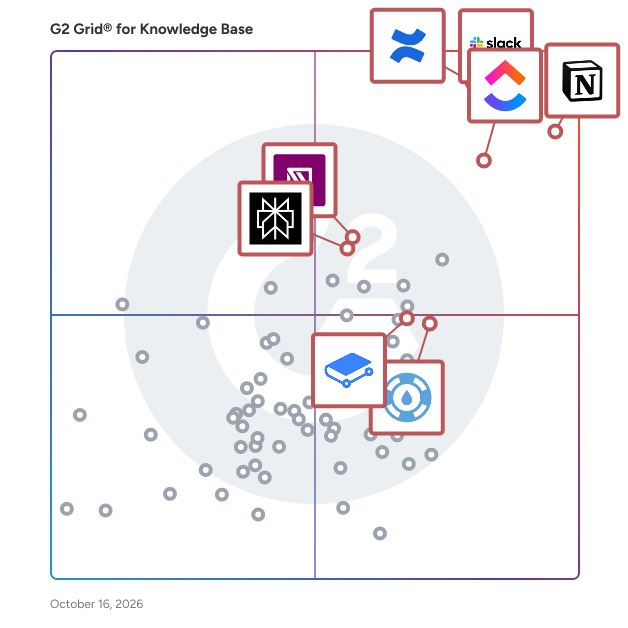
G2 Grid® for Knowledge Base Software

G2 Grid® for Knowledge Base Software plotting products by satisfaction and market presence

Highlighted products: Notion, ClickUp, Slack, Confluence, GitBook, IT Glue, Perplexity, and Helpjuice.

Underlying data: [Grid® JSON](https://www.g2.com/categories/knowledge-base-software/grids.json?focus%5B%5D=notion&focus%5B%5D=clickup&focus%5B%5D=slack&focus%5B%5D=confluence&focus%5B%5D=gitbook&focus%5B%5D=it-glue&focus%5B%5D=perplexity&focus%5B%5D=helpjuice&segment=small-business)

Notion

Notion is the connected AI workspace that brings all work together in a tool that adapts to every team—with AI to find answers and automate busywork. It's one place for search, manage projects, capture notes and company knowledge, and collaborate as a team. Millions love Notion because it increases productivity, reduces tools & costs, and empowers everyone to do their best work. Unlike fragmented, rigid software, Notion connects work into one tool that’s customizable and people love to use. Now you have beautiful tools to build your life’s work.

Average Rating: 4.6/5.0

Total Reviews: 12,542

How Do G2 Users Rate Notion?

  • Has the product been a good partner in doing business?: 8.8/10 (Category avg: 9.0/10)
  • Quality of Support: 8.4/10 (Category avg: 8.8/10)
  • Other Integrations: 7.8/10 (Category avg: 8.3/10)
  • Ease of Use: 8.3/10 (Category avg: 8.8/10)

Who Is the Company Behind Notion?

  • Seller: Notion
  • Company Website:
  • Year Founded: 2016
  • HQ Location: San Francisco, California
  • Twitter: @NotionHQ
    518,653 Twitter followers
  • LinkedIn® Page: www.linkedin.com
    7,360 employees on LinkedIn®

Who Uses This Product?

  • Who Uses This: Software Engineer, Student
  • Top Industries: Computer Software, Information Technology and Services
  • Company Size: 62% Small, 24% Medium

What Do G2 Reviewers Say About Notion?

AI-generated summary from verified user reviews

Pros
  • Users find Notion's ease of use incredibly helpful, appreciating its intuitive design and straightforward collaboration features.
  • Users love Notion’s flexible organization features, making it easy to manage projects, notes, and collaborate effectively.
  • Users love the integrated AI features of Notion, enhancing productivity and simplifying content management effortlessly.
  • Users find Notion extremely useful for managing tasks, enhancing collaboration, and streamlining documentation processes effectively.
  • Users love how Notion offers powerful organization features that greatly enhance productivity and streamline workflow management.
Cons
  • Users find the learning curve steep in Notion, leading to frustration with editing and organization.
  • Users find Notion's limited features frustrating, noting a lack of depth and missing functionalities like recording and free templates.
  • Users find the learning difficulty creates navigation challenges, making formatting and advanced features less intuitive.
  • Users note several missing features in Notion, which hinder optimization and streamline their workflow effectively.
  • Users express frustration with usage limitations in Notion, highlighting challenges in setup, organization, and document drafting.

What Are Recent G2 Reviews of Notion?

ClickUp

ClickUp is the world’s first Converged AI Workspace, bringing together all work apps, data, and workflows. ClickUp eliminates all forms of work sprawl to provide 100% context and a single place for humans and agents to work, together. Trusted by more than 20 million users worldwide, ClickUp is on a mission to maximize human productivity.

Average Rating: 4.6/5.0

Total Reviews: 14,179

How Do G2 Users Rate ClickUp?

  • Has the product been a good partner in doing business?: 9.0/10 (Category avg: 9.0/10)
  • Quality of Support: 8.8/10 (Category avg: 8.8/10)
  • Other Integrations: 8.4/10 (Category avg: 8.3/10)
  • Ease of Use: 8.5/10 (Category avg: 8.8/10)

Who Is the Company Behind ClickUp?

  • Seller: ClickUp
  • Company Website:
  • Year Founded: 2017
  • HQ Location: San Diego, California
  • Twitter: @clickup
    69,539 Twitter followers
  • LinkedIn® Page: www.linkedin.com
    7,082 employees on LinkedIn®

Who Uses This Product?

  • Who Uses This: CEO, Project Manager
  • Top Industries: Marketing and Advertising, Computer Software
  • Company Size: 77% Small, 19% Medium

What Do G2 Reviewers Say About ClickUp?

AI-generated summary from verified user reviews

Pros
  • Users find ClickUp to be incredibly easy and simple to use, streamlining tasks and enhancing productivity effortlessly.
  • Users value the flexibility in task management, enabling customized workflows for personal, team, and project tasks.
  • Users appreciate the abundance of features in ClickUp, making task management seamless and efficient.
  • Users appreciate ClickUp for its streamlined management tasks, enabling better organization and efficiency in project handling.
  • Users appreciate ClickUp for its streamlined organization, making team management and project tracking efficient and effortless.
Cons
  • Users find the missing features in ClickUp frustrating, particularly the lack of basic tools like subfolders.
  • Users experience a learning curve with ClickUp, finding the plethora of features daunting at first.
  • Users note limited features in ClickUp, with missing basic options and a complex setup process hindering ease of use.
  • Users find ClickUp not intuitive, feeling overwhelmed by its many features and struggling with initial setup and performance.
  • Users experience slow loading times in ClickUp, which affects their productivity when managing multiple tasks and fields.

What Are Recent G2 Reviews of ClickUp?

What Are G2 Users Discussing About ClickUp?

Slack

Slack is your single workspace that connects you with the people and tools you work with everyday, no matter where you are or what you do. With Slack you get real-time messaging through calls and chat, a searchable record of all your files and conversations, and integrations with a growing number of handy bots and apps. Now everyone can finally be on the same page and get their work done. Slack: It’s where work happens.

Average Rating: 4.5/5.0

Total Reviews: 37,975

G2 Deal: 25% off eligible upgrades to Slack Pro and Business+ for 12 months

Slack goes beyond chat and video—it empowers teams to work more efficiently by automating everyday tasks, putting your most important conversations at the center, and connecting everyone instantly (right where they're already working). Limited time offer for companies with 200 or fewer users.

View this exclusive G2 deal

How Do G2 Users Rate Slack?

  • Has the product been a good partner in doing business?: 9.1/10 (Category avg: 9.0/10)
  • Quality of Support: 8.8/10 (Category avg: 8.8/10)
  • Other Integrations: 8.6/10 (Category avg: 8.3/10)
  • Ease of Use: 9.2/10 (Category avg: 8.8/10)

Who Is the Company Behind Slack?

  • Seller: Salesforce
  • Company Website:
  • Year Founded: 1999
  • HQ Location: San Francisco, CA
  • Twitter: @salesforce
    579,511 Twitter followers
  • LinkedIn® Page: www.linkedin.com
    89,711 employees on LinkedIn®

Who Uses This Product?

  • Who Uses This: Software Engineer, Project Manager
  • Top Industries: Computer Software, Information Technology and Services
  • Company Size: 41% Small, 41% Medium

What Do G2 Reviewers Say About Slack?

AI-generated summary from verified user reviews

Pros
  • Users find Slack to be extremely easy to use, facilitating seamless collaboration and integration across teams.
  • Users love the effective team collaboration in Slack, finding huddles and organized channels enhance communication and task management.
  • Users love Slack for its efficient communication, enabling quick responses and seamless team collaboration across time zones.
  • Users love the seamless integrations of Slack, enhancing collaboration and automating tasks effortlessly across the platform.
  • Users appreciate the ease of coordination and integrations in Slack, enhancing team communication and productivity.
Cons
  • Users often face notification issues in Slack, causing missed messages and overwhelming alerts from multiple channels.
  • Users find the missing features in Slack lead to confusion and difficulty in organizing channels efficiently.
  • Users are frustrated by Slack's limited message history and lack of intuitive organization for shared assets.
  • Users find the overwhelming experience of constant alerts and message volume to be stressful and distracting.
  • Users find the overwhelming number of channels and limited message history challenging for project tracking and communication.

What Are Recent G2 Reviews of Slack?

What Are G2 Users Discussing About Slack?

AI can help you find the answers. G2 helps you trust them.

Connect G2 to Claude or ChatGPT for answers grounded in G2's trusted reviews, comparisons, and pricing from real user insights.

How it works

Confluence

Confluence is the AI-powered collaborative workspace for all teams. Equipped with intelligent AI agents to save time on tedious tasks, brainstorm new ideas, and help you quickly find the answers you need, Confluence is where knowledge becomes impact. Versatile content types like pages, live docs, whiteboards, and databases help teams move seamlessly from ideation to execution. Confluence integrates with the Atlassian suite of products like Jira Software, Trello, and Loom to enable both synchronous and async work and to push work forward.

Average Rating: 4.1/5.0

Total Reviews: 4,252

How Do G2 Users Rate Confluence?

  • Has the product been a good partner in doing business?: 8.5/10 (Category avg: 9.0/10)
  • Quality of Support: 8.1/10 (Category avg: 8.8/10)
  • Other Integrations: 8.5/10 (Category avg: 8.3/10)
  • Ease of Use: 8.0/10 (Category avg: 8.8/10)

Who Is the Company Behind Confluence?

  • Seller: Atlassian
  • Company Website:
  • Year Founded: 2002
  • HQ Location: Sydney and San Francisco
  • Twitter: @Atlassian
    106,496 Twitter followers
  • LinkedIn® Page: www.linkedin.com
    16,946 employees on LinkedIn®

Who Uses This Product?

  • Who Uses This: Software Engineer, Project Manager
  • Top Industries: Computer Software, Information Technology and Services
  • Company Size: 48% Medium, 34% Large

What Do G2 Reviewers Say About Confluence?

AI-generated summary from verified user reviews

Pros
  • Users value ease of use in Confluence, appreciating its efficient document management and collaboration features.
  • Users highlight the exceptional adaptability and integration of Confluence, enhancing collaboration and facilitating seamless teamwork.
  • Users appreciate the organization and ease of use in Confluence, facilitating smooth documentation and collaboration.
  • Users value the seamless integrations of Confluence, enhancing collaboration and simplifying project management processes.
  • Users value the collaboration efficiency of Confluence, enhancing team alignment and streamlining documentation across departments.
Cons
  • Users find Confluence not intuitive, struggling with slow performance, awkward formatting, and inconsistent search results.
  • Users find that Confluence can be slow and difficult to navigate, especially when dealing with large content volumes.
  • Users face challenges with page management, including slow performance, messy content, and confusing permissions.
  • Users face a steep learning curve with Confluence, finding advanced features and permissions complex and time-consuming to master.
  • Users find the complexity of Confluence challenging, especially regarding permissions, searching, and version control.

What Are Recent G2 Reviews of Confluence?

What Are G2 Users Discussing About Confluence?

IT Glue

IT Glue is the first documentation platform specifically built for the needs of IT professionals. With IT Glue, your team will have IT asset, vendor and software information, along with passwords, contacts and SOPs, all in a single pane of glass. Documentation can be linked to the others, making for a seamless experience, where your team has everything, they need at their fingertips, without having to toggle between applications. IT Glue is trusted by IT teams in over 16,000 organizations across 70+ countries. IT Glue makes documentation easy by consolidating and integrating with the monitoring, ticketing and Microsoft tools techs use every day. Hundreds of out-of-the-box documentation templates ensure you get started with ease, your team creates documentation in a consistent format, and our deep search makes everything easy to find. IT Glue is SOC 2, Type II certified, and comes with a wealth of security features, including host-proof password hosting, granular security permissions at both the group and individual levels, version control, an immutable audit trail and more. With IT Glue, users can: • Organize and manage IT assets • Formalize IT processes and practices • Create editable SOPs and Knowledge Base articles • Define relationships between assets, licensing, vendors, passwords and more • Create checklists for high-level, repeatable processes and procedures • Upload or attach various file types, such as audio and video files, images, and external links • Securely share credentials • Automate the filling of password forms or logins

Average Rating: 4.6/5.0

Total Reviews: 721

How Do G2 Users Rate IT Glue?

  • Has the product been a good partner in doing business?: 9.0/10 (Category avg: 9.0/10)
  • Quality of Support: 8.8/10 (Category avg: 8.8/10)
  • Other Integrations: 8.4/10 (Category avg: 8.3/10)
  • Ease of Use: 9.1/10 (Category avg: 8.8/10)

Who Is the Company Behind IT Glue?

  • Seller: Kaseya
  • Company Website:
  • Year Founded: 2000
  • HQ Location: Miami, FL
  • Twitter: @KaseyaCorp
    17,411 Twitter followers
  • LinkedIn® Page: www.linkedin.com
    5,483 employees on LinkedIn®

Who Uses This Product?

  • Who Uses This: Owner, President
  • Top Industries: Information Technology and Services, Computer & Network Security
  • Company Size: 71% Small, 25% Medium

What Do G2 Reviewers Say About IT Glue?

AI-generated summary from verified user reviews

Pros
  • Users find IT Glue's ease of use remarkable, appreciating the intuitive control panel and invaluable search functions.
  • Users value the flexibility and ease of use of IT Glue for managing passwords and documents effectively.
  • Users value the seamless integration of IT Glue, enhancing efficiency by eliminating the need to switch between screens.
  • Users value the effective organization of assets and passwords in IT Glue, enhancing productivity and access control.
  • Users value the easy integrations of IT Glue, streamlining workflows by consolidating information from multiple platforms.
Cons
  • Users experience slow performance with IT Glue, particularly when loading large client data sets and using the mobile app.
  • Users find the missing features in IT Glue limiting, particularly regarding sections, search capabilities, and mobile functionality.
  • Users find the search functionality lacking, with issues in speed, accuracy, and limited keyword searching capabilities.
  • Users find IT Glue's interface could be complex and confusing, making it difficult for new users to navigate effectively.
  • Users feel that IT Glue's search limitations hinder efficiency, particularly with inconsistent performance and slow loading times.

What Are Recent G2 Reviews of IT Glue?

What Are G2 Users Discussing About IT Glue?

GitBook

GitBook enables teams to easily manage, share and publish their knowledge through a documentation platform designed for the entire organization. Packed with powerful features, GitBook supports any form of rich text, programming languages and visual assets. - Easily create and publish beautiful looking docs without any design or code required - Organize your knowledge and have your team working from a central place - Keep your GitHub workflows in sync with our native integration - Support for both save / merge (async) and real-time collaboration on any doc. GitBook is free for open-source projects, non-profit orgs and students.

Average Rating: 4.7/5.0

Total Reviews: 207

How Do G2 Users Rate GitBook?

  • Has the product been a good partner in doing business?: 9.5/10 (Category avg: 9.0/10)
  • Quality of Support: 9.4/10 (Category avg: 8.8/10)
  • Other Integrations: 8.3/10 (Category avg: 8.3/10)
  • Ease of Use: 9.3/10 (Category avg: 8.8/10)

Who Is the Company Behind GitBook?

  • Seller: GitBook
  • Year Founded: 2014
  • HQ Location: Covina, US
  • Twitter: @GitBookIO
    7,713 Twitter followers
  • LinkedIn® Page: www.linkedin.com
    50 employees on LinkedIn®

Who Uses This Product?

  • Who Uses This: CEO
  • Top Industries: Computer Software, Information Technology and Services
  • Company Size: 79% Small, 15% Medium

What Do G2 Reviewers Say About GitBook?

AI-generated summary from verified user reviews

Pros
  • Users appreciate the ease of use of GitBook, simplifying collaboration and document management for all team members.
  • Users admire GitBook's intuitive interface, making documentation creation and collaboration effortless for all team members.
  • Users appreciate the collaborative features of GitBook, making technical documentation easy and accessible for everyone.
  • Users value the super responsive support from GitBook, enhancing their experience and productivity significantly.
  • Users love the clean and organized interface of GitBook, enhancing productivity and collaboration for all team members.
Cons
  • Users report encountering software bugs, particularly with navigation and UI functionality, impacting their overall experience.
  • Users find the high costs of GitBook to be a significant concern, especially for those without an OSS.
  • Users find GitBook's interface initially complex, though they acknowledge its overall quality and benefits.
  • Users find the difficult automation of GitBook frustrating, as it requires manual updates for documentation post-code changes.
  • Users suggest that adding advanced formatting options could significantly enhance their experience with GitBook.

What Are Recent G2 Reviews of GitBook?

What Are G2 Users Discussing About GitBook?

BoldDesk

BoldDesk® by Syncfusion® is an advanced, AI-powered Customer service software designed to streamline customer support operations. It combines robust ticketing software, live chat, and multi-channel support with cutting-edge AI features like AI Copilot and AI Agents. AI Agents provide 24/7 assistance with fast, accurate, and human-like responses, ensuring customers always get the right support, anytime. It integrates seamlessly with over 40 popular tools, supports 35+ languages, and scales effortlessly from startups to large enterprises, making it the ideal choice for modern, AI-driven customer support.

Average Rating: 4.5/5.0

Total Reviews: 150

G2 Deal: Get a 15% Discount on BoldDesk for Your First Year

Deliver exceptional customer service with BoldDesk — a modern help desk with AI and automation. Manage tickets, knowledge base, and live chat efficiently. Empower agents with an AI Copilot, offer 24/7 AI support with AI agents, automate tasks, and boost customer satisfaction.

Price: ~~Starting at $99 per month for 5 agents~~ → Starting at $84.15 per month for 5 agents

View this exclusive G2 deal

How Do G2 Users Rate BoldDesk?

  • Has the product been a good partner in doing business?: 8.8/10 (Category avg: 9.0/10)
  • Quality of Support: 9.2/10 (Category avg: 8.8/10)
  • Ease of Use: 8.9/10 (Category avg: 8.8/10)

Who Is the Company Behind BoldDesk?

  • Seller: Syncfusion
  • Company Website:
  • Year Founded: 2001
  • HQ Location: Morrisville, North Carolina
  • Twitter: @Syncfusion
    11,907 Twitter followers
  • LinkedIn® Page: www.linkedin.com
    2,739 employees on LinkedIn®

Who Uses This Product?

  • Who Uses This: IT Manager, Software Developer
  • Top Industries: Computer Software, Information Technology and Services
  • Company Size: 47% Small, 36% Medium

What Do G2 Reviewers Say About BoldDesk?

AI-generated summary from verified user reviews

Pros
  • Users find BoldDesk's ease of use remarkable, with its intuitive design and effective collaboration features enhancing productivity.
  • Users find BoldDesk's simple and clean interface enhances usability and facilitates seamless collaboration across departments.
  • Users appreciate the fast and helpful customer support of BoldDesk, enhancing their overall experience with the product.
  • Users highlight the easy setup of BoldDesk, making it accessible and efficient for customer service management.
  • Users value the intuitive interface and ease of use of BoldDesk, making it reliable and user-friendly.
Cons
  • Users find the absence of built-in RMM features limiting, making device management highly challenging.
  • Users find the learning curve steep, potentially overwhelming due to technical customization and limited resources.
  • Users find the limited customization options in BoldDesk restrictive, impacting their overall experience and flexibility.
  • Users find the customer portal to be not intuitive, leading to a challenging and overwhelming experience.
  • Users face ticketing issues due to layout limitations, inadequate user activity logs, and restrictions on ticket volume.

What Are Recent G2 Reviews of BoldDesk?

Helpjuice

Helpjuice's AI knowledge base is an industry-leading playform designed to supercharge your team and customers by enhancing knowledge sharing across your organization. With Helpjuice, you can capture, create, and share critical information effortlessly, making it the ideal knowledge base tool for training employees, onboarding new customers, enabling self-service, and sharing knowledge within and outside your company. Our powerful platform allows users to create new content directly in our easy-to-use editor as well as upload content in multiple formats, ensuring that essential information is accessible anytime and anywhere. Helpjuice's powerful, Google-like search functionality makes it easy for users to find the right information they need quickly and efficiently. Trusted by major organizations such as Amazon, Change.org, Wells Fargo, the World Health Organization, Shipt, TCL, and thousands of others, Helpjuice is dedicated to breaking down information silos and fostering a culture of knowledge sharing.

Average Rating: 4.7/5.0

Total Reviews: 382

How Do G2 Users Rate Helpjuice?

  • Has the product been a good partner in doing business?: 9.4/10 (Category avg: 9.0/10)
  • Quality of Support: 9.5/10 (Category avg: 8.8/10)
  • Other Integrations: 7.8/10 (Category avg: 8.3/10)
  • Ease of Use: 9.1/10 (Category avg: 8.8/10)

Who Is the Company Behind Helpjuice?

  • Seller: Helpjuice
  • Year Founded: 2011
  • HQ Location: Miami, FL
  • Twitter: @HelpJuice
    769 Twitter followers
  • LinkedIn® Page: www.linkedin.com
    36 employees on LinkedIn®

Who Uses This Product?

  • Who Uses This: Customer Success Manager, Technical Writer
  • Top Industries: Computer Software, Information Technology and Services
  • Company Size: 48% Medium, 40% Small

What Do G2 Reviewers Say About Helpjuice?

AI-generated summary from verified user reviews

Pros
  • Users find Helpjuice's ease of use exceptional, facilitating quick setup and efficient management of knowledge bases.
  • Users highlight the helpful customer support of Helpjuice, significantly enhancing their knowledge base experience and efficiency.
  • Users praise the exceptional customer support from Helpjuice, highlighting their proactive assistance and helpful resources.
  • Users appreciate the intuitive interface and robust features of Helpjuice, enhancing efficiency and content management.
  • Users enjoy the customization options of Helpjuice, enhancing the usability and organization of their knowledge base.
Cons
  • Users feel limited by restricted customization options, often requiring expert help for changes and facing unclear pricing.
  • Users find editing difficulties due to the outdated design and bugs when handling long articles and file uploads.
  • Users face formatting issues that complicate documentation usage and hinder their overall experience with Helpjuice.
  • Users note the limitations of AI in Helpjuice, expressing a desire for more functionality beyond basic search.
  • Users find the learning curve steep, struggling with navigation and the interface's organizational structure.

What Are Recent G2 Reviews of Helpjuice?

What Are G2 Users Discussing About Helpjuice?

Perplexity

Perplexity is an AI-powered search engine designed to transform how users discover and interact with information. By processing user queries through advanced language models, it delivers concise, conversational answers backed by verifiable sources. Each response includes citations and links to original content, enabling users to verify information and delve deeper into topics. This approach streamlines the search experience, moving beyond traditional search engines that present numerous links for users to sift through. Key Features and Functionality: - Conversational Search Interface: Users can ask questions in natural language and receive direct, concise answers. - Real-Time Web Integration: The platform searches the web in real-time to provide up-to-date information. - Source Citations: Each response includes citations and links to original sources, ensuring transparency and credibility. - Multiple AI Model Integration: Perplexity integrates cutting-edge AI models, including OpenAI's GPT models and Anthropic's Claude, allowing users to choose the model that best fits their specific needs. - Freemium Model: Offers a free version with access to a proprietary large language model, while the paid Perplexity Pro subscription provides access to advanced models like GPT-4, Claude 3, Mistral Large, Llama 3, and an experimental Perplexity model. Primary Value and User Solutions: Perplexity addresses the inefficiencies of traditional search engines by providing direct, concise answers to user queries, eliminating the need to sift through numerous links. Its integration of multiple AI models and real-time web search capabilities ensures that users receive accurate and current information. The inclusion of source citations enhances transparency and trustworthiness, making it a valuable tool for researchers, professionals, and the general public seeking reliable information efficiently.

Average Rating: 4.4/5.0

Total Reviews: 360

How Do G2 Users Rate Perplexity?

  • Has the product been a good partner in doing business?: 8.9/10 (Category avg: 9.0/10)
  • Quality of Support: 8.2/10 (Category avg: 8.8/10)
  • Other Integrations: 10.0/10 (Category avg: 8.3/10)
  • Ease of Use: 9.2/10 (Category avg: 8.8/10)

Who Is the Company Behind Perplexity?

  • Seller: Perplexity AI
  • Year Founded: 2022
  • HQ Location: San Francisco, California
  • Twitter: @perplexity_ai
    494,413 Twitter followers
  • LinkedIn® Page: www.linkedin.com
    1,372 employees on LinkedIn®

Who Uses This Product?

  • Who Uses This: Founder, Software Engineer
  • Top Industries: Information Technology and Services, Computer Software
  • Company Size: 54% Small, 17% Medium

What Do G2 Reviewers Say About Perplexity?

AI-generated summary from verified user reviews

Pros
  • Users praise the ease of use of Perplexity, highlighting its simple setup and intuitive interface for efficient research.
  • Users appreciate the ease of use and quick implementation of Perplexity, enhancing their research and learning experience.
  • Users find Perplexity extremely helpful for providing accurate data and quality content from trusted sources.
  • Users praise Perplexity for its easy setup, allowing for quick and seamless integration into their research workflows.
  • Users value Perplexity's multi-modal capabilities, enabling deep research and custom AI assistants for efficient workflows.
Cons
  • Users note the usage limitations of Perplexity, feeling restricted by the features available in the free version.
  • Users feel that Perplexity's answer quality needs improvement, particularly regarding complex topics and understanding human behavior.
  • Users feel that Perplexity has significant limitations in understanding human behavior, affecting answer accuracy and overall usability.
  • Users note the need for improved context understanding, as responses can be inaccurate or oversimplified.
  • Users experience inaccurate data from Perplexity, often needing to verify and correct outputs for reliability.

What Are Recent G2 Reviews of Perplexity?

Document360

Document360 is an AI-powered knowledge base platform for enterprises needing secure, scalable documentation. It centralizes organizational knowledge into one workspace, including public help centers, internal wikis, SOPs, user manuals, API docs, or product playbooks. Who It's For By Role: Support teams (deflect tickets), technical writers (publish faster), product managers (align teams), engineers (document APIs and workflows). By Industry: SaaS, IT & consulting, finance, healthcare, education, manufacturing. Key Capabilities: 1. Editors: Markdown and WYSIWYG with real-time previews and drag-and-drop media. 2. Step-by-Step Guides: Capture on-screen actions to create editable interactive guides. 3. Category Manager: Drag-and-drop content organization. 4. Interactive Demos: Clickable walkthroughs embedded in articles. 5. Custom Workflows: Automate reviews, roles, and approvals. 6. Pro Analytics: Track performance, engagement, search trends, and ticket deflection. 7. Brand Customization: Tailor design, layout, and themes. 8. Security: SOC 2 and GDPR-aligned; SSO, JWT, SAML, IP restriction. 9. Localization: 50+ languages. Powered by Eddy AI: 1. AI Search: ChatGPT-style answers from your docs for instant self-service. 2. AI Writing Agent: Generate structured docs from video, audio, text, or prompts. 3. AI Chatbot: 24/7 documentation-driven support that cuts costs. 4. AI Glossary Generator: Auto-creates glossaries for complex terms. 5. Article Summarizer: Condenses long docs into bite-sized summaries. 6. MCP Server: Connects your knowledge base to LLMs. 7. Duplicate Content Detection: Flags redundancy with precision. 8. SEO Automation: Auto-generates titles, tags, and glossaries for discoverability. Document360 is shortlisted for Best AI Assistant in the 2026 A.I. Awards, run by the Cloud Awards. Whether scaling support, streamlining internal knowledge, or building world-class product docs, Document360 brings it all together in one platform.

Average Rating: 4.7/5.0

Total Reviews: 537

How Do G2 Users Rate Document360?

  • Has the product been a good partner in doing business?: 9.5/10 (Category avg: 9.0/10)
  • Quality of Support: 9.5/10 (Category avg: 8.8/10)
  • Other Integrations: 8.1/10 (Category avg: 8.3/10)
  • Ease of Use: 9.4/10 (Category avg: 8.8/10)

Who Is the Company Behind Document360?

  • Seller: Kovai Limited
  • Company Website:
  • Year Founded: 2009
  • HQ Location: London
  • Twitter: @BizTalk360
    1,920 Twitter followers
  • LinkedIn® Page: www.linkedin.com
    321 employees on LinkedIn®

Who Uses This Product?

  • Who Uses This: Technical Writer, Senior Technical Writer
  • Top Industries: Computer Software, Information Technology and Services
  • Company Size: 45% Medium, 39% Small

What Do G2 Reviewers Say About Document360?

AI-generated summary from verified user reviews

Pros
  • Users love the ease of use of Document360, especially its intuitive interface and efficient support, enhancing their workflow.
  • Users admire the customization options of Document360, facilitating tailored documentation and seamless integration with existing platforms.
  • Users value the versatility and customization of Document360, enhancing their platform with seamless integration and support.
  • Users commend the fast and efficient customer support of Document360, enhancing their experience and resolving issues promptly.
  • Users value Document360 for its intuitive interface and ease of use, enhancing efficiency and content organization.
Cons
  • Users highlight the missing features in Document360, particularly for complex document handling and visual editing tools.
  • Users find editing difficulties with Document360, highlighting issues with copying, image uploads, and text formatting inconsistencies.
  • Users feel that the pricing is high and many essential features are not accessible without extra costs.
  • Users encounter formatting issues in Document360, struggling with table editing and inconsistent font adjustments.
  • Users note the limited customization options in Document360, finding it challenging for non-developers to adjust the design.

What Are Recent G2 Reviews of Document360?

What Are G2 Users Discussing About Document360?

Hudu

Hudu is a comprehensive IT documentation platform designed to help organizations streamline their operations and improve team efficiency. It provides a centralized hub for storing critical documentation—covering everything from systems, processes, and policies to credentials, SOPs, and asset records. With Hudu, teams can ensure that important information is always organized, easy to access, and kept up to date, making day-to-day work smoother and decision-making faster. While originally built for internal IT departments and MSPs, Hudu is flexible enough to support a wide range of industries, including finance, healthcare, education, and construction. Its structure can be tailored to fit the needs of any organization, whether you're managing internal infrastructure, supporting clients, or coordinating distributed teams. Teams can build custom asset layouts to track hardware, software, or industry-specific data. Knowledge base articles and SOPs support rich formatting, embedded content, and reusable templates to keep documentation consistent and easy to follow. Passwords and OTPs are stored securely with full access controls and history tracking for auditability and compliance. Hudu supports detailed permission management, so teams can control access at a granular level across departments, roles, or clients. It integrates with popular tools like Microsoft 365, ConnectWise, HaloPSA, NinjaOne, N-able, and many more to automatically sync key data and reduce manual entry. A browser extension and mobile app make it easy to access or update documentation on the go, whether in the office or the field. For more advanced workflows, Hudu offers a powerful API, allowing teams to automate documentation or integrate with internal systems. Organizations with strict security requirements can also choose to deploy Hudu on-premises with full control over their environment. With Hudu, teams can reduce onboarding time, cut down on repetitive questions, and ensure processes are followed consistently. It replaces scattered documentation with a centralized source of truth that’s easy to manage and scale. If your team depends on shared knowledge to operate efficiently, Hudu helps you keep it organized, accessible, and secure—no matter your industry or size.

Average Rating: 4.7/5.0

Total Reviews: 361

How Do G2 Users Rate Hudu?

  • Has the product been a good partner in doing business?: 9.5/10 (Category avg: 9.0/10)
  • Quality of Support: 9.2/10 (Category avg: 8.8/10)
  • Other Integrations: 8.2/10 (Category avg: 8.3/10)
  • Ease of Use: 9.2/10 (Category avg: 8.8/10)

Who Is the Company Behind Hudu?

  • Seller: Hudu
  • Company Website:
  • Year Founded: 2018
  • HQ Location: Fort Collins, Colorado
  • Twitter: @HuduHQ
    500 Twitter followers
  • LinkedIn® Page: www.linkedin.com
    40 employees on LinkedIn®

Who Uses This Product?

  • Who Uses This: Owner, Director
  • Top Industries: Information Technology and Services, Computer & Network Security
  • Company Size: 71% Small, 12% Medium

What Do G2 Reviewers Say About Hudu?

AI-generated summary from verified user reviews

Pros
  • Users value the clean and simple interface of Hudu, enhancing usability and customization for their unique needs.
  • Users appreciate the intuitive interface and comprehensive features of Hudu for organizing IT data efficiently.
  • Users rave about Hudu's seamless integrations, making it easy to incorporate existing systems and enhancing daily operations.
  • Users love the easy setup of Hudu, enabling quick customization and immediate access to documentation.
  • Users appreciate the clean and simple interface of Hudu, making it easy to use and customize for their needs.
Cons
  • Users find Hudu's missing features, such as a unified search bar and limited customization, affecting their overall experience.
  • Users find the poor integration process challenging and desire additional options for improved efficiency.
  • Users note that UX improvement is needed, especially in search, navigation, and overall interface design.
  • Users are disappointed by Hudu's limited features, particularly regarding support for VPS providers and third-party integrations.
  • Users face integration issues with Hudu, needing more support for third-party tools and a broader range of VPS options.

What Are Recent G2 Reviews of Hudu?

What Are G2 Users Discussing About Hudu?

Slite

Slite is the self-maintaining knowledge base that keeps company information current and trusted. Powered by an AI agent, Slite watches what changes across your tools, catches when docs have drifted from reality, and proposes the fix for your team to approve, so the answer you find is always the right one. From onboarding guides to all-hands notes, Slite keeps every type of company knowledge centralised in one place: organised, verified, and tracked. And because it stays in sync, the people and AI agents relying on it can act with confidence. Replace all-in-one workspaces with a tool built for company knowledge, and join thousands of growing teams who trust Slite as their single source of truth.

Average Rating: 4.6/5.0

Total Reviews: 272

How Do G2 Users Rate Slite?

  • Has the product been a good partner in doing business?: 8.9/10 (Category avg: 9.0/10)
  • Quality of Support: 9.2/10 (Category avg: 8.8/10)
  • Other Integrations: 7.6/10 (Category avg: 8.3/10)
  • Ease of Use: 9.3/10 (Category avg: 8.8/10)

Who Is the Company Behind Slite?

  • Seller: Slite
  • Year Founded: 2016
  • HQ Location: Paris
  • Twitter: @sliteHQ
    3,527 Twitter followers
  • LinkedIn® Page: www.linkedin.com
    43 employees on LinkedIn®

Who Uses This Product?

  • Who Uses This: CEO, Product Manager
  • Top Industries: Computer Software, Information Technology and Services
  • Company Size: 63% Small, 28% Medium

What Do G2 Reviewers Say About Slite?

AI-generated summary from verified user reviews

Pros
  • Users find Slite's ease of use exceptional, enabling seamless collaboration and efficient organization of documents.
  • Users praise Slite for its intuitive interface, making it easy to navigate and quickly adopt for various tasks.
  • Users love the real-time collaboration features of Slite, enhancing teamwork and streamlining information sharing effectively.
  • Users find Slite's helpful tools and intuitive interface make documentation and navigation simple and efficient.
  • Users appreciate the clean and intuitive interface of Slite, enhancing productivity and simplifying document organization.
Cons
  • Users find the limited customization options in Slite somewhat restricting for more complex workflows and document layouts.
  • Users find formatting issues with Slite, noting a lack of customization for document layouts and basic options.
  • Users find integration options lacking in Slite, limiting seamless connectivity with other tools and workflows.
  • Users find Slite's limited reporting capabilities insufficient for complex workflows, affecting their overall experience and customization options.
  • Users find tool limitations in Slite, particularly in search efficiency and lack of multiple windows support.

What Are Recent G2 Reviews of Slite?

What Are G2 Users Discussing About Slite?

TextExpander

TextExpander helps teams work smarter by turning their collective knowledge into instant, reusable content, available anywhere they type. Keyboard shortcuts bring your Snippets—your most important messaging, templates, and responses—to your fingertips, so your team can communicate efficiently and consistently across every app. From customer support replies and recruiting outreach to clinical documentation and sales follow-ups, TextExpander makes it easy to share the right Snippets with everyone who needs them, keeping your whole team on the same page, every time.

Average Rating: 4.8/5.0

Total Reviews: 465

G2 Deal: Exclusive 20% discount on TextExpander through G2 Deals

Take 20% off your business account in TextExpander, so you can do more with less. Keep your team consistent, accurate, current, and working efficiently.

View this exclusive G2 deal

How Do G2 Users Rate TextExpander?

  • Has the product been a good partner in doing business?: 9.5/10 (Category avg: 9.0/10)
  • Quality of Support: 9.3/10 (Category avg: 8.8/10)
  • Other Integrations: 7.2/10 (Category avg: 8.3/10)
  • Ease of Use: 9.4/10 (Category avg: 8.8/10)

Who Is the Company Behind TextExpander?

  • Seller: Text Expander
  • Company Website:
  • Year Founded: 2005
  • HQ Location: San Francisco, US
  • Twitter: @TextExpander
    12,184 Twitter followers
  • LinkedIn® Page: linkedin.com
    58 employees on LinkedIn®

Who Uses This Product?

  • Who Uses This: Owner, Account Executive
  • Top Industries: Computer Software, Information Technology and Services
  • Company Size: 40% Small, 28% Medium

What Do G2 Reviewers Say About TextExpander?

AI-generated summary from verified user reviews

Pros
  • Users appreciate the ease of use of TextExpander, finding it efficient and straightforward for daily tasks.
  • Users love how TextExpander provides significant time savings, enhancing productivity and streamlining repetitive tasks efficiently.
  • Users find TextExpander a time-saving tool that enhances productivity by reducing repetitive typing tasks effectively.
  • Users highlight the super easy setup of TextExpander, making it accessible for everyone, regardless of tech skills.
  • Users enjoy TextExpander's ease of use and simplicity in boosting productivity with efficient text expansion features.
Cons
  • Users report software bugs that disrupt usage, including syncing issues and unexpected snippet pasting.
  • Users report frequent app crashes and snippets pasting unexpectedly, disrupting their workflow and causing frustration.
  • Users face a steep learning curve with TextExpander, making it challenging to fully utilize its features initially.
  • Users report app functionality issues with TextExpander, including bugs, crashes, and inefficient mobile performance.
  • Users find the complexity of navigation in Snippets challenging, suggesting improvements for better organization and clarity.

What Are Recent G2 Reviews of TextExpander?

What Are G2 Users Discussing About TextExpander?

Supered

Supered is a sales enablement software platform based in the United States that helps sales teams improve sales playbook adoption and sales process execution directly inside their CRM. Designed primarily for sales enablement leaders, Supered also supports sales leaders, RevOps, and sales operations teams responsible for driving consistent execution across the sales organization. Supered works natively with HubSpot and Salesforce and addresses a common sales enablement challenge: playbooks and training materials that exist outside the CRM and are not consistently applied during live selling. As a CRM-native sales enablement platform, Supered embeds just-in-time, in-app guidance directly into HubSpot and Salesforce workflows so reps can learn while they sell. Rather than relying on static documentation or external training portals, Supered delivers contextual guidance during real deal execution based on CRM context such as deal stage, role, or activity. Core sales enablement functionality includes: - Executable sales playbooks that live inside the CRM - Contextual, in-app sales guidance delivered at the moment of need - Manager visibility into sales process adherence - Role-aware guidance aligned to CRM permissions Supered supports ongoing sales enablement instead of one-time onboarding. Because it operates entirely inside the CRM, reps do not log into a separate tool or change how they work. Sales enablement teams can update playbooks and guidance centrally and see changes reflected immediately in execution, without redistributing documents or retraining teams. Sales leaders and managers use Supered to inspect and coach deal execution based on observable behavior rather than self-reported updates. Managers can see whether key steps are followed, where processes break down, and where coaching is needed while deals are still active. Manager and leadership use cases include: - Coaching reps based on real execution, not anecdotes - Inspecting deal execution without manual audits or spreadsheets - Identifying process breakdowns before deals are lost Supered is commonly used to enforce sales playbooks, onboard new reps, and manage ongoing sales process changes. Sales enablement teams use it to reinforce best practices and reduce reliance on static content. RevOps and sales ops teams use Supered to standardize workflows, support CRM data integrity, and ensure sales processes are followed as designed across teams and regions. Operational value for enablement, RevOps, and sales ops teams includes: - Improved consistency across deals and teams - Reduced process drift over time - Cleaner CRM data through enforced execution - Less time maintaining documentation that goes unused The primary value of Supered is helping organizations shift sales enablement from content distribution to behavior change. By making sales processes observable and enforceable inside the CRM, Supered helps teams improve consistency, strengthen execution, and get more value from their sales enablement strategy and sales technology stack. Supered supports secure, enterprise-ready deployment, including SOC 2 compliance, GDPR alignment, and respect for existing CRM permissions. It is not a learning management system, content library, or offline training tool. Supered is built for teams that want sales enablement to happen where selling actually occurs and to drive consistent execution through real-time guidance and visibility.

Average Rating: 4.9/5.0

Total Reviews: 80

How Do G2 Users Rate Supered?

  • Has the product been a good partner in doing business?: 9.9/10 (Category avg: 9.0/10)
  • Quality of Support: 9.7/10 (Category avg: 8.8/10)
  • Ease of Use: 9.2/10 (Category avg: 8.8/10)

Who Is the Company Behind Supered?

  • Seller: Supered
  • Company Website:
  • Year Founded: 2023
  • HQ Location: Atlanta, US
  • LinkedIn® Page: www.linkedin.com
    17 employees on LinkedIn®

Who Uses This Product?

  • Top Industries: Consulting, Information Technology and Services
  • Company Size: 56% Small, 22% Medium

What Do G2 Reviewers Say About Supered?

AI-generated summary from verified user reviews

Pros
  • Users highlight the ease of use of Supered, seamlessly integrating task management and training within HubSpot.
  • Users appreciate the easy setup of Supered, highlighting the smooth onboarding process and supportive guidance from the team.
  • Users value the CRM efficiency of Supered, seamlessly integrating guidance and reducing coaching time for better performance.
  • Users value the data centralization offered by Supered, enhancing clarity and efficiency in training and communication.
  • Users appreciate the simplicity and efficiency of Supered, enhancing task management and team consistency in HubSpot.
Cons
  • Users experience a steep learning curve with Supered due to its complex object interactions and interface adjustments.
  • Users face challenges with update issues in Supered, requiring diligent monitoring to capitalize on new features effectively.
  • Users find a steep learning curve in using Supered, requiring time to grasp its interface and functionalities.
  • Users find Supered's platform non-intuitive, requiring extra time to understand object interactions and navigate the UI.
  • Users find the user experience lacking, requiring time to learn the platform's interactions and navigate effectively.

What Are Recent G2 Reviews of Supered?

Superhuman Docs

Superhuman Docs (formerly Coda) gets your team and AI on the same page. Most AI tools are built for solo work, so the work ends up trapped in chats. Docs brings your team and AI together in a familiar space, reimagining what a doc can do. Drafts happen faster, projects stay on task, and decisions don’t stall. Ask for what you need and Docs helps your team build and run with it. Docs is part of Superhuman, the AI productivity platform on a mission to unlock the superhuman potential in everyone. AI is everywhere, but what it creates stays disconnected from where your team actually works. Superhuman Docs fixes that. Instead of generating alone and copy-pasting results somewhere else, your whole team works with AI in one shared place—asking, editing, and building on one another’s work without context switching or silos. And you can create docs, trackers, and workflows in plain language. Just say what you need and Docs AI builds it with you. No code. No writing formulas. No learning curve. Superhuman Docs supports real-time multi-user collaboration, rich content editing, AI generation, and text summarization, so your team can ask for a first draft, meeting notes, or a project tracker and build on it together, instantly. Docs features templates, task creation and assignment mapping, GANTT charts, revision history, in-line comments, notifications, and knowledge sharing—all in one shared doc. No switching between tools to generate, organize, and move work forward. And since Docs connects to over 1,000 tools, including Slack, Jira, and Salesforce, you’ll always have access to the latest data so due dates for your team’s OKRs are always current.

Average Rating: 4.6/5.0

Total Reviews: 477

How Do G2 Users Rate Superhuman Docs?

  • Has the product been a good partner in doing business?: 9.3/10 (Category avg: 9.0/10)
  • Quality of Support: 9.1/10 (Category avg: 8.8/10)
  • Other Integrations: 7.7/10 (Category avg: 8.3/10)
  • Ease of Use: 8.5/10 (Category avg: 8.8/10)

Who Is the Company Behind Superhuman Docs?

  • Seller: Superhuman
  • Company Website:
  • HQ Location: San Francisco, California
  • LinkedIn® Page: www.linkedin.com
    7,182 employees on LinkedIn®

Who Uses This Product?

  • Who Uses This: CEO, Founder
  • Top Industries: Computer Software, Information Technology and Services
  • Company Size: 54% Small, 31% Medium

What Do G2 Reviewers Say About Superhuman Docs?

AI-generated summary from verified user reviews

Pros
  • Users love the ease of use of Superhuman Docs, making project management and collaboration effortless and efficient.
  • Users love the flexibility and efficiency of Superhuman Docs, seamlessly integrating docs, data, and workflows together.
  • Users value the flexibility of Superhuman Docs, appreciating its ability to customize and streamline various workflows effortlessly.
  • Users love the automation features of Superhuman Docs for efficient project management and task assignment.
  • Users love the customization options of Coda, allowing them to tailor the platform to meet their specific needs.
Cons
  • Users find the steep learning curve of Superhuman Docs challenging, feeling overwhelmed and needing more time to adapt.
  • Users note a steep learning curve with Superhuman Docs, especially when mastering advanced features and functionalities.
  • Users find the complexity of the authors system to be a learning curve, which can be frustrating.
  • Users find the limited and unattractive canvas layout options hinder usability and functionality in Superhuman Docs.
  • Users find the learning curve difficult, especially with complex features and initial intimidation affecting usability.

What Are Recent G2 Reviews of Superhuman Docs?

What Are G2 Users Discussing About Superhuman Docs?

Neeraja Prakash
NP
Researched and written by Neeraja Prakash
Updated