# Best Payroll Software

*By [Jeffrey Lin](https://research.g2.com/insights/author/jeffrey-lin)*


Payroll software allows companies to manage and streamline payroll processes, ensuring employees are paid accurately and on time while helping HR and accounting teams automate payroll workflows, calculate wages, taxes, and deductions, and comply with state, federal, and international requirements. The [best payroll software](https://learn.g2.com/best-payroll-software) also helps organizations comply with various state and federal taxes and Social Security requirements.

### Core Capabilities of Payroll Software

To qualify for inclusion in the Payroll category, a product must:

- Calculate and pay employee salaries
- Follow employee pay rules, such as minimum wage and overtime pay
- Calculate and deduct withholdings, such as payroll taxes, insurance, and retirement contributions
- Print or deposit paychecks directly and manage employee payment data, such as bank accounts
- Generate payroll reports like salary statements, benefits reports, or leave summaries
- Comply with local and national workplace laws and privacy regulations

### Common Use Cases for Payroll Software

Payroll software is used by HR and finance teams across organizations of all sizes to manage compensation operations efficiently. Common use cases include:

- Automating end-to-end payroll processing for salaried and hourly employees
- Managing multi-country payroll for global or distributed workforces
- Ensuring compliance with evolving tax regulations and labor laws

### How Payroll Software Differs from Other Tools

Payroll software is purpose-built for compensation processing and compliance, distinguishing it from broader HR platforms that include payroll as a secondary feature. It integrates with [core HR software](https://www.g2.com/categories/core-hr), [accounting software](https://www.g2.com/categories/accounting), [benefits administration software](https://www.g2.com/categories/benefits-administration), and [time and attendance software](https://www.g2.com/categories/time-attendance). Organizations with global teams also commonly leverage [multi-country payroll software](https://www.g2.com/categories/multi-country-payroll) alongside their core payroll solution.

### Insights from G2 on Payroll Software

Based on category trends on G2, automated tax calculations and direct deposit capabilities stand out as standout features. Compliance with changing regulations and seamless integration with HR and accounting tools stand out as key reasons for adoption.


## Top Payroll Software at a Glance
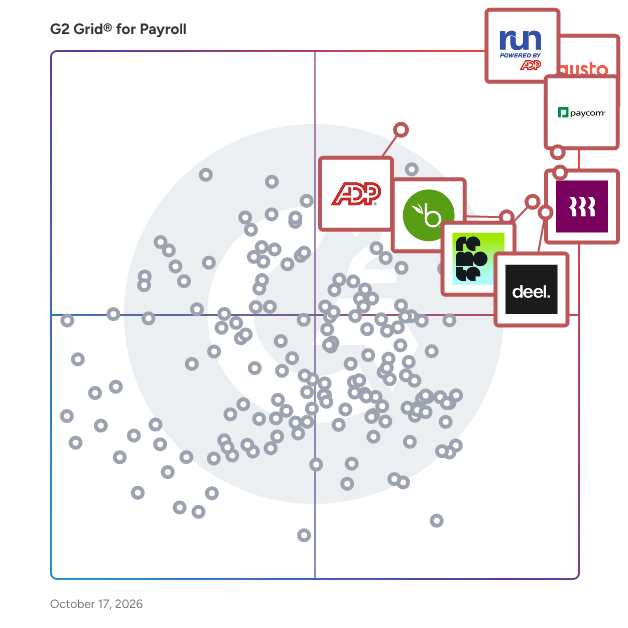
| # | Product | Rating | Best For | What Users Say |
|---|---------|--------|----------|----------------|
| 1 | [RUN Powered by ADP](https://www.g2.com/products/run-powered-by-adp/reviews) | 4.7/5.0 (5,791 reviews) | Small-business payroll automation | "[User-Friendly Payroll with Great Chat Support](https://www.g2.com/survey_responses/run-powered-by-adp-review-12182472)" |
| 2 | [Gusto](https://www.g2.com/products/gusto/reviews) | 4.6/5.0 (11,437 reviews) | Payroll with benefits administration | "[Gusto Makes Small Business Payroll Painless and Fast](https://www.g2.com/survey_responses/gusto-review-13060690)" |
| 3 | [Paycom](https://www.g2.com/products/paycom/reviews) | 4.5/5.0 (4,541 reviews) | Centralized employee payroll visibility | "[Paycom Review 06.26.2026](https://www.g2.com/survey_responses/paycom-review-13036323)" |
| 4 | [Rippling](https://www.g2.com/products/rippling/reviews) | 4.8/5.0 (11,493 reviews) | Unified HR, IT, and payroll automation | "[Intuitive, Well-Designed Platform — Unified Profiles &amp; Easy Device Management](https://www.g2.com/survey_responses/rippling-review-13046239)" |
| 5 | [Deel Payroll](https://www.g2.com/products/deel-payroll/reviews) | 4.7/5.0 (6,768 reviews) | Global payroll payment transparency | "[Perfect for International Payments with Ease](https://www.g2.com/survey_responses/deel-payroll-review-12939273)" |
| 6 | [Remote](https://www.g2.com/products/remote/reviews) | 4.5/5.0 (3,533 reviews) | Cross-border payroll visibility | "[Smooth, Hassle-Free Contracting with Reliable Payments and Responsive Support](https://www.g2.com/survey_responses/remote-review-13034541)" |
| 7 | [UKG Ready](https://www.g2.com/products/ukg-ready/reviews) | 4.4/5.0 (2,367 reviews) | Customizable workforce payroll management | "[Intuitive, Fast, and Insightful—UKG Ready Delivers Real Workflow Efficiency](https://www.g2.com/survey_responses/ukg-ready-review-12643555)" |
| 8 | [Paylocity](https://www.g2.com/products/paylocity/reviews) | 4.4/5.0 (5,974 reviews) | Consolidated HR and payroll management | "[Seamless All-in-One HR Platform That Saves Hours](https://www.g2.com/survey_responses/paylocity-review-12915096)" |
| 9 | [BambooHR](https://www.g2.com/products/bamboohr/reviews) | 4.4/5.0 (5,158 reviews) | HR-first payroll-adjacent workflows | "[Customizable HRIS with Unbeatable Customer Service](https://www.g2.com/survey_responses/bamboohr-review-5224185)" |
| 10 | [TriNet](https://www.g2.com/products/trinet/reviews) | 4.2/5.0 (1,792 reviews) | PEO-style HR payroll consolidation | "[TriNet Simplifies HR So SMBs Can Focus on Growth](https://www.g2.com/survey_responses/trinet-review-12967209)" |

---
## What Are the Most Common Questions About Payroll Software?
*AI-generated · Last updated: May 26, 2026*
### Which Payroll systems have the easiest setup for companies with seasonal workers?
Based on G2 reviews, payroll systems described as easy to set up often appeal to teams hiring seasonally or onboarding workers quickly. G2 reviewers mention that RUN Powered by ADP, Gusto, and Rippling are frequently praised for straightforward setup, simple navigation, and smooth employee onboarding. According to verified users, these products help reduce manual work when adding employees, managing payroll runs, and handling related documents. Reviewers also highlight that clear interfaces and responsive support matter when payroll needs change fast. Across recent feedback, buyers often point to quick implementation, user-friendly workflows, and accessible support as the biggest advantages for businesses with changing staffing levels.


### What highest rated Payroll for small business owners who need fast, accurate payroll processing?
Based on G2 reviews, small business owners consistently describe RUN Powered by ADP as a strong fit when fast, accurate payroll processing is the priority. According to verified users, it is easy to learn, payroll runs can be completed quickly, and the platform helps reduce manual calculations through automated tax and wage handling. G2 reviewers mention that it is especially helpful for small businesses that want a straightforward process, responsive support, and a reliable workflow for recurring payroll tasks. Users also call out time savings, simple setup, and the ability to keep payroll, employee records, and related HR tasks organized in one place for daily operations.

**Here are some of the top-rated products on G2:**

- [RUN Powered by ADP](https://www.g2.com/products/run-powered-by-adp/reviews) – used by small businesses for fast payroll runs, tax handling, and straightforward employee setup
- [Gusto](https://www.g2.com/products/gusto/reviews) – praised for simple payroll runs, easy onboarding, and clear access to pay and tax information
- [Rippling](https://www.g2.com/products/rippling/reviews) – valued for centralized payroll, onboarding, and automation that reduces manual admin work


### Which Payroll platforms integrate seamlessly with accounting software like accounting platforms or Xero?
Based on G2 reviews, payroll buyers often prioritize products that reduce duplicate entry by connecting payroll with accounting workflows. G2 reviewers mention that RUN Powered by ADP supports accounting integrations that help with allocations and ledger detail, while Gusto is praised for integrations that fit existing software stacks with minimal effort. According to verified users, Rippling also stands out for consolidating payroll with other systems and connecting across operations tools. Reviewers consistently tie these integrations to easier reconciliations, fewer manual adjustments, and better visibility into payroll data. For teams evaluating payroll software, the strongest signals point to products that make payroll information easier to route into accounting and reporting processes.


### What Payroll platforms that prevent payroll errors and keep audit trails for compliance?
Based on G2 reviews, buyers looking to reduce payroll mistakes often focus on automation, centralized records, and easier reporting. G2 reviewers mention RUN Powered by ADP for automating calculations, deductions, and filings, which helps reduce manual errors. According to verified users, Gusto is valued for consistent payroll calculations and support with taxes and compliance tasks, while ADP Workforce Now is praised for keeping payroll, attendance, and employee records in one platform for easier oversight. Reviewers also connect these systems with stronger documentation, accessible records, and clearer visibility when payroll needs to be reviewed. Across the category, products with organized records and automated workflows are most often linked to compliance confidence.


### What is the best Payroll software for small teams managing employees and payroll across multiple states?
Based on G2 reviews, Gusto stands out for small teams managing payroll across multiple states. According to verified users, it simplifies payroll runs, helps with tax setup and withholding, and supports teams that need an easier way to manage payroll without adding heavy administrative work. G2 reviewers mention that it is user-friendly, quick to set up, and helpful for teams handling onboarding, payroll taxes, and employee self-service in one place. Users also note that it reduces paperwork and keeps payroll processes organized for smaller organizations. While some reviewers mention reporting and support can vary by issue, the overall feedback strongly supports Gusto for multi-state small-team payroll management.


### What most reliable Payroll based on reviews from companies that switched from spreadsheets?
Based on G2 reviews, reliability is often described in terms of replacing spreadsheets, reducing manual work, and keeping payroll organized in one place. G2 reviewers mention RUN Powered by ADP, Gusto, and Rippling as products that help teams move away from manual calculations, paper-based tracking, or disconnected tools. According to verified users, these platforms make payroll more consistent through automation, centralized employee data, and easier tax handling. Reviewers also connect reliability with responsive support and smoother recurring payroll cycles. For buyers moving from spreadsheets, the strongest patterns point to platforms that automate repetitive payroll steps, reduce errors, and give teams clearer visibility into pay-related information.

**Here are some of the top-rated products on G2:**

- [RUN Powered by ADP](https://www.g2.com/products/run-powered-by-adp/reviews) – helps teams replace manual payroll calculations with automated payroll and tax processing
- [Gusto](https://www.g2.com/products/gusto/reviews) – used to simplify payroll, taxes, and paperwork in one easy-to-manage system
- [Rippling](https://www.g2.com/products/rippling/reviews) – centralizes payroll and employee management to reduce spreadsheet-driven admin work


### What are the best Payroll platforms for automating time tracking and payroll compliance?
Based on G2 reviews, buyers often associate payroll automation with direct time tracking links, fewer manual adjustments, and stronger compliance support. G2 reviewers mention RUN Powered by ADP for time tracking connections and automated tax handling, Gusto for integrated payroll and time workflows, and Rippling for combining payroll, onboarding, and time-related administration in one place. According to verified users, these platforms help reduce the burden of manually calculating hours, deductions, and filings. Reviewers also highlight that centralized records and smoother payroll syncing improve confidence when handling routine compliance tasks. For teams comparing payroll software, automation is most often tied to easier payroll runs and less administrative rework.

**Here are some of the top-rated products on G2:**

- [RUN Powered by ADP](https://www.g2.com/products/run-powered-by-adp/reviews) – supports payroll processing tied to time tracking, tax handling, and organized employee records
- [Gusto](https://www.g2.com/products/gusto/reviews) – helps streamline payroll, time tracking, and compliance-related workflows for small teams
- [Rippling](https://www.g2.com/products/rippling/reviews) – centralizes payroll, time tracking, and onboarding to reduce manual compliance work


### What Payroll software that handles tax filing compliance and wage garnishment processing automatically?
Based on G2 reviews, payroll buyers often look for products that can take tax filing tasks off their plate while also supporting more detailed payroll scenarios. G2 reviewers mention RUN Powered by ADP for handling taxes, garnishments, and payroll adjustments, and ADP Workforce Now for helping teams manage payroll taxes, compliance, and employee records in one system. According to verified users, Gusto is also praised for simplifying tax handling and payroll administration with less manual effort. Reviewers connect these tools with easier payroll processing, better organization during tax-related work, and less need to manually manage recurring payroll compliance tasks. These signals make them stand out for tax and garnishment-heavy workflows.


### What Payroll tools with mobile apps for remote team members to clock in and access pay stubs?
Based on G2 reviews, mobile access is a recurring theme for payroll buyers with remote or distributed teams. G2 reviewers mention RUN Powered by ADP for mobile-friendly access to time cards and payroll information, Gusto for easy app navigation and access to pay details, and Rippling for centralized access to payroll, benefits, and employee information from one platform. According to verified users, these tools help employees review pay information, manage time-related tasks, and access documents without relying on desktop-only workflows. Reviewers also mention that mobile convenience helps reduce routine HR questions and supports employees who need payroll information on the go.


### What most trusted Payroll platforms by finance managers managing multi-state compliance based on user reviews?
Based on G2 reviews, finance and payroll leaders managing multi-state requirements often point to platforms that reduce filing complexity and centralize records. G2 reviewers mention ADP Workforce Now, Gusto, and RUN Powered by ADP as trusted options because they help with payroll tax handling, employee records, and payroll administration across changing state requirements. According to verified users, these products reduce manual work, improve access to payroll data, and make recurring compliance processes easier to manage. Reviewers also emphasize the value of having payroll, employee details, and reporting in one system when working across multiple jurisdictions. Across recent feedback, trust is tied to consistency, support, and easier tax-related workflows.

**Here are some of the top-rated products on G2:**

- [ADP Workforce Now](https://www.g2.com/products/adp-workforce-now/reviews) – used to manage payroll, employee records, tax handling, and multi-state HR workflows in one place
- [Gusto](https://www.g2.com/products/gusto/reviews) – helps teams manage payroll, taxes, and employee onboarding with simpler multi-state processes
- [RUN Powered by ADP](https://www.g2.com/products/run-powered-by-adp/reviews) – supports payroll, tax processing, and employee management with strong ease of use for smaller teams


## How Many Payroll Software Products Does G2 Track?
**Total Products under this Category:** 659

### Category Stats (Jul 2026)
- **Average Rating**: 4.36/5 (↑0.01 vs Jun 2026) The average rating of products in this category, based on all submitted ratings
- **Top Trending Product**: HR3 Payroll (+11.11%) - Among all products in this category, HR3 Payroll recorded the largest rating increase compared to last month
*Last updated: July 03, 2026*


## How Does G2 Rank Payroll Software Products?

**Why You Can Trust G2's Software Rankings:**

- 30 Analysts and Data Experts
- 120,700+ Authentic Reviews
- 659+ Products
- Unbiased Rankings

G2's software rankings are built on verified user reviews, rigorous moderation, and a consistent research methodology maintained by a team of analysts and data experts. Each product is measured using the same transparent criteria, with no paid placement or vendor influence. While reviews reflect real user experiences, which can be subjective, they offer valuable insight into how software performs in the hands of professionals. Together, these inputs power the G2 Score, a standardized way to compare tools within every category.


## Which Payroll Software Is Best for Your Use Case?

- **Leader:** [RUN Powered by ADP](https://www.g2.com/products/run-powered-by-adp/reviews)
- **Highest Performer:** [Multiplier Global Payroll](https://www.g2.com/products/multiplier-global-payroll/reviews)
- **Easiest to Use:** [OnPay](https://www.g2.com/products/onpay/reviews)
- **Top Trending:** [Deel Payroll](https://www.g2.com/products/deel-payroll/reviews)
- **Best Free Software:** [Paylocity](https://www.g2.com/products/paylocity/reviews)


---

**Sponsored**

### OnPay

OnPay is designed for business owners who want to spend more time running their business — and less time managing back-office tasks. This award-winning payroll and HR software helps small and mid-sized businesses save over 15 hours each month by automating time-consuming processes and simplifying workforce management. “It’s an easy, quick, mobile-friendly system that doesn’t require a steep learning curve,” according to Entrepreneur, and it is rated “Outstanding” by PCMag. With OnPay, you can run payroll in minutes, automate federal and state tax calculations and filings, and reduce compliance risks with built-in accuracy. Employees can access their own pay stubs, tax documents, and personal information through self-service tools, which helps reduce administrative work for business owners and HR teams. The platform also makes it easy to streamline HR processes, manage employee records, and offer top-tier benefits in all 50 states. Payroll essentials start at just $49 plus $6 per worker per month. This includes full-service payroll processing, automated tax filings, year-end forms, and seamless integrations with popular accounting software like QuickBooks and Xero, as well as leading time-tracking tools. OnPay also provides onboarding support and account migration at no additional cost, making it easy to switch from another payroll provider. For businesses that need more advanced HR features, the optional HR add-on is available for $15 base plus $2 per worker per month. It includes tools like employee self-service, PTO management, and org charts to help you better manage your team. You can also add integrated benefits, a 401(k) plan, and pay-as-you-go workers’ compensation, giving you a scalable payroll and HR solution that grows with your business.


[Visit website](https://www.g2.com/external_clickthroughs/record?secure%5Bad_program%5D=paid_promo&amp;secure%5Bad_slot%5D=category_product_list&amp;secure%5Bcategory_id%5D=162&amp;secure%5Bchosen_at%5D=2026-07-03T18%3A14%3A27Z&amp;secure%5Bmedium%5D=sponsored&amp;secure%5Bprioritized%5D=false&amp;secure%5Bproduct_id%5D=4558&amp;secure%5Bresource_id%5D=162&amp;secure%5Bresource_type%5D=Category&amp;secure%5Bsource_type%5D=category_page&amp;secure%5Bsource_url%5D=https%3A%2F%2Fwww.g2.com%2Fcategories%2Fpayroll&amp;secure%5Btoken%5D=742c4e22e7e7b895cc2dd10247b5fab2805bf4b40f3f40a87cd5ed357720ff81&amp;secure%5Burl%5D=https%3A%2F%2Fonpay.com%2Fpricing%2F&amp;secure%5Burl_type%5D=paid_promos)

---

## What Are the Top-Rated Payroll Software Products in 2026?
### 1. [RUN Powered by ADP](https://www.g2.com/products/run-powered-by-adp/reviews)
Over 900,000 small businesses trust RUN Powered by ADP® payroll and HR to take care of their people, and get it done fast. With RUN, you can process payroll from anywhere in minutes. AI-enabled error flagging helps you avoid common payroll mistakes, and RUN automatically deducts federal, state and local payroll taxes. In addition, user-friendly HR tools simplify hiring, tracking time, and managing your people. The best part is you’re never alone, real-person support from payroll and HR professionals is just a call (or click) away. You can also stay ahead of state/federal tax laws and HR regulations with automatic updates covering all 50 states. Payroll: - Quickly and reliably pay your employees and contractors. - Save time. RUN deducts and files federal, state and local payroll taxes. - Avoid costly common payroll mistakes (with AI-enabled error flagging) before they can impact your business. - Stay on top of it all with a dashboard tailored to what you need — your next payroll date, priority to-dos, and important alerts. - Get payroll and HR resources at your fingertips with AI-powered search. - Run payroll no matter where you are, using the helpful mobile app. - You can even put recurring payroll on autopilot– we call that RUN &amp; DONE® Human Resources: - Have peace of mind with support from payroll and HR professionals - Get help managing your team with recruiting tools, simplified onboarding, employee handbook assistance, compliance training, and more - Effortlessly offer benefits like insurance and retirement - Modernize your employee experience with automated time tracking that eliminates timecards - Take care of your people with meaningful perks, like flexible pay options and a built-in consumer discount program - Give your employees a friendly mobile payroll and HR app - Stay competitive in the hiring market with data-driven salary benchmarking insights ADP, the ADP logo RUN Powered by ADP and Always Designing for People are trademarks of ADP, Inc. All other marks are the property of their respective owners. Copyright© 2025 ADP, Inc. All rights reserved.


**Average Rating:** 4.7/5.0
**Total Reviews:** 5,791
**How Do G2 Users Rate RUN Powered by ADP?**

- **Has the product been a good partner in doing business?:** 9.3/10 (Category avg: 8.7/10)
- **Performance and Reliability:** 9.3/10 (Category avg: 8.7/10)
- **Scalability:** 9.2/10 (Category avg: 8.7/10)
- **User, Role, and Access Management:** 9.1/10 (Category avg: 8.7/10)

**Who Is the Company Behind RUN Powered by ADP?**

- **Seller:** [ADP](https://www.g2.com/sellers/adp)
- **Company Website:** https://ADP.com
- **Year Founded:** 1949
- **HQ Location:** Roseland, New Jersey
- **Twitter:** @ADP (48,757 Twitter followers)
- **LinkedIn® Page:** https://www.linkedin.com/company/adp/ (99,043 employees on LinkedIn®)

**Who Uses This Product?**
- **Who Uses This:** Owner, Office Manager
- **Top Industries:** Construction, Accounting
- **Company Size:** 80% Small-Business, 4% Mid-Market


#### What Are RUN Powered by ADP's Pros and Cons?

**Pros:**

- Ease of Use (2693 reviews)
- Customer Support (1589 reviews)
- Helpful (1584 reviews)
- Payroll Management (1464 reviews)
- Payroll (1443 reviews)

**Cons:**

- Payroll Issues (436 reviews)
- Poor Customer Support (425 reviews)
- Reporting Issues (333 reviews)
- Expensive (249 reviews)
- Long Waiting Time (236 reviews)


### What Do G2 Reviewers Say About RUN Powered by ADP?
*AI-generated summary from verified user reviews*

**Pros:**

- Users appreciate the **ease of use** of RUN Powered by ADP, benefiting from its user-friendly navigation and features.
- Users appreciate the **helpful customer support** from RUN Powered by ADP, enhancing their overall experience and ease of use.
- Users praise the **ease of use** of RUN Powered by ADP, complemented by helpful tech support for any issues.
- Users value the **ease of setup** with RUN Powered by ADP, ensuring a seamless transition and efficient payroll management.
- Users appreciate the **ease of setup and use** with RUN Powered by ADP, making payroll management seamless and stress-free.

**Cons:**

- Users face **payroll issues** due to rigid templates and reporting limitations, hindering customization and efficiency for small businesses.
- Users express frustration with **poor customer support** , highlighting issues with the chatbot and long wait times for assistance.
- Users struggle with **rigid reporting and customization issues** in RUN, hindering adaptability for small business payroll needs.
- Users find the **cost of service to be pricey** , suggesting it could be significantly more affordable.
- Users often face **long waiting times** when reaching the help center, impacting their overall support experience.

#### What Are Recent G2 Reviews of RUN Powered by ADP?

**"[User-Friendly Payroll with Great Chat Support](https://www.g2.com/survey_responses/run-powered-by-adp-review-12182472)"**

**Rating:** 5.0/5.0 stars
*— Katrina E.*

[Read full review](https://www.g2.com/survey_responses/run-powered-by-adp-review-12182472)

---

**"[RUN Powered by ADP Saves Time with Streamlined Payroll, HR, and Fast Chat Support](https://www.g2.com/survey_responses/run-powered-by-adp-review-13056132)"**

**Rating:** 5.0/5.0 stars
*— Cindy L W S.*

[Read full review](https://www.g2.com/survey_responses/run-powered-by-adp-review-13056132)

---


#### What Are G2 Users Discussing About RUN Powered by ADP?

- [What is RUN Powered by ADP used for?](https://www.g2.com/discussions/what-is-run-powered-by-adp-used-for) - 2 comments, 1 upvote
- [What is the difference between ADP run and ADP Workforce Now?](https://www.g2.com/discussions/run-powered-by-adp-what-is-the-difference-between-adp-run-and-adp-workforce-now) - 2 comments, 1 upvote
- [How do I run payroll on ADP?](https://www.g2.com/discussions/how-do-i-run-payroll-on-adp) - 2 comments, 1 upvote
- [What software does ADP use?](https://www.g2.com/discussions/what-software-does-adp-use)
- [WHAT IS RUN Powered by ADP?](https://www.g2.com/discussions/what-is-run-powered-by-adp) - 2 comments

### 2. [Gusto](https://www.g2.com/products/gusto/reviews)
Gusto is a comprehensive human resources (HR) solution designed to assist businesses in managing their payroll, benefits, hiring, and employee management needs. This platform caters to a wide range of organizations, from startups to established enterprises, providing essential tools that streamline HR processes and enhance team engagement. By consolidating various HR functions into a single, user-friendly interface, Gusto simplifies the complexities of workforce management, allowing businesses to focus on growth and development. Targeted primarily at small to medium-sized businesses, Gusto addresses the unique challenges faced by organizations that may not have extensive HR departments. The platform is particularly beneficial for entrepreneurs and business owners who seek to establish a solid foundation for their workforce without the burden of managing multiple systems. Gusto&#39;s features are designed to support various use cases, including onboarding new employees, administering payroll, and managing employee benefits, making it a versatile tool for any growing business. One of Gusto&#39;s key features is its payroll management system, which automates calculations and tax filings, ensuring compliance with federal and state regulations. This not only saves time but also reduces the risk of costly errors. Additionally, Gusto offers competitive compensation tools that help businesses benchmark salaries and create attractive compensation packages, which can be crucial for attracting and retaining top talent. The platform also includes benefits administration, allowing employers to offer health insurance, retirement plans, and other perks seamlessly. Moreover, Gusto provides a wealth of management resources, including templates and guides for performance reviews, employee handbooks, and compliance checklists. These resources empower business owners to foster a positive workplace culture and ensure that their teams are well-informed and engaged. Gusto&#39;s commitment to customer support further enhances its value, as users can access expert guidance to navigate the complexities of HR management. In summary, Gusto stands out in the HR software category by offering an all-in-one solution that meets the diverse needs of businesses. With its modern features, user-friendly interface, and robust support, Gusto enables organizations to nurture their teams effectively, ensuring that both employees and the business can thrive together.


**Average Rating:** 4.6/5.0
**Total Reviews:** 11,437
**How Do G2 Users Rate Gusto?**

- **Has the product been a good partner in doing business?:** 9.1/10 (Category avg: 8.7/10)
- **Performance and Reliability:** 9.3/10 (Category avg: 8.7/10)
- **Scalability:** 9.2/10 (Category avg: 8.7/10)
- **User, Role, and Access Management:** 9.2/10 (Category avg: 8.7/10)

**Who Is the Company Behind Gusto?**

- **Seller:** [Gusto](https://www.g2.com/sellers/gusto)
- **Company Website:** https://gusto.com/
- **Year Founded:** 2011
- **HQ Location:** San Francisco, CA
- **Twitter:** @GustoHQ (21,245 Twitter followers)
- **LinkedIn® Page:** https://www.linkedin.com/company/2499210/ (4,426 employees on LinkedIn®)

**Who Uses This Product?**
- **Who Uses This:** Owner, CEO
- **Top Industries:** Non-Profit Organization Management, Health, Wellness and Fitness
- **Company Size:** 76% Small-Business, 14% Mid-Market


#### What Are Gusto's Pros and Cons?

**Pros:**

- Ease of Use (5642 reviews)
- Payroll Ease (2984 reviews)
- Easy Setup (2807 reviews)
- Simple (2800 reviews)
- User Interface (2347 reviews)

**Cons:**

- Missing Features (619 reviews)
- Poor Customer Support (601 reviews)
- Payroll Issues (488 reviews)
- Login Issues (416 reviews)
- Limited Customization (409 reviews)


### What Do G2 Reviewers Say About Gusto?
*AI-generated summary from verified user reviews*

**Pros:**

- Users find Gusto incredibly **user-friendly** , making payroll management simple and stress-free for small businesses.
- Users appreciate the **simple and user-friendly payroll management** of Gusto, streamlining processes for small businesses.
- Users praise Gusto for its **easy setup** , allowing for a smooth transition and efficient payroll management.
- Users commend Gusto for its **ease of use** , making payroll and time management efficient and stress-free.
- Users appreciate Gusto&#39;s **user-friendly interface** , making navigation and task management simple and efficient for everyone.

**Cons:**

- Users note the **missing features** in Gusto, like automated expense tracking and advanced reporting, hinder convenience.
- Users express frustration with Gusto&#39;s **poor customer support** , citing slow responses and inadequate help during issues.
- Users report **payroll issues** due to slow login times and limited editing access, impacting efficiency and flexibility.
- Users struggle with **login issues** due to unclear two-step verification requirements and frequent glitches in the process.
- Users find **limited customization options** in Gusto, especially for mobile setup and employee expense views.

#### What Are Recent G2 Reviews of Gusto?

**"[User-Friendly Payroll with Essential Features](https://www.g2.com/survey_responses/gusto-review-13057120)"**

**Rating:** 5.0/5.0 stars
*— Fe M.*

[Read full review](https://www.g2.com/survey_responses/gusto-review-13057120)

---

**"[Gusto Makes Small Business Payroll Painless and Fast](https://www.g2.com/survey_responses/gusto-review-13060690)"**

**Rating:** 4.5/5.0 stars
*— Brett Ross R.*

[Read full review](https://www.g2.com/survey_responses/gusto-review-13060690)

---


#### What Are G2 Users Discussing About Gusto?

- [What is Gusto used for?](https://www.g2.com/discussions/what-is-gusto-used-for) - 2 comments
- [How do you use gusto payroll?](https://www.g2.com/discussions/how-do-you-use-gusto-payroll)
- [Is gusto payroll safe?](https://www.g2.com/discussions/is-gusto-payroll-safe) - 4 comments, 7 upvotes
- [Is there an app for Gusto payroll?](https://www.g2.com/discussions/is-there-an-app-for-gusto-payroll) - 4 comments, 1 upvote
- [What is gusto payroll?](https://www.g2.com/discussions/what-is-gusto-payroll) - 2 comments

### 3. [Paycom](https://www.g2.com/products/paycom/reviews)
Paycom is the most automated HCM platform and the only HR and payroll software built on a truly single, unique database that automates the entire employee life cycle. Designed as a unified system, Paycom eliminates inefficiencies and errors caused by integrating multiple platforms by using command driven AI and full solution automation. Built on a single data source, Paycom enables uninterrupted data flow across HR and payroll, streamlining performance, communication and compliance. Frequently recognized by third party reviewers as one of the best payroll and HR software solutions, Paycom is used by organizations of all sizes across the U.S. and internationally to simplify workforce management and free HR teams to focus on strategic initiatives.


**Average Rating:** 4.5/5.0
**Total Reviews:** 4,541
**How Do G2 Users Rate Paycom?**

- **Has the product been a good partner in doing business?:** 8.3/10 (Category avg: 8.7/10)
- **Performance and Reliability:** 8.9/10 (Category avg: 8.7/10)
- **Scalability:** 8.8/10 (Category avg: 8.7/10)
- **User, Role, and Access Management:** 8.9/10 (Category avg: 8.7/10)

**Who Is the Company Behind Paycom?**

- **Seller:** [Paycom](https://www.g2.com/sellers/paycom)
- **Company Website:** https://www.paycom.com/
- **Year Founded:** 1998
- **HQ Location:** Oklahoma City, OK
- **Twitter:** @Paycom (33,252 Twitter followers)
- **LinkedIn® Page:** https://www.linkedin.com/company/37759/ (5,844 employees on LinkedIn®)

**Who Uses This Product?**
- **Who Uses This:** HR Manager, Human Resources Manager
- **Top Industries:** Hospital &amp; Health Care, Non-Profit Organization Management
- **Company Size:** 19% Mid-Market, 4% Small-Business


#### What Are Paycom's Pros and Cons?

**Pros:**

- Ease of Use (451 reviews)
- Helpful (326 reviews)
- Payroll Management (308 reviews)
- Customer Support (291 reviews)
- Simple (240 reviews)

**Cons:**

- Learning Curve (134 reviews)
- Poor Customer Support (128 reviews)
- Limited Features (115 reviews)
- Not Intuitive (115 reviews)
- Not User-Friendly (109 reviews)


### What Do G2 Reviewers Say About Paycom?
*AI-generated summary from verified user reviews*

**Pros:**

- Users appreciate the **ease of use** of Paycom, finding its interface straightforward and employee-friendly.
- Users find Paycom’s software **extremely helpful** , benefiting from easy navigation and effective time management capabilities.
- Users value Paycom&#39;s **efficient payroll management** , enabling quick processes and empowering employees with time tracking and approval.
- Users value the **responsive customer support** of Paycom, enhancing their overall experience and efficiency.
- Users commend the **user-friendly interface** of Paycom, simplifying employee tasks and enhancing overall satisfaction.

**Cons:**

- Users note a **steep learning curve** with Paycom, requiring time to navigate the complex interface effectively.
- Users express frustration with **poor customer support** , feeling unhelped and encountering repetitive, uninformative responses from Paycom.
- Users express frustration with Paycom’s **limited features** , feeling misled about capabilities and missing essential modules.
- Users find Paycom **not intuitive** , often struggling to navigate and locate features efficiently.
- Users find Paycom **not user-friendly** , as navigation and request submissions can be complicated and time-consuming.

#### What Are Recent G2 Reviews of Paycom?

**"[Efficient Payroll and HR with Beti AI, Great Integrations, and Top-Notch Support](https://www.g2.com/survey_responses/paycom-review-13043985)"**

**Rating:** 4.0/5.0 stars
*— Andrew H.*

[Read full review](https://www.g2.com/survey_responses/paycom-review-13043985)

---

**"[Paycom Review 06.26.2026](https://www.g2.com/survey_responses/paycom-review-13036323)"**

**Rating:** 4.0/5.0 stars
*— Mia J.*

[Read full review](https://www.g2.com/survey_responses/paycom-review-13036323)

---


### 4. [Rippling](https://www.g2.com/products/rippling/reviews)
Rippling is the AI platform that connects HR, IT, and Finance — giving Rippling AI everything it needs to help run your company. Because employee data, permissions, and approvals all live in one place, Rippling AI has a complete view of your business and can take action quickly and safely, across the entire employee lifecycle, from hiring to benefits administration to access management. Automate business tasks, ensure compliance, and streamline approvals with workflows that understand your organization. Enjoy timely payroll, real-time financial visibility, and dynamic spend policies that adjust as your business changes. Simplify IT with device management, software access, and compliance monitoring, all from one dashboard. Because Rippling AI works from a single source of truth instead of disconnected systems, your business can save time, reduce costs, and enhance efficiency — with the trust and safety that comes from unified data and permissions. Experience the power of AI-driven, unified management with Rippling today.


**Average Rating:** 4.8/5.0
**Total Reviews:** 11,493
**How Do G2 Users Rate Rippling?**

- **Has the product been a good partner in doing business?:** 9.1/10 (Category avg: 8.7/10)
- **Performance and Reliability:** 9.4/10 (Category avg: 8.7/10)
- **Scalability:** 9.4/10 (Category avg: 8.7/10)
- **User, Role, and Access Management:** 9.4/10 (Category avg: 8.7/10)

**Who Is the Company Behind Rippling?**

- **Seller:** [Rippling](https://www.g2.com/sellers/rippling)
- **Company Website:** https://www.rippling.com
- **Year Founded:** 2016
- **HQ Location:** San Francisco, CA
- **Twitter:** @Rippling (12,402 Twitter followers)
- **LinkedIn® Page:** https://www.linkedin.com/company/17988315/ (7,523 employees on LinkedIn®)

**Who Uses This Product?**
- **Who Uses This:** Software Engineer, Account Executive
- **Top Industries:** Computer Software, Information Technology and Services
- **Company Size:** 54% Mid-Market, 29% Small-Business


#### What Are Rippling's Pros and Cons?

**Pros:**

- Ease of Use (6968 reviews)
- Intuitive (5171 reviews)
- Simple (4565 reviews)
- User Interface (3811 reviews)
- Easy Access (3660 reviews)

**Cons:**

- Missing Features (1241 reviews)
- Not User-Friendly (886 reviews)
- Learning Curve (858 reviews)
- Limited Features (843 reviews)
- Improvement Needed (820 reviews)


### What Do G2 Reviewers Say About Rippling?
*AI-generated summary from verified user reviews*

**Pros:**

- Users appreciate the **ease of use** in Rippling, enjoying seamless access with a single login for multiple tools.
- Users appreciate the **intuitive interface** of Rippling, finding it easy to navigate and access all features.
- Users find Rippling to be **very easy to navigate** and highly efficient, with everything conveniently accessible.
- Users love the **user-friendly interface** of Rippling, making navigation and functionality seamless and efficient.
- Users appreciate the **easy access** to clock in/out and payslips, finding the system streamlined and efficient.

**Cons:**

- Users face **missing features** like inefficient reporting and delayed customer support, complicating their overall experience with Rippling.
- Users find Rippling&#39;s interface **not user-friendly** , with slow loading times and complicated reporting processes causing frustration.
- Users experience a **steep learning curve** due to the complexity of Rippling’s numerous features, impacting initial usability.
- Users find Rippling&#39;s **limited features** lacking in design appeal and functionality, affecting overall usability.
- Users highlight the need for **improvements in notification systems and user interface clarity** due to frequent complications.

#### What Are Recent G2 Reviews of Rippling?

**"[Intuitive, Well-Designed Platform — Unified Profiles &amp; Easy Device Management](https://www.g2.com/survey_responses/rippling-review-13046239)"**

**Rating:** 5.0/5.0 stars
*— Larry K.*

[Read full review](https://www.g2.com/survey_responses/rippling-review-13046239)

---

**"[Seamless Time &amp; Attendance Integration That Makes Payroll Effortless](https://www.g2.com/survey_responses/rippling-review-13060367)"**

**Rating:** 5.0/5.0 stars
*— David Alonso C.*

[Read full review](https://www.g2.com/survey_responses/rippling-review-13060367)

---


#### What Are G2 Users Discussing About Rippling?

- [How is Rippling innovating in the field of HR and IT management for businesses?](https://www.g2.com/discussions/how-is-rippling-innovating-in-the-field-of-hr-and-it-management-for-businesses) - 6 comments, 7 upvotes
- [What is Rippling used for?](https://www.g2.com/discussions/what-is-rippling-used-for) - 6 comments, 3 upvotes

### 5. [Deel Payroll](https://www.g2.com/products/deel-payroll/reviews)
Deel Payroll runs payroll in 150+ countries on infrastructure Deel owns and operates. One team, one system, one point of accountability for every payroll run. Most global payroll platforms route through a patchwork of in-country providers, which means slower fixes and fragmented data when something needs attention. Deel built the rails itself, so issues get resolved by the people who built the system, not escalated to a vendor you have never met. Consolidate payroll data, calculations, and compliance across every country you operate in. Run payroll yourself with self-serve tools, or hand it to Deel&#39;s in-house experts and let them run it for you. Either way, you get one source of truth, real-time gross-to-net visibility, and local specialists who know the regulations because they live and work in those markets. For US teams, Deel Payroll covers all 50 states with automated tax calculations, built-in compliance, and the same flexible delivery model. For everyone else, Deel handles local statutory requirements, multi-currency payouts, and country-specific reporting without the spreadsheet gymnastics. Pair Deel Payroll with the rest of the platform (HR, IT, benefits, global hiring) and your team operates from a single system. Onboard a new hire in Berlin on Monday, pay them compliantly on Friday, manage their device, time off, and performance reviews from the same place. Data flows where it should. Nothing gets re-keyed. Nothing falls through the cracks. Whether you are scaling from five markets to fifty, replacing a tangle of regional vendors, or running payroll in-house for the first time, Deel Payroll gives finance and people teams the visibility, accuracy, and control they need to operate globally. Trusted by 40,000+ companies to pay over 1.5M workers worldwide. Book a demo to see Deel Payroll in action.


**Average Rating:** 4.7/5.0
**Total Reviews:** 6,768
**How Do G2 Users Rate Deel Payroll?**

- **Has the product been a good partner in doing business?:** 9.3/10 (Category avg: 8.7/10)
- **Performance and Reliability:** 9.2/10 (Category avg: 8.7/10)
- **Scalability:** 9.1/10 (Category avg: 8.7/10)
- **User, Role, and Access Management:** 9.1/10 (Category avg: 8.7/10)

**Who Is the Company Behind Deel Payroll?**

- **Seller:** [Deel](https://www.g2.com/sellers/deel)
- **Company Website:** https://www.deel.com/
- **Year Founded:** 2019
- **HQ Location:** San Francisco, California
- **Twitter:** @deel (30,540 Twitter followers)
- **LinkedIn® Page:** https://www.linkedin.com/company/deel/ (9,619 employees on LinkedIn®)

**Who Uses This Product?**
- **Who Uses This:** Software Engineer, Interpreter
- **Top Industries:** Computer Software, Information Technology and Services
- **Company Size:** 46% Small-Business, 42% Mid-Market


#### What Are Deel Payroll's Pros and Cons?

**Pros:**

- Ease of Use (4375 reviews)
- Convenience (2122 reviews)
- Simple (2074 reviews)
- Easy Payments (1922 reviews)
- Intuitive (1732 reviews)

**Cons:**

- Payment Issues (1006 reviews)
- High Fees (901 reviews)
- Expensive (756 reviews)
- Delays (631 reviews)
- Withdrawal Issues (527 reviews)


### What Do G2 Reviewers Say About Deel Payroll?
*AI-generated summary from verified user reviews*

**Pros:**

- Users find Deel Payroll to be **very easy to use** , allowing quick resolution of HR-related queries and payment processing.
- Users appreciate the **convenience** of Deel Payroll, enjoying timely transfers and flexible withdrawal options tailored to their needs.
- Users value Deel Payroll for its **ease of use and fast payment processing** , creating a smooth experience for contractors.
- Users value the **easy payments** process with Deel, highlighting transparency and a user-friendly experience.
- Users appreciate the **intuitive interface** of Deel Payroll, making navigation and management effortless and efficient.

**Cons:**

- Users frequently experience **payment issues** due to transaction delays and high fees, complicating their payroll process.
- Users are frustrated with the **high fees** for transactions, which complicate salary withdrawals and limit options.
- Users find the fees associated with Deel Payroll to be **expensive** , impacting their overall satisfaction with the service.
- Users express frustration over **delays in notifications and payment processing** , impacting their planning and financial management.
- Users express frustration with **withdrawal issues** , citing long wait times and limited withdrawal options from Deel Payroll.

#### What Are Recent G2 Reviews of Deel Payroll?

**"[Perfect for International Payments with Ease](https://www.g2.com/survey_responses/deel-payroll-review-12939273)"**

**Rating:** 5.0/5.0 stars
*— Danillo G.*

[Read full review](https://www.g2.com/survey_responses/deel-payroll-review-12939273)

---

**"[Fast, User-Friendly Apps with Clear Fees and Powerful Review Features](https://www.g2.com/survey_responses/deel-payroll-review-12970829)"**

**Rating:** 4.5/5.0 stars
*— Leonardo S.*

[Read full review](https://www.g2.com/survey_responses/deel-payroll-review-12970829)

---


#### What Are G2 Users Discussing About Deel Payroll?

- [What is deel app?](https://www.g2.com/discussions/what-is-deel-app) - 6 comments, 1 upvote
- [Is it part of the EU?](https://www.g2.com/discussions/is-deel-an-eor) - 5 comments, 3 upvotes
- [How does Deel work for contractors?](https://www.g2.com/discussions/how-does-deel-work-for-contractors) - 6 comments, 1 upvote
- [What does Deel do?](https://www.g2.com/discussions/what-does-deel-do) - 5 comments, 3 upvotes

### 6. [Remote](https://www.g2.com/products/remote/reviews)
Remote is the all-in-one HR and payroll platform to find, hire, manage, and pay your entire team everywhere. Whether onboarding your first cross-border hire or scaling across continents, Remote delivers enterprise-grade compliance, intuitive design, and dedicated local expertise. With one platform for every contract, payslip, and regulation, Remote helps you grow without borders. Services we offer: HRIS, Payroll, Performance Management, Employer of Record, Contractor of Record, Contractor Management, Recruit, Job Listings and PEO services. You no longer need to rely on convoluted HR tech stacks, expensive in-house teams, or unreliable third parties; Remote’s centralized platform supports you at every stage of the employment lifecycle. Easily find and hire the ideal candidate anywhere in the world with Recruit’s data-driven insights, then onboard them in a matter of days. Create and provide a locally-tailored benefits package, including equity incentives. Pay them accurately and compliantly through Payroll’s cutting-edge, best-in-class infrastructure, and easily track, manage, and solve their day-to-day HR needs. And that’s not all. Need to relocate people? Set up your own entity abroad? Whatever your situation and size, Remote has you covered. Remote also makes it simple to onboard and pay contractors, with localized agreements, multi-currency payments, and protection against misclassification. And all the while, it does so safely and securely. Remote doesn’t cut corners or entertain risk; compliance always comes first, with no exceptions. This includes taking stringent, enterprise-standard security measures, and ensuring your data and IPs are protected at all times. Whatever your business goals and HR needs, Remote doesn’t just save you time and money — and it’s more than just a vendor. It’s a dedicated strategic partner, empowering you to build the workforce that drives your company’s growth — smartly, efficiently, and compliantly.


**Average Rating:** 4.5/5.0
**Total Reviews:** 3,533
**How Do G2 Users Rate Remote?**

- **Has the product been a good partner in doing business?:** 8.9/10 (Category avg: 8.7/10)
- **Performance and Reliability:** 9.2/10 (Category avg: 8.7/10)
- **Scalability:** 9.0/10 (Category avg: 8.7/10)
- **User, Role, and Access Management:** 8.8/10 (Category avg: 8.7/10)

**Who Is the Company Behind Remote?**

- **Seller:** [Remote](https://www.g2.com/sellers/remote)
- **Company Website:** https://remote.com
- **Year Founded:** 2019
- **HQ Location:** San Francisco, CA
- **Twitter:** @remote (34,740 Twitter followers)
- **LinkedIn® Page:** https://www.linkedin.com/company/remote.com (15,644 employees on LinkedIn®)

**Who Uses This Product?**
- **Who Uses This:** Software Engineer, Senior Software Engineer
- **Top Industries:** Computer Software, Information Technology and Services
- **Company Size:** 44% Mid-Market, 42% Small-Business


#### What Are Remote's Pros and Cons?

**Pros:**

- Ease of Use (1873 reviews)
- Helpful (1238 reviews)
- Customer Support (1198 reviews)
- User Interface (836 reviews)
- Easy Setup (801 reviews)

**Cons:**

- Poor Customer Support (373 reviews)
- Delays (313 reviews)
- Missing Features (191 reviews)
- Payment Issues (161 reviews)
- Slow Response (157 reviews)


### What Do G2 Reviewers Say About Remote?
*AI-generated summary from verified user reviews*

**Pros:**

- Users appreciate the **ease of use** with Remote, benefiting from clear information and efficient payment processes.
- Users appreciate the **helpful customer support** and user-friendly interface that enhance the overall experience with Remote.
- Users value the **friendly and responsive customer support** that resolves issues quickly and enhances the user experience.
- Users praise Remote for its **clean and easy-to-use UI** , facilitating seamless access to essential HR processes.
- Users appreciate the **easy setup** of Remote, enjoying a seamless onboarding process with helpful resources and support.

**Cons:**

- Users express frustration over **poor customer support** , experiencing slow responses and inconsistent communication regarding crucial documents.
- Users often face **delays in processing timelines** , impacting the efficiency and experience of using Remote.
- Users find that Remote has **missing features** , particularly in transparency and data accessibility for different countries.
- Users feel the **payment issues** with Remote can be restrictive and cause delays in receiving approvals and payments.
- Users experience **slow response times** for payments and app start-up, impacting their overall satisfaction with Remote.

#### What Are Recent G2 Reviews of Remote?

**"[Smooth, Hassle-Free Contracting with Reliable Payments and Responsive Support](https://www.g2.com/survey_responses/remote-review-13034541)"**

**Rating:** 4.5/5.0 stars
*— Kieren H.*

[Read full review](https://www.g2.com/survey_responses/remote-review-13034541)

---

**"[Everything I Need in One Platform](https://www.g2.com/survey_responses/remote-review-13047855)"**

**Rating:** 5.0/5.0 stars
*— Nicole L.*

[Read full review](https://www.g2.com/survey_responses/remote-review-13047855)

---


#### What Are G2 Users Discussing About Remote?

- [What is Remote used for?](https://www.g2.com/discussions/what-is-remote-used-for) - 6 comments, 1 upvote

### 7. [UKG Ready](https://www.g2.com/products/ukg-ready/reviews)
At UKG, our purpose is people®. We’re on a mission to inspire every organization to become a great place to work through HR and payroll technology built for all. With UKG, you get more than 70 years of combined experience in HCM, workforce management, and culture solutions ― all in one suite. The UKG Ready® software suite is the intuitive, centralized HCM solution designed for small to mid-sized businesses that meets all your employee needs. It automates and streamlines HR, payroll, benefits, time, talent, and scheduling processes, empowering your people to be more productive, make more informed decisions, and build a culture of trust within their organizations. UKG Ready is designed to grow along with your business, offering a comprehensive suite of tools that offer actionable insights, help ensure compliance, and improve profitability. Using the power of AI, it draws on a unique set of work, people, and culture data to boost efficiency and productivity, ultimately driving better business results for all. For example, UKG Ready streamlines core HR functions by centralizing employee information in a single secure database to give HR teams simplified benefits administration, automated workflows, configurable forms, and real-time access to all their people data in one convenient place to help reduce administrative workload and compliance risk. When it comes to payroll, UKG Ready calculations run continuously in the background to reduce payroll processing time and provide real-time reports and analytics. UKG Ready’s flexible pay rules engine simplifies different pay scenarios such as shift differentials and employees with multiple positions. And automatic compliance updates keep you current with constantly changing regulatory requirements. For workforce management, UKG Ready streamlines time and attendance tasks by automating hour tracking, time approvals, and time-off requests. It also simplifies leave and accrual tracking with consistent policy application. In addition, managers can create optimal schedules based on demand, skills, and compliance rules while employees can access self-service tools for shift selection and schedule viewing. And automated expense tracking speeds reimbursement approvals for a better employee experience while offering comprehensive reporting for more informed decision making. The Great Place To Work® Hub in UKG Ready leverages data from the global workplace culture authority, Great Place To Work, and compares it with insights gathered directly you’re your people, allowing you to measure company performance and receive recommendations on improvement opportunities so employees want to stay and grow. UKG Bryte AI™ is our AI-powered sidekick and the embodiment of UKG’s commitment to help organizations become great places to work by empowering people with the insights they need to build a brighter future for all. With AI driven by decades of people, work, and workplace culture data, users get insights to build trust, make the hard things simple, and deliver personalized experiences that foster meaning and purpose. And as partners for life, all UKG customers receive expert support, on-demand guidance, and anytime, anywhere access to a wide range of resources.


**Average Rating:** 4.4/5.0
**Total Reviews:** 2,367
**How Do G2 Users Rate UKG Ready?**

- **Has the product been a good partner in doing business?:** 8.5/10 (Category avg: 8.7/10)
- **Performance and Reliability:** 8.9/10 (Category avg: 8.7/10)
- **Scalability:** 8.9/10 (Category avg: 8.7/10)
- **User, Role, and Access Management:** 8.7/10 (Category avg: 8.7/10)

**Who Is the Company Behind UKG Ready?**

- **Seller:** [UKG](https://www.g2.com/sellers/ukg)
- **Company Website:** https://www.ukg.com/
- **Year Founded:** 1977
- **HQ Location:** Weston, FL
- **Twitter:** @UKGInc (42,629 Twitter followers)
- **LinkedIn® Page:** https://www.linkedin.com/company/67539665 (16,399 employees on LinkedIn®)

**Who Uses This Product?**
- **Who Uses This:** Teacher, Human Resources Manager
- **Top Industries:** Hospital &amp; Health Care, Retail
- **Company Size:** 55% Mid-Market, 30% Enterprise


#### What Are UKG Ready's Pros and Cons?

**Pros:**

- Ease of Use (852 reviews)
- Easy Access (365 reviews)
- Time Tracking (331 reviews)
- Simple (311 reviews)
- User Interface (278 reviews)

**Cons:**

- Login Problems (111 reviews)
- Navigation Difficulty (110 reviews)
- Not Intuitive (91 reviews)
- Login Issues (81 reviews)
- Learning Curve (80 reviews)


### What Do G2 Reviewers Say About UKG Ready?
*AI-generated summary from verified user reviews*

**Pros:**

- Users value the **ease of use** of UKG Ready, appreciating its intuitive layout and effortless navigation.
- Users value the **easy access** to payroll documents and processes, enhancing their overall experience and efficiency.
- Users appreciate the **all-in-one time tracking** capabilities of UKG Ready, making management and communication seamless and efficient.
- Users appreciate the **ease of use** of UKG Ready, valuing its straightforward features for time management and requests.
- Users appreciate the **user-friendly interface** of UKG Ready, making it easy for everyone to navigate and find information.

**Cons:**

- Users face **login problems** with UKG Ready, experiencing issues like unexpected logouts and glitches while trying to access the system.
- Users find **navigation difficult** at first, requiring time to adjust to the system&#39;s layout and functionality.
- Users find UKG Ready **not particularly intuitive** , facing complications with menu navigation and step-retrieval processes.
- Users experience **login issues** , including slow access and frequent automatic logouts, affecting their overall productivity.
- Users find the **steep learning curve** of UKG Ready challenging, particularly due to its complex features and navigation.

#### What Are Recent G2 Reviews of UKG Ready?

**"[Intuitive, Fast, and Insightful—UKG Ready Delivers Real Workflow Efficiency](https://www.g2.com/survey_responses/ukg-ready-review-12643555)"**

**Rating:** 5.0/5.0 stars
*— Frederick T. W.*

[Read full review](https://www.g2.com/survey_responses/ukg-ready-review-12643555)

---

**"[Easy to Use, Wish I could see the notes](https://www.g2.com/survey_responses/ukg-ready-review-12832721)"**

**Rating:** 5.0/5.0 stars
*— Roxanne C.*

[Read full review](https://www.g2.com/survey_responses/ukg-ready-review-12832721)

---


### 8. [Paylocity](https://www.g2.com/products/paylocity/reviews)
Paylocity delivers the most innovative technology bringing HR, Finance, and IT together in one modern, easy-to-use platform to empower teams, simplify processes, and deliver real results. Run payroll, benefits, talent and workforce management while also managing all non-payroll spend including expenses, accounts payable, corporate cards, procurement, and headcount planning. Anchored to a single employee record, policy, limit, and approval workflows stay in lockstep as people join, move, and grow. We&#39;re more than a platform, we’re the partner helping you shape the future of work.


**Average Rating:** 4.4/5.0
**Total Reviews:** 5,974
**How Do G2 Users Rate Paylocity?**

- **Has the product been a good partner in doing business?:** 8.8/10 (Category avg: 8.7/10)
- **Performance and Reliability:** 8.9/10 (Category avg: 8.7/10)
- **Scalability:** 8.9/10 (Category avg: 8.7/10)
- **User, Role, and Access Management:** 8.7/10 (Category avg: 8.7/10)

**Who Is the Company Behind Paylocity?**

- **Seller:** [Paylocity](https://www.g2.com/sellers/paylocity)
- **Company Website:** https://www.paylocity.com
- **Year Founded:** 1997
- **HQ Location:** Schaumburg, IL
- **Twitter:** @Paylocity (4,577 Twitter followers)
- **LinkedIn® Page:** https://www.linkedin.com/company/24614/ (6,978 employees on LinkedIn®)

**Who Uses This Product?**
- **Who Uses This:** HR Manager, Controller
- **Top Industries:** Computer Software, Information Technology and Services
- **Company Size:** 69% Mid-Market, 19% Small-Business


#### What Are Paylocity's Pros and Cons?

**Pros:**

- Ease of Use (1400 reviews)
- Helpful (681 reviews)
- Customer Support (627 reviews)
- Intuitive (569 reviews)
- Simple (558 reviews)

**Cons:**

- Poor Customer Support (502 reviews)
- Missing Features (323 reviews)
- Learning Curve (315 reviews)
- Limited Features (256 reviews)
- Time-Consuming (239 reviews)


### What Do G2 Reviewers Say About Paylocity?
*AI-generated summary from verified user reviews*

**Pros:**

- Users find Paylocity to be **user-friendly** , appreciating its straightforward interface and helpful guides for easy navigation.
- Users commend Paylocity for its **excellent customer service** , ensuring timely responses and knowledgeable support for all inquiries.
- Users value Paylocity&#39;s **excellent customer support** , noting easy access to live assistance and effective follow-up on inquiries.
- Users appreciate the **intuitive interface** of Paylocity, finding it straightforward and easy to navigate.
- Users appreciate the **user-friendly and automated system** of Paylocity, enhancing efficiency and streamlining HR processes.

**Cons:**

- Users experience **poor customer support** with long wait times and unhelpful assistance, complicating their use of Paylocity.
- Users find **missing features** in Paylocity, such as limited customization and occasional workflow disruptions from updates.
- Users find the **initial learning curve** of Paylocity challenging, requiring time for setup and adaptation.
- Users express frustration over **limited features** in Paylocity, particularly regarding admin controls and customization options.
- Users find Paylocity to be **time-consuming** and error-prone, leading to frustration and inefficiency in reporting tasks.

#### What Are Recent G2 Reviews of Paylocity?

**"[Seamless All-in-One HR Platform That Saves Hours](https://www.g2.com/survey_responses/paylocity-review-12915096)"**

**Rating:** 5.0/5.0 stars
*— Ahtziri A.*

[Read full review](https://www.g2.com/survey_responses/paylocity-review-12915096)

---

**"[User-Friendly, Seamless Suite with Helpful and Quick Support](https://www.g2.com/survey_responses/paylocity-review-12934263)"**

**Rating:** 4.5/5.0 stars
*— Whitney J.*

[Read full review](https://www.g2.com/survey_responses/paylocity-review-12934263)

---


#### What Are G2 Users Discussing About Paylocity?

- [I&#39;m having trouble understanding how to use Airbase for managing company-wide spend. Could someone explain the best practices?](https://www.g2.com/discussions/i-m-having-trouble-understanding-how-to-use-airbase-for-managing-company-wide-spend-could-someone-explain-the-best-practices)
- [How is Paylocity transforming payroll and human capital management for businesses?](https://www.g2.com/discussions/how-is-paylocity-transforming-payroll-and-human-capital-management-for-businesses)
- [What is Paylocity used for?](https://www.g2.com/discussions/what-is-paylocity-used-for) - 1 comment
- [What is Airbase used for?](https://www.g2.com/discussions/what-is-airbase-used-for) - 3 comments
- [Why is paylocity not working?](https://www.g2.com/discussions/why-is-paylocity-not-working) - 3 comments

### 9. [BambooHR](https://www.g2.com/products/bamboohr/reviews)
BambooHR® is an all-in-one HR software solution designed to eliminate inefficiencies and simplify people management. Trusted by thousands of companies in over 150 countries, BambooHR centralizes your employee data, payroll, time tracking, and benefits information for seamless coordination and security. Whether you&#39;re managing payroll, tracking employee time, or handling benefits, BambooHR ensures accurate data and a smooth user experience. Features like electronic signature collection streamline operations, saving time and reducing environmental impact. With BambooHR, you can automate key HR functions and workflows throughout the entire employee lifecycle, from onboarding to offboarding. Notable clients like Fitbit, Fab, FreshBooks, Klout, and Squarespace rely on BambooHR to stay organized and efficient. Learn more at www.bamboohr.com.


**Average Rating:** 4.4/5.0
**Total Reviews:** 5,158
**How Do G2 Users Rate BambooHR?**

- **Has the product been a good partner in doing business?:** 9.0/10 (Category avg: 8.7/10)
- **Performance and Reliability:** 9.0/10 (Category avg: 8.7/10)
- **Scalability:** 8.6/10 (Category avg: 8.7/10)
- **User, Role, and Access Management:** 8.9/10 (Category avg: 8.7/10)

**Who Is the Company Behind BambooHR?**

- **Seller:** [BambooHR](https://www.g2.com/sellers/bamboohr)
- **Company Website:** https://www.bamboohr.com
- **Year Founded:** 2008
- **HQ Location:** Draper, UT
- **Twitter:** @bamboohr (18,007 Twitter followers)
- **LinkedIn® Page:** https://www.linkedin.com/company/2049060/ (1,894 employees on LinkedIn®)

**Who Uses This Product?**
- **Who Uses This:** HR Manager, Human Resources Manager
- **Top Industries:** Computer Software, Information Technology and Services
- **Company Size:** 61% Mid-Market, 26% Small-Business


#### What Are BambooHR's Pros and Cons?

**Pros:**

- Ease of Use (1527 reviews)
- Simple (487 reviews)
- Helpful (450 reviews)
- User Interface (403 reviews)
- Comprehensive Features (353 reviews)

**Cons:**

- Limited Features (320 reviews)
- Limited Customization (316 reviews)
- Missing Features (238 reviews)
- Integration Issues (188 reviews)
- Feature Absence (187 reviews)


### What Do G2 Reviewers Say About BambooHR?
*AI-generated summary from verified user reviews*

**Pros:**

- Users appreciate the **ease of use** of BambooHR, highlighting its intuitive design and efficient navigation.
- Users appreciate the **ease of use** of BambooHR, enjoying its clean interface and simple navigation for HR tasks.
- Users appreciate the **clean UI and ease of use** in BambooHR, making information access fast and efficient.
- Users love the **clean and intuitive interface** of BambooHR, which greatly simplifies HR tasks and processes.
- Users love the **comprehensive features** of BambooHR, enhancing usability and transforming HR administration for their companies.

**Cons:**

- Users find BambooHR has **limited features** that hinder functionality, such as inadequate holiday management and reporting options.
- Users find the **limited customization** in BambooHR frustrating, desiring more options for performance and access levels.
- Users note the **missing features** in BambooHR, hindering workflow efficiency and causing frustrations with updates and integrations.
- Users find **integration issues** frustrating, as navigating new features and connecting with other systems can be challenging.
- Users are frustrated by the **absence of advanced features** in BambooHR, limiting their ability to manage complex HR needs.

#### What Are Recent G2 Reviews of BambooHR?

**"[Bamboo HR - Lots of great features, a few limitations](https://www.g2.com/survey_responses/bamboohr-review-6670296)"**

**Rating:** 4.0/5.0 stars
*— Lara W.*

[Read full review](https://www.g2.com/survey_responses/bamboohr-review-6670296)

---

**"[Customizable HRIS with Unbeatable Customer Service](https://www.g2.com/survey_responses/bamboohr-review-5224185)"**

**Rating:** 5.0/5.0 stars
*— Jennifer F.*

[Read full review](https://www.g2.com/survey_responses/bamboohr-review-5224185)

---


#### What Are G2 Users Discussing About BambooHR?

- [How can I effectively use BambooHR for comprehensive employee performance management and HR analytics?](https://www.g2.com/discussions/how-can-i-effectively-use-bamboohr-for-comprehensive-employee-performance-management-and-hr-analytics) - 1 comment, 2 upvotes
- [What is BambooHR used for?](https://www.g2.com/discussions/bamboohr-what-is-bamboohr-used-for) - 1 comment, 2 upvotes
- [What is TraxPayroll used for?](https://www.g2.com/discussions/what-is-traxpayroll-used-for)

### 10. [TriNet](https://www.g2.com/products/trinet/reviews)
TriNet has been a trusted leader in the Professional Employer Organization (PEO) industry for over 30 years, providing comprehensive HR solutions tailored specifically for small and midsize businesses. This longevity in the market reflects deep expertise and a proven track record of helping companies streamline their human resources functions, mitigate risks, and enhance employee satisfaction. TriNet helps simplify complex HR challenges by offering a unified platform that integrates payroll processing, benefits administration, risk mitigation, and compliance support. This consolidates the need for multiple vendors, reducing administrative burden and allows business leaders to focus on growth and strategic priorities. Key areas of service include industry-specific HR expertise, access to premium employee benefits through national and regional carriers or ability to sponsor your own benefits, and advanced proprietary technology. The TriNet platform delivers an intuitive user experience with capabilities spanning payroll, benefits administration, time tracking, performance management, learning and development, and workforce analytics. This comprehensive platform empowers clients with real-time insights and streamlined processes. TriNet’s dedicated service model combines personalized support from assigned HR professionals and relationship managers with access to specialized HR experts via multiple communication channels. This helps deliver timely, expert best practices guidance tailored to each client’s unique needs. TriNet also provides instructor-led trainings and expert consultations to help clients build HR processes in key areas, like performance management, hiring/onboarding, and compensation.


**Average Rating:** 4.2/5.0
**Total Reviews:** 1,792
**How Do G2 Users Rate TriNet?**

- **Has the product been a good partner in doing business?:** 8.2/10 (Category avg: 8.7/10)
- **Performance and Reliability:** 8.5/10 (Category avg: 8.7/10)
- **Scalability:** 8.4/10 (Category avg: 8.7/10)
- **User, Role, and Access Management:** 8.3/10 (Category avg: 8.7/10)

**Who Is the Company Behind TriNet?**

- **Seller:** [TriNet](https://www.g2.com/sellers/trinet)
- **Company Website:** https://www.trinet.com
- **Year Founded:** 1988
- **HQ Location:** Dublin , CA
- **Twitter:** @TriNet (24,429 Twitter followers)
- **LinkedIn® Page:** https://www.linkedin.com/company/9438/ (4,423 employees on LinkedIn®)

**Who Uses This Product?**
- **Who Uses This:** Controller, Office Manager
- **Top Industries:** Information Technology and Services, Computer Software
- **Company Size:** 49% Small-Business, 47% Mid-Market


#### What Are TriNet's Pros and Cons?

**Pros:**

- Customer Support (118 reviews)
- Helpful (117 reviews)
- Ease of Use (104 reviews)
- Payroll (66 reviews)
- Response Time (40 reviews)

**Cons:**

- Poor Customer Support (61 reviews)
- High Fees (31 reviews)
- Not Intuitive (28 reviews)
- Navigation Difficulty (22 reviews)
- Limited Features (21 reviews)


### What Do G2 Reviewers Say About TriNet?
*AI-generated summary from verified user reviews*

**Pros:**

- Users value the **exceptional customer support** from TriNet, ensuring quick resolutions and a smooth experience.
- Users value the **responsive support** from TriNet partners, appreciating their thoughtfulness and can-do attitude in resolving issues.
- Users highlight the **ease of use** of TriNet, praising its smooth implementation and effective customer support.
- Users value the **reliable support** from TriNet, appreciating the ease of automated payroll processing.
- Users appreciate the **quick response time** of TriNet&#39;s support, ensuring immediate assistance when needed.

**Cons:**

- Users express frustration with **poor customer support** , struggling to receive timely and accurate assistance for their needs.
- Users note the **high fees** associated with TriNet, which can be a concern despite its valuable services.
- Users find TriNet&#39;s interface **not intuitive** , with clunky navigation, excessive redirects, and a confusing org chart.
- Users report **navigation difficulties** with TriNet, citing clunky design and excessive redirects that hinder usability.
- Users find TriNet&#39;s **limited features** hinder effective payroll and employee management, making usage cumbersome and frustrating.

#### What Are Recent G2 Reviews of TriNet?

**"[TriNet Simplifies HR So SMBs Can Focus on Growth](https://www.g2.com/survey_responses/trinet-review-12967209)"**

**Rating:** 5.0/5.0 stars
*— Tiffany V.*

[Read full review](https://www.g2.com/survey_responses/trinet-review-12967209)

---

**"[Simple and Stress-Free Benefits Management](https://www.g2.com/survey_responses/trinet-review-13036603)"**

**Rating:** 5.0/5.0 stars
*— Gianna G.*

[Read full review](https://www.g2.com/survey_responses/trinet-review-13036603)

---


#### What Are G2 Users Discussing About TriNet?

- [What is TriNet used for?](https://www.g2.com/discussions/what-is-trinet-used-for) - 1 comment, 1 upvote
- [How much does TriNet cost?](https://www.g2.com/discussions/how-much-does-trinet-cost)
- [Is TriNet a good company to work for?](https://www.g2.com/discussions/is-trinet-a-good-company-to-work-for)
- [What is TriNet passport?](https://www.g2.com/discussions/what-is-trinet-passport) - 1 comment, 1 upvote
- [What is a TriNet?](https://www.g2.com/discussions/what-is-a-trinet) - 1 comment

### 11. [ADP Workforce Now](https://www.g2.com/products/adp-workforce-now/reviews)
ADP Workforce Now is the only all-in-one, cloud-based HR suite that adapts to the way you work. Built on a single database, ADP Workforce Now features Human Resource Management, Payroll, Benefits, Talent Management, Time &amp; Labor Management, Learning and Analytics, and Return to Office capabilities. Managing your people has never been easier. ADP Workforce Now equips you with the tools not just to track HR information, but to help you manage your workforce and make data-driven decisions. And, as you grow, you can add the functionality you need. Empower all levels of your organization with tools and capabilities designed specifically to provide an engaging experience for business leaders, managers, and workers. • All-in-one: A configurable HR platform to efficiently manage all your people management functions — payroll, HR, time, talent, and benefits — within a single database. • Confident Compliance: Our industry-leading security keeps your data safe, while our deep compliance expertise and solutions help you protect your business. • Ease of use: Innovative, easy-to-use features at your fingertips, making it easy to work in ways that fit your needs while also providing a better experience for your workforce • Insights in the flow of work: Make decisions with confidence, informed by insights from the richest and most robust workforce database in the business. • Integrated and connected ecosystem: Broaden your people management capabilities with the largest HR ecosystem that easily and securely integrates with leading third-party solutions. Easily connect with vital partners such as accountants, brokers and financial providers. PAYROLL. Save time and reduce errors with the all-in-one suite purposefully built to help you operate your business and meet your compliance needs. With anytime, anywhere access, quickly and accurately process payroll and gain insights into pay and earnings trends. Improve accuracy and increase confidence by reviewing and correcting errors before running payroll. Manage and pay employees across different jurisdictions and borders. ADP Workforce Now is also engineered to help support your tax &amp; compliance obligations and scales with you as you grow. Manage payroll for a global workforce with a single solution. HUMAN RESOURCES. Transform HR management from an administrative function to a vital, strategic part of your business. With configurable workflows and online document storage, reduce the time spent with paperwork and increase the time managing and transforming your people. Automate and streamline key needs including new hire onboarding and employee acknowledgment. Reduce employee and manager questions by equipping them with anytime, anywhere access so they can take action at their convenience. TALENT. Recruitment, performance management, compensation, learning. Attract top talent with intelligent and easy-to-use tools. Advertise open positions across 25,000+ Job Sites with JobTarget. Take a proactive approach to hiring with embedded ZipRecruiter Job Slots that helps you identify and match active job seekers with best fit jobs. Intelligently analyze which applicants best match your job description with Profile Relevancy. Define job requisitions with confidence using industry and geographic Compensation Benchmarks. Streamline the performance review process to better assess and develop high-performing teams. Align performance to corporate goals with the help of cascading and weighted goals and view team priorities and goal progress in one place with an organized Performance dashboard. Provide flexibility outside of the traditional annual review process with continuous and non-common date reviews. Develop a defined pay-for-performance compensation strategy to help retain top talent. BENEFITS ADMINISTRATION. Streamline your benefits administration with an actionable dashboard that brings notifications and tasks to your attention. Administer benefit plans, execute a smooth open enrollment process, and collect the data required to be compliant with the ACA. Utilize electronic carrier connections to ensure that enrolled employees and their dependents match your organization’s records saving you money. Reduce your administrative burden and simplify Open Enrollment with our OE Center and service team TIME &amp; ATTENDANCE. Experience time tracking that’s easy, convenient and accurate — for both employees and managers. Manage labor costs, boost productivity and simplify compliance by automating your timekeeping, attendance tracking and scheduling. Time-saving automation, seamless payroll integration, real-time visibility into attendance, time off, and overtime as well as real-time analytics help you effectively manage your workforce, every day. ADP DATACLOUD. Making data-driven business decisions has never been easier. With all of your Payroll, Human Resources, Benefits, Time and Talent information in one system, you can gain real, data-driven insight into your business. ADP Benchmarks lets you see how you compare to companies like yours— industries like yours— and locations like yours—so that you can confidently make strategic decisions based on the industry&#39;s largest data set. MOBILE. Equip employees and managers with anytime, anywhere access to view pay and tax information, complete benefits enrollment, clock in or out, manage payment options, and may. Empower business leaders with actionable workforce insights on their mobile device — when and how they need them with Executive and manager insights. ADP MARKETPLACE. Broaden the capabilities of your HR suite with leading solutions ready to easily and securely share data with ADP Workforce Now. ADP API CENTRAL. Supports developers with tools for custom integrations to other HR and business systems to share and synchronize HR data to save time and maintain data accuracy.


**Average Rating:** 4.2/5.0
**Total Reviews:** 4,137
**How Do G2 Users Rate ADP Workforce Now?**

- **Has the product been a good partner in doing business?:** 8.0/10 (Category avg: 8.7/10)
- **Performance and Reliability:** 8.4/10 (Category avg: 8.7/10)
- **Scalability:** 8.6/10 (Category avg: 8.7/10)
- **User, Role, and Access Management:** 8.4/10 (Category avg: 8.7/10)

**Who Is the Company Behind ADP Workforce Now?**

- **Seller:** [ADP](https://www.g2.com/sellers/adp)
- **Company Website:** https://ADP.com
- **Year Founded:** 1949
- **HQ Location:** Roseland, New Jersey
- **Twitter:** @ADP (48,757 Twitter followers)
- **LinkedIn® Page:** https://www.linkedin.com/company/adp/ (99,043 employees on LinkedIn®)

**Who Uses This Product?**
- **Who Uses This:** Human Resources Manager, HR Manager
- **Top Industries:** Hospital &amp; Health Care, Non-Profit Organization Management
- **Company Size:** 64% Mid-Market, 20% Enterprise


#### What Are ADP Workforce Now's Pros and Cons?

**Pros:**

- Ease of Use (428 reviews)
- Helpful (218 reviews)
- Payroll (204 reviews)
- Customer Support (186 reviews)
- Payroll Management (160 reviews)

**Cons:**

- Poor Customer Support (175 reviews)
- Not User-Friendly (95 reviews)
- Not Intuitive (86 reviews)
- Limited Customization (81 reviews)
- Missing Features (79 reviews)


### What Do G2 Reviewers Say About ADP Workforce Now?
*AI-generated summary from verified user reviews*

**Pros:**

- Users appreciate the **ease of use** of ADP Workforce Now, finding it user-friendly and efficient for payroll tasks.
- Users find ADP Workforce Now **easy to use and highly supportive** , enhancing both admin efficiency and employee experience.
- Users value the **user-friendly payroll dashboard** of ADP Workforce Now, making it easy to navigate and manage payroll.
- Users appreciate the **helpful customer support** of ADP Workforce Now, enhancing their experience with easy-to-use features.
- Users value the **efficient payroll management** of ADP Workforce Now, appreciating the ease of access and streamlined processes.

**Cons:**

- Users experience **poor customer support** , struggling with unresolved issues and lack of effective communication.
- Users find ADP Workforce Now **not user-friendly** , citing difficulties in navigation and locating necessary information.
- Users find ADP Workforce Now **not intuitive** , struggling with a clunky review process and difficult navigation.
- Users find **limited customization** frustrating, as it complicates reporting and workflow adjustments in ADP Workforce Now.
- Users find the **missing features** in ADP Workforce Now, as customization and report flexibility are limited.

#### What Are Recent G2 Reviews of ADP Workforce Now?

**"[All-in-One, User-Friendly HR Platform That Saves Time](https://www.g2.com/survey_responses/adp-workforce-now-review-12858369)"**

**Rating:** 5.0/5.0 stars
*— Jagdish D.*

[Read full review](https://www.g2.com/survey_responses/adp-workforce-now-review-12858369)

---

**"[Helpful HR Tool for Attendance, Payroll, and Employee Information](https://www.g2.com/survey_responses/adp-workforce-now-review-12882746)"**

**Rating:** 5.0/5.0 stars
*— Amit B.*

[Read full review](https://www.g2.com/survey_responses/adp-workforce-now-review-12882746)

---


#### What Are G2 Users Discussing About ADP Workforce Now?

- [How is ADP Workforce Now transforming human resource management and payroll processing in organizations?](https://www.g2.com/discussions/how-is-adp-workforce-now-transforming-human-resource-management-and-payroll-processing-in-organizations) - 3 comments
- [How is ADP Workforce Now being used to enhance operational efficiency and user experience in its specific field?](https://www.g2.com/discussions/how-is-adp-workforce-now-being-used-to-enhance-operational-efficiency-and-user-experience-in-its-specific-field) - 2 comments
- [What is ADP Workforce Now used for?](https://www.g2.com/discussions/what-is-adp-workforce-now-used-for) - 2 comments
- [What is the difference between ADP run and ADP Workforce Now?](https://www.g2.com/discussions/adp-workforce-now-what-is-the-difference-between-adp-run-and-adp-workforce-now) - 2 comments
- [What software does ADP use?](https://www.g2.com/discussions/adp-workforce-now-what-software-does-adp-use)

### 12. [HROne](https://www.g2.com/products/uneecops-hrone/reviews)
HROne is a future-ready HCM suite that automates HR processes, simplifies human interactions and delivers actionable insights to build better workplaces. In our pursuit to set everything HR on autopilot, we have successfully streamlined HR functions across the entire employee lifecycle, saving millions of hours for 1100+ enterprises. This count includes names from 20+ industries— Timex, ABP, Lux Cozi, Droom, Amar Ujala, Haier, Bikanervala, Weikfield, Burberry, Harvest Gold, Studds, Nippon Steel, Annapurna, Nissin, TravelXp, Career Launcher, and Paynearby are some to name a few. The best part? We gift our users a MOBILE APP at zero cost to help them experience the true power of HR automation anywhere, anytime. We differentiate ourselves in the HR software market with the following salient functionalities- ✅ First ever Gmail-inspired Inbox for HR to guide your day ✅ Innovative task insights to get work done in time ✅ Intuitive global search box to trace &amp; access any information and a system that doesn’t just promise but actually SHOWS YOU ITS REAL ROI. Being the first HCM that takes real-time actions on all HR tasks, discouraging backlogs with subtle reminders, we set you up for success by automating all operational tasks. To know more, visit our website- https://hrone.cloud/


**Average Rating:** 4.8/5.0
**Total Reviews:** 2,060
**How Do G2 Users Rate HROne?**

- **Has the product been a good partner in doing business?:** 9.4/10 (Category avg: 8.7/10)
- **Performance and Reliability:** 9.5/10 (Category avg: 8.7/10)
- **Scalability:** 9.4/10 (Category avg: 8.7/10)
- **User, Role, and Access Management:** 9.6/10 (Category avg: 8.7/10)

**Who Is the Company Behind HROne?**

- **Seller:** [HROne](https://www.g2.com/sellers/hrone-94ee16e4-7edc-45bb-803d-2eb147a2e6ba)
- **Company Website:** https://www.hrone.cloud
- **Year Founded:** 2016
- **HQ Location:** Noida
- **Twitter:** @hronecloud (1,569 Twitter followers)
- **LinkedIn® Page:** https://www.linkedin.com/company/hronecloud/ (450 employees on LinkedIn®)

**Who Uses This Product?**
- **Who Uses This:** HR Manager, Assistant Manager
- **Top Industries:** Manufacturing, Information Technology and Services
- **Company Size:** 61% Mid-Market, 27% Enterprise


#### What Are HROne's Pros and Cons?

**Pros:**

- Ease of Use (1127 reviews)
- Payroll (644 reviews)
- Helpful (571 reviews)
- Customer Support (546 reviews)
- Automation (467 reviews)

**Cons:**

- Slow Loading (331 reviews)
- Limited Features (273 reviews)
- Limited Customization (272 reviews)
- Missing Features (233 reviews)
- Slow Performance (167 reviews)


### What Do G2 Reviewers Say About HROne?
*AI-generated summary from verified user reviews*

**Pros:**

- Users appreciate the **ease of use** of HROne, highlighting its user-friendly interface and excellent support.
- Users value the **cooperative support during payroll** , which streamlines processes and saves significant time for HR teams.
- Users appreciate the **helpful reminders** in HROne, enhancing task management and ensuring timely completion of responsibilities.
- Users appreciate the **excellent customer support** from HROne, enhancing satisfaction and efficiency in HR operations.
- Users appreciate the **automation features** of HROne, enhancing efficiency and accuracy in HR operations and processes.

**Cons:**

- Users often experience **slow loading** times, especially when multiple users are accessing HROne simultaneously, impacting efficiency.
- Users find the **limited features** of HROne, such as no overtime planner, restrict their overall experience.
- Users find **limited customization** options frustrating, affecting their ability to tailor HROne to their needs.
- Users are frustrated by the **missing features** in HROne, such as the lack of overtime planning and user-friendly mobile access.
- Users experience **slow performance** with HROne, especially during peak usage times and while marking attendance.

#### What Are Recent G2 Reviews of HROne?

**"[On-time support &amp; easy access, email pay-slip automation can be improved](https://www.g2.com/survey_responses/hrone-review-10898412)"**

**Rating:** 4.5/5.0 stars
*— Dhanaji T.*

[Read full review](https://www.g2.com/survey_responses/hrone-review-10898412)

---

**"[All-in-One HR Platform That Makes Daily Tasks Fast and Convenient](https://www.g2.com/survey_responses/hrone-review-12909282)"**

**Rating:** 4.5/5.0 stars
*— Anjaly T.*

[Read full review](https://www.g2.com/survey_responses/hrone-review-12909282)

---


#### What Are G2 Users Discussing About HROne?

- [What does Hr-One do?](https://www.g2.com/discussions/what-does-hr-one-do) - 2 comments
- [How do I use HR one app?](https://www.g2.com/discussions/how-do-i-use-hr-one-app) - 2 comments
- [What software is used in HR?](https://www.g2.com/discussions/what-software-is-used-in-hr) - 2 comments
- [What are the features of HR software?](https://www.g2.com/discussions/hr-one-what-are-the-features-of-hr-software) - 1 comment

### 13. [Keka](https://www.g2.com/products/keka/reviews)
Keka is a global People and Project Operations Platform designed for growing businesses to align teams, drive performance, and streamline HR, payroll, and project delivery. From hiring and onboarding to time tracking, performance reviews, payroll, and project billing, Keka brings everything together in one flexible, modular system that works across countries, roles, and industries. Built for real-world adoption across HR, finance, and delivery teams, Keka supports both desk and frontline workforces, simplifies compliance in every region, and offers project-level insights for service businesses. Whether you’re managing people, processing payroll, or running billable projects, Keka helps your business scale with clarity—not complexity.


**Average Rating:** 4.4/5.0
**Total Reviews:** 1,989
**How Do G2 Users Rate Keka?**

- **Has the product been a good partner in doing business?:** 8.9/10 (Category avg: 8.7/10)
- **Performance and Reliability:** 8.8/10 (Category avg: 8.7/10)
- **Scalability:** 8.8/10 (Category avg: 8.7/10)
- **User, Role, and Access Management:** 8.9/10 (Category avg: 8.7/10)

**Who Is the Company Behind Keka?**

- **Seller:** [Keka Technologies](https://www.g2.com/sellers/keka-technologies)
- **Company Website:** https://www.keka.com
- **Year Founded:** 2015
- **HQ Location:** Seattle, US
- **Twitter:** @kekahr_official (1,155 Twitter followers)
- **LinkedIn® Page:** https://www.linkedin.com/company/6417440/ (1,213 employees on LinkedIn®)

**Who Uses This Product?**
- **Who Uses This:** HR Manager, HR Executive
- **Top Industries:** Information Technology and Services, Computer Software
- **Company Size:** 68% Mid-Market, 20% Small-Business


#### What Are Keka's Pros and Cons?

**Pros:**

- Ease of Use (805 reviews)
- Customer Support (410 reviews)
- User Interface (362 reviews)
- Intuitive (343 reviews)
- Payroll (343 reviews)

**Cons:**

- Limited Customization (156 reviews)
- Poor Customer Support (145 reviews)
- Limited Features (143 reviews)
- Slow Loading (143 reviews)
- Missing Features (119 reviews)


### What Do G2 Reviewers Say About Keka?
*AI-generated summary from verified user reviews*

**Pros:**

- Users appreciate the **user-friendly interface** of Keka, facilitating easy navigation for HR and employees alike.
- Users commend Keka for its **excellent customer support** , highlighted by responsiveness and effective training sessions.
- Users appreciate the **user-friendly interface** of Keka, enhancing navigation for HR teams and employees alike.
- Users find Keka&#39;s interface **intuitive** , making navigation and software usage seamless for HR and employees alike.
- Users appreciate the **smooth payroll processing and accurate compliance management** of Keka, enhancing overall efficiency.

**Cons:**

- Users note **limited customization** , which restricts tailoring Keka to specific needs and managing multiple tenants effectively.
- Users experience **poor customer support** with slow response times and inadequate handling during implementation, causing significant frustration.
- Users find **limited features** in Keka, highlighting the need for improved automation and more responsive support.
- Users express frustration with **slow loading times** interfering with their overall experience and efficiency with Keka.
- Users find **missing features** in Keka, particularly in performance management and reporting, hindering usability across devices.

#### What Are Recent G2 Reviews of Keka?

**"[User-Friendly HR Platform That Simplifies Attendance, Leave, Payroll, and Performance](https://www.g2.com/survey_responses/keka-review-12995782)"**

**Rating:** 4.0/5.0 stars
*— Kiran S.*

[Read full review](https://www.g2.com/survey_responses/keka-review-12995782)

---

**"[Powerful HRMS with Opportunities for Enhanced Customization](https://www.g2.com/survey_responses/keka-review-12995912)"**

**Rating:** 5.0/5.0 stars
*— Amit T.*

[Read full review](https://www.g2.com/survey_responses/keka-review-12995912)

---


#### What Are G2 Users Discussing About Keka?

- [Which software is best for payroll?](https://www.g2.com/discussions/keka-hr-which-software-is-best-for-payroll) - 6 comments, 3 upvotes
- [Is KEKA a good company?](https://www.g2.com/discussions/is-keka-a-good-company) - 5 comments, 6 upvotes
- [What is HR and payroll software?](https://www.g2.com/discussions/what-is-hr-and-payroll-software) - 3 comments, 4 upvotes
- [What is KEKA software?](https://www.g2.com/discussions/what-is-keka-software) - 4 comments, 1 upvote

### 14. [Justworks](https://www.g2.com/products/justworks/reviews)
Justworks is a multi-product solution offering global payroll, benefits, compliance support, time tracking, HR tools and more with award-winning support by HR certified experts. We handle the nitty gritty so you can focus on what matters: building your business and your team.


**Average Rating:** 4.6/5.0
**Total Reviews:** 1,119
**How Do G2 Users Rate Justworks?**

- **Has the product been a good partner in doing business?:** 9.2/10 (Category avg: 8.7/10)
- **Performance and Reliability:** 9.3/10 (Category avg: 8.7/10)
- **Scalability:** 9.1/10 (Category avg: 8.7/10)
- **User, Role, and Access Management:** 9.0/10 (Category avg: 8.7/10)

**Who Is the Company Behind Justworks?**

- **Seller:** [Justworks](https://www.g2.com/sellers/justworks)
- **Company Website:** https://www.justworks.com
- **Year Founded:** 2012
- **HQ Location:** New York
- **LinkedIn® Page:** https://www.linkedin.com/company/justworks-/ (1,586 employees on LinkedIn®)
- **Ownership:** NASDAQ: JW

**Who Uses This Product?**
- **Who Uses This:** Operations Manager, CEO
- **Top Industries:** Computer Software, Information Technology and Services
- **Company Size:** 75% Small-Business, 24% Mid-Market


#### What Are Justworks's Pros and Cons?

**Pros:**

- Ease of Use (315 reviews)
- Customer Support (223 reviews)
- Helpful (216 reviews)
- User Interface (167 reviews)
- Intuitive (162 reviews)

**Cons:**

- Missing Features (65 reviews)
- Poor Customer Support (50 reviews)
- Limited Features (48 reviews)
- Limited Customization (34 reviews)
- Poor Benefits (32 reviews)


### What Do G2 Reviewers Say About Justworks?
*AI-generated summary from verified user reviews*

**Pros:**

- Users find Justworks to be **user-friendly** , with streamlined processes and great support from their account manager.
- Users commend Justworks for its **outstanding customer support** , providing timely and thorough assistance whenever needed.
- Users value the **stellar customer support** from Justworks, highlighting responsiveness and professionalism in resolving issues effortlessly.
- Users commend the **excellent user interface** of Justworks, highlighting its simplicity and ease of use for all tasks.
- Users commend the **intuitive interface** of Justworks, making HR tasks easy and stress-free to manage.

**Cons:**

- Users note the **missing features** in Justworks, citing limitations in the mobile app and insurance options.
- Users experience **poor customer support** with slow responses and limited access to information when issues arise.
- Users find the **limited features** of Justworks restrictive, particularly in reporting and data accessibility for analysis.
- Users find **limited customization** frustrating, impacting reporting capabilities and overall usability of Justworks.
- Users express concerns about **poor benefits** , citing inadequate coverage and a lack of transparency in plan offerings.

#### What Are Recent G2 Reviews of Justworks?

**"[User-Friendly and Cost-Effective Business Administration](https://www.g2.com/survey_responses/justworks-review-12678982)"**

**Rating:** 4.0/5.0 stars
*— Imran B.*

[Read full review](https://www.g2.com/survey_responses/justworks-review-12678982)

---

**"[Justworks Simplifies Onboarding, Payroll, Benefits, and Compliance in One Intuitive Platform](https://www.g2.com/survey_responses/justworks-review-12725889)"**

**Rating:** 5.0/5.0 stars
*— Verified User in Capital Markets*

[Read full review](https://www.g2.com/survey_responses/justworks-review-12725889)

---


#### What Are G2 Users Discussing About Justworks?

- [What is Justworks used for?](https://www.g2.com/discussions/what-is-justworks-used-for) - 1 comment
- [What are the features of payroll system?](https://www.g2.com/discussions/justworks-what-are-the-features-of-payroll-system) - 1 comment
- [How much does Justworks cost?](https://www.g2.com/discussions/how-much-does-justworks-cost) - 1 comment
- [Does Justworks have an app?](https://www.g2.com/discussions/does-justworks-have-an-app) - 2 comments
- [What is Justworks?](https://www.g2.com/discussions/what-is-justworks) - 1 comment

### 15. [Experian Employer Services](https://www.g2.com/products/experian-employer-services/reviews)
Isn’t it time for a change? Introducing Experian Employer Services. As the world of work is evolving, employers are asking us for alternatives to outdated employer solutions services and complacent legacy providers to meet their challenges. We brought together the best of the best to deliver a suite of unmatched employer solutions services with trusted expertise and client-inspired innovation. We’re focused on the employee experience while improving your bottom line. Reduce complexity and minimize disruption with Experian Employer Services. We’re keeping the focus and flexibility you value in boutique providers and adding the resources and security of Experian.


**Average Rating:** 4.9/5.0
**Total Reviews:** 14
**How Do G2 Users Rate Experian Employer Services?**

- **Has the product been a good partner in doing business?:** 9.3/10 (Category avg: 8.7/10)
- **Performance and Reliability:** 10.0/10 (Category avg: 8.7/10)
- **Scalability:** 10.0/10 (Category avg: 8.7/10)
- **User, Role, and Access Management:** 10.0/10 (Category avg: 8.7/10)

**Who Is the Company Behind Experian Employer Services?**

- **Seller:** [Experian](https://www.g2.com/sellers/experian)
- **Year Founded:** 1826
- **HQ Location:** Dublin, Ireland
- **Twitter:** @Experian_US (38,771 Twitter followers)
- **LinkedIn® Page:** https://www.linkedin.com/company/experian (26,191 employees on LinkedIn®)
- **Ownership:** LSE: EXPNL

**Who Uses This Product?**
- **Company Size:** 93% Enterprise, 7% Mid-Market


#### What Are Recent G2 Reviews of Experian Employer Services?

**"[Wonderful Experience - Great Product](https://www.g2.com/survey_responses/experian-employer-services-review-6598066)"**

**Rating:** 5.0/5.0 stars
*— Verified User in Retail*

[Read full review](https://www.g2.com/survey_responses/experian-employer-services-review-6598066)

---

**"[Experian Employer Services: Reliable and Efficient](https://www.g2.com/survey_responses/experian-employer-services-review-12663127)"**

**Rating:** 5.0/5.0 stars
*— Verified User in Consulting*

[Read full review](https://www.g2.com/survey_responses/experian-employer-services-review-12663127)

---


#### What Are G2 Users Discussing About Experian Employer Services?

- [What is CIC Plus used for?](https://www.g2.com/discussions/what-is-cic-plus-used-for)

### 16. [Multiplier Global Payroll](https://www.g2.com/products/multiplier-global-payroll/reviews)
Multiplier Global Payroll is a comprehensive global payroll management solution designed to help businesses run payroll across multiple countries from a single, unified platform. It automates complex tasks like multi-country tax and benefit calculations, compliance with local labor laws, and payslip generation — all while providing real-time visibility and reporting across your global workforce. The platform supports payroll in over 100+ countries with accurate calculations, seamless HR/HRIS integrations, and local compliance expertise to reduce administrative burden and streamline global payroll operations.


**Average Rating:** 4.8/5.0
**Total Reviews:** 616
**How Do G2 Users Rate Multiplier Global Payroll?**

- **Has the product been a good partner in doing business?:** 9.4/10 (Category avg: 8.7/10)
- **Performance and Reliability:** 9.5/10 (Category avg: 8.7/10)
- **Scalability:** 9.4/10 (Category avg: 8.7/10)
- **User, Role, and Access Management:** 9.5/10 (Category avg: 8.7/10)

**Who Is the Company Behind Multiplier Global Payroll?**

- **Seller:** [Multiplier](https://www.g2.com/sellers/multiplier)
- **Year Founded:** 2020
- **HQ Location:** New York, US
- **Twitter:** @UseMultiplier (9,995 Twitter followers)
- **LinkedIn® Page:** https://www.linkedin.com/company/multipliertechnologies/ (1,223 employees on LinkedIn®)

**Who Uses This Product?**
- **Who Uses This:** System administrator, Analyst
- **Top Industries:** Information Technology and Services, Legal Services
- **Company Size:** 51% Mid-Market, 43% Small-Business


#### What Are Multiplier Global Payroll's Pros and Cons?

**Pros:**

- Helpful (358 reviews)
- Customer Support (233 reviews)
- Response Time (212 reviews)
- Ease of Use (162 reviews)
- Fast Response (150 reviews)

**Cons:**

- Poor Customer Support (33 reviews)
- Delays (31 reviews)
- Service Delays (21 reviews)
- Poor Interface Design (19 reviews)
- Invoicing Issues (17 reviews)


### What Do G2 Reviewers Say About Multiplier Global Payroll?
*AI-generated summary from verified user reviews*

**Pros:**

- Users commend the **helpful customer support** of Multiplier Global Payroll, enhancing their experience significantly.
- Users praise the **responsive customer support** of Multiplier Global Payroll, ensuring a smooth and hassle-free experience.
- Users praise the **super fast response time** of Multiplier Global Payroll, enhancing their overall experience and support.
- Users value the **ease of use** of Multiplier Global Payroll, enjoying a smooth and hassle-free experience.
- Users value the **fast response** from Multiplier Global Payroll&#39;s support team, enhancing their overall experience significantly.

**Cons:**

- Users experience **poor customer support** , as it&#39;s not available 24/7 and can complicate timely issue resolution.
- Users experience **payroll delays** of one to two days, which can disrupt timely access to pay statements.
- Users experience **occasional service delays** that can lead to frustration and uncertainty, especially regarding timely payments.
- Users find the **poor interface design** of Multiplier Global Payroll hinders usability and complicates important tasks.
- Users face **invoicing issues** with Multiplier Global Payroll, including delays and lack of tailored tools for freelancers.

#### What Are Recent G2 Reviews of Multiplier Global Payroll?

**"[Reliable Global Payroll Platform That Delivers Consistent Results](https://www.g2.com/survey_responses/multiplier-global-payroll-review-12096542)"**

**Rating:** 5.0/5.0 stars
*— Prakash R.*

[Read full review](https://www.g2.com/survey_responses/multiplier-global-payroll-review-12096542)

---

**"[Efficient Chat Support, Smooth Onboarding](https://www.g2.com/survey_responses/multiplier-global-payroll-review-12473158)"**

**Rating:** 5.0/5.0 stars
*— Michelle G.*

[Read full review](https://www.g2.com/survey_responses/multiplier-global-payroll-review-12473158)

---


### 17. [greytHR](https://www.g2.com/products/greythr/reviews)
greytHR is a comprehensive Human Resource Management System (HRMS) designed to streamline complex, recurring, and essential HR and payroll functions in a compliant and secure manner. This platform provides a full suite of over 50 tools that cover the entire employee lifecycle, from hiring to retirement, making it an invaluable resource for organizations looking to enhance their People Operations. The versatility of greytHR makes it suitable for a wide range of organizations, from small and medium-sized enterprises to large corporations. It is adaptable for various industries, including manufacturing, information technology, healthcare, banking, hospitality, education, and retail. This flexibility allows businesses with employee counts ranging from 5 to 50,000 to utilize the platform effectively. With over 30,000 organizations and 3 million users across more than 25 countries, greytHR has established itself as a trusted HRMS solution in regions such as India, the Middle East, and Southeast Asia. Key features of greytHR include modules for hiring, onboarding, core HR management, performance management, workforce management, and payroll processing. The platform also offers tools for absence management, time and attendance tracking, offboarding, and detailed HR reports and analytics. Employee self-service capabilities empower users to manage their own information, while a mobile app ensures accessibility on the go. Additionally, greytHR supports a marketplace for integrations, allowing organizations to connect with other software solutions seamlessly. By providing a centralized platform for all HR-related tasks, greytHR enhances operational efficiency and compliance. The platform’s robust features cater to the diverse needs of HR departments, enabling them to focus on strategic initiatives rather than administrative burdens. This holistic approach not only improves employee engagement and retention but also supports organizations in maintaining 100% compliance with HR regulations. As a result, greytHR stands out in the HRMS category, offering a unique blend of functionality, adaptability, and user-friendly design that meets the evolving needs of modern businesses.


**Average Rating:** 4.4/5.0
**Total Reviews:** 1,191
**How Do G2 Users Rate greytHR?**

- **Has the product been a good partner in doing business?:** 8.7/10 (Category avg: 8.7/10)
- **Performance and Reliability:** 8.7/10 (Category avg: 8.7/10)
- **Scalability:** 8.8/10 (Category avg: 8.7/10)
- **User, Role, and Access Management:** 8.7/10 (Category avg: 8.7/10)

**Who Is the Company Behind greytHR?**

- **Seller:** [Greytip Software Pvt. Ltd.](https://www.g2.com/sellers/greytip-software-pvt-ltd)
- **Company Website:** https://www.greythr.com/
- **Year Founded:** 1994
- **HQ Location:** Bangalore
- **Twitter:** @greythr2 (1,092 Twitter followers)
- **LinkedIn® Page:** https://www.linkedin.com/company/600275/ (1,018 employees on LinkedIn®)

**Who Uses This Product?**
- **Who Uses This:** HR Manager, HR
- **Top Industries:** Information Technology and Services, Computer Software
- **Company Size:** 65% Mid-Market, 24% Small-Business


#### What Are greytHR's Pros and Cons?

**Pros:**

- Ease of Use (396 reviews)
- Payroll (240 reviews)
- Customer Support (157 reviews)
- Simple (155 reviews)
- User Interface (155 reviews)

**Cons:**

- Limited Customization (87 reviews)
- Slow Loading (87 reviews)
- Poor Customer Support (83 reviews)
- Limited Features (65 reviews)
- Login Problems (58 reviews)


### What Do G2 Reviewers Say About greytHR?
*AI-generated summary from verified user reviews*

**Pros:**

- Users appreciate the **ease of use** of greytHR, finding it user-friendly and supportive during payroll management.
- Users find the **payroll management** in greytHR easy to use and highly supportive, enhancing daily operational efficiency.
- Users praise the **quick and efficient customer support** of greytHR for resolving queries effectively.
- Users appreciate the **user-friendly interface** of greytHR, making it easy for both administrators and employees to navigate.
- Users appreciate the **user-friendly interface** of greytHR, enhancing HR operations and providing efficient access to essential features.

**Cons:**

- Users find **limited customization** options in greytHR, particularly in report generation and interface enhancements.
- Users experience **slow loading times** with greytHR, which can hinder their overall usage and efficiency.
- Users express concerns over **poor customer support** , citing delays in ticket resolution for urgent queries.
- Users find that some modules are **limited in features** , lacking development and integration with project management tools.
- Users face **login problems** with greytHR due to delays and network dependency affecting their workflow efficiency.

#### What Are Recent G2 Reviews of greytHR?

**"[Comprehensive, Customizable HR with Seamless Compliance Support](https://www.g2.com/survey_responses/greythr-review-12788436)"**

**Rating:** 5.0/5.0 stars
*— Jyoti  D.*

[Read full review](https://www.g2.com/survey_responses/greythr-review-12788436)

---

**"[Efficient HR Management for Growing Organizations](https://www.g2.com/survey_responses/greythr-review-12918190)"**

**Rating:** 4.5/5.0 stars
*— Sumisha J.*

[Read full review](https://www.g2.com/survey_responses/greythr-review-12918190)

---


#### What Are G2 Users Discussing About greytHR?

- [What is greytHR used for?](https://www.g2.com/discussions/greythr-what-is-greythr-used-for) - 4 comments, 4 upvotes
- [What is greytHR used for?](https://www.g2.com/discussions/what-is-greythr-used-for) - 3 comments
- [What does a payroll software do?](https://www.g2.com/discussions/greythr-what-does-a-payroll-software-do) - 2 comments, 1 upvote
- [What is great HR?](https://www.g2.com/discussions/what-is-great-hr) - 2 comments
- [What is the most popular payroll software?](https://www.g2.com/discussions/what-is-the-most-popular-payroll-software) - 4 comments

### 18. [Hubstaff](https://www.g2.com/products/hubstaff/reviews)
Hubstaff is a time tracking software built for global teams. Track hours with precision, automate payments and invoicing, and gain full visibility into how work gets done — whether your team is remote, hybrid, in-office or field-based. In addition to time tracking, Hubstaff includes built-in productivity monitoring features such as activity rates, app and URL usage, and optional screenshots — helping managers understand how time is spent and where focus is lost. The platform also offers advanced workforce analytics that classify work time, detect unusual activity patterns, and highlight inefficiencies — enabling data-driven decisions that improve performance and reduce wasted hours. Available on Mac, Windows, Linux, iOS, Android, and Chrome, Hubstaff platform integrates with over 35+ tools to streamline operations and support productive, high-performing teams.


**Average Rating:** 4.4/5.0
**Total Reviews:** 2,248
**How Do G2 Users Rate Hubstaff?**

- **Has the product been a good partner in doing business?:** 8.8/10 (Category avg: 8.7/10)
- **Performance and Reliability:** 9.4/10 (Category avg: 8.7/10)
- **Scalability:** 9.3/10 (Category avg: 8.7/10)
- **User, Role, and Access Management:** 9.3/10 (Category avg: 8.7/10)

**Who Is the Company Behind Hubstaff?**

- **Seller:** [Hubstaff](https://www.g2.com/sellers/hubstaff)
- **Company Website:** https://hubstaff.com
- **Year Founded:** 2013
- **HQ Location:** Indianapolis, IN
- **Twitter:** @HubStaff (11,558 Twitter followers)
- **LinkedIn® Page:** https://www.linkedin.com/company/2358159/ (341 employees on LinkedIn®)

**Who Uses This Product?**
- **Who Uses This:** CEO, Owner
- **Top Industries:** Information Technology and Services, Computer Software
- **Company Size:** 45% Small-Business, 26% Mid-Market


#### What Are Hubstaff's Pros and Cons?

**Pros:**

- Time Tracking (536 reviews)
- Ease of Use (506 reviews)
- Tracking Ease (397 reviews)
- Time-saving (330 reviews)
- Simple (313 reviews)

**Cons:**

- Inaccurate Tracking (196 reviews)
- Time Tracking Issues (173 reviews)
- Time Tracking (135 reviews)
- Limited Features (114 reviews)
- Missing Features (110 reviews)


### What Do G2 Reviewers Say About Hubstaff?
*AI-generated summary from verified user reviews*

**Pros:**

- Users appreciate the **easy-to-use time tracking** features of Hubstaff, making monitoring work hours highly convenient.
- Users appreciate the **ease of use** of Hubstaff, allowing effortless management and seamless time tracking for their teams.
- Users appreciate the **tracking ease** of Hubstaff, finding it invaluable for managing their daily work tasks efficiently.
- Users find Hubstaff&#39;s **time-saving features** invaluable for accurate billing and efficient work management.
- Users appreciate the **intuitive and accurate time tracking** of Hubstaff, making productivity monitoring effortless and effective.

**Cons:**

- Users experience **inaccurate tracking** with Hubstaff, leading to frustrations with the perceived percentage of completed work.
- Users experience **time tracking issues** with Hubstaff, leading to inaccuracies and confusion during multitasking and connectivity challenges.
- Users find **time tracking issues** in Hubstaff due to connection problems and unclear notifications, affecting overall reliability.
- Users note **limited features** in Hubstaff, with costly add-ons and inadequate reporting capabilities affecting usability.
- Users find Hubstaff lacking in **integrated features** , making it difficult to maximize its potential for their workflows.

#### What Are Recent G2 Reviews of Hubstaff?

**"[So much at the same place](https://www.g2.com/survey_responses/hubstaff-review-9900407)"**

**Rating:** 5.0/5.0 stars
*— Kriti  K.*

[Read full review](https://www.g2.com/survey_responses/hubstaff-review-9900407)

---

**"[Easy Time Tracking and Clear Productivity Visibility for Remote Teams](https://www.g2.com/survey_responses/hubstaff-review-12970854)"**

**Rating:** 5.0/5.0 stars
*— Amro A.*

[Read full review](https://www.g2.com/survey_responses/hubstaff-review-12970854)

---


#### What Are G2 Users Discussing About Hubstaff?

- [What is Hubstaff used for?](https://www.g2.com/discussions/hubstaff-what-is-hubstaff-used-for) - 4 comments
- [How do you use the Hubstaff app?](https://www.g2.com/discussions/how-do-you-use-the-hubstaff-app)
- [Is Hubstaff legal?](https://www.g2.com/discussions/is-hubstaff-legal) - 5 comments, 2 upvotes
- [How does Hubstaff measure activity?](https://www.g2.com/discussions/how-does-hubstaff-measure-activity) - 3 comments
- [What is Hubstaff used for?](https://www.g2.com/discussions/what-is-hubstaff-used-for) - 2 comments

### 19. [Workday HCM](https://www.g2.com/products/workday-hcm/reviews)
Workday Human Capital Management is a single, unified system, offering one security model and a seamless user experience. Infused with artificial intelligence, Workday provides a cloud-based platform that intelligently adapts to your organization&#39;s evolving needs. This user-friendly, global system leverages AI to deliver personalized experiences and predictive insights, ensuring you&#39;re always on the latest version, whether on a browser or mobile device. As part of the unified Workday suite, which includes Financial Management, Payroll, and Recruiting, its AI capabilities help you make smarter, data-driven decisions for the future of your workforce.


**Average Rating:** 4.1/5.0
**Total Reviews:** 1,602
**How Do G2 Users Rate Workday HCM?**

- **Has the product been a good partner in doing business?:** 8.3/10 (Category avg: 8.7/10)
- **Performance and Reliability:** 8.6/10 (Category avg: 8.7/10)
- **Scalability:** 8.6/10 (Category avg: 8.7/10)
- **User, Role, and Access Management:** 8.6/10 (Category avg: 8.7/10)

**Who Is the Company Behind Workday HCM?**

- **Seller:** [Workday](https://www.g2.com/sellers/workday)
- **Company Website:** https://www.workday.com
- **Year Founded:** 2005
- **HQ Location:** Pleasanton, CA
- **Twitter:** @Workday (52,273 Twitter followers)
- **LinkedIn® Page:** https://www.linkedin.com/company/17719/ (24,145 employees on LinkedIn®)

**Who Uses This Product?**
- **Who Uses This:** Recruiter, Account Executive
- **Top Industries:** Information Technology and Services, Computer Software
- **Company Size:** 70% Enterprise, 22% Mid-Market


#### What Are Workday HCM's Pros and Cons?

**Pros:**

- Ease of Use (153 reviews)
- Comprehensive Features (55 reviews)
- Integrations (47 reviews)
- Helpful (46 reviews)
- User Interface (46 reviews)

**Cons:**

- Limited Customization (40 reviews)
- Poor Interface Design (37 reviews)
- Not User-Friendly (35 reviews)
- Learning Curve (33 reviews)
- Not Intuitive (30 reviews)


### What Do G2 Reviewers Say About Workday HCM?
*AI-generated summary from verified user reviews*

**Pros:**

- Users love the **user-friendly interface** of Workday HCM, which simplifies daily HR tasks and enhances productivity.
- Users value the **comprehensive features** of Workday HCM, enhancing efficiency with integrated HR, payroll, and analytics.
- Users appreciate the **seamless integrations** of Workday HCM, facilitating easy data synchronization across platforms.
- Users appreciate the **transparency and control** Workday HCM offers, enhancing efficiency in managing HR tasks.
- Users value the **intuitive and user-friendly interface** of Workday HCM, streamlining HR processes and management tasks effectively.

**Cons:**

- Users find **limited customization** in Workday HCM, making it challenging to configure workflows and templates effectively.
- Users find the **poor interface design** of Workday HCM challenging, leading to a frustrating user experience.
- Users often face **confusing navigation** and excessive clicks, making task completion frustrating and inefficient.
- Users find the **learning curve steep** with Workday HCM, especially in configuring workflows and understanding the UI.
- Users find the navigation **not intuitive** , requiring excessive clicks for simple tasks, leading to frustration.

#### What Are Recent G2 Reviews of Workday HCM?

**"[Intuitive, Fast, and Customizable HCM Solution](https://www.g2.com/survey_responses/workday-hcm-review-12642058)"**

**Rating:** 4.5/5.0 stars
*— Tim C.*

[Read full review](https://www.g2.com/survey_responses/workday-hcm-review-12642058)

---

**"[Seamless Compensation Management with Intuitive Updates](https://www.g2.com/survey_responses/workday-hcm-review-12626194)"**

**Rating:** 5.0/5.0 stars
*— Samantha R.*

[Read full review](https://www.g2.com/survey_responses/workday-hcm-review-12626194)

---


#### What Are G2 Users Discussing About Workday HCM?

- [What is Workday HCM used for?](https://www.g2.com/discussions/what-is-workday-hcm-used-for) - 1 comment, 2 upvotes
- [What are the different workday modules?](https://www.g2.com/discussions/what-are-the-different-workday-modules)
- [What is the workday platform?](https://www.g2.com/discussions/what-is-the-workday-platform)
- [What is Workday software used for?](https://www.g2.com/discussions/workday-hcm-what-is-workday-software-used-for)
- [What is included in Workday HCM?](https://www.g2.com/discussions/what-is-included-in-workday-hcm) - 2 comments

### 20. [Patriot Software](https://www.g2.com/products/patriot-software/reviews)
Ranked #1 by users over competitors in functionality, ease of use, value, and customer support, Patriot&#39;s payroll software is the top choice for small business owners who want powerful payroll without the bloated price tag. Run payroll in three steps in under 3 minutes, or set it and forget it with AutoPay. Includes free direct deposit, unlimited payrolls, employee self-onboarding, contractor payments, and free integrations for health benefits, 401(k), and workers&#39; comp. Two straightforward plans: Basic at $17/month + $4 per worker paid, or Full Service with tax filing at $37/month + $5 per worker paid. No surprises. Backed by unmatched free USA-based customer support, available via phone, email, or chat. Try free for 30 days + 50% off for 3 months.


**Average Rating:** 4.8/5.0
**Total Reviews:** 613
**How Do G2 Users Rate Patriot Software?**

- **Has the product been a good partner in doing business?:** 9.7/10 (Category avg: 8.7/10)
- **Performance and Reliability:** 9.7/10 (Category avg: 8.7/10)
- **Scalability:** 9.5/10 (Category avg: 8.7/10)
- **User, Role, and Access Management:** 9.3/10 (Category avg: 8.7/10)

**Who Is the Company Behind Patriot Software?**

- **Seller:** [Patriot Software](https://www.g2.com/sellers/patriot-software)
- **Company Website:** https://www.patriotsoftware.com
- **Year Founded:** 2002
- **HQ Location:** Canton, OH
- **Twitter:** @PatriotSoftware (2,808 Twitter followers)
- **LinkedIn® Page:** https://www.linkedin.com/company/860124/ (173 employees on LinkedIn®)

**Who Uses This Product?**
- **Who Uses This:** Owner, President
- **Top Industries:** Accounting, Construction
- **Company Size:** 94% Small-Business, 2% Mid-Market


#### What Are Patriot Software's Pros and Cons?

**Pros:**

- Ease of Use (56 reviews)
- Customer Support (53 reviews)
- Payroll (49 reviews)
- Payroll Ease (39 reviews)
- Helpful (28 reviews)

**Cons:**

- Payroll Issues (15 reviews)
- Delays (6 reviews)
- Not Intuitive (5 reviews)
- Poor Customer Support (5 reviews)
- High Fees (4 reviews)


### What Do G2 Reviewers Say About Patriot Software?
*AI-generated summary from verified user reviews*

**Pros:**

- Users find Patriot Software to be **incredibly user-friendly** , allowing for seamless navigation and minimal support needed.
- Users appreciate the **responsive customer support** of Patriot Software, which enhances their intuitive and user-friendly experience.
- Users enjoy the **easy payroll filing** with Patriot Software, appreciating its simplicity and excellent customer support.
- Users appreciate the **easy payroll filing** with Patriot Software, ensuring a worry-free experience for small business owners.
- Users find Patriot Software **incredibly user-friendly** , allowing for easy navigation and minimal reliance on customer support.

**Cons:**

- Users face **payroll issues** with limited options, manual data entry, and challenges in payroll integration with QuickBooks.
- Users find the **delays in direct deposit processing** frustrating, often waiting over a week for payment clearance.
- Users find the interface **not intuitive** , making functions like processing vacations or employee types frustrating to navigate.
- Users often experience **poor customer support** , facing long wait times and a lack of clear communication from representatives.
- Users face **high fees** and frustrating hurdles during the onboarding process, leading to dissatisfaction and added costs.

#### What Are Recent G2 Reviews of Patriot Software?

**"[Patriot Made Our Payroll Switch Seamless—Fast Support and Easy Weekly Runs](https://www.g2.com/survey_responses/patriot-software-review-12939146)"**

**Rating:** 5.0/5.0 stars
*— Tricia N.*

[Read full review](https://www.g2.com/survey_responses/patriot-software-review-12939146)

---

**"[Simple Yet Powerful Payroll with Stellar Support and Easy Onboarding](https://www.g2.com/survey_responses/patriot-software-review-12938317)"**

**Rating:** 5.0/5.0 stars
*— Abid H.*

[Read full review](https://www.g2.com/survey_responses/patriot-software-review-12938317)

---


#### What Are G2 Users Discussing About Patriot Software?

- [What is Patriot Payroll used for?](https://www.g2.com/discussions/what-is-patriot-payroll-used-for)
- [What payroll software does ADP use?](https://www.g2.com/discussions/patriot-payroll-what-payroll-software-does-adp-use)
- [Does Patriot software integrate with QuickBooks?](https://www.g2.com/discussions/does-patriot-software-integrate-with-quickbooks) - 2 comments
- [What software do payroll companies use?](https://www.g2.com/discussions/what-software-do-payroll-companies-use) - 2 comments
- [What does a payroll software do?](https://www.g2.com/discussions/patriot-payroll-what-does-a-payroll-software-do) - 4 comments

### 21. [ADP Comprehensive Services](https://www.g2.com/products/adp-comprehensive-services/reviews)
ADP Comprehensive Services provides managed HR and payroll services to businesses of all sizes through the support of a team of committed professionals, trusted workflows and best practices and all-in-one technology within the ADP Workforce Now platform for your HR, talent management, benefits administration and payroll tasks. With ADP Comprehensive Services, you get outsourced execution centered around strategic guidance from a designated team of pros. Whether you choose one, some or all areas of managed services across our services, you&#39;ll find a perfect blend of support through insights, best practices, and full-service technology that will scale along with you.


**Average Rating:** 4.3/5.0
**Total Reviews:** 163
**How Do G2 Users Rate ADP Comprehensive Services?**

- **Has the product been a good partner in doing business?:** 8.9/10 (Category avg: 8.7/10)
- **Performance and Reliability:** 9.0/10 (Category avg: 8.7/10)
- **Scalability:** 9.3/10 (Category avg: 8.7/10)
- **User, Role, and Access Management:** 9.1/10 (Category avg: 8.7/10)

**Who Is the Company Behind ADP Comprehensive Services?**

- **Seller:** [ADP](https://www.g2.com/sellers/adp)
- **Company Website:** https://ADP.com
- **Year Founded:** 1949
- **HQ Location:** Roseland, New Jersey
- **Twitter:** @ADP (48,757 Twitter followers)
- **LinkedIn® Page:** https://www.linkedin.com/company/adp/ (99,043 employees on LinkedIn®)

**Who Uses This Product?**
- **Who Uses This:** HR Manager, Director of Human Resources
- **Top Industries:** Hospital &amp; Health Care, Manufacturing
- **Company Size:** 62% Mid-Market, 19% Small-Business


#### What Are ADP Comprehensive Services's Pros and Cons?

**Pros:**

- Helpful (38 reviews)
- Ease of Use (30 reviews)
- Customer Support (29 reviews)
- Payroll Management (26 reviews)
- Payroll Ease (25 reviews)

**Cons:**

- Missing Features (10 reviews)
- Poor Customer Support (10 reviews)
- Steep Learning Curve (9 reviews)
- Learning Curve (8 reviews)
- Limited Features (8 reviews)


### What Do G2 Reviewers Say About ADP Comprehensive Services?
*AI-generated summary from verified user reviews*

**Pros:**

- Users value the **uniformity in deductions and processes** , appreciating the streamlined features and exceptional support from ADP.
- Users appreciate the **ease of use** of ADP Comprehensive Services, highlighting its simplicity and user-friendly interface.
- Users value the **excellent customer support** of ADP Comprehensive Services, appreciating the prompt responses and expert teams.
- Users value the **expertise in payroll management** from ADP, enhancing efficiency and supporting HR operations effectively.
- Users value the **user-friendly payroll experience** of ADP, praising its seamless integration and expert support for HR functions.

**Cons:**

- Users note a **lack of advanced features** and insufficient training in ADP Comprehensive Services, impacting user experience.
- Users face **poor customer support** issues, often hindered by long wait times and limited problem resolution by representatives.
- Users find the **steep learning curve** of ADP Comprehensive Services challenging, complicating navigation and report generation.
- Users find the **learning curve steep** , needing more training and guidance for effective use of ADP Comprehensive Services.
- Users find the **limited features** of ADP Comprehensive Services restrictive and feel overwhelmed by unnecessary costs.

#### What Are Recent G2 Reviews of ADP Comprehensive Services?

**"[Effortless HR Management with Unmatched Support](https://www.g2.com/survey_responses/adp-comprehensive-services-review-12214722)"**

**Rating:** 5.0/5.0 stars
*— Taylor I.*

[Read full review](https://www.g2.com/survey_responses/adp-comprehensive-services-review-12214722)

---

**"[Streamlined HR and Payroll with Room for Support Improvement](https://www.g2.com/survey_responses/adp-comprehensive-services-review-11694598)"**

**Rating:** 4.0/5.0 stars
*— Danielle M.*

[Read full review](https://www.g2.com/survey_responses/adp-comprehensive-services-review-11694598)

---


#### What Are G2 Users Discussing About ADP Comprehensive Services?

- [Is ADP software as a service?](https://www.g2.com/discussions/is-adp-software-as-a-service)
- [What type of software is ADP?](https://www.g2.com/discussions/adp-comprehensive-services-what-type-of-software-is-adp)
- [What kind of services does ADP provide?](https://www.g2.com/discussions/what-kind-of-services-does-adp-provide) - 1 comment
- [What is comprehensive services ADP?](https://www.g2.com/discussions/adp-comprehensive-services-what-is-comprehensive-services-adp) - 2 comments

### 22. [OnPay](https://www.g2.com/products/onpay/reviews)
OnPay is designed for business owners who want to spend more time running their business — and less time managing back-office tasks. This award-winning payroll and HR software helps small and mid-sized businesses save over 15 hours each month by automating time-consuming processes and simplifying workforce management. “It’s an easy, quick, mobile-friendly system that doesn’t require a steep learning curve,” according to Entrepreneur, and it is rated “Outstanding” by PCMag. With OnPay, you can run payroll in minutes, automate federal and state tax calculations and filings, and reduce compliance risks with built-in accuracy. Employees can access their own pay stubs, tax documents, and personal information through self-service tools, which helps reduce administrative work for business owners and HR teams. The platform also makes it easy to streamline HR processes, manage employee records, and offer top-tier benefits in all 50 states. Payroll essentials start at just $49 plus $6 per worker per month. This includes full-service payroll processing, automated tax filings, year-end forms, and seamless integrations with popular accounting software like QuickBooks and Xero, as well as leading time-tracking tools. OnPay also provides onboarding support and account migration at no additional cost, making it easy to switch from another payroll provider. For businesses that need more advanced HR features, the optional HR add-on is available for $15 base plus $2 per worker per month. It includes tools like employee self-service, PTO management, and org charts to help you better manage your team. You can also add integrated benefits, a 401(k) plan, and pay-as-you-go workers’ compensation, giving you a scalable payroll and HR solution that grows with your business.


**Average Rating:** 4.8/5.0
**Total Reviews:** 409
**How Do G2 Users Rate OnPay?**

- **Has the product been a good partner in doing business?:** 9.7/10 (Category avg: 8.7/10)
- **Performance and Reliability:** 9.8/10 (Category avg: 8.7/10)
- **Scalability:** 9.6/10 (Category avg: 8.7/10)
- **User, Role, and Access Management:** 9.5/10 (Category avg: 8.7/10)

**Who Is the Company Behind OnPay?**

- **Seller:** [OnPay, Inc.](https://www.g2.com/sellers/onpay-inc)
- **Company Website:** https://onpay.com
- **Year Founded:** 2011
- **HQ Location:** Atlanta, GA
- **Twitter:** @onpay_payroll (20,884 Twitter followers)
- **LinkedIn® Page:** https://www.linkedin.com/company/10961327/ (184 employees on LinkedIn®)

**Who Uses This Product?**
- **Who Uses This:** Owner, President
- **Top Industries:** Accounting, Non-Profit Organization Management
- **Company Size:** 96% Small-Business, 3% Mid-Market


#### What Are OnPay's Pros and Cons?

**Pros:**

- Customer Support (106 reviews)
- Ease of Use (96 reviews)
- Payroll (71 reviews)
- Helpful (56 reviews)
- Payroll Ease (47 reviews)

**Cons:**

- Poor Customer Support (18 reviews)
- Integration Issues (11 reviews)
- Inadequate Verification (10 reviews)
- Feature Absence (9 reviews)
- Missing Features (7 reviews)


### What Do G2 Reviewers Say About OnPay?
*AI-generated summary from verified user reviews*

**Pros:**

- Users commend OnPay for its **exceptional customer support** , making payroll processing smooth and efficient for newcomers and seasoned users alike.
- Users appreciate the **ease of use** of OnPay, noting its intuitive interface and self-service portal for employees.
- Users appreciate the **simplicity and control** of OnPay&#39;s payroll process, leading to consistent and timely service.
- Users praise OnPay for its **exceptional customer support** , making client setup and payroll management a breeze.
- Users appreciate the **ease of payroll processing** with OnPay, allowing for quick and efficient management of payroll tasks.

**Cons:**

- Users express concerns about **poor customer support** , relying heavily on troubleshooting rather than clear guidance from OnPay&#39;s team.
- Users face **integration issues** with limited service compatibility, complicating payroll and time tracking functionality.
- Users experience **inadequate verification processes** , leading to delays and challenges in payroll setup and management.
- Users find the **feature absence** in OnPay frustrating, especially regarding support, automated payroll, and essential document handling.
- Users find the **lack of integrated time tracking features** in OnPay limits its overall effectiveness for payroll management.

#### What Are Recent G2 Reviews of OnPay?

**"[Efficient, Simple, and Perfect for Nonprofits](https://www.g2.com/survey_responses/onpay-review-12984843)"**

**Rating:** 5.0/5.0 stars
*— David D.*

[Read full review](https://www.g2.com/survey_responses/onpay-review-12984843)

---

**"[Intuitive, Reliable Payroll with Great Support with Transparent Pricing](https://www.g2.com/survey_responses/onpay-review-12908715)"**

**Rating:** 5.0/5.0 stars
*— Brenda B.*

[Read full review](https://www.g2.com/survey_responses/onpay-review-12908715)

---


#### What Are G2 Users Discussing About OnPay?

- [What is OnPay used for?](https://www.g2.com/discussions/what-is-onpay-used-for) - 1 comment

### 23. [Fingercheck](https://www.g2.com/products/fingercheck/reviews)
Fingercheck is a cloud-based payroll, HR, and time tracking platform built for small and mid-sized businesses. Founded in 2013 and headquartered in Brooklyn, NY, Fingercheck serves 5,000+ businesses and 100,000+ workers across the US. The platform is available in English and Spanish. Most payroll software is designed for office workers. Fingercheck is built for businesses where work happens in the field: on job sites, across multiple locations, and with crews that clock in and out every shift. For business owners managing hourly workers, disconnected tools are expensive: time theft adds up, payroll errors cost hours to fix, and chasing down timesheets every pay cycle pulls owners away from running their business. Fingercheck solves this by connecting time tracking, scheduling, and payroll in a single native system. Verified hours flow directly into payroll, with overtime and break rules automatically calculated in line with local law. No manual entry, no jumping between apps, no reconciliation at the end of every pay period. For business owners and operators, the platform includes unlimited payroll runs at flat-rate pricing (no per-run fees, no long-term contracts), automated multi-state tax filing, GPS-verified punches, geofencing, biometric and facial recognition time clocks, anti-buddy-punch photo verification, and drag-and-drop scheduling with 7-level job costing. Industry-specific features include Certified Payroll reporting for construction, PBJ reporting for healthcare, and tip pooling for hospitality. Multi-state payroll allows businesses with employees working across state lines to calculate and file taxes for multiple states in a single pay cycle — no separate payroll runs, no manual adjustments. Pay On-Demand lets employees access earned wages before payday, with no cash flow risk to the employer. For HR and payroll administrators, Fingercheck includes a self-onboarding wizard, built-in ATS, benefits administration, ACA reporting, 401(k) integrations, pay-as-you-go Workers&#39; Compensation, and the Fingercheck Accountant Portal. Users report cutting payroll processing from a full day to under an hour and saving 10+ hours per month in admin time. Setup is completed in under one week. And when something goes wrong, Fingercheck connects you directly to a payroll specialist with same-day resolution.


**Average Rating:** 4.7/5.0
**Total Reviews:** 352
**How Do G2 Users Rate Fingercheck?**

- **Has the product been a good partner in doing business?:** 9.5/10 (Category avg: 8.7/10)
- **Performance and Reliability:** 9.4/10 (Category avg: 8.7/10)
- **Scalability:** 9.4/10 (Category avg: 8.7/10)
- **User, Role, and Access Management:** 9.4/10 (Category avg: 8.7/10)

**Who Is the Company Behind Fingercheck?**

- **Seller:** [Fingercheck](https://www.g2.com/sellers/fingercheck)
- **Company Website:** https://fingercheck.com
- **Year Founded:** 2013
- **HQ Location:** Brooklyn, NY
- **Twitter:** @FingerCheck (1,914 Twitter followers)
- **LinkedIn® Page:** https://www.linkedin.com/company/fingercheck (136 employees on LinkedIn®)

**Who Uses This Product?**
- **Who Uses This:** Bookkeeper, CFO
- **Top Industries:** Construction, Real Estate
- **Company Size:** 66% Small-Business, 30% Mid-Market


#### What Are Fingercheck's Pros and Cons?

**Pros:**

- Ease of Use (68 reviews)
- Customer Support (48 reviews)
- Helpful (47 reviews)
- Payroll Ease (23 reviews)
- Simple (23 reviews)

**Cons:**

- Missing Features (8 reviews)
- Not Intuitive (8 reviews)
- Payroll Issues (8 reviews)
- Poor Customer Support (8 reviews)
- Limited Customization (7 reviews)


### What Do G2 Reviewers Say About Fingercheck?
*AI-generated summary from verified user reviews*

**Pros:**

- Users appreciate the **ease of use** of Fingercheck, highlighting its user-friendly dashboard and excellent customer service.
- Users praise Fingercheck for its **excellent customer support** , making payroll processing seamless and user-friendly.
- Users appreciate the **helpful and user-friendly nature** of Fingercheck, enhancing their experience and efficiency significantly.
- Users appreciate the **seamless payroll processing** of Fingercheck, enhancing efficiency with employee portals and easy approvals.
- Users find Fingercheck **incredibly user-friendly** , enjoying easy access to various features that streamline their workflow.

**Cons:**

- Users express a desire for **missing features** like streamlined absence request approvals directly via email.
- Users find Fingercheck **not intuitive** due to difficulties locating features and navigating multiple layers of information.
- Users report **payroll issues** with Fingercheck, including errors in charges and inadequate support from agents.
- Users report **poor customer support** , often facing long hold times and inadequate responses from agents.
- Users find the **limited customization** on Fingercheck restrictive, wishing for more functional features and options.

#### What Are Recent G2 Reviews of Fingercheck?

**"[5+ year journey with Fingercheck](https://www.g2.com/survey_responses/fingercheck-review-4582316)"**

**Rating:** 5.0/5.0 stars
*— Anna P.*

[Read full review](https://www.g2.com/survey_responses/fingercheck-review-4582316)

---

**"[Effortless Payroll with Stellar Support](https://www.g2.com/survey_responses/fingercheck-review-12633899)"**

**Rating:** 5.0/5.0 stars
*— Hannah E.*

[Read full review](https://www.g2.com/survey_responses/fingercheck-review-12633899)

---


#### What Are G2 Users Discussing About Fingercheck?

- [What is Fingercheck Payroll used for?](https://www.g2.com/discussions/what-is-fingercheck-payroll-used-for)

### 24. [UKG Pro](https://www.g2.com/products/ukg-pro/reviews)
Designed for organizations that prioritize diverse workforces and cultures of trust and belonging, UKG Pro® puts people at the center of your strategy. From HR and complex payroll to talent and industry-focused workforce management (WFM),our comprehensive human capital management solution (HCM) anticipates people’s needs beyond just work. We partner with you every step of the way to drive better business outcomes and create great workplaces for all.


**Average Rating:** 4.3/5.0
**Total Reviews:** 2,159
**How Do G2 Users Rate UKG Pro?**

- **Has the product been a good partner in doing business?:** 8.3/10 (Category avg: 8.7/10)
- **Performance and Reliability:** 8.5/10 (Category avg: 8.7/10)
- **Scalability:** 8.6/10 (Category avg: 8.7/10)
- **User, Role, and Access Management:** 8.5/10 (Category avg: 8.7/10)

**Who Is the Company Behind UKG Pro?**

- **Seller:** [UKG](https://www.g2.com/sellers/ukg)
- **Company Website:** https://www.ukg.com/
- **Year Founded:** 1977
- **HQ Location:** Weston, FL
- **Twitter:** @UKGInc (42,629 Twitter followers)
- **LinkedIn® Page:** https://www.linkedin.com/company/67539665 (16,399 employees on LinkedIn®)

**Who Uses This Product?**
- **Who Uses This:** Payroll Manager, HR Generalist
- **Top Industries:** Hospital &amp; Health Care, Oil &amp; Energy
- **Company Size:** 48% Mid-Market, 46% Enterprise


#### What Are UKG Pro's Pros and Cons?

**Pros:**

- Ease of Use (176 reviews)
- Helpful (87 reviews)
- Customer Support (69 reviews)
- Easy Access (65 reviews)
- Intuitive (65 reviews)

**Cons:**

- Poor Customer Support (46 reviews)
- Not User-Friendly (45 reviews)
- Learning Curve (44 reviews)
- Not Intuitive (38 reviews)
- Limited Features (36 reviews)


### What Do G2 Reviewers Say About UKG Pro?
*AI-generated summary from verified user reviews*

**Pros:**

- Users appreciate the **ease of use** of UKG Pro, finding it user-friendly and efficient for HR tasks.
- Users find UKG Pro to be **highly helpful** with its user-friendly navigation and reliable self-service features.
- Users appreciate the **quick and responsive customer support** of UKG Pro, enhancing their overall user experience.
- Users value UKG Pro for its **easy access** , ensuring they can promptly verify information whenever needed.
- Users commend UKG Pro for its **intuitive navigation** , making it easy to customize and manage employee information efficiently.

**Cons:**

- Users are frustrated by **poor customer support** , facing endless service tickets and slow resolution times for issues.
- Users find UKG Pro **not user-friendly** , struggling with navigation and high costs for technical support.
- Users find the **learning curve steep** with UKG Pro, particularly for reporting and integrations, impacting usability.
- Users find UKG Pro **not intuitive** , citing difficulties with data entry, payroll processing, and a confusing user interface.
- Users are frustrated with the **limited features** of UKG Pro, impacting functionality and personalized support interactions.

#### What Are Recent G2 Reviews of UKG Pro?

**"[UKG Pro Makes Timesheets, Goals, and Employee Info Easy to Manage](https://www.g2.com/survey_responses/ukg-pro-review-12718570)"**

**Rating:** 5.0/5.0 stars
*— mani s.*

[Read full review](https://www.g2.com/survey_responses/ukg-pro-review-12718570)

---

**"[Unmatched Customization and Support from UKG](https://www.g2.com/survey_responses/ukg-pro-review-12926322)"**

**Rating:** 5.0/5.0 stars
*— Carlos t.*

[Read full review](https://www.g2.com/survey_responses/ukg-pro-review-12926322)

---


### 25. [Darwinbox](https://www.g2.com/products/darwinbox/reviews)
Darwinbox is a new-age, agile HCM that enables enterprises to automate their day-to-day HR processes, deliver actionable insights and build better workplaces. It is trusted by over 850+ leading brands and 2.2 Million+ employees across 110+ countries. Darwinbox is the proud HR Tech Partner for Starbucks, Nivea, Pouring with Heart, Apollo.io, JSW &amp; more


**Average Rating:** 4.4/5.0
**Total Reviews:** 173
**How Do G2 Users Rate Darwinbox?**

- **Has the product been a good partner in doing business?:** 7.2/10 (Category avg: 8.7/10)
- **Performance and Reliability:** 8.5/10 (Category avg: 8.7/10)
- **Scalability:** 9.0/10 (Category avg: 8.7/10)
- **User, Role, and Access Management:** 9.0/10 (Category avg: 8.7/10)

**Who Is the Company Behind Darwinbox?**

- **Seller:** [Darwinbox Digital Solutions](https://www.g2.com/sellers/darwinbox-digital-solutions)
- **Year Founded:** 2015
- **HQ Location:** Singapore, SG
- **Twitter:** @theDarwinbox (1,796 Twitter followers)
- **LinkedIn® Page:** https://www.linkedin.com/company/10549027/ (1,408 employees on LinkedIn®)

**Who Uses This Product?**
- **Who Uses This:** Inside sales specialist
- **Top Industries:** Information Technology and Services, Financial Services
- **Company Size:** 50% Enterprise, 43% Mid-Market


#### What Are Darwinbox's Pros and Cons?

**Pros:**

- Ease of Use (47 reviews)
- Comprehensive Features (21 reviews)
- Payroll (21 reviews)
- User Interface (20 reviews)
- Intuitive (16 reviews)

**Cons:**

- Slow Loading (21 reviews)
- Not Intuitive (13 reviews)
- Slow Performance (11 reviews)
- Steep Learning Curve (10 reviews)
- Learning Curve (8 reviews)


### What Do G2 Reviewers Say About Darwinbox?
*AI-generated summary from verified user reviews*

**Pros:**

- Users find Darwinbox to be **very simple yet powerful** , with all essential features easily accessible and user-friendly.
- Users love the **comprehensive features** of Darwinbox, enabling seamless management of the entire employee lifecycle in one platform.
- Users find Darwinbox&#39;s **payroll management** easy to use, streamlining HR processes and enhancing overall efficiency.
- Users appreciate the **intuitive and user-friendly interface** of Darwinbox, streamlining HR processes on a single platform.
- Users commend the **intuitive interface** of Darwinbox, which simplifies HR tasks and enhances overall usability.

**Cons:**

- Users experience **slow loading times** with Darwinbox, particularly during high usage, impacting daily tasks like check-ins.
- Users find the **interface not intuitive** , often requiring training and leading to a steep learning curve.
- Users often face **slow performance** with Darwinbox, affecting efficiency and leading to frustration during peak usage times.
- Users face a **steep learning curve** with Darwinbox, requiring training to navigate its complex features effectively.
- Users face a **steep learning curve** with Darwinbox, making navigation and initial setup challenging for effective use.

#### What Are Recent G2 Reviews of Darwinbox?

**"[Versatile HR Tool, Smooth App Experience](https://www.g2.com/survey_responses/darwinbox-review-11545190)"**

**Rating:** 4.5/5.0 stars
*— Sharath J.*

[Read full review](https://www.g2.com/survey_responses/darwinbox-review-11545190)

---

**"[Centralized HR Processes with Efficient Mobile Access](https://www.g2.com/survey_responses/darwinbox-review-12850994)"**

**Rating:** 4.0/5.0 stars
*— Nehal D.*

[Read full review](https://www.g2.com/survey_responses/darwinbox-review-12850994)

---


#### What Are G2 Users Discussing About Darwinbox?

- [Is Darwinbox a startup?](https://www.g2.com/discussions/is-darwinbox-a-startup) - 4 comments, 1 upvote
- [Is Darwinbox a good company?](https://www.g2.com/discussions/is-darwinbox-a-good-company) - 2 comments
- [What is the use of Darwinbox?](https://www.g2.com/discussions/what-is-the-use-of-darwinbox)
- [What is unique about Darwinbox?](https://www.g2.com/discussions/what-is-unique-about-darwinbox)


## What Is Payroll Software?

[HR Software](https://www.g2.com/categories/hr)

## What Software Categories Are Similar to Payroll Software?

- [HCM Software](https://www.g2.com/categories/hcm-software)
- [Performance Management Software](https://www.g2.com/categories/performance-management)
- [Core HR Software](https://www.g2.com/categories/core-hr)
- [Time Tracking Software](https://www.g2.com/categories/time-tracking-software)
- [Benefits Administration Software](https://www.g2.com/categories/benefits-administration)
- [Onboarding Software](https://www.g2.com/categories/onboarding-software)
- [Time &amp; Attendance Software](https://www.g2.com/categories/time-attendance)


---

## How Do You Choose the Right Payroll Software?

### What You Should Know About Payroll Software

### Payroll Software software buying insights at a glance

[Payroll software](https://www.g2.com/categories/payroll) helps organizations calculate wages, manage tax withholdings, and deliver employee pay accurately and on schedule. These systems allow payroll teams to automate recurring payroll processes, generate payslips, track deductions, maintain records, and coordinate payroll data across [HR](https://www.g2.com/categories/core-hr), [finance and accounting systems](https://www.g2.com/categories/accounting-finance). As businesses manage distributed workforces, evolving compliance requirements, and higher expectations for payroll accuracy, payroll software is becoming essential infrastructure for organizations that want to run payroll efficiently and reduce administrative risk.

Organizations typically adopt payroll software to simplify payroll administration, reduce manual calculations, and provide employees with clearer access to pay information. Across G2 user reviews, buyers frequently highlight benefits such as intuitive payroll workflows, strong employee self-service features, and streamlined payroll administration that reduces HR overhead.&amp;nbsp;

The top payroll software companies and payroll software vendors stand out when they combine reliable payroll processing, strong compliance support, and integrated HR functionality. In practice, the most effective payroll platforms function as an operational hub that connects payroll processing, employee records, time tracking, and reporting within a single environment.

Pricing varies depending on company size, payroll complexity, geographic coverage, and whether the platform includes broader HR or [workforce management](https://www.g2.com/categories/workforce-management) features. Many payroll software vendors offer tiered subscription plans or per-employee pricing models, while some top payroll systems combine base subscription fees with add-ons for compliance services, benefits administration, or global payroll capabilities. Organizations evaluating payroll software and payroll platforms often also factor in implementation support, reporting capabilities, and long-term administrative effort when estimating the total cost of ownership.

**Top 5 FAQs from software buyers:**

- How do payroll systems improve processing accuracy and compliance?
- What features should teams evaluate when choosing the best payroll software?
- How well do payroll platforms integrate with HR and time-tracking systems?
- What level of automation do payroll software solutions offer for tax filing and reporting?
- How scalable is payroll software for multi-state organizations?

G2&#39;s top-rated Payroll software, based on verified reviews, include [RUN Powered by ADP](https://www.g2.com/products/run-powered-by-adp/reviews), [Gusto](https://www.g2.com/products/gusto/reviews) **,** [Rippling](https://www.g2.com/products/rippling/reviews) **,** [Deel Payroll](https://www.g2.com/products/deel-payroll/reviews) **,** and [UKG Ready](https://www.g2.com/products/ukg-ready/reviews) **.**

### What are the top-reviewed Payroll Software on G2?

[RUN Powered by ADP](https://www.g2.com/products/run-powered-by-adp/reviews)

- Number of Reviews: 3,488
- Satisfaction: 100
- Market Score: 99
- G2 Score: 99

[Gusto](https://www.g2.com/products/gusto/reviews)

- Number of Reviews: 5,357
- Satisfaction: 100
- Market Score: 82
- G2 Score: 91

[Rippling](https://www.g2.com/products/rippling/reviews)

- Number of Reviews: 6,632
- Satisfaction: 100
- Market Score: 81
- G2 Score: 91

[Deel Payroll](https://www.g2.com/products/deel-payroll/reviews)

- Number of Reviews: 3,689
- Satisfaction: 100
- Market Score: 72
- G2 Score: 86

[UKG Ready](https://www.g2.com/products/ukg-ready/reviews)

- Number of Reviews: 1,387
- Satisfaction: 89
- Market Score: 82
- G2 Score: 85

Satisfaction reflects user-reported ratings across factors such as ease of use, feature fit, and support quality. ([Source 2](https://www.g2.com/reports))

Market Presence scores are calculated based on review volume, third-party signals, and overall market visibility. ([Source 2](https://www.g2.com/reports))

G2 Score is a weighted composite of Satisfaction and Market Presence. ([Source 2](https://www.g2.com/reports))

Learn how G2 scores products. ([Source 1](https://documentation.g2.com/docs/research-scoring-methodologies?_gl=1*5vlk6s*_gcl_au*MTAwMzU5MzUxLjE3NjM0MTg0NzYuNjY0NTIxMTY0LjE3NjQ2MTc0NzcuMTc2NDYxNzQ3Nw..*_ga*NzY1MDU0NjE3LjE3NjM0NzQ3ODM.*_ga_MFZ5NDXZ5F*czE3NjYwODk1MTMkbzY3JGcxJHQxNzY2MDkyMjQyJGo1NyRsMCRoMA..))

### What I Often See in Payroll Software

#### Feedback Pros: What Users Consistently Appreciate

- **Intuitive navigation with powerful search and built-in support access**
- “_For the most part, the site is easy to navigate with the main menu on the left. The search bar in the top middle of the page is exceptional at finding what I&#39;m looking for. For example, I couldn&#39;t find where to update my banking info on the menu, but the search bar found it no problem. I also like that the chat feature is always in the bottom-right corner for customer support help if I need it. The integration with our HR and 401k is very helpful.”_ - [Greg B.](https://www.g2.com/products/run-powered-by-adp/reviews/run-powered-by-adp-review-12461673), RUN Powered by ADP review

- **Highly organized interface with seamless web and mobile experience**
- “_Everything about the platform is extremely easy to use and clear-cut. It is very organized, and I have never had any trouble finding my way around the site. I use Gusto very frequently to track my paychecks, new work documents, and review my information. I also like that you are able to see all employees of the company and who their manager is, as well as their current role at the company. The platform&#39;s look is very organized and polished. I also love that the mobile app is just as easy to use as the web browser! That is absolutely not always the case with these platforms.”_ - [Laura G.](https://www.g2.com/products/gusto/reviews/gusto-review-12465890), Gusto reviews

- **Centralized employee dashboard for PTO, payslips, and self-service HR tasks**
- “_I use Deel regularly as our company&#39;s internal HR portal, and the best part is just having everything in one single place. I can easily request my time off, check my remaining PTO balance, and download my monthly payslips without ever having to bother HR. The dashboard is really clean and super easy to navigate as a regular employee”_ - [Afzal M.](https://www.g2.com/products/deel-payroll/reviews/deel-payroll-review-12446005), Deel Payroll review

#### Cons: Where Many Platforms Fall Short

- **Implementation delays and communication gaps during payroll onboarding**
- “_One area that could be improved in Rippling is the implementation experience, particularly for India payroll. There were a few instances where timelines shifted, leading to back-and-forth communication and follow-ups to complete certain configurations. More proactive communication, clearer implementation milestones, and stronger adherence to deadlines would help make the onboarding process smoother for customers.”_ - [Aarthee S.](https://www.g2.com/products/rippling/reviews/rippling-review-12458250), Rippling review

- **Complex system configuration and learning curve for HR teams during adoption**
- “_UKG Ready is solving several operational and compliance challenges by centralizing our HR processes into one integrated system. It streamlines full-cycle recruitment, onboarding, time and attendance, payroll, and employee record management, eliminating the need for multiple platforms and reducing manual data entry. This has benefited us by improving data accuracy, ensuring compliance, increasing visibility into workforce metrics, and saving significant administrative time. Managers and HR staff can access real-time information, track employee credentials and documentation, and address issues proactively. Overall, UKG Ready has increased efficiency, strengthened compliance, and allowed our team to focus more on employee support and organizational needs rather than administrative tasks.”_ - [Benedick N.](https://www.g2.com/products/ukg-ready/reviews/ukg-ready-review-12135337), UKG Ready review

- **Inconsistent payroll report exports requiring frequent manual adjustments**
- “_Their reports are inconsistent. I export the CSV files every payroll, and the order of the accounts changes depending on things like holidays, double overtime, etc. That means I have to go in and manually edit the files each time. I also don’t like that time clock support ends fairly early for those of us in PST.”_ - [Janet V.](https://www.g2.com/products/run-powered-by-adp/reviews/run-powered-by-adp-review-12456071), RUN Powered by ADP review

### My Expert Takeaway on Payroll Software

Payroll software delivers the most value when organizations treat it as a workflow system rather than just a tool for calculating paychecks. The strongest payroll platforms combine payroll processing with employee self-service, time tracking, reporting, and HR data management, allowing teams to run payroll and manage routine tasks with minimal manual intervention.

Review sentiment reflects strong adoption across the category. In this dataset, payroll software holds a 4.59 average star rating, with strong usability signals including 6.60 Ease of Use, 6.26 Ease of Setup, and 6.41 Quality of Support. Likelihood to recommend is also high at 9.19 out of 10, indicating that buyers see clear operational improvements after implementation.

Friction typically appears as organizations scale payroll processes or add complexity. Teams that struggle often underestimate the effort required to configure reporting, approvals, and integrations with [HR](https://www.g2.com/categories/core-hr) or [finance systems](https://www.g2.com/categories/financial-services). High-performing teams approach payroll software with defined workflows and clear employee self-service practices.

The best payroll software vendors succeed when they balance automation with reliability. Strong payroll platforms help organizations streamline payroll cycles while maintaining control over compliance, reporting, and employee data. As companies scale distributed teams and more complex compensation structures, payroll software is becoming core operational infrastructure.

### Payroll Software FAQs

#### **Which software is mostly used for payroll?**

The most commonly used payroll software depends on company size, compliance requirements, and integration needs. On G2, widely adopted solutions include [Gusto](https://www.g2.com/products/gusto/reviews) **,** [Paycom](https://www.g2.com/products/paycom/reviews) **,** [Rippling](https://www.g2.com/products/rippling/reviews) **,** [RUN Powered by ADP](https://www.g2.com/products/run-powered-by-adp/reviews), and [Remote](https://www.g2.com/products/remote/reviews), which are frequently chosen for their payroll automation, tax filing capabilities, employee self-service features, and integrations with HR and finance systems. Buyers often prioritize payroll platforms that combine reliable payroll processing, strong usability, and responsive support to ensure payroll runs accurately and on schedule.

#### **What is the best software for payroll?**

The best payroll software depends on your organization’s size, compliance needs, and workflow complexity. On G2, widely recognized solutions include [RUN Powered by ADP](https://www.g2.com/products/run-powered-by-adp/reviews) **,** [Gusto](https://www.g2.com/products/gusto/reviews) **,** [Rippling](https://www.g2.com/products/rippling/reviews) **,** and [Deel Payroll](https://www.g2.com/products/deel-payroll/reviews). These payroll platforms are often chosen for their strong usability, reliable payroll processing, integrated HR features, and high customer satisfaction.

#### **Which are the best-rated payroll apps for accurate payments?**

Some of the best-rated payroll apps for accurate payments include:

- [RUN Powered by ADP](https://www.g2.com/products/run-powered-by-adp/reviews) - Known for automated payroll processing and tax filing that helps businesses ensure compliance and pay employees accurately on time.
- [Gusto](https://www.g2.com/products/gusto/reviews) - Popular for its intuitive interface and full-service payroll features, including automated tax filings, direct deposit, and employee self-service tools.
- [Rippling](https://www.g2.com/products/rippling/reviews) - Stands out for its unified HR, payroll, and automation capabilities that connect payroll workflows with employee data and reporting.
- [Deel Payroll](https://www.g2.com/products/deel-payroll/reviews) - Designed for global teams, helping companies manage payroll, contractors, and compliance across multiple countries from one platform.
- [UKG Ready](https://www.g2.com/products/ukg-ready/reviews) - Recognized for enterprise-grade payroll processing that simplifies compliance while supporting accurate and timely payments.

Together, these payroll platforms are widely used because they combine reliable payroll calculations, compliance automation, and strong reporting capabilities.

#### **Which are the top-rated payroll solutions for tech startups?**

For tech startups, the best payroll solutions prioritize fast setup, automation, and flexibility as teams grow. [Justworks](https://www.g2.com/products/justworks/reviews) is popular for combining payroll with [PEO](https://www.g2.com/categories/peo-providers) support and benefits management for small teams. [Square Payroll](https://www.g2.com/products/square-payroll/reviews) stands out for its simple pricing and quick payroll runs for lean startups. [Paychex Flex](https://www.g2.com/products/paychex/reviews) offers scalable payroll with strong compliance tools as companies expand. [Oyster](https://www.g2.com/products/oyster-oyster/reviews) helps startups hire and pay international employees while managing global compliance.

**How does payroll software work?**

Payroll software collects employee wages, taxes, benefits, and time data, then calculates gross-to-net pay, deductions, employer taxes, and filing obligations. It automates approvals, generates pay statements, supports direct deposit, and stores records, enabling teams to run payroll accurately and consistently.

### Sources

1. [G2 Scoring Methodologies](https://documentation.g2.com/docs/research-scoring-methodologies?_gl=1*5ky9es*_gcl_au*MTY2NDg2MDY3Ny4xNzU1MDQxMDU4*_ga*MTMwMTMzNzE1MS4xNzQ5MjMyMzg1*_ga_MFZ5NDXZ5F*czE3NTUwOTkzMjgkbzQkZzEkdDE3NTUwOTk3NzYkajU3JGwwJGgw)
2. [G2 Winter 2026 Reports](https://company.g2.com/news/g2-winter-2026-reports)

Researched By: [Jeffrey Lin](https://research.g2.com/insights/author/jeffrey-lin)

Last updated on March 17, 2026