

Introducing G2.ai, the future of software buying.Try now

Float.com Reviews & Product Details

Pricing

Pricing provided by Float.com.

Starter

Starting at $7.00
Per Month

Float.com Media

Float.com Demo - Schedule resources
Easily see who’s working on what and when, with a live schedule to plan and allocate work.
Float.com Demo - Plan capacity
Balance workloads and prevent burnout with a live view of availability, time off, and scheduled work.
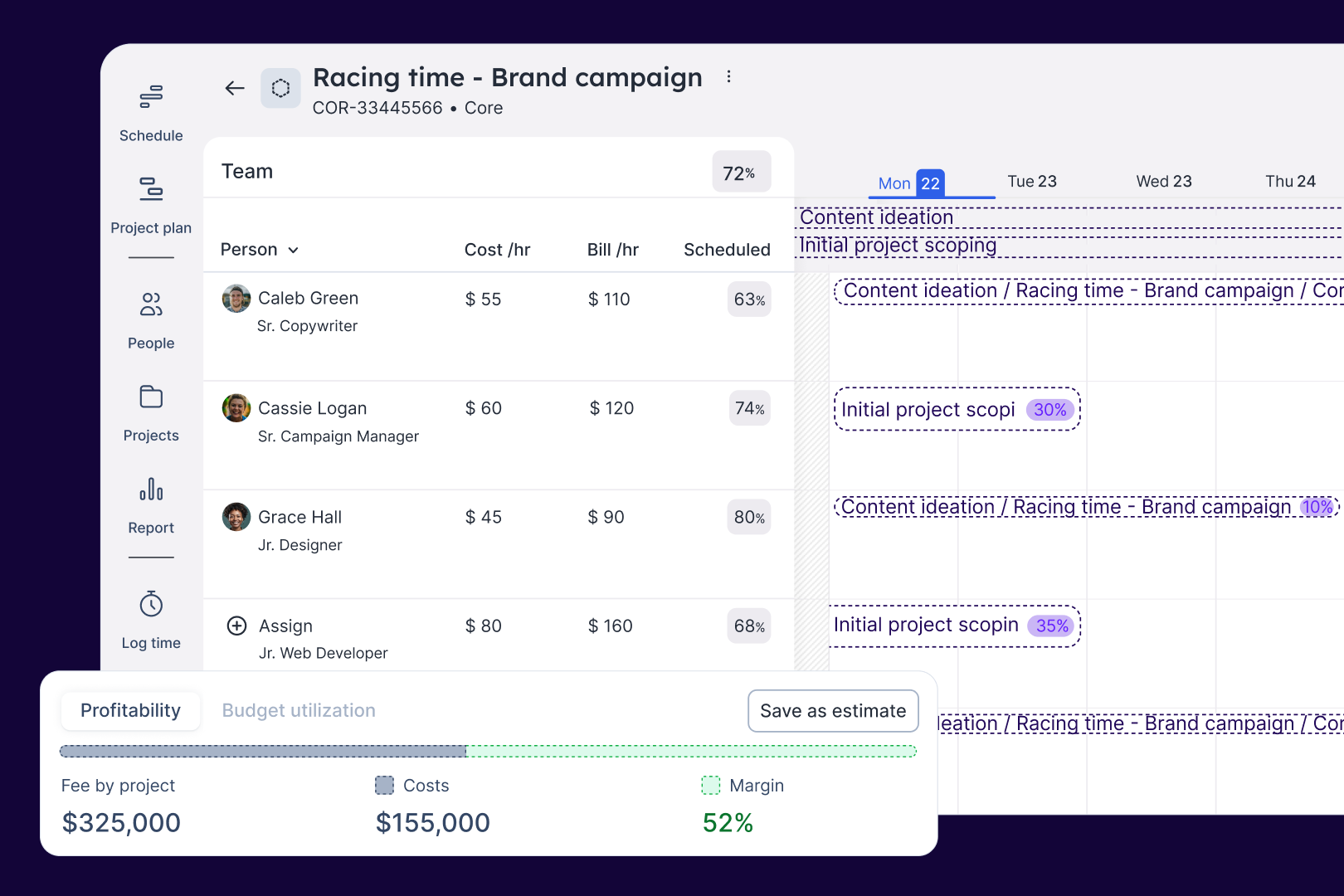
Float.com Demo - Estimate work
Quickly price new projects with confidence. Build budgets, align resourcing, and track scope changes—monitoring estimates against actuals to deliver profitable projects.
Float.com Demo - Scope projects
Align what you need with what you have to create project schedules that keep work on track with the right people, budgets, and timelines.
Float.com Demo - Track time
Simplify timesheets with pre-filled hours so your actuals data is more accurate and always on time!
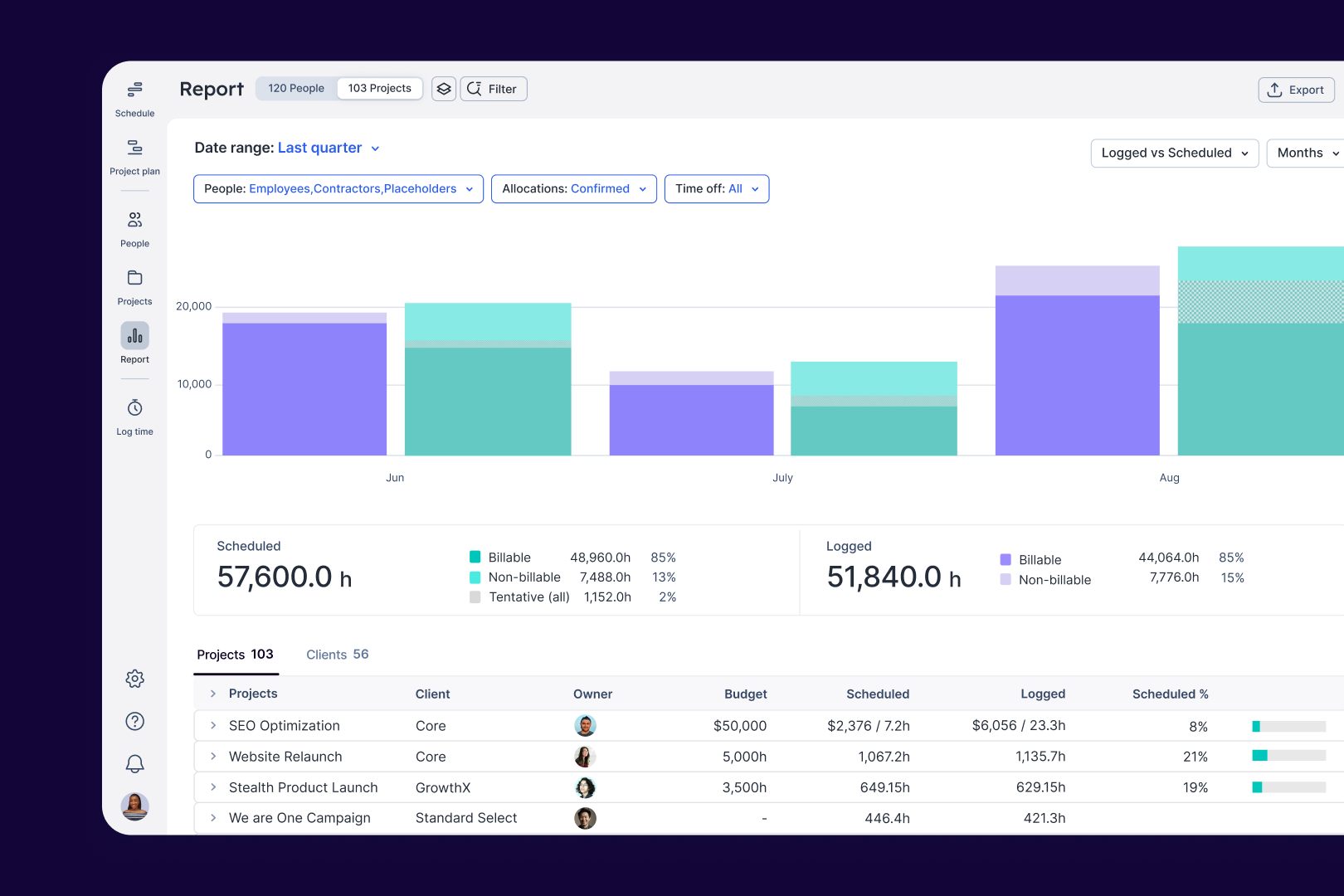
Float.com Demo - Report
Make informed decisions with live insights into team utilization and budget spend to understand how resourcing affects project margins and profitability.
The best teams in the world don’t just wing it. They use Float to get the essential data and context they need when resourcing client work, so they can build winning teams and deliver profitable projects.
Play Float.com Video
The best teams in the world don’t just wing it. They use Float to get the essential data and context they need when resourcing client work, so they can build winning teams and deliver profitable projects.
New: finance & estimations in Float. Stop guessing and start knowing. With Float's finance & estimation features, you can price accurately, protect margins, and deliver profitable projects every time.
Play Float.com Video
New: finance & estimations in Float. Stop guessing and start knowing. With Float's finance & estimation features, you can price accurately, protect margins, and deliver profitable projects every time.
Product Avatar Image

Have you used Float.com before?

Answer a few questions to help the Float.com community

Float.com Reviews (1,997)

View 1 Video Reviews
Reviews

Float.com Reviews (1,997)

View 1 Video Reviews
4.3
1,997 reviews

Pros & Cons

Generated from real user reviews
View All Pros and Cons
Search reviews
Filter Reviews
Clear Results
G2 reviews are authentic and verified.
Nigel C.
NC
Research Support Manager
Small-Business (50 or fewer emp.)
"What I've always needed and what I didn't know I wanted"
What do you like best about Float.com?

Float is incredibly intuitive, and it makes allocating resources a breeze. Even though I'm cetrain I don't take full advantage of its features, Float makes our project management cycle easier and I couldn't imagine going back to our spreadsheet schedule. Review collected by and hosted on G2.com.

What do you dislike about Float.com?

I would love to see Slack integration at some point in the future. Syncing with Google Cal is also wonky for some of our teammates. Review collected by and hosted on G2.com.

Aleksandrs K.
AK
VP of Engineering
Small-Business (50 or fewer emp.)
"VP of Engineering"
What do you like best about Float.com?

I love how simple the planning process is, and the user interface is very intuitive. Overall, the product is great despite the points I mentioned in the "dislike" section. I hope the product team considers this feedback and includes some of these features in future updates. Review collected by and hosted on G2.com.

What do you dislike about Float.com?

There is no option to specify the cost for a resource, as there is no dedicated field for this purpose.

The integrations are limited due to API design:

For example, if you need to retrieve allocations for the current week, you also receive data for previous periods, requiring manual calculations to determine the actual allocations.

For instance, if project A starts in week 32 with resource X allocated for 8 hours a day, and you expand the schedule to week 35 in the UI, fetching the allocation for week 34 should return 40 hours for resource X on project A. However, the API returns allocations for weeks 32-35 combined, leaving you to calculate the actual hours.

There’s no option for forecasting or scenario modeling. For example, if you want to try out different ways to distribute resources for the next quarter and see the financial impact before finalizing the plan, this feature is missing.

There’s no way to "lock" previous planning periods and make them read-only. It’s easy to accidentally make changes, like deleting a resource allocation from a past period, which can lead to mistakes in your reports Review collected by and hosted on G2.com.

Verified User in Computer Software
UC
Small-Business (50 or fewer emp.)
"Float Review as IT team member for a supply chain company"
What do you like best about Float.com?

Alternative for other project planning tools, this is simple to use Review collected by and hosted on G2.com.

What do you dislike about Float.com?

user interface is not appealing, UI feels like outdated Review collected by and hosted on G2.com.

Lauren K.
LK
Chief Executive Officer, Co-Founder
Small-Business (50 or fewer emp.)
"Great tool to measure actual time spent vs allocated"
What do you like best about Float.com?

Float is a really great tool so I can see all of the work assigned to my team and how hours are truly spent. It's a great resource to be able to see where we are over burning on hours and need to make some changes. We use it daily! Review collected by and hosted on G2.com.

What do you dislike about Float.com?

Figuring out the best way to read the dashboards does take an adjustment period. However, the tool itself is definitely userfriendly when it comes to logging time. Review collected by and hosted on G2.com.

Verified User in Leisure, Travel & Tourism
UL
Mid-Market (51-1000 emp.)
"Float makes Project Management so much easier!"
What do you like best about Float.com?

Float makes managing my team's schedule so much easier. I use it everyday and can't picture my work without it. The visual interface is intuitive and lets me quickly see who’s working on what and when. The drag-and-drop functionality makes updating the schedule a breeze. Plus, the time tracking and reporting tools give me a clear view of how projects are progressing, so I can make informed decisions without any guesswork. Overall, Float has streamlined our workflow and made resource management much more efficient. Review collected by and hosted on G2.com.

What do you dislike about Float.com?

Limited data exporting options (only .CSV). Review collected by and hosted on G2.com.

Danyaal S.
DS
Analyst
Enterprise (> 1000 emp.)
"Best software to mark our login hours / task"
What do you like best about Float.com?

the best thing about Float is its very user-friendly. I use float every day it is very easy to implement. There are many fields to mark your task and you can even schedule hours according to your requirements. Review collected by and hosted on G2.com.

What do you dislike about Float.com?

At first, the float server used to lag a lot , but as the time passed I don't face this issue anymore Review collected by and hosted on G2.com.

Camila M.
CM
Analista de Financeiro Junior
Small-Business (50 or fewer emp.)
"Great tool, it helps a lot in scheduling tasks."
What do you like best about Float.com?

I really like everything about Float. But what I think makes daily routines easier is because it helps us with task management and organizing my schedule. It helps with my time management, making it easier for better organization. I find Float sensational. Review collected by and hosted on G2.com.

What do you dislike about Float.com?

The option to set the page in Portuguese, because normally the page crashes and I need to return to the beginning. Review collected by and hosted on G2.com.

Verified User in Online Media
GO
Mid-Market (51-1000 emp.)
"Good tool for activity control"
What do you like best about Float.com?

I use float as an analyst. I like the fact that the tool has few options in the left-hand menu, which makes it easier to learn the platform. It only has scheduele, report and log time (in my version). It's also possible to explore the other functionalities in a few minutes, which makes it easier to discover new possibilities for everyday use. I really like the schedule function, as it helps me to see my agenda for the day and if the time allocated to a particular activity is different, I can easily arrange it before clicking on log time. Review collected by and hosted on G2.com.

What do you dislike about Float.com?

I don't like the integration function with Google calendar. Although it makes everyday life easier, it always pulls up the entire agenda (even those that have already been closed), which is why most people choose not to integrate with Google Calendar. Another thing I don't like is the time in the schedule function, because it's broken, 0.5, 0.75, 1.... I don't think this part makes it any easier for tasks that require times that aren't fulls. Review collected by and hosted on G2.com.

Verified User in Environmental Services
UE
Small-Business (50 or fewer emp.)
"Great tool for organizing Staff and Project Schedules"
What do you like best about Float.com?

I love how easy it is to use and how it is available both on my phone and online. It updates seamlessly and is very good for organizing staff and project schedules. Review collected by and hosted on G2.com.

What do you dislike about Float.com?

It does have a bit of a learning curve in the begining which is solved by having trainings (Very thurough) and practice using it. I think that sometimes people create projects (That are not real) and that can mix things up with emails, schedules and other aspects. Otherwise I learned very quickly how to use it without any previous knowledge. Customer support is very helpful. I use this daily. Review collected by and hosted on G2.com.

Verified User in Consulting
UC
Mid-Market (51-1000 emp.)
"Float making scheduling easy!"
What do you like best about Float.com?

For a company that has multiple offices and a ton of projects its great that i can assign staff to projects/offices and easily filter to view only applicable staff/offices. I also like that you can assign specific hours to tasks utilizing project numbers to easily view workload for an individual for the week. This program is used everyday by all company staff.

Float was implemented company wide with a very informative tutorial provided by company staff. Integration of this program from our previous google doc method was seamless. Review collected by and hosted on G2.com.

What do you dislike about Float.com?

I would say that the only thing i dont like about float is the fact that it looks busy on the interface. A lot of information, colors, and text make initial viewing a bit overwhelming. Review collected by and hosted on G2.com.

Pricing Options

Pricing provided by Float.com.

Starter

Starting at $7.00
Per Month

Pro

Starting at $12.00
Per Month

Enterprise

Contact Us
Float.com Comparisons
Product Avatar Image
Resource Guru
Compare Now
Product Avatar Image
Kantata Professional Services Automation (formerly Mavenlink+ Kimble)
Compare Now
Product Avatar Image
Teamwork.com
Compare Now
Float.com Features
Ease of Completing Timesheets
Tracking Time to Project/Task
Billable Time Rate Management
Time Tracking
Business Tool Integration
Automated Reminders
User, Role, and Access Management
Reporting
Performance and Reliability
Product Avatar Image
Float.com