

Introducing G2.ai, the future of software buying.Try now

Float.com Reviews & Product Details

Pricing

Pricing provided by Float.com.

Starter

Starting at $7.00
Per Month

Float.com Media

Float.com Demo - Schedule resources
Easily see who’s working on what and when, with a live schedule to plan and allocate work.
Float.com Demo - Plan capacity
Balance workloads and prevent burnout with a live view of availability, time off, and scheduled work.
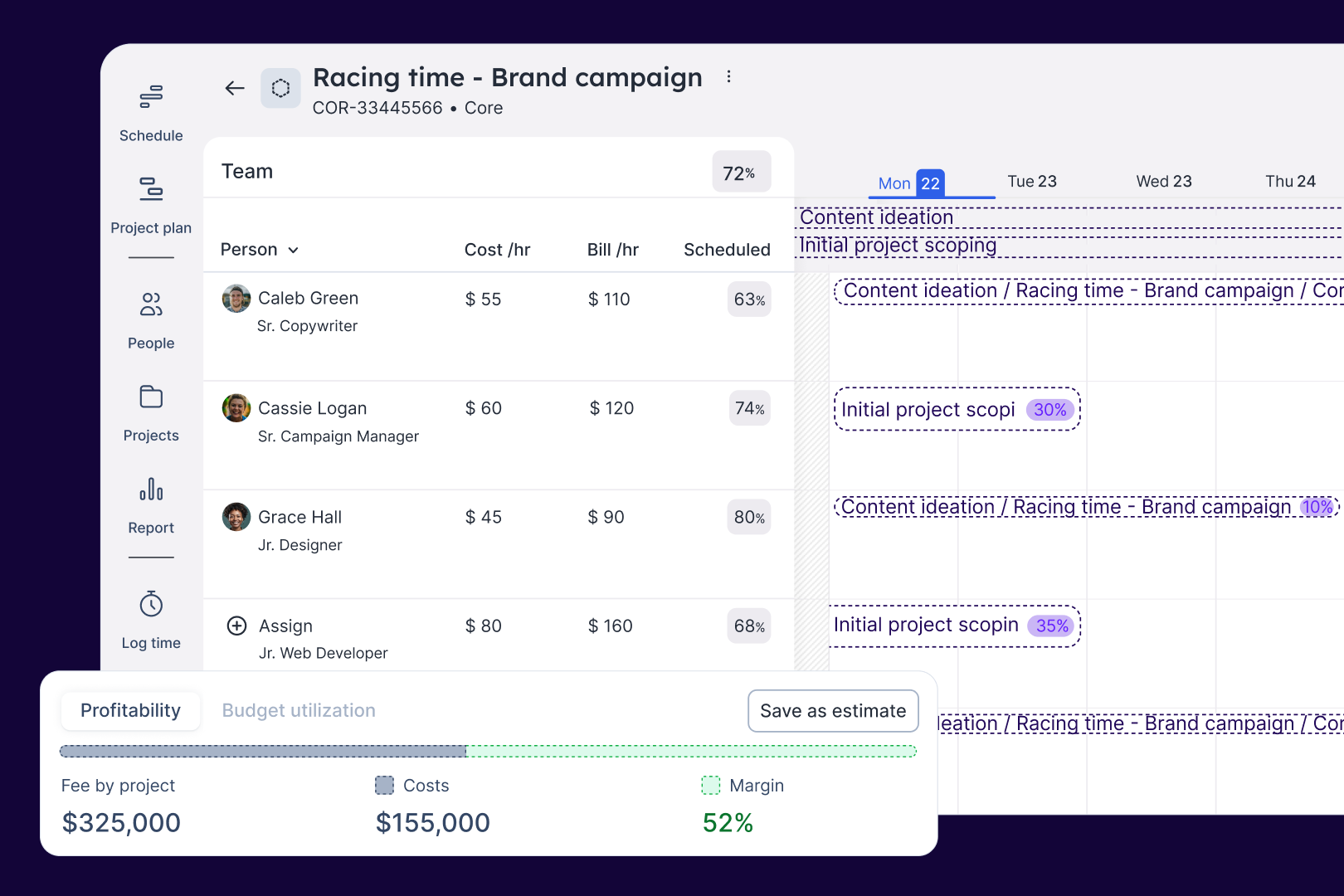
Float.com Demo - Estimate work
Quickly price new projects with confidence. Build budgets, align resourcing, and track scope changes—monitoring estimates against actuals to deliver profitable projects.
Float.com Demo - Scope projects
Align what you need with what you have to create project schedules that keep work on track with the right people, budgets, and timelines.
Float.com Demo - Track time
Simplify timesheets with pre-filled hours so your actuals data is more accurate and always on time!
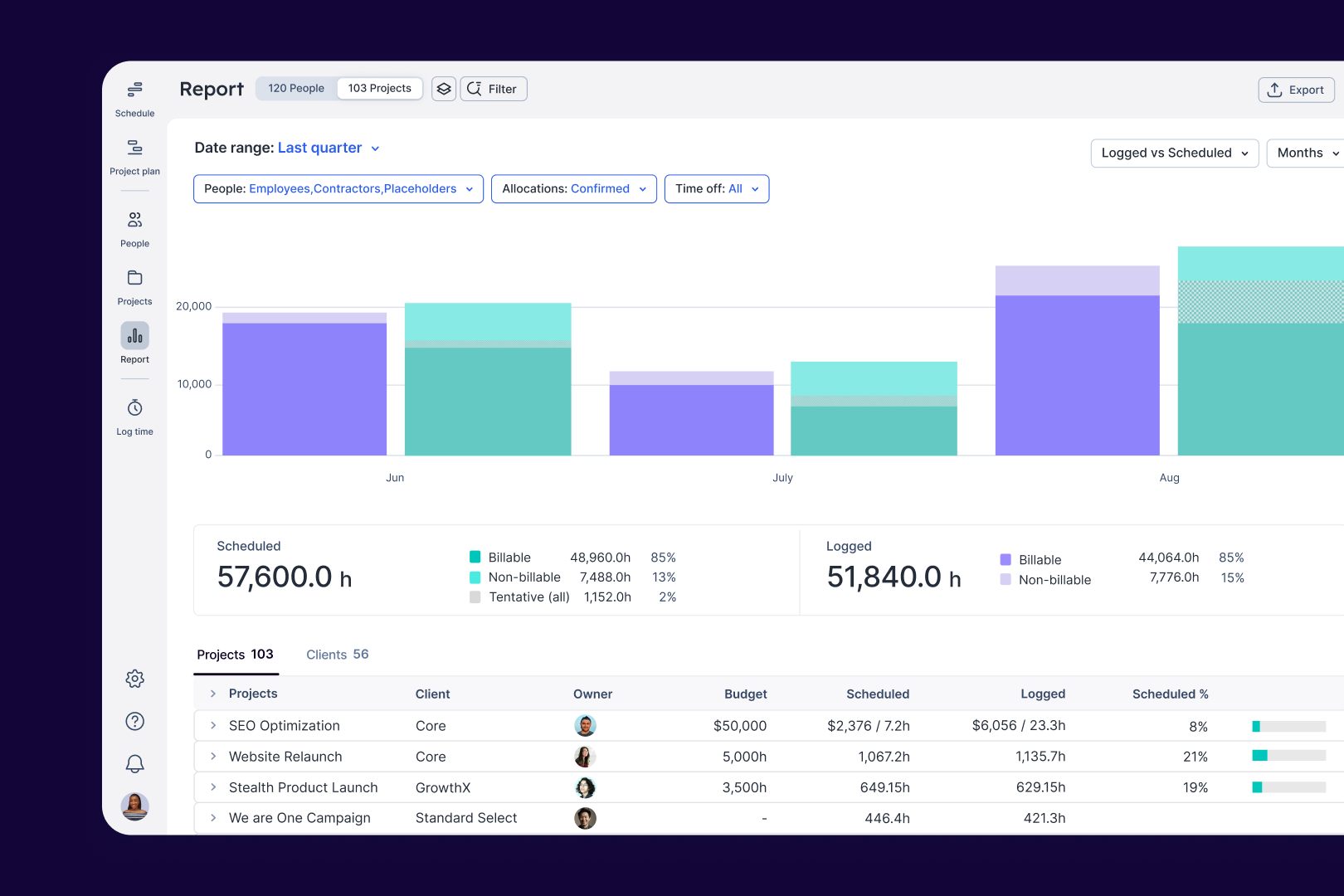
Float.com Demo - Report
Make informed decisions with live insights into team utilization and budget spend to understand how resourcing affects project margins and profitability.
The best teams in the world don’t just wing it. They use Float to get the essential data and context they need when resourcing client work, so they can build winning teams and deliver profitable projects.
Play Float.com Video
The best teams in the world don’t just wing it. They use Float to get the essential data and context they need when resourcing client work, so they can build winning teams and deliver profitable projects.
New: finance & estimations in Float. Stop guessing and start knowing. With Float's finance & estimation features, you can price accurately, protect margins, and deliver profitable projects every time.
Play Float.com Video
New: finance & estimations in Float. Stop guessing and start knowing. With Float's finance & estimation features, you can price accurately, protect margins, and deliver profitable projects every time.
Product Avatar Image

Have you used Float.com before?

Answer a few questions to help the Float.com community

Float.com Reviews (1,997)

View 1 Video Reviews
Reviews

Float.com Reviews (1,997)

View 1 Video Reviews
4.3
1,997 reviews

Pros & Cons

Generated from real user reviews
View All Pros and Cons
Search reviews
Filter Reviews
Clear Results
G2 reviews are authentic and verified.
Verified User in Military
UM
Mid-Market (51-1000 emp.)
"Efficient and User-Friendly Tool for Project Management"
What do you like best about Float.com?

Float stands out due to its intuitive and user-friendly interface, making it easy to manage projects and resources efficiently. The ease of use combined with robust features like drag-and-drop scheduling and real-time updates ensures that I can quickly adapt to changes in project timelines. Additionally, the seamless integration with other tools we use in our workflow has significantly improved our overall productivity. It's clear that Float was designed with the user in mind, providing a balance between simplicity and functionality. Review collected by and hosted on G2.com.

What do you dislike about Float.com?

While Float is a powerful tool, I occasionally find that the mobile app lacks some of the functionality present in the web version, which can be limiting when trying to make quick adjustments on the go. Additionally, it would be beneficial to have more customization options in reporting to better fit specific business needs. However, these are minor issues in an otherwise excellent product. Review collected by and hosted on G2.com.

Verified User in Marketing and Advertising
AM
Small-Business (50 or fewer emp.)
"Simple and convenient"
What do you like best about Float.com?

I've been using Float for some time now, and I must say, it has exceeded my expectations in terms of simplicity and convenience. The platform makes it incredibly easy to log my time, which is essential for keeping track of my work hours and ensuring that projects stay on schedule. Also, the clear calendar view helps me manage my workload effectively, ensuring I stay on track.

One of the standout features is its intuitive interface. Creating new projects is a breeze, with all the necessary options available. Everything can be done quickly and efficiently without getting bogged down in complicated menus. Review collected by and hosted on G2.com.

What do you dislike about Float.com?

After a while, I realized that some of the options were more complex to use than expected and not suited to the type of projects we run. In the end, we managed to find workarounds in the software to ensure that everything works well. Review collected by and hosted on G2.com.

Verified User in Marketing and Advertising
UM
Mid-Market (51-1000 emp.)
"My Review - 8/9"
What do you like best about Float.com?

Float is great for its simplicity and effectiveness in managing project timelines and team resources. Its intuitive interface and clear visualization of schedules make it easy to understand and use, which is crucial for keeping projects on track and ensuring team members are allocated appropriately. Review collected by and hosted on G2.com.

What do you dislike about Float.com?

One downside of Float is that while it excels at resource scheduling, it can lack some advanced project management features, such as detailed task tracking or integration with broader project management tools. Additionally, its reporting capabilities might feel limited if you need in-depth analytics or custom reports, which could be a drawback for teams that rely heavily on data-driven decisions. Review collected by and hosted on G2.com.

Verified User in Computer & Network Security
AC
Small-Business (50 or fewer emp.)
"Essential tool for project scheduling for consulting business"
What do you like best about Float.com?

I use Float extensively for both managing project assignments as well as project phases. I have not found a better way to manage this aspect of my business, and all at a relatively reasonable price. When things are busy and I have to schedule projects out months in advance, I rely completely on Float to keep things straight. I then review the Float schedule with my team on a weekly basis so everyone knows their schedule in advance. Review collected by and hosted on G2.com.

What do you dislike about Float.com?

I originally picked Float because it was simple and easy to personalize. As they continue to release new versions it is getting harder and harder to do things they way I want. As of know I have figured out some work arounds, but I just hope they don't try to be like everyone else and make the process to rigid for how I want to use it. Review collected by and hosted on G2.com.

Verified User in Consulting
AC
Enterprise (> 1000 emp.)
"Fundamentally easy-to-use and report off of"
What do you like best about Float.com?

Float stands out from the crowd of resource management tools with its strong UI/UX and their very helpful, responsive customer support. Just this alone made onboarding and implementing the system very quick for our team. The system is easy to navigate and our users find it easy to complete all of the work that they need to at once. I personally find it intuitive to add hours to someone's schedule and add/edit nested details/projects without having to navigate to another screen. While evaluating our options, I felt that managing our projections for company resources was much easier than some of the other competitors, especially when it came to the tag and department management systems. The cherry on top was the ability to sync users and projects from Jira which sped up our onboarding process. Review collected by and hosted on G2.com.

What do you dislike about Float.com?

A lot of the functionality is fairly shallow. There aren't a lot of fields or the option to add custom fields to all users and departments. Tag management would be much improved if there was functionality around hierarchy added. In a set of allocated hours that has multiple users attached it, I should be able to unlink the users whilst retaining the same allocation for each user. Right now, unlinking the users from the allocation removes hours for them without any option to keep. Access management and visibility should have more granular options including: restricting projects from being seen on any view or search by non-assigned users, the ability to remove archived projects and other records from auto-fills, and the ability to restrict any manager to only seeing their resources. Review collected by and hosted on G2.com.

Verified User in Consulting
AC
Mid-Market (51-1000 emp.)
"Very beautiful and responsive interface"
What do you like best about Float.com?

Wonderful and intuitive design. Great aesthetics that lets you see large amounts of metrics in a visually appealing manner. Has never experienced any service disruptions. Is quickly able to respond to changes from large team making several updates. Review collected by and hosted on G2.com.

What do you dislike about Float.com?

Some of the metrics on resource planning could be better explained. The difference in interpretation of metrics from API vs the web dashboard is difficult to understand. Support does not do a good job of explaining them.

The development team does not customize the product much according to company requirements. Review collected by and hosted on G2.com.

Verified User in Civil Engineering
CC
Small-Business (50 or fewer emp.)
"Great for managing team schedule and keeping everyone busy without overwelming anyone"
What do you like best about Float.com?

The Float Scheduling tool is an effective solution for managing team schedules and workloads. It allows for a clear view of both current and future projects, ensuring that everyone is occupied without being overwhelmed. The tool is particularly useful for our weekly 30-minute meetings, where we review what each team member is working on for the week and assess long-term project planning. This approach helps maintain balanced workloads and enhances overall team productivity. Review collected by and hosted on G2.com.

What do you dislike about Float.com?

While Float Scheduling is an effective tool for managing team schedules and workloads, I wish there were additional features for developing custom reports. The ability to generate tailored reports would enhance our ability to analyze team performance, track project progress, and make more informed decisions based on specific needs. Review collected by and hosted on G2.com.

Verified User in Online Media
UO
Small-Business (50 or fewer emp.)
"Easy and beneficial to use"
What do you like best about Float.com?

Being able to colour code and adapt the blocks of time for different tasks. I also like how the blocks of time are different sizes depending on how much time has been allocated (our previous software didn't have this). Being able to slide blocks of time around is also very convenient.

It was very easy to set up at the beginning as well, we had no trouble learning how to use the software.

We've not yet had to use customer support, but that's a good thing. If I ever did feel like I needed to, I would feel comfortable with reaching out.

We use this everyday, with ease, and it's definitely not as painful to use as our previous software. No one likes filling in their time sheets but Float does make it that little bit better.

I personally don't use any of the intergration tools, but I am percetly happy just keeping Float as its own thing on my desktop browser. Review collected by and hosted on G2.com.

What do you dislike about Float.com?

It's a bit fiddly to see how much time is left in my schedule when plotting tasks in resource meetings. You need to slide that grey bar at the top across to see how much time you're over or under by, and it's a little bit annoying. I would like to be able to see the exact minutes or hours for each day. It can also be a bit annoying when time is allocated across a whole week and it doesn't split it up into daily blocks, it makes the week look all janky and unorganised. What would also be really useful is being able to plan tasks according to time, I use my Google cal to plot tasks for each day/week, but if you could do this in Float I wouldn't need to be tracking time in two different places. Review collected by and hosted on G2.com.

Ben M.
BM
Writer / Final Pass Editor / Topics Master
Mid-Market (51-1000 emp.)
"Simple and Effective Time Tracking and Scheduling Tool"
What do you like best about Float.com?

Float offers us the scheduling and time tracking capabilities of other platforms such as Smartsheet Scheduling (formerly 10,000ft) without the bloat or extra costs of these larger suites. For a smaller team, it provides everything we need, and nothing we don't.

The customer support team were excellent during the on boarding process. We were even able to discuss a couple of feature requests and were glad to hear they were already in the works.

I am now using Float to plan out my teams work over the two week sprints. We all then use it to clock our time daily. The reporting feature is fantastic to keep an eye on project budgets and analyse where any issues around workload or deadlines might arise. Review collected by and hosted on G2.com.

What do you dislike about Float.com?

Quite a few of best features are hidden without any documentation or tutorial on them (such as holding shift and clicking on a time entry will allow you to duplicate it), and some have to work in a specific way to get right. But it's still a new product and evolving all the time. Review collected by and hosted on G2.com.

Verified User in Design
UD
Small-Business (50 or fewer emp.)
"A designer’s perspective on powerful features and navigational challenges"
What do you like best about Float.com?

Float offers a lot of features and you are able to use as many or as few of them that fit your needs. As a designer, I like being able to see how my time is allocated in the neatly organized color-coded calendar. From there, it is easy to log my time. Review collected by and hosted on G2.com.

What do you dislike about Float.com?

Because of its many features, it can be hard to navigate to find what you are looking for. I wish there was a basic home page with navigation links to then jump into what you need to access. As a designer and not a project manager, I don't always need access to or care to view what the rest of the organization is booked on. It would be nice to have a standard home screen where I can just access my projects or time sheet. Review collected by and hosted on G2.com.

Pricing Options

Pricing provided by Float.com.

Starter

Starting at $7.00
Per Month

Pro

Starting at $12.00
Per Month

Enterprise

Contact Us
Float.com Comparisons
Product Avatar Image
Resource Guru
Compare Now
Product Avatar Image
Kantata Professional Services Automation (formerly Mavenlink+ Kimble)
Compare Now
Product Avatar Image
Teamwork.com
Compare Now
Float.com Features
Ease of Completing Timesheets
Tracking Time to Project/Task
Billable Time Rate Management
Time Tracking
Business Tool Integration
Automated Reminders
User, Role, and Access Management
Reporting
Performance and Reliability
Product Avatar Image
Float.com