Best Project Management Software

How Many Project Management Software Products Does G2 Track?

Total Products under this Category: 1,301

Category Stats (Sep 2026)

  • Average Rating: 4.39/5 The average rating of products in this category, based on all submitted ratings
  • Top Trending Product: Workzone (+1.76%) - Among all products in this category, Workzone recorded the largest rating increase compared to last month

Last updated: September 01, 2026

How Does G2 Rank Project Management Software Products?

Why You Can Trust G2's Software Rankings:

  • 30 Analysts and Data Experts
  • 142,700+ Authentic Reviews
  • 1,301+ Products
  • Unbiased Rankings

G2's software rankings are built on verified user reviews, rigorous moderation, and a consistent research methodology maintained by a team of analysts and data experts. Each product is measured using the same transparent criteria, with no paid placement or vendor influence. While reviews reflect real user experiences, which can be subjective, they offer valuable insight into how software performs in the hands of professionals. Together, these inputs power the G2 Score, a standardized way to compare tools within every category.

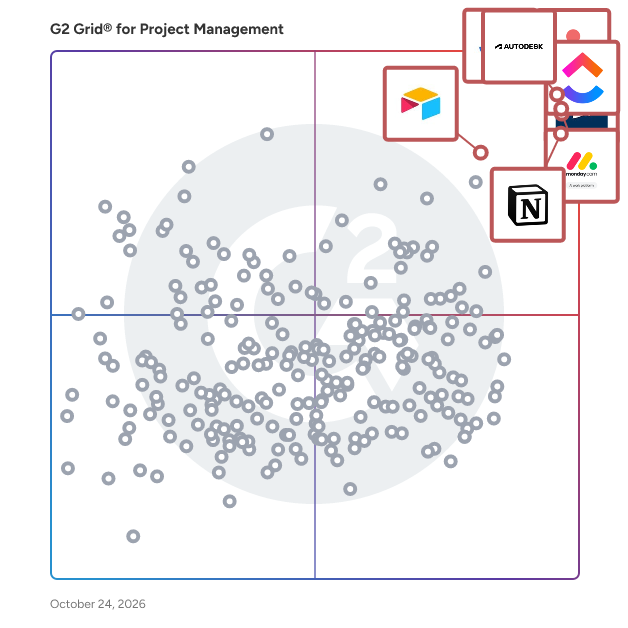
G2 Grid® for Project Management Software

G2 Grid® for Project Management Software plotting products by satisfaction and market presence

Highlighted products: Jira, Asana, Smartsheet, monday AI Work Platform, ClickUp, Notion, Airtable, and Quickbase.

Underlying data: [Grid® JSON](https://www.g2.com/categories/project-management/grids.json?focus%5B%5D=jira&focus%5B%5D=asana&focus%5B%5D=smartsheet&focus%5B%5D=monday-com&focus%5B%5D=clickup&focus%5B%5D=notion&focus%5B%5D=airtable&focus%5B%5D=quickbase)

Jira

Jira bietet einen kollaborativen Raum, um sich über Ziele und Prioritäten abzustimmen, die Arbeit zu verfolgen und zusammenzuarbeiten sowie wertvolle Einblicke zu gewinnen, die bessere Ergebnisse für Ihre Teams fördern. Jedes Team in Ihrer Organisation – von Produkt bis Marketing und darüber hinaus – wird mit der Flexibilität ausgestattet, so zu arbeiten, wie es möchte. Und indem diese Arbeit nahtlos zusammengeführt wird, ermöglicht Jira es Ihnen, Projekte kohärent an einem Ort zu verwalten. - Von kurzen Projekten bis hin zu großen funktionsübergreifenden Programmen: Zerlegen Sie große Ideen in erreichbare Schritte. Organisieren Sie die Arbeit, erstellen Sie Meilensteine, kartieren Sie Abhängigkeiten und lassen Sie die KI die schwere Arbeit übernehmen. - Verknüpfen Sie die Arbeit mit Zielen, damit jeder sehen kann, wie seine Arbeit zu den Unternehmenszielen beiträgt und sich auf das Wichtige konzentriert. - Visualisieren Sie die Arbeit mit Listen, Boards, Kalendern und mehr. Erstellen Sie Workflows für jeden Prozess und integrieren Sie die Tools, die Sie lieben. - Erhalten Sie Einblick in den Projektfortschritt, verstehen Sie Risiken und gewinnen Sie Erkenntnisse aus Echtzeitdaten, um die termingerechte und budgetgerechte Lieferung sicherzustellen. Jira bietet funktionsübergreifende Planung und Sichtbarkeit, die die Arbeit mit den Ergebnissen in Einklang bringt – damit jedes Team in der Lage ist, große Ideen gemeinsam zu verwirklichen.

Average Rating: 4.3/5.0

Total Reviews: 7,591

How Do G2 Users Rate Jira?

  • War the product ein guter Geschäftspartner?: 8.6/10 (Category avg: 8.9/10)
  • Planung: 9.0/10 (Category avg: 8.8/10)
  • Erstellung & Zuweisung: 9.3/10 (Category avg: 8.9/10)
  • Ressourcenallokation: 8.4/10 (Category avg: 8.4/10)

Who Is the Company Behind Jira?

  • Verkäufer: Atlassian
  • Unternehmenswebsite:
  • Gründungsjahr: 2002
  • Hauptsitz: Sydney and San Francisco
  • Twitter: @Atlassian
    106,496 Twitter-Follower
  • LinkedIn®-Seite: www.linkedin.com
    16,946 Mitarbeiter*innen auf LinkedIn®

Who Uses This Product?

  • Who Uses This: Software-Ingenieur, Senior Software Engineer
  • Top Industries: Informationstechnologie und Dienstleistungen, Computersoftware
  • Company Size: 45% Medium, 33% Large

What Do G2 Reviewers Say About Jira?

AI-generated summary from verified user reviews

Pros
  • Benutzer schätzen die Benutzerfreundlichkeit von Jira und finden es intuitiv für das effektive Management von Projekten und Arbeitsabläufen.
  • Benutzer loben die starke Flexibilität von Jira zur Organisation von Projekten, zur Verbesserung der Zusammenarbeit und zur effektiven Verfolgung des Fortschritts.
  • Benutzer schätzen die leistungsstarken Aufgabenverfolgungs-Funktionen von Jira, die das Projektmanagement und die Zusammenarbeit im Team effizient verbessern.
  • Benutzer schätzen die vielseitigen Funktionen von Jira, die das Projektmanagement und die Zusammenarbeit im Team durch Anpassung und Einblicke verbessern.
  • Benutzer finden die leistungsstarken Aufgabenverwaltungsfunktionen von Jira unverzichtbar, um Projektaktivitäten effektiv zu organisieren und zu verfolgen.
Cons
  • Benutzer finden die Lernkurve von Jira steil, was die anfängliche Einrichtung und das Verständnis der Funktionen für Neulinge herausfordernd macht.
  • Benutzer kämpfen mit der Komplexität der Jira-Oberfläche und -Prozesse, da sie diese als überwältigend und schwer zu navigieren empfinden.
  • Benutzer finden die steile Lernkurve von Jira herausfordernd, insbesondere für neue Benutzer, die an einfachen Projekten arbeiten.
  • Benutzer finden Jira überwältigend, insbesondere aufgrund seiner Komplexität und der steilen Lernkurve für neue Benutzer.
  • Benutzer haben oft mit langsamer Leistung zu kämpfen, wenn sie an größeren Projekten oder zahlreichen Boards arbeiten, was die Gesamteffizienz beeinträchtigt.

What Are Recent G2 Reviews of Jira?

What Are G2 Users Discussing About Jira?

Asana

Asana ist eine führende Plattform für Arbeitsmanagement zur Zusammenarbeit von Mensch und KI. Über 170.000 Kunden wie Accenture, Amazon, Anthropic und Suzuki verlassen sich auf Asana, um Teams zu koordinieren und den organisatorischen Einfluss zu beschleunigen. Egal, ob es um die Verwaltung strategischer Initiativen, funktionsübergreifender Programme oder unternehmensweiter Ziele geht, Asana hilft Organisationen, Klarheit in die Komplexität zu bringen – indem Pläne in die Tat umgesetzt werden, wobei KI die Teams bei jedem Schritt begleitet. Um mehr zu erfahren, besuchen Sie www.asana.com.

Average Rating: 4.4/5.0

Total Reviews: 13,368

How Do G2 Users Rate Asana?

  • War the product ein guter Geschäftspartner?: 8.7/10 (Category avg: 8.9/10)
  • Planung: 8.8/10 (Category avg: 8.8/10)
  • Erstellung & Zuweisung: 9.3/10 (Category avg: 8.9/10)
  • Ressourcenallokation: 8.0/10 (Category avg: 8.4/10)

Who Is the Company Behind Asana?

  • Verkäufer: Asana
  • Unternehmenswebsite:
  • Gründungsjahr: 2008
  • Hauptsitz: San Francisco, CA
  • Twitter: @Asana
    119,913 Twitter-Follower
  • LinkedIn®-Seite: www.linkedin.com
    4,427 Mitarbeiter*innen auf LinkedIn®

Who Uses This Product?

  • Who Uses This: Projektmanager, Eigentümer
  • Top Industries: Marketing und Werbung, Informationstechnologie und Dienstleistungen
  • Company Size: 57% Small, 31% Medium

What Do G2 Reviewers Say About Asana?

AI-generated summary from verified user reviews

Pros
  • Benutzer finden, dass Asana eine benutzerfreundliche Oberfläche hat, was es einfach macht, Aufgaben zu verwalten und effektiv zusammenzuarbeiten.
  • Benutzer schätzen Asana für sein effektives Aufgabenmanagement, das die Produktivität und Zusammenarbeit in Teams und Projekten verbessert.
  • Benutzer schätzen die Workflow-Funktionen von Asana, die Teamarbeit und Projektorganisation mit flexiblen Aufgabenverwaltungsoptionen verbessern.
  • Benutzer schätzen die Workflow-Funktionen in Asana, die die Teamkonnektivität erleichtern und die Effizienz des Projektmanagements verbessern.
  • Benutzer schätzen das benutzerfreundliche Aufgaben-Tracking in Asana, was die Organisation und Effizienz bei der Verwaltung von Ergebnissen verbessert.
Cons
  • Benutzer erleben einen Mangel an wesentlichen Funktionen, einschließlich Zeiterfassung und Projektaufsetzungsfähigkeiten, was die Benutzerfreundlichkeit beeinträchtigt.
  • Benutzer kämpfen mit der steilen Lernkurve von Asana, da sie es unübersichtlich finden und Schwierigkeiten haben, Aufgaben effektiv zu verwalten.
  • Benutzer bemerken die begrenzten Funktionen in Asana, insbesondere da leistungsstarke Werkzeuge hinter höheren Preisklassen gesperrt sind.
  • Benutzer finden die Benutzeroberfläche nicht intuitiv, mit einem umständlichen Design, das die Navigation und Aufgabenverwaltung erschwert.
  • Benutzer finden die Suchfunktion unzureichend, was es schwierig macht, Projekte und Aufgaben effizient zu finden.

What Are Recent G2 Reviews of Asana?

What Are G2 Users Discussing About Asana?

Smartsheet

Smartsheet revolutioniert die Art und Weise, wie Sie Projekte, Portfolios und Prozesse verwalten. Die KI-gestützte Plattform von Smartsheet bietet Anpassungsfähigkeit, anspruchsvolle Erlebnisse und unternehmensgerechte Strenge, um die Arbeit in verschiedenen Branchen zu unterstützen – von der Servicebereitstellung über den Bau bis hin zu klinischen Studien und Marketingkampagnen. Entwickelt, um anspruchsvolle Anforderungen zu erfüllen, hilft es Organisationen, Effizienz zu steigern, Innovationen zu beschleunigen und wettbewerbsfähig zu bleiben. Über 85 % der Fortune-500-Unternehmen vertrauen auf Smartsheet, um ihre Ressourcen zu koordinieren und Effizienz, Agilität und Zusammenarbeit in der sich ständig verändernden Arbeitswelt von heute zu verbessern.

Average Rating: 4.4/5.0

Total Reviews: 22,314

How Do G2 Users Rate Smartsheet?

  • War the product ein guter Geschäftspartner?: 8.6/10 (Category avg: 8.9/10)
  • Planung: 8.6/10 (Category avg: 8.8/10)
  • Erstellung & Zuweisung: 8.7/10 (Category avg: 8.9/10)
  • Ressourcenallokation: 7.7/10 (Category avg: 8.4/10)

Who Is the Company Behind Smartsheet?

  • Verkäufer: Smartsheet
  • Unternehmenswebsite:
  • Gründungsjahr: 2005
  • Hauptsitz: Bellevue, WA
  • Twitter: @Smartsheet
    26,366 Twitter-Follower
  • LinkedIn®-Seite: www.linkedin.com
    4,034 Mitarbeiter*innen auf LinkedIn®

Who Uses This Product?

  • Who Uses This: Projektmanager, Senior Projektmanager
  • Top Industries: Informationstechnologie und Dienstleistungen, Bauwesen
  • Company Size: 41% Medium, 34% Small

What Do G2 Reviewers Say About Smartsheet?

AI-generated summary from verified user reviews

Pros
  • Benutzer schätzen die Benutzerfreundlichkeit von Smartsheet, die intuitives Projektmanagement für alle Teamfähigkeitsstufen ermöglicht.
  • Benutzer schätzen die optimierten Kollaborations- und Automatisierungsfunktionen von Smartsheet, die die Effizienz und Flexibilität des Projektmanagements verbessern.
  • Benutzer schätzen die Echtzeit-Zusammenarbeitsfunktionen in Smartsheet, die die Team-Synergie über entfernte Standorte hinweg verbessern.
  • Benutzer schätzen die umfassenden Projektverfolgungs-Fähigkeiten von Smartsheet, die die Zusammenarbeit und die Effizienz des Projektmanagements verbessern.
  • Benutzer schätzen die Automatisierungsfähigkeiten von Smartsheet, die die Zusammenarbeit verbessern und die Projektmanagementprozesse optimieren.
Cons
  • Benutzer stehen bei Smartsheet vor einer steilen Lernkurve aufgrund der begrenzten Formeln und unintuitiven Funktionen.
  • Benutzer finden fehlende Funktionen in Smartsheet, was Herausforderungen beim Verfolgen von Informationen und der Nutzung fortgeschrittener Funktionen verursacht.
  • Benutzer finden Smartsheet nicht intuitiv, was die Navigation und das Beherrschen der Funktionen für viele zu einer herausfordernden Erfahrung macht.
  • Benutzer finden, dass eingeschränkte Funktionen die Zusammenarbeit behindern und die Kosten erhöhen, insbesondere für kleine Unternehmen, die versuchen zu wachsen.
  • Benutzer erleben eingeschränkte Funktionalität in Smartsheet, was ihre volle Nutzung der Fähigkeiten des Tools behindert.

What Are Recent G2 Reviews of Smartsheet?

What Are G2 Users Discussing About Smartsheet?

monday AI Work Platform

monday.com ist die KI-Arbeitsplattform, auf der Menschen und Agenten als ein Team agieren - mit gemeinsamem abteilungsübergreifendem Kontext, vertrauenswürdiger Unternehmenssicherheit und einer benutzerfreundlichen Oberfläche, die für die Skalierung entwickelt wurde. Mit monday.com arbeiten Agenten Seite an Seite mit Teams in denselben Boards, Workflows und Zielen, die sie bereits täglich nutzen, und schaffen so eine neue Art der Teamarbeit, bei der Menschen und Agenten gemeinsam die Arbeit vorantreiben. Über Agenten hinaus bietet monday.com jedem Team mehr Möglichkeiten, KI in echten Geschäftserfolg zu verwandeln. Mit monday vibe können Teams maßgeschneiderte Arbeits-Apps für ihre spezifischen Bedürfnisse erstellen, und mit monday sidekick erhält jeder Benutzer einen persönlichen KI-Assistenten, der hilft, geschäftliche Herausforderungen zu lösen, schneller zu arbeiten und mehr zu erledigen. monday.com bietet Organisationen die Sichtbarkeit, Berechtigungen, menschliche Aufsicht und Compliance-Standards, die sie benötigen, um KI mit Vertrauen einzusetzen. KI operiert nicht in einer Blackbox - sie arbeitet innerhalb derselben vertrauenswürdigen Leitplanken, auf die sich Teams bereits verlassen. Da monday.com bereits abteilungsübergreifend genutzt wird, können Agenten auf den breiteren Kontext zugreifen, wie Arbeit über Marketing, Vertrieb, Produkt, IT, HR, Betrieb und mehr hinweg verbunden ist. Das bedeutet klügere Entscheidungen, schnellere Ausführung und weniger Silos - alles an einem Ort. Heute vertrauen über 250.000 Kunden und mehr als 60 % der Fortune 500-Unternehmen monday.com, wie sie ihr Geschäft führen.

Average Rating: 4.7/5.0

Total Reviews: 16,732

How Do G2 Users Rate monday AI Work Platform?

  • War the product ein guter Geschäftspartner?: 9.1/10 (Category avg: 8.9/10)
  • Planung: 9.1/10 (Category avg: 8.8/10)
  • Erstellung & Zuweisung: 9.3/10 (Category avg: 8.9/10)
  • Ressourcenallokation: 8.3/10 (Category avg: 8.4/10)

Who Is the Company Behind monday AI Work Platform?

  • Verkäufer: monday.com
  • Unternehmenswebsite:
  • Gründungsjahr: 2012
  • Hauptsitz: Tel Aviv
  • Twitter: @mondaydotcom
    40,761 Twitter-Follower
  • LinkedIn®-Seite: www.linkedin.com
    10,589 Mitarbeiter*innen auf LinkedIn®

Who Uses This Product?

  • Who Uses This: Projektmanager, CEO
  • Top Industries: Marketing und Werbung, Informationstechnologie und Dienstleistungen
  • Company Size: 61% Small, 30% Medium

What Do G2 Reviewers Say About monday AI Work Platform?

AI-generated summary from verified user reviews

Pros
  • Benutzer finden die Benutzerfreundlichkeit der monday AI Work Platform unerlässlich, um organisiert und produktiv zu bleiben.
  • Benutzer schätzen die Team-Kollaborationsfunktionen der monday AI Work Platform, die das Projektmanagement in verschiedenen Geschäftsbereichen verbessern.
  • Benutzer schätzen die einfachen Projektmanagement-Funktionen der monday AI Work Platform, die die Zusammenarbeit und die Effizienz des Workflows verbessern.
  • Benutzer schätzen, wie die monday AI Work Platform die Organisation verbessert, indem sie wichtige Informationen leicht zugänglich und verwaltbar macht.
  • Benutzer schätzen das effiziente Aufgabenmanagement in der monday AI Work Platform, was die Zusammenarbeit und das Projekt-Tracking nahtlos macht.
Cons
  • Benutzer bemerken die fehlenden Funktionen in der monday AI Work Platform und äußern Frustration über Einschränkungen wie das Messaging von Kontakten und Sitzplatzanforderungen.
  • Benutzer finden die Lernkurve steil, insbesondere bei der Implementierung über Abteilungen hinweg und der effektiven Verwaltung großer Datensätze.
  • Benutzer finden, dass die begrenzten Funktionen der monday AI Work Platform nützliche Funktionalitäten einschränken und die Kosten unnötig erhöhen.
  • Benutzer finden die Benutzeroberfläche nicht intuitiv, kämpfen mit komplexen Arbeitsabläufen und vermissen eine unkomplizierte Funktionalität.
  • Benutzer finden, dass die begrenzte Anpassung in der monday AI Work Platform ihre Fähigkeit beeinträchtigt, Aufgaben effektiv zu optimieren.

What Are Recent G2 Reviews of monday AI Work Platform?

What Are G2 Users Discussing About monday AI Work Platform?

FAQs About Project Management Software

Generated using AI

Last updated: June 3, 2026

Best project management app with time tracking

Based on G2 reviews, these project management products are most often mentioned for combining task organization with time tracking or workload visibility.

  • Jira — sprint tracking, tickets, time visibility.
  • Asana — task timelines, hours submission, dashboards.
  • monday Work Management — project tracking, time tracking, billing.
  • ClickUp — dashboards, workload visibility, timeline management.

User-friendly project management software for teams

According to verified users, teams describe user-friendly project management software as easy to adopt, simple to navigate, and fast to understand without long training. Recent reviews repeatedly point to clear task views, straightforward assignment, due date tracking, and one shared place for updates and files. Reviewers also value collaboration tools that reduce back-and-forth across email or chat and make ownership visible. At the same time, buyers should watch for tradeoffs: some products feel intuitive for everyday use but become more complex when workflows, reporting, or automation grow. In recent G2 feedback, ease of use is closely tied to how quickly teams can stay aligned and keep work moving.

Top project management tool for software development

Based on G2 reviews, these project management tools are most often highlighted for software development planning, issue tracking, and team coordination.

  • Jira — sprint planning, bugs, backlog visibility.
  • ClickUp — sprint views, docs, GitHub workflows.
  • monday Work Management — dependencies, tracking, cross-team updates.
  • Asana — timelines, ownership, cross-functional coordination.

What features define modern project management software

According to verified users, modern project management software is defined by visibility, coordination, and flexibility. Across recent reviews, the most repeated features include task assignment, status tracking, dashboards, reporting, timelines, boards, and workflow customization. Buyers also consistently mention dependencies, reminders, notifications, and document sharing as useful for keeping work in one place. Integrations matter too, especially with communication tools, documentation platforms, calendars, and development systems, because they reduce context switching. Another recurring theme is resource and workload visibility, which helps teams spot bottlenecks earlier. In practice, reviewers value software that combines planning, collaboration, and tracking without forcing teams into a rigid process.

How does project management integrate with Slack

According to verified users, project management software integrates with Slack mainly to reduce context switching and keep teams updated without opening another tool. Recent reviews mention Slack connections being used for task notifications, project updates, reminders, link sharing, and keeping conversations tied to active work. Reviewers say this is especially useful when teams need quick visibility into status changes, assigned work, or what is coming next. In several products, Slack integration helps centralize communication while preserving a shared project record elsewhere. The main buyer takeaway from recent feedback is that Slack integration works best when it supports visibility and follow-up without replacing the core task and project system.

ClickUp

ClickUp est le premier espace de travail convergé par l'IA au monde, réunissant toutes les applications de travail, les données et les flux de travail. ClickUp élimine toutes les formes de dispersion du travail pour fournir 100 % de contexte et un lieu unique pour que les humains et les agents travaillent ensemble. Fiable par plus de 20 millions d'utilisateurs dans le monde, ClickUp a pour mission de maximiser la productivité humaine.

Average Rating: 4.6/5.0

Total Reviews: 13,480

How Do G2 Users Rate ClickUp?

  • the product a-t-il été un bon partenaire commercial?: 9.0/10 (Category avg: 8.9/10)
  • Planification: 9.0/10 (Category avg: 8.8/10)
  • Création & Cession: 9.4/10 (Category avg: 8.9/10)
  • Affectation de ressources: 8.3/10 (Category avg: 8.4/10)

Who Is the Company Behind ClickUp?

  • Vendeur: ClickUp
  • Site Web de l'entreprise:
  • Année de fondation: 2017
  • Emplacement du siège social: San Diego, California
  • Twitter: @clickup
    69,539 abonnés Twitter
  • Page LinkedIn®: www.linkedin.com
    7,082 employés sur LinkedIn®

Who Uses This Product?

  • Who Uses This: PDG, Chef de projet
  • Top Industries: Marketing et publicité, Logiciels informatiques
  • Company Size: 77% Small, 19% Medium

What Do G2 Reviewers Say About ClickUp?

AI-generated summary from verified user reviews

Pros
  • Les utilisateurs trouvent que ClickUp est incroyablement facile et simple à utiliser, rationalisant les tâches et améliorant la productivité sans effort.
  • Les utilisateurs apprécient la flexibilité dans la gestion des tâches, permettant des flux de travail personnalisés pour les tâches personnelles, d'équipe et de projet.
  • Les utilisateurs apprécient l'abondance de fonctionnalités dans ClickUp, rendant la gestion des tâches fluide et efficace.
  • Les utilisateurs apprécient ClickUp pour ses tâches de gestion rationalisées, permettant une meilleure organisation et efficacité dans la gestion de projet.
  • Les utilisateurs apprécient ClickUp pour son organisation rationalisée, rendant la gestion d'équipe et le suivi de projet efficaces et sans effort.
Cons
  • Les utilisateurs trouvent les fonctionnalités manquantes dans ClickUp frustrantes, en particulier l'absence d'outils de base comme les sous-dossiers.
  • Les utilisateurs rencontrent une avec ClickUp, trouvant la pléthore de fonctionnalités intimidante au début.
  • Les utilisateurs notent des fonctionnalités limitées dans ClickUp, avec des options de base manquantes et un processus de configuration complexe qui entrave la facilité d'utilisation.
  • Les utilisateurs trouvent ClickUp pas intuitif, se sentant submergés par ses nombreuses fonctionnalités et ayant des difficultés avec la configuration initiale et les performances.
  • Les utilisateurs éprouvent des temps de chargement lents dans ClickUp, ce qui affecte leur productivité lorsqu'ils gèrent plusieurs tâches et champs.

What Are Recent G2 Reviews of ClickUp?

What Are G2 Users Discussing About ClickUp?

Notion

Notion ist der vernetzte KI-Arbeitsbereich, der alle Arbeiten in einem Tool zusammenführt, das sich an jedes Team anpasst – mit KI, um Antworten zu finden und Routinearbeiten zu automatisieren. Es ist ein Ort für die Suche, das Verwalten von Projekten, das Erfassen von Notizen und Unternehmenswissen sowie die Zusammenarbeit im Team. Millionen lieben Notion, weil es die Produktivität steigert, Werkzeuge und Kosten reduziert und jeden befähigt, seine beste Arbeit zu leisten. Im Gegensatz zu fragmentierter, starrer Software verbindet Notion die Arbeit in einem Tool, das anpassbar ist und das die Menschen gerne nutzen. Jetzt hast du wunderschöne Werkzeuge, um das Werk deines Lebens zu gestalten.

Average Rating: 4.6/5.0

Total Reviews: 12,509

How Do G2 Users Rate Notion?

  • War the product ein guter Geschäftspartner?: 8.8/10 (Category avg: 8.9/10)
  • Planung: 8.8/10 (Category avg: 8.8/10)
  • Erstellung & Zuweisung: 8.7/10 (Category avg: 8.9/10)
  • Ressourcenallokation: 7.6/10 (Category avg: 8.4/10)

Who Is the Company Behind Notion?

  • Verkäufer: Notion
  • Unternehmenswebsite:
  • Gründungsjahr: 2016
  • Hauptsitz: San Francisco, California
  • Twitter: @NotionHQ
    518,653 Twitter-Follower
  • LinkedIn®-Seite: www.linkedin.com
    7,360 Mitarbeiter*innen auf LinkedIn®

Who Uses This Product?

  • Who Uses This: Software-Ingenieur, Student
  • Top Industries: Computersoftware, Informationstechnologie und Dienstleistungen
  • Company Size: 62% Small, 24% Medium

What Do G2 Reviewers Say About Notion?

AI-generated summary from verified user reviews

Pros
  • Benutzer finden die Benutzerfreundlichkeit von Notion unglaublich hilfreich und schätzen das intuitive Design und die unkomplizierten Kollaborationsfunktionen.
  • Benutzer lieben Notions flexible Organisationsfunktionen, die es einfach machen, Projekte, Notizen zu verwalten und effektiv zusammenzuarbeiten.
  • Benutzer lieben die integrierten KI-Funktionen von Notion, die die Produktivität steigern und die Inhaltsverwaltung mühelos vereinfachen.
  • Benutzer finden Notion äußerst nützlich für die Verwaltung von Aufgaben, die Verbesserung der Zusammenarbeit und die effektive Straffung von Dokumentationsprozessen.
  • Benutzer lieben, wie Notion leistungsstarke Organisationsfunktionen bietet, die die Produktivität erheblich steigern und das Workflow-Management optimieren.
Cons
  • Benutzer finden die Lernkurve steil in Notion, was zu Frustration bei der Bearbeitung und Organisation führt.
  • Benutzer finden die begrenzten Funktionen von Notion frustrierend und bemerken einen Mangel an Tiefe sowie fehlende Funktionen wie Aufzeichnung und kostenlose Vorlagen.
  • Benutzer finden, dass die Lernschwierigkeit Navigationsprobleme schafft, wodurch Formatierung und erweiterte Funktionen weniger intuitiv sind.
  • Benutzer bemerken mehrere fehlende Funktionen in Notion, die die Optimierung behindern und ihren Arbeitsablauf effektiv straffen.
  • Benutzer äußern Frustration über Nutzungsbeschränkungen in Notion und heben Herausforderungen bei der Einrichtung, Organisation und Dokumentenerstellung hervor.

What Are Recent G2 Reviews of Notion?

Airtable

Airtables KI-App-Plattform ist der einfachste Weg, um maßgeschneiderte Apps zu erstellen, die Ihre Geschäftsabläufe beschleunigen. Verwandeln Sie Ihre Daten in benutzerdefinierte Apps, Automatisierungen und KI-Agenten - ohne technische Fachkenntnisse. Ihre Teams können in wenigen Minuten von der Idee zur Umsetzung gelangen. Mehr als 500.000 Organisationen, darunter 80 % der Fortune 100, nutzen Airtable, um ihre Geschäfte zu verwalten, aufzubauen und die Entwicklung durch Bürger zu ermöglichen. Das Ergebnis? Schnellere Innovation, bessere Kundenerfahrungen, unternehmensgerechte Governance und eine moderne Arbeitsweise über Teams hinweg. Holen Sie sich noch heute die kostenlose Edition auf airtable.com

Average Rating: 4.6/5.0

Total Reviews: 3,204

How Do G2 Users Rate Airtable?

  • War the product ein guter Geschäftspartner?: 8.9/10 (Category avg: 8.9/10)
  • Planung: 8.4/10 (Category avg: 8.8/10)
  • Erstellung & Zuweisung: 8.6/10 (Category avg: 8.9/10)
  • Ressourcenallokation: 7.8/10 (Category avg: 8.4/10)

Who Is the Company Behind Airtable?

  • Verkäufer: Airtable
  • Unternehmenswebsite:
  • Gründungsjahr: 2012
  • Hauptsitz: San Francisco, California
  • Twitter: @airtable
    63,795 Twitter-Follower
  • LinkedIn®-Seite: www.linkedin.com
    1,268 Mitarbeiter*innen auf LinkedIn®

Who Uses This Product?

  • Who Uses This: Eigentümer, Projektmanager
  • Top Industries: Non-Profit-Organisationsmanagement, Marketing und Werbung
  • Company Size: 61% Small, 26% Medium

What Do G2 Reviewers Say About Airtable?

AI-generated summary from verified user reviews

Pros
  • Benutzer lieben die Benutzerfreundlichkeit von Airtable und schätzen seine Flexibilität und nahtlosen Projektmanagement-Fähigkeiten.
  • Benutzer lieben die Automatisierungsfunktionen von Airtable für nahtlose Datenaktualisierungen und effektive E-Mail-Kampagnen, die die Gesamteffizienz steigern.
  • Benutzer schätzen die Flexibilität von Airtable, die eine einfache Anpassung und Anpassungsfähigkeit an verschiedene Projektanforderungen ermöglicht.
  • Benutzer schätzen die Vielseitigkeit von Airtable, die die Zusammenarbeit verbessert und die Effizienz des Teams bei verschiedenen Projekten steigert.
  • Benutzer finden, dass das intuitive Layout von Airtable die Zusammenarbeit verbessert und die Datenverwaltung über Teams hinweg vereinfacht.
Cons
  • Benutzer finden die Lernkurve steil und haben Schwierigkeiten, Formeln und Funktionen zu navigieren, insbesondere Anfänger und bei großen Datensätzen.
  • Benutzer finden die fehlenden Funktionen in Airtable einschränkend, insbesondere bei Integrationen und Anpassungsoptionen.
  • Benutzer finden die begrenzten Funktionen von Airtable frustrierend, insbesondere in Bezug auf Integrationen und Anpassungsoptionen.
  • Benutzer finden Lernschwierigkeiten in Airtable, insbesondere bei komplexen Formeln und einer herausfordernden Benutzeroberfläche für Anfänger.
  • Benutzer finden, dass die begrenzte Anpassung in Airtable die Benutzerfreundlichkeit beeinträchtigt, insbesondere bei Ansichten, Feldern und Automatisierungen.

What Are Recent G2 Reviews of Airtable?

What Are G2 Users Discussing About Airtable?

Quickbase

Quickbase is an AI-driven platform designed to help businesses streamline their operations by adapting to their unique workflows and processes. Unlike traditional off-the-shelf software, which often requires users to conform to predefined structures, Quickbase empowers organizations to create customized solutions that align with their specific needs. This flexibility is crucial for companies seeking to eliminate inefficiencies and reduce the burden of 'Gray Work' - what we call the time-consuming tasks and manual processes that arise from using rigid software systems. The target audience for Quickbase includes businesses of all sizes across various industries that are looking to enhance their operational efficiency. Whether it's a 50 person small business or a large enterprise, organizations can benefit from a platform that allows them to connect disparate data sources, automate repetitive tasks, and scale their competitive advantages. Quickbase is particularly valuable for teams that rely on collaboration and data-driven decision-making, as it fosters an environment where information flows seamlessly and processes are optimized. Key features of Quickbase include its intuitive interface, which allows users to build custom applications without extensive coding knowledge. This user-friendly design enables teams to quickly adapt the platform to their specific workflows, ensuring that they can address unique challenges without the need for extensive IT support. Additionally, Quickbase offers powerful automation capabilities, allowing users to set up triggers and workflows that reduce manual effort and streamline operations. The platform also supports integration with various data sources, enabling businesses to consolidate their information and gain valuable insights. One of the standout benefits of Quickbase is its ability to scale with your business. As organizations grow and evolve, their processes often become more complex. Quickbase's adaptable nature ensures that users can modify their applications and workflows as needed, without the constraints typically associated with traditional software. This flexibility not only saves time but also fosters innovation, as teams can experiment with new processes and tools that enhance their productivity. By prioritizing user-centric design and adaptability, Quickbase stands out in the crowded landscape of business software solutions. It provides organizations with the tools they need to optimize their operations, reduce inefficiencies, and ultimately drive growth. With Quickbase, businesses can focus on what truly matters—leveraging their unique processes to gain a competitive edge in their respective markets.

Average Rating: 4.5/5.0

Total Reviews: 1,557

How Do G2 Users Rate Quickbase?

  • Has the product been a good partner in doing business?: 8.8/10 (Category avg: 8.9/10)
  • Planning: 8.3/10 (Category avg: 8.8/10)
  • Creation & Assignment: 8.6/10 (Category avg: 8.9/10)
  • Resource Allocation: 7.9/10 (Category avg: 8.4/10)

Who Is the Company Behind Quickbase?

  • Seller: Quickbase
  • Company Website:
  • Year Founded: 2012
  • HQ Location: Boston, MA
  • Twitter: @quickbase
    5,146 Twitter followers
  • LinkedIn® Page: www.linkedin.com
    806 employees on LinkedIn®

Who Uses This Product?

  • Who Uses This: Project Manager, Project Coordinator
  • Top Industries: Information Technology and Services, Construction
  • Company Size: 42% Medium, 31% Small

What Do G2 Reviewers Say About Quickbase?

AI-generated summary from verified user reviews

Pros
  • Users love the ease of use of Quickbase, finding it user-friendly and adaptable for various business needs.
  • Users value the customization options in Quickbase, enhancing adaptability and efficiency in managing their databases.
  • Users love the customizability of Quickbase, enabling tailored applications to fit specific business needs effectively.
  • Users appreciate the flexibility of Quickbase, enabling high customization and adaptation to diverse business needs.
  • Users love the customization options in Quickbase, tailoring databases to fit unique business needs effectively.
Cons
  • Users struggle with the learning curve due to enforced changes and lack of tailored training options.
  • Users feel the missing features in Quickbase limit its effectiveness for tasks like document management and reporting.
  • Users find Quickbase's limited features hinder effective integration, mobile usability, and overall flexibility in development.
  • Users find Quickbase to be not intuitive, with a confusing interface that affects overall usability and experience.
  • Users note limited customization options that can hinder flexibility, especially for those seeking advanced functionality and control.

What Are Recent G2 Reviews of Quickbase?

What Are G2 Users Discussing About Quickbase?

Wrike

Wrike ist die vertrauenswürdige Plattform für Arbeitsabwicklung, auf der KI erweitert, was Menschen erreichen können. Durch die Zentralisierung aller Arbeiten in einer verwalteten, kontextreichen Umgebung hilft Wrike Organisationen, die Zusammenarbeit, Projektplanung und Aufgabenausführung zu optimieren, während die Kontrolle und Verantwortlichkeit, die komplexe Arbeiten erfordern, aufrechterhalten werden. Wrike bedient Projektmanager, Teamleiter und Organisationen jeder Größe in den Bereichen Marketing, IT, Produktentwicklung, professionelle Dienstleistungen und darüber hinaus. Teams nutzen Wrike, um den Arbeitsfortschritt zu verfolgen, Aufgaben zuzuweisen, Fristen festzulegen und die Kommunikation zu erleichtern, wodurch Silos beseitigt und eine Kultur der Transparenz und Verantwortlichkeit gefördert wird, die für eine erfolgreiche Lieferung entscheidend ist. Zu den Hauptmerkmalen gehören KI-Agenten, Wrike Copilot, Wrike MCP Server, Workflow-Automatisierungen, anpassbare Dashboards, Echtzeit-Kollaborationstools und erweiterte Berichtsfunktionen. Teams können maßgeschneiderte Workflows erstellen und automatisieren, die ihre einzigartigen Prozesse widerspiegeln, Zeitpläne durch Gantt-Diagramme und Kanban-Boards visualisieren und nahtlos mit Tools wie Slack, Google Drive und Microsoft Teams integrieren. Der MCP-Server von Wrike erweitert dies noch weiter, indem er KI-Assistenten ermöglicht, sich direkt mit der Plattform zu verbinden, auf der die Ausführung tatsächlich stattfindet, sodass KI-gesteuerte Aktionen Teil des prüfbaren Protokolls werden, wie Arbeit erledigt wird, und nicht als getrennte Ergebnisse außerhalb des Systems existieren. Und angetrieben durch den Wrike Work Intelligence® Graph, bietet die Plattform der KI den strukturierten Kontext, den sie benötigt, um zuverlässig innerhalb derselben Rollen, Berechtigungen und Zugriffskontrollen wie Ihre Mitarbeiter zu agieren. Das Ergebnis geht weit über das Aufgabenmanagement hinaus. Wrike reduziert die Zeit, die für Verwaltungsarbeiten aufgewendet wird, skaliert mit wachsenden Organisationen und bietet Teams die verwaltete Grundlage, die sie benötigen, um KI in ihren wichtigsten Arbeitsabläufen einzusetzen, ohne die Kontrolle zu verlieren. Mit mehr als 20.000 Organisationen weltweit, darunter Siemens, Walmart, NVIDIA und The Estée Lauder Companies, die Wrike vertrauen, um ihre wichtigsten Arbeiten zu liefern, hat sich die Plattform ihren Platz als zuverlässiger Partner für Organisationen verdient, um ohne Zweifel zu liefern.

Average Rating: 4.2/5.0

Total Reviews: 4,459

How Do G2 Users Rate Wrike?

  • War the product ein guter Geschäftspartner?: 8.5/10 (Category avg: 8.9/10)
  • Planung: 8.5/10 (Category avg: 8.8/10)
  • Erstellung & Zuweisung: 8.9/10 (Category avg: 8.9/10)
  • Ressourcenallokation: 7.9/10 (Category avg: 8.4/10)

Who Is the Company Behind Wrike?

  • Verkäufer: Wrike, Inc.
  • Unternehmenswebsite:
  • Gründungsjahr: 2006
  • Hauptsitz: San Diego, CA
  • Twitter: @wrike
    13,574 Twitter-Follower
  • LinkedIn®-Seite: www.linkedin.com
    1,257 Mitarbeiter*innen auf LinkedIn®

Who Uses This Product?

  • Who Uses This: Projektmanager, Marketing-Manager
  • Top Industries: Marketing und Werbung, Informationstechnologie und Dienstleistungen
  • Company Size: 43% Medium, 35% Small

What Do G2 Reviewers Say About Wrike?

AI-generated summary from verified user reviews

Pros
  • Benutzer schätzen die effektiven Projektverfolgungsfähigkeiten von Wrike, die Organisation und Teamarbeit für ein erfolgreiches Projektmanagement verbessern.
  • Benutzer schätzen die Teamzusammenarbeit in Wrike, die einen nahtlosen Arbeitsablauf ermöglicht und die Produktivität in verschiedenen Projekten steigert.
  • Benutzer schätzen die anpassbaren Dashboards und die Echtzeit-Tracking-Funktionen von Wrike für verbesserte Teamzusammenarbeit und Effizienz.
  • Benutzer schätzen die Organisation und Klarheit, die Wrike bietet, was die Zusammenarbeit im Team und das Aufgabenmanagement effektiv verbessert.
  • Benutzer loben die Benutzerfreundlichkeit von Wrike, die eine effiziente Aufgabenverwaltung und eine reibungslose Zusammenarbeit im Team ermöglicht.
Cons
  • Benutzer finden die Lernkurve steil bei Wrike und kämpfen anfangs mit Komplexität und Navigationsherausforderungen.
  • Benutzer finden Wrike nicht intuitiv, was Schulung und Navigation schwierig macht, insbesondere für weniger schnelle Lerner.
  • Benutzer bemerken einen Mangel an integrierten Vorlagen und benutzerfreundlichem Design in Wrike, was es für Neulinge herausfordernd macht.
  • Benutzer bemerken die begrenzten Funktionen von Wrike und finden es im Vergleich zu Wettbewerbern weniger effektiv für umfassendes Projektmanagement.
  • Benutzer finden die Aufgabensuche herausfordernd und erleben Navigationsprobleme, insbesondere bei mehreren Ergebnissen in Wrike.

What Are Recent G2 Reviews of Wrike?

What Are G2 Users Discussing About Wrike?

Celoxis

Celoxis ist ein All-in-One-Projektmanagement-Tool mit tiefgreifenden, integrierten Funktionen für Projekte, Ressourcen, Finanzen und Prozesse. Alles funktioniert sofort, ohne dass Add-ons oder Automatisierungen erforderlich sind. Unsere Berichte und Dashboards sind die besten der Branche, vollständig anpassbar und einfach zu bedienen. Der Einstieg ist einfach, unsere Experten richten alles mit Ihren Workflows und Daten ein und führen Sie genau durch, wie es funktioniert. Null Risiko. Null Stress. Nur Ergebnisse. Ja, und im Gegensatz zu anderen bleibt es schnell, während Ihre Daten wachsen.

Average Rating: 4.6/5.0

Total Reviews: 512

How Do G2 Users Rate Celoxis?

  • War the product ein guter Geschäftspartner?: 8.8/10 (Category avg: 8.9/10)
  • Planung: 9.1/10 (Category avg: 8.8/10)
  • Erstellung & Zuweisung: 9.1/10 (Category avg: 8.9/10)
  • Ressourcenallokation: 9.0/10 (Category avg: 8.4/10)

Who Is the Company Behind Celoxis?

  • Verkäufer: Celoxis
  • Gründungsjahr: 2001
  • Hauptsitz: Pune, India
  • Twitter: @celoxis
    17,125 Twitter-Follower
  • LinkedIn®-Seite: www.linkedin.com
    62 Mitarbeiter*innen auf LinkedIn®

Who Uses This Product?

  • Who Uses This: Software-Ingenieur, Projektmanager
  • Top Industries: Informationstechnologie und Dienstleistungen, Computersoftware
  • Company Size: 48% Medium, 37% Small

What Do G2 Reviewers Say About Celoxis?

AI-generated summary from verified user reviews

Pros
  • Benutzer schätzen die intuitiven und umfassenden Projektmanagement-Fähigkeiten von Celoxis, die ihren Arbeitsablauf erheblich vereinfachen.
  • Benutzer schätzen die Projektverfolgungsfähigkeiten von Celoxis, die ein nahtloses Management und Echtzeiteinblicke in alle Aufgaben ermöglichen.
  • Benutzer schätzen die Benutzerfreundlichkeit von Celoxis, die ein effizientes Projektmanagement ermöglicht, indem alles an einem Ort verbunden ist.
  • Benutzer schätzen die intuitiven Zeiterfassungsfunktionen von Celoxis, die eine effiziente Ressourcenverwaltung und Budgetkontrolle ermöglichen.
  • Benutzer schätzen die anpassbaren Dashboards von Celoxis, die die Sichtbarkeit und Nachverfolgung für komplexes Projektmanagement verbessern.
Cons
  • Benutzer finden die Lernkurve steil bei Celoxis, was Zeit erfordert, um seine komplexen Funktionen und Einstellungen vollständig zu verstehen.
  • Benutzer finden die steile Lernkurve von Celoxis oft herausfordernd, insbesondere aufgrund seiner umfangreichen Funktionen und Anpassungsmöglichkeiten.
  • Benutzer finden Celoxis nicht intuitiv, da die Benutzeroberfläche für Neulinge überladen und überwältigend wirken kann.
  • Benutzer finden die Anfängerschwierigkeit herausfordernd, da die Benutzeroberfläche verwirrend sein kann und umfangreiches Training erfordert.
  • Benutzer finden die komplexe Benutzeroberfläche von Celoxis überwältigend, insbesondere aufgrund der steilen Lernkurve für Neulinge.

What Are Recent G2 Reviews of Celoxis?

What Are G2 Users Discussing About Celoxis?

Zoho Projects

Zoho Projects ist eine cloudbasierte Projektmanagement-Software mit über 200.000 Kunden weltweit. Sie hilft Ihnen, Ihre Projekte zu planen und sie mit Perfektion auszuführen. Mit Projects können Sie Aufgaben einfach zuweisen, effektiv mit Ihrem Team und Ihren Kunden kommunizieren, über alle Projektaktualisierungen informiert bleiben, detaillierte Berichte über den Arbeitsfortschritt erhalten und Projekte pünktlich und jedes Mal termingerecht liefern. Mit einer Vielzahl von Anpassungsmöglichkeiten und Funktionen wie Gantt-Diagrammen, Blueprints und Zeiterfassungsbögen ist Zoho Projects ein vollwertiges Projektmanagement-Tool, das den geschäftlichen Anforderungen von Unternehmen jeder Größe und Branche gerecht wird. Mit einer breiten Palette von internen und Drittanbieter-Integrationen ist Projects eines der am besten integrierten Projektmanagement-Tools auf dem Markt und kann perfekt in Ihr Arbeitsökosystem passen.

Average Rating: 4.4/5.0

Total Reviews: 515

How Do G2 Users Rate Zoho Projects?

  • War the product ein guter Geschäftspartner?: 8.6/10 (Category avg: 8.9/10)
  • Planung: 8.7/10 (Category avg: 8.8/10)
  • Erstellung & Zuweisung: 8.9/10 (Category avg: 8.9/10)
  • Ressourcenallokation: 8.4/10 (Category avg: 8.4/10)

Who Is the Company Behind Zoho Projects?

  • Verkäufer: Zoho
  • Gründungsjahr: 1996
  • Hauptsitz: Austin, TX
  • Twitter: @Zoho
    137,880 Twitter-Follower
  • LinkedIn®-Seite: www.linkedin.com
    30,913 Mitarbeiter*innen auf LinkedIn®
  • Telefon: +1 (888) 900-9646

Who Uses This Product?

  • Who Uses This: Projektmanager, CEO
  • Top Industries: Informationstechnologie und Dienstleistungen, Computersoftware
  • Company Size: 59% Small, 31% Medium

What Do G2 Reviewers Say About Zoho Projects?

AI-generated summary from verified user reviews

Pros
  • Benutzer schätzen die Benutzerfreundlichkeit von Zoho Projects, das die Projektverwaltung und die tägliche Aufgabenorganisation vereinfacht.
  • Benutzer schätzen die einfache Projektverwaltung in Zoho Projects, dank seiner integrierten Tools und Automatisierungsfunktionen.
  • Benutzer schätzen die Aufgabenautomatisierung und Abhängigkeitsfunktionen von Zoho Projects, die die Verantwortlichkeit und Projektsichtbarkeit verbessern.
  • Benutzer schätzen das effektive Projekt-Tracking von Zoho Projects und finden es unerlässlich für die effiziente Aufgabenverwaltung.
  • Benutzer schätzen das effektive Zeitmanagement in Zoho Projects, das die Verantwortlichkeit und Transparenz innerhalb der Teams verbessert.
Cons
  • Benutzer stehen in Zoho Projects oft vor eingeschränkten Funktionen, insbesondere bei der Anpassung auf Projektebene und erweiterten Einstellungen.
  • Benutzer finden, dass die fehlenden Funktionen in Zoho Projects die Projektverwaltung und Entscheidungsfindung behindern.
  • Benutzer stehen bei Zoho Projects vor einer steilen Lernkurve, insbesondere beim Navigieren durch die erweiterten Funktionen und umfangreichen Funktionalitäten.
  • Benutzer finden die Benutzeroberfläche nicht intuitiv, was die Navigation erschwert und das Projektmanagement komplizierter macht als nötig.
  • Benutzer bemerken langsame Leistung bei großen Projekten, was die Effizienz und das Gesamterlebnis mit Zoho Projects beeinträchtigt.

What Are Recent G2 Reviews of Zoho Projects?

What Are G2 Users Discussing About Zoho Projects?

Basecamp

Basecamp ist das führende Kollaborationstool für Hunderttausende von Teams weltweit. Teams nutzen Basecamp, um an Projekten zu arbeiten, zu kommunizieren und die Arbeit jeden Tag zu organisieren. Ob mit Teamkollegen im selben Raum oder mit Kunden auf der ganzen Welt, Basecamp ist das beste Tool, um Dinge zu erledigen. Basecamp macht es Teams einfach, zu sehen, woran jeder arbeitet, an Dokumenten zusammenzuarbeiten, Projekte zu planen und mehr, ohne Meetings oder E-Mails. Nicht überzeugt? Lesen Sie unsere Tausenden von Bewertungen.

Average Rating: 4.1/5.0

Total Reviews: 5,357

G2 Deal: Get 10% off Basecamp Pro Unlimited

Basecamp Pro Unlimited gets you unlimited users, 10x more storage, priority support, personal onboarding and more for one flat fee. Discount available for a limited time only.

Price: ~~$299~~ → $269

View this exclusive G2 deal

How Do G2 Users Rate Basecamp?

  • War the product ein guter Geschäftspartner?: 8.7/10 (Category avg: 8.9/10)
  • Planung: 8.8/10 (Category avg: 8.8/10)
  • Erstellung & Zuweisung: 9.0/10 (Category avg: 8.9/10)
  • Ressourcenallokation: 8.6/10 (Category avg: 8.4/10)

Who Is the Company Behind Basecamp?

  • Verkäufer: 37signals
  • Gründungsjahr: 1999
  • Hauptsitz: Chicago, IL
  • Twitter: @basecamp
    7,061 Twitter-Follower
  • LinkedIn®-Seite: www.linkedin.com
    176 Mitarbeiter*innen auf LinkedIn®

Who Uses This Product?

  • Who Uses This: Projektmanager, Marketing-Manager
  • Top Industries: Marketing und Werbung, Informationstechnologie und Dienstleistungen
  • Company Size: 50% Small, 34% Medium

What Do G2 Reviewers Say About Basecamp?

AI-generated summary from verified user reviews

Pros
  • Benutzer lieben die Benutzerfreundlichkeit von Basecamp, die eine reibungslose Zusammenarbeit und Projektverwaltung für Remote-Teams erleichtert.
  • Benutzer schätzen die einfache Projektkoordination und die optimierte Teamkommunikation, die Basecamp auf einer zentralisierten Plattform bietet.
  • Benutzer lieben die Zusammenarbeitstools von Basecamp, die Teamarbeit fördern und ein reibungsloses Projektmanagement für den Erfolg ermöglichen.
  • Benutzer genießen die Organisationsfunktionen von Basecamp, die die Projektkoordination vereinfachen und die Verantwortlichkeit des Teams verbessern.
  • Benutzer lieben, wie Basecamp intuitive Aufgabenverwaltung bietet, was es einfach macht, mehrere Projekte reibungslos zu organisieren und zu verfolgen.
Cons
  • Benutzer finden, dass Basecamp begrenzte Funktionen im Vergleich zu anderer Software hat und wünschen sich mehr Optionen für die Planung und Berichterstattung.
  • Benutzer finden Basecamp mangelhaft an fortgeschrittenen Funktionen, einschließlich Berichts- und Planungstools für komplexes Projektmanagement.
  • Benutzer finden die eingeschränkte Funktionalität von Basecamp herausfordernd, um komplexe Arbeitsabläufe zu verwalten und den Projektfortschritt effektiv zu verfolgen.
  • Benutzer finden Basecamps Projektmanagement verwirrend und kämpfen mit der Sichtbarkeit und Vereinfachung, insbesondere in komplexen Szenarien.
  • Benutzer empfinden, dass der Mangel an Funktionen in Basecamp seine Effektivität im Vergleich zu anderen Softwareoptionen einschränkt.

What Are Recent G2 Reviews of Basecamp?

What Are G2 Users Discussing About Basecamp?

Linear

Linear ist das Produktentwicklungssystem für Teams und Agenten. Speziell für die Planung und den Bau von Produkten entwickelt und für das KI-Zeitalter konzipiert. Linear treibt mehr als 40.000 Organisationen an, von ehrgeizigen Startups bis hin zu großen Unternehmen und Fortune-20-Unternehmen, darunter OpenAI, Ramp, Cash App, Coinbase, Cursor und Oscar Health.

Average Rating: 4.6/5.0

Total Reviews: 108

How Do G2 Users Rate Linear?

  • War the product ein guter Geschäftspartner?: 8.9/10 (Category avg: 8.9/10)
  • Planung: 9.7/10 (Category avg: 8.8/10)
  • Erstellung & Zuweisung: 8.7/10 (Category avg: 8.9/10)
  • Ressourcenallokation: 7.5/10 (Category avg: 8.4/10)

Who Is the Company Behind Linear?

  • Verkäufer: Linear
  • Unternehmenswebsite:
  • Gründungsjahr: 2019
  • Hauptsitz: San Francisco, California
  • Twitter: @linear
    105,690 Twitter-Follower
  • LinkedIn®-Seite: www.linkedin.com
    280 Mitarbeiter*innen auf LinkedIn®

Who Uses This Product?

  • Who Uses This: Software-Ingenieur
  • Top Industries: Computersoftware, Informationstechnologie und Dienstleistungen
  • Company Size: 73% Small, 23% Medium

What Do G2 Reviewers Say About Linear?

AI-generated summary from verified user reviews

Pros
  • Benutzer loben die Benutzerfreundlichkeit von Linear und genießen eine saubere Benutzeroberfläche, die die Produktivität und Effizienz des Workflows verbessert.
  • Benutzer lieben Linears saubere und effiziente Benutzeroberfläche, die die Produktivität steigert und gleichzeitig die Erfahrung einfach und fokussiert hält.
  • Benutzer lieben die saubere Benutzeroberfläche von Linear, die die Produktivität steigert, ohne sie mit unnötigen Funktionen zu überfordern.
  • Benutzer lieben das intuitive Design von Linear und loben seine schnelle Leistung und nahtlose Integrationen für ein hervorragendes Erlebnis.
  • Benutzer schätzen die benutzerfreundliche Oberfläche von Linear, die müheloses Tracking ermöglicht und ihre Produktivität und Konzentration steigert.
Cons
  • Benutzer finden begrenzte Funktionen in Linear und kämpfen mit minimaler Anpassung sowie dem Bedarf an fortschrittlicheren Werkzeugen.
  • Benutzer bemerken einen Mangel an Werkzeugen für das Epic-Management und fortgeschrittene Visualisierungen, was die Projektplanung und -verfolgung einschränkt.
  • Benutzer finden die begrenzten Anpassungsoptionen von Linear einschränkend, insbesondere für detaillierte Analysen und komplexe Arbeitsabläufe.
  • Benutzer äußern Bedenken über fehlende Funktionen in Linear und nennen fehlende Automatisierung und begrenzte Dokumentationsmöglichkeiten.
  • Benutzer finden die Plattform nicht intuitiv, insbesondere für Nicht-Ingenieure, was die Navigation und Zugänglichkeit für einige erschwert.

What Are Recent G2 Reviews of Linear?

Backlog

Backlog ist ein All-in-One-Online-Tool, das für Projektmanagement, Aufgabenverfolgung, Versionskontrolle und Fehlerverfolgung entwickelt wurde und jetzt mit einem KI-Assistenten ausgestattet ist, um Ihnen zu helfen, mehr mit weniger Aufwand zu erledigen. Diese umfassende Lösung ermöglicht es Teams, Projekt- und Code-Management nahtlos zu integrieren, sodass sie Arbeit planen, Fortschritte überwachen und Code innerhalb einer einzigen Plattform freigeben können. Durch die Konsolidierung dieser Funktionen und die Übernahme der Routinearbeiten durch die KI verbessert Backlog die Zusammenarbeit und Effizienz und ist somit eine ideale Wahl für Teams, die ihre Arbeitsabläufe optimieren und Projektergebnisse verbessern möchten. Backlog richtet sich an Fachleute, die robuste Werkzeuge für das Management komplexer Projekte benötigen. Es ist besonders vorteilhaft für Teams, die in agilen Umgebungen arbeiten, in denen Flexibilität und schnelle Iteration entscheidend sind. Mit seiner vielfältigen Palette an Funktionen unterstützt Backlog verschiedene Anwendungsfälle, von der Aufgabenverfolgung und Fehlerverwaltung bis hin zur Versionskontrolle und der Förderung der Teamkommunikation. Diese Vielseitigkeit macht es sowohl für kleine Startups als auch für größere Organisationen geeignet, indem es Projektmanagement, Problemverfolgung und Teamzusammenarbeit in einer Plattform ohne nutzerbasierte Preisgestaltung kombiniert, sodass Sie ohne zusätzliche Kosten skalieren können. Eine der herausragenden Funktionen von Backlog ist sein Unteraufgaben-Managementsystem, das es Benutzern ermöglicht, größere Aufgaben in handhabbare Komponenten zu zerlegen. Dieser Prozess ist jetzt schneller denn je: Der KI-Assistent kann Chats, Notizen oder Besprechungsnotizen in klare Zeitpläne mit umsetzbaren Aufgaben im Handumdrehen umwandeln. Diese Funktionalität fördert Klarheit und Verantwortlichkeit, sodass Teammitglieder sich auf spezifische Aspekte eines Projekts konzentrieren können, ohne das Gesamtziel aus den Augen zu verlieren. Darüber hinaus bieten anpassbare Status den Teams die Möglichkeit, ihren Arbeitsablauf an ihre einzigartigen Prozesse anzupassen. Backlog passt sich auch an Ihre Arbeitsweise mit visuellen Projektmanagement-Tools wie Kanban-Boards und Gantt-Diagrammen an. Egal, ob Sie eine Gesamtübersicht oder eine detaillierte Verfolgung bevorzugen, der KI-Assistent hilft dabei, Aufgaben schnell zu erstellen und zu aktualisieren. Für Entwickler ermöglichen eingebaute Git- und SVN-Funktionen den Teams, Code zu verwalten, Pull-Requests zu überprüfen und Commits mit Aufgaben zu verknüpfen, ohne die Werkzeuge wechseln zu müssen, während die KI sofortige Projektaktualisierungen bereitstellt und Fortschrittsberichte generiert. Darüber hinaus zentralisieren eingebaute Wikis und Dateirepositorien das Wissen Ihres Teams; Benutzer können die KI nutzen, um gut strukturierte Dokumentationen in Sekundenschnelle aus Rohdaten zu entwerfen, zu überprüfen und zu verfeinern. Insgesamt sticht Backlog in der Kategorie Projektmanagement hervor, indem es eine umfassende Suite von Werkzeugen bietet, die mit Vertrauen entwickelt wurden – indem die KI-Unterstützung vollständig sicher bleibt und nichts ohne das grüne Licht Ihres Teams voranschreitet. Seine Fähigkeit, Projekt- und Code-Management in einer Plattform zu vereinen, verbessert nicht nur die Transparenz, sondern baut auch Silos ab, sodass Teams effizienter arbeiten können. Durch die Bereitstellung einer strukturierten, KI-gestützten Umgebung für die Zusammenarbeit befähigt Backlog Teams, Antworten zu finden, ohne tief einzutauchen, ihre Ziele zu erreichen und qualitativ hochwertige Ergebnisse zu liefern.

Average Rating: 4.6/5.0

Total Reviews: 384

How Do G2 Users Rate Backlog?

  • War the product ein guter Geschäftspartner?: 8.9/10 (Category avg: 8.9/10)
  • Planung: 8.9/10 (Category avg: 8.8/10)
  • Erstellung & Zuweisung: 9.3/10 (Category avg: 8.9/10)
  • Ressourcenallokation: 8.7/10 (Category avg: 8.4/10)

Who Is the Company Behind Backlog?

  • Verkäufer: Nulab Inc.
  • Gründungsjahr: 2004
  • Hauptsitz: Fukuoka, Japan
  • Twitter: @nulabinc
    2,186 Twitter-Follower
  • LinkedIn®-Seite: www.linkedin.com
    119 Mitarbeiter*innen auf LinkedIn®

Who Uses This Product?

  • Who Uses This: Software-Ingenieur, Softwareentwickler
  • Top Industries: Informationstechnologie und Dienstleistungen, Computersoftware
  • Company Size: 45% Medium, 44% Small

What Do G2 Reviewers Say About Backlog?

AI-generated summary from verified user reviews

Pros
  • Benutzer finden, dass das Aufgabenmanagement in Backlog ihren Arbeitsablauf erheblich rationalisiert und die Zusammenarbeit im Team verbessert.
  • Benutzer finden Backlog einfach zu bedienen, mit einfacher Fehlerverfolgung und intuitiven Aufgabenverteilungsfunktionen.
  • Benutzer finden Projektmanagement in Backlog effizient, da es die Aufgabenverteilung, Fehlerverfolgung und Teamzusammenarbeit nahtlos erleichtert.
  • Benutzer finden die Aufgabenverfolgung nahtlos mit Backlog, was die Produktivität steigert und die Zusammenarbeit für Teams vereinfacht.
  • Benutzer heben die benutzerfreundliche Oberfläche von Backlog hervor, die Projektmanagement und Zusammenarbeit mühelos und effektiv macht.
Cons
  • Benutzer finden, dass die langsame Leistung von Backlog ihre Erfahrung beeinträchtigt und auf Störungen und Verzögerungen in der Funktionalität hinweist.
  • Benutzer finden, dass das langsame Laden von Backlog die Produktivität behindern und zu frustrierenden Verzögerungen im Arbeitsablauf führen kann.
  • Benutzer finden die langsame Geschwindigkeit der Website und der mobilen App frustrierend, was ihre Gesamterfahrung beeinträchtigt.
  • Benutzer empfinden, dass Backlog eingeschränkte Funktionen hat, was die Anpassung und Benutzerfreundlichkeit für einige Teams erschwert.
  • Benutzer finden die übermäßigen E-Mail-Benachrichtigungen von Backlog irritierend und überwältigend, da sie ihre Posteingänge überladen.

What Are Recent G2 Reviews of Backlog?

What Are G2 Users Discussing About Backlog?

Teamwork.com

Die Kombination aus leistungsstarkem Projektmanagement und einfach optimierten Abläufen - wir sind die einzige Plattform, die für die profitable Verwaltung von Kundenprojekten entwickelt wurde. Arbeiten termingerecht und im Budgetrahmen liefern, Kundenchaos beseitigen und Rentabilität verstehen, alles auf einer Plattform. Mit Hauptsitz in Cork, Irland, und gegründet von einem Team, das zuvor eine Agentur geleitet hat, hat Teamwork.com mehr als 20.000 Kunden weltweit mit einem globalen Team von über 350 Mitarbeitern. Erfahren Sie mehr unter teamwork.com.

Average Rating: 4.4/5.0

Total Reviews: 1,176

How Do G2 Users Rate Teamwork.com?

  • War the product ein guter Geschäftspartner?: 9.0/10 (Category avg: 8.9/10)
  • Planung: 9.0/10 (Category avg: 8.8/10)
  • Erstellung & Zuweisung: 9.1/10 (Category avg: 8.9/10)
  • Ressourcenallokation: 8.6/10 (Category avg: 8.4/10)

Who Is the Company Behind Teamwork.com?

  • Verkäufer: Teamwork
  • Unternehmenswebsite:
  • Gründungsjahr: 2007
  • Hauptsitz: Cork
  • Twitter: @teamwork
    1 Twitter-Follower
  • LinkedIn®-Seite: www.linkedin.com
    549 Mitarbeiter*innen auf LinkedIn®

Who Uses This Product?

  • Who Uses This: Projektmanager, Eigentümer
  • Top Industries: Marketing und Werbung, Informationstechnologie und Dienstleistungen
  • Company Size: 57% Small, 31% Medium

What Do G2 Reviewers Say About Teamwork.com?

AI-generated summary from verified user reviews

Pros
  • Benutzer schätzen die umfassenden Projektmanagement-Fähigkeiten von Teamwork.com, die die Aufgabenverfolgung und die Workflow-Effizienz verbessern.
  • Benutzer schätzen die einfache Aufgabenverwaltung von Teamwork.com, die Produktivität und Projektübersicht effektiv verbessert.
  • Benutzer schätzen die effektive Teamzusammenarbeit in Teamwork.com, die den Fokus und die Produktivität durch benutzerfreundliche Funktionen verbessert.
  • Benutzer schätzen das umfassende Aufgaben-Tracking von Teamwork.com, das das Projektmanagement verbessert und die Produktivität steigert.
  • Benutzer finden Teamwork.com als außergewöhnlich benutzerfreundlich, was die Aufgabenverwaltung und -verfolgung nahtlos und effizient macht.
Cons
  • Benutzer finden die Lernkurve steil aufgrund überwältigender Funktionen und verwirrender Einrichtungsprozesse, die die Einführung behindern.
  • Benutzer finden, dass begrenzte Funktionen auf Teamwork.com die Leistung, Navigation und Berichtsfähigkeiten beeinträchtigen, insbesondere auf den Basisebenen.
  • Benutzer finden den Einrichtungsprozess komplex und zeitaufwändig, was zu Frustration und Verzögerungen bei der effektiven Nutzung von Teamwork.com führt.
  • Benutzer finden die fehlenden Rechnungsfunktionen in Teamwork.com frustrierend, was sich auf ihren Arbeitsablauf und das Projektmanagement auswirkt.
  • Benutzer finden einige Ansichten von Teamwork.com nicht intuitiv, was die Navigation und das Entdecken von erweiterten Funktionen erschwert.

What Are Recent G2 Reviews of Teamwork.com?

What Are G2 Users Discussing About Teamwork.com?

Subhransu Sahu
SS
Researched and written by Subhransu Sahu
Updated April 9, 2026

Learn More About Project Management Software

What is Project Management Software?

To better understand project management software tools, it helps to clearly define what constitutes a project. According to the Project Management Institute, a project is a “temporary endeavor undertaken to create a unique product, service or result." This includes five phases that need to be completed to achieve the objective. The phases are: initiating, planning, executing, monitoring and controlling, and closing. Any project management software should provide features for all these phases. 

While the five phases stay the same, there are multiple approaches to project management. The most important include:

The phased approach: It is also known as waterfall project management. The phased approach is a series of distinct steps that depend on the completion of a previous phase. Project phases can only be managed in a linear sequence, making it difficult to correct errors. 

The iterative and incremental method: It consists of repeated cycles. This means a deliverable can be reviewed and improved after its initial completion. This approach, also known as agile project management, can be particularly beneficial in software development.

Lean project management: It uses lean management principles to reduce waste while maintaining a high level of productivity. This approach helps companies identify and eliminate tasks that do not bring value to the company and the customer. 

Critical chain project management: It is based on the theory of constraints (ToC), a management philosophy focusing on restrictions that may jeopardize the success of a project. By identifying the most critical constraints, companies can prepare to avoid project issues.

Process and product-based project management: It focuses on outcomes. It is a part of the benefits realization management approach. When the result is a product, the company defines and manages projects to optimize production and distribution. For professional services companies, the business processes are at the core of their project management strategy.

Project management software has evolved into new offerings, including professional services automation (PSA) software and project and portfolio management (PPM) software. PSA software includes back-office features, such as CRM and accounting, on top of project management. PPM solutions focus on unifying multiple types of projects and managing the interdependencies between them. Buyers need to understand the differences between these types of software to choose the best solution for their needs. 

SMB companies may benefit from a PSA solution that combines project management and back office, thus providing a single data repository and an integrated system. A possible drawback of PSA is that it may not always include robust back-office features, which is why companies may prefer to choose a separate accounting or CRM solution.

Medium to large professional services providers can significantly benefit from PPM software, which allows them to manage projects with multiple stakeholders. PPM can be quite expensive and needs to integrate with other systems, such as ERP systems or CRM software, which usually requires extra investments.

Small companies are facing another critical challenge when evaluating project management software: the multitude of solutions that only provide subsets of a typical project management solution. A few examples are task management and project collaboration tools, which can be used to complement core project management features but not to replace them. While these types of software are more affordable than project management solutions and can be a good option for startups and micro businesses, they usually become insufficient as a company grows.

What Types of Project Management Software Exist?

Project management software is designed to be implemented in different ways, including best of breed, all-in-one suite, and point solutions. 

Best-of-breed software 

Best-of-breed software focuses exclusively on project management.

All-in-one suites 

All-in-one suites include other types of capabilities such as CRM or billing. 

Point solutions 

Point solutions are designed to complement project management tools by offering features such as project collaboration or project analytics. 

Industry-specific project management solutions 

Industry-specific project management solutions are designed for professionals in various industries such as design, real estate, legal services, etc. These solutions provide standard project templates and reports or KPIs for an industry or market. They are also tightly integrated with other software created explicitly for the same industry.

What are the Common Features of Project Management Software?

The following standard functionality is included in most project management solutions:

Definition: Project definition functionality is the core of any project management software because it allows companies to define the project structure, which is the base of any business activity. A project structure needs to be carefully defined; it is difficult to make significant changes to it while it is implemented due to the risk of disrupting the project. At the same time, project management software should allow users to adjust structures to keep projects on track.

Plans: Project management software should provide multiple options to plan projects, such as templates and rules to define who does what and when. A project plan template is a good starting point for any project because project managers don’t need to start planning from scratch. Project rules can be used to define workflows for resource allocation, task dependencies, and project deadlines. Project plans should also take into account the risks that may impact a project. For instance, project managers may want to allocate more than the standard time and resources to complete a task. It is always preferable to plan for the worst possible scenario.

Schedules: Project schedules include milestones and deadlines, which establish when each stage of the project is expected to be completed. Depending on the complexity of the project, deadlines can also be assigned to activities and tasks. Project management solutions should include features to define milestones depending on the interdependencies between tasks. For instance, some tasks can only start when the previous ones are completed, while other activities can be done parallelly.

Visualization: Project visualization features (such as GANTT charts) provide an overview of all activities, tasks, deadlines, and milestones of a project. The ideal visualization allows users to drill down to each level of the project structure to find details on a resource or activity. Users with proper authorization should also be able to adjust visual schedules, and any changes to any action or milestone should automatically update any other related parts of the project.

Workflows: Workflows and processes define how activities are performed during the phases of a project. These features need to be customizable to adapt to the needs of each team and should provide sound logic to take into account project constraints and limitations. To improve accountability, workflows should include approvals so that supervisors, project managers, and executives take responsibility for the quality of the services provided.

Tasks: Task management is used to define, schedule, and monitor employees and their work. This can be critical to managing multiple teams working from different locations, as well as field personnel or external contractors and consultants. Project management software should provide the ability to adjust schedules based on unexpected changes or customer requests. To-do lists are also part of task management and are used to create lists of tasks by an employee or team. Using to-do lists, project managers can assign work to employees without giving them access to the entire project. To-do lists can also be used as checklists that employees use to track their progress.

Resource management: Resource management is particularly important because it can have a significant impact on the cost of the project. Each type of activity may require specific resources, which should be optimally used to keep costs down. Teams also benefit from the ability to allocate resources across multiple activities and projects, which allow them to acquire materials in bulk and save on purchasing costs. Besides, the ability to substitute unavailable resources with compatible alternatives can reduce costs and avoid delays.

Documentation: Project documentation functionality manages the process for all documents related to a project, such as contracts, statements of work, quotes and proposals, and so on. These documents are usually stored in an electronic format, making it easier for users to share them internally and externally. It is also crucial that a project management solution includes templates for documents and the option for users to reuse content.

Reporting: Reporting, analytics, and dashboards are used by all parties involved in a project, from employees to external consultants and even the customers. It is therefore essential for the analytics features to be flexible enough to easily adapt to each type of user. At the same time, sensitive information such as private data or financial details should only be shared with authorized users through secure portals.

Other Features of Project Management Software: Capacity Capabilities, Critical Path Capabilities, Dependencies Capabilities, Issue Tracking Capabilities, Mass Updates Capabilities, Project Budgeting Capabilities, Project Map Capabilities, Recurring Tasks Capabilities, Resource Allocation Capabilities, Task Prioritization Capabilities, Time & Expense Capabilities 

Additional Project Management Software Features

Additional project management features are sometimes included in the core project management solution or delivered separately as addons or separate tools:

Kanban: Based on lean management principles, kanban functionality aims to eliminate wasteful work using visual representations of projects. Kanban boards include cards that can be used to group tasks and easily assign activities to employees or teams. These features are particularly useful for agile project management.

Collaboration: Collaboration between employees or between a company and its customers and partners can be critical to the success of a project. While collaboration platforms and software can be used separately from project management solutions, it is preferable to combine them in one system, especially for complex projects.

Document management: Project managers use documents such as statements of work (SOW) and work breakdown structures (WBS) to share project plans and information internally and externally. File sharing is an important feature that allows all parties access to documents. More advanced document management features allow users to collaborate on creating and modifying documents. Access to documents should be managed by role to limit access to sensitive information.

Billing: Billing and expense management isn't always required for project management, but can be very important for complex projects. When multiple parties are involved in a project, it is essential to ensure that the human and material resources used have been appropriately billed.

Optimization: Project optimization uses historical data to identify bottlenecks and other factors that hurt past projects. This allows companies to take corrective actions and avoid repeating the same mistakes in the future. For instance, if a contractor is always late or does mediocre work, the company should replace it with another services provider.

Simulation: Project simulation allows project managers to create and compare multiple scenarios for a project and identify the best option to be implemented. Each scenario describes different ways to allocate resources and define milestones and can also take into account various constraints and possible bottlenecks. This type of feature is particularly important for large custom projects with complex activities.

Project accounting: This type of functionality is usually delivered as a module of accounting software and project-based ERP software. Its primary purpose is to track project costs and revenue and consolidate any financial information related to project management. Project accounting provides critical information on the financial performance of each project or portfolio.

Earned value management (EVM): EVM is another way to track project performance. This type of software also provides features that monitor project progress. EVM helps companies estimate project costs, track actual costs, and calculate the earned value of the project. While any company can use this type of functionality, it is more beneficial for large and complex projects that require significant investments. For instance, EVM is a must-have for companies delivering capital projects such as infrastructure or urban development.

Work breakdown structure (WBS): For complex projects, companies need to break the project into smaller components and plan them separately. Different employees and teams can be in charge of each element, and external consultants or service providers can also be involved. Companies use a WBS to track the project and its components by monitoring tasks, subtasks, resources, and the people involved.

Risk management: Despite planning and monitoring, projects can be negatively impacted by unexpected events such as natural disasters, hacking, or changes in personnel. While it’s impossible to prepare for any risk, companies can use project risk management capabilities to identify potential issues. Project risk management software also helps companies create plans and corrective actions to mitigate risk when it occurs.

What are the Benefits of Project Management Software?

Resource management and cost tracking: The main reason why companies use this type of software is to manage resources and track costs for nonrepetitive business operations. For instance, marketing companies usually provide standard services such as social media promotion, but they may also create customized campaigns for large clients. The standard services are delivered in the same way to all customers and are therefore repetitive and require similar resources, which means that their cost is usually the same for every client. Custom campaigns can be completely different depending on the needs of the customer, meaning that the resources allocated to each project will also vary, and so will its costs.

Diversification of offering: Project management software offers the ability to combine multiple types of services to diversify the offering of a company. This flexibility allows teams to adapt to the changing preferences of their customer and market demand. The ability to quickly respond to market changes can be an essential competitive advantage in highly competitive industry sectors such as professional services. 

Effectiveness and profitability tracking: Project management is needed to track the effectiveness and profitability of professional services activities. By allocating the right resources to the right tasks at the right time, project managers can deliver the project on time and on budget, which improves customer satisfaction and productivity.

Who Uses Project Management Software?

Most employees, as well as the partners and customers of a project-based business benefit from using project management software. 

Employees: Project management software help employees involved in project execution, who need to know what they have to do and when. Employees also update the system when they complete tasks and use the software to communicate and collaborate with internal and external stakeholders. Through integration with other solutions, employees can track the time spent on each activity or check the availability of resources like equipment or components. 

Project managers: Project managers need access to all the features of the system to define projects and resources and monitor all activities, but also to intervene and modify any part of a project when necessary. This can only be achieved through alerts and notifications with different levels of severity, and which include workflows for escalation. Project managers are also involved in setting and managing access rights for internal and external users.

Executives: Executives mostly use analytics and reporting to monitor projects. Besides details on the status of the project, they also need information on the costs of the resources allocated and the overall effectiveness of each project. They can also benefit from using alerts and notifications when activities or stages of the project are completed. 

Partners: It is important for partners, such as contractors or third-party providers of services that complement the offering of the company. Since external contributors are only involved in particular activities at different stages of the project, they need to access the information required to do their job and nothing more. 

Customers: Customers may also use this type of software through dedicated portals to monitor the progress of one or multiple projects, provide feedback, and communicate with the service provider. For large and complex projects, customers may have a dedicated person or team responsible for the project; they could need access to the project management solution of the provider.

What are the Alternatives to Project Management Software?

There are several alternatives to project management software which can replace this type of software, either partially or entirely:

Project and portfolio management software: PPM focuses on project portfolios, which are groupings of projects with common characteristics, that share the same resources and can be planned and managed as a group. While PPM software often includes functionality to manage individual projects, project management solutions usually don't provide portfolio management features. This means that standard project management tools are not a good option for companies that need to manage portfolios of projects.

Professional services automation software: PSA is an ERP for professional services, which delivers modules for the front office (sales and marketing), back office (accounting and HR), as well as PPM. This type of software is ideal for medium and large services companies that prefer to use a single integrated system for the entire business.

ERP: Other than PSA, there are two types of ERP for project-based companies: ETO ERP software (for manufacturers of complex custom products in industries like aerospace and defense) and Project-based ERP software (for government contractors). Typical ERP systems don't always include the functionality required by these companies, such as bidding, contract management, or time and expense management. Also, most ERP systems' project management modules aren't robust enough for manufacturing and government contractors. 

Work management software: Small and medium professional services companies don't always need PSA but often require features that aren't usually included in project management software. These features can vary by industry, for instance, marketing agencies need content authoring and document management functionality. Work management is a relatively new type of software that combines project management with collaboration and industry-specific functionality.

Software Related to Project Management Software

Most business software is related directly or indirectly with project management software, some of the most important ones are:

Collaboration & productivity software: Collaboration is critical for project management because there are always multiple parties involved. While project management software includes essential features for collaboration, more advanced software such as team collaboration software can be beneficial for large teams and complex projects. When it comes to productivity, new types of tools such as productivity bots software allow project managers to automate mundane tasks and focus on strategy.

Content management systems: In some industries like marketing and advertising, content is the main deliverable of the company. Therefore, it is important for teams that rely on content to have the ability to manage libraries, databases, and other tools needed to create, track, and share multiple types of content. Depending on the complexity of the deliverables, project managers may need to use simple tools such as online form builder software, or complex solutions like knowledge management and enterprise content management (ECM) software.

Partner management software: Project managers often work with external consultants or companies specialized in business areas that the company doesn’t have the expertise to cover. For instance, companies may need to work with legal consultants to make sure that contracts and other documents comply with regulations. Outsourcing specific tasks to freelancers can also be more beneficial than hiring employees. In these cases, project managers need to track who they’re working with, what they are responsible for, and how they perform.

Process automation software: Medium to large companies with complex operations need to define, implement, and optimize team processes to streamline operations. While project management software includes some features for workflow management, advanced functionality for process automation requires integration with business process management software. Another way to automate processes is to use robotic process automation (RPA) software, which uses bots to assist employees with repetitive and tedious tasks.

Accounting software: Accounting and billing software is used to manage a project's invoices and track costs. Accounting software can also be used for complex projects that involve teams in several locations that may have different financial regulations, currencies, or taxes. Billing software is also essential for large projects to consolidate different types of expenses related to the purchase of resources, rentals of equipment, or services delivered by contractors.

Contract management software: Contract management software defines the terms and service level agreements for projects. Service providers must identify activities and milestones and ensure their customers have access to this information. Contracts can also be used for legal issues caused by late deliveries and the poor quality of the services provided, and sometimes to collect outstanding payments from customers.

Customer service software: Customer service software is used to maintain the relationship with the customer during the contract and to ensure that terms and conditions are correctly applied. The customer service department is usually the main point of contact between companies and their customers; they must be able to react quickly and efficiently to any customer requests. They are also responsible for identifying issues that may jeopardize the relationship with the customer, and escalating them to project managers.

HR software: HR software and payroll solutions are essential for large companies with many employees. These types of software are used to define job roles and responsibilities, wages, and other forms of remuneration, and work schedules. Since labor is the most important part of the total costs of any professional services company, it is critical to track it while also ensuring compliance with labor laws and collective bargaining agreements.

ERP systems: ERP systems usually include some of the features mentioned above but rarely all of them. When companies use ERP as their primary system and cannot afford separate solutions for customer service or contract management, they prefer a project management solution that includes these features. They may also choose to adopt tools or addons that complement their ERP and project management solutions.

There are also several types of services related to project management software. Related services can vary from external project management to project optimization, and can be delivered by a company of any size from independent contractors to multinational consulting companies:

  • Outsourcing: Project management outsourcing is used by companies that do not wish to invest in the technology and the expertise required to manage projects. While this approach is mostly adopted for one-time projects, some companies use it regularly.
  • Advisory: Project advisory services help companies define and implement strategies to improve the way they deliver projects or groups of projects. Advisors work with executives and project managers to determine how a company can optimize its offering to adapt to market changes, expand to new markets, or diversify its activities.
  • Consulting: Consulting services for project optimization are essential for professional services companies that do not have the internal expertise required to determine what can be improved. Consultants with extensive experience can quickly identify areas of improvement, and suggest changes or new approaches to project management.

Challenges with Project Management Software

There are hundreds of project management software and tools which may seem similar but aren’t. The difference between these solutions makes it difficult for buyers to understand exactly what they do and how they work with other software products. The most important challenges with project management software are described below:

Features: Not enough or too many features can be an issue for growing companies that either outgrew existing software or implemented project management solutions that are too advanced for their needs. The best way to avoid this problem is to evaluate project management solutions based on current and future needs.

Integrations: Lack of integration between project management software and other solutions creates silos of information that are disconnected, which can lead to data processing errors. User adoption can also be negatively impacted when employees use multiple systems and enter the same information in more than one.

Reporting: Canned reporting and lack of analytics is a significant issue for legacy project management solutions. New software usually provides more flexible analytics or integration with business intelligence tools. Another challenge is that more flexible analytics don’t necessarily cover advanced reporting needs. Buyers should evaluate vendors’ ability to offer the optimal mix of analytics features and flexibility for their specific needs.

Bring your own software (BYOS): BYOS is a trend similar to bring your own device (BYOD); it refers to the fact that employees can decide to use project management tools that are not approved by their employer. Since there are different tools available, many of them free to use, employees may be tempted to try them for their team or department. This trend may lead to the creation of information silos when different teams or departments choose to utilize separate project management software.

Legacy software: While most project management software products are web-based (meaning users only need an internet browser to access the system), some old solutions still need to be hosted by the company on its servers. On-premises project management (known as self-hosted project management software) needs to be installed on a server and on the computer of each employee who needs access to the software. Adding or removing users can be difficult. Additionally, old project management tools that don’t have a web-based interface aren’t very user friendly and cannot be easily configured.

Which Companies Should Buy Project Management Software?

Any company that manages projects can benefit from this type of software, but project management software is essential for the following types of businesses:

Professional services companies: Professional services are usually delivered as projects, such as a marketing campaign to launch a product or the design of an apartment building. Each project can have different deliverables and timelines and require multiple resources (human and material). Professional services companies need to plan project management tasks, assign resources to each one, and monitor project progress to deliver on time and budget.

Project-based manufacturers: Project-based manufacturing (also known as engineer to order or make to order) refers to the production of unique products customized for each customer. A few examples of such products are conveyor systems for warehouses, drilling equipment for oil and gas, or shipping vessels. Project management helps these companies design, manufacture, and provide maintenance services for complex custom products.

How to Buy Project Management Software

Requirements Gathering (RFI/RFP) for Project Management Software

Requirements should cover the entire lifecycle of the project, from scoping and estimating to planning, execution, monitoring, and closing. Depending on the complexity of its operations, buyers may want to create more detailed requirements for the functionality that is critical to the company. For instance, a business that outsources project execution would focus more on defining, planning, and tracking projects.

Compare Project Management Software Products

Create a long list

The long list is created by excluding the products that are not a good fit for the buyer. If buyers only want cloud software, all solutions delivered on-premises are excluded from the list. Another essential criterion could be the project methodology supported by the software. IT departments and services providers prefer to take an agile approach to project management, which means that all solutions not supporting this methodology are usually not considered for the selection.

Create a short list

The requirements list mentioned above is sent to the vendors included in the long list to provide detailed information on supporting each feature. Buyers should also ask vendors to provide customer references and pricing information. It is highly recommended to use objective third party analysis and software reviews to learn more about the vendors and their products. Using vendor responses to RFIs, customer references, reviews, and independent research, buyers can compare products to identify their strengths and weaknesses. At the end of the processes, buyers should have a list of two to four finalists that provide very similar functionality.

Conduct demos

The best way to differentiate between the products on the short list is to conduct demos of each product to see how they can be used in real-life scenarios. Buyers create demo scripts that include requirements and workflows specific to their company, and vendors provide a demo in real-time, which follows the script. Since very long demos can be counterproductive, buyers should focus on the critical features. For instance, instead of asking vendors to show how they create a project and add tasks to it (which is basic project management), buyers may want to focus on interdependencies between tasks or changes to a project's timeline. 

Other than functional requirements, buyers should also evaluate a product based on its ease of use and flexibility to make sure that it’s intuitive and collaborative. The selection team members attending the demo should rate each criterion or requirement on a predefined scale, which will allow them to consolidate all ratings and objectively compare software. 

Selection of Project Management Software

Choose a selection team

The selection team includes executives such as the CEO, CTO, or CFO, as well as project managers or members of the project management office team. It is recommended that the project managers involved have extensive experience managing projects and using this type of software. 

Negotiation

While the software's cost is usually an essential factor in negotiation, buyers should not compromise on features to save money. It may also be tempting to buy components or services that are not critical or important for the company. At the same time, buyers should try to get discounts or free tools and services to complement the project management solution. 

Medium to large companies should also take into account the ability of the vendor to help them update their business processes and best practices for project management. An engineering company and a marketing agency have very different operations and the project management software alone may not be enough to increase productivity. While they can be expensive, business process reengineering services are critical for companies with complex projects.

Final decision

The final decision should be made by the entire selection team. It should be based on the information gathered about each product, its vendor, and their ability to provide the functionality and services required by the buyer. Ideally, buyers should request information on the estimated ROI of the software. The vendor's contract length and discounts can also have a significant impact on the final decision. 

What Does Project Management Software Cost?

On-premises project management software is sold as perpetual or named licenses, which allow buyers to use the software indefinitely and without renewals. The cloud or SaaS solutions use the subscription model, which licenses the software on a monthly or yearly basis. This does not include licenses for operating systems or database management, which are the buyer's responsibility.

Most project management software provide multiple tiers or editions, which are versions of the same software with different features. Many basic versions are free for a limited number of users. In theory, cloud products allow buyers to scale up or down quickly (add or remove users) and change editions. In practice, vendors try to sell packages or plans that are less flexible and only allow buyers to make changes at the end of the contract. The licenses' cost can vary depending on the user's role (administrator, employee, manager, or contributor). 

Finally, a project management solution's initial cost may include various services offered by the vendor, such as consulting, customization, integration, or business process reengineering. 

Return on Investment (ROI)

To determine the ROI of a project management software, buyers need to identify the product's costs (initial and ongoing) and its quantifiable benefits (increased productivity, less time spent managing tasks, better resource allocation).

The costs and benefits of the software aren't always obvious. For example, ongoing costs represent the licenses users need to access the system and include additional support, training, or software configuration. Large companies may also require a dedicated employee to manage the system, user access, or change requests. The main challenge with the benefits is that they are difficult to calculate. Therefore, buyers must estimate how the advantages of project management software impact their finances and profitability.

Implementation of Project Management Software

How is Project Management Software Implemented?

Depending on the complexity of the software and the buyer's operations, implementation can be straightforward or complicated. 

Small businesses: Small businesses with essential project management needs usually adopt cloud software, which does not require installation. Standard project management software usually provides enough out-of-the-box features for these companies, so there's no need to configure the system or buy additional modules or addons.

Mid-market companies: Such companies may require industry-specific features, data migration, and integration with other business software. These require an implementation plan and a dedicated employee in charge of the process. Vendor assistance is also essential, especially for configuration, data migration, and integration. 

Enterprises: Enterprises usually take a phased approach to implementation by deploying the software in each location or division at a time. This approach is preferable to deploying the system everywhere at the same time, which can cause significant disruptions and requires substantial resources.

Who is Responsible for Project Management Software Implementation?

Buyers should have a project manager in charge of the implementation, who works with a team of subject matter experts, and the vendor and its partners. 

While managers and executives aren't always directly involved, they are responsible for keeping the implementation on track. Any changes are recommended by the project manager and approved or rejected by the managers in charge.

What Does the Implementation Process Look Like for Project Management Software?

The implementation process is made of several phases, which may not always apply to all buyers. For instance, a new company does not need data migration services since it has no historical data from previous systems. 

The main phases of a project management software implementation are as follows:

Data migration: Migration of data from any data sources used previously by the buyer to manage projects, such as software, spreadsheets, custom solutions, and databases. While keeping historical data is essential for reporting purposes, companies don't need to migrate all the details of past projects such as project plans, GANNT charts, and so on.

System configuration: System configuration varies significantly from one company to another and can be a fundamental challenge. Standard project management requires little setup, but managing complex processes may involve advanced customizations and integration with other systems or records such as CRM or ERP.

User management: User management defines who does what in the system and assigns them access rights accordingly. An administrator has access to all features, including the user management module. Project managers can add and modify projects. Most employees can only see and complete the tasks assigned to them.

Testing the software: Software testing should be performed using a demo database, a copy of the database used for daily operations. Ideally, the demo dataset should include the data from migration and the system and user roles configuration. 

Training: User training can be done using online learning tools or in person (recommended for admins and advanced users). It also helps to train a trainer who can help new users with training.  

Go-live: Go-live refers to the switch from the old system (or multiple products) to the new project management solutions. Using both the old and new software is not recommended after the go-live, as it will generate confusion, double entries, and loss of productivity.

Adjustments: Some adjustments are unavoidable after the implementation. Generally, complex implementation and software require more adjustments after go-live. 

When Should You Implement Project Management Software?

It is recommended to avoid implementing project management software during a critical phase of an important project. When buyers use this type of software to manage project costs and budgets, it is preferable to finalize the implementation after the year-end financial closing process. This ensures that accounting transactions related to projects are closed and do not impact the new fiscal year.