Best Appointment Reminder Software - Page 2

How Many Appointment Reminder Software Products Does G2 Track?

Total Products under this Category: 82

Category Stats (Oct 2026)

  • Average Rating: 4.59/5 (↑0.01 vs Sep 2026) The average rating of products in this category, based on all submitted ratings
  • Top Trending Product: GlossGenius (+8.84%) - Among all products in this category, GlossGenius recorded the largest rating increase compared to last month

Last updated: October 01, 2026

How Does G2 Rank Appointment Reminder Software Products?

Why You Can Trust G2's Software Rankings:

  • 30 Analysts and Data Experts
  • 14,300+ Authentic Reviews
  • 82+ Products
  • Unbiased Rankings

G2's software rankings are built on verified user reviews, rigorous moderation, and a consistent research methodology maintained by a team of analysts and data experts. Each product is measured using the same transparent criteria, with no paid placement or vendor influence. While reviews reflect real user experiences, which can be subjective, they offer valuable insight into how software performs in the hands of professionals. Together, these inputs power the G2 Score, a standardized way to compare tools within every category.

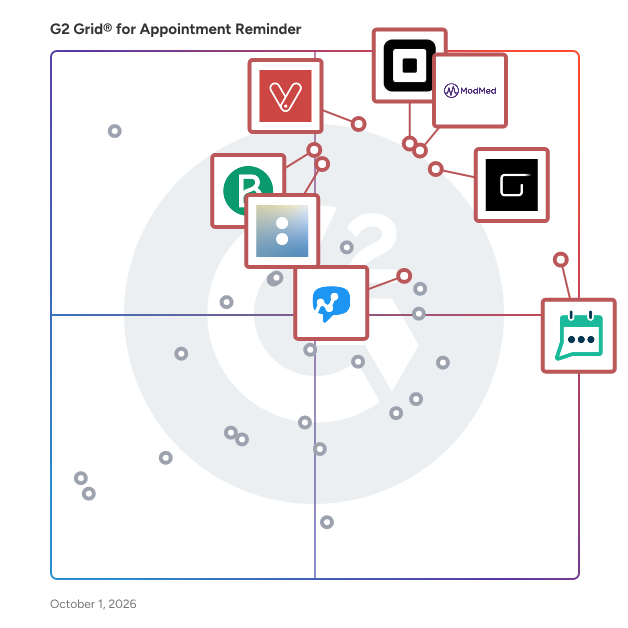
G2 Grid® for Appointment Reminder Software

G2 Grid® for Appointment Reminder Software plotting products by satisfaction and market presence

Highlighted products: GReminders, Square Point of Sale, ModMed, GlossGenius, Vagaro, Brevo Marketing Platform, Acuity Scheduling, and Salesmsg.

Underlying data: [Grid® JSON](https://www.g2.com/categories/appointment-reminder/grids.json?focus%5B%5D=greminders&focus%5B%5D=square-point-of-sale&focus%5B%5D=modmed&focus%5B%5D=glossgenius&focus%5B%5D=vagaro&focus%5B%5D=brevo-marketing-platform&focus%5B%5D=acuity-scheduling&focus%5B%5D=salesmsg)

vcita

vcita: All-in-one business management solution designed to help busy business owners stay organized and deliver exceptional client experiences. vcita is a comprehensive business management software designed to empower small and medium-sized businesses with digital tools to automate administrative tasks and deliver exceptional client experiences. With vcita, business owners can streamline operations, save time, and drive growth through smart automation and seamless integration. Key Features of vcita’s All-in-One Solution: • CRM & Client Management: Easily manage client information, communication history, and track interactions with customizable client cards and workflows. • Payment Collection & Invoicing: Automate billing, estimates, invoicing, and payment collection to ensure getting paid on time 3x faster. • Online Scheduling & Calendar Management: Let clients schedule appointments 24/7,keeping your and your staff’s calendar full with automated reminders and meeting confirmations. • SMS & Email Marketing: Run targeted campaigns and automated follow-ups via SMS and email campaigns to nurture relationships and retain clients. • Lead Capture: Securely capture new leads directly from your website, ensuring seamless integration into your CRM and business flow.. • Client Portal: Let your clients book, pay, send messages and share documents through a secure and branded client portal - any time, from any device. • Documents & Files Management: Store, share, and manage documents securely in one place for easy access. • Automated Reminders: Set reminders for clients and staff to ensure no appointment or payment is missed. • Marketing Automation: Engage clients with automated SMS and email campaigns, saving you time and effort on routine communications. Latest Updates: • BizAI -AI assistant: A fully integrated AI-powered business advisor that offers personalized insights and automates tasks like scheduling, client communication. It learns from user feedback and business data to provide tailored recommendations, allowing business owners to stay in control. • Facebook Messenger Integration: Capture leads directly from Facebook Messenger and integrate them into your CRM, making communication with prospects more seamless. • Multi-Service Scheduling: Schedule multiple services within a single client appointment, allowing for easier management of complex client needs. • Calls & Texting App: New integration allows businesses to manage both calls and text messages from a single business phone number, streamlining communication and offering features like call recording, missed call logs, and custom greetings. • Payment Workflows: New streamlined payment workflows allow businesses to charge clients directly from the service catalog, providing a POS-like experience for quicker payments. Why Choose vcita? Join over 100,000 businesses globally using vcita to automate tasks, improve client relationships, and grow their business. Whether you’re looking to streamline billing, enhance marketing efforts, or offer a better client experience, vcita delivers a powerful, easy-to-use solution that covers it all.

Average Rating: 4.5/5.0

Total Reviews: 80

How Do G2 Users Rate vcita?

  • Has the product been a good partner in doing business?: 9.1/10 (Category avg: 9.2/10)
  • Quality of Support: 8.5/10 (Category avg: 9.0/10)

Who Is the Company Behind vcita?

  • Seller: vcita
  • Year Founded: 2010
  • HQ Location: St. Petersburg Florida
  • Twitter: @vCita
    1,739 Twitter followers
  • LinkedIn® Page: www.linkedin.com
    140 employees on LinkedIn®

Who Uses This Product?

  • Top Industries: Alternative Medicine, Marketing and Advertising
  • Company Size: 88% Small, 12% Medium

What Do G2 Reviewers Say About vcita?

AI-generated summary from verified user reviews

Pros
  • Users find vcita's ease of use exceptional, benefiting from seamless integrations and automated features that enhance productivity.
  • Users love the automated reminders and bookings, making client management seamless and efficient for their businesses.
  • Users commend the exceptional customer support from vcita, providing quick assistance and helpful solutions for their needs.
  • Users appreciate the seamless integration capabilities of vcita, enhancing client interaction and streamlining business management.
  • Users value the seamless integration options of vcita, enhancing client interaction and streamlining business operations.
Cons
  • Users face integration issues with vcita, particularly with Google Calendar syncing and availability inaccuracies.
  • Users express frustration over missing features like partial refunds, limited uploads, and costly adjustments to templates.
  • Users find vcita expensive, facing additional costs for basic adjustments and limitations on document uploads.
  • Users find the lack of integration with other services frustrating, leading to disjointed workflows and inefficiencies.
  • Users report linking issues with vcita, resulting in syncing problems and miscommunication with other platforms.

What Are Recent G2 Reviews of vcita?

What Are G2 Users Discussing About vcita?

Doodle

Doodle is the easiest way to bring people together — without the endless email threads. Whether you're planning a 1:1, hosting a team sync, or coordinating a larger group, Doodle helps you find the right time without wasting hours going back and forth. It’s built for freelancers, small businesses, educators, recruiters, and enterprise teams who need a smarter way to schedule. Doodle gives you the tools to handle any kind of meeting. Use a Group Poll to let people vote on the times that work best for them. Want to skip the coordination altogether? Set up a Booking Page so clients or colleagues can grab a spot on your calendar based on your real-time availability. Need to organize volunteers, sign-ups, or event slots? The Sign-up Sheet makes it easy to collect responses and stay organized. Doodle integrates with the tools you already rely on — like Google Calendar, Outlook, Zoom, and Microsoft Teams — so you don’t have to switch between apps. You can even connect Stripe to collect payments when needed. Everything stays in sync, so you’re always in control. With calendar visibility settings, you decide exactly what others can see and book. Notifications and reminders keep everyone in the loop, so nothing slips through the cracks. It’s fast, intuitive, and built to save you time. Start with Doodle Free, or upgrade to Pro, Team plans for more advanced features like custom branding, shared team calendars, admin controls, and priority support. No matter your role or industry, Doodle makes scheduling effortless. Less friction. More focus. Better meetings — every time.

Average Rating: 4.4/5.0

Total Reviews: 2,031

How Do G2 Users Rate Doodle?

  • Has the product been a good partner in doing business?: 9.1/10 (Category avg: 9.2/10)
  • Quality of Support: 8.7/10 (Category avg: 9.0/10)
  • Voice: 9.5/10 (Category avg: 8.1/10)
  • Confirmation and Cancellation: 9.5/10 (Category avg: 8.8/10)

Who Is the Company Behind Doodle?

  • Seller: Doodle
  • Year Founded: 2007
  • HQ Location: Zurich, Switzerland
  • Twitter: @doodletweet
    10,300 Twitter followers
  • LinkedIn® Page: www.linkedin.com
    129 employees on LinkedIn®

Who Uses This Product?

  • Who Uses This: Student, Graduate Research Assistant
  • Top Industries: Education Management, Higher Education
  • Company Size: 42% Small, 29% Large

What Do G2 Reviewers Say About Doodle?

AI-generated summary from verified user reviews

Pros
  • Users appreciate the automatic scheduling feature of Doodle, enhancing collaboration and simplifying the meeting coordination process.
  • Users value the scheduling efficiency of Doodle, as it streamlines coordination for busy teams effortlessly.
  • Users value Doodle for its seamless booking management, simplifying coordination and reducing messaging hassle effectively.
  • Users value the ease of use of Doodle, finding it quick to set up and efficient for scheduling.
  • Users appreciate the easy scheduling of Doodle, which streamlines meeting coordination and eliminates unnecessary communication hassle.
Cons
  • Users desire more consistent and customizable reminders in Doodle to enhance their scheduling experience.
  • Users desire more customization options for reminders and notifications to enhance their experience with Doodle.
  • Users desire more consistent and customizable notifications from Doodle to enhance their overall experience.
  • Users desire more consistent and customizable reminders from Doodle, highlighting limitations in notification features.

What Are Recent G2 Reviews of Doodle?

What Are G2 Users Discussing About Doodle?

Rectangle Health

A leader in innovative healthcare technology for over 30 years, Rectangle Health is a trusted partner to more than 40,000 healthcare providers. The company’s comprehensive platform, Practice Management Bridge®, streamlines daily business operations including communications and engagement, payments and reimbursements, and office compliance. Customers of all sizes, in all sectors of healthcare, rely on Rectangle Health’s easy-to-use, scalable software to deliver a measurable increase in productivity and profitability, while improving patient experience.

Average Rating: 4.6/5.0

Total Reviews: 117

How Do G2 Users Rate Rectangle Health?

  • Has the product been a good partner in doing business?: 9.5/10 (Category avg: 9.2/10)
  • Quality of Support: 9.5/10 (Category avg: 9.0/10)
  • Voice: 9.0/10 (Category avg: 8.1/10)
  • Confirmation and Cancellation: 8.6/10 (Category avg: 8.8/10)

Who Is the Company Behind Rectangle Health?

  • Seller: Rectangle Health
  • Company Website:
  • Year Founded: 1993
  • HQ Location: Valhalla, NY
  • Twitter: @rectanglehealth
    313 Twitter followers
  • LinkedIn® Page: www.linkedin.com
    321 employees on LinkedIn®

Who Uses This Product?

  • Who Uses This: Executive Director, Owner
  • Top Industries: Medical Practice, Health, Wellness and Fitness
  • Company Size: 94% Small, 7% Medium

What Do G2 Reviewers Say About Rectangle Health?

AI-generated summary from verified user reviews

Pros
  • Users find Rectangle Health's ease of use remarkable, simplifying payment processes and enhancing overall efficiency.
  • Users highlight the efficient payment processing of Rectangle Health, praising its seamless integration and user-friendly features.
  • Users appreciate the customer engagement features of Rectangle Health, enhancing payment interactions and overall satisfaction.
  • Users highlight the exceptional customer support from Rectangle Health, making payment processes easy and efficient.
  • Users value the easy setup of Rectangle Health, facilitating smooth onboarding and efficient payment processes.
Cons
  • Users face payment issues with Rectangle Health, including connectivity problems and challenges in managing cost fluctuations.
  • Users experience connectivity issues with Rectangle Health, leading to complications during payment processing and transaction management.
  • Users find Rectangle Health expensive, with fluctuating costs complicating financial management and requiring long-term commitment.
  • Users face technical connectivity problems with Rectangle Health, leading to payment disruptions and challenges in finance management.
  • Users face challenges with cost fluctuations affecting their financial management and complicating budgeting decisions.

What Are Recent G2 Reviews of Rectangle Health?

What Are G2 Users Discussing About Rectangle Health?

AI can help you find the answers. G2 helps you trust them.

Connect G2 to Claude or ChatGPT for answers grounded in G2's trusted reviews, comparisons, and pricing from real user insights.

How it works

Demandforce

Attract. Retain. Grow. Demandforce helps businesses automate front office tasks and streamline communications with an all-in-one solution. From automated appointment reminders to robust reputation management, only Demandforce uniquely combines all the features and functionality a business needs to grow, in one place. For more information, or to see a demo, visit www.demandforce.com.

Average Rating: 3.4/5.0

Total Reviews: 27

How Do G2 Users Rate Demandforce?

  • Has the product been a good partner in doing business?: 8.3/10 (Category avg: 9.2/10)
  • Quality of Support: 7.9/10 (Category avg: 9.0/10)
  • Voice: 5.8/10 (Category avg: 8.1/10)
  • Confirmation and Cancellation: 5.8/10 (Category avg: 8.8/10)

Who Is the Company Behind Demandforce?

Who Uses This Product?

  • Top Industries: Medical Practice
  • Company Size: 62% Small, 34% Medium

What Do G2 Reviewers Say About Demandforce?

AI-generated summary from verified user reviews

Pros
  • Users value Demandforce's real-time two-way texting, enhancing immediate communication and connectivity for better client interaction.
  • Users value Demandforce's real-time communication efficiency, enhancing client engagement and feedback collection seamlessly.
  • Users value the seamless integration of Demandforce for effortless client appointment requests through their website.
  • Users value the booking efficiency of Demandforce, as it simplifies appointment requests on their websites.
  • Users value the seamless survey integration with Demandforce, greatly enhancing client communication and gathering valuable feedback.
Cons
  • Users experience messaging issues with Demandforce, leading to unreliable client communication and significant confusion.
  • Users express frustration with poor customer support, citing unaddressed glitches and unresolved appointment confirmation issues.
  • Users report significant scheduling issues with Demandforce, leading to confusion and inefficiency in client communications.
  • Users experience frustrating slow speed with Demandforce, impacting appointment confirmations and communication efficiency.
  • Users are frustrated by the app instability of Demandforce, experiencing glitches that hinder effective communication and efficiency.

What Are Recent G2 Reviews of Demandforce?

What Are G2 Users Discussing About Demandforce?

meetergo

meetergo is online appointment scheduling software for service businesses and teams, with an integrated suite for the work before and after a meeting. Developed by meetergo GmbH in Germany, it offers EU-hosted scheduling, video meetings, CRM, forms, electronic signatures, invoicing, AI meeting notes and WhatsApp Business communication. Let clients book directly through a branded booking link or an embedded booking page. Connect Google Calendar, Microsoft Outlook, Microsoft Exchange or Apple Calendar to show availability and avoid double bookings. Set working hours, buffers and booking rules, send automated confirmations and reminders, and distribute appointments across a team with round-robin scheduling and lead routing. Run calls in meetergo Connect or connect Zoom, Microsoft Teams and Google Meet. Keep customer details and deal progress in the built-in CRM, collect information through forms, and manage follow-up work in the same suite. WhatsApp Business supports customer conversations, appointment booking and reminders. meetergo also connects to Salesforce, HubSpot, Pipedrive, Slack, Make and Zapier. An API and webhooks support custom workflows. The product is available in German and English, among other languages, with a free plan and paid plans for additional capabilities. Features, usage limits and add-ons vary by plan. See the current pricing page for details.

Average Rating: 4.8/5.0

Total Reviews: 40

How Do G2 Users Rate meetergo?

  • Has the product been a good partner in doing business?: 9.8/10 (Category avg: 9.2/10)
  • Quality of Support: 9.7/10 (Category avg: 9.0/10)

Who Is the Company Behind meetergo?

Who Uses This Product?

  • Top Industries: Information Technology and Services
  • Company Size: 73% Small, 30% Medium

What Do G2 Reviewers Say About meetergo?

AI-generated summary from verified user reviews

Pros
  • Users find Meetergo to be extremely user-friendly, enabling effortless customizations and efficient workflows for their businesses.
  • Users value the booking efficiency of Meetergo, seamlessly integrating workflows and enhancing client engagement through automation.
  • Users value the efficient scheduling capabilities of Meetergo, greatly simplifying the booking process for serious clients.
  • Users value the seamless calendar integration with Outlook and Google, enhancing efficiency and coordination for bookings.
  • Users love how Meetergo is a time-saving solution, simplifying scheduling and enhancing meeting organization effortlessly.
Cons
  • Users find the difficult learning curve of Meetergo challenging, requiring time and effort to understand its features.
  • Users experience a challenging learning curve due to the complexity of features and need for more tutorials.
  • Users face integration issues with Meetergo, needing better tools and examples for seamless connections and reporting.
  • Users find the API documentation lacking, needing more real-world examples to improve integration experience.
  • Users suggest that missing features like more templates and advanced reporting limit the functionality of Meetergo.

What Are Recent G2 Reviews of meetergo?

Boomerang for Gmail

Boomerang for Gmail is a powerful browser extension that delivers one click calendar scheduling plus powerful email management tools. Why should you use Boomerang? - #1 free meeting scheduling and email management tool for Gmail - Trusted by millions of users all over the world - Security audit by Google - Google Premier Partner - SOC 2 Type 2 certified - Featured in The New York Times, Lifehacker, The Next Web, and more - Used by organizations like Lyft, Netflix, Twitter, and more The ultimate calendar scheduling app and email productivity tool for Gmail™. You can schedule meetings right from your inbox, schedule emails to be sent later, track responses, set up recurring emails, and use AI to write better emails. ▣ The best way to schedule meetings ▣ Schedule meetings via a clickable, always up to date, patented Magic Live Calendar sent in your email invite. 🗓 Bookable Schedule: Set up a schedule of available times, use it again and again. Supports multiple-calendars, Zoom and Google Meet integration, dual time zones, and more. 🗓 Suggest Times: Schedule one-off meetings in a single email - no more back and forth. Supports multiple-calendars, Zoom and Google Meet integration, dual time zones, and more. 🗓 Share Free/Busy: A lightweight way to share your availability without giving up your privacy, even across domains! The person you’re simply clicks on a time slot and confirms. You both automatically have events placed on your calendar complete with details like phone number, Google Meet, or Zoom meeting link. Plus you’ll both receive reminder emails before the meeting. ▣ Tame your inbox ▣ ✓ Track responses ✓ Track emails with read receipts ✓ Schedule emails to automatically send when you want ✓ Set up recurring emails ✓ Pause your inbox ✓ “Snooze” incoming emails. Boomerang helps keep your Inbox clean, without losing track of important messages. And it’s the only email reminder service that can alert you if you do not get a reply to a message. Boomerang also includes Respondable, an AI-powered assistant that predicts the likelihood that the message will receive a response, right in your compose window.

Average Rating: 4.6/5.0

Total Reviews: 416

How Do G2 Users Rate Boomerang for Gmail?

  • Has the product been a good partner in doing business?: 9.4/10 (Category avg: 9.2/10)
  • Quality of Support: 8.8/10 (Category avg: 9.0/10)
  • Voice: 8.3/10 (Category avg: 8.1/10)
  • Confirmation and Cancellation: 9.4/10 (Category avg: 8.8/10)

Who Is the Company Behind Boomerang for Gmail?

  • Seller: Baydin
  • Year Founded: 2010
  • HQ Location: Mountain View, US
  • Twitter: @boomerang
    5,320 Twitter followers
  • LinkedIn® Page: www.linkedin.com
    26 employees on LinkedIn®

Who Uses This Product?

  • Who Uses This: Owner
  • Top Industries: Marketing and Advertising, Computer Software
  • Company Size: 61% Small, 28% Medium

What Do G2 Reviewers Say About Boomerang for Gmail?

AI-generated summary from verified user reviews

Pros
  • Users find easy scheduling with Boomerang for Gmail transforms their email management and boosts productivity effortlessly.
  • Users value the reminder and scheduling features of Boomerang, enhancing productivity and ensuring timely follow-ups.
  • Users love the email scheduling efficiency of Boomerang, enhancing productivity and ensuring timely follow-ups.
  • Users love the time-saving features of Boomerang, enhancing productivity and streamlining email management effortlessly.
  • Users love the automated reminders feature of Boomerang, ensuring no important task or follow-up is forgotten.
Cons
  • Users experience a cluttered interface design that can confuse and slow down their email management process.
  • Users find the time-consuming interface and issues frustrating, especially when managing multiple scheduled emails.
  • Users experience syncing issues with Boomerang for Gmail that can disrupt managing scheduled emails effectively.
  • Users find the interface confusing and cluttered, which complicates managing scheduled emails effectively.
  • Users report slow inbox performance and occasional syncing issues, making management of scheduled emails frustrating.

What Are Recent G2 Reviews of Boomerang for Gmail?

What Are G2 Users Discussing About Boomerang for Gmail?

AddEvent

AddEvent is the leading no-code platform for calendar and event marketing. AddEvent helps businesses promote events, drive attendance, and reduce no-shows. With Add to Calendar buttons, embeddable widgets, followable calendars, and RSVP tools, AddEvent makes it simple to connect your events with your audience’s personal calendars. Create branded event and calendar landing pages without coding, embed calendars or event lists on your website, and use automated reminders to keep attendees engaged. AddEvent’s no-code tools are designed to help marketers, event professionals, and product teams maximize attendance and retention. Whether you’re promoting webinars, conferences, or recurring community events, AddEvent gives you the power to get on their calendars, improve engagement, and make sure your customers never miss what’s next. Add to Calendar Buttons and Links Use our beautiful Add to Calendar buttons and links on your website, landing pages, emails, social media, and SMS to give your users a quick and effortless way to add your events to their calendars. When your users click the button or link, our service quickly adds your event to their calendar of choice. Dynamic Add to Calendar Build dynamic Add to Calendar functionality into your booking confirmation and email campaign templates to give your users Add to Calendar buttons and links customized just for their appointment. Dynamic Add to Calendar is perfect for getting on their calendar during the time of booking. Calendar Marketing An Embeddable Calendar, a Subscription Calendar, and a subscriber data collection service all rolled into one. Calendar Marketing is a marketing channel that delivers content, events, and updates directly to a user’s digital calendar through Subscription Calendars. Simply share your calendar with your customer base and get on their calendars with 1-click. Include upgrade and upsell offers, new product releases, and more to their calendars to get your customers from interested to converted. Zapier Integration AddEvent has built out a robust Zapier app that allows customers to pair AddEvent with their tools of choice. Share RSVP updates in Slack, Create an Event by adding rows to a Google Sheet, or Create and Update Contact information in your CRM from an RSVP. Apps & Marketplace You can also find AddEvent in Webflow, Wix, WordPress, and Mailchimp marketplaces to display and share your calendar and events without needing to copy code over. Security & Trust At AddEvent, we’re committed to the security and privacy of your data. AddEvent is SOC 2 compliant and adheres to GDPR, CCPA and other privacy and security regulations. We also have policies and controls for you to manage security threats, keep your data safe and help you meet your compliance obligations. AddEvent began as simple, powerful API’s built for developers, by developers. Since our founding, we’ve expanded our offering to support no-code solutions such as no-code landing pages, no-code widgets, WYSIWYG automated emails, and more. AddEvent is used by companies and organizations that rely on us to drive attendance for events, campaigns, product launches, webinars, sales, appointments and more. So no important moment is ever missed.

Average Rating: 4.5/5.0

Total Reviews: 68

How Do G2 Users Rate AddEvent?

  • Has the product been a good partner in doing business?: 9.5/10 (Category avg: 9.2/10)
  • Quality of Support: 8.7/10 (Category avg: 9.0/10)

Who Is the Company Behind AddEvent?

  • Seller: AddEvent
  • Company Website:
  • Year Founded: 2015
  • HQ Location: San Francisco, California
  • Twitter: @addevent
    18 Twitter followers
  • LinkedIn® Page: www.linkedin.com
    20 employees on LinkedIn®

Who Uses This Product?

  • Top Industries: Computer Software, Marketing and Advertising
  • Company Size: 67% Small, 17% Medium

What Do G2 Reviewers Say About AddEvent?

AI-generated summary from verified user reviews

Pros
  • Users find AddEvent to be incredibly easy to use, streamlining workflows and enhancing attendee engagement effortlessly.
  • Users value the seamless calendar integration of AddEvent, enhancing convenience and attendance for diverse event participants.
  • Users appreciate the easy setup of AddEvent, enhancing convenience for guests and ensuring seamless event integration.
  • Users appreciate the consistent and simple UX/GUI of AddEvent, enhancing event management and guest engagement effectively.
  • Users love the automation of AddEvent, making it easy to manage events and enhance guest engagement seamlessly.
Cons
  • Users report serious calendar issues with AddEvent, including unreliable reminders and confusing update effects.
  • Users find AddEvent to be expensive for limited use, and feel stuck with rigid pricing and ineffective features.
  • Users express that there are limited options for customization and functionality in AddEvent, particularly for embedding calendars.
  • Users find some missing features in AddEvent, such as limited integrations and confusing naming conventions.
  • Users find limited customization options for landing pages and embeddable calendars, hindering their desired personalization.

What Are Recent G2 Reviews of AddEvent?

What Are G2 Users Discussing About AddEvent?

Customer Experience Solutions

Our platform powers a suite of next-generation customer experience solutions, including queue management, appointment booking, virtual queuing, video appointments, digital signage, wayfinding, customer feedback, and staffing management. It enables organisations to seamlessly manage and optimise omnichannel customer journeys while streamlining back-office processes through business process management (BPM). By incorporating predictive analytics, machine learning, and artificial intelligence, the platform helps organisations stay proactive, predictive, and productive, unlocking powerful capabilities that enhance customer experiences while reducing operational costs. Each module enables organisations to deliver a wide range of services through a single intuitive interface, helping maximise the value of every customer interaction across industries such as healthcare, financial services, education, retail, telecommunications, government, and more.

Average Rating: 4.6/5.0

Total Reviews: 32

How Do G2 Users Rate Customer Experience Solutions?

  • Has the product been a good partner in doing business?: 9.5/10 (Category avg: 9.2/10)
  • Quality of Support: 9.2/10 (Category avg: 9.0/10)
  • Voice: 8.0/10 (Category avg: 8.1/10)
  • Confirmation and Cancellation: 9.0/10 (Category avg: 8.8/10)

Who Is the Company Behind Customer Experience Solutions?

  • Seller: ACF Technologies
  • Year Founded: 2003
  • HQ Location: Asheville, NC
  • Twitter: @ACF_Tech
    462 Twitter followers
  • LinkedIn® Page: www.linkedin.com
    179 employees on LinkedIn®

Who Uses This Product?

  • Top Industries: Information Technology and Services, Banking
  • Company Size: 39% Medium, 36% Large

What Are Recent G2 Reviews of Customer Experience Solutions?

What Are G2 Users Discussing About Customer Experience Solutions?

AppointmentReminders.com

AppointmentReminders.com is a cloud-based appointment reminder software platform that helps businesses reduce no-shows and improve communication with customers, patients, and clients through automated text message, phone call, and email reminders. Our automated appointment reminder system is designed for medical offices, dental practices, therapists, chiropractors, salons, spas, accountants, service businesses, and other appointment-based organizations that want a simple and affordable way to improve attendance and scheduling efficiency. Businesses can send appointment reminders through: SMS text messages Automated phone calls Email reminders The platform also supports: Appointment confirmations and cancellations Two-way text messaging Recurring reminders Google Calendar integration Excel and CSV uploads Web-based scheduling tools Multi-location businesses Custom reminder templates HIPAA-compliant reminder options Automated follow-up messaging AppointmentReminders.com is designed to be easy to set up without complicated software installations or expensive onboarding requirements. Since the system is fully cloud-based, users can access their account from anywhere using a web browser. Healthcare providers can use HIPAA-compliant reminder workflows with secure data handling options appropriate for medical and dental practices. Businesses can customize reminder timing, messaging, and communication methods based on their operational needs. Our platform is commonly used to: Reduce missed appointments and no-shows Improve patient and customer communication Increase appointment confirmations Save staff time on manual reminder calls Improve scheduling efficiency Reduce revenue loss from missed appointments AppointmentReminders.com operates throughout the United States and Canada. Pricing starts at only $11.95 per month, making it an affordable solution for small businesses while still supporting larger organizations with higher reminder volumes. The system is ideal for organizations looking for appointment reminder software, text appointment reminders, automated reminder calls, email reminder systems, patient reminder software, or HIPAA-compliant appointment reminder solutions.

Average Rating: 4.7/5.0

Total Reviews: 29

How Do G2 Users Rate AppointmentReminders.com?

  • Has the product been a good partner in doing business?: 9.8/10 (Category avg: 9.2/10)
  • Quality of Support: 9.7/10 (Category avg: 9.0/10)
  • Voice: 9.3/10 (Category avg: 8.1/10)
  • Confirmation and Cancellation: 9.6/10 (Category avg: 8.8/10)

Who Is the Company Behind AppointmentReminders.com?

Who Uses This Product?

  • Top Industries: Mental Health Care, Hospital & Health Care
  • Company Size: 83% Small, 14% Medium

What Do G2 Reviewers Say About AppointmentReminders.com?

AI-generated summary from verified user reviews

Pros
  • Users love the variety of communication options for appointment reminders, significantly reducing no-show rates.
  • Users love the advanced notification options for appointments, significantly reducing no-shows with automated reminders.
  • Users love the automated reminders that significantly reduce no-shows in medical appointments, enhancing office efficiency.
  • Users value the broadcast communication of AppointmentReminders.com for timely notifications across various channels.
  • Users love the no-show reduction of AppointmentReminders.com, significantly decreasing missed appointments with automated reminders.

What Are Recent G2 Reviews of AppointmentReminders.com?

Engageware

Engageware (formerly TimeTrade SilverCloud), provides industry-leading technology and expert know-how to help organizations better engage their customers. Trusted by more than 500 organizations, our self-service, appointment scheduling, and knowledge management solutions – combined and integrated with those of our market-leading partners – make it easy for customers to answer their questions quickly, connect to the right resources when scheduled expertise is needed, and get a consistent, efficient experience when help from a representative is required. Organizations that use our customer engagement solutions deliver quality customer experiences no matter the channel — enabling faster growth with greater efficiency.

Average Rating: 4.4/5.0

Total Reviews: 128

How Do G2 Users Rate Engageware?

  • Has the product been a good partner in doing business?: 9.1/10 (Category avg: 9.2/10)
  • Quality of Support: 8.7/10 (Category avg: 9.0/10)
  • Voice: 10.0/10 (Category avg: 8.1/10)
  • Confirmation and Cancellation: 10.0/10 (Category avg: 8.8/10)

Who Is the Company Behind Engageware?

  • Seller: Engageware
  • Year Founded: 2000
  • HQ Location: Tewksbury, MA
  • Twitter: @engageware
    2,865 Twitter followers
  • LinkedIn® Page: www.linkedin.com
    104 employees on LinkedIn®

Who Uses This Product?

  • Who Uses This: Sales Consultant
  • Top Industries: Computer Software, Information Technology and Services
  • Company Size: 50% Medium, 34% Large

What Do G2 Reviewers Say About Engageware?

AI-generated summary from verified user reviews

Pros
  • Users value the ease of use of Engageware, facilitating appointment scheduling and enhancing team collaboration effortlessly.
  • Users appreciate the impactful client engagement of Engageware, enhancing performance and streamlining appointment scheduling.
  • Users value the excellent customer support from Engageware, enhancing our team's efficiency and collaboration significantly.
  • Users value the efficiency of Engageware, enhancing client engagement and streamlining appointment scheduling and knowledge sharing.
  • Users value the resourceful knowledge base of Engageware, facilitating effective communication and enhancing team collaboration.
Cons
  • Users find Engageware to be expensive, especially when trying to meet subscription requirements and navigating its complexities.
  • Users experience layout issues with Engageware, citing disorganization and difficulty in managing content access effectively.
  • Users find the learning curve steep with Engageware, facing complexities compared to other scheduling apps.
  • Users find the complexity of Engageware challenging, particularly in pricing and the configuration process requiring extensive technical support.
  • Users experience integration issues with Engageware, particularly with calendar syncing and a lack of modern UI.

What Are Recent G2 Reviews of Engageware?

What Are G2 Users Discussing About Engageware?

Qminder

Qminder is the leading in-person service platform that helps brick-and-mortar organizations manage appointments, walk-ins, and queues with structure, clarity, and data-driven insights. Built for public sector agencies, healthcare providers, and retail teams, Qminder modernizes front-desk operations while improving the visitor experience. From self-check-in to post-visit feedback, Qminder delivers full visibility into every in-person interaction. With Service Intelligence tools, teams can track live service data - like wait times, volumes, and staff activity - while two-way communication and real-time alerts help reduce confusion and no-shows. Why Qminder? * Quick onboarding - launch in under a week * Flexible setup - tailored workflows and APIs * Better visibility - monitor and optimize in real time * Reduced manual tasks - eliminate paper, spreadsheets, and guesswork * Loved by teams - easy to use, easy to scale Built for brick-and-mortar industries Qminder powers service operations for: * Government offices and public agencies * Hospitals and healthcare networks * Retail chains and customer service centers * Banks and financial institutions * Universities and student service departments Key features to support every part of the in-person service experience For your visitors - make every visit feel smooth, informed, and frustration-free: * Visitor website with branded UX * Appointment scheduling * Virtual and physical check-in for visitors * Two-way messaging and visitor notifications * Feedback collection and satisfaction tracking For your service teams - equip staff with the right tools to stay organized and in control: * Walk-in and queue management * Real-time dashboards and role-based clerk tools * Custom fields and segmentation for tailored workflows For your organization - gain visibility and control across all locations and services: * Real-time insights and analytics across verticals * Smart filters by location, staff, service line, and time range * Seamless integrations with CRM and BI tools * Exportable data and service KPI analytics * Full audit logs and data export for compliance Qminder is fully compliant with HIPAA, TX-RAMP, SOC 2 Type II, and GDPR, meeting the highest security standards for public and enterprise use. No setup fees. Transparent pricing. And 1+ billion in-person service interactions (and counting). Whether you’re a city hall, hospital, or retail chain - Qminder brings calm to the chaos of the front desk.

Average Rating: 4.6/5.0

Total Reviews: 249

How Do G2 Users Rate Qminder?

  • Has the product been a good partner in doing business?: 9.3/10 (Category avg: 9.2/10)
  • Quality of Support: 9.1/10 (Category avg: 9.0/10)
  • Voice: 10.0/10 (Category avg: 8.1/10)
  • Confirmation and Cancellation: 10.0/10 (Category avg: 8.8/10)

Who Is the Company Behind Qminder?

  • Seller: Qminder
  • Company Website:
  • Year Founded: 2011
  • HQ Location: London, UK
  • Twitter: @Qminder
    542 Twitter followers
  • LinkedIn® Page: www.linkedin.com
    19 employees on LinkedIn®

Who Uses This Product?

  • Top Industries: Higher Education, Consumer Services
  • Company Size: 52% Small, 31% Medium

What Do G2 Reviewers Say About Qminder?

AI-generated summary from verified user reviews

Pros
  • Users find Qminder's ease of use exceptional, allowing anyone to navigate and manage queues effortlessly.
  • Users value the helpful tracking features of Qminder, enhancing customer service and improving response times.
  • Users appreciate the ease of use of Qminder, enhancing customer check-ins efficiently and streamlining daily operations.
  • Users value Qminder for its efficiency in managing customer check-ins and enhancing organizational productivity effortlessly.
  • Users enjoy the convenience of Qminder, streamlining customer queues and enhancing service efficiency across multiple branches.
Cons
  • Users express frustration with access issues in Qminder, including sign-in requirements and app limitations for Android users.
  • Users point out insufficient information on patient names and check-in statuses, leading to confusion and rework.
  • Users often face technical issues with Qminder, including glitches and app crashes during peak usage.
  • Users feel that Qminder has unnecessary features like excessive questions and a lack of tailored notifications.
  • Users report experiencing update issues with Qminder, causing disruptions and loss of essential reminder functionality.

What Are Recent G2 Reviews of Qminder?

MessageDesk

MessageDesk is a web-based business text messaging and shared SMS inbox platform that enables organizations to send and receive SMS/MMS from existing landline or VoIP phone numbers through a multi-user interface. MessageDesk is designed for mid-sized and larger teams that want a centralized way to handle texting without moving their primary phone numbers to a new carrier. MessageDesk supports U.S. and Canadian 10-digit numbers and can connect with all major VoIP providers and messaging services like Twilio, while allowing voice calls to remain with the current provider. Capabilities include: Text-enabling existing numbers: connect a business landline, Twilio, or VoIP number via number hosting/authorization, or use new local or toll-free numbers. Shared team inbox: all inbound/outbound conversations appear in a single inbox for multiple agents, with conversation history visible to the team. Relay automations/workflows: assignment, labeling, filtering, and internal collaboration features to automatically send messages and route conversations across threads. Messaging features: group texting, mass/broadcast texting, MMS messaging/media, templates, and scheduled text messages. Customers use MessageDesk in a variety of ways, including for appointment reminders, customer support via text, sales or lead follow-ups, dispatch and logistics messaging, HR and company updates, service and delivery updates, and billing notifications. MessageDesk also includes carrier registration support for A2P 10DLC, which is required for all business texting use cases in the U.S. You can use MessageDesk via any device with a web browser or download the companion mobile apps for iOS or Android. MessageDesk integrates with Zapier to connect to CRMs, forms, and scheduling tools. More integrations are planned for the future.

Average Rating: 4.6/5.0

Total Reviews: 35

How Do G2 Users Rate MessageDesk?

  • Has the product been a good partner in doing business?: 10.0/10 (Category avg: 9.2/10)
  • Quality of Support: 9.9/10 (Category avg: 9.0/10)
  • Voice: 5.0/10 (Category avg: 8.1/10)
  • Confirmation and Cancellation: 8.8/10 (Category avg: 8.8/10)

Who Is the Company Behind MessageDesk?

  • Seller: Alderwood Labs
  • Year Founded: 2018
  • HQ Location: Reno, Nevada
  • Twitter: @messagedeskapp
    93 Twitter followers
  • LinkedIn® Page: www.linkedin.com
    9 employees on LinkedIn®

Who Uses This Product?

  • Company Size: 77% Small, 20% Medium

What Do G2 Reviewers Say About MessageDesk?

AI-generated summary from verified user reviews

Pros
  • Users find MessageDesk to be easy to use, facilitating smooth communication and efficient daily operations.
  • Users love the easy communication feature of MessageDesk, allowing seamless connectivity and efficient team interaction.
  • Users value the automation features of MessageDesk, enhancing communication efficiency and organization in their workflows.
  • Users value the effective communication features of MessageDesk, enhancing connectivity and streamlining interactions across teams.
  • Users find the easy setup of MessageDesk intuitive, facilitating quick launches and integration within organizations.
Cons
  • Users express frustration with complex processes, citing issues with setup and managing multiple message threads.
  • Users find the price of MessageDesk to be somewhat high, making it less affordable than competitors.
  • Users experience messaging issues, struggling with multiple threads and unclear credit usage for group messages.
  • Users face challenges with number registration and duplicate contacts, impacting the initial setup of MessageDesk.
  • Users find app incompatibility frustrating, as it complicates group messaging threads and overall communication experience.

What Are Recent G2 Reviews of MessageDesk?

What Are G2 Users Discussing About MessageDesk?

Apptoto

Reduce costly no-show appointments, and ensure your clients and patients show up on time and well-prepared by using Apptoto's appointment management software. Apptoto is an automated appointment reminder, online scheduling, and client messaging platform for appointment-based businesses. Apptoto syncs with virtually any calendar, including Google Calendar, Outlook, Microsoft Exchange, Salesforce, Clio, and more, to display your upcoming appointments in one easy-to-scan interface. Automatically send custom appointment reminders and confirmation messages via SMS text, email, or voice call. Plus, talk with customers in real-time with 2-way messaging, enable clients to schedule their own appointments with online booking pages, and analyze it all with advanced reporting. With Apptoto, you will increase revenue, reduce manual scheduling tasks, and streamline the client communication process.

Average Rating: 4.9/5.0

Total Reviews: 19

How Do G2 Users Rate Apptoto?

  • Has the product been a good partner in doing business?: 9.8/10 (Category avg: 9.2/10)
  • Quality of Support: 10.0/10 (Category avg: 9.0/10)
  • Voice: 8.0/10 (Category avg: 8.1/10)
  • Confirmation and Cancellation: 10.0/10 (Category avg: 8.8/10)

Who Is the Company Behind Apptoto?

  • Seller: Apptoto
  • Year Founded: 2010
  • HQ Location: Bend, Oregon
  • Twitter: @apptotoapp
    158 Twitter followers
  • LinkedIn® Page: www.linkedin.com
    11 employees on LinkedIn®

Who Uses This Product?

  • Company Size: 74% Small, 26% Medium

What Do G2 Reviewers Say About Apptoto?

AI-generated summary from verified user reviews

Pros
  • Users rave about Apptoto's exceptional customer service, consistently providing professional and effective solutions.
  • Users commend Apptoto's phenomenal customer support, consistently receiving professional and effective solutions for their needs.
  • Users appreciate the automated reminders from Apptoto, enhancing client communication and ensuring timely notifications.
  • Users appreciate the automatic scheduling feature of Apptoto, which enhances client reminder accuracy and efficiency.
  • Users appreciate the automation of client reminders, which significantly enhances business communication and efficiency.
Cons
  • Users often struggle with complex settings, making it time-consuming to navigate and requiring frequent support assistance.
  • Users noted the learning curve for contact management in Apptoto, especially with similar first names causing confusion.
  • Users face a challenging learning curve with Apptoto, but adjustments can enhance the experience significantly.
  • Users face initial messaging issues with Apptoto when sending to contacts with similar names, but adjustments can resolve it.
  • Users find the option overload challenging, making it difficult to fully utilize all available features without support.

What Are Recent G2 Reviews of Apptoto?

What Are G2 Users Discussing About Apptoto?

Boomerang for Outlook

Boomerang for Outlook is a powerful browser extension that delivers one click calendar scheduling plus powerful email management tools. Why should you use Boomerang? - #1 free meeting scheduling and email management tool for Outlook - Trusted by millions of users all over the world - SOC 2 Type 2 certified - Featured in The New York Times, Lifehacker, The Next Web, and more - Used by organizations like Lyft, Netflix, Twitter, and more The ultimate calendar scheduling app and email productivity tool for Outlook™. You can schedule meetings right from your inbox, schedule emails to be sent later, track responses, set up recurring emails, and use AI to write better emails. ▣ The best way to schedule meetings ▣ Schedule meetings via a clickable, always up to date, patented Magic Live Calendar sent in your email invite. 🗓 Bookable Schedule: Set up a schedule of available times, use it again and again. Supports multiple-calendars, Zoom and Google Meet integration, dual time zones, and more. 🗓 Suggest Times: Schedule one-off meetings in a single email - no more back and forth. Supports multiple-calendars, Zoom and Google Meet integration, dual time zones, and more. 🗓 Share Free/Busy: A lightweight way to share your availability without giving up your privacy, even across domains! The person you’re simply clicks on a time slot and confirms. You both automatically have events placed on your calendar complete with details like phone number, Google Meet, or Zoom meeting link. Plus you’ll both receive reminder emails before the meeting. ▣ Tame your inbox ▣ ✓ Track responses ✓ Track emails with read receipts ✓ Schedule emails to automatically send when you want ✓ Set up recurring emails ✓ Pause your inbox ✓ “Snooze” incoming emails. Boomerang helps keep your Inbox clean, without losing track of important messages. And it’s the only email reminder service that can alert you if you do not get a reply to a message. Boomerang also includes Respondable, an AI-powered assistant that predicts the likelihood that the message will receive a response, right in your compose window.G

Average Rating: 4.4/5.0

Total Reviews: 68

How Do G2 Users Rate Boomerang for Outlook?

  • Has the product been a good partner in doing business?: 8.3/10 (Category avg: 9.2/10)
  • Quality of Support: 8.5/10 (Category avg: 9.0/10)
  • Voice: 10.0/10 (Category avg: 8.1/10)
  • Confirmation and Cancellation: 9.7/10 (Category avg: 8.8/10)

Who Is the Company Behind Boomerang for Outlook?

  • Seller: Baydin
  • Year Founded: 2010
  • HQ Location: Mountain View, US
  • Twitter: @boomerang
    5,320 Twitter followers
  • LinkedIn® Page: www.linkedin.com
    26 employees on LinkedIn®

Who Uses This Product?

  • Top Industries: Education Management, Higher Education
  • Company Size: 48% Small, 27% Medium

What Are Recent G2 Reviews of Boomerang for Outlook?

What Are G2 Users Discussing About Boomerang for Outlook?

Mobile Text Alerts

Reach customers at the right time with the easiest-to-use SMS marketing solution available. Mobile Text Alerts makes it easy to communicate with your customers, employees, and audience when it matters most. Drive sales, send alerts, and increase engagement easily and affordably. We’re trusted by 20,000+ companies including leaders like Roblox, Yeti, Yamaha, Toyota, Chick-fil-A, and more. Why? Our platform is intuitive and powerful, our pricing can’t be beat, and our customer service is top-of-the-line (we don’t do bots here, ever). We make it easy to get set up - you’ll be able to send your first text in under 5 minutes from our user-friendly online platform or mobile app. Sign up now for a 14-Day Free Trial. To learn more about Mobile Text Alerts or to request a demo, visit https://mobile-text-alerts.com.

Average Rating: 4.5/5.0

Total Reviews: 68

G2 Deal: 50% off Basic Plan for 1st Month

Choose the Basic Plan (500 messages/month) and get 50% off your first month!

Price: ~~$25/month~~ → $12.50/month

View this exclusive G2 deal

How Do G2 Users Rate Mobile Text Alerts?

  • Has the product been a good partner in doing business?: 9.7/10 (Category avg: 9.2/10)
  • Quality of Support: 9.2/10 (Category avg: 9.0/10)
  • Voice: 9.0/10 (Category avg: 8.1/10)
  • Confirmation and Cancellation: 7.8/10 (Category avg: 8.8/10)

Who Is the Company Behind Mobile Text Alerts?

  • Seller: Mobile Text Alerts
  • Year Founded: 2011
  • HQ Location: New York, NY
  • Twitter: @MobileTextAlert
    1,020 Twitter followers
  • LinkedIn® Page: www.linkedin.com
    34 employees on LinkedIn®

Who Uses This Product?

  • Top Industries: Religious Institutions, Non-Profit Organization Management
  • Company Size: 68% Small, 24% Medium

What Do G2 Reviewers Say About Mobile Text Alerts?

AI-generated summary from verified user reviews

Pros
  • Users appreciate the ease of use of Mobile Text Alerts, making SMS communication simple and effective for everyone.
  • Users praise the automation features of Mobile Text Alerts, finding it an effective solution for mass texting needs.
  • Users appreciate the easy-to-use features of Mobile Text Alerts, enabling efficient communication with students effortlessly.
  • Users find Mobile Text Alerts to be affordable, providing effective solutions without compromising on functionality or usability.
  • Users praise the ease of use and advanced features of Mobile Text Alerts, making it ideal for instructors.
Cons
  • Users experience poor customer support initially, although some improvements have been noted over time.
  • Users find the difficult learning curve challenging, particularly those without a marketing background, despite helpful support.
  • Users noted that initial slow customer support affected their experience, although improvements have been observed recently.
  • Users find the interface not intuitive, requiring support for better understanding of the product's components.
  • Users find the interface design confusing, requiring support for better understanding and usability of the product.

What Are Recent G2 Reviews of Mobile Text Alerts?

What Are G2 Users Discussing About Mobile Text Alerts?

Inia Debnath
ID
Researched and written by Inia Debnath
Updated October 3, 2024