

Introducing G2.ai, the future of software buying.Try now

Float.com Reviews & Product Details

Pricing

Pricing provided by Float.com.

Starter

Starting at $7.00
Per Month

Float.com Media

Float.com Demo - Schedule resources
Easily see who’s working on what and when, with a live schedule to plan and allocate work.
Float.com Demo - Plan capacity
Balance workloads and prevent burnout with a live view of availability, time off, and scheduled work.
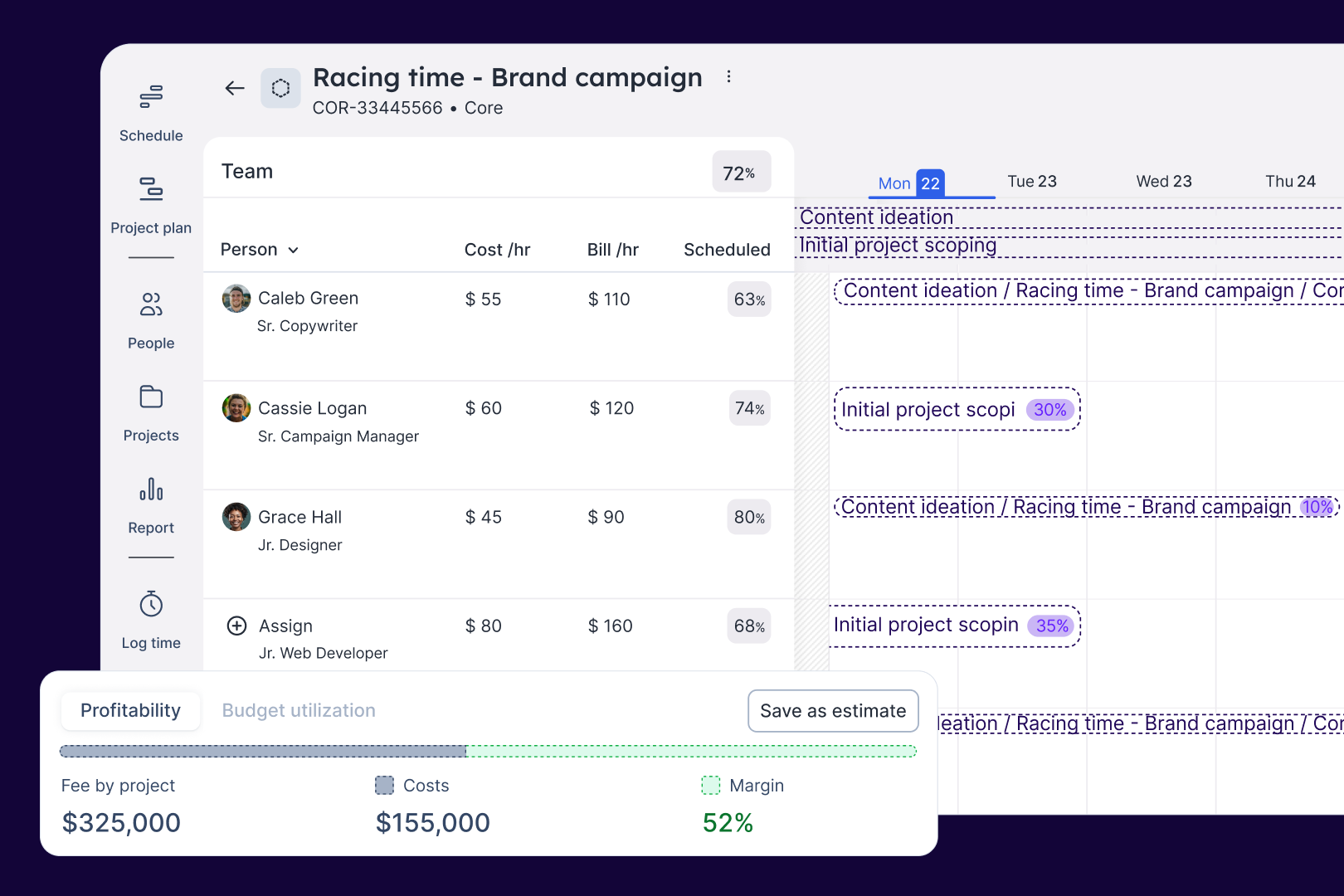
Float.com Demo - Estimate work
Quickly price new projects with confidence. Build budgets, align resourcing, and track scope changes—monitoring estimates against actuals to deliver profitable projects.
Float.com Demo - Scope projects
Align what you need with what you have to create project schedules that keep work on track with the right people, budgets, and timelines.
Float.com Demo - Track time
Simplify timesheets with pre-filled hours so your actuals data is more accurate and always on time!
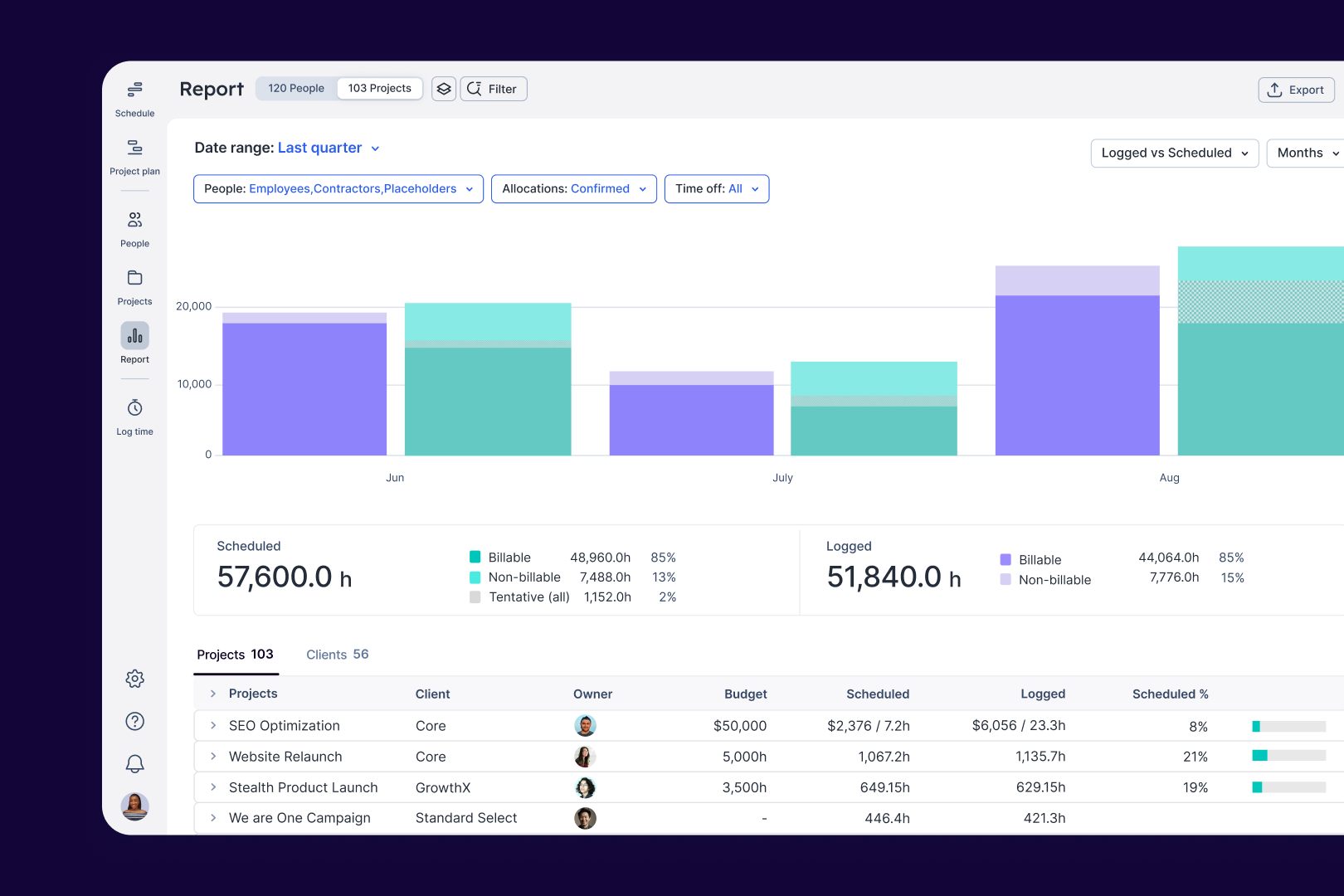
Float.com Demo - Report
Make informed decisions with live insights into team utilization and budget spend to understand how resourcing affects project margins and profitability.
The best teams in the world don’t just wing it. They use Float to get the essential data and context they need when resourcing client work, so they can build winning teams and deliver profitable projects.
Play Float.com Video
The best teams in the world don’t just wing it. They use Float to get the essential data and context they need when resourcing client work, so they can build winning teams and deliver profitable projects.
New: finance & estimations in Float. Stop guessing and start knowing. With Float's finance & estimation features, you can price accurately, protect margins, and deliver profitable projects every time.
Play Float.com Video
New: finance & estimations in Float. Stop guessing and start knowing. With Float's finance & estimation features, you can price accurately, protect margins, and deliver profitable projects every time.
Product Avatar Image

Have you used Float.com before?

Answer a few questions to help the Float.com community

Float.com Reviews (1,997)

View 1 Video Reviews
Reviews

Float.com Reviews (1,997)

View 1 Video Reviews
4.3
1,998 reviews

Pros & Cons

Generated from real user reviews
View All Pros and Cons
Search reviews
Filter Reviews
Clear Results
G2 reviews are authentic and verified.
AB
Junior UX Architect
Mid-Market (51-1000 emp.)
"Intuitive Schedule View, But Confusing Email Notifications"
What do you like best about Float.com?

As someone who is scheduled rather than creating the schedule, I don't make edits to it. However, I find the view to be clear and the layout intuitive. Review collected by and hosted on G2.com.

What do you dislike about Float.com?

The email notifications I get when my schedule changes are always confusing—I can never figure out what has been added or removed, which day the change is for, or what the specific task is. On top of that, I hardly ever use the report feature because, as it is now, it doesn't feel very useful or effective to me. The mobile view is also quite frustrating; when I try to view a scheduled task, a pop-up appears, but there’s no way to close it and return to the main schedule. Review collected by and hosted on G2.com.

VM
Research Analyst
Enterprise (> 1000 emp.)
"Excellent for Team Planning, But Mobile and Load Times Need Improvement"
What do you like best about Float.com?

The best thing about float is it's log time, schedule, project plan visuals and it makes easy to schedule task on it. Seriously, for day to day management it's an best software/app. It helps me avoid team burnout and the utilization reports make tracking billable time and planning future tasks way less painful. Float just takes the stress out of figuring out who's working on what or what schedule i have for future. Review collected by and hosted on G2.com.

What do you dislike about Float.com?

Float offers a good interface on the web, but its mobile experience feels too limited for handling detailed management tasks. Additionally, the loading times on the web version can be frustrating, as it sometimes takes ages for Float to load. Review collected by and hosted on G2.com.

Roberto P.
RP
Principal Consultant
Small-Business (50 or fewer emp.)
"Intuitive, Visual Project Management with Seamless Integrations"
What do you like best about Float.com?

Float is clean, intuitive, and visually clear for managing projects and team capacity. The drag-and-drop scheduling makes it easy to see who’s doing what and when, and the integration with tools like Slack, Google Calendar, and Asana keeps everything connected. It’s great for quick planning and forecasting workloads without getting bogged down in heavy project-management detail. Review collected by and hosted on G2.com.

What do you dislike about Float.com?

The reporting and analytics could be more robust, it’s hard to drill down into project profitability or time-tracking insights beyond surface-level data. Permissions and user roles can feel limited for larger teams, and the mobile experience is less smooth than the desktop version. Sometimes updates or edits take a few clicks more than expected, which slows things down when managing multiple projects. Review collected by and hosted on G2.com.

LS
Platform Operations Supervisor
Small-Business (50 or fewer emp.)
Guest users or non-business users of the software, not included in G2 scores.
"Essential for Resource Scheduling with Powerful, Intuitive Reporting"
What do you like best about Float.com?

Float is an incredibly intuitive tool for managing resource scheduling and project allocation. It gives a clear, real-time view of how my team is allocated and helps ensure a balanced workload across projects. Over the years, the platform has evolved significantly, adding reporting features that are both accurate and easy to use. The reports provide great visibility on capacity, utilization, and forecast, allowing me to plan efficiently and make data-driven decisions. It has truly become an essential part of our daily operations Review collected by and hosted on G2.com.

What do you dislike about Float.com?

One limitation I’ve found is related to reporting and data export. While it’s possible to export active team schedules, there’s currently no way to generate monthly reports for each activity that include archived team members. This makes it harder to analyze historical data or build complete performance reports over time. It would be very helpful if Float allowed exporting data that includes both active and archived users, especially for long-term reporting and forecasting purposes. Review collected by and hosted on G2.com.

JS
Service planenr
Small-Business (50 or fewer emp.)
"Manageable and portative"
What do you like best about Float.com?

We've been using Float for our team planning and scheduling needs, and it's been a great fit.

One of the standout features is how easy it is to access the app on the go.

The mobile integration is smooth and reliable, making it simple to check schedules, make updates, or review plans directly from a phone, no hassle.

Float offers just the right amount of features for our needs.

It’s not overloaded with unnecessary complexity, which makes onboarding and daily use straightforward for everyone on the team.

The interface is clean, intuitive, and helps us stay organized without getting in the way.

Overall,

Float has streamlined our planning process and made team coordination much easier. Highly recommended for teams looking for a lightweight yet powerful scheduling tool. Review collected by and hosted on G2.com.

What do you dislike about Float.com?

one area where Float could improve is in handling daily processes within larger projects.

It would be helpful if it were easier to assign recurring or sequential tasks across multiple team members within a single project. Right now, that kind of planning takes a bit more manual effort than we’d like.

Overall, Float is a reliable and streamlined solution, but a few enhancements in project task management would make it even better. Review collected by and hosted on G2.com.

NK
QA
Mid-Market (51-1000 emp.)
"Float - A Reliable Tool for Streamlining Scheduling and Team Planning"
What do you like best about Float.com?

As a QA, I really like how Float gives me a clear picture of my workload and testing timelines. It is super easy to see on which project I am currently assigned to, and what projects I will be handling in the future. I also like that Float can be synced with Zoho People and if I apply a leave on Zoho, it automatically gets reflected in the Float. Review collected by and hosted on G2.com.

What do you dislike about Float.com?

It can take some time to get accustomed to how everything is structured, especially if you are managing multiple projects with different timelines. It would also be good if Float can be integrated with some QA-specific tools like Jira, as it would make tracking QA tasks even smoother. Review collected by and hosted on G2.com.

Luca C.
LC
Senior Backend Engineer
Mid-Market (51-1000 emp.)
"Effortless Scheduling with Genius Precompiled Timetables"
What do you like best about Float.com?

I find it incredibly easy to keep track of my schedule with this software. In the past, other programs required me to enter a lot of information by hand, which was a lengthy and often error-prone process. The concept of having a precompiled schedule that just needs confirmation is brilliant. Now, I can use it daily without needing to set aside extra time just to log my activities. Review collected by and hosted on G2.com.

What do you dislike about Float.com?

I am unable to submit requests directly from the log time, which is inconvenient. As a regular user, I feel the platform is designed more for administrators than for individual users. There is no personal dashboard, I can't sync the tool with my calendar, and I don't have access to any personal statistics. Review collected by and hosted on G2.com.

Dennis v.
DV
Scrum Master
Small-Business (50 or fewer emp.)
"Float Delivers Fast, Flexible Project Management for Teams of Any Size"
What do you like best about Float.com?

Float is a very powerful tool that gives you real-time insight in projects, planning, time tracking and budgets. All in one single well working app. When using Float, you'll love how fast it is, no more waiting for your reports to load. It's very flexibel in the way you can set it up and use it so it will easily fit all your requirements from smaller to larger companies. And finally, nog only myself as a project manager / planner loves working with Float, it was very easy to get my team on board because of the way it fits their wants and needs too. Review collected by and hosted on G2.com.

What do you dislike about Float.com?

There's not much to dislike about Float for me. It is a tool that truly helps me manage projects and deliver them in time. Review collected by and hosted on G2.com.

SC
Managing Consultant
Mid-Market (51-1000 emp.)
"best project planning and resource management software"
What do you like best about Float.com?

I work in consulting and manage a team of 6 consultants. I find Float really useful to be able to manage scheduling for my team as well as forward plan based on upcoming work and team availability. I also work with a wider team and need to be across what other projects are happening and where my wider team might have upcoming availability that I might be able to use for my upcoming projects. I can use tags to be able to filter based on my preferance, i find this feature extremely helpful. Review collected by and hosted on G2.com.

What do you dislike about Float.com?

I can't really think of any. It works as it should for my needs. It has an intuitive user interface and super easy to use. Review collected by and hosted on G2.com.

Daryll P.
DP
Support Engineer
Small-Business (50 or fewer emp.)
"Effortless Scheduling, But Needs Better Time Tracking and Reporting"
What do you like best about Float.com?

What I like best about Float is how easy it makes planning and managing workloads. The interface is simple and intuitive, and I can quickly see who’s working on what, which really helps with scheduling and avoiding overlaps. It’s also great for keeping the whole team aligned without needing constant check-ins. Review collected by and hosted on G2.com.

What do you dislike about Float.com?

What I dislike about Float is that while it’s great for scheduling, it can sometimes feel a bit limited when it comes to tracking actual time spent versus planned time. It would be even better if there were more flexible reporting options or deeper integrations to make reviewing workloads and forecasts easier. Review collected by and hosted on G2.com.

Pricing Options

Pricing provided by Float.com.

Starter

Starting at $7.00
Per Month

Pro

Starting at $12.00
Per Month

Enterprise

Contact Us
Float.com Comparisons
Product Avatar Image
Resource Guru
Compare Now
Product Avatar Image
Kantata Professional Services Automation (formerly Mavenlink+ Kimble)
Compare Now
Product Avatar Image
Teamwork.com
Compare Now
Float.com Features
Ease of Completing Timesheets
Tracking Time to Project/Task
Billable Time Rate Management
Time Tracking
Business Tool Integration
Automated Reminders
User, Role, and Access Management
Reporting
Performance and Reliability
Product Avatar Image
Float.com