


Compare this with other toolsSave it to your board and evaluate your options side by side.
Save to board

Float.com Reviews & Product Details

Pricing

Pricing provided by Float.com.

Starter

Starting at $7.00
Per Month

Float.com Media

Float.com Demo - Schedule resources
Easily see who’s working on what and when, with a live schedule to plan and allocate work.
Float.com Demo - Plan capacity
Balance workloads and prevent burnout with a live view of availability, time off, and scheduled work.
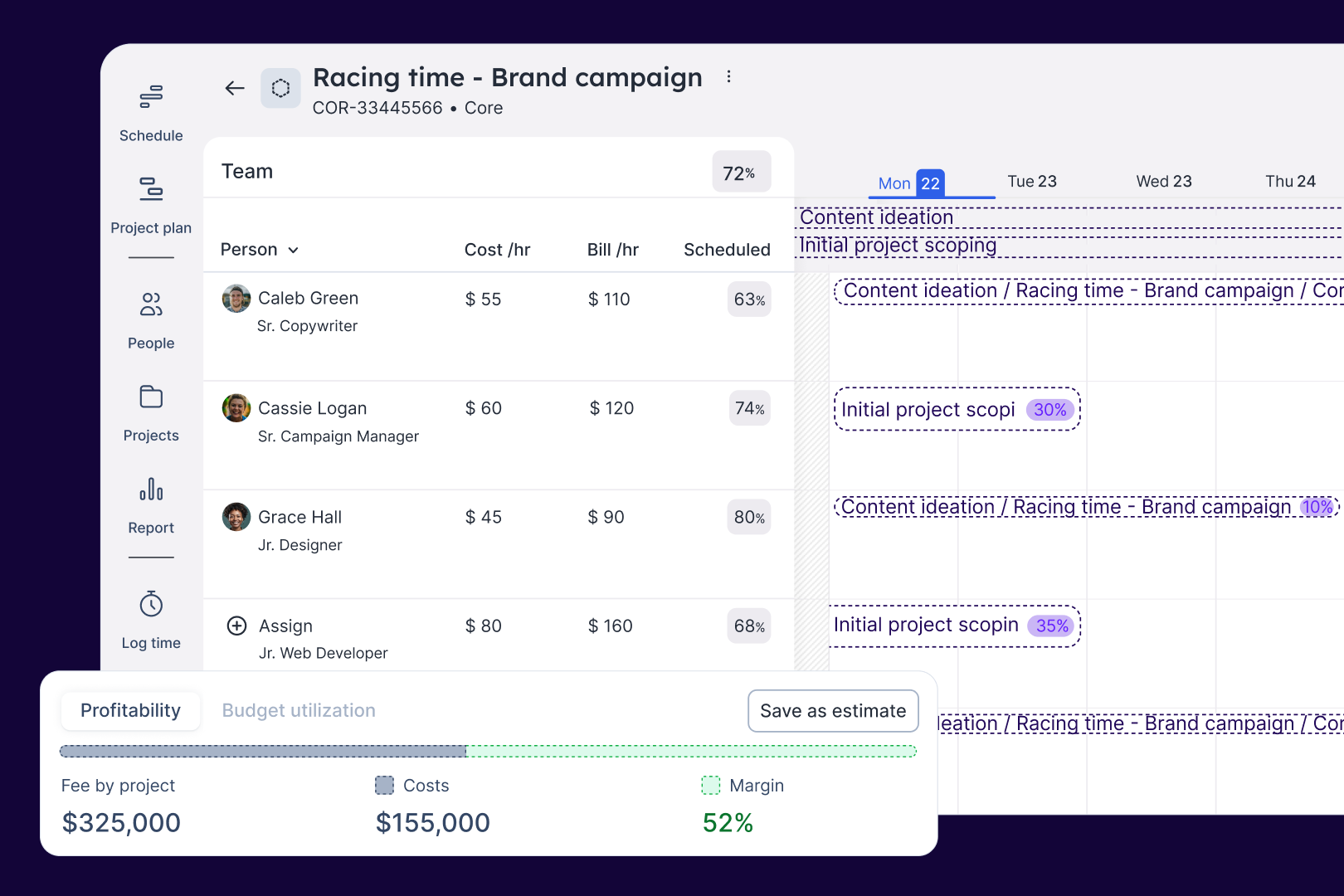
Float.com Demo - Estimate work
Quickly price new projects with confidence. Build budgets, align resourcing, and track scope changes—monitoring estimates against actuals to deliver profitable projects.
Float.com Demo - Scope projects
Align what you need with what you have to create project schedules that keep work on track with the right people, budgets, and timelines.
Float.com Demo - Track time
Simplify timesheets with pre-filled hours so your actuals data is more accurate and always on time!
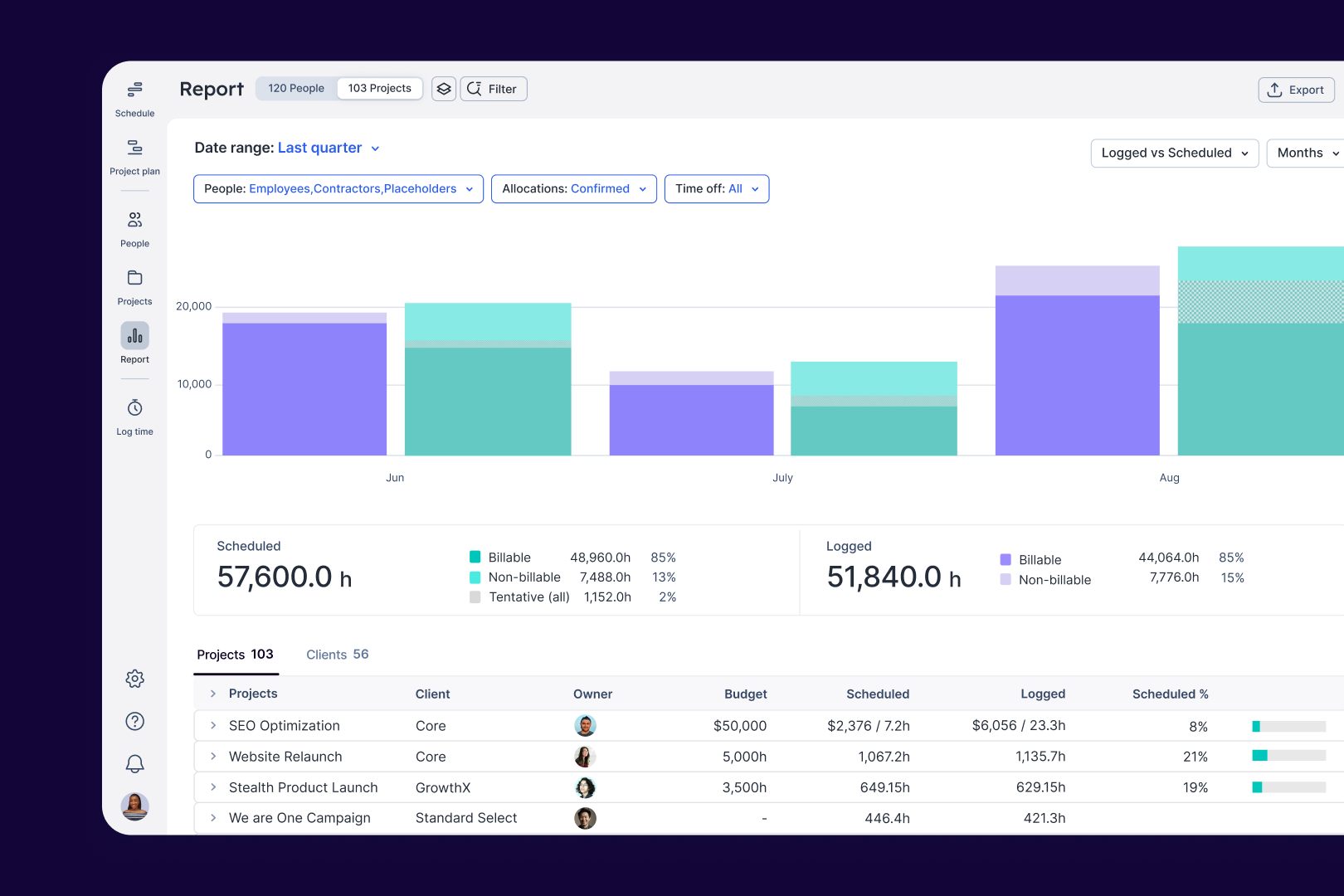
Float.com Demo - Report
Make informed decisions with live insights into team utilization and budget spend to understand how resourcing affects project margins and profitability.
Get to know Float in under 4 mins. 
See how Float connects resourcing decisions to delivery outcomes, keeping your people aligned and your projects profitable.
Play Float.com Video
Get to know Float in under 4 mins. See how Float connects resourcing decisions to delivery outcomes, keeping your people aligned and your projects profitable.
The best teams in the world don’t just wing it. They use Float to get the essential data and context they need when resourcing client work, so they can build winning teams and deliver profitable projects.
Play Float.com Video
The best teams in the world don’t just wing it. They use Float to get the essential data and context they need when resourcing client work, so they can build winning teams and deliver profitable projects.
New: finance & estimations in Float. Stop guessing and start knowing. With Float's finance & estimation features, you can price accurately, protect margins, and deliver profitable projects every time.
Play Float.com Video
New: finance & estimations in Float. Stop guessing and start knowing. With Float's finance & estimation features, you can price accurately, protect margins, and deliver profitable projects every time.
Product Avatar Image

Have you used Float.com before?

Answer a few questions to help the Float.com community

Float.com Reviews (2,091)

View 1 Video Reviews
Reviews

Float.com Reviews (2,091)

View 1 Video Reviews
4.3
2,091 reviews

Review Summary

Generated using AI from real user reviews
Users consistently praise the ease of use and visual clarity of Float.com, highlighting how it simplifies task scheduling and team coordination. The intuitive interface allows for quick adjustments and clear visibility of team workloads, making it a valuable tool for managing resources effectively. However, some users note that the mobile app can be clunky at times.

Pros & Cons

Generated from real user reviews
View All Pros and Cons
Search reviews
Filter Reviews
Clear Results
G2 reviews are authentic and verified.
Miranda K.
MK
Project Engineer
Small-Business (50 or fewer emp.)
"Very happy with Float"
What do you like best about Float.com?

I like how easy it is to track availability and schedules of a lot of staff. This way I can easily find help on projects when needed and know who will be out of the office. Review collected by and hosted on G2.com.

What do you dislike about Float.com?

I think Float is very easy to navigate, the only problem is when people are not updating regularly. I wish there was a reminder feature so people were updating at the same frequency. Review collected by and hosted on G2.com.

VL
Small-Business (50 or fewer emp.)
"Using Float has been a seamless and productive experience for me."
What do you like best about Float.com?

Float offers an intuitive interface, making team scheduling and project tracking a breeze. The real-time updates and integrations have significantly improved our workflow efficiency. Review collected by and hosted on G2.com.

What do you dislike about Float.com?

While Float is largely beneficial, I wish there were more customization options for visual themes. However, its core functionalities remain unmatched. Review collected by and hosted on G2.com.

SW
Mid-Market (51-1000 emp.)
"Mediocer"
What do you like best about Float.com?

Being able to use color schemes for all blocks.

Easy access for users and easy to add new users when needed.

Being able to slide blocks and set certain hours etc. Review collected by and hosted on G2.com.

What do you dislike about Float.com?

Blocks are really big and take up the whole screen. If I want to see the whole team i have to zoom out so far that I am not able to read the blocks annymore. This makes working with Float difficult in some situations to match schedules. Review collected by and hosted on G2.com.

Verified User in Information Services
UI
Mid-Market (51-1000 emp.)
"It's a good tool for the purpose"
What do you like best about Float.com?

It lets me easily log time as a casual employee Review collected by and hosted on G2.com.

What do you dislike about Float.com?

Slightly annoying process for logging multiple tasks Review collected by and hosted on G2.com.

Verified User in Computer & Network Security
UC
Small-Business (50 or fewer emp.)
"Trying to review it as a regular user and not ux designer, haha."
What do you like best about Float.com?

It's really easy to use. In our team, there's not a lot of people, so the scheduling is very convenient. Comparing to the competitors, Float has a positive benefit of using categories and different colors for the projects. Possibility to check completed tasks is a benefit, too. Visual design seems to be on point. Review collected by and hosted on G2.com.

What do you dislike about Float.com?

It would be really lovely to get an automatic color attachment for different category projects. And maybe adding a deadline to the project would be even more easier, it wouldn't require to re-check in Jira when scheduling. Review collected by and hosted on G2.com.

Verified User in Public Relations and Communications
UP
Enterprise (> 1000 emp.)
"Juggling capacities has never been easier (and prettier)"
What do you like best about Float.com?

The tool has a simple overview, visually similar to already known calendars. This means that you don't need any time to familiarize yourself with it. Just click and add entries.

If you work with many different customers, you can create them once and then easily add individual projects within these customer folders.

I especially like the fact that I can tell my clients apart right at first glance using the Color Coding feature. But when I need more information, I can also click on the entries and have access to the job number, the available budget, and any other information that might be available.

Thanks Float - you make my daily work so much easier :-) Review collected by and hosted on G2.com.

What do you dislike about Float.com?

What could be improved:

Currently, when I enter vacation, my projects in the same time frame just disappear from the schedule. This is quite inconvenient and should be fixed. It would be more practical to at least be warned and transfer the projects individually to someone else from the team, or be able to specify vacation substitutions so that the projects are automatically transferred.

Also, it would be great if you could duplicate blockers via copy & paste. The split tool is often a bit impractical to use. Review collected by and hosted on G2.com.

Marcello S.
MS
Senior Director, Integrated Intelligence
Enterprise (> 1000 emp.)
"Easy to use"
What do you like best about Float.com?

You can filter down by project, title, names. You can also add details of the team members (what team they belong to, direct report or even simple tags like experience level) Review collected by and hosted on G2.com.

What do you dislike about Float.com?

When you assign a team member to a project, and they need to work different hours in different weeks, you have to create an entry for each segment. E.g. 3hrs/day in Q1 and 4hrs/day in Q2, and then the same in Q3 and Q4, you need to create 4 different entries. It gets complicated if you program by week. Review collected by and hosted on G2.com.

Lewis S.
LS
Senior Geotechnical Engineer
Mid-Market (51-1000 emp.)
"Positive"
What do you like best about Float.com?

Easy interface with drag and drop functions

Colour coding

fast and snappy use on google chrome

Enjoy the default settings of font and page size and separations

Thanks Review collected by and hosted on G2.com.

What do you dislike about Float.com?

FInding Leave functions

assigning people

Budget visibility when assigned

These functions may exist but in the limited time I have when using float these have not been obvious Review collected by and hosted on G2.com.

Verified User in Computer Software
UC
Small-Business (50 or fewer emp.)
"Float: Elevating Enterprise Time Management"
What do you like best about Float.com?

From the moment I was introduced to Float, I was impressed by its intuitive interface. The platform is visually appealing, making it easy for users of all tech levels to navigate and understand. This is crucial for a tool that is meant to be used across various departments in an enterprise. Review collected by and hosted on G2.com.

What do you dislike about Float.com?

One area where Float could improve is the ability to move time events to different days. While the current drag-and-drop functionality is excellent for intra-day adjustments, extending this feature to allow for moving events across different days would make the platform even more versatile. Review collected by and hosted on G2.com.

AK
Mid-Market (51-1000 emp.)
"One of the best Resource Management software in the market"
What do you like best about Float.com?

I mainly use float for project management and tracking and I think these features provide a very smooth and user friendly platform to manage my projects along with other colleagues in my organization. Review collected by and hosted on G2.com.

What do you dislike about Float.com?

When creating a new project, I think the options available to amend the project could be a bit more comprehensive. For e.g everyone should be auto-selected as project manager and later we can edit it according to our requirement. Review collected by and hosted on G2.com.

Questions about Float.com? Ask real users or explore answers from the community

Get practical answers, real workflows, and honest pros and cons from the G2 community or share your insights.

HL
Hon Lee
Last activity almost 4 years ago

Can the old design be reused, is there an option to switch to that?

andik s.
AS
andik setiawan
Last activity almost 4 years ago

what do you think about float?

Pricing Options

Pricing provided by Float.com.

Starter

Starting at $7.00
Per Month

Pro

Starting at $12.00
Per Month

Enterprise

Contact Us
Float.com Comparisons
Float.com Features
Ease of Completing Timesheets
Tracking Time to Project/Task
Billable Time Rate Management
Time Tracking
Business Tool Integration
Automated Reminders
User, Role, and Access Management
Reporting
Performance and Reliability
Product Avatar Image
Float.com