# Best Online Form Builder Software

## How Many Online Form Builder Software Products Does G2 Track?

**Total Products under this Category:** 478

### Category Stats (Sep 2026)

- **Average Rating:** 4.48/5 The average rating of products in this category, based on all submitted ratings
- **Top Trending Product:** Rizer (+6.25%) - Among all products in this category, Rizer recorded the largest rating increase compared to last month

_Last updated: September 01, 2026_

## How Does G2 Rank Online Form Builder Software Products?

**Why You Can Trust G2's Software Rankings:**

- 30 Analysts and Data Experts
- 110,200+ Authentic Reviews
- 478+ Products
- Unbiased Rankings

G2's software rankings are built on verified user reviews, rigorous moderation, and a consistent research methodology maintained by a team of analysts and data experts. Each product is measured using the same transparent criteria, with no paid placement or vendor influence. While reviews reflect real user experiences, which can be subjective, they offer valuable insight into how software performs in the hands of professionals. Together, these inputs power the G2 Score, a standardized way to compare tools within every category.

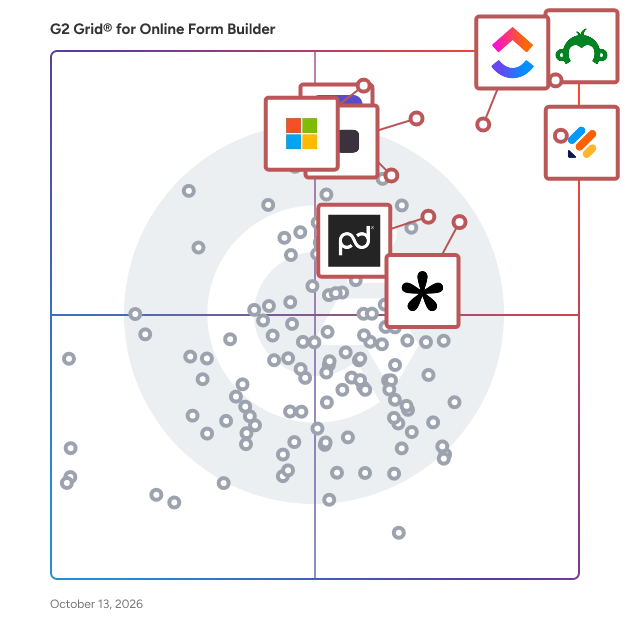
## G2 Grid® for Online Form Builder Software
 ![G2 Grid® for Online Form Builder Software plotting products by satisfaction and market presence](https://www.g2.com/categories/online-form-builder/grids.png?focus%5B%5D=541&focus%5B%5D=23672&focus%5B%5D=25675&focus%5B%5D=13751&focus%5B%5D=89299&focus%5B%5D=134643&focus%5B%5D=1934&focus%5B%5D=4036)

Highlighted products: SurveyMonkey, Jotform, ClickUp, Typeform, Microsoft Forms, Tally, ActiveCampaign, and PandaDoc.

Underlying data: [Grid® JSON](https://www.g2.com/categories/online-form-builder/grids.json?focus%5B%5D=surveymonkey&focus%5B%5D=jotform&focus%5B%5D=clickup&focus%5B%5D=typeform&focus%5B%5D=microsoft-forms&focus%5B%5D=tally-forms-tally&focus%5B%5D=activecampaign&focus%5B%5D=pandadoc)

**Sponsored**

### Aroopa Forms

Aroopa Forms is a cloud-based, web-based form builder for building anything from a simple contact form to a complex multi-step form with conditional logic and workflows. Forms can be public, private, or embedded, and can be embedded into Shopify, Wix, Squarespace, or any website. Beyond standard forms, it supports calculators, calendar scheduling, quotation builders, surveys, and assessments — and connects to 100+ third-party tools through Aroopa Flows. What it does Aroopa Forms is a cloud-based, web-based online form builder — no installation required, build and publish from any browser. Public, Private, and Embed Form Types Control how each form is accessed: Public forms – shareable via a link, open to anyone Private forms – restricted access for internal or invite-only use Embed forms – placed directly inside a website or app rather than hosted on a standalone page Simple to Multi-Step Forms Build a single-page form in minutes, or a multi-step form that guides respondents through several stages — useful for longer applications, onboarding flows, or detailed intake processes. Advanced Conditional Logic Show, hide, or branch form fields and steps based on a respondent's previous answers, so each person only sees the questions relevant to them. Workflows Trigger actions based on form submissions — for example, routing a submission, sending a notification, or kicking off an approval process — rather than a form that just collects data with no follow-up action. Website & Platform Embedding Embed forms directly into Shopify, Wix, Squarespace, or any other website, so the form lives inside your existing site rather than sending visitors to a separate page. Beyond Standard Forms: Calculators, Scheduling, Quotation Builders Aroopa Forms isn't limited to basic data collection. Use the same builder to create: Calculators – interactive forms that compute a result (pricing, eligibility, estimates) from user input Calendar scheduling – booking and appointment scheduling forms Quotation builders – forms that generate a quote based on selections and inputs Surveys & Assessments Build surveys and assessments using the same form engine — useful for feedback collection, research, quizzes, or scored evaluations. 100+ Integrations via Aroopa Flows Push form submission data to 100+ third-party tools and services through Aroopa Flows, Aroopa's automation and integration layer, so form data flows into whatever CRM, spreadsheet, email tool, or other system you already use. Who it's for Businesses that need everything from a simple contact form to a complex multi-step application form, without switching tools Shopify, Wix, and Squarespace store owners who need forms embedded directly into their existing website Teams that need calculators, quotation builders, or scheduling forms, not just basic data collection Anyone running surveys, assessments, or quizzes and wanting the results connected to their other business tools Teams that need form data pushed automatically into a CRM, spreadsheet, or other system via integrations FAQ Can I make a form public, private, or embedded on my own site? Yes. Aroopa Forms supports public forms (shareable link), private forms (restricted access), and embed forms placed directly on a website. Can I embed a form into my Shopify, Wix, or Squarespace site? Yes. Forms can be embedded into Shopify, Wix, Squarespace, or any other website. Does it support multi-step forms, not just single-page forms? Yes. You can build simple single-page forms or complex multi-step forms with conditional logic guiding respondents through multiple stages. Can form fields change based on a respondent's answers? Yes. Advanced conditional logic lets you show, hide, or branch fields and steps based on previous responses. Can I build something other than a standard form, like a calculator or quote builder? Yes. The same builder supports calculators, calendar/appointment scheduling forms, and quotation builders, in addition to standard forms. Does Aroopa Forms support surveys and assessments? Yes. Surveys and assessments can be built using the same form engine. Can form submissions trigger a workflow? Yes. Workflows can route submissions, send notifications, or trigger approval steps automatically when a form is submitted. Can I connect form data to other tools I use? Yes. Aroopa Flows connects Aroopa Forms to 100+ third-party integrations, so submission data can be pushed to your CRM, spreadsheet, email tool, or other systems. Is Aroopa Forms cloud-based? Yes. It's fully cloud-based and web-based — build, publish, and manage forms from any browser, with nothing to install.

[Visit website](https://www.g2.com/external_clickthroughs/record?secure%5Bad_program%5D=ppc&secure%5Bad_slot%5D=category_product_list_llm&secure%5Bcategory_id%5D=1253&secure%5Bchosen_at%5D=2026-09-02T13%3A13%3A38Z&secure%5Bdisplayable_resource_id%5D=1253&secure%5Bdisplayable_resource_type%5D=Category&secure%5Bmedium%5D=sponsored&secure%5Bplacement_reason%5D=page_category&secure%5Bplacement_resource_ids%5D%5B%5D=1253&secure%5Bprioritized%5D=false&secure%5Bproduct_id%5D=1325998&secure%5Bresource_id%5D=1253&secure%5Bresource_type%5D=Category&secure%5Bsource_type%5D=category_page&secure%5Bsource_url%5D=https%3A%2F%2Fwww.g2.com%2Fcategories%2Fonline-form-builder&secure%5Btoken%5D=176a34f99069c65b2022b4dfac8b2d06bd017a4a0c5155fe5a5c2834e80fe77c&secure%5Burl%5D=https%3A%2F%2Fwww.aroopaapps.com&secure%5Burl_type%5D=custom_url)

### [SurveyMonkey](https://www.g2.com/products/surveymonkey/reviews)

SurveyMonkey is the world’s most popular platform for surveys and forms, built for business and loved by users. We combine powerful capabilities with intuitive design, effectively serving every use case, from customer experience to employee engagement, market research to payment and registration forms. With built-in research expertise and AI-assisted technology, it’s like having a team of expert researchers right at your fingertips. Trusted by millions—from startups to Fortune 500 companies—SurveyMonkey helps teams gather insights and information that inspire better decisions, create experiences people love, and drive business growth. Discover how at http://surveymonkey.com.

**Average Rating:** 4.4/5.0

**Total Reviews:** 23,566

#### How Do G2 Users Rate SurveyMonkey?

- **Has the product been a good partner in doing business?:** 8.8/10 (Category avg: 9.1/10)
- **CMS Support:** 7.8/10 (Category avg: 8.5/10)
- **Design:** 8.5/10 (Category avg: 8.7/10)
- **Embedded Forms:** 8.3/10 (Category avg: 8.9/10)

#### Who Is the Company Behind SurveyMonkey?

- **Seller:** [SurveyMonkey](https://www.g2.com/sellers/surveymonkey)
- **Company Website:** www.surveymonkey.com
- **Year Founded:** 1999
- **HQ Location:** San Mateo, CA
- **Twitter:** @SurveyMonkey  
42,887 Twitter followers
- **LinkedIn® Page:** [www.linkedin.com](https://www.g2.com/external_clickthroughs/record?secure%5Bsource_type%5D=product_profile&secure%5Btoken%5D=fd9247267ccd55807789afa880d51b75396e2443309c1a39fb63e518100c6ba1&secure%5Burl%5D=https%3A%2F%2Fwww.linkedin.com%2Fcompany%2Fsurveymonkey%2F&secure%5Burl_type%5D=linkedin_company_website)  
1,390 employees on LinkedIn®

#### Who Uses This Product?

- **Who Uses This:** Teacher, Owner
- **Top Industries:** Education Management, Hospital & Health Care
- **Company Size:** 37% Small, 34% Medium

#### What Do G2 Reviewers Say About SurveyMonkey?

_AI-generated summary from verified user reviews_

##### Pros

- Users appreciate the **ease of use** of SurveyMonkey, finding it quick and intuitive for creating surveys and gathering feedback.
- Users find SurveyMonkey's **ease of creation** exceptional, allowing quick and user-friendly survey development without technical skills.
- Users find SurveyMonkey **intuitive** , with its user-friendly design simplifying question creation and data analysis.
- Users love the **simplicity** of SurveyMonkey, enabling quick survey creation and analysis without technical skills.
- Users find SurveyMonkey **extremely easy to use** , making it a valuable tool for gathering and analyzing feedback.

##### Cons

- Users find SurveyMonkey to be **expensive** , particularly regarding limited features and costly customizations.
- Users find **limitations in the free plan** of SurveyMonkey, requiring payment for essential features and access to more responses.
- Users report **survey issues** such as limited logic, awkward mobile editing, and outdated templates affecting usability.
- Users find that **many advanced features are restricted** to higher-priced plans, limiting the functionality of free versions.
- Users express frustration with **limited customization** options in SurveyMonkey, affecting design and dataset manipulation capabilities.

#### What Are Recent G2 Reviews of SurveyMonkey?

**["User-Friendly with Strong Analytics, Some Licensing Frustrations"](https://www.g2.com/survey_responses/surveymonkey-review-13144960)**

**Rating:** 4.5/5.0 stars

_— Ramin E._

[Read full review](https://www.g2.com/survey_responses/surveymonkey-review-13144960)

**["Simple, User-Friendly Surveys with Clear Results"](https://www.g2.com/survey_responses/surveymonkey-review-13173431)**

**Rating:** 4.5/5.0 stars

_— DEEPAK M._

[Read full review](https://www.g2.com/survey_responses/surveymonkey-review-13173431)

#### What Are G2 Users Discussing About SurveyMonkey?

- [What is SurveyMonkey used for?](https://www.g2.com/discussions/what-is-surveymonkey-used-for) - 6 comments
- [What is SurveyMonkey Market Research Solutions used for?](https://www.g2.com/discussions/what-is-surveymonkey-market-research-solutions-used-for) - 3 comments, 2 upvotes
- [What is SurveyMonkey?](https://www.g2.com/discussions/what-is-surveymonkey) - 3 comments, 1 upvote
- [Is SurveyMonkey safe to use?](https://www.g2.com/discussions/is-surveymonkey-safe-to-use) - 2 comments
- [How do you write a good market research survey?](https://www.g2.com/discussions/how-do-you-write-a-good-market-research-survey)

### [Jotform](https://www.g2.com/products/jotform/reviews)

Trusted by more than 35 million users worldwide, Jotform is an AI-powered online form builder designed to help individuals and organizations create, customize, and publish forms in minutes, from any device. With an intuitive drag-and-drop interface, Jotform makes it simple for anyone to build professional, mobile-responsive forms without writing a single line of code. As a fully no-code platform, Jotform empowers users to automate workflows, streamline data collection, and digitize processes. Jotform offers one of the largest template libraries in the industry, featuring 10,000+ ready-made form templates tailored to every use case. Popular categories include payment forms, lead generation forms, event registration forms, application forms, surveys, order forms, onboarding forms, consent forms, and feedback forms. Each template is fully customizable, allowing users to adjust layouts, add conditional logic, collect e-signatures, upload files, apply branding, and incorporate advanced field types. This level of flexibility ensures every form is optimized for user experience and aligned with organizational goals. To streamline workflows, Jotform integrates seamlessly with over 200 popular third-party apps, including Google Sheets, Slack, Zoom, HubSpot, Salesforce, PayPal, Stripe, and numerous other business tools. These integrations automate data collection, payment processing, CRM updates, and team notifications. By connecting forms directly to the tools your team already uses, Jotform helps eliminate data silos and supports end-to-end process automation—all within a no-code environment. Security and compliance are at the core of Jotform’s platform. Features such as HIPAA compliance options, 256-bit SSL encryption, CAPTCHA, form access controls, and audit logs help organizations protect sensitive data and meet industry standards. Whether you're collecting healthcare information, financial data, or internal employee records, Jotform provides the reliability and safeguards needed to operate with confidence. With powerful features like automated emails, approval workflows, analytics dashboards, and embeddable widgets, Jotform delivers an all-in-one solution for organizations looking to simplify data collection and improve productivity. From small businesses to enterprises, educational institutions, healthcare providers, and nonprofits, millions of teams rely on Jotform to capture information efficiently and turn submissions into actionable results.

**Average Rating:** 4.7/5.0

**Total Reviews:** 5,223

#### G2 Deal: Save 50% on an annual Jotform plans

Get more forms, more submissions, more payments, more e-sign documents, and more powerful automation features —&nbsp;at half the price.

**Price:** ~~$39/user/month~~ → $19.50/user/month

[View this exclusive G2 deal](https://www.g2.com/deals/offers/26d7f3a1-5db1-4f9b-af9c-869033311cf8?source=categories)

#### How Do G2 Users Rate Jotform?

- **Has the product been a good partner in doing business?:** 9.1/10 (Category avg: 9.1/10)
- **CMS Support:** 8.0/10 (Category avg: 8.5/10)
- **Design:** 8.7/10 (Category avg: 8.7/10)
- **Embedded Forms:** 8.8/10 (Category avg: 8.9/10)

#### Who Is the Company Behind Jotform?

- **Seller:** [Jotform](https://www.g2.com/sellers/jotform)
- **Company Website:** www.jotform.com
- **Year Founded:** 2006
- **HQ Location:** San Francisco, California
- **Twitter:** @Jotform  
39,289 Twitter followers
- **LinkedIn® Page:** [www.linkedin.com](https://www.g2.com/external_clickthroughs/record?secure%5Bsource_type%5D=product_profile&secure%5Btoken%5D=8baa6a5c796d62ca5df3355392c638c519f99283c496ed24278490484f9fcca1&secure%5Burl%5D=https%3A%2F%2Fwww.linkedin.com%2Fcompany%2F3541463%2F&secure%5Burl_type%5D=linkedin_company_website)  
901 employees on LinkedIn®

#### Who Uses This Product?

- **Who Uses This:** Owner, CEO
- **Top Industries:** Non-Profit Organization Management, Education Management
- **Company Size:** 71% Small, 20% Medium

#### What Do G2 Reviewers Say About Jotform?

_AI-generated summary from verified user reviews_

##### Pros

- Users appreciate the **ease of use** of Jotform, enabling quick navigation and efficient form management for clients.
- Users appreciate the **ease of use** of Jotform, finding it simplifies event management and form creation significantly.
- Users commend the **intuitive setup process** of Jotform, which simplifies form creation and customization significantly.
- Users love the **user-friendly design** of Jotform, making navigation and form creation a breeze.
- Users love the **ease of building powerful forms** with Jotform's user-friendly interface and flexible integrations.

##### Cons

- Users find Jotform **too expensive** compared to other survey sites, especially given the misleading advertising of free options.
- Users find some **missing features** in Jotform, particularly in font customization and payment integration difficulties.
- Users face **form issues** with navigation, integration, and functionality, making the experience less user-friendly.
- Users find **limited customization** options for Jotform, making design adjustments more challenging than expected.
- Users find the **form design confusing** with unclear navigation and limitations in customization options and features.

#### What Are Recent G2 Reviews of Jotform?

**["Intuitive, User-Friendly Forms That Simplify Client Intake"](https://www.g2.com/survey_responses/jotform-review-13388768)**

**Rating:** 4.5/5.0 stars

_— Isabel R._

[Read full review](https://www.g2.com/survey_responses/jotform-review-13388768)

**["Handled ~800 signed event waivers in one weekend"](https://www.g2.com/survey_responses/jotform-review-13365817)**

**Rating:** 4.0/5.0 stars

_— Sky Y._

[Read full review](https://www.g2.com/survey_responses/jotform-review-13365817)

#### What Are G2 Users Discussing About Jotform?

- [What innovative uses of Jotform are seen in data collection and management across various sectors?](https://www.g2.com/discussions/what-innovative-uses-of-jotform-are-seen-in-data-collection-and-management-across-various-sectors) - 1 comment, 1 upvote
- [What is Jotform used for?](https://www.g2.com/discussions/jotform-what-is-jotform-used-for) - 4 comments, 2 upvotes
- [Who uses JotForm?](https://www.g2.com/discussions/who-uses-jotform)
- [Is JotForm safe?](https://www.g2.com/discussions/is-jotform-safe) - 7 comments, 2 upvotes
- [Does JotForm cost money?](https://www.g2.com/discussions/does-jotform-cost-money) - 7 comments, 1 upvote

### [ClickUp](https://www.g2.com/products/clickup/reviews)

ClickUp is the world’s first Converged AI Workspace, bringing together all work apps, data, and workflows. ClickUp eliminates all forms of work sprawl to provide 100% context and a single place for humans and agents to work, together. Trusted by more than 20 million users worldwide, ClickUp is on a mission to maximize human productivity.

**Average Rating:** 4.6/5.0

**Total Reviews:** 13,427

#### How Do G2 Users Rate ClickUp?

- **Has the product been a good partner in doing business?:** 9.0/10 (Category avg: 9.1/10)
- **CMS Support:** 7.8/10 (Category avg: 8.5/10)
- **Design:** 8.5/10 (Category avg: 8.7/10)
- **Embedded Forms:** 8.6/10 (Category avg: 8.9/10)

#### Who Is the Company Behind ClickUp?

- **Seller:** [ClickUp](https://www.g2.com/sellers/clickup)
- **Company Website:** ClickUp.com
- **Year Founded:** 2017
- **HQ Location:** San Diego, California
- **Twitter:** @clickup  
69,539 Twitter followers
- **LinkedIn® Page:** [www.linkedin.com](https://www.g2.com/external_clickthroughs/record?secure%5Bsource_type%5D=product_profile&secure%5Btoken%5D=12451d66d580078c16b08985ccc98dcf8d832565fb04a9665439cfd4f2a74fa7&secure%5Burl%5D=https%3A%2F%2Fwww.linkedin.com%2Fcompany%2F12949663%2F&secure%5Burl_type%5D=linkedin_company_website)  
1,526 employees on LinkedIn®

#### Who Uses This Product?

- **Who Uses This:** CEO, Project Manager
- **Top Industries:** Marketing and Advertising, Computer Software
- **Company Size:** 77% Small, 19% Medium

#### What Do G2 Reviewers Say About ClickUp?

_AI-generated summary from verified user reviews_

##### Pros

- Users find ClickUp to be incredibly **easy and simple to use** , streamlining tasks and enhancing productivity effortlessly.
- Users value the **flexibility in task management** , enabling customized workflows for personal, team, and project tasks.
- Users appreciate the **abundance of features** in ClickUp, making task management seamless and efficient.
- Users appreciate ClickUp for its **streamlined management tasks** , enabling better organization and efficiency in project handling.
- Users appreciate ClickUp for its **streamlined organization** , making team management and project tracking efficient and effortless.

##### Cons

- Users find the **missing features** in ClickUp frustrating, particularly the lack of basic tools like subfolders.
- Users experience a **learning curve** with ClickUp, finding the plethora of features daunting at first.
- Users note **limited features** in ClickUp, with missing basic options and a complex setup process hindering ease of use.
- Users find ClickUp **not intuitive** , feeling overwhelmed by its many features and struggling with initial setup and performance.
- Users experience **slow loading** times in ClickUp, which affects their productivity when managing multiple tasks and fields.

#### What Are Recent G2 Reviews of ClickUp?

**["Our Operational Home Base - an all in one solution"](https://www.g2.com/survey_responses/clickup-review-12756242)**

**Rating:** 5.0/5.0 stars

_— Shannon S._

[Read full review](https://www.g2.com/survey_responses/clickup-review-12756242)

**["Customizable Request Pages and Brain2 Make Task Follow-Ups Effortless"](https://www.g2.com/survey_responses/clickup-review-13374978)**

**Rating:** 5.0/5.0 stars

_— Tuce B._

[Read full review](https://www.g2.com/survey_responses/clickup-review-13374978)

#### What Are G2 Users Discussing About ClickUp?

- [What features of ClickUp make it a preferred choice for project management in agile teams?](https://www.g2.com/discussions/what-features-of-clickup-make-it-a-preferred-choice-for-project-management-in-agile-teams) - 6 comments, 7 upvotes
- [What is ClickUp used for?](https://www.g2.com/discussions/what-is-clickup-used-for) - 10 comments, 5 upvotes
- [Does Google use ClickUp?](https://www.g2.com/discussions/does-google-use-clickup) - 5 comments, 4 upvotes
- [Who uses ClickUp?](https://www.g2.com/discussions/who-uses-clickup) - 14 comments, 4 upvotes
- [Is ClickUp really free?](https://www.g2.com/discussions/is-clickup-really-free) - 12 comments, 3 upvotes

### [Typeform](https://www.g2.com/products/typeform/reviews)

Typeform is a refreshingly different form builder. We help over 150,000 businesses collect the data they need with forms, surveys, and quizzes people enjoy. Designed to look striking and feel effortless to fill out, Typeform drives 500 million responses every year and integrates with essential tools like Slack, Zapier, and HubSpot.

**Average Rating:** 4.5/5.0

**Total Reviews:** 993

#### How Do G2 Users Rate Typeform?

- **Has the product been a good partner in doing business?:** 8.8/10 (Category avg: 9.1/10)
- **CMS Support:** 8.1/10 (Category avg: 8.5/10)
- **Design:** 9.0/10 (Category avg: 8.7/10)
- **Embedded Forms:** 8.8/10 (Category avg: 8.9/10)

#### Who Is the Company Behind Typeform?

- **Seller:** [Typeform](https://www.g2.com/sellers/typeform)
- **Company Website:** www.typeform.com
- **Year Founded:** 2012
- **HQ Location:** Barcelona
- **Twitter:** @typeform  
28,375 Twitter followers
- **LinkedIn® Page:** [www.linkedin.com](https://www.g2.com/external_clickthroughs/record?secure%5Bsource_type%5D=product_profile&secure%5Btoken%5D=e8f007e3f9551a72c97ed0c5a5009938f25bd6d1e6e1785ed983c9a7de1b7787&secure%5Burl%5D=https%3A%2F%2Fwww.linkedin.com%2Fcompany%2F3226972%2F&secure%5Burl_type%5D=linkedin_company_website)  
882 employees on LinkedIn®

#### Who Uses This Product?

- **Who Uses This:** CEO, Founder
- **Top Industries:** Marketing and Advertising, Information Technology and Services
- **Company Size:** 65% Small, 28% Medium

#### What Do G2 Reviewers Say About Typeform?

_AI-generated summary from verified user reviews_

##### Pros

- Users appreciate the **ease of use** of Typeform, effortlessly creating engaging, brand-aligned forms for various purposes.
- Users value the **intuitive design** of Typeform, making surveys feel conversational and engaging for respondents.
- Users enjoy Typeform's **intuitive design** , which simplifies the survey process and enhances data collection efficiency.
- Users value the **multiple integrations** of Typeform, enhancing workflow efficiency and connectivity with other tools.
- Users appreciate the **ease of creation** in Typeform, enabling them to quickly generate and qualify leads effortlessly.

##### Cons

- Users find the **high cost** of Typeform concerning, especially as their needs for advanced features grow.
- Users find Typeform's **limited customization** options restrictive, compromising their ability to create engaging forms tailored to their needs.
- Users feel the **limited features** of Typeform restricts customization and can lead to expensive upgrades as needs grow.
- Users find the **missing features** frustrating, particularly lacking advanced insights and compliance options without additional costs.
- Users face **integration issues** with Typeform, particularly with limited native support for essential analytics and CRM tools.

#### What Are Recent G2 Reviews of Typeform?

**["Professional, Conversational Forms That Clients Actually Complete"](https://www.g2.com/survey_responses/typeform-review-13119997)**

**Rating:** 5.0/5.0 stars

_— Muzammil M._

[Read full review](https://www.g2.com/survey_responses/typeform-review-13119997)

**["Typeform webhooks kept our .NET workflows out of manual exports"](https://www.g2.com/survey_responses/typeform-review-13333858)**

**Rating:** 4.5/5.0 stars

_— Yurii L._

[Read full review](https://www.g2.com/survey_responses/typeform-review-13333858)

#### What Are G2 Users Discussing About Typeform?

- [What is Typeform used for?](https://www.g2.com/discussions/typeform-what-is-typeform-used-for) - 2 comments
- [Is Typeform secure?](https://www.g2.com/discussions/is-typeform-secure) - 1 comment
- [What is included in Typeform free plan?](https://www.g2.com/discussions/what-is-included-in-typeform-free-plan) - 1 comment
- [Is Typeform free?](https://www.g2.com/discussions/is-typeform-free) - 1 comment
- [What is Typeform used for?](https://www.g2.com/discussions/what-is-typeform-used-for) - 2 comments

### [Microsoft Forms](https://www.g2.com/products/microsoft-forms/reviews)

Microsoft Forms is a, cloud-based application that enables users to create custom surveys, quizzes, polls, and questionnaires with ease. Integrated within the Microsoft 365 suite, it allows for seamless data collection and analysis, making it an ideal tool for educational institutions, businesses, and individual users. With its user-friendly interface, Microsoft Forms simplifies the process of gathering feedback, assessing knowledge, and organizing events. Key Features and Functionality: - Survey and Quiz Creation: Design engaging surveys and quizzes with various question types, including multiple-choice, text, rating, and more. - Real-Time Collaboration: Share forms with others to collaborate on content creation and editing in real time. - Response Collection: Distribute forms via email, a direct link, or embed them into web pages to collect responses from participants across different platforms. - Data Analysis: Utilize built-in analytics to evaluate responses, view automatic charts, and export data to Excel for further analysis. - Integration with Microsoft 365: Seamlessly integrate with other Microsoft 365 applications, enhancing productivity and data management. Primary Value and User Solutions: Microsoft Forms addresses the need for efficient and straightforward data collection and analysis. By providing a platform to create and distribute forms quickly, it enables users to gather valuable insights, assess performance, and make informed decisions. Its integration with Microsoft 365 ensures a cohesive experience, allowing users to leverage familiar tools and workflows. Whether for educational assessments, customer feedback, or event planning, Microsoft Forms streamlines the process, saving time and enhancing productivity.

**Average Rating:** 4.4/5.0

**Total Reviews:** 463

#### How Do G2 Users Rate Microsoft Forms?

- **Has the product been a good partner in doing business?:** 8.8/10 (Category avg: 9.1/10)
- **CMS Support:** 7.9/10 (Category avg: 8.5/10)
- **Design:** 8.2/10 (Category avg: 8.7/10)
- **Embedded Forms:** 8.5/10 (Category avg: 8.9/10)

#### Who Is the Company Behind Microsoft Forms?

- **Seller:** [Microsoft](https://www.g2.com/sellers/microsoft)
- **Year Founded:** 1975
- **HQ Location:** Redmond, Washington
- **Twitter:** @microsoft  
13,091,739 Twitter followers
- **LinkedIn® Page:** [www.linkedin.com](https://www.g2.com/external_clickthroughs/record?secure%5Bsource_type%5D=product_profile&secure%5Btoken%5D=9458f51bd6ded48ad432a804f19ad736469f007787569b63827154231c315630&secure%5Burl%5D=https%3A%2F%2Fwww.linkedin.com%2Fcompany%2Fmicrosoft%2F&secure%5Burl_type%5D=linkedin_company_website)  
231,632 employees on LinkedIn®
- **Ownership:** MSFT

#### Who Uses This Product?

- **Who Uses This:** Software Engineer, Project Manager
- **Top Industries:** Information Technology and Services, Education Management
- **Company Size:** 43% Medium, 38% Large

#### What Do G2 Reviewers Say About Microsoft Forms?

_AI-generated summary from verified user reviews_

##### Pros

- Users appreciate the **intuitive interface** of Microsoft Forms, making it easy for anyone to create surveys quickly.
- Users find the **ease of creation** in Microsoft Forms invaluable for quickly designing and analyzing surveys and quizzes.
- Users appreciate the **easy integration with Microsoft 365** , making form creation and response analysis seamless and efficient.
- Users appreciate the **intuitive interface** of Microsoft Forms, allowing quick and easy form creation for everyone.
- Users find Microsoft Forms to be a **simple and effective tool** for surveys and gathering insights efficiently.

##### Cons

- Users find the **limited customization** options frustrating, as forms end up looking generic and ununique.
- Users note **missing features** in Microsoft Forms, like advanced logic and customization, limiting its effectiveness for complex needs.
- Users note the **limited features** of Microsoft Forms, hindering customization and advanced functionality compared to competitors.
- Users find the **poor design** of Microsoft Forms limits customization and complicates the creation of complex forms.
- Users express frustration with the **limited integrations** of Microsoft Forms, especially concerning compatibility with Google tools.

#### What Are Recent G2 Reviews of Microsoft Forms?

**[""Microsoft Forms Makes Team Data Collection Fast and Easy""](https://www.g2.com/survey_responses/microsoft-forms-review-13132210)**

**Rating:** 4.5/5.0 stars

_— Sameer R._

[Read full review](https://www.g2.com/survey_responses/microsoft-forms-review-13132210)

**["Fast, Intuitive Form Builder That Just Works in Microsoft 365"](https://www.g2.com/survey_responses/microsoft-forms-review-13194138)**

**Rating:** 4.5/5.0 stars

_— Sree K._

[Read full review](https://www.g2.com/survey_responses/microsoft-forms-review-13194138)

#### What Are G2 Users Discussing About Microsoft Forms?

- [What is Microsoft Forms used for?](https://www.g2.com/discussions/what-is-microsoft-forms-used-for) - 2 comments
- [Is Microsoft form free?](https://www.g2.com/discussions/is-microsoft-form-free) - 2 comments
- [Is Microsoft Forms good?](https://www.g2.com/discussions/is-microsoft-forms-good) - 2 comments
- [What can Microsoft Forms do?](https://www.g2.com/discussions/what-can-microsoft-forms-do) - 1 comment

### [ActiveCampaign](https://www.g2.com/products/activecampaign/reviews)

ActiveCampaign is the autonomous marketing platform built to transform how marketers, agencies, and business owners work. Use Active Intelligence to power goal-aware automations and orchestrate personalized experiences across email, SMS, and WhatsApp. Effortlessly integrate with 1000+ apps, uncover deep performance insights, and optimize your workflows so you win every day. - Autonomous marketing Built on the foundation of marketing automation, fuel your marketing strategy and customer journeys with AI-driven execution, optimization, and insight at every step. - AI agents Run entire marketing campaigns through simple prompts, backed by Active Intelligence. - Cross-channel marketing Reach prospects and customers wherever they are, with email, SMS, WhatsApp, and more. - On-brand, personalized content Creative tools that deliver professional, conversion-ready designs for email and landing pages. - CRM Track, manage, and automate your sales process. - 1000+ apps & integrations Connect ActiveCampaign to your favorite tools.

**Average Rating:** 4.4/5.0

**Total Reviews:** 14,253

#### G2 Deal: G2 buyers save 15%!

Whether you’re looking to increase brand awareness, drive more leads, or convert more customers, ActiveCampaign has you covered. Take your marketing to the next level and achieve the engagement and growth you’ve been looking for. G2 buyers save 15% off annual ActiveCampaign subscriptions!

[View this exclusive G2 deal](https://www.g2.com/deals/offers/debfa34b-992a-49e8-8acb-a4949ed66da9?source=categories)

#### How Do G2 Users Rate ActiveCampaign?

- **Has the product been a good partner in doing business?:** 8.7/10 (Category avg: 9.1/10)
- **CMS Support:** 7.0/10 (Category avg: 8.5/10)
- **Design:** 7.4/10 (Category avg: 8.7/10)
- **Embedded Forms:** 7.9/10 (Category avg: 8.9/10)

#### Who Is the Company Behind ActiveCampaign?

- **Seller:** [ActiveCampaign](https://www.g2.com/sellers/activecampaign)
- **Company Website:** www.activecampaign.com
- **Year Founded:** 2003
- **HQ Location:** Chicago, IL
- **Twitter:** @ActiveCampaign  
13,203 Twitter followers
- **LinkedIn® Page:** [www.linkedin.com](https://www.g2.com/external_clickthroughs/record?secure%5Bsource_type%5D=product_profile&secure%5Btoken%5D=ecaffa7a4dd54b3f72ef9abc63c48d5efe51974c2974dfaa5d09b34c1e0c97bd&secure%5Burl%5D=https%3A%2F%2Fwww.linkedin.com%2Fcompany%2F221390%2F&secure%5Burl_type%5D=linkedin_company_website)  
848 employees on LinkedIn®

#### Who Uses This Product?

- **Who Uses This:** Owner, CEO
- **Top Industries:** Marketing and Advertising, Health, Wellness and Fitness
- **Company Size:** 92% Small, 7% Medium

#### What Do G2 Reviewers Say About ActiveCampaign?

_AI-generated summary from verified user reviews_

##### Pros

- Users value the **ease of use** in ActiveCampaign, appreciating seamless automation and straightforward features for personal tasks.
- Users love the **easy automation programming** of ActiveCampaign, streamlining their workflow and enhancing customer communication.
- Users praise the **powerful and easy automation features** of ActiveCampaign, enhancing their workflow efficiency and organization.
- Users love the **phenomenal automation features** of ActiveCampaign, enhancing email campaigns with effective segmentation and tailored messaging.
- Users value ActiveCampaign for its **all-in-one platform** , offering effective segmentation and personalized email marketing capabilities.

##### Cons

- Users experience a **steep learning curve** with ActiveCampaign, requiring additional support to navigate its features effectively.
- Users express concerns about the **missing features** such as easy form building and custom date triggers.
- Users find the **pricing steep** , especially for newer plans, which may be a barrier for some businesses.
- Users find the **limited features** of ActiveCampaign frustrating, particularly in reporting, automation testing, and design flexibility.
- Users find ActiveCampaign **not intuitive** , struggling with complicated automations and email creation processes that hinder efficiency.

#### What Are Recent G2 Reviews of ActiveCampaign?

**["Automation That Runs Reliably"](https://www.g2.com/survey_responses/activecampaign-review-13366443)**

**Rating:** 4.5/5.0 stars

_— Micah J._

[Read full review](https://www.g2.com/survey_responses/activecampaign-review-13366443)

**["ActiveCampaign gave us more control over personalization without pushing everything to development"](https://www.g2.com/survey_responses/activecampaign-review-13355817)**

**Rating:** 5.0/5.0 stars

_— Valeria B._

[Read full review](https://www.g2.com/survey_responses/activecampaign-review-13355817)

#### What Are G2 Users Discussing About ActiveCampaign?

- [What are some creative ways businesses are using ActiveCampaign to automate their marketing efforts?](https://www.g2.com/discussions/what-are-some-creative-ways-businesses-are-using-activecampaign-to-automate-their-marketing-efforts) - 1 comment
- [How much does ActiveCampaign cost?](https://www.g2.com/discussions/how-much-does-activecampaign-cost) - 1 comment
- [What is ActiveCampaign CRM?](https://www.g2.com/discussions/what-is-activecampaign-crm) - 1 comment
- [Does ActiveCampaign have a CRM?](https://www.g2.com/discussions/does-activecampaign-have-a-crm) - 7 comments
- [What is ActiveCampaign used for?](https://www.g2.com/discussions/what-is-activecampaign-used-for) - 20 comments

### [Tally](https://www.g2.com/products/tally-forms-tally/reviews)

Say Goodbye to Boring Forms Tally is the simplest way to create online forms for free. No coding required — just type your questions like you would in a doc, and you’re ready to go. The best part? You get unlimited forms and submissions for free. 💨 As simple as it gets: Tally is the intuitive form builder you’ve been searching for. Just type and build any type of form in seconds.  🆓 Unlimited submissions for free: Say goodbye to paywalls. With Tally, you can create unlimited forms and collect unlimited submissions at no cost, as long as you follow our fair usage guidelines.  💬 Exceptional customer support: At Tally, our users come first. As an independent company, we build in public with a roadmap shaped by your feedback and provide fast, responsive support.

**Average Rating:** 4.9/5.0

**Total Reviews:** 145

#### How Do G2 Users Rate Tally?

- **Has the product been a good partner in doing business?:** 9.5/10 (Category avg: 9.1/10)
- **CMS Support:** 8.6/10 (Category avg: 8.5/10)
- **Design:** 9.3/10 (Category avg: 8.7/10)
- **Embedded Forms:** 9.2/10 (Category avg: 8.9/10)

#### Who Is the Company Behind Tally?

- **Seller:** [Tally Forms](https://www.g2.com/sellers/tally-forms)
- **Year Founded:** 2020
- **HQ Location:** Ghent, BE
- **Twitter:** @TallyForms  
14,165 Twitter followers
- **LinkedIn® Page:** [www.linkedin.com](https://www.g2.com/external_clickthroughs/record?secure%5Bsource_type%5D=product_profile&secure%5Btoken%5D=446a3a57be39959ba92279595f99cfc5cacbae02dc563fc5b06081882863d654&secure%5Burl%5D=https%3A%2F%2Fwww.linkedin.com%2Fcompany%2Ftallyforms%2F&secure%5Burl_type%5D=linkedin_company_website)  
605 employees on LinkedIn®

#### Who Uses This Product?

- **Who Uses This:** Founder, CEO
- **Top Industries:** Computer Software, Consulting
- **Company Size:** 84% Small, 10% Medium

#### What Do G2 Reviewers Say About Tally?

_AI-generated summary from verified user reviews_

##### Pros

- Users value the **ease of use** of Tally, enjoying seamless setup and straightforward integration with other tools.
- Users find Tally's **easy setup** highly beneficial, allowing seamless integration into workflows without complications.
- Users love the **seamless integrations** with Notion, Google Sheets, and Airtable, enhancing their workflow effortlessly.
- Users appreciate the **simplicity and versatility** of Tally, enabling them to create powerful forms effortlessly.
- Users praise Tally's **responsive customer support** , highlighting the team's clarity and helpfulness in resolving queries.

##### Cons

- Users experience a **steep learning curve** with Tally, needing time to refresh their memory for effective use.
- Users desire a **statistics graph** and additional features like version history and polling in Tally.
- Users feel the **limited customization** options in Tally restrict design flexibility and usability for their needs.
- Users report **form issues** such as clunky field transitions and lost integrations when duplicating forms.
- Users experience **layout issues** with Tally, especially regarding mobile scaling and visual organization of elements.

#### What Are Recent G2 Reviews of Tally?

**["Tally Makes Form Building Stress-Free, Fast, and Professional"](https://www.g2.com/survey_responses/tally-review-13232930)**

**Rating:** 5.0/5.0 stars

_— Leo M._

[Read full review](https://www.g2.com/survey_responses/tally-review-13232930)

**["Unlimited Access, Intuitive Customization That Just Works"](https://www.g2.com/survey_responses/tally-review-13349105)**

**Rating:** 5.0/5.0 stars

_— HyangJa P._

[Read full review](https://www.g2.com/survey_responses/tally-review-13349105)

### [PandaDoc](https://www.g2.com/products/pandadoc/reviews)

PandaDoc is an all-in-one document management platform trusted by 68,000+ sales, legal, and operations teams to create, send, e-sign, and manage documents faster and with less manual work. Teams using PandaDoc close deals 30% faster and cut document turnaround time by up to 50%. Customers like Autodesk, Rakuten, and Sysco use PandaDoc to streamline their entire document process, from proposal to signed contract, and everything in between. PandaDoc helps your team: - Build and send professional proposals, contracts, and agreements using customizable templates and a drag-and-drop editor - Collect legally binding e-signatures from any device, anywhere, with no printing, scanning, or delays - Collaborate in real time with internal stakeholders and external signers simultaneously - Automate repetitive document tasks so reps and ops teams spend less time on admin and more time closing - Track document performance with analytics that show how recipients engage with every page PandaDoc integrates natively with the tools your team already uses, including Salesforce, HubSpot, Pipedrive, Stripe, and 30+ other CRM and payment platforms — keeping document processes inside your existing stack without adding friction or extra logins. Whether you're in sales, legal, HR, or finance, PandaDoc is especially popular with growing businesses that need enterprise-grade document processes without the added complexity or price tag. From first draft to final approval, PandaDoc centralizes the full document lifecycle with the compliance, security, and audit trail your team needs to operate with confidence. PandaDoc also supports notarization, payment collection, and document analytics in a single platform, reducing the need to manage multiple tools across your document process.

**Average Rating:** 4.7/5.0

**Total Reviews:** 3,566

#### How Do G2 Users Rate PandaDoc?

- **Has the product been a good partner in doing business?:** 9.3/10 (Category avg: 9.1/10)
- **CMS Support:** 8.5/10 (Category avg: 8.5/10)
- **Design:** 9.2/10 (Category avg: 8.7/10)
- **Embedded Forms:** 8.9/10 (Category avg: 8.9/10)

#### Who Is the Company Behind PandaDoc?

- **Seller:** [PandaDoc](https://www.g2.com/sellers/pandadoc)
- **Company Website:** www.pandadoc.com
- **Year Founded:** 2011
- **HQ Location:** San Francisco, CA
- **Twitter:** @pandadoc  
18,428 Twitter followers
- **LinkedIn® Page:** [www.linkedin.com](https://www.g2.com/external_clickthroughs/record?secure%5Bsource_type%5D=product_profile&secure%5Btoken%5D=40ca5f565283ec365ee9960a9ae5dd31d786fbaa6c410fe3d86b23a96392cfce&secure%5Burl%5D=https%3A%2F%2Fwww.linkedin.com%2Fcompany%2F2211704%2F&secure%5Burl_type%5D=linkedin_company_website)  
883 employees on LinkedIn®

#### Who Uses This Product?

- **Who Uses This:** CEO, Owner
- **Top Industries:** Computer Software, Marketing and Advertising
- **Company Size:** 68% Small, 26% Medium

#### What Do G2 Reviewers Say About PandaDoc?

_AI-generated summary from verified user reviews_

##### Pros

- Users praise the **ease of use** in PandaDoc, highlighting its navigation and seamless signing process.
- Users value the **intuitive document management** of PandaDoc, enhancing workflow efficiency with secure and seamless approvals.
- Users appreciate PandaDoc's **intuitive editing tools** that enhance workflow efficiency and streamline document management.
- Users find PandaDoc to be **extremely user-friendly** , enhancing efficiency in managing documents and obtaining signatures.
- Users love the **simplicity of E-Signatures** in PandaDoc, making document signing straightforward for both parties.

##### Cons

- Users find the **missing features** like document expiration control and cell merging limitations frustrating in PandaDoc.
- Users find PandaDoc **expensive** , particularly regarding costs for online form submissions, limiting its practicality for small teams.
- Users find the **signature issues** challenging, highlighting difficulties with personal signatures and other formatting limitations.
- Users struggle with **difficult editing** , facing issues like skipping sections and limitations on real-time changes during collaboration.
- Users find **editing difficulty** in PandaDoc, with challenges in table formatting and live document adjustments.

#### What Are Recent G2 Reviews of PandaDoc?

**["Makes proposals and contracts so EASY"](https://www.g2.com/survey_responses/pandadoc-review-13353633)**

**Rating:** 4.5/5.0 stars

_— Aneela S._

[Read full review](https://www.g2.com/survey_responses/pandadoc-review-13353633)

**["All-in-One Document Generation and E-Signatures with an Intuitive Editor"](https://www.g2.com/survey_responses/pandadoc-review-13394031)**

**Rating:** 4.5/5.0 stars

_— Anson T._

[Read full review](https://www.g2.com/survey_responses/pandadoc-review-13394031)

#### What Are G2 Users Discussing About PandaDoc?

- [What are the innovative ways PandaDoc is being used to streamline document management and workflow automation?](https://www.g2.com/discussions/what-are-the-innovative-ways-pandadoc-is-being-used-to-streamline-document-management-and-workflow-automation) - 2 comments
- [What is PandaDoc used for?](https://www.g2.com/discussions/what-is-pandadoc-used-for) - 4 comments
- [What is PandaDoc com?](https://www.g2.com/discussions/what-is-pandadoc-com) - 3 comments
- [How much does PandaDoc cost?](https://www.g2.com/discussions/how-much-does-pandadoc-cost) - 2 comments
- [Is PandaDoc really free?](https://www.g2.com/discussions/is-pandadoc-really-free) - 3 comments

### [Adobe Acrobat Sign](https://www.g2.com/products/adobe-acrobat-sign/reviews)

At Adobe, we believe that documents are more than just a collection of information and proof. They are foundational to connecting people and ideas, pushing business forward. Adobe Acrobat Sign helps your business move faster. Acrobat Sign is the only intuitive e-signature solution that combines simple and secure e-signatures with the power of Adobe Acrobat. With Acrobat Sign, you can create, sign, send for signature, manage, and track documents – all from one Adobe platform. You can create delightful signing experiences for your customers and teams by enabling them to sign documents on any device or browser – anytime, anywhere. No additional software download or accounts are needed. As Microsoft’s preferred e-signature solution, Acrobat Sign seamlessly integrates with your favorite Microsoft apps. Save time by signing and requesting signatures – all right from Microsoft 365, Teams, Outlook, and more. Plus, you can access smart integrations for Salesforce, Workday, and many more apps you use every day. Minimize legal and compliance risks by choosing Acrobat Sign, designed to be globally compliant and legally-binding in nearly every country in the world.

**Average Rating:** 4.4/5.0

**Total Reviews:** 1,017

#### How Do G2 Users Rate Adobe Acrobat Sign?

- **Has the product been a good partner in doing business?:** 8.1/10 (Category avg: 9.1/10)
- **CMS Support:** 9.0/10 (Category avg: 8.5/10)
- **Design:** 8.8/10 (Category avg: 8.7/10)
- **Embedded Forms:** 8.2/10 (Category avg: 8.9/10)

#### Who Is the Company Behind Adobe Acrobat Sign?

- **Seller:** [Adobe](https://www.g2.com/sellers/adobe)
- **Year Founded:** 1982
- **HQ Location:** San Jose, CA
- **Twitter:** @Adobe  
956,842 Twitter followers
- **LinkedIn® Page:** [www.linkedin.com](https://www.g2.com/external_clickthroughs/record?secure%5Bsource_type%5D=product_profile&secure%5Btoken%5D=4bd838466d461c6fe81e09c861e82adaaf56d5a567f856b855f9808677f90560&secure%5Burl%5D=https%3A%2F%2Fwww.linkedin.com%2Fcompany%2F1480%2F&secure%5Burl_type%5D=linkedin_company_website)  
42,087 employees on LinkedIn®
- **Ownership:** NASDAQ:ADBE

#### Who Uses This Product?

- **Who Uses This:** Owner, President
- **Top Industries:** Information Technology and Services, Computer Software
- **Company Size:** 40% Small, 38% Medium

#### What Do G2 Reviewers Say About Adobe Acrobat Sign?

_AI-generated summary from verified user reviews_

##### Pros

- Users appreciate the **ease of use** of Adobe Acrobat Sign, enabling quick and organized document signing from anywhere.
- Users value the **integration with other Adobe software** , enabling a seamless document workflow and efficient signature management.
- Users rave about the **easy setup** of Adobe Acrobat Sign, which allows for quick document signing and tracking.
- Users appreciate the **easy document tracking and streamlined signing process** with Adobe Acrobat Sign, enhancing workflow efficiency.
- Users appreciate the **ease of tracking signatures** with Adobe Acrobat Sign, streamlining the signing process significantly.

##### Cons

- Users find the pricing for Adobe Acrobat Sign to be **too high** , especially for smaller teams needing more features.
- Users report a **steep learning curve** for advanced features and complex setup, affecting usability and productivity.
- Users face **signature process challenges** , including difficulties in reaccessing documents and confusion with the 'Continue' step.
- Users find the Adobe Acrobat Sign's interface to be **not intuitive** , leading to a cumbersome experience, especially on mobile.
- Users find Adobe Acrobat Sign **not user-friendly** , leading to confusion and complications during the signing process.

#### What Are Recent G2 Reviews of Adobe Acrobat Sign?

**["Incredibly Easy E-Signatures That Save Our Team Time"](https://www.g2.com/survey_responses/adobe-acrobat-sign-review-12894291)**

**Rating:** 5.0/5.0 stars

_— Alexis V._

[Read full review](https://www.g2.com/survey_responses/adobe-acrobat-sign-review-12894291)

**["Secure, Streamlined E-Signatures with Full Audit Trails and Powerful Integrations"](https://www.g2.com/survey_responses/adobe-acrobat-sign-review-13107675)**

**Rating:** 4.5/5.0 stars

_— Ravindra N._

[Read full review](https://www.g2.com/survey_responses/adobe-acrobat-sign-review-13107675)

#### What Are G2 Users Discussing About Adobe Acrobat Sign?

- [What is Adobe Acrobat Sign used for?](https://www.g2.com/discussions/what-is-adobe-acrobat-sign-used-for) - 2 comments, 1 upvote
- [How do I electronically sign a document in Adobe?](https://www.g2.com/discussions/how-do-i-electronically-sign-a-document-in-adobe)
- [Is Adobe sign free?](https://www.g2.com/discussions/is-adobe-sign-free) - 2 comments, 1 upvote
- [What is Adobe sign used for?](https://www.g2.com/discussions/what-is-adobe-sign-used-for) - 2 comments

### [Laserfiche](https://www.g2.com/products/laserfiche/reviews)

Get work done faster with Laserfiche, the leading SaaS provider of AI-powered document management and process automation. Through powerful workflows, electronic forms, document management and analytics, Laserfiche accelerates processes across the enterprise. ✓ Organize Your Content with AI-Powered Document Management Optimize your operations and increase team productivity with AI-powered document management. Centralize your content, improve collaboration and maintain audit trails to support compliance needs. ✓ Boost Your Productivity with Intelligent Automation Increase efficiency by automating tasks with low-code process automation and prebuilt solution templates. Work smarter and shift your team’s focus to higher priority strategic goals. ✓ Unify Your Systems with Powerful Integrations Laserfiche is the backbone connecting hundreds of mission-critical applications. Users can access relevant documents from a single location, eliminating the need to search across multiple platforms. ✓ Elevate Your Work with Laserfiche AI Laserfiche AI enables organizations to simplify their work, take control of processes and supercharge productivity — all without losing sight of critical data privacy and security standards.

**Average Rating:** 4.7/5.0

**Total Reviews:** 1,207

#### How Do G2 Users Rate Laserfiche?

- **Has the product been a good partner in doing business?:** 9.2/10 (Category avg: 9.1/10)
- **CMS Support:** 8.2/10 (Category avg: 8.5/10)
- **Design:** 9.0/10 (Category avg: 8.7/10)
- **Embedded Forms:** 8.8/10 (Category avg: 8.9/10)

#### Who Is the Company Behind Laserfiche?

- **Seller:** [Laserfiche](https://www.g2.com/sellers/laserfiche)
- **Company Website:** www.laserfiche.com
- **Year Founded:** 1976
- **HQ Location:** Long Beach, California
- **Twitter:** @laserfiche  
4,770 Twitter followers
- **LinkedIn® Page:** [www.linkedin.com](https://www.g2.com/external_clickthroughs/record?secure%5Bsource_type%5D=product_profile&secure%5Btoken%5D=73bed4680cf027c93c3e96a2669556fc76539bf00149ec891c43b43c7a910711&secure%5Burl%5D=https%3A%2F%2Fwww.linkedin.com%2Fcompany%2F19414%2F&secure%5Burl_type%5D=linkedin_company_website)  
403 employees on LinkedIn®

#### Who Uses This Product?

- **Who Uses This:** Deputy City Clerk, Business Systems Analyst
- **Top Industries:** Government Administration, Education Management
- **Company Size:** 60% Medium, 25% Large

#### What Do G2 Reviewers Say About Laserfiche?

_AI-generated summary from verified user reviews_

##### Pros

- Users find Laserfiche's **ease of use** empowering, enabling self-service implementation and efficient process management.
- Users value the **easy process automation** with Laserfiche, enhancing efficiency and reducing errors across departments.
- Users appreciate the **automation of form processes** with Laserfiche, enhancing efficiency and document management.
- Users value the **robust and flexible workflow automation** in Laserfiche, enhancing efficiency and integration with other systems.
- Users commend the **easy training and onboarding** capabilities of Laserfiche, enhancing team efficiency and document management.

##### Cons

- Users experience a **challenging learning curve** with Laserfiche, making initial navigation and feature usage difficult.
- Users experience a **small learning difficulty** with Laserfiche, particularly when adapting to metadata fields and workflows.
- Users find the **missing features** in Laserfiche hinder their experience and highlight the need for better resources.
- Users express concern over **update issues** , highlighting difficulty in keeping up with the rapid growth of Laserfiche.
- Users feel the **limited functionality** of Laserfiche restricts basic process structuring and complicates user experiences.

#### What Are Recent G2 Reviews of Laserfiche?

**["Robust and Reliable"](https://www.g2.com/survey_responses/laserfiche-review-10968098)**

**Rating:** 4.5/5.0 stars

_— Holly V._

[Read full review](https://www.g2.com/survey_responses/laserfiche-review-10968098)

**["Document Management and Automation"](https://www.g2.com/survey_responses/laserfiche-review-3536890)**

**Rating:** 4.5/5.0 stars

_— Matthew D._

[Read full review](https://www.g2.com/survey_responses/laserfiche-review-3536890)

#### What Are G2 Users Discussing About Laserfiche?

- [What is Laserfiche used for?](https://www.g2.com/discussions/what-is-laserfiche-used-for)
- [What is document imaging software?](https://www.g2.com/discussions/what-is-document-imaging-software) - 1 upvote
- [How much is laserfiche?](https://www.g2.com/discussions/how-much-is-laserfiche)
- [What is Laserfiche software?](https://www.g2.com/discussions/what-is-laserfiche-software) - 2 comments

### [pdfFiller](https://www.g2.com/products/pdffiller/reviews)

pdfFiller is a cloud-native document management platform that unifies editing, e-signing, storage, and collaboration. Purpose-built for small and mid-sized businesses, it eliminates the need for multiple subscriptions and constant app-switching, delivering enterprise-grade functionality without enterprise-grade complexity. pdfFiller is engineered for value-driven small businesses, enabling teams to work confidently from wherever they choose. Documents are securely stored in the cloud, giving teams reliable anytime-anywhere access with zero risk of data loss. Recognized internationally as a leading PDF solution across industries and sectors of various sizes, pdfFiller is trusted by organizations seeking to modernize their document workflows and scale operational efficiency. Across sectors, pdfFiller has become a go-to solution for a wide range of business-critical workflows. Real estate professionals rely on the platform for fast, secure contract signing, while healthcare providers and patients use its HIPAA-compliant e-signature capabilities to manage medical forms with confidence. Insurance professionals turn to pdfFiller for editable, fillable application forms, and HR teams — from lean startups to large enterprises — use it to streamline employee onboarding. Educators leverage the platform to quickly create worksheets and instructional materials, nonprofit organizations and researchers apply it for scalable online data collection. Finance professionals, bookkeepers, and accountants value its intuitive, low-friction approach to everyday document handling. Beyond its core editing and signing capabilities, pdfFiller offers a robust set of value-added tools designed to support evolving business needs, including document resizing and cropping, AI-powered summarization and translation, and AI-assisted document generation and template creation. Together, these capabilities position pdfFiller as more than a document tool — it's a platform built to keep pace with the demands of modern, fast-moving organizations. Integrating pdfFiller into daily operations delivers measurable business impact, strengthening cross-departmental collaboration, boosting organizational productivity, and elevating the overall customer experience. The results speak for themselves: businesses using pdfFiller report saving over 40 hours of employee work time per week, achieving a 70% reduction in document preparation errors, and realizing contract turnaround times up to 24 times faster than traditional methods, a clear testament to the platform's impact on operational excellence.

**Average Rating:** 4.6/5.0

**Total Reviews:** 878

#### How Do G2 Users Rate pdfFiller?

- **Has the product been a good partner in doing business?:** 9.5/10 (Category avg: 9.1/10)
- **CMS Support:** 8.3/10 (Category avg: 8.5/10)
- **Design:** 9.8/10 (Category avg: 8.7/10)
- **Embedded Forms:** 10.0/10 (Category avg: 8.9/10)

#### Who Is the Company Behind pdfFiller?

- **Seller:** [airSlate](https://www.g2.com/sellers/airslate)
- **Company Website:** www.airslate.com
- **Year Founded:** 2006
- **HQ Location:** Brookline, Massachusetts
- **Twitter:** @airSlate  
1,234 Twitter followers
- **LinkedIn® Page:** [www.linkedin.com](https://www.g2.com/external_clickthroughs/record?secure%5Bsource_type%5D=product_profile&secure%5Btoken%5D=a387d416c91f548c7ca2da354b11b960ce5fed9453c45cce8a37df86af1daf78&secure%5Burl%5D=https%3A%2F%2Fwww.linkedin.com%2Fcompany%2Fairslate%2F&secure%5Burl_type%5D=linkedin_company_website)  
798 employees on LinkedIn®

#### Who Uses This Product?

- **Who Uses This:** Owner, President
- **Top Industries:** Real Estate, Insurance
- **Company Size:** 82% Small, 13% Medium

#### What Do G2 Reviewers Say About pdfFiller?

_AI-generated summary from verified user reviews_

##### Pros

- Users appreciate the **ease of use** of pdfFiller, enjoying its user-friendly interface and quick accessibility.
- Users value the **easy editing** capabilities of pdfFiller, enabling fast modifications and seamless document management from anywhere.
- Users value the **cloud-based access** of pdfFiller, enabling work flexibility and efficient document management from anywhere.
- Users value the **easy editing** of PDF files with pdfFiller, enhancing productivity and streamlining document management.
- Users value the **e-signing features** of pdfFiller, enhancing document approvals and boosting workplace efficiency.

##### Cons

- Users note the **missing features** in pdfFiller, including limitations with signatures and template customization.
- Users find the **high pricing** of pdfFiller to be a barrier, especially with limited free features available.
- Users find pdfFiller **not user friendly** , particularly for newcomers struggling with its overwhelming interface and complex features.
- Users find **feature limitations** frustrating, particularly with customization and slow loading for complex documents.
- Users face **PDF issues** like slow performance with large documents and limited copy-paste functions, causing frustration.

#### What Are Recent G2 Reviews of pdfFiller?

**["Magic Fields completely cut down our PDF prep time"](https://www.g2.com/survey_responses/pdffiller-review-13390468)**

**Rating:** 5.0/5.0 stars

_— Alesia N._

[Read full review](https://www.g2.com/survey_responses/pdffiller-review-13390468)

**["pdfFiller lets us update forms without rebuilding the whole workflow"](https://www.g2.com/survey_responses/pdffiller-review-13156175)**

**Rating:** 4.5/5.0 stars

_— Yurii L._

[Read full review](https://www.g2.com/survey_responses/pdffiller-review-13156175)

#### What Are G2 Users Discussing About pdfFiller?

- [What is pdfFiller by airSlate used for?](https://www.g2.com/discussions/what-is-pdffiller-by-airslate-used-for) - 1 comment
- [How do I use pdfFiller for free?](https://www.g2.com/discussions/how-do-i-use-pdffiller-for-free) - 2 comments
- [How much does pdfFiller cost?](https://www.g2.com/discussions/how-much-does-pdffiller-cost) - 2 comments
- [What does PDF Filler do?](https://www.g2.com/discussions/what-does-pdf-filler-do) - 1 comment
- [What is pdfFiller software?](https://www.g2.com/discussions/what-is-pdffiller-software) - 2 comments

### [Zapier](https://www.g2.com/products/zapier/reviews)

Zapier is the #1 workflow automation platform for businesses that want to grow faster by maximizing the efficiency of their teams, tools, and processes without relying on development teams. With our new visual editor, free Filter and Formatter tasks for more control, and reduced task-based pricing, you're going love automating with Zapier. It's free to sign up —&nbsp;no credit card required —&nbsp;and creating your first workflow, what we call a "Zap," is just a few clicks away. Since 2011, over 2 million business have turned to Zapier for their automation needs, including: lead management, sales pipeline, marketing campaigns, customer support, data management, project management, and tickets and incidents.

**Average Rating:** 4.5/5.0

**Total Reviews:** 2,065

#### How Do G2 Users Rate Zapier?

- **Has the product been a good partner in doing business?:** 8.8/10 (Category avg: 9.1/10)
- **CMS Support:** 10.0/10 (Category avg: 8.5/10)

#### Who Is the Company Behind Zapier?

- **Seller:** [Zapier](https://www.g2.com/sellers/zapier)
- **Company Website:** zapier.com
- **Year Founded:** 2011
- **HQ Location:** San Francisco, CA
- **Twitter:** @zapier  
95,859 Twitter followers
- **LinkedIn® Page:** [www.linkedin.com](https://www.g2.com/external_clickthroughs/record?secure%5Bsource_type%5D=product_profile&secure%5Btoken%5D=9ed4b88b7d3087b088b560447ab5e4d5dd8645ced77266f1a5419671ca92102c&secure%5Burl%5D=https%3A%2F%2Fwww.linkedin.com%2Fcompany%2Fzapier&secure%5Burl_type%5D=linkedin_company_website)  
1,473 employees on LinkedIn®

#### Who Uses This Product?

- **Who Uses This:** Owner, CEO
- **Top Industries:** Marketing and Advertising, Information Technology and Services
- **Company Size:** 70% Small, 24% Medium

#### What Do G2 Reviewers Say About Zapier?

_AI-generated summary from verified user reviews_

##### Pros

- Users find Zapier's **ease of use** remarkable, simplifying automation and app integrations without the need for technical skills.
- Users value Zapier's **seamless automation** , effectively connecting apps and streamlining workflows for increased efficiency.
- Users value the **extensive integrations** Zapier offers, streamlining tasks across their essential tools effortlessly.
- Users love the **easy integrations** of Zapier, allowing seamless connections between tools for efficient automation.
- Users enjoy **time-saving automation** with Zapier, seamlessly connecting apps and streamlining repetitive tasks efficiently.

##### Cons

- Users find the **cost of Zapier to be high** , especially for accessing advanced features and integrations.
- Users find the **complexity of setup** and feature navigation challenging, complicating their ability to test effectively.
- Users find **pricing issues** with Zapier, as premium features come at a much higher cost than expected for small projects.
- Users find the **learning curve overwhelming** due to the extensive integrations, making it challenging to build efficient zaps.
- Users express frustration with Zapier's **limited features** , making it challenging for smaller teams and specific use cases.

#### What Are Recent G2 Reviews of Zapier?

**["The best no-code AI powered automation platform to streamline workflows and boost productivity"](https://www.g2.com/survey_responses/zapier-review-11796142)**

**Rating:** 5.0/5.0 stars

_— Shelagh O._

[Read full review](https://www.g2.com/survey_responses/zapier-review-11796142)

**["Still solid for connecting apps now even better with AI-powered automation"](https://www.g2.com/survey_responses/zapier-review-8157552)**

**Rating:** 5.0/5.0 stars

_— Kuwar J._

[Read full review](https://www.g2.com/survey_responses/zapier-review-8157552)

#### What Are G2 Users Discussing About Zapier?

- [What is Zapier used for?](https://www.g2.com/discussions/what-is-zapier-used-for) - 3 comments
- [Is Zapier an app?](https://www.g2.com/discussions/is-zapier-an-app) - 4 comments
- [What does Zapier cost?](https://www.g2.com/discussions/what-does-zapier-cost) - 2 comments
- [How good is Zapier?](https://www.g2.com/discussions/how-good-is-zapier) - 2 comments
- [What can Zapier do?](https://www.g2.com/discussions/what-can-zapier-do) - 2 comments, 2 upvotes

### [Klaviyo](https://www.g2.com/products/klaviyo/reviews)

Klaviyo is the all-in-one platform that helps B2C businesses grow by integrating marketing, analytics, and customer service in one solution. Powered by unified data and built-in AI , Klaviyo empowers B2C businesses: - Orchestrate your email marketing, SMS marketing, RCS, push, WhatsApp, reviews, forms, and ads in one platform - Sync with 400+ tools to capture and unify behavior data - AI-optimized messages, segments, timing, and creative to scale conversions - Unlock analytics like RFM, funnel reporting, and catalog insights By capturing every click, purchase, and conversation into a unified profile, Klaviyo powers marketing automation that drives personalized, trigger-based journeys across every channel - no extra tools or complex setup required. Join more than 170,000 businesses using Klaviyo to create a true omnichannel experience for your customers. To learn more about Klaviyo or to request a demo, visit www.klaviyo.com.

**Average Rating:** 4.6/5.0

**Total Reviews:** 1,315

#### How Do G2 Users Rate Klaviyo?

- **Has the product been a good partner in doing business?:** 8.9/10 (Category avg: 9.1/10)
- **CMS Support:** 7.7/10 (Category avg: 8.5/10)
- **Design:** 6.7/10 (Category avg: 8.7/10)
- **Embedded Forms:** 7.0/10 (Category avg: 8.9/10)

#### Who Is the Company Behind Klaviyo?

- **Seller:** [Klaviyo](https://www.g2.com/sellers/klaviyo)
- **Company Website:** www.klaviyo.com
- **Year Founded:** 2012
- **HQ Location:** Boston, Massachusetts
- **Twitter:** @klaviyo  
22,042 Twitter followers
- **LinkedIn® Page:** [www.linkedin.com](https://www.g2.com/external_clickthroughs/record?secure%5Bsource_type%5D=product_profile&secure%5Btoken%5D=bf0686a2fa7814509c58ab9fe4a619a5e97259e7fe70e0f0c792644be6279c7c&secure%5Burl%5D=https%3A%2F%2Fwww.linkedin.com%2Fcompany%2F2908815%2F&secure%5Burl_type%5D=linkedin_company_website)  
2,983 employees on LinkedIn®

#### Who Uses This Product?

- **Who Uses This:** Owner, Marketing Manager
- **Top Industries:** Retail, Marketing and Advertising
- **Company Size:** 81% Small, 16% Medium

#### What Do G2 Reviewers Say About Klaviyo?

_AI-generated summary from verified user reviews_

##### Pros

- Users appreciate the **ease of use** of Klaviyo, enabling intuitive navigation and efficient email and SMS distribution.
- Users value the **powerful automation** of Klaviyo, facilitating tailored campaigns that drive engagement and revenue effectively.
- Users find Klaviyo's **powerful automation** invaluable for creating tailored campaigns that enhance engagement and boost revenue.
- Users appreciate the **easy integration** of Klaviyo with various platforms, streamlining their marketing efforts effectively.
- Users appreciate the **seamless integrations** of Klaviyo, enhancing campaign scheduling and connectivity with platforms like Zapier.

##### Cons

- Users find Klaviyo to be **expensive** , which can be a barrier, especially for beginners.
- Users find **missing features** in Klaviyo, particularly with SMS and search functions that limit functionality.
- Users face a **steep learning curve** with Klaviyo, requiring considerable time to understand its platform effectively.
- Users find **limited features** in Klaviyo, with superficial updates and basic design options proving to be a drawback.
- Users face **limited and slow customer support** , especially on the free plan, impacting their experience significantly.

#### What Are Recent G2 Reviews of Klaviyo?

**["Klaviyo Makes Email Automation Simple, Powerful, and Reliable"](https://www.g2.com/survey_responses/klaviyo-review-12738916)**

**Rating:** 4.5/5.0 stars

_— Tejas K._

[Read full review](https://www.g2.com/survey_responses/klaviyo-review-12738916)

**["Makes Email Marketing Much Easier"](https://www.g2.com/survey_responses/klaviyo-review-13223904)**

**Rating:** 5.0/5.0 stars

_— Suraj J._

[Read full review](https://www.g2.com/survey_responses/klaviyo-review-13223904)

#### What Are G2 Users Discussing About Klaviyo?

- [What is Klaviyo used for?](https://www.g2.com/discussions/what-is-klaviyo-used-for) - 2 comments
- [What is UTM tracking Klaviyo?](https://www.g2.com/discussions/what-is-utm-tracking-klaviyo) - 3 comments
- [How do you integrate Klaviyo?](https://www.g2.com/discussions/how-do-you-integrate-klaviyo) - 1 comment, 1 upvote
- [Does Klaviyo integrate with Shopify?](https://www.g2.com/discussions/does-klaviyo-integrate-with-shopify) - 2 comments
- [Is Klaviyo a CRM?](https://www.g2.com/discussions/is-klaviyo-a-crm)

### [Paperform](https://www.g2.com/products/paperform/reviews)

Paperform is a modern online form builder designed for small and growing businesses that want their forms to run the business, not just collect data. Start on a generous free plan and use a familiar doc‑style editor to build anything from simple contact forms to full landing‑page‑style experiences—no code, no designer and no clunky drag‑and‑drop required. Where some tools optimize for “quick and basic” and others focus on sheer feature breadth, Paperform is optimized for SMB workflows. Marketing, eCommerce, agency, education, healthcare and professional services teams use Paperform to power everyday forms: lead capture for campaigns and social ads, client onboarding and briefs, event registrations, bookings, internal requests, surveys and feedback. In one place, you can: - Build any form layout Single page, multi‑page or one‑question‑at‑a‑time—with rich text, images and video so forms look like part of your brand, not a bolted‑on widget. -Take payments and subscriptions Via Stripe, PayPal, Square and more, with live price calculations, discounts and currencies handled directly in the form. -Handle bookings and eSignatures With built‑in scheduling fields and Papersign, turn submissions into contracts and signed documents in a few clicks. - Automate workflows Using conditional logic, on‑form calculations and Stepper, routing approvals, updating CRMs, pinging Slack and creating tasks automatically. Ask Native AI to build In-app AI accelerates everything without taking control away from you: generate full forms from a prompt, ask AI to write complex calculation rules and use AI Insights to summarize survey responses into clear, shareable reports. Forms plug into the tools you already use—like HubSpot, Google Sheets, Notion, Slack and thousands more—via native integrations, Stepper, webhooks and Zapier/Make. Under the hood, Paperform is built for business: trusted by over 500K teams worldwide, SOC 2 Type II & GDPR compliant, with SSO, roles and permissions, data residency controls and a dedicated Trust Center backed by fast, human support. Featuring 30,000+ designer form templates, the result is an “all‑rounder” form builder that lets SMBs design, automate and scale their most important workflows from one simple platform.

**Average Rating:** 4.8/5.0

**Total Reviews:** 86

#### How Do G2 Users Rate Paperform?

- **Has the product been a good partner in doing business?:** 9.8/10 (Category avg: 9.1/10)
- **CMS Support:** 8.3/10 (Category avg: 8.5/10)
- **Design:** 9.2/10 (Category avg: 8.7/10)
- **Embedded Forms:** 9.3/10 (Category avg: 8.9/10)

#### Who Is the Company Behind Paperform?

- **Seller:** [Paperform](https://www.g2.com/sellers/paperform)
- **Year Founded:** 2016
- **HQ Location:** Sydney, AU
- **Twitter:** @PaperformCo  
1,420 Twitter followers
- **LinkedIn® Page:** [www.linkedin.com](https://www.g2.com/external_clickthroughs/record?secure%5Bsource_type%5D=product_profile&secure%5Btoken%5D=a851b7100e31c1d1ddfca4dd9fbdb1ef3f5667ef887776cb8f75d8c535ce0c53&secure%5Burl%5D=https%3A%2F%2Fwww.linkedin.com%2Fcompany%2Fpaperformco%2F&secure%5Burl_type%5D=linkedin_company_website)  
17 employees on LinkedIn®

#### Who Uses This Product?

- **Who Uses This:** Founder
- **Top Industries:** Marketing and Advertising, Education Management
- **Company Size:** 83% Small, 7% Medium

#### What Do G2 Reviewers Say About Paperform?

_AI-generated summary from verified user reviews_

##### Pros

- Users love the **ease of use** of Paperform, praising its intuitive interface and robust capabilities.
- Users commend Paperform for its **exceptional customer support** , highlighting quick responses and solutions from dedicated agents.
- Users appreciate the **exceptional support** from Paperform, highlighting the team's responsiveness and genuine helpfulness.
- Users find Paperform's **intuitive interface** strikingly designed and easy to use, enhancing their form-building experience.
- Users rave about Paperform's **remarkable flexibility** , enabling them to create tailored solutions seamlessly and effectively.

##### Cons

- Users find the **limited customization options** of Paperform restrictive, impacting their ability to tailor solutions effectively.
- Users find Paperform's pricing to be **expensive** , particularly for small businesses needing advanced customization features.
- Users note a **lack of niche features** in Paperform, though updates and support are commendable.
- Users face **optional white label limits** and only one calendar integration, potentially hindering customization and convenience.
- Users wish for improved **customization of webhook outputs** to eliminate dependency on third-party applications for integration.

#### What Are Recent G2 Reviews of Paperform?

**["Flexible Form Builder with Powerful Piping and Prefilled Links"](https://www.g2.com/survey_responses/paperform-review-13075364)**

**Rating:** 5.0/5.0 stars

_— Chandan D._

[Read full review](https://www.g2.com/survey_responses/paperform-review-13075364)

**["Stand it Up Fast, Start Making Money Now, Stop Duct-Taping Things Together"](https://www.g2.com/survey_responses/paperform-review-12358551)**

**Rating:** 5.0/5.0 stars

_— Starlight M._

[Read full review](https://www.g2.com/survey_responses/paperform-review-12358551)

#### What Are G2 Users Discussing About Paperform?

- [What is a paper form?](https://www.g2.com/discussions/what-is-a-paper-form)
- [How do I create an online form?](https://www.g2.com/discussions/how-do-i-create-an-online-form)
- [How do you create a form builder?](https://www.g2.com/discussions/how-do-you-create-a-form-builder)
- [How do you make a Paperform?](https://www.g2.com/discussions/how-do-you-make-a-paperform)

### [DocuWare](https://www.g2.com/products/docuware/reviews)

DocuWare is a type of digital document management and automated workflow solution designed to help organizations streamline their document processes and enhance operational efficiency. This versatile platform caters to businesses of all sizes and spans various industries, including but not limited to manufacturing, finance, education, and government. By offering a comprehensive suite of tools for managing documents and automating workflows, DocuWare enables users to reduce manual tasks, improve collaboration, and ensure compliance with regulatory requirements. The target audience for DocuWare includes organizations seeking to optimize their document management practices and automate repetitive processes. This solution is particularly beneficial for businesses that handle large volumes of paperwork or require secure access to sensitive information. With its capabilities, DocuWare serves a diverse clientele, from small businesses to large enterprises, making it a flexible choice for any organization looking to enhance its document handling capabilities. DocuWare's key features include robust document storage, intelligent document processing, advanced search functionalities, and customizable workflow automation. Users can easily store and retrieve documents in a secure digital environment, ensuring that critical information is always accessible. The platform's advanced search capabilities allow users to locate documents quickly, saving time and improving productivity. Additionally, the customizable workflow automation tools enable organizations to design processes tailored to their specific needs, facilitating smoother operations and reducing the likelihood of errors. One of the standout aspects of DocuWare is its adaptability to various deployment options. Organizations can choose between cloud-based or on-premises solutions, allowing them to select the deployment method that best fits their infrastructure and security requirements. With support for 24 languages, DocuWare is accessible to a global audience, making it a suitable choice for multinational organizations. The platform currently serves over 20,000 customers and 930,000 users across more than 100 countries, backed by a network of over 800 partners, which highlights its widespread acceptance and reliability in the market. Overall, DocuWare provides a comprehensive solution for organizations looking to modernize their document management and workflow processes. By leveraging its advanced features and flexible deployment options, businesses can enhance efficiency, improve collaboration, and ensure that they remain compliant with industry regulations.

**Average Rating:** 4.4/5.0

**Total Reviews:** 238

#### How Do G2 Users Rate DocuWare?

- **Has the product been a good partner in doing business?:** 9.0/10 (Category avg: 9.1/10)
- **CMS Support:** 8.5/10 (Category avg: 8.5/10)
- **Design:** 9.0/10 (Category avg: 8.7/10)
- **Embedded Forms:** 9.0/10 (Category avg: 8.9/10)

#### Who Is the Company Behind DocuWare?

- **Seller:** [DocuWare](https://www.g2.com/sellers/docuware)
- **Company Website:** docuware.com
- **Year Founded:** 1988
- **HQ Location:** Beacon, NY
- **Twitter:** @DocuWare  
2,283 Twitter followers
- **LinkedIn® Page:** [www.linkedin.com](https://www.g2.com/external_clickthroughs/record?secure%5Bsource_type%5D=product_profile&secure%5Btoken%5D=d375a94a7861476d6c80dd2999f5248b35c4cfc6d26da04ff28d7e32b4a69601&secure%5Burl%5D=https%3A%2F%2Fwww.linkedin.com%2Fcompany%2F101401%2F&secure%5Burl_type%5D=linkedin_company_website)  
647 employees on LinkedIn®

#### Who Uses This Product?

- **Who Uses This:** Software Analyst
- **Top Industries:** Information Technology and Services, Pharmaceuticals
- **Company Size:** 47% Medium, 30% Large

#### What Do G2 Reviewers Say About DocuWare?

_AI-generated summary from verified user reviews_

##### Pros

- Users value the **ease of use** of DocuWare, finding its intuitive interface and efficient workflows highly beneficial.
- Users appreciate the **seamless integration capabilities** of DocuWare, enhancing productivity and simplifying document management effortlessly.
- Users value the **streamlined document management** of DocuWare, enabling efficient workflows and quick access to files.
- Users value the **robust automation** in DocuWare, which simplifies repetitive tasks and enhances workflow efficiency.
- Users value the **easy integrations** of DocuWare, enhancing efficiency through seamless connections with various applications.

##### Cons

- Users notice **missing features** , including inadequate OCR and limited system integration, affecting overall efficiency.
- Users face a **challenging learning curve** with DocuWare, especially those new to document management systems.
- Users find **limited features** in DocuWare, especially regarding built-in actions, rules, and compatibility concerns.
- Users find the **complex setup and steep learning curve** frustrating, hindering efficient initial use of DocuWare.
- Users face a **challenging learning curve** with DocuWare due to complex setup and insufficient tutorials available.

#### What Are Recent G2 Reviews of DocuWare?

**["DocuWare Makes Secure Document Storage and Access Seamless Anywhere"](https://www.g2.com/survey_responses/docuware-review-12837116)**

**Rating:** 5.0/5.0 stars

_— Timothy S._

[Read full review](https://www.g2.com/survey_responses/docuware-review-12837116)

**["Centralization and Security in Document Management"](https://www.g2.com/survey_responses/docuware-review-12854489)**

**Rating:** 4.5/5.0 stars

_— Manuel M._

[Read full review](https://www.g2.com/survey_responses/docuware-review-12854489)

#### What Are G2 Users Discussing About DocuWare?

- [What is DocuWare used for?](https://www.g2.com/discussions/what-is-docuware-used-for)
- [What benefits does DocuWare offer in purchasing?](https://www.g2.com/discussions/what-benefits-does-docuware-offer-in-purchasing) - 1 comment
- [How much does DocuWare cost?](https://www.g2.com/discussions/how-much-does-docuware-cost) - 1 comment
- [How do I use DocuWare?](https://www.g2.com/discussions/how-do-i-use-docuware) - 1 comment
- [What is DocuWare software?](https://www.g2.com/discussions/what-is-docuware-software) - 1 comment

- &lsaquo; Prev ‹ Prev
- 1
- [2](/categories/online-form-builder?order=g2_score&page=2#product-list)
- [3](/categories/online-form-builder?order=g2_score&page=3#product-list)
- [4](/categories/online-form-builder?order=g2_score&page=4#product-list)
- [5](/categories/online-form-builder?order=g2_score&page=5#product-list)
- …
- [31](/categories/online-form-builder?order=g2_score&page=31#product-list)
- [32](/categories/online-form-builder?order=g2_score&page=32#product-list)
- [Next &rsaquo; Next ›](/categories/online-form-builder?order=g2_score&page=2#product-list)

Spotlight Categories

[Business Continuity Management (BCM) Software Solutions](https://www.g2.com/categories/business-continuity-management-software)

[Chatbots Software](https://www.g2.com/categories/chatbots)

[Threat Intelligence Software](https://www.g2.com/categories/threat-intelligence)

[Event Registration and Ticketing Software](https://www.g2.com/categories/event-registration-ticketing)

[Customer Service Automation Software](https://www.g2.com/categories/customer-service-automation)

Similar Categories

- [Brand Asset Management](/categories/brand-asset-management)
- [Client Portal](/categories/client-portal)
- [Cloud Content Collaboration](/categories/cloud-content-collaboration)
- [CMS Tools](/categories/cms-tools)
- [Commenting Systems](/categories/commenting-systems)

- [Component Content Management Systems](/categories/component-content-management-systems)
- [Content Moderation Tools](/categories/content-moderation-tools)
- [Design Systems](/categories/design-systems)
- [Desktop Search](/categories/desktop-search)
- [Digital Asset Management](/categories/digital-asset-management)

- [Digital Experience Orchestration (DXO) Platforms](/categories/digital-experience-orchestration-dxo-platforms)
- [Digital Experience Platforms (DXP)](/categories/digital-experience-platforms-dxp)
- [Digital Rights Management (DRM)](/categories/digital-rights-management-drm)
- [Document Management](/categories/document-management)
- [Enterprise Content Management (ECM)](/categories/enterprise-content-management-ecm)

[Browse Online Form Builder Themes](/categories/online-form-builder/themes)

 ![Neeraja Prakash](/assets/transparent-ad5be28fbcd25b7b08d2cebe1d957125437fb5407d75ee717965ad22c8808791.gif "Neeraja Prakash")
NP

Researched and written by [Neeraja Prakash](https://research.g2.com/insights/author/neeraja-prakash)

Updated April 9, 2026

Online form builder software allows users to create fillable forms, including surveys, quizzes, and questionnaires, using a drag-and-drop interface, collect responses, and store submission data within the application itself.

### Core Capabilities of Online Form Builder Software

To qualify for inclusion in the Online Form Builder category, a product must:

- Offer a drag-and-drop or simplified interface for building fillable forms
- Provide native form building features without relying on integrations
- Allow users to share forms or embed them on websites for data collection
- Provide analytics on form submission data
- Offer multiple templates for distinct types of fillable forms

### Common Use Cases for Online Form Builder Software

Online form builders are used by teams across functions to quickly gather structured information from internal or external audiences. Common use cases include:

- Collecting lead information from potential customers or clients
- Running internal surveys and feedback forms
- Embedding registration or intake forms on web pages

### How Online Form Builder Software Differs from Other Tools

Some online form builders operate as standalone solutions, while tools like [CRM software](https://www.g2.com/categories/crm), [lead capture software](https://www.g2.com/categories/lead-capture), and [survey software](https://www.g2.com/categories/survey) may include form building as a secondary feature. Dedicated online form builders distinguish themselves through native form creation, robust templating, and broad integration support for sharing and exporting data.

### Insights from G2 on Online Form Builder Software

Based on category trends on G2, ease of use and the variety of available templates stand out as primary strengths. The ability to embed forms directly on websites and quickly analyze submission data is frequently noted as a major productivity benefit.

Top Tools at a Glance

| Product | Best for | User Review |
| --- | --- | --- |
| [![Product Avatar Image](https://images.g2crowd.com/uploads/product/image/large_detail/large_detail_d6ffadf9f899197c144496ba95c4ffac/surveymonkey.jpg "Product Avatar Image")](https://www.g2.com/products/surveymonkey/reviews)[SurveyMonkey](https://www.g2.com/products/surveymonkey/reviews)[4.4/5(23,908)](https://www.g2.com/products/surveymonkey/reviews) | Survey feedback with built-in analytics and AI | "User-Friendly with Strong Analytics, Some Licensing Frustrations" |
| [![Product Avatar Image](https://images.g2crowd.com/uploads/product/image/large_detail/large_detail_4daf806ef7316c988e15a20797c547bd/jotform.png "Product Avatar Image")](https://www.g2.com/products/jotform/reviews)[Jotform](https://www.g2.com/products/jotform/reviews)[4.7/5(5,516)](https://www.g2.com/products/jotform/reviews) | Multi-step forms with payment and e-signature | "Handled ~800 signed event waivers in one weekend" |
| [![Product Avatar Image](https://images.g2crowd.com/uploads/product/image/large_detail/large_detail_a05e90757d45fd56faa93611eb55814d/clickup.png "Product Avatar Image")](https://www.g2.com/products/clickup/reviews)[ClickUp](https://www.g2.com/products/clickup/reviews)[4.6/5(14,114)](https://www.g2.com/products/clickup/reviews) | Form-triggered task automation across connected workflows | "Our Operational Home Base - an all in one solution" |
| [![Product Avatar Image](https://images.g2crowd.com/uploads/product/image/large_detail/large_detail_3189487dc2131b54d5ff7c0edef7f9d5/typeform.png "Product Avatar Image")](https://www.g2.com/products/typeform/reviews)[Typeform](https://www.g2.com/products/typeform/reviews)[4.5/5(1,016)](https://www.g2.com/products/typeform/reviews) | Conversational forms with conditional logic and branding | "Professional, Conversational Forms That Clients Actually Complete" |
| [![Product Avatar Image](https://images.g2crowd.com/uploads/product/image/large_detail/large_detail_13aba37ae908d9cf29a2452925257ccc/microsoft-forms.jpeg "Product Avatar Image")](https://www.g2.com/products/microsoft-forms/reviews)[Microsoft Forms](https://www.g2.com/products/microsoft-forms/reviews)[4.4/5(476)](https://www.g2.com/products/microsoft-forms/reviews) | Microsoft 365-native surveys with Excel integration | "Fast, Intuitive Form Builder That Just Works in Microsoft 365" |
| [![Product Avatar Image](https://images.g2crowd.com/uploads/product/image/large_detail/large_detail_50828ef2b93af30b29edd9061533c3b9/activecampaign.jpg "Product Avatar Image")](https://www.g2.com/products/activecampaign/reviews)[ActiveCampaign](https://www.g2.com/products/activecampaign/reviews)[4.4/5(14,790)](https://www.g2.com/products/activecampaign/reviews) | Lead-capture forms wired into CRM automations | "ActiveCampaign gave us more control over personalization without pushing everything to development" |
| [![Product Avatar Image](https://images.g2crowd.com/uploads/product/image/large_detail/large_detail_e3c7d2b1f4b4a955848d8dcb2e2c7cac/tally-forms-tally.png "Product Avatar Image")](https://www.g2.com/products/tally-forms-tally/reviews)[Tally](https://www.g2.com/products/tally-forms-tally/reviews)[4.9/5(149)](https://www.g2.com/products/tally-forms-tally/reviews) | Notion-style form building with conditional logic | "Tally Makes Form Building Stress-Free, Fast, and Professional" |
| [![Product Avatar Image](https://images.g2crowd.com/uploads/product/image/large_detail/large_detail_c9c02185b2606c5e58ac5c37522d55fe/pandadoc.png "Product Avatar Image")](https://www.g2.com/products/pandadoc/reviews)[PandaDoc](https://www.g2.com/products/pandadoc/reviews)[4.7/5(3,756)](https://www.g2.com/products/pandadoc/reviews) | Contract workflows with e-signature and payment collection | "All-in-One Document Generation and E-Signatures with an Intuitive Editor" |
| [![Product Avatar Image](https://images.g2crowd.com/uploads/product/image/large_detail/large_detail_655078e0d371d8c5d65524f6ae30a0ba/adobe-acrobat-sign.png "Product Avatar Image")](https://www.g2.com/products/adobe-acrobat-sign/reviews)[Adobe Acrobat Sign](https://www.g2.com/products/adobe-acrobat-sign/reviews)[4.4/5(1,070)](https://www.g2.com/products/adobe-acrobat-sign/reviews) | Multi-party contract signing with Adobe integration | "Secure, Streamlined E-Signatures with Full Audit Trails and Powerful Integrations" |
| [![Product Avatar Image](https://images.g2crowd.com/uploads/product/image/large_detail/large_detail_567526c3e0ca0f7385662e2e16eeba06/laserfiche.png "Product Avatar Image")](https://www.g2.com/products/laserfiche/reviews)[Laserfiche](https://www.g2.com/products/laserfiche/reviews)[4.7/5(1,248)](https://www.g2.com/products/laserfiche/reviews) | Government forms with automated retention workflows | "Robust and Reliable" |

* * *

Show More

### Online Form Builder Topics

- [Online form builder software buying insights at a glance&nbsp;](#online-form-builder-software-buying-insights-at-a-glance)
- [Top 5 FAQs from software buyers:](#top-5-faqs-from-software-buyers)
- [What are the top-reviewed Online Form Builder on G2?](#what-are-the-top-reviewed-online-form-builder-on-g2)
- [What I Often See in Online Form Builder Tools](#what-i-often-see-in-online-form-builder-tools)
- [My Expert Takeaway on Online Form Builder in 2026](#my-expert-takeaway-on-online-form-builder-in-2026)
- [Online Form Builder FAQs](#online-form-builder-faqs)

[
### Online Form Builder Topics
 Expand/Collapse ](#)
- [Online form builder software buying insights at a glance&nbsp;](#online-form-builder-software-buying-insights-at-a-glance)
- [Top 5 FAQs from software buyers:](#top-5-faqs-from-software-buyers)
- [What are the top-reviewed Online Form Builder on G2?](#what-are-the-top-reviewed-online-form-builder-on-g2)
- [What I Often See in Online Form Builder Tools](#what-i-often-see-in-online-form-builder-tools)
- [My Expert Takeaway on Online Form Builder in 2026](#my-expert-takeaway-on-online-form-builder-in-2026)
- [Online Form Builder FAQs](#online-form-builder-faqs)

## Learn More About Online Form Builder Software

### Online form builder software buying insights at a glance&nbsp;
 

[Online form builder software](https://www.g2.com/categories/online-form-builder) helps teams capture requests and collect structured information by turning questions into shareable, mobile-friendly forms that feed directly into the systems where work happens. These platforms typically support templates, drag-and-drop form creation, conditional logic, and routing so submissions can trigger workflows across [CRMs](https://www.g2.com/categories/crm), [service desks,](https://www.g2.com/categories/service-desk) [onboarding processes](https://www.g2.com/categories/onboarding-software), approvals, and analytics. In practice, online form builder software bridges intake and execution—helping organizations move from “what do we need to collect?” to “where should this go next?” with less manual follow-up.


As more customer and internal workflows shift to self-serve experiences, expectations have risen around both polish and speed: forms need to look clean on any device and deliver data that’s immediately usable. That’s why the best online form builder software and modern online form builder platforms aren’t limited to simple surveys; they function as lightweight workflow engines that reduce back-and-forth and keep teams moving.


Based on G2 review data, buyers consistently reward form builder software that’s easy to learn and quick to deploy: the average star rating is 4.62/5, and the average “likely to recommend” score is 9.23/10. Ease scores are especially strong (average 6.46/7 for ease of use; 6.42/7 for ease of setup), reinforcing that the category delivers the most value when it removes friction for both form creators and respondents. While most reviewers didn’t switch tools, 21% did, signaling teams outgrowing basic online form builder tools and moving toward deeper logic, controls, and integrations that better align with how they operate.


**Common use cases (and how businesses benefit)**

 
- **Lead capture and qualification:** Route form submissions into sales pipelines automatically for faster follow-up.
- **Customer intake, onboarding, and documentation:** Standardize required details upfront to reduce rework and delays.
- **Internal request workflows (IT, HR, facilities, procurement):** Centralize requests with approvals and SLAs to keep work moving.
- **Event registration, payments, and waivers:** Collect attendee data cleanly while minimizing manual errors and reconciliation time.
- **Feedback loops and surveys:** Capture structured responses that can be tied back to teams, accounts, and outcomes.


Most online form builder software vendors offer a free plan or free trial, then tier pricing based on submissions, features (logic, branding, permissions), and integrations. On G2 listings, entry-level pricing for prominent tools often starts at roughly $15-$30/user/month, with higher tiers unlocking advanced logic, admin controls, and reporting.


### Top 5 FAQs from software buyers:
 
- What platform supports payment collection through forms?
- What tool provides real-time analytics for form submissions?
- Which platform supports multi-language form creation?
- Which vendor offers advanced conditional logic for form fields?
- Which vendor provides the most customizable form templates?


G2’s top-rated **Online Form Builder** software, based on verified reviews, includes [Jotform](https://www.g2.com/products/jotform/reviews) **,** [ActiveCampaign](https://www.g2.com/sellers/activecampaign) **,** [Survey Monkey](https://www.g2.com/products/surveymonkey/reviews) **, and** [Microsoft Forms.](https://www.g2.com/products/microsoft-forms/reviews)


### What are the top-reviewed Online Form Builder on G2?
 

[Jotform](https://www.g2.com/products/jotform/reviews)

 
- Number of Reviews: 3445
- Satisfaction: 99&nbsp;
- Market Score: 88
- G2 Score: 94


[ActiveCampaign](https://www.g2.com/sellers/activecampaign)

 
- Number of Reviews: 2830
- Satisfaction: 89
- Market Score: 84
- G2 Score: 87


[Survey Monkey](https://www.g2.com/products/surveymonkey/reviews)

 
- Number of Reviews: 5326
- Satisfaction: 75
- Market Score: 94
- G2 Score: 84


[Microsoft Forms](https://www.g2.com/products/microsoft-forms/reviews)

 
- Number of Reviews: 335
- Satisfaction: 67
- Market Score: 99
- G2 Score: 83


[Click Up](https://www.g2.com/products/clickup/reviews)

 
- Number of Reviews: 1093
- Satisfaction: 75
- Market Score: 89
- G2 Score: 82


**Satisfaction score** reflects how positively users rate and feel about a product based on review-driven signals (beyond just a star average). ([Source 2](https://www.g2.com/reports))&nbsp;


**Market Presence score** reflects a product’s reach and strength in the market using signals like market share, seller size, and broader visibility/impact indicators. ([Source 2](https://www.g2.com/reports))


**G2 Score** is calculated as a proprietary composite that (in simplified terms) averages Satisfaction and Market Presence to rank products within a category. ([Source 2](https://www.g2.com/reports))


Learn how G2 scores products. ([Source 1](https://documentation.g2.com/docs/research-scoring-methodologies?_gl=1*5vlk6s*_gcl_au*MTAwMzU5MzUxLjE3NjM0MTg0NzYuNjY0NTIxMTY0LjE3NjQ2MTc0NzcuMTc2NDYxNzQ3Nw..*_ga*NzY1MDU0NjE3LjE3NjM0NzQ3ODM.*_ga_MFZ5NDXZ5F*czE3NjYwODk1MTMkbzY3JGcxJHQxNzY2MDkyMjQyJGo1NyRsMCRoMA..))


### What I Often See in Online Form Builder Tools

#### Feedback Pros: What Users Consistently Appreciate

- **Drag-and-drop templates accelerate building branded multi-step forms**

_"What I like best about Jotform is how intuitive and flexible it is. The platform makes it incredibly easy to build forms, collect responses, and streamline workflows without needing any technical background. The drag-and-drop builder is clean and user-friendly, and I love how quickly I can customize designs, add conditional logic, and automate follow-up emails. Jotform also integrates seamlessly with the tools I use every day, which saves me time and keeps everything organized in one place. Whether I need to create a simple sign-off form or a more complex registration workflow, Jotform makes the entire process smooth and efficient.”_

_-_ [_Allison C._](https://www.g2.com/products/jotform/reviews/jotform-review-12077608)_, Jotform Review_

- **Native integrations push submissions into spreadsheets, CRMs, and workflows**

_"What is most helpful about ActiveCampaign is how automation-friendly and integration-ready the platform is. It is built in a way that doesn't fight me; it actually supports my mindset. The automation builder is honestly one of the cleanest I have used. The webhooks are reliable, the API documentation is solid, and syncing between systems doesn't feel fragile. The reporting dashboards provide the right level of details.”_

_-_ [_Sathya G._](https://www.g2.com/products/activecampaign/reviews/activecampaign-review-12373182)_,_ _ActiveCampaign Review_

- **Conditional logic and routing reduce manual follow-up and errors**

_“What I don’t like about SurveyMonkey is that many advanced features—such as deeper analytics, logic controls, and export options—are locked behind higher-priced plans. Because of this, the free and lower-tier versions can feel quite limiting if you need more detailed insights. Also, while the interface is easy to use, the design and branding customization options are fairly limited, which can be a downside for teams that want surveys to look more tailored or visually distinctive.”_

_-_ [_Tiwari S_](https://www.g2.com/products/surveymonkey/reviews/surveymonkey-review-12293707)_._ **_,_** _Survey Monkey Review_

#### Cons: Where Many Platforms Fall Short

- **Advanced logic, reporting, and design controls gated by tiers**

_“Many essential features are only available on higher-tier plans, which can become pretty spendy fast. It would also be helpful if the customization options were more flexible without requiring coding knowledge. You can apply some branding to your surveys, but achieving complete design control is difficult unless you upgrade or work directly with CSS. Finally, mastering some of the advanced logic features takes a fair amount of trial and error.”_

_-_ [_Julie K_](https://www.g2.com/products/surveymonkey/reviews/surveymonkey-review-11764117)_._ **_,_** _Survey Monkey Review_

- **Complex forms become clunky; learning curve for new admins**

_“While excellent for basic to intermediate surveys, it lacks the deep analytical and branding features of a dedicated platform like Qualtrics. The customisation options for fonts and themes are limited, which can be a minor drawback for customer-facing surveys that require a fully branded experience. It's a tool for gathering data efficiently, not for complex customer experience (CX) program management.”_

_-_ [_Krisztián T.,_](https://www.g2.com/products/microsoft-forms/reviews/microsoft-forms-review-11996308)_Microsoft Forms Review_

- **Integration setup can be inconsistent, especially for real-time syncing**

_“The API is great and solid, but the rate limits at times feel tight for high-volume operations when syncing large datasets. This requires batching strategies sometimes.”_

_-_ [_Ramesh K._](https://www.g2.com/products/activecampaign/reviews/activecampaign-review-12313091)_, ActiveCampaign Review_

### My Expert Takeaway on Online Form Builder in 2026

Based on G2 reviews, Online form builder tools score strongly on the signals that typically drive adoption: a 4.62/5 average star rating, 9.23/10 likelihood to recommend, 6.46/7 ease of use, and 6.42/7 ease of setup. That profile suggests the category works well for fast rollouts and quick launches, especially when the workflow is straightforward: collect a submission, route it, and notify the right person.

The differences show up after teams move past the first few forms. For basic intake, templates and drag-and-drop builders are usually enough. As usage expands across departments, requirements become more operational. Teams start needing multi-step flows, conditional logic, dependable data syncing, shared assets, and consistent branding. At that point, the question shifts from “How fast can we build?” to “How well can we run this at scale?” In reviews, friction tends to concentrate in two areas: advanced features are often tied to higher tiers, and administration effort increases as more teams share the same environment.

Teams that get the best long-term outcomes treat form builders as workflow infrastructure. They define where submissions land and who owns downstream systems, standardize repeatable patterns like intake, approvals, and handoffs, and enforce guardrails through permissions, templates, and brand controls. They also validate early with the people building the most complex forms, since platforms that feel simple for basic use cases can strain under heavier logic, reporting needs, and sync expectations.

If you’re choosing an Online form builder for a scaling organization, validate four things up front: conditional logic depth, admin controls and permissions, integration reliability, and pricing that stays predictable as volume and governance needs increase. Teams that confirm these early tend to land on a platform that supports both rapid launches and standardized intake across the business.

### Online Form Builder FAQs

#### **What is the best software to create forms?&nbsp;**

[Jotform](https://www.g2.com/products/jotform/reviews) is known for its large template library, drag-and-drop builder, and support for payments and integrations, making it useful for registrations, intake workflows, and business forms. [Survey Monkey](https://www.g2.com/products/surveymonkey/reviews) is often chosen for surveys and feedback programs where analytics and reporting are important. Microsoft Forms is a strong option for teams already using Microsoft 365 that need quick internal surveys or simple forms.

#### **What is the easiest way to make a fillable form?&nbsp;**

The easiest way to create a fillable form is to use a drag-and-drop online form builder that lets you add fields and publish forms without coding. [Microsoft Forms](https://www.g2.com/products/microsoft-forms/reviews) is often considered one of the simplest tools because of its streamlined interface and quick setup for surveys or quizzes. [Jotform](https://www.g2.com/products/jotform/reviews) also makes it easy to build forms with a drag-and-drop editor and prebuilt templates, which helps teams launch forms quickly.

#### **What is the best free online form builder?**

[Jotform](https://www.g2.com/products/jotform/reviews) provides a free plan with templates, integrations, and the ability to create forms for registrations or data collection. [Survey Monkey](https://www.g2.com/products/surveymonkey/reviews) is commonly used for free surveys and feedback collection with built-in reporting. Microsoft Forms is another free option included with Microsoft 365 and widely used for internal [surveys](https://www.g2.com/categories/survey) and quizzes.

#### **What is the best form builder for integrating with CRM systems?**

[ActiveCampaign](https://www.g2.com/products/activecampaign/reviews) includes built-in forms that connect directly to its [CRM](https://www.g2.com/categories/crm) and marketing automation platform, allowing teams to capture leads and trigger campaigns automatically. [Jotform](https://www.g2.com/products/jotform/reviews) integrates with many CRM systems, making it useful for collecting leads that sync into sales pipelines.

#### **What is the most affordable online form builder for small businesses?**

[Jotform](https://www.g2.com/products/jotform/reviews) is commonly used by small businesses because it offers a free plan and flexible paid options while still supporting features like payments and integrations. [Microsoft Forms](https://www.g2.com/products/microsoft-forms/reviews) can also be cost-effective for organizations already using Microsoft 365 since it’s included in the subscription. [Survey Monkey](https://www.g2.com/products/surveymonkey/reviews) provides entry-level plans that work well for teams focused on surveys and feedback collection.

#### Sources

- [G2 Research Hub](https://research.g2.com/insights/demo-automation)
- [G2 Research Scoring Methodologies](https://documentation.g2.com/docs/research-scoring-methodologies)
- [G2 Market Presence Score Overview](https://www.g2.com/reports)

Researched and written by[Gauri Pawsey](https://research.g2.com/insights/author/gauri-pawsey)[&nbsp;](https://research.g2.com/insights/author/gauri-pawsey)

Date published: March 16, 2026