  # Best Employee Scheduling Software

  *By [Jeffrey Lin](https://research.g2.com/insights/author/jeffrey-lin)*

   Employee scheduling software automates the creation, maintenance, and tracking of employee schedules, improving productivity, team coordination, and company-wide visibility into workforce bandwidth, while managing vacations, sick days, and shift conflicts.

### Core Capabilities of Employee Scheduling Software

To qualify for inclusion in the Employee Scheduling category, a product must:

- Automate the creation and maintenance of schedules
- Help manage and provide visibility into employee tasks
- Include self-service functionality for employees, such as messaging and shift swapping

### Common Use Cases for Employee Scheduling Software

Employee scheduling software is widely used in retail, hospitality, and service industries to manage shift-based workforces. Common use cases include:

- Automating shift assignments and preventing scheduling conflicts
- Enabling employees to view, swap, and request changes to their schedules
- Feeding scheduling data into [payroll software](https://www.g2.com/categories/payroll) for accurate compensation processing

### How Employee Scheduling Software Differs from Other Tools

Employee scheduling software is more targeted than [workforce management software](https://www.g2.com/categories/workforce-management), which provides a broader set of capabilities typically found within larger [HRMS and HCM platforms](https://www.g2.com/categories/hcm-software) or [core HR software](https://www.g2.com/categories/core-hr). Scheduling tools focus specifically on shift planning and employee self-service, rather than full workforce optimization.

### Insights from G2 on Employee Scheduling Software

Based on category trends on G2, automated conflict detection and employee self-service features stand out as top strengths. Improved schedule visibility and reduced manual coordination stand out as core benefits.


  ## How Many Employee Scheduling Software Products Does G2 Track?
**Total Products under this Category:** 295

  
## How Does G2 Rank Employee Scheduling Software Products?

**Why You Can Trust G2's Software Rankings:**

- 30 Analysts and Data Experts
- 42,500+ Authentic Reviews
- 295+ Products
- Unbiased Rankings

G2's software rankings are built on verified user reviews, rigorous moderation, and a consistent research methodology maintained by a team of analysts and data experts. Each product is measured using the same transparent criteria, with no paid placement or vendor influence. While reviews reflect real user experiences, which can be subjective, they offer valuable insight into how software performs in the hands of professionals. Together, these inputs power the G2 Score, a standardized way to compare tools within every category.

  
## Top Employee Scheduling Software at a Glance
| # | Product | Rating | Best For | What Users Say |
|---|---------|--------|----------|----------------|
| 1 | [Rippling](https://www.g2.com/products/rippling/reviews) | 4.8/5.0 (11,046 reviews) | Unified HR, payroll, and scheduling administration | "[Rippling Streamlines HR &amp; IT with Easy Automation and an All-in-One Platform](https://www.g2.com/survey_responses/rippling-review-12797179)" |
| 2 | [Connecteam](https://www.g2.com/products/connecteam/reviews) | 4.6/5.0 (3,487 reviews) | Mobile workforce scheduling and communication | "[Connecteam Streamlines Field Staff Management with Real-Time Tasks &amp; Attendance](https://www.g2.com/survey_responses/connecteam-review-12283928)" |
| 3 | [HROne](https://www.g2.com/products/uneecops-hrone/reviews) | 4.8/5.0 (2,050 reviews) | Centralized HR and attendance automation | "[Efficient, User-Friendly HR Management with HROne](https://www.g2.com/survey_responses/hrone-review-12781485)" |
| 4 | [Homebase](https://www.g2.com/products/homebase/reviews) | 4.5/5.0 (445 reviews) | Hourly team scheduling and time tracking | "[Seamless Scheduling and Payroll Management with a Minor App Glitch](https://www.g2.com/survey_responses/homebase-review-12755937)" |
| 5 | [ADP Time and Labor Management](https://www.g2.com/products/adp-adp-time-and-labor-management/reviews) | 4.4/5.0 (149 reviews) | Time tracking with labor rule enforcement | "[Efficient and reliable solution for time and work management](https://www.g2.com/survey_responses/adp-time-and-labor-management-review-12515197)" |
| 6 | [Paycom](https://www.g2.com/products/paycom/reviews) | 4.5/5.0 (4,273 reviews) | Employee self-service time and payroll access | "[Comprehensive, Easy-to-Access HR Solution with Helpful AI Support](https://www.g2.com/survey_responses/paycom-review-12625703)" |
| 7 | [Deputy](https://www.g2.com/products/deputy/reviews) | 4.6/5.0 (645 reviews) | Shift scheduling and timecard management | "[Seamless Scheduling, Multi-Business Support](https://www.g2.com/survey_responses/deputy-review-11854030)" |
| 8 | [Hubstaff](https://www.g2.com/products/hubstaff/reviews) | 4.4/5.0 (2,217 reviews) | Remote time tracking and activity visibility | "[Transparent Developer Time Tracking with Strong UI/UX and Better On-Time Delivery tasks](https://www.g2.com/survey_responses/hubstaff-review-12657388)" |
| 9 | [Viventium Software](https://www.g2.com/products/viventium-software/reviews) | 4.7/5.0 (77 reviews) | Healthcare HR and payroll support | "[User-Friendly Payroll Software with Room for Support Improvement](https://www.g2.com/survey_responses/viventium-software-review-8669656)" |
| 10 | [Mekari Talenta](https://www.g2.com/products/mekari-talenta/reviews) | 4.8/5.0 (22 reviews) | HR operations automation | "[Talenta Streamlined Our Attendance with Seamless Migration and Outstanding Performance](https://www.g2.com/survey_responses/mekari-talenta-review-12761527)" |

  
## Which Employee Scheduling Software Is Best for Your Use Case?

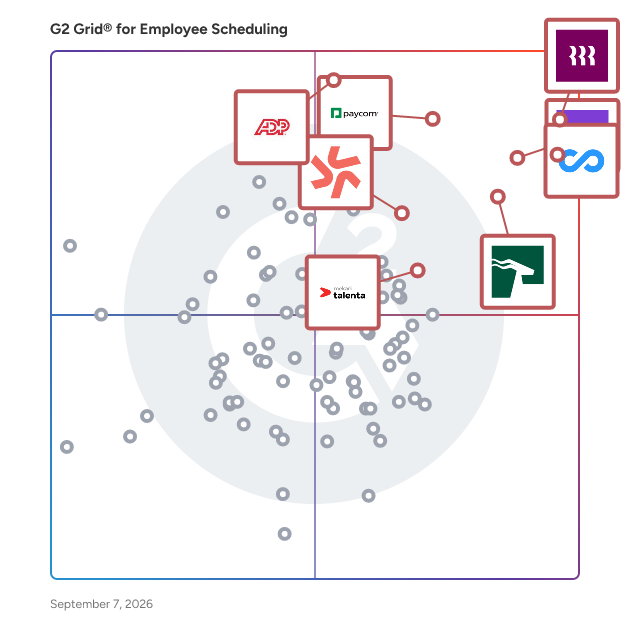
- **Leader:** [Rippling](https://www.g2.com/products/rippling/reviews)
- **Highest Performer:** [Buddy Punch](https://www.g2.com/products/buddy-punch/reviews)
- **Easiest to Use:** [HROne](https://www.g2.com/products/uneecops-hrone/reviews)
- **Top Trending:** [HROne](https://www.g2.com/products/uneecops-hrone/reviews)
- **Best Free Software:** [Connecteam](https://www.g2.com/products/connecteam/reviews)

  
## Which Type of Employee Scheduling Software Tools Are You Looking For?
  - [Employee Scheduling Software](https://www.g2.com/categories/employee-scheduling-software) *(current)*
  - [Payroll Software](https://www.g2.com/categories/payroll)
  - [Workforce Management Software](https://www.g2.com/categories/workforce-management)
  - [Core HR Software](https://www.g2.com/categories/core-hr)
  - [Time Tracking Software](https://www.g2.com/categories/time-tracking-software)
  - [Onboarding Software](https://www.g2.com/categories/onboarding-software)
  - [Time &amp; Attendance Software](https://www.g2.com/categories/time-attendance)
  - [Absence Management Software](https://www.g2.com/categories/absence-management-software)

  
---

**Sponsored**

### Humanity Schedule by TCP

Humanity Schedule by TCP provides a flexible approach to employee scheduling, no matter where your teams work or what device they use. Humanity Schedule automates dynamic scheduling and shift planning to eliminate over-scheduling issues and staffing errors, reduces unexpected labor costs, and mitigates compliance concerns to create an efficient, stress-free scheduling experience for managers and employees alike.  With Humanity Schedule, you easily fill coverage gaps with AI-driven demand forecasting, avoid scheduling conflicts with adaptive scheduling capabilities, and eliminate manual tasks and overspending — all in one solution that ensures compliance and clarity for every employee.


[Visit website](https://www.g2.com/external_clickthroughs/record?secure%5Bad_program%5D=ppc&amp;secure%5Bad_slot%5D=category_product_list&amp;secure%5Bcategory_id%5D=1129&amp;secure%5Bdisplayable_resource_id%5D=1129&amp;secure%5Bdisplayable_resource_type%5D=Category&amp;secure%5Bmedium%5D=sponsored&amp;secure%5Bplacement_reason%5D=page_category&amp;secure%5Bplacement_resource_ids%5D%5B%5D=1129&amp;secure%5Bprioritized%5D=false&amp;secure%5Bproduct_id%5D=2917&amp;secure%5Bresource_id%5D=1129&amp;secure%5Bresource_type%5D=Category&amp;secure%5Bsource_type%5D=category_page&amp;secure%5Bsource_url%5D=https%3A%2F%2Fwww.g2.com%2Fcategories%2Femployee-scheduling-software%3Fpage%3D6&amp;secure%5Btoken%5D=bb895bcce04f1d186841b94ab86ec8adc30476de6a0c8f9c6a8d2f889126d705&amp;secure%5Burl%5D=https%3A%2F%2Ftcpsoftware.com%2Fproducts%2Fhumanity%2F%3Futm_source%3Dg2%26utm_medium%3Dppl&amp;secure%5Burl_type%5D=custom_url)

---

  
## Buyer Guide: Key Questions for Choosing Employee Scheduling Software Software
  ### What does Employee Scheduling do?
  When I explain employee scheduling software, I frame it as a system that helps businesses organize who works when, where, and in what role. These platforms bring shift planning, availability, time clocks, attendance, payroll connections, team communication, and mobile access into one workflow. Instead of managing schedules through spreadsheets, messages, or manual updates, teams can create, share, and adjust schedules while keeping managers and employees aligned.


  ### Why do businesses use Employee Scheduling?
  From the G2 reviewer patterns I evaluated, businesses use Employee Scheduling software because manual schedule work creates missed updates, payroll errors, unclear availability, and extra manager follow-up. Users want faster schedule creation, simpler shift changes, and a shared place for time-related work.

Common benefits reviewers highlight include:

- Easier shift planning and schedule updates.
- Less manual time spent on timesheets and payroll prep.
- Better communication between managers and employees.
- Clearer visibility into availability, attendance, and hours.
- Faster access through mobile apps.
- More organized records for labor, compliance, and reporting.


  ### Who uses Employee Scheduling primarily?
  I found that G2 reviewers most often come from roles responsible for people, shifts, operations, or time tracking:

- **Managers and supervisors** who build schedules and approve changes.
- **HR teams** that manage employee records, leave, and attendance.
- **Operations leaders** who need labor visibility across locations.
- **Payroll and finance users** who rely on accurate hours.
- **Owners and administrators** at small and mid-sized businesses.
- **Employees** who check schedules, clock in, request time off, or trade shifts.

Reviewer industry patterns point to hospitality, healthcare, retail, food and beverage, restaurants, construction, fitness, education, consumer services, nonprofits, and professional services.


  ### What types of Employee Scheduling should I consider?
  From the G2 feedback I evaluated, buyers should consider:

- **Shift scheduling tools** for creating schedules, handling availability, and managing swaps.
- **Time clock and attendance tools** for clock-ins, timesheets, breaks, and approvals.
- **Workforce management platforms** for labor planning, compliance, and reporting.
- **HR suites with scheduling** for teams that also need onboarding, payroll, and employee records.
- **Mobile-first team apps** for deskless employees who need schedule access and quick communication.


  ### What are the core features to look for in Employee Scheduling?
  G2 reviewer sentiment points to practical features that affect daily use:

- Employee availability, time-off requests, and shift swap controls that help teams reduce scheduling conflicts.
- Mobile access for schedule checks, alerts, and clock-ins that helps employees stay updated from anywhere.
- Time clock, attendance, and timesheet approval workflows that help connect scheduled hours with actual hours worked.
- Payroll and HR integrations that help reduce manual handoffs between scheduling, time tracking, and pay processes.
- Labor cost, hours, and attendance reports that help managers understand coverage, staffing costs, and workforce patterns.
- Team messaging and notification tools that help keep employees informed about changes, reminders, and open shifts.
- Multi-location or department support that helps growing teams manage schedules across different sites, roles, or groups.
- Easy setup, clear navigation, and responsive support that help teams adopt the software with fewer delays.


  ### What trends are shaping Employee Scheduling right now?
  I found several emerging patterns in G2 reviewer sentiment:

- **Connected workforce workflows** are bringing scheduling, time tracking, payroll, and team communication into one system.
- **Mobile-first scheduling** is becoming essential as employees need to check shifts, swap availability, and receive updates away from a desk.
- **Automation** is helping managers reduce manual work around reminders, approvals, recurring schedules, and shift changes.
- **Easier onboarding** is becoming a priority as buyers look for tools that employees and managers can adopt quickly.
- **Labor visibility and reporting** are helping growing teams understand coverage, hours, costs, and staffing patterns.
- **Compliance support** is becoming more important for teams managing labor rules, attendance policies, and multi-location scheduling.


  ### How should I choose Employee Scheduling?
  For me, the strongest employee scheduling software is the kind that reduces schedule confusion without adding unnecessary admin work. When shift planning, mobile access, payroll integrations, reporting, availability, and team communication align with the way employees work, employee scheduling software becomes a dependable system for keeping schedules clear and teams covered.


---

  ## What Are the Top-Rated Employee Scheduling Software Products in 2026?
### 1. [Rippling](https://www.g2.com/products/rippling/reviews)
  **Average Rating:** 4.8/5.0
  **Total Reviews:** 11,046
  **Why buyers love it?:** Rippling came through as an all-in-one workforce platform in the feedback I evaluated. When I reviewed G2 sentiment, users highlight the user-friendly interface, easy navigation, payroll automation, onboarding, and benefits management. Reviewers often connect it with reducing manual HR work and keeping employee-related processes in one system. I found that it fits teams that want scheduling connected to broader HR and payroll workflows. Users also mention mobile app limitations, frequent interface changes, reporting difficulties, and leave request friction.


### What Do G2 Reviewers Say About Rippling?
*AI-generated summary from verified user reviews*

**Pros:**

- Users appreciate the **ease of use** of Rippling, with one login simplifying access to multiple tools and information.
- Users appreciate the **intuitive interface** of Rippling, finding it streamlined and user-friendly for various functionalities.
- Users love the **simple navigation** of Rippling, enjoying easy access to essential features with efficiency.
- Users appreciate the **user-friendly interface** of Rippling, noting its easy navigation and helpful search bar feature.
- Users enjoy the **easy access** to features like Clock in/out and payslips, enhancing workflow efficiency.

**Cons:**

- Users find **reporting and analytics challenging** , requiring excessive setup and struggling with app inconsistencies and support delays.
- Users find Rippling to be **not user-friendly** , with slow loading times and a complicated reporting process.
- Users find the **learning curve challenging** due to the complexity of Rippling&#39;s many powerful features.
- Users find Rippling has **limited features** , particularly feeling the design and access functionality could be improved.
- Users identify **improvement needed** for Rippling due to slow loading times and complicated processes for leave and reviews.

#### Key Features
  - Expense Management
  - Integration APIs
  - Approvals
  - Tax Calculation
  - Time Tracking Integration
  #### What Are Recent G2 Reviews of Rippling?

**"[Rippling Streamlines HR &amp; IT with Easy Automation and an All-in-One Platform](https://www.g2.com/survey_responses/rippling-review-12797179)"**

**Rating:** 5.0/5.0 stars
*— Kevin D.*

[Read full review](https://www.g2.com/survey_responses/rippling-review-12797179)

---

**"[Efficiency in One Platform](https://www.g2.com/survey_responses/rippling-review-12446437)"**

**Rating:** 5.0/5.0 stars
*— Carmina O.*

[Read full review](https://www.g2.com/survey_responses/rippling-review-12446437)

---

  #### What Are G2 Users Discussing About Rippling?

- [How is Rippling innovating in the field of HR and IT management for businesses?](https://www.g2.com/discussions/how-is-rippling-innovating-in-the-field-of-hr-and-it-management-for-businesses) - 5 comments, 6 upvotes
- [What is Rippling used for?](https://www.g2.com/discussions/what-is-rippling-used-for) - 6 comments, 3 upvotes
### 2. [Connecteam](https://www.g2.com/products/connecteam/reviews)
  **Average Rating:** 4.6/5.0
  **Total Reviews:** 3,487
  **Why buyers love it?:** Connecteam stood out for teams that manage employees away from a desk. From the reviewer patterns I evaluated, users highlight its mobile-first design, centralized features, user-friendly interface, and convenience for on-the-go teams. Reviewers often connect it with scheduling, communication, time tracking, and operational coordination in one platform. I found that it fits businesses that need staff to access schedules and updates from mobile devices. Users also mention pricing concerns, limited advanced features for smaller teams, occasional app lag, and requests for more customization.


### What Do G2 Reviewers Say About Connecteam?
*AI-generated summary from verified user reviews*

**Pros:**

- Users value the **ease of use** of Connecteam, finding it intuitive and simple for staff to learn and navigate.
- Users appreciate the **easy access to communication and scheduling** with Connecteam, enhancing team collaboration and efficiency.
- Users appreciate the **customizable scheduling feature** of Connecteam, enhancing organization and improving team accountability effectively.
- Users love the **effortless team communication** and scheduling features in Connecteam, enhancing collaboration and efficiency.
- Users find Connecteam&#39;s **user-friendly interface** enhances organization and communication, ensuring effective staff management.

**Cons:**

- Users note the **missing features** in Connecteam, expressing a desire for better templates and improved admin organization.
- Users find **limited features** in Connecteam, wishing for more customization and improved organization for a better experience.
- Users struggle with **schedule-related difficulties** , including limited viewing options and glitches in the calendar function.
- Users feel that **improvement is needed** in notification visibility and the organization of admin features for better usability.
- Users find Connecteam **not user-friendly** , facing challenges with corrections and navigating the interface efficiently.

#### Key Features
  - Reporting
  - Time Tracking
  - Automated Reminders
  - Self-Service Capabilities
  - Dashboards &amp; Reporting
  #### What Are Recent G2 Reviews of Connecteam?

**"[Keeps Clinic Work and Team Coordination Perfectly Organized](https://www.g2.com/survey_responses/connecteam-review-12423368)"**

**Rating:** 4.5/5.0 stars
*— Ishan S.*

[Read full review](https://www.g2.com/survey_responses/connecteam-review-12423368)

---

**"[Connecteam Streamlines Field Staff Management with Real-Time Tasks &amp; Attendance](https://www.g2.com/survey_responses/connecteam-review-12283928)"**

**Rating:** 4.0/5.0 stars
*— Subham A.*

[Read full review](https://www.g2.com/survey_responses/connecteam-review-12283928)

---

  #### What Are G2 Users Discussing About Connecteam?

- [Is Connecteam secure?](https://www.g2.com/discussions/is-connecteam-secure) - 2 comments
- [How do you use Connecteam?](https://www.g2.com/discussions/how-do-you-use-connecteam) - 2 comments
- [Is Connecteam really free?](https://www.g2.com/discussions/is-connecteam-really-free)
### 3. [HROne](https://www.g2.com/products/uneecops-hrone/reviews)
  **Average Rating:** 4.8/5.0
  **Total Reviews:** 2,050
  **Why buyers love it?:** HROne showed a clear pattern around consolidated HR work. When I reviewed G2 feedback, users highlight having HR tasks in one place, ease of use, attendance tracking, payroll processing, and process automation. Reviewers often connect it with simplifying HR administration for employee records, attendance, and pay-related workflows. I found that it fits teams that want scheduling and attendance tied to a broader HCM suite. Users also mention limited customization, restrictions around deleting data, third-party integration issues, and occasional performance concerns.


### What Do G2 Reviewers Say About HROne?
*AI-generated summary from verified user reviews*

**Pros:**

- Users appreciate the **ease of use** of HROne, highlighting its intuitive interface and efficient task management features.
- Users find the **supportive help during payroll** from HROne invaluable, significantly improving efficiency and productivity.
- Users appreciate the **efficient attendance management** of HROne, streamlining processes and saving valuable time.
- Users praise HROne for its **efficient attendance tracking** and time-saving automation features, enhancing HR management.
- Users value the **easy-to-operate payroll system** of HROne, which streamlines processes and saves time.

**Cons:**

- Users find HROne lacking in **missing features** , noting the need for more reports and specific modules like timesheets.
- Users find the **limited features** of HROne restrictive, desiring more customization and functionality enhancements.
- Users experience **slow loading** times with HROne, especially during attendance marking and user login processes.
- Users face **limited customization** with HROne, especially regarding report integration and biometric settings.
- Users report **slow performance** in HROne, especially during peak usage and when marking attendance, impacting productivity.

#### Key Features
  - Time, Attendance, and PTO
  - Integration APIs
  - Billable Time Rate Management
  - Project Accounting / Revenue Recognition
  - Workflow
  #### What Are Recent G2 Reviews of HROne?

**"[Feature-Rich and Cost-Effective HR Tool That Keeps Teams Engaged](https://www.g2.com/survey_responses/hrone-review-12468514)"**

**Rating:** 5.0/5.0 stars
*— Abhishek  K.*

[Read full review](https://www.g2.com/survey_responses/hrone-review-12468514)

---

**"[Efficient, User-Friendly HR Management with HROne](https://www.g2.com/survey_responses/hrone-review-12781485)"**

**Rating:** 4.0/5.0 stars
*— Pratyush S.*

[Read full review](https://www.g2.com/survey_responses/hrone-review-12781485)

---

  #### What Are G2 Users Discussing About HROne?

- [What does Hr-One do?](https://www.g2.com/discussions/what-does-hr-one-do) - 2 comments
- [How do I use HR one app?](https://www.g2.com/discussions/how-do-i-use-hr-one-app) - 2 comments
- [What software is used in HR?](https://www.g2.com/discussions/what-software-is-used-in-hr) - 2 comments
### 4. [Homebase](https://www.g2.com/products/homebase/reviews)
  **Average Rating:** 4.5/5.0
  **Total Reviews:** 445
  **Why buyers love it?:** Homebase appeared strongest in feedback from small businesses with hourly teams. From the G2 sentiment I evaluated, reviewers highlight easy setup, a user-friendly interface, scheduling, time tracking, and communication tools. Users often connect it with team coordination for restaurants, food service, and shift-based operations. I found that it fits businesses that need a simple way to create schedules, track time, and keep staff informed. Reviewers also mention glitches, difficulty finding specific features, mobile app limitations, and integration challenges.


### What Do G2 Reviewers Say About Homebase?
*AI-generated summary from verified user reviews*

**Pros:**

- Users find **ease of use** in Homebase for team communication, scheduling, and time management efficiency.
- Users appreciate the **easy scheduling** in Homebase, simplifying shift swaps and time off requests for employees.
- Users appreciate the **effortless scheduling** of Homebase, enhancing team management and saving valuable time.
- Users appreciate the **real-time scheduling updates** in Homebase, enhancing visibility and ease of shift management.
- Users value the **time-saving features** of Homebase, streamlining scheduling and payroll processes with ease.

**Cons:**

- Users face **scheduling issues** with the app, including defaulting to past weeks and slow performance.
- Users find the **limited customization** options frustrating, impacting their overall experience with the Homebase app.
- Users find the **limited features** of the Homebase app hinder productivity and create inconsistencies in usability.
- Users note **missing features** in Homebase, such as limited HR options and calendar integration issues that frustrate experience.
- Users report **glitches in shift management** causing issues with clocking in, clocking out, and schedule alignment.

#### Key Features
  - User, Role, and Access Management
  - Time &amp; Attendance Tracking
  - Process Automation
  - Data Collection
  - Schedule Management
  #### What Are Recent G2 Reviews of Homebase?

**"[Seamless Scheduling and Payroll Management with a Minor App Glitch](https://www.g2.com/survey_responses/homebase-review-12755937)"**

**Rating:** 5.0/5.0 stars
*— Kathleen G.*

[Read full review](https://www.g2.com/survey_responses/homebase-review-12755937)

---

**"[Homebase Makes Scheduling, Time Tracking, and Team Communication Effortless](https://www.g2.com/survey_responses/homebase-review-12774531)"**

**Rating:** 5.0/5.0 stars
*— Allegra A.*

[Read full review](https://www.g2.com/survey_responses/homebase-review-12774531)

---

  #### What Are G2 Users Discussing About Homebase?

- [Is Homebase really free?](https://www.g2.com/discussions/is-homebase-really-free) - 2 comments
- [How does Homebase app work?](https://www.g2.com/discussions/how-does-homebase-app-work) - 1 comment
- [Is Homebase legit?](https://www.g2.com/discussions/is-homebase-legit) - 2 comments
### 5. [ADP Time and Labor Management](https://www.g2.com/products/adp-adp-time-and-labor-management/reviews)
  **Average Rating:** 4.4/5.0
  **Total Reviews:** 149
  **Why buyers love it?:** ADP Time and Labor Management appeared as a dedicated time and attendance tool in the review set. When I reviewed the available feedback, users connect it with collecting employee time, tracking labor activity, manager self-service, and rule-based time management. Reviewers also associate it with workforce oversight in mid-market and enterprise environments. I found that it fits teams that need employee time tracking tied to established HR and payroll processes. The available feedback was more limited than for several other products, so I kept the description focused on the supported time and labor workflow.


### What Do G2 Reviewers Say About ADP Time and Labor Management?
*AI-generated summary from verified user reviews*

**Pros:**

- Users appreciate the **ease of use** of ADP Time and Labor Management, highlighting its intuitive design and mobile accessibility.
- Users value the **easy access to pay stubs and financial documents** provided by ADP Time and Labor Management.
- Users value the **efficient time tracking** within ADP, appreciating the seamless integration with various features in one portal.
- Users appreciate the **reliable and structured tracking** of time and attendance in ADP Time and Labor Management.
- Users value the **time-saving automation** of ADP Time and Labor Management, streamlining payroll and attendance management effortlessly.

**Cons:**

- Users find the **complexity** of ADP Time and Labor Management challenging, often struggling with navigation and usability issues.
- Users experience **login problems** with ADP Time and Labor Management, facing difficulties and delays in accessing the system.
- Users find the **interface design outdated** , making it less intuitive compared to newer workforce management tools.
- Users feel that the **interface and usability need improvement** to enhance navigation and support modern workforce demands.
- Users find ADP Time and Labor Management to be **expensive** , especially compared to standalone time-tracking solutions.

#### Key Features
  - Reporting
  - Automation
  - Integrations
  #### What Are Recent G2 Reviews of ADP Time and Labor Management?

**"[Efficient and reliable solution for time and work management](https://www.g2.com/survey_responses/adp-time-and-labor-management-review-12515197)"**

**Rating:** 5.0/5.0 stars
*— Shalini R.*

[Read full review](https://www.g2.com/survey_responses/adp-time-and-labor-management-review-12515197)

---

**"[Accurate, Easy-to-Use Time and Labor Tool](https://www.g2.com/survey_responses/adp-time-and-labor-management-review-12702687)"**

**Rating:** 5.0/5.0 stars
*— Jude Patrick D.*

[Read full review](https://www.g2.com/survey_responses/adp-time-and-labor-management-review-12702687)

---

  #### What Are G2 Users Discussing About ADP Time and Labor Management?

- [What is ADP Time and Labor Management used for?](https://www.g2.com/discussions/what-is-adp-time-and-labor-management-used-for)
### 6. [Paycom](https://www.g2.com/products/paycom/reviews)
  **Average Rating:** 4.5/5.0
  **Total Reviews:** 4,273
  **Why buyers love it?:** Paycom registered as a broad HR and payroll platform with scheduling-adjacent time access. When I assessed reviewer feedback, users highlight ease of use, paycheck transparency, centralized employee information, and convenient clock-in and clock-out functions. Reviewers often connect it with tracking work information and improving employee access to HR and pay details. I found that it fits organizations that want time management tied closely to payroll and employee self-service. Users also mention an initial learning curve, slow network periods, confusion around punch corrections, and limited advance paycheck options.


### What Do G2 Reviewers Say About Paycom?
*AI-generated summary from verified user reviews*

**Pros:**

- Users love the **ease of use** of Paycom, praising its straightforward navigation and employee-friendly applications.
- Users appreciate Paycom for its **user-friendly time management software** , enhancing efficiency and reducing payroll workload significantly.
- Users value the **efficient payroll management** of Paycom, which streamlines processes and enhances employee autonomy.
- Users praise the **responsive customer support** of Paycom, enhancing their overall efficiency and satisfaction.
- Users appreciate how **simple Paycom is to use** , enhancing employee satisfaction and streamlining HR processes.

**Cons:**

- Users find the **learning curve challenging** , often taking longer to navigate Paycom’s complex interface and setup.
- Users express frustration with **poor customer support** from Paycom, highlighting unresponsiveness and lack of effective solutions.
- Users find that Paycom&#39;s **limited features** hinder functionality and fall short compared to competitors.
- Users find Paycom **not intuitive** , causing challenges in navigation and task completion before it becomes easier to use.
- Users find Paycom **not user-friendly** , often struggling to navigate and complete tasks like submitting PTO requests.

#### Key Features
  - User, Role, and Access Management
  - Time Off Accrual
  - Tax Calculation
  - Time Tracking Integration
  - E-Forms
  #### What Are Recent G2 Reviews of Paycom?

**"[Comprehensive, Easy-to-Access HR Solution with Helpful AI Support](https://www.g2.com/survey_responses/paycom-review-12625703)"**

**Rating:** 4.5/5.0 stars
*— Jeremy H.*

[Read full review](https://www.g2.com/survey_responses/paycom-review-12625703)

---

**"[Accurate Time Tracking with Clear PTO and Payroll Visibility](https://www.g2.com/survey_responses/paycom-review-12702665)"**

**Rating:** 5.0/5.0 stars
*— Christine G.*

[Read full review](https://www.g2.com/survey_responses/paycom-review-12702665)

---

  #### What Are G2 Users Discussing About Paycom?

- [What is Paycom used for?](https://www.g2.com/discussions/what-is-paycom-used-for)
### 7. [Deputy](https://www.g2.com/products/deputy/reviews)
  **Average Rating:** 4.6/5.0
  **Total Reviews:** 645
  **Why buyers love it?:** Deputy showed a strong scheduling pattern for shift-based teams. From the reviewer sentiment I evaluated, users highlight the intuitive dashboard, schedule management, timecards, integrations, and reduced manual scheduling work. Reviewers often connect it with hospitality, retail, and other frontline operations that need clear shift coverage. I found that it fits businesses that need schedules, employee hours, and timecards managed together. Users also mention search bar lag, complexity for new users, and frustration with schedule loading or notifications.


### What Do G2 Reviewers Say About Deputy?
*AI-generated summary from verified user reviews*

**Pros:**

- Users find Deputy to be **easy to use** , appreciating its straightforward setup and mobile accessibility for shift management.
- Users value the **easy scheduling and visibility** of their shifts with Deputy, enhancing their work experience significantly.
- Users value the **ease of scheduling** with Deputy, making it simple to manage shifts and track availability.
- Users find Deputy&#39;s **intuitive setup** and user-friendly features significantly enhance their work organization and efficiency.
- Users appreciate the **intuitive interface** of Deputy, making shift management easy and enhancing their overall experience.

**Cons:**

- Users struggle with **scheduling issues** , including difficulty in finding available shifts and inconsistent name alignment.
- Users find **shift management cumbersome** due to login difficulties and confusing absence notifications that hinder their experience.
- Users experience **clocking issues** with Deputy, often facing slow loading and inaccurate time registrations that lead to frustration.
- Users express frustration over **missing features** and unreliable integrations, highlighting poor tech support as a major concern.
- Users experience **slow loading times** that lead to missed clock-ins and inconveniences during work hours.

#### Key Features
  - User, Role, and Access Management
  - Ease of Completing Timesheets
  - Labor Forecasting
  - Employee Leave Management
  - Compliance Monitoring
  #### What Are Recent G2 Reviews of Deputy?

**"[Seamless Scheduling, Multi-Business Support](https://www.g2.com/survey_responses/deputy-review-11854030)"**

**Rating:** 5.0/5.0 stars
*— Christina D.*

[Read full review](https://www.g2.com/survey_responses/deputy-review-11854030)

---

**"[Simple, User-Friendly Interface for Time-Off Requests and Weekly Timecards](https://www.g2.com/survey_responses/deputy-review-12630419)"**

**Rating:** 4.0/5.0 stars
*— Verified User in Automotive*

[Read full review](https://www.g2.com/survey_responses/deputy-review-12630419)

---

  #### What Are G2 Users Discussing About Deputy?

- [What is Deputy used for?](https://www.g2.com/discussions/what-is-deputy-used-for) - 1 comment
- [How do I change my availability on deputy?](https://www.g2.com/discussions/how-do-i-change-my-availability-on-deputy)
- [How much does Deputy app cost?](https://www.g2.com/discussions/how-much-does-deputy-app-cost)
### 8. [Hubstaff](https://www.g2.com/products/hubstaff/reviews)
  **Average Rating:** 4.4/5.0
  **Total Reviews:** 2,217
  **Why buyers love it?:** Hubstaff came through as a time tracking platform for distributed work. From the reviewer patterns I evaluated, users highlight easy setup, a user-friendly interface, transparency, team performance visibility, and task assignment support. Reviewers often connect it with tracking hours, managing remote teams, and understanding work activity. I found that it fits teams that need schedule-related visibility through time tracking and productivity data. Users also mention issues with newer time and activity reports, missing HRIS functions, timing mismatches, idle-time sensitivity, and mobile app limitations.


### What Do G2 Reviewers Say About Hubstaff?
*AI-generated summary from verified user reviews*

**Pros:**

- Users find Hubstaff&#39;s **time-tracking features** convenient and reliable, making it easy to monitor work hours seamlessly.
- Users find Hubstaff **extremely user-friendly** , making time tracking and management of remote teams effortless and efficient.
- Users admire the **tracking ease** of Hubstaff, appreciating its reliable time management and accuracy in monitoring work.
- Users find Hubstaff&#39;s **time-saving capabilities** invaluable, enhancing their productivity and efficiency in daily tasks.
- Users appreciate the **accurate time tracking** of Hubstaff, finding it intuitive and easy to enhance productivity.

**Cons:**

- Users experience **inaccurate tracking** with Hubstaff, leading to confusion and interruptions during multitasking.
- Users report **time tracking issues** , causing confusion about app measurements and inconsistent timer functionality during multitasking.
- Users report **timer inconsistencies** and bugs in Hubstaff, affecting project tracking and user experience negatively.
- Users highlight **limited features** in Hubstaff, affecting project management and increasing costs due to add-ons.
- Users find Hubstaff lacking in **essential features** , limiting its effectiveness beyond basic hour tracking and causing frustration.

#### Key Features
  - Internationalization
  - Invoice Creation and Delivery
  - Time Tracking
  - Automated Reminders
  - Mobile
  #### What Are Recent G2 Reviews of Hubstaff?

**"[Empowers Remote Team Management with Ease](https://www.g2.com/survey_responses/hubstaff-review-12669568)"**

**Rating:** 5.0/5.0 stars
*— Morissa f.*

[Read full review](https://www.g2.com/survey_responses/hubstaff-review-12669568)

---

**"[Transparent Developer Time Tracking with Strong UI/UX and Better On-Time Delivery tasks](https://www.g2.com/survey_responses/hubstaff-review-12657388)"**

**Rating:** 4.0/5.0 stars
*— Francisco Javier H.*

[Read full review](https://www.g2.com/survey_responses/hubstaff-review-12657388)

---

  #### What Are G2 Users Discussing About Hubstaff?

- [What is Hubstaff used for?](https://www.g2.com/discussions/hubstaff-what-is-hubstaff-used-for) - 4 comments
- [How do you use the Hubstaff app?](https://www.g2.com/discussions/how-do-you-use-the-hubstaff-app)
- [Is Hubstaff legal?](https://www.g2.com/discussions/is-hubstaff-legal) - 5 comments, 2 upvotes
### 9. [Viventium Software](https://www.g2.com/products/viventium-software/reviews)
  **Average Rating:** 4.7/5.0
  **Total Reviews:** 77
  **Why buyers love it?:** Viventium Software stood out where workforce administration connects with healthcare operations. When I reviewed G2 feedback, users highlight the user-friendly interface, easy integration, responsive support, automated reminders, real-time reporting, and employee self-service. Reviewers often connect it with saving time, reducing errors, and supporting HR or payroll processes. I found that it fits healthcare-oriented teams that need workforce tools supported by service and reporting. Users also mention some limited features, initial learning time, navigation difficulty in settings or reports, and integration issues with other systems.


### What Do G2 Reviewers Say About Viventium Software?
*AI-generated summary from verified user reviews*

**Pros:**

- Users appreciate the **ease of use** of Viventium Software, highlighting its intuitive design and organization for payroll and HR tasks.
- Users appreciate the **excellent customer service** of Viventium Software, enhancing overall satisfaction and support availability.
- Users value the **excellent customer support** of Viventium Software, providing timely assistance and effective problem resolution.
- Users appreciate the **ease of completing payroll** with Viventium Software, enhanced by excellent support and customizable features.
- Users praise Viventium Software for its **efficiency** , highlighting time-saving features and streamlined HR processes.

**Cons:**

- Users face **onboarding issues** with Viventium, such as account creation and difficulties completing hiring processes.
- Users find the **poor customer support** of Viventium Software to be time-consuming and frustrating during their experience.
- Users report **poor onboarding experiences** due to glitches and inability to complete the hiring process smoothly.
- Users report experiencing **glitches with the onboarding module** in Viventium, complicating the hiring process.
- Users face **deletion difficulties** , finding it hard to manage documents and access needed adjustments post-onboarding.
  #### What Are Recent G2 Reviews of Viventium Software?

**"[has made our payroll  and compliance tasks faster, easier, and more accurate saving time.](https://www.g2.com/survey_responses/viventium-software-review-11401924)"**

**Rating:** 4.0/5.0 stars
*— Ahmed J.*

[Read full review](https://www.g2.com/survey_responses/viventium-software-review-11401924)

---

**"[User-Friendly Payroll Software with Room for Support Improvement](https://www.g2.com/survey_responses/viventium-software-review-8669656)"**

**Rating:** 4.5/5.0 stars
*— Zack T.*

[Read full review](https://www.g2.com/survey_responses/viventium-software-review-8669656)

---

### 10. [Mekari Talenta](https://www.g2.com/products/mekari-talenta/reviews)
  **Average Rating:** 4.8/5.0
  **Total Reviews:** 22
  **Why buyers love it?:** Mekari Talenta appeared in the dataset as an HR operations platform with scheduling-adjacent workforce use. When I reviewed the available feedback, the supported pattern centered on automating administrative HR processes and simplifying employee management tasks. Reviewers connect it with mid-market and small-business workforce administration. I found that it fits teams that want employee scheduling connected to broader HR operations. The available review detail was limited, so I avoided adding unsupported claims about specific scheduling features.


### What Do G2 Reviewers Say About Mekari Talenta?
*AI-generated summary from verified user reviews*

**Pros:**

- Users find Mekari Talenta&#39;s **user-friendly interface** enhances productivity and simplifies team management effectively.
- Users appreciate how Mekari Talenta&#39;s **attendance management** simplifies HR processes and saves time and effort efficiently.
- Users appreciate the **efficient attendance tracking** in Mekari Talenta, simplifying payroll processes and saving valuable time.
- Users praise the **efficiency** of Mekari Talenta in managing payroll and attendance seamlessly and accurately.
- Users value the **complete HR solution** of Mekari Talenta, which enhances productivity and simplifies reporting for teams.

**Cons:**

- Users find the **slow loading** times frustrating, especially during peak hours and with geotag updates.
- Users face **attendance issues** with limited customization options, affecting project insights and notification effectiveness.
- Users report **inaccurate tracking** issues with Mekari Talenta, complicating remote clock-ins and location updates.
- Users find **limited customization** in Mekari Talenta, leading to delays and extra manual work for payroll and reports.
- Users desire **missing features** in Mekari Talenta, such as deeper project insights and smarter notifications.

#### Key Features
  - Organization Management
  - Customization 
  - AI Text Summarization
  #### What Are Recent G2 Reviews of Mekari Talenta?

**"[Reliable Compliance and Seamless Attendance-to-Payroll Integration](https://www.g2.com/survey_responses/mekari-talenta-review-12606077)"**

**Rating:** 5.0/5.0 stars
*— padmayoni l.*

[Read full review](https://www.g2.com/survey_responses/mekari-talenta-review-12606077)

---

**"[Talenta Streamlined Our Attendance with Seamless Migration and Outstanding Performance](https://www.g2.com/survey_responses/mekari-talenta-review-12761527)"**

**Rating:** 5.0/5.0 stars
*— Verified User in Education Management*

[Read full review](https://www.g2.com/survey_responses/mekari-talenta-review-12761527)

---

### 11. [Workforce.com](https://www.g2.com/products/workforce-com/reviews)
  **Average Rating:** 4.5/5.0
  **Total Reviews:** 117
  **Why buyers love it?:** Workforce.com came through as a workforce platform for hourly and shift-based teams. From the reviewer sentiment I evaluated, users highlight versatility, control, centralized HR functions, and strong implementation support. Reviewers often connect it with scheduling, time tracking, HR, and payroll processes in one system. I found that it fits organizations that need labor operations connected across scheduling, timesheets, and employee records. Users also mention a less user-friendly chat function, timesheet accuracy issues, and document management challenges for individual staff records.


### What Do G2 Reviewers Say About Workforce.com?
*AI-generated summary from verified user reviews*

**Pros:**

- Users appreciate the **ease of use** of Workforce.com, finding it intuitive and effective for managing workforce tasks seamlessly.
- Users value the **helpfulness of the staff** at Workforce.com, who provide excellent support and adapt to customer needs.
- Users commend Workforce.com for its **excellent customer support** and seamless navigation, enhancing overall user experience.
- Users praise the **easy setup process** of Workforce.com, highlighting exceptional support that makes transitioning effortless.
- Users value the **time-saving capabilities** of Workforce.com, streamlining scheduling and HR tasks for enhanced efficiency.

**Cons:**

- Users criticize Workforce.com for its **not user-friendly interface** , finding navigation and setup to be quite challenging.
- Users find the **setup process complicated** and time-consuming, often struggling with non-intuitive elements and navigation.
- Users find the **difficult navigation** of Workforce.com overwhelming, impacting ease of use and setup despite prior experience.
- Users find the **difficult setup** of Workforce.com to be complicated and time-consuming, requiring additional assistance.
- Users find the **learning curve challenging** , citing complexity and a lack of intuitive navigation for initial setup.

#### Key Features
  - Process Automation
  - Dashboards &amp; Reporting
  - Schedule Creation Tools
  - Regulations Enforcement
  - Dashboard
  #### What Are Recent G2 Reviews of Workforce.com?

**"[Workforce transformed our operations, efficient, accurate, and staff-friendly!](https://www.g2.com/survey_responses/workforce-com-review-11972950)"**

**Rating:** 5.0/5.0 stars
*— J G.*

[Read full review](https://www.g2.com/survey_responses/workforce-com-review-11972950)

---

**"[Best product has seen so far and amazing customer service](https://www.g2.com/survey_responses/workforce-com-review-12222891)"**

**Rating:** 5.0/5.0 stars
*— Aziz H.*

[Read full review](https://www.g2.com/survey_responses/workforce-com-review-12222891)

---

  #### What Are G2 Users Discussing About Workforce.com?

- [What is Workforce.com used for?](https://www.g2.com/discussions/what-is-workforce-com-used-for)
### 12. [WorkJam](https://www.g2.com/products/workjam/reviews)
  **Average Rating:** 4.5/5.0
  **Total Reviews:** 58
  **Why buyers love it?:** WorkJam surfaced as a frontline workplace tool in the feedback I evaluated. When I reviewed G2 sentiment, users highlight the user-friendly interface, streamlined work processes, customer support, scheduling, task management, learning, and communication. Reviewers often connect it with retail teams that need employees to access work information in one place. I found that it fits organizations that want scheduling paired with frontline communication and task execution. Users also mention module-based feature limits, messaging gaps, and slow reporting with bulky outputs.


### What Do G2 Reviewers Say About WorkJam?
*AI-generated summary from verified user reviews*

**Pros:**

- Users appreciate the **ease of use** of WorkJam, making it simple to stay organized and engaged all day.
- Users find **communication efficiency** in WorkJam enhances engagement, streamlines operations, and fosters a connected workforce.
- Users value the **effective communication** tools of WorkJam, enhancing collaboration and streamlining task management effortlessly.
- Users love the **easy scheduling and clocking features** of WorkJam, enhancing efficiency and communication in their work routines.
- Users highly value the **intuitive interface** of WorkJam, appreciating its ease of use and seamless integration.

**Cons:**

- Users experience **app glitches** with loading and training videos, affecting their overall usability and functionality.
- Users face **scheduling issues** with WorkJam, as the in-app scheduler lacks ease of use for their business needs.
- Users experience **integration issues** with WorkJam, particularly finding it cumbersome to connect with other existing systems.
- Users experience a **challenging learning curve** with WorkJam, finding some features complex and integration efforts demanding.
- Users find the **complexity** of WorkJam challenging, noting a learning curve and integration difficulties during initial use.

#### Key Features
  - Customization 
  - Employee Pulse Surveys
  - Goal and Challenge Creation
  - News Feed
  - Employee Generated Content
  #### What Are Recent G2 Reviews of WorkJam?

**"[WorkJam Improved Corporate/Field Communication, but has not been a One Stop Shop for us](https://www.g2.com/survey_responses/workjam-review-12791997)"**

**Rating:** 4.0/5.0 stars
*— Verified User in Retail*

[Read full review](https://www.g2.com/survey_responses/workjam-review-12791997)

---

**"[Centralizes Communication Efficiently, Needs Messaging Enhancements](https://www.g2.com/survey_responses/workjam-review-12562357)"**

**Rating:** 4.0/5.0 stars
*— Jeff K.*

[Read full review](https://www.g2.com/survey_responses/workjam-review-12562357)

---

  #### What Are G2 Users Discussing About WorkJam?

- [Who owns WorkJam?](https://www.g2.com/discussions/who-owns-workjam)
- [How much does WorkJam cost?](https://www.g2.com/discussions/how-much-does-workjam-cost)
- [How does work jam work?](https://www.g2.com/discussions/how-does-work-jam-work)
### 13. [Zoho Workerly](https://www.g2.com/products/zoho-workerly/reviews)
  **Average Rating:** 4.4/5.0
  **Total Reviews:** 63
  **Why buyers love it?:** Zoho Workerly stood apart as a tool for staffing and recruiting workflows. From the reviewer data I evaluated, users connect it with temporary staffing operations, schedule coordination, and workforce assignment management. Reviewers associate the product with agencies that need to organize workers and job requirements in one cloud-based system. I found that it fits teams that need scheduling built around temporary staff placement.


### What Do G2 Reviewers Say About Zoho Workerly?
*AI-generated summary from verified user reviews*

**Pros:**

- Users appreciate the **ease of use** of Zoho Workerly, enjoying its simple interface and seamless integration with other apps.
- Users value the **time-saving integration** of Zoho Workerly, streamlining workflows and reducing manual tasks significantly.
- Users appreciate the **ease of scheduling** with Zoho Workerly, benefiting from efficient management of temporary staff.
- Users value the **seamless automation** features of Zoho Workerly, enhancing efficiency and reducing manual tasks.
- Users appreciate the **easy integrations** of Zoho Workerly, streamlining workflows and enhancing efficiency across platforms.

**Cons:**

- Users find **customization options limited** , with advanced features requiring extra setup and often leading to frustration.
- Users find the **complexity** of Zoho Workerly overwhelming, hindering efficiency and creating a fragmented experience.
- Users feel that **improvement is needed** in mobile compatibility, customer support, and app integration for smoother workflows.
- Users find the **mobile app experience lacking** , with issues like limited features and performance compared to desktop.
- Users find the **mobile accessibility lacking** due to limited features and performance compared to the desktop version.

#### Key Features
  - Reporting
  - Automation
  - Integrations
  #### What Are Recent G2 Reviews of Zoho Workerly?

**"[Simplifies Temporary Staffing with an All-in-One, Well-Organized Platform](https://www.g2.com/survey_responses/zoho-workerly-review-12211556)"**

**Rating:** 5.0/5.0 stars
*— Jishan P.*

[Read full review](https://www.g2.com/survey_responses/zoho-workerly-review-12211556)

---

**"[Easy Setup, Smooth Workforce Management, and Seamless Zoho Integrations](https://www.g2.com/survey_responses/zoho-workerly-review-12221621)"**

**Rating:** 5.0/5.0 stars
*— Priya S.*

[Read full review](https://www.g2.com/survey_responses/zoho-workerly-review-12221621)

---

  #### What Are G2 Users Discussing About Zoho Workerly?

- [What is Zoho Workerly used for?](https://www.g2.com/discussions/what-is-zoho-workerly-used-for)
### 14. [Humanity Schedule by TCP](https://www.g2.com/products/humanity-schedule-by-tcp/reviews)
  **Average Rating:** 4.3/5.0
  **Total Reviews:** 1,053
  **Product Description:** Humanity Schedule by TCP provides a flexible approach to employee scheduling, no matter where your teams work or what device they use. Humanity Schedule automates dynamic scheduling and shift planning to eliminate over-scheduling issues and staffing errors, reduces unexpected labor costs, and mitigates compliance concerns to create an efficient, stress-free scheduling experience for managers and employees alike.  With Humanity Schedule, you easily fill coverage gaps with AI-driven demand forecasting, avoid scheduling conflicts with adaptive scheduling capabilities, and eliminate manual tasks and overspending — all in one solution that ensures compliance and clarity for every employee.


### What Do G2 Reviewers Say About Humanity Schedule by TCP?
*AI-generated summary from verified user reviews*

**Pros:**

- Users appreciate the **ease of use** of Humanity Schedule, highlighting its intuitive design for new employees.
- Users find **Scheduling Ease** with Humanity Schedule effortless, saving time and ensuring team coordination.
- Users value the **effortless scheduling** of Humanity Schedule, finding it intuitive and time-saving for managing shifts.
- Users value the **ease of use** and quick updates for managing schedules effectively with Humanity Schedule by TCP.
- Users appreciate the **intuitive interface** of Humanity Schedule, finding it easy to read and use effectively.

**Cons:**

- Users face **scheduling issues** with Humanity Schedule, including reports not automating and new schedules disappearing.
- Users find the **learning curve challenging** , as new schedules can disappear and require navigation to reappear.
- Users note the **lack of integration features** with Dayforce/Ceridian, complicating scheduling and updates across systems.
- Users experience **slow loading times** with the Humanity Schedule app, impacting efficiency during bulk updates and approvals.
- Users find the **complexity of the system** challenging, particularly for novices trying to create and manage schedules.
  #### What Are Recent G2 Reviews of Humanity Schedule by TCP?

**"[Easy-to-View Scheduling That Keeps the Whole Team Connected](https://www.g2.com/survey_responses/humanity-schedule-by-tcp-review-12724270)"**

**Rating:** 4.0/5.0 stars
*— Suzette K.*

[Read full review](https://www.g2.com/survey_responses/humanity-schedule-by-tcp-review-12724270)

---

**"[The Backbone of Our Scheduling Workflow](https://www.g2.com/survey_responses/humanity-schedule-by-tcp-review-12516294)"**

**Rating:** 4.5/5.0 stars
*— Lorraine P.*

[Read full review](https://www.g2.com/survey_responses/humanity-schedule-by-tcp-review-12516294)

---

  #### What Are G2 Users Discussing About Humanity Schedule by TCP?

- [What is TCP Humanity Scheduling used for?](https://www.g2.com/discussions/what-is-tcp-humanity-scheduling-used-for)
- [How do you use humanity scheduling?](https://www.g2.com/discussions/how-do-you-use-humanity-scheduling) - 1 comment
- [How much does humanity cost?](https://www.g2.com/discussions/how-much-does-humanity-cost) - 1 comment
### 15. [OnShift](https://www.g2.com/products/onshift/reviews)
  **Average Rating:** 4.5/5.0
  **Total Reviews:** 40
  **Why buyers love it?:** OnShift appeared as a healthcare-focused workforce management platform in the review set. From the available feedback I evaluated, users connect it with scheduling and broader employee management for healthcare organizations. Reviewers associate the platform with hospital and healthcare environments where staff coordination and retention-related processes matter. I found that it fits teams that need scheduling tools aligned with healthcare workforce operations.


### What Do G2 Reviewers Say About OnShift?
*AI-generated summary from verified user reviews*

**Pros:**

- Users find OnShift&#39;s interface **very easy to use** , enhancing their experience with quick communication and helpful support.
- Users appreciate the **navigation ease** of OnShift, finding everything they need just a click away.
- Users find OnShift **exceptionally helpful** due to its ease of use and responsive customer support.
- Users value the **time-saving features** of OnShift, particularly its automated scheduling and easy communication on shifts.
- Users value the **easy-to-read reports** in OnShift, enhancing communication and schedule management for staff.

**Cons:**

- Users struggle with **notification issues** , as updates and shift requests often go unnoticed, causing frustration.
- Users report encountering **software bugs** that disrupt functionality, such as incorrect birthday year displays.
- Users find OnShift&#39;s **complex setup** challenging, particularly when customizing for larger organizations&#39; specific needs.
- Users express frustration over **data integration issues** with OnShift, particularly with inconsistent time clock synchronization.
- Users find **difficult customization** a challenge when implementing OnShift, particularly for larger organizations.

#### Key Features
  - Automated Scheduling
  - Employee Work Status
  #### What Are Recent G2 Reviews of OnShift?

**"[Easy to Use, Modern Features, and Quick, Helpful Support](https://www.g2.com/survey_responses/onshift-review-12160275)"**

**Rating:** 5.0/5.0 stars
*— Melissa M.*

[Read full review](https://www.g2.com/survey_responses/onshift-review-12160275)

---

**"[OnShift Review](https://www.g2.com/survey_responses/onshift-review-9062983)"**

**Rating:** 4.0/5.0 stars
*— Shawn B.*

[Read full review](https://www.g2.com/survey_responses/onshift-review-9062983)

---

  #### What Are G2 Users Discussing About OnShift?

- [How does OnShift wallet work?](https://www.g2.com/discussions/how-does-onshift-wallet-work) - 1 comment
- [How do I access OnShift?](https://www.g2.com/discussions/how-do-i-access-onshift) - 1 comment
- [What is OnShift app?](https://www.g2.com/discussions/what-is-onshift-app) - 1 comment
### 16. [Quinyx](https://www.g2.com/products/quinyx/reviews)
  **Average Rating:** 4.3/5.0
  **Total Reviews:** 496
  **Why buyers love it?:** Quinyx showed a strong pattern around frontline scheduling and shift oversight. When I reviewed G2 feedback, users highlight ease of use, a user-friendly interface, scheduling, shift management, work-hour tracking, and helpful support. Reviewers often connect it with retail and healthcare teams that need simpler coordination for shift-based employees. I found that it fits organizations that need scheduling and hours tracking across frontline teams. Users also mention bugs, crashes, automatic logouts, customization difficulty, and features that could feel more intuitive or robust.


### What Do G2 Reviewers Say About Quinyx?
*AI-generated summary from verified user reviews*

**Pros:**

- Users appreciate the **ease of use** of Quinyx, streamlining daily tasks and enhancing overall efficiency.
- Users appreciate the **intuitive design** of Quinyx, making scheduling effortless and enhancing overall efficiency.
- Users value Quinyx for its **everyday simplicity** , making it easy for employees and managers to use and manage.
- Users praise Quinyx for its **effective scheduling** , enabling smooth management of large teams and effortless time tracking.
- Users value the **navigation ease** of Quinyx, enjoying its intuitive interface for efficient task management.

**Cons:**

- Users find **scheduling issues** frustrating due to complexity and difficulty in accessing colleagues&#39; schedules.
- Users note the **limited features** of Quinyx, particularly regarding customization and the inflexibility of reporting options.
- Users feel that Quinyx lacks **customization options** and robust reporting, making certain features less accessible and slower to navigate.
- Users find Quinyx **not user-friendly** , struggling with complex logins and confusing hour-to-minute conversions.
- Users find Quinyx&#39;s interface **complex** , describing difficulties with navigation, login, and managing settings across units.

#### Key Features
  - User, Role, and Access Management
  - Labor Forecasting
  - Schedule Creation Tools
  - Reporting &amp; Dashboards
  - Employee Segmenting
  #### What Are Recent G2 Reviews of Quinyx?

**"[Effortlessly Manages Large Workforce](https://www.g2.com/survey_responses/quinyx-review-7184284)"**

**Rating:** 5.0/5.0 stars
*— Muhammad I.*

[Read full review](https://www.g2.com/survey_responses/quinyx-review-7184284)

---

**"[Effortless Scheduling, Precision Tracking](https://www.g2.com/survey_responses/quinyx-review-12442907)"**

**Rating:** 5.0/5.0 stars
*— Daniela F.*

[Read full review](https://www.g2.com/survey_responses/quinyx-review-12442907)

---

  #### What Are G2 Users Discussing About Quinyx?

- [What is Quinyx used for?](https://www.g2.com/discussions/quinyx-what-is-quinyx-used-for) - 1 comment
- [What is Quinyx used for?](https://www.g2.com/discussions/what-is-quinyx-used-for) - 1 comment
### 17. [When I Work](https://www.g2.com/products/when-i-work/reviews)
  **Average Rating:** 4.4/5.0
  **Total Reviews:** 376
  **Product Description:** When I Work is an easy way for businesses to schedule, track time and attendance, and communicate with their hourly employees. Put the schedule and time clock in every employee&#39;s pocket with free iOS and Android apps. Keep track of time off, employee availability, and manage shift swaps with just a few clicks. Integrate with your payroll provider to streamline the process and avoid human error. Get started with a 14-day free trial now.


### What Do G2 Reviewers Say About When I Work?
*AI-generated summary from verified user reviews*

**Pros:**

- Users appreciate the **ease of use** of When I Work, simplifying scheduling and communication for large teams.
- Users appreciate the **efficient scheduling** capabilities of When I Work, simplifying management for large teams.
- Users appreciate the **scheduling ease** of When I Work, enhancing workflow and communication among their large teams.
- Users appreciate the **time-saving integration** of When I Work, significantly reducing hours spent on scheduling and timesheets.
- Users love the **one-click auto-scheduling feature** of When I Work, drastically reducing scheduling time and enhancing organization.

**Cons:**

- Users often face **scheduling issues** such as overwhelming notifications and difficulties in managing shifts effectively.
- Users express frustration over **missing features** like advanced forecasting, customization options, and payroll integration.
- Users experience **software bugs** that hinder functionality, causing frustration and impacting overall efficiency with When I Work.
- Users find the **limited features** in When I Work hinder effective scheduling and advanced reporting capabilities.
- Users experience **notification issues** with When I Work, citing overwhelming alerts and occasional delays in receiving them.
  #### What Are Recent G2 Reviews of When I Work?

**"[Seamless Integration, Helpful Support, Needs Error Handling Improvements](https://www.g2.com/survey_responses/when-i-work-review-11014132)"**

**Rating:** 4.5/5.0 stars
*— Bree N.*

[Read full review](https://www.g2.com/survey_responses/when-i-work-review-11014132)

---

**"[Effortless Setup, Budget-Friendly but Needs Better Gusto Integration](https://www.g2.com/survey_responses/when-i-work-review-12759265)"**

**Rating:** 4.0/5.0 stars
*— Kurt G.*

[Read full review](https://www.g2.com/survey_responses/when-i-work-review-12759265)

---

  #### What Are G2 Users Discussing About When I Work?

- [What is When I Work used for?](https://www.g2.com/discussions/when-i-work-what-is-when-i-work-used-for)
- [What is When I Work used for?](https://www.g2.com/discussions/what-is-when-i-work-used-for) - 1 comment
- [How do you work as an employee?](https://www.g2.com/discussions/how-do-you-work-as-an-employee)
### 18. [Bizimply](https://www.g2.com/products/bizimply/reviews)
  **Average Rating:** 4.6/5.0
  **Total Reviews:** 216
  **Product Description:** Bizimply is built for shift-based teams, by people who’ve worked in them. We know the challenges of managing rotas, tracking time, and keeping labour costs under control - because we’ve lived them. That’s why we designed Bizimply to make the complex parts of running a hospitality, retail or healthcare business simple, intuitive, and stress-free. With real support from real people and tools shaped by real experience, Bizimply helps managers spend less time on admin and more time leading their teams. Business made simple. That’s Bizimply.


### What Do G2 Reviewers Say About Bizimply?
*AI-generated summary from verified user reviews*

**Pros:**

- Users appreciate the **ease of use** of Bizimply, finding it simplifies rota planning and attendance tracking effectively.
- Users value the **effortless scheduling** with Bizimply, making rota planning and payroll management seamless and efficient.
- Users love the **seamless attendance management** of Bizimply, enjoying the convenience of everything organized in one platform.
- Users appreciate the **seamless attendance tracking** of Bizimply, simplifying payroll and schedule management in one platform.
- Users benefit from **communication efficiency** with Bizimply, enjoying seamless updates and excellent customer support for team collaboration.

**Cons:**

- Users note the **limited features** of Bizimply may require workarounds and lack full functionality for their needs.
- Users find **missing features** in Bizimply, though the team is responsive to feedback and development needs.
- Users find the interface **cluttered and dated** , impacting usability and overall experience while using Bizimply.
- Users find **display issues** in Bizimply, noting it feels clumsy and could use improved functionality for a better experience.
- Users find the **lack of visibility on remaining holidays** frustrating, complicating holiday planning and approval processes.
  #### What Are Recent G2 Reviews of Bizimply?

**"[Effortless Roster Management with Bizimply](https://www.g2.com/survey_responses/bizimply-review-8765644)"**

**Rating:** 4.5/5.0 stars
*— Verified User in Restaurants*

[Read full review](https://www.g2.com/survey_responses/bizimply-review-8765644)

---

**"[Bizimply Brings Clarity and Peace of Mind to Staff Scheduling](https://www.g2.com/survey_responses/bizimply-review-12629768)"**

**Rating:** 4.5/5.0 stars
*— TOMAS C.*

[Read full review](https://www.g2.com/survey_responses/bizimply-review-12629768)

---

  #### What Are G2 Users Discussing About Bizimply?

- [What is Bizimply used for?](https://www.g2.com/discussions/what-is-bizimply-used-for) - 1 comment
### 19. [Dialpad Support](https://www.g2.com/products/dialpad-support/reviews)
  **Average Rating:** 4.4/5.0
  **Total Reviews:** 667
  **Product Description:** Dialpad elevates every conversation with the leading Ai-powered customer communications platform. Tap into real-time Ai insights to enhance and streamline every interaction. Dialpad Support modernizes your inbound contact center with Ai agents, assistants, real-time guidance, and coaching. Dialpad Sell is the outbound solution that guides your sales reps with real-time Ai coaching, automation, and insights. Together Dialpad Support and Dialpad Sell are the leading contact center solution. You can: - Call, message, and meet in a single app - Focus on the conversation with real-time call transcriptions, Ai summaries, and action items - Provide real-time guidance and instant knowledge to agents - Empower supervisors to coach and monitor teams with live sentiment and automated quality management - Deflect simple customer inquiries 24/7 with our Ai Agent


### What Do G2 Reviewers Say About Dialpad Support?
*AI-generated summary from verified user reviews*

**Pros:**

- Users appreciate the **helpful support** from Dialpad, which provides quick answers and effective assistance.
- Users value the **ease of use** of Dialpad Support, simplifying customer interactions and enhancing organization effortlessly.
- Users value the **prompt and efficient customer support** from Dialpad, appreciating quick resolutions and helpful follow-ups.
- Users appreciate the **extensive features** of Dialpad Support, enhancing productivity with AI capabilities and seamless communication.
- Users value the **comprehensive call recording** feature of Dialpad Support, enhancing training and performance through detailed transcriptions.

**Cons:**

- Users find the **poor customer support** of Dialpad Support to be time-consuming and frustrating during critical inquiries.
- Users experience **frequent call malfunctions** with Dialpad Support, leading to time-consuming and frustrating interactions.
- Users experience **dialer issues** with missed call notifications and difficulties identifying simultaneous calls, impacting usability.
- Users find that **long wait times** for Dialpad Support make resolving issues frustrating and time-consuming.
- Users find the **delayed support** from Dialpad frustrating, often leading to time-consuming resolutions for tech inquiries.
  #### What Are Recent G2 Reviews of Dialpad Support?

**"[Dialpad has many good features and overall it is a sound and comprehensive contact center solution.](https://www.g2.com/survey_responses/dialpad-support-review-12696144)"**

**Rating:** 4.0/5.0 stars

[Read full review](https://www.g2.com/survey_responses/dialpad-support-review-12696144)

---

**"[Smooth and reliable contact center solution](https://www.g2.com/survey_responses/dialpad-support-review-12694730)"**

**Rating:** 5.0/5.0 stars

[Read full review](https://www.g2.com/survey_responses/dialpad-support-review-12694730)

---

  #### What Are G2 Users Discussing About Dialpad Support?

- [What is Dialpad Sell used for?](https://www.g2.com/discussions/what-is-dialpad-sell-used-for)
- [What is Dialpad Contact Center used for?](https://www.g2.com/discussions/what-is-dialpad-contact-center-used-for) - 1 comment
### 20. [Buddy Punch](https://www.g2.com/products/buddy-punch/reviews)
  **Average Rating:** 4.8/5.0
  **Total Reviews:** 365
  **Product Description:** Buddy Punch is a cloud-based platform that transforms how businesses track employee time and manage schedules, bringing clarity and control to workforce operations across industries. This software helps organizations accurately track employee work hours, manage time-off requests, monitor attendance, and prepare data for payroll. Buddy Punch is built to accommodate remote, mobile, and in-office teams with tools that support accountability, transparency, and flexibility. Designed for small to mid-sized businesses across industries like construction, healthcare, retail, professional services, and more, Buddy Punch provides customizable features to support both hourly and salaried workers. Employees can clock in and out using web browsers or mobile apps on iOS and Android devices, while employers can oversee operations in real time with GPS tracking, geofencing, and customizable permissions. Buddy Punch features: \*Real-Time Tracking &amp; Visibility: Monitor who is on the clock, their current location, and their punch activity with GPS and geofencing tools. \*Payroll-Ready Reporting: Export timesheets directly to payroll systems or download them in Excel format, with integrations for QuickBooks, ADP, Paychex, and SurePayroll. \*Flexible Punch Options: Employees can punch in via Face ID, QR codes, PIN, or mobile device, which ensures security and convenience. \*Advanced Time Management Tools: Includes automatic break rules, punch rounding, PTO accrual tracking, and job code reporting. \*Secure Access &amp; SSO: Offers role-based permissions and single sign-on (SSO) for a streamlined and secure login experience. Buddy Punch enables managers and business owners to reduce manual entry, enforce time tracking policies, and empower their teams with tools that are easy to use and built for accountability. Whether employees are on-site, remote, or mobile, Buddy Punch helps organizations ensure accurate time tracking and efficient payroll processing by making workforce management straightforward and reliable.


### What Do G2 Reviewers Say About Buddy Punch?
*AI-generated summary from verified user reviews*

**Pros:**

- Users appreciate the **ease of use** of Buddy Punch, finding it user-friendly and simple to navigate.
- Users appreciate the **intuitive design** of Buddy Punch, finding it easy and straightforward to navigate and use.
- Users value the **flexibility to adjust hours** in Buddy Punch, enhancing their time tracking experience significantly.
- Users value the **tracking ease** of Buddy Punch, appreciating the automatic overtime clocking and accurate time records.
- Users appreciate the **ease of use** of Buddy Punch, finding navigation and application straightforward and clear.

**Cons:**

- Users find the **punching issues** frustrating, especially with photo requirements and a confusing app interface.
- Users face **clocking issues** with geo-fencing limitations and time discrepancies, affecting overall usability and convenience.
- Users face **attendance issues** , like being unable to clock out when outside the geo-fence and camera hassles.
- Users experience **scheduling issues** with Buddy Punch, finding it challenging to manage PTO and approval processes effectively.
- Users face **time tracking issues** , struggling with adjusting time discrepancies and navigating employee approvals efficiently.
  #### What Are Recent G2 Reviews of Buddy Punch?

**"[Geo-Fencing Powerhouse with Easy Setup](https://www.g2.com/survey_responses/buddy-punch-review-12323732)"**

**Rating:** 5.0/5.0 stars
*— David M.*

[Read full review](https://www.g2.com/survey_responses/buddy-punch-review-12323732)

---

**"[Clean interace, easy copying of hours, automatic OT](https://www.g2.com/survey_responses/buddy-punch-review-12544211)"**

**Rating:** 4.5/5.0 stars
*— Joanne C.*

[Read full review](https://www.g2.com/survey_responses/buddy-punch-review-12544211)

---

  #### What Are G2 Users Discussing About Buddy Punch?

- [What is Buddy Punch used for?](https://www.g2.com/discussions/what-is-buddy-punch-used-for)
### 21. [Playvox WFM](https://www.g2.com/products/playvox-wfm/reviews)
  **Average Rating:** 4.7/5.0
  **Total Reviews:** 122
  **Product Description:** Playvox by NICE Workforce Management (WFM) uses AI for efficient capacity planning, forecasting, scheduling, and intraday planning, accessible via the cloud. It provides real-time visibility into staff allocation, supports shift swaps and time-off requests, and enhances employee engagement. Its interactive dashboard focuses on key KPIs like shrinkage and service levels. Designed for digital, omnichannel contact centers, Playvox WFM handles complex interactions and concurrent work for chat, email, and social media. Its intuitive design simplifies workforce management, allowing quick training and improved customer experiences.


### What Do G2 Reviewers Say About Playvox WFM?
*AI-generated summary from verified user reviews*

**Pros:**

- Users highlight the **user-friendly interface** of Playvox WFM, making schedule management smooth and hassle-free.
- Users appreciate the **easy scheduling** features of Playvox WFM, which simplify team management and reduce stress.
- Users appreciate the **user-friendly scheduling** of Playvox WFM, enhancing navigation and reducing stress in managing tasks.
- Users find the **efficiency** of Playvox WFM essential for managing schedules and improving time management effectively.
- Users love the **intuitive interface** of Playvox WFM, making it easy to navigate and manage schedules effortlessly.

**Cons:**

- Users note various **missing features** in Playvox WFM, impacting schedule management and data accuracy significantly.
- Users face **scheduling issues** with frequent page refreshes needed for updates and limited calendar viewing options.
- Users express frustration over **limited features** in Playvox WFM, impacting schedule management and comprehensive reporting.
- Users experience **slow loading times** with Playvox WFM, causing delays in accessing schedules and critical features.
- Users experience **display issues** with calendar views and image formatting, affecting their overall satisfaction with Playvox WFM.
  #### What Are Recent G2 Reviews of Playvox WFM?

**"[Great reporting and time tracking tool](https://www.g2.com/survey_responses/playvox-wfm-review-11419098)"**

**Rating:** 5.0/5.0 stars
*— Alberto L.*

[Read full review](https://www.g2.com/survey_responses/playvox-wfm-review-11419098)

---

**"[Effortless Team Management, Smooth Operations](https://www.g2.com/survey_responses/playvox-wfm-review-12229198)"**

**Rating:** 4.5/5.0 stars
*— Felipe B.*

[Read full review](https://www.g2.com/survey_responses/playvox-wfm-review-12229198)

---

  #### What Are G2 Users Discussing About Playvox WFM?

- [What is Playvox WFM used for?](https://www.g2.com/discussions/what-is-playvox-wfm-used-for)
### 22. [Tanda](https://www.g2.com/products/tanda/reviews)
  **Average Rating:** 4.8/5.0
  **Total Reviews:** 54
  **Product Description:** Tanda helps you manage and pay staff for the time they work - quickly and compliantly. Built for a variety of industries, Tanda pays your staff the correct entitlements, using award rules maintained by our in-house compliance team. Tanda’s rostering forecasts wages, paired with live data from your POS system to provide unmatched accuracy in your budgeting. Tanda offers truly paperless onboarding for new employees including electronic TFND lodgement, upload qualifications and attachments, &amp; acknowledgment of key documents such as contracts and policies. The best place for managers is running shifts, not running payroll.


### What Do G2 Reviewers Say About Tanda?
*AI-generated summary from verified user reviews*

**Pros:**

- Users appreciate the **ease of use** with Tanda, streamlining daily tasks like shift management and clocking in.
- Users highly value Tanda&#39;s **responsive support** , noting its commitment to providing exceptional solutions for businesses.
- Users praise Tanda&#39;s **responsive customer support** , highlighting their commitment to ensuring successful implementations and user satisfaction.
- Users value Tanda&#39;s **user-friendly payroll integration** and responsive support, enhancing efficiency for both management and staff.
- Users value Tanda for its **time-saving efficiency** , streamlining processes and enhancing productivity without confusion.

**Cons:**

- Users face **integration issues** with Tanda, including slow syncing and limited resources for multiple locations.
- Users experience **poor customer support** with delays in communication and frustration during critical moments needing immediate assistance.
- Users face **delayed support** , experiencing frustration when immediate assistance is needed during critical moments.
- Users find that the **system setup process lacks organization** , leading to confusion and inefficiencies in onboarding.
- Users find the **learning curve steep** , needing better organization and resources for effective system setup and training.
  #### What Are Recent G2 Reviews of Tanda?

**"[Huge Time Savings and Outstanding Support from Tanda](https://www.g2.com/survey_responses/tanda-review-12727419)"**

**Rating:** 5.0/5.0 stars
*— Verified User in Retail*

[Read full review](https://www.g2.com/survey_responses/tanda-review-12727419)

---

**"[Intuitive, Time-Saving Rostering with Awesome Features](https://www.g2.com/survey_responses/tanda-review-12698891)"**

**Rating:** 5.0/5.0 stars
*— Daniel C.*

[Read full review](https://www.g2.com/survey_responses/tanda-review-12698891)

---

  #### What Are G2 Users Discussing About Tanda?

- [Is Tanda good?](https://www.g2.com/discussions/is-tanda-good)
- [How does the Tanda app work?](https://www.g2.com/discussions/how-does-the-tanda-app-work)
- [What is Tanda system?](https://www.g2.com/discussions/what-is-tanda-system) - 1 comment
### 23. [Dayforce](https://www.g2.com/products/dayforce/reviews)
  **Average Rating:** 4.2/5.0
  **Total Reviews:** 940
  **Product Description:** Dayforce is the global people platform for the modern workforce. An enterprise HCM solution, Dayforce combines payroll, HR, benefits, talent management, workforce management, and more in a single cloud application to power today’s boundless workforce. Dayforce helps deliver experiences that help organizations unlock their full workforce potential and operate with confidence no matter where they operate in the world. Dayforce is headquartered in Toronto, Ontario and Minneapolis, Minnesota with operations across the globe. The company’s brand promise to make work life better is the commitment it makes not only to customers, but to its own people and the communities Dayforce operates in. Key product areas: · HRIS · Global payroll, on-demand pay · Benefits · Workforce management, including time and attendance and task management · Talent acquisition, including recruiting and onboarding · Talent management, including performance management, succession planning, compensation management, engagement surveys, and an integrated learning management system · Advanced reporting, analytics, and dashboards · HR self service via the Dayforce mobile app


### What Do G2 Reviewers Say About Dayforce?
*AI-generated summary from verified user reviews*

**Pros:**

- Users appreciate the **ease of use** in Dayforce, complemented by helpful guides and quick support options.
- Users appreciate the **seamless integration and comprehensive features** of Dayforce, enhancing payroll and employee management.
- Users value the **quick support and customizable options** of Dayforce, enhancing their overall experience and satisfaction.
- Users value the **comprehensive features** of Dayforce, benefiting from an integrated solution that enhances management and employee experience.
- Users appreciate the **ease of payroll management** with Dayforce, enabling efficient access to pay and benefits.

**Cons:**

- Users often face **poor customer support** , with confusion and unhelpful service exacerbating their Dayforce experience.
- Users find **missing features** in Dayforce frustrating, such as outdated help articles and limited reporting tools.
- Users are frustrated with the **limited customization** options in Dayforce, hindering their ability to optimize the system.
- Users highlight **limited features** in Dayforce, particularly around reporting tools and customization options.
- Users find the **reporting complexity** of Dayforce challenging, often struggling to locate necessary information efficiently.
  #### What Are Recent G2 Reviews of Dayforce?

**"[Streamlined HR Management with Unified System](https://www.g2.com/survey_responses/dayforce-review-12736676)"**

**Rating:** 4.5/5.0 stars
*— Matthew S.*

[Read full review](https://www.g2.com/survey_responses/dayforce-review-12736676)

---

**"[Easy Mobile Clock-In with Scheduling, Time-Off, Pay &amp; Benefits at Your Fingertips](https://www.g2.com/survey_responses/dayforce-review-12410597)"**

**Rating:** 5.0/5.0 stars
*— Kerry D.*

[Read full review](https://www.g2.com/survey_responses/dayforce-review-12410597)

---

  #### What Are G2 Users Discussing About Dayforce?

- [What is Ceridian Dayforce used for?](https://www.g2.com/discussions/what-is-ceridian-dayforce-used-for) - 1 comment
- [What is eloomi used for?](https://www.g2.com/discussions/what-is-eloomi-used-for)
- [How do you create a dayforce account?](https://www.g2.com/discussions/how-do-you-create-a-dayforce-account)
### 24. [Workstream](https://www.g2.com/products/workstream-workstream/reviews)
  **Average Rating:** 4.7/5.0
  **Total Reviews:** 58
  **Product Description:** Workstream is the modern HR, payroll, and hiring platform built specifically for multi-location restaurants. Trusted by 46 of the top 50 restaurant brands, Workstream centralizes the entire employee lifecycle, from sourcing and onboarding to scheduling, payroll, benefits, and compliance, in one mobile-first and multi-lingual system. With Workstream, restaurants can grow with confidence, build repeatable systems, and reduce compliance risk while navigating complex wage rules, multi-location operations, and high-turnover hiring. From text-to-apply recruiting to ACA compliance and labor optimization, Workstream is designed to support restaurant operators and their teams at every stage of growth, accelerated by AI solutions that automate tasks and surface smarter insights. Workstream is headquartered in San Francisco, CA and serves more than 35,000+ locations across the U.S. and is backed by Founders Fund, CRV, GGV Capital, Basis Set, Coatue, and more.


### What Do G2 Reviewers Say About Workstream?
*AI-generated summary from verified user reviews*

**Pros:**

- Users find Workstream&#39;s **ease of use** invaluable for monitoring applications and coordinating interviews effortlessly.
- Users value the **efficient customer service** of Workstream, making the hiring and onboarding process much simpler.
- Users love how Workstream **saves time** by streamlining application processes and interview scheduling effortlessly.
- Users rave about the **efficient and knowledgeable customer support** of Workstream, making onboarding seamless and hassle-free.
- Users praise the **easy onboarding process** , enhanced by responsive customer service and user-friendly application management.

**Cons:**

- Users express concerns over **missing features** , with requests for improved user-friendliness and integration still unaddressed.
- Users face **reporting issues** with delayed improvements and confusing integrations, impacting critical business operations like payroll.
- Users have faced **integration issues** with Workstream, especially concerning compatibility with internal systems like Outlook.
- Users often face **scheduling issues** with Workstream, requiring frequent manual adjustments for inconsistent weekly schedules.
- Users find **update issues** troublesome, as they can disrupt reliability and complicate the setup for job postings.
  #### What Are Recent G2 Reviews of Workstream?

**"[I recommend Workstream to others trying to simplify onboarding and employee file maintenance!](https://www.g2.com/survey_responses/workstream-review-12093185)"**

**Rating:** 4.5/5.0 stars
*— Jaime L.*

[Read full review](https://www.g2.com/survey_responses/workstream-review-12093185)

---

**"[Streamlines Payroll and Recruitment with Ease](https://www.g2.com/survey_responses/workstream-review-12005928)"**

**Rating:** 4.5/5.0 stars
*— Paul O.*

[Read full review](https://www.g2.com/survey_responses/workstream-review-12005928)

---

  #### What Are G2 Users Discussing About Workstream?

- [How do you use Workstream?](https://www.g2.com/discussions/how-do-you-use-workstream)
- [How do you use Workstream in a sentence?](https://www.g2.com/discussions/how-do-you-use-workstream-in-a-sentence)
- [What does Workstream do?](https://www.g2.com/discussions/what-does-workstream-do)
### 25. [WhenToWork by TCP](https://www.g2.com/products/whentowork-by-tcp/reviews)
  **Average Rating:** 4.4/5.0
  **Total Reviews:** 98
  **Product Description:** Tired of paper schedules and software that does far more than you need? WhenToWork is simple to use, built for how your team already works, and priced right for seasonal and small teams. From templates to work preferences to mobile shift trading and reminders, it gives managers the control they need and employees the flexibility they expect. No learning curve and no big software price tag. With WhenToWork, you can: Build the best schedule fast: Create and adjust shifts in minutes using drag-and-drop tools, schedule templates, and auto-fill. Improve coverage and avoid last-minute scrambles: View availability and staffing gaps at a glance to stay ahead of no-shows and overtime. Empower your team with more flexibility: Let employees trade shifts, pick up open slots, and request time off with built-in manager approval. Keep everyone in the loop: Send automatic shift reminders and updates via email, text, and in the app so no one misses a change. Manage multiple teams with ease: Create and view schedules by role, department, or location all in one place. No tab toggling required. Whether you&#39;re managing a small business, seasonal crew, or large department, WhenToWork gets scheduling done fast without slowing down your day.


### What Do G2 Reviewers Say About WhenToWork by TCP?
*AI-generated summary from verified user reviews*

**Pros:**

- Users value the **scheduling ease** of WhenToWork, greatly appreciating the clear organization and access to schedules.
- Users appreciate the **comprehensive features** of WhenToWork, enjoying its clarity and diverse scheduling options.
- Users appreciate the **ease of use** of WhenToWork, finding it clear and well-organized for scheduling shifts.
- Users love the **mobile access** to schedules, transitioning from paper to a modern, efficient solution.

**Cons:**

- Users find the **complexity of unnecessary features** overwhelming for their small business needs.
- Users find **limited features** in WhenToWork, making it overly complicated for their small business needs.
- Users dislike the **multiple login requirements** for different facilities, causing frustration and inconvenience during access.
  #### What Are Recent G2 Reviews of WhenToWork by TCP?

**"[Efficient Shifts with Easy Setup](https://www.g2.com/survey_responses/whentowork-by-tcp-review-12596059)"**

**Rating:** 5.0/5.0 stars
*— Evelyn S.*

[Read full review](https://www.g2.com/survey_responses/whentowork-by-tcp-review-12596059)

---

**"[Easy Shift Scheduling with Weekly Copy and Built-In Availability](https://www.g2.com/survey_responses/whentowork-by-tcp-review-12477715)"**

**Rating:** 4.5/5.0 stars
*— Verified User in Higher Education*

[Read full review](https://www.g2.com/survey_responses/whentowork-by-tcp-review-12477715)

---

  #### What Are G2 Users Discussing About WhenToWork by TCP?

- [What are the benefits and challenges of using WhenToWork for employee scheduling, and what features do you find most valuable?](https://www.g2.com/discussions/what-are-the-benefits-and-challenges-of-using-whentowork-for-employee-scheduling-and-what-features-do-you-find-most-valuable)
- [What is WhenToWork used for?](https://www.g2.com/discussions/what-is-whentowork-used-for)
- [How much does when I work app cost?](https://www.g2.com/discussions/whentowork-how-much-does-when-i-work-app-cost)

    ## What Is Employee Scheduling Software?
  [HR Software](https://www.g2.com/categories/hr)
  ## What Software Categories Are Similar to Employee Scheduling Software?
    - [Payroll Software](https://www.g2.com/categories/payroll)
    - [Workforce Management Software](https://www.g2.com/categories/workforce-management)
    - [Core HR Software](https://www.g2.com/categories/core-hr)
    - [Time Tracking Software](https://www.g2.com/categories/time-tracking-software)
    - [Onboarding Software](https://www.g2.com/categories/onboarding-software)
    - [Time &amp; Attendance Software](https://www.g2.com/categories/time-attendance)
    - [Absence Management Software](https://www.g2.com/categories/absence-management-software)

  
---

## How Do You Choose the Right Employee Scheduling Software?

### What You Should Know About Employee Scheduling Software

### Employee Scheduling Software software buying insights at a glance

[Employee Scheduling Software](https://www.g2.com/categories/employee-scheduling-software) helps businesses build, update, and communicate employee schedules without relying on spreadsheets, group texts, or manual manager oversight. On G2, the category centers on tools that automate schedule creation and maintenance, give visibility into employee tasks, and let workers access schedules with self-service features such as messaging and shift swapping. As labor costs stay under scrutiny and teams become more distributed, this software is increasingly essential for organizations that need tighter [staffing](https://www.g2.com/categories/staffing) control, faster schedule changes, and better coordination across locations.

Common use cases include building recurring shift plans, handling time-off requests, giving employees mobile schedule access, coordinating shift swaps, reducing scheduling conflicts, and linking labor planning more closely to attendance and payroll workflows. Businesses benefit most when they use these tools to cut manual admin, respond faster to callouts or staffing changes, and give frontline teams one place to check shifts, punch in, and communicate.

Pricing is usually shaped by employee count, number of locations, and whether the product bundles broader [HR](https://www.g2.com/categories/core-hr) **,** [payroll](https://www.g2.com/categories/payroll) **,** or [workforce management](https://www.g2.com/categories/workforce-management) capabilities. On the category page, G2 shows both free-entry options and products with published pricing, which matches what I see in the review file: buyers are comparing everything from lighter-weight scheduling tools to broader workforce suites. In practice, total cost depends less on the schedule builder alone and more on whether a team needs compliance controls, reporting depth, mobile workflows, and integration with adjacent systems.

### Top 5 FAQs from software buyers:

- How do employee scheduling systems improve workforce coordination and staffing efficiency?
- What features should teams evaluate when choosing the best employee scheduling software?
- How well do employee scheduling tools integrate with payroll, HR, and time tracking systems?
- What level of automation do employee scheduling platforms offer for shifts, availability, and approvals?
- How scalable is employee scheduling software for businesses managing multiple locations or distributed teams?

G2’s top-rated Employee Scheduling software, based on verified reviews, includes [Rippling](https://www.g2.com/products/rippling/reviews) **,** [Connecteam](https://www.g2.com/products/connecteam/reviews) **,** [HROne](https://www.g2.com/products/uneecops-hrone/reviews) **,** and [Deputy](https://www.g2.com/products/deputy/reviews).

### What are the top-reviewed Employee Scheduling Software on G2?

[Rippling](https://www.g2.com/products/rippling/reviews)

- Number of Reviews: ​​761
- Satisfaction: 98
- Market Score: 90
- G2 score: 94

[Connecteam](https://www.g2.com/products/connecteam/reviews)

- Number of Reviews: 1,911
- Satisfaction: 99
- Market Score: 84
- G2 score: 92

[HROne](https://www.g2.com/products/uneecops-hrone/reviews)

- Number of Reviews: 933
- Satisfaction: 91
- Market Score: 76
- G2 score: 84

[Deputy](https://www.g2.com/products/deputy/reviews)

- Number of Reviews: 319
- Satisfaction: 72
- Market Score: 74
- G2 score: 73

[Homebase](https://www.g2.com/products/homebase/reviews)

- Number of Reviews: 210
- Satisfaction: 58
- Market Score: 81
- G2 score: 70

Satisfaction reflects user-reported ratings across factors such as ease of use, feature fit, and support quality. ([Source 2](https://www.g2.com/reports))

Market Presence scores are calculated based on review volume, third-party signals, and overall market visibility. ([Source 2](https://www.g2.com/reports))

G2 Score is a weighted composite of Satisfaction and Market Presence. ([Source 2](https://www.g2.com/reports))

Learn how G2 scores products. ([Source 1](https://documentation.g2.com/docs/research-scoring-methodologies?_gl=1*5vlk6s*_gcl_au*MTAwMzU5MzUxLjE3NjM0MTg0NzYuNjY0NTIxMTY0LjE3NjQ2MTc0NzcuMTc2NDYxNzQ3Nw..*_ga*NzY1MDU0NjE3LjE3NjM0NzQ3ODM.*_ga_MFZ5NDXZ5F*czE3NjYwODk1MTMkbzY3JGcxJHQxNzY2MDkyMjQyJGo1NyRsMCRoMA..))

### What I Often See in Employee Scheduling Software

#### Feedback Pros: What Users Consistently Appreciate

- **Seamless global payroll and compliance management for distributed teams**
- “_Rippling makes global employment feel simple and reliable. I work remotely in Asia for a U.S.-based company, and Rippling helps ensure I’m paid accurately and on time. Having payroll, HR, and global employment management in one system makes the whole process more transparent and much easier to manage. It’s particularly helpful for international employees because it streamlines cross-border payroll and compliance, providing both the company and employees with peace of mind. Overall, the platform is intuitive, efficient, and dependable.”_ - [Jeannie W.](https://www.g2.com/products/rippling/reviews/rippling-review-12491553), Rippling review
- **Cost-effective HR platform with engaging employee-centric features and recruitment tools**
- “_The best part of HROne is that it’s less costly and still provides all the features that other tools charge more for. This tool helps keep my organisation’s HR processes smooth. I’m currently using it, and one of the best things is that the team always stays up to date with trends. For example, during the India T20 World Cup, they created a scorecard you could play to earn rewards. This kind of activity makes employees feel more comfortable and motivated. Also, the recruitment portal in this tool is good.”_ - [Abhishek K.](https://www.g2.com/products/uneecops-hrone/reviews/hrone-review-12468514), HROne review
- **All-in-one workforce management with easy setup and daily operational efficiency**
- “_There are so many features to Homebase. Scheduling, onboarding, timesheets, and reporting. All very helpful for operations and labor reporting in a business. Was easy to set up, and is easy to use but thorough. Pricing for it is also very competitive to other systems. We use it daily, and it works exactly for what we need without major headaches. Also easy for employees on their end. Communication, scheduling, etc.”_ - [Emily E.](https://www.g2.com/products/homebase/reviews/homebase-review-12341315), Homebase review

#### Cons: Where Many Platforms Fall Short

- **Delayed task loading and grouped notifications can cause missed updates**
- “_When I open a task to update it, it takes a moment longer to load before I can type anything. One thing I have noticed is that notifications sometimes come in groups rather than one by one. If multiple tasks are updated close to each other, the alerts show together, and it is easy to miss a small detail unless I open the app and check properly.”_ - [Ishan S.](https://www.g2.com/products/connecteam/reviews/connecteam-review-12423368), Connecteam review
- **Limited mobile admin capabilities for complex scheduling and compliance tasks**
- “_What I dislike with Rippling&#39;s mobile apps is the lack of advanced administrative capabilities; currently, to resolve complex schedule management conflicts or compliance audits still require for a desktop version of the platform._” - [Imanda I.](https://www.g2.com/products/rippling/reviews/rippling-review-12489225), Rippling review
- **Extra navigation steps and learning curve for accessing settings and reports**
- “_Some workflows take a few extra clicks to complete, especially when navigating between modules. While the system is powerful, new users may need a short learning period to understand where certain settings or reports are located.”_ - [Priyanka T.](https://www.g2.com/products/uneecops-hrone/reviews/hrone-review-12356840), HROne review

### My Expert Takeaway on Employee Scheduling Software

Employee scheduling software delivers the most value when organizations treat it as a workforce coordination and operations system rather than just a scheduling tool. The strongest platforms combine schedule creation with availability management, time tracking, and mobile communication, allowing teams to manage staffing while maintaining visibility into day-to-day operations.

Review sentiment across the category is strong. In this dataset, employee scheduling software has an average star rating of 4.56, with strong usability signals including 6.41 Ease of Use, 6.36 Ease of Setup, and 6.36 Quality of Support. Likelihood to recommend is also high at 9.11 out of 10, indicating that buyers consistently see value once these tools are embedded into daily workflows.

Friction tends to appear as organizations scale usage or introduce more complex scheduling rules. Teams that struggle often underestimate the effort required to standardize availability, define permissions, and align scheduling with payroll and attendance workflows. High-performing teams approach employee scheduling with clear processes and consistent usage across managers and locations.

The best employee scheduling software balances simplicity with operational control. Strong platforms make it easy for employees to access schedules, swap shifts, and manage time off, while giving managers clear visibility into staffing coverage and workforce activity. As distributed teams and dynamic staffing models grow, employee scheduling software is becoming core operational infrastructure.

### Employee Scheduling Software FAQs

#### **What is the best employee scheduling software?**

The best employee scheduling software depends on whether you need lightweight shift planning or a broader workforce platform. On G2, tools like [Rippling](https://www.g2.com/products/rippling/reviews) **,** [Connecteam](https://www.g2.com/products/connecteam/reviews) **,** [HROne](https://www.g2.com/products/uneecops-hrone/reviews), [Buddy Punch](https://www.g2.com/products/buddy-punch/reviews), and [Homebase](https://www.g2.com/products/homebase/reviews) stand out because buyers consistently compare usability, mobile access, and scheduling flexibility.

#### **What is the best employee scheduling software for shift-based businesses?**

For shift-based businesses, tools like [Homebase](https://www.g2.com/products/homebase/reviews) **,** [Connecteam](https://www.g2.com/products/connecteam/reviews) **,** [Buddy Punch](https://www.g2.com/products/buddy-punch/reviews) **,** [7shifts](https://www.g2.com/products/7shifts/reviews) **,** and [Deputy](https://www.g2.com/products/deputy/reviews) are commonly evaluated because they combine recurring schedule creation, shift swaps, mobile alerts, and time-off handling while reducing manual scheduling work for managers.

#### **How to choose an employee scheduling software?**

Start with your scheduling complexity, number of locations, hourly staff volume, approval flows, and payroll dependencies. Then compare products like [Rippling](https://www.g2.com/products/rippling/reviews) **,** [Deputy](https://www.g2.com/products/deputy/reviews) **,** [Homebase](https://www.g2.com/products/homebase/reviews) **,** and [Connecteam](https://www.g2.com/products/connecteam/reviews) based on mobile usability, setup effort, reporting depth, and support quality, key drivers of adoption in your dataset.

#### **What are the top tools for managing staff rosters?**

The top tools for managing staff rosters are usually those that balance fast schedule creation with employee self-service. G2 leaders such as [Rippling](https://www.g2.com/products/rippling/reviews) **,** [Buddy Punch](https://www.g2.com/products/buddy-punch/reviews) **,** [HROne](https://www.g2.com/products/uneecops-hrone/reviews) **,** [Connecteam](https://www.g2.com/products/connecteam/reviews) **,** [Homebase](https://www.g2.com/products/homebase/reviews) **,** and [Deputy](https://www.g2.com/products/deputy/reviews) are frequently considered for their ability to streamline roster management.

#### **Which software is best for mobile workforce scheduling?**

For mobile-first teams, products like [Connecteam](https://www.g2.com/products/connecteam/reviews) **,** [Homebase](https://www.g2.com/products/homebase/reviews) **,** [Buddy Punch](https://www.g2.com/products/buddy-punch/reviews) **,** and [Deputy](https://www.g2.com/products/deputy/reviews) are strong options because they prioritize mobile apps for scheduling, clocking in, requesting time off, and receiving real-time updates, without relying on desktop access.

#### **Which is the best employee scheduling software for shift-based work?**

For shift-based work, solutions like [7shifts](https://www.g2.com/products/7shifts/reviews) **,** [Deputy](https://www.g2.com/products/deputy/reviews) **,** [Homebase](https://www.g2.com/products/homebase/reviews) **,** and [Connecteam](https://www.g2.com/products/connecteam/reviews) are often shortlisted because they handle high-volume roster changes, shift visibility, and swap workflows while keeping employee actions simple through mobile-friendly interfaces.

### Sources

1. [G2 Scoring Methodologies](https://documentation.g2.com/docs/research-scoring-methodologies?_gl=1*5ky9es*_gcl_au*MTY2NDg2MDY3Ny4xNzU1MDQxMDU4*_ga*MTMwMTMzNzE1MS4xNzQ5MjMyMzg1*_ga_MFZ5NDXZ5F*czE3NTUwOTkzMjgkbzQkZzEkdDE3NTUwOTk3NzYkajU3JGwwJGgw)
2. [G2 Winter 2026 Reports](https://company.g2.com/news/g2-winter-2026-reports)

Researched By: [Jeffrey Lin](https://research.g2.com/insights/author/jeffrey-lin)

**Last updated on March 18, 2026**


---
## What Are the Most Common Questions About Employee Scheduling Software?

### How do employee scheduling tools handle compliance with labor laws?

Employee scheduling tools typically incorporate features that help ensure compliance with labor laws by automating scheduling based on regulations such as overtime, breaks, and maximum working hours. For instance, products like Deputy and When I Work allow users to set rules that automatically alert managers when schedules conflict with labor laws. Additionally, tools like Homebase and TSheets provide compliance tracking features that help businesses adhere to local labor regulations, ensuring that employees are scheduled within legal limits. These functionalities are frequently highlighted in user reviews, emphasizing their importance in maintaining compliance.


### How do employee scheduling tools improve workforce management efficiency?

Employee scheduling tools enhance workforce management efficiency by automating scheduling processes, reducing manual errors, and improving communication. Users report that tools like Deputy and When I Work streamline shift assignments and allow for real-time updates, which minimizes scheduling conflicts. Additionally, platforms such as TSheets and Humanity provide analytics that help managers optimize labor costs and employee productivity. Overall, these tools significantly decrease administrative workload, enabling managers to focus on strategic tasks.


### How does pricing vary across different employee scheduling solutions?

Pricing for employee scheduling solutions varies significantly. For instance, Deputy offers plans starting at $2 per user per month, while When I Work starts at $2.50 per user per month. On the higher end, Shiftboard&#39;s pricing can reach up to $5 per user per month, depending on features. Additionally, Homebase provides a free tier, with premium features available at $20 per month for unlimited users. Overall, the pricing structure reflects differences in features, user limits, and target markets.


### How do user reviews reflect the reliability of employee scheduling solutions?

User reviews indicate that reliability in employee scheduling solutions is often assessed through factors such as uptime, ease of use, and customer support. For instance, products like Deputy and When I Work receive high ratings for their dependable performance and user-friendly interfaces, with users frequently highlighting their consistent scheduling capabilities. Additionally, solutions like Shiftboard and TSheets are noted for their robust features that enhance reliability, such as real-time updates and mobile accessibility, which contribute to positive user experiences and trust in the software.


### How scalable are employee scheduling solutions for growing businesses?

Employee scheduling solutions are generally scalable for growing businesses, with many products offering features that support expansion. For instance, solutions like Deputy and When I Work are noted for their ability to handle increased user loads and complex scheduling needs as businesses grow. Users frequently highlight the flexibility of these platforms, allowing for easy adjustments to accommodate more employees and varied scheduling requirements. Additionally, tools like Shiftboard and Humanity provide robust integrations and automation features that enhance scalability, making them suitable for businesses anticipating growth.


### How user-friendly are the top employee scheduling platforms?

The top employee scheduling platforms exhibit varying degrees of user-friendliness. For instance, When I Work scores 8.7 for ease of use, while Deputy has a score of 8.5. Homebase follows closely with an 8.4 rating. Shiftboard, however, has a lower ease of use rating at 7.5. Overall, platforms like When I Work and Deputy are noted for their intuitive interfaces and straightforward navigation, making them favorable choices for users seeking user-friendly solutions.


### What are common implementation challenges with employee scheduling software?

Common implementation challenges with employee scheduling software include integration issues with existing systems, which can lead to data inconsistencies, as noted by users of products like Deputy and When I Work. Additionally, users often face a steep learning curve, particularly with complex features in software such as Shiftboard and Humanity, which can hinder adoption. Resistance to change among staff is another frequent concern, impacting the overall effectiveness of the software during the transition period.


### What are the best practices for using employee scheduling software effectively?

To effectively use employee scheduling software, prioritize clear communication of schedules to all team members, utilize automated notifications for shift changes, and leverage reporting features to analyze labor trends. Regularly gather employee feedback to refine scheduling practices and ensure compliance with labor laws. Additionally, integrate the software with other HR tools for seamless operations. Popular tools in this category include When I Work, Deputy, and Homebase, which are noted for their user-friendly interfaces and robust features that enhance scheduling efficiency.


### What are the key features to look for in employee scheduling software?

Key features to look for in employee scheduling software include user-friendly interfaces, mobile accessibility, automated scheduling, real-time updates, integration capabilities with other HR tools, and reporting analytics. High user satisfaction ratings highlight the importance of mobile access and automation, as these features significantly enhance efficiency and flexibility. Additionally, robust integration options are frequently mentioned as essential for seamless operations across various platforms, while reporting tools help in analyzing workforce productivity and scheduling effectiveness.


### What integrations should I consider for employee scheduling tools?

When considering integrations for employee scheduling tools, focus on those that enhance functionality and streamline operations. Key integrations include payroll systems like ADP and QuickBooks, communication platforms such as Slack and Microsoft Teams, and HR management systems like BambooHR and Workday. Additionally, time tracking tools like TSheets and Clockify are frequently mentioned as valuable integrations. These connections help improve data accuracy and facilitate seamless workflows, which are critical for effective employee scheduling.


### What reporting features should I expect from employee scheduling software?

Employee scheduling software typically includes reporting features such as labor cost analysis, employee attendance tracking, and scheduling efficiency metrics. Users often expect customizable reports that provide insights into overtime hours, shift coverage, and employee availability. Additionally, many solutions offer visual dashboards for real-time data monitoring and historical reporting capabilities to analyze trends over time. Popular products in this category, like Deputy, When I Work, and Homebase, frequently highlight these reporting functionalities in user reviews, emphasizing their importance for effective workforce management.


### What support options are typically available with employee scheduling software?

Employee scheduling software typically offers various support options, including live chat support, email support, and phone support. For instance, products like Deputy and When I Work provide 24/7 customer support, while others like Homebase and Shiftboard offer extensive help centers and community forums. Additionally, many solutions feature onboarding assistance and training resources to help users maximize their software experience. The availability of these support options can significantly enhance user satisfaction and ease of use.


