Top Free Employee Scheduling Software

How Many Employee Scheduling Software Products Does G2 Track?

Total Products under this Category: 722

Category Stats (Nov 2026)

  • Average Rating: 4.44/5 (↑0.01 vs Oct 2026) The average rating of products in this category, based on all submitted ratings
  • Top Trending Product: Timefold (+3.06%) - Among all products in this category, Timefold recorded the largest rating increase compared to last month

Last updated: November 01, 2026

How Does G2 Rank Employee Scheduling Software Products?

Why You Can Trust G2's Software Rankings:

  • 30 Analysts and Data Experts
  • 91,500+ Authentic Reviews
  • 722+ Products
  • Unbiased Rankings

G2's software rankings are built on verified user reviews, rigorous moderation, and a consistent research methodology maintained by a team of analysts and data experts. Each product is measured using the same transparent criteria, with no paid placement or vendor influence. While reviews reflect real user experiences, which can be subjective, they offer valuable insight into how software performs in the hands of professionals. Together, these inputs power the G2 Score, a standardized way to compare tools within every category.

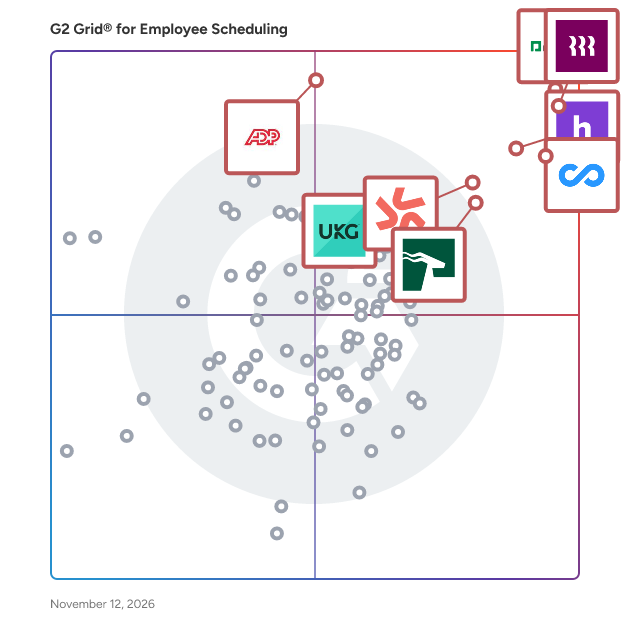
G2 Grid® for Employee Scheduling Software

G2 Grid® for Employee Scheduling Software plotting products by satisfaction and market presence

Highlighted products: Paycom, Rippling, Connecteam, Homebase, Deputy, HROne, ADP Time and Labor Management, and UKG Ready.

Underlying data: [Grid® JSON](https://www.g2.com/categories/employee-scheduling-software/grids.json?focus%5B%5D=paycom&focus%5B%5D=rippling&focus%5B%5D=connecteam&focus%5B%5D=homebase&focus%5B%5D=deputy&focus%5B%5D=uneecops-hrone&focus%5B%5D=adp-adp-time-and-labor-management&focus%5B%5D=ukg-ready)

Rippling

Rippling is the AI workforce management platform that connects HR, IT, and Finance — giving Rippling AI everything it needs to help run your company. Because employee data, permissions, and approvals all live in one place, Rippling AI has a complete view of your business and can take action quickly and safely, across the entire employee lifecycle, from hiring to benefits administration to access management. Automate business tasks, ensure compliance, and streamline approvals with workflows that understand your organization. Enjoy timely payroll, real-time financial visibility, and dynamic spend policies that adjust as your business changes. Simplify IT with device management, software access, and compliance monitoring, all from one dashboard. Because Rippling AI works from a single source of truth instead of disconnected systems, your business can save time, reduce costs, and enhance efficiency — with the trust and safety that comes from unified data and permissions. Experience the power of AI-driven, unified management with Rippling today.

Average Rating: 4.7/5.0

Total Reviews: 13,258

How Do G2 Users Rate Rippling?

  • Has the product been a good partner in doing business?: 9.1/10 (Category avg: 9.1/10)
  • Reporting: 9.2/10 (Category avg: 8.4/10)
  • Portal: 9.1/10 (Category avg: 8.3/10)
  • Automation: 9.2/10 (Category avg: 8.5/10)

Who Is the Company Behind Rippling?

  • Seller: Rippling
  • Company Website:
  • Year Founded: 2016
  • HQ Location: San Francisco, CA
  • LinkedIn® Page: www.linkedin.com
    7,798 employees on LinkedIn®

Who Uses This Product?

  • Who Uses This: Software Engineer, Account Executive
  • Top Industries: Computer Software, Information Technology and Services
  • Company Size: 56% Medium, 28% Small

What Do G2 Reviewers Say About Rippling?

AI-generated summary from verified user reviews

Pros
  • Users find the platform intuitive and easy to use, helping employees and administrators handle day-to-day tasks simply.
  • Users find the initial setup easy and straightforward, helping them get started quickly.
  • Users like the clean, well-organized interface and clear layout, which makes information easy to navigate without feeling overwhelming.
  • Users find navigation intuitive and straightforward, helping them locate features and get to the tasks they need quickly.
  • Users like having workplace tools consolidated in one platform, making it easier to manage work without juggling separate systems.
Cons
  • Users find navigation confusing and unintuitive, with features and settings sometimes buried or requiring extra clicks to locate.
  • Users find the interface unintuitive and confusing, with features sometimes feeling complicated or clunky to use.
  • Users say the platform takes time to learn, especially navigating its many features and advanced settings.
  • Users report slow or inconsistent support responses and difficulty reaching a live agent by phone or chat.
  • Users find setup and implementation time-consuming and challenging, with small errors sometimes causing bigger downstream problems.

What Are Recent G2 Reviews of Rippling?

What Are G2 Users Discussing About Rippling?

Connecteam

Connecteam is a mobile-first workforce management app featuring a robust set of tools designed to help organizations with deskless teams improve communication, retain staff, and drive operational efficiency. Connecteam allows managers to put their business processes on autopilot and focus on business growth while also freeing up employees to be more productive, professional, and satisfied. At the heart of Connecteam lies a powerful suite of tools for scheduling, time tracking, task management, communication, HR processes, and training—all built for the realities of frontline teams. Whether you need to create complex shift schedules, automate payroll-ready timesheets, distribute company announcements, or onboard new hires at scale, Connecteam brings everything under one intuitive app. Save time and increase productivity with AI assisted scheduling, mobile-first custom checklists, forms, and reports; Track work hours with GPS time clock; Simplify employee communication, enhance professional skills with mobile courses (AI powered course content creator), manage daily tasks and so much more, all in one app. Connecteam AI helps you work faster and smarter than humanly possible, while keeping it simple: -AI Agent : Just ask your AI sidekick in chat. From stock info to safety steps, manuals, or care procedures, employees get instant spot-on answers, pulled straight from your in-app resources. No delays, no guesswork. -Auto scheduling : Your team schedule’s fully covered in seconds. AI puzzles availability, roles, fairness, and requirements with expert precision. The result? Reliable schedules, happier employees, and no admin hassle. -AI course creation: Turn any training topic into a full course. Just describe the subject and AI instantly builds a pro-level course, ready to go. Your team, trained the way you need, to the standard you expect. -File to Form: Digitize forms in a snap - upload a file or take a photo of any paper form. AI turns it into a fillable version your team can complete wherever they are. Easy for them, efficient for you. -AI updates and feed: Level up every update - write clear team updates that land. AI enhances your message and auto-translates it into each employee’s preferred language. Everyone stays aligned, nothing gets misinterpreted. -Speech to text: Fill forms, hands-free - simply speak into forms. AI captures, summarizes, and sorts your team’s input on the spot, without them having to look down or slow down. No distractions, no delays—just clear, accurate reporting. Additionally, ensure a secure and easy login for system admins with Active Directory Single Sign-On (SSO).

Average Rating: 4.6/5.0

Total Reviews: 3,492

How Do G2 Users Rate Connecteam?

  • Has the product been a good partner in doing business?: 9.3/10 (Category avg: 9.1/10)
  • Reporting: 8.4/10 (Category avg: 8.4/10)
  • Portal: 9.0/10 (Category avg: 8.3/10)
  • Automation: 8.4/10 (Category avg: 8.5/10)

Who Is the Company Behind Connecteam?

Who Uses This Product?

  • Who Uses This: Owner, Manager
  • Top Industries: Construction, Retail
  • Company Size: 83% Small, 14% Medium

What Do G2 Reviewers Say About Connecteam?

AI-generated summary from verified user reviews

Pros
  • Users love the ease of use of Connecteam, which streamlines tasks and communication seamlessly in one app.
  • Users love the all-in-one utility of Connecteam, which streamlines scheduling, communication, and training in one app.
  • Users enjoy the efficient scheduling capabilities of Connecteam, streamlining management and communication for deskless teams.
  • Users love the seamless team collaboration with Connecteam, enhancing communication and streamlining operations efficiently.
  • Users find Connecteam user-friendly, praising its intuitive interface and seamless communication for deskless teams.
Cons
  • Users express frustration with the missing features in Connecteam, particularly regarding attendance reporting and geo-locking inconsistencies.
  • Users often face limited features without higher payment, which may hinder small business usability and flexibility.
  • Users find scheduling issues frustrating, especially with limited visibility on meeting changes and shift requests.
  • Users feel there is a need for better audit trails and notifications management in Connecteam to enhance usability.
  • Users find Connecteam's interface not user-friendly, leading to confusion and setup fatigue for less tech-savvy employees.

What Are Recent G2 Reviews of Connecteam?

What Are G2 Users Discussing About Connecteam?

Homebase

Homebase is a comprehensive workforce management solution designed specifically for hourly teams, catering to the unique needs of small businesses. This platform streamlines various aspects of team management, including time tracking, scheduling, communication, and payroll, making it an essential tool for businesses looking to enhance their operational efficiency. By automating many time-consuming tasks, Homebase allows managers to focus on more strategic initiatives, ultimately improving overall productivity. Targeted primarily at small to medium-sized businesses, Homebase is particularly beneficial for industries that rely heavily on hourly workers, such as retail, hospitality, and service sectors. The platform addresses common pain points such as scheduling conflicts, time theft, and compliance with labor laws. By providing a centralized hub for team management, Homebase enables businesses to maintain a well-organized and productive workforce while ensuring that employees remain engaged and informed about their roles and responsibilities. Key features of Homebase include an automated time clock that simplifies time tracking, significantly reducing the administrative burden on managers. This feature can save managers over five hours a week, allowing them to allocate their time more effectively to other important tasks. The scheduling tools offered by Homebase help eliminate chaos by providing templates, reminders, and shift notes, ensuring that all team members are aware of their responsibilities and schedules. Additionally, the platform centralizes team communications, fostering a collaborative environment where employees can easily share updates and information, thus enhancing teamwork and transparency. Homebase also simplifies payroll processing by eliminating manual data entry and paperwork. This feature not only saves time but also minimizes the risk of errors, ensuring that employees are paid accurately and on time. Furthermore, Homebase offers resources to help businesses stay compliant with federal and state labor laws, reducing the risk of costly penalties. Its integration capabilities with various point-of-sale systems, sales tools, job boards, and payroll providers further enhance the platform's versatility, making it a valuable asset for any small business looking to streamline operations. With mobile applications available for both iOS and Android, Homebase ensures that users can stay connected and manage their teams on the go. This flexibility is particularly advantageous for businesses with employees who are frequently on-site or working remotely. With over 2 million hourly workers already benefiting from Homebase, it has established itself as a trusted solution in the workforce management landscape, recognized for its effectiveness and user satisfaction across various platforms.

Average Rating: 4.6/5.0

Total Reviews: 659

How Do G2 Users Rate Homebase?

  • Has the product been a good partner in doing business?: 8.9/10 (Category avg: 9.1/10)
  • Reporting: 7.9/10 (Category avg: 8.4/10)
  • Portal: 7.7/10 (Category avg: 8.3/10)
  • Automation: 7.9/10 (Category avg: 8.5/10)

Who Is the Company Behind Homebase?

  • Seller: Homebase
  • Company Website:
  • Year Founded: 2014
  • HQ Location: San Francisco, California
  • LinkedIn® Page: www.linkedin.com
    1,924 employees on LinkedIn®

Who Uses This Product?

  • Who Uses This: Owner, General Manager
  • Top Industries: Restaurants, Food & Beverages
  • Company Size: 80% Small, 15% Medium

What Do G2 Reviewers Say About Homebase?

AI-generated summary from verified user reviews

Pros
  • Users find Homebase to be easy to use, with intuitive features that streamline scheduling and accessibility for staff.
  • Users appreciate the efficient scheduling features of Homebase, making shift management fast and straightforward.
  • Users appreciate the ease of scheduling in Homebase, enjoying efficient management through color-coded shifts and convenient features.
  • Users love the ease of scheduling with Homebase, appreciating its quick updates and color-coded shift management.
  • Users appreciate the time-saving capabilities of Homebase, allowing for quick scheduling and efficient access to shifts.
Cons
  • Users find schedule creation challenging, seeking better alignment with payroll weeks to simplify overtime tracking.
  • Users find Homebase has limited customization, lacking flexibility in reporting and need for enhanced functionality.
  • Users find the limited features of Homebase restrict their functionality, especially on the mobile app compared to the web version.
  • Users find the missing essential features frustrating, as they lead to unnecessary costs and limitations in functionality.
  • Users find the shift management chaotic and inefficient, complicating scheduling and attendance tracking significantly.

What Are Recent G2 Reviews of Homebase?

What Are G2 Users Discussing About Homebase?

AI can help you find the answers. G2 helps you trust them.

Connect G2 to Claude or ChatGPT for answers grounded in G2's trusted reviews, comparisons, and pricing from real user insights.

How it works

Deputy

Deputy is the leading workforce management software and unified end-to-end people platform for shift-based work.Trusted by over 390,000 workplaces globally, Deputy simplifies the entire employee lifecycle by combining HR, advanced scheduling, time tracking, and compliance tools into a single seamless software. Move beyond employee scheduling with a platform that provides a centralised source of visibility for navigating complex labor laws, streamlining team communication, and controlling costs in real-time. Whether you need to simplify recruitment and onboarding with Deputy HR, capture accurate timesheets with GPS verification, or bridge the gap to pay with 300+ payroll integrations, Deputy empowers you to manage your entire workforce infrastructure from anywhere.

Average Rating: 4.5/5.0

Total Reviews: 945

How Do G2 Users Rate Deputy?

  • Has the product been a good partner in doing business?: 9.0/10 (Category avg: 9.1/10)
  • Reporting: 8.5/10 (Category avg: 8.4/10)
  • Portal: 8.4/10 (Category avg: 8.3/10)
  • Automation: 8.7/10 (Category avg: 8.5/10)

Who Is the Company Behind Deputy?

  • Seller: Deputy
  • Company Website:
  • Year Founded: 2008
  • HQ Location: Sydney, Australia
  • LinkedIn® Page: www.linkedin.com
    470 employees on LinkedIn®

Who Uses This Product?

  • Who Uses This: Manager, Store Manager
  • Top Industries: Hospitality, Retail
  • Company Size: 54% Small, 36% Medium

What Do G2 Reviewers Say About Deputy?

AI-generated summary from verified user reviews

Pros
  • Users find Deputy to be easy to use, appreciating its user-friendly interface for scheduling and timesheets.
  • Users find Deputy's scheduling features essential for managing shifts, enhancing collaboration, and simplifying workday organization.
  • Users appreciate the scheduling ease of Deputy, finding it user-friendly for managing shifts and workdays effectively.
  • Users find Deputy to be intuitive and easy to navigate, making scheduling and timesheet management a breeze.
  • Users love the intuitive user interface of Deputy, which simplifies scheduling and enhances overall workforce management efficiency.
Cons
  • Users express frustration over scheduling issues, including slow performance and lack of desired features for better tracking.
  • Users often experience slow performance during shift releases, complicating the ability to manage schedules effectively.
  • Users often experience clocking issues with Deputy, such as freezing and location reading failures, impacting usability.
  • Users find the missing features frustrating, particularly the absence of earnings tracking and leave notifications.
  • Users often face slow loading times with Deputy, which can hinder their ability to clock in and out effectively.

What Are Recent G2 Reviews of Deputy?

What Are G2 Users Discussing About Deputy?

When I Work

When I Work is an easy way for businesses to schedule, track time and attendance, and communicate with their hourly employees. Put the schedule and time clock in every employee's pocket with free iOS and Android apps. Keep track of time off, employee availability, and manage shift swaps with just a few clicks. Integrate with your payroll provider to streamline the process and avoid human error. Get started with a 14-day free trial now.

Average Rating: 4.4/5.0

Total Reviews: 418

How Do G2 Users Rate When I Work?

  • Has the product been a good partner in doing business?: 8.8/10 (Category avg: 9.1/10)
  • Reporting: 8.0/10 (Category avg: 8.4/10)
  • Portal: 8.2/10 (Category avg: 8.3/10)
  • Automation: 8.4/10 (Category avg: 8.5/10)

Who Is the Company Behind When I Work?

  • Seller: When I Work
  • Company Website:
  • Year Founded: 2010
  • HQ Location: Minneapolis, MN
  • LinkedIn® Page: www.linkedin.com
    179 employees on LinkedIn®

Who Uses This Product?

  • Who Uses This: Owner, General Manager
  • Top Industries: Hospital & Health Care, Retail
  • Company Size: 61% Small, 31% Medium

What Do G2 Reviewers Say About When I Work?

AI-generated summary from verified user reviews

Pros
  • Users appreciate the user-friendly interface of When I Work, facilitating smooth management and employee interactions.
  • Users value the flexible scheduling capabilities of When I Work, enhancing business efficiency and team management.
  • Users appreciate the scheduling ease of When I Work, which simplifies managing shifts for teams of all sizes.
  • Users appreciate the time-saving features of When I Work, allowing for efficient scheduling and seamless communication.
  • Users value the easy color coding in When I Work, enhancing shift management and team scheduling efficiency.
Cons
  • Users report scheduling issues with notifications and formatting, affecting effective communication and payroll alignment.
  • Users express frustration over missing features, such as laggy clocking, limited notification control, and inconsistent app functionality.
  • Users experience software bugs that lead to glitches, app freezes, and difficulties in scheduling employee availability.
  • Users find the limited features of When I Work frustrating, especially regarding clocking in and notifications.
  • Users report notification issues, with staff often missing alerts and a desire for improved notification management.

What Are Recent G2 Reviews of When I Work?

What Are G2 Users Discussing About When I Work?

Humanity Schedule by TCP

Humanity Schedule by TCP provides a flexible approach to employee scheduling, no matter where your teams work or what device they use. Humanity Schedule automates dynamic scheduling and shift planning to eliminate over-scheduling issues and staffing errors, reduces unexpected labor costs, and mitigates compliance concerns to create an efficient, stress-free scheduling experience for managers and employees alike.  With Humanity Schedule, you easily fill coverage gaps with AI-driven demand forecasting, avoid scheduling conflicts with adaptive scheduling capabilities, and eliminate manual tasks and overspending — all in one solution that ensures compliance and clarity for every employee.

Average Rating: 4.3/5.0

Total Reviews: 1,108

How Do G2 Users Rate Humanity Schedule by TCP?

  • Has the product been a good partner in doing business?: 8.9/10 (Category avg: 9.1/10)
  • Reporting: 8.5/10 (Category avg: 8.4/10)
  • Portal: 8.5/10 (Category avg: 8.3/10)
  • Automation: 8.4/10 (Category avg: 8.5/10)

Who Is the Company Behind Humanity Schedule by TCP?

  • Seller: TCP Software
  • Company Website:
  • Year Founded: 1988
  • HQ Location: Plano, US
  • LinkedIn® Page: www.linkedin.com
    1,386 employees on LinkedIn®

Who Uses This Product?

  • Who Uses This: General Manager, Manager
  • Top Industries: Hospital & Health Care, Retail
  • Company Size: 49% Medium, 38% Small

What Do G2 Reviewers Say About Humanity Schedule by TCP?

AI-generated summary from verified user reviews

Pros
  • Users appreciate the intuitive and user-friendly design of Humanity Schedule, enhancing team coordination and efficiency.
  • Users appreciate the intuitive scheduling ease of Humanity Schedule, which enhances team coordination and minimizes confusion.
  • Users value the intuitive scheduling of Humanity Schedule, enhancing team coordination and real-time updates effortlessly.
  • Users appreciate the easy scheduling of Humanity Schedule by TCP, simplifying team coordination and communication effectively.
  • Users value the intuitive interface of Humanity Schedule, making scheduling effortless and user-friendly for all employees.
Cons
  • Users experience scheduling issues with Humanity, including confusion over disappearing schedules and slow updates.
  • Users find the learning curve challenging, often taking time to navigate and utilize Humanity Schedule effectively.
  • Users find the missing features in Humanity Schedule frustrating, hindering efficiency in scheduling tasks and communication.
  • Users experience occasional slow loading times in the Humanity Schedule app, affecting usability, especially with bulk actions.
  • Users find the complexity of Humanity Schedule challenging, especially when learning how to navigate the system effectively.

What Are Recent G2 Reviews of Humanity Schedule by TCP?

What Are G2 Users Discussing About Humanity Schedule by TCP?

Mekari Talenta

Mekari Talenta is a cloud-based end-to-end that automates HR operations. The system simplifies administrative processes to only the essentials, enabling businesses to operate their business at any place and time using multiple devices.

Average Rating: 4.8/5.0

Total Reviews: 42

How Do G2 Users Rate Mekari Talenta?

  • Has the product been a good partner in doing business?: 9.3/10 (Category avg: 9.1/10)
  • Reporting: 9.7/10 (Category avg: 8.4/10)
  • Portal: 9.4/10 (Category avg: 8.3/10)
  • Automation: 9.8/10 (Category avg: 8.5/10)

Who Is the Company Behind Mekari Talenta?

  • Seller: Mekari
  • Year Founded: 2015
  • HQ Location: Jakarta Pusat, ID
  • LinkedIn® Page: www.linkedin.com
    1,724 employees on LinkedIn®

Who Uses This Product?

  • Top Industries: Construction
  • Company Size: 75% Medium, 23% Small

What Do G2 Reviewers Say About Mekari Talenta?

AI-generated summary from verified user reviews

Pros
  • Users appreciate the ease of use of Mekari Talenta, enabling efficient management of HR tasks anytime, anywhere.
  • Users appreciate the ease of use and seamless attendance management with Mekari Talenta, enhancing HR efficiency greatly.
  • Users value the ease of attendance tracking with Mekari Talenta, enabling convenient management from anywhere at any time.
  • Users value the efficiency of Mekari Talenta, which streamlines HR processes and enhances team collaboration.
  • Users value the helpful customer support of Mekari Talenta, ensuring prompt resolutions for inquiries and issues.
Cons
  • Users experience slow loading times with Mekari Talenta, particularly during peak hours and while transitioning features.
  • Users face attendance issues with limited configurability and slow processing times affecting overall efficiency.
  • Users find the inaccurate tracking problematic, as it hinders clocking in/out and remote work efficiency.
  • Users find the limited customization in Mekari Talenta cumbersome, requiring extra manual work and prolonged processing times.
  • Users desire more customization options and smarter notifications in Mekari Talenta for improved project management and efficiency.

What Are Recent G2 Reviews of Mekari Talenta?

Buddy Punch

Buddy Punch is a cloud-based platform that transforms how businesses track employee time and manage schedules, bringing clarity and control to workforce operations across industries. This software helps organizations accurately track employee work hours, manage time-off requests, monitor attendance, and prepare data for payroll. Buddy Punch is built to accommodate remote, mobile, and in-office teams with tools that support accountability, transparency, and flexibility. Designed for small to mid-sized businesses across industries like construction, healthcare, retail, professional services, and more, Buddy Punch provides customizable features to support both hourly and salaried workers. Employees can clock in and out using web browsers or mobile apps on iOS and Android devices, while employers can oversee operations in real time with GPS tracking, geofencing, and customizable permissions. Buddy Punch features: *Real-Time Tracking & Visibility: Monitor who is on the clock, their current location, and their punch activity with GPS and geofencing tools. *Payroll-Ready Reporting: Export timesheets directly to payroll systems or download them in Excel format, with integrations for QuickBooks, ADP, Paychex, and SurePayroll. *Flexible Punch Options: Employees can punch in via Face ID, QR codes, PIN, or mobile device, which ensures security and convenience. *Advanced Time Management Tools: Includes automatic break rules, punch rounding, PTO accrual tracking, and job code reporting. *Secure Access & SSO: Offers role-based permissions and single sign-on (SSO) for a streamlined and secure login experience. Buddy Punch enables managers and business owners to reduce manual entry, enforce time tracking policies, and empower their teams with tools that are easy to use and built for accountability. Whether employees are on-site, remote, or mobile, Buddy Punch helps organizations ensure accurate time tracking and efficient payroll processing by making workforce management straightforward and reliable.

Average Rating: 4.8/5.0

Total Reviews: 421

How Do G2 Users Rate Buddy Punch?

  • Has the product been a good partner in doing business?: 9.8/10 (Category avg: 9.1/10)
  • Reporting: 9.3/10 (Category avg: 8.4/10)
  • Portal: 9.8/10 (Category avg: 8.3/10)
  • Automation: 8.9/10 (Category avg: 8.5/10)

Who Is the Company Behind Buddy Punch?

  • Seller: Buddy Punch
  • Company Website:
  • Year Founded: 2013
  • HQ Location: Grandville, MI
  • LinkedIn® Page: www.linkedin.com
    19 employees on LinkedIn®

Who Uses This Product?

  • Who Uses This: Data Steward, Office Manager
  • Top Industries: Construction, Hospital & Health Care
  • Company Size: 74% Small, 23% Medium

What Do G2 Reviewers Say About Buddy Punch?

AI-generated summary from verified user reviews

Pros
  • Users appreciate the ease of use of Buddy Punch, enjoying its convenience and straightforward features for managing employees.
  • Users value the intuitive design of Buddy Punch, making timekeeping simple and hassle-free across devices.
  • Users appreciate the seamless time tracking of Buddy Punch, making break management and punching in/out effortless.
  • Users appreciate the ease of tracking with Buddy Punch, making timekeeping seamless and straightforward.
  • Users love the user-friendly interface of Buddy Punch, making employee management simple and efficient.
Cons
  • Users experience punching issues due to sensitive geo-fence settings and limitations on adding notes when clocking in and out.
  • Users face clocking issues due to geo-fence limitations and the hassle of mandatory photo verification.
  • Users report attendance issues with Buddy Punch, citing problems with geo-fencing and note-taking during clock-ins.
  • Users face scheduling issues with slow drag-and-drop features and complicated shift management, impacting efficiency.
  • Users often experience time tracking issues that complicate clocking in and out, causing frustration with approval processes.

What Are Recent G2 Reviews of Buddy Punch?

What Are G2 Users Discussing About Buddy Punch?

WebWork Time Tracker

WebWork is an AI-powered time tracking and workforce management platform that automates the full workflow from clock-in to payroll. It is built for growing teams that want professional tracking without enterprise setup or cost, with everything in one platform starting at $3.99 per user per month. Teams use WebWork to capture accurate work time, understand productivity, and manage the whole workforce in one place: - Automated time tracking across apps and devices on desktop, web, and mobile, so teams see how work time is actually spent. - Flexible screenshots that can be visible, blurred, or disabled, giving teams full control over how monitoring fits their culture. - App and website monitoring that classifies activity as productive or unproductive. - Project and task management that keeps deadlines, budgets, and tracked time in one view. - Automatic timesheets with a quick approval step before payroll. - Field service tools including GPS tracking, geofencing, shift scheduling, and offline time tracking. WebWork AI catches early signs of burnout, workload imbalance, and unusual activity, so teams can act before small issues grow. It also automates routine work, creating projects and tasks, running standups, and sending reminders and birthday wishes, and works right inside WebWork, Slack, and WebWork Chat. WebWork's MCP connector also opens the platform to Claude, ChatGPT, and other AI assistants. Data security is a core priority. WebWork is GDPR, HIPAA, and CCPA compliant and protects workforce data with encryption in transit and at rest, role-based access controls, device compliance monitoring, and continuous monitoring and backups. WebWork is available on desktop (Windows, macOS, Linux), web, and mobile, with a Time Clock Kiosk app for shared on-site clock-in.

Average Rating: 4.6/5.0

Total Reviews: 482

G2 Deal: Save 30% for 6 Months — and 15% for Life!

Get 30% off any WebWork Time Tracker plan for your first 6 months, then enjoy 15% off for life! Choose a yearly plan and get an extra 20% off — included with all annual subscriptions. Track time, monitor work, and pay your team — all within WebWork.

Price: ~~$4.99 per user/month~~ → $3.49 per user/month

View this exclusive G2 deal

How Do G2 Users Rate WebWork Time Tracker?

  • Has the product been a good partner in doing business?: 9.5/10 (Category avg: 9.1/10)
  • Reporting: 10.0/10 (Category avg: 8.4/10)
  • Portal: 9.0/10 (Category avg: 8.3/10)
  • Automation: 9.4/10 (Category avg: 8.5/10)

Who Is the Company Behind WebWork Time Tracker?

  • Seller: WebWork Time Tracker
  • Company Website:
  • Year Founded: 2016
  • HQ Location: Yerevan, Armenia
  • LinkedIn® Page: www.linkedin.com
    20 employees on LinkedIn®

Who Uses This Product?

  • Who Uses This: Front Desk Representative, Software Engineer
  • Top Industries: Information Technology and Services, Computer Software
  • Company Size: 53% Small, 39% Medium

What Do G2 Reviewers Say About WebWork Time Tracker?

AI-generated summary from verified user reviews

Pros
  • Users love the ease of use of WebWork Time Tracker, appreciating its simplicity and quick initial setup.
  • Users value the easy time tracking of WebWork Time Tracker, appreciating its simplicity and effective productivity management.
  • Users value the time-saving features of WebWork Time Tracker, enabling efficient tracking and management of their work hours.
  • Users appreciate the ease of tracking with WebWork Time Tracker, finding it user-friendly and efficient for timekeeping.
  • Users value the efficiency of WebWork Time Tracker, effortlessly managing their time and enhancing overall productivity.
Cons
  • Users express frustration with time tracking issues, especially when the app stops during breaks or laptop sleep mode.
  • Users experience frustrating software bugs that cause tracking interruptions and affect clocking in and out reliability.
  • Users report inaccurate tracking, as the system often fails to register clock-ins and clock-outs effectively.
  • Users find the app performance lacking as it stops tracking during breaks or when the laptop sleeps.
  • Users experience frequent clocking issues with WebWork Time Tracker, leading to frustration and missed time entries.

What Are Recent G2 Reviews of WebWork Time Tracker?

What Are G2 Users Discussing About WebWork Time Tracker?

Tanda

Tanda is a workforce management and payroll platform that helps businesses manage employee scheduling, time tracking, award interpretation, payroll, onboarding and compliance from a single system. Trusted by hospitality, retail, healthcare and other shift-based businesses, Tanda automates award interpretation, reduces payroll errors and helps managers control labour costs in real time.

Average Rating: 4.5/5.0

Total Reviews: 105

How Do G2 Users Rate Tanda?

  • Has the product been a good partner in doing business?: 9.3/10 (Category avg: 9.1/10)
  • Reporting: 9.2/10 (Category avg: 8.4/10)
  • Portal: 8.5/10 (Category avg: 8.3/10)
  • Automation: 9.0/10 (Category avg: 8.5/10)

Who Is the Company Behind Tanda?

  • Seller: Tanda
  • Company Website:
  • Year Founded: 2012
  • HQ Location: Brisbane
  • LinkedIn® Page: www.linkedin.com
    256 employees on LinkedIn®

Who Uses This Product?

  • Top Industries: Hospitality, Retail
  • Company Size: 49% Small, 43% Medium

What Do G2 Reviewers Say About Tanda?

AI-generated summary from verified user reviews

Pros
  • Users find Tanda's ease of use invaluable, streamlining shift management and enhancing overall workflow efficiency.
  • Users find Tanda remarkably user-friendly, with impressive support and a comprehensive all-in-one HR solution.
  • Users praise Tanda's exceptional customer support, highlighting quick resolutions and helpful staff for various inquiries.
  • Users value Tanda's user-friendly payroll system, praising its responsiveness and seamless integration for compliance management.
  • Users love Tanda for its time-saving capabilities, streamlining tasks like scheduling and shift management effortlessly.
Cons
  • Users experience integration issues, noting slow syncing with Xero and limitations in the Tanda Hire function across multiple locations.
  • Users experience frustrating delays in customer support, impacting their ability to resolve issues promptly when needed.
  • Users experience delayed support, leading to frustration during critical moments when immediate assistance is needed.
  • Users find that the set-up process lacks organization, causing confusion and inefficiency in initial configurations.
  • Users find the learning curve steep, with an unstructured setup process affecting initial experience and efficiency.

What Are Recent G2 Reviews of Tanda?

What Are G2 Users Discussing About Tanda?

Hubstaff

Hubstaff is a time tracking software built for global teams. Track hours with precision, automate payments and invoicing, and gain full visibility into how work gets done — whether your team is remote, hybrid, in-office or field-based. In addition to time tracking, Hubstaff includes built-in productivity monitoring features such as activity rates, app and URL usage, and optional screenshots — helping managers understand how time is spent and where focus is lost. The platform also offers advanced workforce analytics that classify work time, detect unusual activity patterns, and highlight inefficiencies — enabling data-driven decisions that improve performance and reduce wasted hours. Available on Mac, Windows, Linux, iOS, Android, and Chrome, Hubstaff platform integrates with over 35+ tools to streamline operations and support productive, high-performing teams.

Average Rating: 4.4/5.0

Total Reviews: 2,314

How Do G2 Users Rate Hubstaff?

  • Has the product been a good partner in doing business?: 8.9/10 (Category avg: 9.1/10)
  • Reporting: 9.2/10 (Category avg: 8.4/10)
  • Portal: 8.9/10 (Category avg: 8.3/10)
  • Automation: 8.9/10 (Category avg: 8.5/10)

Who Is the Company Behind Hubstaff?

  • Seller: Hubstaff
  • Company Website:
  • Year Founded: 2013
  • HQ Location: Indianapolis, IN
  • LinkedIn® Page: www.linkedin.com
    352 employees on LinkedIn®

Who Uses This Product?

  • Who Uses This: CEO, Owner
  • Top Industries: Information Technology and Services, Computer Software
  • Company Size: 45% Small, 26% Medium

What Do G2 Reviewers Say About Hubstaff?

AI-generated summary from verified user reviews

Pros
  • Users love the easy time tracking with Hubstaff, enhancing team productivity and efficiency effortlessly.
  • Users find Hubstaff's interface easy to use, allowing seamless tracking with simple play and pause functionality.
  • Users love the tracking ease of Hubstaff, enhancing team productivity and simplifying time management effortlessly.
  • Users appreciate the time-saving features of Hubstaff, simplifying project tracking and enhancing team productivity effortlessly.
  • Users love Hubstaff for its simple and user-friendly design, making time tracking and productivity management effortless.
Cons
  • Users complain about inaccurate tracking, leading to frustrations with timekeeping and potential data loss during project updates.
  • Users report significant time tracking issues in Hubstaff, particularly lacking a "submit timesheet" feature on mobile.
  • Users report technical issues with time tracking, including payment failures and overly strict activity tracking.
  • Users criticize the limited features of Hubstaff, feeling constrained in their ability to manage tasks effectively.
  • Users note the missing features in Hubstaff, particularly the lack of mobile timesheet submission and notifications.

What Are Recent G2 Reviews of Hubstaff?

What Are G2 Users Discussing About Hubstaff?

WorkJam

WorkJam is the complete AI frontline operations platform for hourly staff, shift workers, frontline employees, and their managers. Communications, tasks and audits, learning, knowledge and scheduling share one app that every frontline employee can open on the device they have, and it connects to the workforce management, HR and point-of-sale systems a company already runs. Retail, hospitality, food service, manufacturing and distribution companies use WorkJam across their locations, including Catalyst Brands (JCPenney, Aéropostale, Brooks Brothers, Lucky Brand and Nautica), Shell, Metro AG, Ulta Beauty, Priceline Pharmacy, Panda Restaurant Group, Compass Group, Ultium Cells, Marks & Spencer, and The Venetian Resort Las Vegas. The platform Each WorkJam module works on its own and connects to the others, so a company can start with one and add more without changing platforms. Task Management: Work moves from head office to the store or shop floor and reaches employees through their job assignments and qualifications. Employees complete tasks with photo proof, and managers review them. Audits: Store and site audits, inspections and compliance checks run in the same app as daily tasks. Employee Communications: Targeted channels, messaging and surveys replace the email chains and group chats that reach whoever happens to check them. Learning & Knowledge Management: Courses and training are assigned by role and tracked to completion. In the Knowledge Center, policies and SOPs are searchable, and Target Audiences make sure each employee finds the version that applies to them. Documents, pages and thumbnails can be published in multiple languages. Flexible Shift Management: Schedules, shift swaps, open shifts and time-off requests, plus native time and attendance. Earned Wage Access: Employees can get access to wages they have already earned, in the same app. AI & Workflows: The WorkJam AI Agent answers employee questions from company content, within each person's permissions. More on AI below. AI today, and where it is heading WorkJam's AI works inside the frontline workflow in two ways today: the AI Agent answers employee questions, and AI image verification checks the photos employees submit as proof of work. The AI Agent answers from a company's own content, such as policies, SOPs and Knowledge Center pages, and respects each user's permissions and role. An associate and a manager who ask the same question can get different answers, each limited to what that person is authorized to see. That matters on the frontline, where company content includes pay rules, disciplinary procedures and benefits details that not everyone should read. Catalyst Brands uses the AI Agent to answer HR questions for employees across all five of its brands. AI image verification compares each photo an employee takes with the task step's reference image or written description, and tells the employee what to fix before they submit it. Managers review photos from Tasks, Audits and Forms in one Image Review gallery, so district managers can spend store visits on what a photo can't show. The AI Agent and Knowledge Center are included in WorkJam platform tiers rather than priced as add-ons. WorkJam's penetration testing covers the AI Agent, and an AI Agent Security White Paper is available in the WorkJam Trust Center. Most frontline signals still land in a dashboard or an inbox: a cooler alarm, a late delivery, a sick call that leaves a shift short. Someone then has to decide what happens next, pick the person to do it and check that it got done. WorkJam already handles the end of that chain. Tasks reach the right people through their job assignments and come back with photo proof, and Task Connect ties tasks to the systems where many signals start. Metro AG, for example, connects IoT sensors to tasks through Task Connect. WorkJam is building the part in the middle, under an architecture it calls Insights to Execution. The AI will weigh each signal against who is on shift and qualified, rank the work, give the reason for each recommendation and send the task to the person who can act on it, with the result feeding back into the next decision. The design keeps managers in charge: they will be able to see why work was ranked the way it was and override it, and the AI will work inside the company's labor rules, compensable-time limits and SOPs. Customer results Metro AG runs one operational standard for store tasks across 13 countries on WorkJam. "By centralising every task within WorkJam, we've finally achieved harmonisation at scale." (Ligia Paraschivescu, Supply Chain and Store Operations, Metro AG) Catalyst Brands expanded WorkJam across JCPenney, Aéropostale, Brooks Brothers, Lucky Brand and Nautica in 2026 and added the AI Agent for HR support. Andre Joyner, its EVP and Chief Human Resources Officer, describes the goal as "creating a workforce that is connected, agile, and increasingly AI enabled." Shell uses WorkJam for communications and learning at its retail sites. "With 44,000 retail sites globally, real-time, targeted communication is critical." (Mark Williams, former Global Retail Enablement, Shell International) Integrations and partners WorkJam connects to the workforce management, HR and operations systems a company already runs. Integration and services partners include UKG, Blue Yonder, Legion, ADP, Microsoft, Google, DailyPay, Accenture, Deloitte and Wizeline. Through Data as a Service (DaaS), WorkJam sends execution data to BI tools such as Tableau, Power BI, Snowflake and BigQuery. Security and compliance WorkJam has a SOC 2 Type II report, is certified to ISO/IEC 27001:2022 and UK Cyber Essentials, is attested to ISO/IEC 27017:2015, and has published a CSA STAR Level One self-assessment. WorkJam complies with GDPR, supports HIPAA compliance, and has a Data Protection Officer. The platform is hosted primarily on Google Cloud Platform, with US, EU, EMEA and Canadian regions. Reports, policies, penetration testing details and an AI Agent Security White Paper are available in the WorkJam Trust Center at trustreport.workjam.com. Recognition Nucleus Research placed WorkJam in the Leader quadrant of its Task Management Technology Value Matrix 2026. Gartner lists WorkJam as a Sample Vendor in the Hype Cycle for Retail Technologies, 2026 (30 June 2026), the Hype Cycle for HR Technology, 2026 (26 June 2026) and the Hype Cycle for Corporate Learning Technologies, 2026 (23 July 2026). Time named WorkJam to its TIME100 Most Influential Companies list in 2023. For smaller organizations WorkJam's core platform is built for enterprises with many locations and complex roles. Frontline Connect is WorkJam's offering for smaller organizations, with a lighter setup and published pricing. WorkJam was founded in 2014 and is based in Montreal.

Average Rating: 4.5/5.0

Total Reviews: 60

How Do G2 Users Rate WorkJam?

  • Has the product been a good partner in doing business?: 9.7/10 (Category avg: 9.1/10)
  • Reporting: 9.2/10 (Category avg: 8.4/10)
  • Portal: 9.5/10 (Category avg: 8.3/10)
  • Automation: 9.1/10 (Category avg: 8.5/10)

Who Is the Company Behind WorkJam?

  • Seller: WorkJam
  • Company Website:
  • Year Founded: 2014
  • HQ Location: Montreal, CA
  • LinkedIn® Page: www.linkedin.com
    228 employees on LinkedIn®

Who Uses This Product?

  • Top Industries: Retail
  • Company Size: 44% Large, 26% Medium

What Do G2 Reviewers Say About WorkJam?

AI-generated summary from verified user reviews

Pros
  • Users appreciate the ease of use of WorkJam, finding it simple to manage schedules and clock in/out.
  • Users value the communication efficiency of WorkJam, enabling seamless interaction and enhanced productivity among frontline teams.
  • Users value the effective communication tools in WorkJam, enhancing teamwork and streamlining daily operations seamlessly.
  • Users love the convenient scheduling features of WorkJam, making shift management and reminders effortless.
  • Users love the intuitive design of WorkJam, making it easy to use for clocking in and managing schedules.
Cons
  • Users experience frequent app glitches, including login errors and issues with week navigation, disrupting their workflow.
  • Users experience scheduling issues with WorkJam, finding it challenging to manage tasks outside of their scheduled hours.
  • Users experience integration issues with WorkJam, particularly with scheduling and connecting to existing systems seamlessly.
  • Users experience a challenging learning curve with WorkJam, making initial adoption and integration somewhat difficult.
  • Users find complexity in WorkJam, noting learning curves and integration challenges that can hinder effective use.

What Are Recent G2 Reviews of WorkJam?

What Are G2 Users Discussing About WorkJam?
7shifts

7shifts believes that employees are the driving force behind the success of restaurants and they are committed to elevating the standards of what restaurant teams can accomplish together. Born in the back office of a sandwich shop, 7shifts was founded in 2014 with the goal of building simple solutions to solve the most complex team management challenges. Today 7shifts is the HR platform for restaurants helping operators hire, train, schedule, pay, and retain their team in one place. With an easy-to-use platform and built-for-restaurant workflows, 7shifts replaces disconnected systems for 55,000 restaurants. Here’s how your restaurant can benefit from 7shifts: -Save up to 4 hours per week creating and managing your staff schedules -Reduce time spent on scheduling by 80% -Save up to $250 per month in managers' time -Reduce labor costs to save up to $3,000 annually -Reduce calls and texts from staff by 70% -Create schedules with 95% labor accuracy -Forecast your future sales with 95% accuracy -Save $1000s per month in reduced labor costs from a more efficient schedule -Save $1000s per month in early clock-ins and labor overages

Average Rating: 4.5/5.0

Total Reviews: 129

How Do G2 Users Rate 7shifts?

  • Has the product been a good partner in doing business?: 9.3/10 (Category avg: 9.1/10)
  • Reporting: 7.9/10 (Category avg: 8.4/10)
  • Portal: 7.9/10 (Category avg: 8.3/10)
  • Automation: 8.2/10 (Category avg: 8.5/10)

Who Is the Company Behind 7shifts?

  • Seller: 7shifts
  • Company Website:
  • Year Founded: 2014
  • HQ Location: Saskatoon
  • LinkedIn® Page: www.linkedin.com
    322 employees on LinkedIn®

Who Uses This Product?

  • Who Uses This: General Manager, Director of Operations
  • Top Industries: Restaurants, Food & Beverages
  • Company Size: 55% Small, 41% Medium

What Do G2 Reviewers Say About 7shifts?

AI-generated summary from verified user reviews

Pros
  • Users value the scheduling ease of 7shifts, finding it intuitive and effective for managing diverse employee needs.
  • Users find 7shifts incredibly easy to use, simplifying scheduling and enhancing team communication effortlessly.
  • Users value the scheduling efficiency of 7shifts, enjoying its ease of use and enhanced operational management.
  • Users enjoy the efficient communication capabilities of 7shifts, making team messaging quick and seamless.
  • Users value the setup ease of 7shifts, finding it intuitive and effective for managing scheduling seamlessly.
Cons
  • Users find the limited features of 7shifts restrictive, especially compared to competitors offering more comprehensive tools.
  • Users find 7shifts to be expensive as essential features are now paywalled, diminishing overall value and support.
  • Users face integration issues with 7shifts, experiencing syncing problems with POS systems and manual data entry.
  • Users find scheduling issues with 7shifts cumbersome, affecting usability and efficiency in managing employee schedules.
  • Users find the high fees for 7shifts excessive compared to better value options from other companies.

What Are Recent G2 Reviews of 7shifts?

What Are G2 Users Discussing About 7shifts?

ClockShark

ClockShark is cloud-based construction time tracking software and field service time tracking software that helps companies record crew hours, schedule field work, see who is working, and connect timesheets to payroll, accounting, and job costing workflows. Built for construction, trades, and field service businesses, ClockShark gives crews a mobile time tracking app, GPS time clock app, online time clock software, and web punch clock for recording time from the field, office, or a shared device. Managers can use scheduling, geofencing, location visibility, job management, time reporting, PTO tracking, and timesheet approvals to keep labor records organized before payroll. The product is designed for teams that need job-level labor records across multiple jobsites, crews, departments, and customer work. Core capabilities include: - Mobile, web, kiosk, and crew time tracking for field teams and contractors. - GPS and geofencing tools that show where employees are while they are clocked in. - Employee scheduling and time tracking software for assigning jobs, tasks, shifts, and directions. - Construction job costing software and reporting that connect labor hours to jobs, tasks, and payroll review. - Integrations with accounting, payroll, and operations tools, including QuickBooks, ADP, Sage 100 Contractor, Xero, Zapier, Simpro, Paychex, Gusto, MYOB, and Paylocity. ClockShark helps teams replace paper timesheets, reduce double entry, prepare payroll, understand labor costs, and keep office and field staff working from the same records. ClockShark Lightning adds AI-assisted field workflows inside the app, including JobReady shift briefs, Task Checklists, and Mileage Tracking, while keeping people in control of schedule, job, and time records.

Average Rating: 4.6/5.0

Total Reviews: 369

How Do G2 Users Rate ClockShark?

  • Has the product been a good partner in doing business?: 9.4/10 (Category avg: 9.1/10)
  • Reporting: 8.8/10 (Category avg: 8.4/10)
  • Portal: 8.6/10 (Category avg: 8.3/10)
  • Automation: 8.3/10 (Category avg: 8.5/10)

Who Is the Company Behind ClockShark?

  • Seller: Simpro
  • Company Website:
  • Year Founded: 2002
  • HQ Location: Miami, FL
  • LinkedIn® Page: www.linkedin.com
    719 employees on LinkedIn®

Who Uses This Product?

  • Who Uses This: Office Manager, Owner
  • Top Industries: Construction, Real Estate
  • Company Size: 88% Small, 11% Medium

What Do G2 Reviewers Say About ClockShark?

AI-generated summary from verified user reviews

Pros
  • Users appreciate the ease of tracking team members' locations and digital clock-ins, simplifying time management significantly.
  • Users appreciate the ease of use of ClockShark, making time-keeping simple and digital for everyone.
  • Users value the intuitive mapping feature that allows easy tracking of team members' locations and clock-ins.
  • Users love the time-saving simplicity of ClockShark, appreciating the ease of digital clock-ins and outs.
  • Users value the tracking ease of ClockShark, enabling visibility of team locations and clocking for various tasks.
Cons
  • Users wish for improved attendance features, specifically for allowing short breaks to be clocked in.
  • Users wish for better clocking features to allow employees to record short breaks effectively.

What Are Recent G2 Reviews of ClockShark?

What Are G2 Users Discussing About ClockShark?

WhenToWork by TCP

Tired of paper schedules and software that does far more than you need? WhenToWork is simple to use, built for how your team already works, and priced right for seasonal and small teams. From templates to work preferences to mobile shift trading and reminders, it gives managers the control they need and employees the flexibility they expect. No learning curve and no big software price tag. With WhenToWork, you can: Build the best schedule fast: Create and adjust shifts in minutes using drag-and-drop tools, schedule templates, and auto-fill. Improve coverage and avoid last-minute scrambles: View availability and staffing gaps at a glance to stay ahead of no-shows and overtime. Empower your team with more flexibility: Let employees trade shifts, pick up open slots, and request time off with built-in manager approval. Keep everyone in the loop: Send automatic shift reminders and updates via email, text, and in the app so no one misses a change. Manage multiple teams with ease: Create and view schedules by role, department, or location all in one place. No tab toggling required. Whether you're managing a small business, seasonal crew, or large department, WhenToWork gets scheduling done fast without slowing down your day.

Average Rating: 4.4/5.0

Total Reviews: 98

How Do G2 Users Rate WhenToWork by TCP?

  • Has the product been a good partner in doing business?: 8.8/10 (Category avg: 9.1/10)
  • Reporting: 9.6/10 (Category avg: 8.4/10)
  • Portal: 10.0/10 (Category avg: 8.3/10)
  • Automation: 9.3/10 (Category avg: 8.5/10)

Who Is the Company Behind WhenToWork by TCP?

Who Uses This Product?

  • Top Industries: Higher Education, Hospital & Health Care
  • Company Size: 50% Medium, 30% Small

What Do G2 Reviewers Say About WhenToWork by TCP?

AI-generated summary from verified user reviews

Pros
  • Users appreciate the ease of scheduling with WhenToWork, benefiting from clear organization and accessible off-site access.
  • Users appreciate the comprehensive features of WhenToWork, finding it clear and easy for organizing schedules effectively.
  • Users appreciate the ease of use of WhenToWork, finding it clear and well-organized for scheduling shifts.
  • Users love the mobile access feature of WhenToWork, making schedule management convenient and modern.
Cons
  • Users find the complexity of features in WhenToWork unnecessary for small business needs, complicating their experience.
  • Users find the limited features of WhenToWork inadequate for small business needs, leading to unnecessary complexity.
  • Users find the login problems frustrating, requiring separate accounts and PINs for each facility they manage.

What Are Recent G2 Reviews of WhenToWork by TCP?

What Are G2 Users Discussing About WhenToWork by TCP?

Inia Debnath
ID
Researched and written by Inia Debnath
Updated April 9, 2026