Introducing G2.ai, the future of software buying.Try now

Best Enterprise Employee Scheduling Software

Jeffrey Lin
JL
Researched and written by Jeffrey Lin

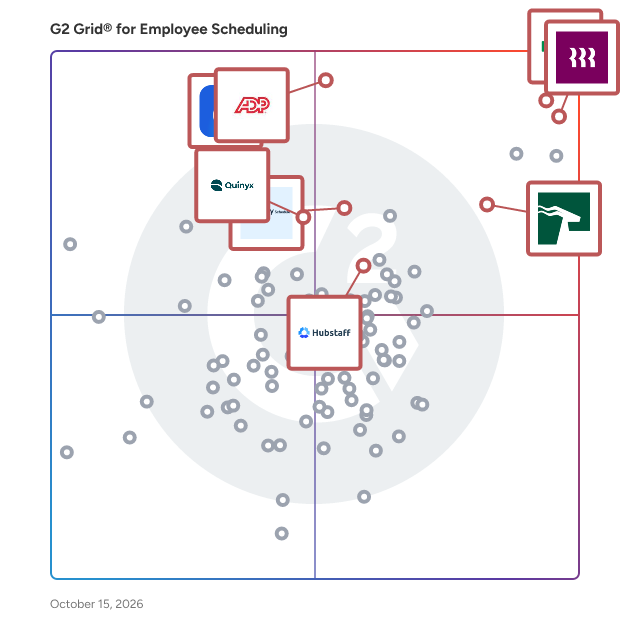
Products classified in the overall Employee Scheduling category are similar in many regards and help companies of all sizes solve their business problems. However, enterprise business features, pricing, setup, and installation differ from businesses of other sizes, which is why we match buyers to the right Enterprise Business Employee Scheduling to fit their needs. Compare product ratings based on reviews from enterprise users or connect with one of G2's buying advisors to find the right solutions within the Enterprise Business Employee Scheduling category.

In addition to qualifying for inclusion in the Employee Scheduling Software category, to qualify for inclusion in the Enterprise Business Employee Scheduling Software category, a product must have at least 10 reviews left by a reviewer from an enterprise business.

Show More
Show Less

G2 takes pride in showing unbiased reviews on user satisfaction in our ratings and reports. We do not allow paid placements in any of our ratings, rankings, or reports. Learn about our scoring methodologies.

Coming Soon
Get Trending Employee Scheduling Products in Your Inbox

A weekly snapshot of rising stars, new launches, and what everyone's buzzing about.

Sample Trending Products Newsletter
1 filter applied
Clear All

20 Listings in Enterprise Employee Scheduling Software Available

(1,975)4.8 out of 5
Optimized for quick response
1st Easiest To Use in Employee Scheduling software
Save to My Lists
Entry Level Price:₹85.00
  • Overview
    Expand/Collapse Overview
  • Product Description
    How are these determined?Information
    This description is provided by the seller.

    HROne is a future-ready HCM suite that automates HR processes, simplifies human interactions and delivers actionable insights to build better workplaces. In our pursuit to set everything HR on aut

    Users
    • HR Manager
    • Senior Manager
    Industries
    • Manufacturing
    • Information Technology and Services
    Market Segment
    • 60% Mid-Market
    • 28% Enterprise
    User Sentiment
    How are these determined?Information
    These insights, currently in beta, are compiled from user reviews and grouped to display a high-level overview of the software.
    • HROne is a software solution designed to streamline HR operations, automate payroll processing, and maintain employee data.
    • Reviewers like the user-friendly interface, the ability to mark attendance through handsets, and the automation of routine HR tasks such as salary processing and attendance tracking.
    • Reviewers experienced issues with system performance being slow at times, inability to customize certain features, and difficulty in removing employee data completely from the system.
  • Pros and Cons
    Expand/Collapse Pros and Cons
  • HROne Pros and Cons
    How are these determined?Information
    Pros and Cons are compiled from review feedback and grouped into themes to provide an easy-to-understand summary of user reviews.
    Pros
    Ease of Use
    882
    Helpful
    558
    Attendance Management
    462
    Payroll
    457
    Payroll Management
    449
    Cons
    Missing Features
    290
    Limited Features
    273
    Slow Loading
    260
    Limited Customization
    235
    Slow Performance
    219
  • User Satisfaction
    Expand/Collapse User Satisfaction
  • HROne features and usability ratings that predict user satisfaction
    9.4
    Has the product been a good partner in doing business?
    Average: 9.0
    9.7
    Reporting
    Average: 8.5
    9.6
    Portal
    Average: 8.4
    9.5
    Automation
    Average: 8.4
  • Seller Details
    Expand/Collapse Seller Details
  • Seller Details
    Seller
    HROne
    Company Website
    Year Founded
    2016
    HQ Location
    Noida
    Twitter
    @hronecloud
    1,588 Twitter followers
    LinkedIn® Page
    www.linkedin.com
    407 employees on LinkedIn®
Product Description
How are these determined?Information
This description is provided by the seller.

HROne is a future-ready HCM suite that automates HR processes, simplifies human interactions and delivers actionable insights to build better workplaces. In our pursuit to set everything HR on aut

Users
  • HR Manager
  • Senior Manager
Industries
  • Manufacturing
  • Information Technology and Services
Market Segment
  • 60% Mid-Market
  • 28% Enterprise
User Sentiment
How are these determined?Information
These insights, currently in beta, are compiled from user reviews and grouped to display a high-level overview of the software.
  • HROne is a software solution designed to streamline HR operations, automate payroll processing, and maintain employee data.
  • Reviewers like the user-friendly interface, the ability to mark attendance through handsets, and the automation of routine HR tasks such as salary processing and attendance tracking.
  • Reviewers experienced issues with system performance being slow at times, inability to customize certain features, and difficulty in removing employee data completely from the system.
HROne Pros and Cons
How are these determined?Information
Pros and Cons are compiled from review feedback and grouped into themes to provide an easy-to-understand summary of user reviews.
Pros
Ease of Use
882
Helpful
558
Attendance Management
462
Payroll
457
Payroll Management
449
Cons
Missing Features
290
Limited Features
273
Slow Loading
260
Limited Customization
235
Slow Performance
219
HROne features and usability ratings that predict user satisfaction
9.4
Has the product been a good partner in doing business?
Average: 9.0
9.7
Reporting
Average: 8.5
9.6
Portal
Average: 8.4
9.5
Automation
Average: 8.4
Seller Details
Seller
HROne
Company Website
Year Founded
2016
HQ Location
Noida
Twitter
@hronecloud
1,588 Twitter followers
LinkedIn® Page
www.linkedin.com
407 employees on LinkedIn®
(9,293)4.8 out of 5
Optimized for quick response
2nd Easiest To Use in Employee Scheduling software
View top Consulting Services for Rippling
Save to My Lists
  • Overview
    Expand/Collapse Overview
  • Product Description
    How are these determined?Information
    This description is provided by the seller.

    Streamline your business with Rippling’s all-in-one platform for HR, IT, payroll, and spend management. Simplify IT with device management, software access, and compliance monitoring, all from one das

    Users
    • Software Engineer
    • Account Executive
    Industries
    • Computer Software
    • Information Technology and Services
    Market Segment
    • 58% Mid-Market
    • 29% Small-Business
    User Sentiment
    How are these determined?Information
    These insights, currently in beta, are compiled from user reviews and grouped to display a high-level overview of the software.
    • Rippling is a comprehensive HR and payroll platform that consolidates various employee management tasks into one user-friendly interface.
    • Users frequently mention the ease of use, intuitive interface, and the convenience of having all HR-related tasks in one place as major benefits of using Rippling.
    • Users mentioned some issues with the platform, such as occasional glitches, difficulties in finding specific features, and the platform's US-centric focus which may not cater to international users.
  • Pros and Cons
    Expand/Collapse Pros and Cons
  • Rippling Pros and Cons
    How are these determined?Information
    Pros and Cons are compiled from review feedback and grouped into themes to provide an easy-to-understand summary of user reviews.
    Pros
    Ease of Use
    7,534
    Intuitive
    5,724
    Simple
    4,824
    User Interface
    4,291
    Easy Access
    4,138
    Cons
    Missing Features
    1,437
    Not User-Friendly
    967
    Learning Curve
    930
    Limited Features
    908
    Navigation Difficulty
    881
  • User Satisfaction
    Expand/Collapse User Satisfaction
  • Rippling features and usability ratings that predict user satisfaction
    9.0
    Has the product been a good partner in doing business?
    Average: 9.0
    9.2
    Reporting
    Average: 8.5
    9.0
    Portal
    Average: 8.4
    9.2
    Automation
    Average: 8.4
  • Seller Details
    Expand/Collapse Seller Details
  • Seller Details
    Seller
    Rippling
    Company Website
    Year Founded
    2016
    HQ Location
    San Francisco, CA
    Twitter
    @Rippling
    11,671 Twitter followers
    LinkedIn® Page
    www.linkedin.com
    6,473 employees on LinkedIn®
Product Description
How are these determined?Information
This description is provided by the seller.

Streamline your business with Rippling’s all-in-one platform for HR, IT, payroll, and spend management. Simplify IT with device management, software access, and compliance monitoring, all from one das

Users
  • Software Engineer
  • Account Executive
Industries
  • Computer Software
  • Information Technology and Services
Market Segment
  • 58% Mid-Market
  • 29% Small-Business
User Sentiment
How are these determined?Information
These insights, currently in beta, are compiled from user reviews and grouped to display a high-level overview of the software.
  • Rippling is a comprehensive HR and payroll platform that consolidates various employee management tasks into one user-friendly interface.
  • Users frequently mention the ease of use, intuitive interface, and the convenience of having all HR-related tasks in one place as major benefits of using Rippling.
  • Users mentioned some issues with the platform, such as occasional glitches, difficulties in finding specific features, and the platform's US-centric focus which may not cater to international users.
Rippling Pros and Cons
How are these determined?Information
Pros and Cons are compiled from review feedback and grouped into themes to provide an easy-to-understand summary of user reviews.
Pros
Ease of Use
7,534
Intuitive
5,724
Simple
4,824
User Interface
4,291
Easy Access
4,138
Cons
Missing Features
1,437
Not User-Friendly
967
Learning Curve
930
Limited Features
908
Navigation Difficulty
881
Rippling features and usability ratings that predict user satisfaction
9.0
Has the product been a good partner in doing business?
Average: 9.0
9.2
Reporting
Average: 8.5
9.0
Portal
Average: 8.4
9.2
Automation
Average: 8.4
Seller Details
Seller
Rippling
Company Website
Year Founded
2016
HQ Location
San Francisco, CA
Twitter
@Rippling
11,671 Twitter followers
LinkedIn® Page
www.linkedin.com
6,473 employees on LinkedIn®

This is how G2 Deals can help you:

  • Easily shop for curated – and trusted – software
  • Own your own software buying journey
  • Discover exclusive deals on software
(495)4.3 out of 5
Optimized for quick response
13th Easiest To Use in Employee Scheduling software
Save to My Lists
  • Overview
    Expand/Collapse Overview
  • Product Description
    How are these determined?Information
    This description is provided by the seller.

    Quinyx is the workforce management platform built for the world’s frontline industries, where efficiency, agility, and employee engagement make all the difference. More than just scheduling, Quinyx

    Users
    • Store Manager
    • Supervisor
    Industries
    • Retail
    • Hospital & Health Care
    Market Segment
    • 38% Enterprise
    • 37% Mid-Market
    User Sentiment
    How are these determined?Information
    These insights, currently in beta, are compiled from user reviews and grouped to display a high-level overview of the software.
    • Quinyx is a workforce management tool that streamlines scheduling, staffing processes, and facilitates easy communication among staff.
    • Users like the user-friendly interface of Quinyx, its easy navigation, the ability to manage shifts, track time, and the convenience of accessing schedules on their phones.
    • Users mentioned issues with the mobile app, the complexity of filter options, difficulty in navigating with a keyboard, and the inability to save and share filters with colleagues.
  • Pros and Cons
    Expand/Collapse Pros and Cons
  • Quinyx Pros and Cons
    How are these determined?Information
    Pros and Cons are compiled from review feedback and grouped into themes to provide an easy-to-understand summary of user reviews.
    Pros
    Ease of Use
    58
    Scheduling
    33
    Intuitive
    28
    Scheduling Ease
    24
    Navigation Ease
    21
    Cons
    Scheduling Issues
    24
    Reporting Issues
    11
    Shift Management
    11
    Limited Features
    10
    Not User-Friendly
    10
  • User Satisfaction
    Expand/Collapse User Satisfaction
  • Quinyx features and usability ratings that predict user satisfaction
    8.5
    Has the product been a good partner in doing business?
    Average: 9.0
    7.9
    Reporting
    Average: 8.5
    8.0
    Portal
    Average: 8.4
    7.9
    Automation
    Average: 8.4
  • Seller Details
    Expand/Collapse Seller Details
  • Seller Details
    Seller
    Quinyx
    Company Website
    Year Founded
    2005
    HQ Location
    Stockholm
    LinkedIn® Page
    www.linkedin.com
    293 employees on LinkedIn®
Product Description
How are these determined?Information
This description is provided by the seller.

Quinyx is the workforce management platform built for the world’s frontline industries, where efficiency, agility, and employee engagement make all the difference. More than just scheduling, Quinyx

Users
  • Store Manager
  • Supervisor
Industries
  • Retail
  • Hospital & Health Care
Market Segment
  • 38% Enterprise
  • 37% Mid-Market
User Sentiment
How are these determined?Information
These insights, currently in beta, are compiled from user reviews and grouped to display a high-level overview of the software.
  • Quinyx is a workforce management tool that streamlines scheduling, staffing processes, and facilitates easy communication among staff.
  • Users like the user-friendly interface of Quinyx, its easy navigation, the ability to manage shifts, track time, and the convenience of accessing schedules on their phones.
  • Users mentioned issues with the mobile app, the complexity of filter options, difficulty in navigating with a keyboard, and the inability to save and share filters with colleagues.
Quinyx Pros and Cons
How are these determined?Information
Pros and Cons are compiled from review feedback and grouped into themes to provide an easy-to-understand summary of user reviews.
Pros
Ease of Use
58
Scheduling
33
Intuitive
28
Scheduling Ease
24
Navigation Ease
21
Cons
Scheduling Issues
24
Reporting Issues
11
Shift Management
11
Limited Features
10
Not User-Friendly
10
Quinyx features and usability ratings that predict user satisfaction
8.5
Has the product been a good partner in doing business?
Average: 9.0
7.9
Reporting
Average: 8.5
8.0
Portal
Average: 8.4
7.9
Automation
Average: 8.4
Seller Details
Seller
Quinyx
Company Website
Year Founded
2005
HQ Location
Stockholm
LinkedIn® Page
www.linkedin.com
293 employees on LinkedIn®
(1,573)4.5 out of 5
Optimized for quick response
3rd Easiest To Use in Employee Scheduling software
Save to My Lists
Entry Level Price:$4.99
  • Overview
    Expand/Collapse Overview
  • Product Description
    How are these determined?Information
    This description is provided by the seller.

    Hubstaff is a time tracking software built for global teams. Track hours with precision, automate payments and invoicing, and gain full visibility into how work gets done — whether your team is remote

    Users
    • Owner
    • CEO
    Industries
    • Information Technology and Services
    • Computer Software
    Market Segment
    • 58% Small-Business
    • 32% Mid-Market
    User Sentiment
    How are these determined?Information
    These insights, currently in beta, are compiled from user reviews and grouped to display a high-level overview of the software.
    • Hubstaff is a productivity tracking tool that provides features such as time tracking, activity monitoring, and detailed reporting for remote work management.
    • Users frequently mention the ease of use, accurate time tracking, and detailed reporting as key benefits, along with the ability to monitor staff productivity and manage tasks effectively.
    • Users mentioned issues such as the activity monitoring being overly strict, occasional glitches, and difficulties with certain features like viewing screenshots or navigating the mobile app.
  • Pros and Cons
    Expand/Collapse Pros and Cons
  • Hubstaff Pros and Cons
    How are these determined?Information
    Pros and Cons are compiled from review feedback and grouped into themes to provide an easy-to-understand summary of user reviews.
    Pros
    Time Tracking
    647
    Ease of Use
    560
    Tracking Ease
    464
    Time-saving
    352
    Features
    294
    Cons
    Time Tracking Issues
    219
    Inaccurate Tracking
    214
    Time Tracking
    163
    Software Bugs
    125
    Missing Features
    123
  • User Satisfaction
    Expand/Collapse User Satisfaction
  • Hubstaff features and usability ratings that predict user satisfaction
    8.9
    Has the product been a good partner in doing business?
    Average: 9.0
    9.2
    Reporting
    Average: 8.5
    8.9
    Portal
    Average: 8.4
    8.9
    Automation
    Average: 8.4
  • Seller Details
    Expand/Collapse Seller Details
  • Seller Details
    Seller
    Hubstaff
    Company Website
    Year Founded
    2013
    HQ Location
    Indianapolis, IN
    Twitter
    @HubStaff
    11,608 Twitter followers
    LinkedIn® Page
    www.linkedin.com
    311 employees on LinkedIn®
Product Description
How are these determined?Information
This description is provided by the seller.

Hubstaff is a time tracking software built for global teams. Track hours with precision, automate payments and invoicing, and gain full visibility into how work gets done — whether your team is remote

Users
  • Owner
  • CEO
Industries
  • Information Technology and Services
  • Computer Software
Market Segment
  • 58% Small-Business
  • 32% Mid-Market
User Sentiment
How are these determined?Information
These insights, currently in beta, are compiled from user reviews and grouped to display a high-level overview of the software.
  • Hubstaff is a productivity tracking tool that provides features such as time tracking, activity monitoring, and detailed reporting for remote work management.
  • Users frequently mention the ease of use, accurate time tracking, and detailed reporting as key benefits, along with the ability to monitor staff productivity and manage tasks effectively.
  • Users mentioned issues such as the activity monitoring being overly strict, occasional glitches, and difficulties with certain features like viewing screenshots or navigating the mobile app.
Hubstaff Pros and Cons
How are these determined?Information
Pros and Cons are compiled from review feedback and grouped into themes to provide an easy-to-understand summary of user reviews.
Pros
Time Tracking
647
Ease of Use
560
Tracking Ease
464
Time-saving
352
Features
294
Cons
Time Tracking Issues
219
Inaccurate Tracking
214
Time Tracking
163
Software Bugs
125
Missing Features
123
Hubstaff features and usability ratings that predict user satisfaction
8.9
Has the product been a good partner in doing business?
Average: 9.0
9.2
Reporting
Average: 8.5
8.9
Portal
Average: 8.4
8.9
Automation
Average: 8.4
Seller Details
Seller
Hubstaff
Company Website
Year Founded
2013
HQ Location
Indianapolis, IN
Twitter
@HubStaff
11,608 Twitter followers
LinkedIn® Page
www.linkedin.com
311 employees on LinkedIn®
(647)4.6 out of 5
Optimized for quick response
4th Easiest To Use in Employee Scheduling software
Save to My Lists
Entry Level Price:$1.50
  • Overview
    Expand/Collapse Overview
  • Product Description
    How are these determined?Information
    This description is provided by the seller.

    Deputy is the world’s leading workforce management software, revolutionizing hourly work for over 1.5 million workers and 375,000 workplaces across over 100 countries. As the complete people platform

    Users
    • Owner
    • Barista
    Industries
    • Hospitality
    • Retail
    Market Segment
    • 53% Small-Business
    • 33% Mid-Market
  • Pros and Cons
    Expand/Collapse Pros and Cons
  • Deputy Pros and Cons
    How are these determined?Information
    Pros and Cons are compiled from review feedback and grouped into themes to provide an easy-to-understand summary of user reviews.
    Pros
    Ease of Use
    223
    Scheduling
    139
    Scheduling Ease
    127
    Intuitive
    118
    User Interface
    101
    Cons
    Scheduling Issues
    47
    Shift Management
    39
    Clocking Issues
    23
    Missing Features
    22
    Slow Loading
    19
  • User Satisfaction
    Expand/Collapse User Satisfaction
  • Deputy features and usability ratings that predict user satisfaction
    9.2
    Has the product been a good partner in doing business?
    Average: 9.0
    8.5
    Reporting
    Average: 8.5
    8.4
    Portal
    Average: 8.4
    8.7
    Automation
    Average: 8.4
  • Seller Details
    Expand/Collapse Seller Details
  • Seller Details
    Seller
    Deputy
    Company Website
    Year Founded
    2008
    HQ Location
    Sydney, Australia
    Twitter
    @deputyapp
    4,340 Twitter followers
    LinkedIn® Page
    www.linkedin.com
    517 employees on LinkedIn®
Product Description
How are these determined?Information
This description is provided by the seller.

Deputy is the world’s leading workforce management software, revolutionizing hourly work for over 1.5 million workers and 375,000 workplaces across over 100 countries. As the complete people platform

Users
  • Owner
  • Barista
Industries
  • Hospitality
  • Retail
Market Segment
  • 53% Small-Business
  • 33% Mid-Market
Deputy Pros and Cons
How are these determined?Information
Pros and Cons are compiled from review feedback and grouped into themes to provide an easy-to-understand summary of user reviews.
Pros
Ease of Use
223
Scheduling
139
Scheduling Ease
127
Intuitive
118
User Interface
101
Cons
Scheduling Issues
47
Shift Management
39
Clocking Issues
23
Missing Features
22
Slow Loading
19
Deputy features and usability ratings that predict user satisfaction
9.2
Has the product been a good partner in doing business?
Average: 9.0
8.5
Reporting
Average: 8.5
8.4
Portal
Average: 8.4
8.7
Automation
Average: 8.4
Seller Details
Seller
Deputy
Company Website
Year Founded
2008
HQ Location
Sydney, Australia
Twitter
@deputyapp
4,340 Twitter followers
LinkedIn® Page
www.linkedin.com
517 employees on LinkedIn®
(1,525)4.3 out of 5
Optimized for quick response
11th Easiest To Use in Employee Scheduling software
Save to My Lists
  • Overview
    Expand/Collapse Overview
  • Product Description
    How are these determined?Information
    This description is provided by the seller.

    Paycom Software, Inc. (NYSE: PAYC) simplifies business and employees’ lives through automated, command-driven HR and payroll technology that revolutionizes data access. From hire to retire, Paycom’s e

    Users
    • HR Manager
    • Human Resources Manager
    Industries
    • Non-Profit Organization Management
    • Hospital & Health Care
    Market Segment
    • 74% Mid-Market
    • 16% Small-Business
    User Sentiment
    How are these determined?Information
    These insights, currently in beta, are compiled from user reviews and grouped to display a high-level overview of the software.
    • Paycom is a human resources management system that consolidates various HR functions such as payroll, benefits, time tracking, and performance management in one platform.
    • Users frequently mention the user-friendliness of the platform, the efficiency it brings to HR and payroll processes, and the responsive and knowledgeable customer support.
    • Reviewers experienced challenges with the complexity of the interface, difficulties in navigating certain features, and issues with the implementation phase.
  • Pros and Cons
    Expand/Collapse Pros and Cons
  • Paycom Pros and Cons
    How are these determined?Information
    Pros and Cons are compiled from review feedback and grouped into themes to provide an easy-to-understand summary of user reviews.
    Pros
    Ease of Use
    350
    Helpful
    257
    Customer Support
    254
    Payroll Management
    226
    Simple
    164
    Cons
    Learning Curve
    108
    Poor Customer Support
    108
    Payroll Issues
    88
    Missing Features
    85
    Limited Features
    84
  • User Satisfaction
    Expand/Collapse User Satisfaction
  • Paycom features and usability ratings that predict user satisfaction
    8.4
    Has the product been a good partner in doing business?
    Average: 9.0
    8.5
    Reporting
    Average: 8.5
    9.7
    Portal
    Average: 8.4
    8.7
    Automation
    Average: 8.4
  • Seller Details
    Expand/Collapse Seller Details
  • Seller Details
    Seller
    Paycom
    Company Website
    Year Founded
    1998
    HQ Location
    Oklahoma City, OK
    Twitter
    @Paycom
    33,612 Twitter followers
    LinkedIn® Page
    www.linkedin.com
    6,708 employees on LinkedIn®
Product Description
How are these determined?Information
This description is provided by the seller.

Paycom Software, Inc. (NYSE: PAYC) simplifies business and employees’ lives through automated, command-driven HR and payroll technology that revolutionizes data access. From hire to retire, Paycom’s e

Users
  • HR Manager
  • Human Resources Manager
Industries
  • Non-Profit Organization Management
  • Hospital & Health Care
Market Segment
  • 74% Mid-Market
  • 16% Small-Business
User Sentiment
How are these determined?Information
These insights, currently in beta, are compiled from user reviews and grouped to display a high-level overview of the software.
  • Paycom is a human resources management system that consolidates various HR functions such as payroll, benefits, time tracking, and performance management in one platform.
  • Users frequently mention the user-friendliness of the platform, the efficiency it brings to HR and payroll processes, and the responsive and knowledgeable customer support.
  • Reviewers experienced challenges with the complexity of the interface, difficulties in navigating certain features, and issues with the implementation phase.
Paycom Pros and Cons
How are these determined?Information
Pros and Cons are compiled from review feedback and grouped into themes to provide an easy-to-understand summary of user reviews.
Pros
Ease of Use
350
Helpful
257
Customer Support
254
Payroll Management
226
Simple
164
Cons
Learning Curve
108
Poor Customer Support
108
Payroll Issues
88
Missing Features
85
Limited Features
84
Paycom features and usability ratings that predict user satisfaction
8.4
Has the product been a good partner in doing business?
Average: 9.0
8.5
Reporting
Average: 8.5
9.7
Portal
Average: 8.4
8.7
Automation
Average: 8.4
Seller Details
Seller
Paycom
Company Website
Year Founded
1998
HQ Location
Oklahoma City, OK
Twitter
@Paycom
33,612 Twitter followers
LinkedIn® Page
www.linkedin.com
6,708 employees on LinkedIn®
(128)4.7 out of 5
9th Easiest To Use in Employee Scheduling software
Save to My Lists
  • Overview
    Expand/Collapse Overview
  • Product Description
    How are these determined?Information
    This description is provided by the seller.

    Playvox by NICE Workforce Management (WFM) uses AI for efficient capacity planning, forecasting, scheduling, and intraday planning, accessible via the cloud. It provides real-time visibility into staf

    Users
    • Customer Service Representative
    Industries
    • Consumer Services
    • Retail
    Market Segment
    • 49% Mid-Market
    • 33% Enterprise
  • Pros and Cons
    Expand/Collapse Pros and Cons
  • Playvox WFM Pros and Cons
    How are these determined?Information
    Pros and Cons are compiled from review feedback and grouped into themes to provide an easy-to-understand summary of user reviews.
    Pros
    Ease of Use
    37
    Scheduling
    29
    Scheduling Ease
    28
    Efficiency
    14
    Helpful
    11
    Cons
    Missing Features
    9
    Scheduling Issues
    8
    Limited Features
    5
    Inaccurate Data Analysis
    3
    Display Issues
    2
  • User Satisfaction
    Expand/Collapse User Satisfaction
  • Playvox WFM features and usability ratings that predict user satisfaction
    9.4
    Has the product been a good partner in doing business?
    Average: 9.0
    9.6
    Reporting
    Average: 8.5
    9.8
    Portal
    Average: 8.4
    9.6
    Automation
    Average: 8.4
  • Seller Details
    Expand/Collapse Seller Details
  • Seller Details
    Seller
    Playvox
    Year Founded
    2012
    HQ Location
    Sunnyvale, CA
    Twitter
    @PlayVoxCX
    1,696 Twitter followers
    LinkedIn® Page
    www.linkedin.com
    58 employees on LinkedIn®
Product Description
How are these determined?Information
This description is provided by the seller.

Playvox by NICE Workforce Management (WFM) uses AI for efficient capacity planning, forecasting, scheduling, and intraday planning, accessible via the cloud. It provides real-time visibility into staf

Users
  • Customer Service Representative
Industries
  • Consumer Services
  • Retail
Market Segment
  • 49% Mid-Market
  • 33% Enterprise
Playvox WFM Pros and Cons
How are these determined?Information
Pros and Cons are compiled from review feedback and grouped into themes to provide an easy-to-understand summary of user reviews.
Pros
Ease of Use
37
Scheduling
29
Scheduling Ease
28
Efficiency
14
Helpful
11
Cons
Missing Features
9
Scheduling Issues
8
Limited Features
5
Inaccurate Data Analysis
3
Display Issues
2
Playvox WFM features and usability ratings that predict user satisfaction
9.4
Has the product been a good partner in doing business?
Average: 9.0
9.6
Reporting
Average: 8.5
9.8
Portal
Average: 8.4
9.6
Automation
Average: 8.4
Seller Details
Seller
Playvox
Year Founded
2012
HQ Location
Sunnyvale, CA
Twitter
@PlayVoxCX
1,696 Twitter followers
LinkedIn® Page
www.linkedin.com
58 employees on LinkedIn®
  • Overview
    Expand/Collapse Overview
  • Product Description
    How are these determined?Information
    This description is provided by the seller.

    WorkJam is the leading digital frontline workplace, proven to deliver a 410% ROI by combining task management, scheduling, learning, and communication into one easy-to-use super app for employees who

    Users
    No information available
    Industries
    • Retail
    Market Segment
    • 44% Enterprise
    • 31% Mid-Market
    User Sentiment
    How are these determined?Information
    These insights, currently in beta, are compiled from user reviews and grouped to display a high-level overview of the software.
    • WorkJam is a platform that combines scheduling, communication, task management, training, and early wage access into a single platform with modular scalability.
    • Reviewers frequently mention that WorkJam is user-friendly, easy to implement, and significantly boosts team productivity and engagement by streamlining communication, scheduling, and task assignment.
    • Users reported occasional technical issues such as repeated sign-outs, password troubles, and login errors that disrupt workflow, and a desire for additional customization options.
  • Pros and Cons
    Expand/Collapse Pros and Cons
  • WorkJam Pros and Cons
    How are these determined?Information
    Pros and Cons are compiled from review feedback and grouped into themes to provide an easy-to-understand summary of user reviews.
    Pros
    Ease of Use
    20
    Communication Efficiency
    13
    Communication
    11
    Simple
    11
    Collaboration Efficiency
    10
    Cons
    Integration Issues
    3
    App Glitches
    2
    Organizational Challenges
    2
    Complexity
    1
    Confusion
    1
  • User Satisfaction
    Expand/Collapse User Satisfaction
  • WorkJam features and usability ratings that predict user satisfaction
    9.6
    Has the product been a good partner in doing business?
    Average: 9.0
    9.2
    Reporting
    Average: 8.5
    9.5
    Portal
    Average: 8.4
    9.1
    Automation
    Average: 8.4
  • Seller Details
    Expand/Collapse Seller Details
  • Seller Details
    Seller
    WorkJam
    Company Website
    Year Founded
    2014
    HQ Location
    Montreal, CA
    Twitter
    @WorkJam
    707 Twitter followers
    LinkedIn® Page
    www.linkedin.com
    228 employees on LinkedIn®
Product Description
How are these determined?Information
This description is provided by the seller.

WorkJam is the leading digital frontline workplace, proven to deliver a 410% ROI by combining task management, scheduling, learning, and communication into one easy-to-use super app for employees who

Users
No information available
Industries
  • Retail
Market Segment
  • 44% Enterprise
  • 31% Mid-Market
User Sentiment
How are these determined?Information
These insights, currently in beta, are compiled from user reviews and grouped to display a high-level overview of the software.
  • WorkJam is a platform that combines scheduling, communication, task management, training, and early wage access into a single platform with modular scalability.
  • Reviewers frequently mention that WorkJam is user-friendly, easy to implement, and significantly boosts team productivity and engagement by streamlining communication, scheduling, and task assignment.
  • Users reported occasional technical issues such as repeated sign-outs, password troubles, and login errors that disrupt workflow, and a desire for additional customization options.
WorkJam Pros and Cons
How are these determined?Information
Pros and Cons are compiled from review feedback and grouped into themes to provide an easy-to-understand summary of user reviews.
Pros
Ease of Use
20
Communication Efficiency
13
Communication
11
Simple
11
Collaboration Efficiency
10
Cons
Integration Issues
3
App Glitches
2
Organizational Challenges
2
Complexity
1
Confusion
1
WorkJam features and usability ratings that predict user satisfaction
9.6
Has the product been a good partner in doing business?
Average: 9.0
9.2
Reporting
Average: 8.5
9.5
Portal
Average: 8.4
9.1
Automation
Average: 8.4
Seller Details
Seller
WorkJam
Company Website
Year Founded
2014
HQ Location
Montreal, CA
Twitter
@WorkJam
707 Twitter followers
LinkedIn® Page
www.linkedin.com
228 employees on LinkedIn®
(1,055)4.3 out of 5
Optimized for quick response
Save to My Lists
  • Overview
    Expand/Collapse Overview
  • Product Description
    How are these determined?Information
    This description is provided by the seller.

    Humanity Schedule by TCP provides a flexible approach to employee scheduling, no matter where your teams work or what device they use. Humanity Schedule automates dynamic scheduling and shift planning

    Users
    • General Manager
    • Manager
    Industries
    • Hospital & Health Care
    • Retail
    Market Segment
    • 48% Mid-Market
    • 38% Small-Business
  • Pros and Cons
    Expand/Collapse Pros and Cons
  • Humanity Schedule by TCP Pros and Cons
    How are these determined?Information
    Pros and Cons are compiled from review feedback and grouped into themes to provide an easy-to-understand summary of user reviews.
    Pros
    Ease of Use
    14
    Scheduling Ease
    13
    Scheduling
    12
    Comprehensive Features
    6
    Simple
    6
    Cons
    Scheduling Issues
    6
    Slow Loading
    5
    Complexity
    4
    Learning Curve
    4
    Missing Features
    4
  • User Satisfaction
    Expand/Collapse User Satisfaction
  • Humanity Schedule by TCP features and usability ratings that predict user satisfaction
    8.9
    Has the product been a good partner in doing business?
    Average: 9.0
    8.5
    Reporting
    Average: 8.5
    8.5
    Portal
    Average: 8.4
    8.4
    Automation
    Average: 8.4
  • Seller Details
    Expand/Collapse Seller Details
  • Seller Details
    Company Website
    Year Founded
    1988
    HQ Location
    Plano, US
    Twitter
    @tcpsoftware
    453 Twitter followers
    LinkedIn® Page
    www.linkedin.com
    1,258 employees on LinkedIn®
Product Description
How are these determined?Information
This description is provided by the seller.

Humanity Schedule by TCP provides a flexible approach to employee scheduling, no matter where your teams work or what device they use. Humanity Schedule automates dynamic scheduling and shift planning

Users
  • General Manager
  • Manager
Industries
  • Hospital & Health Care
  • Retail
Market Segment
  • 48% Mid-Market
  • 38% Small-Business
Humanity Schedule by TCP Pros and Cons
How are these determined?Information
Pros and Cons are compiled from review feedback and grouped into themes to provide an easy-to-understand summary of user reviews.
Pros
Ease of Use
14
Scheduling Ease
13
Scheduling
12
Comprehensive Features
6
Simple
6
Cons
Scheduling Issues
6
Slow Loading
5
Complexity
4
Learning Curve
4
Missing Features
4
Humanity Schedule by TCP features and usability ratings that predict user satisfaction
8.9
Has the product been a good partner in doing business?
Average: 9.0
8.5
Reporting
Average: 8.5
8.5
Portal
Average: 8.4
8.4
Automation
Average: 8.4
Seller Details
Company Website
Year Founded
1988
HQ Location
Plano, US
Twitter
@tcpsoftware
453 Twitter followers
LinkedIn® Page
www.linkedin.com
1,258 employees on LinkedIn®
(149)4.6 out of 5
Optimized for quick response
Save to My Lists
Entry Level Price:Contact Us
  • Overview
    Expand/Collapse Overview
  • Product Description
    How are these determined?Information
    This description is provided by the seller.

    Assembled is the all-in-one support platform that unifies AI agents and intelligent workforce management to help companies deliver superhuman support. With Assembled, teams can forecast with over 90%

    Users
    No information available
    Industries
    • Financial Services
    • Consumer Services
    Market Segment
    • 60% Mid-Market
    • 23% Small-Business
  • Pros and Cons
    Expand/Collapse Pros and Cons
  • Assembled WFM Pros and Cons
    How are these determined?Information
    Pros and Cons are compiled from review feedback and grouped into themes to provide an easy-to-understand summary of user reviews.
    Pros
    Ease of Use
    40
    Scheduling
    29
    Scheduling Ease
    27
    Intuitive
    19
    Efficiency
    18
    Cons
    Scheduling Issues
    15
    Missing Features
    10
    Limited Features
    9
    Slow Loading
    9
    Lagging Issues
    8
  • User Satisfaction
    Expand/Collapse User Satisfaction
  • Assembled WFM features and usability ratings that predict user satisfaction
    9.5
    Has the product been a good partner in doing business?
    Average: 9.0
    8.5
    Reporting
    Average: 8.5
    8.2
    Portal
    Average: 8.4
    8.1
    Automation
    Average: 8.4
  • Seller Details
    Expand/Collapse Seller Details
  • Seller Details
    Seller
    Assembled
    Company Website
    Year Founded
    2018
    HQ Location
    San Francisco, California
    Twitter
    @assembledhq
    384 Twitter followers
    LinkedIn® Page
    www.linkedin.com
    158 employees on LinkedIn®
Product Description
How are these determined?Information
This description is provided by the seller.

Assembled is the all-in-one support platform that unifies AI agents and intelligent workforce management to help companies deliver superhuman support. With Assembled, teams can forecast with over 90%

Users
No information available
Industries
  • Financial Services
  • Consumer Services
Market Segment
  • 60% Mid-Market
  • 23% Small-Business
Assembled WFM Pros and Cons
How are these determined?Information
Pros and Cons are compiled from review feedback and grouped into themes to provide an easy-to-understand summary of user reviews.
Pros
Ease of Use
40
Scheduling
29
Scheduling Ease
27
Intuitive
19
Efficiency
18
Cons
Scheduling Issues
15
Missing Features
10
Limited Features
9
Slow Loading
9
Lagging Issues
8
Assembled WFM features and usability ratings that predict user satisfaction
9.5
Has the product been a good partner in doing business?
Average: 9.0
8.5
Reporting
Average: 8.5
8.2
Portal
Average: 8.4
8.1
Automation
Average: 8.4
Seller Details
Seller
Assembled
Company Website
Year Founded
2018
HQ Location
San Francisco, California
Twitter
@assembledhq
384 Twitter followers
LinkedIn® Page
www.linkedin.com
158 employees on LinkedIn®
(903)4.2 out of 5
View top Consulting Services for Dayforce
Save to My Lists
  • Overview
    Expand/Collapse Overview
  • Product Description
    How are these determined?Information
    This description is provided by the seller.

    Dayforce is the global people platform for the modern workforce. An enterprise HCM solution, Dayforce combines payroll, HR, benefits, talent management, workforce management, and more in a single clou

    Users
    • Payroll Manager
    • Payroll Specialist
    Industries
    • Retail
    • Hospital & Health Care
    Market Segment
    • 47% Mid-Market
    • 47% Enterprise
    User Sentiment
    How are these determined?Information
    These insights, currently in beta, are compiled from user reviews and grouped to display a high-level overview of the software.
    • Dayforce is a software that allows users to manage employee information, payroll, and timekeeping.
    • Users frequently mention the software's ease of use, its ability to provide organized information, and its functionality in managing multiple locations and processing large-scale payroll.
    • Reviewers noted issues with system responsiveness and speed, difficulty in integrating with other apps, complex login methods, and a lack of straightforward reporting.
  • Pros and Cons
    Expand/Collapse Pros and Cons
  • Dayforce Pros and Cons
    How are these determined?Information
    Pros and Cons are compiled from review feedback and grouped into themes to provide an easy-to-understand summary of user reviews.
    Pros
    Ease of Use
    139
    Features
    66
    Comprehensive Features
    64
    Helpful
    61
    Payroll Management
    59
    Cons
    Poor Customer Support
    61
    Missing Features
    49
    Reporting Issues
    45
    Limited Features
    44
    Limited Customization
    43
  • User Satisfaction
    Expand/Collapse User Satisfaction
  • Dayforce features and usability ratings that predict user satisfaction
    8.1
    Has the product been a good partner in doing business?
    Average: 9.0
    7.8
    Reporting
    Average: 8.5
    7.1
    Portal
    Average: 8.4
    7.6
    Automation
    Average: 8.4
  • Seller Details
    Expand/Collapse Seller Details
  • Seller Details
    Seller
    Dayforce
    Year Founded
    2012
    HQ Location
    Minneapolis, MN
    Twitter
    @Ceridian
    16,658 Twitter followers
    LinkedIn® Page
    www.linkedin.com
    4,349 employees on LinkedIn®
    Ownership
    NYSE: CDAY
Product Description
How are these determined?Information
This description is provided by the seller.

Dayforce is the global people platform for the modern workforce. An enterprise HCM solution, Dayforce combines payroll, HR, benefits, talent management, workforce management, and more in a single clou

Users
  • Payroll Manager
  • Payroll Specialist
Industries
  • Retail
  • Hospital & Health Care
Market Segment
  • 47% Mid-Market
  • 47% Enterprise
User Sentiment
How are these determined?Information
These insights, currently in beta, are compiled from user reviews and grouped to display a high-level overview of the software.
  • Dayforce is a software that allows users to manage employee information, payroll, and timekeeping.
  • Users frequently mention the software's ease of use, its ability to provide organized information, and its functionality in managing multiple locations and processing large-scale payroll.
  • Reviewers noted issues with system responsiveness and speed, difficulty in integrating with other apps, complex login methods, and a lack of straightforward reporting.
Dayforce Pros and Cons
How are these determined?Information
Pros and Cons are compiled from review feedback and grouped into themes to provide an easy-to-understand summary of user reviews.
Pros
Ease of Use
139
Features
66
Comprehensive Features
64
Helpful
61
Payroll Management
59
Cons
Poor Customer Support
61
Missing Features
49
Reporting Issues
45
Limited Features
44
Limited Customization
43
Dayforce features and usability ratings that predict user satisfaction
8.1
Has the product been a good partner in doing business?
Average: 9.0
7.8
Reporting
Average: 8.5
7.1
Portal
Average: 8.4
7.6
Automation
Average: 8.4
Seller Details
Seller
Dayforce
Year Founded
2012
HQ Location
Minneapolis, MN
Twitter
@Ceridian
16,658 Twitter followers
LinkedIn® Page
www.linkedin.com
4,349 employees on LinkedIn®
Ownership
NYSE: CDAY
(346)4.4 out of 5
Optimized for quick response
10th Easiest To Use in Employee Scheduling software
Save to My Lists
Entry Level Price:$2.50
  • Overview
    Expand/Collapse Overview
  • Product Description
    How are these determined?Information
    This description is provided by the seller.

    When I Work is an easy way for businesses to schedule, track time and attendance, and communicate with their hourly employees. Put the schedule and time clock in every employee's pocket with free iOS

    Users
    • Owner
    • Manager
    Industries
    • Hospital & Health Care
    • Retail
    Market Segment
    • 59% Small-Business
    • 32% Mid-Market
  • Pros and Cons
    Expand/Collapse Pros and Cons
  • When I Work Pros and Cons
    How are these determined?Information
    Pros and Cons are compiled from review feedback and grouped into themes to provide an easy-to-understand summary of user reviews.
    Pros
    Ease of Use
    40
    Scheduling Ease
    26
    Scheduling
    25
    Intuitive
    17
    Time-saving
    15
    Cons
    Missing Features
    8
    Scheduling Issues
    8
    Poor Customer Support
    6
    App Performance
    5
    Limited Customization
    5
  • User Satisfaction
    Expand/Collapse User Satisfaction
  • When I Work features and usability ratings that predict user satisfaction
    8.7
    Has the product been a good partner in doing business?
    Average: 9.0
    8.1
    Reporting
    Average: 8.5
    8.2
    Portal
    Average: 8.4
    8.4
    Automation
    Average: 8.4
  • Seller Details
    Expand/Collapse Seller Details
  • Seller Details
    Company Website
    Year Founded
    2010
    HQ Location
    Minneapolis, MN
    Twitter
    @wheniwork
    13,741 Twitter followers
    LinkedIn® Page
    www.linkedin.com
    190 employees on LinkedIn®
Product Description
How are these determined?Information
This description is provided by the seller.

When I Work is an easy way for businesses to schedule, track time and attendance, and communicate with their hourly employees. Put the schedule and time clock in every employee's pocket with free iOS

Users
  • Owner
  • Manager
Industries
  • Hospital & Health Care
  • Retail
Market Segment
  • 59% Small-Business
  • 32% Mid-Market
When I Work Pros and Cons
How are these determined?Information
Pros and Cons are compiled from review feedback and grouped into themes to provide an easy-to-understand summary of user reviews.
Pros
Ease of Use
40
Scheduling Ease
26
Scheduling
25
Intuitive
17
Time-saving
15
Cons
Missing Features
8
Scheduling Issues
8
Poor Customer Support
6
App Performance
5
Limited Customization
5
When I Work features and usability ratings that predict user satisfaction
8.7
Has the product been a good partner in doing business?
Average: 9.0
8.1
Reporting
Average: 8.5
8.2
Portal
Average: 8.4
8.4
Automation
Average: 8.4
Seller Details
Company Website
Year Founded
2010
HQ Location
Minneapolis, MN
Twitter
@wheniwork
13,741 Twitter followers
LinkedIn® Page
www.linkedin.com
190 employees on LinkedIn®
Entry Level Price:$3.75
  • Overview
    Expand/Collapse Overview
  • Product Description
    How are these determined?Information
    This description is provided by the seller.

    MakeShift is the only people first cloud scheduling solution that improves the scheduling experience for managers and employees alike. It's easy to set up and even easier to use. You'll create schedul

    Users
    • Manager
    • Supervisor
    Industries
    • Hospital & Health Care
    • Health, Wellness and Fitness
    Market Segment
    • 57% Mid-Market
    • 33% Small-Business
  • Pros and Cons
    Expand/Collapse Pros and Cons
  • MakeShift Pros and Cons
    How are these determined?Information
    Pros and Cons are compiled from review feedback and grouped into themes to provide an easy-to-understand summary of user reviews.
    Pros
    Scheduling
    63
    Scheduling Ease
    61
    Ease of Use
    55
    Shift Management
    34
    Easy Access
    21
    Cons
    Scheduling Issues
    33
    Missing Features
    19
    Shift Management
    18
    Limited Features
    15
    Display Issues
    10
  • User Satisfaction
    Expand/Collapse User Satisfaction
  • MakeShift features and usability ratings that predict user satisfaction
    8.8
    Has the product been a good partner in doing business?
    Average: 9.0
    7.7
    Reporting
    Average: 8.5
    8.2
    Portal
    Average: 8.4
    8.2
    Automation
    Average: 8.4
  • Seller Details
    Expand/Collapse Seller Details
  • Seller Details
    Seller
    MakeShift
    Company Website
    Year Founded
    2014
    HQ Location
    Calgary, CA
    Twitter
    @makeshiftapp
    510 Twitter followers
    LinkedIn® Page
    www.linkedin.com
    25 employees on LinkedIn®
Product Description
How are these determined?Information
This description is provided by the seller.

MakeShift is the only people first cloud scheduling solution that improves the scheduling experience for managers and employees alike. It's easy to set up and even easier to use. You'll create schedul

Users
  • Manager
  • Supervisor
Industries
  • Hospital & Health Care
  • Health, Wellness and Fitness
Market Segment
  • 57% Mid-Market
  • 33% Small-Business
MakeShift Pros and Cons
How are these determined?Information
Pros and Cons are compiled from review feedback and grouped into themes to provide an easy-to-understand summary of user reviews.
Pros
Scheduling
63
Scheduling Ease
61
Ease of Use
55
Shift Management
34
Easy Access
21
Cons
Scheduling Issues
33
Missing Features
19
Shift Management
18
Limited Features
15
Display Issues
10
MakeShift features and usability ratings that predict user satisfaction
8.8
Has the product been a good partner in doing business?
Average: 9.0
7.7
Reporting
Average: 8.5
8.2
Portal
Average: 8.4
8.2
Automation
Average: 8.4
Seller Details
Seller
MakeShift
Company Website
Year Founded
2014
HQ Location
Calgary, CA
Twitter
@makeshiftapp
510 Twitter followers
LinkedIn® Page
www.linkedin.com
25 employees on LinkedIn®
  • Overview
    Expand/Collapse Overview
  • Product Description
    How are these determined?Information
    This description is provided by the seller.

    Legion Technologies is a workforce management platform designed to help businesses enhance labor efficiency while simultaneously boosting employee engagement. This innovative solution leverages advanc

    Users
    No information available
    Industries
    • Retail
    • Health, Wellness and Fitness
    Market Segment
    • 37% Small-Business
    • 33% Enterprise
  • Pros and Cons
    Expand/Collapse Pros and Cons
  • Legion WFM Pros and Cons
    How are these determined?Information
    Pros and Cons are compiled from review feedback and grouped into themes to provide an easy-to-understand summary of user reviews.
    Pros
    Ease of Use
    5
    Scheduling
    3
    Scheduling Ease
    3
    Access Ease
    1
    Analytics
    1
    Cons
    Holiday Management
    1
  • User Satisfaction
    Expand/Collapse User Satisfaction
  • Legion WFM features and usability ratings that predict user satisfaction
    9.2
    Has the product been a good partner in doing business?
    Average: 9.0
    7.0
    Reporting
    Average: 8.5
    8.1
    Portal
    Average: 8.4
    7.0
    Automation
    Average: 8.4
  • Seller Details
    Expand/Collapse Seller Details
  • Seller Details
    Company Website
    Year Founded
    2016
    HQ Location
    Palo Alto, US
    Twitter
    @legiontech
    238 Twitter followers
    LinkedIn® Page
    www.linkedin.com
    249 employees on LinkedIn®
Product Description
How are these determined?Information
This description is provided by the seller.

Legion Technologies is a workforce management platform designed to help businesses enhance labor efficiency while simultaneously boosting employee engagement. This innovative solution leverages advanc

Users
No information available
Industries
  • Retail
  • Health, Wellness and Fitness
Market Segment
  • 37% Small-Business
  • 33% Enterprise
Legion WFM Pros and Cons
How are these determined?Information
Pros and Cons are compiled from review feedback and grouped into themes to provide an easy-to-understand summary of user reviews.
Pros
Ease of Use
5
Scheduling
3
Scheduling Ease
3
Access Ease
1
Analytics
1
Cons
Holiday Management
1
Legion WFM features and usability ratings that predict user satisfaction
9.2
Has the product been a good partner in doing business?
Average: 9.0
7.0
Reporting
Average: 8.5
8.1
Portal
Average: 8.4
7.0
Automation
Average: 8.4
Seller Details
Company Website
Year Founded
2016
HQ Location
Palo Alto, US
Twitter
@legiontech
238 Twitter followers
LinkedIn® Page
www.linkedin.com
249 employees on LinkedIn®
  • Overview
    Expand/Collapse Overview
  • Product Description
    How are these determined?Information
    This description is provided by the seller.

    HotSchedules is the #1-rated workforce management platform built for restaurants. With HotSchedules, you hire, schedule, and pay your team…al l from one integrated platform. Restaurant operators are u

    Users
    • Server
    Industries
    • Restaurants
    • Food & Beverages
    Market Segment
    • 48% Mid-Market
    • 28% Enterprise
  • Pros and Cons
    Expand/Collapse Pros and Cons
  • HotSchedules Pros and Cons
    How are these determined?Information
    Pros and Cons are compiled from review feedback and grouped into themes to provide an easy-to-understand summary of user reviews.
    Pros
    Ease of Use
    1
    Scheduling
    1
    Scheduling Ease
    1
    Cons
    Shift Management
    1
  • User Satisfaction
    Expand/Collapse User Satisfaction
  • HotSchedules features and usability ratings that predict user satisfaction
    7.5
    Has the product been a good partner in doing business?
    Average: 9.0
    9.6
    Reporting
    Average: 8.5
    8.9
    Portal
    Average: 8.4
    7.9
    Automation
    Average: 8.4
  • Seller Details
    Expand/Collapse Seller Details
  • Seller Details
    Seller
    Fourth
    HQ Location
    Austin, US
    LinkedIn® Page
    www.linkedin.com
    881 employees on LinkedIn®
Product Description
How are these determined?Information
This description is provided by the seller.

HotSchedules is the #1-rated workforce management platform built for restaurants. With HotSchedules, you hire, schedule, and pay your team…al l from one integrated platform. Restaurant operators are u

Users
  • Server
Industries
  • Restaurants
  • Food & Beverages
Market Segment
  • 48% Mid-Market
  • 28% Enterprise
HotSchedules Pros and Cons
How are these determined?Information
Pros and Cons are compiled from review feedback and grouped into themes to provide an easy-to-understand summary of user reviews.
Pros
Ease of Use
1
Scheduling
1
Scheduling Ease
1
Cons
Shift Management
1
HotSchedules features and usability ratings that predict user satisfaction
7.5
Has the product been a good partner in doing business?
Average: 9.0
9.6
Reporting
Average: 8.5
8.9
Portal
Average: 8.4
7.9
Automation
Average: 8.4
Seller Details
Seller
Fourth
HQ Location
Austin, US
LinkedIn® Page
www.linkedin.com
881 employees on LinkedIn®

Frequently asked questions about Employee Scheduling Software

Generated using AI