Best Digital Adoption Platforms with Product Tours Capabilities

How Many Digital Adoption Platforms Products Does G2 Track?

Total Products under this Category: 124

Category Stats (Oct 2026)

  • Average Rating: 4.62/5 (↓0.01 vs Sep 2026) The average rating of products in this category, based on all submitted ratings
  • Top Trending Product: Whatfix (+0.15%) - Among all products in this category, Whatfix recorded the largest rating increase compared to last month

Last updated: October 25, 2026

How Does G2 Rank Digital Adoption Platforms Products?

Why You Can Trust G2's Software Rankings:

  • 30 Analysts and Data Experts
  • 19,900+ Authentic Reviews
  • 124+ Products
  • Unbiased Rankings

G2's software rankings are built on verified user reviews, rigorous moderation, and a consistent research methodology maintained by a team of analysts and data experts. Each product is measured using the same transparent criteria, with no paid placement or vendor influence. While reviews reflect real user experiences, which can be subjective, they offer valuable insight into how software performs in the hands of professionals. Together, these inputs power the G2 Score, a standardized way to compare tools within every category.

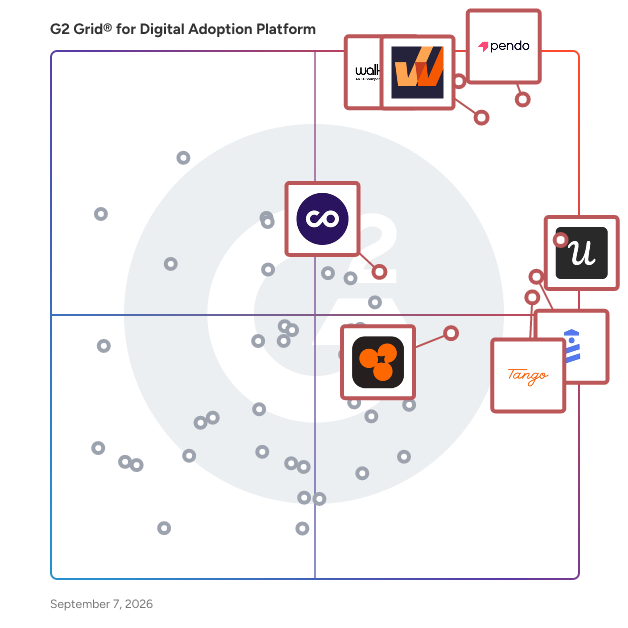
G2 Grid® for Digital Adoption Platforms

G2 Grid® for Digital Adoption Platforms plotting products by satisfaction and market presence

Highlighted products: Pendo, WalkMe, Whatfix, Userpilot, UserGuiding, Tango, ChurnZero, and Product Fruits.

Underlying data: [Grid® JSON](https://www.g2.com/categories/digital-adoption-platform/grids.json?focus%5B%5D=pendo-io-pendo&focus%5B%5D=walkme&focus%5B%5D=whatfix&focus%5B%5D=userpilot&focus%5B%5D=userguiding&focus%5B%5D=tango-tango&focus%5B%5D=churnzero&focus%5B%5D=product-fruits)

Pendo

Pendo is the most powerful way for product builders to drive adoption, keep customers, and grow revenue from what they ship, no matter where or how they work. Pendo tracks and analyzes what users do, what they say, and how a product or agent performs, all in a single system, giving builders complete product context. That context enables Pendo to deliver detailed product and user insights, make or suggest the right fix, design the most impactful user guidance, or identify what to build next. Whether you're working in Pendo or using MCP to work in the AI tools you already use, Pendo helps you ship the best experience for all of your users.

Average Rating: 4.4/5.0

Total Reviews: 1,802

How Do G2 Users Rate Pendo?

  • User Segmentation: 8.5/10 (Category avg: 8.8/10)
  • Ease of Use: 8.2/10 (Category avg: 9.0/10)
  • Text Bubble Walkthroughs: 8.7/10 (Category avg: 9.1/10)
  • Audio-visual Walkthroughs: 8.1/10 (Category avg: 8.9/10)

Who Is the Company Behind Pendo?

  • Seller: Pendo.io
  • Company Website:
  • Year Founded: 2013
  • HQ Location: Raleigh, North Carolina
  • Twitter: @pendoio
    20,032 Twitter followers
  • LinkedIn® Page: www.linkedin.com
    968 employees on LinkedIn®

Who Uses This Product?

  • Who Uses This: Product Manager, Senior Product Manager
  • Top Industries: Computer Software, Information Technology and Services
  • Company Size: 59% Medium, 21% Large

What Do G2 Reviewers Say About Pendo?

AI-generated summary from verified user reviews

Pros
  • Users appreciate the ease of use of Pendo, finding its features intuitive and straightforward for effective product engagement.
  • Users appreciate the seamless integration of analytics and in-app guidance, enhancing user engagement and feedback collection.
  • Users appreciate the seamless integration of analytics and in-app guidance in Pendo, enhancing user engagement and feedback collection.
  • Users highlight Pendo's exceptional support and ease of use, enhancing user engagement and analytics capabilities.
  • Users love Pendo for its seamless integration of analytics and in-app guidance, making user adoption and training effortless.
Cons
  • Users find Pendo's missing features frustrating, particularly in filtering, NPS tracking, and handling decommissioned accounts.
  • Users find it frustrating that Pendo lacks self-recovery options for deleted guides, complicating their admin tasks unnecessarily.
  • Users face a significant learning curve with Pendo, making initial setup and customization challenging and time-consuming.
  • Users find a steep learning curve with Pendo, necessitating time and effort to grasp its complexities effectively.
  • Users express concerns about data inaccuracy with Pendo, noting delays and issues impacting their overall experience.

What Are Recent G2 Reviews of Pendo?

What Are G2 Users Discussing About Pendo?

Whatfix

Whatfix is the AI-native Digital Adoption Platform built for the modern enterprise. It’s the only platform to unify pre-production simulation training, in-workflow guidance and support, and adoption analytics for continuous optimization, driving business outcomes from enterprise software.

Average Rating: 4.6/5.0

Total Reviews: 550

How Do G2 Users Rate Whatfix?

  • User Segmentation: 8.2/10 (Category avg: 8.8/10)
  • Ease of Use: 8.6/10 (Category avg: 9.0/10)
  • Text Bubble Walkthroughs: 9.0/10 (Category avg: 9.1/10)
  • Audio-visual Walkthroughs: 8.5/10 (Category avg: 8.9/10)

Who Is the Company Behind Whatfix?

  • Seller: Whatfix
  • Company Website:
  • Year Founded: 2013
  • HQ Location: San Jose, CA
  • Twitter: @whatfix
    3,096 Twitter followers
  • LinkedIn® Page: www.linkedin.com
    1,102 employees on LinkedIn®

Who Uses This Product?

  • Who Uses This: Product Manager, Project Manager
  • Top Industries: Computer Software, Information Technology and Services
  • Company Size: 45% Large, 36% Medium

What Do G2 Reviewers Say About Whatfix?

AI-generated summary from verified user reviews

Pros
  • Users appreciate the ease of use of Whatfix, allowing effortless content creation without coding expertise.
  • Users praise the unmatched customer support from Whatfix, facilitating smooth onboarding and effective tool implementation.
  • Users appreciate the user-friendly navigation of Whatfix, streamlining training and enhancing understanding of SaaS tools.
  • Users appreciate the intuitive no-code authoring of Whatfix, enabling seamless in-app guidance tailored to various user needs.
  • Users appreciate the ease of content creation with Whatfix, enjoying quick support and seamless implementation.
Cons
  • Users find the learning curve steep, requiring significant time and technical support for an effective setup.
  • Users find the translation process and enablement sessions to be time-consuming, impacting overall productivity and engagement.
  • Users find content library maintenance clunky and analytics limitations hinder usability, affecting the overall experience.
  • Users find the complexity of setup and configuration challenging, often requiring technical support for advanced features.
  • Users find a lack of guidance for advanced workflows, complicating the use of Whatfix for power users.

What Are Recent G2 Reviews of Whatfix?

What Are G2 Users Discussing About Whatfix?

Userpilot

Userpilot is an all-in-one platform for Product, UX, and Marketing teams. It combines Product Analytics, Session Replay, In-app Engagement and In-app Surveys to help you increase product adoption. Userpilot allows teams to build user onboarding flows, launch product announcements, improve your UX & product adoption, provide self-serve support, collect feedback in-app , all code-free. It also provides you with powerful product analytics tools (funnels, trends, paths, cohorts) so you can make informed, data-driven product decisions. NEW: Session Replay: Learn how users navigate your product, find bugs, and spot friction points by watching their sessions. Integrations: Mixpanel, Amplitude, Heap, Intercom, Segment, Webhooks, HubSpot, Salesforce.

Average Rating: 4.6/5.0

Total Reviews: 1,018

How Do G2 Users Rate Userpilot?

  • User Segmentation: 8.7/10 (Category avg: 8.8/10)
  • Ease of Use: 8.6/10 (Category avg: 9.0/10)
  • Text Bubble Walkthroughs: 8.9/10 (Category avg: 9.1/10)
  • Audio-visual Walkthroughs: 8.2/10 (Category avg: 8.9/10)

Who Is the Company Behind Userpilot?

  • Seller: Userpilot
  • Company Website:
  • Year Founded: 2019
  • HQ Location: Austin, US
  • Twitter: @teamuserpilot
    808 Twitter followers
  • LinkedIn® Page: www.linkedin.com
    85 employees on LinkedIn®

Who Uses This Product?

  • Who Uses This: Product Manager, Customer Success Manager
  • Top Industries: Computer Software, Information Technology and Services
  • Company Size: 53% Medium, 38% Small

What Do G2 Reviewers Say About Userpilot?

AI-generated summary from verified user reviews

Pros
  • Users appreciate the intuitive and easy-to-use interface of Userpilot, making their experience streamlined and efficient.
  • Users love the intuitive design of Userpilot, making it easy to create journeys without coding hassle.
  • Users admire the easy setup of Userpilot, facilitating smooth onboarding and effective user engagement without technical hurdles.
  • Users commend the dedicated customer support from UserPilot, enhancing their experience and ensuring seamless usability.
  • Users value the helpful insights from UserPilot, simplifying user engagement and enhancing customer interactions effectively.
Cons
  • Users find the learning curve steep, requiring time to navigate and fully grasp all features of Userpilot.
  • Users experience a steep learning curve with Userpilot, finding its extensive features initially overwhelming to navigate.
  • Users encounter limited customization options, making it difficult to tailor features for their specific use cases effectively.
  • Users find reporting complexities challenging, struggling with custom reports despite support from the Userpilot team.
  • Users find the expensive pricing of Userpilot restrictive, particularly for startups with limited budgets.

What Are Recent G2 Reviews of Userpilot?

What Are G2 Users Discussing About Userpilot?

AI can help you find the answers. G2 helps you trust them.

Connect G2 to Claude or ChatGPT for answers grounded in G2's trusted reviews, comparisons, and pricing from real user insights.

How it works

UserGuiding

UserGuiding is a no-code product adoption platform for teams who need users to reach value on their own, without a support ticket or a training call. You build in-app guidance inside your own product using a visual editor and a Chrome extension, with no engineering ticket. Interactive guides and walkthroughs, onboarding checklists, tooltips, hotspots, banners and announcement modals, each targeted to segments you define from user attributes and events. One platform for the whole adoption loop. Onboard users, see where they stall, ask them why, collect what they want built next, show them what you committed to, then announce it in-app when it ships. Self-serve help: a standalone multilingual Knowledge Base, a Resource Center widget inside your product, and an AI Assistant that answers your users' questions conversationally from your own content. Deflect tickets without adding headcount. Feedback and evidence: in-app surveys and NPS targeted to the right users at the right moment, analytics on every guide, checklist and survey, and Session Replay to see exactly where users stall. Custom Alerts flag a material that stops performing, instead of you finding out at the monthly review. Feature requests and public roadmap: your users submit ideas inside your product and vote on each other's. Everything lands in an inbox you approve before anything goes public. What you pick moves onto a public roadmap in status columns you name yourself, and when it ships it becomes an update post on the same page the request started on. AI-native access: UserGuiding ships an MCP server, so you can query your own adoption data straight from Claude, Cursor or any MCP client rather than exporting spreadsheets. The 1:1 onboarding program: twelve weeks, one hour a week, someone from our team on a call with yours, building in your account instead of handing you a plan. Each session takes one piece of your user journey and gets something live. UserGuiding is the only product adoption platform that includes a weekly 1:1 onboarding program at no additional fee. Everywhere else, hands-on implementation is a paid services engagement or reserved for enterprise contracts. You can see what UserGuiding costs without booking a call. Plans start at $174 per month billed annually. Enterprise adds SAML SSO, activity logs, migration support, and SOC 2, GDPR and HIPAA compliance. More than 1,000 companies use UserGuiding, which holds 4.7 stars across 772 G2 reviews, most often praised for how quickly it goes live.

Average Rating: 4.7/5.0

Total Reviews: 779

How Do G2 Users Rate UserGuiding?

  • User Segmentation: 8.7/10 (Category avg: 8.8/10)
  • Ease of Use: 9.1/10 (Category avg: 9.0/10)
  • Text Bubble Walkthroughs: 9.1/10 (Category avg: 9.1/10)
  • Audio-visual Walkthroughs: 8.6/10 (Category avg: 8.9/10)

Who Is the Company Behind UserGuiding?

  • Seller: UserGuiding
  • Company Website:
  • Year Founded: 2017
  • HQ Location: Istanbul, TR
  • Twitter: @UserGuiding
    1,755 Twitter followers
  • LinkedIn® Page: www.linkedin.com
    24 employees on LinkedIn®

Who Uses This Product?

  • Who Uses This: Product Manager, Product Designer
  • Top Industries: Computer Software, Information Technology and Services
  • Company Size: 55% Small, 36% Medium

What Do G2 Reviewers Say About UserGuiding?

AI-generated summary from verified user reviews

Pros
  • Users appreciate the ease of use of UserGuiding, finding it simple and intuitive for onboarding and setup.
  • Users value the responsive and helpful customer support of UserGuiding, enhancing their overall experience and satisfaction.
  • Users find the easy setup of UserGuiding highly beneficial for onboarding and managing customer updates efficiently.
  • Users find the intuitive interface of UserGuiding essential for quickly understanding and utilizing new features independently.
  • Users appreciate the helpful onboarding features of UserGuiding, enhancing customer experience and driving business success.
Cons
  • Users find the limited customization options challenging, requiring additional code changes for desired features.
  • Users find missing features in UserGuiding, such as limited customization options and lack of comprehensive analytics.
  • Users note the limitations of mobile app support in UserGuiding, impacting their overall experience and insights.
  • Users find the learning curve challenging due to tricky custom setup and language barriers for non-English speakers.
  • Users experience editing difficulties with UserGuiding, facing lag and challenges when navigating the Rich Text Editor and changes.

What Are Recent G2 Reviews of UserGuiding?

What Are G2 Users Discussing About UserGuiding?

Chameleon

Chameleon is the AI-first product adoption platform for modern SaaS teams. Build tours, checklists, embeddables, and surveys instantly with Copilot—our AI that creates campaigns, audiences, and analyzes data in seconds. Record interactive demos and auto-generate product launch content. Ranger, our governance agent, automatically maintains account health. Deeply native experiences with real-time personalization, smart triggers, and enterprise governance controls. Product teams trust Chameleon to drive activation and expansion while maintaining exceptional UX. Start free at chameleon.io/signup Need help deciding? Check out our Buyers' Guide with tips on running a successful evaluation chameleon.io/buyers-guide

Average Rating: 4.4/5.0

Total Reviews: 360

How Do G2 Users Rate Chameleon?

  • User Segmentation: 7.9/10 (Category avg: 8.8/10)
  • Ease of Use: 8.2/10 (Category avg: 9.0/10)
  • Text Bubble Walkthroughs: 8.6/10 (Category avg: 9.1/10)
  • Audio-visual Walkthroughs: 7.9/10 (Category avg: 8.9/10)

Who Is the Company Behind Chameleon?

Who Uses This Product?

  • Who Uses This: Product Manager, Senior Product Manager
  • Top Industries: Computer Software, Information Technology and Services
  • Company Size: 55% Medium, 30% Small

What Do G2 Reviewers Say About Chameleon?

AI-generated summary from verified user reviews

Pros
  • Users praise Chameleon's clean and easy-to-use interface, making integration and creating tooltips hassle-free.
  • Users appreciate the flexibility and customization of Chameleon, enhancing user targeting and onboarding experiences effectively.
  • Users find Chameleon intuitive for creating in-app experiences effortlessly, empowering teams to innovate with minimal engineering support.
  • Users praise Chameleon for its exceptional customer support, highlighting responsive and knowledgeable assistance from the team.
  • Users value Chameleon's customization and user-friendliness for creating tailored, effective communications and enhancing user engagement.
Cons
  • Users find the learning curve steep, requiring time and tech knowledge to effectively navigate Chameleon's complex features.
  • Users report experiencing frequent software bugs, which disrupt the experience and hinder usability in the Chameleon app.
  • Users find the complex features of Chameleon overwhelming and challenging to navigate during onboarding and setup.
  • Users find Chameleon has limited features, particularly with integrations and templates, affecting overall usability.
  • Users find the learning difficulty in mastering Chameleon's advanced features challenging, especially for non-technical users.

What Are Recent G2 Reviews of Chameleon?

Fin

Fin is an AI Agent that helps CX teams deliver instant, accurate, & personalized experiences on any channel, in over 45 languages, 24/7. It is the highest-performing customer agent on the market, resolving 76% of queries on average across 12K+ customers, including highly complex, multi-step cases like refunds, account changes, or subscription issues. Fin connects into business systems, pulls customer data, and takes action in those systems – automatically resolving queries without needing a human. If Fin can’t answer the question or it has explicit guidance not to, it hands off to a human in whatever help desk they’re working in. It runs on all the channels you engage with customers on: voice, email, chat, WhatsApp, SMS, social, Slack, Discord, and more. It delivers the same personalized, context-rich experience regardless of where the conversation is happening. Works across the entire customer journey. Fin is a single Agent that understands the entire customer context and history, can build a relationship with customers over time, and can transition from one use case to another – from service to sales to ecommerce – without the customer even realizing the change. The Fin family of agent roles include: - Fin for Service resolves customers queries and automates support processes end-to-end. - Fin for Sales answers product discovery questions, qualifies inbound leads, and books appointments for your sales team or guides those leads to a self-service flow. - Fin for Ecommerce answers questions as customers shop, recommends exactly the right product, and guides them through checkout. What makes Fin different: - Industry-leading performance: Fin resolves 76% of cases on average across 12,000+ customers, with many customers seeing resolution rates of over 90%. This is because Fin is powered by Apex, our proprietary models that are purpose-built for CX. Fin Apex 1.0 outperforms generic frontier models, with a 2.8% higher resolution rate and 65% fewer hallucinations on average when compared to frontier models. - Easy-to-launch and optimize: Fin is fast to set up and easy for anyone on your team to configure without the need for technical resources. Teams go live in days, see value quickly, and are able to continuously and easily improve Fin themselves. - One platform across AI & human agents: Fin is natively integrated with Intercom, but also integrates seamlessly with almost any helpdesk. This means you can manage your human team and Fin in one place, without ever having to migrate off your system of record or change your workflows. - An agent for customer operations: Operator is an internal agent that helps CX leaders spot problems, find opportunities to improve, and act on them. You can optimize Fin agentically and without the manual lift. - Full trust and control: Fin is the only AI Agent that gives you complete control over how it performs. You can configure tone, behavior, and knowledge without any technical resources. And it has a full observability and testing suite, so you can deploy changes with confidence and trust what is going live to customers. - One agent for the whole lifecycle: Fin is a single Customer Agent, working across the entire customer lifecycle to help sell, onboard, and deliver excellent service. All on the same shared context, history, and guidance. - The most experienced partner: Fin combines 15+ years experience in CX with a 60+ person cutting-edge AI team. We partner with customers for the long-term and have developed the Blueprint for success based on our own experience using Fin.

Average Rating: 4.5/5.0

Total Reviews: 3,772

How Do G2 Users Rate Fin?

  • User Segmentation: 9.1/10 (Category avg: 8.8/10)
  • Ease of Use: 8.9/10 (Category avg: 9.0/10)
  • Text Bubble Walkthroughs: 9.0/10 (Category avg: 9.1/10)
  • Audio-visual Walkthroughs: 8.9/10 (Category avg: 8.9/10)

Who Is the Company Behind Fin?

  • Seller: Fin
  • Company Website:
  • Year Founded: 2011
  • HQ Location: San Francisco, CA
  • Twitter: @fin_ai
    45,225 Twitter followers
  • LinkedIn® Page: www.linkedin.com
    1,238 employees on LinkedIn®

Who Uses This Product?

  • Who Uses This: Customer Success Manager, CEO
  • Top Industries: Computer Software, Information Technology and Services
  • Company Size: 56% Small, 37% Medium

What Do G2 Reviewers Say About Fin?

AI-generated summary from verified user reviews

Pros
  • Users appreciate the powerful query resolution capabilities of Fin, highlighting its quick access to helpful resources.
  • Users find Fin to be incredibly easy to use and appreciate its quick and efficient responses.
  • Users appreciate Fin's speed and reliability in resolving queries, enjoying its intuitive UI and seamless integration.
  • Users enjoy the efficiency of Fin, benefiting from seamless navigation and effective AI handling of customer queries.
  • Users appreciate the automation features of Fin, enhancing efficiency and client management without overwhelming support teams.
Cons
  • Users find the missing features in Fin, particularly for procedure visibility and conversation simulation, frustrating and limiting.
  • Users find AI limitations in Fin, struggling with unique formats and providing unhelpful responses at times.
  • Users express frustration with limited features in Fin, citing a need for better integration and simulation options.
  • Users find the learning curve challenging, struggling with setup and the need for constant monitoring and attention.
  • Users express concerns over Fin's high pricing, with many features requiring additional payment, leading to unexpected bills.

What Are Recent G2 Reviews of Fin?

What Are G2 Users Discussing About Fin?

iorad

Capture once. Reach everyone. Train anything. iorad automatically captures any workflow on any desktop or web application and transforms it into interactive, step-by-step training content. No screenshots, no manual editing, no production work necessary. Instantly ready to use with Storyteller AI. One recording. No editing. No production. While other tools give you one static output, iorad generates six learning modes: ✅ Try — fully interactive, guided walkthrough ✅ Watch — auto-generated video ✅ Slide — slideshow format ✅ Scroll — scannable step-by-step list ✅ Quiz — graded learning experience ✅ Do — in-app guided experience Every learner is different. iorad covers all of them. Built for scale with unlimited learners. iorad doesn't charge per viewer. Whether you're training 10 employees or 10,000 customers, your costs don't grow with your audience, making it the most cost-efficient tutorial platform for organizations that need broad reach. One platform for employee training, digital adoption, and customer education. Teams use iorad for onboarding, SOPs, knowledge base content, sales enablement, customer training, and self-service support. Every tutorial is instantly ready to share via link, embed, or integration within your existing tech stack. Global-ready from day one. Deliver guidance in any language, embedded within the tools your learners use every day. ✨ Trusted by 45K+ organizations · 1M+ tutorials created · 30M+ learners reached

Average Rating: 4.7/5.0

Total Reviews: 52

How Do G2 Users Rate iorad?

  • User Segmentation: 5.0/10 (Category avg: 8.8/10)
  • Ease of Use: 8.9/10 (Category avg: 9.0/10)
  • Text Bubble Walkthroughs: 8.8/10 (Category avg: 9.1/10)
  • Audio-visual Walkthroughs: 9.8/10 (Category avg: 8.9/10)

Who Is the Company Behind iorad?

  • Seller: iorad
  • Company Website:
  • Year Founded: 2007
  • HQ Location: Boston, US
  • Twitter: @iorad
    1,176 Twitter followers
  • LinkedIn® Page: www.linkedin.com
    18 employees on LinkedIn®

Who Uses This Product?

  • Top Industries: Computer Software, Education Management
  • Company Size: 60% Medium, 27% Large

What Are Recent G2 Reviews of iorad?

What Are G2 Users Discussing About iorad?

Appcues

Appcues is a customer engagement platform that turns your product into the best place to reach, encourage, and engage your customers. Marketing and product teams use Appcues to publish dynamic content, surveys and multi-step guides without ongoing engineering resources. Most in-app tools focus solely on onboarding new users. Appcues runs campaigns across the full customer lifecycle: helping you build awareness of new features, drive adoption, encourage advocacy, and inform what you build next, all through targeted in-app messaging. When a user hits an activation moment, drifts from a key workflow, or crosses a usage threshold, Appcues helps you respond automatically across in-app, email, and push. Appcues connects engagement to real business outcomes: custom analytics dashboards show how users move through your product, and funnels surface exactly where they fall off. Inside Appcues, you can describe what you want in plain language: build a campaign, create an experience, ask a question, and Appcues AI does the work: building experiences, flagging what's underperforming, and suggesting fixes automatically. Segments let you target the right audience down to a single user, so every experience reaches exactly who it should. Campaigns tie it all to a named goal you can track. Founded in 2013 in Boston, Appcues has spent over a decade helping companies close the gap between building products and helping customers get real value from them. Trusted by HubSpot, G2, Airbase, and Wayfair, Appcues has powered billions of in-product experiences across thousands of products worldwide.

Average Rating: 4.6/5.0

Total Reviews: 358

How Do G2 Users Rate Appcues?

  • User Segmentation: 8.5/10 (Category avg: 8.8/10)
  • Ease of Use: 8.6/10 (Category avg: 9.0/10)
  • Text Bubble Walkthroughs: 8.9/10 (Category avg: 9.1/10)
  • Audio-visual Walkthroughs: 8.1/10 (Category avg: 8.9/10)

Who Is the Company Behind Appcues?

  • Seller: Appcues
  • Company Website:
  • Year Founded: 2013
  • HQ Location: Boston, MA
  • Twitter: @appcues
    5,121 Twitter followers
  • LinkedIn® Page: www.linkedin.com
    58 employees on LinkedIn®

Who Uses This Product?

  • Who Uses This: Product Manager, Customer Success Manager
  • Top Industries: Computer Software, Information Technology and Services
  • Company Size: 58% Medium, 33% Small

What Do G2 Reviewers Say About Appcues?

AI-generated summary from verified user reviews

Pros
  • Users find Appcues to be exceptionally easy to use, streamlining onboarding and feedback collection seamlessly.
  • Users find the easy setup of Appcues to be straightforward and user-friendly, enhancing their onboarding experience.
  • Users commend the outstanding customer support of Appcues, noting quick and helpful responses to all requests.
  • Users value the easy creation process of Appcues, significantly improving trial user retention and engagement.
  • Users value the intuitive interface of Appcues, enhancing their ability to create effective workflows effortlessly.
Cons
  • Users face limitations in customization and integration, hindering the overall effectiveness of Appcues.
  • Users find Appcues lacking in missing features such as alert systems and better organizational tools for flows.
  • Users feel there is a need for improvement in metrics, organization of flows, and tracking features in Appcues.
  • Users express frustration over poor customer support, particularly regarding the lack of timely assistance and resolutions.
  • Users report a poor UX, with slow responses and clunky features detracting from the overall experience.

What Are Recent G2 Reviews of Appcues?

What Are G2 Users Discussing About Appcues?

Lemon Learning

Lemon Learning is a Digital Adoption Platform (DAP) that empowers millions users worldwide in their use of digital tools. Lemon Learning is like GPS navigation for any web-based software, whether market-leading solutions or unique tools developed in-house. Interactive, in-app walkthroughs guide users step by step through any business process or functionality. From small businesses to major global enterprises, Lemon Learning helps teams across the globe to boost adoption of digital tools. The international organizations and stock market leaders we work with include KPMG, Martin Bower, Chanel, Randstad, Aéroports de Paris, among many others.

Average Rating: 4.8/5.0

Total Reviews: 44

How Do G2 Users Rate Lemon Learning?

  • User Segmentation: 9.6/10 (Category avg: 8.8/10)
  • Ease of Use: 9.6/10 (Category avg: 9.0/10)
  • Text Bubble Walkthroughs: 9.2/10 (Category avg: 9.1/10)
  • Audio-visual Walkthroughs: 9.9/10 (Category avg: 8.9/10)

Who Is the Company Behind Lemon Learning?

  • Seller: Lemonlearning
  • Company Website:
  • Year Founded: 2014
  • HQ Location: Paris, France
  • LinkedIn® Page: www.linkedin.com
    54 employees on LinkedIn®

Who Uses This Product?

  • Top Industries: Manufacturing
  • Company Size: 44% Medium, 38% Large

What Are Recent G2 Reviews of Lemon Learning?

What Are G2 Users Discussing About Lemon Learning?

Userflow

Userflow is a Product Adoption Engine built for customer-obsessed SaaS teams running self-serve products. Many teams rely on engineering to ship in-app onboarding, announcements, and user education, slowing iteration and limiting visibility into what drives activation. Userflow removes those bottlenecks with a flexible, AI-powered platform for in-app onboarding and in-app guidance that helps turn users into champions. Build product tours, onboarding checklists, surveys, feature announcements, and a customizable resource center without code. Personalize experiences by behavior or segment to drive product adoption and feature adoption across the entire lifecycle. Userflow goes beyond surface-level guidance. Real-time product signals power segmentation, targeting, and continuous optimization. With built-in analytics and product analytics integrations— including Amplitude, Mixpanel, and cohort sync via Segment— teams can stream events, sync cohorts, and measure impact without stitching together multiple tools. A standard chatbot tells users what to do—or points them to a doc. Adoption Agent reads the question, picks the most relevant flow from your library, and walks the user through it in-app. That’s the difference between in-app AI as support overhead and in-app AI as a growth driver. Userflow installs as a lightweight layer on top of your app and supports modern data workflows with event streaming, two-way integrations, and CRM sync, helping teams close the loop between insight and action. Whether you’re improving trial-to-paid conversion, scaling onboarding across personas, or optimizing feature adoption in a complex product, Userflow helps teams move from guesswork to guided, measurable growth. Learn more at www.userflow.com

Average Rating: 4.8/5.0

Total Reviews: 125

How Do G2 Users Rate Userflow?

  • User Segmentation: 8.6/10 (Category avg: 8.8/10)
  • Ease of Use: 9.4/10 (Category avg: 9.0/10)
  • Text Bubble Walkthroughs: 9.8/10 (Category avg: 9.1/10)
  • Audio-visual Walkthroughs: 9.4/10 (Category avg: 8.9/10)

Who Is the Company Behind Userflow?

  • Seller: Joincube, Inc. (DBA Beamer)
  • Company Website:
  • Year Founded: 2011
  • HQ Location: Austin, Texas
  • Twitter: @joincube
    488 Twitter followers
  • LinkedIn® Page: www.linkedin.com
    3 employees on LinkedIn®

Who Uses This Product?

  • Who Uses This: CEO, Product Manager
  • Top Industries: Computer Software, Information Technology and Services
  • Company Size: 58% Small, 34% Medium

What Do G2 Reviewers Say About Userflow?

AI-generated summary from verified user reviews

Pros
  • Users find Userflow to be incredibly easy to use, especially for non-technical individuals, enhancing their experience.
  • Users find Userflow to be intuitive, enabling effortless onboarding and seamless user experiences without technical expertise.
  • Users love the easy setup of Userflow, allowing quick onboarding for non-technical staff and efficient use of resources.
  • Users highlight the incredibly quick and helpful customer support from Userflow, enhancing their overall experience.
  • Users praise Userflow for its easy implementation, making it accessible even for non-technical users and enhancing flexibility.
Cons
  • Users find content management cumbersome due to missing translations and difficulties in sharing unpublished flows.
  • Users find Userflow's pricing expensive, especially for small companies and AI Assistant usage.
  • Users express frustration over the lack of integration options in Userflow, limiting in-depth analytics and organization.
  • Users find Userflow's limited functionality challenging for complex flows due to automation and low-code constraints.
  • Users wish for missing functionality like access to private articles and native "Back" buttons in Userflow.

What Are Recent G2 Reviews of Userflow?

What Are G2 Users Discussing About Userflow?

Apty

Apty is an enterprise-grade Digital Adoption Platform (DAP) built to work across your entire software stack—including custom apps. While other DAPs stop at tooltips and walkthroughs, Apty drives execution: faster onboarding, fewer errors, and measurable ROI in weeks. No guesswork. No bloat. No hand-holding required. Just software that works the way your business does—without retraining or IT overload.

Average Rating: 4.7/5.0

Total Reviews: 138

How Do G2 Users Rate Apty?

  • User Segmentation: 8.9/10 (Category avg: 8.8/10)
  • Ease of Use: 9.1/10 (Category avg: 9.0/10)
  • Text Bubble Walkthroughs: 9.2/10 (Category avg: 9.1/10)
  • Audio-visual Walkthroughs: 8.8/10 (Category avg: 8.9/10)

Who Is the Company Behind Apty?

  • Seller: Apty
  • Year Founded: 2018
  • HQ Location: Austin, Texas
  • LinkedIn® Page: www.linkedin.com
    67 employees on LinkedIn®

Who Uses This Product?

  • Top Industries: Information Technology and Services, Computer Software
  • Company Size: 42% Medium, 36% Large

What Do G2 Reviewers Say About Apty?

AI-generated summary from verified user reviews

Pros
  • Users find Apty's interface easy to use, allowing quick implementation of workflows without technical expertise.
  • Users value the easy implementation of Apty, allowing quick setup for non-technical individuals.
  • Users value the easy integrations of Apty, enabling quick setup and implementation without technical expertise.
  • Users find Apty's easy setup intuitive, allowing quick implementation of workflows even without technical skills.
Cons
  • Users experience occasional glitches and manual translation issues with Apty, affecting their overall efficiency.
  • Users report occasional software glitches with Apty, though it typically recovers quickly and needs better auto-translation features.

What Are Recent G2 Reviews of Apty?

What Are G2 Users Discussing About Apty?

Userlane

Userlane is the software adoption platform for healthcare, financial services, manufacturing, and pharma. Organizations are making their largest technology investments yet, spanning digital transformation, new core systems, and AI. Across software, AI, training, and support budgets, one factor decides the return: whether people use the technology well. Userlane delivers the data to decide: where to cut, where to invest, and how to realize that value. It captures the signals of how work actually happens: who is working, in which application, on which task. It interprets those signals to show which applications earn their budget, where spend can be reduced, and where friction points to an AI opportunity. It detects shifts in user behavior (task success, compliance, signs that someone is lost within a workflow) and responds by surfacing insights to the teams responsible and offering assistance within the application. And it quantifies the impact on business results. Large and mid-market organizations run Userlane across their entire estate, from clinical systems to ERP, CRM, and AI tools, independent of any vendor.

Average Rating: 4.7/5.0

Total Reviews: 80

How Do G2 Users Rate Userlane?

  • User Segmentation: 9.2/10 (Category avg: 8.8/10)
  • Ease of Use: 8.9/10 (Category avg: 9.0/10)
  • Text Bubble Walkthroughs: 9.2/10 (Category avg: 9.1/10)
  • Audio-visual Walkthroughs: 9.0/10 (Category avg: 8.9/10)

Who Is the Company Behind Userlane?

  • Seller: Userlane
  • Year Founded: 2016
  • HQ Location: Munich, Bavaria
  • Twitter: @UserlaneHQ
    7,327 Twitter followers
  • LinkedIn® Page: www.linkedin.com
    69 employees on LinkedIn®

Who Uses This Product?

  • Top Industries: Computer Software, Automotive
  • Company Size: 40% Large, 38% Medium

What Do G2 Reviewers Say About Userlane?

AI-generated summary from verified user reviews

Pros
  • Users appreciate the ease of creating guides and tool tips, enhancing their onboarding experience and user understanding.
  • Users appreciate the easy creation of guides and tools, enhancing their ability to onboard and engage effectively.
  • Users love the easy setup of Userlane, enabling quick creation of guides and seamless onboarding experiences.
  • Users appreciate the ease of creating guides and tooltips, enhancing the clarity of user interactions on the platform.
  • Users appreciate the intuitive guidebuilding features of Userlane, making onboarding and support seamless and effective.
Cons
  • Users experience bugs in the interface for managers, which hinders usability and independence from customer support.
  • Users find that missing simple functions lead to complicated workarounds and buggy manager interfaces, limiting independence from CS.
  • Users find the missing features frustrating, often requiring complicated workarounds for basic functionality.
  • Users find the missing functionality in Userlane frustrating, often requiring complex workarounds for basic tasks.
  • Users experience software bugs in the manager interface, hindering independence and usability of the tool.

What Are Recent G2 Reviews of Userlane?

Gainsight Product Experience

Gainsight Product Experience (PX) is an all-in-one platform where product, CS, and revenue teams can understand how users engage with their product, guide them to value, and collect feedback in one connected workspace. Today's SaaS businesses win by orchestrating precise, data-driven experiences. Gainsight PX empowers teams to see exactly where users succeed or struggle through deep usage analytics, funnel analysis, and user-level insights so every decision is backed by data, not guesswork. Gainsight PX enhances both the user and admin experience through native integrations with Gainsight Customer Success, Gainsight Customer Communities, Skilljar by Gainsight, and your broader tech stack, connecting in-app behavior directly to health scores, playbooks, and renewal workflows. With AI supporting hyper-personalized in-app engagements, path analysis, segmentation, and feedback loops, Gainsight PX turns every user action into a business advantage, reducing engineering dependency and accelerating time to value. By bridging the gap between product analytics and customer outcomes, Gainsight PX drives stronger adoption, lower cost-to-serve, and the retention and expansion growth that keeps businesses ahead.

Average Rating: 4.4/5.0

Total Reviews: 239

How Do G2 Users Rate Gainsight Product Experience?

  • User Segmentation: 8.2/10 (Category avg: 8.8/10)
  • Ease of Use: 7.7/10 (Category avg: 9.0/10)
  • Text Bubble Walkthroughs: 8.5/10 (Category avg: 9.1/10)
  • Audio-visual Walkthroughs: 8.3/10 (Category avg: 8.9/10)

Who Is the Company Behind Gainsight Product Experience?

  • Seller: Gainsight Inc.
  • Year Founded: 2009
  • HQ Location: San Francisco, CA
  • Twitter: @GainsightHQ
    13,119 Twitter followers
  • LinkedIn® Page: www.linkedin.com
    1,144 employees on LinkedIn®

Who Uses This Product?

  • Who Uses This: Customer Success Manager, Product Manager
  • Top Industries: Computer Software, Information Technology and Services
  • Company Size: 61% Medium, 21% Small

What Do G2 Reviewers Say About Gainsight Product Experience?

AI-generated summary from verified user reviews

Pros
  • Users find Gainsight Product Experience to provide ease of use, streamlining customer engagement and tracking success effortlessly.
  • Users value the high-quality customer engagement features of Gainsight, enhancing their understanding and support for clients.
  • Users value the automation and organization Gainsight provides, enhancing their ability to personalize customer experiences efficiently.
  • Users value the real-time reporting and dashboards of Gainsight, enhancing client engagement and retention efforts effectively.
  • Users value the real-time analytics in Gainsight, enhancing customer retention and informed decision-making.
Cons
  • Users face a steep learning curve with Gainsight, complicating the utilization of its extensive features and functionalities.
  • Users find the learning difficulty with Gainsight Product Experience to be a challenge due to its complexity and intricacies.
  • Users note a steep learning curve with Gainsight Product Experience, making full utilization challenging and time-consuming.
  • Users find missing features in Gainsight Product Experience hinder effective engagement and reporting functionalities.
  • Users find the missing functionality in Gainsight Product Experience limits engagement effectiveness and complicates custom workflows.

What Are Recent G2 Reviews of Gainsight Product Experience?

What Are G2 Users Discussing About Gainsight Product Experience?

Inline Manual

Engage and support customers through in-app tutorials Inline Manual provides a service to guide, support and engage prospects and customers right within an application. Easily create product walkthroughs, on-boarding guides, new features announcements, tooltips and manageable product documentation. Used and loved by small and big companies to get customers up to speed in no time, available for any web based product. All this without any coding.

Average Rating: 4.6/5.0

Total Reviews: 22

How Do G2 Users Rate Inline Manual?

  • User Segmentation: 10.0/10 (Category avg: 8.8/10)
  • Ease of Use: 8.2/10 (Category avg: 9.0/10)
  • Text Bubble Walkthroughs: 9.2/10 (Category avg: 9.1/10)
  • Audio-visual Walkthroughs: 8.9/10 (Category avg: 8.9/10)

Who Is the Company Behind Inline Manual?

  • Seller: Inline Manual
  • Year Founded: 2014
  • HQ Location: London, United Kingdom
  • Twitter: @InlineManual
    1,165 Twitter followers
  • LinkedIn® Page: www.linkedin.com
    7 employees on LinkedIn®

Who Uses This Product?

  • Top Industries: Computer Software
  • Company Size: 48% Small, 35% Medium

What Are Recent G2 Reviews of Inline Manual?

What Are G2 Users Discussing About Inline Manual?

Toonimo

User Experience Made Easy, for Everyone. Toonimo is a leading Digital Adoption Platform for enterprises who streamline the efforts for internal employee training and customer onboarding initiatives. For organizations that want to help bolster user adoption of new or currently used software solutions, but don’t want to force employees to sit through hours of eLearning modules or read user manuals, Toonimo offers powerful tools to add learning right into a layer on top of the software in real-time, allowing users to learn by doing, and fulfill tasks on the fly. Toonimo places the trainer next to you at the point of need using text bubbles, effects and audio creating an impactful self-serve environment. The result is a dramatic rise in user adoption, internal training cost savings enterprise wide, higher employee morale and increased efficiency fulfilling tasks. Use Cases : - Employee training - Onboard new customers - Reduce customer support - Improve website conversion - Change management Main Features: - Real time human voice guidance - Rich media effects - Step-by-step Walkthroughs - Self-service editor - Multi-language support - A/B testing - Reporting and analytics And much more.. Come learn more about Toonimo and request a free demo: https://www.toonimo.com/why-toonimo/

Average Rating: 4.3/5.0

Total Reviews: 12

How Do G2 Users Rate Toonimo?

  • User Segmentation: 9.4/10 (Category avg: 8.8/10)
  • Ease of Use: 8.8/10 (Category avg: 9.0/10)
  • Text Bubble Walkthroughs: 9.6/10 (Category avg: 9.1/10)
  • Audio-visual Walkthroughs: 9.8/10 (Category avg: 8.9/10)

Who Is the Company Behind Toonimo?

  • Seller: Toonimo
  • Year Founded: 2013
  • HQ Location: New York, NY
  • Twitter: @toonimo
    399 Twitter followers
  • LinkedIn® Page: www.linkedin.com
    43 employees on LinkedIn®

Who Uses This Product?

  • Company Size: 42% Small, 42% Medium

What Are Recent G2 Reviews of Toonimo?

What Are G2 Users Discussing About Toonimo?