Best Cloud Content Collaboration Software - Page 5

How Many Cloud Content Collaboration Software Products Does G2 Track?

Total Products under this Category: 260

Category Stats (Sep 2026)

  • Average Rating: 4.34/5 (↓0.02 vs Aug 2026) The average rating of products in this category, based on all submitted ratings
  • Top Trending Product: NetDocuments (+1.42%) - Among all products in this category, NetDocuments recorded the largest rating increase compared to last month

Last updated: September 29, 2026

How Does G2 Rank Cloud Content Collaboration Software Products?

Why You Can Trust G2's Software Rankings:

  • 30 Analysts and Data Experts
  • 118,900+ Authentic Reviews
  • 260+ Products
  • Unbiased Rankings

G2's software rankings are built on verified user reviews, rigorous moderation, and a consistent research methodology maintained by a team of analysts and data experts. Each product is measured using the same transparent criteria, with no paid placement or vendor influence. While reviews reflect real user experiences, which can be subjective, they offer valuable insight into how software performs in the hands of professionals. Together, these inputs power the G2 Score, a standardized way to compare tools within every category.

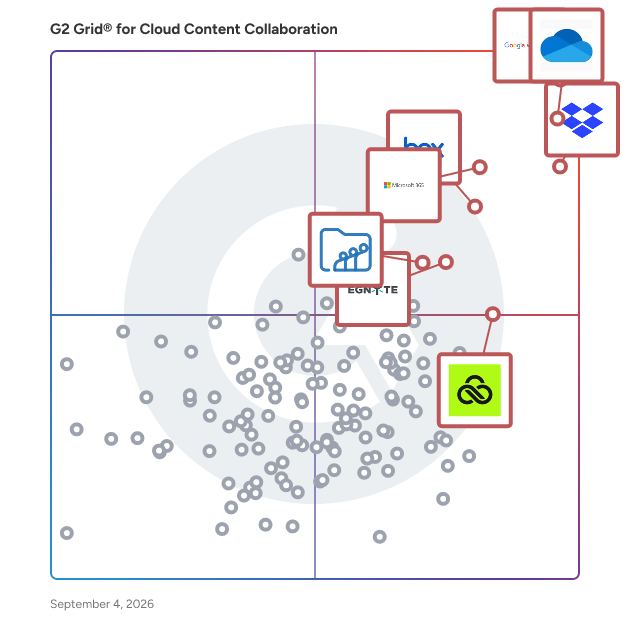
G2 Grid® for Cloud Content Collaboration Software

G2 Grid® for Cloud Content Collaboration Software plotting products by satisfaction and market presence

Highlighted products: Google Workspace, Microsoft OneDrive for Business, Dropbox, Microsoft 365, Box, Egnyte, LucidLink, and Zoho WorkDrive.

Underlying data: [Grid® JSON](https://www.g2.com/categories/cloud-content-collaboration/grids.json?focus%5B%5D=google-workspace&focus%5B%5D=microsoft-onedrive-for-business&focus%5B%5D=dropbox&focus%5B%5D=microsoft365&focus%5B%5D=box&focus%5B%5D=egnyte&focus%5B%5D=lucidlink&focus%5B%5D=zoho-workdrive)

NetDocuments

NetDocuments is a cloud-native document management system built for legal professionals who need secure, intelligent, and connected ways to manage their work. Trusted by law firms, corporate legal departments, and public-sector organizations, NetDocuments goes beyond document storage to serve as the central platform where legal work happens. It brings together content, workflows, collaboration, and AI in a single governed environment—helping teams work more efficiently while maintaining strict security, compliance, and auditability. With built-in AI capabilities like intelligent search, automated profiling, and workflow automation, NetDocuments helps legal teams surface insight faster, reduce administrative effort, and apply their expertise where it matters most. Deep integrations with Microsoft 365 and other legal technologies ensure professionals can work seamlessly in the tools they already use — without sacrificing control or governance. NetDocuments is designed to scale with organizations of any size, providing a secure foundation for intelligent legal work today and in the future.

Average Rating: 3.9/5.0

Total Reviews: 37

How Do G2 Users Rate NetDocuments?

  • Has the product been a good partner in doing business?: 8.6/10 (Category avg: 8.8/10)
  • Performance and Reliability: 1.7/10 (Category avg: 8.7/10)
  • File following: 8.3/10 (Category avg: 8.8/10)
  • Device Syncing: 6.7/10 (Category avg: 8.8/10)

Who Is the Company Behind NetDocuments?

  • Seller: NetDocuments
  • Company Website:
  • Year Founded: 1998
  • HQ Location: Lehi, UT
  • Twitter: @netdocuments
    6,598 Twitter followers
  • LinkedIn® Page: www.linkedin.com
    578 employees on LinkedIn®

Who Uses This Product?

  • Who Uses This: Paralegal
  • Top Industries: Law Practice, Legal Services
  • Company Size: 45% Medium, 45% Small

What Do G2 Reviewers Say About NetDocuments?

AI-generated summary from verified user reviews

Pros
  • Users value the efficient document management features of NetDocuments, such as effective search and easy downloads.
  • Users find the ease of creation in NetDocuments enhances workflow with simple saving and downloading of documents.
  • Users find NetDocuments easy to use, especially appreciating the effective search and document handling features.
  • Users find the easy upload process in NetDocuments convenient, enhancing their document management experience.
  • Users find NetDocuments intuitive and easy to navigate, enhancing their overall experience with effective features.
Cons
  • Users report multiple billing issues with NetDocuments, including unexpected costs and inadequate support for setup and storage.
  • Users express concerns over cost increases due to inadequate sub-folder setups and unexpected storage fees.
  • Users find the document management setup cumbersome and feel it lacks adequate support and customization options.
  • Users struggle with email integration, finding setup cumbersome and lacking essential features compared to previous systems.
  • Users express concerns about the expensive nature of NetDocuments, especially regarding storage and setup costs.

What Are Recent G2 Reviews of NetDocuments?

What Are G2 Users Discussing About NetDocuments?

GoFileRoom

Why choose GoFileRoom It’s time to banish paper files and storage fees. Thomson Reuters GoFileRoom is cloud-based electronic document storage software designed for tax and accounting professionals. GoFileRoom offers an arsenal of features to give your firm 24/7 access to document storage in the cloud. Your staff can quickly associate client documents to workflows while uploading files to the web-based DMS. Streamline your processes and create a truly paperless office. Plus, integrate GoFileRoom with other products to save even more time and money. Learn more at https://tax.thomsonreuters.com/us/en/cs-professional-suite/gofileroom

Average Rating: 4.1/5.0

Total Reviews: 36

How Do G2 Users Rate GoFileRoom?

  • Has the product been a good partner in doing business?: 7.0/10 (Category avg: 8.8/10)
  • Performance and Reliability: 9.7/10 (Category avg: 8.7/10)
  • File following: 9.2/10 (Category avg: 8.8/10)
  • Device Syncing: 8.5/10 (Category avg: 8.8/10)

Who Is the Company Behind GoFileRoom?

  • Seller: Thomson Reuters
  • Year Founded: 2008
  • HQ Location: Toronto, CA
  • Twitter: @thomsonreuters
    150,224 Twitter followers
  • LinkedIn® Page: www.linkedin.com
    36,803 employees on LinkedIn®
  • Ownership: NYSE:TRI

Who Uses This Product?

  • Top Industries: Accounting
  • Company Size: 39% Small, 39% Medium

What Do G2 Reviewers Say About GoFileRoom?

AI-generated summary from verified user reviews

Pros
  • Users appreciate the centralized cloud-based document management of GoFileRoom, which streamlines secure collaboration and file access.
  • Users find GoFileRoom to be very easy to use, enhancing organization and simplifying document management and access.
  • Users appreciate the easy access to files via GoFileRoom's centralized cloud-based system, enhancing organization and collaboration.
  • Users appreciate the easy access and organization of GoFileRoom, enhancing their document management experience.
  • Users appreciate the centralized cloud-based system of GoFileRoom for secure and organized document management and sharing.
Cons
  • Users find data management issues in GoFileRoom, suggesting smoother organization and enhanced search and sharing features.
  • Users find the inefficient search functionality limits usability and complicates file organization within GoFileRoom.
  • Users find GoFileRoom lacking features that make it appear outdated and less competitive in the market.
  • Users find limited customization options in GoFileRoom hinder their experience and desire more flexibility in file organization.
  • Users find GoFileRoom's interface outdated, wishing for a more modern design and improved performance.

What Are Recent G2 Reviews of GoFileRoom?

What Are G2 Users Discussing About GoFileRoom?

Quatrix

Quatrix is trusted by UK Central Government and global corporate enterprises in 65 industries including finance, healthcare, retail and banking to provide secure file transfers and automated workflows. With a focus on being easy to deploy, manage and use, Quatrix offers advanced security and compliance (including GDPR, HIPAA and ISO 27001) for Managed File Transfer (MFT / Automation), user to user file sharing and secure data acquisition. It integrates with third party systems through an API and IPAAS / ESB integrations to provide pre-configured connections that benefit from it's in-built compliance. security and automation capabilities. It offers a reduced total cost of ownership when compared with in-house, legacy or on-premises products, is backed by world-class customer support and is consistently recommended by customers (96% would or have already recommended it according to the 2021 annual customer satisfaction survey). A free 14 day trial is available at Maytech.net.

Average Rating: 4.4/5.0

Total Reviews: 77

How Do G2 Users Rate Quatrix?

  • Has the product been a good partner in doing business?: 9.4/10 (Category avg: 8.8/10)
  • Performance and Reliability: 9.4/10 (Category avg: 8.7/10)
  • File following: 8.8/10 (Category avg: 8.8/10)
  • Device Syncing: 8.7/10 (Category avg: 8.8/10)

Who Is the Company Behind Quatrix?

  • Seller: Kiteworks
  • Year Founded: 1999
  • HQ Location: Palo Alto, CA
  • Twitter: @Kiteworks
    3,460 Twitter followers
  • LinkedIn® Page: www.linkedin.com
    380 employees on LinkedIn®
  • Phone: 650-485-4300

Who Uses This Product?

  • Top Industries: Computer Software, Higher Education
  • Company Size: 34% Medium, 34% Small

What Do G2 Reviewers Say About Quatrix?

AI-generated summary from verified user reviews

Pros
  • Users value the robust security features of Quatrix, ensuring safe and private file sharing with ease.
  • Users value the ease of use of Quatrix, finding setup and secure file sharing straightforward and efficient.
  • Users value the easy and secure file sharing capabilities of Quatrix, making data exchange efficient and straightforward.
  • Users value the secure sharing capabilities of Quatrix, enabling effortless management of sensitive files with robust security features.
  • Users find the initial setup very easy, allowing them to quickly start utilizing Quatrix's secure features.
Cons
  • Users find the complexity of integration and interface challenging, especially without development support or technical experience.
  • Users find difficult learning due to complex setups and overwhelming interface, especially for first-time users of Quatrix.
  • Users find Quatrix lacking features, wishing for better editing tools, advanced task options, and proactive alerts integration.
  • Users find Quatrix has limited functionality for advanced reporting and co-authoring documents directly within the platform.
  • Users find the interface design poor, feeling overwhelmed and desiring more customization and modern features.

What Are Recent G2 Reviews of Quatrix?

What Are G2 Users Discussing About Quatrix?

Revver

Revver (formerly eFileCabinet) is an AI-powered document management and workflow automation platform that helps organizations streamline, secure, and accelerate their document-centric work. New Revver users get unlimited storage and unlimited use of Revver AI Smart Suite in all license tiers. Designed for industries like finance, insurance, government, and manufacturing, Revver empowers teams to automate up to 80% of repetitive document processes—from intake to approval—boosting productivity and reducing manual effort. With Revver, businesses can: ✷ Organize and retrieve documents instantly through intelligent indexing and search powered by Smart Extract AI, capable of reading diverse file types including scans and handwritten forms. ✷ Automate workflows and approvals with no-code tools that route documents, assign tasks, and enforce compliance rules—helping teams work up to 70% faster than with manual systems. ✷ Share files securely through custom-branded client portals and encrypted email links, maintaining complete audit trails and permissions control. ✷ Simplify compliance with built-in retention schedules, legal holds, audit logs, and SOC 2 Type II and ISO 27001 certified infrastructure. ✷Accelerate signatures and forms with integrated eSignature and fillable form templates that eliminate third-party tools and versioning confusion. Accessible via any web browser or desktop app, Revver enables teams to collaborate securely from anywhere—backed by a U.S.-based customer success team and guided onboarding that delivers fast ROI, often within the first 90 days. With over 2 billion data points processed and 1 million+ workflows automated, Revver helps growing organizations turn their documents into a strategic advantage—working smarter, not harder.

Average Rating: 4.3/5.0

Total Reviews: 434

How Do G2 Users Rate Revver?

  • Has the product been a good partner in doing business?: 8.8/10 (Category avg: 8.8/10)
  • Performance and Reliability: 8.5/10 (Category avg: 8.7/10)
  • File following: 8.7/10 (Category avg: 8.8/10)
  • Device Syncing: 8.6/10 (Category avg: 8.8/10)

Who Is the Company Behind Revver?

  • Seller: Revver
  • Company Website:
  • Year Founded: 2001
  • HQ Location: Lehi, UT
  • Twitter: @RevverDocs
    5,199 Twitter followers
  • LinkedIn® Page: www.linkedin.com
    94 employees on LinkedIn®

Who Uses This Product?

  • Who Uses This: Owner, Office Manager
  • Top Industries: Accounting, Financial Services
  • Company Size: 61% Small, 33% Medium

What Do G2 Reviewers Say About Revver?

AI-generated summary from verified user reviews

Pros
  • Users love how Revver provides organized and searchable document management, enhancing collaboration and efficiency significantly.
  • Users appreciate the ease of use of Revver, enjoying seamless setup and organized document management for collaboration.
  • Users value the time efficiency of Revver, as it streamlines document organization and retrieval seamlessly.
  • Users praise Revver for its effective automation that streamlines workflows and simplifies document management tasks.
  • Users love the convenience of Revver, enjoying quick setup and effortless content management features that save time.
Cons
  • Users report that Revver can feel slow at times, especially with large files and mobile use.
  • Users experience slow performance with Revver, particularly when handling large files or using the mobile app.
  • Users face inefficient searching in Revver, requiring precise queries which complicate finding documents, especially in large repositories.
  • Users struggle with mobile app issues on Revver, including inefficiency and high costs for small businesses.
  • Users express concerns about mobile limitations in Revver, citing inefficiency and slow performance on devices.

What Are Recent G2 Reviews of Revver?

Seafile

Seafile is an open-source workspace where you can save, organize, and collaborate on your files and documents. From essential features like file syncing and sharing, to advanced capabilities such as extensible metadata management, multi-level tagging and AI-powered file organization, it offers numerous possibilities to enhance your file workflow. It offers both cloud-based and self-hosted deployment options to meet different data management and security needs. Key Features of Seafile: Cross-Platform Syncing and Sharing: Seafile enables seamless file syncing and access across Windows, Mac, Linux, iOS, and Android devices through native clients, supporting cross-device collaboration. Efficient File Organization: Teams can organize files using custom properties, flexible views (table, kanban, gallery, map), and multi-level tagging, improving file management efficiency and accessibility. AI-Driven File Management: Seafile integrates AI to automate tasks like generating tags, descriptions, and extracting file details, enhancing the speed and accuracy of file organization and search. Document and Knowledge: Seafile is not only a file storage solution; it also includes SeaDoc for document collaboration, Wiki for knowledge management, and Excalidraw for brainstorming and diagramming.

Average Rating: 4.3/5.0

Total Reviews: 57

How Do G2 Users Rate Seafile?

  • Has the product been a good partner in doing business?: 8.6/10 (Category avg: 8.8/10)
  • Performance and Reliability: 9.3/10 (Category avg: 8.7/10)
  • File following: 8.8/10 (Category avg: 8.8/10)
  • Device Syncing: 8.8/10 (Category avg: 8.8/10)

Who Is the Company Behind Seafile?

  • Seller: Seafile
  • Year Founded: 2012
  • HQ Location: Beijing, CN
  • Twitter: @Seafile
    2,256 Twitter followers
  • LinkedIn® Page: www.linkedin.com
    8 employees on LinkedIn®

Who Uses This Product?

  • Top Industries: Information Technology and Services, Computer Software
  • Company Size: 51% Small, 29% Medium

What Do G2 Reviewers Say About Seafile?

AI-generated summary from verified user reviews

Pros
  • Users praise Seafile for its fast and reliable syncing, ensuring effortless management of files across devices.
  • Users appreciate the ease of use of Seafile, enjoying its straightforward interface and effortless file management.
  • Users value Seafile's strong focus on security, appreciating its fast syncing and robust version control for data protection.
  • Users appreciate Seafile for its fast, efficient syncing of large files, ensuring reliability and quick version recovery.
  • Users appreciate the fast and reliable syncing of Seafile, making data management seamless and effortless.
Cons
  • Users find Seafile's limited built-in features a hindrance, noting the need for improvements to enhance convenience and functionality.
  • Users find Seafile's limited built-in features a challenge, hindering convenience and overall functionality.
  • Users find the integration difficulty a barrier, especially regarding third-party app compatibility and technical setup requirements.
  • Users find that training is required for effective use of Seafile, which may deter less tech-savvy individuals.
  • Users find the complex setup of Seafile challenging and wish for more built-in features to enhance convenience.

What Are Recent G2 Reviews of Seafile?

What Are G2 Users Discussing About Seafile?

infoRouter

infoRouter is a comprehensive electronic document management system (EDMS) designed to streamline the creation, storage, retrieval, and management of digital documents within organizations. It offers a centralized platform that enhances document control, collaboration, and compliance, ensuring that only authorized users have access to critical information. By automating complex tasks such as version control, indexing, and workflow management, infoRouter helps businesses improve efficiency, reduce manual errors, and maintain regulatory compliance. Key Features and Functionality: - Advanced Document Management: Utilizes form templates for structured document creation and management. - Document Version Control: Maintains a history of changes and versioning to track document evolution. - Secure Document Libraries: Provides isolated workspaces with robust security and authentication measures. - Workflow Automation: Facilitates document-based workflows and automation to streamline business processes. - Integration Capabilities: Supports LDAP integration, Windows authentication, and MS Office add-ins for seamless compatibility. - Compliance and Governance: Offers tools for regulatory compliance, records management, and ISO document control. - Collaboration Tools: Enables document sharing, task assignments, and discussion threads to enhance teamwork. - Search and Reporting: Features full-text indexing, advanced search capabilities, and comprehensive reporting tools. Primary Value and Solutions Provided: infoRouter addresses the challenges of managing vast amounts of digital documents by providing a scalable and secure platform that enhances document accuracy and reliability. It reduces human errors through automated workflows and version control, ensuring that teams have access to up-to-date information, which leads to faster response times and improved customer service. The system also aids in compliance management by offering built-in tracking and retention schedules, helping organizations meet regulatory requirements and reduce risks associated with e-discovery and corporate governance processes. By integrating various document management functions into a single platform, infoRouter simplifies document processes, making it easier for businesses to manage and access essential information efficiently.

Average Rating: 4.6/5.0

Total Reviews: 17

How Do G2 Users Rate infoRouter?

  • Has the product been a good partner in doing business?: 6.7/10 (Category avg: 8.8/10)
  • Performance and Reliability: 8.9/10 (Category avg: 8.7/10)
  • File following: 7.9/10 (Category avg: 8.8/10)
  • Device Syncing: 7.6/10 (Category avg: 8.8/10)

Who Is the Company Behind infoRouter?

  • Seller: InfoRouter
  • Year Founded: 2001
  • HQ Location: N/A
  • Twitter: @inforouter
    612 Twitter followers
  • LinkedIn® Page: www.linkedin.com
    1 employees on LinkedIn®

Who Uses This Product?

  • Company Size: 39% Small, 39% Medium

What Do G2 Reviewers Say About infoRouter?

AI-generated summary from verified user reviews

Pros
  • Users find the effective document management of infoRouter invaluable for storing and accessing legal documents efficiently.
  • Users value the convenient integration and simplicity of InfoRouter, ensuring efficient document management and workflow adaptability.
  • Users appreciate the cross-platform integration of InfoRouter, enabling flexibility across various business environments and workflows.
  • Users value the effective document management of infoRouter, enhancing storage, access, and retrieval with advanced search capabilities.
  • Users appreciate the ease of use with InfoRouter, finding navigation, uploads, and management straightforward and efficient.
Cons
  • Users find the mobile app experience restricted and unrefined, making it challenging to open and highlight files easily.
  • Users find the mobile app experience somewhat restricted and inconvenient, making it challenging to access documents on the go.
  • The app's limited space results in a restricted experience, making it challenging to access files on mobile devices.
  • Users experience slow response times from the support team, affecting timely resolution of offline limitations.

What Are Recent G2 Reviews of infoRouter?

Koofr

Koofr is a safe, secure and simple way to store, backup and share your documents, photos, videos and more. The free plan comes with up to 10GB of free cloud storage space for life. In case you ever need more space, Koofr offers affordable storage upgrades with a large variety of plans to fit your needs. All your files are safe on EU based servers. The files you store on Koofr are accessible anytime, from anywhere and from any device, since Koofr comes in a variety of desktop (Windows, Linux, Mac OS X, WebDAV) and mobile apps (Android and iOS). Koofr can be fully branded, running on-premise or in the cloud for STaaS (STorage as a Service) providers.

Average Rating: 4.4/5.0

Total Reviews: 51

How Do G2 Users Rate Koofr?

  • Has the product been a good partner in doing business?: 9.0/10 (Category avg: 8.8/10)
  • Performance and Reliability: 8.5/10 (Category avg: 8.7/10)
  • File following: 8.7/10 (Category avg: 8.8/10)
  • Device Syncing: 8.9/10 (Category avg: 8.8/10)

Who Is the Company Behind Koofr?

  • Seller: Koofr D.O.O.
  • Year Founded: 2012
  • HQ Location: Ljubljana, Slovenia
  • Twitter: @KoofrNet
    43,457 Twitter followers
  • LinkedIn® Page: www.linkedin.com
    6 employees on LinkedIn®

Who Uses This Product?

  • Top Industries: Marketing and Advertising, Retail
  • Company Size: 45% Small, 39% Medium

What Do G2 Reviewers Say About Koofr?

AI-generated summary from verified user reviews

Pros
  • Users appreciate the ease of use and clean design of Koofr, making file management simple and efficient.
  • Users find Koofr to have a clean design and easy navigation, enhancing their overall experience with quick uploads.
  • Users appreciate the speed efficiency of Koofr, enjoying quick uploads and seamless file syncing across devices.
  • Users value the convenience of managing multiple cloud accounts on Koofr, enhancing their overall storage experience.
  • Users love the cross-platform integration of Koofr, simplifying file management across various cloud services.
Cons
  • Users express frustration with Koofr's poor customer support, citing slow responses and unhelpfulness in addressing issues.
  • Users express frustration over the lack of built-in document editing and the constraints of limited free storage.
  • Users find Koofr's features lacking compared to OneDrive and Dropbox, limiting functionality and support experiences.
  • Users are frustrated with the limited storage space offered by Koofr, impacting their ability to store files efficiently.
  • Users face offline limitations with Koofr, lacking offline access and built-in document editing, relying on third-party solutions.

What Are Recent G2 Reviews of Koofr?

What Are G2 Users Discussing About Koofr?

FileCap

FileCap is a secure file sharing software solution that enables organizations to send and receive sensitive files in a controlled, auditable, and compliant manner. It is designed for organizations that handle confidential or regulated information and require stronger security and oversight than standard email attachments or consumer file-sharing tools can provide. Organizations evaluating secure file sharing solutions can start a free trial of FileCap at https://trial.filecap.com/ to assess its suitability for their security and compliance requirements. FileCap belongs to the secure file transfer and secure file sharing software category. It is used by organizations that need to exchange documents with external parties while maintaining control over access, data retention, and compliance requirements such as the General Data Protection Regulation (GDPR). The product supports use cases where data protection, traceability, and accountability are essential parts of the file exchange process. Organizations commonly use FileCap to replace email-based file sharing, unsecured cloud storage links, or consumer-oriented transfer services. The software allows users to securely send files to external recipients and to receive sensitive documents from customers, partners, or citizens without exposing data to unnecessary risk. FileCap is often implemented in environments where files contain personal data, financial information, legal documents, or other confidential content.

Average Rating: 4.3/5.0

Total Reviews: 77

How Do G2 Users Rate FileCap?

  • Has the product been a good partner in doing business?: 8.5/10 (Category avg: 8.8/10)
  • Performance and Reliability: 8.8/10 (Category avg: 8.7/10)
  • File following: 9.1/10 (Category avg: 8.8/10)
  • Device Syncing: 8.2/10 (Category avg: 8.8/10)

Who Is the Company Behind FileCap?

  • Seller: Contec
  • Year Founded: 2012
  • HQ Location: Enschede, Overijssel
  • Twitter: @FileCapEN
    1 Twitter followers
  • LinkedIn® Page: www.linkedin.com
    6 employees on LinkedIn®

Who Uses This Product?

  • Top Industries: Information Technology and Services, Computer Software
  • Company Size: 49% Small, 33% Medium

What Do G2 Reviewers Say About FileCap?

AI-generated summary from verified user reviews

Pros
  • Users value FileCap's robust security features, providing confidence in safe file transfers and protection against data leaks.
  • Users appreciate the ease of use of FileCap, enjoying straightforward setup and seamless integration into their workflows.
  • Users find the initial setup easy, enabling quick and efficient use of FileCap for secure file sharing.
  • Users appreciate the ability to send large files securely with FileCap, enhancing their file-sharing experience significantly.
  • Users value the easy upload process of FileCap, which simplifies secure file sharing without changing their workflow.
Cons
  • Users face significant integration difficulties with FileCap, requiring extra steps and clear instructions for setup.
  • Users find the file size limitations in FileCap frustrating, especially when handling very large files.
  • Users often face slow upload speeds, leading to frustration when trying to share files efficiently.
  • Users note limited features in FileCap, particularly in reporting and compatibility with new Outlook.
  • Users desire more customization options in FileCap to improve notifications and branding for a better experience.

What Are Recent G2 Reviews of FileCap?

OpenText Hightail

OpenText Hightail is the essential creative collaboration application for marketing teams and their creative partners developing compelling visual creative content and looking to speed their time to market. With one place for teams to share, review feedback and approve multimedia files, Hightail streamlines the process and helps teams keep marketing campaigns on schedule. Mobile access and visual previews also make it easy for executive level creative review. Learn more at www.hightail.com.

Average Rating: 4.2/5.0

Total Reviews: 677

How Do G2 Users Rate OpenText Hightail?

  • Has the product been a good partner in doing business?: 8.7/10 (Category avg: 8.8/10)
  • Performance and Reliability: 8.6/10 (Category avg: 8.7/10)
  • File following: 8.6/10 (Category avg: 8.8/10)
  • Device Syncing: 8.2/10 (Category avg: 8.8/10)

Who Is the Company Behind OpenText Hightail?

  • Seller: OpenText
  • Year Founded: 1991
  • HQ Location: Waterloo, ON
  • Twitter: @OpenText
    21,565 Twitter followers
  • LinkedIn® Page: www.linkedin.com
    22,835 employees on LinkedIn®
  • Ownership: NASDAQ:OTEX

Who Uses This Product?

  • Who Uses This: Owner, Project Manager
  • Top Industries: Marketing and Advertising, Entertainment
  • Company Size: 51% Small, 31% Medium

What Are Recent G2 Reviews of OpenText Hightail?

What Are G2 Users Discussing About OpenText Hightail?

ENet Docs

ENet Docs is a browser-based document management system designed to help businesses store, organize, and share files securely. It enables users to access documents from any device or location, collaborate in real-time, and manage workflows efficiently. By integrating seamlessly with existing ERP systems without additional programming, ENet Docs enhances operational efficiency and streamlines document-related processes. Key Features and Functionality: - ERP Integration: Connects with various business software systems, providing immediate access to related documents and supporting business processes. - Workflow Automation: Offers automatic routing, electronic signatures, and management oversight, applicable to processes like accounts payable, expense approvals, and purchasing. - Collaboration Tools: Manages user permissions, ensuring secure storage and sharing capabilities, while allowing authorized personnel to access documents from any device. - Return on Investment (ROI): Automating with ENet Docs can reduce document-related expenses by up to 40%, save up to 30% of employee time through faster document retrieval and distribution, and enhance security and compliance with features like encryption, audit trails, version control, and retention policies. Primary Value and User Solutions: ENet Docs addresses the challenges of managing physical paperwork by providing a digital solution that increases productivity and profitability. It eliminates the inefficiencies associated with storing and moving paper documents, offering a centralized platform for document management. By automating workflows and integrating with existing business systems, ENet Docs helps businesses streamline operations, reduce costs, and improve collaboration across teams.

Average Rating: 4.3/5.0

Total Reviews: 17

How Do G2 Users Rate ENet Docs?

  • Has the product been a good partner in doing business?: 9.2/10 (Category avg: 8.8/10)
  • Performance and Reliability: 8.3/10 (Category avg: 8.7/10)
  • File following: 8.3/10 (Category avg: 8.8/10)
  • Device Syncing: 8.5/10 (Category avg: 8.8/10)

Who Is the Company Behind ENet Docs?

  • Seller: Enlighten.Net
  • Year Founded: 2004
  • HQ Location: Farmington, CT
  • Twitter: @EnlightenNetInc
    89 Twitter followers
  • LinkedIn® Page: www.linkedin.com
    8 employees on LinkedIn®

Who Uses This Product?

  • Company Size: 53% Small, 29% Medium

What Do G2 Reviewers Say About ENet Docs?

AI-generated summary from verified user reviews

Pros
  • Users appreciate the ease of use of ENet Docs, enjoying seamless integration and straightforward setup for efficient document management.
  • Users find the easy setup of ENet Docs efficient, allowing quick onboarding and seamless integration into existing workflows.
  • Users value the secure and efficient document management in ENet Docs, streamlining workflows and ensuring easy access to vital files.
  • Users praise the seamless integration of ENet Docs, enhancing productivity and simplifying document access within their workflows.
  • Users find ENet Docs to be very convenient, thanks to its ease of use and excellent customer support.
Cons
  • Users find the steep learning curve and complex interface challenging, hindering their overall experience with ENet Docs.
  • Users find the limited workflow automation of ENet Docs frustrating, leading to added manual steps and inefficiencies.
  • Users find the lack of built-in workflow automation in ENet Docs frustrating, adding unnecessary manual steps to processes.
  • Users find search difficulties challenging due to a steep learning curve and less intuitive mobile experience.
  • Users find slow uploads to be a significant drawback in the otherwise capable ENet Docs system.

What Are Recent G2 Reviews of ENet Docs?

What Are G2 Users Discussing About ENet Docs?

SuiteFiles

SuiteFiles is an intelligent workspace solution specifically designed for professional service firms, aimed at streamlining the way teams manage their documents and client interactions. This comprehensive platform integrates essential functions such as document creation, review, approval, client collaboration, and digital signing into a single, cohesive system. By eliminating the need to juggle multiple folders, emails, and manual follow-ups, SuiteFiles provides a structured environment that enhances productivity and ensures efficient completion of work. The target audience for SuiteFiles encompasses a diverse range of professional service firms, including accounting firms, law firms, and consultancy agencies. These organizations often handle extensive documentation and require effective communication with clients. SuiteFiles addresses these challenges by creating a centralized workspace where all relevant documents, conversations, and approvals are easily accessible. This organization reduces the likelihood of important information being overlooked or lost, ultimately fostering better collaboration among team members and clients. Key features of SuiteFiles include seamless integration with widely-used tools such as Microsoft 365, Xero, Karbon, WorkflowMax, HubSpot, and QuickBooks Online. This compatibility allows firms to enhance their existing tech stack rather than complicate it with additional software. By connecting these tools, SuiteFiles helps create a more efficient workflow, enabling users to manage their tasks and client interactions without the hassle of switching between different applications. The platform’s ability to consolidate various functions into one interface simplifies the user experience and promotes a more streamlined approach to document management. The benefits of using SuiteFiles extend beyond mere organization; it empowers professional service firms to focus on their core competencies by minimizing busy work. With everything living in context, teams can spend less time chasing down documents or coordinating approvals and more time on delivering quality service to their clients. The platform promotes clarity and control, ensuring that all team members are aligned and that client confidence is maintained throughout the process. SuiteFiles is designed for firms that prioritize efficiency and client satisfaction. By providing an intelligent workspace that consolidates essential functions and integrates with existing tools, it enables professional service firms to work smarter, not harder, ultimately leading to more finished work and enhanced client relationships. This solution not only supports the operational needs of these firms but also contributes to a more collaborative and productive work environment.

Average Rating: 4.5/5.0

Total Reviews: 65

How Do G2 Users Rate SuiteFiles?

  • Has the product been a good partner in doing business?: 9.2/10 (Category avg: 8.8/10)
  • Performance and Reliability: 8.1/10 (Category avg: 8.7/10)
  • File following: 8.8/10 (Category avg: 8.8/10)
  • Device Syncing: 6.9/10 (Category avg: 8.8/10)

Who Is the Company Behind SuiteFiles?

  • Seller: SuiteFiles
  • Company Website:
  • Year Founded: 2012
  • HQ Location: Wellington, NZ
  • Twitter: @SuiteFiles
    681 Twitter followers
  • LinkedIn® Page: www.linkedin.com
    28 employees on LinkedIn®

Who Uses This Product?

  • Who Uses This: Director
  • Top Industries: Accounting
  • Company Size: 94% Small, 6% Medium

What Do G2 Reviewers Say About SuiteFiles?

AI-generated summary from verified user reviews

Pros
  • Users find that SuiteFiles enhances document organization, streamlining collaboration and providing easy access to necessary information.
  • Users find SuiteFiles to be incredibly easy to use, streamlining workflows and enhancing collaboration effortlessly.
  • Users appreciate the centralization of documents in SuiteFiles, enhancing collaboration and efficiency for teams and clients.
  • Users value the efficient email filing in SuiteFiles, ensuring important communications are securely organized and easily accessible.
  • Users appreciate the quick and reliable customer support of SuiteFiles, enhancing their overall experience and efficiency.
Cons
  • Users find the accessibility issues of SuiteFiles can make document retrieval somewhat frustrating and cumbersome.
  • Users find the difficult learning curve challenging, impacting their ability to adapt quickly to SuiteFiles.
  • Users find the difficult navigation in SuiteFiles can be cumbersome when accessing documents, affecting overall efficiency.
  • Users find the document access to be a bit chunky, which can hinder their efficiency and ease of use.
  • Users find the access to documents can be a bit chunky, leading to a less smooth experience.

What Are Recent G2 Reviews of SuiteFiles?

SmartVault

SmartVault is the easiest and most secure way to optimize how you, your staff, and your clients gather, store, share, and eSign documents in the cloud. Streamline how you work, collaborate with clients more easily, and reduce costs — through one integrated document management and client portal solution.

Average Rating: 4.3/5.0

Total Reviews: 98

How Do G2 Users Rate SmartVault?

  • Has the product been a good partner in doing business?: 8.5/10 (Category avg: 8.8/10)
  • Performance and Reliability: 8.8/10 (Category avg: 8.7/10)
  • File following: 8.3/10 (Category avg: 8.8/10)
  • Device Syncing: 8.6/10 (Category avg: 8.8/10)

Who Is the Company Behind SmartVault?

  • Seller: GetBusy
  • Year Founded: 1998
  • HQ Location: CAMBRIDGE, Cambridgeshire
  • Twitter: @getbusy
    453 Twitter followers
  • LinkedIn® Page: www.linkedin.com
    86 employees on LinkedIn®

Who Uses This Product?

  • Top Industries: Accounting, Financial Services
  • Company Size: 82% Small, 13% Medium

What Do G2 Reviewers Say About SmartVault?

AI-generated summary from verified user reviews

Pros
  • Users appreciate the ease of use of SmartVault, finding it intuitive for file uploading, organizing, and sharing.
  • Users find SmartVault's easy upload feature extremely convenient for securely managing and sharing documents effortlessly.
  • Users commend SmartVault for its secure sharing capabilities, simplifying document management with user-friendly features.
  • Users value SmartVault for its strong security measures, ensuring secure uploads and seamless access for clients.
  • Users appreciate the secure file sharing capabilities of SmartVault, enabling safe and efficient document management.
Cons
  • Users find the limited customization options frustrating, impacting their ability to tailor SmartVault to their needs.
  • Users find SmartVault to be expensive, making it less suitable for smaller businesses or individual use.
  • Users express concerns over high pricing for SmartVault, making it less suitable for smaller businesses or individuals.
  • Users find the high cost of SmartVault to be a barrier, particularly for smaller businesses and individuals.
  • Users faced integration issues with SmartVault, leading to the creation of numerous duplicate entries.

What Are Recent G2 Reviews of SmartVault?

What Are G2 Users Discussing About SmartVault?

iManage Drive

iManage Drive is an intuitive and easy-to-use interface to the iManage document management system (DMS). Drive looks and feels like a shared network drive, enabling users to easily store, search, and retrieve documents — no training required. Drive empowers the modern mobile workforce by enabling users to take documents, folders, or entire workspaces offline, complete their work, then sync automatically once they reconnect. Most importantly, Drive ensures that more high-value content is saved in the iManage DMS, where it is secure, governed, and sharable. Key Benefits - Enable broader user adoption - Familiar Windows Explorer or Mac Finder interfaces - Improve knowledge management and reuse - Drastically reduce data silos and improve security and governance - Capture and secure 100% of work product - Take content offline, then sync automatically - Simplify work with programs not integrated with iManage

Average Rating: 4.2/5.0

Total Reviews: 30

How Do G2 Users Rate iManage Drive?

  • Has the product been a good partner in doing business?: 8.3/10 (Category avg: 8.8/10)
  • Performance and Reliability: 9.1/10 (Category avg: 8.7/10)
  • File following: 8.8/10 (Category avg: 8.8/10)
  • Device Syncing: 8.6/10 (Category avg: 8.8/10)

Who Is the Company Behind iManage Drive?

  • Seller: iManage
  • Year Founded: 2015
  • HQ Location: Chicago, Illinois
  • Twitter: @imanageinc
    2,763 Twitter followers
  • LinkedIn® Page: www.linkedin.com
    1,310 employees on LinkedIn®

Who Uses This Product?

  • Company Size: 35% Medium, 29% Small

What Do G2 Reviewers Say About iManage Drive?

AI-generated summary from verified user reviews

Pros
  • Users appreciate the ease of use of iManage Drive, benefiting from seamless document management and integration features.
  • Users value the seamless integration of iManage Drive, enhancing document management and syncing efficiency across multiple platforms.
  • Users value the easy collaboration features of iManage Drive, enhancing document management and workflow efficiency significantly.
  • Users appreciate the enterprise-grade security of iManage Drive, ensuring that important files are always secure and accessible.
  • Users value the effective document management capabilities of iManage Drive, enhancing productivity and ensuring regulatory compliance.
Cons
  • Users often face syncing issues with iManage Drive, leading to frustration and delays in productivity.
  • Users experience slow performance with iManage Drive, particularly during syncing of large files and overall usage.
  • Users note a learning curve for new users, as mastering iManage Drive may take some time and support.
  • Users express frustration over the lack of document activity sync to CRM, hindering compliance and audit trails.
  • Users find the search difficulties in iManage Drive can hinder document retrieval and usability.

What Are Recent G2 Reviews of iManage Drive?

What Are G2 Users Discussing About iManage Drive?

Wimi

Wimi is the best all-in-one collaboration tool for businesses. This is not just words, Wimi includes into dedicated workspaces: social network, file sharing & drive, task management, calendar sharing, instant messaging and video conferencing. With this full set of features carefully crafted inside an intuitive and powerful solution, thousands of businesses ranging from small to Fortune 500 companies save time every day and allow their teams to be more productive.

Average Rating: 4.2/5.0

Total Reviews: 105

How Do G2 Users Rate Wimi?

  • Has the product been a good partner in doing business?: 8.6/10 (Category avg: 8.8/10)
  • Performance and Reliability: 8.2/10 (Category avg: 8.7/10)
  • File following: 8.5/10 (Category avg: 8.8/10)
  • Device Syncing: 8.6/10 (Category avg: 8.8/10)

Who Is the Company Behind Wimi?

  • Seller: Wimi
  • Year Founded: 2010
  • HQ Location: Paris, France
  • Twitter: @WimiPro
    928 Twitter followers
  • LinkedIn® Page: www.linkedin.com
    96 employees on LinkedIn®

Who Uses This Product?

  • Top Industries: Information Technology and Services, Hospital & Health Care
  • Company Size: 42% Large, 40% Medium

What Are Recent G2 Reviews of Wimi?

PSISafe

PSIsafe is a centralized repository where all documents are accessed and managed, eliminating the inefficiencies of filing cabinets, shared drives and local hard drives.

Average Rating: 4.0/5.0

Total Reviews: 18

How Do G2 Users Rate PSISafe?

  • Has the product been a good partner in doing business?: 8.9/10 (Category avg: 8.8/10)
  • Performance and Reliability: 8.5/10 (Category avg: 8.7/10)
  • File following: 9.3/10 (Category avg: 8.8/10)
  • Device Syncing: 7.9/10 (Category avg: 8.8/10)

Who Is the Company Behind PSISafe?

  • Seller: PSIGEN Software
  • Year Founded: 1995
  • HQ Location: Huntsville, AL
  • Twitter: @psigensoftware
    2,840 Twitter followers
  • LinkedIn® Page: www.linkedin.com
    441 employees on LinkedIn®

Who Uses This Product?

  • Company Size: 61% Medium, 33% Small

What Do G2 Reviewers Say About PSISafe?

AI-generated summary from verified user reviews

Pros
  • Users appreciate the ease of use of PSISafe, highlighting its friendly interface for seamless document management.
  • Users value the easy access to documents and client info in PSISafe, ensuring a seamless experience.
  • Users find PSISafe's centralized data management essential for secure, easy access and organization of digital documents.
  • Users value the advanced encryption and instant alerts of PSISafe, ensuring robust protection for their sensitive data.
  • Users value the convenience of easily accessing, sharing, and managing their documents in one secure platform.
Cons
  • Users experience difficulty in downloading or importing multiple documents at once, which can be time-consuming.
  • Users find the permission issues challenging, as managing access controls can be overwhelming without clearer visual cues.
  • Users note that slow loading times can hinder efficiency, despite overall satisfaction with the tool.
  • Users experience slow performance with PSISafe, noting frequent lags and pauses during use.
  • Users experience time delays when downloading or importing multiple documents, making the process tedious at times.

What Are Recent G2 Reviews of PSISafe?

What Are G2 Users Discussing About PSISafe?

Neeraja Prakash
NP
Researched and written by Neeraja Prakash
Updated July 20, 2025