Best File Migration Software

How Many File Migration Software Products Does G2 Track?

Total Products under this Category: 222

Category Stats (Sep 2026)

  • Average Rating: 4.38/5 The average rating of products in this category, based on all submitted ratings
  • Top Trending Product: CloudFuze Migrate (+1.03%) - Among all products in this category, CloudFuze Migrate recorded the largest rating increase compared to last month

Last updated: September 26, 2026

How Does G2 Rank File Migration Software Products?

Why You Can Trust G2's Software Rankings:

  • 30 Analysts and Data Experts
  • 1,900+ Authentic Reviews
  • 222+ Products
  • Unbiased Rankings

G2's software rankings are built on verified user reviews, rigorous moderation, and a consistent research methodology maintained by a team of analysts and data experts. Each product is measured using the same transparent criteria, with no paid placement or vendor influence. While reviews reflect real user experiences, which can be subjective, they offer valuable insight into how software performs in the hands of professionals. Together, these inputs power the G2 Score, a standardized way to compare tools within every category.

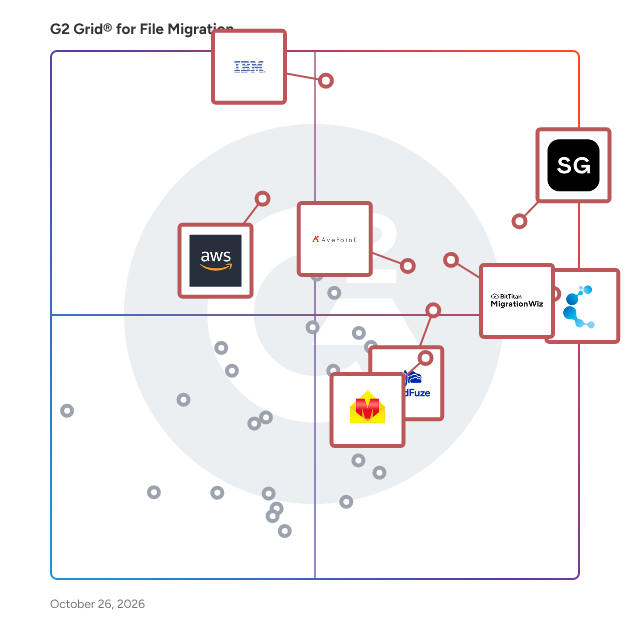
G2 Grid® for File Migration Software

G2 Grid® for File Migration Software plotting products by satisfaction and market presence

Highlighted products: ShareGate, Cloudiway, IBM Aspera on Cloud, MigrationWiz, AvePoint Confidence Platform, CloudFuze Migrate, EdbMails Office 365 Migration, and AWS DataSync.

Underlying data: [Grid® JSON](https://www.g2.com/categories/file-migration/grids.json?focus%5B%5D=sharegate&focus%5B%5D=cloudiway&focus%5B%5D=ibm-aspera-on-cloud&focus%5B%5D=migrationwiz&focus%5B%5D=avepoint-confidence-platform&focus%5B%5D=cloudfuze-migrate&focus%5B%5D=edbmails-office-365-migration&focus%5B%5D=aws-datasync)

ShareGate

ShareGate is a Microsoft 365 migration and governance software platform that helps IT professionals move business data to Microsoft 365 and maintain control of their environments after migration. Trusted by over 100,000 IT pros, ShareGate addresses two distinct operational challenges for IT teams managing Microsoft 365 at scale: executing complex tenant-to-tenant and cross-platform migrations accurately, and maintaining ongoing visibility and governance across collaboration environments. ShareGate Migrate supports organizations moving content between Microsoft 365 tenants and from third-party platforms. Key capabilities include: • Tenant-to-tenant migration for SharePoint, Microsoft Teams, OneDrive, and Exchange Online • Cross-platform migration from Google Workspace, Box, and on-premises file shares • Pre-migration environment analysis covering permissions, ownership, and content structure • Post-migration verification and reporting • Concurrent migration support with workload coverage scaled by plan tier ShareGate Protect supports IT teams managing Microsoft 365 governance on an ongoing basis. Key capabilities include: • Tenant-wide visibility into access, workspace health, guest permissions, and license utilization • Identification of oversharing, inactive workspaces, ownership gaps, and external access drift • Guided remediation tools for fixing access and governance issues without custom scripting • AI and Microsoft Copilot access exposure indicators to support readiness assessments • Cost and license visibility with dollar-value indicators for operational decision-making ShareGate is used by IT professionals and managed service providers across organizations of varying sizes, with particular adoption among teams managing Microsoft 365 environments through mergers, acquisitions, and organizational restructuring. The platform is designed to reduce manual effort and administrative overhead across both migration projects and ongoing governance operations.

Average Rating: 4.6/5.0

Total Reviews: 191

How Do G2 Users Rate ShareGate?

  • Quality of Support: 9.0/10 (Category avg: 8.7/10)
  • Ease of Use: 9.0/10 (Category avg: 9.0/10)

Who Is the Company Behind ShareGate?

  • Seller: Workleap
  • Company Website:
  • Year Founded: 2006
  • HQ Location: Montréal, Québec, Canada
  • Twitter: @WorkleapHQ
    1,132 Twitter followers
  • LinkedIn® Page: www.linkedin.com
    376 employees on LinkedIn®

Who Uses This Product?

  • Top Industries: Information Technology and Services, Government Administration
  • Company Size: 60% Large, 27% Medium

What Do G2 Reviewers Say About ShareGate?

AI-generated summary from verified user reviews

Pros
  • Users appreciate the ease of use in ShareGate, enabling effortless SharePoint migrations with an intuitive interface.
  • Users find migration easy with ShareGate, significantly reducing time and simplifying SharePoint and OneDrive management.
  • Users appreciate the intuitive and easy-to-navigate UI of ShareGate, making tasks straightforward and efficient.
  • Users find ShareGate's easy setup straightforward, minimizing complexity and saving time for migrations.
  • Users value the clear and concise reporting in ShareGate, which enhances data migration and auditing efficiency.
Cons
  • Users point out the lack of essential features in ShareGate, expressing a desire for enhancements and improvements.
  • Users find ShareGate expensive, especially for smaller teams needing multiple licenses and advanced features not included in the base product.
  • Users find the poor interface design of ShareGate frustrating, especially with hidden options and complicated navigation.
  • Users report slow migration speeds, leading to long downtimes and potential interruptions in business operations.
  • Users express frustration with the slow loading of ShareGate, finding it disruptive to business operations during migrations.

What Are Recent G2 Reviews of ShareGate?

What Are G2 Users Discussing About ShareGate?

Cloudiway

Cloudiway is a comprehensive Software-as-a-Service (SaaS) platform designed to facilitate seamless cloud migrations and ensure enterprise coexistence. It enables organizations to efficiently transfer data and content across various cloud environments, including Microsoft 365, Google Workspace, and other platforms, while maintaining data integrity and minimizing downtime. Key Features and Functionality: - Mailbox Migration: Transfers emails, calendars, contacts, and tasks between platforms such as Microsoft Exchange, Google Workspace, Lotus Notes, and Zimbra, ensuring no data loss or business disruption. - File and Site Migration: Migrates files and documents from sources like Google Drive, OneDrive, Box, and Dropbox, preserving permissions and metadata. It also handles complex migrations of collaborative sites, such as Google Sites to SharePoint Online. - Teams and Collaboration Migration: Facilitates the migration of Microsoft Teams, Slack, and Google Chat environments, including channels, conversations, files, and memberships. - Enterprise Coexistence: Ensures seamless collaboration between different email platforms during and after migrations through features like Global Address List synchronization (GALSync) and centralized email signature management. - Device Migration: Supports cross-tenant device migration for Windows devices, preserving user profiles, Outlook configurations, Office licenses, and settings during transitions between Microsoft 365 tenants. Primary Value and Solutions Provided: Cloudiway addresses the complexities associated with cloud migrations by offering a unified platform that supports a wide range of migration scenarios, including tenant-to-tenant consolidations, mergers, divestitures, and platform transitions. Its robust security measures, built on Microsoft Azure infrastructure with SOC 2 Type 2 certification, ensure data protection and compliance throughout the migration process. By automating and streamlining migration tasks, Cloudiway minimizes downtime, reduces operational risks, and enables organizations to achieve a smooth transition to their desired cloud environment.

Average Rating: 4.9/5.0

Total Reviews: 254

How Do G2 Users Rate Cloudiway?

  • Quality of Support: 9.7/10 (Category avg: 8.7/10)
  • Ease of Use: 9.7/10 (Category avg: 9.0/10)

Who Is the Company Behind Cloudiway?

  • Seller: Cloudiway
  • Year Founded: 2010
  • HQ Location: Annecy, Auvergne-Rhône-Alpes
  • Twitter: @cloudiway
    815 Twitter followers
  • LinkedIn® Page: www.linkedin.com
    22 employees on LinkedIn®

Who Uses This Product?

  • Who Uses This: Virtual Assistant
  • Top Industries: Information Technology and Services, Accounting
  • Company Size: 58% Small, 30% Medium

What Do G2 Reviewers Say About Cloudiway?

AI-generated summary from verified user reviews

Pros
  • Users value the structured and efficient migration process of Cloudiway, enhancing ease and minimizing disruptions.
  • Users commend Cloudiway for its effective tracking features, simplifying migration processes and improving overall productivity.
  • Users appreciate the flexibility and efficiency of Cloudiway, enabling smooth migrations across multiple cloud environments.
  • Users highlight the ease of use of Cloudiway, making data migration quick and stress-free for everyone.
  • Users commend the knowledgeable and prompt customer support of Cloudiway, enhancing the migration experience significantly.
Cons
  • Users find the complex setup process of Cloudiway challenging, requiring time and technical expertise to navigate successfully.
  • Users find the learning difficulty in Cloudiway challenging, requiring time to understand setup and user permissions.
  • Users find complex usability in Cloudiway, requiring more time and support to navigate its extensive features effectively.
  • Users find the poor interface design confusing for new users, impacting overall usability and simplicity.
  • Users note an information deficiency with Cloudiway that hinders user experience and clarity for non-technical audiences.

What Are Recent G2 Reviews of Cloudiway?

IBM Aspera on Cloud

IBM Aspera on Cloud is a hosted SaaS service of IBM Aspera. Rather than optimize or accelerate data transfer, IBM Aspera’s high-speed data transfer fully utilizes available network bandwidth to maximize speed and quickly scale up with no theoretical limit, without impacting other network traffic. The result is unmatched transfer speeds, end-to-end security, reliability, and exceptional bandwidth control. IBM Aspera on Cloud also offers intuitive file sharing, big data transfer, workflow automation, central administration, and real-time visibility.

Average Rating: 4.4/5.0

Total Reviews: 132

How Do G2 Users Rate IBM Aspera on Cloud?

  • Quality of Support: 8.7/10 (Category avg: 8.7/10)
  • Ease of Use: 8.6/10 (Category avg: 9.0/10)

Who Is the Company Behind IBM Aspera on Cloud?

  • Seller: IBM
  • Company Website:
  • Year Founded: 1911
  • HQ Location: Armonk, New York, United States
  • Twitter: @IBMSecurity
    74,660 Twitter followers
  • LinkedIn® Page: www.linkedin.com
    344,328 employees on LinkedIn®

Who Uses This Product?

  • Top Industries: Information Technology and Services, Computer Software
  • Company Size: 43% Small, 29% Medium

What Do G2 Reviewers Say About IBM Aspera on Cloud?

AI-generated summary from verified user reviews

Pros
  • Users praise the speed efficiency of IBM Aspera on Cloud, enabling fast and reliable transfers for large files.
  • Users value the fast and reliable transfer of large files with IBM Aspera on Cloud, enhancing team efficiency.
  • Users commend the reliability of IBM Aspera on Cloud for consistently delivering fast and secure file transfers.
  • Users value the high security of IBM Aspera on Cloud, ensuring safe transfers and reliable data synchronization across teams.
  • Users commend the unmatched file transfer speed of IBM Aspera on Cloud, enhancing efficiency for large file transfers.
Cons
  • Users find IBM Aspera on Cloud's pricing model expensive, especially for small teams with varying usage needs.
  • Users find the training required frustrating due to a steep learning curve and a less user-friendly interface.
  • Users express concerns about the high pricing of IBM Aspera on Cloud, especially affecting smaller teams.
  • Users find IBM Aspera on Cloud lacking features, citing an outdated interface and limited use cases that hinder usability.
  • Users find the cost issues concerning, especially for smaller teams managing large data volumes.

What Are Recent G2 Reviews of IBM Aspera on Cloud?

What Are G2 Users Discussing About IBM Aspera on Cloud?

MigrationWiz

All cloud migrations start with MigrationWiz, a fully automated, 100% SaaS migration solution that can be accessed at any time from anywhere. Sign up, configure, and initiate mailbox, document, personal archive, public folder, Microsoft Teams and Active Directory migration projects from a single, centralized user interface. Why MigrationWiz? Easy to Use - 100% SaaS with no special training, installations, or professional services required. One simple UI for all workloads. Fast & Scalable - Quickly move users and data to the Destination at-scale. Migrate as fast as Source bandwidth allows. Secure & Compliant - Data encrypted at rest and in-transit through Azure datacenters. Regional processing options available; we never store user data. Enterprise Reliability - Support migrations with seat counts in the thousands and complex business scenarios like mergers, acquisitions, or divestitures.

Average Rating: 4.7/5.0

Total Reviews: 277

How Do G2 Users Rate MigrationWiz?

  • Quality of Support: 8.9/10 (Category avg: 8.7/10)
  • Ease of Use: 9.2/10 (Category avg: 9.0/10)

Who Is the Company Behind MigrationWiz?

  • Seller: Idera, Inc.
  • Year Founded: 2007
  • HQ Location: Austin, US
  • Twitter: @MigrationWiz
    482 Twitter followers
  • LinkedIn® Page: www.linkedin.com
    1 employees on LinkedIn®

Who Uses This Product?

  • Who Uses This: Cloud Consultant
  • Top Industries: Information Technology and Services, Computer & Network Security
  • Company Size: 41% Medium, 40% Small

What Do G2 Reviewers Say About MigrationWiz?

AI-generated summary from verified user reviews

Pros
  • Users find Migration Ease with MigrationWiz remarkable, streamlining complex migrations effortlessly and efficiently.
  • Users value the ease of use of MigrationWiz, making both small and large migrations straightforward and efficient.
  • Users commend the responsive customer support of MigrationWiz, quickly addressing queries and ensuring smooth migrations.
  • Users praise the implementation ease of MigrationWiz, making the migration process seamless and efficient for all.
  • Users appreciate the reliability and efficiency of MigrationWiz, making cloud migrations seamless and user-friendly.
Cons
  • Users experience slow migration times that can lead to delays and require careful planning to manage effectively.
  • Users feel the pricing is high compared to alternatives and desire better reseller options for cost effectiveness.
  • Users are frustrated by the poor customer support and the need to pay extra for assistance with MigrationWiz.
  • Users find complex usability for first-time use, with minor challenges in configurations that require some manual input.
  • Users find the pricing for MigrationWiz quite expensive, especially with additional costs for various features and larger migrations.

What Are Recent G2 Reviews of MigrationWiz?

What Are G2 Users Discussing About MigrationWiz?

AvePoint Confidence Platform

AvePoint is the unifying Trust Layer for AI. AvePoint enables more than 28,000 organizations and 6,000 channel partners to protect, secure, and govern their entire AI estate across data, infrastructure, AI and agents for Microsoft, Google, Salesforce, and other leading cloud environments — so that enterprises can deploy AI with confidence and scale innovation without scaling risk. To learn more, visit www.avepoint.com.

Average Rating: 4.5/5.0

Total Reviews: 123

How Do G2 Users Rate AvePoint Confidence Platform?

  • Quality of Support: 9.0/10 (Category avg: 8.7/10)
  • Ease of Use: 9.1/10 (Category avg: 9.0/10)

Who Is the Company Behind AvePoint Confidence Platform?

  • Seller: AvePoint
  • Company Website:
  • Year Founded: 2001
  • HQ Location: Jersey City, NJ
  • Twitter: @AvePoint
    9,747 Twitter followers
  • LinkedIn® Page: www.linkedin.com
    2,778 employees on LinkedIn®

Who Uses This Product?

  • Top Industries: Information Technology and Services, Computer Software
  • Company Size: 40% Medium, 27% Large

What Do G2 Reviewers Say About AvePoint Confidence Platform?

AI-generated summary from verified user reviews

Pros
  • Users find the ease of use of AvePoint Confidence Platform enhances implementation and administration, ensuring a smooth experience.
  • Users value the ease of use and comprehensive cloud backup features of AvePoint Confidence Platform for Microsoft 365.
  • Users value the flexible backup frequency of AvePoint Confidence Platform, making data management effortless and efficient.
  • Users appreciate the integrated data protection and security of AvePoint Confidence Platform, simplifying SaaS management and compliance.
  • Users appreciate the easy setup of AvePoint Confidence Platform, simplifying implementation and administration significantly.
Cons
  • Users find the AvePoint Confidence Platform expensive with high initial costs and limited budget-friendly options for longer use.
  • Users experience backup issues with inconsistent data restoration and infrequent support, leading to frustration and inefficiency.
  • Users experience poor customer support from AvePoint, facing delayed responses and issues with call connectivity.
  • Users face slow performance issues, particularly with data retrieval speed, affecting overall efficiency and user experience.
  • Users report technical issues with backup completions and lack of timely notifications for errors and expiring accounts.

What Are Recent G2 Reviews of AvePoint Confidence Platform?

What Are G2 Users Discussing About AvePoint Confidence Platform?

CloudFuze Migrate

CloudFuze is a comprehensive cloud office migration solution designed to assist large enterprises, small and medium-sized businesses (SMBs), and managed service providers in securely and efficiently migrating their critical data across various cloud environments. This platform specializes in transferring a wide array of digital assets, including user accounts, files, chat messages, emails, links, digital whiteboards, and cloud tenant data, ensuring a seamless transition from one cloud service to another. The target audience for CloudFuze encompasses organizations of all sizes looking to enhance their cloud capabilities. Whether a business is undergoing a merger, changing cloud providers, or simply optimizing its digital workspace, CloudFuze offers tailored solutions to meet diverse migration needs. The platform is particularly beneficial for those who require a fully managed service, allowing them to focus on their core operations while the migration logistics are handled by experts. Key features of CloudFuze include unlimited migrations, which means that users can transfer an extensive volume of data without the worry of leaving anything behind. The fully managed service covers every aspect of the migration process, from initial assessments to post-migration support, ensuring that businesses can adapt quickly to their new cloud environments. Additionally, the platform supports a variety of use cases, making it versatile enough to cater to specific business requirements. Security and compliance are paramount in CloudFuze’s operations. The platform adheres to industry standards and regulations, such as GDPR and SOC 2 Type 2, ensuring that all data transfers are conducted securely. The seamless integration capabilities with popular cloud services like Microsoft 365, Google Workspace, Slack, and Dropbox further enhance the user experience by providing a cohesive migration process. Moreover, CloudFuze offers scalable solutions that can accommodate the complexities of any migration scenario, making it suitable for businesses of all sizes. Customizable approaches allow organizations to tailor the migration process to their unique requirements, while expert guidance throughout the migration phases ensures that users benefit from deep expertise in cloud solutions. By choosing CloudFuze, organizations can transform their cloud data management and streamline their migration efforts with confidence.

Average Rating: 4.2/5.0

Total Reviews: 51

How Do G2 Users Rate CloudFuze Migrate?

  • Quality of Support: 8.8/10 (Category avg: 8.7/10)
  • Ease of Use: 9.0/10 (Category avg: 9.0/10)

Who Is the Company Behind CloudFuze Migrate?

  • Seller: CloudFuze
  • Company Website:
  • Year Founded: 2013
  • HQ Location: Durham, North Carolina, United States
  • Twitter: @cloudfuze
    769 Twitter followers
  • LinkedIn® Page: www.linkedin.com
    73 employees on LinkedIn®

Who Uses This Product?

  • Top Industries: Information Technology and Services
  • Company Size: 53% Medium, 29% Small

What Do G2 Reviewers Say About CloudFuze Migrate?

AI-generated summary from verified user reviews

Pros
  • Users value the migration ease of CloudFuze Migrate, appreciating its seamless data transfer and excellent support during transition.
  • Users value the flexibility and effectiveness of CloudFuze Migrate for seamless cloud source connections.
  • Users appreciate the ease of use of CloudFuze Migrate, enjoying seamless, hands-off file transfers and excellent support.
  • Users value the excellent customer support of CloudFuze Migrate, appreciating the responsiveness and helpfulness throughout the process.
  • Users value the seamless data transfer capabilities of CloudFuze, simplifying migrations across multiple platforms efficiently.
Cons
  • Users experience poor customer support, suffering from slow responses, inadequate communication, and unresolved issues during migration.
  • Users find the migration process painfully slow, often taking weeks and suffering from missing version histories and poor communication.
  • Users experience significant storage limitations with CloudFuze Migrate, leading to slow and inefficient migration processes.
  • Users face access limitations with CloudFuze Migrate, struggling with communication and requiring support for simple tasks.
  • Users face information deficiency as the tool's messaging lacks clarity, complicating the user experience during migration.

What Are Recent G2 Reviews of CloudFuze Migrate?

AWS DataSync

AWS DataSync is a data transfer service that makes it easy for you to automate moving data between on-premises storage and Amazon S3 or Amazon Elastic File System (Amazon EFS).

Average Rating: 4.2/5.0

Total Reviews: 14

How Do G2 Users Rate AWS DataSync?

  • Quality of Support: 8.5/10 (Category avg: 8.7/10)
  • Ease of Use: 8.1/10 (Category avg: 9.0/10)

Who Is the Company Behind AWS DataSync?

  • Seller: Amazon Web Services (AWS)
  • Year Founded: 2006
  • HQ Location: Seattle, WA
  • Twitter: @awscloud
    2,232,483 Twitter followers
  • LinkedIn® Page: www.linkedin.com
    147,094 employees on LinkedIn®
  • Ownership: NASDAQ: AMZN

Who Uses This Product?

  • Company Size: 43% Medium, 43% Small

What Are Recent G2 Reviews of AWS DataSync?

What Are G2 Users Discussing About AWS DataSync?

EdbMails Office 365 Migration

EdbMails Office 365 Migration is a secure and user-friendly solution to migrate Office 365 mailboxes, shared mailboxes, archive mailboxes, and public folders between tenants or from on-premises Exchange to Microsoft 365. The software ensures full data preservation, including email attributes, folder hierarchy, and mailbox permissions, with zero downtime. It supports modern authentication (OAuth 2.0), incremental migration to avoid duplicates, and advanced filtering options making it ideal for tenant-to-tenant migration and organizational restructuring.

Average Rating: 4.9/5.0

Total Reviews: 17

How Do G2 Users Rate EdbMails Office 365 Migration?

  • Quality of Support: 9.6/10 (Category avg: 8.7/10)
  • Ease of Use: 10.0/10 (Category avg: 9.0/10)

Who Is the Company Behind EdbMails Office 365 Migration?

  • Seller: EdbMails
  • Year Founded: 2009
  • HQ Location: Delware, US
  • Twitter: @edb_mails
    35 Twitter followers
  • LinkedIn® Page: www.linkedin.com
    8 employees on LinkedIn®

Who Uses This Product?

  • Top Industries: Computer Software
  • Company Size: 65% Small, 41% Medium

What Are Recent G2 Reviews of EdbMails Office 365 Migration?

NetApp Cloud Volumes ONTAP

NetApp® Cloud Volumes ONTAP® offers a self-managed, unified storage management solution built on NetApp’s industry-leading ONTAP® software—empowering organizations with unmatched control and flexibility across block and file workloads in hybrid and multicloud environments. Seamlessly integrated with all major cloud providers, it runs natively on each cloud platform (Microsoft Azure, Google Cloud, AWS), allowing you to deploy and manage storage for mission-critical applications, databases, containers, and user files without requiring extra tooling or complex configuration. With support for iSCSI, NVMe/TCP, NFS, SMB/CIFS, and S3, Cloud Volumes ONTAP brings enterprise-class data services to your cloud environment.  

Average Rating: 4.5/5.0

Total Reviews: 26

How Do G2 Users Rate NetApp Cloud Volumes ONTAP?

  • Quality of Support: 8.5/10 (Category avg: 8.7/10)
  • Ease of Use: 8.9/10 (Category avg: 9.0/10)

Who Is the Company Behind NetApp Cloud Volumes ONTAP?

  • Seller: NetApp
  • Year Founded: 1992
  • HQ Location: Sunnyvale, California
  • Twitter: @NetApp
    118,015 Twitter followers
  • LinkedIn® Page: www.linkedin.com
    12,706 employees on LinkedIn®
  • Ownership: NASDAQ

Who Uses This Product?

  • Top Industries: Information Technology and Services, Computer & Network Security
  • Company Size: 41% Large, 32% Small

What Do G2 Reviewers Say About NetApp Cloud Volumes ONTAP?

AI-generated summary from verified user reviews

Pros
  • Users value the comprehensive solutions provided by NetApp Cloud Volumes ONTAP, enhancing performance and reliability in storage.
  • Users value the reliable and powerful data storage provided by NetApp Cloud Volumes ONTAP for their needs.
  • Users find the ease of use in NetApp Cloud Volumes ONTAP beneficial for efficient management and operations.
  • Users value the user-friendly interface and powerful CLI of NetApp Cloud Volumes ONTAP, enhancing performance and availability.
  • Users value the high availability of NetApp Cloud Volumes ONTAP, ensuring reliable performance for their storage needs.
Cons
  • Users find the command line interface challenging, as frequent GUI changes complicate the navigation experience.
  • Users find the frequently changing GUI of NetApp Cloud Volumes ONTAP frustrating, often preferring the stability of CLI.
  • Users find the poor interface design frustrating, ultimately preferring the CLI over the frequently changing GUI.
  • Users find the poor UI of NetApp Cloud Volumes ONTAP frustrating, often preferring CLI for ease of use.
  • Users find the poor usability due to frequent GUI changes, often opting for CLI instead for simplicity.

What Are Recent G2 Reviews of NetApp Cloud Volumes ONTAP?

What Are G2 Users Discussing About NetApp Cloud Volumes ONTAP?

CloudM

CloudM is a comprehensive data management solution designed to assist IT teams in migrating, archiving, and backing up data seamlessly and securely. With a focus on automation and efficiency, CloudM provides a suite of tools that cater to the specific needs of organizations transitioning to cloud platforms like Google Workspace and Microsoft 365. By streamlining data management processes, CloudM enables teams to focus on strategic initiatives rather than manual tasks. The CloudM suite includes several key products, each tailored to address different aspects of data management. CloudM Migrate facilitates rapid and secure data migrations from over 20 source platforms, ensuring that emails, contacts, calendars, and files are transferred with minimal disruption. Its scalable performance and flexible deployment options make it suitable for organizations of all sizes, while pre-migration environment scans help identify potential issues before the migration process begins. This capability is particularly beneficial for businesses looking to transition to cloud services without the risk of data loss or downtime. In addition to migration, CloudM Automate addresses the need for efficiency in data management by automating repetitive tasks such as onboarding and offboarding employees. With over 30 customizable automated steps, organizations can set up workflows that run in the background, significantly reducing the time spent on manual processes. This feature not only enhances productivity but also ensures compliance with organizational policies, making it an essential tool for IT departments managing large teams. CloudM Backup and CloudM Archive further enhance data security and cost management. CloudM Backup protects Google Workspace data from accidental deletions and cyber threats, offering advanced restoration features that bolster data resilience. Meanwhile, CloudM Archive helps organizations manage their data retention policies and reduce licensing costs by automating license reassignment and applying tailored retention strategies. This dual approach to data protection and cost efficiency is crucial for organizations looking to maintain compliance while optimizing their cloud expenditures. Lastly, CloudM Email Signatures simplifies the process of creating and deploying email signatures across departments. By automating this task, organizations can ensure consistency in branding and communication while streamlining the onboarding process for new employees. With a commitment to security, proven reliability, and comprehensive support, CloudM stands out as a trusted partner for organizations navigating the complexities of cloud data management.

Average Rating: 4.6/5.0

Total Reviews: 37

How Do G2 Users Rate CloudM?

  • Quality of Support: 8.9/10 (Category avg: 8.7/10)
  • Ease of Use: 8.9/10 (Category avg: 9.0/10)

Who Is the Company Behind CloudM?

  • Seller: CloudM
  • Company Website:
  • Year Founded: 2008
  • HQ Location: Manchester, GB
  • Twitter: @cloudm_co
    415 Twitter followers
  • LinkedIn® Page: www.linkedin.com
    75 employees on LinkedIn®

Who Uses This Product?

  • Top Industries: Information Technology and Services
  • Company Size: 41% Medium, 35% Small

What Do G2 Reviewers Say About CloudM?

AI-generated summary from verified user reviews

Pros
  • Users commend the migration ease with CloudM, appreciating the smooth process and excellent support throughout.
  • Users value the exceptionally responsive customer support of CloudM, which enhances their migration experience significantly.
  • Users find CloudM's platform to be intuitive and easy to use, ensuring a smooth migration experience with excellent support.
  • Users appreciate the effortless data migration process with CloudM, enhancing efficiency and reliability during acquisitions.
  • Users value the seamless data migration with CloudM, appreciating its efficient and supportive hosted solutions.
Cons
  • Users experience slow migration speeds and face errors without adequate logs or troubleshooting support in the hosted version.
  • Users experience technical difficulties with CloudM, such as unclear errors and slow migration speeds on the hosted version.
  • Users experience poor customer support with CloudM, needing constant assistance for migration issues and error troubleshooting.
  • Users find the complexity of troubleshooting errors in CloudM challenging due to limited logging and unclear messages.
  • Users find the complex setup challenging, especially with limited technical experience and data migration knowledge.

What Are Recent G2 Reviews of CloudM?

MASV

MASV is a cloud-based intelligent managed file transfer (IMFT) designed to orchestrate global file movement in cloud, on-prem, and hybrid workflows. Teams of all sizes rely on MASV to deliver large files securely, automatically, and at blazing speeds with no restrictions, no size limits, and no compromise on reliability, no matter where they are. MASV’s simple, browser-based interface and flexible pricing make it cost-effective for both sporadic and frequent use. The company was founded in Ottawa, Canada, in 2019. To learn more, visit masv.io. Refreshingly simple. Unbelievably powerful. Get started with MASV today.

Average Rating: 4.8/5.0

Total Reviews: 46

How Do G2 Users Rate MASV?

  • Quality of Support: 9.6/10 (Category avg: 8.7/10)
  • Ease of Use: 9.5/10 (Category avg: 9.0/10)

Who Is the Company Behind MASV?

  • Seller: MASV
  • Year Founded: 2019
  • HQ Location: Ottawa ON (Canada)
  • Twitter: @masvfast
  • LinkedIn® Page: www.linkedin.com
    45 employees on LinkedIn®

Who Uses This Product?

  • Top Industries: Media Production, Motion Pictures and Film
  • Company Size: 79% Small, 6% Medium

What Do G2 Reviewers Say About MASV?

AI-generated summary from verified user reviews

Pros
  • Users appreciate the ease of use of MASV, noting its intuitive interface and simple onboarding process.
  • Users rave about MASV's excellent customer support, highlighting quick assistance and a seamless user experience.
  • Users commend MASV for its exceptional reliability, ensuring successful file transfers without failures and enhancing workflow efficiency.
  • Users rave about the speed of MASV, noting it surpasses traditional tools for quick file transfers.
  • Users love the effortless large file handling of MASV, ensuring efficient and reliable transfers without complications.
Cons
  • Users find the complexity of the UI challenging, making the delivery process less intuitive and more prone to errors.
  • Users acknowledge that MASV is expensive, but many feel the value justifies the high cost.
  • Users note that the pricing issues of MASV can be high, yet value its efficiency and reliability.
  • Users express concerns about high costs associated with MASV, making it less accessible for some users.
  • Users find the difficult learning curve of MASV frustrating, impacting their delivery efficiency despite successful message transfers.

What Are Recent G2 Reviews of MASV?

What Are G2 Users Discussing About MASV?

BMC AMI Ops

BMC AMI Ops is an AI-driven mainframe operations management solution for IBM Z environments. It helps enterprises monitor, automate, and optimize the performance and availability of mission-critical systems while reducing operational complexity and manual effort. BMC AMI Ops uses real-time monitoring, intelligent automation, and predictive analytics to detect issues early, prioritize actions, and resolve problems faster across z/OS, Db2, IMS, and supporting infrastructure. The solution enables operations teams to shift from reactive monitoring to proactive, service-focused operations. Key capabilities include: - Real-time and predictive monitoring of mainframe workloads and resources - Intelligent automation to reduce manual intervention and operator dependency - Root cause analysis and anomaly detection to accelerate problem resolution - Service-level visibility aligned to business outcomes - On-premises execution that keeps operational data on the mainframe By modernizing mainframe operations with AI and automation, BMC AMI Ops helps organizations improve system reliability, reduce downtime, and operate IBM Z environments more efficiently at scale.

Average Rating: 4.2/5.0

Total Reviews: 57

How Do G2 Users Rate BMC AMI Ops?

  • Quality of Support: 8.7/10 (Category avg: 8.7/10)
  • Ease of Use: 8.4/10 (Category avg: 9.0/10)

Who Is the Company Behind BMC AMI Ops?

  • Seller: BMC Software
  • Company Website:
  • Year Founded: 1980
  • HQ Location: Houston, TX
  • Twitter: @BMCSoftware
    47,946 Twitter followers
  • LinkedIn® Page: www.linkedin.com
    8,646 employees on LinkedIn®

Who Uses This Product?

  • Top Industries: Information Technology and Services, Banking
  • Company Size: 52% Large, 26% Small

What Are Recent G2 Reviews of BMC AMI Ops?

What Are G2 Users Discussing About BMC AMI Ops?

C2 Transfer

C2 Transfer is Synology’s all-new cloud-based file transfer solution that is designed to provide end-to-end encrypted file transfer service without sacrificing simplicity and easy management. As Synology prioritizes our user’s safety, the files uploaded on to this service are encrypted and identities such as recipients will be verified through advanced verification settings. To make sure the workflow is secure but easy at once, file transfers and requests and users can be managed from an intuitive dashboard and from most devices. C2 Transfer aims to help businesses introduce safer file sharing and cybersecurity habits in workplaces.

Average Rating: 4.7/5.0

Total Reviews: 11

How Do G2 Users Rate C2 Transfer?

  • Quality of Support: 9.0/10 (Category avg: 8.7/10)
  • Ease of Use: 9.5/10 (Category avg: 9.0/10)

Who Is the Company Behind C2 Transfer?

  • Seller: Synology C2
  • Year Founded: 2000
  • HQ Location: New Taipei City , TW
  • Twitter: @Synology
    67,298 Twitter followers
  • LinkedIn® Page: www.linkedin.com
    993 employees on LinkedIn®

Who Uses This Product?

  • Company Size: 73% Medium, 18% Small

What Are Recent G2 Reviews of C2 Transfer?

Box Shuttle

Box Shuttle helps organizations migrate large amounts of data- anywhere from hundreds of gigabytes to hundreds of terabytes- from an existing file server, ECM or cloud data source.

Average Rating: 4.2/5.0

Total Reviews: 11

How Do G2 Users Rate Box Shuttle?

  • Quality of Support: 9.2/10 (Category avg: 8.7/10)
  • Ease of Use: 7.7/10 (Category avg: 9.0/10)

Who Is the Company Behind Box Shuttle?

  • Seller: Box
  • Year Founded: 1998
  • HQ Location: Redwood City, CA
  • Twitter: @Box
    78,537 Twitter followers
  • LinkedIn® Page: www.linkedin.com
    4,413 employees on LinkedIn®
  • Ownership: NYSE:BOX

Who Uses This Product?

  • Company Size: 55% Small, 27% Large

What Are Recent G2 Reviews of Box Shuttle?

What Are G2 Users Discussing About Box Shuttle?

Movebot

Movebot is the leading next-generation data migration tool. There's a better way to move data between storage platforms. Any platforms. Emails, or files, it doesn’t matter. Move any supported data type into the storage of your choice, with no convoluted pricing or setup. Fully cloud hosted and managed, there is no need manage or run infrastructure or pay per user license. Movebot scales to handle PBs of data and has detailed reporting at every stage of the migration--before, during, and after--providing real-time monitoring with easy and predictive troubleshooting. Movebot is the only migration platform with comprehensive bidirectional support for all major platforms. Move between over 30 platforms including on-prem file servers and NAS devices. There's a better way to move data between storage platforms. Any platforms. Emails, or files, it doesn’t matter. Move any supported data type into the storage of your choice, with no convoluted pricing or setup.

Average Rating: 4.9/5.0

Total Reviews: 21

How Do G2 Users Rate Movebot?

  • Quality of Support: 9.9/10 (Category avg: 8.7/10)
  • Ease of Use: 9.2/10 (Category avg: 9.0/10)

Who Is the Company Behind Movebot?

  • Seller: Couchdrop
  • Year Founded: 2017
  • HQ Location: Christchurch, NZ
  • Twitter: @couchdrop_
    842 Twitter followers
  • LinkedIn® Page: www.linkedin.com
    25 employees on LinkedIn®

Who Uses This Product?

  • Top Industries: Information Technology and Services
  • Company Size: 59% Small, 23% Medium

What Do G2 Reviewers Say About Movebot?

AI-generated summary from verified user reviews

Pros
  • Users value the simple connection process of Movebot, appreciating its ease of use for migrations.
  • Users appreciate the responsive customer support of Movebot, receiving personalized assistance and prompt help during migration.
  • Users appreciate the ease of use of Movebot, noting its intuitive interface and straightforward setup process.
  • Users appreciate the migration ease of Movebot, highlighting its intuitive process and helpful support throughout.

What Are Recent G2 Reviews of Movebot?

What Are G2 Users Discussing About Movebot?

Neeraja Prakash
NP
Researched and written by Neeraja Prakash
Updated October 3, 2024

Learn More About File Migration Software

What is File Migration Software?

File migration software, also known as data migration software, facilitates data transfer from one system to another by transforming, validating, and loading the data. These tools can also provide features for data encryption, backup assistance, and tracking migration histories. File migration software can integrate with entire enterprise content management systems or specific tools such as SharePoint and Office 365. These tools are an alternative to self-scripted migrations, which can be taxing, time consuming, and not cost effective. Ready-to-use migration tools save IT teams the time and stress associated with manual migration and can offer additional benefits such as consolidation and reorganization of files in the process. To understand the software better, it is important to know the different types of file migrations that exist, such as:

  • Storage migration: This refers to the process of moving data to more modern arrays that allow other systems to access it. This migration aims to shift to a system that offers faster performance and cost-effective scaling while retaining the standard file management features such as cloning, backup, and disaster recovery.
  • Cloud migration: As the name suggests, this is the process of moving data to cloud storage. This can be moving data from an on-premises data center to cloud or from one cloud to another. 
  • Application migration: This entails moving a specific application program and its components from one environment to another. This could mean moving data from an on-premises center to a cloud, from one cloud to another, or moving the application’s data to an updated form of the application. Components that are transferred include the database, data, and IT processes. 

What are the Common Features of File Migration Software?

The following are some core features within file migration software that help users with each step in the migration process:

Migration: These tools will help with the different steps in migrating the data from one environment to another, including preparing the data for migration, planning the migration, migration, and post-migration audits. 

Reporting: This software allows users to centralize their reporting using pre-built or custom reports. These reports enable administrators to monitor the migration process, identify and fix issues, and monitor usage and compliance. The software will monitor the environment and feed usage and access information to dashboards so that the reports are up to date.

Data transfer scheduling: Some tools have built-in scheduling systems that allow users to periodically run data migrations at hourly, daily, or weekly intervals. This capability also allows users to avoid writing scripts to manage repeated transfers. 

Data encryption and validation: These tools will manage data encryption at rest and in transit during migrations. They will ensure that data remains intact during the process by conducting integrity checks along the way. The checks ensure that the data written to the destination matches the data read from the source. 

Bandwidth optimization and control: Data migration tools have built-in granular controls to optimize bandwidth consumption. Administrators can turn speeds up during off hours and set limits where network availability is needed for other reasons.

What are the Benefits of File Migration Software?

The following are the benefits of using file migration software.

Free up employee time: Using file migration software to help with data migration and system updates can free up time that it would otherwise take employees to manually complete this process. Also, updated systems allow for faster performance and efficiencies that further help to save employees time.

Improve operational efficiency: The simplified management of data that file migration software allows and the better reliability, greater performance, and reduced errors resulting from an updated data environment improve a business’s operational efficiency.

Easier restructuring: The file migration process is a great time for businesses to restructure their data. Data restructure is a major project to undertake, but the tools provided by file migration software and the tasks that are already underway during the file migration process make data restructuring simpler. Restructuring can also be done after data migration. Updating to a modern system makes the data more accessible, transferable, and secure—all of which help to make data restructuring easier. 

Who Uses File Migration Software?

IT teams: While individuals from various teams in a business will be involved with the file migration process and decision making, the IT team will oversee and undertake the bulk of the work. Members of this team have the most knowledge of existing systems, data structures, and data types and how to correctly transform the data to prepare it for migration. Thus, they will own the task of migration and bring stakeholders in as needed. 

Software Related to File Migration

Related solutions that can be used together with file migration software include:

File converter software: File conversion is often necessary when file migration is taking place. Files need to be prepared for transfer, which sometimes means they need to be converted into a different format compatible with the new system they will be migrated to. File converter software converts files from one format to another.

Challenges with File Migration Software

Software solutions can come with their own set of challenges. 

Lack of communication with employees: Data is stored by a business for multiple purposes, and more times than not, it is actively used by employees. So it is important to notify the teams that use the files and data regularly that the migration is happening, along with when and for how long they may not be able to access the data.

Lack of planning: Having a solid plan in place for a data migration will save time and frustration for the IT team and other impacted teams. Planning includes setting a timeline for various stages of the migration, outlining who will be involved and their responsibilities, and having backup and recovery plans in place.

Insufficient data preparation: Data preparation can be difficult to manage, especially if there are a large number of files involved. Hiring a specialist who will bring their own software to manage the preparation and migration process may be worthwhile.

How to Buy File Migration Software

Requirements Gathering (RFI/RFP) for File Migration Software

Before beginning to search for a file migration tool, it’s important to understand the business requirements for the different steps in the migration process. Depending on the types of data involved, the data sources and destinations, and the amount of the data, there are different tools that will be best suited to optimize performance and minimize costs. Some additional factors to consider are:

  • Reliability: Some products, especially cloud-based tools, are more reliable than others, as they have higher uptime due to highly redundant architectures.
  • Security: Businesses must choose a file migration tool that meets compliance and security requirements. 
  • Data sources and destinations: Depending on where the company is migrating data, the buyer can choose between self-scripted solutions, on-premises tools, and cloud-based solutions. Self-scripted tools allow data to be migrated to almost any destination, but they aren’t highly scalable. Most cloud-based and on-premise solutions can manage large volumes of data and numerous data destinations and sources.
  • Performance and scalability: Cloud-based migration tools perform the best with large data volumes due to their flexibility.

Compare File Migration Software Products

Create a long list

After listing down requirements, buyers can browse products at a high level to create a long list. These products won’t necessarily meet all the requirements, so buyers will need to prioritize their list of requirements. By visiting g2.com’s category for file migration software, buyers may sift through the file migration tools and add products to their “My List” within g2.com.

Create a short list

Once buyers have created a short list, they can further sort their options by checking the product’s ratings on the G2 Grid® and reading user reviews to understand their peers’ experience with the software. This way, buyers can find the best file migration software for their needs.

Conduct demos

After narrowing down the selection, buyers must contact the vendors to schedule demonstrations of the solution. Businesses can contact many vendors directly on g2.com to request demos by selecting the “Get a Quote” button. At each demo, buyers must be sure to ask the same questions and use case scenarios to best evaluate each product.

Selection of File Migration Software

Choose a selection team

The IT team will be responsible for making most of the decisions regarding data migration. They should bring in stakeholders from other teams as needed, such as those that work with the data daily and members of senior management who can make cost decisions and help set a timeline for migration.

Negotiation

Pricing is usually determined by storage space requirements, with discounts being offered if large volumes of data need to be handled. 

Final decision

The IT team should make the final decision with input from important stakeholders.