Top Free Cloud Content Collaboration Software

How Many Cloud Content Collaboration Software Products Does G2 Track?

Total Products under this Category: 263

Category Stats (Sep 2026)

  • Average Rating: 4.36/5 (↑0.01 vs Aug 2026) The average rating of products in this category, based on all submitted ratings
  • Top Trending Product: Assai Document Management (+26.07%) - Among all products in this category, Assai Document Management recorded the largest rating increase compared to last month

Last updated: September 01, 2026

How Does G2 Rank Cloud Content Collaboration Software Products?

Why You Can Trust G2's Software Rankings:

  • 30 Analysts and Data Experts
  • 118,600+ Authentic Reviews
  • 263+ Products
  • Unbiased Rankings

G2's software rankings are built on verified user reviews, rigorous moderation, and a consistent research methodology maintained by a team of analysts and data experts. Each product is measured using the same transparent criteria, with no paid placement or vendor influence. While reviews reflect real user experiences, which can be subjective, they offer valuable insight into how software performs in the hands of professionals. Together, these inputs power the G2 Score, a standardized way to compare tools within every category.

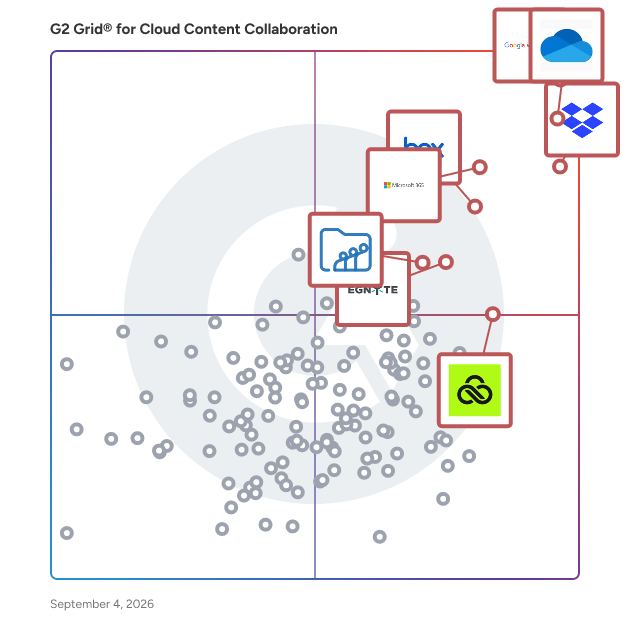
G2 Grid® for Cloud Content Collaboration Software

G2 Grid® for Cloud Content Collaboration Software plotting products by satisfaction and market presence

Highlighted products: Google Workspace, Microsoft OneDrive for Business, Dropbox, Microsoft 365, Box, Egnyte, LucidLink, and Zoho WorkDrive.

Underlying data: [Grid® JSON](https://www.g2.com/categories/cloud-content-collaboration/grids.json?focus%5B%5D=google-workspace&focus%5B%5D=microsoft-onedrive-for-business&focus%5B%5D=dropbox&focus%5B%5D=microsoft365&focus%5B%5D=box&focus%5B%5D=egnyte&focus%5B%5D=lucidlink&focus%5B%5D=zoho-workdrive)

Google Workspace

Google Workspace is a comprehensive productivity and collaboration solution designed to help users streamline their work processes by integrating essential tools such as email, chat, file storage, and video conferencing into a unified platform. This suite of applications is tailored for businesses, educational institutions, and individuals looking to enhance their communication and collaboration efforts, all while leveraging the power of Google’s artificial intelligence. Targeted at a diverse audience, Google Workspace caters to teams of all sizes, from small startups to large enterprises. It is particularly beneficial for remote teams and organizations that prioritize collaboration across different locations. The platform supports various use cases, including project management, team communication, document sharing, and virtual meetings, making it an ideal choice for professionals who need to work together efficiently, regardless of their physical location. One of the key features of Google Workspace is its seamless integration of applications such as Gmail, Google Meet, Google Drive, and Google Docs. This interconnectedness allows users to switch effortlessly between tasks, whether they are sending emails, participating in video calls, or collaborating on documents in real-time. The AI capabilities embedded within the platform enhance user experience by providing smart suggestions, automating repetitive tasks, and improving search functionalities, ultimately saving time and increasing productivity. Additionally, Google Workspace prioritizes security and data protection, offering robust features such as two-factor authentication, advanced phishing protection, and customizable access controls. These measures ensure that sensitive information remains secure while allowing teams to collaborate freely. The platform also supports third-party integrations, enabling users to connect their favorite applications and tools, further enhancing their workflow. In summary, Google Workspace stands out in the productivity software category by providing a holistic approach to collaboration. Its user-friendly interface, combined with powerful AI-driven features and strong security protocols, makes it a valuable tool for anyone looking to improve their work processes and foster effective teamwork. Whether for managing projects, communicating with colleagues, or sharing files, Google Workspace is designed to meet the diverse needs of its users, making it an essential resource in today’s digital workplace.

Average Rating: 4.6/5.0

Total Reviews: 45,690

How Do G2 Users Rate Google Workspace?

  • Has the product been a good partner in doing business?: 9.0/10 (Category avg: 8.8/10)
  • Performance and Reliability: 9.3/10 (Category avg: 8.7/10)
  • File following: 9.0/10 (Category avg: 8.8/10)
  • Device Syncing: 9.2/10 (Category avg: 8.7/10)

Who Is the Company Behind Google Workspace?

  • Seller: Google
  • Year Founded: 1998
  • HQ Location: Mountain View, CA
  • Twitter: @google
    31,899,995 Twitter followers
  • LinkedIn® Page: www.linkedin.com
    301,144 employees on LinkedIn®
  • Ownership: NASDAQ:GOOG

Who Uses This Product?

  • Who Uses This: Student, Teacher
  • Top Industries: Information Technology and Services, Education Management
  • Company Size: 47% Small, 35% Medium

What Do G2 Reviewers Say About Google Workspace?

AI-generated summary from verified user reviews

Pros
  • Users appreciate the ease of use in Google Workspace, facilitating smooth and efficient workflow management.
  • Users love the seamless team collaboration in Google Workspace, enhancing communication and boosting productivity effortlessly.
  • Users love the seamless integrations in Google Workspace, enhancing efficiency with easy access to tools and scheduling.
  • Users praise the ease of use and integration in Google Workspace, enhancing productivity and collaboration seamlessly.
  • Users appreciate the seamless Google integration of Workspace, enhancing collaboration and efficiency across all tools.
Cons
  • Users face missing features in Google Workspace, such as limited offline capabilities and restrictions on accessing certain functionalities.
  • Users find the limited features of Google Workspace unnecessary for smaller teams, lacking essential tools for their needs.
  • Users find Google Workspace lacking features compared to other platforms, impacting effective campaign management and data handling.
  • Users find internet dependency challenging, as offline functionality is limited and issues with quality can arise.
  • Users find limited customization options in Google Workspace, particularly for calendars and forms, restricting flexibility and creativity.

What Are Recent G2 Reviews of Google Workspace?

What Are G2 Users Discussing About Google Workspace?

Microsoft OneDrive for Business

Microsoft OneDrive for Business lets you securely store, access, share, and collaborate on all your files from anywhere. -Access your files anywhere across all your devices -Store and organize your work documents in a secure location in the cloud.​ -Share documents with others and work together in real time. -Get 1 TB of storage per user and upload files up to 250GB in size. ​ -Synchronize documents stored in the cloud to your computer or mobile device so that you can access your documents offline. Back up and protect your files so you can easily recover from accidental deletes or malicious attacks.

Average Rating: 4.3/5.0

Total Reviews: 9,968

How Do G2 Users Rate Microsoft OneDrive for Business?

  • Has the product been a good partner in doing business?: 8.7/10 (Category avg: 8.8/10)
  • Performance and Reliability: 8.8/10 (Category avg: 8.7/10)
  • File following: 8.7/10 (Category avg: 8.8/10)
  • Device Syncing: 8.7/10 (Category avg: 8.7/10)

Who Is the Company Behind Microsoft OneDrive for Business?

  • Seller: Microsoft
  • Year Founded: 1975
  • HQ Location: Redmond, Washington
  • Twitter: @microsoft
    13,091,739 Twitter followers
  • LinkedIn® Page: www.linkedin.com
    232,750 employees on LinkedIn®
  • Ownership: MSFT

Who Uses This Product?

  • Who Uses This: Project Manager, Owner
  • Top Industries: Information Technology and Services, Education Management
  • Company Size: 38% Large, 33% Medium

What Do G2 Reviewers Say About Microsoft OneDrive for Business?

AI-generated summary from verified user reviews

Pros
  • Users appreciate the ease of use of OneDrive for Business, facilitating efficient file management and seamless collaboration.
  • Users appreciate the easy access of Microsoft OneDrive for Business, enabling seamless work from any device, anytime.
  • Users value the seamless integration of Microsoft OneDrive for Business with Microsoft 365 apps for effortless collaboration.
  • Users love the ease of access and collaboration with Microsoft OneDrive for Business, enhancing teamwork and efficiency.
  • Users value the seamless team collaboration that Microsoft OneDrive for Business provides for editing and sharing files.
Cons
  • Users occasionally face syncing issues that may lead to duplication or conflicts, though fixes are often quick.
  • Users often face permission issues, complicating file sharing and leading to frustrations with syncing and access management.
  • Users often experience slow uploads, leading to frustration and delays in their workflow with OneDrive for Business.
  • Users experience slow loading with OneDrive for Business, leading to frustrating delays in file synchronization and access.
  • Users face sync issues and delays with Microsoft OneDrive for Business, especially with large files and shared folders.

What Are Recent G2 Reviews of Microsoft OneDrive for Business?

What Are G2 Users Discussing About Microsoft OneDrive for Business?

Microsoft 365

Launch and grow your business with Microsoft 365. Do more, faster, with intelligent tools to create, send, share, and store professional, branded documents with your customers and team - securely in the cloud. Microsoft 365 is a cloud-based suite of software tools designed to help you do more—with best-in-class communication, design, and data management apps, intelligent cloud services, and advanced security. Access your data from anywhere, collaborate with team members in real time, meet with people virtually, and use thousands of predesigned templates to better communicate with customers and manage your business - all with built-in security technology that safeguards your data and devices from anywhere. Get the latest Office apps, such as Microsoft Teams, Word, Excel, PowerPoint, Outlook, OneDrive, and more.

Average Rating: 4.6/5.0

Total Reviews: 5,544

How Do G2 Users Rate Microsoft 365?

  • Has the product been a good partner in doing business?: 8.8/10 (Category avg: 8.8/10)
  • Performance and Reliability: 9.3/10 (Category avg: 8.7/10)
  • File following: 9.2/10 (Category avg: 8.8/10)
  • Device Syncing: 9.3/10 (Category avg: 8.7/10)

Who Is the Company Behind Microsoft 365?

  • Seller: Microsoft
  • Year Founded: 1975
  • HQ Location: Redmond, Washington
  • Twitter: @microsoft
    13,091,739 Twitter followers
  • LinkedIn® Page: www.linkedin.com
    232,750 employees on LinkedIn®
  • Ownership: MSFT

Who Uses This Product?

  • Who Uses This: Owner, Software Engineer
  • Top Industries: Information Technology and Services, Education Management
  • Company Size: 37% Medium, 35% Small

What Do G2 Reviewers Say About Microsoft 365?

AI-generated summary from verified user reviews

Pros
  • Users highlight the ease of use in Microsoft 365, enjoying straightforward implementation and seamless navigation.
  • Users appreciate the seamless team collaboration in Microsoft 365, enhancing efficiency and communication across various applications.
  • Users value the easy integration with Microsoft apps, enhancing data access and collaboration across devices.
  • Users value the easy integration of Microsoft 365 with other tools, enhancing collaboration and accessibility across devices.
  • Users love the seamless integration of Microsoft 365 with other apps, enhancing accessibility and collaboration.
Cons
  • Users find Microsoft 365 too expensive for small teams, encountering frustrating limitations and issues with updates.
  • Users find the missing features frustrating, as essential tools are locked behind higher-priced plans and updates disrupt functionality.
  • Users find the learning curve daunting with Microsoft 365, often feeling overwhelmed by its complexity and features.
  • Users find Microsoft 365 lacking essential features, especially with frequent updates that disrupt established workflows and settings.
  • Users are frustrated by limited features in Microsoft 365, often requiring costly plans for full functionality.

What Are Recent G2 Reviews of Microsoft 365?

What Are G2 Users Discussing About Microsoft 365?

Box

Box: The leader in Intelligent Content Management — Store, secure, and automate content on an AI-powered platform Box helps businesses of every size get more value from their documents and files with stringent security controls, intelligent workflow automation, and AI agents that extract critical insight. ✓ Box AI — Summarize documents, extract insights, ask questions in natural language, and deploy and create intelligent AI agents that automate repetitive work ✓ Intelligent workflow automation — Streamline reviews, contract approvals, and onboarding with AI-powered workflows ✓ Security and compliance — Protect sensitive information with granular access controls, intelligent threat detection, and AI governance that meet HIPAA, FINRA, FedRAMP, and GDPR standards ✓ Integrations and extensibility — Connect Box with 1,500+ popular apps or extend functionality with APIs and SDKs ✓ Industry solutions — Trusted by leading finance, technology, government, and life sciences organizations for secure collaboration and AI-enhanced productivity

Average Rating: 4.2/5.0

Total Reviews: 5,038

How Do G2 Users Rate Box?

  • Has the product been a good partner in doing business?: 8.7/10 (Category avg: 8.8/10)
  • Performance and Reliability: 8.9/10 (Category avg: 8.7/10)
  • File following: 8.7/10 (Category avg: 8.8/10)
  • Device Syncing: 8.6/10 (Category avg: 8.7/10)

Who Is the Company Behind Box?

  • Seller: Box
  • Company Website:
  • Year Founded: 1998
  • HQ Location: Redwood City, CA
  • Twitter: @Box
    78,537 Twitter followers
  • LinkedIn® Page: www.linkedin.com
    4,413 employees on LinkedIn®

Who Uses This Product?

  • Who Uses This: Project Manager, Consultant
  • Top Industries: Higher Education, Information Technology and Services
  • Company Size: 41% Large, 32% Medium

What Do G2 Reviewers Say About Box?

AI-generated summary from verified user reviews

Pros
  • Users value the ease of use of Box, appreciating its intuitive design that needs minimal training.
  • Users value the robust security features of Box, ensuring safe collaboration and peace of mind for document management.
  • Users love the simple sharing and collaboration features of Box, enhancing productivity and peace of mind.
  • Users value the easy sharing capabilities of Box, enhancing collaboration and secure access to files from anywhere.
  • Users rave about the seamless integration of Box, enhancing file sharing and organizational efficiency across teams.
Cons
  • Users experience slow performance with Box, particularly during syncing and when handling large files.
  • Users feel that the pricing of Box is expensive, especially for smaller teams compared to other storage solutions.
  • Users find storage limitations frustrating due to higher costs and limited options for organizing files effectively.
  • Users criticize Box for its lack of essential features in lower-tier plans, complicating user experience and collaboration.
  • Users experience performance issues with slow uploads and downloads, negatively impacting productivity and user satisfaction.

What Are Recent G2 Reviews of Box?

What Are G2 Users Discussing About Box?

Egnyte

Egnyte combines the power of cloud content management, data security, and AI into one intelligent content platform. More than 22,000 customers trust Egnyte to improve employee productivity, automate business processes, and safeguard critical data, in addition to offering specialized content intelligence and automation solutions across industries, including architecture, engineering, and construction (AEC), life sciences, and financial services.

Average Rating: 4.4/5.0

Total Reviews: 1,138

How Do G2 Users Rate Egnyte?

  • Has the product been a good partner in doing business?: 8.8/10 (Category avg: 8.8/10)
  • Performance and Reliability: 9.2/10 (Category avg: 8.7/10)
  • File following: 8.9/10 (Category avg: 8.8/10)
  • Device Syncing: 8.9/10 (Category avg: 8.7/10)

Who Is the Company Behind Egnyte?

  • Seller: Egnyte
  • Company Website:
  • Year Founded: 2008
  • HQ Location: Mountain View, CA
  • Twitter: @Egnyte
    16,127 Twitter followers
  • LinkedIn® Page: www.linkedin.com
    1,309 employees on LinkedIn®

Who Uses This Product?

  • Who Uses This: Project Manager, Owner
  • Top Industries: Construction, Marketing and Advertising
  • Company Size: 44% Small, 38% Medium

What Do G2 Reviewers Say About Egnyte?

AI-generated summary from verified user reviews

Pros
  • Users find Egnyte to be user-friendly and easy to navigate, enhancing their overall experience and efficiency.
  • Users love the easy file sharing capabilities of Egnyte, enhancing collaboration and workflow efficiency from anywhere.
  • Users appreciate the easy sharing capabilities of Egnyte, enhancing collaboration across departments with secure file access.
  • Users enjoy the easy access to files anywhere, ensuring productivity with a secure and reliable platform.
  • Users commend Egnyte for its high security, ensuring data safety while navigating and finding files easily.
Cons
  • Users find Egnyte expensive, especially when storage needs exceed small business plan limits without clear ROI.
  • Users experience file saving failures, timeouts, and duplication issues, which detracts from their overall experience with Egnyte.
  • Users find user difficulty with Egnyte, especially on mobile, complicating the overall experience and feature accessibility.
  • Users find Egnyte lacking features like clear visibility on team documents and effective handling of file sharing tasks.
  • Users are disappointed by the missing features in Egnyte, especially for 3D file support and collaboration.

What Are Recent G2 Reviews of Egnyte?

What Are G2 Users Discussing About Egnyte?

LucidLink

LucidLink is a cloud-based file collaboration platform that empowers teams across industries to work together effortlessly, no matter where they’re located. By combining the familiarity of a local drive with the flexibility and power of cloud storage, LucidLink gives users the ability to access, edit, and share files in real time within a single, secure shared filespace. Built with creative professionals in mind, LucidLink is a game-changer for industries like media production, design, and film. It’s equally valuable for teams in marketing, architecture, engineering, healthcare, and enterprises working with large datasets. LucidLink eliminates the delays of traditional file-sharing methods, enabling teams to collaborate simultaneously and stay productive around the clock. What makes LucidLink stand out is its ability to provide immediate access to shared files—no downloading, syncing, or waiting. This means teams can start working on projects right away, seamlessly handling even the largest files and keeping workflows moving without interruption. It’s designed to adapt to the way teams work, not the other way around. Security is fundamental to LucidLink. With zero-knowledge encryption, centralized access management, and single sign-on (SSO) integration, your files are accessible only to authorized users. Whether you’re working on sensitive creative assets or proprietary business content, you can trust LucidLink to keep your data secure. LucidLink works seamlessly with tools like Adobe Premiere Pro, Media Composer, DaVinci Resolve, and CAD software, making it easy to integrate into existing workflows. With an intuitive setup and minimal learning curve, teams can start collaborating instantly without missing a beat. Whether it’s a small creative studio or a global enterprise, LucidLink helps organizations unlock their potential, improve efficiency, and stay ahead in today’s fast-paced digital landscape.

Average Rating: 4.5/5.0

Total Reviews: 775

How Do G2 Users Rate LucidLink?

  • Has the product been a good partner in doing business?: 9.0/10 (Category avg: 8.8/10)
  • Performance and Reliability: 8.6/10 (Category avg: 8.7/10)
  • File following: 8.0/10 (Category avg: 8.8/10)
  • Device Syncing: 8.8/10 (Category avg: 8.7/10)

Who Is the Company Behind LucidLink?

  • Seller: LucidLink Corp.
  • Company Website:
  • Year Founded: 2016
  • HQ Location: San Francisco, California, United States
  • Twitter: @Lucid_Link
    1,203 Twitter followers
  • LinkedIn® Page: www.linkedin.com
    262 employees on LinkedIn®

Who Uses This Product?

  • Who Uses This: Video Editor, Creative Director
  • Top Industries: Media Production, Marketing and Advertising
  • Company Size: 62% Small, 24% Medium

What Do G2 Reviewers Say About LucidLink?

AI-generated summary from verified user reviews

Pros
  • Users appreciate the ease of use of LucidLink, enabling quick collaboration and effortless access to files.
  • Users value the ease of remote collaboration with LucidLink, enhancing project accessibility and workflow efficiency.
  • Users value effective team collaboration with LucidLink, facilitating seamless access to shared files and real-time updates.
  • Users appreciate the seamless collaboration on projects with LucidLink, enhancing productivity across different locations.
  • Users value the easy access to files from anywhere, significantly enhancing collaboration and workflow efficiency.
Cons
  • Users experience slow performance with LucidLink, especially when handling large files, impacting their editing workflow.
  • Users feel that the pricing can be a bit steep, particularly for smaller teams or solo users.
  • Users often face slow internet speed issues with LucidLink, particularly during unstable connections affecting functionality.
  • Users experience storage limitations with LucidLink, which complicate usability and hinder project management.
  • Users find the complex setup of LucidLink challenging, especially with tedious individual user permissions and device compatibility.

What Are Recent G2 Reviews of LucidLink?

What Are G2 Users Discussing About LucidLink?

Zoho WorkDrive

Zoho Docs is now Zoho WorkDrive! Launched in 2019 as the successor to Zoho Docs, Zoho WorkDrive is a robust content management platform trusted by over 1 million businesses worldwide. Built for modern teams, small businesses, and enterprises, it provides secure file storage, seamless collaboration, and powerful automation features. With detailed access stats, mobile apps for Android and iOS, and a desktop sync application, WorkDrive empowers teams to work efficiently from anywhere, anytime.

Average Rating: 4.4/5.0

Total Reviews: 697

How Do G2 Users Rate Zoho WorkDrive?

  • Has the product been a good partner in doing business?: 8.8/10 (Category avg: 8.8/10)
  • Performance and Reliability: 8.6/10 (Category avg: 8.7/10)
  • File following: 9.0/10 (Category avg: 8.8/10)
  • Device Syncing: 8.9/10 (Category avg: 8.7/10)

Who Is the Company Behind Zoho WorkDrive?

  • Seller: Zoho
  • Year Founded: 1996
  • HQ Location: Austin, TX
  • Twitter: @Zoho
    137,880 Twitter followers
  • LinkedIn® Page: www.linkedin.com
    30,913 employees on LinkedIn®
  • Phone: +1 (888) 900-9646

Who Uses This Product?

  • Who Uses This: Software Engineer, Owner
  • Top Industries: Information Technology and Services, Computer Software
  • Company Size: 51% Small, 35% Medium

What Do G2 Reviewers Say About Zoho WorkDrive?

AI-generated summary from verified user reviews

Pros
  • Users praise the easy-to-use interface of Zoho WorkDrive, enhancing organization and collaboration without confusion.
  • Users value the effective team collaboration features of Zoho WorkDrive, enhancing project organization and real-time teamwork.
  • Users value the real-time collaboration feature in Zoho WorkDrive, enhancing team communication and workflow efficiency.
  • Users value the seamless integration of Zoho WorkDrive across devices and apps, streamlining collaboration and organization.
  • Users appreciate the real-time collaboration features of Zoho WorkDrive, enhancing teamwork and productivity effortlessly.
Cons
  • Users experience slow file syncing with Zoho WorkDrive, especially for larger files, which can hinder productivity under tight deadlines.
  • Users experience slow performance with Zoho WorkDrive, impacting navigation, syncing, and collaboration on large projects.
  • Users experience syncing issues that can slow down workflow, especially when managing large files under tight deadlines.
  • Users note the missing features in Zoho WorkDrive, particularly compared to more integrated solutions like SharePoint.
  • Users experience performance issues with slow file syncing and poor mobile app quality, affecting overall usability.

What Are Recent G2 Reviews of Zoho WorkDrive?

What Are G2 Users Discussing About Zoho WorkDrive?

IBM Aspera on Cloud

IBM Aspera on Cloud is a hosted SaaS service of IBM Aspera. Rather than optimize or accelerate data transfer, IBM Aspera’s high-speed data transfer fully utilizes available network bandwidth to maximize speed and quickly scale up with no theoretical limit, without impacting other network traffic. The result is unmatched transfer speeds, end-to-end security, reliability, and exceptional bandwidth control. IBM Aspera on Cloud also offers intuitive file sharing, big data transfer, workflow automation, central administration, and real-time visibility.

Average Rating: 4.4/5.0

Total Reviews: 131

How Do G2 Users Rate IBM Aspera on Cloud?

  • Has the product been a good partner in doing business?: 8.8/10 (Category avg: 8.8/10)
  • Performance and Reliability: 8.9/10 (Category avg: 8.7/10)
  • File following: 8.5/10 (Category avg: 8.8/10)
  • Device Syncing: 8.5/10 (Category avg: 8.7/10)

Who Is the Company Behind IBM Aspera on Cloud?

  • Seller: IBM
  • Company Website:
  • Year Founded: 1911
  • HQ Location: Armonk, New York, United States
  • Twitter: @IBMSecurity
    74,660 Twitter followers
  • LinkedIn® Page: www.linkedin.com
    344,328 employees on LinkedIn®

Who Uses This Product?

  • Top Industries: Information Technology and Services, Computer Software
  • Company Size: 42% Small, 29% Medium

What Do G2 Reviewers Say About IBM Aspera on Cloud?

AI-generated summary from verified user reviews

Pros
  • Users value the high security of IBM Aspera on Cloud, ensuring safe transfers and reliable data synchronization across teams.
  • Users praise the speed efficiency of IBM Aspera on Cloud, enabling fast and reliable transfers for large files.
  • Users value the fast and reliable transfer of large files with IBM Aspera on Cloud, enhancing team efficiency.
  • Users commend the reliability of IBM Aspera on Cloud for consistently delivering fast and secure file transfers.
  • Users find the user-friendly interface of IBM Aspera on Cloud makes cloud computing straightforward, particularly for newcomers.
Cons
  • Users find IBM Aspera on Cloud's pricing model expensive, especially for small teams with varying usage needs.
  • Users find the training required frustrating due to a steep learning curve and a less user-friendly interface.
  • Users express concerns about the high pricing of IBM Aspera on Cloud, especially affecting smaller teams.
  • Users find IBM Aspera on Cloud lacking features, citing an outdated interface and limited use cases that hinder usability.
  • Users face challenges due to internet dependence, complicating large workflows and hindering overall user experience.

What Are Recent G2 Reviews of IBM Aspera on Cloud?

What Are G2 Users Discussing About IBM Aspera on Cloud?

Proton Drive For Business

Proton Drive for Business is a secure cloud storage and collaboration solution specifically designed to assist small and medium-sized businesses (SMBs) in safely storing, sharing, and managing their files and documents. This platform prioritizes privacy and security, employing robust encryption methods to protect sensitive business data. By ensuring that only authorized users can access files, Proton Drive for Business also helps organizations comply with various data protection regulations, making it an essential tool for businesses that handle confidential information. The target audience for Proton Drive for Business includes SMBs that require stringent safeguards for client data, intellectual property, and operational documents while facilitating seamless team collaboration. Typical use cases encompass securely storing business files, sharing documents with internal teams or external partners, and enabling real-time editing of documents and spreadsheets. The platform’s central administrative interface allows for effective management of access controls and compliance measures, ensuring that businesses can operate securely and efficiently. Key features of Proton Drive for Business include end-to-end encrypted cloud storage, which ensures that files are encrypted on the user’s device before being uploaded, with only authorized users able to access them. This level of security means that even Proton cannot decrypt customer files, providing an added layer of privacy. The solution also supports regulatory compliance with international standards such as ISO 27001, GDPR, HIPAA, and CCPA, making it particularly valuable for SMBs operating in regulated industries. Additionally, data stored in Proton Drive benefits from Swiss legal protections, which offer stronger safeguards against surveillance and unauthorized access compared to many other jurisdictions. Collaboration and sharing features are integral to Proton Drive for Business, allowing users to share files securely via encrypted links or email invites. Users can set passwords, expiration dates, and revoke access at any time, ensuring flexibility in file sharing. The platform also supports real-time collaboration, enabling teams to work together on documents and spreadsheets with synchronized updates. Features such as file versioning and recovery further enhance business continuity by allowing users to track changes and restore previous versions of files, mitigating risks associated with accidental alterations or data loss. For administrators, Proton Drive for Business offers a centralized panel for managing users, permissions, and storage limits, along with monitoring sharing activity. The solution supports multi-user environments and allows for the implementation of security policies, including two-factor authentication (2FA) and hardware security keys. This comprehensive approach to security and management positions Proton Drive for Business as a privacy-centric alternative to mainstream cloud services, ensuring that business data remains accessible only to authorized personnel while integrating essential compliance features for SMBs in regulated environments.

Average Rating: 4.6/5.0

Total Reviews: 166

G2 Deal: Try Proton Drive For Business for Free

Start a 14-day free business trial. Collaborate efficiently while protecting your client and business data from breaches, ransomware, and surveillance.

Price: ~~$7.99 /user per month~~

View this exclusive G2 deal

How Do G2 Users Rate Proton Drive For Business?

  • Has the product been a good partner in doing business?: 8.8/10 (Category avg: 8.8/10)
  • Performance and Reliability: 7.7/10 (Category avg: 8.7/10)
  • File following: 10.0/10 (Category avg: 8.8/10)
  • Device Syncing: 8.0/10 (Category avg: 8.7/10)

Who Is the Company Behind Proton Drive For Business?

  • Seller: Proton AG
  • Company Website:
  • Year Founded: 2014
  • HQ Location: Plan-les-Ouates, Geneva, Switzerland
  • Twitter: @ProtonPrivacy
    363,085 Twitter followers
  • LinkedIn® Page: www.linkedin.com
    973 employees on LinkedIn®

Who Uses This Product?

  • Who Uses This: Owner
  • Top Industries: Information Technology and Services, Mental Health Care
  • Company Size: 14% Small, 2% Medium

What Do G2 Reviewers Say About Proton Drive For Business?

AI-generated summary from verified user reviews

Pros
  • Users value Proton Drive for Business as a trustworthy cloud storage solution for secure data management.
  • Users value the reliability of Proton Drive for Business, trusting it to securely store their data.
  • Users value the reliable storage solutions of Proton Drive For Business for secure data management.
Cons
  • Users are frustrated by the lack of a native Linux client for syncing data, hoping for future improvements.
  • Users struggle with syncing issues on Proton Drive for Business due to the lack of a native Linux client.

What Are Recent G2 Reviews of Proton Drive For Business?

DocSend

Dropbox DocSend helps business professionals like you to securely share and control the content that drives your business forward. Dropbox DocSend's powerful link-based system makes it easy to set security preferences for each stakeholder, receive notifications each time someone views your file, analyze content performance on a page-by-page basis, and create modern virtual deal rooms. With DocSend, business can offload administrative burdens and securely share the most impactful proprietary information faster. DocSend’s Virtual Data Rooms manage sensitive documents securely and gets team real-time deal insights, simplying the entire deal process from initial pitch to final signature. Join over 34,000 companies that rely on Dropbox DocSend to share and manage sensitive information.

Average Rating: 4.6/5.0

Total Reviews: 561

How Do G2 Users Rate DocSend?

  • Has the product been a good partner in doing business?: 8.7/10 (Category avg: 8.8/10)
  • Performance and Reliability: 9.3/10 (Category avg: 8.7/10)
  • File following: 9.1/10 (Category avg: 8.8/10)
  • Device Syncing: 9.1/10 (Category avg: 8.7/10)

Who Is the Company Behind DocSend?

  • Seller: Dropbox
  • Company Website:
  • Year Founded: 2007
  • HQ Location: San Francisco, California
  • Twitter: @Dropbox
    3,279,477 Twitter followers
  • LinkedIn® Page: www.linkedin.com
    4,183 employees on LinkedIn®

Who Uses This Product?

  • Who Uses This: CEO, Founder
  • Top Industries: Computer Software, Information Technology and Services
  • Company Size: 76% Small, 21% Medium

What Do G2 Reviewers Say About DocSend?

AI-generated summary from verified user reviews

Pros
  • Users praise DocSend for its ease of use, making document sharing and tracking simple and efficient.
  • Users value the visibility and tracking features of DocSend, enhancing document sharing and strategic decision-making.
  • Users appreciate the visibility and analytics DocSend provides, enhancing collaboration and document sharing for better insights.
  • Users value the robust security features of DocSend, ensuring safe document sharing with detailed engagement insights.
  • Users value the easy sharing of DocSend, which provides visibility and control over document engagement and professionalism.
Cons
  • Users find DocSend to be expensive, especially when managing multiple clients and requiring multiple user seats.
  • Users find the app functionality lacking, facing issues like slow loading, mobile optimization, and limited file type support.
  • Users find DocSend lacking features, such as advanced analytics and mobile optimization, limiting its overall effectiveness.
  • Users feel that DocSend's limited customization options restrict flexibility and adaptability for diverse marketing needs.
  • Users express concerns about high and fluctuating pricing for DocSend, affecting accessibility and overall affordability.

What Are Recent G2 Reviews of DocSend?

What Are G2 Users Discussing About DocSend?

M-Files

M-Files delivers Context-First Document Management with an AI-native, metadata-driven architecture that eliminates information chaos and improves productivity across the document lifecycle. By linking documents to the people, processes, clients, and projects that give them meaning, M-Files creates a unified, connected environment that accelerates decision-making, strengthens governance, and streamlines industry-specific workflows through advanced workflow automation and AI. M-Files is also the only document management system that is native to Microsoft 365. This unified solution extends Microsoft collaboration, Copilot, and Purview capabilities to curated M-Files content, enabling stronger security, more consistent compliance, and more accurate AI outcomes grounded in trusted, contextualized information. Organizations gain a seamless, future-ready environment that maximizes ROI on their Microsoft investments while supporting smarter and more efficient work across the business. Schedule a Demo: https://bit.ly/3O1SCm0 Free Trial: https://bit.ly/4ehlAsV

Average Rating: 4.4/5.0

Total Reviews: 229

How Do G2 Users Rate M-Files?

  • Has the product been a good partner in doing business?: 8.4/10 (Category avg: 8.8/10)
  • Performance and Reliability: 9.4/10 (Category avg: 8.7/10)
  • File following: 9.3/10 (Category avg: 8.8/10)
  • Device Syncing: 9.5/10 (Category avg: 8.7/10)

Who Is the Company Behind M-Files?

  • Seller: M-Files Corporation
  • Year Founded: 2002
  • HQ Location: Austin, Texas
  • Twitter: @M_Files
    8,609 Twitter followers
  • LinkedIn® Page: www.linkedin.com
    858 employees on LinkedIn®

Who Uses This Product?

  • Who Uses This: Project Manager, Director
  • Top Industries: Information Technology and Services, Computer Software
  • Company Size: 48% Medium, 41% Small

What Do G2 Reviewers Say About M-Files?

AI-generated summary from verified user reviews

Pros
  • Users love the user-friendly interface of M-Files, making document management simple and efficient for everyone.
  • Users value the effortless organization and collaboration capabilities of M-Files, simplifying document management and access control.
  • Users value the easy access to files anytime, benefiting from a central, secure storage and user-friendly interface.
  • Users value the efficient data management capabilities of M-Files, enhancing organization and simplifying information retrieval significantly.
  • Users value the organization capabilities of M-Files, making project management and document tracking effortless and efficient.
Cons
  • Users find the learning curve steep for M-Files, requiring significant time and training for effective use.
  • Users face initial training challenges with M-Files, requiring extra time to adapt to the platform's structure.
  • Users report slow performance with M-Files, particularly during document retrieval and complex search operations.
  • Users often experience slow loading times in M-Files, particularly during complex searches and document handling.
  • Users find the outdated UI and inconsistent features of M-Files challenging, especially for new users.

What Are Recent G2 Reviews of M-Files?

What Are G2 Users Discussing About M-Files?

TitanFile

TitanFile is an award-winning secure file sharing and client collaboration platform. TitanFile is as easy to use as email, resulting in increased efficiency, cost savings and higher customer satisfaction while improving security and compliance. The TitanFile platform is comprehensive and supports diverse use cases and workflows such as secure file sharing, group collaboration, customer-initiated workflows, and shared mailboxes.

Average Rating: 4.6/5.0

Total Reviews: 139

How Do G2 Users Rate TitanFile?

  • Has the product been a good partner in doing business?: 9.6/10 (Category avg: 8.8/10)
  • Performance and Reliability: 9.3/10 (Category avg: 8.7/10)
  • File following: 9.5/10 (Category avg: 8.8/10)
  • Device Syncing: 9.0/10 (Category avg: 8.7/10)

Who Is the Company Behind TitanFile?

  • Seller: TitanFile Inc.
  • Year Founded: 2011
  • HQ Location: Toronto, Ontario
  • Twitter: @titanfile
    852 Twitter followers
  • LinkedIn® Page: www.linkedin.com
    28 employees on LinkedIn®

Who Uses This Product?

  • Top Industries: Accounting, Law Practice
  • Company Size: 80% Small, 14% Medium

What Do G2 Reviewers Say About TitanFile?

AI-generated summary from verified user reviews

Pros
  • Users find TitanFile to be extremely easy to use, enhancing their experience with secure and intuitive file sharing.
  • Users value the high security of TitanFile, ensuring confidential document sharing in a safe environment.
  • Users value the easy and secure file sharing with TitanFile, making client communication efficient and professional.
  • Users value the secure sharing of TitanFile, finding it safe and easy for confidential document exchange.
  • Users commend the easy setup of TitanFile, facilitating quick and intuitive secure file sharing without hassle.
Cons
  • Users find TitanFile's interface complex and unintuitive, making it challenging for new users and quick sharing.
  • Users find the document signing process cumbersome, citing too many steps and poor integration with other software.
  • Users find integration issues problematic, wishing for better compatibility with existing systems and smoother data management.
  • Users find TitanFile's features can be difficult to learn, especially for occasional users seeking a streamlined experience.
  • Users find TitanFile expensive, noting high costs can challenge budget management and user invitations.

What Are Recent G2 Reviews of TitanFile?

What Are G2 Users Discussing About TitanFile?

Nextcloud

Nextcloud provides universal access to data while keeping IT in control, with a complete content collaboration platform. Store, share and edit documents alone or with others, take notes during an audio/video chat or manage your tasks and calendars from one platform. Through our user friendly mobile and web interfaces, teams can collaborate on documents, calendars and projects on the go, while data remains secure on the existing company servers. Nextcloud is: * supremely easy to use and accessible * quick to deploy and integrate in existing infrastructure * extremely secure with multiple layers of encryption and authentication * used by over 35 million users on more than 300.000 servers all over the world * 100% open source software, with a strong ecosystem backed by a German, employee-owned company

Average Rating: 4.3/5.0

Total Reviews: 195

How Do G2 Users Rate Nextcloud?

  • Has the product been a good partner in doing business?: 8.5/10 (Category avg: 8.8/10)
  • Performance and Reliability: 8.3/10 (Category avg: 8.7/10)
  • File following: 8.5/10 (Category avg: 8.8/10)
  • Device Syncing: 8.4/10 (Category avg: 8.7/10)

Who Is the Company Behind Nextcloud?

  • Seller: Nextcloud
  • Year Founded: 2016
  • HQ Location: Stuttgart, Baden-Württemberg
  • Twitter: @Nextclouders
    36,053 Twitter followers
  • LinkedIn® Page: www.linkedin.com
    149 employees on LinkedIn®

Who Uses This Product?

  • Top Industries: Information Technology and Services, Computer Software
  • Company Size: 56% Small, 30% Medium

What Do G2 Reviewers Say About Nextcloud?

AI-generated summary from verified user reviews

Pros
  • Users appreciate the effective team collaboration tools in Nextcloud, enhancing productivity and maintaining data privacy seamlessly.
  • Users find Nextcloud to be easy to use, making storage, sharing, and backup both efficient and manageable.
  • Users value the strong file sharing and sync capabilities of Nextcloud, enhancing their data management experience effectively.
  • Users appreciate the complete data ownership and privacy provided by Nextcloud, enhancing their data security and transparency.
  • Users emphasize the easy collaboration features of Nextcloud, enhancing teamwork and simplifying file sharing across teams.
Cons
  • Users find the training required for initial setup challenging, particularly for those lacking technical expertise.
  • Users experience slow performance on weaker servers, impacting features like file preview and live document editing.
  • Users note that the file size handling in Nextcloud could use performance improvements for larger libraries.
  • Users find integration difficult due to complex setup and maintenance requirements, particularly for non-technical individuals.
  • Users find permission issues challenging in Nextcloud, making initial setup and configuration time-consuming and confusing.

What Are Recent G2 Reviews of Nextcloud?

What Are G2 Users Discussing About Nextcloud?

AlphaSense

Meet AlphaSense: the world's leading market intelligence and search platform. AlphaSense is a market intelligence platform used by the world’s top companies and financial institutions to help professionals make better business decisions with confidence and speed. Since 2011, our AI-based technology has delivered insights from an extensive universe of public and private content—including realtime and aftermarket broker research, expert calls, private company data, SEC filings, earnings transcripts, regulatory content, news and trade journals. Our platform is trusted by over 4,000 enterprise customers, including a majority of the S&P 500. For more information, please visit www.alpha-sense.com.

Average Rating: 4.6/5.0

Total Reviews: 344

How Do G2 Users Rate AlphaSense?

  • Has the product been a good partner in doing business?: 9.4/10 (Category avg: 8.8/10)
  • Performance and Reliability: 9.3/10 (Category avg: 8.7/10)
  • File following: 8.7/10 (Category avg: 8.8/10)
  • Device Syncing: 8.8/10 (Category avg: 8.7/10)

Who Is the Company Behind AlphaSense?

  • Seller: AlphaSense
  • Company Website:
  • Year Founded: 2011
  • HQ Location: New York
  • Twitter: @AlphaSenseInc
    34,479 Twitter followers
  • LinkedIn® Page: www.linkedin.com
    3,341 employees on LinkedIn®

Who Uses This Product?

  • Who Uses This: Analyst, Associate
  • Top Industries: Financial Services, Pharmaceuticals
  • Company Size: 46% Large, 33% Small

What Do G2 Reviewers Say About AlphaSense?

AI-generated summary from verified user reviews

Pros
  • Users appreciate the ease of use of AlphaSense, enjoying efficient access to valuable insights and time-saving summaries.
  • Users value the search functionality of AlphaSense, enabling access to unique presentations and timely data easily.
  • Users appreciate the intuitive generative AI search of AlphaSense, which enhances efficiency in market intelligence and data analysis.
  • Users find AlphaSense's intuitive AI search invaluable for quickly generating insights and summaries, enhancing market intelligence efficiency.
  • Users value the advanced AI capabilities of AlphaSense for efficient competitive monitoring and insightful data summaries.
Cons
  • Users find the learning difficulty of AlphaSense frustrating, often needing to rely on others for assistance.
  • Users find the difficult learning curve of AlphaSense challenging, often requiring more time and familiarity to use effectively.
  • Users find the platform overwhelming for new users, as the extensive features and data can be intimidating.
  • Users find the search functionality lacking, struggling to filter for high-quality articles and avoid irrelevant results.
  • Users express frustration over insufficient information, particularly the need for more structured industry reports and documentation.

What Are Recent G2 Reviews of AlphaSense?

What Are G2 Users Discussing About AlphaSense?

Tresorit

Tresorit is a secure content collaboration platform designed to help individuals and organizations store, sync, and share sensitive information while prioritizing privacy. This comprehensive solution integrates encrypted storage, file sharing, collaboration tools, data rooms, and e-signatures into a single product family. Trusted by thousands of organizations worldwide, Tresorit is part of Swiss Post and serves as a privacy-first alternative to mainstream cloud tools, particularly for teams managing confidential files, regulated data, or client-facing work. At the heart of Tresorit is its commitment to zero-knowledge, end-to-end encryption. This means that files are encrypted on the user's device before being uploaded, and the encryption keys remain inaccessible to Tresorit itself. As a result, the platform cannot read customer content, ensuring that sensitive information remains protected even in the event of infrastructure compromise. Tresorit's cryptographic design choices are specifically intended to prevent data leakage through content matching or server-side visibility, providing users with peace of mind regarding their data security. Tresorit SecureCloud serves as an encrypted workspace that facilitates both internal collaboration and external exchanges. It supports secure file storage, syncing, and team collaboration while maintaining user-friendly workflows. The platform offers personal and business plans, with personal use functioning as an encrypted vault for sensitive documents and business use providing a secure workspace that emphasizes IT control, governance, and collaboration. This dual approach caters to a wide range of users, from individuals to large organizations. The Tresorit Drive experience allows users to access encrypted content through familiar interfaces such as Windows File Explorer and macOS Finder. This feature includes “cloud-only” access, which prevents the need to store all files locally, thus enhancing efficiency while maintaining centralized control. Administrators have the capability to take action if a device is lost or compromised, such as revoking access and unlinking the device to mitigate risks. For secure external sharing, Tresorit FileSharing offers robust access control features. Users can protect sharing links with expiration rules, passwords, watermarks, and restrictions on downloading or printing, all while benefiting from detailed activity tracking and auditing. Additionally, Tresorit integrates seamlessly into email workflows like Outlook and Gmail, helping to minimize the risks associated with sending sensitive attachments. For structured client collaboration, Tresorit Engage provides customizable, encrypted data rooms that support ongoing projects, role-based access control, and granular permissions, making it particularly useful for industries such as legal, finance, and consulting. Tresorit also enhances its offerings with Tresorit eSign, which combines document signing with encrypted file handling, supporting EU-qualified electronic signatures for high-trust workflows. Tresorit Email Encryption allows users to send encrypted emails directly from Outlook, ensuring secure communication without imposing complex setups on recipients. On the compliance front, Tresorit boasts strong security validation and certifications, including ISO 27001:2022 and Common Criteria EAL4+, while also supporting compliance with frameworks like GDPR and HIPAA. With data residency options across multiple regions, organizations can align their storage locations with legal and governance requirements, further solidifying Tresorit's position as a trusted solution for secure content collaboration.

Average Rating: 4.5/5.0

Total Reviews: 263

How Do G2 Users Rate Tresorit?

  • Has the product been a good partner in doing business?: 8.9/10 (Category avg: 8.8/10)
  • Performance and Reliability: 9.0/10 (Category avg: 8.7/10)
  • File following: 8.8/10 (Category avg: 8.8/10)
  • Device Syncing: 8.9/10 (Category avg: 8.7/10)

Who Is the Company Behind Tresorit?

  • Seller: Tresorit
  • Company Website:
  • Year Founded: 2011
  • HQ Location: Zurich, Zurich
  • Twitter: @Tresorit
    7,446 Twitter followers
  • LinkedIn® Page: www.linkedin.com
    147 employees on LinkedIn®

Who Uses This Product?

  • Who Uses This: CEO, Manager
  • Top Industries: Information Technology and Services, Non-Profit Organization Management
  • Company Size: 83% Small, 15% Medium

What Do G2 Reviewers Say About Tresorit?

AI-generated summary from verified user reviews

Pros
  • Users appreciate the user-friendly interface of Tresorit, finding it easy to manage and secure sensitive files.
  • Users appreciate Tresorit for its strong security features, enabling safe handling and sharing of sensitive files effortlessly.
  • Users appreciate the easy file sharing capabilities of Tresorit, enhancing collaboration without cumbersome email exchanges.
  • Users appreciate the secure sharing capabilities of Tresorit, allowing private information to be shared without hassle.
  • Users appreciate the ironclad security of Tresorit, enjoying peace of mind with end-to-end encryption and zero-knowledge design.
Cons
  • Users find the access limitations of Tresorit frustrating, hindering file management and collaborative editing experiences.
  • Users acknowledge that Tresorit is expensive, particularly impacting smaller teams and solo practitioners with limited budgets.
  • Users find file management cumbersome, with difficulties in organizing, renaming, and navigating through directories.
  • Users experience syncing issues with Tresorit, leading to inconsistent file visibility and slower performance across platforms.
  • Users face file sharing issues with Tresorit, including visibility problems and slower performance compared to alternatives.

What Are Recent G2 Reviews of Tresorit?

What Are G2 Users Discussing About Tresorit?