# Best Online Appointment Scheduling Software

*By [Neeraja Prakash](https://research.g2.com/insights/author/neeraja-prakash)*


Online appointment scheduling software provides customers with a portal to book an appointment online and enables businesses to track and manage those appointments. This software enables businesses to schedule appointments, view calendars, print forms, integrate payment options, customize schedules, and enforce scheduling rules. Additional features may include automated emails (reminders, follow-ups, cancellations, rescheduling, etc.) and notifications, online payment for services, custom profiles, and calendar integrations. A feature that is becoming more popular within this software is the use of AI scheduling, where typical schedules are analyzed and times are suggested based on all parties&#39; time zones, best work hours, and consistent availability.

This software can integrate with [enterprise content management systems](https://www.g2.com/categories/enterprise-content-management-ecm), [email software](https://www.g2.com/categories/email), [meeting management software](https://www.g2.com/categories/meeting-management), [video conferencing software](https://www.g2.com/categories/video-conferencing), and [calendar software](https://www.g2.com/categories/calendar), among other useful office software. Online appointment scheduling tools are used by various appointment-based business segments, such as health and wellness professionals, salon and beauty professionals, professional service providers, and medical professionals. Having access to online appointment scheduling software allows for service and appointment-based businesses to boost revenue and clientele bases.

There are some categories similar to online appointment scheduling, but offer features for different use cases or business types. For instance, [patient scheduling software](https://www.g2.com/categories/patient-scheduling) caters specifically to healthcare and medical professionals. [Business scheduling software](https://www.g2.com/categories/business-scheduling) is meant for internal business meetings as well as teams who work with outside vendors or customers. Sales, revenue operations, recruitment, and customer success teams use business scheduling software to schedule one-on-one meetings or groups to accomplish specific goals. The biggest difference between business scheduling and online appointment scheduling tools is that the latter enables scheduling and receiving payments. Business scheduling users do not need to collect payment as that is not beneficial to the meetings scheduled via this software.

To qualify for inclusion in the Online Appointment Scheduling category, a product must:

- Have a scheduler that can be viewed, managed, and edited by administrators and multiple users
- Gather contact information for appointment makers
- Send appointment notifications to customers
- Contain a form of payment integration for clients’ appointments 
- Allow for integration with other office products such as email, calendar, or video conferencing tools


## Top Online Appointment Scheduling Software at a Glance
| # | Product | Rating | Best For | What Users Say |
|---|---------|--------|----------|----------------|
| 1 | [Microsoft 365](https://www.g2.com/products/microsoft365/reviews) | 4.6/5.0 (5,521 reviews) | Outlook-native appointment scheduling with Teams calendar sync | "[All-in-One Office Ecosystem with Reliable Apps and Seamless Collaboration](https://www.g2.com/survey_responses/microsoft-365-review-12834956)" |
| 2 | [Calendly](https://www.g2.com/products/calendly/reviews) | 4.7/5.0 (2,556 reviews) | Self-service scheduling with automated calendar sync | "[Calendly Makes Scheduling Simple, Organized, and Efficient](https://www.g2.com/survey_responses/calendly-review-12859640)" |
| 3 | [Qualified](https://www.g2.com/products/qualified/reviews) | 4.9/5.0 (1,487 reviews) | AI-SDR-powered inbound meeting booking with Salesforce | "[On-Point Success Architect and Clear Project Direction](https://www.g2.com/survey_responses/qualified-review-13038507)" |
| 4 | [GReminders](https://www.g2.com/products/greminders/reviews) | 4.6/5.0 (678 reviews) | CRM-integrated scheduling with AI meeting prep | "[GReminders Streamlined Our Scheduling with Reliable Calendar Automation](https://www.g2.com/survey_responses/greminders-review-12953675)" |
| 5 | [Jotform](https://www.g2.com/products/jotform/reviews) | 4.7/5.0 (5,013 reviews) | Self-service scheduling with custom intake forms | "[Powerful Yet Intuitive Forms—Jotform Streamlines Our Resident Communication](https://www.g2.com/survey_responses/jotform-review-13039815)" |
| 6 | [Cal.com](https://www.g2.com/products/cal-com/reviews) | 4.6/5.0 (137 reviews) | Open-source scheduling with team routing workflows | "[Ease of Use, but Mobile App Needs Improvement](https://www.g2.com/survey_responses/cal-com-review-12701543)" |
| 7 | [Waitwhile](https://www.g2.com/products/waitwhile/reviews) | 4.9/5.0 (318 reviews) | Virtual waitlists with SMS-based queue management | "[Simple but powerful tool for customer service at IKEA](https://www.g2.com/survey_responses/waitwhile-review-10333584)" |
| 8 | [Square Point of Sale](https://www.g2.com/products/square-point-of-sale/reviews) | 4.6/5.0 (1,182 reviews) | Client self-booking with instant payment access | "[Square Point of Sale: Simple, Flexible, and Easy for Staff to Learn](https://www.g2.com/survey_responses/square-point-of-sale-review-12726472)" |
| 9 | [Wix](https://www.g2.com/products/wix/reviews) | 4.2/5.0 (1,818 reviews) | Website-native self-booking with integrated appointment payments | "[Website design made simple.](https://www.g2.com/survey_responses/wix-review-8121499)" |
| 10 | [Cal ID](https://www.g2.com/products/cal-id/reviews) | 4.7/5.0 (219 reviews) | — | "[Fast Onboarding, Customizable Booking Links, and No Paywall for Integrations](https://www.g2.com/survey_responses/cal-id-review-12866241)" |

---
## What Are the Most Common Questions About Online Appointment Scheduling Software?
*AI-generated · Last updated: May 26, 2026*
### Which appointment tool offers payment processing at booking?
Based on G2 reviews, Calendly stands out here because verified users repeatedly mention built-in payment-related workflows and easier booking at the point of scheduling. Reviewers say it helps reduce back-and-forth by letting people book directly, and some users specifically note payment support as part of the booking flow. According to verified users, it also supports reminders, scheduling links, and integrations that make appointment setup feel more streamlined for client-facing teams. G2 reviewers mention that some advanced payment-related capabilities may depend on plan level, but the product is still described as easy to set up and professional for handling bookings. Other products in this category also mention payment support, but Calendly appears most frequently in recent review data.


### Which platform supports multi-location appointment scheduling?
Based on G2 reviews, Cal ID is the strongest fit for this question because verified users describe it as flexible for teams, event types, and scheduling across different needs, including scenarios where organizations manage multiple hosts and varied booking requirements. According to verified users, it supports integrations with calendars and meeting tools while helping teams route appointments through a unified booking experience. G2 reviewers also mention that it is useful for organizations needing more than a simple one-person calendar, with support for multiple calendars and team-based scheduling flows. While some reviewers note that certain admin capabilities could go further, the review data most clearly supports Cal ID for multi-location or multi-team scheduling scenarios.


### Which vendor provides real-time appointment confirmations and reminders?
Based on G2 reviews, Calendly is the clearest match because verified users repeatedly mention automated confirmations, reminder emails, and follow-up messages as core strengths. Reviewers say these reminders improve attendance, reduce missed calls, and make the booking experience feel more professional for both teams and clients. According to verified users, the platform helps eliminate manual follow-up while keeping invitees informed with confirmations and schedule updates. G2 reviewers mention this benefit across use cases like interviews, demos, client meetings, and sales calls. Some users note that premium plans unlock deeper workflow options, but the review data consistently ties Calendly to strong reminder and confirmation functionality in recent customer feedback.


### Which appointment scheduling tool offers the most intuitive booking interface?
Based on G2 reviews, Calendly is most often described as intuitive, simple, and easy for both teams and invitees to use. Verified users frequently mention its clean interface, straightforward setup, and smooth experience for sharing booking links, embedding scheduling pages, and letting clients choose a time without confusion. According to verified users, it reduces friction in the booking process and helps present a professional impression to prospects and customers. G2 reviewers mention that even first-time users can get started quickly, while teams appreciate how little training is needed for day-to-day scheduling. Some users want deeper customization, but the overall review language most strongly supports Calendly as the most intuitive option in this dataset.


### What is the top-rated appointment scheduling solution for healthcare?
Based on G2 reviews, healthcare-focused buyers often highlight tools that reduce no-shows, simplify patient or client scheduling, and automate reminders. Verified users in healthcare and service settings mention products such as Calendly, GoReminders, and Waitwhile for improving appointment flow, confirmations, and front-desk efficiency. According to verified users, important themes include easier online booking, reminder automation, reduced administrative work, and better communication before appointments. G2 reviewers mention that the right fit depends on whether the need is provider scheduling, reminders, queue management, or intake workflows. In this review set, healthcare-related praise appears across multiple products rather than one universal winner, so buyers should compare based on reminders, scheduling simplicity, and operational workflow support.

**Here are some of the top-rated products on G2:**

- [Calendly](https://www.g2.com/products/calendly/reviews) – often used for patient, client, and team scheduling with reminders and self-service booking
- [GoReminders](https://www.g2.com/products/goreminders/reviews) – frequently praised for reminder workflows that help reduce no-shows and missed appointments
- [Waitwhile](https://www.g2.com/products/waitwhile/reviews) – commonly used to manage appointments, check-ins, and queue-based service workflows


### What is the most affordable appointment scheduling software for SMBs?
Based on G2 reviews, affordability for SMBs usually comes down to lower setup friction, useful free or low-cost entry points, and enough functionality to avoid buying extra tools. Verified users frequently describe Calendly, Jotform, and Cal.com as cost-conscious options, with reviewers calling out free plans, manageable pricing, or good value for what they receive. According to verified users, these products help smaller teams reduce manual scheduling, automate reminders, and keep bookings organized without heavy administrative overhead. G2 reviewers mention that some advanced capabilities may sit behind higher tiers, but these tools are still often described as practical for growing businesses that want scheduling without excessive complexity or cost.

**Here are some of the top-rated products on G2:**

- [Calendly](https://www.g2.com/products/calendly/reviews) – widely used by small teams for professional scheduling links, reminders, and quick setup
- [Jotform](https://www.g2.com/products/jotform/reviews) – valued for easy form-based booking workflows, free-plan flexibility, and broad business use
- [Cal.com](https://www.g2.com/products/cal-com/reviews) – praised for customization, useful free features, and strong scheduling control for lean teams


### What is the best scheduling software for service-based businesses?
Based on G2 reviews, service-based businesses consistently value tools that reduce manual coordination, automate reminders, and help clients self-book without repeated phone calls or email exchanges. Verified users mention Calendly, Microsoft 365, and Jotform as products that support daily scheduling, communication, and organization across service workflows. According to verified users, the best choice depends on whether the business needs simple appointment links, broader productivity and calendar coordination, or form-driven intake before appointments. G2 reviewers mention benefits like easier scheduling, better visibility into availability, and more professional client interactions. In this dataset, there is no single dominant winner across all service businesses, but the most praised options all help streamline client booking and reduce admin work.

**Here are some of the top-rated products on G2:**

- [Calendly](https://www.g2.com/products/calendly/reviews) – ideal for service teams that want simple client booking, reminders, and fewer scheduling emails
- [Microsoft 365](https://www.g2.com/products/microsoft365/reviews) – useful for businesses that rely on calendar coordination, meetings, and connected communication tools
- [Jotform](https://www.g2.com/products/jotform/reviews) – helpful for service businesses that combine appointment scheduling with forms, intake details, and document collection


### What tool offers advanced appointment analytics and reporting?
Based on G2 reviews, Mindbody is one of the most clearly cited tools for analytics and reporting in appointment-driven operations. Verified users mention its reporting depth for tracking bookings, sales, attendance, customer activity, and business performance. According to verified users, those reports help with planning, spotting trends, monitoring class or appointment demand, and understanding revenue performance over time. G2 reviewers mention that analytics are especially useful for studios, gyms, and businesses that need both appointment management and operational visibility. Some reviewers would like even more customization or easier navigation, but the review set consistently connects Mindbody with strong reporting compared with many simpler scheduling tools focused mostly on booking links and reminders.


### What platform integrates with Google Calendar and Outlook?
Based on G2 reviews, Calendly is strongly associated with calendar integrations, especially for teams that want appointments to sync across common work tools. Verified users mention easy connections with Google Calendar, Outlook, Google Meet, Microsoft tools, and other workflow systems that keep availability accurate and reduce manual coordination. According to verified users, these integrations help prevent double bookings, simplify scheduling across time zones, and make it easier to share booking links externally. G2 reviewers mention that setup is typically fast and that integration support is one of the product’s biggest strengths for daily scheduling. While several products in this category also connect to Google and Outlook, Calendly is the most consistently referenced in recent reviews.


### Which vendor supports group and recurring booking options?
Based on G2 reviews, Calendly is a strong fit for group and recurring-style scheduling needs because verified users mention event types for webinars, group meetings, interviews, different meeting lengths, and team-based coordination. Reviewers also describe using it for recurring client interactions, regular meetings, and structured booking workflows that reduce manual setup. According to verified users, it helps teams manage availability across individuals while supporting professional reminders and self-service booking. G2 reviewers mention that some more advanced team or workflow capabilities may depend on plan level, but the platform is frequently praised for handling varied meeting formats beyond simple one-to-one booking. That makes it one of the better-supported options in this review set for group-oriented scheduling use cases.


## How Many Online Appointment Scheduling Software Products Does G2 Track?
**Total Products under this Category:** 458

### Category Stats (Jun 2026)
- **Average Rating**: 4.45/5 (↑0.01 vs May 2026) The average rating of products in this category, based on all submitted ratings
- **Top Trending Product**: DataDocks (+1.58%) - Among all products in this category, DataDocks recorded the largest rating increase compared to last month
*Last updated: June 29, 2026*


## How Does G2 Rank Online Appointment Scheduling Software Products?

**Why You Can Trust G2's Software Rankings:**

- 30 Analysts and Data Experts
- 37,800+ Authentic Reviews
- 458+ Products
- Unbiased Rankings

G2's software rankings are built on verified user reviews, rigorous moderation, and a consistent research methodology maintained by a team of analysts and data experts. Each product is measured using the same transparent criteria, with no paid placement or vendor influence. While reviews reflect real user experiences, which can be subjective, they offer valuable insight into how software performs in the hands of professionals. Together, these inputs power the G2 Score, a standardized way to compare tools within every category.


## Which Online Appointment Scheduling Software Is Best for Your Use Case?

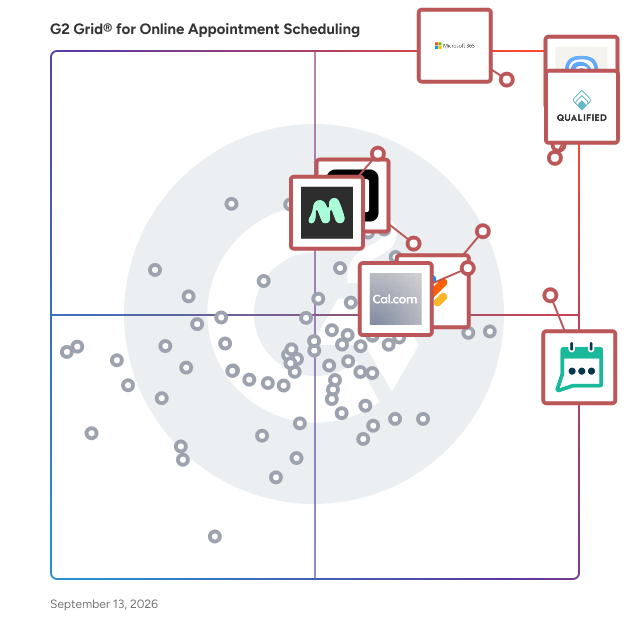
- **Leader:** [Microsoft 365](https://www.g2.com/products/microsoft365/reviews)
- **Highest Performer:** [Cal ID](https://www.g2.com/products/cal-id/reviews)
- **Easiest to Use:** [Waitwhile](https://www.g2.com/products/waitwhile/reviews)
- **Top Trending:** [Qualified](https://www.g2.com/products/qualified/reviews)
- **Best Free Software:** [Calendly](https://www.g2.com/products/calendly/reviews)


---

**Sponsored**

### Apollo.io

Apollo.io is an AI-powered go-to-market (GTM) platform that helps revenue teams find, engage, and manage B2B buyers across the entire sales cycle. Apollo.io is the company behind the industry’s first fully agentic GTM platform, transforming how revenue teams execute. Going beyond automation, Apollo’s intelligent agents actively drive results across the entire sales funnel – from prospecting to deal management – all in one place. Trusted by millions of users and hundreds of thousands of companies – including Anthropic, Autodesk, and Docusign – Apollo is making world-class go-to-market simple, intelligent, and accessible for all. Apollo serves sales development representatives, account executives, sales leaders, revenue operations, and marketing teams at B2B organizations of various sizes. Teams use Apollo to build and maintain target account lists, orchestrate outbound and inbound motions, manage opportunities, and understand which activities lead to qualified pipeline and closed revenue. Key capabilities include: Data and targeting: Access to a large B2B database with company and contact details, including firmographic, technographic, and buyer signal data, so users can define ideal customer profiles and create precise segments for outreach. Prospecting and enrichment: Tools to search, filter, and save prospect lists, plus enrichment workflows that keep contact and account records up to date in Apollo and connected systems such as CRM. Sales engagement: Multi-step, multi-channel sequences for email, calls, and tasks that standardize how reps follow up with prospects, with controls for timing, throttling, and deliverability. Agentic and AI-assisted workflows: Intelligent agents and AI features that help with account research, lead scoring, message generation, and next-step recommendations so reps can prioritize and personalize at scale. Deal and activity management: Basic CRM-style functionality for tracking opportunities, stages, activities, and notes, giving teams a single view of pipeline health and sales performance. By combining data, engagement, and deal execution in one platform, Apollo is designed to reduce the number of disconnected tools in a typical GTM stack and provide a consistent workflow for building pipeline and managing deals. This helps organizations improve data quality, increase seller productivity, and run more structured, measurable go-to-market programs.


[Visit website](https://www.g2.com/external_clickthroughs/record?secure%5Bad_program%5D=ppc&amp;secure%5Bad_slot%5D=category_product_list&amp;secure%5Bcategory_id%5D=269&amp;secure%5Bdisplayable_resource_id%5D=2875&amp;secure%5Bdisplayable_resource_type%5D=Category&amp;secure%5Bmedium%5D=sponsored&amp;secure%5Bplacement_reason%5D=neighbor_category&amp;secure%5Bplacement_resource_ids%5D%5B%5D=147&amp;secure%5Bplacement_resource_ids%5D%5B%5D=2875&amp;secure%5Bprioritized%5D=false&amp;secure%5Bproduct_id%5D=19743&amp;secure%5Bresource_id%5D=269&amp;secure%5Bresource_type%5D=Category&amp;secure%5Bsource_type%5D=category_page&amp;secure%5Bsource_url%5D=https%3A%2F%2Fwww.g2.com%2Fcategories%2Fonline-appointment-scheduling&amp;secure%5Btoken%5D=5cf7fb9f21f97b1a4fdbf77d65678a77f5860ce33a413522353430e51f9a2c7f&amp;secure%5Burl%5D=https%3A%2F%2Fwww.apollo.io%2Fdemo%3Futm_source%3Dg2%26utm_medium%3Dcpc%26utm_campaign%3DG2Clicks%26utm_content%3Dtopic%26utm_term%3Dbusinessscheduling&amp;secure%5Burl_type%5D=custom_url)

---

## What Are the Top-Rated Online Appointment Scheduling Software Products in 2026?
### 1. [Microsoft 365](https://www.g2.com/products/microsoft365/reviews)
Launch and grow your business with Microsoft 365. Do more, faster, with intelligent tools to create, send, share, and store professional, branded documents with your customers and team - securely in the cloud. Microsoft 365 is a cloud-based suite of software tools designed to help you do more—with best-in-class communication, design, and data management apps, intelligent cloud services, and advanced security. Access your data from anywhere, collaborate with team members in real time, meet with people virtually, and use thousands of predesigned templates to better communicate with customers and manage your business - all with built-in security technology that safeguards your data and devices from anywhere. Get the latest Office apps, such as Microsoft Teams, Word, Excel, PowerPoint, Outlook, OneDrive, and more.


**Average Rating:** 4.6/5.0
**Total Reviews:** 5,521
**How Do G2 Users Rate Microsoft 365?**

- **Has the product been a good partner in doing business?:** 8.8/10 (Category avg: 9.1/10)
- **Communication:** 8.7/10 (Category avg: 8.6/10)
- **AI Text Generation:** 8.5/10 (Category avg: 7.1/10)
- **Website Integration:** 8.9/10 (Category avg: 8.6/10)

**Who Is the Company Behind Microsoft 365?**

- **Seller:** [Microsoft](https://www.g2.com/sellers/microsoft)
- **Year Founded:** 1975
- **HQ Location:** Redmond, Washington
- **Twitter:** @microsoft (13,091,739 Twitter followers)
- **LinkedIn® Page:** https://www.linkedin.com/company/microsoft/ (231,632 employees on LinkedIn®)
- **Ownership:** MSFT

**Who Uses This Product?**
- **Who Uses This:** Owner, Manager
- **Top Industries:** Information Technology and Services, Education Management
- **Company Size:** 37% Mid-Market, 35% Small-Business


#### What Are Microsoft 365's Pros and Cons?

**Pros:**

- Ease of Use (264 reviews)
- Team Collaboration (205 reviews)
- Features (191 reviews)
- Integrations (184 reviews)
- Seamless Integration (169 reviews)

**Cons:**

- Expensive (112 reviews)
- Missing Features (97 reviews)
- Learning Curve (90 reviews)
- Lacking Features (71 reviews)
- Limited Features (70 reviews)


### What Do G2 Reviewers Say About Microsoft 365?
*AI-generated summary from verified user reviews*

**Pros:**

- Users value the **ease of navigation** and integration of Microsoft 365, enhancing their productivity effortlessly.
- Users value the **seamless team collaboration** in Microsoft 365, enhancing productivity and communication across platforms.
- Users value the **seamless integration with Microsoft apps** and a variety of features for enhanced productivity.
- Users value the **seamless integration** of Microsoft 365 with various apps, enhancing collaboration and accessibility from anywhere.
- Users enjoy the **seamless integration** of Microsoft 365 with apps, enhancing accessibility and collaboration across devices.

**Cons:**

- Users find Microsoft 365 **too expensive** for small teams, with frustrating updates and slow performance affecting usability.
- Users find **missing features** frustrating, especially when updates disrupt functionality and limit access in lower-priced plans.
- Users find the **learning curve** steep and overwhelming, particularly with advanced features and numerous applications.
- Users find Microsoft 365 **lacking features** in lower-priced plans, making it difficult for small teams to access necessary tools.
- Users are frustrated by the **limited features** available on lower-priced plans in Microsoft 365, affecting usability.

#### What Are Recent G2 Reviews of Microsoft 365?

**"[All-in-One Office Ecosystem with Reliable Apps and Seamless Collaboration](https://www.g2.com/survey_responses/microsoft-365-review-12834956)"**

**Rating:** 5.0/5.0 stars
*— Megh P.*

[Read full review](https://www.g2.com/survey_responses/microsoft-365-review-12834956)

---

**"[All in One Productivity Ecosystem with Seamless Collaboration Across Devices](https://www.g2.com/survey_responses/microsoft-365-review-12930516)"**

**Rating:** 4.5/5.0 stars
*— Sunil B.*

[Read full review](https://www.g2.com/survey_responses/microsoft-365-review-12930516)

---


#### What Are G2 Users Discussing About Microsoft 365?

- [What are the uses of Microsoft software?](https://www.g2.com/discussions/what-are-the-uses-of-microsoft-software) - 2 comments, 1 upvote
- [What kind of software is Microsoft Office?](https://www.g2.com/discussions/what-kind-of-software-is-microsoft-office) - 1 comment, 1 upvote
- [What programs are in Microsoft Office suite?](https://www.g2.com/discussions/what-programs-are-in-microsoft-office-suite) - 1 comment
- [What is Microsoft Office features?](https://www.g2.com/discussions/what-is-microsoft-office-features) - 2 comments

### 2. [Calendly](https://www.g2.com/products/calendly/reviews)
Calendly helps individuals, teams, and organizations automate the meeting lifecycle by removing the back and forth with scheduling. Calendly’s cloud-based platform offers a new layer of the modern digital technology stack by connecting with critical tools to automate scheduling workflows, creates a more delightful customer experience, and provides insightful, measurable data to drive better business outcomes. Today, more than 20 million users across 230+ countries use Calendly to simplify meetings, collaborate more effectively and efficiently, and drive business forward. To learn more, visit Calendly.com.


**Average Rating:** 4.7/5.0
**Total Reviews:** 2,556
**How Do G2 Users Rate Calendly?**

- **Has the product been a good partner in doing business?:** 9.3/10 (Category avg: 9.1/10)
- **Communication:** 8.9/10 (Category avg: 8.6/10)
- **AI Text Generation:** 7.2/10 (Category avg: 7.1/10)
- **Website Integration:** 9.0/10 (Category avg: 8.6/10)

**Who Is the Company Behind Calendly?**

- **Seller:** [Calendly](https://www.g2.com/sellers/calendly)
- **Company Website:** https://Calendly.com
- **Year Founded:** 2013
- **HQ Location:** Atlanta, Georgia
- **Twitter:** @Calendly (21,838 Twitter followers)
- **LinkedIn® Page:** https://www.linkedin.com/company/3640016/ (530 employees on LinkedIn®)

**Who Uses This Product?**
- **Who Uses This:** Owner, CEO
- **Top Industries:** Computer Software, Information Technology and Services
- **Company Size:** 60% Small-Business, 28% Mid-Market


#### What Are Calendly's Pros and Cons?

**Pros:**

- Ease of Use (171 reviews)
- Scheduling (139 reviews)
- Easy Scheduling (130 reviews)
- Calendar Integration (87 reviews)
- Easy Setup (87 reviews)

**Cons:**

- Missing Features (54 reviews)
- Calendar Issues (46 reviews)
- Expensive (38 reviews)
- Integration Issues (33 reviews)
- Limited Customization (32 reviews)


### What Do G2 Reviewers Say About Calendly?
*AI-generated summary from verified user reviews*

**Pros:**

- Users love the **ease of use** of Calendly, finding it intuitive and efficient for scheduling meetings effortlessly.
- Users love the **easy scheduling** with Calendly, simplifying client meetings and saving valuable time.
- Users love the **easy scheduling** with Calendly, simplifying the process of arranging meetings across various schedules.
- Users love the **seamless calendar integration** of Calendly, streamlining scheduling and avoiding unnecessary email exchanges.
- Users praise the **easy setup** of Calendly, drastically simplifying appointment scheduling and saving valuable time.

**Cons:**

- Users find the **missing advanced features** and limitations of the free version hinder their experience and functionality.
- Users struggle with **calendar sync issues** and software instability, causing lost scheduling opportunities and frustrating experiences.
- Users find the cost of Calendly&#39;s **paid plans expensive** , especially for small businesses trying to access advanced features.
- Users face **integration issues** with Calendly, particularly with Apple/iCloud and Thunderbird, complicating their scheduling process.
- Users find **limited customization** in the free plan frustrating, lacking intuitive features and responsive support for issues.

#### What Are Recent G2 Reviews of Calendly?

**"[Calendly Makes Scheduling Simple, Organized, and Efficient](https://www.g2.com/survey_responses/calendly-review-12859640)"**

**Rating:** 4.0/5.0 stars
*— Muhammad O.*

[Read full review](https://www.g2.com/survey_responses/calendly-review-12859640)

---

**"[Calendly Makes Scheduling Effortless With Smart Sync, Time Zones, and Buffers](https://www.g2.com/survey_responses/calendly-review-12872385)"**

**Rating:** 4.5/5.0 stars
*— Kaleem A.*

[Read full review](https://www.g2.com/survey_responses/calendly-review-12872385)

---


#### What Are G2 Users Discussing About Calendly?

- [What unique scheduling challenges are being solved by Calendly in professional services and consulting firms?](https://www.g2.com/discussions/what-unique-scheduling-challenges-are-being-solved-by-calendly-in-professional-services-and-consulting-firms) - 2 comments
- [What is Calendly used for?](https://www.g2.com/discussions/what-is-calendly-used-for) - 2 comments
- [How much is Calendly per month?](https://www.g2.com/discussions/how-much-is-calendly-per-month) - 2 comments
- [How do you use Calendly free?](https://www.g2.com/discussions/how-do-you-use-calendly-free) - 3 comments
- [What is Hugo app?](https://www.g2.com/discussions/hugo-what-is-hugo-app) - 1 comment

### 3. [Qualified](https://www.g2.com/products/qualified/reviews)
Qualified is the Agentic Marketing platform for B2B companies around the world. Headquartered in San Francisco, Qualified is built to modernize and maximize inbound pipeline generation with Piper the AI SDR Agent. Piper autonomously engages website visitors, captures leads, and converts them into pipeline with zero human intervention. With Piper, Qualified is transforming pipeline generation as we know it today. Your website is the front door to your business and the pinnacle of pipeline generation, but what happens when interested buyers want to learn more? They submit a web form and move on. Those leads get added to a queue for an inbound Sales Development Rep (SDR) to follow up with and nurture to pipeline for your sales team. How long does it take for an inbound lead to hear back? It can take hours, if not days. In the world of sales and marketing, speed is crucial as 78% of buyers go with the vendor that responds to them first. The problem is it&#39;s impossible to respond quickly with the current process because it&#39;s painfully manual, time intensive, and it relies on limited human capacity. But it doesn’t have to be this way. In the age of AI, we can put pipeline generation on autopilot. Meet Piper the AI SDR Agent. She operates across your entire inbound motion and works tirelessly to convert qualified buyers into pipeline, 24x7. Piper knows everything about your buyers. She profiles every website visitor to understand whether they&#39;re qualified and where they are in the buying journey then works toward her conversion goals. Piper also turns every touchpoint on your website into an opportunity for conversion with live chat, meeting booking, and personalized marketing offers. What&#39;s more, Piper works the inbox to send fast, personalized follow up and nurture emails to each and every lead. Hundreds of the world’s leading brands—including Crunchbase, Demandbase, Greenhouse, Plaid, and Suse—have hired Piper the AI SDR Agent to grow their inbound pipeline and are seeing real tangible business results.


**Average Rating:** 4.9/5.0
**Total Reviews:** 1,487
**How Do G2 Users Rate Qualified?**

- **Has the product been a good partner in doing business?:** 9.9/10 (Category avg: 9.1/10)
- **Communication:** 8.9/10 (Category avg: 8.6/10)
- **AI Text Generation:** 9.0/10 (Category avg: 7.1/10)
- **Website Integration:** 9.6/10 (Category avg: 8.6/10)

**Who Is the Company Behind Qualified?**

- **Seller:** [Qualified.com](https://www.g2.com/sellers/qualified-com)
- **Company Website:** https://www.qualified.com
- **Year Founded:** 2018
- **HQ Location:** San Francisco, CA
- **Twitter:** @tryqualified (713 Twitter followers)
- **LinkedIn® Page:** https://www.linkedin.com/company/35580403/ (298 employees on LinkedIn®)

**Who Uses This Product?**
- **Who Uses This:** Marketing Operations Manager, Sales Development Representative
- **Top Industries:** Computer Software, Information Technology and Services
- **Company Size:** 67% Mid-Market, 20% Enterprise


#### What Are Qualified's Pros and Cons?

**Pros:**

- Customer Support (279 reviews)
- Helpful (266 reviews)
- Features (217 reviews)
- Ease of Use (211 reviews)
- Customer Service (179 reviews)

**Cons:**

- Learning Curve (85 reviews)
- Missing Features (84 reviews)
- Steep Learning Curve (46 reviews)
- Limited Customization (42 reviews)
- Complexity (41 reviews)


### What Do G2 Reviewers Say About Qualified?
*AI-generated summary from verified user reviews*

**Pros:**

- Users value the **exceptional customer support** from Qualified, highlighting effective implementation and continued assistance.
- Users find Qualified&#39;s **support and guidance** invaluable, enhancing their experience and ensuring successful implementation and utilization.
- Users highlight Qualified&#39;s **user-friendly tools and consistent innovation** , effectively enhancing lead engagement and conversion optimization.
- Users find Qualified to be incredibly **easy to use** , with seamless integration and reliable support enhancing their experience.
- Users value the **exceptional customer service** from Qualified, feeling supported as if they have an additional team member.

**Cons:**

- Users find the **learning curve challenging** due to usability issues, hindering ease of use and workflow intuitiveness.
- Users find the **missing features** in Qualified, particularly in reporting and integrations, a significant drawback.
- Users find the **steep learning curve** challenging initially, though support is available to aid in onboarding.
- Users express a desire for more **customization options** in Qualified, particularly regarding graphic elements and workflow efficiencies.
- Users find the **complexity** of Qualified challenging during setup and management, requiring substantial learning and support.

#### What Are Recent G2 Reviews of Qualified?

**"[Impressive AI products backed by an exceptional human team.](https://www.g2.com/survey_responses/qualified-review-13038914)"**

**Rating:** 5.0/5.0 stars
*— Marissa P.*

[Read full review](https://www.g2.com/survey_responses/qualified-review-13038914)

---

**"[On-Point Success Architect and Clear Project Direction](https://www.g2.com/survey_responses/qualified-review-13038507)"**

**Rating:** 5.0/5.0 stars
*— Marilyn H.*

[Read full review](https://www.g2.com/survey_responses/qualified-review-13038507)

---


#### What Are G2 Users Discussing About Qualified?

- [What is Qualified used for?](https://www.g2.com/discussions/what-is-qualified-used-for)
- [What skills does a software developer need in 2020?](https://www.g2.com/discussions/what-skills-does-a-software-developer-need-in-2020)
- [What qualities do you need to be a software developer?](https://www.g2.com/discussions/what-qualities-do-you-need-to-be-a-software-developer)
- [What is qualified io?](https://www.g2.com/discussions/what-is-qualified-io)

### 4. [GReminders](https://www.g2.com/products/greminders/reviews)
GReminders is the ONLY AI-powered end-to-end meeting management platform BUILT for Financial and Professional Services. Online scheduling built exclusively for Google, Microsoft Outlook / Office 365 / Exchange, Redtail or Wealthbox Calendars. Eliminate No-Shows - Send reminders via SMS / Email / phone, or Follow-ups. Integrates with Web Meeting Providers such as Zoom, Microsoft Teams, Webex, etc... and all major CRMs such as Salesforce, Microsoft Dynamics, Redtail, Wealthbox, Hubspot, Pipedrive, SmartOffice and more. Our powerful AI Assistant can be utilized as a Notetaker, or to send follow-up emails and generate pre-meeting briefs. Utilize Ask Anything or Do Anything within your CRM, saving time searching for client information or creating tasks. GReminders works HOW YOU WORK, using your EXISTING systems, and focuses on simplicity and service! Give it a Try today for Free! Visit https://www.greminders.com


**Average Rating:** 4.6/5.0
**Total Reviews:** 678
**How Do G2 Users Rate GReminders?**

- **Has the product been a good partner in doing business?:** 9.3/10 (Category avg: 9.1/10)
- **Communication:** 8.5/10 (Category avg: 8.6/10)
- **AI Text Generation:** 8.0/10 (Category avg: 7.1/10)
- **Website Integration:** 8.4/10 (Category avg: 8.6/10)

**Who Is the Company Behind GReminders?**

- **Seller:** [Greminders](https://www.g2.com/sellers/greminders)
- **HQ Location:** Los Angeles, CA
- **LinkedIn® Page:** https://www.linkedin.com/company/76599426/ (26 employees on LinkedIn®)

**Who Uses This Product?**
- **Who Uses This:** Owner, Financial Advisor
- **Top Industries:** Financial Services, Mental Health Care
- **Company Size:** 90% Small-Business, 8% Mid-Market


#### What Are GReminders's Pros and Cons?

**Pros:**

- Ease of Use (97 reviews)
- Reminders Feature (82 reviews)
- Automated Reminders (60 reviews)
- Scheduling (58 reviews)
- Reminders (52 reviews)

**Cons:**

- Learning Curve (48 reviews)
- Reminder Limitations (20 reviews)
- Calendar Issues (19 reviews)
- Integration Issues (19 reviews)
- Limited Features (18 reviews)


### What Do G2 Reviewers Say About GReminders?
*AI-generated summary from verified user reviews*

**Pros:**

- Users commend the **ease of use** of GReminders, streamlining appointment reminders and boosting overall efficiency.
- Users love the **time-saving reminders feature** of GReminders, enhancing efficiency and simplifying client appointment management.
- Users value the **automated reminders** from GReminders, significantly enhancing efficiency and client communication for busy schedules.
- Users value the **seamless scheduling** of GReminders, enhancing convenience and efficiency for client interactions.
- Users appreciate the **customizable reminders** of GReminders, allowing effortless appointment reminders via multiple channels.

**Cons:**

- Users find the **learning curve steep** , as the software&#39;s complexities and settings can be confusing and time-consuming.
- Users are frustrated by **reminder limitations** , especially the lack of unlimited reminder templates on lower payment plans.
- Users experience **calendar integration issues** , leading to clients receiving reminders for deleted meetings unexpectedly.
- Users face **integration issues** with CRM systems like RedTail, complicating reminders and payment processing options.
- Users find GReminders&#39; **limited features** disappointing, especially the lack of customization and outdated design options.

#### What Are Recent G2 Reviews of GReminders?

**"[GReminders Streamlined Our Scheduling with Reliable Calendar Automation](https://www.g2.com/survey_responses/greminders-review-12953675)"**

**Rating:** 5.0/5.0 stars
*— Michael R.*

[Read full review](https://www.g2.com/survey_responses/greminders-review-12953675)

---

**"[GReminders: Effortless Client Scheduling and Time-Saving AI Notetaker](https://www.g2.com/survey_responses/greminders-review-12944686)"**

**Rating:** 5.0/5.0 stars
*— John C.*

[Read full review](https://www.g2.com/survey_responses/greminders-review-12944686)

---


#### What Are G2 Users Discussing About GReminders?

- [How do I set a Google reminder?](https://www.g2.com/discussions/how-do-i-set-a-google-reminder) - 2 comments
- [Can Google Calendar send text reminders?](https://www.g2.com/discussions/can-google-calendar-send-text-reminders) - 2 comments
- [How much is Greminders?](https://www.g2.com/discussions/how-much-is-greminders) - 1 comment
- [Is Greminders free?](https://www.g2.com/discussions/is-greminders-free) - 3 comments

### 5. [Jotform](https://www.g2.com/products/jotform/reviews)
Trusted by more than 35 million users worldwide, Jotform is an AI-powered online form builder designed to help individuals and organizations create, customize, and publish forms in minutes, from any device. With an intuitive drag-and-drop interface, Jotform makes it simple for anyone to build professional, mobile-responsive forms without writing a single line of code. As a fully no-code platform, Jotform empowers users to automate workflows, streamline data collection, and digitize processes. Jotform offers one of the largest template libraries in the industry, featuring 10,000+ ready-made form templates tailored to every use case. Popular categories include payment forms, lead generation forms, event registration forms, application forms, surveys, order forms, onboarding forms, consent forms, and feedback forms. Each template is fully customizable, allowing users to adjust layouts, add conditional logic, collect e-signatures, upload files, apply branding, and incorporate advanced field types. This level of flexibility ensures every form is optimized for user experience and aligned with organizational goals. To streamline workflows, Jotform integrates seamlessly with over 200 popular third-party apps, including Google Sheets, Slack, Zoom, HubSpot, Salesforce, PayPal, Stripe, and numerous other business tools. These integrations automate data collection, payment processing, CRM updates, and team notifications. By connecting forms directly to the tools your team already uses, Jotform helps eliminate data silos and supports end-to-end process automation—all within a no-code environment. Security and compliance are at the core of Jotform’s platform. Features such as HIPAA compliance options, 256-bit SSL encryption, CAPTCHA, form access controls, and audit logs help organizations protect sensitive data and meet industry standards. Whether you&#39;re collecting healthcare information, financial data, or internal employee records, Jotform provides the reliability and safeguards needed to operate with confidence. With powerful features like automated emails, approval workflows, analytics dashboards, and embeddable widgets, Jotform delivers an all-in-one solution for organizations looking to simplify data collection and improve productivity. From small businesses to enterprises, educational institutions, healthcare providers, and nonprofits, millions of teams rely on Jotform to capture information efficiently and turn submissions into actionable results.


**Average Rating:** 4.7/5.0
**Total Reviews:** 5,013
**How Do G2 Users Rate Jotform?**

- **Has the product been a good partner in doing business?:** 9.1/10 (Category avg: 9.1/10)
- **Communication:** 7.5/10 (Category avg: 8.6/10)
- **AI Text Generation:** 7.8/10 (Category avg: 7.1/10)
- **Website Integration:** 8.8/10 (Category avg: 8.6/10)

**Who Is the Company Behind Jotform?**

- **Seller:** [Jotform](https://www.g2.com/sellers/jotform)
- **Company Website:** https://www.jotform.com/
- **Year Founded:** 2006
- **HQ Location:** San Francisco, California
- **Twitter:** @Jotform (39,289 Twitter followers)
- **LinkedIn® Page:** https://www.linkedin.com/company/3541463/ (901 employees on LinkedIn®)

**Who Uses This Product?**
- **Who Uses This:** Owner, CEO
- **Top Industries:** Non-Profit Organization Management, Education Management
- **Company Size:** 70% Small-Business, 21% Mid-Market


#### What Are Jotform's Pros and Cons?

**Pros:**

- Ease of Use (1083 reviews)
- Simple (715 reviews)
- Ease of Creation (475 reviews)
- User-Friendly (464 reviews)
- Features (457 reviews)

**Cons:**

- Expensive (277 reviews)
- Missing Features (238 reviews)
- Form Issues (231 reviews)
- Limited Customization (221 reviews)
- Form Design (212 reviews)


### What Do G2 Reviewers Say About Jotform?
*AI-generated summary from verified user reviews*

**Pros:**

- Users appreciate the **ease of use** of Jotform, enabling quick access and effortless navigation for clients.
- Users appreciate the **ease of creating forms** on Jotform, greatly benefiting organization and event management.
- Users appreciate the **intuitive setup process** of Jotform, finding it easy and efficient for various needs.
- Users find Jotform to be **extremely user-friendly** , making navigation and form creation a breeze.
- Users love the **user-friendly design** of Jotform, enabling easy form creation with robust features and integrations.

**Cons:**

- Users find the **pricing to be too high** compared to other survey platforms, affecting overall satisfaction.
- Users struggle with **missing features** like font color changes and easier resizing, complicating form creation and functionality.
- Users face **form issues** with navigation and integration, making it challenging to utilize Jotform effectively.
- Users find **limited customization options** frustrating, particularly for graphics and personalizing their forms effectively.
- Users find the **form design navigation challenging** , struggling with directions and customization options within Jotform.

#### What Are Recent G2 Reviews of Jotform?

**"[Simple, Customizable Forms with Templates, Add-Ons, and Easy PayPal Integration](https://www.g2.com/survey_responses/jotform-review-13036898)"**

**Rating:** 4.0/5.0 stars
*— Philip J V.*

[Read full review](https://www.g2.com/survey_responses/jotform-review-13036898)

---

**"[Powerful Yet Intuitive Forms—Jotform Streamlines Our Resident Communication](https://www.g2.com/survey_responses/jotform-review-13039815)"**

**Rating:** 5.0/5.0 stars
*— Kevin H.*

[Read full review](https://www.g2.com/survey_responses/jotform-review-13039815)

---


#### What Are G2 Users Discussing About Jotform?

- [What innovative uses of Jotform are seen in data collection and management across various sectors?](https://www.g2.com/discussions/what-innovative-uses-of-jotform-are-seen-in-data-collection-and-management-across-various-sectors) - 1 upvote
- [What is Jotform used for?](https://www.g2.com/discussions/jotform-what-is-jotform-used-for) - 4 comments, 2 upvotes
- [Who uses JotForm?](https://www.g2.com/discussions/who-uses-jotform)
- [Is JotForm safe?](https://www.g2.com/discussions/is-jotform-safe) - 7 comments, 1 upvote
- [Does JotForm cost money?](https://www.g2.com/discussions/does-jotform-cost-money) - 7 comments, 1 upvote

### 6. [Cal.com](https://www.g2.com/products/cal-com/reviews)
The better way to schedule meetings Cal.com is a modern, fully customizable scheduling platform that gives businesses complete control over how meetings are booked, routed, and managed. Designed for flexibility and ownership, Cal.com adapts to how your organization works — not the other way around. Deploy it on your own infrastructure or use Cal.com’s hosted solution. Integrate seamlessly with the tools you already rely on, including Google, Microsoft, Salesforce, Zoom, and Stripe, while maintaining brand consistency through custom domains, white-labeling, and advanced routing logic. Teams choose Cal.com for its clean, modern design and intuitive experience — making scheduling feel effortless for both internal teams and external clients. For teams, Cal.com turns scheduling into a strategic advantage. Round-robin, collective, and group booking links eliminate back-and-forth. Routing forms ensure every meeting reaches the right person. Smart automations handle reminders, follow-ups, and workflows with ease. For enterprises, Cal.com delivers robust security and scalability. SOC 2 and HIPAA compliance (with signed BAAs), SSO and SCIM provisioning, RBAC permissions, and centralized billing support even the most complex organizations. With self-hosting and API access, you retain full control over your data. For individuals, Cal.com is free to start and easy to grow with. Create a booking link in minutes, then scale seamlessly into team or organization plans as your needs evolve. Modern. Secure. Fully customizable. Beautifully designed. Cal.com is the better way to schedule — powering everything from startup sales calls to enterprise-wide appointment systems on one flexible platform.


**Average Rating:** 4.6/5.0
**Total Reviews:** 137
**How Do G2 Users Rate Cal.com?**

- **Has the product been a good partner in doing business?:** 8.8/10 (Category avg: 9.1/10)
- **Communication:** 9.0/10 (Category avg: 8.6/10)
- **AI Text Generation:** 7.3/10 (Category avg: 7.1/10)
- **Website Integration:** 8.7/10 (Category avg: 8.6/10)

**Who Is the Company Behind Cal.com?**

- **Seller:** [Cal](https://www.g2.com/sellers/cal)
- **Company Website:** https://cal.com/
- **Year Founded:** 2021
- **HQ Location:** San Francisco
- **Twitter:** @calendso (83 Twitter followers)
- **LinkedIn® Page:** https://www.linkedin.com/company/cal-com/ (40 employees on LinkedIn®)

**Who Uses This Product?**
- **Who Uses This:** CEO
- **Top Industries:** Computer Software, Information Technology and Services
- **Company Size:** 50% Small-Business, 5% Mid-Market


#### What Are Cal.com's Pros and Cons?

**Pros:**

- Ease of Use (91 reviews)
- Easy Scheduling (87 reviews)
- Automatic Scheduling (71 reviews)
- Flexibility (60 reviews)
- Calendar Integration (58 reviews)

**Cons:**

- Complex Settings (43 reviews)
- Learning Curve (41 reviews)
- Setup Difficulties (36 reviews)
- Limited Customization (35 reviews)
- UX Improvement (17 reviews)


### What Do G2 Reviewers Say About Cal.com?
*AI-generated summary from verified user reviews*

**Pros:**

- Users value the **ease of use** of Cal.com, praising its straightforward setup and efficient scheduling features.
- Users value how Cal.com offers **easy scheduling** , streamlining team management and enhancing efficiency with seamless integrations.
- Users love the **automatic scheduling** of Cal.com, making booking seamless and freeing up time for more important tasks.
- Users value the **flexibility** of Cal.com, enjoying its customizable scheduling and seamless integration with existing tools.
- Users love the **seamless calendar integration** of Cal.com, enhancing scheduling efficiency and reducing the hassle of double-booking.

**Cons:**

- Users find the **complex settings** of Cal.com overwhelming, especially during initial setup and when customizing features.
- Users find the **learning curve steep** , particularly with advanced features and setup, making it challenging for beginners.
- Users often face **setup difficulties** with Cal.com, finding the process overwhelming and confusing for non-technical users.
- Users express frustration with the **limited customization** options in Cal.com, hindering efficiency and advanced scheduling needs.
- Users find the **UX improvement** of Cal.com challenging due to complex setup and occasional UI issues affecting usability.

#### What Are Recent G2 Reviews of Cal.com?

**"[Ease of Use, but Mobile App Needs Improvement](https://www.g2.com/survey_responses/cal-com-review-12701543)"**

**Rating:** 4.0/5.0 stars
*— Jacqui P.*

[Read full review](https://www.g2.com/survey_responses/cal-com-review-12701543)

---

**"[Streamlined Scheduling with Excellent Customization](https://www.g2.com/survey_responses/cal-com-review-12764907)"**

**Rating:** 5.0/5.0 stars
*— Brittany C.*

[Read full review](https://www.g2.com/survey_responses/cal-com-review-12764907)

---


#### What Are G2 Users Discussing About Cal.com?

- [What is Cal.com used for?](https://www.g2.com/discussions/cal-com-what-is-cal-com-used-for) - 1 comment, 1 upvote
- [What is Cal.com used for?](https://www.g2.com/discussions/what-is-cal-com-used-for)

### 7. [Waitwhile](https://www.g2.com/products/waitwhile/reviews)
Waitwhile is a user-friendly queue management and appointment scheduling solution designed to help businesses optimize their operations and enhance customer experiences. By offering virtual waitlists and seamless appointment scheduling, Waitwhile enables organizations to manage customer flow efficiently, ensuring that both walk-ins and scheduled appointments are handled with ease. This platform is particularly beneficial for businesses that rely on in-person interactions, such as retail stores, restaurants, and service providers. The target audience for Waitwhile includes businesses of all sizes that seek to improve customer engagement and streamline their operational processes. From large retailers like Best Buy and Louis Vuitton to boutique service providers, Waitwhile caters to a diverse range of industries. The platform is particularly useful in scenarios where customer wait times can lead to frustration or lost sales opportunities. By implementing Waitwhile, businesses can create a more organized and pleasant experience for their customers, ultimately driving higher conversion rates and customer satisfaction. Key features of Waitwhile include integrated waitlists and appointment bookings, which allow businesses to manage all customer interactions in one centralized location. This feature not only increases operational efficiency but also enhances the employee experience by reducing the chaos often associated with managing customer flow. Additionally, the platform offers unrivaled customization options, enabling businesses to tailor the customer journey to their specific needs. This flexibility minimizes drop-offs and maximizes upsell opportunities, allowing businesses to capitalize on every customer interaction. Moreover, Waitwhile&#39;s best-in-class API and integrations facilitate seamless connectivity with existing technology stacks, ensuring that businesses can automate their workflows without disrupting their current systems. The platform&#39;s user-friendly interface is designed for ease of use, allowing administrators to configure settings quickly, employees to get started with minimal training, and customers to navigate the system effortlessly. This focus on user experience sets Waitwhile apart from other queue management solutions, making it a preferred choice for organizations looking to enhance their service delivery. In summary, Waitwhile stands out as a comprehensive queue management and appointment scheduling platform that not only improves operational efficiency but also enriches the customer experience. By leveraging its advanced features and capabilities, businesses can transform how they manage customer interactions, ultimately leading to increased satisfaction and loyalty.


**Average Rating:** 4.9/5.0
**Total Reviews:** 318
**How Do G2 Users Rate Waitwhile?**

- **Has the product been a good partner in doing business?:** 9.7/10 (Category avg: 9.1/10)
- **Communication:** 9.2/10 (Category avg: 8.6/10)
- **AI Text Generation:** 9.1/10 (Category avg: 7.1/10)
- **Website Integration:** 9.2/10 (Category avg: 8.6/10)

**Who Is the Company Behind Waitwhile?**

- **Seller:** [Waitwhile, Inc](https://www.g2.com/sellers/waitwhile-inc)
- **Company Website:** https://waitwhile.com/
- **Year Founded:** 2017
- **HQ Location:** San Francisco, California
- **Twitter:** @waitwhile (183 Twitter followers)
- **LinkedIn® Page:** https://www.linkedin.com/company/waitwhile/ (50 employees on LinkedIn®)

**Who Uses This Product?**
- **Who Uses This:** Sales Associate, Cafe Ambassador
- **Top Industries:** Retail, Consumer Services
- **Company Size:** 46% Small-Business, 32% Mid-Market


#### What Are Waitwhile's Pros and Cons?

**Pros:**

- Ease of Use (82 reviews)
- User-Friendly (45 reviews)
- Easy Setup (21 reviews)
- Appointment Management (20 reviews)
- Time Efficiency (19 reviews)

**Cons:**

- Client Experience (8 reviews)
- Missing Features (8 reviews)
- Messaging Issues (7 reviews)
- Inefficient Processes (4 reviews)
- Learning Curve (4 reviews)


### What Do G2 Reviewers Say About Waitwhile?
*AI-generated summary from verified user reviews*

**Pros:**

- Users appreciate the **ease of use** of Waitwhile, finding it simple to manage appointments and guest check-ins.
- Users value the **user-friendly design** of Waitwhile, which simplifies customer organization and appointment management.
- Users value the **easy setup** of Waitwhile, making it quick to integrate and use effectively in busy environments.
- Users appreciate the **appointment management features** of Waitwhile, enhancing their ability to assist multiple clients efficiently.
- Users appreciate the **time efficiency** of Waitwhile, enabling quick check-ins and streamlined task management for enhanced productivity.

**Cons:**

- Users find **client experience challenging** especially with elderly clients, citing privacy concerns and communication inconsistencies.
- Users desire **missing features** in Waitwhile, such as finer time settings and improved permissions for user groups.
- Users experience **messaging issues** with inconsistent notifications, leading to confusion about appointments and communication difficulties.
- Users find the **inefficient processes** of Waitwhile cumbersome, complicating queue management and transaction searches.
- Users find the **learning curve steep** with Waitwhile, making setup and customization frustrating for newcomers.

#### What Are Recent G2 Reviews of Waitwhile?

**"[Simple but powerful tool for customer service at IKEA](https://www.g2.com/survey_responses/waitwhile-review-10333584)"**

**Rating:** 5.0/5.0 stars
*— ALEX R.*

[Read full review](https://www.g2.com/survey_responses/waitwhile-review-10333584)

---

**"[Waitwhile Streamlines Queues a User-Friendly Experience Efficient and Management Solution](https://www.g2.com/survey_responses/waitwhile-review-12919413)"**

**Rating:** 5.0/5.0 stars
*— Selena  B.*

[Read full review](https://www.g2.com/survey_responses/waitwhile-review-12919413)

---


#### What Are G2 Users Discussing About Waitwhile?

- [What is Waitwhile com?](https://www.g2.com/discussions/what-is-waitwhile-com)
- [How do you use Waitwhile?](https://www.g2.com/discussions/how-do-you-use-waitwhile) - 2 comments, 1 upvote
- [Does Waitwhile have an app?](https://www.g2.com/discussions/does-waitwhile-have-an-app) - 3 comments, 1 upvote
- [What does Waitwhile do?](https://www.g2.com/discussions/what-does-waitwhile-do) - 1 comment

### 8. [Square Point of Sale](https://www.g2.com/products/square-point-of-sale/reviews)
Square Point of Sale is a powerful, flexible POS system built for every kind of business—from restaurants and retailers to salons and professional services. With Square POS, you can manage your entire operation from one place. Accept payments in person, online, or on the go. Track sales, inventory, and customer preferences in real time, and use built-in analytics to understand how your business is performing across every location and channel. Tailored solutions of every business. Square POS includes seven industry modes: Quick Service, Full Service, Bar, Retail, Bookings, Services, and Standard. Each mode includes features designed for your business type, including order management, KDS, and pre-authorized tabs for restaurants, appointment scheduling for beauty providers, invoices and estimates for service professionals, and inventory and vendor management for retailers. A POS that grows with your business. As your business evolves, Square POS adapts with you. Easily switch modes, add locations, or manage multiple concepts within one app. Square hardware works across every mode, from countertop setups to mobile readers, so you can take payments wherever your customers are. Simplify your operations. Square combines payments, hardware, and software in one unified platform. Accept all major payment types, including tap, chip, swipe, and digital wallets like Apple Pay and Google Pay. Get paid as soon as the next business day, with transparent pricing, no hidden fees, and no long-term contracts. Insights and tools that drive growth. Square POS includes built-in reports that track sales, customers, staff, and inventory in real time. Square AI delivers smart insights to help you make more informed business decisions. And with integrated tools like Square Marketing, Payroll, Banking, and Square Online, you can manage your entire business from one connected platform. Get started in minutes. Square POS is free to download and simple to set up. Train your team quickly and start accepting payments right away. Explore advanced features with a 30-day free trial, and upgrade anytime. Transparent pricing means you always know what you’ll pay—with no contracts or surprises.


**Average Rating:** 4.6/5.0
**Total Reviews:** 1,182
**How Do G2 Users Rate Square Point of Sale?**

- **Has the product been a good partner in doing business?:** 9.1/10 (Category avg: 9.1/10)
- **Communication:** 8.7/10 (Category avg: 8.6/10)
- **AI Text Generation:** 10.0/10 (Category avg: 7.1/10)
- **Website Integration:** 8.3/10 (Category avg: 8.6/10)

**Who Is the Company Behind Square Point of Sale?**

- **Seller:** [Block](https://www.g2.com/sellers/block)
- **Company Website:** https://block.xyz/
- **Year Founded:** 2009
- **HQ Location:** Oakland, California
- **Twitter:** @Square (309,691 Twitter followers)
- **LinkedIn® Page:** https://www.linkedin.com/company/joinblock/ (12,254 employees on LinkedIn®)

**Who Uses This Product?**
- **Who Uses This:** Owner, Business Owner
- **Top Industries:** Retail, Food &amp; Beverages
- **Company Size:** 89% Small-Business, 7% Mid-Market


#### What Are Square Point of Sale's Pros and Cons?

**Pros:**

- Ease of Use (121 reviews)
- Payment Processing (58 reviews)
- Features (44 reviews)
- Simple (42 reviews)
- Setup Ease (41 reviews)

**Cons:**

- High Fees (30 reviews)
- Expensive (24 reviews)
- Access Limitations (19 reviews)
- Missing Features (17 reviews)
- Payment Issues (17 reviews)


### What Do G2 Reviewers Say About Square Point of Sale?
*AI-generated summary from verified user reviews*

**Pros:**

- Users highlight the **ease of use** with Square Point of Sale, appreciating its quick setup and intuitive navigation.
- Users appreciate the **ease of payment processing** with Square Point of Sale, facilitating seamless transactions across devices.
- Users value the **robust reporting tools** in Square Point of Sale for data-driven decision making and convenience.
- Users appreciate the **ease of use** of Square Point of Sale, making it ideal for beginners and efficient in operations.
- Users commend the **easy setup** of Square Point of Sale, appreciating its quick and straightforward installation process.

**Cons:**

- Users express concerns about **high fees** , noting transaction and add-on costs can accumulate as businesses expand.
- Users find the **fees for Square Point of Sale** to be higher compared to other options, impacting overall affordability.
- Users find **access limitations** frustrating, as programming can be tedious and requires a stable internet connection to function.
- Users report **missing features** like unreliable mobile add-ons and basic layout hindering navigation and e-commerce integration.
- Users face **payment issues** , noting high transaction fees and slow verification processes that hinder business growth.

#### What Are Recent G2 Reviews of Square Point of Sale?

**"[Square Point of Sale: Simple, Flexible, and Easy for Staff to Learn](https://www.g2.com/survey_responses/square-point-of-sale-review-12726472)"**

**Rating:** 5.0/5.0 stars
*— Jean R.*

[Read full review](https://www.g2.com/survey_responses/square-point-of-sale-review-12726472)

---

**"[Seamless Payment Collection with Automation](https://www.g2.com/survey_responses/square-point-of-sale-review-12672421)"**

**Rating:** 5.0/5.0 stars
*— Verified User in Events Services*

[Read full review](https://www.g2.com/survey_responses/square-point-of-sale-review-12672421)

---


#### What Are G2 Users Discussing About Square Point of Sale?

- [What is Square Point of Sale used for?](https://www.g2.com/discussions/what-is-square-point-of-sale-used-for) - 1 comment
- [What is Square Invoices used for?](https://www.g2.com/discussions/what-is-square-invoices-used-for) - 1 comment
- [What is Square for Retail used for?](https://www.g2.com/discussions/what-is-square-for-retail-used-for)
- [What are the key features of a point of sale system?](https://www.g2.com/discussions/square-point-of-sale-what-are-the-key-features-of-a-point-of-sale-system) - 1 comment
- [Is Square Point of Sale free?](https://www.g2.com/discussions/is-square-point-of-sale-free) - 2 comments, 1 upvote

### 9. [Wix](https://www.g2.com/products/wix/reviews)
Wix is a website builder that lets any business or individual build their own professional website. By combining design tools and business solutions in one AI-powered platform, Wix makes it easy for anyone to create without limits and scale confidently online. Whether it’s a personal portfolio, blog, service business or eCommerce store, Wix has a solution for you. You can get started by vibe coding a website with Wix Harmony, or choosing a designer-made template for something more structured. Either way, your site can then be easily customized with a smart drag and drop editor. Every site includes multi-cloud hosting, lightning-fast web performance and enterprise grade security. Wix goes beyond basic website creation with built-in tools and AI features to support your full online journey. You can generate content using AI in the same brand voice across your entire site, as well as images, SEO tags, marketing materials and much more. You can also use Wix to search for and register a custom domain with access to 400+ TLD options, set up a professional business email and use advanced branding features. Wix also has website analytics and a mobile app, so you can monitor and manage your site from anywhere. No matter your website or business, Wix combines everything you need into one intuitive platform used by millions worldwide. What are the main features of Wix? • AI website builder that can create a site for any industry • Smart drag and drop editor to intuitively edit your site • Professionally designed website templates • Ability to search for and register a custom domain • Multi-cloud web hosting with fast performance and built-in security • Advanced marketing tools including SEO and LLM optimization • eCommerce solutions equipped with multi-channel sales • Online scheduling software for service-based businesses • Blogging and portfolio capabilities to grow and monetize your audience • Full-stack web dev tools for advanced customization


**Average Rating:** 4.2/5.0
**Total Reviews:** 1,818
**How Do G2 Users Rate Wix?**

- **Has the product been a good partner in doing business?:** 8.4/10 (Category avg: 9.1/10)
- **Communication:** 9.2/10 (Category avg: 8.6/10)
- **AI Text Generation:** 9.7/10 (Category avg: 7.1/10)
- **Website Integration:** 9.1/10 (Category avg: 8.6/10)

**Who Is the Company Behind Wix?**

- **Seller:** [Wix](https://www.g2.com/sellers/wix)
- **Company Website:** https://www.wix.com/
- **Year Founded:** 2006
- **HQ Location:** Tel Aviv
- **Twitter:** @Wix (391,474 Twitter followers)
- **LinkedIn® Page:** https://www.linkedin.com/company/97250/ (7,506 employees on LinkedIn®)

**Who Uses This Product?**
- **Who Uses This:** Owner, Marketing Manager
- **Top Industries:** Marketing and Advertising, Computer Software
- **Company Size:** 79% Small-Business, 15% Mid-Market


#### What Are Wix's Pros and Cons?

**Pros:**

- Ease of Use (254 reviews)
- Easy Creation (96 reviews)
- Template Variety (87 reviews)
- No Coding (82 reviews)
- Simple (79 reviews)

**Cons:**

- Limited Customization (72 reviews)
- Expensive (68 reviews)
- Pricing Issues (40 reviews)
- Limited Features (37 reviews)
- Limited Templates (37 reviews)


### What Do G2 Reviewers Say About Wix?
*AI-generated summary from verified user reviews*

**Pros:**

- Users find Wix to be **very easy to use** , allowing them to create websites effortlessly without coding.
- Users love the **easy creation** of websites with Wix, thanks to its intuitive drag-and-drop features and templates.
- Users love the **extensive variety of templates** in Wix, allowing for personalized and unique website creation effortlessly.
- Users value the **no coding flexibility** of Wix, enabling easy website creation with diverse templates and integrated features.
- Users appreciate how **easy and effortless** it is to set up websites with Wix, making it ideal for beginners.

**Cons:**

- Users find **limited customization** options in Wix, preferring more advanced solutions like Webflow or Tilda for flexibility.
- Users find Wix to be **expensive** , citing hidden fees and higher costs for essential features and services.
- Users find **pricing issues** with Wix, noting costs can be high and limited to a single currency.
- Users find Wix&#39;s **limited features** restrict creative freedom, especially compared to platforms like WordPress.
- Users find the **limited templates** restrictive, as switching requires rebuilding the site, hindering flexibility and creativity.

#### What Are Recent G2 Reviews of Wix?

**"[Website design made simple.](https://www.g2.com/survey_responses/wix-review-8121499)"**

**Rating:** 5.0/5.0 stars
*— Kim Domonique Benita D.*

[Read full review](https://www.g2.com/survey_responses/wix-review-8121499)

---

**"[Easy to Use and Very Nice to use feel you like playing video game inside the dashboard](https://www.g2.com/survey_responses/wix-review-12986988)"**

**Rating:** 4.5/5.0 stars
*— Mania C.*

[Read full review](https://www.g2.com/survey_responses/wix-review-12986988)

---


#### What Are G2 Users Discussing About Wix?

- [What are the advanced design features in Wix that a new user should learn to create a professional website?](https://www.g2.com/discussions/what-are-the-advanced-design-features-in-wix-that-a-new-user-should-learn-to-create-a-professional-website) - 1 comment
- [What is Wix used for?](https://www.g2.com/discussions/what-is-wix-used-for) - 1 comment, 2 upvotes
- [Does Wix have a booking feature?](https://www.g2.com/discussions/does-wix-have-a-booking-feature) - 2 comments

### 10. [Cal ID](https://www.g2.com/products/cal-id/reviews)
Cal ID is a product of OneHash and caters to the need of people who are looking for scheduling App for Individual, Scheduling App for Teams, Collective Scheduling, wants to triggers events based on action, wants to set workflow. It can be used by Recruiters for scheduling interview. Sales &amp; Marketing team for accommodate multiple time zones, round-robin scheduling, collective events, and private single-use links. Educationist for scheduling students, parents and staff. Telehealth and by hospitals for patients to book meetings with Doctors or for lab testing. Stores for in store bookings.


**Average Rating:** 4.7/5.0
**Total Reviews:** 219
**How Do G2 Users Rate Cal ID?**

- **Has the product been a good partner in doing business?:** 9.3/10 (Category avg: 9.1/10)
- **Communication:** 8.3/10 (Category avg: 8.6/10)
- **AI Text Generation:** 9.2/10 (Category avg: 7.1/10)
- **Website Integration:** 10.0/10 (Category avg: 8.6/10)

**Who Is the Company Behind Cal ID?**

- **Seller:** [OneHash](https://www.g2.com/sellers/onehash)
- **Year Founded:** 2020
- **HQ Location:** Delaware
- **Twitter:** @OneHash (593 Twitter followers)
- **LinkedIn® Page:** https://www.linkedin.com/company/onehash (28 employees on LinkedIn®)

**Who Uses This Product?**
- **Who Uses This:** Founder, CEO
- **Top Industries:** Computer Software, Marketing and Advertising
- **Company Size:** 90% Small-Business, 8% Mid-Market


#### What Are Cal ID's Pros and Cons?

**Pros:**

- Ease of Use (47 reviews)
- Scheduling (34 reviews)
- Simple (30 reviews)
- User Interface (19 reviews)
- Calendar Integration (18 reviews)

**Cons:**

- Limited Customization (13 reviews)
- Integration Issues (8 reviews)
- Calendar Issues (7 reviews)
- Learning Curve (6 reviews)
- Missing Features (6 reviews)


### What Do G2 Reviewers Say About Cal ID?
*AI-generated summary from verified user reviews*

**Pros:**

- Users admire the **ease of use** of Cal ID, finding scheduling simple and efficient with a user-friendly interface.
- Users appreciate the **streamlined scheduling** of Cal ID, making coordination effortless and improving calendar management.
- Users appreciate the **ease of use and extensive features** of Cal ID, making management simple and efficient.
- Users love the **user-friendly interface** of Cal ID, which simplifies scheduling and enhances professionalism.
- Users find **Calendar Integration** effortless, enabling seamless bookings and syncing with other tools like Google Calendar.

**Cons:**

- Users feel that the **customization options are limited** , impacting branding and user experience flexibility.
- Users feel that **limited integrations** hinder Cal ID&#39;s effectiveness, expressing a need for more app connections.
- Users face **calendar synchronization delays** and limited customization options, complicating their scheduling experience.
- Users experience a noticeable **learning curve** with Cal ID, requiring time to effectively navigate its features.
- Users feel the product has **missing features** , such as templates and advanced customization options, limiting its potential.

#### What Are Recent G2 Reviews of Cal ID?

**"[Powerful Scheduling That Stays Simple and Cost-Effective](https://www.g2.com/survey_responses/cal-id-review-12877300)"**

**Rating:** 5.0/5.0 stars
*— Rohit V.*

[Read full review](https://www.g2.com/survey_responses/cal-id-review-12877300)

---

**"[Fast Onboarding, Customizable Booking Links, and No Paywall for Integrations](https://www.g2.com/survey_responses/cal-id-review-12866241)"**

**Rating:** 5.0/5.0 stars
*— Dan G.*

[Read full review](https://www.g2.com/survey_responses/cal-id-review-12866241)

---


### 11. [WellnessLiving](https://www.g2.com/products/wellnessliving/reviews)
WellnessLiving is the fastest-growing, all-in-one business management software for the fitness and wellness industry. Trusted by over 5,000 business owners and more than 15 million users worldwide, WellnessLiving is the only software you need to manage and grow your business. It&#39;s affordable, reliable, easy to use, and offers all the tools and mobile apps you need to attract, convert, and retain more clients.


**Average Rating:** 4.5/5.0
**Total Reviews:** 195
**How Do G2 Users Rate WellnessLiving?**

- **Has the product been a good partner in doing business?:** 9.3/10 (Category avg: 9.1/10)
- **Communication:** 9.3/10 (Category avg: 8.6/10)
- **AI Text Generation:** 8.9/10 (Category avg: 7.1/10)
- **Website Integration:** 8.6/10 (Category avg: 8.6/10)

**Who Is the Company Behind WellnessLiving?**

- **Seller:** [WellnessLiving Systems](https://www.g2.com/sellers/wellnessliving-systems)
- **Company Website:** https://www.wellnessliving.com
- **Year Founded:** 2012
- **HQ Location:** Thornhill, Ontario
- **Twitter:** @WL_software (287 Twitter followers)
- **LinkedIn® Page:** https://www.linkedin.com/company/5306592/ (376 employees on LinkedIn®)

**Who Uses This Product?**
- **Who Uses This:** Owner, Business Owner
- **Top Industries:** Health, Wellness and Fitness, Sports
- **Company Size:** 92% Small-Business, 3% Mid-Market


#### What Are WellnessLiving's Pros and Cons?

**Pros:**

- Ease of Use (40 reviews)
- Customer Support (36 reviews)
- Customer Service (30 reviews)
- User-Friendly (18 reviews)
- Client Management (14 reviews)

**Cons:**

- Missing Features (8 reviews)
- Poor Customer Support (7 reviews)
- Feature Issues (6 reviews)
- Learning Curve (6 reviews)
- Update Issues (6 reviews)


### What Do G2 Reviewers Say About WellnessLiving?
*AI-generated summary from verified user reviews*

**Pros:**

- Users appreciate the **ease of use** of WellnessLiving, streamlining operations and enhancing overall business efficiency.
- Users praise the **great and fast customer support** from WellnessLiving, always ready to assist with any questions.
- Users praise the **fast and supportive customer service** of WellnessLiving, always available to assist with any tech questions.
- Users appreciate the **user-friendly interface** of WellnessLiving, making management and navigation effortless for their businesses.
- Users appreciate the **organized client management** of WellnessLiving, streamlining daily operations and enhancing business efficiency.

**Cons:**

- Users find the **missing features** in WellnessLiving restrictive, particularly in reporting and invoicing capabilities.
- Users express frustration with **poor customer support** , often experiencing delays and unresponsiveness from the service team.
- Users find **feature issues** with WellnessLiving, citing confusion and limited integrations that complicate the user experience.
- Users find the **steep learning curve** daunting, feeling overwhelmed by the extensive features of WellnessLiving.
- Users face **delay in updates** across platforms, causing initial difficulties and adaptation challenges with new features and integrations.

#### What Are Recent G2 Reviews of WellnessLiving?

**"[Exceptional Service, Improved Platform](https://www.g2.com/survey_responses/wellnessliving-review-12599497)"**

**Rating:** 5.0/5.0 stars
*— Tammy S.*

[Read full review](https://www.g2.com/survey_responses/wellnessliving-review-12599497)

---

**"[All-in-One Solution for Growing Studios](https://www.g2.com/survey_responses/wellnessliving-review-12178035)"**

**Rating:** 5.0/5.0 stars
*— Irina K.*

[Read full review](https://www.g2.com/survey_responses/wellnessliving-review-12178035)

---


#### What Are G2 Users Discussing About WellnessLiving?

- [What does Wellnessliving do?](https://www.g2.com/discussions/what-does-wellnessliving-do) - 1 comment
- [How do I set up a wellness living account?](https://www.g2.com/discussions/how-do-i-set-up-a-wellness-living-account)
- [Does wellness living have an app?](https://www.g2.com/discussions/does-wellness-living-have-an-app) - 2 comments
- [How much does Wellness living software cost?](https://www.g2.com/discussions/how-much-does-wellness-living-software-cost) - 1 comment

### 12. [Doodle](https://www.g2.com/products/doodle/reviews)
Doodle is the easiest way to bring people together — without the endless email threads. Whether you&#39;re planning a 1:1, hosting a team sync, or coordinating a larger group, Doodle helps you find the right time without wasting hours going back and forth. It’s built for freelancers, small businesses, educators, recruiters, and enterprise teams who need a smarter way to schedule. Doodle gives you the tools to handle any kind of meeting. Use a Group Poll to let people vote on the times that work best for them. Want to skip the coordination altogether? Set up a Booking Page so clients or colleagues can grab a spot on your calendar based on your real-time availability. Need to organize volunteers, sign-ups, or event slots? The Sign-up Sheet makes it easy to collect responses and stay organized. Doodle integrates with the tools you already rely on — like Google Calendar, Outlook, Zoom, and Microsoft Teams — so you don’t have to switch between apps. You can even connect Stripe to collect payments when needed. Everything stays in sync, so you’re always in control. With calendar visibility settings, you decide exactly what others can see and book. Notifications and reminders keep everyone in the loop, so nothing slips through the cracks. It’s fast, intuitive, and built to save you time. Start with Doodle Free, or upgrade to Pro, Team plans for more advanced features like custom branding, shared team calendars, admin controls, and priority support. No matter your role or industry, Doodle makes scheduling effortless. Less friction. More focus. Better meetings — every time.


**Average Rating:** 4.4/5.0
**Total Reviews:** 2,031
**How Do G2 Users Rate Doodle?**

- **Has the product been a good partner in doing business?:** 9.1/10 (Category avg: 9.1/10)
- **Communication:** 9.2/10 (Category avg: 8.6/10)
- **AI Text Generation:** 10.0/10 (Category avg: 7.1/10)
- **Website Integration:** 9.2/10 (Category avg: 8.6/10)

**Who Is the Company Behind Doodle?**

- **Seller:** [Doodle](https://www.g2.com/sellers/doodle)
- **Year Founded:** 2007
- **HQ Location:** Zurich, Switzerland
- **Twitter:** @doodletweet (10,300 Twitter followers)
- **LinkedIn® Page:** https://www.linkedin.com/company/doodle-ag/ (128 employees on LinkedIn®)

**Who Uses This Product?**
- **Who Uses This:** Student, Graduate Research Assistant
- **Top Industries:** Education Management, Higher Education
- **Company Size:** 42% Small-Business, 29% Enterprise


#### What Are Doodle's Pros and Cons?

**Pros:**

- Automatic Scheduling (2 reviews)
- Scheduling Efficiency (2 reviews)
- Booking Management (1 reviews)
- Ease of Use (1 reviews)
- Easy Scheduling (1 reviews)

**Cons:**

- Limited Automation (1 reviews)
- Limited Customization (1 reviews)
- Notification Issues (1 reviews)
- Reminder Limitations (1 reviews)


### What Do G2 Reviewers Say About Doodle?
*AI-generated summary from verified user reviews*

**Pros:**

- Users find Doodle’s **automatic scheduling** feature simplifies coordination and eliminates the hassle of back-and-forth messaging.
- Users value the **scheduling efficiency** of Doodle, greatly simplifying meeting coordination for busy executives.
- Users appreciate the **seamless scheduling** process of Doodle, which simplifies meeting coordination and eliminates messaging hassles.
- Users appreciate the **ease of use** of Doodle, finding scheduling meetings quick and seamless without hassle.
- Users appreciate the **easy scheduling** of Doodle, streamlining coordination and eliminating unnecessary messaging hassles.

**Cons:**

- Users desire more **consistent and customizable reminders** for better scheduling and notifications with Doodle.
- Users desire more **consistent and customizable reminders** in Doodle to enhance their overall experience.
- Users express frustration with the **inconsistent and uncustomizable notifications** from Doodle, impacting their scheduling experience.
- Users desire **better consistency and customization** for reminders and notifications in Doodle to enhance their experience.

#### What Are Recent G2 Reviews of Doodle?

**"[Scheduling fights became a thing of the past](https://www.g2.com/survey_responses/doodle-review-12463986)"**

**Rating:** 4.5/5.0 stars
*— Yuna  P.*

[Read full review](https://www.g2.com/survey_responses/doodle-review-12463986)

---

**"[Easy Setup and User-Friendly Experience](https://www.g2.com/survey_responses/doodle-review-12787570)"**

**Rating:** 5.0/5.0 stars
*— Stephanie G.*

[Read full review](https://www.g2.com/survey_responses/doodle-review-12787570)

---


#### What Are G2 Users Discussing About Doodle?

- [What unique features make Doodle an effective tool for scheduling and meeting coordination?](https://www.g2.com/discussions/what-unique-features-make-doodle-an-effective-tool-for-scheduling-and-meeting-coordination)
- [What is Doodle used for?](https://www.g2.com/discussions/what-is-doodle-used-for)
- [What is the best free scheduling software?](https://www.g2.com/discussions/doodle-what-is-the-best-free-scheduling-software)
- [Does Doodle have a free version?](https://www.g2.com/discussions/does-doodle-have-a-free-version)
- [Is Doodle any good?](https://www.g2.com/discussions/is-doodle-any-good)

### 13. [Zoho Bookings](https://www.g2.com/products/zoho-bookings/reviews)
Zoho Bookings is AI-powered appointment scheduling software that helps individuals and teams across industries book meetings and services. Equipped with powerful automation features and seamless integrations with calendars, CRMs, and payment gateways, the scheduling app offers end-to-end customization of the booking experience. It reduces phone calls, back-and-forth emails, and repetitive tasks by allowing customers to self-schedule from a custom booking page. Learn more at zoho.com/bookings/


**Average Rating:** 4.1/5.0
**Total Reviews:** 52
**How Do G2 Users Rate Zoho Bookings?**

- **Has the product been a good partner in doing business?:** 8.8/10 (Category avg: 9.1/10)
- **Communication:** 8.8/10 (Category avg: 8.6/10)
- **AI Text Generation:** 10.0/10 (Category avg: 7.1/10)
- **Website Integration:** 9.2/10 (Category avg: 8.6/10)

**Who Is the Company Behind Zoho Bookings?**

- **Seller:** [Zoho](https://www.g2.com/sellers/zoho-b00ca9d5-bca8-41b5-a8ad-275480841704)
- **Year Founded:** 1996
- **HQ Location:** Austin, TX
- **Twitter:** @Zoho (137,880 Twitter followers)
- **LinkedIn® Page:** https://www.linkedin.com/company/38373/ (30,766 employees on LinkedIn®)
- **Phone:** +1 (888) 900-9646 

**Who Uses This Product?**
- **Top Industries:** Computer Software, Consulting
- **Company Size:** 91% Small-Business, 9% Mid-Market


#### What Are Zoho Bookings's Pros and Cons?

**Pros:**

- Ease of Use (8 reviews)
- Seamless Integration (3 reviews)
- Booking Ease (2 reviews)
- Customization (2 reviews)
- Design Appreciation (2 reviews)

**Cons:**

- Integration Issues (4 reviews)
- Limited Customization (3 reviews)
- Booking Issues (2 reviews)
- Calendar Issues (2 reviews)
- Appointment Management (1 reviews)


### What Do G2 Reviewers Say About Zoho Bookings?
*AI-generated summary from verified user reviews*

**Pros:**

- Users find Zoho Bookings to be **super simple and easy to use** , streamlining the booking process for everyone.
- Users value the **seamless integration** of Zoho Bookings with various apps, enhancing their scheduling efficiency.
- Users find the **booking process easy** , facilitating quick calendar enablement and automated demo scheduling for clients.
- Users enjoy the **customizable UI** of Zoho Bookings, making it simple yet effective for scheduling.
- Users love the **user-friendly design** of Zoho Bookings, appreciating its simplicity and multiple features for bookings.

**Cons:**

- Users face **integration issues** with Zoho Bookings, particularly with unclear confirmations and missing calendar links.
- Users note the **limited customization** options in Zoho Bookings, making it challenging to tailor the experience to their needs.
- Users find the **booking issues** in Zoho Bookings frustrating as it doesn&#39;t sync with existing Google Calendar entries.
- Users face **calendar integration issues** with Zoho Bookings, leading to uncertainty and frustration in scheduling meetings.
- Users struggle with **limited schedule customization** in Zoho Bookings, making it hard to manage different appointment types effectively.

#### What Are Recent G2 Reviews of Zoho Bookings?

**"[Making Appointment Management Easier](https://www.g2.com/survey_responses/zoho-bookings-review-12935313)"**

**Rating:** 4.0/5.0 stars
*— Asif M.*

[Read full review](https://www.g2.com/survey_responses/zoho-bookings-review-12935313)

---

**"[Reliable, User-Friendly Scheduling with Continuous Improvements](https://www.g2.com/survey_responses/zoho-bookings-review-12906266)"**

**Rating:** 4.5/5.0 stars
*— Rakesh N.*

[Read full review](https://www.g2.com/survey_responses/zoho-bookings-review-12906266)

---


#### What Are G2 Users Discussing About Zoho Bookings?

- [What does Zoho Bookings do?](https://www.g2.com/discussions/what-does-zoho-bookings-do) - 1 comment
- [Does Zoho have a scheduler?](https://www.g2.com/discussions/does-zoho-have-a-scheduler)
- [How does Zoho booking work?](https://www.g2.com/discussions/how-does-zoho-booking-work)

### 14. [Acuity Scheduling](https://www.g2.com/products/acuity-scheduling/reviews)
Acuity Scheduling is flexible scheduling software designed to support anyone in the business of time. Whether you offer appointments, classes, consultations, or excursions, Acuity can help you create a seamless booking experience to match your online presence. Give clients the ability to book, reschedule, cancel, and pay for your services all on their own, while you take control of your calendar and automate workflows. Acuity is a part of Squarespace and integrates with leading third-party applications.


**Average Rating:** 4.7/5.0
**Total Reviews:** 400
**How Do G2 Users Rate Acuity Scheduling?**

- **Has the product been a good partner in doing business?:** 9.3/10 (Category avg: 9.1/10)
- **Communication:** 9.0/10 (Category avg: 8.6/10)
- **AI Text Generation:** 8.7/10 (Category avg: 7.1/10)
- **Website Integration:** 9.5/10 (Category avg: 8.6/10)

**Who Is the Company Behind Acuity Scheduling?**

- **Seller:** [Squarespace](https://www.g2.com/sellers/squarespace)
- **Year Founded:** 2003
- **HQ Location:** New York
- **Twitter:** @squarespace (138,295 Twitter followers)
- **LinkedIn® Page:** https://www.linkedin.com/company/265314/ (2,153 employees on LinkedIn®)
- **Ownership:** NYSE: SQSP

**Who Uses This Product?**
- **Who Uses This:** Owner, CEO
- **Top Industries:** Health, Wellness and Fitness, Marketing and Advertising
- **Company Size:** 91% Small-Business, 7% Mid-Market


#### What Are Acuity Scheduling's Pros and Cons?

**Pros:**

- Ease of Use (4 reviews)
- User-Friendly (3 reviews)
- Scheduling (2 reviews)
- Scheduling Ease (2 reviews)
- Scheduling Efficiency (2 reviews)

**Cons:**

- Limited Features (3 reviews)
- Scheduling Issues (3 reviews)
- Complexity (2 reviews)
- Feature Issues (2 reviews)
- Integration Issues (2 reviews)


### What Do G2 Reviewers Say About Acuity Scheduling?
*AI-generated summary from verified user reviews*

**Pros:**

- Users love the **ease of use** of Acuity Scheduling, enjoying its user-friendly interface and customization options.
- Users love the **user-friendly interface** of Acuity Scheduling, making appointment management and adjustments a breeze.
- Users love the **ease of scheduling** with Acuity, allowing effortless adjustments and concurrent bookings for multiple instructors.
- Users love the **ease of scheduling** with Acuity, appreciating its flexibility and user-friendly interface for appointments.
- Users appreciate the **scheduling efficiency** of Acuity Scheduling, enjoying easy adjustments and multiple instructor availability.

**Cons:**

- Users find the **limited features** of Acuity Scheduling frustrating, particularly regarding integrations and client record management.
- Users experience **scheduling issues** with Acuity, including confusion over options and difficulties in managing client records.
- Users find **Acuity Scheduling complex** due to its confusing options and issues with client record merging.
- Users find **feature issues** with Acuity Scheduling, particularly regarding limited reporting and problematic client record merging.
- Users face **integration issues** with Acuity Scheduling, leading to confusion and difficulties in data management.

#### What Are Recent G2 Reviews of Acuity Scheduling?

**"[Efficient Scheduling, Perfect for Our Studio](https://www.g2.com/survey_responses/acuity-scheduling-review-12749309)"**

**Rating:** 5.0/5.0 stars
*— Rachel W.*

[Read full review](https://www.g2.com/survey_responses/acuity-scheduling-review-12749309)

---

**"[Customizable and Intuitive with Excellent Client Communication](https://www.g2.com/survey_responses/acuity-scheduling-review-12725484)"**

**Rating:** 5.0/5.0 stars
*— Abigail L.*

[Read full review](https://www.g2.com/survey_responses/acuity-scheduling-review-12725484)

---


#### What Are G2 Users Discussing About Acuity Scheduling?

- [What is Acuity Scheduling used for?](https://www.g2.com/discussions/what-is-acuity-scheduling-used-for)
- [How do you do Acuity Scheduling?](https://www.g2.com/discussions/how-do-you-do-acuity-scheduling)
- [What is the best software for scheduling?](https://www.g2.com/discussions/what-is-the-best-software-for-scheduling)
- [Is Acuity Scheduling good?](https://www.g2.com/discussions/is-acuity-scheduling-good)
- [What does Acuity Scheduling do?](https://www.g2.com/discussions/what-does-acuity-scheduling-do) - 1 comment

### 15. [meetergo](https://www.g2.com/products/meetergo/reviews)
Client communication is a time-consuming process: Aren&#39;t you sick of emailing back and forth to set up online meetings using third-party services? Don&#39;t you have enough of the slowdowns and inefficient processes that keep you from being productive? meetergo enables businesses, self-employed persons, and anybody else who has three or more meetings per week to expand their business with more appointments, conversions, and income in less time by making communication not only easier and more efficient, but also safer - GDPR compliant. Software for scheduling appointments online: Take advantage of instant bookings that seamlessly sync to your calendar by sharing your availability hours throughout the globe in one link. Furthermore, meetergo&#39;s lead routing mechanism facilitates more meetings by improving client satisfaction through the right match. Instead of using a third-party video conferencing software, use meetergo&#39;s - made in Germany -&amp;nbsp;peer-to-peer meeting platform &quot;meetergo connect&quot; for the best data security. Productivity and workflows will be boosted by innovative features such as browser extensions that remove distractions while working, as well as other integrations. Voice messages, which can be used in e-mails, comments, and pretty much everywhere else, take your communication to the next level. Over 3000 Zapier integrations help you to construct your ideal workflow and, in addition,&amp;nbsp;your CRM is also being integrated by meetergo. meetergo is your go-to scheduling solution for quickly acquiring and managing all of your clients in the safest and most efficient way, including B2B and B2C.


**Average Rating:** 4.7/5.0
**Total Reviews:** 22
**How Do G2 Users Rate meetergo?**

- **Has the product been a good partner in doing business?:** 10.0/10 (Category avg: 9.1/10)
- **AI Text Generation:** 10.0/10 (Category avg: 7.1/10)
- **Website Integration:** 10.0/10 (Category avg: 8.6/10)

**Who Is the Company Behind meetergo?**

- **Seller:** [meetergo GmbH](https://www.g2.com/sellers/meetergo-gmbh-cf051d34-269f-4bc1-bbbd-bebabb005ee6)
- **Year Founded:** 2021
- **HQ Location:** Köln, Nordrhein-Westfalen
- **LinkedIn® Page:** https://www.linkedin.com/company/meetergo/ (2 employees on LinkedIn®)

**Who Uses This Product?**
- **Top Industries:** Information Technology and Services
- **Company Size:** 73% Small-Business, 27% Mid-Market


#### What Are meetergo's Pros and Cons?

**Pros:**

- Ease of Use (16 reviews)
- Booking Efficiency (10 reviews)
- Scheduling (9 reviews)
- Calendar Integration (7 reviews)
- Time-saving (7 reviews)

**Cons:**

- Difficult Learning (4 reviews)
- Learning Curve (4 reviews)
- Integration Issues (3 reviews)
- Limitations (3 reviews)
- Missing Features (3 reviews)


### What Do G2 Reviewers Say About meetergo?
*AI-generated summary from verified user reviews*

**Pros:**

- Users love the **ease of use** of Meetergo, finding it simple to customize and manage bookings effortlessly.
- Users love the **booking efficiency** of meetergo, streamlining client workflows with seamless integrations and personalized experiences.
- Users love the **efficient scheduling** with Meetergo, streamlining appointments and filtering serious inquiries effortlessly.
- Users appreciate the **seamless calendar integration** with Outlook and Google, enhancing coordination and efficiency in scheduling.
- Users value the **time-saving features** of Meetergo, simplifying scheduling and reducing unnecessary communication.

**Cons:**

- Users find the **difficult learning curve** challenging, needing more guidance to fully utilize the powerful features.
- Users find the **learning curve steep** , requiring time and guidance to navigate the complex features effectively.
- Users face **integration issues** , requiring additional support and clearer examples for effective connectivity with other tools.
- Users note the **API documentation needs improvement** as it lacks clear examples for complex integrations.
- Users feel that the **lack of features** limits functionality, especially regarding templates, reporting, and integrations.

#### What Are Recent G2 Reviews of meetergo?

**"[Easy Online Booking and Handy Digital Cards](https://www.g2.com/survey_responses/meetergo-review-12386159)"**

**Rating:** 5.0/5.0 stars
*— Lisa H.*

[Read full review](https://www.g2.com/survey_responses/meetergo-review-12386159)

---

**"[Smooth calls that actually saves time](https://www.g2.com/survey_responses/meetergo-review-12381348)"**

**Rating:** 5.0/5.0 stars
*— W J.*

[Read full review](https://www.g2.com/survey_responses/meetergo-review-12381348)

---


### 16. [TidyCal](https://www.g2.com/products/tidycal/reviews)
TidyCal is a scheduling solution that makes it easier to manage your calendar and get more bookings. With TidyCal’s intuitive interface, you can customize and manage a variety of bookings stress-free. You can define your ideal schedule by creating multiple booking types for different days, whether you want to offer free or paid meetings. Specify time blocks of availability by day and add gap times, so you can take the breaks you need between meetings. And because business meetings aren’t one size fits all, this tool also lets you set up one-on-one and group meetings. You can tap into tons of tools that streamline your scheduling processes with TidyCal’s API and Zapier integrations. Sync and automate all your calendars across Google, Apple, and Microsoft Office, so whether your meetings are for business or pleasure, nothing falls through the cracks. Using Zoom and Google Meet integrations, you’ll be able to automatically generate custom meeting links. Plus, if you’re offering courses or consulting sessions, you can accept payments via Stripe and PayPal before the meeting even begins! With TidyCal, you can share your booking pages via links or embeddable widgets right on your website. You’ll be able to either embed your entire booking page, or share individual appointment types. TidyCal helps you collect all the client information you need right when they book an appointment. Set up your page to ask questions before completing the booking, so you’re prepared for the meeting ahead of time. Once the meeting is booked, TidyCal will automatically send a confirmation email to all participants. Plus, you and your client will be able to cancel or reschedule the meeting hassle-free, so everyone is on the same page if anything changes. Coordinating across calendars and time zones with back-and-forth emails is a thing of the past, just like burning mixtapes. (“How much Boyz II Men will show my crush I care?”) With TidyCal, you get everything you need to manage all your bookings and turn prospects into paying customers. Take control of your schedule using one tool for all your calendars. Get lifetime access to TidyCal today!


**Average Rating:** 4.7/5.0
**Total Reviews:** 24
**How Do G2 Users Rate TidyCal?**

- **Has the product been a good partner in doing business?:** 10.0/10 (Category avg: 9.1/10)
- **Communication:** 7.7/10 (Category avg: 8.6/10)
- **AI Text Generation:** 5.7/10 (Category avg: 7.1/10)
- **Website Integration:** 9.1/10 (Category avg: 8.6/10)

**Who Is the Company Behind TidyCal?**

- **Seller:** [AppSumo Originals](https://www.g2.com/sellers/appsumo-originals)
- **Year Founded:** 2010
- **HQ Location:** Austin, Texas, United States
- **Twitter:** @AppSumo (126,954 Twitter followers)
- **LinkedIn® Page:** https://www.linkedin.com/company/appsumo/ (94 employees on LinkedIn®)

**Who Uses This Product?**
- **Company Size:** 88% Small-Business, 4% Mid-Market


#### What Are TidyCal's Pros and Cons?

**Pros:**

- Ease of Use (2 reviews)
- Automatic Scheduling (1 reviews)
- Booking Management (1 reviews)
- Calendar Integration (1 reviews)
- Customer Support (1 reviews)

**Cons:**

- Booking Issues (2 reviews)
- Appointment Management (1 reviews)
- Availability Issues (1 reviews)
- Limited Access (1 reviews)
- Limited Customization (1 reviews)


### What Do G2 Reviewers Say About TidyCal?
*AI-generated summary from verified user reviews*

**Pros:**

- Users praise TidyCal for its **ease of use** , highlighting its simple design and seamless integration with calendars.
- Users appreciate the **automatic scheduling** feature of TidyCal, enhancing efficiency and maintaining productivity with ease.
- Users praise TidyCal for its **one-time purchase option** and the ability to integrate multiple calendars for convenience.
- Users love TidyCal&#39;s **calendar integration** , allowing seamless synchronization with multiple calendars for easy availability checks.
- Users love the **responsive customer support** of TidyCal, enhancing their overall experience with the software.

**Cons:**

- Users face **booking issues** like limited session lengths and occasional access problems, affecting their scheduling experience.
- Users face **limitations in appointment management** , unable to set global limits or create flexible booking durations.
- Users face **availability issues** with TidyCal, unable to set global limits or create flexible booking types.
- Users occasionally face **limited access** issues, making it difficult to book meetings, but overall satisfaction remains high.
- Users find TidyCal to have **limited customization options** , which may restrict personal preferences and usability.

#### What Are Recent G2 Reviews of TidyCal?

**"[Neat, Simple Scheduling at an Amazing Cost](https://www.g2.com/survey_responses/tidycal-review-12416345)"**

**Rating:** 5.0/5.0 stars
*— Nayeli G.*

[Read full review](https://www.g2.com/survey_responses/tidycal-review-12416345)

---

**"[Efficient Meeting Scheduling at a Bargain Price](https://www.g2.com/survey_responses/tidycal-review-12036143)"**

**Rating:** 5.0/5.0 stars
*— Craig P.*

[Read full review](https://www.g2.com/survey_responses/tidycal-review-12036143)

---


#### What Are G2 Users Discussing About TidyCal?

- [What is TidyCal used for?](https://www.g2.com/discussions/what-is-tidycal-used-for) - 1 comment

### 17. [Thryv](https://www.g2.com/products/thryv/reviews)
Thryv is an AI-powered marketing and sales platform built specifically for small businesses, helping you market smarter, sell more, and grow faster—all from one centralized solution. Designed to replace disconnected tools, Thryv combines essential business software into one easy-to-use platform. Now including Keap, Thryv delivers powerful CRM software, marketing automation, and sales management tools that help small businesses capture more leads, automate follow-ups, and increase repeat business. With built-in tools for lead management, email and SMS marketing, pipeline tracking, and customer relationship management, Thryv + Keap help teams stay organized and close more deals. From getting found online with digital marketing tools to managing customer relationships and automating sales workflows, Thryv + Keap simplify every stage of the customer journey. The result is a scalable, all-in-one CRM and marketing platform that helps small businesses save time, increase efficiency, and focus on what matters most—running and growing their business.


**Average Rating:** 4.3/5.0
**Total Reviews:** 1,890
**How Do G2 Users Rate Thryv?**

- **Has the product been a good partner in doing business?:** 8.5/10 (Category avg: 9.1/10)
- **Communication:** 8.6/10 (Category avg: 8.6/10)
- **AI Text Generation:** 7.5/10 (Category avg: 7.1/10)
- **Website Integration:** 9.1/10 (Category avg: 8.6/10)

**Who Is the Company Behind Thryv?**

- **Seller:** [Thryv](https://www.g2.com/sellers/thryv)
- **Company Website:** https://Thryv.com
- **Year Founded:** 2012
- **HQ Location:** Dallas, TX
- **Twitter:** @thryv (8,415 Twitter followers)
- **LinkedIn® Page:** https://www.linkedin.com/company/thryvinc (5,883 employees on LinkedIn®)

**Who Uses This Product?**
- **Who Uses This:** Owner, CEO
- **Top Industries:** Marketing and Advertising, Health, Wellness and Fitness
- **Company Size:** 90% Small-Business, 9% Mid-Market


#### What Are Thryv's Pros and Cons?

**Pros:**

- Ease of Use (109 reviews)
- Automation (90 reviews)
- Automation Features (70 reviews)
- Customer Support (69 reviews)
- Helpful (58 reviews)

**Cons:**

- Missing Features (60 reviews)
- Learning Curve (50 reviews)
- Limited Features (46 reviews)
- Limitations (45 reviews)
- Expensive (34 reviews)


### What Do G2 Reviewers Say About Thryv?
*AI-generated summary from verified user reviews*

**Pros:**

- Users appreciate the **ease of use** with scheduling appointments and managing customer relationships effortlessly.
- Users appreciate the **automation features** in Thryv, enabling streamlined follow-ups and consistent engagement with clients.
- Users enjoy the **automation features** of Thryv, enhancing marketing efficiency and ensuring consistent client follow-up.
- Users commend the **excellent customer support** of Thryv, enhancing their experience with prompt and effective assistance.
- Users value the **helpful customer support** of Keap, ensuring assistance is available whenever needed.

**Cons:**

- Users highlight **missing features** in Thryv, notably in invoicing, calendar functionality, and content management solutions.
- Users find the **learning curve steep** with Thryv, making initial navigation and usability a challenge.
- Users find the **limited features** of Thryv restrict their ability to manage inventory and customize reporting effectively.
- Users note **limitations in user experience and feature stagnation** with Keap, impacting overall satisfaction with the app.
- Users find Thryv&#39;s **pricing model expensive** , especially with user limits and additional costs for added functionalities.

#### What Are Recent G2 Reviews of Thryv?

**"[All-in-One Thryv Platform That Streamlined Our Workflow and Saved Us Money](https://www.g2.com/survey_responses/thryv-review-12972196)"**

**Rating:** 5.0/5.0 stars
*— Alan H.*

[Read full review](https://www.g2.com/survey_responses/thryv-review-12972196)

---

**"[Outstanding Customer Service and Real-Time Results with Thryv](https://www.g2.com/survey_responses/thryv-review-12979894)"**

**Rating:** 5.0/5.0 stars
*— Earth E.*

[Read full review](https://www.g2.com/survey_responses/thryv-review-12979894)

---


#### What Are G2 Users Discussing About Thryv?

- [What is Thryv used for?](https://www.g2.com/discussions/what-is-thryv-used-for)
- [How do I cancel Thryv?](https://www.g2.com/discussions/how-do-i-cancel-thryv)
- [What is infusionsoft used for?](https://www.g2.com/discussions/what-is-infusionsoft-used-for) - 3 comments
- [Who owns Thryv software?](https://www.g2.com/discussions/who-owns-thryv-software)
- [Is KEAP an Infusionsoft?](https://www.g2.com/discussions/is-keap-an-infusionsoft) - 4 comments

### 18. [Housecall Pro](https://www.g2.com/products/housecall-pro/reviews)
Housecall Pro is a comprehensive business solution designed specifically for home service professionals, providing a suite of innovative tools and features within an easy-to-use platform. Trusted by over 200k+ Pros, Housecall Pro aims to streamline operations for professionals in various home service industries, including plumbing, electrical work, landscaping, and cleaning services. This platform is accessible via both web and mobile applications, allowing users to manage their businesses efficiently from anywhere. The target audience for Housecall Pro includes small to medium-sized businesses in the home services sector that are looking to enhance their operational efficiency and increase revenue. The platform caters to a variety of use cases, such as automating marketing efforts to attract new customers, facilitating online booking, and managing job schedules. By integrating these functionalities, Housecall Pro empowers service professionals to focus more on their core work while effectively managing the business side of operations. Key features of Housecall Pro include automated marketing campaigns that help users reach potential clients, visually appealing proposal creation, and consumer financing options that enable businesses to secure larger jobs. The platform also supports online payment processing, allowing customers to pay via multiple methods, including credit cards, bank transfers, and mobile wallets. This flexibility not only enhances customer satisfaction but also accelerates cash flow for service providers. In addition to revenue growth and payment solutions, Housecall Pro offers robust job management capabilities. Users can automate routine tasks such as scheduling, dispatching, and invoicing, while also tracking leads and job progress through a comprehensive workflow management board. Real-time alerts enhance communication among team members and clients, ensuring everyone stays informed throughout the service process. Furthermore, the platform integrates seamlessly with third-party tools like QuickBooks, enabling users to sync data effortlessly and manage payroll and employee benefits. Housecall Pro also provides valuable insights through detailed analytics and reporting on key business metrics, allowing professionals to make informed decisions and scale their operations effectively. On average, users report a more than 35% increase in monthly revenue after their first year with Housecall Pro. Subscribers gain access to an online community where they can connect with other home service professionals, sharing insights and best practices. This collaborative environment fosters growth and learning, making Housecall Pro not just a tool, but a partner in business success.


**Average Rating:** 4.3/5.0
**Total Reviews:** 198
**How Do G2 Users Rate Housecall Pro?**

- **Has the product been a good partner in doing business?:** 8.8/10 (Category avg: 9.1/10)
- **Communication:** 8.4/10 (Category avg: 8.6/10)
- **AI Text Generation:** 8.0/10 (Category avg: 7.1/10)
- **Website Integration:** 8.1/10 (Category avg: 8.6/10)

**Who Is the Company Behind Housecall Pro?**

- **Seller:** [Housecall Pro](https://www.g2.com/sellers/housecall-pro-ad8f2c1c-9810-4fe7-94f6-064d62280980)
- **Company Website:** https://www.housecallpro.com
- **Year Founded:** 2013
- **HQ Location:** San Diego, CA
- **LinkedIn® Page:** https://www.linkedin.com/company/3491149/ (1,506 employees on LinkedIn®)

**Who Uses This Product?**
- **Who Uses This:** Owner
- **Top Industries:** Construction, Consumer Services
- **Company Size:** 90% Small-Business, 4% Mid-Market


#### What Are Housecall Pro's Pros and Cons?

**Pros:**

- Ease of Use (16 reviews)
- Easy Setup (10 reviews)
- Usability (8 reviews)
- User-Friendly (8 reviews)
- Customer Support (7 reviews)

**Cons:**

- Missing Features (7 reviews)
- Expensive (4 reviews)
- Improvement Needed (4 reviews)
- Limited Features (4 reviews)
- Feature Limitations (3 reviews)


### What Do G2 Reviewers Say About Housecall Pro?
*AI-generated summary from verified user reviews*

**Pros:**

- Users find Housecall Pro to be **extremely easy to use** , simplifying operations for both staff and customers.
- Users find the **easy setup** of Housecall Pro makes onboarding simple and enhances overall efficiency for their business.
- Users emphasize the **user-friendly experience** of Housecall Pro, simplifying business operations and enhancing customer satisfaction.
- Users love the **user-friendly interface** of Housecall Pro, simplifying setup and enhancing customer interactions effortlessly.
- Users praise the **fast and helpful customer support** of Housecall Pro, enhancing their overall experience and organization.

**Cons:**

- Users note a lack of **specialized features** and customization options in Housecall Pro, limiting its effectiveness across industries.
- Users find Housecall Pro to be **expensive for smaller businesses** , especially with added costs for additional contractors.
- Users are concerned about **glitches and inconsistent reporting** in Housecall Pro, seeking enhancements for a better experience.
- Users note the **limited features** of Housecall Pro, seeking more customization and effective scheduling tools for efficiency.
- Users note **feature limitations** in Housecall Pro, wishing for improved customization and specialized tools for their industries.

#### What Are Recent G2 Reviews of Housecall Pro?

**"[Efficient, Feature-Rich, and Easy to Use](https://www.g2.com/survey_responses/housecall-pro-review-12045862)"**

**Rating:** 5.0/5.0 stars
*— Rod B.*

[Read full review](https://www.g2.com/survey_responses/housecall-pro-review-12045862)

---

**"[Efficient Business Management with Stellar Support](https://www.g2.com/survey_responses/housecall-pro-review-12050730)"**

**Rating:** 5.0/5.0 stars
*— alberto E.*

[Read full review](https://www.g2.com/survey_responses/housecall-pro-review-12050730)

---


#### What Are G2 Users Discussing About Housecall Pro?

- [How do you use Housecall pro?](https://www.g2.com/discussions/how-do-you-use-housecall-pro)
- [How much does Housecall pro cost?](https://www.g2.com/discussions/how-much-does-housecall-pro-cost) - 1 comment
- [Is Housecall Pro safe?](https://www.g2.com/discussions/is-housecall-pro-safe) - 1 comment
- [What does Housecall Pro do?](https://www.g2.com/discussions/what-does-housecall-pro-do)

### 19. [YouCanBookMe](https://www.g2.com/products/youcanbookme/reviews)
Give your clients a better booking experience Stand out from your competitors with a completely customized scheduling experience that simply works. Bookings are your business. YouCanBookMe lets you create the best booking experience for your customers — and your business. Customise your booking page to suit the way you work. Create a scheduling experience that is unique for your business with multiple display options and customizable notifications so your clients have the best scheduling experience. Friction-free scheduling that saves you time. No more back and forth to find a time to meet. Let clients book you when it suits them with a booking site that’s on duty 24/7 for scheduling, cancelling and rescheduling. Eliminate manual tasks. Leave the scheduling to us with automated video links, CRM updates, reminders, follow-ups and no-show tracking. Fits seamlessly into the way you work YCBM offers many integrations to save you time, reduce duplication and boost your productivity. Powered by Capacity.


**Average Rating:** 4.7/5.0
**Total Reviews:** 1,895
**How Do G2 Users Rate YouCanBookMe?**

- **Has the product been a good partner in doing business?:** 9.3/10 (Category avg: 9.1/10)
- **Communication:** 8.8/10 (Category avg: 8.6/10)
- **AI Text Generation:** 8.3/10 (Category avg: 7.1/10)
- **Website Integration:** 9.1/10 (Category avg: 8.6/10)

**Who Is the Company Behind YouCanBookMe?**

- **Seller:** [YouCanBookMe](https://www.g2.com/sellers/youcanbookme)
- **Year Founded:** 2011
- **HQ Location:** Bedford
- **Twitter:** @YouCanBookMe (2,131 Twitter followers)
- **LinkedIn® Page:** https://www.linkedin.com/company/you-can-book-me (22 employees on LinkedIn®)

**Who Uses This Product?**
- **Who Uses This:** Owner, Teacher
- **Top Industries:** Higher Education, Primary/Secondary Education
- **Company Size:** 60% Small-Business, 31% Mid-Market


#### What Are YouCanBookMe's Pros and Cons?

**Pros:**

- Ease of Use (6 reviews)
- Scheduling (3 reviews)
- Scheduling Efficiency (3 reviews)
- Automatic Scheduling (2 reviews)
- Automation (2 reviews)

**Cons:**

- Learning Curve (3 reviews)
- Booking Issues (2 reviews)
- Calendar Integration (2 reviews)
- Calendar Issues (2 reviews)
- Complex Settings (2 reviews)


### What Do G2 Reviewers Say About YouCanBookMe?
*AI-generated summary from verified user reviews*

**Pros:**

- Users appreciate the **ease of use** of YouCanBookMe, enjoying its intuitive interface and effortless scheduling capabilities.
- Users appreciate the **easy and efficient scheduling** with YouCanBookMe, enhancing professionalism through automation and integration.
- Users value the **scheduling efficiency** of YouCanBookMe, enjoying its automation and customization for smooth appointment management.
- Users value the **automatic scheduling** features of YouCanBookMe, which enhance professionalism and efficiency in appointment management.
- Users appreciate the **automation features** of YouCanBookMe, enhancing professionalism and ensuring smooth scheduling without confusion.

**Cons:**

- Users find the **learning curve steep** for advanced features, suggesting simpler presets to ease the transition.
- Users often face **booking issues** due to errors, time zone confusion, and lack of personalized settings, leading to frustrations.
- Users face **calendar sync issues** and errors during booking, impacting their overall experience with YouCanBookMe.
- Users experience **calendar issues** with booking errors and imperfect sync, impacting overall scheduling functionality.
- Users find the **navigation of complex settings** in YouCanBookMe cumbersome, impacting the overall user experience and efficiency.

#### What Are Recent G2 Reviews of YouCanBookMe?

**"[Time-Saving Scheduling with Easy Calendar](https://www.g2.com/survey_responses/youcanbookme-review-12558385)"**

**Rating:** 4.0/5.0 stars
*— Harshul S.*

[Read full review](https://www.g2.com/survey_responses/youcanbookme-review-12558385)

---

**"[A practical way to manage meeting availability without back and forth scheduling](https://www.g2.com/survey_responses/youcanbookme-review-12087450)"**

**Rating:** 4.0/5.0 stars
*— Tarun K.*

[Read full review](https://www.g2.com/survey_responses/youcanbookme-review-12087450)

---


#### What Are G2 Users Discussing About YouCanBookMe?

- [How are educational institutions and corporate trainers using YouCanBookMe to streamline appointment scheduling?](https://www.g2.com/discussions/how-are-educational-institutions-and-corporate-trainers-using-youcanbookme-to-streamline-appointment-scheduling) - 1 comment
- [What is YouCanBook.me used for?](https://www.g2.com/discussions/what-is-youcanbook-me-used-for) - 1 comment
- [What is the best free scheduling app?](https://www.g2.com/discussions/what-is-the-best-free-scheduling-app)
- [How do you use Youcanbookme?](https://www.g2.com/discussions/how-do-you-use-youcanbookme) - 6 comments
- [How much does you can book me cost?](https://www.g2.com/discussions/how-much-does-you-can-book-me-cost) - 4 comments

### 20. [HoneyBook](https://www.g2.com/products/honeybook/reviews)
HoneyBook is a clientflow management platform designed for independent service businesses, such as photographers, venues, virtual assistants, wedding planners, and creative freelancers. The platform consolidates every stage of the client lifecycle into one place, from initial inquiry to final payment, allowing users to manage their operations without switching between multiple tools. Unlike generic CRM tools, HoneyBook offers a tailored experience that integrates lead capture, contracts, invoicing, scheduling, and client communication into a single platform. It includes AI-powered automation and customization features designed specifically for the workflows of service-based businesses. The target audience for HoneyBook includes service-oriented professionals who need a system to handle lead generation, client management, and payment processing. The platform is particularly relevant for those who operate in creative industries such as photography, event venues, graphic design, consulting, and virtual assistance, where client interactions and project management are central to running the business. Key features include: Branded lead forms and questionnaires that embed on any website, along with online scheduling, appointment booking, and automated follow-up sequences to convert inquiries into booked clients Online invoices with integrated payment processing, legally binding contracts with e-signatures, and customizable proposals that combine services, pricing, contracts, and payment in one document A visual project pipeline to track every client and job status, CRM and contact management to store client details and history, a branded client portal where clients can view documents and make payments, and automated workflows and task reminders to reduce manual follow-up HoneyBook integrates with over 40 third-party tools including Squarespace, Google Ads, Mailchimp, Zoom, and QuickBooks, allowing businesses to connect their existing tech stack. The platform is available on web and mobile. A 30-day free trial is available. No credit card required.


**Average Rating:** 4.5/5.0
**Total Reviews:** 230
**How Do G2 Users Rate HoneyBook?**

- **Has the product been a good partner in doing business?:** 9.3/10 (Category avg: 9.1/10)
- **Communication:** 8.7/10 (Category avg: 8.6/10)
- **AI Text Generation:** 7.7/10 (Category avg: 7.1/10)
- **Website Integration:** 8.9/10 (Category avg: 8.6/10)

**Who Is the Company Behind HoneyBook?**

- **Seller:** [HoneyBook](https://www.g2.com/sellers/honeybook)
- **Company Website:** https://www.honeybook.com
- **Year Founded:** 2013
- **HQ Location:** San Francisco, CA
- **Twitter:** @honeybook (4,476 Twitter followers)
- **LinkedIn® Page:** https://www.linkedin.com/company/2527444/ (320 employees on LinkedIn®)

**Who Uses This Product?**
- **Who Uses This:** Owner, Photographer
- **Top Industries:** Photography, Events Services
- **Company Size:** 98% Small-Business, 2% Mid-Market


#### What Are HoneyBook's Pros and Cons?

**Pros:**

- Payment Management (19 reviews)
- Easy Creation (8 reviews)
- Ease of Use (6 reviews)
- Easy Customization (6 reviews)
- Product Value (6 reviews)

**Cons:**

- Payment Issues (5 reviews)
- Expensive (4 reviews)
- Lack of Integration (4 reviews)
- Limited Features (4 reviews)
- Poor Reporting (4 reviews)


### What Do G2 Reviewers Say About HoneyBook?
*AI-generated summary from verified user reviews*

**Pros:**

- Users love the **efficiency of payment management** in HoneyBook, streamlining invoices and contracts for seamless business operations.
- Users appreciate the **easy creation** of materials with HoneyBook, benefiting from user-friendly templates and streamlined processes.
- Users love the **ease of use** of HoneyBook, seamlessly integrating essential business tools into their workflow.
- Users love the **easy customization** of HoneyBook&#39;s templates, enhancing workflow and simplifying their business tasks.
- Users appreciate how HoneyBook provides **streamlined organization** for bookings and payments, enhancing overall business efficiency and professionalism.

**Cons:**

- Users face **payment issues** with alternative methods and hidden fees, complicating the invoicing process and client transactions.
- Users find HoneyBook **too expensive** following steep price hikes without justifiable improvements, leading to frustration in their experience.
- Users face significant challenges due to the **lack of integration** , making data export and collaboration difficult.
- Users find the **limited features** of HoneyBook inadequate, especially in workflow automations and reporting capabilities.
- Users find the **reporting features lacking** , leading to confusion and difficulties in tracking important metrics.

#### What Are Recent G2 Reviews of HoneyBook?

**"[Honeybook Feels Like a Virtual Assistant for My Business](https://www.g2.com/survey_responses/honeybook-review-13032698)"**

**Rating:** 4.5/5.0 stars
*— Nikki M.*

[Read full review](https://www.g2.com/survey_responses/honeybook-review-13032698)

---

**"[Streamlined Event Booking with Intuitive Workflows and Stellar Support](https://www.g2.com/survey_responses/honeybook-review-12999446)"**

**Rating:** 5.0/5.0 stars
*— Dustin F.*

[Read full review](https://www.g2.com/survey_responses/honeybook-review-12999446)

---


#### What Are G2 Users Discussing About HoneyBook?

- [What is HoneyBook used for?](https://www.g2.com/discussions/honeybook-what-is-honeybook-used-for)
- [Is HoneyBook secure?](https://www.g2.com/discussions/is-honeybook-secure)
- [How much does HoneyBook cost?](https://www.g2.com/discussions/how-much-does-honeybook-cost) - 2 comments
- [What is HoneyBook?](https://www.g2.com/discussions/what-is-honeybook) - 2 comments
- [What is HoneyBook used for?](https://www.g2.com/discussions/what-is-honeybook-used-for) - 2 comments

### 21. [Brevo Marketing Platform](https://www.g2.com/products/brevo-marketing-platform/reviews)
Trusted by over 500,000 businesses worldwide, Brevo (formerly Sendinblue) is the affordable, all-in-one marketing and CRM stack that helps growing businesses scale faster. It&#39;s easy to use and suitable for companies of all sizes. Build lasting customer relationships with Brevo&#39;s flexible toolkit. Products range from marketing to sales, chat, and transactional emails. Choose what you need — and only pay for what you use. Here are just some of the things you can do with Brevo: - Run multi-channel marketing campaigns across email, WhatsApp, SMS, web push, and Facebook ads - Trigger transactional emails, SMS, and WhatsApp notifications over Brevo SMTP and APIs - Automate marketing activities to deliver the right message at the right time, and efficiently manage your audience - Reduce the number of marketing and sales apps — and get a full view of customer interactions with tools that talk to each other - Engage customers in real-time and reply to FAQs 24/7 with live chat and chatbot - Track leads, automate tasks, and schedule meetings with the Brevo Sales Platform - Connect your e-commerce store to track web sales and use the Retention analysis to improve your marketing strategy. - Talk to customers anytime, anywhere with Brevo’s cloud-based phone system Learn more and start for free at https://www.brevo.com/products/marketing-platform/ Get a custom quote: https://www.brevo.com/plus/contact/


**Average Rating:** 4.5/5.0
**Total Reviews:** 2,444
**How Do G2 Users Rate Brevo Marketing Platform?**

- **Has the product been a good partner in doing business?:** 8.9/10 (Category avg: 9.1/10)
- **Communication:** 8.8/10 (Category avg: 8.6/10)
- **AI Text Generation:** 7.5/10 (Category avg: 7.1/10)
- **Website Integration:** 8.9/10 (Category avg: 8.6/10)

**Who Is the Company Behind Brevo Marketing Platform?**

- **Seller:** [Brevo](https://www.g2.com/sellers/brevo)
- **Company Website:** https://www.brevo.com/
- **Year Founded:** 2012
- **HQ Location:** Paris
- **Twitter:** @brevo_official (16,032 Twitter followers)
- **LinkedIn® Page:** https://www.linkedin.com/company/brevo/ (898 employees on LinkedIn®)

**Who Uses This Product?**
- **Who Uses This:** CEO, Founder
- **Top Industries:** Marketing and Advertising, Information Technology and Services
- **Company Size:** 84% Small-Business, 13% Mid-Market


#### What Are Brevo Marketing Platform's Pros and Cons?

**Pros:**

- Ease of Use (271 reviews)
- Features (167 reviews)
- Easy Setup (150 reviews)
- Email Marketing (146 reviews)
- Simple (136 reviews)

**Cons:**

- Missing Features (94 reviews)
- Limited Features (72 reviews)
- Limited Customization (63 reviews)
- Learning Curve (58 reviews)
- Expensive (49 reviews)


### What Do G2 Reviewers Say About Brevo Marketing Platform?
*AI-generated summary from verified user reviews*

**Pros:**

- Users find Brevo exceptionally **easy to use** , enjoying its accessibility and customizable templates for effective email management.
- Users love the **campaign scheduling and automation features** of Brevo, enhancing their email marketing efficiency.
- Users find Brevo Marketing Platform&#39;s **easy setup** beneficial for efficiently managing email campaigns and automation.
- Users value the **email scheduling and automation features** of Brevo, finding it indispensable for effective marketing campaigns.
- Users appreciate the **simplicity** of Brevo, noting its ease in creating effective marketing campaigns without complexity.

**Cons:**

- Users find Brevo lacking in **flexibility and automation features** , limiting creativity and effectiveness in marketing tasks.
- Users find **template designs limited** and desire more flexibility and automation capabilities in Brevo&#39;s marketing features.
- Users find the **limited customization options** for email templates restrict their ability to create unique designs.
- Users find the **learning curve steep** , especially with advanced features and backend authentication, hindering initial usage.
- Users feel the platform&#39;s pricing is **too high** , suggesting a need for more affordable options.

#### What Are Recent G2 Reviews of Brevo Marketing Platform?

**"[All-in-One Marketing Platform That Simplifies Automation, Improves Targeting, and Drives Better ROI](https://www.g2.com/survey_responses/brevo-marketing-platform-review-12763163)"**

**Rating:** 5.0/5.0 stars
*— Hardik C.*

[Read full review](https://www.g2.com/survey_responses/brevo-marketing-platform-review-12763163)

---

**"[Brevo: Easy Email Campaigns with Solid Features at a Lower Price](https://www.g2.com/survey_responses/brevo-marketing-platform-review-12676684)"**

**Rating:** 5.0/5.0 stars
*— Bhavya D.*

[Read full review](https://www.g2.com/survey_responses/brevo-marketing-platform-review-12676684)

---


#### What Are G2 Users Discussing About Brevo Marketing Platform?

- [What is Sendinblue used for?](https://www.g2.com/discussions/brevo-marketing-platform-what-is-sendinblue-used-for) - 1 comment, 1 upvote
- [Is Sendinblue free?](https://www.g2.com/discussions/is-sendinblue-free) - 6 comments
- [What is Sendinblue email?](https://www.g2.com/discussions/what-is-sendinblue-email) - 1 comment
- [What is Sendinblue?](https://www.g2.com/discussions/what-is-sendinblue) - 1 comment

### 22. [Boomerang for Gmail](https://www.g2.com/products/boomerang-for-gmail/reviews)
Boomerang for Gmail is a powerful browser extension that delivers one click calendar scheduling plus powerful email management tools. Why should you use Boomerang? - #1 free meeting scheduling and email management tool for Gmail - Trusted by millions of users all over the world - Security audit by Google - Google Premier Partner - SOC 2 Type 2 certified - Featured in The New York Times, Lifehacker, The Next Web, and more - Used by organizations like Lyft, Netflix, Twitter, and more The ultimate calendar scheduling app and email productivity tool for Gmail™. You can schedule meetings right from your inbox, schedule emails to be sent later, track responses, set up recurring emails, and use AI to write better emails. ▣ The best way to schedule meetings ▣ Schedule meetings via a clickable, always up to date, patented Magic Live Calendar sent in your email invite. 🗓 Bookable Schedule: Set up a schedule of available times, use it again and again. Supports multiple-calendars, Zoom and Google Meet integration, dual time zones, and more. 🗓 Suggest Times: Schedule one-off meetings in a single email - no more back and forth. Supports multiple-calendars, Zoom and Google Meet integration, dual time zones, and more. 🗓 Share Free/Busy: A lightweight way to share your availability without giving up your privacy, even across domains! The person you’re simply clicks on a time slot and confirms. You both automatically have events placed on your calendar complete with details like phone number, Google Meet, or Zoom meeting link. Plus you’ll both receive reminder emails before the meeting. ▣ Tame your inbox ▣ ✓ Track responses ✓ Track emails with read receipts ✓ Schedule emails to automatically send when you want ✓ Set up recurring emails ✓ Pause your inbox ✓ “Snooze” incoming emails. Boomerang helps keep your Inbox clean, without losing track of important messages. And it’s the only email reminder service that can alert you if you do not get a reply to a message. Boomerang also includes Respondable, an AI-powered assistant that predicts the likelihood that the message will receive a response, right in your compose window.


**Average Rating:** 4.6/5.0
**Total Reviews:** 416
**How Do G2 Users Rate Boomerang for Gmail?**

- **Has the product been a good partner in doing business?:** 9.4/10 (Category avg: 9.1/10)
- **Communication:** 9.7/10 (Category avg: 8.6/10)
- **AI Text Generation:** 6.3/10 (Category avg: 7.1/10)
- **Website Integration:** 7.5/10 (Category avg: 8.6/10)

**Who Is the Company Behind Boomerang for Gmail?**

- **Seller:** [Baydin](https://www.g2.com/sellers/baydin-d2da2244-230b-46e0-bfd2-fdf624734ea0)
- **Year Founded:** 2010
- **HQ Location:** Mountain View, California, United States
- **Twitter:** @boomerang (5,320 Twitter followers)
- **LinkedIn® Page:** https://www.linkedin.com/company/1124420/ (24 employees on LinkedIn®)

**Who Uses This Product?**
- **Who Uses This:** Owner
- **Top Industries:** Marketing and Advertising, Computer Software
- **Company Size:** 61% Small-Business, 28% Mid-Market


#### What Are Boomerang for Gmail's Pros and Cons?

**Pros:**

- Easy Scheduling (3 reviews)
- Reminders (3 reviews)
- Scheduling Efficiency (3 reviews)
- Time-saving (3 reviews)
- Automated Reminders (2 reviews)

**Cons:**

- Poor Interface Design (2 reviews)
- Time-Consuming (2 reviews)
- Calendar Issues (1 reviews)
- Confusing Interface (1 reviews)
- Email Functionality (1 reviews)


### What Do G2 Reviewers Say About Boomerang for Gmail?
*AI-generated summary from verified user reviews*

**Pros:**

- Users love the **easy scheduling** with Boomerang for Gmail, streamlining their email tasks and improving efficiency.
- Users love the **reminders and scheduling features** of Boomerang, enhancing productivity and ensuring timely follow-ups.
- Users appreciate the **scheduling efficiency** of Boomerang, enabling timely email sends and improved productivity.
- Users value the **time-saving features** of Boomerang for Gmail, enhancing productivity and streamlining communication.
- Users value the **automated reminders** of Boomerang for Gmail, enhancing their productivity and ensuring no task is overlooked.

**Cons:**

- Users often find the **cluttered interface** of Boomerang for Gmail confusing and occasionally frustrating during email management.
- Users find Boomerang for Gmail to be **time-consuming** due to slow inbox and issues with default subject lines.
- Users experience **calendar syncing issues** that can lead to frustration when managing scheduled emails effectively.
- Users find the **confusing interface** adds frustration, especially with managing scheduled emails and advanced features.
- Users experience **slow inbox performance and cluttered interface** , alongside frustration from syncing issues and limitations on advanced features.

#### What Are Recent G2 Reviews of Boomerang for Gmail?

**"[Streamline Email Management with Ease](https://www.g2.com/survey_responses/boomerang-for-gmail-review-12779229)"**

**Rating:** 4.0/5.0 stars
*— Vivek K.*

[Read full review](https://www.g2.com/survey_responses/boomerang-for-gmail-review-12779229)

---

**"[Simplifies Email Management with Top-Notch Features](https://www.g2.com/survey_responses/boomerang-for-gmail-review-12627525)"**

**Rating:** 5.0/5.0 stars
*— Jose O.*

[Read full review](https://www.g2.com/survey_responses/boomerang-for-gmail-review-12627525)

---


#### What Are G2 Users Discussing About Boomerang for Gmail?

- [What is Boomerang for Gmail used for?](https://www.g2.com/discussions/what-is-boomerang-for-gmail-used-for) - 1 comment

### 23. [Vagaro](https://www.g2.com/products/vagaro/reviews)
Vagaro is the #1 business management software built for professionals in the beauty, wellness, and fitness industries. Whether you&#39;re a solo professional, small business, or managing multiple locations, Vagaro provides everything you need to run and grow your business efficiently. Easily manage your schedule with customizable calendars and 24/7 online booking. Reduce no-shows with automated email and text reminders. Accept payments seamlessly using integrated POS tools, manage inventory in real time, and deliver a personalized client experience with detailed profiles, digital intake forms, and notes. Grow your brand with built-in marketing tools, including email and text campaigns, a customizable website, and exposure on the Vagaro Marketplace. Stay on top of performance with advanced reporting and payroll features. Plus, AI-powered tools help you create content, communicate with clients, and automate routine tasks. Join over 220,000 professionals who trust Vagaro to streamline operations, engage clients, and boost revenue—all from one powerful platform.


**Average Rating:** 4.6/5.0
**Total Reviews:** 389
**How Do G2 Users Rate Vagaro?**

- **Has the product been a good partner in doing business?:** 7.1/10 (Category avg: 9.1/10)

**Who Is the Company Behind Vagaro?**

- **Seller:** [Vagaro](https://www.g2.com/sellers/vagaro)
- **Company Website:** https://www.vagaro.com
- **Year Founded:** 2009
- **HQ Location:** Pleasanton, California
- **Twitter:** @Vagaro (3,843 Twitter followers)
- **LinkedIn® Page:** https://www.linkedin.com/company/680194 (726 employees on LinkedIn®)

**Who Uses This Product?**
- **Top Industries:** Health, Wellness and Fitness, Consumer Services
- **Company Size:** 65% Small-Business, 1% Enterprise


#### What Are Vagaro's Pros and Cons?

**Pros:**

- Ease of Use (166 reviews)
- Scheduling (90 reviews)
- Features (69 reviews)
- Booking Ease (67 reviews)
- Booking Management (65 reviews)

**Cons:**

- Missing Features (47 reviews)
- Limited Features (40 reviews)
- Poor Usability (40 reviews)
- Lack of Features (37 reviews)
- App Issues (31 reviews)


### What Do G2 Reviewers Say About Vagaro?
*AI-generated summary from verified user reviews*

**Pros:**

- Users love the **ease of use** of Vagaro, making online booking for clients straightforward and efficient.
- Users value the **effective scheduling and reminder features** that enhance client communication and booking accuracy.
- Users appreciate Vagaro&#39;s **comprehensive resources and tools** , enjoying seamless business management and excellent customer support.
- Users love the **booking ease** of Vagaro, finding it simple for clients to schedule and pay online.
- Users love the **easy online booking** and flexibility of Vagaro, making scheduling and service management seamless.

**Cons:**

- Users express frustration with the **missing features** in Vagaro, particularly the reliance on paid add-ons and lack of upgrades.
- Users find the **limited features** of Vagaro restrictive, impacting their ability to fully utilize the platform.
- Users express concerns about **poor usability** due to a complicated setup and lack of intuitive features.
- Users find the **lack of features** limits their business capabilities and leads to unexpected charges and costs.
- Users experience **app issues** like slow loading times and glitches during client bookings, affecting their overall satisfaction.

#### What Are Recent G2 Reviews of Vagaro?

**"[0wner](https://www.g2.com/survey_responses/vagaro-review-11316316)"**

**Rating:** 5.0/5.0 stars

[Read full review](https://www.g2.com/survey_responses/vagaro-review-11316316)

---

**"[I love the inventory/PO functionality](https://www.g2.com/survey_responses/vagaro-review-12180620)"**

**Rating:** 5.0/5.0 stars
*— Patricia  D.*

[Read full review](https://www.g2.com/survey_responses/vagaro-review-12180620)

---


#### What Are G2 Users Discussing About Vagaro?

- [What is Vagaro used for?](https://www.g2.com/discussions/what-is-vagaro-used-for) - 3 comments
- [Is Vagaro app free?](https://www.g2.com/discussions/is-vagaro-app-free)
- [How much is Vagaro pro a month?](https://www.g2.com/discussions/how-much-is-vagaro-pro-a-month)
- [How do you use Vagaro?](https://www.g2.com/discussions/how-do-you-use-vagaro)

### 24. [Setmore](https://www.g2.com/products/setmore/reviews)
A free online scheduling software that connects you with customers 24/7. Organize your business from one simple, automated calendar system, giving you more time to grow your brand. Every account comes with a customizable Booking Page. Make it your own with your logo, brand colors, images, reviews and more. Visitors can explore your services, team and availability—getting an unforgettable first impression. When they find what they like, they can self-schedule and pay without the need to call, email or drop in. Focus on providing meaningful and memorable experiences, while your app handles routine admin. Customers stay in the loop with automated email or text reminders, and your team receives instant booking updates across web, desktop or mobile. No more no-shows and your business runs like clockwork. Capitalize on your online presence by giving visitors a direct route to schedule appointments. Optimize your Google Business Profile so those who find you through Search and Maps can easily book with Reserve with Google. Convert website traffic by adding a booking widget to your website, and turn likes and shares into appointments with a ‘Book now’ button on your Facebook and Instagram. Grow your brand and business with integrations that make administrative tasks a breeze. Get paid online or in-person by connecting Square, Stripe, PayPal or LawPay. Offer seamless virtual appointments with Zoom or Google Meet. Take your marketing to the next level with Mailchimp, or use Zapier to integrate any software with Setmore with seamless functionality. Championed by teams of all sizes, Setmore’s external APIs have been utilized by enterprise operations to build custom solutions. A HIPAA-compliant version is also available with additional data security features. Discover everything you need to boost your bookings and reach a wider audience with your skills.


**Average Rating:** 4.5/5.0
**Total Reviews:** 264
**How Do G2 Users Rate Setmore?**

- **Has the product been a good partner in doing business?:** 9.2/10 (Category avg: 9.1/10)
- **Communication:** 9.0/10 (Category avg: 8.6/10)
- **AI Text Generation:** 8.0/10 (Category avg: 7.1/10)
- **Website Integration:** 8.9/10 (Category avg: 8.6/10)

**Who Is the Company Behind Setmore?**

- **Seller:** [Setmore Appointments](https://www.g2.com/sellers/setmore-appointments)
- **Year Founded:** 2011
- **HQ Location:** Portland, OR
- **Twitter:** @Setmore (1,086 Twitter followers)
- **LinkedIn® Page:** https://www.linkedin.com/company/2555220/ (22 employees on LinkedIn®)

**Who Uses This Product?**
- **Who Uses This:** Owner, Director
- **Top Industries:** Health, Wellness and Fitness, Higher Education
- **Company Size:** 87% Small-Business, 10% Mid-Market


#### What Are Setmore's Pros and Cons?

**Pros:**

- Booking Ease (2 reviews)
- Ease of Use (2 reviews)
- Appointment Management (1 reviews)
- Booking Management (1 reviews)
- Easy Access (1 reviews)

**Cons:**

- Calendar Issues (1 reviews)
- Integration Issues (1 reviews)
- Sync Issues (1 reviews)


### What Do G2 Reviewers Say About Setmore?
*AI-generated summary from verified user reviews*

**Pros:**

- Users value the **booking ease** of Setmore, appreciating its functionality for public and internal scheduling.
- Users appreciate the **ease of use** of Setmore, finding it convenient for scheduling and managing appointments seamlessly.
- Users appreciate the **public and internal appointment scheduling** of Setmore, enjoying its ease and Google Calendar sync.
- Users find Setmore&#39;s **booking management** invaluable, easily integrating it into websites and mobile apps for streamlined scheduling.
- Users appreciate **easy access** to schedule and manage appointments seamlessly on Setmore, enhancing their productivity.

**Cons:**

- Users struggle with **calendar issues** , including limited service scheduling and unreliable Google calendar synchronization.
- Users face **integration issues** with Setmore, like inconsistent Google Calendar sync and limited service day coding.
- Users experience **sync issues** with Google Calendar, requiring frequent reconnections and limits on specific service days.

#### What Are Recent G2 Reviews of Setmore?

**"[Great booking system](https://www.g2.com/survey_responses/setmore-review-6555889)"**

**Rating:** 5.0/5.0 stars
*— Raymond R.*

[Read full review](https://www.g2.com/survey_responses/setmore-review-6555889)

---

**"[Efficient Scheduling with User-Friendly Interface](https://www.g2.com/survey_responses/setmore-review-12732409)"**

**Rating:** 5.0/5.0 stars
*— James C.*

[Read full review](https://www.g2.com/survey_responses/setmore-review-12732409)

---


#### What Are G2 Users Discussing About Setmore?

- [What is Setmore used for?](https://www.g2.com/discussions/what-is-setmore-used-for)
- [How do you use Setmore?](https://www.g2.com/discussions/how-do-you-use-setmore)
- [What is Setmore app?](https://www.g2.com/discussions/what-is-setmore-app) - 3 comments, 1 upvote
- [How much does Setmore cost?](https://www.g2.com/discussions/how-much-does-setmore-cost) - 1 comment
- [What is Setmore?](https://www.g2.com/discussions/what-is-setmore) - 1 comment

### 25. [jrni](https://www.g2.com/products/jrni-formerly-bookingbug-jrni/reviews)
jrni is the in-person experience platform for enterprise brands. We help leading retailers, financial services providers, educational institutions, and more convert more of their foot traffic and digital traffic into revenue-driving interactions; through smart, scalable appointment scheduling, queue management, and event booking. Our platform replaces siloed tools with one unified solution for engaging customers in the moments that matter; whether it’s a one-to-one consultation, a one-to-many event, or an optimized walk-in experience. From storefront to branch, jrni helps organizations create seamless, personalized journeys that meet customer expectations and deliver measurable business impact. Appointments Turn interest into action with branded, conversion-optimized booking journeys. jrni Appointments makes it easy for customers to self-schedule with the right staff, at the right time, in the right channel; while your team gets the tools they need to manage, prep, and deliver consistent one-to-one experiences. Events Power large-scale engagement with flexible, scalable events infrastructure. From product launches to local workshops, jrni Events supports digital and in-person registration, attendee management, and post-event follow-up; all from a single dashboard. Virtual Queuing Eliminate the uncertainty of waiting. With jrni’s intelligent queue management, walk-in customers can join lines remotely, track their status in real-time, and even shift to a future appointment if needed; increasing satisfaction and reducing drop-off. Analytics Track the impact of every interaction. jrni Analytics gives you visibility into scheduling trends, attendance rates, wait times, revenue attribution, and staff utilization; so you can optimize performance across every channel and location. Connectors &amp; Extensibility Built for enterprise IT teams, jrni integrates with your existing tech stack; from CRMs to calendars to workforce tools. With RESTful APIs, prebuilt connectors, and a flexible extensibility framework, jrni is ready to scale and adapt to your unique requirements. The result? Fewer missed opportunities. More booked moments. And a smarter, more profitable in-person experience every time.


**Average Rating:** 4.6/5.0
**Total Reviews:** 23
**How Do G2 Users Rate jrni?**

- **Has the product been a good partner in doing business?:** 9.6/10 (Category avg: 9.1/10)
- **Communication:** 9.4/10 (Category avg: 8.6/10)
- **AI Text Generation:** 7.8/10 (Category avg: 7.1/10)
- **Website Integration:** 9.7/10 (Category avg: 8.6/10)

**Who Is the Company Behind jrni?**

- **Seller:** [JRNI](https://www.g2.com/sellers/jrni-699c47b0-60ec-4ec4-b8fc-115e1a03f184)
- **Year Founded:** 2008
- **HQ Location:** London, United Kingdom
- **Twitter:** @JRNI_inc (2,062 Twitter followers)
- **LinkedIn® Page:** https://www.linkedin.com/company/jrni/ (83 employees on LinkedIn®)

**Who Uses This Product?**
- **Top Industries:** Banking, Retail
- **Company Size:** 52% Enterprise, 39% Mid-Market


#### What Are jrni's Pros and Cons?

**Pros:**

- Customer Support (11 reviews)
- Appointment Management (7 reviews)
- Customer Service (7 reviews)
- Helpful (7 reviews)
- Responsive Support (7 reviews)

**Cons:**

- Update Issues (2 reviews)
- Calendar Issues (1 reviews)
- Complex Settings (1 reviews)
- Email Issues (1 reviews)
- Error Handling (1 reviews)


### What Do G2 Reviewers Say About jrni?
*AI-generated summary from verified user reviews*

**Pros:**

- Users praise the **responsive customer support** of JRNI, enhancing their overall experience and satisfaction.
- Users value the **easy navigation** of JRNI for efficient appointment management and a streamlined customer experience.
- Users commend the **exceptional customer service** of JRNI, highlighting responsiveness and dedication to client success.
- Users value the **exceptional support** from JRNI, which greatly enhances their appointment booking experience and overall satisfaction.
- Users praise the **responsive support** from JRNI, highlighting their proactive and knowledgeable assistance throughout the transition.

**Cons:**

- Users report that **update issues** can disrupt workflows and delay new features, impacting overall satisfaction with JRNI.
- Users wish for improved **calendar management** , specifically the ability to delete holidays in bulk from their calendars.
- Users face challenges with **complex settings** due to internal firewalls blocking access to admin configuration pages.
- Users find **email support challenging** for resolving technical issues, preferring direct communication for better clarity.
- Users find **error handling challenging** , as resolving technical issues via email can be difficult without direct communication.

#### What Are Recent G2 Reviews of jrni?

**"[JRNI is a great product to support our business needs](https://www.g2.com/survey_responses/jrni-review-11131931)"**

**Rating:** 5.0/5.0 stars
*— Lara A.*

[Read full review](https://www.g2.com/survey_responses/jrni-review-11131931)

---

**"[A Key Partner in Managing Customer Experience at Scale](https://www.g2.com/survey_responses/jrni-review-11223948)"**

**Rating:** 5.0/5.0 stars
*— Fiona H.*

[Read full review](https://www.g2.com/survey_responses/jrni-review-11223948)

---


#### What Are G2 Users Discussing About jrni?

- [What is acuity scheduling?](https://www.g2.com/discussions/jrni-formerly-bookingbug-what-is-acuity-scheduling-13152524-7f69-4f6c-8820-bb225f99c45d)
- [What is acuity scheduling?](https://www.g2.com/discussions/jrni-formerly-bookingbug-what-is-acuity-scheduling-cbcbacbb-f2f1-4a12-8069-8f6d0c07b01c)
- [What is acuity scheduling?](https://www.g2.com/discussions/jrni-formerly-bookingbug-what-is-acuity-scheduling)
- [What is acuity scheduling?](https://www.g2.com/discussions/what-is-acuity-scheduling)
- [What is booking bug com?](https://www.g2.com/discussions/jrni-formerly-bookingbug-what-is-booking-bug-com)


## What Is Online Appointment Scheduling Software?

[Collaboration &amp; Productivity Software](https://www.g2.com/categories/collaboration-productivity)

## What Software Categories Are Similar to Online Appointment Scheduling Software?

- [Calendar Software](https://www.g2.com/categories/calendar-software)
- [Appointment Reminder Software](https://www.g2.com/categories/appointment-reminder)
- [Business Scheduling Software](https://www.g2.com/categories/business-scheduling)


---

## How Do You Choose the Right Online Appointment Scheduling Software?

### What You Should Know About Online Appointment Scheduling Software 

### What is Online Appointment Scheduling Software?

Online appointment scheduling software solutions are designed to keep your events and meetings organized. These software solutions are especially valuable to businesses who offer appointment-based services to their customers. Businesses can manage their upcoming appointments and take reservations for future meetings. These solutions tend to offer a customer portal so they can book the appointment themselves right on the platform. Online appointment scheduling software tends to integrate with solutions such as content management systems and website builders so that businesses can integrate these solutions right in their business’ website.

This software eliminates the need for customers to call businesses and for those businesses to keep paper calendars and planners. Online appointment scheduling software automates the business appointment scheduling process on both sides of the equation. These solutions also let users print schedules and forms, customize schedules, and enforce various scheduling rules.

This software can also facilitate cancellations, help users reschedule their appointments, and assist with online payment options. This software is able to send reminders to all parties involved in an upcoming appointment and capture customer information so businesses can run effective and targeted marketing campaigns.

Online appointment scheduling software is leveraged by businesses to help book a number of different kinds of appointments, including but not limited to classes, workshops, tours, and more. Businesses in many different fields can use these solutions to their advantage as well. For example, fitness organizations can use this software to book workout classes and personal training sessions. Those in the food service industry can use online appointment scheduling software for restaurant reservations and catering appointments.

Key Benefits of Online Appointment Scheduling Software

- Reduce no-shows to your appointments
- Improve the overall productivity of your staff
- Attract new clients and retain existing clients

### Why Use Online Appointment Scheduling Software?

Bringing an online appointment scheduling solution into your business’ software stack boasts many benefits. The following are just a few reasons why a business should use these software solutions.

**Reduce no-shows for your professional appointments —** With traditional paper calendars and planners, it could be easy to forget about an upcoming appointment, whether you are the customer or business in question. These solutions can keep track of your appointments and send calls, emails or texts to notify your customers of your upcoming meeting. This will reduce your no-shows and ensure your staff’s time is well spent.

**Attract new customers and retain current customers —** If your business has an online appointment scheduling software solution on its website, it will be far easier for customers to schedule time with you, as opposed to going through email or the phone. These solutions allow customers to schedule at their own convenience, as they won’t be tied to business hours. This easy appointment scheduling option will prove to be a valuable asset to convince current customers to stay loyal to your businesses.

**Improve staff’s productivity —** It can be tricky for representatives from your business to manage various customer appointments during peak business hours. With online appointment scheduling software solutions, employees from your business can keep track of all upcoming appointments. If either party needs to reschedule, this software can easily allow for that option so that potential and current customers are not lost.

**Drive business revenue —** Without these software solutions, scheduling appointments could be time-consuming. But as online appointment scheduling software allows users to automate the appointment scheduling process, your business can focus on tasks that will drive revenue for the organization.

### Who Uses Online Appointment Scheduling Software?

Online appointment scheduling software is used by businesses in customer-facing roles. Users in these industries regularly meet with their customers to maintain professional relationships and gain new business. These organizations regularly juggle multiple meetings at once, so online appointment scheduling software keeps them organized and on top of all their meetings.

**Health and beauty organizations —** Online appointment scheduling software is heavily utilized in this field. This includes hair salons, medical offices, spas, and more. Clients can directly schedule appointments with the person they’d like to see through this software. If clients do not have a particular person in mind, they can submit their availability and be matched to a health or beauty professional at the time that works for them.

**Fitness and recreation centers —** Clients sign up for various classes and personal training sessions at fitness and recreation centers. Online appointment scheduling software solutions integrate right into a fitness and recreation center’s website and let customers sign up for classes at their convenience. Some solutions should be able to inform clients if the class they want to sign up for is full.

**Field service careers —** People in field service careers tend to make house calls to perform particular services for their customers. This includes but is not limited to cleaning services, pest control, and more. Customers can use online appointment scheduling software to sign up for the time that they would like these business representatives to stop at their house to perform that service for them.

### Kinds of Online Appointment Scheduling Software

All online appointment scheduling software solutions have the same end game, which is to help users book and manage appointments with clients. For that reason, there is not much variation in the different types of online appointment scheduling software. Some solutions vary in their focus though, whether it is on a certain feature or business size.

### Online Appointment Scheduling Software Features

The following features are commonly found within online appointment scheduling software solutions:

**Online booking —** This particular feature can let your customers book, reschedule, or even follow up with appointments. Some online appointment scheduling software solutions will even automatically sync your appointments across multiple devices, such as desktops, tablets, and mobile devices.

**Automated scheduling —** This feature can confirm or deny an appointment when a party makes a booking request based on the business representative’s availability. This functionality also gives businesses the ability to manage a waitlist so that a customer may be added if an existing appointment is cancelled or rescheduled.

**Online payments —** Online appointment scheduling software typically integrates with [payment gateway software](https://www.g2.com/categories/payment-gateway). This enables businesses to collect payments as appointments are scheduled through the platform.

**Calendar management —** This allows users to share their calendars with customers so those customers can take a look at different availabilities. That way, they can request an appointment at a time that works for both parties.

**Employee scheduling —** Online appointment scheduling software solutions also help employees schedule appointments with one another. This software lets users view multiple calendars at once so that employees can see how their schedules line up.

#### Additional Online Appointment Scheduling Features

**Automatic reminders —** These solutions send automatic reminders to all parties involved in an upcoming appointment. These reminders can be sent through email notifications or SMS text messaging.

**Promotions management —** This feature is particularly useful for those businesses that charge clients for booking appointments. If these businesses offer discounts for a certain timespan, that promotion will show up on employees’ calendars for the given days.

### Trends Related to Online Appointment Scheduling Software

As with any technology, certain trends will begin to emerge in the space. The following are trends emerging in the online appointment scheduling space.

**Off-hours appointment scheduling —** As it is more common these days for customers to book appointments online, the amount of appointments that are being booked off-hours has skyrocketed. With the ability to book appointments 24/7, customers are often booking appointments once they are off work and have free time. It may be a little frustrating for businesses to not be able to see appointments come in during the work day, but businesses will have to adjust to this as we become increasingly reliant on technology.

**Mobile appointment scheduling —** Mobile functionality and usage is constantly increasing. It has become more and more common to book appointments through mobile devices. We can expect that usage to continue to rise.

### Potential Issues with Online Appointment Scheduling Software

Despite the many benefits it offers to businesses, online appointment scheduling software has its own set of disadvantages, just like any piece of technology. The following are a few problems that users of online appointment scheduling software may run into.

**The right tool will potentially be expensive —** Before you settle on the right online appointment scheduling solution for your business, you will need to take a lot of features into consideration. Does it integrate easily with your business’s website? Does it integrate with your calendar software? Do you need to have the ability for customers to be able to submit payments directly through the platform? There’s a great chance that all these features in one tool could come at a hefty price.

**Technology can lead to miscommunication —** Arranging meetings in person or over the phone can be incredibly time-consuming. But direct contact typically ensures that all parties involved in an appointment are on the same page. When communication only happens through technology, there’s a chance that it can lead to some type of miscommunication.

**Using this software could potentially cause your business to lose a personal touch with customers —** When you chat with potential and current customers face to face, you build a certain rapport with them. This is part of what attracts new customers and keeps current customers returning for more. Limiting conversations to only online appointment scheduling software solutions could cause you to lose that personal touch with your clients, since it will be hard to develop a professional relationship with them.

### Software and Services Related to Online Appointment Scheduling Software

For multiple parties to find a time in all their schedules to meet, multiple moving parts need to align perfectly on both sides. That requires different types of software solutions to work in tandem with one another. The following types of software should easily integrate with online appointment scheduling software solutions.

[**Payment gateway software**](https://www.g2.com/categories/payment-gateway) **—** These solutions automate payment transactions between a shopper and a merchant. These solutions securely transmit and authorize that payment to the bank. These solutions should accept credit cards so that payment is as easy as possible. Integrating a payment gateway with an online appointment scheduling solution makes it easy for customers to pay for an appointment as they book it.

[**Calendar software**](https://www.g2.com/categories/calendar) **—** Calendar software solutions are used by businesses to organize tasks, appointments, and goals in an easy way to view. These solutions are intended to help streamline all internal activities of a business, including but not limited to client meetings. This benefits both customers and users so both parties can see how availabilities line up.

[**Spa management software**](https://www.g2.com/categories/spa-management) **—** These solutions are intended to specifically help run spas at hotels and resorts, along with independently owned spas and salons. These solutions help businesses organize client information, manage payment collection, and schedule appointments. Spa and salon owners can use online scheduling appointment software solutions for their clients to book their appointments.

[**Gym management software**](https://www.g2.com/categories/gym-management) **—** These solutions help gym and fitness centers manage their facilities. Gym management software stores member information, manages financial records, helps schedule classes, and more. These software solutions can often integrate with online scheduling appointment software solutions to help gym members book classes and personal training sessions.