Best Cloud Content Collaboration Software

How Many Cloud Content Collaboration Software Products Does G2 Track?

Total Products under this Category: 288

Category Stats (Nov 2026)

  • Average Rating: 4.35/5 (↑0.01 vs Oct 2026) The average rating of products in this category, based on all submitted ratings
  • Top Trending Product: FileOrbis (+3.7%) - Among all products in this category, FileOrbis recorded the largest rating increase compared to last month

Last updated: November 01, 2026

How Does G2 Rank Cloud Content Collaboration Software Products?

Why You Can Trust G2's Software Rankings:

  • 30 Analysts and Data Experts
  • 119,400+ Authentic Reviews
  • 288+ Products
  • Unbiased Rankings

G2's software rankings are built on verified user reviews, rigorous moderation, and a consistent research methodology maintained by a team of analysts and data experts. Each product is measured using the same transparent criteria, with no paid placement or vendor influence. While reviews reflect real user experiences, which can be subjective, they offer valuable insight into how software performs in the hands of professionals. Together, these inputs power the G2 Score, a standardized way to compare tools within every category.

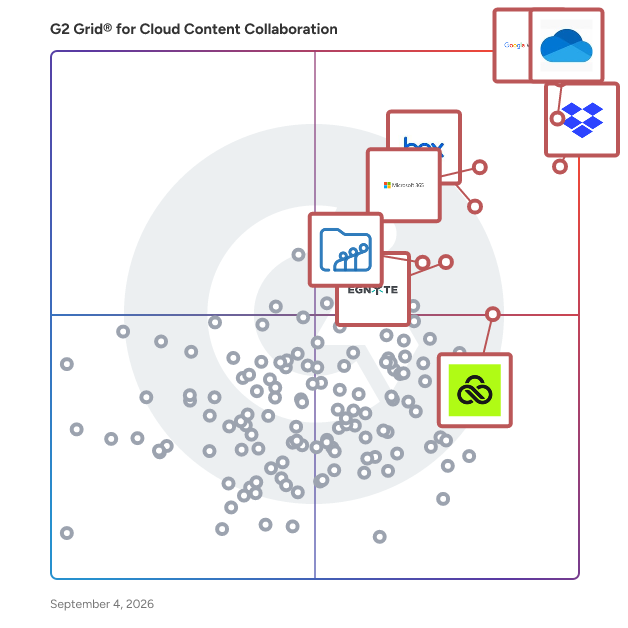
G2 Grid® for Cloud Content Collaboration Software

G2 Grid® for Cloud Content Collaboration Software plotting products by satisfaction and market presence

Highlighted products: Google Workspace, Microsoft OneDrive for Business, Dropbox, Microsoft 365, Box, Egnyte, LucidLink, and Zoho WorkDrive.

Underlying data: [Grid® JSON](https://www.g2.com/categories/cloud-content-collaboration/grids.json?focus%5B%5D=google-workspace&focus%5B%5D=microsoft-onedrive-for-business&focus%5B%5D=dropbox&focus%5B%5D=microsoft365&focus%5B%5D=box&focus%5B%5D=egnyte&focus%5B%5D=lucidlink&focus%5B%5D=zoho-workdrive)

Google Workspace

Google Workspace is a comprehensive productivity and collaboration solution designed to help users streamline their work processes by integrating essential tools such as email, chat, file storage, and video conferencing into a unified platform. This suite of applications is tailored for businesses, educational institutions, and individuals looking to enhance their communication and collaboration efforts, all while leveraging the power of Google’s artificial intelligence. Targeted at a diverse audience, Google Workspace caters to teams of all sizes, from small startups to large enterprises. It is particularly beneficial for remote teams and organizations that prioritize collaboration across different locations. The platform supports various use cases, including project management, team communication, document sharing, and virtual meetings, making it an ideal choice for professionals who need to work together efficiently, regardless of their physical location. One of the key features of Google Workspace is its seamless integration of applications such as Gmail, Google Meet, Google Drive, and Google Docs. This interconnectedness allows users to switch effortlessly between tasks, whether they are sending emails, participating in video calls, or collaborating on documents in real-time. The AI capabilities embedded within the platform enhance user experience by providing smart suggestions, automating repetitive tasks, and improving search functionalities, ultimately saving time and increasing productivity. Additionally, Google Workspace prioritizes security and data protection, offering robust features such as two-factor authentication, advanced phishing protection, and customizable access controls. These measures ensure that sensitive information remains secure while allowing teams to collaborate freely. The platform also supports third-party integrations, enabling users to connect their favorite applications and tools, further enhancing their workflow. In summary, Google Workspace stands out in the productivity software category by providing a holistic approach to collaboration. Its user-friendly interface, combined with powerful AI-driven features and strong security protocols, makes it a valuable tool for anyone looking to improve their work processes and foster effective teamwork. Whether for managing projects, communicating with colleagues, or sharing files, Google Workspace is designed to meet the diverse needs of its users, making it an essential resource in today’s digital workplace.

Average Rating: 4.6/5.0

Total Reviews: 45,746

How Do G2 Users Rate Google Workspace?

  • Has the product been a good partner in doing business?: 9.0/10 (Category avg: 8.8/10)
  • Performance and Reliability: 9.3/10 (Category avg: 8.7/10)
  • File following: 9.0/10 (Category avg: 8.8/10)
  • Device Syncing: 9.2/10 (Category avg: 8.7/10)

Who Is the Company Behind Google Workspace?

  • Seller: Google
  • Year Founded: 1998
  • HQ Location: Mountain View, CA
  • LinkedIn® Page: www.linkedin.com
    301,144 employees on LinkedIn®
  • Ownership: NASDAQ:GOOG
  • Phone: +1 (650) 253-0000

Who Uses This Product?

  • Who Uses This: Student, Teacher
  • Top Industries: Information Technology and Services, Education Management
  • Company Size: 47% Small, 35% Medium

What Do G2 Reviewers Say About Google Workspace?

AI-generated summary from verified user reviews

Pros
  • Users like its intuitive, familiar interface and simple navigation, making everyday tasks easy to handle.
  • Users like smooth integration across Workspace apps and outside tools, helping keep workflows connected and efficient.
  • Users value real-time co-editing, which lets teams work together on shared documents and review changes as they happen.
  • Users value having work tools together in one place, making it easier to access resources and manage everyday tasks.
  • Users find everyday work simpler and more efficient, helping them save time and get tasks done faster.
Cons
  • Users find offline functionality limited and sometimes unreliable, with editing and access constrained without an internet connection.
  • Users find subscription costs high, and expenses can rise as teams grow or plans are upgraded.
  • Users find the apps lack depth and power for advanced work compared with desktop and specialized tools.
  • Users find the interface cluttered and unintuitive, making navigation and settings difficult to manage.
  • Users find sharing and managing file permissions confusing, especially across large teams, shared drives, and external collaborators.

What Are Recent G2 Reviews of Google Workspace?

What Are G2 Users Discussing About Google Workspace?

Microsoft OneDrive for Business

Microsoft OneDrive for Business lets you securely store, access, share, and collaborate on all your files from anywhere. -Access your files anywhere across all your devices -Store and organize your work documents in a secure location in the cloud.​ -Share documents with others and work together in real time. -Get 1 TB of storage per user and upload files up to 250GB in size. ​ -Synchronize documents stored in the cloud to your computer or mobile device so that you can access your documents offline. Back up and protect your files so you can easily recover from accidental deletes or malicious attacks.

Average Rating: 4.3/5.0

Total Reviews: 9,997

How Do G2 Users Rate Microsoft OneDrive for Business?

  • Has the product been a good partner in doing business?: 8.7/10 (Category avg: 8.8/10)
  • Performance and Reliability: 8.8/10 (Category avg: 8.7/10)
  • File following: 8.7/10 (Category avg: 8.8/10)
  • Device Syncing: 8.7/10 (Category avg: 8.7/10)

Who Is the Company Behind Microsoft OneDrive for Business?

  • Seller: Microsoft
  • Year Founded: 1975
  • HQ Location: Redmond, Washington
  • LinkedIn® Page: www.linkedin.com
    232,750 employees on LinkedIn®
  • Ownership: MSFT
  • Phone: +1 (877) 276-2464

Who Uses This Product?

  • Who Uses This: Project Manager, Owner
  • Top Industries: Information Technology and Services, Education Management
  • Company Size: 38% Large, 33% Medium

What Do G2 Reviewers Say About Microsoft OneDrive for Business?

AI-generated summary from verified user reviews

Pros
  • Users appreciate the ease of use of OneDrive for Business, facilitating efficient file management and seamless collaboration.
  • Users appreciate the easy access of Microsoft OneDrive for Business, enabling seamless work from any device, anytime.
  • Users value the seamless integration of Microsoft OneDrive for Business with Microsoft 365 apps for effortless collaboration.
  • Users love the ease of access and collaboration with Microsoft OneDrive for Business, enhancing teamwork and efficiency.
  • Users value the seamless team collaboration that Microsoft OneDrive for Business provides for editing and sharing files.
Cons
  • Users occasionally face syncing issues that may lead to duplication or conflicts, though fixes are often quick.
  • Users often face permission issues, complicating file sharing and leading to frustrations with syncing and access management.
  • Users often experience slow uploads, leading to frustration and delays in their workflow with OneDrive for Business.
  • Users experience slow loading with OneDrive for Business, leading to frustrating delays in file synchronization and access.
  • Users face sync issues and delays with Microsoft OneDrive for Business, especially with large files and shared folders.

What Are Recent G2 Reviews of Microsoft OneDrive for Business?

What Are G2 Users Discussing About Microsoft OneDrive for Business?

Dropbox

Keep creative projects moving from first draft to final sign-off. Dropbox brings your team’s files, feedback, and approvals together in one secure cloud storage platform. Back up your work, send large files in seconds, and keep everyone in sync—so nothing slows you down. Find it fast, from anywhere Dropbox makes it easy to find and share files across desktop, mobile, and web—whether your team is in the office, remote, or on the go. Organize your work, align your team Every version stays current and simple to manage. Synced team folders keep content up to date, and previews for 175+ file types keep your team in the loop. Share anything, instantly Send large assets—up to 2 TB uploads and 1 TB video previews—with just a link. Security you can trust Protect your files with industry-leading encryption, granular permissions, compliance-ready controls, and built-in recovery features. Dropbox integrates with Google Workspace, Microsoft 365, Adobe Creative Cloud, Slack, Salesforce, Canva, Autodesk, Zoom, Claud, and more. Trusted by more than 700 million users and 575,000 teams worldwide.

Average Rating: 4.4/5.0

Total Reviews: 30,919

How Do G2 Users Rate Dropbox?

  • Has the product been a good partner in doing business?: 8.9/10 (Category avg: 8.8/10)
  • Performance and Reliability: 9.0/10 (Category avg: 8.7/10)
  • File following: 8.7/10 (Category avg: 8.8/10)
  • Device Syncing: 8.9/10 (Category avg: 8.7/10)

Who Is the Company Behind Dropbox?

  • Seller: Dropbox
  • Company Website:
  • Year Founded: 2007
  • HQ Location: San Francisco, California
  • LinkedIn® Page: www.linkedin.com
    4,183 employees on LinkedIn®
  • Ownership: NASDAQ: DBX

Who Uses This Product?

  • Who Uses This: Owner, Project Manager
  • Top Industries: Information Technology and Services, Marketing and Advertising
  • Company Size: 63% Small, 23% Medium

What Do G2 Reviewers Say About Dropbox?

AI-generated summary from verified user reviews

Pros
  • Users love the ease of use of Dropbox, allowing effortless file access, sharing, and collaboration.
  • Users appreciate the easy file sharing capabilities of Dropbox, enabling seamless collaboration and accessibility across devices.
  • Users love the easy access to files anywhere, enhancing collaboration and simplifying file sharing across devices.
  • Users find Dropbox's cloud storage abilities invaluable for easily sharing and securing large files and important documents.
  • Users appreciate the easy sharing capabilities of Dropbox, enabling seamless collaboration and efficient document management.
Cons
  • Users find Dropbox's storage plans expensive relative to available features, impacting overall value and usability.
  • Users often express concern over limited storage, especially on the free tier, leading to unintentional syncing issues.
  • Users find the storage limitations of Dropbox frustrating, as plans require purchasing more for additional space.
  • Users find the expensive cost of Dropbox challenging as storage needs increase, affecting overall satisfaction.
  • Users report syncing issues with Dropbox, experiencing slowness and frustrating glitches during file transfers.

What Are Recent G2 Reviews of Dropbox?

What Are G2 Users Discussing About Dropbox?

AI can help you find the answers. G2 helps you trust them.

Connect G2 to Claude or ChatGPT for answers grounded in G2's trusted reviews, comparisons, and pricing from real user insights.

How it works

Microsoft 365

Launch and grow your business with Microsoft 365. Do more, faster, with intelligent tools to create, send, share, and store professional, branded documents with your customers and team - securely in the cloud. Microsoft 365 is a cloud-based suite of software tools designed to help you do more—with best-in-class communication, design, and data management apps, intelligent cloud services, and advanced security. Access your data from anywhere, collaborate with team members in real time, meet with people virtually, and use thousands of predesigned templates to better communicate with customers and manage your business - all with built-in security technology that safeguards your data and devices from anywhere. Get the latest Office apps, such as Microsoft Teams, Word, Excel, PowerPoint, Outlook, OneDrive, and more.

Average Rating: 4.6/5.0

Total Reviews: 5,566

How Do G2 Users Rate Microsoft 365?

  • Has the product been a good partner in doing business?: 8.8/10 (Category avg: 8.8/10)
  • Performance and Reliability: 9.3/10 (Category avg: 8.7/10)
  • File following: 9.2/10 (Category avg: 8.8/10)
  • Device Syncing: 9.3/10 (Category avg: 8.7/10)

Who Is the Company Behind Microsoft 365?

  • Seller: Microsoft
  • Year Founded: 1975
  • HQ Location: Redmond, Washington
  • LinkedIn® Page: www.linkedin.com
    232,750 employees on LinkedIn®
  • Ownership: MSFT
  • Phone: +1 (877) 276-2464

Who Uses This Product?

  • Who Uses This: Owner, Manager
  • Top Industries: Information Technology and Services, Education Management
  • Company Size: 37% Medium, 35% Small

What Do G2 Reviewers Say About Microsoft 365?

AI-generated summary from verified user reviews

Pros
  • Users appreciate the user-friendly interface of Microsoft 365, enhancing productivity across multiple devices effortlessly.
  • Users value the seamless team collaboration in Microsoft 365, enhancing productivity and flexibility across devices.
  • Users enjoy the integrated package of Microsoft 365, making it easy to manage multiple applications on various devices.
  • Users appreciate the seamless integration of Microsoft 365 with various tools, enhancing productivity and user experience.
  • Users appreciate the seamless integration of Microsoft 365, enhancing control and simplifying management for admins.
Cons
  • Users find the subscription cost expensive over time, impacting the overall affordability of Microsoft 365.
  • Users often note missing features in Microsoft 365, highlighting confusion and inconsistency across settings and updates.
  • Users find the learning curve of Microsoft 365 challenging due to its differences from the familiar desktop version.
  • Users find the limited features of Microsoft 365 frustrating, especially with inconsistent rollouts and scattered settings.
  • Users report that Microsoft 365 is lacking features, particularly in Word and PowerBI, impacting usability and efficiency.

What Are Recent G2 Reviews of Microsoft 365?

What Are G2 Users Discussing About Microsoft 365?

Box

Box: The leader in Intelligent Content Management — Store, secure, and automate content on an AI-powered platform Box helps businesses of every size get more value from their documents and files with stringent security controls, intelligent workflow automation, and AI agents that extract critical insight. ✓ Box AI — Summarize documents, extract insights, ask questions in natural language, and deploy and create intelligent AI agents that automate repetitive work ✓ Intelligent workflow automation — Streamline reviews, contract approvals, and onboarding with AI-powered workflows ✓ Security and compliance — Protect sensitive information with granular access controls, intelligent threat detection, and AI governance that meet HIPAA, FINRA, FedRAMP, and GDPR standards ✓ Integrations and extensibility — Connect Box with 1,500+ popular apps or extend functionality with APIs and SDKs ✓ Industry solutions — Trusted by leading finance, technology, government, and life sciences organizations for secure collaboration and AI-enhanced productivity

Average Rating: 4.2/5.0

Total Reviews: 5,104

How Do G2 Users Rate Box?

  • Has the product been a good partner in doing business?: 8.7/10 (Category avg: 8.8/10)
  • Performance and Reliability: 8.8/10 (Category avg: 8.7/10)
  • File following: 8.7/10 (Category avg: 8.8/10)
  • Device Syncing: 8.6/10 (Category avg: 8.7/10)

Who Is the Company Behind Box?

  • Seller: Box
  • Company Website:
  • Year Founded: 1998
  • HQ Location: Redwood City, CA
  • LinkedIn® Page: www.linkedin.com
    4,413 employees on LinkedIn®
  • Ownership: NYSE:BOX

Who Uses This Product?

  • Who Uses This: Project Manager, Consultant
  • Top Industries: Higher Education, Information Technology and Services
  • Company Size: 41% Large, 32% Medium

What Do G2 Reviewers Say About Box?

AI-generated summary from verified user reviews

Pros
  • Users appreciate the ease of use of Box, facilitating secure sharing and collaboration across different platforms effortlessly.
  • Users value the strong enterprise-grade security of Box, ensuring safe sharing of sensitive information with total control.
  • Users value the seamless sharing capabilities of Box, making collaboration across platforms easy and secure.
  • Users value the easy sharing capabilities of Box, appreciating its seamless integration across multiple platforms.
  • Users appreciate the seamless integration of Box, which enables efficient collaboration across multiple platforms effortlessly.
Cons
  • Users face slow performance with Box, experiencing frustratingly long upload times and sync delays for large files.
  • Users find Box to be expensive, especially for small teams and freelancers needing advanced features and storage.
  • Users are frustrated by storage limitations and slow upload speeds, impacting their overall experience and productivity.
  • Users face performance issues with slow upload/download speeds and sync delays, impacting productivity and experience.
  • Users report significant connectivity issues with Box, including slow upload speeds and unreliable offline functionality.

What Are Recent G2 Reviews of Box?

What Are G2 Users Discussing About Box?

Egnyte

Egnyte combines the power of cloud content management, data security, and AI into one intelligent content platform. More than 22,000 customers trust Egnyte to improve employee productivity, automate business processes, and safeguard critical data, in addition to offering specialized content intelligence and automation solutions across industries, including architecture, engineering, and construction (AEC), life sciences, and financial services.

Average Rating: 4.4/5.0

Total Reviews: 1,152

How Do G2 Users Rate Egnyte?

  • Has the product been a good partner in doing business?: 8.8/10 (Category avg: 8.8/10)
  • Performance and Reliability: 9.2/10 (Category avg: 8.7/10)
  • File following: 8.9/10 (Category avg: 8.8/10)
  • Device Syncing: 8.9/10 (Category avg: 8.7/10)

Who Is the Company Behind Egnyte?

  • Seller: Egnyte
  • Company Website:
  • Year Founded: 2008
  • HQ Location: Mountain View, CA
  • LinkedIn® Page: www.linkedin.com
    1,313 employees on LinkedIn®
  • Phone: 650-968-4018

Who Uses This Product?

  • Who Uses This: Project Manager, Owner
  • Top Industries: Construction, Marketing and Advertising
  • Company Size: 45% Small, 38% Medium

What Do G2 Reviewers Say About Egnyte?

AI-generated summary from verified user reviews

Pros
  • Users value the user-friendly interface of Egnyte that enables easy access and efficient file management.
  • Users appreciate the easy access to project files on Egnyte, enhancing collaboration and file management in various environments.
  • Users value Egnyte for its easy sharing, enabling quick collaboration and efficient file organization across teams.
  • Users value Egnyte for its robust security, enabling secure file sharing and management with ease and confidence.
  • Users value the easy access to files without VPN, enhancing convenience and user-friendliness for all team members.
Cons
  • Users find Egnyte expensive, particularly when adding team members and navigating the complex pricing structure.
  • Users face file management challenges including migration issues, errors, and slow performance, impacting overall usability.
  • Users note the limited features of Egnyte, finding the plans restrictive for growing businesses needing more storage.
  • Users find user difficulty in navigating Egnyte, often leading to confusion and slower productivity overall.
  • Users feel Egnyte is lacking features such as an intuitive mobile app and clearer tool functionalities.

What Are Recent G2 Reviews of Egnyte?

What Are G2 Users Discussing About Egnyte?

LucidLink

LucidLink is a cloud-based file collaboration platform that empowers teams across industries to work together effortlessly, no matter where they’re located. By combining the familiarity of a local drive with the flexibility and power of cloud storage, LucidLink gives users the ability to access, edit, and share files in real time within a single, secure shared filespace. Built with creative professionals in mind, LucidLink is a game-changer for industries like media production, design, and film. It’s equally valuable for teams in marketing, architecture, engineering, healthcare, and enterprises working with large datasets. LucidLink eliminates the delays of traditional file-sharing methods, enabling teams to collaborate simultaneously and stay productive around the clock. What makes LucidLink stand out is its ability to provide immediate access to shared files—no downloading, syncing, or waiting. This means teams can start working on projects right away, seamlessly handling even the largest files and keeping workflows moving without interruption. It’s designed to adapt to the way teams work, not the other way around. Security is fundamental to LucidLink. With zero-knowledge encryption, centralized access management, and single sign-on (SSO) integration, your files are accessible only to authorized users. Whether you’re working on sensitive creative assets or proprietary business content, you can trust LucidLink to keep your data secure. LucidLink works seamlessly with tools like Adobe Premiere Pro, Media Composer, DaVinci Resolve, and CAD software, making it easy to integrate into existing workflows. With an intuitive setup and minimal learning curve, teams can start collaborating instantly without missing a beat. Whether it’s a small creative studio or a global enterprise, LucidLink helps organizations unlock their potential, improve efficiency, and stay ahead in today’s fast-paced digital landscape.

Average Rating: 4.5/5.0

Total Reviews: 784

How Do G2 Users Rate LucidLink?

  • Has the product been a good partner in doing business?: 9.0/10 (Category avg: 8.8/10)
  • Performance and Reliability: 8.6/10 (Category avg: 8.7/10)
  • File following: 8.0/10 (Category avg: 8.8/10)
  • Device Syncing: 8.8/10 (Category avg: 8.7/10)

Who Is the Company Behind LucidLink?

  • Seller: LucidLink Corp.
  • Company Website:
  • Year Founded: 2016
  • HQ Location: San Francisco, California, United States
  • LinkedIn® Page: www.linkedin.com
    262 employees on LinkedIn®

Who Uses This Product?

  • Who Uses This: Video Editor, Creative Director
  • Top Industries: Media Production, Marketing and Advertising
  • Company Size: 62% Small, 24% Medium

What Do G2 Reviewers Say About LucidLink?

AI-generated summary from verified user reviews

Pros
  • Users appreciate the ease of use of LucidLink, enjoying fast access and seamless integration with their applications.
  • Users value the fast and easy access to files from anywhere, enhancing their remote work experience significantly.
  • Users value the seamless team collaboration in LucidLink, greatly enhancing workflow efficiency and file management.
  • Users appreciate LucidLink's seamless collaboration features, enabling efficient teamwork and real-time updates on shared files.
  • Users love the speed and efficiency of LucidLink, enabling seamless access to files regardless of location.
Cons
  • Users experience slow performance during setup and with long camera files, leading to a frustrating experience.
  • Users note that LucidLink is very expensive, which might be challenging for small teams despite its quality.
  • Users experience slow internet speed with LucidLink, particularly during unstable connections, impacting overall workflow.
  • Users report that internet dependence can affect performance, making workflows challenging during unstable connections.
  • Users find the storage limitations of LucidLink challenging, particularly with cache visibility and version control issues.

What Are Recent G2 Reviews of LucidLink?

What Are G2 Users Discussing About LucidLink?

Zoho WorkDrive

Zoho Docs is now Zoho WorkDrive! Launched in 2019 as the successor to Zoho Docs, Zoho WorkDrive is a robust content management platform trusted by over 1 million businesses worldwide. Built for modern teams, small businesses, and enterprises, it provides secure file storage, seamless collaboration, and powerful automation features. With detailed access stats, mobile apps for Android and iOS, and a desktop sync application, WorkDrive empowers teams to work efficiently from anywhere, anytime.

Average Rating: 4.4/5.0

Total Reviews: 701

How Do G2 Users Rate Zoho WorkDrive?

  • Has the product been a good partner in doing business?: 8.8/10 (Category avg: 8.8/10)
  • Performance and Reliability: 8.6/10 (Category avg: 8.7/10)
  • File following: 9.0/10 (Category avg: 8.8/10)
  • Device Syncing: 8.9/10 (Category avg: 8.7/10)

Who Is the Company Behind Zoho WorkDrive?

  • Seller: Zoho
  • Year Founded: 1996
  • HQ Location: Austin, TX
  • LinkedIn® Page: www.linkedin.com
    30,913 employees on LinkedIn®
  • Phone: +1 (888) 900-9646

Who Uses This Product?

  • Who Uses This: Software Engineer, Owner
  • Top Industries: Information Technology and Services, Computer Software
  • Company Size: 51% Small, 35% Medium

What Do G2 Reviewers Say About Zoho WorkDrive?

AI-generated summary from verified user reviews

Pros
  • Users appreciate the ease of use of Zoho WorkDrive, making collaboration and file management straightforward and efficient.
  • Users value the easy team collaboration in Zoho WorkDrive, streamlining file sharing and keeping everyone organized.
  • Users value the easy collaboration features of Zoho WorkDrive, enhancing teamwork and keeping projects organized and efficient.
  • Users value the real-time collaboration features of Zoho WorkDrive, making teamwork efficient and organized.
  • Users appreciate the seamless integration of Zoho WorkDrive, enhancing collaboration and file management across their business apps.
Cons
  • Users experience slow loading and syncing issues, especially with larger files, impacting productivity and user satisfaction.
  • Users experience slow performance with Zoho WorkDrive, particularly when handling large files and navigating the interface.
  • Users often face syncing issues with Zoho WorkDrive, particularly concerning slow performance and limited offline access.
  • Users note several missing features in Zoho WorkDrive, impacting functionality and ease of use for shared documents.
  • Users frequently experience performance issues with file syncing and app responsiveness, making the process frustrating at times.

What Are Recent G2 Reviews of Zoho WorkDrive?

What Are G2 Users Discussing About Zoho WorkDrive?

IBM Aspera on Cloud

IBM Aspera on Cloud is a hosted SaaS service of IBM Aspera. Rather than optimize or accelerate data transfer, IBM Aspera’s high-speed data transfer fully utilizes available network bandwidth to maximize speed and quickly scale up with no theoretical limit, without impacting other network traffic. The result is unmatched transfer speeds, end-to-end security, reliability, and exceptional bandwidth control. IBM Aspera on Cloud also offers intuitive file sharing, big data transfer, workflow automation, central administration, and real-time visibility.

Average Rating: 4.4/5.0

Total Reviews: 141

How Do G2 Users Rate IBM Aspera on Cloud?

  • Has the product been a good partner in doing business?: 8.8/10 (Category avg: 8.8/10)
  • Performance and Reliability: 8.8/10 (Category avg: 8.7/10)
  • File following: 8.5/10 (Category avg: 8.8/10)
  • Device Syncing: 8.5/10 (Category avg: 8.7/10)

Who Is the Company Behind IBM Aspera on Cloud?

  • Seller: IBM
  • Company Website:
  • Year Founded: 1911
  • HQ Location: Armonk, New York, United States
  • LinkedIn® Page: www.linkedin.com
    344,328 employees on LinkedIn®
  • Ownership: SWX:IBM

Who Uses This Product?

  • Who Uses This: Software Engineer
  • Top Industries: Information Technology and Services, Computer Software
  • Company Size: 44% Small, 28% Medium

What Do G2 Reviewers Say About IBM Aspera on Cloud?

AI-generated summary from verified user reviews

Pros
  • Users commend the robust security of IBM Aspera on Cloud, ensuring safe and efficient file transfers across teams.
  • Users commend the speed efficiency of IBM Aspera on Cloud, significantly enhancing file transfers for global teams.
  • Users value the high-speed transfer of large files with IBM Aspera on Cloud, ensuring reliable and efficient collaboration.
  • Users commend the reliability of IBM Aspera on Cloud, ensuring consistent, efficient file transfers without interruptions.
  • Users praise the user-friendly interface of IBM Aspera on Cloud, appreciating its simplicity for newcomers and efficiency.
Cons
  • Users find the pricing model expensive, particularly impacting small teams and leading to unexpected costs during usage spikes.
  • Users report a steep learning curve for IBM Aspera on Cloud, especially for teams without technical expertise.
  • Users express concerns about unexpected pricing spikes with IBM Aspera on Cloud, especially impacting small teams negatively.
  • Users critique the lack of intuitive features in IBM Aspera on Cloud, creating challenges for new users and setups.
  • Users face challenges due to internet dependence, with fluctuating networks impacting reliability and usability at various locations.

What Are Recent G2 Reviews of IBM Aspera on Cloud?

What Are G2 Users Discussing About IBM Aspera on Cloud?

Air

Air is an agent for creative tasks that supports digital asset management (DAM), creative operations, and creative production, helping creative and marketing teams understand, organize, and scale content, images and video alike, across every channel. It's built for two connected users inside the same organization: creative teams who produce and approve assets, and marketing teams who adapt and distribute that work everywhere it needs to go. Air combines a creative asset library, version and approval tracking, and an AI layer that understands what's in each file. It reads image content, video transcripts, and metadata to auto-tag and enrich assets as they're uploaded, so search works by what's actually in a file, not just its name or folder. That same layer scales approved work, resizing, reformatting, and generating variants for new use cases without recreating files from scratch. Every asset, version, and approval decision lives in one system, so new work draws on what's already approved, current, and intended. Common use cases include campaign asset management and distribution, product photography and imagery libraries, video review and finishing (transcription, captioning, time-range comments, and clipping), creative review and approval workflows, and adapting existing assets for channels like paid social, email, and retail. Key capabilities: Content understanding and search — assets are automatically tagged and enriched using AI, including video transcripts and visual content, so files can be located by what's in them rather than where they're stored. Version and approval tracking — every revision, feedback round, and sign-off is recorded, giving teams one record of what's current and approved. Asset adaptation and scaling — approved assets can be resized, reformatted, or adapted into new variants for different channels and formats. Video review and production — time-range comments, AI-generated transcripts and captions, and clip extraction support reviewing and finishing video alongside images. Cross-team context and integrations — creative and marketing teams work from the same asset library, approval history, and decision record, with native integrations like Figma, Canva, Adobe Premiere Pro, Shopify, Sanity, and more keeping files in sync with existing workflows. Founded in 2017, Air is used by 3,000 teams including Warby Parker, Ramp, and Sweetgreen, across industries such as ecommerce, consumer goods, sports, media, and agencies. Organizations typically adopt Air to consolidate cloud storage, video review and approval tools, and AI creative production into one system for managing creative assets from creation through distribution.

Average Rating: 4.6/5.0

Total Reviews: 954

How Do G2 Users Rate Air?

  • Has the product been a good partner in doing business?: 9.2/10 (Category avg: 8.8/10)
  • Performance and Reliability: 9.2/10 (Category avg: 8.7/10)
  • File following: 9.1/10 (Category avg: 8.8/10)
  • Device Syncing: 8.6/10 (Category avg: 8.7/10)

Who Is the Company Behind Air?

  • Seller: Air Labs, Inc.
  • Company Website:
  • Year Founded: 2017
  • HQ Location: Brooklyn, NY
  • LinkedIn® Page: www.linkedin.com
    289 employees on LinkedIn®

Who Uses This Product?

  • Who Uses This: Graphic Designer, Creative Director
  • Top Industries: Marketing and Advertising, Consumer Goods
  • Company Size: 64% Small, 30% Medium

What Do G2 Reviewers Say About Air?

AI-generated summary from verified user reviews

Pros
  • Users appreciate the ease of use of Air, enhancing their experience and streamlining social media management.
  • Users appreciate the easy organization features of Air, simplifying collaboration and asset management significantly.
  • Users appreciate the seamless collaboration with clients and partners, enhancing productivity and workflow across teams.
  • Users appreciate the intuitive design of Air, making organization and navigation effortless for efficient media management.
  • Users love the intuitive organization features of Air, greatly enhancing their asset management and collaboration efficiency.
Cons
  • Users find tagging issues with AI slow and not as intuitive, making asset management challenging and cumbersome.
  • Users feel the product lacks essential features, such as file format support and intuitive automation workflows.
  • Users find the high price of Air difficult, wishing it were more accessible for small businesses and nonprofits.
  • Users struggle with search difficulties, finding it hard to locate specific assets and navigate search results effectively.
  • Users struggle with search issues, needing exact titles and facing overwhelming results that hinder effective content discovery.

What Are Recent G2 Reviews of Air?

Proton Drive For Business

Proton Drive for Business is a secure cloud storage and collaboration solution specifically designed to assist small and medium-sized businesses (SMBs) in safely storing, sharing, and managing their files and documents. This platform prioritizes privacy and security, employing robust encryption methods to protect sensitive business data. By ensuring that only authorized users can access files, Proton Drive for Business also helps organizations comply with various data protection regulations, making it an essential tool for businesses that handle confidential information. The target audience for Proton Drive for Business includes SMBs that require stringent safeguards for client data, intellectual property, and operational documents while facilitating seamless team collaboration. Typical use cases encompass securely storing business files, sharing documents with internal teams or external partners, and enabling real-time editing of documents and spreadsheets. The platform’s central administrative interface allows for effective management of access controls and compliance measures, ensuring that businesses can operate securely and efficiently. Key features of Proton Drive for Business include end-to-end encrypted cloud storage, which ensures that files are encrypted on the user’s device before being uploaded, with only authorized users able to access them. This level of security means that even Proton cannot decrypt customer files, providing an added layer of privacy. The solution also supports regulatory compliance with international standards such as ISO 27001, GDPR, HIPAA, and CCPA, making it particularly valuable for SMBs operating in regulated industries. Additionally, data stored in Proton Drive benefits from Swiss legal protections, which offer stronger safeguards against surveillance and unauthorized access compared to many other jurisdictions. Collaboration and sharing features are integral to Proton Drive for Business, allowing users to share files securely via encrypted links or email invites. Users can set passwords, expiration dates, and revoke access at any time, ensuring flexibility in file sharing. The platform also supports real-time collaboration, enabling teams to work together on documents and spreadsheets with synchronized updates. Features such as file versioning and recovery further enhance business continuity by allowing users to track changes and restore previous versions of files, mitigating risks associated with accidental alterations or data loss. For administrators, Proton Drive for Business offers a centralized panel for managing users, permissions, and storage limits, along with monitoring sharing activity. The solution supports multi-user environments and allows for the implementation of security policies, including two-factor authentication (2FA) and hardware security keys. This comprehensive approach to security and management positions Proton Drive for Business as a privacy-centric alternative to mainstream cloud services, ensuring that business data remains accessible only to authorized personnel while integrating essential compliance features for SMBs in regulated environments.

Average Rating: 4.5/5.0

Total Reviews: 168

G2 Deal: Try Proton Drive For Business for Free

Start a 14-day free business trial. Collaborate efficiently while protecting your client and business data from breaches, ransomware, and surveillance.

Price: ~~$7.99 /user per month~~

View this exclusive G2 deal

How Do G2 Users Rate Proton Drive For Business?

  • Has the product been a good partner in doing business?: 8.8/10 (Category avg: 8.8/10)
  • Performance and Reliability: 7.7/10 (Category avg: 8.7/10)
  • File following: 10.0/10 (Category avg: 8.8/10)
  • Device Syncing: 8.0/10 (Category avg: 8.7/10)

Who Is the Company Behind Proton Drive For Business?

  • Seller: Proton AG
  • Company Website:
  • Year Founded: 2014
  • HQ Location: Plan-les-Ouates, Geneva, Switzerland
  • LinkedIn® Page: www.linkedin.com
    973 employees on LinkedIn®

Who Uses This Product?

  • Who Uses This: Owner
  • Top Industries: Information Technology and Services, Mental Health Care
  • Company Size: 15% Small, 2% Medium

What Do G2 Reviewers Say About Proton Drive For Business?

AI-generated summary from verified user reviews

Pros
  • Users value the trustworthiness and reliability of Proton Drive For Business for secure data storage.
  • Users trust Proton Drive For Business for its reliable and reputable cloud storage, ensuring security for their data.
  • Users value the reputable and trustworthy storage offered by Proton Drive for Business, ensuring data security.
Cons
  • Users find the lack of a native Linux client frustrating, hoping for syncing capabilities to be added soon.
  • Users face syncing issues due to the absence of a native Linux client, expressing hope for future availability.

What Are Recent G2 Reviews of Proton Drive For Business?

DocSend

Dropbox DocSend helps business professionals like you to securely share and control the content that drives your business forward. Dropbox DocSend's powerful link-based system makes it easy to set security preferences for each stakeholder, receive notifications each time someone views your file, analyze content performance on a page-by-page basis, and create modern virtual deal rooms. With DocSend, business can offload administrative burdens and securely share the most impactful proprietary information faster. DocSend’s Virtual Data Rooms manage sensitive documents securely and gets team real-time deal insights, simplying the entire deal process from initial pitch to final signature. Join over 34,000 companies that rely on Dropbox DocSend to share and manage sensitive information.

Average Rating: 4.6/5.0

Total Reviews: 562

How Do G2 Users Rate DocSend?

  • Has the product been a good partner in doing business?: 8.7/10 (Category avg: 8.8/10)
  • Performance and Reliability: 9.3/10 (Category avg: 8.7/10)
  • File following: 9.1/10 (Category avg: 8.8/10)
  • Device Syncing: 9.1/10 (Category avg: 8.7/10)

Who Is the Company Behind DocSend?

  • Seller: Dropbox
  • Company Website:
  • Year Founded: 2007
  • HQ Location: San Francisco, California
  • LinkedIn® Page: www.linkedin.com
    4,183 employees on LinkedIn®
  • Ownership: NASDAQ: DBX

Who Uses This Product?

  • Who Uses This: CEO, Founder
  • Top Industries: Computer Software, Information Technology and Services
  • Company Size: 75% Small, 21% Medium

What Do G2 Reviewers Say About DocSend?

AI-generated summary from verified user reviews

Pros
  • Users love the ease of use in DocSend, appreciating its quick setup and seamless document management features.
  • Users value the insightful content utilization tracking of DocSend, enabling strategic decisions and efficient document management.
  • Users value DocSend for its detailed analytics and easy document sharing, enhancing insights for better decision-making.
  • Users appreciate the detailed tracking features of DocSend, enabling insightful analysis of document engagement for optimization.
  • Users appreciate the strong security and access control features of DocSend, enabling confident sharing of sensitive documents.
Cons
  • Users find DocSend's pricing not very accessible, particularly for smaller teams and with frequent price changes.
  • Users find the app functionality lacking due to slow loading, integration issues, and limited mobile optimization.
  • Users find DocSend has lacking features in lower-tier plans, limiting accessibility and performance for smaller teams.
  • Users find DocSend has limited features, particularly for smaller teams due to higher-tier plan restrictions.
  • Users find limitations in advanced features and face slow loading, integration issues, and mobile optimization concerns.

What Are Recent G2 Reviews of DocSend?

What Are G2 Users Discussing About DocSend?

M-Files

M-Files delivers Context-First Document Management with an AI-native, metadata-driven architecture that eliminates information chaos and improves productivity across the document lifecycle. By linking documents to the people, processes, clients, and projects that give them meaning, M-Files creates a unified, connected environment that accelerates decision-making, strengthens governance, and streamlines industry-specific workflows through advanced workflow automation and AI. M-Files is also the only document management system that is native to Microsoft 365. This unified solution extends Microsoft collaboration, Copilot, and Purview capabilities to curated M-Files content, enabling stronger security, more consistent compliance, and more accurate AI outcomes grounded in trusted, contextualized information. Organizations gain a seamless, future-ready environment that maximizes ROI on their Microsoft investments while supporting smarter and more efficient work across the business. Schedule a Demo: https://bit.ly/3O1SCm0

Average Rating: 4.4/5.0

Total Reviews: 229

How Do G2 Users Rate M-Files?

  • Has the product been a good partner in doing business?: 8.4/10 (Category avg: 8.8/10)
  • Performance and Reliability: 9.4/10 (Category avg: 8.7/10)
  • File following: 9.3/10 (Category avg: 8.8/10)
  • Device Syncing: 9.5/10 (Category avg: 8.7/10)

Who Is the Company Behind M-Files?

Who Uses This Product?

  • Who Uses This: Project Manager, Director
  • Top Industries: Information Technology and Services, Computer Software
  • Company Size: 48% Medium, 41% Small

What Do G2 Reviewers Say About M-Files?

AI-generated summary from verified user reviews

Pros
  • Users find M-Files to have a user-friendly interface, making it simple to learn and reducing manual file management.
  • Users love the user-friendly interface of M-Files, making document management simple and efficient for all needs.
  • Users enjoy the easy access from anywhere, simplifying document sharing and retrieval on the go.
  • Users highlight the easy access and intuitive organization in M-Files, enhancing their document management experience significantly.
  • Users value the organization through metadata, making document retrieval and management efficient and hassle-free.
Cons
  • Users find the learning curve steep, requiring thorough documentation and guidance for effective use of M-Files.
  • Users find the training required for M-Files challenging, particularly for new users and technical configurations.
  • Users experience slow performance with M-Files, particularly during searches and while navigating the interface.
  • Users find the slow loading times can hinder their experience, especially with large files and updates.
  • Users find M-Files' outdated interface and slow syncing challenging, especially for new users adapting to the system.

What Are Recent G2 Reviews of M-Files?

What Are G2 Users Discussing About M-Files?

Laserfiche

Get work done faster with Laserfiche, the leading SaaS provider of AI-powered document management and process automation. Through powerful workflows, electronic forms, document management and analytics, Laserfiche accelerates processes across the enterprise. ✓ Organize Your Content with AI-Powered Document Management Optimize your operations and increase team productivity with AI-powered document management. Centralize your content, improve collaboration and maintain audit trails to support compliance needs. ✓ Boost Your Productivity with Intelligent Automation Increase efficiency by automating tasks with low-code process automation and prebuilt solution templates. Work smarter and shift your team’s focus to higher priority strategic goals. ✓ Unify Your Systems with Powerful Integrations Laserfiche is the backbone connecting hundreds of mission-critical applications. Users can access relevant documents from a single location, eliminating the need to search across multiple platforms. ✓ Elevate Your Work with Laserfiche AI Laserfiche AI enables organizations to simplify their work, take control of processes and supercharge productivity — all without losing sight of critical data privacy and security standards.

Average Rating: 4.7/5.0

Total Reviews: 1,209

How Do G2 Users Rate Laserfiche?

  • Has the product been a good partner in doing business?: 9.2/10 (Category avg: 8.8/10)
  • Performance and Reliability: 9.2/10 (Category avg: 8.7/10)
  • File following: 9.0/10 (Category avg: 8.8/10)
  • Device Syncing: 8.4/10 (Category avg: 8.7/10)

Who Is the Company Behind Laserfiche?

  • Seller: Laserfiche
  • Company Website:
  • Year Founded: 1976
  • HQ Location: Long Beach, California
  • LinkedIn® Page: www.linkedin.com
    400 employees on LinkedIn®

Who Uses This Product?

  • Who Uses This: Deputy City Clerk, Business Systems Analyst
  • Top Industries: Government Administration, Education Management
  • Company Size: 60% Medium, 25% Large

What Do G2 Reviewers Say About Laserfiche?

AI-generated summary from verified user reviews

Pros
  • Users find Laserfiche's ease of use empowering, enabling self-service implementation and efficient process management.
  • Users value the easy process automation with Laserfiche, enhancing efficiency and reducing errors across departments.
  • Users appreciate the automation of form processes with Laserfiche, enhancing efficiency and document management.
  • Users value the robust and flexible workflow automation in Laserfiche, enhancing efficiency and integration with other systems.
  • Users commend the easy training and onboarding capabilities of Laserfiche, enhancing team efficiency and document management.
Cons
  • Users experience a challenging learning curve with Laserfiche, making initial navigation and feature usage difficult.
  • Users experience a small learning difficulty with Laserfiche, particularly when adapting to metadata fields and workflows.
  • Users find the missing features in Laserfiche hinder their experience and highlight the need for better resources.
  • Users express concern over update issues, highlighting difficulty in keeping up with the rapid growth of Laserfiche.
  • Users report performance issues with Laserfiche, including slow form builds and delayed feature implementations.

What Are Recent G2 Reviews of Laserfiche?

What Are G2 Users Discussing About Laserfiche?

TitanFile

TitanFile is an award-winning secure file sharing and client collaboration platform. TitanFile is as easy to use as email, resulting in increased efficiency, cost savings and higher customer satisfaction while improving security and compliance. The TitanFile platform is comprehensive and supports diverse use cases and workflows such as secure file sharing, group collaboration, customer-initiated workflows, and shared mailboxes.

Average Rating: 4.6/5.0

Total Reviews: 138

How Do G2 Users Rate TitanFile?

  • Has the product been a good partner in doing business?: 9.6/10 (Category avg: 8.8/10)
  • Performance and Reliability: 9.3/10 (Category avg: 8.7/10)
  • File following: 9.5/10 (Category avg: 8.8/10)
  • Device Syncing: 9.0/10 (Category avg: 8.7/10)

Who Is the Company Behind TitanFile?

Who Uses This Product?

  • Top Industries: Accounting, Law Practice
  • Company Size: 80% Small, 14% Medium

What Do G2 Reviewers Say About TitanFile?

AI-generated summary from verified user reviews

Pros
  • Users value the ease of use of TitanFile, enhancing communication and organization effortlessly for both clients and themselves.
  • Users value the security and compliance of TitanFile, enhancing confidence in client communication and data management.
  • Users benefit from easy large file sharing and enjoy the platform's strong security and user-friendly interface.
  • Users appreciate the easy and secure file sharing capabilities of TitanFile, ensuring safety during sensitive transactions.
  • Users emphasize the easy setup of TitanFile, allowing quick connections and efficient file sharing from the start.
Cons
  • Users express frustration with complex usability, citing login issues and limitations in navigating the client dashboard.
  • Users find TitanFile's complexity challenging, with navigation issues and cumbersome security processes hindering the overall experience.
  • Users experience integration issues with TitanFile, finding third-party connections cumbersome and less streamlined than expected.
  • Users find the difficult learning curve of TitanFile frustrating, especially for newcomers trying to navigate its features.
  • Users find TitanFile expensive, with higher costs impacting small teams and budget-conscious companies.

What Are Recent G2 Reviews of TitanFile?

What Are G2 Users Discussing About TitanFile?

Neeraja Prakash
NP
Researched and written by Neeraja Prakash
Updated July 20, 2025

Learn More About Cloud Content Collaboration Software

What is the best cloud content collaboration software for small businesses in 2025?

Teams in small businesses thrive on speed and simplicity. The tools below, praised on G2, make it easy to share files, co-edit documents, and stay in sync, without the overhead:

  • Dropbox: Known for its clean interface and ease of use, Dropbox offers file syncing, team folders, and smart content suggestions, ideal for small teams managing shared documents.
  • Google Workspace: Provides seamless collaboration across Docs, Sheets, Slides, and Drive, with real-time co-authoring and powerful sharing controls, all accessible via a single Google login.
  • Microsoft OneDrive: Integrated with the Microsoft ecosystem, OneDrive enables secure file storage, sharing, and collaboration with automatic syncing across devices.
  • Microsoft 365: Goes beyond storage by combining Word, Excel, PowerPoint, Teams, and OneDrive into one suite, helping small teams co-author files, chat, and manage tasks from a single platform.

What are the top cloud content collaboration solutions for improving team productivity?

To boost team productivity, the best cloud content collaboration platforms offer seamless file sharing, version control, and secure workflows, enabling teams to collaborate in real time while keeping data organized and accessible. According to G2 reviews, these top solutions stand out:

  • Box: Offers enterprise-grade security with collaborative features like shared folders, workflow automation, and integrations with tools like Slack and Microsoft 365, ideal for teams that handle sensitive documents.
  • Egnyte: Blends secure cloud storage with collaborative content governance, giving teams fast access to files while enforcing compliance and user permissions across remote and hybrid environments.
  • IBM Aspera on Cloud: Specializes in fast, secure transfer of large files between teams and locations, making it a strong fit for media, healthcare, and research teams managing heavy content workloads.