

Introducing G2.ai, the future of software buying.Try now

Float.com Reviews & Product Details

Pricing

Pricing provided by Float.com.

Starter

Starting at $7.00
Per Month

Float.com Media

Float.com Demo - Schedule resources
Easily see who’s working on what and when, with a live schedule to plan and allocate work.
Float.com Demo - Plan capacity
Balance workloads and prevent burnout with a live view of availability, time off, and scheduled work.
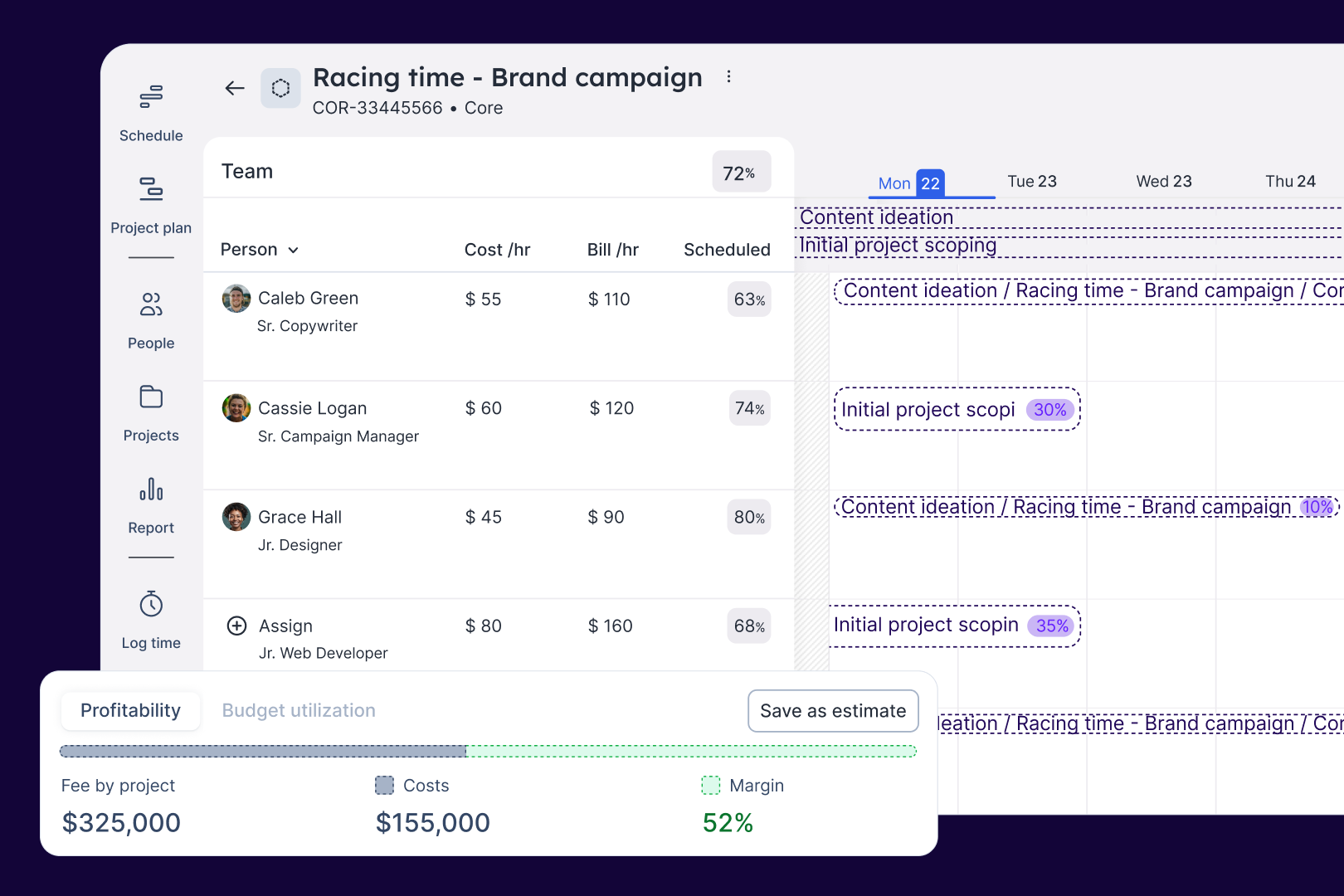
Float.com Demo - Estimate work
Quickly price new projects with confidence. Build budgets, align resourcing, and track scope changes—monitoring estimates against actuals to deliver profitable projects.
Float.com Demo - Scope projects
Align what you need with what you have to create project schedules that keep work on track with the right people, budgets, and timelines.
Float.com Demo - Track time
Simplify timesheets with pre-filled hours so your actuals data is more accurate and always on time!
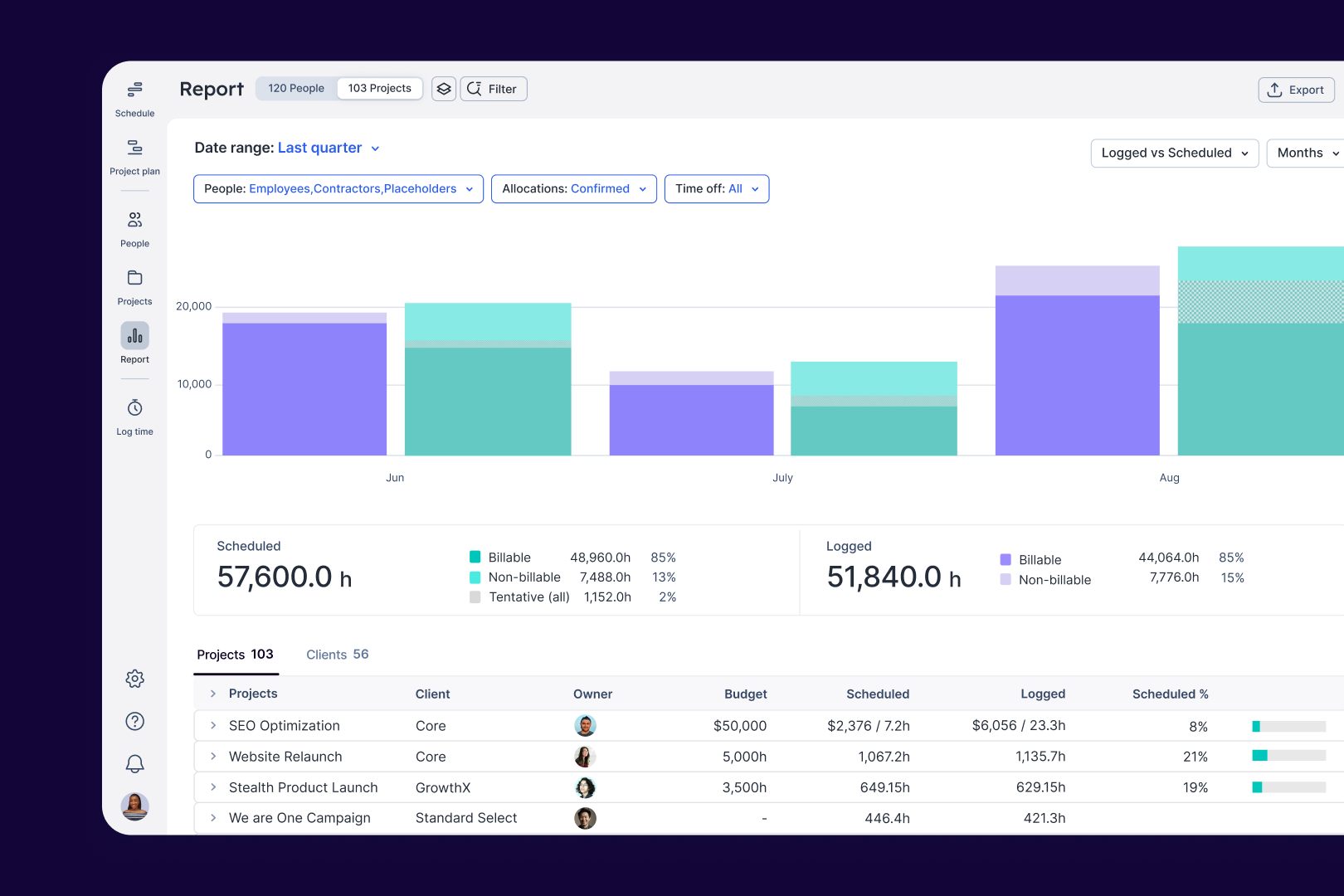
Float.com Demo - Report
Make informed decisions with live insights into team utilization and budget spend to understand how resourcing affects project margins and profitability.
The best teams in the world don’t just wing it. They use Float to get the essential data and context they need when resourcing client work, so they can build winning teams and deliver profitable projects.
Play Float.com Video
The best teams in the world don’t just wing it. They use Float to get the essential data and context they need when resourcing client work, so they can build winning teams and deliver profitable projects.
New: finance & estimations in Float. Stop guessing and start knowing. With Float's finance & estimation features, you can price accurately, protect margins, and deliver profitable projects every time.
Play Float.com Video
New: finance & estimations in Float. Stop guessing and start knowing. With Float's finance & estimation features, you can price accurately, protect margins, and deliver profitable projects every time.
Product Avatar Image

Have you used Float.com before?

Answer a few questions to help the Float.com community

Float.com Reviews (1,997)

View 1 Video Reviews
Reviews

Float.com Reviews (1,997)

View 1 Video Reviews
4.3
1,997 reviews

Review Summary

Generated using AI from real user reviews
Users consistently praise Float.com for its ease of use and intuitive interface, which simplifies scheduling and resource management. The platform's ability to provide a clear overview of team availability and project timelines enhances collaboration and efficiency. However, some users note that the reporting features could be more robust, limiting deeper insights into project performance.

Pros & Cons

Generated from real user reviews
View All Pros and Cons
Search reviews
Filter Reviews
Clear Results
G2 reviews are authentic and verified.
Verified User in Computer Software
AC
Mid-Market (51-1000 emp.)
"Easy to start with"
What do you like best about Float.com?

An easy start for scheduling multiple people of multiple teams. Float gives a nice overview and had good reporting functionality

Review collected by and hosted on G2.com.

What do you dislike about Float.com?

Scheduling meetings for multiple people requires the meeting to be scheduled for each individual. Then when for example the meeting date changes all separate items need to be rescheduled. Review collected by and hosted on G2.com.

Eaint Su W.
EW
Designer (Intern)
Small-Business (50 or fewer emp.)
"Smooth and Easy"
What do you like best about Float.com?

The user interface is easy and clean to look! Best part, colour-coded! Review collected by and hosted on G2.com.

What do you dislike about Float.com?

Need to use through web and sometimes, confusing when many tabs are in use. Review collected by and hosted on G2.com.

Verified User in Public Safety
UP
Small-Business (50 or fewer emp.)
"Not bad! "
What do you like best about Float.com?

I like that it's very easy to use and visually not overwhelming. Review collected by and hosted on G2.com.

What do you dislike about Float.com?

Nothing I DISLIKE per say, but I think for what our team needs, in terms of accessing the calendar on-the-go it could be a bit more user-friendly. Our team has a lot of people who are not very tech-friendly. Review collected by and hosted on G2.com.

Verified User in Accounting
UA
Mid-Market (51-1000 emp.)
"Easy to use"
What do you like best about Float.com?

This piece of software is fantastic.

Its easy to comprehend, easy to navigate, as easy to change when your in a hurry. Review collected by and hosted on G2.com.

What do you dislike about Float.com?

There isnt really anything negative about this software. Review collected by and hosted on G2.com.

Verified User in Marketing and Advertising
UM
Enterprise (> 1000 emp.)
"float"
What do you like best about Float.com?

easy to access on mobile, fairly easy to learn to use. pretty colors. Review collected by and hosted on G2.com.

What do you dislike about Float.com?

it doesn't work as well for people on multiple projects - think 4 and above - and changing hours from week to week Review collected by and hosted on G2.com.

Verified User in Marketing and Advertising
AM
Enterprise (> 1000 emp.)
"Not built for lots of projects happening at once "
What do you like best about Float.com?

1. The intention of the tool is very helpful and it is probably amazing for smaller groups with limited projects.

2. Color coding of projects/teams/clients is helpful.

Review collected by and hosted on G2.com.

What do you dislike about Float.com?

1. The interface is not obvious; features are hard to find.

2. You have to navigate between different tabs to enter information for a single project. You should be able to add projects & people from a single view. And deleting something from one tab does not carry over to another (e.g., deleting someone from a project in the Schedule does not delete them from the project team).

3. You cannot see the roll up of how over allocated someone is without trying to figure out the reports for a single person. This is incredibly frustrating for our large team with a lot of projects going on at once. The red area is not a good indication when you can hardly see it behind the projects. The row views are also quite small, which hinders this being noticeable. Then you have to do the math to see the number of hours over. Other tools we have used will give percentages for allocations and overages.

4. A single project does not take a horizontal view to scan across weeks/months, as you add new projects each week the view changes and makes it very difficult to scan.

5. You cannot specify what time off is for - would be helpful to be able to track out of the office time based on conference or vacation or maternity leave or another reason. Review collected by and hosted on G2.com.

Response from Glenn Rogers of Float.com

Thanks for the feedback! Hit us up at support@float.com and we'd be happy to point you to the right resources or register you for a free webinar to get the most out of Float.

You can add people and projects from the top right '+' button so you never need to leave the schedule view if you prefer.

Your Admins can also add different Time Off Types from the Account Settings if you'd like more to choose from (e.g. Maternity), otherwise do feel free to add those details in the Time Off Comments field when adding these.

Verified User in Marketing and Advertising
UM
Mid-Market (51-1000 emp.)
"Easy and user friendly tool"
What do you like best about Float.com?

User interface

Project, timeline, people overview and management Review collected by and hosted on G2.com.

What do you dislike about Float.com?

User experience is not so obvious in some cases - clicking on project in some cases not always results in expected effect. Review collected by and hosted on G2.com.

Verified User in Computer Software
UC
Small-Business (50 or fewer emp.)
"Software Solved - Great Experience"
What do you like best about Float.com?

The best features of float are it's ease of use, it's sleek UI design which makes it easy to read and the ability to share easily among colleagues. The permissions management is also a strong area. Review collected by and hosted on G2.com.

What do you dislike about Float.com?

The two features that could be improved upon are. The system needs an advanced tutorial to train users on the hidden hotkeys and tricks - I had to go externally to a blog post to find these. The system also needs the ability to select a total time and an end date and then automatically work out the daily allocation. Review collected by and hosted on G2.com.

Verified User in Entertainment
AE
Small-Business (50 or fewer emp.)
"Helpful for Visualization and Planning"
What do you like best about Float.com?

I like being able to see the full overview of everyone's activities, tasks, and projects in the office at once but then search through and see only the projects I want to see or am currently working on to clear out the schedule so I can focus. I love also having specific tasks within projects, as many have long lead times and deadlines split among many different individuals. Review collected by and hosted on G2.com.

What do you dislike about Float.com?

This is may be more of a problem on our end - but we have so many projects concurrently running that we ran out of colors that really contrast to visualize who is working on what at a glance. Our office also doesn't quite function by hours per day or billable hours, so it can feel strange to arrange the days like that - however, it's helpful to arrange things by hour to sort out your day and workflow.

I would also like if it integrated into our dropbox or google docs accounts - if we could pin or upload files to specific tasks. That would be a great feature to have in the future. Review collected by and hosted on G2.com.

Verified User in Telecommunications
AT
Mid-Market (51-1000 emp.)
"Float, one of the best tools we currently use."
What do you like best about Float.com?

Kudos to you guys! I love the newer faster Float! You are making my job much easier & faster. Love the faster navigating/scrolling and the changing of a task’s time by scrolling on the schedule up or down beats the hell out of having to open the task and do it from there.

Love the new feature that you can hover over the work task and the notes appear without having to open the task.

Great job, keep it up! Review collected by and hosted on G2.com.

What do you dislike about Float.com?

Would like to be able to move a task to the afternoon (or lower in the cell) for a day where it is not a full days worth of hours and there is nothing else for that employee that day. Example, I have a technician on a 4 hour training course and it is in the afternoon. He has nothing else scheduled that day but I can't move the task lower in the cell so it looks like it is scheduled for the morning. It would be nice if you could hover over the "Time off" cells and see the notes associated with it , like you can for a work task, without having to open the "time off" cell. Review collected by and hosted on G2.com.

Response from Glenn Rogers of Float.com

We love this feedback so much! Thanks for sharing. We'll be adding those Time Off notes to hovers real soon. :)

Pricing Options

Pricing provided by Float.com.

Starter

Starting at $7.00
Per Month

Pro

Starting at $12.00
Per Month

Enterprise

Contact Us
Float.com Comparisons
Product Avatar Image
Resource Guru
Compare Now
Product Avatar Image
Kantata Professional Services Automation (formerly Mavenlink+ Kimble)
Compare Now
Product Avatar Image
Teamwork.com
Compare Now
Float.com Features
Ease of Completing Timesheets
Tracking Time to Project/Task
Billable Time Rate Management
Time Tracking
Business Tool Integration
Automated Reminders
User, Role, and Access Management
Reporting
Performance and Reliability
Product Avatar Image
Float.com