

2026 Best Software Awards are here!See the list

Float.com Reviews & Product Details

Pricing

Pricing provided by Float.com.

Starter

Starting at $7.00
Per Month

Float.com Media

Float.com Demo - Schedule resources
Easily see who’s working on what and when, with a live schedule to plan and allocate work.
Float.com Demo - Plan capacity
Balance workloads and prevent burnout with a live view of availability, time off, and scheduled work.
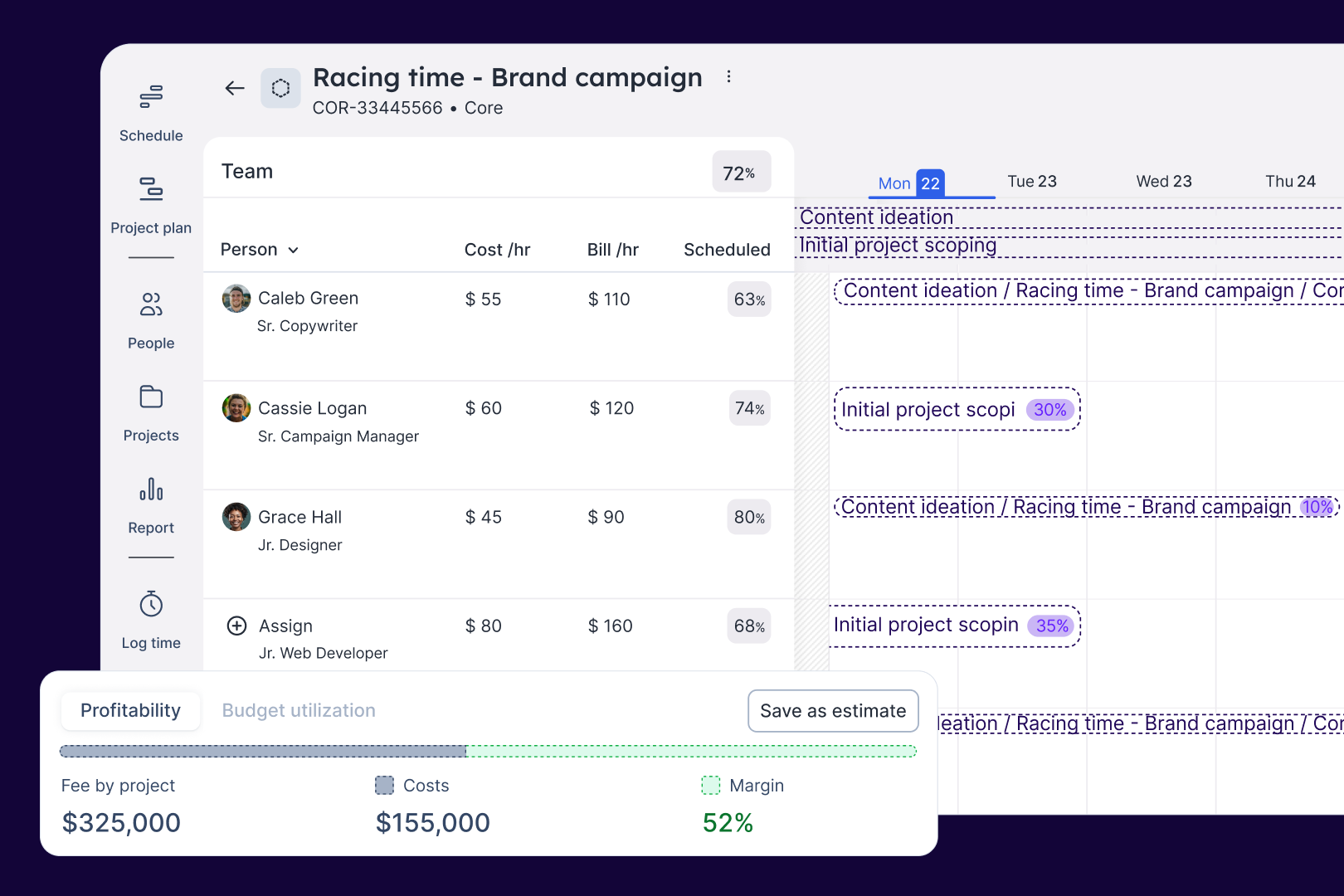
Float.com Demo - Estimate work
Quickly price new projects with confidence. Build budgets, align resourcing, and track scope changes—monitoring estimates against actuals to deliver profitable projects.
Float.com Demo - Scope projects
Align what you need with what you have to create project schedules that keep work on track with the right people, budgets, and timelines.
Float.com Demo - Track time
Simplify timesheets with pre-filled hours so your actuals data is more accurate and always on time!
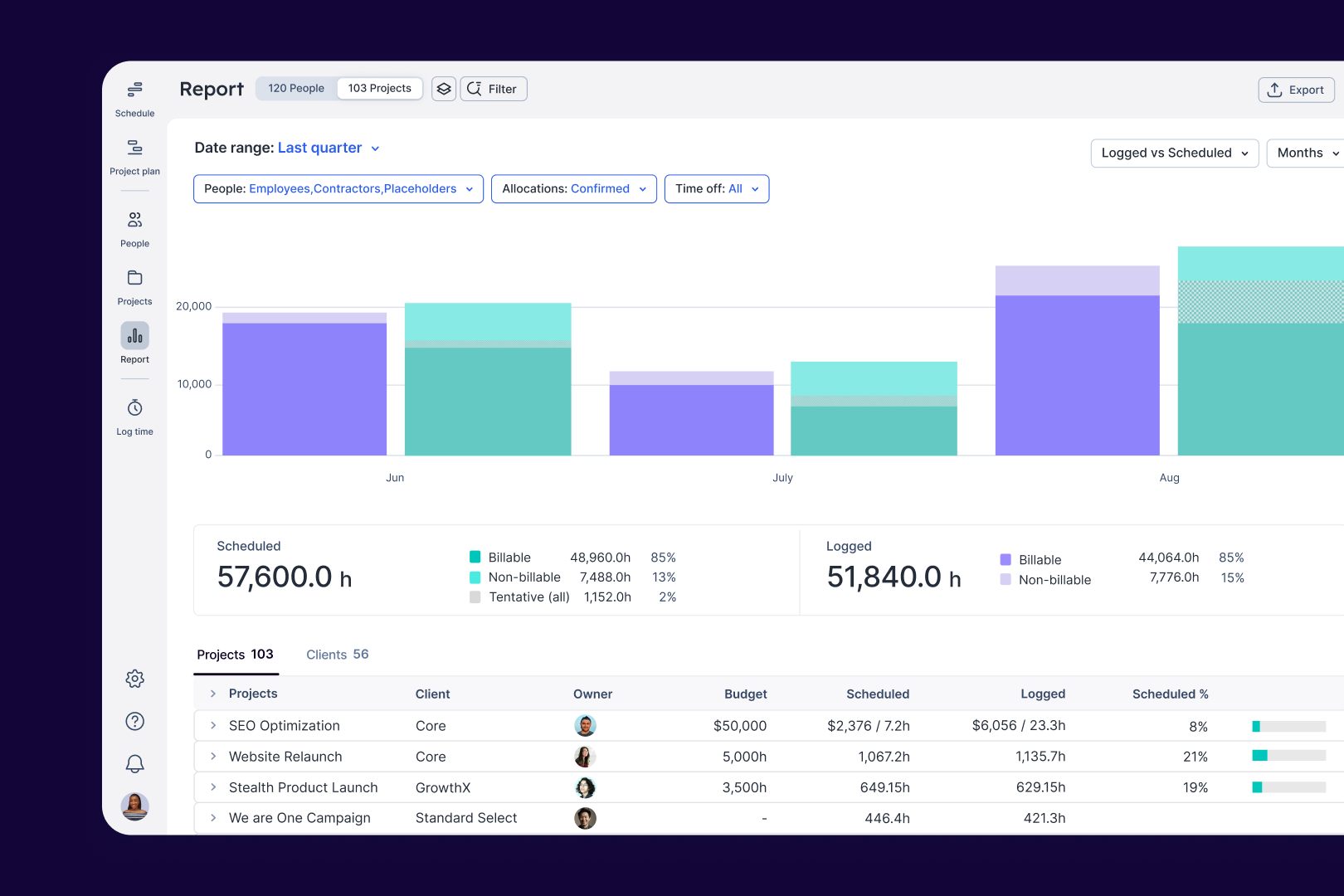
Float.com Demo - Report
Make informed decisions with live insights into team utilization and budget spend to understand how resourcing affects project margins and profitability.
Get to know Float in under 4 mins. 
See how Float connects resourcing decisions to delivery outcomes, keeping your people aligned and your projects profitable.
Play Float.com Video
Get to know Float in under 4 mins. See how Float connects resourcing decisions to delivery outcomes, keeping your people aligned and your projects profitable.
The best teams in the world don’t just wing it. They use Float to get the essential data and context they need when resourcing client work, so they can build winning teams and deliver profitable projects.
Play Float.com Video
The best teams in the world don’t just wing it. They use Float to get the essential data and context they need when resourcing client work, so they can build winning teams and deliver profitable projects.
New: finance & estimations in Float. Stop guessing and start knowing. With Float's finance & estimation features, you can price accurately, protect margins, and deliver profitable projects every time.
Play Float.com Video
New: finance & estimations in Float. Stop guessing and start knowing. With Float's finance & estimation features, you can price accurately, protect margins, and deliver profitable projects every time.
Product Avatar Image

Have you used Float.com before?

Answer a few questions to help the Float.com community

Float.com Reviews (2,037)

View 1 Video Reviews
Reviews

Float.com Reviews (2,037)

View 1 Video Reviews
4.3
2,037 reviews

Review Summary

Generated using AI from real user reviews
Users consistently praise Float.com for its ease of use and intuitive interface, which simplifies scheduling and resource management. The platform's ability to provide a clear overview of team availability and project timelines enhances collaboration and efficiency. However, some users note that the reporting features could be more robust, limiting deeper insights into project performance.

Pros & Cons

Generated from real user reviews
View All Pros and Cons
Search reviews
Filter Reviews
Clear Results
G2 reviews are authentic and verified.
Joel A.
JA
Test Lead
Small-Business (50 or fewer emp.)
"Effortless Resource Planning with Intuitive, Visual Scheduling"
What do you like best about Float.com?

What I like best about Float is its simplicity and clarity for resource planning.

It provides a visual schedule that makes team availability easy to understand at a glance.

Drag-and-drop updates save time when adjusting timelines or workloads.

The real-time visibility helps prevent overbooking and improves collaboration across projects.

Overall, it’s intuitive and reduces the complexity of managing multiple resources. Review collected by and hosted on G2.com.

What do you dislike about Float.com?

we've been having a few outages in this last quoter. Review collected by and hosted on G2.com.

Verified User in Design
AD
Mid-Market (51-1000 emp.)
"Time saving and simplified project management on a daily basis"
What do you like best about Float.com?

I use this platform to manage traffic within a creative agency. I particularly appreciate the speed with which I can adjust the mapping of projects for talents, as well as the ease of adding new projects. The shortcuts are also very practical and save me time.

The reporting function is another asset: it allows me to easily access the necessary data to properly inform the team, make forecasts, and conduct analyses.

I use the platform daily, often several times a day. Review collected by and hosted on G2.com.

What do you dislike about Float.com?

The only thing I think about is that it is not used in the same way by everyone at LG2 and it is not connected to our time management platform.

I know we are looking to change how we will use Float in 2026, stay tuned! Review collected by and hosted on G2.com.

Verified User in Design
AD
Mid-Market (51-1000 emp.)
"Simple, Beautiful Scheduling—But Extra Features Feel Unnecessary"
What do you like best about Float.com?

I run a design agency. 2 things are important to me 1) Simplicity - Float is simple to use. 2) Aesthetics - If i'm to use a tool daily then it has to be attractive and Float is one of the better tools that satisfies this niche requirement.

I like how much the focus is purely on just resourcing my team. Review collected by and hosted on G2.com.

What do you dislike about Float.com?

I'm not a big fan of time tracking nor the recently released budgeting features. Neither are useful in my use case as I use dedicated task management tools (Basecamp, Harvest) that are far better at managing this than Float. Float should focus more on resourcing and scheduling because that's what brought me to the platform and what it's good for. I understand tools like Float need to evolve but at the same time stick to what you're good at because there are other tools in other areas that often do better jobs. There's a reason why tools such as Clickup or Monday are disliked so much - it's because they're bloated trying to focus on too many things it becomes unusable. I'd suggest focussing more on integrations with other tools to expand Float's usefulness into those other areas. Review collected by and hosted on G2.com.

Verified User in Information Technology and Services
CI
Small-Business (50 or fewer emp.)
"Intuitive Resource Management, but Reporting Needs Improvement"
What do you like best about Float.com?

What I like best about Float is how intuitive and easy to use it is. The interface is clean and well designed, making it simple to plan, allocate, and adjust resources without needing much training or setup time. Implementation was straightforward, and it integrated smoothly with our existing tools, which helped us get up and running quickly. I also appreciate the range of features available, from capacity planning to time tracking, which give a clear, real-time view of team workload and project timelines. Overall, Float strikes a great balance between functionality and usability, making it a reliable tool for managing resources efficiently. The fact there is an API is a bonus. Review collected by and hosted on G2.com.

What do you dislike about Float.com?

One aspect I find frustrating about Float is that the reporting features can be somewhat complex to navigate, and the results for hours tracked are not always entirely accurate. This often means I have to spend additional time adjusting or double-checking the data, which makes the reporting process less seamless compared to the rest of the platform. Review collected by and hosted on G2.com.

Verified User in Information Technology and Services
AI
Small-Business (50 or fewer emp.)
"Outstanding Resource Management"
What do you like best about Float.com?

The best tool for resource management. Allows you to forecast and manage active projects. Ability to estimate and manage profitability of project based on the team rates. Flexible permissions allow you to give different members of the team access to manage projects and team. Reporting gives a granular view of a Projects phases and tasks which makes it easy to share information with clients. Time tracking is a breeze with team able to track time against already scheduled tasks, adjusting the time and adding notes as needed. The Float support team are super friendly and responsive, answering questions within a few hours. Our team uses Float multiple times a day and gives everyone clear direction on what its happening now, in the future and the past. Easy to onboard team members and integrates with Google Workspace. Review collected by and hosted on G2.com.

What do you dislike about Float.com?

There are no "Project Management" features, so you'll need to use Float alongside another PM tool like Asana, Jira, ClickUp, Trello etc. However this does make it easier to onboard teams already using these tools. Review collected by and hosted on G2.com.

Verified User in Computer Software
AC
Mid-Market (51-1000 emp.)
"Schedule & Project Plan Page Makes Planning 50+ Employees Easy"
What do you like best about Float.com?

The schedule and project plan page, which we use to plan over 50 employees Review collected by and hosted on G2.com.

What do you dislike about Float.com?

it's hard to link logged time to tasks in our issue-tracking tool. So employees need to add that manually as comments. Review collected by and hosted on G2.com.

Dhruval V.
DV
Student Research Assistant
Enterprise (> 1000 emp.)
"Excellent tool for resource management and time logging."
What do you like best about Float.com?

Float is super easy to use and didn’t take long to get the team onboard. The interface is clean and makes scheduling feel almost effortless—just drag, drop, and you’re done. We use it daily to plan out work and manage capacity across projects. It integrates nicely with Google Calendar, which helps keep everything in sync without extra effort. I also found their customer support to be responsive the one time we needed help. Review collected by and hosted on G2.com.

What do you dislike about Float.com?

I wish the reporting features were a bit more detailed in the basic plan. Sometimes I have to export data just to get a clear picture of workload trends. The mobile version also feels a bit clunky—fine for checking things, but not ideal for making updates. Review collected by and hosted on G2.com.

Verified User in Computer Software
CC
Small-Business (50 or fewer emp.)
"Intuitive Interface with a Clear, All-in-One Schedule View"
What do you like best about Float.com?

the graphical interface and ease of use. Being able to see everyone's schedule on one screen is awesome Review collected by and hosted on G2.com.

What do you dislike about Float.com?

Sometimes the split and delete functions don't work. Also, if a task is added on a non-working day then other tasks that span the same timeframe are automatically added incorrectly to the non-working day Review collected by and hosted on G2.com.

Yash P.
YP
Senior Software Developer
Mid-Market (51-1000 emp.)
"Highly Useful with Flexible Project and Leave Management"
What do you like best about Float.com?

It ia very useful, it has the filters and different option to add leave also. We can create the project and related task as much as we can. Review collected by and hosted on G2.com.

What do you dislike about Float.com?

When we apply leave from float, it is not reflacted in relavant third part. We need to do it manually Review collected by and hosted on G2.com.

Verified User in Marketing and Advertising
AM
Small-Business (50 or fewer emp.)
"Easy Project Setup and Scheduling with Float"
What do you like best about Float.com?

Float was easy to use, it was easy to add projects to the platform and schedule to people. Review collected by and hosted on G2.com.

What do you dislike about Float.com?

When you had multiple users assigned to a task, if you needed to make an amendments to the booking for one user it would move the entire booking for everyone. It would be good if you could make the change for one or all users. Review collected by and hosted on G2.com.

Pricing Options

Pricing provided by Float.com.

Starter

Starting at $7.00
Per Month

Pro

Starting at $12.00
Per Month

Enterprise

Contact Us
Float.com Comparisons
Product Avatar Image
Resource Guru
Compare Now
Product Avatar Image
Kantata Professional Services Automation (formerly Mavenlink+ Kimble)
Compare Now
Product Avatar Image
Teamwork.com
Compare Now
Float.com Features
Ease of Completing Timesheets
Tracking Time to Project/Task
Billable Time Rate Management
Time Tracking
Business Tool Integration
Automated Reminders
User, Role, and Access Management
Reporting
Performance and Reliability
Product Avatar Image
Float.com