# Best Video Conferencing Software - Page 5

*By [Neeraja Prakash](https://research.g2.com/insights/author/neeraja-prakash)*


Video conferencing software enables online communication through audio calls, video meetings, and virtual seminars, offering built-in capabilities such as chat, screen sharing, and recording to support long-distance collaboration and reduce travel costs. These tools allow employees, partners, and customers to meet virtually from any location while maintaining consistent and effective communication.

### Core Capabilities of Video Conferencing Software

To qualify for inclusion in the Video Conferencing category, a product must:

- Provide online video and audio communication between two or more parties
- Allow video conference hosts to modify meeting specifications and invite guests
- Offer features such as screen sharing and chat within individual conferences
- Offer recording capabilities for future reference or presentations

### How Video Conferencing Software Differs from Other Tools

Video conferencing platforms reduce the need for in-person meetings by supporting both quick internal discussions and formal client sessions. Unlike broader collaboration or communication suites, these tools focus specifically on real-time visual and audio interaction. Some systems also integrate with related tools like [Marketing Automation Software](https://www.g2.com/categories/marketing-automation) and [CRM Software](https://www.g2.com/categories/crm), syncing key business data to streamline follow-up actions and account updates.

### Insights from G2 on Video Conferencing Software

Based on category trends on G2, the convenience of eliminating travel, the ability to connect dispersed teams, and the improved consistency of client and internal communication stand out as primary benefits.


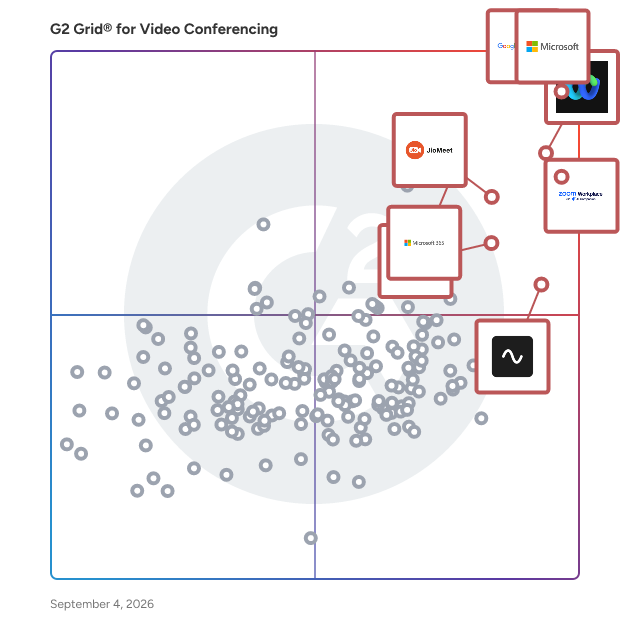
## Top Video Conferencing Software at a Glance
| # | Product | Rating | Best For | What Users Say |
|---|---------|--------|----------|----------------|
| 1 | [Google Workspace](https://www.g2.com/products/google-workspace/reviews) | 4.6/5.0 (45,602 reviews) | Integrated collaboration workspace | "[Seamless Collaboration, Smart AI, and All-in-One Value with Google Workspace](https://www.g2.com/survey_responses/google-workspace-review-12989188)" |
| 2 | [Microsoft Teams](https://www.g2.com/products/microsoft-teams/reviews) | 4.4/5.0 (17,545 reviews) | Enterprise chat and meetings | "[Bringing Work Together: A Practical Review of Microsoft Teams](https://www.g2.com/survey_responses/microsoft-teams-review-12997916)" |
| 3 | [Webex Suite](https://www.g2.com/products/cisco-webex-suite/reviews) | 4.2/5.0 (17,655 reviews) | Structured enterprise meetings | "[Great features, with excellent AI features](https://www.g2.com/survey_responses/webex-suite-review-12932142)" |
| 4 | [Zoom Workplace](https://www.g2.com/products/zoom-workplace/reviews) | 4.5/5.0 (53,489 reviews) | Easy video meetings with recording | "[Zoom Workplace: Seamless All-in-One Hub That Streamlines My Workflow](https://www.g2.com/survey_responses/zoom-workplace-review-13045001)" |
| 5 | [JioMeet](https://www.g2.com/products/jiomeet/reviews) | 4.4/5.0 (448 reviews) | Simple video calls | "[Easy to Use and Network Efficient](https://www.g2.com/survey_responses/jiomeet-review-12818115)" |
| 6 | [Microsoft 365](https://www.g2.com/products/microsoft365/reviews) | 4.6/5.0 (5,521 reviews) | Productivity suite with meeting access | "[All-in-One Office Ecosystem with Reliable Apps and Seamless Collaboration](https://www.g2.com/survey_responses/microsoft-365-review-12834956)" |
| 7 | [Riverside](https://www.g2.com/products/riverside/reviews) | 4.8/5.0 (1,729 reviews) | — | "[Effortless Recording and Amazing Text-Based Editing](https://www.g2.com/survey_responses/riverside-review-13034561)" |
| 8 | [GoTo Meeting](https://www.g2.com/products/goto-meeting/reviews) | 4.2/5.0 (16,573 reviews) | Simple remote meeting access | "[Easy to Implement, Efficient Phone Service with Seamless iOS/Android Integration](https://www.g2.com/survey_responses/goto-meeting-review-12798106)" |
| 9 | [Amazon Chime](https://www.g2.com/products/amazon-chime/reviews) | 4.3/5.0 (637 reviews) | AWS-aligned meeting communication | "[Amazon Chime: A Lean Communication Tool That Knows What It Is.](https://www.g2.com/survey_responses/amazon-chime-review-12964680)" |
| 10 | [Zoho Meeting](https://www.g2.com/products/zoho-meeting/reviews) | 4.5/5.0 (1,137 reviews) | Webinars and online meetings | "[Zoho Meeting’s Unified Workflow Makes Webinars and Demos Effortless](https://www.g2.com/survey_responses/zoho-meeting-review-12870215)" |

---
## What Are the Most Common Questions About Video Conferencing Software?
*AI-generated · Last updated: May 26, 2026*
### Which video call software is best for customer meetings?
Based on G2 reviews, Microsoft Teams stands out for customer meetings because verified users repeatedly describe it as a centralized place for meetings, chats, and file sharing, with reliable video meetings and smooth screen sharing. According to verified users, it is especially useful when organizations already need scheduling, communication, and collaboration in one workflow. G2 reviewers mention that Teams helps connect internal staff and external clients in one place, while some users also note that search and notifications can take getting used to. For buyers focused on structured customer conversations and shared context, recent reviews most often highlight Teams as a dependable option for business-facing meetings.


### What is best desktop video conferencing software with good reviews?
Based on G2 reviews, desktop buyers most often highlight tools that balance call quality, collaboration, and usability. According to verified users, Microsoft Teams is frequently described as a strong fit for desktop use because it brings meetings, chat, calling, and file sharing into one workspace. G2 reviewers mention dependable video meetings, live captions, recordings, and organized channels, especially for remote and hybrid teams. At the same time, some users say the interface can feel heavy or crowded, particularly for new users or lower-end devices. If you want a desktop-focused option backed by recurring recent review activity, Teams is the most consistently mentioned product in this dataset.

**Here are some of the top-rated products on G2:**

- [Microsoft Teams](https://www.g2.com/products/microsoft-teams/reviews) – commonly used for desktop meetings, chat, file sharing, and cross-team collaboration
- [Google Workspace](https://www.g2.com/products/google-workspace/reviews) – valued for Meet integration with Calendar, Gmail, and shared docs in day-to-day work
- [Zoom Workplace](https://www.g2.com/products/zoom-workplace/reviews) – praised for reliable desktop meetings, screen sharing, and AI meeting summaries


### Which affordable video conferencing platform is great audio?
Based on G2 reviews, buyers looking for affordable options often mention products that combine accessible pricing with dependable call quality. According to verified users, Google Workspace is repeatedly described as cost-effective for small businesses and helpful for meetings, file sharing, and daily communication in one suite. G2 reviewers mention that Google Meet is convenient to launch from Calendar and Gmail, while some also point to secure access and simple onboarding. At the same time, reviewers note that offline use and some advanced needs can be limiting. For budget-conscious teams, the strongest recent signals favor broadly adopted products that pair audio reliability with familiar workflows.

**Here are some of the top-rated products on G2:**

- [Google Workspace](https://www.g2.com/products/google-workspace/reviews) – often described as a cost-conscious choice for meetings, calendars, and shared collaboration
- [Microsoft Teams](https://www.g2.com/products/microsoft-teams/reviews) – frequently noted as bundled value for organizations already using Microsoft tools
- [JioMeet](https://www.g2.com/products/jiomeet/reviews) – highlighted for free long meetings, simple access, and solid audio on average connections


### What secure video conferencing software is for legal firms?
Based on G2 reviews, secure video conferencing buyers in regulated environments most often emphasize control, privacy, and stable collaboration. According to verified users, Webex Suite is repeatedly described as strong on security, centralized communication, and dependable audio and video for enterprise use. G2 reviewers mention that it helps teams handle meetings, messaging, and screen sharing in one place, and several recent reviews call out secure communication and strong administrative confidence. Some users do mention a more complex interface and heavier setup than lighter meeting tools. For legal firms prioritizing controlled collaboration and secure remote discussions, Webex Suite shows the clearest review-based fit in this dataset.


### What recommended video conferencing tools are for startups?
Based on G2 reviews, startups often favor platforms that are simple to launch, easy to learn, and practical for remote collaboration. According to verified users, Zoom Workplace is frequently praised for quick meeting setup, dependable calls, and straightforward joining for external participants. G2 reviewers mention AI summaries, screen sharing, calendar integrations, and a generally intuitive experience across desktop and mobile. Reviewers also note that it can become resource-heavy or feel crowded as more features are added. For startup teams that need fast-moving communication without much setup friction, Zoom Workplace appears often in recent reviews as a reliable option for day-to-day meetings.


### What is best video conferencing app for small business?
Based on G2 reviews, Google Workspace is the strongest fit for small business needs in this dataset. According to verified users, it is often described as easy to adopt, affordable for core communication needs, and useful for combining email, file sharing, calendars, and meetings in one place. G2 reviewers mention that Google Meet is simple to launch, onboarding is straightforward, and the broader workspace helps teams stay organized without juggling too many separate tools. Some users mention pricing concerns as needs grow, plus occasional limitations around offline use or advanced admin controls. Still, for small businesses wanting an accessible app with broad collaboration value, Google Workspace is the most clearly supported option.


### What easy to use video conference solution is for our office?
Based on G2 reviews, ease of use is most often tied to familiar interfaces, quick joining, and low setup friction. According to verified users, Zoom Workplace is regularly described as simple to use for meetings, screen sharing, and daily communication, with clear audio and video that support office collaboration. G2 reviewers mention quick meeting setup, clean navigation for common tasks, and dependable performance across devices. Some users do note update prompts and heavier system usage during long sessions. If your office wants a solution that staff can adopt quickly without much technical support, recent review patterns suggest Zoom Workplace is one of the easiest options to roll out.


### What is best rated video calling software for international communication?
Based on G2 reviews, products suited for international communication are usually praised for stable calls, cross-device access, and easy external joining. According to verified users, Zoom Workplace is repeatedly highlighted for reliable calls, simple guest access, and useful features like recordings, summaries, and calendar coordination. G2 reviewers mention that it supports customer meetings, interviews, workshops, and cross-team discussions without much friction. Some users mention that the app can use significant resources or require frequent updates, but the overall call experience is described as dependable. For organizations communicating across regions and devices, Zoom Workplace appears consistently strong in recent review feedback.

**Here are some of the top-rated products on G2:**

- [Zoom Workplace](https://www.g2.com/products/zoom-workplace/reviews) – commonly used for international meetings with reliable video, webinars, and cross-device access
- [Microsoft Teams](https://www.g2.com/products/microsoft-teams/reviews) – supports global team communication with meetings, channels, and Microsoft 365 integration
- [Google Workspace](https://www.g2.com/products/google-workspace/reviews) – often used for global collaboration through Meet, Calendar, Gmail, and shared documents


### What most reliable video meeting service is for large companies?
Based on G2 reviews, reliability at enterprise scale usually means stable calls, centralized workflows, and predictable collaboration across teams. According to verified users, Microsoft Teams is often described as an all-in-one hub for large organizations, with dependable meetings, channels, file sharing, and broad Microsoft ecosystem integration. G2 reviewers mention that it helps replace fragmented tools and keeps communication organized in one platform. Some users note that the interface can feel heavy or overwhelming, especially with many channels and notifications. Even so, for larger companies prioritizing consistent day-to-day operations and broad internal adoption, Teams shows the strongest recent review signals for reliability.

**Here are some of the top-rated products on G2:**

- [Microsoft Teams](https://www.g2.com/products/microsoft-teams/reviews) – frequently used by large organizations for meetings, collaboration, channels, and file sharing
- [Zoom Workplace](https://www.g2.com/products/zoom-workplace/reviews) – often praised for stable large meetings, webinars, and consistent call performance
- [Webex Suite](https://www.g2.com/products/cisco-webex-suite/reviews) – highlighted for enterprise security, centralized communication, and support for large internal sessions


### What are top video conference software for remote teams?
Based on G2 reviews, remote teams usually value tools that reduce app switching and keep meetings, messaging, and shared work connected. According to verified users, Microsoft Teams, Zoom Workplace, and Google Workspace appear most often in recent feedback for supporting remote and hybrid collaboration. G2 reviewers mention channels, recordings, chat, screen sharing, calendar integrations, and shared documents as key strengths across these platforms. They also note common tradeoffs, such as heavier interfaces, update prompts, or occasional resource demands. For buyers comparing options for distributed teams, the clearest review-based theme is that the best remote collaboration tools combine dependable meetings with built-in workflows people already use daily.

**Here are some of the top-rated products on G2:**

- [Microsoft Teams](https://www.g2.com/products/microsoft-teams/reviews) – centralizes meetings, chat, channels, and file sharing for hybrid and remote collaboration
- [Zoom Workplace](https://www.g2.com/products/zoom-workplace/reviews) – supports remote work with reliable meetings, summaries, chat, and easy guest joining
- [Google Workspace](https://www.g2.com/products/google-workspace/reviews) – keeps remote teams aligned through Meet, Calendar, Drive, and real-time document collaboration


## How Many Video Conferencing Software Products Does G2 Track?
**Total Products under this Category:** 218

### Category Stats (Jun 2026)
- **Average Rating**: 4.39/5 (↓0.01 vs May 2026) The average rating of products in this category, based on all submitted ratings
- **Top Trending Product**: Streams.AI (+2.13%) - Among all products in this category, Streams.AI recorded the largest rating increase compared to last month
*Last updated: June 29, 2026*


## How Does G2 Rank Video Conferencing Software Products?

**Why You Can Trust G2's Software Rankings:**

- 30 Analysts and Data Experts
- 197,300+ Authentic Reviews
- 218+ Products
- Unbiased Rankings

G2's software rankings are built on verified user reviews, rigorous moderation, and a consistent research methodology maintained by a team of analysts and data experts. Each product is measured using the same transparent criteria, with no paid placement or vendor influence. While reviews reflect real user experiences, which can be subjective, they offer valuable insight into how software performs in the hands of professionals. Together, these inputs power the G2 Score, a standardized way to compare tools within every category.


## Which Video Conferencing Software Is Best for Your Use Case?

- **Leader:** [Google Workspace](https://www.g2.com/products/google-workspace/reviews)
- **Highest Performer:** [Gather](https://www.g2.com/products/gather-town-gather/reviews)
- **Easiest to Use:** [Riverside](https://www.g2.com/products/riverside/reviews)
- **Top Trending:** [Google Workspace](https://www.g2.com/products/google-workspace/reviews)
- **Best Free Software:** [Zoom Workplace](https://www.g2.com/products/zoom-workplace/reviews)


## Video Conferencing Software Features & Capabilities

### What are the Best Video Conferencing Software with Presentations?
Presenters can cue up a Powerpoint presentation or other slideshow for display in the conference.

**Top-rated Video Conferencing Software for Presentations:**
- [Microsoft Teams](https://www.g2.com/products/microsoft-teams/reviews)
- [Webex Suite](https://www.g2.com/products/cisco-webex-suite/reviews)
- [GoTo Meeting](https://www.g2.com/products/goto-meeting/reviews)
[Explore Video Conferencing Software with Presentations](https://www.g2.com/categories/video-conferencing/f/presentations)

### What are the Best Video Conferencing Software with Whiteboarding?
Provides a virtual whiteboard for collaborative use.

**Top-rated Video Conferencing Software for Whiteboarding:**
- [Webex Suite](https://www.g2.com/products/cisco-webex-suite/reviews)
- [JioMeet](https://www.g2.com/products/jiomeet/reviews)
- [GoTo Meeting](https://www.g2.com/products/goto-meeting/reviews)
[Explore Video Conferencing Software with Whiteboarding](https://www.g2.com/categories/video-conferencing/f/whiteboarding)

### What are the Best Video Conferencing Software with Hand Raising?
Allows conference participants to notifiy conference hosts when they want to speak.

**Top-rated Video Conferencing Software for Hand Raising:**
- [Webex Suite](https://www.g2.com/products/cisco-webex-suite/reviews)
- [Zoom Workplace](https://www.g2.com/products/zoom-workplace/reviews)
- [JioMeet](https://www.g2.com/products/jiomeet/reviews)
[Explore Video Conferencing Software with Hand Raising](https://www.g2.com/categories/video-conferencing/f/hand-raising)


## What Are the Top-Rated Video Conferencing Software Products in 2026?
### 1. [Hapony](https://www.g2.com/products/hapony/reviews)
Create high impact webinars and training courses that increase conversions and drive growth. Connect your CRM, capture actionable data, and up your webinar game today! Make your meetings and webinars your own - white labelled &amp; custom branded for all your organisations communications. Streamline and simplify online meetings, presentations and webinars. No need for multiple platforms, or separate accounts - you can do it all within Hapony. Content sharing, co-presenting, polls, role allocation, whiteboard, chat, Q&amp;A, analytics, breakout rooms, registration and AI Assistant to streamline everything - all you need for successful meetings, webinars and training courses.


**Average Rating:** 4.5/5.0
**Total Reviews:** 49
**How Do G2 Users Rate Hapony?**

- **Has the product been a good partner in doing business?:** 9.5/10 (Category avg: 8.9/10)
- **Presentations:** 9.4/10 (Category avg: 8.9/10)
- **Participant Permissions:** 9.5/10 (Category avg: 8.8/10)
- **Whiteboarding:** 8.8/10 (Category avg: 8.6/10)

**Who Is the Company Behind Hapony?**

- **Seller:** [Hapony](https://www.g2.com/sellers/hapony)
- **Year Founded:** 2024
- **HQ Location:** London, Greater London
- **Twitter:** @haponyhq (3 Twitter followers)
- **LinkedIn® Page:** https://www.linkedin.com/company/hapony/ (1 employees on LinkedIn®)

**Who Uses This Product?**
- **Company Size:** 56% Small-Business, 20% Mid-Market


#### What Are Hapony's Pros and Cons?

**Pros:**

- Ease of Use (10 reviews)
- Easy Setup (10 reviews)
- Quick Setup (9 reviews)
- Intuitive (8 reviews)
- Features (6 reviews)

**Cons:**

- Missing Features (5 reviews)
- Limited Analytics (4 reviews)
- Limited Customization (4 reviews)
- Limited Features (4 reviews)
- Event Management (3 reviews)


### What Do G2 Reviewers Say About Hapony?
*AI-generated summary from verified user reviews*

**Pros:**

- Users appreciate the **ease of use** in Hapony, enjoying its intuitive interface and straightforward setup process.
- Users appreciate the **easy setup** of Hapony, allowing quick onboarding and efficient use for various events.
- Users emphasize the **quick setup** of Hapony, finding it effortless to get started and host events effectively.
- Users appreciate the **intuitive interface** of Hapony, facilitating easy setup and seamless collaboration for engaging team events.
- Users appreciate the **intuitive interface** and **engaging features** of Hapony, enhancing their webinar and meeting experiences.

**Cons:**

- Users find the **missing features** in Hapony, like limited reporting and tiered access, to be frustrating.
- Users find the **limited analytics** of Hapony insufficient for optimizing event budgets and understanding participant engagement.
- Users find the interface **limited in customization** , making it challenging to tailor the experience for their workflows.
- Users find the **limited features** of Hapony restrict their experience and seek more advanced options for engagement.
- Users note the **lack of tiered event access** , requiring separate private events for different audience segments, which is time-consuming.

#### What Are Recent G2 Reviews of Hapony?

**"[Easy Onboarding, Interactive Polls, and Solid Security for Meetings &amp; Webinars](https://www.g2.com/survey_responses/hapony-review-12710963)"**

**Rating:** 4.0/5.0 stars
*— Prabhat C.*

[Read full review](https://www.g2.com/survey_responses/hapony-review-12710963)

---

**"[HR-Focused with Robust GDPR Compliance, Needs Localized UI](https://www.g2.com/survey_responses/hapony-review-13042673)"**

**Rating:** 4.5/5.0 stars
*— Cunliffe S.*

[Read full review](https://www.g2.com/survey_responses/hapony-review-13042673)

---


### 2. [openmeet](https://www.g2.com/products/openmeet/reviews)
OpenMeet is a comprehensive audience engagement platform designed to enhance interactions across in-person, hybrid, and virtual events. Supporting up to 40 languages, it offers a suite of interactive tools that empower audiences to actively participate, thereby maximizing the value of meetings and events. Key Features and Functionality: - Browser-Based Accessibility: No app downloads required; participants can join using their own devices with secure login credentials. - Customization: Tailor events with branded interfaces and a variety of communication media before, during, and after the event. - Integration: Seamlessly connects with other platforms to provide a cohesive delegate experience. - Interactive Tools: Facilitates dynamic interactions through Q&amp;A sessions, live polls, surveys, and real-time feedback mechanisms. - Multilingual Support: Offers real-time language support in up to 40 languages, ensuring inclusivity for global audiences. - Comprehensive Event Management: Supports agenda design, breakout sessions, and post-event content sharing, including highlight videos and asset hubs. Primary Value and Solutions Provided: OpenMeet addresses the challenge of engaging diverse and dispersed audiences by providing a user-friendly, customizable platform that fosters active participation. It enables organizations to: - Enhance Audience Engagement: By giving attendees a voice through interactive features, leading to more meaningful and productive meetings. - Ensure Inclusivity: With extensive language support, it caters to a global audience, breaking down language barriers. - Streamline Event Management: Offers a fully managed solution capable of handling both simple and complex event requirements, ensuring smooth execution. - Gain Actionable Insights: Utilizes real-time feedback and analytics to adapt content and messaging, improving future events. By integrating these features, OpenMeet transforms traditional meetings into interactive experiences, driving higher engagement and delivering measurable outcomes for organizations.


**Average Rating:** 4.4/5.0
**Total Reviews:** 61
**How Do G2 Users Rate openmeet?**

- **Has the product been a good partner in doing business?:** 9.1/10 (Category avg: 8.9/10)
- **Presentations:** 6.8/10 (Category avg: 8.9/10)
- **Participant Permissions:** 8.1/10 (Category avg: 8.8/10)
- **Whiteboarding:** 8.1/10 (Category avg: 8.6/10)

**Who Is the Company Behind openmeet?**

- **Seller:** [Open Audience](https://www.g2.com/sellers/open-audience)
- **Year Founded:** 2015
- **HQ Location:** AYLESBURY, Buckinghamshire
- **LinkedIn® Page:** https://www.linkedin.com/company/open-audience/ (7 employees on LinkedIn®)

**Who Uses This Product?**
- **Top Industries:** Computer Software
- **Company Size:** 31% Small-Business, 24% Mid-Market


#### What Are openmeet's Pros and Cons?

**Pros:**

- Ease of Use (29 reviews)
- Easy Setup (25 reviews)
- Reliability (13 reviews)
- Audio Quality (11 reviews)
- Simplicity (10 reviews)

**Cons:**

- Limited Features (8 reviews)
- Connectivity Issues (7 reviews)
- Limited Customization (6 reviews)
- Missing Features (5 reviews)
- Limited Integrations (4 reviews)


### What Do G2 Reviewers Say About openmeet?
*AI-generated summary from verified user reviews*

**Pros:**

- Users appreciate the **ease of use** of OpenMeet, making video meetings and document sharing hassle-free and efficient.
- Users appreciate the **easy setup** of OpenMeet, enabling seamless connections and efficient meetings across distances.
- Users appreciate the **reliability** of Openmeet, ensuring uninterrupted communication and effortless meeting experiences.
- Users commend the **reliable audio quality** of OpenMeet, ensuring smooth and natural conversations during meetings.
- Users commend OpenMeet for its **simplicity** , highlighting how easy it is to join meetings and navigate the interface.

**Cons:**

- Users find Openmeet has **limited features** , lacking advanced tools and customization options compared to other platforms.
- Users report frequent **connectivity issues** during meetings, especially on older devices, affecting the overall experience.
- Users feel the **limited customization options** on OpenMeet hinder their ability to tailor the experience for various meetings.
- Users feel that OpenMeet has **missing features** compared to larger tools, limiting their overall meeting experience.
- Users recognize the **limited integrations** with other tools, which hinders a smoother experience in managing meetings.

#### What Are Recent G2 Reviews of openmeet?

**"[Seamless Webinars with a Few Formal Hiccups](https://www.g2.com/survey_responses/openmeet-review-12810346)"**

**Rating:** 4.0/5.0 stars
*— Manav O.*

[Read full review](https://www.g2.com/survey_responses/openmeet-review-12810346)

---

**"[An effective standalone webinar hosting platform with inbuilt video rendering tools](https://www.g2.com/survey_responses/openmeet-review-12649553)"**

**Rating:** 4.0/5.0 stars
*— Verified User in Oil &amp; Energy*

[Read full review](https://www.g2.com/survey_responses/openmeet-review-12649553)

---


#### What Are G2 Users Discussing About openmeet?

- [What is openmeet used for?](https://www.g2.com/discussions/what-is-openmeet-used-for) - 1 comment

### 3. [Easymeeting](https://www.g2.com/products/easymeeting/reviews)
We make calling from your personal devices easy as a phone call. Our clients are available for Windows, Mac, and for Android and iOS smartphones/tablets. Forward incoming calls to your company&#39;s video conferencing system (H323/SIP). Share your EasyNumber in your signature, meeting invitations or add it as click-to-dial-buttons on your web. Join your meeting from any device even without an account. Video Conferencing has never been easier!


**Average Rating:** 4.5/5.0
**Total Reviews:** 30
**How Do G2 Users Rate Easymeeting?**

- **Has the product been a good partner in doing business?:** 9.4/10 (Category avg: 8.9/10)
- **Presentations:** 10.0/10 (Category avg: 8.9/10)
- **Participant Permissions:** 10.0/10 (Category avg: 8.8/10)
- **Whiteboarding:** 10.0/10 (Category avg: 8.6/10)

**Who Is the Company Behind Easymeeting?**

- **Seller:** [Easymeeting](https://www.g2.com/sellers/easymeeting)
- **Year Founded:** 2006
- **HQ Location:** Tromsø, Troms
- **Twitter:** @Easymeetingnet (388 Twitter followers)
- **LinkedIn® Page:** https://www.linkedin.com/company/1078039/ (17 employees on LinkedIn®)

**Who Uses This Product?**
- **Top Industries:** Computer Software, Information Technology and Services
- **Company Size:** 58% Small-Business, 35% Mid-Market


#### What Are Easymeeting's Pros and Cons?

**Pros:**

- Ease of Use (3 reviews)
- Intuitive (2 reviews)
- Simplicity (2 reviews)
- User Interface (2 reviews)
- Customer Support (1 reviews)

**Cons:**

- Expensive (1 reviews)
- Limited Customization (1 reviews)
- Limited Features (1 reviews)
- Limited Integrations (1 reviews)
- Missing Features (1 reviews)


### What Do G2 Reviewers Say About Easymeeting?
*AI-generated summary from verified user reviews*

**Pros:**

- Users appreciate the **ease of use** of Easymeeting, allowing quick setup and smooth scheduling for stress-free meetings.
- Users appreciate the **intuitive design** of Easymeeting, enabling quick and stress-free meeting setups for everyone.
- Users appreciate the **simplicity** of Easymeeting, allowing for quick setup and seamless integration into daily routines.
- Users appreciate the **clean and simple interface** of Easymeeting, making scheduling effortless and intuitive for all.
- Users praise the **responsive and helpful customer support** of Easymeeting, enhancing their overall experience and satisfaction.

**Cons:**

- Users find Easymeeting **expensive** and sometimes struggle with unclear pricing and limited advanced features for larger enterprises.
- Users note that **limited customization** options hinder their ability to tailor meeting settings and notifications effectively.
- Users find Easymeeting has **limited features** , lacking advanced options and deep integrations for larger enterprises.
- Users find Easymeeting&#39;s **limited integrations** restrictive compared to larger platforms, impacting their overall experience and functionality.
- Users find **missing features** in Easymeeting, limiting its functionality compared to other robust platforms.

#### What Are Recent G2 Reviews of Easymeeting?

**"[EasyMeeting Delivers Seamless, Hassle-Free Virtual Meetings](https://www.g2.com/survey_responses/easymeeting-review-12956965)"**

**Rating:** 5.0/5.0 stars
*— Abhishek K.*

[Read full review](https://www.g2.com/survey_responses/easymeeting-review-12956965)

---

**"[“Simple and Reliable Online Meeting Solution”](https://www.g2.com/survey_responses/easymeeting-review-12676514)"**

**Rating:** 4.5/5.0 stars
*— Paramjeet S.*

[Read full review](https://www.g2.com/survey_responses/easymeeting-review-12676514)

---


#### What Are G2 Users Discussing About Easymeeting?

- [What is Easymeeting.net used for?](https://www.g2.com/discussions/what-is-easymeeting-net-used-for) - 1 comment

### 4. [Spike](https://www.g2.com/products/spike/reviews)
Spike is an AI-powered email and team communication platform that combines email, chat, meetings, and collaboration tools into a single, organized workspace. It is designed for professionals, small teams, and businesses that use email as their primary communication channel but want a faster, more streamlined way to manage daily interactions and tasks. By transforming traditional email into a chat-like format, Spike simplifies how users read and reply to messages. The platform removes repetitive headers, quoted text, and long chains, allowing conversations to appear as clean, continuous threads. Users can manage all email accounts, calendars, and contacts in one place while taking advantage of built-in AI to summarize conversations, draft replies, and organize the inbox automatically. Spike supports both individual and team use. Freelancers and professionals use it to manage clients and projects more efficiently, while teams rely on Spike to centralize communication, share files, and collaborate in real time without switching between multiple tools. Core Features: Conversational Email: Presents emails as natural chat-like conversations while remaining fully compatible with standard email protocols. AI Productivity Tools: Provides automatic summaries, suggested replies, translations, and content drafting to speed up workflow. Priority Inbox: Uses AI to sort incoming messages into relevant categories—Priority, Other, Notes, and Starred—helping users focus on what matters most. Integrated Meetings: Enables voice and video calls directly from email threads for faster coordination. Collaborative Notes and Docs: Allows users to create, edit, and share documents in real time within the inbox. Unified Inbox and Search: Consolidates multiple email accounts and calendars into a single interface with cross-account search. Shared Inbox: Helps teams manage customer and project communications collaboratively, ensuring faster response times. Compatibility: Works with Gmail, Outlook, iCloud, Office 365, Yahoo Mail, and all IMAP-supported accounts across desktop, mobile, and web platforms. Security and Privacy: Spike is ad-free and never sells or monetizes user data. All message data is encrypted using the AES-256 standard. Spike is suited for users seeking a unified communication platform that enhances productivity while maintaining the familiarity of email. It bridges the gap between traditional email clients and modern collaboration tools, offering a single, AI-enhanced workspace that helps individuals and teams stay focused and efficient.


**Average Rating:** 4.6/5.0
**Total Reviews:** 250
**How Do G2 Users Rate Spike?**

- **Has the product been a good partner in doing business?:** 8.6/10 (Category avg: 8.9/10)
- **Presentations:** 8.6/10 (Category avg: 8.9/10)
- **Participant Permissions:** 9.1/10 (Category avg: 8.8/10)
- **Whiteboarding:** 8.7/10 (Category avg: 8.6/10)

**Who Is the Company Behind Spike?**

- **Seller:** [Spike](https://www.g2.com/sellers/spike)
- **Year Founded:** 2014
- **HQ Location:** Herzliya, IL
- **Twitter:** @SpikeNowHQ (3,036 Twitter followers)
- **LinkedIn® Page:** https://www.linkedin.com/company/3240452/ (30 employees on LinkedIn®)

**Who Uses This Product?**
- **Who Uses This:** Owner, CEO
- **Top Industries:** Information Technology and Services, Computer Software
- **Company Size:** 72% Small-Business, 15% Mid-Market


#### What Are Spike's Pros and Cons?

**Pros:**

- Ease of Use (47 reviews)
- Email Management (35 reviews)
- Communication (33 reviews)
- Helpful (27 reviews)
- Features (24 reviews)

**Cons:**

- Missing Features (19 reviews)
- Limited Features (12 reviews)
- Integration Issues (10 reviews)
- Expensive (9 reviews)
- Limited Customization (9 reviews)


### What Do G2 Reviewers Say About Spike?
*AI-generated summary from verified user reviews*

**Pros:**

- Users find Spike&#39;s **ease of use** exceptional, with a user-friendly interface that simplifies email and task management.
- Users appreciate the **easy email management** of Spike, enjoying a simple interface and organized messaging.
- Users value the **intuitive chat-style communication** in Spike, enhancing productivity and simplifying email management.
- Users love the **intuitive chat interface** of Spike, reducing email stress and simplifying communication across accounts.
- Users praise Spike for its **intuitive chat-style interface** , significantly reducing inbox anxiety and enhancing productivity.

**Cons:**

- Users note the **missing features** in Spike, including limited message history and inadequate task integration options.
- Users criticize the **limited features** of Spike, particularly regarding message history and inadequate search capabilities.
- Users experience **integration issues** with Spike, leading to limitations in syncing and external tool compatibility.
- Users highlight the **expensive pricing** of Spike, expressing concerns about paid plan restrictions and overall value.
- Users express frustration with the **limited customization** of Spike, particularly in offline access and notification settings.

#### What Are Recent G2 Reviews of Spike?

**"[Transformative Chat-Based Email Efficiency](https://www.g2.com/survey_responses/spike-review-12664813)"**

**Rating:** 4.0/5.0 stars
*— Virat K.*

[Read full review](https://www.g2.com/survey_responses/spike-review-12664813)

---

**"[All-in-One Email Productivity Tool](https://www.g2.com/survey_responses/spike-review-12264685)"**

**Rating:** 5.0/5.0 stars
*— Sorabuddin M.*

[Read full review](https://www.g2.com/survey_responses/spike-review-12264685)

---


#### What Are G2 Users Discussing About Spike?

- [What is Spike used for?](https://www.g2.com/discussions/what-is-spike-used-for) - 1 comment
- [What is Spike analysis?](https://www.g2.com/discussions/what-is-spike-analysis)
- [Why is a spike called a spike in agile?](https://www.g2.com/discussions/why-is-a-spike-called-a-spike-in-agile) - 1 comment
- [What is a spike task?](https://www.g2.com/discussions/what-is-a-spike-task) - 2 comments
- [What is a spike in Devops?](https://www.g2.com/discussions/what-is-a-spike-in-devops) - 2 comments, 1 upvote

### 5. [Sylaps](https://www.g2.com/products/sylaps/reviews)
Instantaneous, Audio and Video meeting collaboration. As simple as opening on a link to join a meeting on web browser, mobile devices and desktops. You no longer need to hassle your contacts with installing plugins. Just send them a link. Audio call and Video conferencing, file transfer and screen sharing. All-in-one secure service. All your data are encrypted and we assure you very high quality audio and video, screen-share and unlimited file transfer.


**Average Rating:** 4.4/5.0
**Total Reviews:** 107
**How Do G2 Users Rate Sylaps?**

- **Has the product been a good partner in doing business?:** 8.7/10 (Category avg: 8.9/10)
- **Presentations:** 8.4/10 (Category avg: 8.9/10)
- **Participant Permissions:** 8.9/10 (Category avg: 8.8/10)
- **Whiteboarding:** 8.1/10 (Category avg: 8.6/10)

**Who Is the Company Behind Sylaps?**

- **Seller:** [Sylaps Inc.](https://www.g2.com/sellers/sylaps-inc)
- **Year Founded:** 2014
- **HQ Location:** Wixom, US
- **Twitter:** @sylapsinc (186 Twitter followers)
- **LinkedIn® Page:** https://www.linkedin.com/company/sylaps (1 employees on LinkedIn®)

**Who Uses This Product?**
- **Top Industries:** Information Technology and Services, Computer Software
- **Company Size:** 44% Small-Business, 28% Mid-Market


#### What Are Sylaps's Pros and Cons?

**Pros:**

- Ease of Use (15 reviews)
- Easy Setup (14 reviews)
- Audio Quality (10 reviews)
- Video Quality (9 reviews)
- Screen Sharing (8 reviews)

**Cons:**

- Limited Features (10 reviews)
- Missing Features (9 reviews)
- Limited Integrations (5 reviews)
- User Interface (5 reviews)
- Connectivity Issues (4 reviews)


### What Do G2 Reviewers Say About Sylaps?
*AI-generated summary from verified user reviews*

**Pros:**

- Users enjoy the **ease of use** with Sylaps, praising its quick setup and straightforward, frictionless experience.
- Users appreciate the **easy setup** of Sylaps, enabling quick meetings without unnecessary complications, fostering smooth communication.
- Users enjoy the **excellent audio quality** of Sylaps, enhancing their communication during meetings and presentations.
- Users value the **high-quality video and audio** of Sylaps, enhancing collaboration even with limited internet connectivity.
- Users appreciate the **high-quality screen sharing** of Sylaps, enabling smooth and easy presentations without complex setups.

**Cons:**

- Users note the **limited features** of Sylaps compared to competitors, lacking essential tools for enhanced collaboration.
- Users note the **missing advanced features** in Sylaps, which limits its competitiveness against platforms like Zoom and Teams.
- Users are frustrated with Sylaps&#39; **limited integrations** that hinder syncing with essential tools, causing inefficiencies.
- Users find the **user interface lacking** in modern design and mobile optimization, impacting their overall experience.
- Users often face **connectivity issues** with Sylaps, experiencing audio/video lag and inconsistent performance during calls.

#### What Are Recent G2 Reviews of Sylaps?

**"[Online Meetings, Discussions, and Follow Up Sessions Feel Much Easier to Manage](https://www.g2.com/survey_responses/sylaps-review-12878684)"**

**Rating:** 4.5/5.0 stars
*— Ishan S.*

[Read full review](https://www.g2.com/survey_responses/sylaps-review-12878684)

---

**"[Sylaps Makes Virtual Meetings Simple and Reliable](https://www.g2.com/survey_responses/sylaps-review-12910495)"**

**Rating:** 4.0/5.0 stars
*— Verified User in Marketing and Advertising*

[Read full review](https://www.g2.com/survey_responses/sylaps-review-12910495)

---


#### What Are G2 Users Discussing About Sylaps?

- [What is Sylaps used for?](https://www.g2.com/discussions/what-is-sylaps-used-for) - 1 comment, 1 upvote

### 6. [Batipi](https://www.g2.com/products/batipi/reviews)
Batipi is a comprehensive software solution designed to streamline business operations by integrating various functionalities into a single platform. It offers tools for project management, customer relationship management (CRM), invoicing, and time tracking, enabling businesses to manage their processes efficiently and effectively. Key Features and Functionality: - Project Management: Organize tasks, set deadlines, and monitor progress to ensure timely project completion. - Customer Relationship Management (CRM): Maintain detailed records of client interactions, manage leads, and enhance customer engagement. - Invoicing: Generate professional invoices, track payments, and manage billing cycles with ease. - Time Tracking: Monitor employee work hours, track project time, and analyze productivity metrics. Primary Value and User Solutions: Batipi addresses the challenge of managing multiple business processes by providing an all-in-one platform that enhances productivity and reduces the need for multiple disparate tools. By centralizing project management, CRM, invoicing, and time tracking, it simplifies workflows, improves data accuracy, and offers valuable insights into business performance. This integration allows businesses to focus more on growth and less on administrative tasks, ultimately leading to increased efficiency and profitability.


**Average Rating:** 4.2/5.0
**Total Reviews:** 34
**How Do G2 Users Rate Batipi?**

- **Has the product been a good partner in doing business?:** 8.3/10 (Category avg: 8.9/10)
- **Presentations:** 8.2/10 (Category avg: 8.9/10)
- **Participant Permissions:** 8.2/10 (Category avg: 8.8/10)
- **Whiteboarding:** 8.0/10 (Category avg: 8.6/10)

**Who Is the Company Behind Batipi?**

- **Seller:** [Batipi](https://www.g2.com/sellers/batipi)
- **Year Founded:** 2008
- **HQ Location:** TORONTO
- **Twitter:** @batipi (1 Twitter followers)
- **LinkedIn® Page:** https://www.linkedin.com/company/batipi/about/

**Who Uses This Product?**
- **Top Industries:** Information Technology and Services
- **Company Size:** 61% Small-Business, 25% Mid-Market


#### What Are Batipi's Pros and Cons?

**Pros:**

- Ease of Use (3 reviews)
- Reliability (2 reviews)
- Customer Support (1 reviews)
- Easy Setup (1 reviews)
- Intuitive (1 reviews)

**Cons:**

- Limited Features (1 reviews)


### What Do G2 Reviewers Say About Batipi?
*AI-generated summary from verified user reviews*

**Pros:**

- Users praise Batipi for its **user-friendly interface** , simplifying processes and enhancing overall efficiency and organization.
- Users commend the **reliability and efficiency** of Batipi, appreciating its organization that saves time and enhances productivity.
- Users value the **responsive and helpful customer support** of Batipi, enhancing their overall experience significantly.
- Users find the **easy setup** of Batipi Video Web Conferencing to be a highly beneficial experience for registration and usage.
- Users find Batipi to be **intuitive and user-friendly** , greatly enhancing their video conferencing experience and satisfaction.

**Cons:**

- Users note the **limited features** of Batipi, with some advanced functions lacking clear documentation or tutorials.

#### What Are Recent G2 Reviews of Batipi?

**"[Robust Security and Compliance for Cybersecurity Teams](https://www.g2.com/survey_responses/batipi-review-12556682)"**

**Rating:** 4.0/5.0 stars
*— Carnagey G.*

[Read full review](https://www.g2.com/survey_responses/batipi-review-12556682)

---

**"[Centralized Dashboard Revolutionizes Our Workflow](https://www.g2.com/survey_responses/batipi-review-13042945)"**

**Rating:** 5.0/5.0 stars
*— om s.*

[Read full review](https://www.g2.com/survey_responses/batipi-review-13042945)

---


#### What Are G2 Users Discussing About Batipi?

- [What is Batipi Video Web Conferencing used for?](https://www.g2.com/discussions/what-is-batipi-video-web-conferencing-used-for)

### 7. [Help Lightning](https://www.g2.com/products/help-lightning/reviews)
Help Lightning&#39;s Remote Visual Guidance Software provides video collaboration services that enable a company’s experts to work virtually side-by-side with anyone needing help, anywhere in the world. This cloud-based solution applies augmented reality features, including the merging of two video streams and the use of 3D annotation to improve real-time communications and solve difficult problems. Help Lightning is used for the installation, inspection, training, servicing, and repair of complex equipment and products. With Help Lightning, customers see immediate performance improvements including an increase in first-time fix rates, fewer truck rolls, expanded workforce capacity, and an increase in end customer satisfaction while enhancing service revenue and margin. Learn more at helplightning.com.


**Average Rating:** 4.8/5.0
**Total Reviews:** 62
**How Do G2 Users Rate Help Lightning?**

- **Has the product been a good partner in doing business?:** 9.6/10 (Category avg: 8.9/10)
- **Presentations:** 6.3/10 (Category avg: 8.9/10)
- **Participant Permissions:** 8.8/10 (Category avg: 8.8/10)
- **Whiteboarding:** 6.4/10 (Category avg: 8.6/10)

**Who Is the Company Behind Help Lightning?**

- **Seller:** [Help Lightning](https://www.g2.com/sellers/help-lightning)
- **Year Founded:** 2016
- **HQ Location:** Birmingham, AL
- **Twitter:** @helplightning (3,961 Twitter followers)
- **LinkedIn® Page:** https://www.linkedin.com/company/10175859/ (18 employees on LinkedIn®)

**Who Uses This Product?**
- **Top Industries:** Chemicals, Information Technology and Services
- **Company Size:** 40% Mid-Market, 37% Enterprise


#### What Are Help Lightning's Pros and Cons?

**Pros:**

- Ease of Use (8 reviews)
- Customer Support (6 reviews)
- Screen Sharing (4 reviews)
- Reliability (3 reviews)
- Service Quality (3 reviews)

**Cons:**

- Delay Issues (6 reviews)
- Connectivity Issues (3 reviews)
- Screen Resolution (3 reviews)
- Screen Sharing (3 reviews)
- Connection Issues (2 reviews)


### What Do G2 Reviewers Say About Help Lightning?
*AI-generated summary from verified user reviews*

**Pros:**

- Users highly value the **ease of use** of Help Lightning, making virtual support accessible and efficient for all.
- Users value the **excellent customer support** from Help Lightning, which enhances their overall experience and efficiency.
- Users appreciate the **screen sharing feature** of Help Lightning for its clarity and effectiveness in troubleshooting sessions.
- Users highly value the **reliability** of Help Lightning, citing its effectiveness and support in resolving issues efficiently.
- Users value the **exceptional service quality** of Help Lightning, highlighting its ease of use and effective support features.

**Cons:**

- Users report experiencing **delay issues** with screensharing and video downloads, affecting overall efficiency and connectivity.
- Users experience **connectivity issues** that disrupt sessions, particularly with larger groups, despite some improvements over time.
- Users face **screen resolution issues** with disconnections and black screens during sharing, leading to frustration.
- Users experience issues with **screen sharing disconnections** , leading to frustration in reconnecting and limited time frames.
- Users face **connection issues** that disrupt calls and complicate troubleshooting attempts with Help Lightning.

#### What Are Recent G2 Reviews of Help Lightning?

**"[Help Lightning: Instant Visual Support Made Easy](https://www.g2.com/survey_responses/help-lightning-review-4670118)"**

**Rating:** 4.5/5.0 stars
*— Verified User in Machinery*

[Read full review](https://www.g2.com/survey_responses/help-lightning-review-4670118)

---

**"[Help Lighting the Deciding Factor](https://www.g2.com/survey_responses/help-lightning-review-8164084)"**

**Rating:** 5.0/5.0 stars
*— Angel M.*

[Read full review](https://www.g2.com/survey_responses/help-lightning-review-8164084)

---


#### What Are G2 Users Discussing About Help Lightning?

- [What is Help Lightning used for?](https://www.g2.com/discussions/what-is-help-lightning-used-for)

### 8. [Workstorm](https://www.g2.com/products/workstorm/reviews)
Workstorm is a productivity platform built to protect privacy and confidentiality, connect teams, and streamline projects.


**Average Rating:** 4.4/5.0
**Total Reviews:** 40
**How Do G2 Users Rate Workstorm?**

- **Has the product been a good partner in doing business?:** 9.0/10 (Category avg: 8.9/10)
- **Presentations:** 9.4/10 (Category avg: 8.9/10)
- **Participant Permissions:** 10.0/10 (Category avg: 8.8/10)
- **Whiteboarding:** 9.1/10 (Category avg: 8.6/10)

**Who Is the Company Behind Workstorm?**

- **Seller:** [Workstorm](https://www.g2.com/sellers/workstorm)
- **Year Founded:** 2015
- **HQ Location:** Chicago, Illinois
- **Twitter:** @WorkstormHQ (102 Twitter followers)
- **LinkedIn® Page:** https://www.linkedin.com/company/27227548/ (21 employees on LinkedIn®)

**Who Uses This Product?**
- **Top Industries:** Online Media, Information Technology and Services
- **Company Size:** 45% Mid-Market, 43% Small-Business


#### What Are Workstorm's Pros and Cons?

**Pros:**

- Ease of Use (2 reviews)
- File Sharing (2 reviews)
- Screen Sharing (2 reviews)
- Video Conferencing (2 reviews)
- Video Quality (2 reviews)

**Cons:**

- Expensive (2 reviews)
- Limited Features (1 reviews)
- Missing Features (1 reviews)
- Slow Loading (1 reviews)
- Subscription Costs (1 reviews)


### What Do G2 Reviewers Say About Workstorm?
*AI-generated summary from verified user reviews*

**Pros:**

- Users appreciate the **ease of use** of Workstorm, enhancing productivity with seamless scheduling and integration features.
- Users appreciate the **seamless file sharing** feature in Workstorm, enhancing collaboration and efficiency in their workflows.
- Users value the **real-time screen sharing** feature of Workstorm, enhancing collaboration and productivity seamlessly.
- Users love the **smooth video conferencing** experience with seamless integration and easy scheduling options.
- Users appreciate the **high video quality** of Workstorm, enhancing their meeting and collaboration experiences significantly.

**Cons:**

- Users find Workstorm **expensive** , with limited features in the trial and costly subscription plans compared to alternatives.
- Users find the **limited features** in the trial version restrict their experience, pushing them to upgrade for more benefits.
- Users find **missing features** hinder app navigation, making it challenging to fully utilize Workstorm&#39;s capabilities.
- Users find that **slow loading times** hinder app navigation, affecting overall productivity and feature accessibility.
- Users find the **subscription costs** of Workstorm to be relatively high compared to similar tools, lacking a trial option.

#### What Are Recent G2 Reviews of Workstorm?

**"[Secure, All-in-One Collaboration That Keeps Work Organised](https://www.g2.com/survey_responses/workstorm-review-12725798)"**

**Rating:** 4.5/5.0 stars
*— Syed I.*

[Read full review](https://www.g2.com/survey_responses/workstorm-review-12725798)

---

**"[Efficient Team Communication, Needs More Integrations](https://www.g2.com/survey_responses/workstorm-review-12631170)"**

**Rating:** 4.0/5.0 stars
*— Aayush D.*

[Read full review](https://www.g2.com/survey_responses/workstorm-review-12631170)

---


#### What Are G2 Users Discussing About Workstorm?

- [What is Workstorm used for?](https://www.g2.com/discussions/what-is-workstorm-used-for)

### 9. [Jugo](https://www.g2.com/products/jugo/reviews)
Jugo is the next-gen virtual meeting platform built for the moments that matter. It turns your Zoom calls into immersive, attention-grabbing experiences. Its cinematic virtual stages transform flat calls into on-brand, immersive environments that grab attention from start to finish. Hosts feel unstoppable and in control, attendees are engaged from minute one, and every conversation can drive measurable business momentum. Jugo Intelligence provides AI-driven insights before, during, and after meetings, helping hosts own the moment and deliver presentations that leave a lasting impression. Better yet, it’s frictionless, working seamlessly with the tools you already use, with no downloads, plugins, or extra hardware required. Pioneered on the back of 30 years of experience in events management, powered by NVIDIA, and proven with the world’s biggest brands like Coca-Cola, Amex, and Vodafone. When important things and important people are on the line, Jugo helps you own the moment.


**Average Rating:** 4.4/5.0
**Total Reviews:** 13
**How Do G2 Users Rate Jugo?**

- **Has the product been a good partner in doing business?:** 10.0/10 (Category avg: 8.9/10)
- **Presentations:** 9.8/10 (Category avg: 8.9/10)
- **Participant Permissions:** 9.3/10 (Category avg: 8.8/10)
- **Whiteboarding:** 9.3/10 (Category avg: 8.6/10)

**Who Is the Company Behind Jugo?**

- **Seller:** [Jugo Digital](https://www.g2.com/sellers/jugo-digital)
- **Year Founded:** 2022
- **HQ Location:** New York, NY
- **LinkedIn® Page:** https://www.linkedin.com/company/wearejugo/ (53 employees on LinkedIn®)

**Who Uses This Product?**
- **Top Industries:** Information Technology and Services
- **Company Size:** 100% Small-Business


#### What Are Jugo's Pros and Cons?

**Pros:**

- Ease of Use (2 reviews)
- Features (2 reviews)
- Access Convenience (1 reviews)
- Attendee Engagement (1 reviews)
- Attendee Management (1 reviews)

**Cons:**

- Improvement Needed (3 reviews)
- Not User-Friendly (3 reviews)
- Page Navigation (2 reviews)
- Poor Interface Design (2 reviews)
- Poor Navigation (2 reviews)


### What Do G2 Reviewers Say About Jugo?
*AI-generated summary from verified user reviews*

**Pros:**

- Users love the **ease of use** of Jugo, finding it simple to communicate globally and enjoy video meetings.
- Users praise the **customizable features** of Jugo, enhancing their meeting experiences with effective role management and insights.
- Users value the **customizable privacy levels** and management options that enhance overall convenience with Jugo.
- Users appreciate the **customizable engagement features** of Jugo, enhancing their interaction and overall event experience.
- Users value the **customizable attendee management** features of Jugo, enhancing event organization and insights significantly.

**Cons:**

- Users highlight the need for **improvement in user interface and navigation** , affecting overall usability of Jugo.
- Users find Jugo **not user-friendly** due to navigation difficulties and lag, impacting their overall experience.
- Users find **page navigation challenging** on Jugo, particularly on mobile devices, which detracts from the overall experience.
- Users find Jugo&#39;s **poor interface design** frustrating, highlighting navigation difficulties and lag that hinder usability.
- Users report **poor navigation** on Jugo, particularly highlighting difficulties on mobile devices that hinder usability.

#### What Are Recent G2 Reviews of Jugo?

**"[I loved it.](https://www.g2.com/survey_responses/jugo-review-7908521)"**

**Rating:** 4.5/5.0 stars
*— Anuj K.*

[Read full review](https://www.g2.com/survey_responses/jugo-review-7908521)

---

**"[Review for jugo](https://www.g2.com/survey_responses/jugo-review-7916311)"**

**Rating:** 4.5/5.0 stars
*— Aman  S.*

[Read full review](https://www.g2.com/survey_responses/jugo-review-7916311)

---


### 10. [LiveWebinar](https://www.g2.com/products/livewebinar/reviews)
LiveWebinar.com is a cloud-based webinar software that helps both small teams and enterprises manage webinars and online meetings. It lets any sales, HR, or marketing team easily perform online events for their audiences. Its features range from live streaming, presentation and screen sharing possibility, and fully customizable branding option, to user engagement features like polls and surveys, voting, and Call To Action. LiveWebinar also enables organizations to analyze audience engagement delivering valuable insights, and record sessions in HD, using it later for analysis or as an Evergreen Webinar. Try LiveWebinar if you need a webinar platform tailored to your needs!


**Average Rating:** 4.4/5.0
**Total Reviews:** 178
**How Do G2 Users Rate LiveWebinar?**

- **Has the product been a good partner in doing business?:** 8.9/10 (Category avg: 8.9/10)
- **Presentations:** 8.5/10 (Category avg: 8.9/10)
- **Participant Permissions:** 8.6/10 (Category avg: 8.8/10)
- **Whiteboarding:** 8.5/10 (Category avg: 8.6/10)

**Who Is the Company Behind LiveWebinar?**

- **Seller:** [RTCLab](https://www.g2.com/sellers/rtclab)
- **Year Founded:** 2016
- **HQ Location:** Gdańsk, PL
- **Twitter:** @rtclaboratory (6 Twitter followers)
- **LinkedIn® Page:** https://www.linkedin.com/company/17954923/ (12 employees on LinkedIn®)

**Who Uses This Product?**
- **Who Uses This:** Owner, President
- **Top Industries:** Marketing and Advertising, Professional Training &amp; Coaching
- **Company Size:** 82% Small-Business, 10% Mid-Market


#### What Are LiveWebinar's Pros and Cons?


**Cons:**

- Improvement Needed (1 reviews)
- User Interface (1 reviews)


#### What Are Recent G2 Reviews of LiveWebinar?

**"[Reliable product with excellent support](https://www.g2.com/survey_responses/livewebinar-review-8678820)"**

**Rating:** 4.5/5.0 stars
*— Tibor K.*

[Read full review](https://www.g2.com/survey_responses/livewebinar-review-8678820)

---

**"[Comprehensive and User-Friendly Webinar Solution](https://www.g2.com/survey_responses/livewebinar-review-9898957)"**

**Rating:** 5.0/5.0 stars
*— Iwona P.*

[Read full review](https://www.g2.com/survey_responses/livewebinar-review-9898957)

---


#### What Are G2 Users Discussing About LiveWebinar?

- [What is LiveWebinar used for?](https://www.g2.com/discussions/what-is-livewebinar-used-for)

### 11. [Cosmos Video](https://www.g2.com/products/cosmos-video/reviews)
Cosmos is a virtual office for remote teams who want real connection, not more meetings. Your team gets a shared digital workspace where everyone can see each other and collaborate naturally. No more calendar Tetris. No more waiting for responses. Just fluid teamwork that happens in the moment. Real impact on your team: ✓ Save 45 minutes per person daily through quick, spontaneous conversations ✓ Boost team engagement by 20% with genuine daily connections ✓ Reduce collaboration friction—from idea to action in minutes, not hours Built for all-day performance: Experience crystal-clear audio and video without the technical headaches. Cosmos runs smoothly on any laptop, keeping your team focused on work, not troubleshooting. How it transforms your workflow: • Instant visibility of who&#39;s available • One-click conversations that start immediately • Seamless screen sharing and collaboration tools • AI-powered meeting summaries and transcriptions • Async chat that doesn&#39;t overwhelm • Works perfectly with Google Calendar, Outlook, and Slack Premium performance at a fraction of the cost. The best virtual office platform available—at 3x less than market alternatives. 500+ remote teams have already made the switch. See how Cosmos outperforms other solutions in the market- https://cosmos.video/virtual-office-comparison Try Cosmos free for 14 days. Experience the difference- https://cosmos.video/signin


**Average Rating:** 4.9/5.0
**Total Reviews:** 38
**How Do G2 Users Rate Cosmos Video?**

- **Has the product been a good partner in doing business?:** 9.4/10 (Category avg: 8.9/10)
- **Presentations:** 8.8/10 (Category avg: 8.9/10)
- **Participant Permissions:** 9.5/10 (Category avg: 8.8/10)
- **Whiteboarding:** 9.5/10 (Category avg: 8.6/10)

**Who Is the Company Behind Cosmos Video?**

- **Seller:** [Cosmos Video](https://www.g2.com/sellers/cosmos-video)
- **Year Founded:** 2020
- **HQ Location:** London, GB
- **Twitter:** @cosmosdotvideo (1,414 Twitter followers)
- **LinkedIn® Page:** https://www.linkedin.com/company/cosmosvideo/ (10 employees on LinkedIn®)

**Who Uses This Product?**
- **Top Industries:** Computer Software
- **Company Size:** 76% Small-Business, 24% Mid-Market


#### What Are Cosmos Video's Pros and Cons?

**Pros:**

- Virtual Collaboration (2 reviews)
- Ease of Use (1 reviews)
- Experience (1 reviews)
- High Quality (1 reviews)
- Remote Work (1 reviews)

**Cons:**

- Performance Delays (1 reviews)
- System Lagging (1 reviews)


### What Do G2 Reviewers Say About Cosmos Video?
*AI-generated summary from verified user reviews*

**Pros:**

- Users appreciate the **real-life feel of virtual collaboration** that fosters deep connections and builds community.
- Users appreciate the **ease of use** of Cosmos Video, making remote collaboration feel seamless and enjoyable.
- Users appreciate the **real-life feel of virtual experiences** in Cosmos Video, enhancing connection and building community.
- Users love the **high quality** of Cosmos Video, creating a real-life feel that fosters deep connections and community.
- Users appreciate the **remote work capabilities** of Cosmos Video, enabling seamless virtual collaboration with colleagues.

**Cons:**

- Users experience **performance delays** with Cosmos Video, as it can become laggy and burdensome on their computers.
- Users experience **system lagging** with Cosmos Video, causing frustration during usage and affecting performance.

#### What Are Recent G2 Reviews of Cosmos Video?

**"[Relatively intuitive and stable in connection](https://www.g2.com/survey_responses/cosmos-video-review-12975649)"**

**Rating:** 5.0/5.0 stars
*— Verified User in E-Learning*

[Read full review](https://www.g2.com/survey_responses/cosmos-video-review-12975649)

---

**"[A Faster, More Human Way to Work](https://www.g2.com/survey_responses/cosmos-video-review-12998589)"**

**Rating:** 5.0/5.0 stars
*— Emina d.*

[Read full review](https://www.g2.com/survey_responses/cosmos-video-review-12998589)

---


#### What Are G2 Users Discussing About Cosmos Video?

- [What is Cosmos Video used for?](https://www.g2.com/discussions/what-is-cosmos-video-used-for) - 1 upvote

### 12. [Pensight](https://www.g2.com/products/pensight/reviews)
Pensight is the all-in-one creator platform. It&#39;s tailored for content creators, coaches, and entrepreneurs who want to monetize their expertise through digital products and services. It allows users to easily set up a customizable link-in-bio store, where they can sell a wide range of offerings, including digital downloads (like e-books and templates), online courses, memberships, and coaching sessions. Pensight stands out for its comprehensive suite of tools that simplify the management of an online business. It integrates video calling, scheduling, email marketing, and payment processing within a single platform, enabling creators to handle all aspects of their business seamlessly. The platform is designed with ease of use in mind, making it accessible even for those without technical skills. With Pensight, you can start with a free plan that offers essential features, such as creating and selling digital products. For more advanced needs, including subscription payments, email automation, and custom domain usage, Pensight offers a Pro plan at $29 per month. This flexibility makes it a strong alternative to other link-in-bio platforms, especially for those looking to monetize their social media presence more effectively. Pensight is particularly valuable for creators who want to consolidate multiple business tools into one platform, saving time and reducing the complexity of managing various software. Whether you’re just starting out or looking to scale your online business, Pensight provides the tools to help you succeed.


**Average Rating:** 4.4/5.0
**Total Reviews:** 36
**How Do G2 Users Rate Pensight?**

- **Has the product been a good partner in doing business?:** 9.0/10 (Category avg: 8.9/10)
- **Presentations:** 8.6/10 (Category avg: 8.9/10)
- **Participant Permissions:** 6.2/10 (Category avg: 8.8/10)
- **Whiteboarding:** 9.0/10 (Category avg: 8.6/10)

**Who Is the Company Behind Pensight?**

- **Seller:** [Pensight](https://www.g2.com/sellers/pensight)
- **HQ Location:** London, GB
- **Twitter:** @PensightHQ (95 Twitter followers)
- **LinkedIn® Page:** https://www.linkedin.com/company/pensight/ (11 employees on LinkedIn®)

**Who Uses This Product?**
- **Top Industries:** Information Technology and Services, Computer Software
- **Company Size:** 46% Small-Business, 35% Mid-Market


#### What Are Pensight's Pros and Cons?

**Pros:**

- Ease of Use (16 reviews)
- Easy Setup (11 reviews)
- Setup Ease (11 reviews)
- Time Management (9 reviews)
- Scheduling Ease (8 reviews)

**Cons:**

- Limited Customization (11 reviews)
- Limited Features (7 reviews)
- Missing Features (7 reviews)
- Integration Issues (5 reviews)
- Limited Integrations (5 reviews)


### What Do G2 Reviewers Say About Pensight?
*AI-generated summary from verified user reviews*

**Pros:**

- Users value the **ease of use** of Pensight, appreciating its seamless integration of services into one efficient platform.
- Users praise Pensight for its **easy setup** , allowing quick launches and streamlined management of products and bookings.
- Users appreciate the **easy setup** of Pensight, allowing for quick, hassle-free integration of services on one platform.
- Users value **time management** with Pensight&#39;s all-in-one platform that streamlines client communication and payment processes.
- Users appreciate the **scheduling ease** of Pensight, which effortlessly integrates bookings and payments into one platform.

**Cons:**

- Users find the **limited customization options** restrictive, impacting user experience and functionality in Pensight.
- Users report frustration with the **limited features** available in the free plan, hindering business growth potential.
- Users find the **missing features** in Pensight limiting, with a need for better customization and advanced tools.
- Users find **integration issues** problematic, citing a lack of advanced tools and difficult initial setup.
- Users find the **limited integrations** of Pensight restrict their ability to customize and analyze their projects effectively.

#### What Are Recent G2 Reviews of Pensight?

**"[Efficient HR Management with GDPR Compliance](https://www.g2.com/survey_responses/pensight-review-12958627)"**

**Rating:** 4.5/5.0 stars
*— María T.*

[Read full review](https://www.g2.com/survey_responses/pensight-review-12958627)

---

**"[Pensight Makes Monetizing Expertise Simple with Clean, All-in-One Tools](https://www.g2.com/survey_responses/pensight-review-12760337)"**

**Rating:** 4.5/5.0 stars
*— Ritesh  M.*

[Read full review](https://www.g2.com/survey_responses/pensight-review-12760337)

---


#### What Are G2 Users Discussing About Pensight?

- [What is Pensight used for?](https://www.g2.com/discussions/what-is-pensight-used-for)

### 13. [Bizbize](https://www.g2.com/products/bizbize/reviews)
BizBize for all your video conferencing and online meeting needs with 4 languages support (English, Spanish, Russian, Turkish) Secure Communication: Your data is safe with end-to-end encryption. Easy Accessa: Use the video conferencing platform on your browser without installation. Functional Features: Discover BizBize’s advanced features that will elevate your video communication experience. Local Setup Option: Store your data on your own servers. Webinar, Secure File Sharing, Whiteboard, Encrypted Meeting Mode, Web-Based Application Individual Use A flawless video conferencing experience with unique features. Corporate Use Sector-specific online meeting solutions for you to stay connected with your coworkers and clients.


**Average Rating:** 4.4/5.0
**Total Reviews:** 12
**How Do G2 Users Rate Bizbize?**

- **Has the product been a good partner in doing business?:** 9.0/10 (Category avg: 8.9/10)
- **Presentations:** 9.0/10 (Category avg: 8.9/10)
- **Participant Permissions:** 9.3/10 (Category avg: 8.8/10)
- **Whiteboarding:** 9.2/10 (Category avg: 8.6/10)

**Who Is the Company Behind Bizbize?**

- **Seller:** [BITES Defence and Aerospace Tech](https://www.g2.com/sellers/bites-defence-and-aerospace-tech)
- **HQ Location:** Ankara, Turkey
- **Twitter:** @trbizbize (300 Twitter followers)
- **LinkedIn® Page:** https://www.linkedin.com/company/trbizbize/ (12 employees on LinkedIn®)

**Who Uses This Product?**
- **Company Size:** 75% Small-Business, 25% Mid-Market


#### What Are Recent G2 Reviews of Bizbize?

**"[The Bizbize application provides its users with reliable and local service providers.](https://www.g2.com/survey_responses/bizbize-review-8129037)"**

**Rating:** 5.0/5.0 stars
*— İsmail S.*

[Read full review](https://www.g2.com/survey_responses/bizbize-review-8129037)

---

**"[Business meeting platform](https://www.g2.com/survey_responses/bizbize-review-8171807)"**

**Rating:** 5.0/5.0 stars
*— Danielle B.*

[Read full review](https://www.g2.com/survey_responses/bizbize-review-8171807)

---


### 14. [Kaleyra Video API](https://www.g2.com/products/kaleyra-video-api/reviews)
Kaleyra Video API is a customizable, natively integrated video communication solution that enables businesses to engage with customers directly through their existing digital platforms, such as websites or mobile applications. This seamless integration allows users to initiate video calls without the need for external software or switching devices, ensuring a cohesive and efficient user experience. Key Features and Functionality: - Seamless Integration: Easily embed video calling capabilities into websites, mobile apps, CRMs, or smart glasses using REST APIs, Web SDKs, or Mobile SDKs. - Brand Customization: Tailor the video call interface with company logos, colors, and branding elements to maintain and enhance brand identity. - Cross-Device Compatibility: Accessible on any device, allowing users to join video calls directly from their preferred digital touchpoints without additional downloads. - Advanced Collaboration Tools: Enhance interactions with features like whiteboard, live pointer, in-call snapshot, recording, file sharing, screen sharing, in-call chat, and virtual backgrounds. - Security and Compliance: Ensure data protection by embedding video call technology within existing platforms, eliminating the need for external software and reducing phishing risks. Primary Value and Solutions Provided: Kaleyra Video API addresses the need for businesses to offer real-time, personalized communication channels without disrupting the user experience. By integrating directly into existing digital environments, it eliminates the friction associated with third-party software, thereby enhancing customer engagement and satisfaction. The solution is particularly beneficial across various sectors: - Banking and Financial Services: Facilitate secure customer identity verification and document sharing. - Insurance: Streamline claims evaluation through real-time video interactions. - Healthcare: Support teleconsultations with HIPAA-compliant video communication. - Retail: Offer immersive virtual shopping experiences and personalized sales assistance. By providing a secure, stable, and branded video communication channel, Kaleyra Video API empowers businesses to enhance their customer interactions, improve operational efficiency, and strengthen brand loyalty.


**Average Rating:** 4.2/5.0
**Total Reviews:** 18
**How Do G2 Users Rate Kaleyra Video API?**

- **Has the product been a good partner in doing business?:** 6.7/10 (Category avg: 8.9/10)
- **Presentations:** 8.7/10 (Category avg: 8.9/10)
- **Participant Permissions:** 8.3/10 (Category avg: 8.8/10)
- **Whiteboarding:** 7.8/10 (Category avg: 8.6/10)

**Who Is the Company Behind Kaleyra Video API?**

- **Seller:** [Kaleyra](https://www.g2.com/sellers/kaleyra-1aecce65-a7cc-4f60-b366-85f9269a7b01)
- **Year Founded:** 2016
- **HQ Location:** Milano, IT
- **Twitter:** @BandyerSrl (144 Twitter followers)
- **LinkedIn® Page:** https://www.linkedin.com/company/bandyer/about/ (3 employees on LinkedIn®)

**Who Uses This Product?**
- **Company Size:** 63% Small-Business, 42% Mid-Market


#### What Are Kaleyra Video API's Pros and Cons?

**Pros:**

- Ease of Use (8 reviews)
- Easy Setup (4 reviews)
- Communication (3 reviews)
- Audio Quality (2 reviews)
- Easy Communication (2 reviews)

**Cons:**

- Screen Sharing (4 reviews)
- Customer Support (2 reviews)
- Expensive (2 reviews)
- Learning Curve (2 reviews)
- Poor Customer Support (2 reviews)


### What Do G2 Reviewers Say About Kaleyra Video API?
*AI-generated summary from verified user reviews*

**Pros:**

- Users appreciate the **ease of use** of Kaleyra Video API, enabling quick and seamless video conferences without hassle.
- Users highlight the **easy setup** of Kaleyra Video API, enabling quick organization of video conferences effortlessly.
- Users value the **seamless communication** features of Kaleyra Video API, enhancing connectivity and user experience.
- Users highlight the **high audio quality** of Kaleyra Video API, enhancing their video conferencing experience significantly.
- Users find **easy communication** with Kaleyra Video API, appreciating its all-in-one business solution for various requirements.

**Cons:**

- Users experience **limitations in screen sharing** , including lag, narrow scope, and necessary improvements in functionality.
- Users experience **lengthy customer support** that impacts their overall satisfaction and resolution of issues.
- Users find the **pricing to be high** compared to other options, leading to concerns about value for money.
- Users find the **learning curve steep** , with challenges in implementation and unclear pricing impacting their overall experience.
- Users report **poor customer support** , facing delays that hinder resolution of issues and impact user experience.

#### What Are Recent G2 Reviews of Kaleyra Video API?

**"[Connecting Globally with Kaleyra Video API](https://www.g2.com/survey_responses/kaleyra-video-api-review-12194046)"**

**Rating:** 5.0/5.0 stars
*— Pratik K.*

[Read full review](https://www.g2.com/survey_responses/kaleyra-video-api-review-12194046)

---

**"[Flexible and Reliable Video API with Good Integration Potential for Product Teams](https://www.g2.com/survey_responses/kaleyra-video-api-review-12584246)"**

**Rating:** 4.0/5.0 stars
*— Verified User in Information Technology and Services*

[Read full review](https://www.g2.com/survey_responses/kaleyra-video-api-review-12584246)

---


#### What Are G2 Users Discussing About Kaleyra Video API?

- [What is Bandyer used for?](https://www.g2.com/discussions/what-is-bandyer-used-for) - 1 comment

### 15. [IVA MCU](https://www.g2.com/products/iva-mcu/reviews)
Established in 2017, IVKS is a Russian developer of a unified communications platform under the IVA Technologies brand, which includes all types of communications: voice, video conferencing and messaging. Currently, the range of the IVA UC unified communication solutions includes the IVA MCU video conferencing platform, the IVA Connect corporate messenger and the IVA IP phone family. These products are in commercial operation, are included in the unified register of Russian programs and have the status of telecommunications equipment of Russian origin. At the same time, the following development projects are underway: the IVA SFU server, IVA CS enterprise communication platform, IVA GW VoIP gateway and new models of IP telephones.


**Average Rating:** 4.3/5.0
**Total Reviews:** 18
**How Do G2 Users Rate IVA MCU?**

- **Has the product been a good partner in doing business?:** 8.3/10 (Category avg: 8.9/10)
- **Presentations:** 8.9/10 (Category avg: 8.9/10)
- **Participant Permissions:** 10.0/10 (Category avg: 8.8/10)
- **Whiteboarding:** 9.0/10 (Category avg: 8.6/10)

**Who Is the Company Behind IVA MCU?**

- **Seller:** [IVA Technologies](https://www.g2.com/sellers/iva-technologies)
- **Year Founded:** 2017
- **HQ Location:** N/A
- **LinkedIn® Page:** https://www.linkedin.com/company/iva-technologies (109 employees on LinkedIn®)

**Who Uses This Product?**
- **Company Size:** 56% Small-Business, 26% Mid-Market


#### What Are IVA MCU's Pros and Cons?

**Pros:**

- Audio Quality (3 reviews)
- High Quality (3 reviews)
- Video Conferencing (3 reviews)
- Convenience (2 reviews)
- Intuitive (2 reviews)

**Cons:**

- Participant Limitations (3 reviews)
- Editing Limitations (1 reviews)
- Expensive (1 reviews)
- Integration Issues (1 reviews)
- Internet Dependency (1 reviews)


### What Do G2 Reviewers Say About IVA MCU?
*AI-generated summary from verified user reviews*

**Pros:**

- Users value the **reliable high-quality audio** of IVA MCU, enhancing their video conferencing experience significantly.
- Users value the **high quality** of IVA MCU, enhancing their video conferencing experience with reliable audio and video performance.
- Users value the **easy connectivity and audio quality** of IVA MCU for effective and secure video conferencing.
- Users find IVA MCU to be **convenient and easy to use** , enhancing video conferencing for small business interactions.
- Users value the **intuitive interface** of IVA MCU, facilitating quick adoption and streamlined user experience.

**Cons:**

- Users express frustration over **participant limitations** with IVA MCU, as compatibility issues hinder effective participation in meetings.
- Users face **editing limitations** with IVA MCU, complicating usability during big gatherings and device compatibility issues.
- Users find the IVA MCU to be **expensive** , feeling it could benefit from a more affordable price point.
- Users report **integration issues** , finding IVA MCU&#39;s cross-platform compatibility lacking for seamless meetings with other platforms.
- Users find the **internet dependency** of IVA MCU problematic due to excessive data consumption and background issues.

#### What Are Recent G2 Reviews of IVA MCU?

**"[IVA MCU: Clean, Fast, and Beginner-Friendly Task Management](https://www.g2.com/survey_responses/iva-mcu-review-12697907)"**

**Rating:** 5.0/5.0 stars
*— Rohit G.*

[Read full review](https://www.g2.com/survey_responses/iva-mcu-review-12697907)

---

**"[Reliable Cross-Border Connectivity, Needs Better Integration](https://www.g2.com/survey_responses/iva-mcu-review-12904473)"**

**Rating:** 4.0/5.0 stars
*— Erik T.*

[Read full review](https://www.g2.com/survey_responses/iva-mcu-review-12904473)

---


#### What Are G2 Users Discussing About IVA MCU?

- [What is IVA MCU used for?](https://www.g2.com/discussions/what-is-iva-mcu-used-for) - 1 comment

### 16. [Onstream Live](https://www.g2.com/products/onstream-live/reviews)
Onstream Live is a powerful and versatile WebRTC-based collaboration platform that is used to produce highly engaging and professional video-centric meetings and events. Through our tight integrations with our premiere partners, we offer the highest levels of resiliency possible to ensure service continuity, scale, privacy and security.


**Average Rating:** 4.0/5.0
**Total Reviews:** 160
**How Do G2 Users Rate Onstream Live?**

- **Has the product been a good partner in doing business?:** 8.3/10 (Category avg: 8.9/10)
- **Presentations:** 8.9/10 (Category avg: 8.9/10)
- **Participant Permissions:** 7.8/10 (Category avg: 8.8/10)
- **Whiteboarding:** 8.9/10 (Category avg: 8.6/10)

**Who Is the Company Behind Onstream Live?**

- **Seller:** [Xcyte Digital](https://www.g2.com/sellers/xcyte-digital)
- **Year Founded:** 2022
- **HQ Location:** Toronto, CA
- **LinkedIn® Page:** https://www.linkedin.com/company/xcyte-digital-corporation (11 employees on LinkedIn®)

**Who Uses This Product?**
- **Who Uses This:** Owner
- **Top Industries:** Information Technology and Services, Marketing and Advertising
- **Company Size:** 60% Small-Business, 23% Mid-Market


#### What Are Onstream Live's Pros and Cons?

**Pros:**

- Easy Setup (13 reviews)
- Ease of Use (12 reviews)
- Reliability (8 reviews)
- Convenience (5 reviews)
- Simplicity (4 reviews)

**Cons:**

- Limited Customization (5 reviews)
- Poor Quality (3 reviews)
- Control Issues (2 reviews)
- Limited Integrations (2 reviews)
- Technical Issues (2 reviews)


### What Do G2 Reviewers Say About Onstream Live?
*AI-generated summary from verified user reviews*

**Pros:**

- Users appreciate the **easy setup** of Onstream Live, enabling quick launches of professional live streams with minimal hassle.
- Users find Onstream Live&#39;s **ease of use** exceptional, allowing quick setup and hassle-free access to content.
- Users praise the **reliability** of Onstream Live, ensuring smooth, professional, and stress-free live streaming experiences.
- Users appreciate the **convenience** of Onstream Live, enjoying easy setup and quick access to diverse content.
- Users praise the **simplicity** of Onstream Live, enabling quick access to features and content without hassle.

**Cons:**

- Users find the **customization options limited** , making branding and event setup more challenging and time-consuming.
- Users experience **poor quality** streaming with drops and audio issues, along with a lack of support and consistency.
- Users find **control issues** in Onstream Live can complicate last-minute events and affect subtitle functionality.
- Users note **limited integrations** with Onstream Live, which hinder functionality and complicate audience engagement with various platforms.
- Users experience frequent **technical issues** like stream failures and unresponsive content, leading to frustration and lack of trust.

#### What Are Recent G2 Reviews of Onstream Live?

**"[Effortless Multistreaming with Scheduling and a Unified Chat Dashboard](https://www.g2.com/survey_responses/onstream-live-review-12678657)"**

**Rating:** 4.0/5.0 stars
*— Verified User in Oil &amp; Energy*

[Read full review](https://www.g2.com/survey_responses/onstream-live-review-12678657)

---

**"[Onstream Live: Easy Setup and Reliable Streaming for Live Events](https://www.g2.com/survey_responses/onstream-live-review-13041710)"**

**Rating:** 4.5/5.0 stars
*— Dharamveer p.*

[Read full review](https://www.g2.com/survey_responses/onstream-live-review-13041710)

---


#### What Are G2 Users Discussing About Onstream Live?

- [What is Onstream Live used for?](https://www.g2.com/discussions/what-is-onstream-live-used-for) - 1 comment

### 17. [Bigtincan Engagement](https://www.g2.com/products/bigtincan-engagement/reviews)
We aspire to make every customer interaction successful. Every email, every meeting, and every presentation should provide value and lead buyers to the best decision. Bigtincan Engagement (formerly Clearslide) provides a complete Sales Engagement solution that combines content management, integrated communications, engagement analytics, conversation intelligence, AI-powered meeting automation, and guided selling to power dynamic conversations with buyers. Bigtincan Engagement is designed to enhance sales effectiveness by addressing common challenges faced by sales teams. It aims to increase active selling time, optimize sales interactions, and provide better visibility into buyer needs. Key features include: Centralized Content Management: Sellers can access a variety of content from multiple systems, ensuring they have the most up-to-date materials. Real-Time Buyer Engagement: The platform allows for immediate reactions to engaged buyers through notifications and automates email outreach to focus on active opportunities. Personalized Experiences: Engagement Hub enables the creation of personalized microsites for buyers, allowing sellers to tailor content and interactions based on buyer interests and needs. Analytics and Insights: The platform provides detailed engagement insights, helping sellers understand how buyers interact with shared content, which can uncover hidden needs. Conversation Intelligence: This feature transcribes and analyzes sales calls, providing feedback on tone and articulation, which aids in self-coaching for sales reps. These capabilities are designed to empower sales teams to create engaging, measurable buyer experiences that drive sales success. Bigtincan Engagement customers report: 10%-20% increase in closed deals 25% decrease in time to on-board new reps 50%-80% reduction in selling costs


**Average Rating:** 4.1/5.0
**Total Reviews:** 575
**How Do G2 Users Rate Bigtincan Engagement?**

- **Has the product been a good partner in doing business?:** 8.2/10 (Category avg: 8.9/10)
- **Presentations:** 9.1/10 (Category avg: 8.9/10)
- **Participant Permissions:** 8.2/10 (Category avg: 8.8/10)
- **Whiteboarding:** 8.8/10 (Category avg: 8.6/10)

**Who Is the Company Behind Bigtincan Engagement?**

- **Seller:** [Bigtincan](https://www.g2.com/sellers/bigtincan)
- **Year Founded:** 2011
- **HQ Location:** Waltham, MA
- **Twitter:** @bigtincan (2,236 Twitter followers)
- **LinkedIn® Page:** https://www.linkedin.com/company/bigtincan (184 employees on LinkedIn®)
- **Phone:** 781-405-2376

**Who Uses This Product?**
- **Who Uses This:** Account Executive, Account Manager
- **Top Industries:** Computer Software, Internet
- **Company Size:** 55% Mid-Market, 28% Enterprise


#### What Are Recent G2 Reviews of Bigtincan Engagement?

**"[ClearSlide: Real-time A/V/W Conferencing GOAT &amp; BOAT of All Times](https://www.g2.com/survey_responses/bigtincan-engagement-review-7770942)"**

**Rating:** 4.5/5.0 stars
*— Divya N.*

[Read full review](https://www.g2.com/survey_responses/bigtincan-engagement-review-7770942)

---

**"[Very good tool.](https://www.g2.com/survey_responses/bigtincan-engagement-review-9428024)"**

**Rating:** 5.0/5.0 stars
*— Nicolo F. V.*

[Read full review](https://www.g2.com/survey_responses/bigtincan-engagement-review-9428024)

---


#### What Are G2 Users Discussing About Bigtincan Engagement?

- [What is ClearSlide used for?](https://www.g2.com/discussions/what-is-clearslide-used-for)
- [What is SalesDirector.ai used for?](https://www.g2.com/discussions/what-is-salesdirector-ai-used-for)

### 18. [Unlimited Conferencing](https://www.g2.com/products/unlimited-conferencing/reviews)
Unlimited Conferencing offers high-quality, full-featured conferencing services tailored for businesses and organizations of all sizes. Established in 2003, the company has served over 40,000 satisfied customers, emphasizing ease of use, reliability, and exceptional customer service. Their conferencing solutions are designed to be both affordable and feature-rich, ensuring seamless communication without compromising on quality or security. Key Features and Functionality: - Unlimited Minutes: All plans provide unlimited conferencing minutes, allowing users to conduct meetings without time constraints. - Superior Sound Quality: Advanced echo cancellation and background noise suppression technologies ensure crystal-clear audio during calls. - Global Dial-In Numbers: Participants can join conferences from various international locations using local and toll-free dial-in numbers. - Web and Video Conferencing: Integrated video and web conferencing capabilities support webinars, screen sharing, and video meetings. - Custom Greetings: Users can personalize conference calls with custom greetings, either by recording their own or utilizing professional voice actors. - Free Recordings: Conferences can be recorded at no additional cost, with optional transcription services available for a nominal fee. - Dial-Out Feature: Hosts can add participants by calling them directly from within the conference or have the system call them when the meeting starts. - Personalized Meeting Links: Each user receives a unique, one-click meeting room URL for easy access and sharing. Primary Value and Solutions Provided: Unlimited Conferencing addresses the need for reliable and cost-effective communication solutions in the business environment. By offering unlimited conferencing minutes, superior audio quality, and a suite of advanced features, it enables organizations to conduct efficient and productive meetings without geographical limitations. The platform&#39;s user-friendly interface and customizable options ensure that businesses can tailor their conferencing experience to meet specific needs, enhancing collaboration and decision-making processes. With flexible pricing plans and no contractual obligations, Unlimited Conferencing provides a scalable solution that grows with the organization, ensuring consistent and high-quality communication channels.


**Average Rating:** 4.6/5.0
**Total Reviews:** 56
**How Do G2 Users Rate Unlimited Conferencing?**

- **Has the product been a good partner in doing business?:** 6.7/10 (Category avg: 8.9/10)
- **Presentations:** 8.6/10 (Category avg: 8.9/10)
- **Participant Permissions:** 9.1/10 (Category avg: 8.8/10)
- **Whiteboarding:** 8.3/10 (Category avg: 8.6/10)

**Who Is the Company Behind Unlimited Conferencing?**

- **Seller:** [Unlimited Conferencing](https://www.g2.com/sellers/unlimited-conferencing)
- **Year Founded:** 2003
- **HQ Location:** Mill Valley, CA
- **Twitter:** @UnlimitedConfer (2 Twitter followers)
- **LinkedIn® Page:** https://www.linkedin.com/company/291029/ (3 employees on LinkedIn®)

**Who Uses This Product?**
- **Top Industries:** Information Technology and Services, Computer Software
- **Company Size:** 51% Small-Business, 34% Mid-Market


#### What Are Unlimited Conferencing's Pros and Cons?

**Pros:**

- Ease of Use (3 reviews)
- Easy Setup (3 reviews)
- Audio Quality (2 reviews)
- Team Collaboration (2 reviews)
- Video Quality (2 reviews)

**Cons:**

- Performance Issues (2 reviews)
- Connection Issues (1 reviews)
- Participant Limitations (1 reviews)
- Poor Call Quality (1 reviews)


### What Do G2 Reviewers Say About Unlimited Conferencing?
*AI-generated summary from verified user reviews*

**Pros:**

- Users love the **ease of use** of Unlimited Conferencing, enjoying its straightforward setup and seamless communication options.
- Users love the **easy setup** of Unlimited Conferencing, enabling quick access and seamless initial experiences.
- Users value the **reliable audio quality** of Unlimited Conferencing, essential for effective remote meetings and client calls.
- Users appreciate the **enhanced team collaboration** of Unlimited Conferencing, citing effective communication and user-friendly design.
- Users praise the **reliable video quality** of Unlimited Conferencing, ensuring seamless remote meetings and client calls.

**Cons:**

- Users report **performance issues** with Unlimited Conferencing, citing lag and limited access impacting their experience.
- Users often face **connection issues** that hinder team members from joining meetings effectively.
- Users report **system lagging** and **limited rooms access** , which hinder a seamless conferencing experience.
- Users report **poor call quality** with Unlimited Conferencing, especially in remote locations affecting clarity during calls.

#### What Are Recent G2 Reviews of Unlimited Conferencing?

**"[Flat-Rate Unlimited Conferencing That Eliminates Surprise Call Costs](https://www.g2.com/survey_responses/unlimited-conferencing-review-12909712)"**

**Rating:** 5.0/5.0 stars
*— Wenming L.*

[Read full review](https://www.g2.com/survey_responses/unlimited-conferencing-review-12909712)

---

**"[Simplifies Meeting Planning for Time Zones and Webinars](https://www.g2.com/survey_responses/unlimited-conferencing-review-12725548)"**

**Rating:** 4.5/5.0 stars
*— Jamaal J.*

[Read full review](https://www.g2.com/survey_responses/unlimited-conferencing-review-12725548)

---


#### What Are G2 Users Discussing About Unlimited Conferencing?

- [What is Unlimited Conferencing used for?](https://www.g2.com/discussions/what-is-unlimited-conferencing-used-for)

### 19. [IPPBX](https://www.g2.com/products/ippbx/reviews)
IPPBX is an all-in-one communication platform designed to streamline business operations by integrating essential tools into a single, user-friendly interface. By consolidating various communication and collaboration functionalities, IPPBX eliminates the need for multiple applications, enhancing productivity and reducing operational costs. Key Features and Functionality: - Appointment Scheduling: Simplifies the process of booking and managing appointments, reducing the complexity of handling multiple calendars. - Project Management: Enhances project tracking, team collaboration, and task management, ensuring projects are completed efficiently. - Note-Taking: Allows for the creation, organization, and sharing of notes within teams, facilitating better information management. - Instant Messaging: Provides private chat rooms for team communication, improving internal collaboration. - Audio and Video Conferencing: Enables virtual meetings with high-quality audio and video, supporting remote collaboration. - Document Management &amp; Editing: Offers real-time collaborative document editing and secure cloud storage, streamlining document workflows. - Built-in CRM: Integrates customer relationship management tools to effectively manage client interactions and data. - Survey Creation: Facilitates the design and distribution of surveys to gather valuable customer feedback and insights. Primary Value and Solutions Provided: IPPBX addresses the common challenges businesses face with fragmented communication tools by offering a unified platform that integrates various functionalities. This consolidation leads to significant time savings, with businesses reporting up to 85% reduction in management time and a 75% increase in teamwork efficiency. Additionally, IPPBX&#39;s browser-based tools ensure accessibility from any device, supporting remote work and enhancing flexibility. With robust security measures, including GDPR certification and ISO 27001 compliance, IPPBX ensures that sensitive data remains protected, making it an ideal solution for businesses seeking to optimize their communication processes and boost overall productivity.


**Average Rating:** 4.4/5.0
**Total Reviews:** 18
**How Do G2 Users Rate IPPBX?**

- **Has the product been a good partner in doing business?:** 9.2/10 (Category avg: 8.9/10)
- **Presentations:** 9.2/10 (Category avg: 8.9/10)
- **Participant Permissions:** 10.0/10 (Category avg: 8.8/10)
- **Whiteboarding:** 8.3/10 (Category avg: 8.6/10)

**Who Is the Company Behind IPPBX?**

- **Seller:** [IPPBX](https://www.g2.com/sellers/ippbx)
- **Year Founded:** 1998
- **HQ Location:** New York, US
- **Twitter:** @Ippbxusa (9,250 Twitter followers)
- **LinkedIn® Page:** https://www.linkedin.com/company/ippbx-llc (58 employees on LinkedIn®)

**Who Uses This Product?**
- **Top Industries:** Accounting
- **Company Size:** 33% Mid-Market, 28% Small-Business


#### What Are IPPBX's Pros and Cons?

**Pros:**

- Ease of Use (6 reviews)
- Easy Setup (6 reviews)
- Easy Communication (4 reviews)
- Efficiency (4 reviews)
- Intuitive (4 reviews)

**Cons:**

- Complex Setup (4 reviews)
- Complexity (3 reviews)
- Difficult Setup (3 reviews)
- Integration Issues (2 reviews)
- Learning Curve (2 reviews)


### What Do G2 Reviewers Say About IPPBX?
*AI-generated summary from verified user reviews*

**Pros:**

- Users find IPPBX to be **easy to set up and use** , enhancing collaboration and streamlining communication for remote teams.
- Users enjoy the **easy setup** of IPPBX, enabling quick configurations and seamless integration for efficient communication.
- Users love the **easy communication** features of IPPBX, enhancing collaboration and connection for remote teams.
- Users appreciate the **efficiency** of IPPBX, enhancing call management and streamlining communication across the team.
- Users value the **intuitive setup** of IPPBX, allowing for quick deployment and easy integration into existing systems.

**Cons:**

- Users highlight the **complex setup** of IPPBX, making initial configuration and maintenance challenging for beginners.
- Users find the **complex setup** of IPPBX challenging, especially for beginners and those lacking technical expertise.
- Users find the **difficult setup** of IPPBX challenging, often requiring extensive technical knowledge to configure properly.
- Users face **integration issues** with IPPBX, particularly during initial setup, impacting overall functionality and usability.
- Users find the **learning curve steep** for IPPBX, especially with setup and technical configurations impacting usability.

#### What Are Recent G2 Reviews of IPPBX?

**"[Flexible and Cost-Effective Communication, but Security Concerns Persist](https://www.g2.com/survey_responses/ippbx-review-12390730)"**

**Rating:** 4.0/5.0 stars
*— Mohd A.*

[Read full review](https://www.g2.com/survey_responses/ippbx-review-12390730)

---

**"[Flexible, Cost-Effective IP PBX That Scales for Remote Work](https://www.g2.com/survey_responses/ippbx-review-12706738)"**

**Rating:** 4.5/5.0 stars
*— Kanga Y.*

[Read full review](https://www.g2.com/survey_responses/ippbx-review-12706738)

---


### 20. [JetWebinar](https://www.g2.com/products/jetwebinar/reviews)
JetWebinar is an all-in-one platform designed to simplify the creation and management of engaging virtual events and webinars. It combines automation, interactive engagement tools, and real-time analytics into a seamless interface, enabling users to deliver impactful online experiences effortlessly. Key Features and Functionality: - Effortless Automation: Automate scheduling, reminders, and follow-ups, reducing manual tasks and allowing focus on content delivery. - Dynamic Audience Engagement: Utilize interactive features like live polls, Q&amp;A sessions, and breakout rooms to keep attendees actively involved. - Powerful Real-Time Analytics: Access instant insights into attendee behavior to refine strategies and enhance future events. - Flexible Webinar Delivery: Host live, automated, or simulive webinars to accommodate various audience preferences and time zones. - Custom Branding Options: Personalize registration pages, webinar layouts, and branding elements to maintain a consistent brand identity. Primary Value and Solutions Provided: JetWebinar addresses the challenges of hosting virtual events by offering a user-friendly platform that automates administrative tasks, fosters interactive audience participation, and provides actionable insights through analytics. This comprehensive approach enables organizations to effectively engage their audiences, streamline event management, and achieve measurable outcomes from their virtual events.


**Average Rating:** 4.1/5.0
**Total Reviews:** 42
**How Do G2 Users Rate JetWebinar?**

- **Has the product been a good partner in doing business?:** 8.1/10 (Category avg: 8.9/10)
- **Presentations:** 8.9/10 (Category avg: 8.9/10)
- **Participant Permissions:** 8.5/10 (Category avg: 8.8/10)
- **Whiteboarding:** 8.2/10 (Category avg: 8.6/10)

**Who Is the Company Behind JetWebinar?**

- **Seller:** [Neurosoft](https://www.g2.com/sellers/neurosoft)
- **Year Founded:** 1994
- **HQ Location:** Iraklio, Athens
- **LinkedIn® Page:** https://www.linkedin.com/company/22326/ (328 employees on LinkedIn®)
- **Ownership:** NRST.MI
- **Total Revenue (USD mm):** $13

**Who Uses This Product?**
- **Top Industries:** Information Technology and Services, Computer Software
- **Company Size:** 47% Small-Business, 29% Mid-Market


#### What Are JetWebinar's Pros and Cons?

**Pros:**

- Ease of Use (1 reviews)
- Intuitive (1 reviews)
- Navigation Ease (1 reviews)

**Cons:**

- Expensive (1 reviews)
- Glitches (1 reviews)
- Screen Sharing (1 reviews)
- User Interface (1 reviews)


### What Do G2 Reviewers Say About JetWebinar?
*AI-generated summary from verified user reviews*

**Pros:**

- Users appreciate the **user-friendly design** of JetWebinar, enhancing their overall experience and efficiency in decision-making.
- Users praise JetWebinar for its **intuitive design** , greatly enhancing their overall experience and decision-making efficiency.
- Users appreciate the **user-friendly navigation** of JetWebinar, which significantly enhances their overall experience and efficiency.

**Cons:**

- Users find the pricing of JetWebinar to be **quite costly** , suggesting it could be more affordable.
- Users report facing **glitches** like bugs in the mobile viewer and screen sharing, impacting the overall experience.
- Users often criticize the **screen sharing functionality** , highlighting bugs and a preference for alternative solutions.
- Users note the **user interface has bugs** , especially for mobile viewers and screen sharing, affecting their experience.

#### What Are Recent G2 Reviews of JetWebinar?

**"[JetWebinar: Effortless Reach and Time Saver](https://www.g2.com/survey_responses/jetwebinar-review-12639878)"**

**Rating:** 5.0/5.0 stars
*— Sajawal Z.*

[Read full review](https://www.g2.com/survey_responses/jetwebinar-review-12639878)

---

**"[Automation Powerhouse with Room for UI Improvement](https://www.g2.com/survey_responses/jetwebinar-review-12657061)"**

**Rating:** 4.0/5.0 stars
*— Paras D.*

[Read full review](https://www.g2.com/survey_responses/jetwebinar-review-12657061)

---


#### What Are G2 Users Discussing About JetWebinar?

- [What is JetVideo Technologies used for?](https://www.g2.com/discussions/what-is-jetvideo-technologies-used-for) - 1 comment

### 21. [Agora](https://www.g2.com/products/agora-io-agora/reviews)
Agora&#39;s Video Calling API enables developers to seamlessly integrate high-definition, real-time video communication into web, mobile, and native applications. Designed for ultra-low latency and cross-platform compatibility, it ensures smooth video experiences even under challenging network conditions. This solution is ideal for various applications, including telehealth, education, team collaboration, and any scenario requiring face-to-face interaction. Key Features and Functionality: - Global Coverage: Agora&#39;s Software-Defined Real-Time Network (SDRTN®) supports users in over 200 countries and regions, ensuring reliable connectivity worldwide. - High-Quality Video at Scale: Delivers consistent high-definition video quality for both one-on-one calls and large group meetings, maintaining performance even with thousands of concurrent users. - Multiple Audio and Video Tracks: Allows publishing multiple audio and video streams from a single instance, supporting multi-channel capture from various cameras and microphones. - Screen Sharing and Collaboration: Facilitates screen sharing and interactive whiteboards, enabling users to draw, annotate, and share content across multiple devices simultaneously. - AI-Powered Audio Enhancement: Incorporates advanced audio features such as 3D spatial audio, AI noise suppression, and gain control to provide an immersive and clear audio experience. - Call Recording: Offers options for recording video calls either in the cloud or on-premises, with customizable settings for format, storage path, and quality. Primary Value and User Solutions: Agora&#39;s Video Calling API addresses the need for reliable, high-quality real-time video communication across diverse applications. By providing a scalable and customizable solution, it empowers developers to enhance user engagement and collaboration within their platforms. The API&#39;s robust features, including global coverage, AI-driven enhancements, and flexible integration options, ensure that users experience seamless and interactive video communication, thereby improving productivity and user satisfaction.


**Average Rating:** 4.1/5.0
**Total Reviews:** 41
**How Do G2 Users Rate Agora?**

- **Has the product been a good partner in doing business?:** 8.2/10 (Category avg: 8.9/10)
- **Presentations:** 7.9/10 (Category avg: 8.9/10)
- **Participant Permissions:** 7.7/10 (Category avg: 8.8/10)
- **Whiteboarding:** 6.7/10 (Category avg: 8.6/10)

**Who Is the Company Behind Agora?**

- **Seller:** [Agora.io](https://www.g2.com/sellers/agora-io)
- **Year Founded:** 2014
- **HQ Location:** Santa Clara, CA
- **Twitter:** @AgoraIO (26,359 Twitter followers)
- **LinkedIn® Page:** https://www.linkedin.com/company/agora-lab-inc/ (922 employees on LinkedIn®)
- **Ownership:** NASDAQ:API

**Who Uses This Product?**
- **Who Uses This:** CEO
- **Top Industries:** Computer Software, Events Services
- **Company Size:** 68% Small-Business, 27% Mid-Market


#### What Are Agora's Pros and Cons?

**Pros:**

- Audio Quality (1 reviews)
- Customer Support (1 reviews)
- High Quality (1 reviews)
- Video Conferencing (1 reviews)

**Cons:**

- Learning Curve (1 reviews)
- Limited Customization (1 reviews)


### What Do G2 Reviewers Say About Agora?
*AI-generated summary from verified user reviews*

**Pros:**

- Users praise Agora for its **exceptional audio quality** , allowing seamless merging of audio and video with low latency.
- Users praise the **responsive customer support** of Agora, helping them effectively navigate the platform&#39;s features.
- Users praise Agora for its **high quality** , delivering real-time video and speech with low latency and adaptability.
- Users value Agora&#39;s **low latency and real-time merging capabilities** , enhancing video and speech quality without technical issues.

**Cons:**

- Users find the **learning curve challenging** , particularly for those with less technical experience in their team.
- Users find it **difficult to customize** Agora, impacting their overall satisfaction and adaptability to specific needs.

#### What Are Recent G2 Reviews of Agora?

**"[Agora best solution available in the market](https://www.g2.com/survey_responses/agora-review-9135019)"**

**Rating:** 4.5/5.0 stars
*— Abhishek Kumar  S.*

[Read full review](https://www.g2.com/survey_responses/agora-review-9135019)

---

**"[using for creating reports for investors](https://www.g2.com/survey_responses/agora-review-11487193)"**

**Rating:** 4.5/5.0 stars
*— Verified User in Real Estate*

[Read full review](https://www.g2.com/survey_responses/agora-review-11487193)

---


#### What Are G2 Users Discussing About Agora?

- [What is Agora AI?](https://www.g2.com/discussions/what-is-agora-ai)
- [How does Agora IO work?](https://www.g2.com/discussions/how-does-agora-io-work)
- [How good is Agora?](https://www.g2.com/discussions/how-good-is-agora)
- [What does Agora software do?](https://www.g2.com/discussions/what-does-agora-software-do)

### 22. [Edworking](https://www.g2.com/products/edworking_/reviews)
Edworking is an AI powered workspace that brings project management, documents, team chat, video meetings, file sharing, and search together in one place. Teams plan work with list and kanban views, manage sprints, assign owners, set due dates and estimates, and break down tasks with subtasks and checklists. Conversations stay in context with chats inside tasks, private messages, team spaces, and meeting rooms. Start a video call from any conversation when sync is faster than typing. Share and preview files where work happens, and use quick video stories for async updates. AI is woven across the platform to help you move faster. In documents, AI assists with drafting, rephrasing, and summarizing so writing feels effortless. In search, AI finds answers across documents, images, PDFs, and files in seconds, not just keyword matches but intent aware results. In chat and tasks, smart suggestions help you keep work organized and progress unblocked. Edworking is designed for startups, agencies, and SMBs that want fewer tools and better alignment across product, marketing, operations, and client delivery. It reduces tool switching, preserves context, and gives clear visibility from planning to delivery. Pricing is flexible with per user plans for focused teams and a team license with a single flat rate for unlimited users. Choose monthly for flexibility or yearly for savings. Edworking helps you replace scattered apps with one integrated workspace so your team can collaborate clearly, deliver faster, and stay on the same page.


**Average Rating:** 4.7/5.0
**Total Reviews:** 28
**How Do G2 Users Rate Edworking?**

- **Has the product been a good partner in doing business?:** 8.6/10 (Category avg: 8.9/10)
- **Presentations:** 9.3/10 (Category avg: 8.9/10)
- **Participant Permissions:** 8.3/10 (Category avg: 8.8/10)
- **Whiteboarding:** 9.3/10 (Category avg: 8.6/10)

**Who Is the Company Behind Edworking?**

- **Seller:** [Ed technology ltd](https://www.g2.com/sellers/ed-technology-ltd)
- **Year Founded:** 2021
- **HQ Location:** London, GB
- **LinkedIn® Page:** https://www.linkedin.com/company/edworkingremote/ (3 employees on LinkedIn®)

**Who Uses This Product?**
- **Top Industries:** Information Technology and Services
- **Company Size:** 83% Small-Business, 21% Mid-Market


#### What Are Edworking's Pros and Cons?

**Pros:**

- Ease of Use (3 reviews)
- File Sharing (3 reviews)
- Security (3 reviews)
- Communication (2 reviews)
- Easy Access (2 reviews)

**Cons:**

- Connection Issues (1 reviews)
- Connectivity Issues (1 reviews)
- Customer Support (1 reviews)
- Integration Issues (1 reviews)
- Lack of Integration (1 reviews)


### What Do G2 Reviewers Say About Edworking?
*AI-generated summary from verified user reviews*

**Pros:**

- Users praise Edworking for its **user-friendly interface** , making it simple to manage tasks and communicate efficiently.
- Users love the **secure and efficient file sharing** capabilities in Edworking, enhancing collaboration within teams and clients.
- Users value the **high security and encryption** of Edworking, ensuring safe communication and document sharing.
- Users value the **efficient communication** features of Edworking, which streamline collaboration and keep information secure.
- Users appreciate the **easy access** to all business communications and task management within Edworking&#39;s centralized platform.

**Cons:**

- Users often struggle with **connection issues** like dropped calls and poor internet connectivity, impacting overall productivity.
- Users frequently face **connectivity issues** with Edworking, resulting in dropped calls and unreliable internet performance.
- Users desire **faster customer response times** and improved interface speed for a better overall experience.
- Users find **integration issues** prevalent, with a need for improved responsiveness and better third-party app connections.
- Users find the **lack of integration** with third-party apps limits functionality and responsiveness in Edworking.

#### What Are Recent G2 Reviews of Edworking?

**"[Perfect Platform for Remote Teams and Freelancers](https://www.g2.com/survey_responses/edworking-review-12164797)"**

**Rating:** 4.0/5.0 stars
*— Sara Y.*

[Read full review](https://www.g2.com/survey_responses/edworking-review-12164797)

---

**"[One solution to manage files and business confidential data](https://www.g2.com/survey_responses/edworking-review-11600905)"**

**Rating:** 4.5/5.0 stars
*— Raaj P.*

[Read full review](https://www.g2.com/survey_responses/edworking-review-11600905)

---


#### What Are G2 Users Discussing About Edworking?

- [Is solidworks good for woodworking?](https://www.g2.com/discussions/is-solidworks-good-for-woodworking)
- [What SketchUp to use for woodworking?](https://www.g2.com/discussions/what-sketchup-to-use-for-woodworking)
- [How do you make a woodworking plan?](https://www.g2.com/discussions/how-do-you-make-a-woodworking-plan)
- [What are two pros for digital woodworking?](https://www.g2.com/discussions/what-are-two-pros-for-digital-woodworking)

### 23. [baasi](https://www.g2.com/products/baasi/reviews)
Innovating The Way We Connect! baasi is a customizable communication platform designed to simplify how you connect with your peers, teams, and clients. An all-in-one platform that enhances collaboration, engagement, and organization. baasi empowers businesses and individuals to connect, reduces communications costs, and gives more integrations to streamline operations effortlessly. Join us in shaping the future of video communication for a brighter, more connected world.


**Average Rating:** 4.7/5.0
**Total Reviews:** 11
**How Do G2 Users Rate baasi?**

- **Has the product been a good partner in doing business?:** 8.3/10 (Category avg: 8.9/10)
- **Presentations:** 9.5/10 (Category avg: 8.9/10)
- **Participant Permissions:** 9.7/10 (Category avg: 8.8/10)
- **Whiteboarding:** 9.0/10 (Category avg: 8.6/10)

**Who Is the Company Behind baasi?**

- **Seller:** [baasi](https://www.g2.com/sellers/baasi)
- **Year Founded:** 2020
- **HQ Location:** Wilmington, North Carolina
- **LinkedIn® Page:** https://www.linkedin.com/company/baasi/ (10 employees on LinkedIn®)

**Who Uses This Product?**
- **Company Size:** 64% Mid-Market, 36% Small-Business


#### What Are Recent G2 Reviews of baasi?

**"[revolutionizing video communication](https://www.g2.com/survey_responses/baasi-review-8571461)"**

**Rating:** 4.5/5.0 stars
*— Sourabh B.*

[Read full review](https://www.g2.com/survey_responses/baasi-review-8571461)

---

**"[Bassi is impressive with the quality of his video calls.](https://www.g2.com/survey_responses/baasi-review-8412473)"**

**Rating:** 5.0/5.0 stars
*— Luis M R.*

[Read full review](https://www.g2.com/survey_responses/baasi-review-8412473)

---


### 24. [REC.VC](https://www.g2.com/products/mns-vc-rec-vc/reviews)
REC.VC is a recording and live streaming cloud service that works with video meeting services such as BlueJeans, Cisco Webex, Lifesize, Pexip, Polycom, StarLeaf and Zoom.


**Average Rating:** 4.4/5.0
**Total Reviews:** 20
**How Do G2 Users Rate REC.VC?**

- **Has the product been a good partner in doing business?:** 7.5/10 (Category avg: 8.9/10)
- **Presentations:** 8.3/10 (Category avg: 8.9/10)
- **Participant Permissions:** 6.0/10 (Category avg: 8.8/10)
- **Whiteboarding:** 6.7/10 (Category avg: 8.6/10)

**Who Is the Company Behind REC.VC?**

- **Seller:** [Media Network Services](https://www.g2.com/sellers/media-network-services)
- **Year Founded:** 2007
- **HQ Location:** Tromsø, NO
- **LinkedIn® Page:** https://www.linkedin.com/company/media-network-services/ (10 employees on LinkedIn®)

**Who Uses This Product?**
- **Company Size:** 37% Small-Business, 33% Mid-Market


#### What Are REC.VC's Pros and Cons?

**Pros:**

- Recording (7 reviews)
- Setup Ease (7 reviews)
- Ease of Use (6 reviews)
- Reliability (6 reviews)
- Easy Setup (5 reviews)

**Cons:**

- Feature Deficiency (3 reviews)
- Limited Features (3 reviews)
- Performance Delays (3 reviews)
- Poor Quality (2 reviews)
- Slow Performance (2 reviews)


### What Do G2 Reviewers Say About REC.VC?
*AI-generated summary from verified user reviews*

**Pros:**

- Users appreciate the **user-friendly recording capabilities** of REC.VC, enjoying seamless integration with major video platforms.
- Users highlight the **easy initial setup** of REC.VC, praising its plug-and-play capability for hassle-free use.
- Users commend REC.VC for its **ease of use** , making logistics coordination and live streaming incredibly straightforward and efficient.
- Users value the **reliable and high-quality recording system** of REC.VC, ensuring smooth meetings and easy sharing.
- Users value the **easy setup** of REC.VC, finding account creation and permissions straightforward for seamless use.

**Cons:**

- Users find the **feature deficiency** in REC.VC, citing lack of advanced organizational tools and quality limitations.
- Users find the **limited features** of REC.VC hinder organizational efficiency, affecting their ability to manage recordings effectively.
- Users notice **performance delays** with long recordings and processing times, impacting the overall usability of REC.VC.
- Users express dissatisfaction with the **poor quality** of night recording, highlighting issues with blurriness and lack of transcripts.
- Users experience **slow performance** with REC.VC, particularly during long recording processing and playback controls.

#### What Are Recent G2 Reviews of REC.VC?

**"[Simple, Intuitive Meetings with Reliable Audio/Video and Handy Recording](https://www.g2.com/survey_responses/rec-vc-review-12963316)"**

**Rating:** 5.0/5.0 stars
*— Shailesh Y.*

[Read full review](https://www.g2.com/survey_responses/rec-vc-review-12963316)

---

**"[Easy, Reliable, Secure Video Recording and Streaming Across Platforms](https://www.g2.com/survey_responses/rec-vc-review-12927537)"**

**Rating:** 5.0/5.0 stars
*— Prasanna Kumar  D.*

[Read full review](https://www.g2.com/survey_responses/rec-vc-review-12927537)

---


### 25. [JoinU](https://www.g2.com/products/joinu/reviews)
\* Multifunctional Software from Prestigio Solutions for meeting rooms of any size. All in one software. \* Screen Mirror - simultaneously up to 16 users | Any Video Conference apps in one place | One Touch Join | Any Calendar Integration - for Booking meeting room | Wireless Operation | Centralized online control panel, etc. \* Say good bye to additional hardware. Just install JoinU Software solutions on your current equipment and use all the features of modern meeting room immediately.


**Average Rating:** 4.6/5.0
**Total Reviews:** 49
**How Do G2 Users Rate JoinU?**

- **Has the product been a good partner in doing business?:** 8.9/10 (Category avg: 8.9/10)
- **Presentations:** 9.5/10 (Category avg: 8.9/10)
- **Participant Permissions:** 9.5/10 (Category avg: 8.8/10)
- **Whiteboarding:** 9.3/10 (Category avg: 8.6/10)

**Who Is the Company Behind JoinU?**

- **Seller:** [Prestigio Solutions](https://www.g2.com/sellers/prestigio-solutions)
- **Year Founded:** 2013
- **HQ Location:** Limassol, CY
- **LinkedIn® Page:** https://www.linkedin.com/company/prestigio-solutions/

**Who Uses This Product?**
- **Top Industries:** Information Technology and Services, Accounting
- **Company Size:** 38% Mid-Market, 30% Small-Business


#### What Are JoinU's Pros and Cons?

**Pros:**

- Ease of Use (17 reviews)
- Intuitive (13 reviews)
- Easy Setup (10 reviews)
- Easy Collaboration (8 reviews)
- Simplicity (8 reviews)

**Cons:**

- Inadequate Notification System (5 reviews)
- User Interface (5 reviews)
- Slow Loading (4 reviews)
- User Interface Issues (4 reviews)
- Limited Customization (3 reviews)


### What Do G2 Reviewers Say About JoinU?
*AI-generated summary from verified user reviews*

**Pros:**

- Users appreciate the **ease of use** of JoinU, noting its user-friendly interface and straightforward setup process.
- Users value JoinU for its **intuitive interface** , enhancing event coordination and simplifying access to networking opportunities.
- Users praise JoinU&#39;s **easy setup** , highlighting the straightforward onboarding process and user-friendly interface.
- Users value the **easy collaboration** of JoinU, enhancing organization and clarity in team communication and meetings.
- Users value the **simplicity** of JoinU, enabling easy collaboration and quick meeting setups without technical complications.

**Cons:**

- Users experience **inadequate notification system** issues, feeling overwhelmed by excessive and poorly personalized alerts on JoinU.
- Users often criticize the **cluttered and overwhelming UI** of JoinU, affecting usability and user experience negatively.
- Users experience **slow loading** times when handling multiple features, affecting performance and usability during high-demand tasks.
- Users report **user interface issues** with JoinU, including overwhelming design and usability challenges affecting overall experience.
- Users feel that **limited customization** options hinder their experience, making the interface overwhelming and navigation difficult.

#### What Are Recent G2 Reviews of JoinU?

**"[All-in-One Meetings Made Easy: Seamless Screen Sharing and Quick Team Adoption](https://www.g2.com/survey_responses/joinu-review-13041697)"**

**Rating:** 4.0/5.0 stars
*— Dharamveer p.*

[Read full review](https://www.g2.com/survey_responses/joinu-review-13041697)

---

**"[Seamless, One-Click Meetings That Keep Sales Pitches On Track](https://www.g2.com/survey_responses/joinu-review-13047662)"**

**Rating:** 4.0/5.0 stars
*— Ravinder S.*

[Read full review](https://www.g2.com/survey_responses/joinu-review-13047662)

---


#### What Are G2 Users Discussing About JoinU?

- [What is JoinU used for?](https://www.g2.com/discussions/what-is-joinu-used-for)


## What Is Video Conferencing Software?

[Collaboration &amp; Productivity Software](https://www.g2.com/categories/collaboration-productivity)

## What Software Categories Are Similar to Video Conferencing Software?

- [Webinar Platforms](https://www.g2.com/categories/webinar)
- [UCaaS Platforms](https://www.g2.com/categories/ucaas-platforms)
- [Screen Sharing Software](https://www.g2.com/categories/screen-sharing)


---

## How Do You Choose the Right Video Conferencing Software?

### What You Should Know About Video Conferencing Software

### What is Video Conferencing Software?

Video conferencing software enables online communication for audio meetings, video meetings, and seminars, with built-in features such as chat, screen sharing, and recording. This software can be an incredibly flexible tool in a business’s software ecosystem. Video conferencing solutions eliminate the need for in-person attendance, adding convenience to daily schedules for all involved, improving client relationships, and ensuring open and consistent communication between teams.

These solutions can be used for internal check-ins, conference calls, external meetings, and presentations. Many video conferencing tools also offer additional functionality outside of video conferencing itself, providing file sharing and instant communication features that support collaboration within teams.&amp;nbsp;Some video conferencing systems offer integrations with [marketing automation software](https://www.g2.com/categories/marketing-automation) and [CRM software](https://www.g2.com/categories/crm) to sync critical business data into relevant conferences and allow for streamlined follow-up communications and updates to contact accounts.

Outside of the straightforward video calling capability, many video conferencing products come with extensive feature sets that support collaboration and communication on several fronts. This can include the option for simple audio calling without video, whiteboarding and screen sharing, and call recording tools. Understanding which of these features the business might need outside of video conferencing is key to finding the best product.

### What are the Common Features of Video Conferencing Software?

The following are some core features within video conferencing software that enable users to communicate and collaborate in real time:

**Video calling:** Apart from face-to-face meetings, high-quality video calls are the next best thing for one-on-ones or team meetings. Video calling not only enhances collaboration but helps teams feel more connected when they are unable to meet in person.

**Audio calling** : Many video conferencing tools will offer the option to attend a video conference via audio only by joining via a dial-in number. These calls are akin to a typical phone call or phone system, and utilize VoIP software. Similarly, most products will give participants the option to join a conference call with either audio only or video and audio.

**Recording:** Products with this feature will allow users to record a video or audio conference call so it can be reviewed later. Some products will even host the recorded video within the platform with the option to download it to share either within or outside of the organization.

**Screen sharing:** This feature allows participants to share their screens alongside, or instead of, a webcam feed. [Screen sharing software](https://www.g2.com/categories/screen-sharing) is a great collaborative tool, especially for remote or hybrid teams that participate in frequent online meetings.&amp;nbsp;

**Document sharing:** Document sharing features will occasionally be built inside of a text chat function, but this is not a hard-and-fast rule. Some video conferencing software will offer straightforward document sharing without a text chat.

**Scheduling:** The ability to schedule meetings in-app comes with some video conferencing tools. Others will integrate with external scheduling or [calendar software](https://www.g2.com/categories/calendar).

**Text chat:** Some video conferencing tools provide a live text chat for participants to use alongside or instead of audio. These text chats can be recorded and referred to later. Some video conferencing products will allow for peer-to-peer or peer-to-group instant messaging outside of video meetings as well.

**Presentations:** While some video conferencing tools will allow for presentation hosting via integration with external [presentation software](https://www.g2.com/categories/presentation), others will allow users to build and present slideshows within the application.

**Subtitles and closed captions:** Some video conferencing products offer subtitles and closed captions, which is not only inclusive but allows global teams to reduce friction around language barriers or cultural differences. In some cases, live transcription may be available as well. However, the supported languages may differ from one product to another.

**Other Features of Video Conferencing Software:** [Hand Raising](https://www.g2.com/categories/video-conferencing/f/hand-raising), [Presentations](https://www.g2.com/categories/video-conferencing/f/presentations), [Whiteboarding](https://www.g2.com/categories/video-conferencing/f/whiteboarding)

### What are the Benefits of Video Conferencing Software?

**Save costs:** Video conferencing software can be a financially beneficial tool as it can save users the costs associated with long distance and international calls. For businesses, this means no hiccups in communication for remote employees, potential prospects, or outside stakeholders, regardless of travel capability. Video conferencing software can also reduce travel costs by allowing employees to attend meetings from the comfort of their office. This can be especially useful for small businesses looking to grow without exorbitant travel costs.

Another financial benefit of some video conferencing platforms is the ability to utilize this software in replacement of traditional [webinar software](https://www.g2.com/categories/webinar). If a company needs to host a webinar or virtual event but doesn’t necessarily need all of the bells and whistles of a traditional webinar tool, using video conferencing software can result in substantial savings. Furthermore, savings can increase significantly if a company can get by on a free plan vs paid plan as many video conferencing tools offer free plans (with limitations, of course).

**Maximize time and resources:** By utilizing video conferencing software, colleagues can easily meet for a quick one-on-one or hold a last-minute virtual meeting. Others can boost team collaboration by screen sharing, file sharing, and using collaborative whiteboards—all without leaving their desks or having to book meeting rooms unnecessarily. This can save time and free up conference rooms for those who need them.&amp;nbsp;

**Empower remote and hybrid teams:** In addition to enhancing collaboration, video conferencing enables teams to work together while working remotely. Employees are no longer required to work from the same office building or even the same state, or country, for that matter. In a post-pandemic world that is shifting to remote and hybrid teams, video conferencing tools are critical for connection and collaboration. Additionally, these tools allow companies to pursue prospects outside of a specific location, which can boost talent acquisition.

### Who Uses Video Conferencing Software?

**Most businesses:** A variety of businesses and industries, regardless of size, can benefit from video conferencing tools. Client-facing businesses, such as consulting and advisory firms, legal firms, and other services providers, can leverage these tools as a means to reduce unnecessary travel and work with clients near and far.&amp;nbsp;Video conferencing software is also used by growing businesses to expand their prospects and check in with employees, regardless of location. Even mid-market and enterprise-level businesses use video conferencing in their daily operations to connect with stakeholders and prospects.&amp;nbsp;&amp;nbsp;

**Freelancers:** Many free video conferencing options are available as well, making them an appealing tool for small businesses, freelancers, and other self-employed individuals. Free versions of video conferencing offerings usually provide less extensive functionality and limit the number of participants, making these plans more suitable for single users or small teams.

**Schools:** Video conferencing tools are sometimes built into [online learning platforms](https://www.g2.com/categories/online-learning-platform) or [learning management systems](https://www.g2.com/categories/learning-management-system-lms) as a medium to connect teachers with their students. These offerings are more specialized to the online learning environment, often providing additional collaboration tools such as file sharing, polling, and whiteboarding capability to effectively simulate a physical learning space.

### Challenges with Video Conferencing Software&amp;nbsp;

Video conferencing solutions can come with their own set of challenges, including:&amp;nbsp;

**Call quality:** One of the most common issues with video conferencing software is call quality. While the software itself can be robust, the quality of the video or audio itself is highly dependent on the internet speed of the users involved. It’s critical to ensure that users have access to reliable internet when using video conferencing software to prevent potential frustration.

**Security concerns:** As with any software used for internal and confidential communication, buyers need to assess a product’s security protocol. While video conferencing tools have been the subject of security breaches in the past, vendors have taken steps to enhance meeting security, such as requiring passcodes to enter a meeting, implementing the use of waiting rooms, and strengthening administrative controls.

### What are the top video conferencing software options for remote teams?

For remote teams, the best video conferencing software offers reliability, strong collaboration features, and seamless integration across devices and tools. Based on G2 reviews, these platforms are top choices for distributed workforces:

- [Google Meet](https://www.g2.com/products/google-meet/reviews): A simple, browser-based solution that integrates with Google Workspace, offering real-time captions, screen sharing, and easy calendar-based scheduling for remote collaboration.
- [Skype](https://www.g2.com/products/skype/reviews): Known for its familiarity and ease of use, Skype supports HD video and chat for smaller teams needing a straightforward communication tool without added complexity.
- [Microsoft Teams](https://www.g2.com/products/microsoft-teams/reviews): Combines video conferencing, team chat, file sharing, and app integrations in one platform, ideal for remote teams already using Microsoft 365.
- [Zoom Workplace](https://www.g2.com/products/zoom-workplace/reviews): Delivers consistently high-quality video and audio, along with breakout rooms, recordings, and strong security controls, making it a remote work staple for businesses of all sizes.

### What is the best video conferencing app for small businesses?

For everyday meetings and client calls, [small businesses](https://www.g2.com/categories/video-conferencing/small-business) value simplicity, reliability, and strong core features. According to G2 reviews, these tools deliver exactly that:

- [Zoho Meeting](https://www.g2.com/products/zoho-meeting/reviews): A browser-based platform that offers secure video meetings, screen sharing, and webinar tools—well-suited for small teams looking for affordability and ease of use without sacrificing essential features.
- [Webex Suite](https://www.g2.com/products/cisco-webex-suite/reviews): Provides HD video, built-in AI enhancements (like background noise removal), and whiteboarding tools, all in a scalable package that supports small businesses as they grow.
- [BlueJeans Meetings](https://www.g2.com/products/bluejeans-meetings/reviews): Delivers crisp audio and video quality with Dolby Voice, along with meeting analytics and calendar integrations,ideal for small businesses prioritizing call clarity and professionalism.

### How to Buy Video Conferencing Software&amp;nbsp;

#### Requirements Gathering (RFI/RFP) for Video Conferencing Software

Whether a company is just starting to explore video conferencing software or looking for a more appropriate solution for its needs, G2.com can help inform buyers of the market and assist them in selecting the best software for their business.

The first step in deciding what kind of video conferencing software a buyer should look at is to assess the needs of the organization as a whole. Does the organization already use this kind of software? If so, what works and what doesn’t? Is this the first time the organization will be using video conferencing software? If that’s the case, buyers will need to determine how they plan to implement this software and whether or not their current systems are compatible. Some points to consider are:

**Company size:** Buyers will need to ensure that the products they are looking at will suit the size and need of the organization. When purchasing software, it’s important to ensure the product has the appropriate scalability to adapt to changing needs.&amp;nbsp;

**Integrations:** Many companies need to leverage adaptable solutions that easily fit into an existing software ecosystem. To ensure that a new product is adopted and properly utilized by employees, it’s critical to ensure that the new tool is compatible with a company’s devices and applications, such as calendars, [email software](https://www.g2.com/categories/email), [CRM software](https://www.g2.com/categories/crm), and [project management software](https://www.g2.com/categories/project-management). Additionally, buyers must confirm that the new conferencing system is compatible with existing technology such as room systems, mobile devices (iOS and Android), operating systems such as PC and Mac, as well as common web browsers such as Safari and Chrome. This will help to reduce any potential friction users frequently face when implementing new technology.&amp;nbsp;

#### Compare Video Conferencing Software Products

**Create a long list**

The first step to finding the perfect video conferencing software is to create a preliminary list of products that fit the buyer’s general needs. The next step is to narrow down the list by selecting specific features that are must haves or requirements for the buyer. G2.com provides information about the best video conferencing software, allowing buyers to filter options as well as user reviews to help narrow down the product list to a more relevant selection.

**Create a short list**

Creating a short list of products is an important step in the buying process. While it may be daunting to filter through various products, users can get help by utilizing G2’s compare feature. This feature will take products of choice and display them side by side so the buyer can easily determine which software ticks the important boxes on the list.

**Conduct demos**

Once the buyer has narrowed down the product list, the next step is to conduct a demo. Demos allow buyers to see a product and its features in more detail. To ensure a buyer gets the most out of a demo, it’s important to go in prepared. Buyers should have a business scenario ready that will fully test each product in consideration. Additionally, buyers should inquire about cost, vendor support, and any concerns they have about the product. Adequate preparation will make it easier for a buyer to compare products after the demos are completed.

#### Selection of Video Conferencing Software

**Choose a selection team**

Video conferencing software is very practical and widely used in many businesses. With that in mind, a good starting point would be to select three to five team members from various departments and seniority levels (such as IT, upper management, and associates) to be part of the selection team. The more varied the selection team is, the better a company can assess how well a product will meet its needs.

**Negotiation**

Once the selection team has narrowed down their software picks, it’s time to discuss customization options, pricing, and the type of support needed from the vendor. It’s always important to address pricing options, even when they are listed on a vendor’s website. Many software vendors will provide discounts and custom pricing options based on what the buyer is looking to purchase.&amp;nbsp;

**Final decision**

Once a buyer has made the final decision on a product and is ready to move forward with a purchase, it is recommended that they conduct a final demo, inquire about a trial run, and determine what the next steps are if the product doesn’t ultimately fit their needs. It&#39;s also important to look into the kind of support the vendor provides following implementation. Most vendors will provide customer support services, such as video chat, to ensure ease of use as well as a pleasant customer experience. These steps can provide a buyer with an additional sense of security and confidence when making a final decision.

### Video Conferencing Software Trends

**Focus on security and privacy**

Due to remote work and hybrid teams becoming more common, companies will begin to permanently rely on video conferencing software for everyday communications. As a result, privacy and security are becoming increasingly important to businesses. Following some well-known security concerns in 2020, such as the infamous [FBI warning](https://www.fbi.gov/contact-us/field-offices/boston/news/press-releases/fbi-warns-of-teleconferencing-and-online-classroom-hijacking-during-covid-19-pandemic) about hackers and the hijacking of online meetings, software vendors are continuing to implement changes to ensure customers are protected from outside threats. Features such as end-to-end encryption, passcodes, and multi-factor authentication are becoming more common across various video conferencing tools.&amp;nbsp;

**Enhanced user experience**

Vendors are utilizing advanced artificial intelligence (AI) and machine learning to enhance audio and video functionality and quality, which is vital now that so many people are working from home who rely on these tools daily. For example, natural language processing, a subset of AI, can automatically detect unwanted sounds, toning down the background noise for those who are not on mute and enhancing the speaker’s voice. Visually, computer vision is used to blur the user’s background or add a virtual backdrop, adjust color and lighting, and even touch up the user’s appearance. These advanced features take HD video conferencing solutions to a new level.