# Best Enterprise Survey Software - Page 3

*By [Neeraja Prakash](https://research.g2.com/insights/author/neeraja-prakash)*


Products classified in the overall Survey category are similar in many regards and help companies of all sizes solve their business problems. However, enterprise business features, pricing, setup, and installation differ from businesses of other sizes, which is why we match buyers to the right Enterprise Business Survey to fit their needs. Compare product ratings based on reviews from enterprise users or connect with one of G2&#39;s buying advisors to find the right solutions within the Enterprise Business Survey category.

In addition to qualifying for inclusion in the Survey Software category, to qualify for inclusion in the Enterprise Business Survey Software category, a product must have at least 10 reviews left by a reviewer from an enterprise business.


## Top Survey Software at a Glance
| # | Product | Rating | Best For | What Users Say |
|---|---------|--------|----------|----------------|
| 1 | [Google Workspace](https://www.g2.com/products/google-workspace/reviews) | 4.6/5.0 (45,628 reviews) | Real-time team survey and document collaboration | "[Always Up, Affordable, and Built for Seamless Collaboration](https://www.g2.com/survey_responses/google-workspace-review-13094473)" |
| 2 | [SurveyMonkey](https://www.g2.com/products/surveymonkey/reviews) | 4.4/5.0 (23,395 reviews) | Fast survey creation and feedback reporting | "[Fast, Reliable, and Feature-Rich Survey Creation with SurveyMonkey](https://www.g2.com/survey_responses/surveymonkey-review-13123818)" |
| 3 | [Jotform](https://www.g2.com/products/jotform/reviews) | 4.7/5.0 (5,078 reviews) | Flexible forms with payments and workflows | "[Effortless Setup, Ideal for Managing Registrations](https://www.g2.com/survey_responses/jotform-review-4538471)" |
| 4 | [Zoho Survey](https://www.g2.com/products/zoho-survey/reviews) | 4.4/5.0 (996 reviews) | CRM-connected customer feedback surveys | "[Zoho Survey: Easy, Flexible, and Great for Streamlined Data Collection](https://www.g2.com/survey_responses/zoho-survey-review-13076704)" |
| 5 | [Microsoft Forms](https://www.g2.com/products/microsoft-forms/reviews) | 4.4/5.0 (461 reviews) | Microsoft-native simple surveys and quizzes | "[Microsoft Forms Makes Surveys Fast, Simple, and Easy to Share](https://www.g2.com/survey_responses/microsoft-forms-review-12920035)" |
| 6 | [Typeform](https://www.g2.com/products/typeform/reviews) | 4.5/5.0 (992 reviews) | Interactive lead and feedback forms | "[Fast, Easy Survey Building with Robust Integrations](https://www.g2.com/survey_responses/typeform-review-13115907)" |
| 7 | [Microsoft 365](https://www.g2.com/products/microsoft365/reviews) | 4.6/5.0 (5,527 reviews) | Suite-based survey and file workflows | "[Seamless Microsoft 365 Integration with Strong Security and Copilot Productivity Boost](https://www.g2.com/survey_responses/microsoft-365-review-13084482)" |
| 8 | [QuestionPro](https://www.g2.com/products/questionpro/reviews) | 4.5/5.0 (1,136 reviews) | Advanced research surveys with branching | "[User-Friendly Surveys with AI Templates, Branching Logic, and Powerful Analytics](https://www.g2.com/survey_responses/questionpro-review-12925750)" |
| 9 | [Qualtrics Market Research](https://www.g2.com/products/qualtrics-market-research/reviews) | 4.4/5.0 (2,913 reviews) | Research-grade experience feedback analysis | "[Structured Feedback Insights with an Intuitive Survey Builder](https://www.g2.com/survey_responses/qualtrics-market-research-review-12999170)" |
| 10 | [Constant Contact](https://www.g2.com/products/constant-contact/reviews) | 4.1/5.0 (7,227 reviews) | Email campaigns with embedded feedback collection | "[Flexible Email Templates and Insightful Reporting in Constant Contact](https://www.g2.com/survey_responses/constant-contact-review-12837182)" |


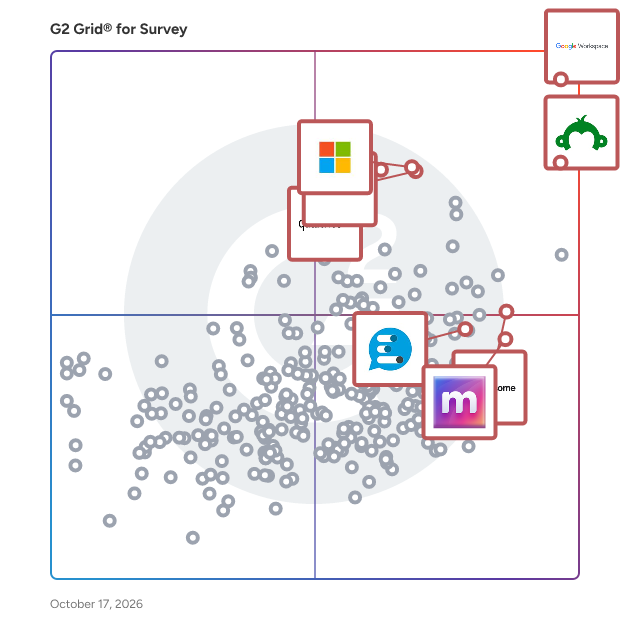
## G2 Grid® for Survey Software
![G2 Grid® for Survey Software plotting products by satisfaction and market presence](https://www.g2.com/categories/survey/grids.png?focus%5B%5D=1434&focus%5B%5D=541&focus%5B%5D=89299&focus%5B%5D=97695&focus%5B%5D=482&focus%5B%5D=663&focus%5B%5D=78926&focus%5B%5D=13574)
Highlighted products: Google Workspace, SurveyMonkey, Microsoft Forms, Matter, Qualtrics Market Research, Microsoft 365, Leapsome, and Vevox.
Underlying data: [Grid® JSON](https://www.g2.com/categories/survey/grids.json?focus%5B%5D=google-workspace&amp;focus%5B%5D=surveymonkey&amp;focus%5B%5D=microsoft-forms&amp;focus%5B%5D=matter-app&amp;focus%5B%5D=qualtrics-market-research&amp;focus%5B%5D=microsoft365&amp;focus%5B%5D=leapsome&amp;focus%5B%5D=vevox&amp;segment=enterprise)


## How Many Survey Software Products Does G2 Track?
**Total Products under this Category:** 555

### Category Stats (Jul 2026)
- **Average Rating**: 4.42/5 The average rating of products in this category, based on all submitted ratings
- **Top Trending Product**: onlinesurvey.ai (+5.56%) - Among all products in this category, onlinesurvey.ai recorded the largest rating increase compared to last month
*Last updated: July 17, 2026*


## How Does G2 Rank Survey Software Products?

**Why You Can Trust G2's Software Rankings:**

- 30 Analysts and Data Experts
- 153,600+ Authentic Reviews
- 555+ Products
- Unbiased Rankings

G2's software rankings are built on verified user reviews, rigorous moderation, and a consistent research methodology maintained by a team of analysts and data experts. Each product is measured using the same transparent criteria, with no paid placement or vendor influence. While reviews reflect real user experiences, which can be subjective, they offer valuable insight into how software performs in the hands of professionals. Together, these inputs power the G2 Score, a standardized way to compare tools within every category.


---

**Sponsored**

### Ideally

Ideally is the market research platform that puts real human insight into every creative and commercial decision. We&#39;re reinventing research for modern marketing, putting real consumer understanding into the hands of every marketer, strategist, and insights leader who needs it. Our platform delivers fast, always-on insight to understand what customers want, where categories are heading, and how to test ideas, products, and campaigns before they hit the market. Real people. Real responses. At the speed modern brands need to move. More than 250 brands and agencies across the US, UK, and APAC - including Treasury Wine Estates, Burger King, Google, and Rémy Cointreau - trust Ideally to make better decisions, faster.


[Visit website](https://www.g2.com/external_clickthroughs/record?secure%5Bad_program%5D=ppc&amp;secure%5Bad_slot%5D=category_product_list&amp;secure%5Bcategory_id%5D=28&amp;secure%5Bchosen_at%5D=2026-07-18T19%3A32%3A31Z&amp;secure%5Bdisplayable_resource_id%5D=28&amp;secure%5Bdisplayable_resource_type%5D=Category&amp;secure%5Bmedium%5D=sponsored&amp;secure%5Bplacement_reason%5D=page_category&amp;secure%5Bplacement_resource_ids%5D%5B%5D=28&amp;secure%5Bprioritized%5D=false&amp;secure%5Bproduct_id%5D=1327193&amp;secure%5Bresource_id%5D=28&amp;secure%5Bresource_type%5D=Category&amp;secure%5Bsource_type%5D=category_page&amp;secure%5Bsource_url%5D=https%3A%2F%2Fwww.g2.com%2Fcategories%2Fsurvey%2Fenterprise%3Fpage%3D3&amp;secure%5Btoken%5D=d4d3ca2ae5771b12248fa6e56326b8649ffcffff66cfcd92ed83b6aafdc89ec8&amp;secure%5Burl%5D=https%3A%2F%2Fwww.goideally.com&amp;secure%5Burl_type%5D=company_website)

---

## What Are the Top-Rated Survey Software Products in 2026?
### 1. [Sogolytics](https://www.g2.com/products/sogolytics/reviews)
Sogolytics is an experience management platform designed to help organizations enhance customer experience, boost employee engagement, and generate actionable insights through its robust survey software. This comprehensive solution caters to businesses of all sizes, providing tools that streamline the process of gathering feedback and analyzing data to drive informed decision-making. The platform is particularly beneficial for organizations looking to understand their customers and employees better. With SogoCX, businesses can focus on improving customer interactions and satisfaction, while SogoEX helps foster a more engaged and motivated workforce. Sogolytics stands out in the experience management category by offering a versatile suite of features that adapt to various use cases, from customer satisfaction surveys to employee engagement assessments. This adaptability makes it suitable for diverse industries, including retail, healthcare, education, and more. Key features of Sogolytics include seamless automation of data collection and analysis, which significantly reduces the time and effort required to gather insights. The user-friendly interface allows users to navigate the platform effortlessly, making it accessible even for those with limited technical expertise. Additionally, the powerful reporting engine transforms raw data into visually appealing and easily interpretable reports, enabling organizations to quickly identify trends and areas for improvement. Another notable aspect of Sogolytics is its integration capabilities with popular CRM systems and other business tools, ensuring that organizations can leverage their existing technology stack effectively. The platform prioritizes data security, adhering to the highest industry standards to protect sensitive information. Automated feedback collection through APIs further enhances the user experience, allowing organizations to gather real-time insights without manual intervention. Sogolytics also emphasizes customer support, offering 24/7 assistance via phone, email, and chat. This commitment to service ensures that users can resolve issues promptly and maximize the platform&#39;s potential. By providing a comprehensive and secure experience management solution, Sogolytics empowers organizations to make data-driven decisions that enhance both customer and employee experiences.


**Average Rating:** 4.6/5.0
**Total Reviews:** 87
**How Do G2 Users Rate Sogolytics?**

- **Has the product been a good partner in doing business?:** 9.3/10 (Category avg: 8.9/10)
- **Permissions:** 8.8/10 (Category avg: 8.6/10)
- **Question Types:** 9.1/10 (Category avg: 8.9/10)
- **Data Exporting:** 9.4/10 (Category avg: 8.7/10)

**Who Is the Company Behind Sogolytics?**

- **Seller:** [Sogolytics](https://www.g2.com/sellers/sogolytics)
- **Company Website:** https://www.sogolytics.com/
- **Year Founded:** 2013
- **HQ Location:** Herndon, VA
- **Twitter:** @Sogolytics (8,657 Twitter followers)
- **LinkedIn® Page:** https://www.linkedin.com/company/2315708/ (111 employees on LinkedIn®)

**Who Uses This Product?**
- **Top Industries:** Non-Profit Organization Management, Education Management
- **Company Size:** 49% Small-Business, 27% Mid-Market


#### What Are Sogolytics's Pros and Cons?

**Pros:**

- Customer Support (2 reviews)
- Ease of Use (2 reviews)
- Feedback (2 reviews)
- Feedback Management (2 reviews)
- Helpful (2 reviews)

**Cons:**

- Complex Usability (1 reviews)
- Inadequate Filtering (1 reviews)
- Not Intuitive (1 reviews)
- Survey Issues (1 reviews)


### What Do G2 Reviewers Say About Sogolytics?
*AI-generated summary from verified user reviews*

**Pros:**

- Users appreciate the **awesome customer support** from Sogolytics, helping even amateurs navigate the platform effectively.
- Users highlight the **ease of use** of Sogolytics, making survey creation simple and intuitive for everyone.
- Users value Sogolytics for its **ease of use and powerful measuring tools** , making feedback collection simple and effective.
- Users commend Sogolytics for its **powerful feedback management tools** , making participant feedback easy and meaningful.
- Users highlight the **helpful support** from Sogolytics, making it ideal for amateurs navigating the platform.

**Cons:**

- Users find the **complex usability** of Sogolytics frustrating, particularly regarding report saving and survey adjustments.
- Users find the **inadequate filtering** of Sogolytics frustrating, complicating the process of saving reports and filters efficiently.
- Users find the software **not super intuitive** , though staff assistance helps improve the overall experience.
- Users find **survey issues** frustrating, particularly with saving functionality and managing prior reports or filters.

#### What Are Recent G2 Reviews of Sogolytics?

**"[Easy Survey Creation with Reports That Are Actually Useful](https://www.g2.com/survey_responses/sogolytics-review-13080156)"**

**Rating:** 4.5/5.0 stars
*— Verified User in Hospital &amp; Health Care*

[Read full review](https://www.g2.com/survey_responses/sogolytics-review-13080156)

---

**"[Effortless Survey Creation with Templates, AI Prompts, and Multilingual Forms](https://www.g2.com/survey_responses/sogolytics-review-12969235)"**

**Rating:** 4.5/5.0 stars
*— Konjengbam  M.*

[Read full review](https://www.g2.com/survey_responses/sogolytics-review-12969235)

---


#### What Are G2 Users Discussing About Sogolytics?

- [Is SoGo survey free?](https://www.g2.com/discussions/is-sogo-survey-free) - 1 comment
- [Who owns SoGoSurvey?](https://www.g2.com/discussions/who-owns-sogosurvey)
- [What is the features of Zoho survey?](https://www.g2.com/discussions/what-is-the-features-of-zoho-survey)
- [What are the features of Survey Monkey?](https://www.g2.com/discussions/what-are-the-features-of-survey-monkey)

### 2. [FormAssembly](https://www.g2.com/products/formassembly/reviews)
FormAssembly is an enterprise data collection and automation platform that enables organizations to capture clean, compliant data from the start. FormAssembly turns secure web forms into governed data collection workflows. From the moment information is submitted, it is validated, structured, and routed reliably into systems of record, like Salesforce. With AI-assisted guidance from Fai, teams can design sophisticated workflows faster without sacrificing control or compliance.


**Average Rating:** 4.4/5.0
**Total Reviews:** 388
**How Do G2 Users Rate FormAssembly?**

- **Has the product been a good partner in doing business?:** 8.9/10 (Category avg: 8.9/10)
- **Permissions:** 8.8/10 (Category avg: 8.6/10)
- **Question Types:** 9.1/10 (Category avg: 8.9/10)
- **Data Exporting:** 9.1/10 (Category avg: 8.7/10)

**Who Is the Company Behind FormAssembly?**

- **Seller:** [FormAssembly Inc.](https://www.g2.com/sellers/formassembly-inc)
- **Company Website:** https://www.formassembly.com/
- **Year Founded:** 2006
- **HQ Location:** Bloomington, IN
- **Twitter:** @formassembly (1,472 Twitter followers)
- **LinkedIn® Page:** https://www.linkedin.com/company/2316013/ (150 employees on LinkedIn®)

**Who Uses This Product?**
- **Who Uses This:** Salesforce Administrator, Salesforce Consultant
- **Top Industries:** Non-Profit Organization Management, Higher Education
- **Company Size:** 58% Small-Business, 33% Mid-Market


#### What Are FormAssembly's Pros and Cons?

**Pros:**

- Ease of Use (10 reviews)
- Customer Support (9 reviews)
- Integrations (9 reviews)
- Easy Integrations (6 reviews)
- Features (6 reviews)

**Cons:**

- Limited Customization (6 reviews)
- Missing Features (5 reviews)
- Expensive (4 reviews)
- Limitations (3 reviews)
- Pricing Issues (3 reviews)


### What Do G2 Reviewers Say About FormAssembly?
*AI-generated summary from verified user reviews*

**Pros:**

- Users value the **user-friendly interface** of FormAssembly, enabling easy customization and quick implementation for their needs.
- Users praise the **excellent customer support** from FormAssembly, highlighting their helpfulness and timely responses.
- Users value the **seamless integrations** with Salesforce, enabling efficient data handling and enhancing overall user experience.
- Users value the **easy integrations** of FormAssembly, enabling seamless data collection and efficient Salesforce connectivity.
- Users love the **user-friendly interface and drag-and-drop capabilities** , making form updates and data collection seamless and efficient.

**Cons:**

- Users experience **limited customization** options, frustrating branding flexibility and efficiency when managing multiple forms with FormAssembly.
- Users find the **missing features** of FormAssembly, like CRM connectors and PDF attachments, limit their efficiency.
- Users find FormAssembly **expensive** , particularly when accessing advanced features that are essential for their projects.
- Users experience **limitations in features and flexibility** , particularly with advanced options and customization capabilities.
- Users find **pricing issues** limiting, as advanced features often come at a premium, restricting access for smaller teams.

#### What Are Recent G2 Reviews of FormAssembly?

**"[Great tool - doing better with support](https://www.g2.com/survey_responses/formassembly-review-8195232)"**

**Rating:** 4.5/5.0 stars
*— James P.*

[Read full review](https://www.g2.com/survey_responses/formassembly-review-8195232)

---

**"[Exceptional Client Support and Onboarding Experience](https://www.g2.com/survey_responses/formassembly-review-12670754)"**

**Rating:** 5.0/5.0 stars
*— Amy M.*

[Read full review](https://www.g2.com/survey_responses/formassembly-review-12670754)

---


#### What Are G2 Users Discussing About FormAssembly?

- [What is FormAssembly used for?](https://www.g2.com/discussions/what-is-formassembly-used-for)

### 3. [Decode](https://www.g2.com/products/entropik-decode/reviews)
Decode is an integrated Human Insights AI Platform that replaces fragmented research stacks with a single, comprehensive solution. By unifying consumer research, user experience testing, predictive creative analytics, and insights management with Emotion AI, Behavior AI and Generative AI, Decode delivers faster, more actionable insights across the entire customer journey. Complete Research Suite: - Consumer Insights: AI-powered surveys, qualitative research, diary studies, shopper behavior analysis, and social media research that decode emotions and predict behaviors. - User Experience Research: Remote user testing, journey mapping, wireframe validation, prototype testing, and live website optimization. - Predictive Creative Analytics: Real-time eye-gaze tracking, attention measurement, and creative optimization powered by advanced Neuro AI. - Insights Intelligence Hub: Centralized AI Copilot that automatically analyzes calls, meetings, documents, and research data to surface connected insights across all touchpoints.


**Average Rating:** 4.5/5.0
**Total Reviews:** 46
**How Do G2 Users Rate Decode?**

- **Has the product been a good partner in doing business?:** 8.3/10 (Category avg: 8.9/10)
- **Permissions:** 8.5/10 (Category avg: 8.6/10)
- **Question Types:** 8.7/10 (Category avg: 8.9/10)
- **Data Exporting:** 8.2/10 (Category avg: 8.7/10)

**Who Is the Company Behind Decode?**

- **Seller:** [Entropik Technologies](https://www.g2.com/sellers/entropik-technologies)
- **Year Founded:** 2016
- **HQ Location:** Bengaluru, IN
- **Twitter:** @entropik_io (583 Twitter followers)
- **LinkedIn® Page:** https://www.linkedin.com/company/entropiktech/about/ (94 employees on LinkedIn®)

**Who Uses This Product?**
- **Company Size:** 45% Enterprise, 41% Mid-Market


#### What Are Decode's Pros and Cons?

**Pros:**

- Ease of Use (12 reviews)
- Integrations (6 reviews)
- Features (5 reviews)
- Insights (5 reviews)
- Analytics (4 reviews)

**Cons:**

- Complexity (4 reviews)
- Dashboard Issues (3 reviews)
- Learning Curve (3 reviews)
- Not User-Friendly (3 reviews)
- Steep Learning Curve (3 reviews)


### What Do G2 Reviewers Say About Decode?
*AI-generated summary from verified user reviews*

**Pros:**

- Users praise Decode for its **intuitive interface** , making navigation and task performance effortless and efficient.
- Users highlight Decode&#39;s **seamless integration capabilities** , enabling effortless navigation and enhanced productivity in consumer insights research.
- Users appreciate the **intuitive interface and useful features** of Decode, significantly enhancing their productivity and workflow.
- Users value the **AI-powered assistant** of Decode for its ability to streamline data analysis and insights extraction.
- Users praise the **analytics capabilities** of Decode for transforming strategic planning and enhancing customer experience insights.

**Cons:**

- Users note the **complexity of features** , making initial setup and mastering the platform challenging but eventually rewarding.
- Users find the **dashboard issues** frustrating, calling for simplification and improved data accuracy for better analysis.
- Users find the **learning curve steep** initially, noting a need for better tutorials to master Decode’s advanced features.
- Users find the **user interface not user-friendly** , often struggling to locate specific tools and reports efficiently.
- Users note a **steep learning curve** initially, making it challenging for new users to adapt effectively.

#### What Are Recent G2 Reviews of Decode?

**"[User-friendly and Reliable](https://www.g2.com/survey_responses/decode-review-10045909)"**

**Rating:** 4.5/5.0 stars
*— Verified User in Writing and Editing*

[Read full review](https://www.g2.com/survey_responses/decode-review-10045909)

---

**"[Exceptional Tool for User Research](https://www.g2.com/survey_responses/decode-review-10038249)"**

**Rating:** 5.0/5.0 stars
*— Pavan K.*

[Read full review](https://www.g2.com/survey_responses/decode-review-10038249)

---


### 4. [Constant Contact](https://www.g2.com/products/constant-contact/reviews)
We deliver for small businesses with powerful tools to simplify and amplify digital marketing. Whether it&#39;s driving sales, growing a customer base or engaging an audience, we help you build strong connections and generate powerful results. - Grow your audience Build your list fast with landing pages, social media lead ads, and more. - Deepen customer relationships Connect with people where they are—via text, email, or social—all from one platform, to drive more engagement and results for your business. - Simplify your social media Create and manage social posts and ads to generate awareness, drive leads and promote growth. - Sync with the apps you&#39;re already using Connect with digital tools you&#39;re already using to grow your business and sell more online, faster. Learn more at www.constantcontact.com


**Average Rating:** 4.1/5.0
**Total Reviews:** 7,227
**How Do G2 Users Rate Constant Contact?**

- **Has the product been a good partner in doing business?:** 8.6/10 (Category avg: 8.9/10)
- **Permissions:** 8.8/10 (Category avg: 8.6/10)
- **Question Types:** 8.4/10 (Category avg: 8.9/10)
- **Data Exporting:** 8.6/10 (Category avg: 8.7/10)

**Who Is the Company Behind Constant Contact?**

- **Seller:** [Constant Contact](https://www.g2.com/sellers/constant-contact-5aaee82b-8325-4eeb-b7b7-15fada778076)
- **Company Website:** https://www.constantcontact.com/home
- **Year Founded:** 1995
- **HQ Location:** Waltham, US
- **Twitter:** @ConstantContact (67,137 Twitter followers)
- **LinkedIn® Page:** https://www.linkedin.com/company/constant-contact/ (1,147 employees on LinkedIn®)

**Who Uses This Product?**
- **Who Uses This:** Marketing Manager, Owner
- **Top Industries:** Non-Profit Organization Management, Marketing and Advertising
- **Company Size:** 70% Small-Business, 23% Mid-Market


#### What Are Constant Contact's Pros and Cons?

**Pros:**

- Ease of Use (1059 reviews)
- Easy Creation (495 reviews)
- Email Marketing (490 reviews)
- Simple (457 reviews)
- Helpful (418 reviews)

**Cons:**

- Missing Features (286 reviews)
- Limited Customization (255 reviews)
- Limited Features (254 reviews)
- Limited Templates (210 reviews)
- Layout Issues (183 reviews)


### What Do G2 Reviewers Say About Constant Contact?
*AI-generated summary from verified user reviews*

**Pros:**

- Users find Constant Contact&#39;s **ease of use** exceptional, facilitating effortless campaign creation and management for small businesses.
- Users appreciate the **easy creation of campaigns** with Constant Contact, enhancing engagement and efficiency for small businesses.
- Users value the **user-friendly email builder** of Constant Contact, making campaign creation and management effortless.
- Users appreciate how **simple** it is to create consistent newsletters and engaging social media posts for their audience.
- Users find Constant Contact **incredibly helpful** for managing email campaigns efficiently and training new team members easily.

**Cons:**

- Users find **missing features** in Constant Contact, such as inadequate search and limited design options, disappointing.
- Users find the **limited customization options** restrictive, impacting their ability to create personalized campaigns effectively.
- Users find the **limited features** of Constant Contact may not justify its pricing for their specific needs.
- Users express frustration over **limited templates** , wishing for more design options and customization in Constant Contact.
- Users find the **layout issues** in Constant Contact frustrating, leading to confusion in navigation and tool access.

#### What Are Recent G2 Reviews of Constant Contact?

**"[Constant Contact Review](https://www.g2.com/survey_responses/constant-contact-review-13125279)"**

**Rating:** 4.0/5.0 stars
*— Omer Y.*

[Read full review](https://www.g2.com/survey_responses/constant-contact-review-13125279)

---

**"[Flexible Email Templates and Insightful Reporting in Constant Contact](https://www.g2.com/survey_responses/constant-contact-review-12837182)"**

**Rating:** 4.5/5.0 stars
*— Olga Z.*

[Read full review](https://www.g2.com/survey_responses/constant-contact-review-12837182)

---


#### What Are G2 Users Discussing About Constant Contact?

- [How are small businesses using Constant Contact to enhance their email marketing campaigns effectively?](https://www.g2.com/discussions/how-are-small-businesses-using-constant-contact-to-enhance-their-email-marketing-campaigns-effectively) - 3 comments
- [What is Constant Contact used for?](https://www.g2.com/discussions/constant-contact-what-is-constant-contact-used-for) - 4 comments, 1 upvote
- [Does Constant Contact have a CRM?](https://www.g2.com/discussions/does-constant-contact-have-a-crm) - 2 comments
- [How do I stop Constant Contact emails?](https://www.g2.com/discussions/how-do-i-stop-constant-contact-emails) - 2 comments
- [What is constant contact used for?](https://www.g2.com/discussions/what-is-constant-contact-used-for) - 1 comment

### 5. [ArcGIS Survey123](https://www.g2.com/products/arcgis-survey123/reviews)
ArcGIS Survey123 provides an end to end, location aware, form-centric data gathering solution. With Survey123 you can design powerful smart forms and leverage them throughout your organization to streamline the way you work. Organizations worldwide use Survey123 to support asset and inventory inspection workflows, perform field damage assessments, support citizen science, crowdsourcing efforts and much more. Survey123 is included with ArcGIS, and provides powerful features to help you leverage the power of location to boost your productivity while capturing data and analyzing the results of your surveys.


**Average Rating:** 4.3/5.0
**Total Reviews:** 60
**How Do G2 Users Rate ArcGIS Survey123?**

- **Has the product been a good partner in doing business?:** 8.6/10 (Category avg: 8.9/10)
- **Permissions:** 8.9/10 (Category avg: 8.6/10)
- **Question Types:** 8.3/10 (Category avg: 8.9/10)
- **Data Exporting:** 9.3/10 (Category avg: 8.7/10)

**Who Is the Company Behind ArcGIS Survey123?**

- **Seller:** [Esri](https://www.g2.com/sellers/esri)
- **Year Founded:** 1969
- **HQ Location:** Redlands, CA
- **Twitter:** @Esri (188,738 Twitter followers)
- **LinkedIn® Page:** https://www.linkedin.com/company/5311/ (7,311 employees on LinkedIn®)

**Who Uses This Product?**
- **Top Industries:** Government Administration, Environmental Services
- **Company Size:** 42% Mid-Market, 29% Enterprise


#### What Are ArcGIS Survey123's Pros and Cons?

**Pros:**

- Ease of Use (5 reviews)
- Efficiency (4 reviews)
- Customization (3 reviews)
- Easy Integrations (3 reviews)
- Setup Ease (3 reviews)

**Cons:**

- Complexity (4 reviews)
- Limited Customization (3 reviews)
- Limited Features (3 reviews)
- Survey Issues (3 reviews)
- Upload Issues (3 reviews)


### What Do G2 Reviewers Say About ArcGIS Survey123?
*AI-generated summary from verified user reviews*

**Pros:**

- Users love the **ease of use** in ArcGIS Survey123, enabling efficient data collection through smart, customizable forms.
- Users value the **efficiency of data collection** in ArcGIS Survey123, enhancing workflows in both mobile and web environments.
- Users value the **customization options** in ArcGIS Survey123, allowing for tailored form designs and enhanced data quality.
- Users value the **easy integrations** of ArcGIS Survey123, facilitating seamless data flow into various GIS tools for analysis.
- Users find the **initial setup very streamlined** , making it easy to start creating sophisticated forms quickly.

**Cons:**

- Users find **designing complex forms** in Survey123 challenging, with limitations on customization and conditional logic functionality.
- Users find the **customization options limited** , especially for creating complex or dynamic surveys in Survey123.
- Users find **limited features** in Survey123 restrict their ability to create complex and dynamic surveys effectively.
- Users experience **performance and integration hurdles** with Survey123, highlighting frustrations with slow load times and buggy previews.
- Users often face **upload issues** with Survey123, experiencing slow loads, bugs, and frustrating performance limitations.

#### What Are Recent G2 Reviews of ArcGIS Survey123?

**"[Form-Based Surveys with Powerful Offline Sync for Field Data Collection](https://www.g2.com/survey_responses/arcgis-survey123-review-12638371)"**

**Rating:** 5.0/5.0 stars
*— Dhawood Gani N.*

[Read full review](https://www.g2.com/survey_responses/arcgis-survey123-review-12638371)

---

**"[Reliable Tool for Easy Field Data Collection](https://www.g2.com/survey_responses/arcgis-survey123-review-12541540)"**

**Rating:** 5.0/5.0 stars
*— Emina d.*

[Read full review](https://www.g2.com/survey_responses/arcgis-survey123-review-12541540)

---


#### What Are G2 Users Discussing About ArcGIS Survey123?

- [What is ArcGIS Survey123 used for?](https://www.g2.com/discussions/what-is-arcgis-survey123-used-for) - 2 comments, 1 upvote
- [What&#39;s new in survey123?](https://www.g2.com/discussions/what-s-new-in-survey123) - 1 comment, 1 upvote
- [How much does survey123 cost?](https://www.g2.com/discussions/how-much-does-survey123-cost) - 2 comments
- [What is survey123 connect?](https://www.g2.com/discussions/what-is-survey123-connect)

### 6. [Forsta](https://www.g2.com/products/forsta/reviews)
Forsta, a Press Ganey company, powers the HX (Human Experience) Platform – a comprehensive Experience and Research Technology platform that breaks down the silos between CX (Customer Experience), Employee Experience (EX), Market Research – so that companies can get a deeper, more complete understanding of the experiences of their audiences. The HX Platform gathers and analyzes data, and translates the findings into shareable actions to inform decision-making and drive growth. Forsta’s technology, combined with its team of expert consultants, serves organizations across a variety of industries including financial services, healthcare, hospitality, market research, professional services, retail and technology. Forsta is recognized as a Leader in the 2021 Gartner® Magic Quadrant™ for Voice of the Customer. For more information, visit www.forsta.com.


**Average Rating:** 4.2/5.0
**Total Reviews:** 297
**How Do G2 Users Rate Forsta?**

- **Has the product been a good partner in doing business?:** 8.4/10 (Category avg: 8.9/10)
- **Permissions:** 8.5/10 (Category avg: 8.6/10)
- **Question Types:** 9.0/10 (Category avg: 8.9/10)
- **Data Exporting:** 9.1/10 (Category avg: 8.7/10)

**Who Is the Company Behind Forsta?**

- **Seller:** [Forsta](https://www.g2.com/sellers/forsta)
- **Year Founded:** 1990
- **HQ Location:** London, United Kingdom
- **Twitter:** @Forstaglobal (840 Twitter followers)
- **LinkedIn® Page:** https://www.linkedin.com/company/forstainfo/ (436 employees on LinkedIn®)

**Who Uses This Product?**
- **Who Uses This:** Project Manager, Manager
- **Top Industries:** Market Research, Management Consulting
- **Company Size:** 43% Mid-Market, 29% Enterprise


#### What Are Forsta's Pros and Cons?

**Pros:**

- Ease of Use (4 reviews)
- Insights (4 reviews)
- Customization (3 reviews)
- Data Analysis (3 reviews)
- Efficiency Improvement (3 reviews)

**Cons:**

- Limited Options (3 reviews)
- Expensive (2 reviews)
- Limitations (2 reviews)
- Limited Customization (2 reviews)
- Limited Features (2 reviews)


### What Do G2 Reviewers Say About Forsta?
*AI-generated summary from verified user reviews*

**Pros:**

- Users appreciate the **ease of use** of Forsta, finding it simple to create surveys and analyze data.
- Users value the **ease of data integration and reporting** with Forsta, streamlining their survey processes effectively.
- Users value the **customization options** in Forsta, which enhance usability and meet diverse market research needs.
- Users value the **powerful data analysis tools** of Forsta for effective market research and insightful reporting.
- Users value the **efficiency improvement** of Forsta, enhancing their market research and customer experience management seamlessly.

**Cons:**

- Users find the **limited design options** of Forsta challenging, hindering effective personalization and creativity in projects.
- Users find the **expensive pricing** of Forsta burdensome for smaller teams, affecting accessibility and personalization.
- Users find Forsta **costly and limited** in design options, making complex surveys challenging and expensive to implement.
- Users find the **limited customization** options hinder their ability to personalize projects effectively, impacting overall satisfaction.
- Users find the **limited features** of Forsta hinder personalization, making setup and advanced projects time-consuming and costly.

#### What Are Recent G2 Reviews of Forsta?

**"[Powerful Survey Tool with Room for Enhancement](https://www.g2.com/survey_responses/forsta-review-12708334)"**

**Rating:** 4.0/5.0 stars
*— Michael H.*

[Read full review](https://www.g2.com/survey_responses/forsta-review-12708334)

---

**"[Easy-to-Customize Survey Management with Helpful Crosstabs and Quotas](https://www.g2.com/survey_responses/forsta-review-12639408)"**

**Rating:** 4.0/5.0 stars
*— Chandra L.*

[Read full review](https://www.g2.com/survey_responses/forsta-review-12639408)

---


#### What Are G2 Users Discussing About Forsta?

- [What is Forsta used for?](https://www.g2.com/discussions/what-is-forsta-used-for)
- [Are confirmit surveys legit?](https://www.g2.com/discussions/are-confirmit-surveys-legit) - 1 comment

### 7. [Survio](https://www.g2.com/products/survio/reviews)
Survio is an intuitive online survey platform designed for modern businesses. Launch, govern, and scale surveys effortlessly with AI-powered creation tools, real-time analytics, and automated reporting. Secure, multilingual, and fully integrated with popular business apps, Survio empowers organizations to collect feedback, improve decisions, and drive growth at any scale


**Average Rating:** 4.4/5.0
**Total Reviews:** 381
**How Do G2 Users Rate Survio?**

- **Has the product been a good partner in doing business?:** 8.5/10 (Category avg: 8.9/10)
- **Permissions:** 8.3/10 (Category avg: 8.6/10)
- **Question Types:** 8.7/10 (Category avg: 8.9/10)
- **Data Exporting:** 8.4/10 (Category avg: 8.7/10)

**Who Is the Company Behind Survio?**

- **Seller:** [Survio](https://www.g2.com/sellers/survio)
- **Year Founded:** 2012
- **HQ Location:** Brno
- **Twitter:** @theSurvio (861 Twitter followers)
- **LinkedIn® Page:** https://www.linkedin.com/company/gbit.cz/about (25 employees on LinkedIn®)

**Who Uses This Product?**
- **Who Uses This:** Student, student
- **Top Industries:** Higher Education, Education Management
- **Company Size:** 65% Small-Business, 28% Mid-Market


#### What Are Survio's Pros and Cons?

**Pros:**

- Ease of Use (20 reviews)
- Ease of Creation (12 reviews)
- Intuitive (11 reviews)
- Simple (11 reviews)
- Quick Setup (10 reviews)

**Cons:**

- Expensive (5 reviews)
- Survey Issues (5 reviews)
- Limited Customization (4 reviews)
- Limited Features (4 reviews)
- Subscription Cost (3 reviews)


### What Do G2 Reviewers Say About Survio?
*AI-generated summary from verified user reviews*

**Pros:**

- Users praise the **ease of use** of Survio, appreciating its intuitive interface and quick survey creation process.
- Users find Survio&#39;s **ease of creation** exceptional, enabling quick and professional surveys with an intuitive interface.
- Users appreciate Survio&#39;s **intuitive interface** , making survey creation quick and efficient without the need for extensive tutorials.
- Users value the **simple and user-friendly design** of Survio, enabling quick survey creation and efficient feedback collection.
- Users praise the **quick setup** of Survio, enabling fast and intuitive survey creation within minutes.

**Cons:**

- Users find Survio&#39;s pricing **expensive** , especially for those needing only a single survey without a subscription commitment.
- Users are concerned about the **limited advanced question logic and branching** in Survio, affecting survey depth and engagement.
- Users find the **limited customization options** in Survio restrictive for creating unique and branded survey designs.
- Users find **limited advanced question logic** in Survio hampers the effectiveness of mid-sized surveys.
- Users find the **subscription cost** high, especially when needing only one survey for a specific project.

#### What Are Recent G2 Reviews of Survio?

**"[It helped us replace assumptions with real user feedback](https://www.g2.com/survey_responses/survio-review-13039335)"**

**Rating:** 4.0/5.0 stars
*— Phil J.*

[Read full review](https://www.g2.com/survey_responses/survio-review-13039335)

---

**"[Streamlined Feedback with GDPR Compliance](https://www.g2.com/survey_responses/survio-review-13058497)"**

**Rating:** 4.5/5.0 stars
*— Muqe Y.*

[Read full review](https://www.g2.com/survey_responses/survio-review-13058497)

---


#### What Are G2 Users Discussing About Survio?

- [What is Survio used for?](https://www.g2.com/discussions/what-is-survio-used-for) - 1 upvote

### 8. [Attest](https://www.g2.com/products/attest/reviews)
Understand the &#39;why&#39; and &#39;what’s next&#39; for your customers. Attest is an enterprise-grade platform for qualitative and quantitative research. One platform to deeply understand your current customers, future consumers or both side-by-side. Simple to launch surveys, data storytelling and dedicated experts to help you every step of the way. - Simple and transparent pricing No hidden fees – no matter who or where your audience is we have one flat audience cost. - Multi-market insights with local nuance Access insights from 59 countries with fully localised and translated surveys, across 70 languages. Compare regional groups side by side. - No extra cost for the support you need Our industry-leading team of experts are always on hand for everything from survey setup best practice, to support in identifying key trends in your data. - Data Storytelling Discover, craft and share data stories with automated analysis tools, custom charts and interactive Boards. - Industry-leading data quality methods We truly care about the quality of your insights. Our sophisticated data training and algorithms are designed to eliminate noise and provide high quality results. - Bespoke insights for your brand Plug and play with survey templates and pre-set audiences, or create your ideal setup with fully customisable audiences. No omnibus research or sharing insights. Attest is your end-to-end consumer research platform that prioritises data quality, tailored research and robust insights so you always have the confidence in your decisions.


**Average Rating:** 4.5/5.0
**Total Reviews:** 153
**How Do G2 Users Rate Attest?**

- **Has the product been a good partner in doing business?:** 9.3/10 (Category avg: 8.9/10)
- **Permissions:** 8.2/10 (Category avg: 8.6/10)
- **Question Types:** 8.3/10 (Category avg: 8.9/10)
- **Data Exporting:** 7.6/10 (Category avg: 8.7/10)

**Who Is the Company Behind Attest?**

- **Seller:** [Attest](https://www.g2.com/sellers/attest)
- **Company Website:** https://www.askattest.com
- **Year Founded:** 2015
- **HQ Location:** London
- **Twitter:** @AskAttest (1,425 Twitter followers)
- **LinkedIn® Page:** https://www.linkedin.com/company/attest-technologies-limited/ (115 employees on LinkedIn®)

**Who Uses This Product?**
- **Top Industries:** Marketing and Advertising, Food &amp; Beverages
- **Company Size:** 53% Mid-Market, 27% Small-Business


#### What Are Attest's Pros and Cons?

**Pros:**

- Ease of Use (16 reviews)
- Survey Creation (9 reviews)
- Intuitive (8 reviews)
- Customer Support (7 reviews)
- Helpful (7 reviews)

**Cons:**

- Pricing Issues (6 reviews)
- Survey Issues (4 reviews)
- Survey Limitations (4 reviews)
- Expensive (3 reviews)
- Insufficient Insights (2 reviews)


### What Do G2 Reviewers Say About Attest?
*AI-generated summary from verified user reviews*

**Pros:**

- Users praise the **speed and simplicity** of Attest, enabling quick, intuitive, and actionable consumer insights.
- Users appreciate the **speed and simplicity** of Attest for creating insightful and actionable consumer surveys efficiently.
- Users love Attest for its **intuitive design** , allowing quick setup and straightforward surveys for efficient market research.
- Users highlight the **responsive and professional support** from Attest, enhancing their survey experience and results.
- Users appreciate the **speed and simplicity** of Attest, enabling quick, actionable insights for confident decision-making.

**Cons:**

- Users find **pricing issues** with Attest, particularly for frequent or large-scale surveys, which can feel expensive.
- Users experience **survey issues** with Attest, noting limitations in customization and availability for deeper research.
- Users find **survey limitations** in Attest, noting infrequent participation opportunities and compatibility issues with complex designs.
- Users find Attest to be **expensive** , especially for small projects and frequent surveys, impacting overall affordability.
- Users feel that Attest provides **insufficient insights** for deep research, limiting customization and advanced analytics options.

#### What Are Recent G2 Reviews of Attest?

**"[Streamlined German Market Insights, But Needs Better DSGVO Integration](https://www.g2.com/survey_responses/attest-review-13058323)"**

**Rating:** 4.5/5.0 stars
*— Orte P.*

[Read full review](https://www.g2.com/survey_responses/attest-review-13058323)

---

**"[Streamlined GDPR Compliance for EU Market Research](https://www.g2.com/survey_responses/attest-review-12996132)"**

**Rating:** 4.0/5.0 stars
*— Paloma E.*

[Read full review](https://www.g2.com/survey_responses/attest-review-12996132)

---


#### What Are G2 Users Discussing About Attest?

- [What is Attest used for?](https://www.g2.com/discussions/what-is-attest-used-for)

### 9. [Personio](https://www.g2.com/products/personio/reviews)
Personio is the intelligent HR platform built for the way European businesses actually work. Most HR software was designed in the US and adapted for Europe as an afterthought. Personio was built here from the start, for companies navigating multiple languages, varying labor laws, and a patchwork of local compliance requirements that change faster than most platforms can keep up with. Manage the full employee lifecycle in one place: hiring, onboarding, time tracking, absence management, payroll, performance, and workforce reporting. No more switching between systems or maintaining spreadsheets on the side. Everything your HR team needs lives in one place, connected and up to date. Smart automations handle the repetitive admin that consumes your HR team&#39;s day. Approval workflows, absence tracking, contract generation, and onboarding checklists run in the background so your team can focus on the work that actually moves the business forward. Proactive insights turn workforce data into clear, shareable intelligence, helping HR leaders spot trends, anticipate change, and walk into leadership meetings with something worth saying. The platform adapts to how your organisation works, not the other way around. Customise workflows, approval chains, and reporting to fit your structure, whether you are running one office or coordinating teams across five countries. Personio connects with over 200 tools European businesses rely on, including DATEV, Slack, and Google Workspace. It runs natively in German, English, Spanish, French, Dutch, and Italian, among other languages and is built for GDPR compliance across every market you operate in. More than 14,000 companies across Germany, Austria, Switzerland, the UK, and Spain trust Personio to run their HR. It is the intelligent platform that grows with European businesses, because it was made for them.


**Average Rating:** 4.4/5.0
**Total Reviews:** 853
**How Do G2 Users Rate Personio?**

- **Has the product been a good partner in doing business?:** 8.5/10 (Category avg: 8.9/10)
- **Permissions:** 8.1/10 (Category avg: 8.6/10)
- **Question Types:** 7.9/10 (Category avg: 8.9/10)
- **Data Exporting:** 8.2/10 (Category avg: 8.7/10)

**Who Is the Company Behind Personio?**

- **Seller:** [Personio](https://www.g2.com/sellers/personio)
- **Company Website:** https://www.personio.com
- **Year Founded:** 2015
- **HQ Location:** München, Bayern
- **LinkedIn® Page:** https://www.linkedin.com/company/personio/ (1,745 employees on LinkedIn®)

**Who Uses This Product?**
- **Who Uses This:** CEO, HR Manager
- **Top Industries:** Computer Software, Information Technology and Services
- **Company Size:** 59% Mid-Market, 28% Small-Business


#### What Are Personio's Pros and Cons?

**Pros:**

- Ease of Use (351 reviews)
- Intuitive (192 reviews)
- Features (184 reviews)
- HR Management (179 reviews)
- Comprehensive Features (177 reviews)

**Cons:**

- Missing Features (110 reviews)
- Limited Customization (100 reviews)
- Limited Features (94 reviews)
- Lacking Features (66 reviews)
- Limited Options (62 reviews)


### What Do G2 Reviewers Say About Personio?
*AI-generated summary from verified user reviews*

**Pros:**

- Users value the **ease of use** of Personio, enjoying its clarity and helpful resources for quick onboarding.
- Users appreciate the **intuitive interface** of Personio, enhancing their experience with easy navigation and accessibility.
- Users appreciate the **intuitive interface and centralized features** of Personio, making it ideal for small teams.
- Users appreciate the **high employee acceptance** of Personio, benefiting from its centralized HR management and versatile features.
- Users appreciate the **comprehensive features** of Personio, enjoying seamless integration and user-friendly process automation.

**Cons:**

- Users desire **missing features** in Personio, particularly in automated notifications and mobile functionality.
- Users experience **limited customization** options in Personio, which can hinder meeting unique needs effectively.
- Users find the **limited features** in Personio hinder workflow customization and can complicate the user experience.
- Users often face **lacking features** in Personio, with insufficient reporting and limited mobile functionality impacting usability.
- Users express frustration over **limited options** in customization and reporting tools, feeling restricted in their HR data management.

#### What Are Recent G2 Reviews of Personio?

**"[Personio noticeably relieves our HR processes and continuously evolves](https://www.g2.com/survey_responses/personio-review-12852402)"**

**Rating:** 5.0/5.0 stars
*— Silke A.*

[Read full review](https://www.g2.com/survey_responses/personio-review-12852402)

---

**"[Effortless HR Self-Service](https://www.g2.com/survey_responses/personio-review-13002993)"**

**Rating:** 5.0/5.0 stars
*— Robert K.*

[Read full review](https://www.g2.com/survey_responses/personio-review-13002993)

---


#### What Are G2 Users Discussing About Personio?

- [What is Personio used for?](https://www.g2.com/discussions/what-is-personio-used-for)

### 10. [Explorance Blue](https://www.g2.com/products/explorance-blue/reviews)
- What is Explorance Blue: Explorance Blue is a feedback analytics platform that helps institutions and organizations gather, analyze, and act on feedback at scale. From course evaluations and student experience surveys to employee engagement and 360-degree feedback, Blue supports a wide range of feedback use cases. With flexible workflows, deep integration capabilities, and powerful analytics, Blue adapts to your unique structures and systems – whether centralized or decentralized. Automate survey delivery, streamline reporting, and turn feedback into meaningful insights that drive continuous improvement in student and employee experiences. - Explorance Blue for Higher Education: Institutions are increasingly looking for ways to boost survey response rates and streamline feedback across diverse academic structures. Explorance Blue solves this with automated workflows, deep customization, robust reporting, and seamless integration with your SIS, LMS, and other existing IT systems. It improves student participation by delivering timely, personalized surveys and simplifies feedback collection across schools, departments, and programs. With real-time response rate monitoring and automated reporting, institutions can turn feedback into actionable insights that drive teaching effectiveness and improve the student experience. \* Use Cases: All central and major feedback gathering initiatives within an institution, including: Course evaluations, Midterm surveys, Peer evaluations, 360-degree Feedback, Student engagement surveys, Clinical rotations, Placement surveys, Student exit surveys, Faculty/Staff surveys, Alumni surveys - Explorance Blue for the Workplace: Forward-thinking HR teams are seeking better ways to translate employee feedback into impactful organizational change. Explorance Blue simplifies the process with automated survey delivery, built-in data governance, and integration with existing HR systems. It empowers leaders with clear, real-time insights to employee engagement drivers, track trends, and make data-informed decisions. The result is stronger engagement, better performance, and a more responsive workplace culture. \* Use Cases: All central and major feedback gathering initiatives within an organization, including: Employee engagement surveys, Employee experience surveys, employee listening strategies, Voice of the employee initiatives, 360-degree feedback, Stay/exit surveys - Key Features: 1- Automated and Flexible Survey Management: \* Automatically distributes personalized surveys with delegated customization across departments, roles, and programs \* Uses organizational hierarchies and role-based logic for targeted survey and report delivery \* Native support for complex course evaluation scenarios including cross-listed and team-taught courses, and unique course stat/end dates. \* Leverages existing data sources to minimize manual setup and reduce administrative workload 2- Multi-Channel Delivery and Inclusive Accessibility \* Delivers surveys through LMS, HRIS, email, SMS, and QR codes to maximize response rates \* Fully responsive and compliant with WCAG 2.1 AA and Section 508 accessibility standards \* Supports multiple languages for global and diverse respondent groups \* Real-time response rate monitoring, built-in reporting and dashboard suites, and automated reminders to drive survey participation 3- Insightful Reporting with Built-In Privacy and Security \* Offers real-time analytics, data visualizations, and contextualized reports with internal benchmarks \* Global Employee Engagement benchmarks across key themes such as Culture &amp; Values, Career Development, Inclusiveness/DEI, Teamwork, and more. \* Enables role-based access and automated report distribution based on organizational hierarchy, roles, and responsibilities \* Provides AI-powered qualitative analysis through Explorance MLY for deeper understanding of open-ended feedback \* Ensures data privacy with configurable confidentiality settings and secure delivery workflows 4- Seamless Integration and Centralized Oversight \* Integrates with SIS, LMS, HRIS, and data warehouses for a unified feedback ecosystem \* Automated supports for roster syncs and dynamic data updates \* Centralized platform to manage diverse feedback types—from engagement and satisfaction surveys to 360-degree feedback and course evaluations


**Average Rating:** 4.2/5.0
**Total Reviews:** 52
**How Do G2 Users Rate Explorance Blue?**

- **Has the product been a good partner in doing business?:** 8.2/10 (Category avg: 8.9/10)
- **Permissions:** 9.0/10 (Category avg: 8.6/10)
- **Question Types:** 9.8/10 (Category avg: 8.9/10)
- **Data Exporting:** 10.0/10 (Category avg: 8.7/10)

**Who Is the Company Behind Explorance Blue?**

- **Seller:** [Explorance](https://www.g2.com/sellers/explorance)
- **Year Founded:** 2003
- **HQ Location:** Montreal, Quebec
- **Twitter:** @explorance (866 Twitter followers)
- **LinkedIn® Page:** https://www.linkedin.com/company/1210243/ (252 employees on LinkedIn®)

**Who Uses This Product?**
- **Top Industries:** Higher Education
- **Company Size:** 38% Small-Business, 36% Enterprise


#### What Are Explorance Blue's Pros and Cons?

**Pros:**

- Ease of Use (4 reviews)
- Efficiency (4 reviews)
- Easy Setup (2 reviews)
- Quick Setup (2 reviews)
- Setup Ease (2 reviews)

**Cons:**

- Technical Issues (2 reviews)
- Difficult Setup (1 reviews)
- Email Functionality (1 reviews)
- Email Issues (1 reviews)
- Expensive (1 reviews)


### What Do G2 Reviewers Say About Explorance Blue?
*AI-generated summary from verified user reviews*

**Pros:**

- Users highlight the **ease of use** of Explorance Blue, simplifying data collection and enhancing creative processes effortlessly.
- Users appreciate the **efficiency** of Explorance Blue, which streamlines data collection and improves productivity significantly.
- Users appreciate the **easy setup** of Explorance Blue, simplifying deployment and enhancing the overall experience.
- Users appreciate the **quick setup** of Explorance Blue, finding it easy and efficient for deployment and creativity.
- Users find the **initial setup extremely easy** , facilitating quicker deployment and enhancing the overall experience with Blue.

**Cons:**

- Users find the **login requirement inconvenient** , especially during rush periods when immediate access is needed for recording.
- Users find the **difficult setup** of Explorance Blue challenging, impacting their initial experience with the product.
- Users find Blue to be **expensive** , posing challenges with initial setup and resource demands.
- Users find the **login requirements inconvenient** , especially when they need to start recording quickly during busy moments.
- Users experience multiple **glitches and application failures** , indicating a need for more frequent updates to improve reliability.

#### What Are Recent G2 Reviews of Explorance Blue?

**"[Blue Delivers Comprehensive Surveys and Exceptional Support](https://www.g2.com/survey_responses/explorance-blue-review-12972837)"**

**Rating:** 5.0/5.0 stars
*— Ronda A.*

[Read full review](https://www.g2.com/survey_responses/explorance-blue-review-12972837)

---

**"[Highly Customizable, Feature-Rich Blue](https://www.g2.com/survey_responses/explorance-blue-review-12972946)"**

**Rating:** 5.0/5.0 stars
*— Kevin W.*

[Read full review](https://www.g2.com/survey_responses/explorance-blue-review-12972946)

---


#### What Are G2 Users Discussing About Explorance Blue?

- [What is Blue used for?](https://www.g2.com/discussions/what-is-blue-used-for)

### 11. [SurveyCTO](https://www.g2.com/products/surveycto/reviews)
We are a secure, flexible data collection software platform built for high-quality data capture—wherever and however you work. Our history: Developed in 2012, SurveyCTO was designed to address the challenges associated with collecting high-quality data in the field: lack of data quality controls, unreliable internet, an inability to scale, and poor data security. Today, SurveyCTO is one of the world’s most powerful data collection software platforms. Our user base spans across 165 countries and comprises over 15,000 organizations across industries who trust us to power data collection and management, both on and offline. What we provide: SurveyCTO is a professionally supported, cloud hosted data collection software that allows you to build forms and collect data on desktop and mobile devices, even completely offline and off-the-grid. Our platform is packed with intelligent features relevant for any organization with data collection and data quality needs. Our use cases span public health, monitoring &amp; evaluation, academic and market research, humanitarian crises, customer feedback, and clinical research. Our features, such as error and fraud detection to monitor surveyors in the field, case management to easily manage long-term data collection, automated data quality checks to ensure high-quality data, and end-to-end encryption for securely collecting sensitive, identifying data. Intuitive enough for anyone, and powerful enough for the most complex projects, our tools help teams collect, manage, and integrate data seamlessly across systems. We know that better data leads to smarter decisions—and smarter decisions create real-world impact. Visit our website to learn more the industries and use cases we support: https://www.surveycto.com/


**Average Rating:** 4.4/5.0
**Total Reviews:** 68
**How Do G2 Users Rate SurveyCTO?**

- **Has the product been a good partner in doing business?:** 9.4/10 (Category avg: 8.9/10)
- **Permissions:** 8.3/10 (Category avg: 8.6/10)
- **Question Types:** 9.4/10 (Category avg: 8.9/10)
- **Data Exporting:** 9.3/10 (Category avg: 8.7/10)

**Who Is the Company Behind SurveyCTO?**

- **Seller:** [Dobility](https://www.g2.com/sellers/dobility)
- **Year Founded:** 2012
- **HQ Location:** Cambridge, MA
- **LinkedIn® Page:** https://www.linkedin.com/company/5197743/ (23 employees on LinkedIn®)

**Who Uses This Product?**
- **Top Industries:** Research, Information Technology and Services
- **Company Size:** 43% Small-Business, 39% Mid-Market


#### What Are SurveyCTO's Pros and Cons?

**Pros:**

- Customer Support (1 reviews)
- Ease of Creation (1 reviews)
- Ease of Use (1 reviews)
- Flexibility (1 reviews)
- Integrations (1 reviews)

**Cons:**

- Expensive (2 reviews)
- Learning Curve (2 reviews)
- Complexity (1 reviews)
- Difficult Setup (1 reviews)
- Limited Customization (1 reviews)


### What Do G2 Reviewers Say About SurveyCTO?
*AI-generated summary from verified user reviews*

**Pros:**

- Users appreciate the **excellent customer support** of SurveyCTO, enhancing their overall experience and setup process.
- Users love the **ease of creating surveys** with SurveyCTO, ensuring simple and efficient data collection.
- Users value the **ease of use** in SurveyCTO, finding survey design and offline data capture straightforward and reliable.
- Users value the **flexibility in form design** that allows easy adaptation to various data collection needs.
- Users value the **seamless integrations** of SurveyCTO, enhancing usability and fitting perfectly into their workflows.

**Cons:**

- Users find the **high cost** of SurveyCTO challenging for small projects and sporadic data collection needs.
- Users find the **learning curve for advanced features** challenging, particularly during setup and customization processes.
- Users find the **complexity** of SurveyCTO challenging, especially given its high cost for small projects.
- Users find the **difficult setup** of SurveyCTO to be challenging, requiring time to learn advanced features.
- Users find the **limited customization** options challenging, requiring a steep learning curve for advanced features.

#### What Are Recent G2 Reviews of SurveyCTO?

**"[Secure, Mobile-Friendly Data Collection with Easy Drag-and-Drop Form Building](https://www.g2.com/survey_responses/surveycto-review-12857494)"**

**Rating:** 4.5/5.0 stars
*— Konjengbam  M.*

[Read full review](https://www.g2.com/survey_responses/surveycto-review-12857494)

---

**"[Reliable Offline Field Data Collection with Powerful Survey Logic](https://www.g2.com/survey_responses/surveycto-review-13060493)"**

**Rating:** 4.5/5.0 stars
*— Dharamveer p.*

[Read full review](https://www.g2.com/survey_responses/surveycto-review-13060493)

---


#### What Are G2 Users Discussing About SurveyCTO?

- [How do you use SurveyCTO collect?](https://www.g2.com/discussions/how-do-you-use-surveycto-collect)
- [What is the meaning of SurveyCTO?](https://www.g2.com/discussions/what-is-the-meaning-of-surveycto)
- [How does SurveyCTO work?](https://www.g2.com/discussions/how-does-surveycto-work)
- [What is SurveyCTO used for?](https://www.g2.com/discussions/what-is-surveycto-used-for)

### 12. [PerformYard Performance Management](https://www.g2.com/products/performyard-performance-management/reviews)
PerformYard is a complete, AI-driven employee performance toolkit. With it, you can build your vision of performance management with an easy-to-use system your people will love. Get streamlined, AI-assisted performance reviews, 1:1 meetings, goal management, continuous feedback, and engagement surveys all in one place. With PerformYard your organization can continuously improve, use AI-powered recommendations, and develop a high-performance culture.   
_PerformYard’s AI-powered performance management workflows, engagement tools, and data dashboards help you take the tactical actions necessary to get the best version of your people. The platform creates a natural feedback loop, scientifically validated engagement surveys inform your strategy and the most flexible AI-powered performance management platform on the market evolves as your strategy does. A highly engaged and productive workforce is a journey and PerformYard AI is here to guide you.   
Performance: PerformYard’s AI-driven performance management toolkit makes it easy to streamline the entire process, bringing review cycles, goals, feedback, and performance data analysis into one platform that can surface AI insights for every employee. Engagement: PerformYard Engagement allows you to fine-tune your organization with anonymous engagement surveys, visual data, and AI-powered recommendations to build a strong culture of energized, productive employees. Flexibility: PerformYard helps you build a unique performance feedback loop for your specific company culture with a rich feature set that can accommodate the needs of every kind of organization Simplicity: PerformYard makes life easy for HR, managers, and employees with a centralized platform for performance and feedback. AI-powered summaries and automation capture all your performance data in one platform with detailed AI reporting. Human support: We provide the best support in the industry, always human, on-the-phone, free and unlimited._


**Average Rating:** 4.7/5.0
**Total Reviews:** 1,248
**How Do G2 Users Rate PerformYard Performance Management?**

- **Has the product been a good partner in doing business?:** 9.5/10 (Category avg: 8.9/10)

**Who Is the Company Behind PerformYard Performance Management?**

- **Seller:** [PerformYard](https://www.g2.com/sellers/performyard)
- **Company Website:** https://performyard.com
- **Year Founded:** 2013
- **HQ Location:** Arlington, VA
- **Twitter:** @PerformYard (2,086 Twitter followers)
- **LinkedIn® Page:** https://www.linkedin.com/company/3239388/ (121 employees on LinkedIn®)

**Who Uses This Product?**
- **Who Uses This:** Director of Human Resources, Consultant
- **Top Industries:** Accounting, Information Technology and Services
- **Company Size:** 69% Mid-Market, 23% Small-Business


#### What Are PerformYard Performance Management's Pros and Cons?

**Pros:**

- Ease of Use (364 reviews)
- Goal Setting (185 reviews)
- Helpful (123 reviews)
- Simple (111 reviews)
- Goal Tracking (110 reviews)

**Cons:**

- Goal Confusion (58 reviews)
- Navigation Difficulty (48 reviews)
- Limited Customization (42 reviews)
- Learning Curve (33 reviews)
- Missing Features (33 reviews)


### What Do G2 Reviewers Say About PerformYard Performance Management?
*AI-generated summary from verified user reviews*

**Pros:**

- Users value the **ease of use** of PerformYard, finding it simple to track and manage performance goals efficiently.
- Users appreciate the **user-friendly goal tracking** feature, making it easy to set and manage goals effectively.
- Users value the **helpful support** from PerformYard, enhancing the performance review process effortlessly and effectively.
- Users appreciate the **user-friendly navigation** of PerformYard, which simplifies performance management and tracking.
- Users benefit from **effective goal tracking** that keeps progress visible and encourages team collaboration throughout the year.

**Cons:**

- Users experience **goal confusion** , finding the process of updating and submitting goals cumbersome and unclear.
- Users find the **navigation difficult** , struggling with linking screens and managing goals within PerformYard effectively.
- Users find **limited customization options** frustrating, wishing for more flexibility in formatting and reporting features.
- Users experience a **steep learning curve** with PerformYard, facing confusion over workflows and goal management.
- Users note the **missing employee development features** which limits personalization and scalability for larger organizations.

#### What Are Recent G2 Reviews of PerformYard Performance Management?

**"[PerformYard Makes Performance Tracking Continuous, Transparent, and Goal-Aligned](https://www.g2.com/survey_responses/performyard-performance-management-review-12786484)"**

**Rating:** 5.0/5.0 stars
*— Samuel M.*

[Read full review](https://www.g2.com/survey_responses/performyard-performance-management-review-12786484)

---

**"[PerformYard Makes Quarterly Review Cycles Fast and Effortless](https://www.g2.com/survey_responses/performyard-performance-management-review-12338699)"**

**Rating:** 5.0/5.0 stars
*— Shar B.*

[Read full review](https://www.g2.com/survey_responses/performyard-performance-management-review-12338699)

---


#### What Are G2 Users Discussing About PerformYard Performance Management?

- [What is PerformYard Performance Management used for?](https://www.g2.com/discussions/what-is-performyard-performance-management-used-for) - 2 comments, 1 upvote

### 13. [BrewSurvey](https://www.g2.com/products/brewsurvey/reviews)
BrewSurvey is a mobile survey and feedback collection tool for capturing customer feedback, conducting field research and lead capture.


**Average Rating:** 4.8/5.0
**Total Reviews:** 47
**How Do G2 Users Rate BrewSurvey?**

- **Has the product been a good partner in doing business?:** 9.2/10 (Category avg: 8.9/10)
- **Permissions:** 9.4/10 (Category avg: 8.6/10)
- **Question Types:** 9.7/10 (Category avg: 8.9/10)
- **Data Exporting:** 9.6/10 (Category avg: 8.7/10)

**Who Is the Company Behind BrewSurvey?**

- **Seller:** [Brew Survey](https://www.g2.com/sellers/brew-survey)
- **Year Founded:** 2017
- **HQ Location:** Singapore, SG
- **Twitter:** @BrewSurvey (291 Twitter followers)
- **LinkedIn® Page:** https://www.linkedin.com/company/brew-survey/ (1 employees on LinkedIn®)

**Who Uses This Product?**
- **Top Industries:** Information Technology and Services, Business Supplies and Equipment
- **Company Size:** 43% Small-Business, 34% Enterprise


#### What Are BrewSurvey's Pros and Cons?

**Pros:**

- Ease of Use (2 reviews)
- Easy Integrations (1 reviews)
- Integrations (1 reviews)
- Intuitive (1 reviews)

**Cons:**

- Integration Issues (1 reviews)
- Limited Customization (1 reviews)
- Limited Templates (1 reviews)
- Restrictions (1 reviews)


### What Do G2 Reviewers Say About BrewSurvey?
*AI-generated summary from verified user reviews*

**Pros:**

- Users value the **ease of use** of BrewSurvey, enhancing efficiency in conducting surveys anywhere and anytime.
- Users appreciate the **easy integrations** with Google Sheets, simplifying data transfer and enhancing analysis efficiency.
- Users find the **Google Sheets integration** extremely useful for seamless data transfer and quick results analysis.
- Users find BrewSurvey&#39;s mobile app **intuitive and user-friendly** , making it ideal for conducting surveys anytime, anywhere.

**Cons:**

- Users desire improved **integration options** beyond Google Sheets to enhance BrewSurvey’s versatility and customization capabilities.
- Users desire more **advanced customization options** for survey templates and additional integrations to enhance BrewSurvey&#39;s versatility.
- Users desire **more specialized templates** for Non-profit Organizations to enhance BrewSurvey&#39;s usefulness for their needs.
- Users find the **exporting options limited** , wishing for more formats to enhance their data analysis flexibility.

#### What Are Recent G2 Reviews of BrewSurvey?

**"[Ideal for Market Research](https://www.g2.com/survey_responses/brewsurvey-review-10490957)"**

**Rating:** 5.0/5.0 stars
*— Faizan T.*

[Read full review](https://www.g2.com/survey_responses/brewsurvey-review-10490957)

---

**"[Seamless Data Collection, Even Offline](https://www.g2.com/survey_responses/brewsurvey-review-10240320)"**

**Rating:** 5.0/5.0 stars
*— Dhruv V.*

[Read full review](https://www.g2.com/survey_responses/brewsurvey-review-10240320)

---


#### What Are G2 Users Discussing About BrewSurvey?

- [What is BrewSurvey used for?](https://www.g2.com/discussions/what-is-brewsurvey-used-for) - 1 comment

### 14. [Ballpark - User Research and Surveys](https://www.g2.com/products/ballparkhq/reviews)
Ballpark is the fastest way to capture high-quality feedback on questions, marketing copy, designs and prototypes using task-driven questions. It&#39;s the perfect mix of survey, video and usability tasks, giving Ballpark unrivaled flexibility for every team. Pick from dozens of survey questions such as multiple-choice, ratings and open questions, alongside tasks, including image preference test, first click and 5 second tests. If you&#39;re validating designs and prototypes, our integrations with Figma and Marvel means you can get feedback early and often, with no-code required. Oh and you can also add pre-recorded video guides on every question, giving you the power to make your surveys and tests more personal, resulting in higher quality feedback. Ballpark gives you Our mission is to democratise research and feedback, making it more accessible to every team. Give Ballpark a try today, no credit card required.


**Average Rating:** 4.6/5.0
**Total Reviews:** 62
**How Do G2 Users Rate Ballpark - User Research and Surveys?**

- **Has the product been a good partner in doing business?:** 9.6/10 (Category avg: 8.9/10)
- **Permissions:** 8.0/10 (Category avg: 8.6/10)
- **Question Types:** 9.1/10 (Category avg: 8.9/10)
- **Data Exporting:** 7.8/10 (Category avg: 8.7/10)

**Who Is the Company Behind Ballpark - User Research and Surveys?**

- **Seller:** [Ballpark HQ](https://www.g2.com/sellers/ballpark-hq)
- **Year Founded:** 2022
- **HQ Location:** London, GB
- **Twitter:** @ballpark (289 Twitter followers)
- **LinkedIn® Page:** https://www.linkedin.com/company/ballparkhq (19 employees on LinkedIn®)

**Who Uses This Product?**
- **Top Industries:** Computer Software, Information Technology and Services
- **Company Size:** 53% Mid-Market, 31% Enterprise


#### What Are Ballpark - User Research and Surveys's Pros and Cons?

**Pros:**

- Customer Support (3 reviews)
- Ease of Use (3 reviews)
- Ease of Creation (2 reviews)
- Feedback Management (2 reviews)
- Helpful (2 reviews)

**Cons:**

- Limited Customization (2 reviews)
- Complexity (1 reviews)
- Integration Issues (1 reviews)
- Layout Issues (1 reviews)


### What Do G2 Reviewers Say About Ballpark - User Research and Surveys?
*AI-generated summary from verified user reviews*

**Pros:**

- Users commend the **quick customer support** from Ballpark, appreciating their responsiveness and helpful guidance throughout the process.
- Users appreciate the **ease of use** of Ballpark, enabling quick survey creation and management with seamless integrations.
- Users find the **ease of creation** of Ballpark exceptional, enabling quick and simple survey setup and customization.
- Users appreciate the **seamless feedback management** of Ballpark, enhancing design validation and team collaboration effortlessly.
- Users appreciate the **exceptional support** from Ballpark, highlighting their quick responses and willingness to assist throughout the process.

**Cons:**

- Users desire greater **customization options** in Ballpark, wishing for features like multiple questions per page.
- Users find the **complexity** of Ballpark&#39;s design challenging, often hindering effective testing and usability.
- Users desire enhanced **integration options** for complex prototypes beyond Figma, limiting their functionality with advanced tools.
- Users face **layout issues** that hinder visibility and convenience during recordings, affecting user behavior insights.

#### What Are Recent G2 Reviews of Ballpark - User Research and Surveys?

**"[Great experience and impressive customer support](https://www.g2.com/survey_responses/ballpark-user-research-and-surveys-review-10858335)"**

**Rating:** 5.0/5.0 stars
*— Andrew G.*

[Read full review](https://www.g2.com/survey_responses/ballpark-user-research-and-surveys-review-10858335)

---

**"[Impressive Usability Tool Backed by an Incredible Team](https://www.g2.com/survey_responses/ballpark-user-research-and-surveys-review-12672702)"**

**Rating:** 5.0/5.0 stars
*— Abbey P.*

[Read full review](https://www.g2.com/survey_responses/ballpark-user-research-and-surveys-review-12672702)

---


#### What Are G2 Users Discussing About Ballpark - User Research and Surveys?

- [What is Ballpark - User Research and Surveys used for?](https://www.g2.com/discussions/what-is-ballpark-user-research-and-surveys-used-for)

### 15. [SurveyRock](https://www.g2.com/products/surveyrock/reviews)
SurveyRock is an intuitive online survey platform designed to help businesses and individuals gather valuable feedback efficiently. With a user-friendly interface, it enables the creation, distribution, and analysis of surveys tailored to diverse needs. Supporting multiple languages, including right-to-left scripts, SurveyRock ensures accessibility for a global audience. Its versatile question types, such as multiple-choice, text, image, and rating scales, allow for comprehensive data collection. Advanced features like survey logic and real-time reporting enhance the survey experience, making it a robust tool for informed decision-making. Key Features and Functionality: - Global Language Support: Create surveys in any language, including right-to-left scripts like Arabic and Hebrew, catering to a worldwide audience. - Diverse Question Types: Utilize multiple-choice, text, image, number, matrix, and rating scale questions to gather precise responses. - Survey Logic: Implement PagePath and QuestionPath logic to direct respondents based on their answers, ensuring a personalized survey flow. - Advanced Logic: Combine multiple conditions and actions for sophisticated survey pathways, enhancing respondent engagement. - Video Embedding: Incorporate YouTube or Vimeo videos to provide context or additional information within surveys. - Randomization: Randomize multiple-choice options to prevent order bias and obtain unbiased data. - Distribution Options: Share surveys via unique web links, embed them into web pages, or distribute through email and social media platforms. - Custom URLs: Customize survey links for a professional appearance and better respondent recognition. - Real-Time Reporting: Access immediate survey results to monitor participation and analyze data as responses are submitted. - Individual Response Viewing: Examine specific respondent answers for detailed insights and export data for further analysis. Primary Value and Solutions: SurveyRock empowers users to make informed decisions by providing a comprehensive suite of tools for creating, distributing, and analyzing surveys. Its global language support and diverse question types ensure inclusivity and adaptability to various research needs. Advanced logic and real-time reporting facilitate efficient data collection and analysis, enabling users to understand their audience better and tailor their products, services, or content accordingly. By simplifying the survey process, SurveyRock helps organizations and individuals gather actionable insights to drive growth and improvement.


**Average Rating:** 4.3/5.0
**Total Reviews:** 110
**How Do G2 Users Rate SurveyRock?**

- **Has the product been a good partner in doing business?:** 8.5/10 (Category avg: 8.9/10)
- **Permissions:** 8.2/10 (Category avg: 8.6/10)
- **Question Types:** 8.9/10 (Category avg: 8.9/10)
- **Data Exporting:** 8.5/10 (Category avg: 8.7/10)

**Who Is the Company Behind SurveyRock?**

- **Seller:** [Oak Mountain Digital](https://www.g2.com/sellers/oak-mountain-digital)
- **Year Founded:** 2011
- **HQ Location:** N/A
- **Twitter:** @surveyrock (633 Twitter followers)
- **LinkedIn® Page:** https://www.linkedin.com/company/3533453/ (1 employees on LinkedIn®)

**Who Uses This Product?**
- **Top Industries:** Information Technology and Services, Education Management
- **Company Size:** 48% Small-Business, 37% Mid-Market


#### What Are SurveyRock's Pros and Cons?

**Pros:**

- Ease of Use (9 reviews)
- Quick Setup (6 reviews)
- Customization (4 reviews)
- Helpful (4 reviews)
- Simple (4 reviews)

**Cons:**

- Outdated Design (4 reviews)
- Survey Issues (4 reviews)
- Limited Features (2 reviews)
- Limited Templates (2 reviews)
- Not User-Friendly (2 reviews)


### What Do G2 Reviewers Say About SurveyRock?
*AI-generated summary from verified user reviews*

**Pros:**

- Users praise the **simplicity and ease of use** of SurveyRock, enabling fast survey setup without technical skills.
- Users commend the **quick setup** of SurveyRock, highlighting its intuitive design and ease of use for surveys.
- Users value the **customization and branding options** of SurveyRock, enabling professional and tailored survey experiences.
- Users highlight the **simplicity and ease of use** of SurveyRock, making survey creation fast and effective.
- Users value the **ease of creating surveys** with SurveyRock, appreciating its simplicity and wide range of question types.

**Cons:**

- Users find the **outdated design** of SurveyRock limits engagement and diminishes user experience significantly.
- Users find the need for a **better mobile experience** and improvements in engagement tools to enhance response rates.
- Users note the **limited features** of SurveyRock, mentioning a lack of advanced analytics and language support.
- Users find the **limited templates** of SurveyRock restricts design flexibility and modern aesthetics in their surveys.
- Users find SurveyRock **not user-friendly** , citing a complicated interface and outdated design that hinders engagement.

#### What Are Recent G2 Reviews of SurveyRock?

**"[SurveyRock Simplifies and Organizes My Health and Wellness Surveys](https://www.g2.com/survey_responses/surveyrock-review-12868054)"**

**Rating:** 4.5/5.0 stars
*— Ishan S.*

[Read full review](https://www.g2.com/survey_responses/surveyrock-review-12868054)

---

**"[Easy Form Creation and Analysis with a Clean, User-Friendly Dashboard](https://www.g2.com/survey_responses/surveyrock-review-12817811)"**

**Rating:** 4.5/5.0 stars
*— Konjengbam  M.*

[Read full review](https://www.g2.com/survey_responses/surveyrock-review-12817811)

---


#### What Are G2 Users Discussing About SurveyRock?

- [What is SurveyRock used for?](https://www.g2.com/discussions/what-is-surveyrock-used-for) - 1 comment

### 16. [Polly](https://www.g2.com/products/polly/reviews)
Capture instant feedback on Slack, MS Teams, Zoom and Google Meet with Polly. It helps teams of all sizes make smarter, data-driven decisions, instantly! We believe in a world where every voice has the power to transform work, and it’s our goal to make them heard. More than 40% of the Fortune 100 companies use Polly, empowering their teams across the globe while driving deeper engagement through our real-time feedback tools: Q&amp;A, single-question and multi-question pollys, templates, icebreakers, trivia, and more. Polly gives you 10x better &amp; faster response rate than email as it offers not just a native in-app experience but also voting over web. With over 20 million pollys sent and 1 million monthly active users, Polly connects you with your team in the spaces where work happens: Slack, Microsoft Teams, Zoom, Google Meet and virtual meetings.


**Average Rating:** 4.6/5.0
**Total Reviews:** 94
**How Do G2 Users Rate Polly?**

- **Has the product been a good partner in doing business?:** 9.6/10 (Category avg: 8.9/10)
- **Permissions:** 9.2/10 (Category avg: 8.6/10)
- **Question Types:** 9.5/10 (Category avg: 8.9/10)
- **Data Exporting:** 9.0/10 (Category avg: 8.7/10)

**Who Is the Company Behind Polly?**

- **Seller:** [Polly.ai](https://www.g2.com/sellers/polly-ai)
- **Year Founded:** 2015
- **HQ Location:** Seattle, WA
- **Twitter:** @polly_ai (584 Twitter followers)
- **LinkedIn® Page:** https://www.linkedin.com/company/15184631/ (34 employees on LinkedIn®)

**Who Uses This Product?**
- **Top Industries:** Computer Software, Information Technology and Services
- **Company Size:** 43% Mid-Market, 35% Small-Business


#### What Are Polly's Pros and Cons?

**Pros:**

- Ease of Creation (2 reviews)
- Ease of Use (2 reviews)
- Communication (1 reviews)
- Customer Support (1 reviews)
- Easy Integrations (1 reviews)

**Cons:**

- Complexity (1 reviews)
- Interface Complexity (1 reviews)
- Limited Customization (1 reviews)
- Limited Templates (1 reviews)
- Limited Variety (1 reviews)


### What Do G2 Reviewers Say About Polly?
*AI-generated summary from verified user reviews*

**Pros:**

- Users find Polly&#39;s **ease of creation** incredibly helpful for making quick surveys within their team messaging app.
- Users find Polly&#39;s **ease of use** impressive, making survey creation and team integration seamless and efficient.
- Users benefit from the **efficient communication** abilities of Polly, enhancing team collaboration and support responsiveness.
- Users value the **quick and helpful customer support** from Polly, enhancing their overall experience with the product.
- Users find creating surveys with Polly to be simple, appreciating the **easy integrations** with Slack for enhanced functionality.

**Cons:**

- Users find the **interface complex** , requiring multiple steps before they can effectively use Polly.
- Users find the **interface complex** , requiring multiple steps before they can start using Polly effectively.
- Users find the need for more templates, highlighting the **limited customization** options available for surveys on Polly.
- Users desire a wider selection of **templates for surveys** , indicating limitations in current offerings.
- Users desire a greater **variety of templates** for surveys to enhance flexibility and customization options in Polly.

#### What Are Recent G2 Reviews of Polly?

**"[Simple, Easy-to-Use Slack Polls for Organisation-Wide Surveys](https://www.g2.com/survey_responses/polly-review-12748523)"**

**Rating:** 5.0/5.0 stars
*— Jonny K.*

[Read full review](https://www.g2.com/survey_responses/polly-review-12748523)

---

**"[Easy Setup, User-Friendly Polls with Flexible Options](https://www.g2.com/survey_responses/polly-review-7964216)"**

**Rating:** 5.0/5.0 stars
*— Christy H.*

[Read full review](https://www.g2.com/survey_responses/polly-review-7964216)

---


#### What Are G2 Users Discussing About Polly?

- [What do you like most about Polly for conducting surveys, and what features would you like to see added?](https://www.g2.com/discussions/what-do-you-like-most-about-polly-for-conducting-surveys-and-what-features-would-you-like-to-see-added)
- [What is Polly platform?](https://www.g2.com/discussions/what-is-polly-platform) - 1 comment
- [What does agile Polly do?](https://www.g2.com/discussions/what-does-agile-polly-do) - 1 comment
- [What does Polly do in teams?](https://www.g2.com/discussions/what-does-polly-do-in-teams) - 1 comment
- [What is Polly used for?](https://www.g2.com/discussions/what-is-polly-used-for) - 1 comment

### 17. [Spotler Mail+](https://www.g2.com/products/spotler-mail/reviews)
Spotler Mail+ is a comprehensive email marketing automation platform that enhances customer engagement and drives conversions. It offers a suite of user-friendly tools that enable businesses to create, manage, and optimise email campaigns effectively. Key Features: Drag-and-Drop Email Editor: Craft visually appealing, responsive email newsletters that align with your brand&#39;s identity using the intuitive drag-and-drop editor. Automated Campaigns: Set up sophisticated automated email sequences triggered by specific customer actions or events, such as welcome emails, birthday greetings, or re-engagement campaigns, to nurture leads and maintain customer relationships. Advanced Segmentation and Personalisation: Utilise behavioural data, tags, and scores to segment your audience precisely, allowing for highly personalised content that resonates with each recipient. Landing Pages and Forms: Create dedicated landing pages and web forms for event registrations, information requests, or surveys, seamlessly integrating them into your campaigns to capture leads and gather valuable insights. A/B Testing: Conduct A/B tests on various elements of your emails, such as subject lines, sender names, or content, to determine the most effective strategies and optimise campaign performance. Comprehensive Reporting: Access detailed analytics on email performance, including open rates, click-through rates, and conversions, to measure success and inform future marketing decisions. GDPR Compliance: Ensure your email marketing practices adhere to GDPR regulations with built-in compliance features, including easy management of consent and data subject requests. Integration Capabilities: Spotler Mail+ integrates seamlessly with various CRM systems, e-commerce platforms, and customer data platforms (CDPs), enabling real-time data synchronisation and enhancing the relevance and effectiveness of your email marketing efforts. Support and Services: Beyond the software, Spotler provides extensive support services, including training, technical assistance, and access to a comprehensive help centre, ensuring you can maximise the platform&#39;s potential and achieve your marketing objectives. By leveraging Spotler Mail+, businesses can deliver targeted, personalised email communications that foster customer loyalty and drive higher conversion rates.


**Average Rating:** 4.4/5.0
**Total Reviews:** 200
**How Do G2 Users Rate Spotler Mail+?**

- **Has the product been a good partner in doing business?:** 9.0/10 (Category avg: 8.9/10)
- **Permissions:** 9.1/10 (Category avg: 8.6/10)
- **Question Types:** 8.0/10 (Category avg: 8.9/10)
- **Data Exporting:** 9.7/10 (Category avg: 8.7/10)

**Who Is the Company Behind Spotler Mail+?**

- **Seller:** [Spotler Group](https://www.g2.com/sellers/spotler-group-a3f6b7c0-24fb-4205-9f31-02f8a1d43e29)
- **Year Founded:** 2001
- **HQ Location:** Rotterdam, NL
- **LinkedIn® Page:** https://www.linkedin.com/company/spotler-group/ (164 employees on LinkedIn®)

**Who Uses This Product?**
- **Who Uses This:** Marketing Manager, Director
- **Top Industries:** Marketing and Advertising, Information Technology and Services
- **Company Size:** 50% Small-Business, 41% Mid-Market


#### What Are Spotler Mail+'s Pros and Cons?

**Pros:**

- Ease of Use (7 reviews)
- Email Marketing (6 reviews)
- Efficiency (5 reviews)
- Automation (4 reviews)
- Automation Features (4 reviews)

**Cons:**

- Learning Curve (3 reviews)
- Template Issues (3 reviews)
- Functionality Issues (2 reviews)
- Performance Issues (2 reviews)
- Poor Customer Support (2 reviews)


### What Do G2 Reviewers Say About Spotler Mail+?
*AI-generated summary from verified user reviews*

**Pros:**

- Users appreciate the **ease of use** of Spotler Mail+, enhancing their marketing efforts through streamlined processes and simple setup.
- Users value the **effective email marketing automation** of Spotler Mail+, enhancing engagement and success in campaigns.
- Users value the **efficiency** of Spotler Mail+, streamlining marketing efforts and enhancing email campaign success rates.
- Users value the **automation capabilities** of Spotler Mail+, enhancing engagement and streamlining complex marketing campaigns efficiently.
- Users value the **automation features** of Spotler Mail+, enhancing engagement and making complex campaigns effortless.

**Cons:**

- Users find the **learning curve challenging** , requiring patience to master the many functions available in Spotler Mail+.
- Users find **template issues** in Spotler Mail+ frustrating, with non-intuitive design and slow code editor response times.
- Users are frustrated with the **functionality issues** in Spotler Mail+, especially regarding deliverability tools and pricing options.
- Users experience **performance issues** with Spotler Mail+, particularly with freezes during image uploads and delays in email design.
- Users experience **poor customer support** , often facing delays in response that exacerbate user frustrations.

#### What Are Recent G2 Reviews of Spotler Mail+?

**"[Best and easy AI Email Marketing Tools](https://www.g2.com/survey_responses/spotler-mail-review-8938202)"**

**Rating:** 5.0/5.0 stars
*— Ajay K.*

[Read full review](https://www.g2.com/survey_responses/spotler-mail-review-8938202)

---

**"[Great experience for the first year](https://www.g2.com/survey_responses/spotler-mail-review-8221769)"**

**Rating:** 4.5/5.0 stars
*— Verified User in Publishing*

[Read full review](https://www.g2.com/survey_responses/spotler-mail-review-8221769)

---


#### What Are G2 Users Discussing About Spotler Mail+?

- [What is Spotler used for?](https://www.g2.com/discussions/what-is-spotler-used-for)
- [What is Pure360 used for?](https://www.g2.com/discussions/what-is-pure360-used-for)

### 18. [easyfeedback](https://www.g2.com/products/easyfeedback/reviews)
easyfeedback is an intuitive online survey tool designed to help organizations and individuals create, distribute, and analyze surveys efficiently. It offers a user-friendly interface that simplifies the survey creation process, making it accessible for users of all technical backgrounds. With a focus on data security and compliance, easyfeedback ensures that all surveys adhere to GDPR standards, providing peace of mind for users concerned about data protection. Key Features: - Extensive Question Types: Offers 14 different question types, including multiple choice, matrix, ranking, and slider, allowing for versatile survey designs. - Dynamic Content: Supports personalized content, answer piping, and randomization of pages, questions, and answers to enhance respondent engagement. - Multilingual Support: Provides 14 preconfigured languages with automatic language detection, facilitating surveys for a global audience. - Branding and Design Customization: Features a layout configurator with options for logos, images, fonts, colors, and a CSS editor to align surveys with corporate branding. - Mobile Responsiveness: Ensures surveys are automatically adapted for optimal display on any device, including desktops, tablets, and smartphones. - Real-Time Analytics: Delivers immediate insights with real-time statistics, customizable reports, and advanced filtering options to analyze survey results effectively. - Data Security: Emphasizes GDPR compliance with data hosted on ISO 27001-certified servers located in Germany, ensuring high standards of data protection. - Integration Capabilities: Offers API access and webhooks for seamless integration with existing systems, enhancing workflow efficiency. Primary Value and Solutions: easyfeedback addresses the need for a comprehensive yet straightforward survey solution that caters to various applications, including employee feedback, customer satisfaction, market research, and event evaluations. By providing a platform that combines ease of use with robust features, it enables users to gather valuable insights without the need for extensive technical expertise. The emphasis on data security and compliance ensures that sensitive information is handled responsibly, making it a trusted choice for organizations prioritizing data protection. Additionally, the tool&#39;s flexibility in design and distribution methods allows for tailored surveys that effectively engage respondents, leading to higher response rates and more accurate data collection.


**Average Rating:** 4.4/5.0
**Total Reviews:** 41
**How Do G2 Users Rate easyfeedback?**

- **Has the product been a good partner in doing business?:** 6.7/10 (Category avg: 8.9/10)
- **Permissions:** 8.7/10 (Category avg: 8.6/10)
- **Question Types:** 8.7/10 (Category avg: 8.9/10)
- **Data Exporting:** 8.5/10 (Category avg: 8.7/10)

**Who Is the Company Behind easyfeedback?**

- **Seller:** [easyfeedback](https://www.g2.com/sellers/easyfeedback)
- **Year Founded:** 2010
- **HQ Location:** Koblenz, Rheinland-Pfalz
- **Twitter:** @easy_feedback (41 Twitter followers)
- **LinkedIn® Page:** https://www.linkedin.com/company/easyfeedback/ (4 employees on LinkedIn®)

**Who Uses This Product?**
- **Top Industries:** Information Technology and Services
- **Company Size:** 56% Small-Business, 37% Mid-Market


#### What Are easyfeedback's Pros and Cons?

**Pros:**

- Ease of Use (9 reviews)
- Ease of Creation (5 reviews)
- Helpful (5 reviews)
- Efficiency (2 reviews)
- Feedback Management (2 reviews)

**Cons:**

- Limited Customization (3 reviews)
- Limited Features (2 reviews)
- Learning Curve (1 reviews)
- Not User-Friendly (1 reviews)
- Outdated Design (1 reviews)


### What Do G2 Reviewers Say About easyfeedback?
*AI-generated summary from verified user reviews*

**Pros:**

- Users find **easy of use** in easyfeedback exceptional, appreciating its quick setup and intuitive survey creation process.
- Users love the **ease of creation** with easyfeedback, allowing for quick survey setup without technical skills.
- Users appreciate the **ease of use** of easyfeedback for quick setup and clear insights into feedback.
- Users value the **efficiency** of easyfeedback, enabling quick survey creation and fostering honest feedback effortlessly.
- Users appreciate the **efficient feedback management** of EasyFeedback, enabling quick insights and streamlined survey creation.

**Cons:**

- Users find the **limited customization** options in easyfeedback restrictive, affecting their ability to personalize surveys effectively.
- Users find easyfeedback has **limited features** compared to larger survey tools, affecting customization and reporting options.
- Users find the **learning curve** for advanced customization in easyfeedback to be somewhat challenging and time-consuming.
- Users find easyfeedback to have a **learning curve** that makes it less user-friendly for advanced customization.
- Users find the **outdated design** of easyfeedback limiting, with few customization options compared to other survey tools.

#### What Are Recent G2 Reviews of easyfeedback?

**"[Survey Creation and Feedback Tracking Feel More Simple and Organized](https://www.g2.com/survey_responses/easyfeedback-review-12889098)"**

**Rating:** 4.5/5.0 stars
*— Ishan S.*

[Read full review](https://www.g2.com/survey_responses/easyfeedback-review-12889098)

---

**"[User-Friendly Surveys with Great Templates, Reporting, and AI Assistance](https://www.g2.com/survey_responses/easyfeedback-review-12784029)"**

**Rating:** 4.5/5.0 stars
*— Konjengbam  M.*

[Read full review](https://www.g2.com/survey_responses/easyfeedback-review-12784029)

---


#### What Are G2 Users Discussing About easyfeedback?

- [What is easyfeedback used for?](https://www.g2.com/discussions/what-is-easyfeedback-used-for) - 1 comment, 1 upvote

### 19. [quantilope](https://www.g2.com/products/quantilope/reviews)
quantilope is a technology company obsessed with helping customers grow their brand. Our end-to-end, AI-driven Consumer Intelligence Platform transforms the research process, equipping marketers and insights professionals with 15 fully automated advanced methodologies and real-time tracking. By turning complex data into clear, actionable recommendations, we empower over 1000 global brands - including Pepsi, Kenvue, and Nestlé - to make confident decisions at the speed of the market. Recognized as Greenbook&#39;s #1 Market Research Technology for two consecutive years, quantilope is the definitive solution for high-impact strategy, innovation, and performance monitoring. Company Details: quantilope was founded in 2014 and is headquartered in Hamburg, Germany with additional offices in New York, London, and Vilnius. global-sales@quantilope.com


**Average Rating:** 4.3/5.0
**Total Reviews:** 39
**How Do G2 Users Rate quantilope?**

- **Has the product been a good partner in doing business?:** 9.4/10 (Category avg: 8.9/10)
- **Permissions:** 8.9/10 (Category avg: 8.6/10)
- **Question Types:** 9.0/10 (Category avg: 8.9/10)
- **Data Exporting:** 6.8/10 (Category avg: 8.7/10)

**Who Is the Company Behind quantilope?**

- **Seller:** [Quantilope](https://www.g2.com/sellers/quantilope-59e0ca22-d7a4-4ba4-82cf-d7e64f6e6d3e)
- **Year Founded:** 2014
- **HQ Location:** New York
- **Twitter:** @quantilope (249 Twitter followers)
- **LinkedIn® Page:** https://www.linkedin.com/company/quantilope (219 employees on LinkedIn®)

**Who Uses This Product?**
- **Company Size:** 45% Mid-Market, 43% Enterprise


#### What Are quantilope's Pros and Cons?

**Pros:**

- Ease of Use (4 reviews)
- Intuitive (4 reviews)
- Collaboration (2 reviews)
- Customer Support (2 reviews)
- Survey Creation (2 reviews)

**Cons:**

- Dashboard Issues (1 reviews)
- Data Visualization (1 reviews)
- Design Limitations (1 reviews)
- Difficult Navigation (1 reviews)
- Difficult Usability (1 reviews)


### What Do G2 Reviewers Say About quantilope?
*AI-generated summary from verified user reviews*

**Pros:**

- Users appreciate the **ease of use** of quantilope, with intuitive navigation and helpful tutorials enhancing their experience.
- Users find quantilope **intuitive and user-friendly** , enhancing their understanding of methodologies with clear tutorials and excellent support.
- Users value the **collaborative support** from the Quantilope team, enhancing their experience and knowledge of methodologies.
- Users appreciate the **helpful customer support** of quantilope, enhancing their learning and research experience effectively.
- Users appreciate the **useful built-in methods** for survey design, enhancing the overall survey creation experience.

**Cons:**

- Users find the **dashboard issues** of quantilope can be rigid and clunky, impacting overall usability.
- Users find the **dashboarding tools rigid and clunky** , leading to frustration in their overall experience with quantilope.
- Users find the **dashboarding and visualization tools too rigid** , making the overall experience less flexible and user-friendly.
- Users find the **difficult navigation** of quantilope&#39;s cluttered interface challenges their survey design experience.
- Users find the **difficult usability** of quantilope&#39;s interface frustrating, leading to a challenging navigation experience.

#### What Are Recent G2 Reviews of quantilope?

**"[A decent survey solution with some nice built-in analytics and methods](https://www.g2.com/survey_responses/quantilope-review-9878957)"**

**Rating:** 4.0/5.0 stars
*— Verified User in Security and Investigations*

[Read full review](https://www.g2.com/survey_responses/quantilope-review-9878957)

---

**"[All-in-one market research platform!](https://www.g2.com/survey_responses/quantilope-review-10780772)"**

**Rating:** 4.5/5.0 stars
*— Verified User in Market Research*

[Read full review](https://www.g2.com/survey_responses/quantilope-review-10780772)

---


#### What Are G2 Users Discussing About quantilope?

- [What is quantilope used for?](https://www.g2.com/discussions/what-is-quantilope-used-for)

### 20. [PopSurvey](https://www.g2.com/products/popsurvey/reviews)
PopSurvey is an AI-powered online survey platform developed by Populix, designed to facilitate quick, efficient, and cost-effective data collection for both academic and business research. With a user-friendly interface, PopSurvey enables users to create and distribute surveys seamlessly, ensuring high-quality responses from a vast pool of over 700,000 verified respondents. Key Features and Functionality: - Extensive Respondent Network: Access to a large, verified user base ensures diverse and authentic survey responses. - Rapid Survey Completion: Achieve a 97.5% response rate within 24 hours, facilitating swift data collection. - Cost-Effective Solutions: Affordable pricing starting at Rp375 per answer, making it accessible for various research budgets. - AI-Assisted Survey Design: Utilize AI-powered tools to design, structure, and refine surveys, optimizing the research process. - Versatile Use Cases: Suitable for academic research, business strategy development, media and journalism, and more. Primary Value and User Solutions: PopSurvey addresses the need for efficient and reliable data collection by offering a platform that combines speed, affordability, and quality. It empowers users to make informed, data-driven decisions by providing access to a broad respondent base and advanced survey design tools. Whether for academic purposes or business insights, PopSurvey simplifies the research process, enabling users to gather valuable information swiftly and effectively.


**Average Rating:** 4.2/5.0
**Total Reviews:** 80
**How Do G2 Users Rate PopSurvey?**

- **Has the product been a good partner in doing business?:** 9.4/10 (Category avg: 8.9/10)
- **Permissions:** 8.3/10 (Category avg: 8.6/10)
- **Question Types:** 8.9/10 (Category avg: 8.9/10)
- **Data Exporting:** 8.6/10 (Category avg: 8.7/10)

**Who Is the Company Behind PopSurvey?**

- **Seller:** [PopSurvey](https://www.g2.com/sellers/popsurvey)
- **Year Founded:** 2010
- **HQ Location:** Needham, MA
- **Twitter:** @PopSurvey (214 Twitter followers)
- **LinkedIn® Page:** https://www.linkedin.com/company/popsurvey/

**Who Uses This Product?**
- **Top Industries:** Information Technology and Services, Computer Software
- **Company Size:** 52% Small-Business, 30% Mid-Market


#### What Are PopSurvey's Pros and Cons?

**Pros:**

- Ease of Use (11 reviews)
- Quick Setup (6 reviews)
- Intuitive (5 reviews)
- Efficiency (3 reviews)
- Setup Ease (3 reviews)

**Cons:**

- Expensive (2 reviews)
- Not User-Friendly (2 reviews)
- Survey Issues (2 reviews)
- Complexity (1 reviews)
- Difficult Setup (1 reviews)


### What Do G2 Reviewers Say About PopSurvey?
*AI-generated summary from verified user reviews*

**Pros:**

- Users appreciate the **ease of use** of PopSurvey, enjoying its simple setup and intuitive survey creation process.
- Users love the **quick setup** of PopSurvey, enabling effortless onboarding and immediate start for their surveys.
- Users find PopSurvey **intuitive** , enabling quick and effortless survey creation while enhancing user engagement and experience.
- Users appreciate the **efficiency** of PopSurvey, enjoying quick surveys and organized data for better decision-making.
- Users find the **initial setup easy and seamless** , allowing for a smooth integration into their workflow.

**Cons:**

- Users feel that the product is **expensive** and may not provide value proportional to its cost.
- Users find PopSurvey to have a **not user-friendly interface** , leading to challenges with navigation and engagement.
- Users find the **free plan very limiting** , restricting survey options and causing confusion with unclear questions.
- Users find **complex scoring and limited integrations** to detract from the overall ease of using PopSurvey.
- Users find the **difficult setup** challenging, especially those lacking technical skills, leading to frustration during onboarding.

#### What Are Recent G2 Reviews of PopSurvey?

**"[Streamlined Survey Creation and Sharing with Powerful Reporting](https://www.g2.com/survey_responses/popsurvey-review-13058889)"**

**Rating:** 4.5/5.0 stars
*— Bernd  T.*

[Read full review](https://www.g2.com/survey_responses/popsurvey-review-13058889)

---

**"[Simple, Flexible Surveys with Real-Time Feedback and Strong Reporting](https://www.g2.com/survey_responses/popsurvey-review-12856900)"**

**Rating:** 4.0/5.0 stars
*— Verified User in Marketing and Advertising*

[Read full review](https://www.g2.com/survey_responses/popsurvey-review-12856900)

---


#### What Are G2 Users Discussing About PopSurvey?

- [What is PopSurvey used for?](https://www.g2.com/discussions/what-is-popsurvey-used-for) - 3 comments, 1 upvote

### 21. [SurveyKiwi](https://www.g2.com/products/surveykiwi/reviews)
Survey Kiwi is a cloud SaaS that lets you build beautiful and professionally designed mobile-ready surveys in minutes. Thanks to 3 main characteristics the product has an average completion rate of 83% vs 20% market average. MOBILE: Now a days more than 70% of surveys are being opened on mobile devices, Survey Kiwi has been thought to work on any device making the mobile UX absolutely stunning. CUSTOMIZATION: Survey Kiwi lets you completely customize your forms and surveys, using colors, images, typographies, logos or even choose from the integrations inside the platform. DYNAMIC: Forms and surveys look alive with videos and gifs. Survey Kiwi even lets you change the content depending on what users answer.


**Average Rating:** 4.3/5.0
**Total Reviews:** 61
**How Do G2 Users Rate SurveyKiwi?**

- **Has the product been a good partner in doing business?:** 8.1/10 (Category avg: 8.9/10)
- **Permissions:** 8.9/10 (Category avg: 8.6/10)
- **Question Types:** 9.0/10 (Category avg: 8.9/10)
- **Data Exporting:** 8.7/10 (Category avg: 8.7/10)

**Who Is the Company Behind SurveyKiwi?**

- **Seller:** [Survey Kiwi](https://www.g2.com/sellers/survey-kiwi)
- **Year Founded:** 2015
- **HQ Location:** Delaware, US
- **Twitter:** @KiwiSurvey (1 Twitter followers)
- **LinkedIn® Page:** https://www.linkedin.com/company/5380625/ (16 employees on LinkedIn®)

**Who Uses This Product?**
- **Top Industries:** Marketing and Advertising, Computer Software
- **Company Size:** 47% Small-Business, 31% Mid-Market


#### What Are SurveyKiwi's Pros and Cons?

**Pros:**

- Ease of Creation (5 reviews)
- Ease of Use (5 reviews)
- Intuitive (4 reviews)
- Simple (4 reviews)
- Quick Setup (3 reviews)

**Cons:**

- Poor Reporting (3 reviews)
- Difficult Setup (1 reviews)
- Expensive (1 reviews)
- Inadequate Filtering (1 reviews)
- Integration Issues (1 reviews)


### What Do G2 Reviewers Say About SurveyKiwi?
*AI-generated summary from verified user reviews*

**Pros:**

- Users appreciate the **ease of creation** with SurveyKiwi, allowing effortless survey building without technical skills.
- Users value the **ease of use** of SurveyKiwi, making survey creation fast and accessible for everyone.
- Users enjoy the **intuitive interface** of SurveyKiwi, which simplifies survey creation and enhances the feedback process significantly.
- Users appreciate the **simplicity and speed** of SurveyKiwi, making survey creation fast and easy without technical skills.
- Users value the **blazing fast setup** of SurveyKiwi, enabling quick survey deployment without technical expertise.

**Cons:**

- Users express frustration with **poor reporting** capabilities, citing limitations in custom filters and automated report delivery.
- Users find the **difficult setup** of SurveyKiwi challenging due to minor quirks and a learning curve for complex logic.
- Users feel that SurveyKiwi is **expensive** due to many advanced features being locked behind a paid plan.
- Users face challenges with **inadequate filtering** , requiring manual data exports and hindering efficient analysis of survey feedback.
- Users find that **integration issues** with other tools limit SurveyKiwi&#39;s effectiveness, especially for large-scale surveys.

#### What Are Recent G2 Reviews of SurveyKiwi?

**"[SurveyKiwi: Simple, Intuitive Surveys with Clear, Fast Reporting](https://www.g2.com/survey_responses/surveykiwi-review-13086183)"**

**Rating:** 4.0/5.0 stars
*— Dharamveer p.*

[Read full review](https://www.g2.com/survey_responses/surveykiwi-review-13086183)

---

**"[Secure, User-Friendly Form Builder with Strong Integrations](https://www.g2.com/survey_responses/surveykiwi-review-12871178)"**

**Rating:** 4.5/5.0 stars
*— Konjengbam  M.*

[Read full review](https://www.g2.com/survey_responses/surveykiwi-review-12871178)

---


#### What Are G2 Users Discussing About SurveyKiwi?

- [What is SurveyKiwi used for?](https://www.g2.com/discussions/what-is-surveykiwi-used-for) - 1 comment

### 22. [forms.app](https://www.g2.com/products/forms-app/reviews)
forms.app is an online form builder for teams. The platform enables businesses to create online forms, invite unlimited members to manage the forms, and collect unlimited responses, even on its free plan. forms.app is an obvious choice for businesses of all sizes, from start-ups, small businesses, agencies, to government organizations and large enterprises who are looking for a reliable form building tool that they can use as a team and collect responses with no limits.


**Average Rating:** 4.5/5.0
**Total Reviews:** 489
**How Do G2 Users Rate forms.app?**

- **Has the product been a good partner in doing business?:** 8.9/10 (Category avg: 8.9/10)
- **Permissions:** 8.9/10 (Category avg: 8.6/10)
- **Question Types:** 9.1/10 (Category avg: 8.9/10)
- **Data Exporting:** 8.9/10 (Category avg: 8.7/10)

**Who Is the Company Behind forms.app?**

- **Seller:** [forms.app](https://www.g2.com/sellers/forms-app)
- **Year Founded:** 2018
- **HQ Location:** London, UK
- **Twitter:** @formsapp (1,479 Twitter followers)
- **LinkedIn® Page:** https://www.linkedin.com/company/formsapp/ (22 employees on LinkedIn®)

**Who Uses This Product?**
- **Who Uses This:** CEO, Student
- **Top Industries:** Education Management, Information Technology and Services
- **Company Size:** 78% Small-Business, 18% Mid-Market


#### What Are forms.app's Pros and Cons?

**Pros:**

- Customer Support (1 reviews)
- Ease of Creation (1 reviews)
- Ease of Use (1 reviews)
- Helpful (1 reviews)
- Intuitive (1 reviews)

**Cons:**

- Form Complexity (1 reviews)


### What Do G2 Reviewers Say About forms.app?
*AI-generated summary from verified user reviews*

**Pros:**

- Users value the **excellent customer service** of forms.app, enhancing their experience with the user-friendly platform.
- Users appreciate the **ease of creation** with forms.app, as it consolidates multiple functionalities in one tool.
- Users appreciate the **ease of use** of forms.app, highlighting both the website and app&#39;s user-friendly design.
- Users appreciate the **convenience of having all forms in one place** with efficient management and storage features.
- Users love the **intuitive interface** of forms.app, enabling easy management of multiple forms and submissions seamlessly.

**Cons:**

- Users feel that the **form complexity** in forms.app can be less intuitive compared to other systems.

#### What Are Recent G2 Reviews of forms.app?

**"[Great for professional-looking forms](https://www.g2.com/survey_responses/forms-app-review-12547888)"**

**Rating:** 5.0/5.0 stars
*— Jerry H.*

[Read full review](https://www.g2.com/survey_responses/forms-app-review-12547888)

---

**"[Intuitive UX with AI Insights; Easy Setup](https://www.g2.com/survey_responses/forms-app-review-12818698)"**

**Rating:** 5.0/5.0 stars
*— Elifnaz B.*

[Read full review](https://www.g2.com/survey_responses/forms-app-review-12818698)

---


#### What Are G2 Users Discussing About forms.app?

- [What is forms.app used for?](https://www.g2.com/discussions/what-is-forms-app-used-for) - 1 comment

### 23. [eSurvey](https://www.g2.com/products/esurvey/reviews)
eSurvey is a comprehensive survey software solution designed to facilitate the creation, distribution, and analysis of surveys across multiple platforms, including web, mobile devices, telephone, and paper questionnaires. It caters to a wide range of research needs, from simple polls to complex, mixed-mode surveys, making it suitable for market research, public opinion polling, and employee satisfaction assessments. Key Features and Functionality: - Multi-Platform Support: Conduct surveys via web, mobile devices (Android smartphones and tablets), telephone, and paper, allowing flexibility in data collection methods. - Advanced Questionnaire Logic: Implement sophisticated logic instructions, such as branching, randomization of questions and answer choices, piping, and consistency checks, to enhance survey flow and data quality. - Voice Capture Module: Record respondents&#39; answers in their own voices, facilitating the collection of qualitative data and richer insights. - Comprehensive Reporting Tools: Generate results in various formats, including tables, charts, and text, with customizable reports that can be printed, uploaded online, or exported to word processors, spreadsheets, or statistical programs like SPSS. - Multilingual Support: Conduct surveys in multiple languages, including those using non-Roman characters, to reach a diverse respondent base. Primary Value and User Solutions: eSurvey addresses the need for a versatile and efficient survey tool that adapts to various data collection methods and research requirements. By offering advanced features like complex logic, voice capture, and robust reporting capabilities, it enables organizations to gather accurate and meaningful data. Its support for multiple languages and platforms ensures accessibility and inclusivity, making it an ideal solution for businesses and researchers aiming to understand and engage with diverse audiences effectively.


**Average Rating:** 4.3/5.0
**Total Reviews:** 136
**How Do G2 Users Rate eSurvey?**

- **Has the product been a good partner in doing business?:** 9.2/10 (Category avg: 8.9/10)
- **Permissions:** 8.8/10 (Category avg: 8.6/10)
- **Question Types:** 8.8/10 (Category avg: 8.9/10)
- **Data Exporting:** 9.0/10 (Category avg: 8.7/10)

**Who Is the Company Behind eSurvey?**

- **Seller:** [eSurvey](https://www.g2.com/sellers/esurvey)
- **Year Founded:** 2011
- **HQ Location:** Tel aviv
- **Twitter:** @esurvey (4 Twitter followers)
- **LinkedIn® Page:** https://www.linkedin.com/company/esurvey-online-feedback-systems (2 employees on LinkedIn®)

**Who Uses This Product?**
- **Top Industries:** Information Technology and Services, Computer Games
- **Company Size:** 43% Mid-Market, 37% Small-Business


#### What Are eSurvey's Pros and Cons?

**Pros:**

- Ease of Use (21 reviews)
- Simple (9 reviews)
- Helpful (7 reviews)
- Ease of Creation (6 reviews)
- Setup Ease (6 reviews)

**Cons:**

- Limited Data Analysis (4 reviews)
- Survey Issues (4 reviews)
- Data Visualization (3 reviews)
- Limited Customization (3 reviews)
- Outdated Design (3 reviews)


### What Do G2 Reviewers Say About eSurvey?
*AI-generated summary from verified user reviews*

**Pros:**

- Users find eSurvey to be **intuitive and user-friendly** , making survey creation and data analysis straightforward and efficient.
- Users appreciate eSurvey&#39;s **user-friendly functionality** , making survey creation and navigation easy and efficient.
- Users appreciate the **helpfulness** of eSurvey, citing its ease of use and effective feedback mechanisms.
- Users praise the **ease of creation** in eSurvey, appreciating its intuitive platform for building and analyzing surveys effortlessly.
- Users find eSurvey&#39;s **initial setup exceptionally straightforward** , enabling efficient survey creation and management across regions.

**Cons:**

- Users find the **limited data analysis** in eSurvey lacking, expressing a desire for improved reporting and analytics features.
- Users express concern over the **low incentive rewards** and limited question variety, affecting their survey experience.
- Users find the **data visualization options limiting** , lacking advanced features for comprehensive analysis and customization.
- Users find the **limited customization options** in eSurvey restrict creative survey design, craving more flexibility and modern templates.
- Users find the **outdated design** of eSurvey limits engagement and lacks modern templates and customization options.

#### What Are Recent G2 Reviews of eSurvey?

**"[Flexible survey tool that handles more complex research than most](https://www.g2.com/survey_responses/esurvey-review-12730182)"**

**Rating:** 4.0/5.0 stars
*— Mark E.*

[Read full review](https://www.g2.com/survey_responses/esurvey-review-12730182)

---

**"[Solid Data Collection, But Don’t Skip the Compliance Review](https://www.g2.com/survey_responses/esurvey-review-12715079)"**

**Rating:** 5.0/5.0 stars
*— Brooks A.*

[Read full review](https://www.g2.com/survey_responses/esurvey-review-12715079)

---


#### What Are G2 Users Discussing About eSurvey?

- [How to install ESurvey?](https://www.g2.com/discussions/how-to-install-esurvey)
- [What is ESurvey CAD?](https://www.g2.com/discussions/what-is-esurvey-cad) - 1 comment, 1 upvote
- [What is E survey software?](https://www.g2.com/discussions/what-is-e-survey-software) - 1 upvote
- [How do I download ESurvey CAD?](https://www.g2.com/discussions/how-do-i-download-esurvey-cad) - 1 comment

### 24. [Click](https://www.g2.com/products/clickdimensions-click/reviews)
Click is the only complete marketing technology solution that is natively integrated with Microsoft Dynamics CRM. Our top-rated marketing automation platform and communication tools create a unified and seamless user experience, ensuring your Sales, Marketing and IT teams are fully aligned and able to work together easily and productively. Providing email, marketing automation, journey builders, web intelligence, lead scoring, web forms, landing pages, SMS messaging, event management, surveys, social media tools and much more, Click offers a comprehensive solution that meets the needs of businesses and organizations of all sizes. Over 3,700 customers across 76 countries trust us to provide the tools they need to drive marketing results. Discover what ClickDimensions can help you achieve. Click – Built to Grow your Business.


**Average Rating:** 4.0/5.0
**Total Reviews:** 293
**How Do G2 Users Rate Click?**

- **Has the product been a good partner in doing business?:** 8.0/10 (Category avg: 8.9/10)
- **Permissions:** 7.8/10 (Category avg: 8.6/10)
- **Question Types:** 8.0/10 (Category avg: 8.9/10)
- **Data Exporting:** 8.2/10 (Category avg: 8.7/10)

**Who Is the Company Behind Click?**

- **Seller:** [Click](https://www.g2.com/sellers/click)
- **Year Founded:** 2010
- **HQ Location:** Atlanta, GA
- **Twitter:** @ClickDimensions (4,918 Twitter followers)
- **LinkedIn® Page:** https://www.linkedin.com/company/1223882/ (167 employees on LinkedIn®)

**Who Uses This Product?**
- **Who Uses This:** Director of Marketing, Marketing Manager
- **Top Industries:** Information Technology and Services, Computer Software
- **Company Size:** 47% Mid-Market, 38% Small-Business


#### What Are Click's Pros and Cons?

**Pros:**

- Ease of Use (7 reviews)
- Features (4 reviews)
- Helpful (3 reviews)
- Customer Service (2 reviews)
- Customer Support (2 reviews)

**Cons:**

- Email Spam (2 reviews)
- Poor Notifications (2 reviews)
- Setup Challenges (2 reviews)
- Complexity (1 reviews)
- Dependency Issues (1 reviews)


### What Do G2 Reviewers Say About Click?
*AI-generated summary from verified user reviews*

**Pros:**

- Users find Click to be **easy to use** , appreciating its straightforward setup and problem-free online shopping experience.
- Users appreciate the **ease of use and extensive features** of Click, enhancing online shopping and business management.
- Users value Click&#39;s **user-friendly design** , effective tools, and responsive customer service that enhance team collaboration and efficiency.
- Users value the **responsive customer service** of Click, ensuring prompt solutions whenever issues arise.
- Users praise the **exceptional customer support** of Click, appreciating the prompt solutions available 24/7.

**Cons:**

- Users find the **excessive email spam** from Click overwhelming and prefer a more manageable communication approach.
- Users find the **poor notifications** overwhelming and distracting, complicating their ability to tailor communication preferences.
- Users face **complex setup challenges** with Click, leading to frustration and lengthy adjustments for effective communication.
- Users find the **complexity of setup** for Click to be a significant hurdle, especially with integrations.
- Users find the **dependency issues** create a cluttered interface, especially during large project management.

#### What Are Recent G2 Reviews of Click?

**"[Clean, Easy Navigation with Well-Organized Tasks](https://www.g2.com/survey_responses/click-review-12817705)"**

**Rating:** 4.5/5.0 stars
*— Verified User in Research*

[Read full review](https://www.g2.com/survey_responses/click-review-12817705)

---

**"[User-Friendly Marketing Automation That Integrates Smoothly with Microsoft Dynamics 365](https://www.g2.com/survey_responses/click-review-12378339)"**

**Rating:** 4.5/5.0 stars
*— Sunil C.*

[Read full review](https://www.g2.com/survey_responses/click-review-12378339)

---


#### What Are G2 Users Discussing About Click?

- [What is ClickDimensions used for?](https://www.g2.com/discussions/what-is-clickdimensions-used-for) - 2 comments, 1 upvote

### 25. [QuestionStar](https://www.g2.com/products/questionstar/reviews)
QuestionStar is a comprehensive online survey platform designed to facilitate the creation, distribution, analysis, and reporting of surveys across various business sectors. With its intuitive drag-and-drop interface, users can effortlessly design professional surveys, incorporating over 30 customizable question types. The platform supports multilingual surveys with AI-powered translations in 106 languages, ensuring a broad reach. Advanced analytics tools, including tables, graphs, regressions, and correlations, enable in-depth data analysis. Seamless integration with MS Office allows for native exports to Word, Excel, and PowerPoint, streamlining the reporting process. QuestionStar is GDPR-compliant, with data hosted in European data centers, ensuring robust security and privacy. Its responsive design guarantees optimal performance on both desktop and mobile devices. Key Features: - Survey Creation and Editing: Over 30 question types with fine adjustments, a near WYSIWYG editor, rich text capabilities, and drag-and-drop functionality. - Multilingual Support: AI-driven translations in 106 languages for global accessibility. - Distribution Channels: Direct links, QR codes, email invitations, social media integration, and individual respondent tracking. - Advanced Analytics: Comprehensive data analysis tools, including statistical tests like t-tests, cross tables, correlations, and regression analysis. - Data Export: Native exports to MS Office formats (Word, Excel, PowerPoint) and CSV; SPSS export available. - Security and Compliance: GDPR-compliant processing, data residency in European data centers, and encrypted data connections. - Customization and Branding: White-label surveys, flexible layout designs, and corporate identity options. - Team Collaboration: Roles and permissions management, audit trails, and project organization features. Primary Value and Solutions: QuestionStar addresses the need for a versatile and secure survey tool that caters to businesses of all sizes. By offering a user-friendly interface combined with powerful analytics and extensive customization options, it empowers organizations to gather actionable insights efficiently. The platform&#39;s multilingual capabilities and diverse distribution channels ensure a wide reach, while its compliance with GDPR and data hosting in Europe provide peace of mind regarding data security and privacy. Seamless integration with MS Office and advanced analytics eliminate the need for external software, streamlining the survey process from creation to reporting.


**Average Rating:** 4.2/5.0
**Total Reviews:** 67
**How Do G2 Users Rate QuestionStar?**

- **Has the product been a good partner in doing business?:** 9.0/10 (Category avg: 8.9/10)
- **Permissions:** 8.4/10 (Category avg: 8.6/10)
- **Question Types:** 9.0/10 (Category avg: 8.9/10)
- **Data Exporting:** 9.2/10 (Category avg: 8.7/10)

**Who Is the Company Behind QuestionStar?**

- **Seller:** [QuestionStar](https://www.g2.com/sellers/questionstar)
- **HQ Location:** N/A
- **Twitter:** @QuestionStar (358 Twitter followers)
- **LinkedIn® Page:** https://www.linkedin.com/company/No-Linkedin-Presence-Added-Intentionally-By-DataOps (1 employees on LinkedIn®)

**Who Uses This Product?**
- **Top Industries:** Information Technology and Services, Education Management
- **Company Size:** 50% Small-Business, 34% Mid-Market


#### What Are QuestionStar's Pros and Cons?

**Pros:**

- Ease of Use (6 reviews)
- Simple (4 reviews)
- Customization (3 reviews)
- Ease of Creation (3 reviews)
- Intuitive (3 reviews)

**Cons:**

- Learning Curve (3 reviews)
- Integration Issues (2 reviews)
- Not User-Friendly (2 reviews)
- Survey Issues (2 reviews)
- Difficult Usability (1 reviews)


### What Do G2 Reviewers Say About QuestionStar?
*AI-generated summary from verified user reviews*

**Pros:**

- Users find QuestionStar&#39;s **ease of use** exceptional, allowing quick setup and stress-free survey creation and sharing.
- Users appreciate the **full-featured, research-grade platform** of QuestionStar, balancing ease of use with advanced statistical capabilities.
- Users appreciate the **extensive customization options** of QuestionStar, enabling professional surveys without technical skills.
- Users appreciate the **ease of creation** with QuestionStar, enabling quick and professional quiz development without technical skills.
- Users find QuestionStar&#39;s **intuitive interface** essential for quickly creating professional quizzes without any technical difficulties.

**Cons:**

- Users find the **learning curve steep** , requiring time and effort to fully utilize QuestionStar&#39;s features effectively.
- Users find **integration issues** problematic, as deeper connections with CRM and automation tools are lacking.
- Users find the **interface outdated** , making QuestionStar feel clunky compared to newer, more modern survey tools.
- Users report the need for improvement in **mobile compatibility** and distribution capabilities for better survey management.
- Users find that **limited customization** hinders the development of complex quizzes and detailed surveys, leading to simpler designs.

#### What Are Recent G2 Reviews of QuestionStar?

**"[Simplifies Patient Follow Ups with Survey Logic and Clear Analytics](https://www.g2.com/survey_responses/questionstar-review-12770418)"**

**Rating:** 4.5/5.0 stars
*— Ishan S.*

[Read full review](https://www.g2.com/survey_responses/questionstar-review-12770418)

---

**"[Simple Form Creation with Built-In Analytics for Smarter Decisions](https://www.g2.com/survey_responses/questionstar-review-12821348)"**

**Rating:** 4.0/5.0 stars
*— Konjengbam  M.*

[Read full review](https://www.g2.com/survey_responses/questionstar-review-12821348)

---


#### What Are G2 Users Discussing About QuestionStar?

- [What is QuestionStar used for?](https://www.g2.com/discussions/what-is-questionstar-used-for)


## What Is Survey Software?

[Collaboration &amp; Productivity Software](https://www.g2.com/categories/collaboration-productivity)

## What Software Categories Are Similar to Survey Software?

- [Employee Engagement Software](https://www.g2.com/categories/employee-engagement)
- [Online Form Builder Software](https://www.g2.com/categories/online-form-builder)
- [User Research Tools](https://www.g2.com/categories/user-research)


---

## How Do You Choose the Right Survey Software?

### What You Should Know About Survey Software

### What is Survey Software?

Survey software allows users to create various survey types to gather information. These solutions are useful across a wide range of industries and for collecting different sets of information. Businesses can gather customer feedback to inform their product development and marketing strategies. This information can also be used to develop internal employee engagement strategies. Survey software can even be used to poll constituents in a political district. That data is then used to shape campaign strategies. Mobile survey software applications have now expanded the possibilities for use. In short, survey software is a multiuse tool that is limited only by the creativity of its users during deployment.

Key Benefits of Survey Software

- Collect feedback and data efficiently
- Leverage data to develop strategy
- Gain customer insight
- Manage the survey process

### Why Use Survey Software?

Survey software has many different use cases. Businesses may use survey software to shape product development based on customer feedback, and educational institutions use survey software to assess their academic programs and employees. Corporations may use it to solicit feedback from employees, take that feedback, and use it to create an employee engagement strategy. Survey tools can be used during live events and even in the field to collect valuable data.

**Product Development —** Products, be they software products or otherwise, can always improve. Internal product teams are often extremely close to the product they’re developing, so it can be difficult to stay objective and maintain an unbiased perspective when it comes to evaluating potential areas for improvement. Survey software can be used prelaunch to help teams put together a comprehensive, customer-focused product or postlaunch to help product teams tweak the product to improve it.

**Education Program Assessment —** Academic program surveys have long been a part of university-level courses. They give students a voice that can be heard by the administration by producing teacher evaluations. Course evaluations are also given to compile feedback about the actual structure and content of the course itself. The feedback is then used to improve teacher performance and increase the amount of value students are seeing from their courses.

**Employee Feedback —** One of the use cases of survey software is gathering employee feedback. These surveys are often anonymous to solicit the most accurate, unfiltered feedback from employees. Businesses then compile the data gathered from employees during the survey and analyze it. Management and human resources teams then use the insights gained through the analysis of the data to identify employee-highlighted problem areas and put in place active strategies to improve those areas. While survey tools can be used to solicit employee feedback, employee engagement tools contain both survey features and comprehensive tools to address employee concerns and increase engagement levels.

### Who Uses Survey Software?

HR departments, educational institutions (typically universities), product teams, marketers, and researchers all use survey software. Because survey software can be used to structure and distribute surveys in a multitude of ways, the user base is extremely diverse and the use cases varied. Each group uses survey software to gather specific sets of information.

**Marketers —** Marketers use survey software to gauge customer reaction to advertisements and campaigns they produce. They also use these solutions to conduct in-depth market research, laying the groundwork for product development and marketing campaigns by seeing what their target demographic wants and needs.

**Academic Researchers —** Researchers use survey software to collect the data that drives their insights. A lot of academic research, particularly in the social sciences, is conducted using surveys, and survey software is increasingly used to carry out those surveys.

**HR Departments —** Human resources professionals use survey software to carry out employee satisfaction surveys. These surveys typically hit on things like employee happiness, the perceived availability of career advancement opportunities, company culture, and more. Tools, like the net promoter score (NPS), can be tabulated from the answers given to gauge overall employee contentment with their workplace.

**Product Teams —** Product teams can use survey software to solicit customer feedback on their product. They can ask questions about specific features, desired features, and more to improve upon their existing product. This can always be a vital tool but is particularly useful in the initial stages of development.

### Kinds of Survey Software

There are three main types of survey software: telephone, in-person, and web-based. Telephone survey software automates the process of calling people and collecting and recording their answers. Computer-assisted in-person survey software is designed to be used for in-depth answer collection when both parties, interviewer and interviewee are in the same room. There are prompts delivered via the software interface on both sides. Entirely web-based survey software is the most common type and is conducted entirely online.

### Survey Software Features

Survey software often contains, but is not limited to, the following features:

**Survey Builder —** Survey software comes with a feature, often a drag-and-drop tool, that enables users to easily build surveys within the solution. This tool allows users to craft every aspect of the survey, including the form of question, the layout of the survey, and more.

**Survey Template —** Survey solutions typically offer pre-built templates for users to save time when creating surveys. These templates will vary depending on the type of survey being constructed. For example, a survey to gather feedback for academic research will look a lot different from a market research survey put together by a marketing team.

**Multimedia Support —** Certain surveys work better when there is rich media included. Some survey solutions offer the ability to include multimedia like images, videos, and more.

**Analytics —** This feature allows users to gain insights from the data collected within the software. The analytics capabilities within survey software can range from fairly basic to quite complex, with the ability to have different types of weighting, filtering, and multivariable analysis.

**Email Distribution —** Use email to distribute survey questions. This feature may be an integration or just built in to the application itself.

**Mobility —** This feature allows users to distribute surveys via mobile devices, which is an increasingly important feature to have, as people spend more time and conduct more activity on their phones and tablets than ever before.

#### Additional Survey Software Features

**Multilingual Support —** The ability to produce surveys in multiple languages can be vital if conducting international data collection.

**White-Labeling —** This feature allows users to completely brand their surveys with their company or organization logo and feel. The fully branded survey may be helpful in raising brand awareness.

**Answer Scoring —** Survey software can calculate survey scores automatically, which is dependent on the scoring algorithm for each survey. The algorithm sets the weight of different questions to determine the final score.

**Answer Flows —** This feature handles the survey’s reaction to different answers that are given. As users go through the survey, different paths may be taken, depending on their answers to certain questions.

### Trends Related to Survey Software

There are several trends that are currently affecting the survey software market. Some of the major ones include an increase in focus on the customer experience with the product, a paradigm shift to thinking about the customer experience as a whole.

**Customer Experience Ecosystem —** Companies have begun to focus on every single customer touchpoint. Instead of just focusing on surveying for product feedback, companies will use survey tools to gain insights into how customers perceive their support and all of the other interaction points with the company. The multiuse nature of survey software will facilitate the gathering of this data.

**Real User Feedback —** This is an increasingly important aspect of solidifying trust in a customer base. Potential customers want to see real user feedback to verify a product’s qualifications. This feedback is often collected using survey software, which allows customers to air grievances or wholeheartedly endorse products. The important thing here is the transparency that real user reviews allow a company to stamp its product with.

**Multi-Channel Options —** The public is living in different portions of the digital world more and more. The increase in mobile phone usage that accompanied the proliferation of smartphones has driven an increased need for companies to reach customers at different touchpoints. Mobile versions of survey software applications are popping up everywhere, allowing users to gather data from multiple channels. Certain people still prefer phone surveys. Survey software has adapted to cover all available avenues to questioning.

**Artificial Intelligence —** The rise of AI has affected the survey industry, in addition to many others. Applications are now using machine learning to help surveyors engineer new question sets and analyze the data they receive from those they survey. The number of survey solutions that incorporate machine learning and AI in their software should continue to increase going forward.

**Personalized Questions —** Personalized question sets are the new normal. As survey solutions offer increasingly complex survey creation options, including skip logic and varied survey paths dependent on the answers to survey questions, there are more options for surveyors to engineer complicated surveys that will get them valuable data.

**Pulse Surveys —** Pulse surveys are increasing in popularity. These are extremely short surveys, often just a question long, to gauge customer satisfaction. (You may have seen these in retail stores or airports, where the question is often about how your experience was and the possible answers range from a sad face to a smiley face.) Survey software will accomodate more of these pulse surveys going forward.

### Potential Issues with Survey Software

**Subpar Answers —** This is a potential issue that can hamper the data collection process, particularly during anonymous surveys. If someone’s name is not attached to something, they might feel less of an obligation to fill out answers to the extent they otherwise might.

**Survey Question Ambiguity —** This issue is not exclusive to surveys conducted with survey software but is still something to be aware of. If a company wants to use the data gathered by their survey, it should ensure that the open-ended questions are clear and the answers can be standardized. Ambiguities in the questions can lead to bad data, which then defeats the purpose of carrying the survey out in the first place.

**Privacy —** The issue of survey data being exposed is always a concern, so organizations should take extra steps to ensure that the data they collect is being protected.

### Software and Services Related to Survey Software

Survey software often integrates with third-party solutions in [marketing software](https://www.g2.com/categories/marketing) categories.

[**CRM Software**](https://www.g2.com/categories/crm) **—** Survey solutions sometimes integrate with CRM software to provide users with survey data attached to customer profiles.

**Marketing Software —** Survey software also usually interacts with marketing software to provide marketing solutions with access to data that can help shape strategy.

### What are the best software tools for creating professional surveys?

Here are some leading software platforms for creating professional, high-quality surveys with ease:

- [SurveyMonkey](https://www.g2.com/products/surveymonkey/reviews) offers advanced survey templates and logic features that make it easy to design polished, professional-grade surveys.
- [Qualtrics Strategy &amp; Research](https://www.g2.com/products/qualtrics-strategy-research-formerly-corexm/reviews)provides enterprise-level survey capabilities with deep analytics, ideal for high-stakes research and strategic feedback.
- [Typeform](https://www.g2.com/products/typeform/reviews) creates visually engaging, conversational surveys that feel more interactive and user-friendly for respondents.
- [Jotform](https://www.g2.com/products/jotform/reviews) combines powerful form-building with customizable survey layouts to support professional branding and design flexibility.
- [Zoho Survey](https://www.g2.com/products/zoho-survey/reviews) delivers robust survey tools with multilingual support and analytics, perfect for global teams seeking polished insights.

### What are the most user-friendly survey software tools for small teams?

Here are some of the most user-friendly survey tools ideal for [small teams](https://www.g2.com/categories/survey/small-business) looking to gather quick, actionable insights:

- [Google Workspace (Forms)](https://www.g2.com/products/google-workspace/reviews) is easy to set up and share. Google Forms is ideal for small teams looking to create quick surveys with built-in collaboration.
- [Microsoft Forms](https://www.g2.com/products/microsoft-forms/reviews) offers a clean interface and seamless integration with Microsoft 365, making it a natural fit for small teams already using Office tools.
- [SurveySparrow](https://www.g2.com/products/surveysparrow/reviews) delivers conversational, mobile-friendly surveys with a minimal learning curve—perfect for small teams focused on engagement.
- [Jotform](https://www.g2.com/products/jotform/reviews) provides a drag-and-drop builder with flexible templates, enabling small teams to launch polished surveys without technical skills.
- [Typeform](https://www.g2.com/products/typeform/reviews) features a visually appealing, step-by-step format that enhances the user experience and simplifies data collection for lean teams.﻿


---
## What Are the Most Common Questions About Survey Software?
*AI-generated · Last updated: June  3, 2026*
### Popular survey apps for market research
Based on G2 reviews, these products are often used for market research, customer feedback, and fast survey deployment.

- [SurveyMonkey](https://www.g2.com/products/surveymonkey) — market research with analytics and logic.
- [Jotform](https://www.g2.com/products/jotform) — surveys, registrations, and data collection.
- [Zoho Survey](https://www.g2.com/products/zoho-survey) — customer feedback and real-time reporting.
- [Typeform](https://www.g2.com/products/typeform) — engaging surveys for customer insights.


### Affordable survey platforms with the best features
Based on G2 reviews, buyers often shortlist these products for broad features, straightforward setup, and flexible survey creation.

- [SurveyMonkey](https://www.g2.com/products/surveymonkey) — templates, logic, and reporting tools.
- [Jotform](https://www.g2.com/products/jotform) — forms, approvals, and integrations.
- [Zoho Survey](https://www.g2.com/products/zoho-survey) — easy setup with analytics dashboards.
- [Tally](https://www.g2.com/products/tally-forms-tally) — simple forms with flexible logic.


### Best-rated survey software for customer satisfaction
Based on G2 reviews, these products are commonly used to capture customer satisfaction feedback and review responses clearly.

- [SurveyMonkey](https://www.g2.com/products/surveymonkey) — customer satisfaction and feedback analysis.
- [Jotform](https://www.g2.com/products/jotform) — customer surveys with response dashboards.
- [Zoho Survey](https://www.g2.com/products/zoho-survey) — satisfaction tracking with simple reports.
- [Typeform](https://www.g2.com/products/typeform) — engaging surveys for response quality.


### What should buyers look for in survey software
According to verified users, buyers often focus on ease of use, quick survey setup, response collection, and reporting that makes feedback easy to understand. Reviews frequently mention templates, drag-and-drop builders, conditional logic, and dashboards as the features that save the most time. Many users also value simple sharing options, the ability to reach respondents across email or links, and integrations that reduce manual work. Across recent feedback, buyers also pay attention to customization, analytics depth, and whether the tool fits straightforward feedback collection or more advanced research workflows. Those themes tend to shape shortlists more than broad claims alone.


### How do teams use survey software for customer feedback
According to verified users, teams use survey software to collect structured feedback after product use, service interactions, events, and internal milestones. Recent reviews often mention sending quick surveys through links or email, then reviewing results in dashboards to spot patterns, pain points, and satisfaction trends. Many teams rely on simple workflows that reduce manual follow-up and keep responses in one place for easier analysis. Users also describe using surveys to validate ideas, improve onboarding, understand customer expectations, and inform future decisions. For many organizations, the biggest value is turning scattered opinions into organized insights that are easier to act on quickly.


