# Best Accounting Software for Small Business

*By [Nathan Calabrese](https://research.g2.com/insights/author/nathan-calabrese)*


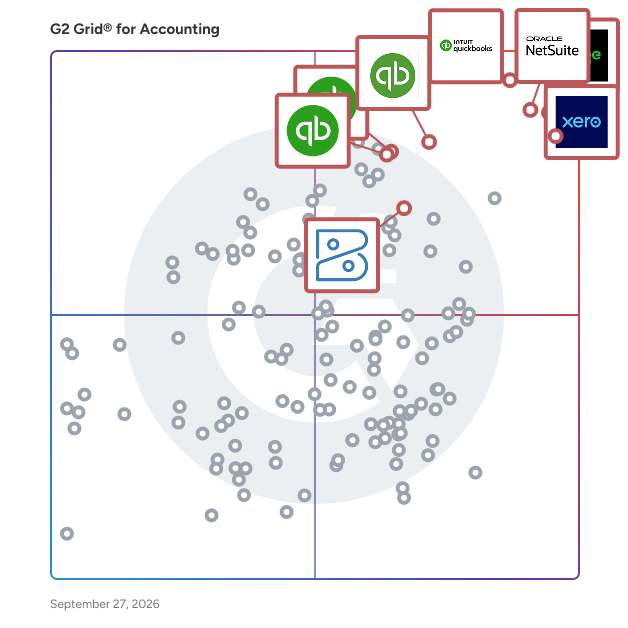
Products classified in the overall Accounting category are similar in many regards and help companies of all sizes solve their business problems. However, small business features, pricing, setup, and installation differ from businesses of other sizes, which is why we match buyers to the right Small Business Accounting to fit their needs. Compare product ratings based on reviews from enterprise users or connect with one of G2&#39;s buying advisors to find the right solutions within the Small Business Accounting category.

In addition to qualifying for inclusion in the Accounting Software category, to qualify for inclusion in the Small Business Accounting Software category, a product must have at least 10 reviews left by a reviewer from a small business.


## Top Accounting Software at a Glance
| # | Product | Rating | Best For | What Users Say |
|---|---------|--------|----------|----------------|
| 1 | [QuickBooks Online](https://www.g2.com/products/quickbooks-online/reviews) | 4.0/5.0 (3,739 reviews) | Browser-based small business accounting | "[QB Online Lets Me Work Anywhere, Anytime](https://www.g2.com/survey_responses/quickbooks-online-review-12994640)" |
| 2 | [Sage Intacct](https://www.g2.com/products/sage-intacct/reviews) | 4.3/5.0 (3,917 reviews) | Advanced financial reporting | "[Powerful Multi-Dimensional GL and Streamlined Reporting in Sage Intacct](https://www.g2.com/survey_responses/sage-intacct-review-12949345)" |
| 3 | [NetSuite](https://www.g2.com/products/oracle-netsuite/reviews) | 4.1/5.0 (4,687 reviews) | ERP-connected accounting operations | "[Real-Time Visibility Across Finance, Inventory, Purchasing, and Sales](https://www.g2.com/survey_responses/netsuite-review-12905951)" |
| 4 | [Xero](https://www.g2.com/products/xero/reviews) | 4.4/5.0 (1,615 reviews) | Cloud accounting with cash flow visibility | "[Perfect for Sole Traders – Simple, Intuitive and Stress-Free](https://www.g2.com/survey_responses/xero-review-12985482)" |
| 5 | [Acumatica](https://www.g2.com/products/acumatica/reviews) | 4.4/5.0 (1,906 reviews) | Business management accounting workflows | "[Acumatica Delivers Flexibility and Scalability for Global Growth](https://www.g2.com/survey_responses/acumatica-review-12716143)" |
| 6 | [QuickBooks Online Advanced](https://www.g2.com/products/quickbooks-online-advanced/reviews) | 4.4/5.0 (506 reviews) | Advanced cloud accounting controls | "[QuickBooks Online: Helpful AI, Smooth Performance, and Easy Integrations](https://www.g2.com/survey_responses/quickbooks-online-advanced-review-12982616)" |
| 7 | [Intuit QuickBooks](https://www.g2.com/products/intuit-quickbooks/reviews) | 4.4/5.0 (393 reviews) | Small business financial management | "[Easy Financial Management for Small Business](https://www.g2.com/survey_responses/intuit-quickbooks-review-12813967)" |
| 8 | [QuickBooks Desktop Enterprise](https://www.g2.com/products/quickbooks-desktop-enterprise/reviews) | 4.3/5.0 (1,032 reviews) | Large-file desktop accounting | "[Reliable Accounting with Room for Mobile Improvement](https://www.g2.com/survey_responses/quickbooks-desktop-enterprise-review-7811217)" |
| 9 | [Microsoft Dynamics 365 Business Central](https://www.g2.com/products/microsoft-microsoft-dynamics-365-business-central/reviews) | 4.0/5.0 (856 reviews) | Microsoft-connected financial management | "[A Complete All-in-One Solution for Managing Business Operations](https://www.g2.com/survey_responses/microsoft-dynamics-365-business-central-review-12910861)" |
| 10 | [FreshBooks](https://www.g2.com/products/freshbooks/reviews) | 4.5/5.0 (955 reviews) | Simple invoicing and billing | "[Straightforward Invoicing and Tracking with a Clean, Easy-to-Navigate Interface](https://www.g2.com/survey_responses/freshbooks-review-12668419)" |


## How Many Accounting Software Products Does G2 Track?
**Total Products under this Category:** 656

### Category Stats (Jun 2026)
- **Average Rating**: 4.25/5 The average rating of products in this category, based on all submitted ratings
- **Top Trending Product**: Pennylane (+0.2) - Among all products in this category, Pennylane recorded the largest rating increase compared to last month
*Last updated: June 01, 2026*


## How Does G2 Rank Accounting Software Products?

**Why You Can Trust G2's Software Rankings:**

- 30 Analysts and Data Experts
- 38,300+ Authentic Reviews
- 656+ Products
- Unbiased Rankings

G2's software rankings are built on verified user reviews, rigorous moderation, and a consistent research methodology maintained by a team of analysts and data experts. Each product is measured using the same transparent criteria, with no paid placement or vendor influence. While reviews reflect real user experiences, which can be subjective, they offer valuable insight into how software performs in the hands of professionals. Together, these inputs power the G2 Score, a standardized way to compare tools within every category.


---

**Sponsored**

### Chargebee

Chargebee is the billing and monetization platform built for the AI economy. From fast-scaling startups to global enterprises, we help companies capture, optimize, and scale revenue — no matter their GTM strategy or pricing model. Whether you’re experimenting with usage-based pricing, launching AI-powered products, or expanding globally, Chargebee gives you the flexibility and automation to grow with confidence. Chargebee is trusted by businesses of all sizes, including Zapier, Freshworks, DeepL, Condé Nast, and Pret A Manger, and is proud to have been consistently recognized by customers as a Leader in Subscription Management on G2. To learn more about how Chargebee can help unlock and maximize revenue growth, visit Chargebee.com.


[Visit website](https://www.g2.com/external_clickthroughs/record?secure%5Bad_program%5D=ppc&amp;secure%5Bad_slot%5D=category_product_list&amp;secure%5Bcategory_id%5D=65&amp;secure%5Bdisplayable_resource_id%5D=90&amp;secure%5Bdisplayable_resource_type%5D=Category&amp;secure%5Bmedium%5D=sponsored&amp;secure%5Bplacement_reason%5D=neighbor_category&amp;secure%5Bplacement_resource_ids%5D%5B%5D=90&amp;secure%5Bprioritized%5D=false&amp;secure%5Bproduct_id%5D=3294&amp;secure%5Bresource_id%5D=65&amp;secure%5Bresource_type%5D=Category&amp;secure%5Bsource_type%5D=category_page&amp;secure%5Bsource_url%5D=https%3A%2F%2Fwww.g2.com%2Fcategories%2Faccounting%2Fsmall-business&amp;secure%5Btoken%5D=0412a86cc91e87b2e74659a301a9b818d58911407a27680d41a342ee965ad644&amp;secure%5Burl%5D=https%3A%2F%2Fwww.chargebee.com%2F%3Futm_source%3Dg2crowd%26utm_medium%3Dcpc&amp;secure%5Burl_type%5D=custom_url)

---


## Accounting Software Features & Capabilities

### What are the Best Accounting Software with Check/W-2 Printing?
Allows administrators to print valid paychecks and W-2 forms.

**Top-rated Accounting Software for Check/W-2 Printing:**
- [QuickBooks Online](https://www.g2.com/products/quickbooks-online/reviews)
- [NetSuite](https://www.g2.com/products/oracle-netsuite/reviews)
- [Xero](https://www.g2.com/products/xero/reviews)
[Explore Accounting Software with Check/W-2 Printing](https://www.g2.com/categories/accounting/f/check-w-2-printing)

### What are the Best Accounting Software with Workflow Capability?
Automates a process that requires a series of steps that typically require intervention by several different users. Administrators can write rules to determine who and when a user needs to complete a step. Also includes notification of users when they need to take action.

**Top-rated Accounting Software for Workflow Capability:**
- [QuickBooks Online](https://www.g2.com/products/quickbooks-online/reviews)
- [Sage Intacct](https://www.g2.com/products/sage-intacct/reviews)
- [NetSuite](https://www.g2.com/products/oracle-netsuite/reviews)
[Explore Accounting Software with Workflow Capability](https://www.g2.com/categories/accounting/f/workflow-capability)

### What are the Best Accounting Software with Internationalization?
Enables users to view and transact business with the same content in multiple languages and currencies.

**Top-rated Accounting Software for Internationalization:**
- [QuickBooks Online](https://www.g2.com/products/quickbooks-online/reviews)
- [Sage Intacct](https://www.g2.com/products/sage-intacct/reviews)
- [NetSuite](https://www.g2.com/products/oracle-netsuite/reviews)
[Explore Accounting Software with Internationalization](https://www.g2.com/categories/accounting/f/internationalization)

### What are the Best Accounting Software with Inventory Tracking / Ordering?
Real time inventory tracking. Maintains accurate &quot;On Hand&quot; infomation by matching reserved inventory requested on purchase and sales orders.

**Top-rated Accounting Software for Inventory Tracking / Ordering:**
- [QuickBooks Online](https://www.g2.com/products/quickbooks-online/reviews)
- [Sage Intacct](https://www.g2.com/products/sage-intacct/reviews)
- [NetSuite](https://www.g2.com/products/oracle-netsuite/reviews)
[Explore Accounting Software with Inventory Tracking / Ordering](https://www.g2.com/categories/accounting/f/inventory-tracking-ordering)

### What are the Best Accounting Software with Reporting and Dashboards?
Access pre-built and custom reports and dashboards to track payroll costs and for compliance purposes.

**Top-rated Accounting Software for Reporting and Dashboards:**
- [QuickBooks Online](https://www.g2.com/products/quickbooks-online/reviews)
- [Sage Intacct](https://www.g2.com/products/sage-intacct/reviews)
- [NetSuite](https://www.g2.com/products/oracle-netsuite/reviews)
[Explore Accounting Software with Reporting and Dashboards](https://www.g2.com/categories/accounting/f/reporting-and-dashboards)


## What Are the Top-Rated Accounting Software Products in 2026?
### 1. [QuickBooks Online](https://www.g2.com/products/quickbooks-online/reviews)
Easy Online Accounting to Organize Your Finances in One Place. Run your entire business with the #1 small business cloud accounting solution!


**Average Rating:** 4.0/5.0
**Total Reviews:** 3,739
**How Do G2 Users Rate QuickBooks Online?**

- **Has the product been a good partner in doing business?:** 7.8/10 (Category avg: 8.5/10)
- **Output Document Generation:** 8.1/10 (Category avg: 8.3/10)
- **Workflow Capability:** 7.7/10 (Category avg: 8.1/10)
- **Performance and Reliability:** 8.3/10 (Category avg: 8.4/10)

**Who Is the Company Behind QuickBooks Online?**

- **Seller:** [Intuit](https://www.g2.com/sellers/intuit)
- **Year Founded:** 1983
- **HQ Location:** Mountain View, California
- **Twitter:** @Intuit (80,559 Twitter followers)
- **LinkedIn® Page:** https://www.linkedin.com/company/1666/ (18,185 employees on LinkedIn®)
- **Ownership:** VIE:INTU

**Who Uses This Product?**
- **Who Uses This:** Owner, Accountant
- **Top Industries:** Accounting, Construction
- **Company Size:** 81% Small-Business, 15% Mid-Market


#### What Are QuickBooks Online's Pros and Cons?

**Pros:**

- Ease of Use (222 reviews)
- Integrations (65 reviews)
- Cloud-Based (64 reviews)
- Easy Access (63 reviews)
- Invoice Management (60 reviews)

**Cons:**

- Missing Features (75 reviews)
- Expensive (66 reviews)
- Poor Customer Support (49 reviews)
- High Fees (46 reviews)
- Learning Curve (44 reviews)


### What Do G2 Reviewers Say About QuickBooks Online?
*AI-generated summary from verified user reviews*

**Pros:**

- Users find QuickBooks Online to be **very easy to use** , streamlining tasks with its intuitive design and helpful features.
- Users value the **extensive integrations** of QuickBooks Online, enhancing collaboration and flexibility for growing businesses.
- Users value the **cloud-based accessibility** of QuickBooks Online, allowing effortless management and collaboration on financial data.
- Users appreciate the **easy access** of QuickBooks Online, allowing them to manage finances from anywhere with ease.
- Users value the **invoice management** in QuickBooks Online for its ease of tracking projects and financial health.

**Cons:**

- Users find the **missing features** in QuickBooks Online limit usability and complicate tasks like migration and tagging.
- Users find QuickBooks Online to be **expensive** , with hidden charges and inadequate customer support complicating their experience.
- Users express frustration with **poor customer support** , citing hassle and lack of responsiveness during critical situations.
- Users criticize the **high fees** of QuickBooks Online, with overpriced services and limited support for the cost.
- Users face a **steep learning curve** with QuickBooks Online, especially in generating reports and adapting to the interface.

#### What Are Recent G2 Reviews of QuickBooks Online?

**"[QBO Saves Time with Powerful Automations, API, and Integrations](https://www.g2.com/survey_responses/quickbooks-online-review-12938368)"**

**Rating:** 4.5/5.0 stars
*— Mark E.*

[Read full review](https://www.g2.com/survey_responses/quickbooks-online-review-12938368)

---

**"[QB Online Lets Me Work Anywhere, Anytime](https://www.g2.com/survey_responses/quickbooks-online-review-12994640)"**

**Rating:** 5.0/5.0 stars
*— Marie B.*

[Read full review](https://www.g2.com/survey_responses/quickbooks-online-review-12994640)

---


#### What Are G2 Users Discussing About QuickBooks Online?

- [How is QuickBooks Online revolutionizing financial management and accounting practices for small businesses?](https://www.g2.com/discussions/how-is-quickbooks-online-revolutionizing-financial-management-and-accounting-practices-for-small-businesses) - 1 comment, 1 upvote
- [How is QuickBooks Online being used to enhance operational efficiency and user experience in its specific field?](https://www.g2.com/discussions/how-is-quickbooks-online-being-used-to-enhance-operational-efficiency-and-user-experience-in-its-specific-field) - 2 comments
- [What is QuickBooks Online used for?](https://www.g2.com/discussions/what-is-quickbooks-online-used-for) - 2 comments
- [What are 3 benefits of the online invoicing feature within QuickBooks online?](https://www.g2.com/discussions/what-are-3-benefits-of-the-online-invoicing-feature-within-quickbooks-online) - 2 comments
- [What can you do with QuickBooks online?](https://www.g2.com/discussions/what-can-you-do-with-quickbooks-online) - 3 comments

### 2. [Xero](https://www.g2.com/products/xero/reviews)
Xero is a cloud-based accounting software solution designed to help small business owners and accounting professionals manage their financial operations efficiently. With a user-friendly interface and a focus on automation, Xero enables users to streamline their bookkeeping processes, allowing them to concentrate on growing their businesses rather than getting bogged down by administrative tasks. Targeted primarily at small businesses, Xero caters to a diverse audience that includes entrepreneurs, freelancers, and accounting firms. The platform is particularly beneficial for those who seek to simplify financial management while ensuring compliance with regional tax regulations. Xero&#39;s innovative features, such as JAX (Just Ask Xero), an AI financial superagent, enhance the user experience by providing real-time insights and automating routine tasks. This allows users to create quotes, send invoices, and reconcile bank transactions through natural language commands, making financial management more accessible and efficient. One of the key features of Xero is its ability to automate data ingestion from various sources, including banks and e-commerce platforms. This functionality significantly reduces the time spent on manual data entry, with many users reporting an average savings of six hours per month. Additionally, Xero&#39;s smart bank reconciliation adapts to user patterns, simplifying the bookkeeping process to a straightforward click-to-confirm operation. This level of efficiency not only saves time but also enhances accuracy in financial reporting. Xero also prioritizes cash flow management, a critical aspect for any business. Users can create customizable online invoices equipped with integrated &quot;Pay Now&quot; buttons, which facilitate faster payments. Coupled with automated payment reminders, Xero helps businesses reduce the time spent on collections, allowing them to focus on revenue generation. Furthermore, Xero&#39;s tools are designed to simplify tax compliance across various jurisdictions, making it easier for users to navigate the complexities of tax regulations. The platform is supported by a robust ecosystem of over 1,000 third-party applications and a global directory of certified accountants and bookkeepers. This connectivity ensures that users have access to specialized tools for inventory management, customer relationship management, and financial advice tailored to their specific needs. With a customer support team rated highly by new users, Xero provides the assurance and assistance necessary for businesses to operate confidently in their financial endeavors.


**Average Rating:** 4.4/5.0
**Total Reviews:** 1,615
**How Do G2 Users Rate Xero?**

- **Has the product been a good partner in doing business?:** 8.6/10 (Category avg: 8.5/10)
- **Output Document Generation:** 8.5/10 (Category avg: 8.3/10)
- **Workflow Capability:** 8.1/10 (Category avg: 8.1/10)
- **Performance and Reliability:** 8.8/10 (Category avg: 8.4/10)

**Who Is the Company Behind Xero?**

- **Seller:** [Xero](https://www.g2.com/sellers/xero-390f429b-8d4b-4170-a85d-f071f0cc536d)
- **Company Website:** https://www.xero.com
- **Year Founded:** 2006
- **HQ Location:** Wellington
- **Twitter:** @Xero (77,493 Twitter followers)
- **LinkedIn® Page:** https://www.linkedin.com/company/50780/ (6,186 employees on LinkedIn®)

**Who Uses This Product?**
- **Who Uses This:** Owner, Director
- **Top Industries:** Accounting, Information Technology and Services
- **Company Size:** 72% Small-Business, 33% Mid-Market


#### What Are Xero's Pros and Cons?

**Pros:**

- Ease of Use (840 reviews)
- Invoice Management (363 reviews)
- Transactions (314 reviews)
- Efficiency (302 reviews)
- Simple (275 reviews)

**Cons:**

- Missing Features (314 reviews)
- Limited Options (172 reviews)
- Limited Customization (138 reviews)
- Accounting Limitations (132 reviews)
- Poor Customer Support (119 reviews)


### What Do G2 Reviewers Say About Xero?
*AI-generated summary from verified user reviews*

**Pros:**

- Users appreciate the **ease of use** of Xero, valuing its automatic invoicing and compatibility with other systems.
- Users love Xero&#39;s **automatic invoice generation** , simplifying operations and reducing time spent on billing and payments.
- Users value the **efficient transaction handling** in Xero, enabling easy reconciliations and smooth financial workflows.
- Users appreciate Xero’s **efficiency** , as it simplifies invoicing, reporting, and streamlines financial management effectively.
- Users find Xero&#39;s **simplicity in invoicing and payment tracking** invaluable for maintaining an efficient financial workflow.

**Cons:**

- Users find Xero has **missing features** and lacks flexibility, making it challenging and time-consuming to use effectively.
- Users find the **limited features** of Xero hinder customization and basic reporting and forecasting capabilities.
- Users find Xero has **limited customization** in reporting, making it challenging to analyze data thoroughly.
- Users find the **reporting limitations** in Xero restrictive, impacting workflow and making detailed analysis more cumbersome.
- Users express frustration with the **poor customer support** , particularly due to the absence of immediate telephone assistance.

#### What Are Recent G2 Reviews of Xero?

**"[Xero Brings Clear Financial Visibility and Organized Accounting in One Place](https://www.g2.com/survey_responses/xero-review-12992762)"**

**Rating:** 4.5/5.0 stars
*— Dar F.*

[Read full review](https://www.g2.com/survey_responses/xero-review-12992762)

---

**"[Perfect for Sole Traders – Simple, Intuitive and Stress-Free](https://www.g2.com/survey_responses/xero-review-12985482)"**

**Rating:** 5.0/5.0 stars
*— Philip D.*

[Read full review](https://www.g2.com/survey_responses/xero-review-12985482)

---


#### What Are G2 Users Discussing About Xero?

- [What is Xero used for?](https://www.g2.com/discussions/what-is-xero-used-for) - 4 comments
- [Is Xero easy to use?](https://www.g2.com/discussions/is-xero-easy-to-use) - 3 comments, 2 upvotes
- [What are the features of accounting software?](https://www.g2.com/discussions/xero-what-are-the-features-of-accounting-software)
- [Is XERO a good accounting software?](https://www.g2.com/discussions/is-xero-a-good-accounting-software) - 4 comments, 1 upvote
- [What is Xero software used for?](https://www.g2.com/discussions/what-is-xero-software-used-for) - 4 comments

### 3. [Sage Intacct](https://www.g2.com/products/sage-intacct/reviews)
Sage Intacct is the flexible and scalable financial platform that delivers deep accounting capabilities to thousands of businesses across the world. Sage Intacct delivers an array of core accounting applications such as a general ledger, accounts payable, accounts receivable, cash management, and order management to any accounting department or finance team. It also supports functionality for built-in dashboards, real time reporting, time and expense management, project accounting, revenue management, and global consolidations for multiple entities. The software can be used in a wide variety of industries as a horizontal accounting system, but also delivers specialized features for the following industries: Nonprofit, Software and SaaS, Professional Services, Financial Services, Healthcare, Hospitality, Wholesale Distribution, Construction and Real Estate.


**Average Rating:** 4.3/5.0
**Total Reviews:** 3,917
**How Do G2 Users Rate Sage Intacct?**

- **Has the product been a good partner in doing business?:** 8.4/10 (Category avg: 8.5/10)
- **Output Document Generation:** 8.2/10 (Category avg: 8.3/10)
- **Workflow Capability:** 8.1/10 (Category avg: 8.1/10)
- **Performance and Reliability:** 8.7/10 (Category avg: 8.4/10)

**Who Is the Company Behind Sage Intacct?**

- **Seller:** [Sage Software](https://www.g2.com/sellers/sage-software-d61a780c-4fb3-4781-9519-baa772f5ea91)
- **Company Website:** https://www.sage.com/
- **Year Founded:** 1981
- **HQ Location:** Newcastle
- **LinkedIn® Page:** https://www.linkedin.com/company/2802/ (15,579 employees on LinkedIn®)
- **Ownership:** SGE.L

**Who Uses This Product?**
- **Who Uses This:** Controller, Senior Accountant
- **Top Industries:** Accounting, Non-Profit Organization Management
- **Company Size:** 58% Mid-Market, 26% Small-Business


#### What Are Sage Intacct's Pros and Cons?

**Pros:**

- Ease of Use (1027 reviews)
- Intuitive (519 reviews)
- Reporting (508 reviews)
- User-Friendly (467 reviews)
- Features (384 reviews)

**Cons:**

- Missing Features (385 reviews)
- Learning Curve (339 reviews)
- Limited Functionality (242 reviews)
- Access Limitations (238 reviews)
- Learning Difficulty (231 reviews)


### What Do G2 Reviewers Say About Sage Intacct?
*AI-generated summary from verified user reviews*

**Pros:**

- Users find Sage Intacct to be **easy to use** , allowing quick access to information and efficient report generation.
- Users value the **intuitive design** of Sage Intacct, making it easy to navigate and enhancing daily workflow efficiency.
- Users value the **great reporting** capabilities of Sage Intacct, appreciating customization and transparency in their audit trails.
- Users appreciate the **user-friendly interface** of Sage Intacct, making it intuitive and accessible from anywhere.
- Users love the **seamless integration and user-friendly interface** of Sage Intacct, enhancing efficiency and simplifying tasks.

**Cons:**

- Users face **missing features** in Sage Intacct, such as limited report customizations and dated visual appeal, impeding productivity.
- Users experience a **steep learning curve** with Sage Intacct, especially if transitioning from simpler accounting software.
- Users find the **limited functionality** of Sage Intacct frustrating, impacting productivity and intercompany management.
- Users face **access limitations** with Sage Intacct, causing delays and hindering productivity across teams and processes.
- Users find the **learning difficulty** steep, necessitating extensive training and assistance for effective usage of Sage Intacct.

#### What Are Recent G2 Reviews of Sage Intacct?

**"[Smooth Transition with Sage Intacct: Easy Interface, Fast Reconciliations, Great Integrations](https://www.g2.com/survey_responses/sage-intacct-review-12885603)"**

**Rating:** 4.5/5.0 stars
*— Felicitous M.*

[Read full review](https://www.g2.com/survey_responses/sage-intacct-review-12885603)

---

**"[Powerful Multi-Dimensional GL and Streamlined Reporting in Sage Intacct](https://www.g2.com/survey_responses/sage-intacct-review-12949345)"**

**Rating:** 5.0/5.0 stars
*— Kaangeyan P.*

[Read full review](https://www.g2.com/survey_responses/sage-intacct-review-12949345)

---


#### What Are G2 Users Discussing About Sage Intacct?

- [In what ways is Sage Intacct transforming financial management for businesses?](https://www.g2.com/discussions/in-what-ways-is-sage-intacct-transforming-financial-management-for-businesses) - 2 comments
- [What is Sage Intacct used for?](https://www.g2.com/discussions/what-is-sage-intacct-used-for) - 2 comments, 1 upvote
- [What is the difference between Sage and Sage intacct?](https://www.g2.com/discussions/what-is-the-difference-between-sage-and-sage-intacct) - 5 comments, 1 upvote
- [How much does Sage intacct cost?](https://www.g2.com/discussions/sage-intacct-how-much-does-sage-intacct-cost) - 1 comment, 1 upvote
- [What is Sage Software used for?](https://www.g2.com/discussions/sage-intacct-what-is-sage-software-used-for) - 1 comment

### 4. [QuickBooks Online Advanced](https://www.g2.com/products/quickbooks-online-advanced/reviews)
QuickBooks Online Advanced is a sophisticated cloud-based accounting solution tailored for mid-sized and growing businesses that require more robust financial management capabilities. This software is designed to streamline accounting processes and provide deeper insights into business performance, enabling users to make informed decisions that drive growth and efficiency. With its advanced features, QuickBooks Online Advanced caters to organizations with complex finance and accounting needs, ensuring they can manage their finances effectively. Targeting businesses that have outgrown basic accounting solutions, QuickBooks Online Advanced offers a comprehensive suite of tools that enhance financial oversight. Users benefit from customizable business analytics and visual dashboards that provide real-time insights into cash flow and revenue. This level of detail helps businesses identify trends and make strategic decisions based on accurate financial data. The platform is particularly useful for organizations that require collaboration among multiple users, as it allows for custom user roles for up to 25 individuals, ensuring that team members have the appropriate access to sensitive financial information. Key features of QuickBooks Online Advanced include automated workflows that streamline repetitive tasks, such as batch invoicing, which saves time and reduces operational costs. The mobile app further enhances accessibility, allowing employees to access real-time data from various locations, which is crucial for businesses with remote teams or multiple offices. Additionally, the software includes mileage tracking capabilities, making it easier for businesses to manage expenses related to travel. Another significant advantage of QuickBooks Online Advanced is the support structure it offers. With Priority Circle membership, users gain access to premium care, on-demand training, and 24/7 U.S.-based technical support. This ensures that businesses can resolve issues quickly and efficiently, minimizing downtime and maintaining productivity. Overall, QuickBooks Online Advanced stands out in the accounting software category by providing a powerful, flexible solution that meets the diverse needs of growing businesses, enabling them to focus on their core operations while managing their finances with confidence.


**Average Rating:** 4.4/5.0
**Total Reviews:** 506
**How Do G2 Users Rate QuickBooks Online Advanced?**

- **Has the product been a good partner in doing business?:** 8.8/10 (Category avg: 8.5/10)
- **Output Document Generation:** 8.5/10 (Category avg: 8.3/10)
- **Workflow Capability:** 8.2/10 (Category avg: 8.1/10)
- **Performance and Reliability:** 8.8/10 (Category avg: 8.4/10)

**Who Is the Company Behind QuickBooks Online Advanced?**

- **Seller:** [Intuit](https://www.g2.com/sellers/intuit)
- **Company Website:** https://www.intuit.com/
- **Year Founded:** 1983
- **HQ Location:** Mountain View, California
- **Twitter:** @Intuit (80,559 Twitter followers)
- **LinkedIn® Page:** https://www.linkedin.com/company/1666/ (18,185 employees on LinkedIn®)

**Who Uses This Product?**
- **Who Uses This:** Owner, Office Manager
- **Top Industries:** Accounting, Construction
- **Company Size:** 80% Small-Business, 17% Mid-Market


#### What Are QuickBooks Online Advanced's Pros and Cons?

**Pros:**

- Ease of Use (17 reviews)
- Reporting Features (16 reviews)
- Automation Efficiency (13 reviews)
- Easy Setup (9 reviews)
- Customizability (8 reviews)

**Cons:**

- Missing Features (14 reviews)
- Expensive (10 reviews)
- Limited Customization (7 reviews)
- Not User-Friendly (6 reviews)
- Slow Performance (6 reviews)


### What Do G2 Reviewers Say About QuickBooks Online Advanced?
*AI-generated summary from verified user reviews*

**Pros:**

- Users appreciate the **ease of use** of QuickBooks Online Advanced, finding it intuitive and efficient for various financial tasks.
- Users appreciate the **advanced reporting features** of QuickBooks Online Advanced, enhancing project and performance insights effortlessly.
- Users value the **automation efficiency** of QuickBooks Online Advanced, significantly reducing manual tasks and saving valuable time.
- Users appreciate the **easy setup** of QuickBooks Online Advanced, enabling quick implementation for enhanced financial management.
- Users value the **customizable workflows** of QuickBooks Online Advanced, enhancing efficiency and flexibility in financial processes.

**Cons:**

- Users find the **missing features** in QuickBooks Online Advanced limit their reporting and financial planning capabilities.
- Users find QuickBooks Online Advanced to be **very expensive** , questioning if the high cost is justified by its features.
- Users find **limited customization** in QuickBooks Online Advanced, hindering their reporting and transaction management capabilities.
- Users find QuickBooks Online Advanced to be **not user-friendly** , citing a complicated interface and cumbersome processes.
- Users frequently experience **slow performance** with QuickBooks Online Advanced, including issues like slow loading and occasional crashes.

#### What Are Recent G2 Reviews of QuickBooks Online Advanced?

**"[Cloud-Based Convenience with Helpful AI, HR Tools, and Integrations](https://www.g2.com/survey_responses/quickbooks-online-advanced-review-13000302)"**

**Rating:** 4.0/5.0 stars
*— Heather .*

[Read full review](https://www.g2.com/survey_responses/quickbooks-online-advanced-review-13000302)

---

**"[QuickBooks Online: Helpful AI, Smooth Performance, and Easy Integrations](https://www.g2.com/survey_responses/quickbooks-online-advanced-review-12982616)"**

**Rating:** 4.5/5.0 stars
*— Corinne M.*

[Read full review](https://www.g2.com/survey_responses/quickbooks-online-advanced-review-12982616)

---


#### What Are G2 Users Discussing About QuickBooks Online Advanced?

- [What is QuickBooks Online Advanced used for?](https://www.g2.com/discussions/what-is-quickbooks-online-advanced-used-for)
- [What is QBO advanced?](https://www.g2.com/discussions/what-is-qbo-advanced) - 1 comment
- [Which 4 key features are only included in QuickBooks Online Advanced?](https://www.g2.com/discussions/which-4-key-features-are-only-included-in-quickbooks-online-advanced)
- [Which reporting app is included with QuickBooks Online Advanced?](https://www.g2.com/discussions/which-reporting-app-is-included-with-quickbooks-online-advanced)

### 5. [Intuit QuickBooks](https://www.g2.com/products/intuit-quickbooks/reviews)
Intuit QuickBooks is a comprehensive accounting software solution designed to meet the financial management needs of small and medium-sized businesses. Since its introduction in 1992, QuickBooks has evolved to offer both desktop and cloud-based versions, enabling users to efficiently manage various financial tasks such as invoicing, expense tracking, payroll processing, and financial reporting. Its user-friendly interface and robust features make it a preferred choice for businesses seeking to streamline their accounting processes. Key Features and Functionality: - Invoicing and Payments: Create and send customized invoices, accept online payments via credit card or ACH, and set up recurring billing to ensure timely payments. - Expense Tracking: Automatically import and categorize expenses by connecting bank accounts and credit cards, simplifying financial management. - Payroll Management: Automate payroll processing, including salary calculations, tax deductions, and direct deposits, ensuring compliance with tax regulations. - Financial Reporting: Generate a variety of customizable reports, such as profit and loss statements, balance sheets, and cash flow statements, to gain insights into business performance. - Inventory Management: Monitor inventory levels, set reorder points, and manage stock across multiple locations to maintain optimal inventory control. - Multi-Currency Support: Conduct transactions in multiple currencies, making it suitable for businesses with international operations. Primary Value and Solutions Provided: QuickBooks addresses the critical need for efficient and accurate financial management in small and medium-sized businesses. By automating routine accounting tasks, it reduces manual errors and saves time, allowing business owners to focus on growth and strategic planning. The software&#39;s comprehensive reporting tools provide valuable insights into financial health, aiding in informed decision-making. Additionally, its scalability and integration capabilities ensure that as businesses grow, QuickBooks can adapt to their evolving needs, making it a long-term solution for financial management.


**Average Rating:** 4.4/5.0
**Total Reviews:** 393
**How Do G2 Users Rate Intuit QuickBooks?**

- **Has the product been a good partner in doing business?:** 8.5/10 (Category avg: 8.5/10)
- **Output Document Generation:** 8.3/10 (Category avg: 8.3/10)
- **Workflow Capability:** 7.9/10 (Category avg: 8.1/10)
- **Performance and Reliability:** 8.5/10 (Category avg: 8.4/10)

**Who Is the Company Behind Intuit QuickBooks?**

- **Seller:** [Intuit](https://www.g2.com/sellers/intuit)
- **Year Founded:** 1983
- **HQ Location:** Mountain View, California
- **Twitter:** @Intuit (80,559 Twitter followers)
- **LinkedIn® Page:** https://www.linkedin.com/company/1666/ (18,185 employees on LinkedIn®)
- **Ownership:** VIE:INTU

**Who Uses This Product?**
- **Who Uses This:** Owner, Accountant
- **Top Industries:** Accounting, Construction
- **Company Size:** 74% Small-Business, 22% Mid-Market


#### What Are Intuit QuickBooks's Pros and Cons?

**Pros:**

- Ease of Use (54 reviews)
- Intuitive (19 reviews)
- Invoice Management (18 reviews)
- Integrations (12 reviews)
- Accounting Management (10 reviews)

**Cons:**

- Expensive (17 reviews)
- Missing Features (11 reviews)
- Slow Performance (11 reviews)
- Poor Customer Support (9 reviews)
- Poor Interface Design (8 reviews)


### What Do G2 Reviewers Say About Intuit QuickBooks?
*AI-generated summary from verified user reviews*

**Pros:**

- Users love the **ease of use** of Intuit QuickBooks, finding it intuitive and straightforward for daily tasks.
- Users love the **intuitive and user-friendly design** of Intuit QuickBooks, enhancing their financial management experience.
- Users find the **user-friendly invoicing** of Intuit QuickBooks essential for efficient daily financial management.
- Users value the **seamless integrations** of Intuit QuickBooks, enhancing efficiency and simplifying financial management tasks.
- Users appreciate the **dramatic simplification of accounting** with QuickBooks, making financial management efficient for small businesses.

**Cons:**

- Users find the **cost increases** with additional features and users unreasonable for small businesses, seeking more affordable options.
- Users express frustration over **missing features** in the new update, preferring the classic view and previous functionalities.
- Users experience **slow performance** with QuickBooks, leading to frustrations during navigation and execution of complex tasks.
- Users report **poor customer support** with slow response times, impacting their overall experience with QuickBooks.
- Users often experience a **poor interface design** with QuickBooks, making navigation and customization unnecessarily challenging.

#### What Are Recent G2 Reviews of Intuit QuickBooks?

**"[Easy Financial Management for Small Business](https://www.g2.com/survey_responses/intuit-quickbooks-review-12813967)"**

**Rating:** 4.5/5.0 stars
*— Ranjit K.*

[Read full review](https://www.g2.com/survey_responses/intuit-quickbooks-review-12813967)

---

**"[Streamlined Financial Management with Compatibility Challenges](https://www.g2.com/survey_responses/intuit-quickbooks-review-12941788)"**

**Rating:** 4.0/5.0 stars
*— Melissa S.*

[Read full review](https://www.g2.com/survey_responses/intuit-quickbooks-review-12941788)

---


#### What Are G2 Users Discussing About Intuit QuickBooks?

- [What are the benefits of QuickBooks?](https://www.g2.com/discussions/what-are-the-benefits-of-quickbooks)
- [What is the difference between QuickBooks and Intuit?](https://www.g2.com/discussions/what-is-the-difference-between-quickbooks-and-intuit) - 3 comments
- [What can you do with Intuit QuickBooks?](https://www.g2.com/discussions/what-can-you-do-with-intuit-quickbooks) - 2 comments
- [What is the features of QuickBooks software?](https://www.g2.com/discussions/what-is-the-features-of-quickbooks-software) - 3 comments, 1 upvote

### 6. [NetSuite](https://www.g2.com/products/oracle-netsuite/reviews)
As the world&#39;s #1 AI Cloud ERP solution for more than 25 years, NetSuite has helped businesses gain the visibility, control, and agility to build and grow a successful business. First focused on financials and ERP, we now provide an AI-powered integrated system that also includes inventory management, HR, professional services automation, and commerce, and is used by more than 43,000 customers in 220 countries.


**Average Rating:** 4.1/5.0
**Total Reviews:** 4,687
**How Do G2 Users Rate NetSuite?**

- **Has the product been a good partner in doing business?:** 7.4/10 (Category avg: 8.5/10)
- **Output Document Generation:** 7.5/10 (Category avg: 8.3/10)
- **Workflow Capability:** 7.6/10 (Category avg: 8.1/10)
- **Performance and Reliability:** 7.8/10 (Category avg: 8.4/10)

**Who Is the Company Behind NetSuite?**

- **Seller:** [Oracle](https://www.g2.com/sellers/oracle)
- **Company Website:** https://www.oracle.com/middleware/technologies/api-manager.html
- **Year Founded:** 1977
- **HQ Location:** Austin, TX
- **Twitter:** @Oracle (827,997 Twitter followers)
- **LinkedIn® Page:** https://www.linkedin.com/company/1028/ (208,078 employees on LinkedIn®)

**Who Uses This Product?**
- **Who Uses This:** Controller, Accounting Manager
- **Top Industries:** Computer Software, Accounting
- **Company Size:** 57% Mid-Market, 31% Small-Business


#### What Are NetSuite's Pros and Cons?

**Pros:**

- Ease of Use (521 reviews)
- Customizability (342 reviews)
- Functionality (318 reviews)
- Customization Options (304 reviews)
- Customization (278 reviews)

**Cons:**

- Learning Curve (354 reviews)
- Improvement Needed (306 reviews)
- Missing Features (265 reviews)
- Limited Customization (229 reviews)
- Not User-Friendly (227 reviews)


### What Do G2 Reviewers Say About NetSuite?
*AI-generated summary from verified user reviews*

**Pros:**

- Users find NetSuite&#39;s interface to offer **ease of use** , making functionalities straightforward and customizable for their needs.
- Users value the **customizability** of NetSuite, enhancing reporting, inventory management, and integration across their operations.
- Users appreciate the **robust functionality** of NetSuite, facilitating seamless integration, customization, and effective reporting capabilities.
- Users value the **extensive customization options** of NetSuite, significantly enhancing their business management capabilities.
- Users love the **customization capabilities** of NetSuite, allowing impactful changes tailored to their business needs.

**Cons:**

- Users find the **steep learning curve** of NetSuite frustrating, making initial navigation and setup time-consuming.
- Users find the **complex reports** and interface of NetSuite need significant improvements for better usability.
- Users find **missing features** in areas like project tasks and cash-flow management, leading to limitations and frustrations.
- Users are frustrated by the **limited customization** options in NetSuite, affecting both aesthetics and functionality.
- Users find the **interface not user-friendly** , often struggling with reports and requiring technical expertise for configurations.

#### What Are Recent G2 Reviews of NetSuite?

**"[NetSuite Unifies Core Processes with Powerful Visibility and Reporting](https://www.g2.com/survey_responses/netsuite-review-12967208)"**

**Rating:** 4.5/5.0 stars
*— Abhishek G.*

[Read full review](https://www.g2.com/survey_responses/netsuite-review-12967208)

---

**"[Real-Time Visibility Across Finance, Inventory, Purchasing, and Sales](https://www.g2.com/survey_responses/netsuite-review-12905951)"**

**Rating:** 5.0/5.0 stars
*— David K.*

[Read full review](https://www.g2.com/survey_responses/netsuite-review-12905951)

---


#### What Are G2 Users Discussing About NetSuite?

- [Is NetSuite an accounting software?](https://www.g2.com/discussions/is-netsuite-an-accounting-software) - 4 comments
- [What is NetSuite built on?](https://www.g2.com/discussions/what-is-netsuite-built-on) - 1 comment
- [Is NetSuite a good ERP system?](https://www.g2.com/discussions/is-netsuite-a-good-erp-system) - 3 comments, 1 upvote
- [What is a NetSuite software?](https://www.g2.com/discussions/what-is-a-netsuite-software) - 3 comments

### 7. [QuickBooks Desktop Enterprise](https://www.g2.com/products/quickbooks-desktop-enterprise/reviews)
Enhanced visibility and control to help power your business. QuickBooks Enterprise helps improve decision-making, efficiency, and productivity with a clear line of sight across your business. Manage more of your business with Enterprise • Get best-in-class accounting, inventory management, reporting, pricing rules, job costing, integrated payroll\*, time tracking, and more • Capacity for 1 million customers, vendors and inventory items, 100,000 classes, 45 custom fields, and up to 40 users • Boost productivity, enhance collaboration and free your team to work from anywhere with hosting • Automate your work with our best integrated time tracking and payroll tools, plus the optional Salesforce CRM connector. And plug in more than 200 applications to extend the value of your Enterprise Improve your productivity and make quicker decisions by seeing of more of your data in real-time • Industry-focused editions give you tools and reporting built with your business in mind. Specialized industry editions offer customized capabilities, reports, and features designed for your company type and industry. • Store vendors, inventory, pricing, and customer information all right in QuickBooks for easy access, faster workflows, and better decision making • Work faster with batch transactions to speed up your workflows and reduce data entry • Get a picture of with what’s incoming and outgoing with a cash flow hub to track payments, bills, invoices, sales receipts, and more Get more transparency-more efficiently • Maintain control of your data with out-of-the box (# here) user permissions and custom user permissions - you decide who has access to what data • Work with multiple companies. Seamlessly track and report on intercompany transactions from one simple dashboard. Manage inventory more effectively • Organize and track inventory across warehouses right down to the specific bin or pallet with intuitive, multi-level categorization • Manage sales orders and inventory from a single dashboard with Enhanced Pick, Pack and Ship • Reduce business losses by assigning expiration dates to inventory Call Intuit to partner with one of our Customer Success Managers to help you choose the right edition of Enterprise for your business, and work with our best on-boarding specialists to get you up and running quickly. \* Additional fees may apply


**Average Rating:** 4.3/5.0
**Total Reviews:** 1,032
**How Do G2 Users Rate QuickBooks Desktop Enterprise?**

- **Has the product been a good partner in doing business?:** 8.4/10 (Category avg: 8.5/10)
- **Output Document Generation:** 8.3/10 (Category avg: 8.3/10)
- **Workflow Capability:** 8.0/10 (Category avg: 8.1/10)
- **Performance and Reliability:** 8.3/10 (Category avg: 8.4/10)

**Who Is the Company Behind QuickBooks Desktop Enterprise?**

- **Seller:** [Intuit](https://www.g2.com/sellers/intuit)
- **Company Website:** https://www.intuit.com/
- **Year Founded:** 1983
- **HQ Location:** Mountain View, California
- **Twitter:** @Intuit (80,559 Twitter followers)
- **LinkedIn® Page:** https://www.linkedin.com/company/1666/ (18,185 employees on LinkedIn®)

**Who Uses This Product?**
- **Who Uses This:** Accountant, Office Manager
- **Top Industries:** Accounting, Construction
- **Company Size:** 67% Small-Business, 29% Mid-Market


#### What Are QuickBooks Desktop Enterprise's Pros and Cons?

**Pros:**

- Ease of Use (124 reviews)
- Simple (34 reviews)
- Comprehensive Features (29 reviews)
- Reporting (27 reviews)
- Reporting Features (27 reviews)

**Cons:**

- High Fees (30 reviews)
- Limited Features (29 reviews)
- Slow Loading (25 reviews)
- Feature Absence (22 reviews)
- Not Intuitive (20 reviews)


### What Do G2 Reviewers Say About QuickBooks Desktop Enterprise?
*AI-generated summary from verified user reviews*

**Pros:**

- Users appreciate the **ease of use** of QuickBooks Desktop Enterprise, making data entry and reporting simple and efficient.
- Users value the **user-friendly interface** of QuickBooks Desktop Enterprise, making accounting accessible for beginners and startups.
- Users praise the **comprehensive features** of QuickBooks Desktop Enterprise, making it ideal for startups and small businesses.
- Users value the **excellent reporting features** of QuickBooks Desktop Enterprise, enhancing their accounting efficiency and accuracy.
- Users appreciate the **excellent reporting features** of QuickBooks Desktop Enterprise, enhancing insights and decision-making for businesses.

**Cons:**

- Users find the **high fees** of QuickBooks Desktop Enterprise burdensome, affecting overall satisfaction with the product.
- Users find the **limited features** of QuickBooks Desktop Enterprise hinder functionality and create inefficiencies in data handling.
- Users often face **slow loading** times when handling large files, impacting their overall experience with QuickBooks Desktop Enterprise.
- Users face challenges with the **absence of multicurrency support** and limited screen functionality in QuickBooks Desktop Enterprise.
- Users find the **interface non-intuitive** , making navigation and setup challenging, especially for remote access.

#### What Are Recent G2 Reviews of QuickBooks Desktop Enterprise?

**"[Streamlined Accounting with Robust Connectivity](https://www.g2.com/survey_responses/quickbooks-desktop-enterprise-review-12737466)"**

**Rating:** 4.0/5.0 stars
*— David O.*

[Read full review](https://www.g2.com/survey_responses/quickbooks-desktop-enterprise-review-12737466)

---

**"[Reliable Accounting with Room for Mobile Improvement](https://www.g2.com/survey_responses/quickbooks-desktop-enterprise-review-7811217)"**

**Rating:** 4.5/5.0 stars
*— Mark H.*

[Read full review](https://www.g2.com/survey_responses/quickbooks-desktop-enterprise-review-7811217)

---


#### What Are G2 Users Discussing About QuickBooks Desktop Enterprise?

- [What is QuickBooks Desktop Enterprise used for?](https://www.g2.com/discussions/what-is-quickbooks-desktop-enterprise-used-for)
- [How does QuickBooks enterprise work?](https://www.g2.com/discussions/how-does-quickbooks-enterprise-work)
- [Is QuickBooks desktop being phased out?](https://www.g2.com/discussions/quickbooks-desktop-enterprise-is-quickbooks-desktop-being-phased-out) - 1 comment
- [What is the difference between QuickBooks Enterprise and Quickbooks desktop?](https://www.g2.com/discussions/what-is-the-difference-between-quickbooks-enterprise-and-quickbooks-desktop) - 2 comments
- [What is QuickBooks desktop enterprise?](https://www.g2.com/discussions/what-is-quickbooks-desktop-enterprise)

### 8. [FreshBooks](https://www.g2.com/products/freshbooks/reviews)
FreshBooks is software that simplifies the complicated world of bookkeeping and accounting. With FreshBooks, you can run your billing, books, and payroll all from one platform—no complicated spreadsheets or convoluted software. With FreshBooks, you’ll save time and get peace of mind. • Run your billing, books, and payroll on the same platform. • Build invoices in seconds and get paid twice as fast. • Create reports that allow you to see the health of your business instantly. • Stay organized for tax time and compliant with tax regulations. • Collaborate with clients, manage billing, and track project profitability.


**Average Rating:** 4.5/5.0
**Total Reviews:** 955
**How Do G2 Users Rate FreshBooks?**

- **Has the product been a good partner in doing business?:** 9.2/10 (Category avg: 8.5/10)
- **Output Document Generation:** 8.3/10 (Category avg: 8.3/10)
- **Workflow Capability:** 7.6/10 (Category avg: 8.1/10)
- **Performance and Reliability:** 9.0/10 (Category avg: 8.4/10)

**Who Is the Company Behind FreshBooks?**

- **Seller:** [FreshBooks](https://www.g2.com/sellers/freshbooks)
- **Company Website:** https://www.freshbooks.com/
- **Year Founded:** 2003
- **HQ Location:** Toronto
- **Twitter:** @freshbooks (28,085 Twitter followers)
- **LinkedIn® Page:** https://www.linkedin.com/company/116468/ (391 employees on LinkedIn®)

**Who Uses This Product?**
- **Who Uses This:** Owner, Founder
- **Top Industries:** Marketing and Advertising, Information Technology and Services
- **Company Size:** 80% Small-Business, 9% Mid-Market


#### What Are FreshBooks's Pros and Cons?

**Pros:**

- Ease of Use (208 reviews)
- Customer Support (113 reviews)
- Simple (87 reviews)
- Helpful (64 reviews)
- Time Tracking (51 reviews)

**Cons:**

- Invoicing Issues (40 reviews)
- Limited Features (34 reviews)
- High Fees (32 reviews)
- Missing Features (29 reviews)
- Limited Customization (24 reviews)


### What Do G2 Reviewers Say About FreshBooks?
*AI-generated summary from verified user reviews*

**Pros:**

- Users love the **ease of use** of FreshBooks, making daily accounting tasks simple and stress-free.
- Users rave about FreshBooks&#39; **responsive customer support** , ensuring quick resolutions and exceptional assistance for all queries.
- Users love the **simplicity and efficiency** of FreshBooks, making accounting tasks manageable for small business owners.
- Users value the **excellent customer support** from FreshBooks, highlighting prompt assistance and helpful feature guidance.
- Users appreciate the **ease of time tracking** in FreshBooks, facilitating efficient time logging and reporting.

**Cons:**

- Users report frequent **invoicing issues** with FreshBooks, including crashes, incorrect dates, and confusion over multiple delivery addresses.
- Users are frustrated by **limited features** in FreshBooks, citing removals and lack of necessary tools for larger businesses.
- Users feel that the **high fees** of FreshBooks may be burdensome for freelancers and small businesses on a budget.
- Users are dissatisfied with the **missing features** in FreshBooks, noting limitations in invoicing and customization options.
- Users find the **limited customization** in FreshBooks restrictive, seeking more flexibility in reporting and templates.

#### What Are Recent G2 Reviews of FreshBooks?

**"[Straightforward Invoicing and Tracking with a Clean, Easy-to-Navigate Interface](https://www.g2.com/survey_responses/freshbooks-review-12668419)"**

**Rating:** 4.5/5.0 stars
*— Urvish M.*

[Read full review](https://www.g2.com/survey_responses/freshbooks-review-12668419)

---

**"[Slick Invoicing and Time Tracking That Makes Billing Effortless](https://www.g2.com/survey_responses/freshbooks-review-12632716)"**

**Rating:** 4.0/5.0 stars
*— Jason W.*

[Read full review](https://www.g2.com/survey_responses/freshbooks-review-12632716)

---


#### What Are G2 Users Discussing About FreshBooks?

- [What is FreshBooks used for?](https://www.g2.com/discussions/freshbooks-what-is-freshbooks-used-for) - 1 upvote
- [How does FreshBooks work?](https://www.g2.com/discussions/how-does-freshbooks-work)
- [Which is better QuickBooks or FreshBooks?](https://www.g2.com/discussions/which-is-better-quickbooks-or-freshbooks)
- [What is FreshBooks?](https://www.g2.com/discussions/what-is-freshbooks) - 1 comment
- [What is FreshBooks used for?](https://www.g2.com/discussions/what-is-freshbooks-used-for) - 1 comment, 1 upvote

### 9. [Zoho Books](https://www.g2.com/products/zoho-books/reviews)
Zoho Books is a robust accounting platform designed for growing businesses, offering a comprehensive suite of features to streamline your financial management. With Zoho Books, you can efficiently track payables and receivables, customise invoices, and set up automated payment reminders for your clients. The platform allows you to connect and reconcile bank accounts, fetching and matching transactions seamlessly. Zoho Books also includes customer and vendor portals, making it easy for all parties to keep track of their transactions with you. Payment gateways integrated within the platform provide your customers with multiple reliable payment methods, ensuring hassle-free payments. The user-friendly interface simplifies navigation for you and your team, enhancing productivity. With over 70 detailed reports, Zoho Books offers valuable insights into your financial health. Security is a top priority, and Zoho Books safeguards your data and privacy with stringent access controls, ensuring only authorized users can access your information. The free mobile app keeps you updated with your financial transactions on the go, providing flexibility and convenience. Zoho Books is an all-in-one platform equipped with every feature a business needs to manage its accounting tasks and organise transactions effectively.


**Average Rating:** 4.4/5.0
**Total Reviews:** 320
**How Do G2 Users Rate Zoho Books?**

- **Has the product been a good partner in doing business?:** 9.0/10 (Category avg: 8.5/10)
- **Output Document Generation:** 8.5/10 (Category avg: 8.3/10)
- **Workflow Capability:** 8.2/10 (Category avg: 8.1/10)
- **Performance and Reliability:** 8.8/10 (Category avg: 8.4/10)

**Who Is the Company Behind Zoho Books?**

- **Seller:** [Zoho](https://www.g2.com/sellers/zoho-b00ca9d5-bca8-41b5-a8ad-275480841704)
- **Year Founded:** 1996
- **HQ Location:** Austin, TX
- **Twitter:** @Zoho (137,880 Twitter followers)
- **LinkedIn® Page:** https://www.linkedin.com/company/38373/ (30,766 employees on LinkedIn®)
- **Phone:** +1 (888) 900-9646 

**Who Uses This Product?**
- **Who Uses This:** Owner, Account Executive
- **Top Industries:** Accounting, Information Technology and Services
- **Company Size:** 70% Small-Business, 22% Mid-Market


#### What Are Zoho Books's Pros and Cons?

**Pros:**

- Ease of Use (35 reviews)
- Invoice Management (19 reviews)
- Easy Setup (11 reviews)
- User Interface (11 reviews)
- Tax Management (10 reviews)

**Cons:**

- Missing Features (15 reviews)
- Poor Customer Support (11 reviews)
- Expensive (4 reviews)
- Learning Curve (4 reviews)
- Limited Customization (4 reviews)


### What Do G2 Reviewers Say About Zoho Books?
*AI-generated summary from verified user reviews*

**Pros:**

- Users appreciate the **ease of use** of Zoho Books, facilitating smooth transactions and effortless integration with other apps.
- Users appreciate the **invoicing automation** in Zoho Books, which streamlines processes and saves valuable time effectively.
- Users find the **easy setup** of Zoho Books to be straightforward, enhancing their overall experience efficiently.
- Users love the **user-friendly interface** of Zoho Books, which simplifies accounting tasks and enhances overall productivity.
- Users appreciate the **effortless tax management** in Zoho Books, which ensures compliance and reduces bookkeeping hassle.

**Cons:**

- Users express a desire for more **flexibility and features** , citing limitations in account management and support accessibility.
- Users report **poor customer support** with slow response times and unresolved issues hindering their experience with Zoho Books.
- Users find Zoho Books **expensive** , particularly for small enterprises needing advanced features, which can strain budgets.
- Users note a **steep learning curve** for beginners, particularly when dealing with advanced features and complex scenarios.
- Users find the **limited customization** in reports and templates restrictive, hindering their ability to tailor the platform.

#### What Are Recent G2 Reviews of Zoho Books?

**"[Zoho Books Makes Invoicing and Payment Tracking Simple and Time Saving](https://www.g2.com/survey_responses/zoho-books-review-12832399)"**

**Rating:** 4.5/5.0 stars
*— Muzammil M.*

[Read full review](https://www.g2.com/survey_responses/zoho-books-review-12832399)

---

**"[All-in-One Finance Management with a Clean, Intuitive Dashboard](https://www.g2.com/survey_responses/zoho-books-review-12738952)"**

**Rating:** 4.5/5.0 stars
*— Pramoda  H.*

[Read full review](https://www.g2.com/survey_responses/zoho-books-review-12738952)

---


#### What Are G2 Users Discussing About Zoho Books?

- [What is Zoho Books used for?](https://www.g2.com/discussions/zoho-books-what-is-zoho-books-used-for) - 4 comments
- [Is Zoho Books free?](https://www.g2.com/discussions/is-zoho-books-free) - 2 comments
- [Are Zoho Books good?](https://www.g2.com/discussions/are-zoho-books-good) - 2 comments, 1 upvote
- [What is Zoho Books used for?](https://www.g2.com/discussions/what-is-zoho-books-used-for) - 2 comments
- [What is Zoho Books software?](https://www.g2.com/discussions/what-is-zoho-books-software) - 1 comment

### 10. [Intuit Enterprise Suite](https://www.g2.com/products/intuit-intuit-enterprise-suite/reviews)
Intuit Enterprise Suite is a modern, intelligent ERP designed for larger, growing companies that have outgrown basic financial tools but don’t want the cost, complexity, or disruption of traditional ERP systems. It&#39;s an all-in-one platform that goes beyond basic accounting, offering a unified solution that can streamline operations and improve profitability. Unlike legacy ERPs that are often difficult to implement and maintain, Intuit Enterprise Suite is is simple to use and built to scale. It leverages Intuit&#39;s long-standing legacy in financial tools, making the transition feel like a natural evolution for businesses already familiar with the company&#39;s products. A key differentiator for Intuit Enterprise Suite is its integration of artificial intelligence. By using AI built on decades of anonymized financial data, the platform provides automated, &quot;done-for-you&quot; experiences and intelligent business insights. This helps businesses move away from the fragmented and manual workflows that often hinder growth, allowing them to focus on strategic initiatives and make smarter decisions. Key Features: - One connected platform: The solution serves as a unified platform that consolidates various business functions, including financial management, payroll, payments, workforce, and marketing. This all-in-one approach helps mid-market businesses that are often managing a collection of disparate applications, leading to data silos and increased costs. By bringing everything together, Intuit Enterprise Suite helps reduce the total cost of ownership and streamlines workflows. - Automation and intelligence: The product’s deep integration of artificial intelligence is a significant differentiator across accounting, financial planning, project management, and payments. Built on Intuit&#39;s extensive foundation of financial data, the AI capabilities go beyond simple automation, providing proactive, &quot;done-for-you&quot; experiences and intelligent insights. - Multi-entity management: For businesses with multiple entities or subsidiaries, the Intuit Enterprise Suite offers robust multi-entity management capabilities. This includes the ability to manage inter-company transactions and generate consolidated financial reports, providing a single source of truth and a comprehensive view of the entire organization&#39;s performance. - Simple to use, built to scale: A familiar, intuitive design makes adoption easy, while advanced capabilities like multi-entity management and consolidated reporting give businesses the confidence to grow. QuickBooks customers can migrate seamlessly.


**Average Rating:** 4.6/5.0
**Total Reviews:** 22
**How Do G2 Users Rate Intuit Enterprise Suite?**

- **Has the product been a good partner in doing business?:** 9.6/10 (Category avg: 8.5/10)
- **Workflow Capability:** 10.0/10 (Category avg: 8.1/10)
- **Performance and Reliability:** 5.0/10 (Category avg: 8.4/10)

**Who Is the Company Behind Intuit Enterprise Suite?**

- **Seller:** [Intuit](https://www.g2.com/sellers/intuit)
- **Company Website:** https://www.intuit.com/
- **Year Founded:** 1983
- **HQ Location:** Mountain View, California
- **Twitter:** @Intuit (80,559 Twitter followers)
- **LinkedIn® Page:** https://www.linkedin.com/company/1666/ (18,185 employees on LinkedIn®)

**Who Uses This Product?**
- **Company Size:** 64% Small-Business, 32% Mid-Market


#### What Are Intuit Enterprise Suite's Pros and Cons?

**Pros:**

- Ease of Use (7 reviews)
- Efficiency (6 reviews)
- Easy Access (4 reviews)
- Easy Management (3 reviews)
- Feature Rich (3 reviews)

**Cons:**

- Slow Loading (2 reviews)
- Complex Features (1 reviews)
- Complex Usability (1 reviews)
- Confusion (1 reviews)
- Data Management (1 reviews)


### What Do G2 Reviewers Say About Intuit Enterprise Suite?
*AI-generated summary from verified user reviews*

**Pros:**

- Users appreciate the **intuitive and user-friendly interface** of Intuit Enterprise Suite, simplifying financial management significantly.
- Users commend the **efficiency** of Intuit Enterprise Suite, making financial management and reporting significantly easier.
- Users value the **easy access** provided by Intuit Enterprise Suite, enhancing workflow efficiency and simplifying management tasks.
- Users value the **easy management** capabilities of Intuit Enterprise Suite, enhancing efficiency and simplifying financial oversight.
- Users value the **feature-rich capabilities** of Intuit Enterprise Suite, enhancing efficiency and simplifying financial management.

**Cons:**

- Users experience **slow loading times** with Intuit Enterprise Suite, affecting the efficiency of report generation and merging processes.
- Users find the **complex features** overwhelming at times, especially for simple tasks, which affects efficiency.
- Users find the **complex usability** of Intuit Enterprise Suite overwhelming, especially when handling simple tasks.
- Users find the **overwhelming features** of Intuit Enterprise Suite can complicate simple tasks and slow report loading times.
- Users face challenges with **data merging** in Intuit Enterprise Suite, leading to delays and complications in workflows.

#### What Are Recent G2 Reviews of Intuit Enterprise Suite?

**"[Solid for Multi-Entity Accounting, But Some Features Need Work](https://www.g2.com/survey_responses/intuit-enterprise-suite-review-12698034)"**

**Rating:** 5.0/5.0 stars
*— Verified User in Construction*

[Read full review](https://www.g2.com/survey_responses/intuit-enterprise-suite-review-12698034)

---

**"[Easy to Use, with Helpful Hidden Extras](https://www.g2.com/survey_responses/intuit-enterprise-suite-review-12575033)"**

**Rating:** 4.0/5.0 stars
*— Diana D.*

[Read full review](https://www.g2.com/survey_responses/intuit-enterprise-suite-review-12575033)

---


### 11. [QuickBooks Desktop Pro](https://www.g2.com/products/quickbooks-desktop-pro/reviews)
QuickBooks helps you organize your business finances all in one place so you can complete your frequent tasks in fewer steps. Easily get set up, learn and use. No accounting knowledge is necessary and you can quickly import your data from a spreadsheet. Easily create invoices and manage expenses. And, QuickBooks ensures you’ll have reliable records for tax time. Have questions? Step-by-step tutorials show you how to create invoices, record expenses and more. Includes a 60 day money-back guarantee.


**Average Rating:** 4.3/5.0
**Total Reviews:** 1,707
**How Do G2 Users Rate QuickBooks Desktop Pro?**

- **Has the product been a good partner in doing business?:** 8.2/10 (Category avg: 8.5/10)
- **Output Document Generation:** 8.6/10 (Category avg: 8.3/10)
- **Workflow Capability:** 8.3/10 (Category avg: 8.1/10)
- **Performance and Reliability:** 8.6/10 (Category avg: 8.4/10)

**Who Is the Company Behind QuickBooks Desktop Pro?**

- **Seller:** [Intuit](https://www.g2.com/sellers/intuit)
- **Year Founded:** 1983
- **HQ Location:** Mountain View, California
- **Twitter:** @Intuit (80,559 Twitter followers)
- **LinkedIn® Page:** https://www.linkedin.com/company/1666/ (18,185 employees on LinkedIn®)
- **Ownership:** VIE:INTU

**Who Uses This Product?**
- **Who Uses This:** Owner, Office Manager
- **Top Industries:** Accounting, Construction
- **Company Size:** 80% Small-Business, 15% Mid-Market


#### What Are QuickBooks Desktop Pro's Pros and Cons?

**Pros:**

- Ease of Use (52 reviews)
- Comprehensive Features (14 reviews)
- Reliability (13 reviews)
- Simple (13 reviews)
- Customizability (12 reviews)

**Cons:**

- Limited Features (13 reviews)
- High Fees (10 reviews)
- Not Intuitive (10 reviews)
- Complex Reporting (9 reviews)
- Missing Features (9 reviews)


### What Do G2 Reviewers Say About QuickBooks Desktop Pro?
*AI-generated summary from verified user reviews*

**Pros:**

- Users find the **ease of use** of QuickBooks Desktop Pro invaluable for managing accounting tasks effortlessly.
- Users appreciate the **comprehensive features** of QuickBooks Desktop Pro, enhancing efficiency for accounting and billing management.
- Users highlight the **reliability** of QuickBooks Desktop Pro, consistently meeting their needs and providing great value.
- Users value the **convenient remote access** of QuickBooks Desktop Pro, enhancing their work flexibility and efficiency.
- Users value the **customizability** of QuickBooks Desktop Pro, enhancing their billing and financial management to meet specific needs.

**Cons:**

- Users express frustration with the **limited features** of QuickBooks Desktop Pro, feeling it lacks essential tools and updates.
- Users are frustrated by the **high fees** for QuickBooks Desktop Pro, feeling it&#39;s exploitative and burdensome for small businesses.
- Users find QuickBooks Desktop Pro to be **not intuitive** , requiring extensive training to navigate its dated interface.
- Users find the **complex reporting** in QuickBooks Desktop Pro frustrating, limiting their ability to share information easily.
- Users express concerns about **missing features** in QuickBooks Desktop Pro, limiting effectiveness and user satisfaction.

#### What Are Recent G2 Reviews of QuickBooks Desktop Pro?

**"[Efficient Invoicing and Real-Time Reporting](https://www.g2.com/survey_responses/quickbooks-desktop-pro-review-12704386)"**

**Rating:** 4.0/5.0 stars
*— Colleen U.*

[Read full review](https://www.g2.com/survey_responses/quickbooks-desktop-pro-review-12704386)

---

**"[Reliable Accounting with Room for Cloud Improvement](https://www.g2.com/survey_responses/quickbooks-desktop-pro-review-12546524)"**

**Rating:** 4.0/5.0 stars
*— Harikshna K.*

[Read full review](https://www.g2.com/survey_responses/quickbooks-desktop-pro-review-12546524)

---


#### What Are G2 Users Discussing About QuickBooks Desktop Pro?

- [What are some advanced functionalities in QuickBooks Desktop Pro that are crucial for small business accounting?](https://www.g2.com/discussions/what-are-some-advanced-functionalities-in-quickbooks-desktop-pro-that-are-crucial-for-small-business-accounting)
- [What is QuickBooks Desktop Pro used for?](https://www.g2.com/discussions/what-is-quickbooks-desktop-pro-used-for) - 1 comment
- [What does QuickBooks Pro do?](https://www.g2.com/discussions/what-does-quickbooks-pro-do) - 1 comment
- [Is QuickBooks desktop being phased out?](https://www.g2.com/discussions/is-quickbooks-desktop-being-phased-out)
- [What is QuickBooks Desktop Pro Standard?](https://www.g2.com/discussions/what-is-quickbooks-desktop-pro-standard)

### 12. [TallyPrime](https://www.g2.com/products/tallyprime/reviews)
TallyPrime is a comprehensive business management software solution designed to assist organizations in efficiently managing their invoicing, accounting, inventory, banking, cash and credit management, taxation, payroll, and cost management, among other essential functions. By consolidating multiple business operations into a single platform, TallyPrime aims to simplify complex processes, allowing users to concentrate on driving business growth rather than getting bogged down by administrative tasks. Targeted primarily at small to medium-sized enterprises, TallyPrime caters to a diverse range of industries, including retail, manufacturing, and services. Its user-friendly interface and intuitive design make it easier to get started with. Businesses can leverage TallyPrime to streamline their operations, ensuring that all financial and operational aspects are interconnected and easily manageable. This integrated approach not only enhances efficiency but also fosters better decision-making and strategic planning. One of the standout features of TallyPrime is its extensive reporting capabilities. With over 400+ insightful business reports, users can gain a comprehensive view of their organization’s performance. These reports can be generated quickly, allowing for real-time analysis and informed decision-making. Furthermore, TallyPrime offers customization options, enabling users to tailor reports to their specific needs. The ability to access reports on mobile or any devices ensures that business owners and managers can stay updated on their operations from anywhere, facilitating easy access of data anytime. In addition to its robust reporting features, TallyPrime automates critical business processes, significantly reducing the time and effort required for routine tasks. This automation not only enhances operational efficiency but also minimizes the risk of human error, leading to more accurate financial records. The software also provides tools for effective cash and credit management, ensuring that businesses maintain healthy financial practices. Overall, TallyPrime stands out in the business management software category by offering a holistic solution that integrates various functions into a single platform. Its focus on automation, extensive reporting capabilities, and user-friendly design make it an invaluable tool for businesses looking to optimize their operations and achieve sustainable growth.


**Average Rating:** 4.5/5.0
**Total Reviews:** 284
**How Do G2 Users Rate TallyPrime?**

- **Has the product been a good partner in doing business?:** 9.1/10 (Category avg: 8.5/10)
- **Output Document Generation:** 8.6/10 (Category avg: 8.3/10)
- **Workflow Capability:** 7.7/10 (Category avg: 8.1/10)
- **Performance and Reliability:** 8.4/10 (Category avg: 8.4/10)

**Who Is the Company Behind TallyPrime?**

- **Seller:** [Tally Solutions](https://www.g2.com/sellers/tally-solutions)
- **Company Website:** https://tallysolutions.com/
- **Year Founded:** 1986
- **HQ Location:** Bangalore
- **Twitter:** @tallysolutions (14,693 Twitter followers)
- **LinkedIn® Page:** https://www.linkedin.com/company/15674/ (4,900 employees on LinkedIn®)

**Who Uses This Product?**
- **Who Uses This:** Accountant, Senior Accountant
- **Top Industries:** Accounting, Information Technology and Services
- **Company Size:** 59% Small-Business, 35% Mid-Market


#### What Are TallyPrime's Pros and Cons?

**Pros:**

- Ease of Use (43 reviews)
- Accounting Management (27 reviews)
- Accounting Efficiency (23 reviews)
- Accounting (21 reviews)
- Reporting (20 reviews)

**Cons:**

- Missing Features (18 reviews)
- Limited Customization (13 reviews)
- Poor Interface Design (13 reviews)
- User Unfriendliness (13 reviews)
- Learning Curve (12 reviews)


### What Do G2 Reviewers Say About TallyPrime?
*AI-generated summary from verified user reviews*

**Pros:**

- Users find TallyPrime&#39;s **ease of use** remarkable, simplifying accounting tasks and streamlining software integration.
- Users find TallyPrime&#39;s **simple accounting features** invaluable for efficient financial management and compliance.
- Users value the **accounting efficiency** of TallyPrime, appreciating its simplicity and speed for managing business operations.
- Users value the **ease of use** in TallyPrime, which simplifies accounting and payroll management effectively.
- Users value the **efficient and straightforward reporting** capabilities of TallyPrime, enhancing their accounting experience significantly.

**Cons:**

- Users find TallyPrime&#39;s **missing features** like limited automation and poor cloud access frustrating for modern accounting needs.
- Users find TallyPrime has **limited customization** , making it challenging to tailor reports and features effectively.
- Users find the **poor interface design** of TallyPrime outdated and not user-friendly, impacting their overall experience.
- Users find TallyPrime&#39;s **user unfriendliness** frustrating due to its outdated interface and lack of modern features.
- Users find the **learning curve steep** due to TallyPrime&#39;s outdated interface and lack of modern features.

#### What Are Recent G2 Reviews of TallyPrime?

**"[TallyPrime’s “Go To” Search Bar Makes Accounting and GST Compliance Effortless](https://www.g2.com/survey_responses/tallyprime-review-12955670)"**

**Rating:** 5.0/5.0 stars
*— Ruchi P.*

[Read full review](https://www.g2.com/survey_responses/tallyprime-review-12955670)

---

**"[Reliable Accounting Software for Daily Accounting, GST Compliance, and Financial Reporting](https://www.g2.com/survey_responses/tallyprime-review-12953673)"**

**Rating:** 4.5/5.0 stars
*— Verified User in Accounting*

[Read full review](https://www.g2.com/survey_responses/tallyprime-review-12953673)

---


#### What Are G2 Users Discussing About TallyPrime?

- [What is TallyPrime used for?](https://www.g2.com/discussions/what-is-tallyprime-used-for) - 2 comments
- [What does Tally do?](https://www.g2.com/discussions/what-does-tally-do) - 1 comment
- [What are the functions of tally?](https://www.g2.com/discussions/what-are-the-functions-of-tally) - 1 comment
- [What are the four features of tally?](https://www.g2.com/discussions/what-are-the-four-features-of-tally) - 1 comment
- [What is tally and its features?](https://www.g2.com/discussions/what-is-tally-and-its-features)

### 13. [Refrens Accounting](https://www.g2.com/products/refrens-accounting/reviews)
Refrens is an accounting software that helps you manage invoicing, accounting, bookkeeping, inventory, expenses, payments, clients, vendors, sales, and other day-to-day operations in one place. Ideal For: SMBs, MSMEs, Startups, Manufacturing Businesses, and Service Businesses.


**Average Rating:** 4.7/5.0
**Total Reviews:** 123
**How Do G2 Users Rate Refrens Accounting?**

- **Has the product been a good partner in doing business?:** 9.4/10 (Category avg: 8.5/10)
- **Output Document Generation:** 9.8/10 (Category avg: 8.3/10)
- **Workflow Capability:** 9.5/10 (Category avg: 8.1/10)
- **Performance and Reliability:** 9.8/10 (Category avg: 8.4/10)

**Who Is the Company Behind Refrens Accounting?**

- **Seller:** [Naman Sarawagi](https://www.g2.com/sellers/naman-sarawagi)
- **Year Founded:** 2018
- **HQ Location:** Bengaluru, IN
- **Twitter:** @RefrensApp (1,619 Twitter followers)
- **LinkedIn® Page:** https://www.linkedin.com/company/refrens (103 employees on LinkedIn®)

**Who Uses This Product?**
- **Who Uses This:** Founder, Director
- **Top Industries:** Information Technology and Services, Marketing and Advertising
- **Company Size:** 93% Small-Business, 2% Mid-Market


#### What Are Refrens Accounting's Pros and Cons?

**Pros:**

- Ease of Use (50 reviews)
- Invoice Management (45 reviews)
- Invoicing (38 reviews)
- Invoicing Ease (24 reviews)
- Customer Support (17 reviews)

**Cons:**

- Missing Features (27 reviews)
- Limited Customization (14 reviews)
- Expensive (5 reviews)
- Difficult Customization (4 reviews)
- Inadequate Reporting (4 reviews)


### What Do G2 Reviewers Say About Refrens Accounting?
*AI-generated summary from verified user reviews*

**Pros:**

- Users find the **ease of use** in Refrens Accounting exceptional, streamlining invoicing and record-keeping effortlessly.
- Users find the **user-friendly invoicing tools** in Refrens Accounting efficient, streamlining their invoicing and quotation processes.
- Users appreciate the **simplicity and efficiency of invoicing** in Refrens Accounting, streamlining financial work effectively.
- Users value the **simplicity of invoicing** in Refrens Accounting, enabling effortless client management and communication.
- Users highlight the **outstanding customer support** of Refrens Accounting, enhancing their experience while managing their business.

**Cons:**

- Users find that **missing features** such as customization options limit the overall effectiveness of Refrens Accounting.
- Users find that **customization options are limited** , affecting their experience and access to advanced accounting features.
- Users find the **pricing too high** , especially for small businesses compared to other available software options.
- Users find the **difficult customization** options in Refrens limiting, impacting document flexibility and branding alignment.
- Users find **inadequate reporting** options limiting, especially as their accounting needs grow more complex over time.

#### What Are Recent G2 Reviews of Refrens Accounting?

**"[Effortless Client Management and Fast Invoicing in One Clean Platform](https://www.g2.com/survey_responses/refrens-accounting-review-12943282)"**

**Rating:** 5.0/5.0 stars
*— Verified User in Graphic Design*

[Read full review](https://www.g2.com/survey_responses/refrens-accounting-review-12943282)

---

**"[Clean, Intuitive UI with Fast Performance and Helpful Support](https://www.g2.com/survey_responses/refrens-accounting-review-12620492)"**

**Rating:** 5.0/5.0 stars
*— hitessh Prakash L.*

[Read full review](https://www.g2.com/survey_responses/refrens-accounting-review-12620492)

---


### 14. [Microsoft Dynamics 365 Business Central](https://www.g2.com/products/microsoft-microsoft-dynamics-365-business-central/reviews)
Grow your business with Microsoft Dynamics 365 Business Central—the first comprehensive business management solution that uses Microsoft Copilot to boost productivity, spark creativity, and improve business performance with next-generation AI. Connect finance, sales, service, and operations teams within a single easy-to-use application that streamlines processes and empowers data-driven decisions. Work seamlessly with Microsoft 365 including Outlook, Excel, and Teams, so employees can get the information they need without switching between applications. Drive continuous improvement and innovation backed by the world-class security, flexibility, and scalability of the Microsoft cloud. Join more than 40,000 small and medium-sized businesses that have moved to the cloud with Dynamics 365 Business Central to work smarter, adapt faster, and perform better.


**Average Rating:** 4.0/5.0
**Total Reviews:** 856
**How Do G2 Users Rate Microsoft Dynamics 365 Business Central?**

- **Has the product been a good partner in doing business?:** 7.8/10 (Category avg: 8.5/10)
- **Output Document Generation:** 7.9/10 (Category avg: 8.3/10)
- **Workflow Capability:** 8.1/10 (Category avg: 8.1/10)
- **Performance and Reliability:** 8.2/10 (Category avg: 8.4/10)

**Who Is the Company Behind Microsoft Dynamics 365 Business Central?**

- **Seller:** [Microsoft](https://www.g2.com/sellers/microsoft)
- **Year Founded:** 1975
- **HQ Location:** Redmond, Washington
- **Twitter:** @microsoft (13,091,739 Twitter followers)
- **LinkedIn® Page:** https://www.linkedin.com/company/microsoft/ (231,632 employees on LinkedIn®)
- **Ownership:** MSFT

**Who Uses This Product?**
- **Who Uses This:** Controller, Accountant
- **Top Industries:** Information Technology and Services, Accounting
- **Company Size:** 56% Mid-Market, 24% Small-Business


#### What Are Microsoft Dynamics 365 Business Central's Pros and Cons?

**Pros:**

- Ease of Use (89 reviews)
- Financial Management (66 reviews)
- Integrations (61 reviews)
- Finance Management (45 reviews)
- Integration Ease (45 reviews)

**Cons:**

- Learning Curve (51 reviews)
- Learning Difficulty (36 reviews)
- Missing Features (28 reviews)
- Expensive (26 reviews)
- Difficult Customization (20 reviews)


### What Do G2 Reviewers Say About Microsoft Dynamics 365 Business Central?
*AI-generated summary from verified user reviews*

**Pros:**

- Users value the **ease of use** of Microsoft Dynamics 365 Business Central, appreciating its user-friendly features and integration.
- Users value the **efficiency and automation** of financial management in Microsoft Dynamics 365, enhancing productivity and accuracy.
- Users love the **seamless integrations** of Microsoft Dynamics 365 Business Central within the Microsoft ecosystem, enhancing productivity.
- Users appreciate the **robust financial management capabilities** of Microsoft Dynamics 365 Business Central for enhancing productivity and control.
- Users enjoy the **seamless integration** of Microsoft Dynamics 365 Business Central with various tools, enhancing productivity and efficiency.

**Cons:**

- Users face a noticeable **learning curve** with Microsoft Dynamics 365 Business Central, especially those unfamiliar with its ecosystem.
- Users find **learning Dynamics 365 Business Central challenging** , especially due to complex integrations and cumbersome customizations.
- Users feel the lack of **advanced features** limits Microsoft Dynamics 365 Business Central&#39;s effectiveness for smaller businesses.
- Users find Microsoft Dynamics 365 Business Central to have **high implementation costs** that may deter smaller businesses from adoption.
- Users face **difficult customization** challenges in Microsoft Dynamics 365 Business Central, complicating enhancements and slowing down productivity.

#### What Are Recent G2 Reviews of Microsoft Dynamics 365 Business Central?

**"[Powerful ERP with a learning curve worth taking](https://www.g2.com/survey_responses/microsoft-dynamics-365-business-central-review-11447477)"**

**Rating:** 5.0/5.0 stars
*— Kiril S.*

[Read full review](https://www.g2.com/survey_responses/microsoft-dynamics-365-business-central-review-11447477)

---

**"[A Complete All-in-One Solution for Managing Business Operations](https://www.g2.com/survey_responses/microsoft-dynamics-365-business-central-review-12910861)"**

**Rating:** 5.0/5.0 stars
*— Abdul H.*

[Read full review](https://www.g2.com/survey_responses/microsoft-dynamics-365-business-central-review-12910861)

---


#### What Are G2 Users Discussing About Microsoft Dynamics 365 Business Central?

- [Does salesforce integrate with Microsoft Dynamics?](https://www.g2.com/discussions/does-salesforce-integrate-with-microsoft-dynamics)
- [What is Microsoft Dynamics 365 used for?](https://www.g2.com/discussions/microsoft-dynamics-365-business-central-what-is-microsoft-dynamics-365-used-for) - 2 comments
- [What is NAV computer system?](https://www.g2.com/discussions/what-is-nav-computer-system)
- [Is Microsoft Dynamics GP going away?](https://www.g2.com/discussions/is-microsoft-dynamics-gp-going-away)
- [What is the difference between Dynamics 365 and Business Central?](https://www.g2.com/discussions/what-is-the-difference-between-dynamics-365-and-business-central) - 1 comment

### 15. [SAP ECC](https://www.g2.com/products/sap-ecc/reviews)
Leverage world-class ERP software. Sharpen your competitive edge and drive growth with enterprise resource planning from SAP. With more than 40 years of experience and nearly 50,000 customers, our market-leading enterprise resource planning (ERP) software is a proven, trusted foundation built to support the world۪s largest organizations as well as small and midsize companies in 25 different industries. Leverage role-based access to critical data, applications, and analytical tools and streamline your processes across procurement, manufacturing, service, sales, finance, and HR.


**Average Rating:** 4.2/5.0
**Total Reviews:** 862
**How Do G2 Users Rate SAP ECC?**

- **Has the product been a good partner in doing business?:** 8.0/10 (Category avg: 8.5/10)
- **Output Document Generation:** 8.2/10 (Category avg: 8.3/10)
- **Workflow Capability:** 8.0/10 (Category avg: 8.1/10)
- **Performance and Reliability:** 8.3/10 (Category avg: 8.4/10)

**Who Is the Company Behind SAP ECC?**

- **Seller:** [SAP](https://www.g2.com/sellers/sap)
- **Year Founded:** 1972
- **HQ Location:** Walldorf
- **Twitter:** @SAP (297,052 Twitter followers)
- **LinkedIn® Page:** https://www.linkedin.com/company/sap/ (141,955 employees on LinkedIn®)
- **Ownership:** NYSE:SAP

**Who Uses This Product?**
- **Who Uses This:** Consultant, Assistant Manager
- **Top Industries:** Information Technology and Services, Accounting
- **Company Size:** 64% Enterprise, 29% Mid-Market


#### What Are SAP ECC's Pros and Cons?

**Pros:**

- Functionality (27 reviews)
- Ease of Use (26 reviews)
- Integrations (22 reviews)
- Module Integration (22 reviews)
- Integration Features (19 reviews)

**Cons:**

- Time-Consuming (20 reviews)
- Complex Setup (19 reviews)
- Learning Curve (19 reviews)
- Not User-Friendly (17 reviews)
- User Unfriendliness (17 reviews)


### What Do G2 Reviewers Say About SAP ECC?
*AI-generated summary from verified user reviews*

**Pros:**

- Users value the **seamless integration** of SAP ECC, enhancing efficiency across various business functions and departments.
- Users find SAP ECC exceptionally **easy to use** , with intuitive transaction codes and seamless integration across modules.
- Users appreciate the **seamless integration** of SAP ECC, enhancing collaboration across departments for better operational efficiency.
- Users value the **sophisticated module integration** of SAP ECC, enhancing collaboration across departments for efficient operations.
- Users value the **strong integration features** of SAP ECC, which streamline operations and enhance data accuracy across departments.

**Cons:**

- Users find **implementation and customization time-consuming** , complicating the overall experience with SAP ECC.
- Users find the **complex setup** of SAP ECC cumbersome, requiring extensive training and time-consuming customization for effective use.
- Users find the **steep learning curve** of SAP ECC challenging, impacting adoption and usage efficiency.
- Users find SAP ECC to have a **not user-friendly interface** , hindering the experience for new and non-technical users.
- Users struggle with the **complex interface** of SAP ECC, finding it intimidating and difficult for new users to navigate.

#### What Are Recent G2 Reviews of SAP ECC?

**"[Reliable System I Use Daily for Procurement and Vendor Management”](https://www.g2.com/survey_responses/sap-ecc-review-12585975)"**

**Rating:** 5.0/5.0 stars
*— Amit B.*

[Read full review](https://www.g2.com/survey_responses/sap-ecc-review-12585975)

---

**"[SAP ECC: Unmatched Single Source of Truth with Rock-Solid Integration](https://www.g2.com/survey_responses/sap-ecc-review-8270897)"**

**Rating:** 5.0/5.0 stars
*— Victor G.*

[Read full review](https://www.g2.com/survey_responses/sap-ecc-review-8270897)

---


#### What Are G2 Users Discussing About SAP ECC?

- [What is SAP ERP used for?](https://www.g2.com/discussions/what-is-sap-erp-used-for) - 2 comments
- [How is SAP different from ERP?](https://www.g2.com/discussions/how-is-sap-different-from-erp)
- [What kind of software is SAP ERP?](https://www.g2.com/discussions/what-kind-of-software-is-sap-erp) - 3 comments, 2 upvotes
- [What is SAP and its features?](https://www.g2.com/discussions/what-is-sap-and-its-features)
- [What are the features of SAP ERP?](https://www.g2.com/discussions/what-are-the-features-of-sap-erp) - 2 comments

### 16. [DualEntry](https://www.g2.com/products/dualentry/reviews)
DualEntry is the AI-native ERP that helps finance teams achieve more in less time. With powerful automations, it takes manual work out of everything from everyday accounting, AR/AP, and revenue management to tax handling, financial reporting, and audit prep. DualEntry is built for global, multi-entity, multi-currency operations. It’s designed to scale with business from mid-market to IPO and beyond, adapting to a company’s specific needs – no matter how complex. 𝗕𝘂𝗶𝗹𝘁 𝗯𝘆 𝗮𝗰𝗰𝗼𝘂𝗻𝘁𝗮𝗻𝘁𝘀, 𝗳𝗼𝗿 𝗮𝗰𝗰𝗼𝘂𝗻𝘁𝗮𝗻𝘁𝘀, 𝗗𝘂𝗮𝗹𝗘𝗻𝘁𝗿𝘆 𝗼𝗳𝗳𝗲𝗿𝘀: • Multi-entity consolidation across global subsidiaries • Multi-currency support, covering 180 local currencies in 240 countries, with live FX rates • Automated intercompany eliminations and journal-entry posting • Custom workflows and granular access controls • Role-based, real-time dashboards • Audit-ready financials with SOX, SOC 2, and GDPR compliance • A flexible, complete GL that you can tailor to you with unlimited nestable classifications and custom feeds • Real-time insights and drillable, multi-dimensional reporting across entities • 13,000+ bank connections covering 60+ countries • 200+ free, seamless integrations across CRM, AP, AR, and more Automate your workflows end-to-end with DualEntry, and grow your business without adding to your headcount. Schedule a personalized demo now.


**Average Rating:** 4.9/5.0
**Total Reviews:** 122
**How Do G2 Users Rate DualEntry?**

- **Has the product been a good partner in doing business?:** 9.5/10 (Category avg: 8.5/10)
- **Output Document Generation:** 9.4/10 (Category avg: 8.3/10)
- **Workflow Capability:** 9.5/10 (Category avg: 8.1/10)
- **Performance and Reliability:** 9.4/10 (Category avg: 8.4/10)

**Who Is the Company Behind DualEntry?**

- **Seller:** [DualEntry](https://www.g2.com/sellers/dualentry)
- **Company Website:** https://www.dualentry.com
- **Year Founded:** 2024
- **HQ Location:** New York, US
- **Twitter:** @dualentry (765 Twitter followers)
- **LinkedIn® Page:** https://www.linkedin.com/company/dualentry/ (71 employees on LinkedIn®)

**Who Uses This Product?**
- **Who Uses This:** Accountant
- **Top Industries:** Accounting, Manufacturing
- **Company Size:** 48% Mid-Market, 34% Small-Business


#### What Are DualEntry's Pros and Cons?

**Pros:**

- Ease of Use (318 reviews)
- Features (272 reviews)
- Efficiency (256 reviews)
- Integrations (235 reviews)
- Time-saving (231 reviews)

**Cons:**

- Improvement Needed (116 reviews)
- Missing Features (92 reviews)
- Limited Customization (91 reviews)
- Not User-Friendly (84 reviews)
- Learning Difficulty (83 reviews)


### What Do G2 Reviewers Say About DualEntry?
*AI-generated summary from verified user reviews*

**Pros:**

- Users appreciate the **ease of use** of DualEntry, thanks to its intuitive tools and streamlined automation.
- Users appreciate the **smooth handling of high-volume transactions** , keeping performance fast and reliable for growing businesses.
- Users praise the **efficiency** of DualEntry, appreciating its ability to handle high transaction volumes seamlessly.
- Users value the **powerful integrations** of DualEntry, enhancing efficiency and accuracy in financial tracking for their businesses.
- Users value the **time-saving automation** of DualEntry, allowing teams to focus on strategic decision-making.

**Cons:**

- Users find the interface impressive but feel **improvement is needed** in onboarding and guidance for better usability.
- Users find the **lack of a mobile app** and inadequate onboarding assistance to be significant drawbacks of DualEntry.
- Users find the **limited customization** options for reporting and interface color preferences somewhat restrictive in DualEntry.
- Users find DualEntry to be **not user-friendly** , as it lacks sufficient guidance for new users to get started.
- Users find the **learning difficulty** of DualEntry noticeable due to inadequate guidance and a steep initial setup process.

#### What Are Recent G2 Reviews of DualEntry?

**"[Accurate + Convenience](https://www.g2.com/survey_responses/dualentry-review-11367056)"**

**Rating:** 5.0/5.0 stars
*— John Rey C.*

[Read full review](https://www.g2.com/survey_responses/dualentry-review-11367056)

---

**"[DualEntry Makes Data Entry Smoother and More Efficient](https://www.g2.com/survey_responses/dualentry-review-11897989)"**

**Rating:** 5.0/5.0 stars
*— Verified User in Construction*

[Read full review](https://www.g2.com/survey_responses/dualentry-review-11897989)

---


### 17. [Odoo ERP](https://www.g2.com/products/odoo-odoo-erp/reviews)
Odoo is the #1 open source integrated business apps suite. Main apps include CRM, Accounting, Project Management, Inventory, Manufacturing, Human Resources, Marketing, Website Builder, and eCommerce, . There is an app for everything you need to manage your business, supported by the largest business app store in the world (https://odoo.com/apps)! Odoo thrives in a unique ecosystem combining the resources of its community, partner network, and expert developer team. Odoo is the most installed business application worldwide with 3,000 installs a day. Try it for free at https://odoo.com/trial


**Average Rating:** 4.2/5.0
**Total Reviews:** 311
**How Do G2 Users Rate Odoo ERP?**

- **Has the product been a good partner in doing business?:** 8.3/10 (Category avg: 8.5/10)
- **Output Document Generation:** 8.2/10 (Category avg: 8.3/10)
- **Workflow Capability:** 8.3/10 (Category avg: 8.1/10)
- **Performance and Reliability:** 8.3/10 (Category avg: 8.4/10)

**Who Is the Company Behind Odoo ERP?**

- **Seller:** [Odoo](https://www.g2.com/sellers/odoo)
- **Company Website:** https://www.odoo.com
- **Year Founded:** 2005
- **HQ Location:** Brussels, Belgium
- **Twitter:** @Odoo (55,391 Twitter followers)
- **LinkedIn® Page:** https://www.linkedin.com/company/633558/ (8,467 employees on LinkedIn®)

**Who Uses This Product?**
- **Who Uses This:** CEO, Software Engineer
- **Top Industries:** Information Technology and Services, Computer Software
- **Company Size:** 68% Small-Business, 26% Mid-Market


#### What Are Odoo ERP's Pros and Cons?

**Pros:**

- Ease of Use (24 reviews)
- Cloud-Based (14 reviews)
- Customizability (14 reviews)
- Flexibility (14 reviews)
- Inventory Management (13 reviews)

**Cons:**

- Missing Features (14 reviews)
- Limited Customization (10 reviews)
- Difficult Customization (9 reviews)
- Learning Curve (9 reviews)
- Expensive (6 reviews)


### What Do G2 Reviewers Say About Odoo ERP?
*AI-generated summary from verified user reviews*

**Pros:**

- Users appreciate the **ease of use** of Odoo ERP, benefiting from a seamless, efficient, and integrated experience.
- Users value the **seamless integration** of Odoo ERP, enhancing efficiency through a unified platform for all business needs.
- Users value the **customizability** of Odoo ERP, praising its flexibility to adapt to various business needs seamlessly.
- Users value the **flexibility** of Odoo ERP, allowing seamless customization and scalability to meet evolving business needs.
- Users appreciate the **seamless integration of inventory management** in Odoo ERP, enhancing efficiency and operational visibility across departments.

**Cons:**

- Users find Odoo ERP&#39;s **missing features** challenging, as basic use-cases can be difficult to locate and utilize.
- Users experience **limited customization** options in Odoo ERP, leading to challenges and additional complexities during implementation.
- Users find **difficult customization** a challenge with Odoo ERP, impacting efficiency and requiring extensive training and resources.
- Users find Odoo ERP has a steep **learning curve** that hinders initial setup and efficiency.
- Users find Odoo ERP can be **expensive** due to costs for advanced features and necessary third-party support.

#### What Are Recent G2 Reviews of Odoo ERP?

**"[Unified, Modular ERP That Streamlines Workflows and Reporting](https://www.g2.com/survey_responses/odoo-erp-review-12739254)"**

**Rating:** 4.0/5.0 stars
*— Chinecherem N.*

[Read full review](https://www.g2.com/survey_responses/odoo-erp-review-12739254)

---

**"[Good ERP Platform for Managing Daily Business Operations](https://www.g2.com/survey_responses/odoo-erp-review-12795816)"**

**Rating:** 4.0/5.0 stars
*— Muhammad O.*

[Read full review](https://www.g2.com/survey_responses/odoo-erp-review-12795816)

---


#### What Are G2 Users Discussing About Odoo ERP?

- [What is the use of Odoo?](https://www.g2.com/discussions/odoo-erp-what-is-the-use-of-odoo) - 1 comment
- [What are the main features of ERP?](https://www.g2.com/discussions/odoo-erp-what-are-the-main-features-of-erp) - 1 comment
- [Is Odoo a good ERP?](https://www.g2.com/discussions/is-odoo-a-good-erp) - 2 comments
- [What is Odoo ERP system?](https://www.g2.com/discussions/what-is-odoo-erp-system) - 1 comment

### 18. [SAP Cloud ERP (SAP S/4HANA Cloud)](https://www.g2.com/products/sap-cloud-erp-sap-s-4hana-cloud/reviews)
SAP Cloud ERP (SAP S/4HANA Cloud) is a modular ERP designed for every business need, powered by AI and analytics. SAP Cloud ERP enables users to run mission-critical operations in real time from anywhere, introduce new business models in any industry, and expand globally. SAP Cloud ERP is a SaaS product and can also be deployed in a hybrid landscape for quicker time to value.​ SAP Cloud ERP is the foundational component of the SAP Business Suite, a seamlessly integrated system of applications, data, and AI that connects and optimizes every part of your business, enabling smarter decisions, real-time insights, and intelligent automation.​


**Average Rating:** 4.4/5.0
**Total Reviews:** 939
**How Do G2 Users Rate SAP Cloud ERP (SAP S/4HANA Cloud)?**

- **Has the product been a good partner in doing business?:** 8.7/10 (Category avg: 8.5/10)
- **Output Document Generation:** 8.7/10 (Category avg: 8.3/10)
- **Workflow Capability:** 8.7/10 (Category avg: 8.1/10)
- **Performance and Reliability:** 9.0/10 (Category avg: 8.4/10)

**Who Is the Company Behind SAP Cloud ERP (SAP S/4HANA Cloud)?**

- **Seller:** [SAP](https://www.g2.com/sellers/sap)
- **Company Website:** https://www.sap.com/
- **Year Founded:** 1972
- **HQ Location:** Walldorf
- **Twitter:** @SAP (297,052 Twitter followers)
- **LinkedIn® Page:** https://www.linkedin.com/company/sap/ (141,955 employees on LinkedIn®)

**Who Uses This Product?**
- **Who Uses This:** Consultant, Senior Consultant
- **Top Industries:** Information Technology and Services, Accounting
- **Company Size:** 48% Enterprise, 36% Mid-Market


#### What Are SAP Cloud ERP (SAP S/4HANA Cloud)'s Pros and Cons?

**Pros:**

- Ease of Use (97 reviews)
- Cloud-Based (76 reviews)
- Functionality (73 reviews)
- Efficiency (70 reviews)
- Real-Time Data (68 reviews)

**Cons:**

- Complexity (67 reviews)
- Learning Curve (62 reviews)
- Learning Difficulty (58 reviews)
- Complex Setup (52 reviews)
- Limited Customization (47 reviews)


### What Do G2 Reviewers Say About SAP Cloud ERP (SAP S/4HANA Cloud)?
*AI-generated summary from verified user reviews*

**Pros:**

- Users find SAP Cloud ERP to be **easy to use** , with a straightforward interface and effective feature integration.
- Users value the **cloud-based architecture** of SAP S/4HANA Cloud for enhancing efficiency and reducing downtime significantly.
- Users value the **predefined industry-specific functionalities** of SAP S/4HANA Cloud, enhancing efficiency and real-time financial management.
- Users value the **efficiency** of SAP Cloud ERP, benefitting from real-time updates and streamlined financial processes.
- Users value the **real-time data** capabilities of SAP S/4HANA Cloud, enabling immediate access to crucial financial insights.

**Cons:**

- Users find the **complexity** of SAP Cloud ERP challenging, especially with its limited customization options and costly implementation.
- Users face a **steep learning curve** with SAP Cloud ERP, which can overwhelm first-time users and consultants alike.
- Users often face a **steep learning curve** with SAP Cloud ERP, making onboarding and usability challenging for newcomers.
- Users report that the **complex setup** of SAP Cloud ERP requires significant support and can overwhelm new users.
- Users find **limited customization** in SAP S/4HANA Cloud restrictive, struggling to adapt standard functions to specific business needs.

#### What Are Recent G2 Reviews of SAP Cloud ERP (SAP S/4HANA Cloud)?

**"[SAP S/4HANA Cloud: Instant Processing, Centralized Data, and Seamless Integration](https://www.g2.com/survey_responses/sap-cloud-erp-sap-s-4hana-cloud-review-12772371)"**

**Rating:** 5.0/5.0 stars
*— Yonis A.*

[Read full review](https://www.g2.com/survey_responses/sap-cloud-erp-sap-s-4hana-cloud-review-12772371)

---

**"[Unified SAP Fiori Launchpad Makes Workflows Fast and Frictionless](https://www.g2.com/survey_responses/sap-cloud-erp-sap-s-4hana-cloud-review-12865064)"**

**Rating:** 4.5/5.0 stars
*— Akansha C.*

[Read full review](https://www.g2.com/survey_responses/sap-cloud-erp-sap-s-4hana-cloud-review-12865064)

---


#### What Are G2 Users Discussing About SAP Cloud ERP (SAP S/4HANA Cloud)?

- [What is SAP S/4HANA Cloud used for?](https://www.g2.com/discussions/what-is-sap-s-4hana-cloud-used-for) - 2 comments, 3 upvotes
- [What is SAP S/4HANA Asset Management for resource scheduling used for?](https://www.g2.com/discussions/what-is-sap-s-4hana-asset-management-for-resource-scheduling-used-for) - 2 comments
- [What is SAP S/4HANA for receivables management used for?](https://www.g2.com/discussions/what-is-sap-s-4hana-for-receivables-management-used-for) - 1 comment
- [What is SAP S/4HANA Manufacturing solutions used for?](https://www.g2.com/discussions/what-is-sap-s-4hana-manufacturing-solutions-used-for) - 1 comment
- [What are the benefits of SAP HANA?](https://www.g2.com/discussions/what-are-the-benefits-of-sap-hana) - 1 comment

### 19. [Dext](https://www.g2.com/products/dext/reviews)
Dext: The AI-powered platform for bookkeeping automation Dext is an all-in-one, cloud-based platform that helps accountants, bookkeepers, and growing businesses automate bookkeeping tasks. It combines artificial intelligence, automation, and seamless integrations to deliver accurate, real-time financial data for smarter decisions. More than 700,000 businesses and 12,000 accounting firms trust Dext. Each year, it processes over 320 million financial documents with 99.9 percent data extraction accuracy. Dext connects to more than 11,500 banks, platforms, and accounting systems worldwide. How Dext works 1. Capture invoices and receipts – Snap a photo, upload a PDF, or connect data feeds. 2. Extract key data automatically – Dext’s OCR reads supplier, amount, tax, and due date. 3. Categorise and enrich with AI – Suggests categories, descriptions, and payment methods. 4. Sync with accounting software – Send accurate data to Xero, QuickBooks, Sage, and over 30 accounting platforms. 5. Reconcile transactions – Automatic matching keeps accounts accurate and up to date. Receipt scanning and submission options The Dext mobile app makes data capture simple and fast. Users can quickly snap a picture of their receipts and then submit receipts individually or in bulk, calculate mileage using GPS, and manage expense claims with ease. Dext also supports receipt uploads via email, WhatsApp, Dropbox, drag-and-drop, and direct bank feeds, giving teams complete flexibility. Automation, AI, and OCR Dext turns manual bookkeeping into an intelligent, automated process. Its AI and OCR technologies achieves 99.9 percent accuracy, even with handwritten receipts. Custom rules, such as supplier rules and smart splits, let users automate how transactions are categorised and posted. Integrations and ecosystem Dext connects with more than 11,500 banks, e-commerce platforms, and payment systems and syncs with over 30 accounting softwares. This eliminates duplicate data entry and keeps all of your data together in one place. Dext syncs directly with Xero, QuickBooks, and Sage, and connects to Amazon, Shopify, Stripe, and PayPal for e-commerce data. Expense management Dext simplifies expense tracking and approvals. Users can capture, submit, and reconcile expenses automatically. The platform supports multi-currency transactions and mileage calculations. Quick filters and search features make it easy to find any record instantly. Reconciliation and accuracy Dext’s AI automatically matches transactions with bank feeds or accounting records. It identifies duplicates and ensures consistent accuracy without the need for spreadsheets or manual checks. Security and compliance Dext is built for security and scalability. It uses bank-level encryption, GDPR-compliant hosting in the UK and EU, and secure cloud storage for up to 10 years. Dext Solo is also fully MTD UK-ready. Recognition and ratings - Xero App Partner of the Year (UK and US, 2024) - QuickBooks Developer Spotlight 2024 - SME News Best Cloud-Based Accounting Software 2023 - Rated 4.7 stars on Trustpilot, 4.8 stars on the App Store, and 4.5 stars on Google Play. FAQs What is Dext used for? Dext automates the collection, extraction, and categorisation of financial documents. It helps businesses eliminate manual bookkeeping and reduce data entry errors. Who uses Dext? Accountants, bookkeepers, and small to medium-sized businesses across many industries use Dext to simplify financial management. Does Dext integrate with accounting software? Yes. Dext integrates directly with Xero, QuickBooks, Sage, and over 11,500 banks, platforms, and systems worldwide. How accurate is Dext? Dext uses AI and OCR technology with 99.9 percent data extraction accuracy. This ensures every document is processed reliably and securely. \* Start your 14-day free trial today and experience smarter bookkeeping with Dext.


**Average Rating:** 4.6/5.0
**Total Reviews:** 239
**How Do G2 Users Rate Dext?**

- **Has the product been a good partner in doing business?:** 9.2/10 (Category avg: 8.5/10)
- **Workflow Capability:** 10.0/10 (Category avg: 8.1/10)
- **Performance and Reliability:** 10.0/10 (Category avg: 8.4/10)

**Who Is the Company Behind Dext?**

- **Seller:** [IRIS Software Group](https://www.g2.com/sellers/iris-software-group)
- **Company Website:** https://www.IRISglobal.com
- **Year Founded:** 1978
- **HQ Location:** Alpharetta, GA
- **Twitter:** @IRISSoftwareGrp (1,340 Twitter followers)
- **LinkedIn® Page:** https://www.linkedin.com/company/iris-software-group/ (3,042 employees on LinkedIn®)

**Who Uses This Product?**
- **Who Uses This:** Director, Owner
- **Top Industries:** Accounting, Financial Services
- **Company Size:** 87% Small-Business, 11% Mid-Market


#### What Are Dext's Pros and Cons?

**Pros:**

- Ease of Use (17 reviews)
- Time Saving (9 reviews)
- Automation (8 reviews)
- Automation Efficiency (8 reviews)
- Efficiency (6 reviews)

**Cons:**

- Pricing Issues (6 reviews)
- Billing Issues (4 reviews)
- Slow Processing (4 reviews)
- Approval Issues (3 reviews)
- Expensive (3 reviews)


### What Do G2 Reviewers Say About Dext?
*AI-generated summary from verified user reviews*

**Pros:**

- Users appreciate the **ease of use** with Dext, finding it user-friendly and efficient for managing invoices effortlessly.
- Users highlight the **time-saving automation** of Dext, significantly reducing manual work and enhancing efficiency.
- Users value the **automation features** of Dext, significantly reducing manual work and saving time efficiently.
- Users value the **automation efficiency** of Dext, which significantly reduces manual work and enhances accuracy.
- Users value the **efficiency** of Dext, noting its quick data absorption and time-saving automation features.

**Cons:**

- Users are frustrated with the **pricing issues** of Dext, including unexpected fees and lack of support for contract disputes.
- Users have experienced **billing issues** , including unauthorized charges and poor customer service, leading to significant frustrations.
- Users experience occasional **slow processing** with Dext, particularly when reading documents or fetching data.
- Users express concerns over **approval issues** , highlighting unauthorized charges and complicated plan changes by Dext.
- Users express frustration over Dext&#39;s **high costs and unauthorized charges** , deeming it unworthy of the price.

#### What Are Recent G2 Reviews of Dext?

**"[Practical Receipt Capture and Smooth Xero Integration That Cuts Manual Work](https://www.g2.com/survey_responses/dext-review-12796465)"**

**Rating:** 5.0/5.0 stars
*— DAMLA I.*

[Read full review](https://www.g2.com/survey_responses/dext-review-12796465)

---

**"[Feature-Rich, Seamless Integrations, and Best-in-Class Scanning](https://www.g2.com/survey_responses/dext-review-12835759)"**

**Rating:** 5.0/5.0 stars
*— Lee G.*

[Read full review](https://www.g2.com/survey_responses/dext-review-12835759)

---


#### What Are G2 Users Discussing About Dext?

- [What is Dext Prepare used for?](https://www.g2.com/discussions/what-is-dext-prepare-used-for) - 1 upvote
- [What is Dext Precision used for?](https://www.g2.com/discussions/what-is-dext-precision-used-for)

### 20. [Mekari Jurnal](https://www.g2.com/products/jurnal-mekari-jurnal/reviews)
Mekari Jurnal is an integrated cloud-based SaaS platform that aims to deliver web-based accounting solutions for small to medium-size businesses in Indonesia. We simplify administrative processes to only the essentials. It gives users the convenience of operating their business at any place and time, on any device. Businesses running Jurnal are equipped with the right tools to be a professional business.


**Average Rating:** 4.9/5.0
**Total Reviews:** 21
**How Do G2 Users Rate Mekari Jurnal?**

- **Has the product been a good partner in doing business?:** 9.6/10 (Category avg: 8.5/10)
- **Output Document Generation:** 9.6/10 (Category avg: 8.3/10)
- **Workflow Capability:** 9.9/10 (Category avg: 8.1/10)
- **Performance and Reliability:** 10.0/10 (Category avg: 8.4/10)

**Who Is the Company Behind Mekari Jurnal?**

- **Seller:** [Jurnal](https://www.g2.com/sellers/jurnal)
- **HQ Location:** N/A
- **LinkedIn® Page:** https://www.linkedin.com/company/No-Linkedin-Presence-Added-Intentionally-By-DataOps (1 employees on LinkedIn®)

**Who Uses This Product?**
- **Top Industries:** Accounting
- **Company Size:** 54% Small-Business, 42% Mid-Market


#### What Are Mekari Jurnal's Pros and Cons?

**Pros:**

- Ease of Use (10 reviews)
- Accurate Data (5 reviews)
- Customer Support (5 reviews)
- Intuitive (5 reviews)
- User Interface (5 reviews)

**Cons:**

- Slow Performance (4 reviews)
- Limited Customization (3 reviews)
- Inadequate Reporting (2 reviews)
- Poor Customer Support (2 reviews)
- Slow Loading (2 reviews)


### What Do G2 Reviewers Say About Mekari Jurnal?
*AI-generated summary from verified user reviews*

**Pros:**

- Users value the **ease of use** of Mekari Jurnal, enjoying its simple interface and responsive customer support.
- Users appreciate the **accurate data** provided by Mekari Jurnal, enhancing efficiency and simplifying financial processes.
- Users value the **responsive customer support** of Mekari Jurnal, consistently providing high-quality assistance and quick resolutions.
- Users appreciate the **intuitive design** of Mekari Jurnal, finding it easy to navigate and use effectively.
- Users appreciate the **user-friendly interface** of Mekari Jurnal, making bookkeeping easy and accessible for everyone.

**Cons:**

- Users experience **slow performance** during peak hours, affecting the overall efficiency of Mekari Jurnal.
- Users find the **limited customization** options frustrating, especially for dashboards, templates, and advanced features.
- Users face **inadequate reporting** due to slow download times and limited customization options for templates.
- Users report **poor customer support** that can be slow and lacks consistency in addressing urgent issues.
- Users experience **slow loading times** especially during peak hours, affecting the overall efficiency of Mekari Jurnal.

#### What Are Recent G2 Reviews of Mekari Jurnal?

**"[Mekari Jurnal Streamlines Accounting with Powerful Imports, Reports, and Cashlink](https://www.g2.com/survey_responses/mekari-jurnal-review-12916955)"**

**Rating:** 5.0/5.0 stars
*— Muhammad A.*

[Read full review](https://www.g2.com/survey_responses/mekari-jurnal-review-12916955)

---

**"[Fast, Easy Transaction Tracing with a Powerful General Ledger](https://www.g2.com/survey_responses/mekari-jurnal-review-12926881)"**

**Rating:** 5.0/5.0 stars
*— Verified User in Marketing and Advertising*

[Read full review](https://www.g2.com/survey_responses/mekari-jurnal-review-12926881)

---


### 21. [GoDaddy Bookkeeping](https://www.g2.com/products/godaddy-bookkeeping/reviews)
GoDaddy Bookkeeping was a cloud-based accounting solution tailored for small businesses and freelancers, designed to simplify financial management by automating tasks such as income and expense tracking, invoicing, and tax preparation. Originally developed by Outright in 2008, it was acquired by GoDaddy in 2012 and rebranded as GoDaddy Bookkeeping. The service was discontinued on June 18, 2022. Key Features and Functionality: - Income and Expense Tracking: Automatically imported transactions from linked bank and credit card accounts, categorizing them for easy monitoring. - Invoicing: Enabled users to create, customize, and send professional invoices, facilitating prompt payments. - Financial Reporting: Generated essential financial statements, including profit and loss reports, providing insights into business performance. - Tax Preparation: Organized expenses into tax-ready categories, assisting users in preparing for tax filings. - E-commerce Integration: Seamlessly connected with popular platforms like eBay, Etsy, and Amazon, allowing for automatic import of sales data. Primary Value and User Solutions: GoDaddy Bookkeeping addressed the needs of small business owners and freelancers by offering an intuitive platform that streamlined financial tasks. By automating transaction imports and categorization, it reduced manual data entry, saving time and minimizing errors. The integration with e-commerce platforms provided a centralized view of sales and expenses, essential for online sellers. Additionally, its tax preparation features simplified the process of organizing financial data for tax reporting, alleviating a common pain point for many entrepreneurs.


**Average Rating:** 4.1/5.0
**Total Reviews:** 36
**How Do G2 Users Rate GoDaddy Bookkeeping?**

- **Has the product been a good partner in doing business?:** 8.1/10 (Category avg: 8.5/10)
- **Output Document Generation:** 8.2/10 (Category avg: 8.3/10)
- **Workflow Capability:** 7.2/10 (Category avg: 8.1/10)
- **Performance and Reliability:** 8.1/10 (Category avg: 8.4/10)

**Who Is the Company Behind GoDaddy Bookkeeping?**

- **Seller:** [GoDaddy](https://www.g2.com/sellers/godaddy)
- **Year Founded:** 1997
- **HQ Location:** Scottsdale, AZ
- **Twitter:** @GoDaddy (274,844 Twitter followers)
- **LinkedIn® Page:** https://www.linkedin.com/company/7846/ (9,011 employees on LinkedIn®)
- **Ownership:** NYSE:GDDY

**Who Uses This Product?**
- **Top Industries:** Accounting
- **Company Size:** 87% Small-Business, 5% Mid-Market


#### What Are GoDaddy Bookkeeping's Pros and Cons?

**Pros:**

- Reporting Features (2 reviews)
- Accurate Data (1 reviews)
- Ease of Use (1 reviews)
- Easy Access (1 reviews)
- Efficiency (1 reviews)

**Cons:**

- Missing Features (2 reviews)
- Inventory Management (1 reviews)
- Slow Performance (1 reviews)


### What Do G2 Reviewers Say About GoDaddy Bookkeeping?
*AI-generated summary from verified user reviews*

**Pros:**

- Users value the **robust reporting features** of GoDaddy Bookkeeping, which simplify financial analysis and decision-making.
- Users value the **accurate data** provided by GoDaddy Bookkeeping for efficient financial analysis and reporting.
- Users value the **ease of use** of GoDaddy Bookkeeping, especially for quick access to financial data and reports.
- Users value the **easy access** to view and export past posting data for efficient financial analysis.
- Users value the **efficiency** of GoDaddy Bookkeeping, enjoying quick access and analysis of their financial data.

**Cons:**

- Users find **missing inventory and payroll features** a drawback, limiting its utility for some businesses.
- Users find the **inventory management features lacking** , though it still offers good value for small businesses.
- Users find the **slow performance** of GoDaddy Bookkeeping frustrating, affecting their overall productivity and experience.

#### What Are Recent G2 Reviews of GoDaddy Bookkeeping?

**"[Online accounting solution designed for small businesses](https://www.g2.com/survey_responses/godaddy-bookkeeping-review-11028852)"**

**Rating:** 4.0/5.0 stars
*— Anna B.*

[Read full review](https://www.g2.com/survey_responses/godaddy-bookkeeping-review-11028852)

---

**"[Exceptional Reporting Tools and Effortless Data Access](https://www.g2.com/survey_responses/godaddy-bookkeeping-review-12063916)"**

**Rating:** 5.0/5.0 stars
*— Derek U.*

[Read full review](https://www.g2.com/survey_responses/godaddy-bookkeeping-review-12063916)

---


#### What Are G2 Users Discussing About GoDaddy Bookkeeping?

- [What is GoDaddy Bookkeeping used for?](https://www.g2.com/discussions/what-is-godaddy-bookkeeping-used-for)
- [What is the easiest bookkeeping software?](https://www.g2.com/discussions/godaddy-bookkeeping-what-is-the-easiest-bookkeeping-software)
- [What accounting software do bookkeepers use?](https://www.g2.com/discussions/what-accounting-software-do-bookkeepers-use)
- [What is the best software for a bookkeeping business?](https://www.g2.com/discussions/what-is-the-best-software-for-a-bookkeeping-business)
- [How much does GoDaddy bookkeeping cost?](https://www.g2.com/discussions/how-much-does-godaddy-bookkeeping-cost)

### 22. [Acumatica](https://www.g2.com/products/acumatica/reviews)
Acumatica Cloud ERP is an AI-enabled, cloud-based enterprise resource planning solution built for small and mid-sized businesses that want to grow on their own terms. It brings together a full suite of business management applications—covering finance, inventory, operations, project accounting, and customer management—so every team works from a single, connected platform. Growing businesses shouldn&#39;t have to wrestle with disconnected tools or rigid software that can&#39;t keep up. Acumatica is designed around real-world needs: the challenges of scaling operations, keeping data accurate across departments, and making confident decisions quickly. Key features and capabilities include: - AI-enabled workflows: Automation powered by artificial intelligence reduces manual tasks across finance, sales, inventory, and customer service, helping teams work more efficiently and consistently. - Open API architecture: Built-in open APIs allow rapid integrations with the software your business already relies on, breaking down data silos and connecting your entire operation. - Consumption-based licensing: Pricing is based on the computing resources you use, not the number of users. Your whole team can access the platform without adding to your licensing costs as you grow. - Remote and mobile access: Acumatica is a true cloud solution, giving employees, field teams, and leadership real-time visibility into operations from any device, anywhere. - Scalable, future-ready platform: The platform adapts as your business evolves, supporting new modules, additional complexity, and emerging technologies without requiring a system overhaul. Acumatica is a practical fit for mid-sized organizations that have moved beyond entry-level accounting tools and need a more adaptable, cost-effective alternative to large enterprise ERP solutions. Common use cases include multi-entity financial management, supply chain coordination, automated compliance reporting, and cross-department synchronization across sales, fulfillment, and customer service. The platform also addresses business resilience directly. Real-time data insights support faster, more informed decisions, while built-in security controls and financial audit capabilities help organizations meet compliance requirements, including SOX, tax, and data security standards. Acumatica is more than software; it is a platform built around the people who run and grow businesses every day. By connecting operations, enabling collaboration, and aligning costs with actual usage, it gives small and mid-sized businesses the tools they need to operate efficiently, adapt confidently, and build for what comes next.


**Average Rating:** 4.4/5.0
**Total Reviews:** 1,906
**How Do G2 Users Rate Acumatica?**

- **Has the product been a good partner in doing business?:** 8.5/10 (Category avg: 8.5/10)
- **Output Document Generation:** 8.2/10 (Category avg: 8.3/10)
- **Workflow Capability:** 8.1/10 (Category avg: 8.1/10)
- **Performance and Reliability:** 8.5/10 (Category avg: 8.4/10)

**Who Is the Company Behind Acumatica?**

- **Seller:** [Acumatica](https://www.g2.com/sellers/acumatica)
- **Company Website:** https://www.acumatica.com
- **Year Founded:** 2008
- **HQ Location:** Bellevue, WA
- **Twitter:** @Acumatica (28,250 Twitter followers)
- **LinkedIn® Page:** https://www.linkedin.com/company/492504/ (776 employees on LinkedIn®)

**Who Uses This Product?**
- **Who Uses This:** Controller, CFO
- **Top Industries:** Construction, Manufacturing
- **Company Size:** 49% Mid-Market, 28% Small-Business


#### What Are Acumatica's Pros and Cons?

**Pros:**

- Ease of Use (557 reviews)
- Customizability (224 reviews)
- Customization (224 reviews)
- Features (201 reviews)
- Customization Options (176 reviews)

**Cons:**

- Missing Features (229 reviews)
- Learning Curve (191 reviews)
- Difficult Setup (142 reviews)
- User Unfriendliness (131 reviews)
- Complex Setup (128 reviews)


### What Do G2 Reviewers Say About Acumatica?
*AI-generated summary from verified user reviews*

**Pros:**

- Users value the **ease of use** of Acumatica, which enhances operational efficiency and user satisfaction.
- Users value Acumatica&#39;s **customizability** , enabling tailored solutions that enhance efficiency and user experience.
- Users appreciate Acumatica&#39;s **customizability** , allowing tailored solutions that enhance operational efficiency without compromising existing processes.
- Users value the **intelligent, data-driven features** of Acumatica, enhancing sales, tracking, and reporting capabilities effectively.
- Users value Acumatica&#39;s **customization options** , enabling tailored solutions that align perfectly with their business processes.

**Cons:**

- Users note the **missing features** in Acumatica, particularly in availability viewing and required add-ons for functionality.
- Users experience a **large learning curve** with Acumatica, making initial setup and integration challenging and overwhelming.
- Users find the **difficult setup** of Acumatica overwhelming and challenging, impacting the implementation of various modules.
- Users find Acumatica **user unfriendly** , struggling with complex setups, a difficult report designer, and a cumbersome interface.
- Users find the **complex setup** of Acumatica challenging and overwhelming, complicating the implementation process.

#### What Are Recent G2 Reviews of Acumatica?

**"[Acumatica: Adaptable, Easy-to-Train Cloud ERP with Customer-First Support](https://www.g2.com/survey_responses/acumatica-review-12643433)"**

**Rating:** 5.0/5.0 stars
*— Stanley H.*

[Read full review](https://www.g2.com/survey_responses/acumatica-review-12643433)

---

**"[Acumatica Delivers Flexibility and Scalability for Global Growth](https://www.g2.com/survey_responses/acumatica-review-12716143)"**

**Rating:** 5.0/5.0 stars
*— Ralph T.*

[Read full review](https://www.g2.com/survey_responses/acumatica-review-12716143)

---


### 23. [Rillet](https://www.g2.com/products/rillet/reviews)
Rillet is the AI-native ERP built for the modern finance team. Automate manual accounting work, close faster, and report in real time — all from one platform. Rillet supports multi-entity, multi-currency, and multi-geography operations, with native integrations to Salesforce, Stripe, Ramp, Brex, Rippling, and more.


**Average Rating:** 5.0/5.0
**Total Reviews:** 76
**How Do G2 Users Rate Rillet?**

- **Has the product been a good partner in doing business?:** 10.0/10 (Category avg: 8.5/10)
- **Output Document Generation:** 9.3/10 (Category avg: 8.3/10)
- **Workflow Capability:** 9.3/10 (Category avg: 8.1/10)
- **Performance and Reliability:** 9.7/10 (Category avg: 8.4/10)

**Who Is the Company Behind Rillet?**

- **Seller:** [Rillet](https://www.g2.com/sellers/rillet)
- **Company Website:** https://www.rillet.com
- **Year Founded:** 2021
- **HQ Location:** New York, NY
- **Twitter:** @RilletHQ (817 Twitter followers)
- **LinkedIn® Page:** https://www.linkedin.com/company/team-rillet/ (179 employees on LinkedIn®)

**Who Uses This Product?**
- **Who Uses This:** CEO, Accounting Manager
- **Top Industries:** Computer Software, Accounting
- **Company Size:** 53% Small-Business, 47% Mid-Market


#### What Are Rillet's Pros and Cons?

**Pros:**

- Automation Efficiency (26 reviews)
- Ease of Use (22 reviews)
- Customer Support (21 reviews)
- Reporting Features (19 reviews)
- Time Saving (14 reviews)

**Cons:**

- Missing Features (8 reviews)
- Integration Issues (6 reviews)
- Data Management (4 reviews)
- Export Issues (2 reviews)
- External Dependency (2 reviews)


### What Do G2 Reviewers Say About Rillet?
*AI-generated summary from verified user reviews*

**Pros:**

- Users value the **powerful automation** of Rillet, significantly enhancing efficiency in handling complex accounting tasks.
- Users praise Rillet for its **ease of use** , simplifying revenue tracking and finance functions effortlessly.
- Users commend Rillet&#39;s **exceptional customer support** , appreciating the responsive team that aids in seamless platform navigation.
- Users commend Rillet&#39;s **powerful reporting features** , seamlessly combining accounting and SaaS metrics for streamlined insights.
- Users highlight **significant time savings** thanks to Rillet&#39;s powerful automation and seamless integrations throughout accounting processes.

**Cons:**

- Users indicate a **lack of advanced features** , such as granular permissions and direct API integrations, impacting usability.
- Users note that **integration issues** persist, suggesting improvements for smoother connections with other platforms.
- Users find that **data management requires more manual work** than expected, highlighting issues with integrations and reporting.
- Users experience **export issues** with Rillet, finding drill-down views clumsy and challenging to integrate with other systems.
- Users find the **external dependency** on integrations like Rippling limits Rillet&#39;s overall functionality and ease of use.

#### What Are Recent G2 Reviews of Rillet?

**"[Rillet’s Rapid Feature Delivery and Automation Helped Us Scale Finance Without Headcount](https://www.g2.com/survey_responses/rillet-review-13000886)"**

**Rating:** 5.0/5.0 stars
*— Ray L.*

[Read full review](https://www.g2.com/survey_responses/rillet-review-13000886)

---

**"[Fast Implementation, Major Close-Time Gains, and Fantastic Support](https://www.g2.com/survey_responses/rillet-review-12881841)"**

**Rating:** 5.0/5.0 stars
*— Anupam S.*

[Read full review](https://www.g2.com/survey_responses/rillet-review-12881841)

---


### 24. [FloQast](https://www.g2.com/products/floqast/reviews)
FloQast, an Accounting Transformation Platform created by accountants for accountants, enables organizations to automate a variety of accounting operations. Trusted by more than 3,000 global accounting teams – including Twilio, Los Angeles Lakers, Zoom, and Snowflake – FloQast enhances the way accounting teams work, enabling customers to automate close management, account reconciliations, accounting operations, and compliance activities. With FloQast, teams can utilize the latest advancements in AI technology to manage aspects of the close, reduce their compliance burden, stay audit-ready, and improve accuracy, visibility, and collaboration overall. FloQast is consistently rated #1 across all user review sites. Learn more at FloQast.com.


**Average Rating:** 4.6/5.0
**Total Reviews:** 1,393
**How Do G2 Users Rate FloQast?**

- **Has the product been a good partner in doing business?:** 9.6/10 (Category avg: 8.5/10)
- **Output Document Generation:** 7.7/10 (Category avg: 8.3/10)
- **Workflow Capability:** 8.5/10 (Category avg: 8.1/10)
- **Performance and Reliability:** 8.9/10 (Category avg: 8.4/10)

**Who Is the Company Behind FloQast?**

- **Seller:** [FloQast](https://www.g2.com/sellers/floqast)
- **Company Website:** https://www.floqast.com
- **Year Founded:** 2013
- **HQ Location:** Los Angeles, CA
- **Twitter:** @FloQast (1,578 Twitter followers)
- **LinkedIn® Page:** https://www.linkedin.com/company/3059072/ (867 employees on LinkedIn®)

**Who Uses This Product?**
- **Who Uses This:** Senior Accountant, Accounting Manager
- **Top Industries:** Accounting, Computer Software
- **Company Size:** 58% Mid-Market, 22% Enterprise


#### What Are FloQast's Pros and Cons?

**Pros:**

- Ease of Use (169 reviews)
- Organization (98 reviews)
- Task Management (98 reviews)
- Reconciliation (71 reviews)
- Efficiency (69 reviews)

**Cons:**

- Missing Features (48 reviews)
- Limited Functionality (35 reviews)
- Limitations (29 reviews)
- Reconciliation Issues (26 reviews)
- Slow Loading (25 reviews)


### What Do G2 Reviewers Say About FloQast?
*AI-generated summary from verified user reviews*

**Pros:**

- Users appreciate the **ease of use** of FloQast, finding it user-friendly and seamless for month-end processes.
- Users value the **organization** of FloQast, finding it easy to track tasks and maintain workflow efficiently.
- Users find the updated **intuitive UI for task signoff** enhances clarity and simplifies tracking monthly progress.
- Users love the **efficient reconciliation notifications** from FloQast, enhancing their month-end closing process significantly.
- Users appreciate the **efficiency** of FloQast, citing its seamless setup and effective month-end process tracking.

**Cons:**

- Users note the **missing features** in FloQast, especially regarding automation and client advisory services functionalities.
- Users face **limited functionality** due to restrictions on the number of entities per log-in, affecting workflow efficiency.
- Users experience **limitations in functionality** with FloQast, particularly in multi-subsidiary deadline management and client service support.
- Users face **reconciliation issues** with FloQast, needing to track exceptions manually, which undermines intended efficiency.
- Users experience **slow loading times** and clunky refreshes, which complicate their workflow and reduce efficiency.

#### What Are Recent G2 Reviews of FloQast?

**"[Streamlined Compliance with Powerful Audit Trails](https://www.g2.com/survey_responses/floqast-review-12969781)"**

**Rating:** 4.0/5.0 stars
*— Reena s.*

[Read full review](https://www.g2.com/survey_responses/floqast-review-12969781)

---

**"[FloQast Streamlines Close with Intuitive Onboarding, Automation, and ERP Integrations](https://www.g2.com/survey_responses/floqast-review-12817485)"**

**Rating:** 4.5/5.0 stars
*— Rinalon E.*

[Read full review](https://www.g2.com/survey_responses/floqast-review-12817485)

---


#### What Are G2 Users Discussing About FloQast?

- [What is FloQast used for?](https://www.g2.com/discussions/what-is-floqast-used-for) - 1 comment

### 25. [Sage 100](https://www.g2.com/products/sage-100/reviews)
Sage 100 helps your growing small or medium company manage more than accounting — it unites your entire business at an affordable price. Best of all, it&#39;s easy and customizable. Sage 100 has the ability to connect your company to the cloud, giving your business access to web and mobile capabilities to confidently run your business. Sales and service people have access to customer information and can invoice customers and collect payments from the field. Procurement has deep visibility into inventory to properly manage stock levels. Invoicing is done electronically and managed by exception. Executives have analytics on all parts of the business, connecting everything with Sage 100.


**Average Rating:** 3.7/5.0
**Total Reviews:** 208
**How Do G2 Users Rate Sage 100?**

- **Has the product been a good partner in doing business?:** 7.6/10 (Category avg: 8.5/10)
- **Output Document Generation:** 7.8/10 (Category avg: 8.3/10)
- **Workflow Capability:** 7.1/10 (Category avg: 8.1/10)
- **Performance and Reliability:** 7.8/10 (Category avg: 8.4/10)

**Who Is the Company Behind Sage 100?**

- **Seller:** [Sage Software](https://www.g2.com/sellers/sage-software-d61a780c-4fb3-4781-9519-baa772f5ea91)
- **Year Founded:** 1981
- **HQ Location:** Newcastle
- **LinkedIn® Page:** https://www.linkedin.com/company/2802/ (15,579 employees on LinkedIn®)
- **Ownership:** SGE.L
- **Phone:** +1 (866) 996-7243

**Who Uses This Product?**
- **Who Uses This:** Controller
- **Top Industries:** Construction, Accounting
- **Company Size:** 48% Small-Business, 44% Mid-Market


#### What Are Sage 100's Pros and Cons?

**Pros:**

- Inventory Management (4 reviews)
- Accounting Management (2 reviews)
- Accounting (1 reviews)
- Accounting Efficiency (1 reviews)
- Billing Management (1 reviews)

**Cons:**

- Connectivity Issues (1 reviews)
- Inventory Management (1 reviews)
- Invoice Issues (1 reviews)
- Invoicing Issues (1 reviews)
- Lack of Features (1 reviews)


### What Do G2 Reviewers Say About Sage 100?
*AI-generated summary from verified user reviews*

**Pros:**

- Users value the **efficient integration** with QuickBase, enhancing inventory management and streamlining business processes.
- Users appreciate the **excellent accounting and inventory management** capabilities of Sage 100 for property management.
- Users find Sage 100 to be **effective for accounting** , streamlining property management tasks efficiently.
- Users appreciate the **accounting efficiency** of Sage 100, noting improved management and streamlined financial processes.
- Users value the **seamless integration** of Sage 100 with QuickBase, enhancing efficiency in managing billing and operations.

**Cons:**

- Users often face **connectivity issues** with Sage 100, leading to slow performance and printing difficulties.
- Users report **printing issues** and that the software is **slow at times** , affecting overall productivity.
- Users experience **invoice issues** , including slow performance and instances of duplicate invoices affecting workflow efficiency.
- Users experience **invoicing issues** with Sage 100, noting slow performance and instances of duplicate invoices.
- Users find a **lack of features** in Sage 100, especially regarding in-depth AR management capabilities.

#### What Are Recent G2 Reviews of Sage 100?

**"[Solid, Reliable, and Customizable.](https://www.g2.com/survey_responses/sage-100-review-12635628)"**

**Rating:** 4.0/5.0 stars
*— Edyta W.*

[Read full review](https://www.g2.com/survey_responses/sage-100-review-12635628)

---

**"[SAGE100](https://www.g2.com/survey_responses/sage-100-review-4243469)"**

**Rating:** 5.0/5.0 stars
*— Grace S.*

[Read full review](https://www.g2.com/survey_responses/sage-100-review-4243469)

---


#### What Are G2 Users Discussing About Sage 100?

- [What is Sage 100cloud used for?](https://www.g2.com/discussions/what-is-sage-100cloud-used-for) - 1 comment
- [How much does Sage 100 cost?](https://www.g2.com/discussions/how-much-does-sage-100-cost)
- [What is Sage ERP system?](https://www.g2.com/discussions/sage-100cloud-what-is-sage-erp-system)
- [What is Sage Software used for?](https://www.g2.com/discussions/sage-100cloud-what-is-sage-software-used-for)
- [What is Sage 100cloud?](https://www.g2.com/discussions/what-is-sage-100cloud)


## What Is Accounting Software?

[Accounting &amp; Finance Software](https://www.g2.com/categories/accounting-finance)

## What Software Categories Are Similar to Accounting Software?

- [Billing Software](https://www.g2.com/categories/billing)
- [ERP Systems](https://www.g2.com/categories/erp-systems)
- [Discrete ERP Software](https://www.g2.com/categories/discrete-erp)


---

## How Do You Choose the Right Accounting Software?

### What You Should Know About Accounting Software

### Accounting Software software buying insights at a glance

[Accounting software](https://www.g2.com/categories/accounting) helps organizations record financial transactions, manage general ledgers, reconcile accounts, and generate accurate financial reports. These systems allow finance teams to automate recurring accounting processes, track invoices and expenses, and maintain financial records across finance and operational systems. As businesses manage increasing transaction volumes and demand clearer financial visibility, accounting software is becoming essential infrastructure for organizations that want to run finance operations efficiently. For many buyers, the best accounting software now ranks among the top systems for financial decision-making across the business.

Organizations adopt accounting software products to simplify financial management, reduce manual work, and gain clearer insight into performance. Across user reviews, buyers often highlight benefits such as streamlined reconciliations, automated invoicing, improved reporting, and centralized transaction tracking. The top accounting software platforms stand out when they balance usability with financial depth, acting as an operational hub that connects accounting [workflows](https://www.g2.com/categories/workflow-management) with [payroll](https://www.g2.com/categories/payroll), [ERP](https://www.g2.com/categories/erp-systems), [tax](https://www.g2.com/categories/corporate-tax), and [reporting systems](https://www.g2.com/software/financial-reporting).

Pricing varies based on company size, transaction complexity, and available modules. Many accounting software tools offer subscription pricing, while some top accounting systems use quote-based pricing for more complex deployments. Organizations evaluating the best accounting software also consider implementation effort, integrations, and reporting capabilities when estimating the total cost of ownership.

**Top 5 FAQs from software buyers:**

- What features should I look for in the best accounting software for a growing finance team?
- How do accounting software platforms help automate bookkeeping and financial workflows?
- What makes accounting software easy to implement and learn for finance teams?
- How scalable are accounting software platforms as a business grows??
- How do modern accounting systems support real-time financial visibility and reporting?

G2’s top-rated accounting software, based on verified reviews, include [Sage Intacct](https://www.g2.com/products/sage-intacct/reviews) **,&amp;nbsp;** [NetSuite](https://www.g2.com/products/netsuite/reviews) **,** [Xero](https://www.g2.com/products/xero/reviews) **,** and [QuickBooks Online](https://www.g2.com/products/quickbooks-online/reviews).

### What are the top-reviewed Accounting Software on G2?

[Sage Intacct](https://www.g2.com/products/sage-intacct/reviews)

- Number of Reviews: 3,350
- Satisfaction: 98
- Market Score: 93
- G2 Score: 95

[NetSuite](https://www.g2.com/products/netsuite/reviews)

- Number of Reviews: 3,125
- Satisfaction: 95
- Market Score: 95
- G2 Score: 95

[Xero](https://www.g2.com/products/xero/reviews)

- Number of Reviews: 1,231
- Satisfaction: 99
- Market Score: 88
- G2 Score: 93

[QuickBooks Online](https://www.g2.com/products/quickbooks-online/reviews)

- Number of Reviews: 3,375
- Satisfaction: 84
- Market Score: 99
- G2 Score: 91

[Microsoft Dynamics 365 Business Central](https://www.g2.com/products/microsoft-microsoft-dynamics-365-business-central/reviews)

- Number of Reviews: 566
- Satisfaction: 73
- Market Score: 94
- G2 Score: 83

Satisfaction reflects user-reported ratings across various factors, including ease of use, feature fit, and quality of support. ([Source 2](https://www.g2.com/reports))

Market Presence scores are calculated based on review volume, third-party signals, and overall market visibility. ([Source 2](https://www.g2.com/reports))

G2 Score is a weighted composite of Satisfaction and Market Presence. ([Source 2](https://www.g2.com/reports))

Learn how G2 scores products. ([Source 1](https://documentation.g2.com/docs/research-scoring-methodologies?_gl=1*5vlk6s*_gcl_au*MTAwMzU5MzUxLjE3NjM0MTg0NzYuNjY0NTIxMTY0LjE3NjQ2MTc0NzcuMTc2NDYxNzQ3Nw..*_ga*NzY1MDU0NjE3LjE3NjM0NzQ3ODM.*_ga_MFZ5NDXZ5F*czE3NjYwODk1MTMkbzY3JGcxJHQxNzY2MDkyMjQyJGo1NyRsMCRoMA..))

### What I Often See in Accounting Software

#### Feedback Pros: What Users Consistently Appreciate

- **Managing multiple entities and bulk financial uploads is significantly easier**
- “_Being able to keep multiple tabs open for different entities within the same login is a game changer. I also really appreciate how quickly I can move between modules. The custom reports are extremely helpful once you know how to use them. The CSV uploads for checking accounts, 1099 transaction updates, adding bills, adding invoices, adding GLs, adding vendors, and adding customers are amazing and make those updates much easier to manage.”_ - [Levi S.](https://www.g2.com/products/sage-intacct/reviews/sage-intacct-review-12465224), Sage Intacct review

- **Finance operations become centralized with automation and real-time reporting**
- “_NetSuite is powerful because it brings accounting, billing, purchasing, and financial reporting into one unified system, creating a single source of truth for the business. For finance teams, it helps automate key processes such as invoicing, revenue recognition, and approvals, which reduces manual work and helps cut down on errors. The platform is also highly scalable, allowing companies to grow from startup to enterprise without needing to switch ERPs along the way. NetSuite offers strong real-time reporting and dashboards as well, giving leadership clear visibility into overall financial performance. On top of that, its ability to integrate with tools like Salesforce and other operational systems makes it a solid backbone for a modern SaaS tech stack.”_ - [Grant H.](https://www.g2.com/products/netsuite/reviews/netsuite-review-12461333), NetSuite review

- **Deep integrations reduce duplicate entry across finance workflows**
- “_It has a good easy to use interface and all the functions are easy to find. It has a good help system to get you through using those features that are not so obvious. The import bills functions by email is really useful for me and saves a lot of time over manually entering data.”_ - [Andrew A.](https://www.g2.com/products/xero/reviews/xero-review-11695593), Xero review

#### Cons: Where Many Platforms Fall Short

- **Reporting accuracy concerns and complex usability**
- “_I feel like the reporting dashboards are never 100% accurate or fully trustworthy. The way the information is laid out, along with the recent updates, felt unnecessary and made things harder to follow. Overall, it isn’t very user-friendly unless you’ve had training or have been using it for a long time. Customer support is lacking.”_ - [Danielle P.](https://www.g2.com/products/quickbooks-online/reviews/quickbooks-online-review-12472098), QuickBooks Online review

- **Interface feels dense for new users and lacks in-app guidance**
- “_The interface can feel dense at first, especially for new users who aren&#39;t familiar with ERP-style screens. Some actions take a few extra clicks, and onboarding would be smoother with more in app guidance for non technical users.”_ - [Avyan S.](https://www.g2.com/products/acumatica/reviews/acumatica-review-12287585), Acumatica review

- **Some workflows require multiple steps and have a learning curve**
- “_One thing I dislike about Sage Intacct is that some processes are not as intuitive as they could be, especially for new users. Certain tasks require several steps or navigating through multiple menus, which can take time to learn. Customizing reports and configurations can also require a deeper understanding of the system, so there can be a learning curve for teams that are new to the platform.”_ - [Marcus G.](https://www.g2.com/products/sage-intacct/reviews/sage-intacct-review-12442716), Sage Intacct review

### My Expert Takeaway on Accounting Software

Accounting software delivers the most value when organizations treat it as a financial workflow system rather than just a tool for recording transactions. The strongest platforms combine accounting functionality with reconciliations, reporting, invoicing, and integrations across finance systems, allowing teams to manage financial processes with less manual work.

Review sentiment reflects strong adoption across the category. In this dataset, accounting software holds a 4.39 average star rating, with strong usability signals including 6.32 Ease of Use, 6.13 Ease of Setup, and 6.17 Quality of Support. Likelihood to recommend is also high at 8.78 out of 10, suggesting that many buyers see operational improvements after implementation.

Friction typically appears as reporting complexity increases or integrations expand. Teams that struggle often underestimate the effort required to configure reporting, reconciliations, and connections with other finance systems.

The best accounting software vendors succeed when they balance automation with financial control. As organizations scale financial operations and transaction volumes, accounting software is becoming essential infrastructure for modern finance teams.

### Accounting Software FAQs

#### **How to choose the right accounting software for your business?**

Choosing the right accounting software starts with evaluating workflow complexity, including invoicing, reconciliation, reporting, approvals, inventory, and entity structure. Buyers should compare ease of use, implementation effort, support quality, and integration capabilities to ensure the platform can scale with financial operations.

#### **What is accounting software?**

Accounting software helps businesses record financial transactions, manage financial records, generate reports, reconcile accounts, and monitor cash flow. These platforms streamline processes such as invoicing, ledger management, and financial reporting while improving visibility into business performance.

#### **Which accounting automation software is best?**

There is no single solution that fits every organization. Highly rated and widely reviewed accounting software options include [Sage Intacct](https://www.g2.com/products/sage-intacct/reviews) **,** [NetSuite](https://www.g2.com/products/netsuite/reviews) **,** [Xero](https://www.g2.com/products/xero/reviews) **,** [QuickBooks Online](https://www.g2.com/products/quickbooks-online/reviews), and [Acumatica](https://www.g2.com/products/acumatica/reviews). The best choice typically depends on transaction volume, reporting complexity, operational needs, and finance team maturity.

#### **Which accounting software is the easiest to use?**

Ease of use varies depending on company size and financial process complexity. However, several accounting software products are frequently highlighted for their intuitive interfaces and streamlined workflows, including [FloQast](https://www.g2.com/products/floqast/reviews), [Xero](https://www.g2.com/products/xero/reviews) **,** [DualEntry](https://www.g2.com/products/dualentry/reviews) **,** [finally](https://www.g2.com/products/finally-finally/reviews) and [FreshBooks](https://www.g2.com/products/freshbooks/reviews) **.** Platforms that consistently score well typically offer simple navigation, reliable bank feeds, straightforward invoicing, and accessible reporting features that help finance teams complete routine tasks efficiently.

#### **What&#39;s the best accounting solution for a growing business?**

The best accounting solution for a growing business is one that supports current financial processes while scaling with increasing operational complexity. Platforms such as [Sage Intacct](https://www.g2.com/products/sage-intacct/reviews) **,** [NetSuite](https://www.g2.com/products/netsuite/reviews) **,** and [Acumatica](https://www.g2.com/products/acumatica/reviews) are commonly considered strong options for growing businesses because they provide advanced reporting, integrations, approval workflows, and multi-entity capabilities that support expansion without requiring a full system replacement.

#### **What are the top accounting softwares with cloud storage for enterprises?**

Top accounting software with cloud storage for enterprises includes [NetSuite](https://www.g2.com/products/netsuite/reviews) **,** [Sage Intacct](https://www.g2.com/products/sage-intacct/reviews) **, and** [SAP Cloud ERP (formerly SAP S/4HANA Cloud)](https://www.g2.com/products/sap-cloud-erp-formerly-sap-s-4hana-cloud/reviews). These platforms provide cloud-based deployments, centralized financial data storage, advanced reporting, and integrations with other enterprise systems, helping large organizations manage complex financial operations while maintaining scalability and accessibility.

### Sources

1. [G2 Scoring Methodologies](https://documentation.g2.com/docs/research-scoring-methodologies?_gl=1*5ky9es*_gcl_au*MTY2NDg2MDY3Ny4xNzU1MDQxMDU4*_ga*MTMwMTMzNzE1MS4xNzQ5MjMyMzg1*_ga_MFZ5NDXZ5F*czE3NTUwOTkzMjgkbzQkZzEkdDE3NTUwOTk3NzYkajU3JGwwJGgw)
2. [G2 Winter 2026 Reports](https://company.g2.com/news/g2-winter-2026-reports)

Researched By: [Nathan Calabrese](https://research.g2.com/insights/author/nathan-calabrese)

Last updated on March 17, 2026


---
## What Are the Most Common Questions About Accounting Software?
*AI-generated · Last updated: June  3, 2026*
### Best accounting software for small businesses
Based on G2 reviews, these accounting products are frequently mentioned for small business bookkeeping, invoicing, reporting, and day-to-day cash visibility.

- [QuickBooks Online](https://www.g2.com/products/quickbooks-online) — bank feeds, invoicing, simple bookkeeping.
- [Xero](https://www.g2.com/products/xero) — recurring invoices and bank reconciliation.
- [Intuit QuickBooks](https://www.g2.com/products/intuit-quickbooks) — expense tracking and cash flow visibility.
- [Sage Intacct](https://www.g2.com/products/sage-intacct) — reporting and multi-entity financial management.


### What&#39;s the best accounting software for startups
Based on G2 reviews, these products are commonly used when teams need accounting software that is easy to adopt, organized, and scalable for growing operations.

- [QuickBooks Online](https://www.g2.com/products/quickbooks-online) — easy setup and accountant collaboration.
- [Xero](https://www.g2.com/products/xero) — clean interface and automated invoicing.
- [NetSuite](https://www.g2.com/products/netsuite) — unified financials and reporting visibility.
- [Sage Intacct](https://www.g2.com/products/sage-intacct) — strong reporting for growing teams.


### Recommendations for the best accounting service provider
According to verified users, the most discussed buying factors in this category are ease of use, reporting, bank reconciliation, invoicing, and collaboration with accountants. Recent reviews highlight a range of options depending on business complexity. Some users prefer tools that simplify daily bookkeeping and recurring invoices, while others value stronger multi-entity controls, deeper reporting, or inventory and operational visibility. For many buyers, the best fit comes down to whether they need straightforward accounting for a small team or broader financial management across multiple workflows. In G2 reviews, recurring themes include automation, centralized records, and quicker access to financial data.


### What features define modern accounting software
According to verified users, modern accounting software is defined by automation and centralized financial workflows. Across recent reviews, buyers repeatedly mention invoicing, expense tracking, bank feeds, reconciliation, reporting, and cloud access as core expectations. Users also point to customizable reports, recurring invoices, receipt capture, accountant collaboration, and integrations with banking, payroll, ecommerce, or payment tools as important differentiators. Many reviews describe value in having accounts payable, accounts receivable, and financial visibility in one place rather than across spreadsheets or separate systems. Common pain points still include slow performance on large datasets, limited customization in some reports, and occasional transaction categorization errors that require manual review.


### How does accounting integrate with bank accounts
According to verified users, accounting software often integrates with bank accounts through bank feeds, transaction syncing, and reconciliation workflows. Recent reviews frequently describe connected bank accounts as a major time-saver because transactions can flow into the system automatically instead of being entered manually. Users mention matching expenses or income, categorizing transactions, reviewing cash position, and accelerating month-end reconciliation as key benefits. Many also note that these integrations improve visibility into outstanding balances and support faster reporting. At the same time, some reviews call out occasional sync delays, transaction mislabeling, or bank-feed reliability issues, so buyers still need to review and validate imported activity rather than rely on full automation.