Introducing G2.ai, the future of software buying.Try now

Best IT Asset Management Software for Small Business

Tian Lin
TL
Researched and written by Tian Lin

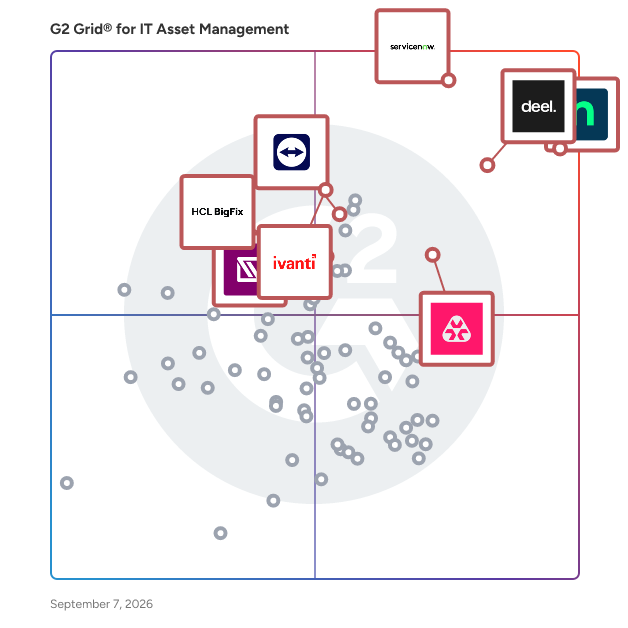
Products classified in the overall IT Asset Management category are similar in many regards and help companies of all sizes solve their business problems. However, small business features, pricing, setup, and installation differ from businesses of other sizes, which is why we match buyers to the right Small Business IT Asset Management to fit their needs. Compare product ratings based on reviews from enterprise users or connect with one of G2's buying advisors to find the right solutions within the Small Business IT Asset Management category.

In addition to qualifying for inclusion in the IT Asset Management Software category, to qualify for inclusion in the Small Business IT Asset Management Software category, a product must have at least 10 reviews left by a reviewer from a small business.

Show More
Show Less

G2 takes pride in showing unbiased reviews on user satisfaction in our ratings and reports. We do not allow paid placements in any of our ratings, rankings, or reports. Learn about our scoring methodologies.

Coming Soon
Get Trending IT Asset Management Products in Your Inbox

A weekly snapshot of rising stars, new launches, and what everyone's buzzing about.

Sample Trending Products Newsletter
1 filter applied
Clear All

20 Listings in Small Business IT Asset Management Available

(3,213)4.7 out of 5
Optimized for quick response
2nd Easiest To Use in IT Asset Management software
View top Consulting Services for NinjaOne
Save to My Lists
  • Overview
    Expand/Collapse Overview
  • Product Description
    How are these determined?Information
    This description is provided by the seller.

    NinjaOne, the automated endpoint management platform, delivers visibility, security, and control over all endpoints for more than 30,000 customers in 130+ countries. The cloud-native NinjaOne platform

    Users
    • IT Manager
    • Owner
    Industries
    • Information Technology and Services
    • Computer & Network Security
    Market Segment
    • 49% Mid-Market
    • 45% Small-Business
    User Sentiment
    How are these determined?Information
    These insights, currently in beta, are compiled from user reviews and grouped to display a high-level overview of the software.
    • NinjaOne is a platform designed for IT management, offering features such as monitoring, automation, remote management, patching, and integration with other tools.
    • Users frequently mention the platform's ease of use, its wide range of features, and the responsiveness and expertise of its customer support, which contribute to a smooth and reliable overall experience.
    • Users experienced issues with the Ninja remote tool breaking, slow response from support at times, and a lack of certain features such as a built-in software audit tool and an AI agent.
  • Pros and Cons
    Expand/Collapse Pros and Cons
  • NinjaOne Pros and Cons
    How are these determined?Information
    Pros and Cons are compiled from review feedback and grouped into themes to provide an easy-to-understand summary of user reviews.
    Pros
    Ease of Use
    1,871
    Features
    1,212
    Remote Access
    1,092
    Automation
    1,072
    Customer Support
    995
    Cons
    Missing Features
    960
    Limited Features
    462
    Improvement Needed
    457
    Feature Issues
    441
    Needs Improvement
    428
  • User Satisfaction
    Expand/Collapse User Satisfaction
  • NinjaOne features and usability ratings that predict user satisfaction
    9.1
    Ease of Use
    Average: 8.9
    9.2
    Quality of Support
    Average: 9.0
    9.5
    Has the product been a good partner in doing business?
    Average: 9.2
    8.7
    Asset Policy Management
    Average: 8.1
  • Seller Details
    Expand/Collapse Seller Details
  • Seller Details
    Seller
    NinjaOne
    Company Website
    Year Founded
    2013
    HQ Location
    Austin, Texas
    Twitter
    @NinjaOne
    3,411 Twitter followers
    LinkedIn® Page
    www.linkedin.com
    1,978 employees on LinkedIn®
Product Description
How are these determined?Information
This description is provided by the seller.

NinjaOne, the automated endpoint management platform, delivers visibility, security, and control over all endpoints for more than 30,000 customers in 130+ countries. The cloud-native NinjaOne platform

Users
  • IT Manager
  • Owner
Industries
  • Information Technology and Services
  • Computer & Network Security
Market Segment
  • 49% Mid-Market
  • 45% Small-Business
User Sentiment
How are these determined?Information
These insights, currently in beta, are compiled from user reviews and grouped to display a high-level overview of the software.
  • NinjaOne is a platform designed for IT management, offering features such as monitoring, automation, remote management, patching, and integration with other tools.
  • Users frequently mention the platform's ease of use, its wide range of features, and the responsiveness and expertise of its customer support, which contribute to a smooth and reliable overall experience.
  • Users experienced issues with the Ninja remote tool breaking, slow response from support at times, and a lack of certain features such as a built-in software audit tool and an AI agent.
NinjaOne Pros and Cons
How are these determined?Information
Pros and Cons are compiled from review feedback and grouped into themes to provide an easy-to-understand summary of user reviews.
Pros
Ease of Use
1,871
Features
1,212
Remote Access
1,092
Automation
1,072
Customer Support
995
Cons
Missing Features
960
Limited Features
462
Improvement Needed
457
Feature Issues
441
Needs Improvement
428
NinjaOne features and usability ratings that predict user satisfaction
9.1
Ease of Use
Average: 8.9
9.2
Quality of Support
Average: 9.0
9.5
Has the product been a good partner in doing business?
Average: 9.2
8.7
Asset Policy Management
Average: 8.1
Seller Details
Seller
NinjaOne
Company Website
Year Founded
2013
HQ Location
Austin, Texas
Twitter
@NinjaOne
3,411 Twitter followers
LinkedIn® Page
www.linkedin.com
1,978 employees on LinkedIn®
(3,712)4.5 out of 5
Optimized for quick response
5th Easiest To Use in IT Asset Management software
Save to My Lists
Entry Level Price:Starting at $24.90
  • Overview
    Expand/Collapse Overview
  • Product Description
    How are these determined?Information
    This description is provided by the seller.

    TeamViewer is a leading provider of remote connectivity software for individuals and businesses of all sizes. Our remote software enables companies across various industries to enhance their efficienc

    Users
    • Software Engineer
    • IT Manager
    Industries
    • Information Technology and Services
    • Computer Software
    Market Segment
    • 43% Small-Business
    • 36% Mid-Market
    User Sentiment
    How are these determined?Information
    These insights, currently in beta, are compiled from user reviews and grouped to display a high-level overview of the software.
    • TeamViewer is a software that provides remote access and support to devices, allowing users to connect, troubleshoot, and transfer files between systems from anywhere.
    • Users like the ease of use, secure connections, cross-platform compatibility, and the ability to provide remote support, transfer files, and manage multiple sessions, which saves time and makes daily operations smoother.
    • Reviewers experienced occasional connection lags, especially during large file transfers or on low bandwidth networks, and some found the licensing structure expensive for small teams or occasional users, and the customer support sometimes slow to respond.
  • Pros and Cons
    Expand/Collapse Pros and Cons
  • TeamViewer Pros and Cons
    How are these determined?Information
    Pros and Cons are compiled from review feedback and grouped into themes to provide an easy-to-understand summary of user reviews.
    Pros
    Ease of Use
    462
    Remote Access
    372
    Remote Control
    292
    Easy Access
    244
    Remote Work
    239
    Cons
    Connection Issues
    162
    Connectivity Issues
    133
    Slow Performance
    124
    Expensive
    117
    Remote Access Issues
    104
  • User Satisfaction
    Expand/Collapse User Satisfaction
  • TeamViewer features and usability ratings that predict user satisfaction
    9.1
    Ease of Use
    Average: 8.9
    8.7
    Quality of Support
    Average: 9.0
    8.6
    Has the product been a good partner in doing business?
    Average: 9.2
    8.7
    Asset Policy Management
    Average: 8.1
  • Seller Details
    Expand/Collapse Seller Details
  • Seller Details
    Company Website
    Year Founded
    2005
    HQ Location
    Goppingen
    Twitter
    @TeamViewer
    48,439 Twitter followers
    LinkedIn® Page
    www.linkedin.com
    2,701 employees on LinkedIn®
Product Description
How are these determined?Information
This description is provided by the seller.

TeamViewer is a leading provider of remote connectivity software for individuals and businesses of all sizes. Our remote software enables companies across various industries to enhance their efficienc

Users
  • Software Engineer
  • IT Manager
Industries
  • Information Technology and Services
  • Computer Software
Market Segment
  • 43% Small-Business
  • 36% Mid-Market
User Sentiment
How are these determined?Information
These insights, currently in beta, are compiled from user reviews and grouped to display a high-level overview of the software.
  • TeamViewer is a software that provides remote access and support to devices, allowing users to connect, troubleshoot, and transfer files between systems from anywhere.
  • Users like the ease of use, secure connections, cross-platform compatibility, and the ability to provide remote support, transfer files, and manage multiple sessions, which saves time and makes daily operations smoother.
  • Reviewers experienced occasional connection lags, especially during large file transfers or on low bandwidth networks, and some found the licensing structure expensive for small teams or occasional users, and the customer support sometimes slow to respond.
TeamViewer Pros and Cons
How are these determined?Information
Pros and Cons are compiled from review feedback and grouped into themes to provide an easy-to-understand summary of user reviews.
Pros
Ease of Use
462
Remote Access
372
Remote Control
292
Easy Access
244
Remote Work
239
Cons
Connection Issues
162
Connectivity Issues
133
Slow Performance
124
Expensive
117
Remote Access Issues
104
TeamViewer features and usability ratings that predict user satisfaction
9.1
Ease of Use
Average: 8.9
8.7
Quality of Support
Average: 9.0
8.6
Has the product been a good partner in doing business?
Average: 9.2
8.7
Asset Policy Management
Average: 8.1
Seller Details
Company Website
Year Founded
2005
HQ Location
Goppingen
Twitter
@TeamViewer
48,439 Twitter followers
LinkedIn® Page
www.linkedin.com
2,701 employees on LinkedIn®

This is how G2 Deals can help you:

  • Easily shop for curated – and trusted – software
  • Own your own software buying journey
  • Discover exclusive deals on software
(959)4.6 out of 5
Optimized for quick response
3rd Easiest To Use in IT Asset Management software
Save to My Lists
  • Overview
    Expand/Collapse Overview
  • Product Description
    How are these determined?Information
    This description is provided by the seller.

    The first and only Agentic AI platform for IT management, offers a digital workforce of AI agents that proactively and autonomously support your entire IT operation. Atera’s all-in-one IT management

    Users
    • Owner
    • IT Manager
    Industries
    • Information Technology and Services
    • Computer & Network Security
    Market Segment
    • 60% Small-Business
    • 35% Mid-Market
    User Sentiment
    How are these determined?Information
    These insights, currently in beta, are compiled from user reviews and grouped to display a high-level overview of the software.
    • Atera is a platform that assists in diagnosing issues, implementing solutions, and managing systems through features like Patching and Automation.
    • Reviewers like the ease of setup, the ability to combine old systems, the automation options, and the preventative maintenance provided by the platform.
    • Users experienced issues with ticket editing options, limitations in reporting and customization, and occasional inaccuracies in system readings.
  • Pros and Cons
    Expand/Collapse Pros and Cons
  • Atera Pros and Cons
    How are these determined?Information
    Pros and Cons are compiled from review feedback and grouped into themes to provide an easy-to-understand summary of user reviews.
    Pros
    Ease of Use
    519
    Features
    339
    Automation
    286
    Remote Access
    235
    Customer Support
    229
    Cons
    Missing Features
    241
    Limited Features
    172
    Feature Issues
    125
    Improvement Needed
    108
    Needs Improvement
    84
  • User Satisfaction
    Expand/Collapse User Satisfaction
  • Atera features and usability ratings that predict user satisfaction
    9.2
    Ease of Use
    Average: 8.9
    9.0
    Quality of Support
    Average: 9.0
    9.2
    Has the product been a good partner in doing business?
    Average: 9.2
    8.1
    Asset Policy Management
    Average: 8.1
  • Seller Details
    Expand/Collapse Seller Details
  • Seller Details
    Seller
    Atera
    Company Website
    Year Founded
    2011
    HQ Location
    Tel Aviv
    Twitter
    @AteraCloud
    1,677 Twitter followers
    LinkedIn® Page
    www.linkedin.com
    359 employees on LinkedIn®
Product Description
How are these determined?Information
This description is provided by the seller.

The first and only Agentic AI platform for IT management, offers a digital workforce of AI agents that proactively and autonomously support your entire IT operation. Atera’s all-in-one IT management

Users
  • Owner
  • IT Manager
Industries
  • Information Technology and Services
  • Computer & Network Security
Market Segment
  • 60% Small-Business
  • 35% Mid-Market
User Sentiment
How are these determined?Information
These insights, currently in beta, are compiled from user reviews and grouped to display a high-level overview of the software.
  • Atera is a platform that assists in diagnosing issues, implementing solutions, and managing systems through features like Patching and Automation.
  • Reviewers like the ease of setup, the ability to combine old systems, the automation options, and the preventative maintenance provided by the platform.
  • Users experienced issues with ticket editing options, limitations in reporting and customization, and occasional inaccuracies in system readings.
Atera Pros and Cons
How are these determined?Information
Pros and Cons are compiled from review feedback and grouped into themes to provide an easy-to-understand summary of user reviews.
Pros
Ease of Use
519
Features
339
Automation
286
Remote Access
235
Customer Support
229
Cons
Missing Features
241
Limited Features
172
Feature Issues
125
Improvement Needed
108
Needs Improvement
84
Atera features and usability ratings that predict user satisfaction
9.2
Ease of Use
Average: 8.9
9.0
Quality of Support
Average: 9.0
9.2
Has the product been a good partner in doing business?
Average: 9.2
8.1
Asset Policy Management
Average: 8.1
Seller Details
Seller
Atera
Company Website
Year Founded
2011
HQ Location
Tel Aviv
Twitter
@AteraCloud
1,677 Twitter followers
LinkedIn® Page
www.linkedin.com
359 employees on LinkedIn®
Entry Level Price:Starting at $8.00
  • Overview
    Expand/Collapse Overview
  • Product Description
    How are these determined?Information
    This description is provided by the seller.

    Deel IT is a global IT management platform that helps organizations provision, secure, support, and recover employee devices and software across distributed teams. It enables IT teams to manage the fu

    Users
    No information available
    Industries
    • Information Technology and Services
    • Computer Software
    Market Segment
    • 50% Small-Business
    • 44% Mid-Market
  • User Satisfaction
    Expand/Collapse User Satisfaction
  • Deel IT features and usability ratings that predict user satisfaction
    9.3
    Ease of Use
    Average: 8.9
    9.3
    Quality of Support
    Average: 9.0
    9.8
    Has the product been a good partner in doing business?
    Average: 9.2
    8.7
    Asset Policy Management
    Average: 8.1
  • Seller Details
    Expand/Collapse Seller Details
  • Seller Details
    Seller
    Deel
    Company Website
    Year Founded
    2019
    HQ Location
    San Francisco, California
    Twitter
    @deel
    25,916 Twitter followers
    LinkedIn® Page
    www.linkedin.com
    6,630 employees on LinkedIn®
Product Description
How are these determined?Information
This description is provided by the seller.

Deel IT is a global IT management platform that helps organizations provision, secure, support, and recover employee devices and software across distributed teams. It enables IT teams to manage the fu

Users
No information available
Industries
  • Information Technology and Services
  • Computer Software
Market Segment
  • 50% Small-Business
  • 44% Mid-Market
Deel IT features and usability ratings that predict user satisfaction
9.3
Ease of Use
Average: 8.9
9.3
Quality of Support
Average: 9.0
9.8
Has the product been a good partner in doing business?
Average: 9.2
8.7
Asset Policy Management
Average: 8.1
Seller Details
Seller
Deel
Company Website
Year Founded
2019
HQ Location
San Francisco, California
Twitter
@deel
25,916 Twitter followers
LinkedIn® Page
www.linkedin.com
6,630 employees on LinkedIn®
(151)4.4 out of 5
View top Consulting Services for ServiceNow IT Asset Management
Save to My Lists
  • Overview
    Expand/Collapse Overview
  • Product Description
    How are these determined?Information
    This description is provided by the seller.

    Optimize hardware, software, and cloud costs while reducing risk. Automate workflow action from a native CMDB, the central system of record for IT.

    Users
    No information available
    Industries
    • Information Technology and Services
    • Financial Services
    Market Segment
    • 68% Enterprise
    • 21% Mid-Market
  • Pros and Cons
    Expand/Collapse Pros and Cons
  • ServiceNow IT Asset Management Pros and Cons
    How are these determined?Information
    Pros and Cons are compiled from review feedback and grouped into themes to provide an easy-to-understand summary of user reviews.
    Pros
    Asset Management
    54
    Ease of Use
    28
    Integrations
    23
    Tracking
    20
    Features
    12
    Cons
    Learning Curve
    17
    Expensive
    16
    Complexity
    8
    Difficult Setup
    6
    Insufficient Information
    6
  • User Satisfaction
    Expand/Collapse User Satisfaction
  • ServiceNow IT Asset Management features and usability ratings that predict user satisfaction
    8.3
    Ease of Use
    Average: 8.9
    8.8
    Quality of Support
    Average: 9.0
    9.0
    Has the product been a good partner in doing business?
    Average: 9.2
    8.3
    Asset Policy Management
    Average: 8.1
  • Seller Details
    Expand/Collapse Seller Details
  • Seller Details
    Company Website
    Year Founded
    2004
    HQ Location
    Santa Clara, CA
    Twitter
    @servicenow
    52,998 Twitter followers
    LinkedIn® Page
    www.linkedin.com
    31,344 employees on LinkedIn®
Product Description
How are these determined?Information
This description is provided by the seller.

Optimize hardware, software, and cloud costs while reducing risk. Automate workflow action from a native CMDB, the central system of record for IT.

Users
No information available
Industries
  • Information Technology and Services
  • Financial Services
Market Segment
  • 68% Enterprise
  • 21% Mid-Market
ServiceNow IT Asset Management Pros and Cons
How are these determined?Information
Pros and Cons are compiled from review feedback and grouped into themes to provide an easy-to-understand summary of user reviews.
Pros
Asset Management
54
Ease of Use
28
Integrations
23
Tracking
20
Features
12
Cons
Learning Curve
17
Expensive
16
Complexity
8
Difficult Setup
6
Insufficient Information
6
ServiceNow IT Asset Management features and usability ratings that predict user satisfaction
8.3
Ease of Use
Average: 8.9
8.8
Quality of Support
Average: 9.0
9.0
Has the product been a good partner in doing business?
Average: 9.2
8.3
Asset Policy Management
Average: 8.1
Seller Details
Company Website
Year Founded
2004
HQ Location
Santa Clara, CA
Twitter
@servicenow
52,998 Twitter followers
LinkedIn® Page
www.linkedin.com
31,344 employees on LinkedIn®
(649)4.7 out of 5
Optimized for quick response
10th Easiest To Use in IT Asset Management software
Save to My Lists
Entry Level Price:$29.00
  • Overview
    Expand/Collapse Overview
  • Product Description
    How are these determined?Information
    This description is provided by the seller.

    IT Glue is the first documentation platform specifically built for the needs of IT professionals. With IT Glue, your team will have IT asset, vendor and software information, along with passwords, con

    Users
    • System Administrator
    • Owner
    Industries
    • Information Technology and Services
    • Computer & Network Security
    Market Segment
    • 69% Small-Business
    • 27% Mid-Market
  • Pros and Cons
    Expand/Collapse Pros and Cons
  • IT Glue Pros and Cons
    How are these determined?Information
    Pros and Cons are compiled from review feedback and grouped into themes to provide an easy-to-understand summary of user reviews.
    Pros
    Ease of Use
    108
    Document Management
    71
    Integrations
    69
    Organization
    49
    Easy Integrations
    47
    Cons
    Slow Performance
    22
    Missing Features
    21
    Learning Curve
    20
    Search Functionality
    20
    Search Limitations
    16
  • User Satisfaction
    Expand/Collapse User Satisfaction
  • IT Glue features and usability ratings that predict user satisfaction
    9.1
    Ease of Use
    Average: 8.9
    8.7
    Quality of Support
    Average: 9.0
    9.0
    Has the product been a good partner in doing business?
    Average: 9.2
    8.1
    Asset Policy Management
    Average: 8.1
  • Seller Details
    Expand/Collapse Seller Details
  • Seller Details
    Seller
    Kaseya
    Company Website
    Year Founded
    2000
    HQ Location
    Miami, FL
    Twitter
    @KaseyaCorp
    17,487 Twitter followers
    LinkedIn® Page
    www.linkedin.com
    5,388 employees on LinkedIn®
Product Description
How are these determined?Information
This description is provided by the seller.

IT Glue is the first documentation platform specifically built for the needs of IT professionals. With IT Glue, your team will have IT asset, vendor and software information, along with passwords, con

Users
  • System Administrator
  • Owner
Industries
  • Information Technology and Services
  • Computer & Network Security
Market Segment
  • 69% Small-Business
  • 27% Mid-Market
IT Glue Pros and Cons
How are these determined?Information
Pros and Cons are compiled from review feedback and grouped into themes to provide an easy-to-understand summary of user reviews.
Pros
Ease of Use
108
Document Management
71
Integrations
69
Organization
49
Easy Integrations
47
Cons
Slow Performance
22
Missing Features
21
Learning Curve
20
Search Functionality
20
Search Limitations
16
IT Glue features and usability ratings that predict user satisfaction
9.1
Ease of Use
Average: 8.9
8.7
Quality of Support
Average: 9.0
9.0
Has the product been a good partner in doing business?
Average: 9.2
8.1
Asset Policy Management
Average: 8.1
Seller Details
Seller
Kaseya
Company Website
Year Founded
2000
HQ Location
Miami, FL
Twitter
@KaseyaCorp
17,487 Twitter followers
LinkedIn® Page
www.linkedin.com
5,388 employees on LinkedIn®
(1,292)4.9 out of 5
Optimized for quick response
1st Easiest To Use in IT Asset Management software
View top Consulting Services for Scrut Automation
Save to My Lists
  • Overview
    Expand/Collapse Overview
  • Product Description
    How are these determined?Information
    This description is provided by the seller.

    Scrut Automation is a leading compliance automation platform designed for fast-growing businesses looking to streamline security, risk, and compliance without disrupting operations. It centralizes com

    Users
    • CTO
    • CEO
    Industries
    • Computer Software
    • Information Technology and Services
    Market Segment
    • 50% Small-Business
    • 48% Mid-Market
  • Pros and Cons
    Expand/Collapse Pros and Cons
  • Scrut Automation Pros and Cons
    How are these determined?Information
    Pros and Cons are compiled from review feedback and grouped into themes to provide an easy-to-understand summary of user reviews.
    Pros
    Ease of Use
    333
    Customer Support
    290
    Compliance Management
    263
    Helpful
    261
    Compliance
    231
    Cons
    Improvement Needed
    77
    Technical Issues
    54
    Missing Features
    50
    UX Improvement
    48
    Improvements Needed
    46
  • User Satisfaction
    Expand/Collapse User Satisfaction
  • Scrut Automation features and usability ratings that predict user satisfaction
    9.5
    Ease of Use
    Average: 8.9
    9.7
    Quality of Support
    Average: 9.0
    9.7
    Has the product been a good partner in doing business?
    Average: 9.2
    9.4
    Asset Policy Management
    Average: 8.1
  • Seller Details
    Expand/Collapse Seller Details
  • Seller Details
    Company Website
    Year Founded
    2022
    HQ Location
    Palo Alto, US
    Twitter
    @scrutsocial
    119 Twitter followers
    LinkedIn® Page
    in.linkedin.com
    220 employees on LinkedIn®
Product Description
How are these determined?Information
This description is provided by the seller.

Scrut Automation is a leading compliance automation platform designed for fast-growing businesses looking to streamline security, risk, and compliance without disrupting operations. It centralizes com

Users
  • CTO
  • CEO
Industries
  • Computer Software
  • Information Technology and Services
Market Segment
  • 50% Small-Business
  • 48% Mid-Market
Scrut Automation Pros and Cons
How are these determined?Information
Pros and Cons are compiled from review feedback and grouped into themes to provide an easy-to-understand summary of user reviews.
Pros
Ease of Use
333
Customer Support
290
Compliance Management
263
Helpful
261
Compliance
231
Cons
Improvement Needed
77
Technical Issues
54
Missing Features
50
UX Improvement
48
Improvements Needed
46
Scrut Automation features and usability ratings that predict user satisfaction
9.5
Ease of Use
Average: 8.9
9.7
Quality of Support
Average: 9.0
9.7
Has the product been a good partner in doing business?
Average: 9.2
9.4
Asset Policy Management
Average: 8.1
Seller Details
Company Website
Year Founded
2022
HQ Location
Palo Alto, US
Twitter
@scrutsocial
119 Twitter followers
LinkedIn® Page
in.linkedin.com
220 employees on LinkedIn®
(90)4.1 out of 5
Optimized for quick response
View top Consulting Services for Network Detective Pro
Save to My Lists
  • Overview
    Expand/Collapse Overview
  • Product Description
    How are these determined?Information
    This description is provided by the seller.

    Network Detective Pro is the non-intrusive IT assessment and reporting tool that automates data collection across the entire network to easily identify risks and issues. With it, MSPs, IT Service Prov

    Users
    No information available
    Industries
    • Information Technology and Services
    • Computer & Network Security
    Market Segment
    • 64% Small-Business
    • 32% Mid-Market
  • Pros and Cons
    Expand/Collapse Pros and Cons
  • Network Detective Pro Pros and Cons
    How are these determined?Information
    Pros and Cons are compiled from review feedback and grouped into themes to provide an easy-to-understand summary of user reviews.
    Pros
    Ease of Use
    31
    Reporting Features
    22
    Product Quality
    17
    Features
    15
    Comprehensive View
    9
    Cons
    Expensive
    10
    Missing Features
    9
    Setup Difficulty
    9
    Learning Curve
    8
    Insufficient Information
    7
  • User Satisfaction
    Expand/Collapse User Satisfaction
  • Network Detective Pro features and usability ratings that predict user satisfaction
    7.6
    Ease of Use
    Average: 8.9
    7.9
    Quality of Support
    Average: 9.0
    8.1
    Has the product been a good partner in doing business?
    Average: 9.2
    7.5
    Asset Policy Management
    Average: 8.1
  • Seller Details
    Expand/Collapse Seller Details
  • Seller Details
    Seller
    Kaseya
    Company Website
    Year Founded
    2000
    HQ Location
    Miami, FL
    Twitter
    @KaseyaCorp
    17,487 Twitter followers
    LinkedIn® Page
    www.linkedin.com
    5,388 employees on LinkedIn®
Product Description
How are these determined?Information
This description is provided by the seller.

Network Detective Pro is the non-intrusive IT assessment and reporting tool that automates data collection across the entire network to easily identify risks and issues. With it, MSPs, IT Service Prov

Users
No information available
Industries
  • Information Technology and Services
  • Computer & Network Security
Market Segment
  • 64% Small-Business
  • 32% Mid-Market
Network Detective Pro Pros and Cons
How are these determined?Information
Pros and Cons are compiled from review feedback and grouped into themes to provide an easy-to-understand summary of user reviews.
Pros
Ease of Use
31
Reporting Features
22
Product Quality
17
Features
15
Comprehensive View
9
Cons
Expensive
10
Missing Features
9
Setup Difficulty
9
Learning Curve
8
Insufficient Information
7
Network Detective Pro features and usability ratings that predict user satisfaction
7.6
Ease of Use
Average: 8.9
7.9
Quality of Support
Average: 9.0
8.1
Has the product been a good partner in doing business?
Average: 9.2
7.5
Asset Policy Management
Average: 8.1
Seller Details
Seller
Kaseya
Company Website
Year Founded
2000
HQ Location
Miami, FL
Twitter
@KaseyaCorp
17,487 Twitter followers
LinkedIn® Page
www.linkedin.com
5,388 employees on LinkedIn®
(93)4.8 out of 5
7th Easiest To Use in IT Asset Management software
Save to My Lists
Entry Level Price:$19.00
  • Overview
    Expand/Collapse Overview
  • Product Description
    How are these determined?Information
    This description is provided by the seller.

    Alloy Navigator is an AI-powered IT service and asset management solution that enables organizations of all sizes to manage their IT operations. This solution offers fully integrated help desk, networ

    Users
    No information available
    Industries
    • Information Technology and Services
    • Marketing and Advertising
    Market Segment
    • 66% Small-Business
    • 30% Mid-Market
  • Pros and Cons
    Expand/Collapse Pros and Cons
  • Alloy Navigator Pros and Cons
    How are these determined?Information
    Pros and Cons are compiled from review feedback and grouped into themes to provide an easy-to-understand summary of user reviews.
    Pros
    Asset Management
    31
    Ease of Use
    30
    Ticket Management
    27
    Ticketing System
    26
    Automation
    20
    Cons
    Learning Curve
    12
    Complex Setup
    11
    Limited Customization
    11
    Setup Difficulty
    10
    Poor Interface Design
    8
  • User Satisfaction
    Expand/Collapse User Satisfaction
  • Alloy Navigator features and usability ratings that predict user satisfaction
    9.1
    Ease of Use
    Average: 8.9
    9.1
    Quality of Support
    Average: 9.0
    9.0
    Has the product been a good partner in doing business?
    Average: 9.2
    8.8
    Asset Policy Management
    Average: 8.1
  • Seller Details
    Expand/Collapse Seller Details
  • Seller Details
    Year Founded
    2002
    HQ Location
    Bloomfield, NJ
    Twitter
    @AlloySoftware
    470 Twitter followers
    LinkedIn® Page
    www.linkedin.com
    15 employees on LinkedIn®
Product Description
How are these determined?Information
This description is provided by the seller.

Alloy Navigator is an AI-powered IT service and asset management solution that enables organizations of all sizes to manage their IT operations. This solution offers fully integrated help desk, networ

Users
No information available
Industries
  • Information Technology and Services
  • Marketing and Advertising
Market Segment
  • 66% Small-Business
  • 30% Mid-Market
Alloy Navigator Pros and Cons
How are these determined?Information
Pros and Cons are compiled from review feedback and grouped into themes to provide an easy-to-understand summary of user reviews.
Pros
Asset Management
31
Ease of Use
30
Ticket Management
27
Ticketing System
26
Automation
20
Cons
Learning Curve
12
Complex Setup
11
Limited Customization
11
Setup Difficulty
10
Poor Interface Design
8
Alloy Navigator features and usability ratings that predict user satisfaction
9.1
Ease of Use
Average: 8.9
9.1
Quality of Support
Average: 9.0
9.0
Has the product been a good partner in doing business?
Average: 9.2
8.8
Asset Policy Management
Average: 8.1
Seller Details
Year Founded
2002
HQ Location
Bloomfield, NJ
Twitter
@AlloySoftware
470 Twitter followers
LinkedIn® Page
www.linkedin.com
15 employees on LinkedIn®
Entry Level Price:$39.00
  • Overview
    Expand/Collapse Overview
  • Product Description
    How are these determined?Information
    This description is provided by the seller.

    SolarWinds® Service Desk is an all-in-one service management platform designed to help IT teams and various departments deliver reliable and efficient service. This comprehensive solution integrates t

    Users
    • IT Manager
    • Systems Administrator
    Industries
    • Information Technology and Services
    • Hospital & Health Care
    Market Segment
    • 68% Mid-Market
    • 24% Enterprise
  • Pros and Cons
    Expand/Collapse Pros and Cons
  • SolarWinds Service Desk Pros and Cons
    How are these determined?Information
    Pros and Cons are compiled from review feedback and grouped into themes to provide an easy-to-understand summary of user reviews.
    Pros
    Ease of Use
    9
    Asset Management
    7
    Ticketing System
    7
    User Interface
    7
    Ticket Management
    6
    Cons
    Insufficient Information
    4
    Missing Features
    4
    Asset Management
    3
    Expensive
    3
    Ticketing Issues
    3
  • User Satisfaction
    Expand/Collapse User Satisfaction
  • SolarWinds Service Desk features and usability ratings that predict user satisfaction
    9.0
    Ease of Use
    Average: 8.9
    8.9
    Quality of Support
    Average: 9.0
    9.0
    Has the product been a good partner in doing business?
    Average: 9.2
    8.0
    Asset Policy Management
    Average: 8.1
  • Seller Details
    Expand/Collapse Seller Details
  • Seller Details
    Company Website
    Year Founded
    1999
    HQ Location
    Austin, TX
    Twitter
    @solarwinds
    19,702 Twitter followers
    LinkedIn® Page
    www.linkedin.com
    2,796 employees on LinkedIn®
Product Description
How are these determined?Information
This description is provided by the seller.

SolarWinds® Service Desk is an all-in-one service management platform designed to help IT teams and various departments deliver reliable and efficient service. This comprehensive solution integrates t

Users
  • IT Manager
  • Systems Administrator
Industries
  • Information Technology and Services
  • Hospital & Health Care
Market Segment
  • 68% Mid-Market
  • 24% Enterprise
SolarWinds Service Desk Pros and Cons
How are these determined?Information
Pros and Cons are compiled from review feedback and grouped into themes to provide an easy-to-understand summary of user reviews.
Pros
Ease of Use
9
Asset Management
7
Ticketing System
7
User Interface
7
Ticket Management
6
Cons
Insufficient Information
4
Missing Features
4
Asset Management
3
Expensive
3
Ticketing Issues
3
SolarWinds Service Desk features and usability ratings that predict user satisfaction
9.0
Ease of Use
Average: 8.9
8.9
Quality of Support
Average: 9.0
9.0
Has the product been a good partner in doing business?
Average: 9.2
8.0
Asset Policy Management
Average: 8.1
Seller Details
Company Website
Year Founded
1999
HQ Location
Austin, TX
Twitter
@solarwinds
19,702 Twitter followers
LinkedIn® Page
www.linkedin.com
2,796 employees on LinkedIn®
Entry Level Price:$79.00
  • Overview
    Expand/Collapse Overview
  • Product Description
    How are these determined?Information
    This description is provided by the seller.

    SuperOps is a unified PSA+RMM platform built for MSPs of all shapes and sizes. SuperOps's platform is built on three principles 1. One for all, all-in-one If you can dream it, you can do it.

    Users
    • Director
    • Owner
    Industries
    • Information Technology and Services
    • Computer & Network Security
    Market Segment
    • 87% Small-Business
    • 12% Mid-Market
  • Pros and Cons
    Expand/Collapse Pros and Cons
  • SuperOps Pros and Cons
    How are these determined?Information
    Pros and Cons are compiled from review feedback and grouped into themes to provide an easy-to-understand summary of user reviews.
    Pros
    Ease of Use
    74
    Customer Support
    62
    Features
    45
    User Interface
    33
    Intuitive
    30
    Cons
    Missing Features
    41
    Feature Issues
    19
    Integration Issues
    14
    Lack of Integrations
    13
    Ticketing System Issues
    13
  • User Satisfaction
    Expand/Collapse User Satisfaction
  • SuperOps features and usability ratings that predict user satisfaction
    9.0
    Ease of Use
    Average: 8.9
    9.4
    Quality of Support
    Average: 9.0
    9.2
    Has the product been a good partner in doing business?
    Average: 9.2
    8.3
    Asset Policy Management
    Average: 8.1
  • Seller Details
    Expand/Collapse Seller Details
  • Seller Details
    Company Website
    Year Founded
    2020
    HQ Location
    Claymont, US
    LinkedIn® Page
    www.linkedin.com
    203 employees on LinkedIn®
Product Description
How are these determined?Information
This description is provided by the seller.

SuperOps is a unified PSA+RMM platform built for MSPs of all shapes and sizes. SuperOps's platform is built on three principles 1. One for all, all-in-one If you can dream it, you can do it.

Users
  • Director
  • Owner
Industries
  • Information Technology and Services
  • Computer & Network Security
Market Segment
  • 87% Small-Business
  • 12% Mid-Market
SuperOps Pros and Cons
How are these determined?Information
Pros and Cons are compiled from review feedback and grouped into themes to provide an easy-to-understand summary of user reviews.
Pros
Ease of Use
74
Customer Support
62
Features
45
User Interface
33
Intuitive
30
Cons
Missing Features
41
Feature Issues
19
Integration Issues
14
Lack of Integrations
13
Ticketing System Issues
13
SuperOps features and usability ratings that predict user satisfaction
9.0
Ease of Use
Average: 8.9
9.4
Quality of Support
Average: 9.0
9.2
Has the product been a good partner in doing business?
Average: 9.2
8.3
Asset Policy Management
Average: 8.1
Seller Details
Company Website
Year Founded
2020
HQ Location
Claymont, US
LinkedIn® Page
www.linkedin.com
203 employees on LinkedIn®
  • Overview
    Expand/Collapse Overview
  • Product Description
    How are these determined?Information
    This description is provided by the seller.

    Lifecycle Manager Pro gives MSPs the tools to lead strategic client conversations rooted in Customer Success—using roadmaps and client-friendly reporting to run impactful QBRs, align technology with b

    Users
    • President
    Industries
    • Information Technology and Services
    • Computer & Network Security
    Market Segment
    • 74% Small-Business
    • 24% Mid-Market
  • Pros and Cons
    Expand/Collapse Pros and Cons
  • ScalePad Lifecycle Manager Pros and Cons
    How are these determined?Information
    Pros and Cons are compiled from review feedback and grouped into themes to provide an easy-to-understand summary of user reviews.
    Pros
    Ease of Use
    21
    Integrations
    17
    Asset Management
    14
    Product Quality
    12
    Customer Support
    7
    Cons
    Integration Issues
    6
    Expensive
    5
    Inadequate Reporting
    4
    Missing Features
    4
    Limited Customization
    3
  • User Satisfaction
    Expand/Collapse User Satisfaction
  • ScalePad Lifecycle Manager features and usability ratings that predict user satisfaction
    9.1
    Ease of Use
    Average: 8.9
    8.7
    Quality of Support
    Average: 9.0
    9.0
    Has the product been a good partner in doing business?
    Average: 9.2
    8.3
    Asset Policy Management
    Average: 8.1
  • Seller Details
    Expand/Collapse Seller Details
  • Seller Details
    Seller
    ScalePad
    Company Website
    Year Founded
    2015
    HQ Location
    Vancouver, BC
    Twitter
    @GoScalePad
    983 Twitter followers
    LinkedIn® Page
    www.linkedin.com
    241 employees on LinkedIn®
Product Description
How are these determined?Information
This description is provided by the seller.

Lifecycle Manager Pro gives MSPs the tools to lead strategic client conversations rooted in Customer Success—using roadmaps and client-friendly reporting to run impactful QBRs, align technology with b

Users
  • President
Industries
  • Information Technology and Services
  • Computer & Network Security
Market Segment
  • 74% Small-Business
  • 24% Mid-Market
ScalePad Lifecycle Manager Pros and Cons
How are these determined?Information
Pros and Cons are compiled from review feedback and grouped into themes to provide an easy-to-understand summary of user reviews.
Pros
Ease of Use
21
Integrations
17
Asset Management
14
Product Quality
12
Customer Support
7
Cons
Integration Issues
6
Expensive
5
Inadequate Reporting
4
Missing Features
4
Limited Customization
3
ScalePad Lifecycle Manager features and usability ratings that predict user satisfaction
9.1
Ease of Use
Average: 8.9
8.7
Quality of Support
Average: 9.0
9.0
Has the product been a good partner in doing business?
Average: 9.2
8.3
Asset Policy Management
Average: 8.1
Seller Details
Seller
ScalePad
Company Website
Year Founded
2015
HQ Location
Vancouver, BC
Twitter
@GoScalePad
983 Twitter followers
LinkedIn® Page
www.linkedin.com
241 employees on LinkedIn®
(333)4.7 out of 5
Optimized for quick response
4th Easiest To Use in IT Asset Management software
Save to My Lists
Entry Level Price:$27.00
  • Overview
    Expand/Collapse Overview
  • Product Description
    How are these determined?Information
    This description is provided by the seller.

    Hudu is a comprehensive IT documentation platform designed to help organizations streamline their operations and improve team efficiency. It provides a centralized hub for storing critical documentati

    Users
    • Owner
    • Director
    Industries
    • Information Technology and Services
    • Computer & Network Security
    Market Segment
    • 71% Small-Business
    • 11% Mid-Market
  • Pros and Cons
    Expand/Collapse Pros and Cons
  • Hudu Pros and Cons
    How are these determined?Information
    Pros and Cons are compiled from review feedback and grouped into themes to provide an easy-to-understand summary of user reviews.
    Pros
    Ease of Use
    105
    Integrations
    56
    Features
    55
    Customer Support
    47
    Easy Integrations
    43
    Cons
    Missing Features
    27
    UX Improvement
    20
    Poor Integration
    17
    Poor Interface Design
    14
    Limited Features
    12
  • User Satisfaction
    Expand/Collapse User Satisfaction
  • Hudu features and usability ratings that predict user satisfaction
    9.1
    Ease of Use
    Average: 8.9
    9.2
    Quality of Support
    Average: 9.0
    9.5
    Has the product been a good partner in doing business?
    Average: 9.2
    10.0
    Asset Policy Management
    Average: 8.1
  • Seller Details
    Expand/Collapse Seller Details
  • Seller Details
    Seller
    Hudu
    Company Website
    Year Founded
    2018
    HQ Location
    Fort Collins, Colorado
    Twitter
    @HuduHQ
    492 Twitter followers
    LinkedIn® Page
    www.linkedin.com
    30 employees on LinkedIn®
Product Description
How are these determined?Information
This description is provided by the seller.

Hudu is a comprehensive IT documentation platform designed to help organizations streamline their operations and improve team efficiency. It provides a centralized hub for storing critical documentati

Users
  • Owner
  • Director
Industries
  • Information Technology and Services
  • Computer & Network Security
Market Segment
  • 71% Small-Business
  • 11% Mid-Market
Hudu Pros and Cons
How are these determined?Information
Pros and Cons are compiled from review feedback and grouped into themes to provide an easy-to-understand summary of user reviews.
Pros
Ease of Use
105
Integrations
56
Features
55
Customer Support
47
Easy Integrations
43
Cons
Missing Features
27
UX Improvement
20
Poor Integration
17
Poor Interface Design
14
Limited Features
12
Hudu features and usability ratings that predict user satisfaction
9.1
Ease of Use
Average: 8.9
9.2
Quality of Support
Average: 9.0
9.5
Has the product been a good partner in doing business?
Average: 9.2
10.0
Asset Policy Management
Average: 8.1
Seller Details
Seller
Hudu
Company Website
Year Founded
2018
HQ Location
Fort Collins, Colorado
Twitter
@HuduHQ
492 Twitter followers
LinkedIn® Page
www.linkedin.com
30 employees on LinkedIn®
Entry Level Price:Free
  • Overview
    Expand/Collapse Overview
  • Product Description
    How are these determined?Information
    This description is provided by the seller.

    Josys is an Autonomous Identity Governance Platform that simplifies how IT works. Our AI identity governance and administration agent provides IT managers with 360° control over their software and har

    Users
    No information available
    Industries
    • Computer Software
    • Information Services
    Market Segment
    • 67% Mid-Market
    • 29% Small-Business
  • Pros and Cons
    Expand/Collapse Pros and Cons
  • Josys Pros and Cons
    How are these determined?Information
    Pros and Cons are compiled from review feedback and grouped into themes to provide an easy-to-understand summary of user reviews.
    Pros
    Ease of Use
    38
    Easy Management
    25
    Device Management
    24
    Application Integration
    18
    Centralization
    16
    Cons
    Missing Features
    22
    Insufficient Information
    13
    Integration Issues
    11
    Limited Features
    8
    Limited Integrations
    8
  • User Satisfaction
    Expand/Collapse User Satisfaction
  • Josys features and usability ratings that predict user satisfaction
    8.5
    Ease of Use
    Average: 8.9
    9.2
    Quality of Support
    Average: 9.0
    9.2
    Has the product been a good partner in doing business?
    Average: 9.2
    7.3
    Asset Policy Management
    Average: 8.1
  • Seller Details
    Expand/Collapse Seller Details
  • Seller Details
    Company Website
    Year Founded
    2021
    HQ Location
    Tokyo, JP
    LinkedIn® Page
    www.linkedin.com
    198 employees on LinkedIn®
Product Description
How are these determined?Information
This description is provided by the seller.

Josys is an Autonomous Identity Governance Platform that simplifies how IT works. Our AI identity governance and administration agent provides IT managers with 360° control over their software and har

Users
No information available
Industries
  • Computer Software
  • Information Services
Market Segment
  • 67% Mid-Market
  • 29% Small-Business
Josys Pros and Cons
How are these determined?Information
Pros and Cons are compiled from review feedback and grouped into themes to provide an easy-to-understand summary of user reviews.
Pros
Ease of Use
38
Easy Management
25
Device Management
24
Application Integration
18
Centralization
16
Cons
Missing Features
22
Insufficient Information
13
Integration Issues
11
Limited Features
8
Limited Integrations
8
Josys features and usability ratings that predict user satisfaction
8.5
Ease of Use
Average: 8.9
9.2
Quality of Support
Average: 9.0
9.2
Has the product been a good partner in doing business?
Average: 9.2
7.3
Asset Policy Management
Average: 8.1
Seller Details
Company Website
Year Founded
2021
HQ Location
Tokyo, JP
LinkedIn® Page
www.linkedin.com
198 employees on LinkedIn®
  • Overview
    Expand/Collapse Overview
  • Product Description
    How are these determined?Information
    This description is provided by the seller.

    Central is a secure, cloud-based remote monitoring and management solution enabling IT professionals to effectively monitor, manage, and safeguard their endpoint infrastructure. ​Whether you have rem

    Users
    • IT Manager
    Industries
    • Information Technology and Services
    • Computer Software
    Market Segment
    • 52% Small-Business
    • 38% Mid-Market
  • Pros and Cons
    Expand/Collapse Pros and Cons
  • LogMeIn Central Pros and Cons
    How are these determined?Information
    Pros and Cons are compiled from review feedback and grouped into themes to provide an easy-to-understand summary of user reviews.
    Pros
    Connection Speed
    1
    Data Management
    1
    Ease of Use
    1
    Efficiency
    1
    Features
    1
    Cons
    Agent Reliability
    1
    Compatibility Issues
    1
    Delays
    1
    Device Compatibility
    1
    Expensive
    1
  • User Satisfaction
    Expand/Collapse User Satisfaction
  • LogMeIn Central features and usability ratings that predict user satisfaction
    8.8
    Ease of Use
    Average: 8.9
    8.0
    Quality of Support
    Average: 9.0
    8.4
    Has the product been a good partner in doing business?
    Average: 9.2
    7.7
    Asset Policy Management
    Average: 8.1
  • Seller Details
    Expand/Collapse Seller Details
  • Seller Details
    Seller
    GoTo
    Year Founded
    2003
    HQ Location
    Boston, MA
    Twitter
    @goto
    41,422 Twitter followers
    LinkedIn® Page
    www.linkedin.com
    920 employees on LinkedIn®
Product Description
How are these determined?Information
This description is provided by the seller.

Central is a secure, cloud-based remote monitoring and management solution enabling IT professionals to effectively monitor, manage, and safeguard their endpoint infrastructure. ​Whether you have rem

Users
  • IT Manager
Industries
  • Information Technology and Services
  • Computer Software
Market Segment
  • 52% Small-Business
  • 38% Mid-Market
LogMeIn Central Pros and Cons
How are these determined?Information
Pros and Cons are compiled from review feedback and grouped into themes to provide an easy-to-understand summary of user reviews.
Pros
Connection Speed
1
Data Management
1
Ease of Use
1
Efficiency
1
Features
1
Cons
Agent Reliability
1
Compatibility Issues
1
Delays
1
Device Compatibility
1
Expensive
1
LogMeIn Central features and usability ratings that predict user satisfaction
8.8
Ease of Use
Average: 8.9
8.0
Quality of Support
Average: 9.0
8.4
Has the product been a good partner in doing business?
Average: 9.2
7.7
Asset Policy Management
Average: 8.1
Seller Details
Seller
GoTo
Year Founded
2003
HQ Location
Boston, MA
Twitter
@goto
41,422 Twitter followers
LinkedIn® Page
www.linkedin.com
920 employees on LinkedIn®