# Best Email Client Software

  *By [Nana Serwah Nkrahene](https://research.g2.com/insights/author/nana-nkrahene)*

   Email client software manages a user’s email account or accounts through a desktop application. Email clients work similarly to webmail email managers provided by [email software](https://www.g2.com/categories/email) available via browser, but are instead accessible through a downloaded program. Some email account providers also offer email clients, but most email clients do not provide email accounts themselves.

One of the main benefits of email clients is the capability to house a unified inbox for multiple email accounts. While some webmail options consolidate emails from multiple accounts from the same provider, email clients can collect email from different providers in a single space. Like their webmail counterparts, email clients will either natively provide, or integrate with, outside [calendar software](https://www.g2.com/categories/calendar) so users can easily coordinate meetings and record dates.

To qualify for inclusion in the Email Client category, a product must:

- Be available as a downloadable desktop application
- Provide an inbox that can collect emails for one or more accounts
- Be capable of auditing emails and contacts for errors, duplicates, etc.


## Category Overview

**Total Products under this Category:** 52


## Trust & Credibility Stats

**Why You Can Trust G2's Software Rankings:**

- 30 Analysts and Data Experts
- 72,200+ Authentic Reviews
- 52+ Products
- Unbiased Rankings

G2's software rankings are built on verified user reviews, rigorous moderation, and a consistent research methodology maintained by a team of analysts and data experts. Each product is measured using the same transparent criteria, with no paid placement or vendor influence. While reviews reflect real user experiences, which can be subjective, they offer valuable insight into how software performs in the hands of professionals. Together, these inputs power the G2 Score, a standardized way to compare tools within every category.


## Best Email Client Software At A Glance

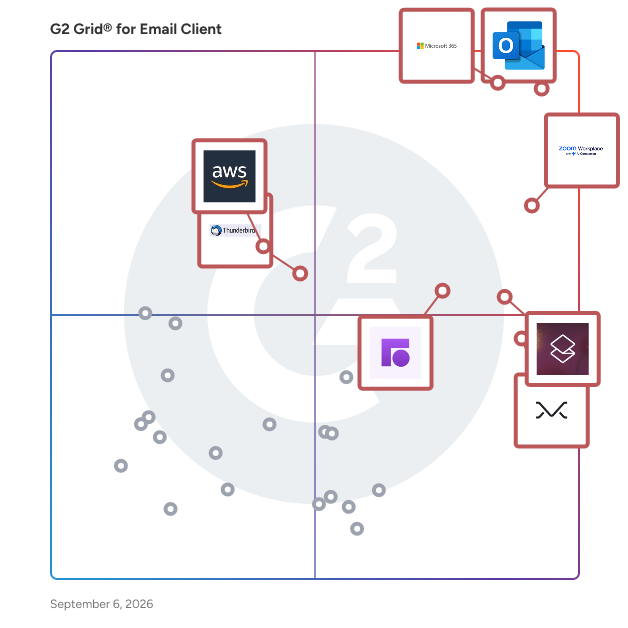
- **Leader:** [Microsoft Outlook](https://www.g2.com/products/microsoft-outlook/reviews)
- **Highest Performer:** [Missive](https://www.g2.com/products/missive/reviews)
- **Easiest to Use:** [Microsoft 365](https://www.g2.com/products/microsoft365/reviews)
- **Top Trending:** [Front](https://www.g2.com/products/front/reviews)
- **Best Free Software:** [Zoom Workplace](https://www.g2.com/products/zoom-workplace/reviews)


## Top-Rated Products (Ranked by G2 Score)
### 1. [Microsoft Outlook](https://www.g2.com/products/microsoft-outlook/reviews)
  Microsoft Outlook is a comprehensive email and calendar application designed to help users stay connected and organized across various devices. It integrates email, calendar, contacts, and tasks into a single platform, enabling efficient management of communications and schedules. With a Microsoft 365 subscription, users can share attachments directly from OneDrive, access contacts, and view LinkedIn profiles, enhancing productivity and collaboration. Key Features and Functionality: - Unified Communication: Combines email, calendar, contacts, and tasks in one application, streamlining workflow and reducing the need to switch between different apps. - Calendar Management: Allows booking of conference rooms, tracking RSVPs, and sharing calendars to coordinate schedules effectively. - Enterprise-Grade Security: Provides robust security measures to protect confidential information, ensuring peace of mind for users. - Intelligent Assistance: Automatically adds travel and bill payment details to the calendar and offers intelligent reminders to keep users on track. Primary Value and User Solutions: Microsoft Outlook addresses the need for a centralized platform to manage emails, schedules, and tasks efficiently. By integrating these functions, it reduces the complexity of juggling multiple applications, thereby enhancing productivity. Its security features ensure that sensitive information remains protected, while intelligent tools assist in planning and organization, allowing users to focus on their priorities without missing important events or communications.


  **Average Rating:** 4.5/5.0
  **Total Reviews:** 3,352

**User Satisfaction Scores:**

- **Has the product been a good partner in doing business?:** 8.8/10 (Category avg: 8.6/10)
- **Desktop Application:** 9.2/10 (Category avg: 8.9/10)
- **Notifications:** 9.2/10 (Category avg: 8.8/10)
- **Reminders:** 9.3/10 (Category avg: 8.9/10)


**Seller Details:**

- **Seller:** [Microsoft](https://www.g2.com/sellers/microsoft)
- **Year Founded:** 1975
- **HQ Location:** Redmond, Washington
- **Twitter:** @microsoft (13,114,353 Twitter followers)
- **LinkedIn® Page:** https://www.linkedin.com/company/microsoft/ (227,697 employees on LinkedIn®)
- **Ownership:** MSFT

**Reviewer Demographics:**
  - **Who Uses This:** Software Engineer, Project Manager
  - **Top Industries:** Information Technology and Services, Computer Software
  - **Company Size:** 39% Enterprise, 38% Mid-Market


#### Pros & Cons

**Pros:**

- Ease of Use (267 reviews)
- Calendar Integration (139 reviews)
- Integrations (139 reviews)
- Scheduling (128 reviews)
- Features (98 reviews)

**Cons:**

- Slow Performance (92 reviews)
- Slow Loading (91 reviews)
- Missing Features (74 reviews)
- Sync Issues (49 reviews)
- Email Management (48 reviews)

### 2. [Microsoft 365](https://www.g2.com/products/microsoft365/reviews)
  Launch and grow your business with Microsoft 365. Do more, faster, with intelligent tools to create, send, share, and store professional, branded documents with your customers and team - securely in the cloud. Microsoft 365 is a cloud-based suite of software tools designed to help you do more—with best-in-class communication, design, and data management apps, intelligent cloud services, and advanced security. Access your data from anywhere, collaborate with team members in real time, meet with people virtually, and use thousands of predesigned templates to better communicate with customers and manage your business - all with built-in security technology that safeguards your data and devices from anywhere. Get the latest Office apps, such as Microsoft Teams, Word, Excel, PowerPoint, Outlook, OneDrive, and more.


  **Average Rating:** 4.6/5.0
  **Total Reviews:** 5,486

**User Satisfaction Scores:**

- **Has the product been a good partner in doing business?:** 8.8/10 (Category avg: 8.6/10)
- **Desktop Application:** 9.3/10 (Category avg: 8.9/10)
- **Notifications:** 9.0/10 (Category avg: 8.8/10)
- **Reminders:** 9.0/10 (Category avg: 8.9/10)


**Seller Details:**

- **Seller:** [Microsoft](https://www.g2.com/sellers/microsoft)
- **Year Founded:** 1975
- **HQ Location:** Redmond, Washington
- **Twitter:** @microsoft (13,114,353 Twitter followers)
- **LinkedIn® Page:** https://www.linkedin.com/company/microsoft/ (227,697 employees on LinkedIn®)
- **Ownership:** MSFT

**Reviewer Demographics:**
  - **Who Uses This:** Owner, Manager
  - **Top Industries:** Information Technology and Services, Education Management
  - **Company Size:** 37% Mid-Market, 35% Small-Business


#### Pros & Cons

**Pros:**

- Ease of Use (297 reviews)
- Team Collaboration (228 reviews)
- Features (220 reviews)
- Integrations (198 reviews)
- Seamless Integration (178 reviews)

**Cons:**

- Expensive (117 reviews)
- Missing Features (102 reviews)
- Learning Curve (95 reviews)
- Limited Features (76 reviews)
- Lacking Features (73 reviews)

### 3. [Zoom Workplace](https://www.g2.com/products/zoom-workplace/reviews)
  Goodbye app overload. Hello effortless work. Work can be complicated. Your tools shouldn&#39;t be. Zoom Workplace connects all the ways you collaborate — from meetings to docs to chat and more — with built-in AI and seamless integrations that help teams focus and work flawlessly. Zoom Communications: Unified, Effortless Connection for Modern Work Bring every way your teams communicate—meetings, chat, calls, email, and scheduling—into one seamless experience. With Zoom, collaboration happens faster and more naturally across channels, without switching apps or losing context. From spontaneous chats to scheduled meetings and calls, everything stays connected, searchable, and secure—powered by one intuitive platform built for how modern teams work. Zoom Productivity: Workflows Connected, Work Effortless Transform how work gets done with AI-first collaboration that keeps people, content, and actions in one place. From brainstorming on whiteboards to co-creating in docs, sharing clips, and automating follow-ups, Zoom connects every step of your workflow. With Zoom Hub and integrated video management, knowledge stays organized, accessible, and actionable—so teams can move from idea to outcome without friction. Zoom Spaces: Smarter, Connected Workplaces for Every Team Bring your physical and hybrid environments to life with intelligent, connected spaces. Zoom Spaces unifies meeting rooms, desk reservations, digital signage, and visitor management into one seamless experience—making it simple to collaborate, navigate, and manage the workplace. Whether employees are remote, hybrid, or on-site, Zoom creates a consistent, secure, and flexible environment that keeps teams connected wherever work happens. Zoom Employee Engagement: Connect, Inspire, and Empower Every Employee Foster belonging and alignment with Workvivo by Zoom—a modern employee experience platform that unites communication, culture, and community in one place. From company-wide updates to recognition, feedback, and social engagement, Workvivo gives every employee a voice and a sense of connection. Built right into Zoom Workplace, it helps organizations strengthen culture, boost engagement, and keep teams informed and inspired—no matter where they work.


  **Average Rating:** 4.5/5.0
  **Total Reviews:** 53,322

**User Satisfaction Scores:**

- **Has the product been a good partner in doing business?:** 9.1/10 (Category avg: 8.6/10)
- **Desktop Application:** 9.1/10 (Category avg: 8.9/10)
- **Notifications:** 8.8/10 (Category avg: 8.8/10)
- **Reminders:** 8.7/10 (Category avg: 8.9/10)


**Seller Details:**

- **Seller:** [Zoom](https://www.g2.com/sellers/zoom-a5000ea1-6d30-4ab4-b591-20723189ac97)
- **Company Website:** https://www.zoom.com
- **Year Founded:** 2011
- **HQ Location:** San Jose, CA
- **Twitter:** @zoom (1,044,537 Twitter followers)
- **LinkedIn® Page:** https://www.linkedin.com/company/2532259/ (12,688 employees on LinkedIn®)

**Reviewer Demographics:**
  - **Who Uses This:** Owner, Software Engineer
  - **Top Industries:** Information Technology and Services, Computer Software
  - **Company Size:** 51% Small-Business, 31% Mid-Market


#### Pros & Cons

**Pros:**

- Ease of Use (4634 reviews)
- Video Conferencing (2761 reviews)
- Video Quality (2115 reviews)
- Reliability (2006 reviews)
- Screen Sharing (1696 reviews)

**Cons:**

- Limited Features (1266 reviews)
- Zoom Issues (1210 reviews)
- Meeting Issues (1180 reviews)
- Connection Issues (877 reviews)
- Video Issues (804 reviews)

### 4. [Missive](https://www.g2.com/products/missive/reviews)
  Are you double sending emails? Not knowing who&#39;s responding to what, or whether they&#39;ve responded at all? What if your business could manage all your email accounts, including its shared inboxes like support@, sales@, info@, and accounting@, along with SMS, WhatsApp, Messenger, and Instagram—all in one place? Missive is inbox collaboration for teams that run on email—eliminating chaos and ensuring everyone is aligned. Our powerful tool simplifies collaboration and boosts productivity, breaking down silos between your business&#39;s internal and external communications. We help your team work together effortlessly. Used by over 4500 businesses, including accounting firms, logistics companies, travel agencies, and start up tech companies. -- Key features • Teams Inbox: Centralize all your communication channels into shared inboxes for efficient management across your different teams. • Internal Team Chat: Facilitate real-time collaboration and discussions within your team, directly alongside your external communications. • Automated Workflows: Create customizable rules to automate repetitive tasks and use AI to get even more efficiency. Popular use cases include auto-categorization of emails, auto-follow-up emails, automatic forwarding of receipts, and out-of-office auto-responses. • Canned responses: Save time with pre-written replies to customer inquiries, sales pitches, or to include that PDF you always need to attach when signing up a new client • Integrations: Enhance your workflow with integrations to popular tools like OpenAI, ClickUp, Asana, GitHub, HubSpot, Zapier, and many more.


  **Average Rating:** 4.7/5.0
  **Total Reviews:** 806

**User Satisfaction Scores:**

- **Has the product been a good partner in doing business?:** 9.6/10 (Category avg: 8.6/10)
- **Desktop Application:** 9.1/10 (Category avg: 8.9/10)
- **Notifications:** 9.0/10 (Category avg: 8.8/10)
- **Reminders:** 8.7/10 (Category avg: 8.9/10)


**Seller Details:**

- **Seller:** [Missive](https://www.g2.com/sellers/missive)
- **Company Website:** https://missiveapp.com
- **Year Founded:** 2015
- **HQ Location:** Quebec, QC
- **Twitter:** @missiveapp (2,673 Twitter followers)
- **LinkedIn® Page:** https://www.linkedin.com/company/missive-app/ (15 employees on LinkedIn®)

**Reviewer Demographics:**
  - **Who Uses This:** CEO, Owner
  - **Top Industries:** Accounting, Marketing and Advertising
  - **Company Size:** 89% Small-Business, 11% Mid-Market


#### Pros & Cons

**Pros:**

- Team Collaboration (356 reviews)
- Communication (319 reviews)
- Ease of Use (282 reviews)
- Features (227 reviews)
- Communication Ease (170 reviews)

**Cons:**

- Missing Features (125 reviews)
- Learning Curve (100 reviews)
- Search Functionality (95 reviews)
- Search Difficulty (77 reviews)
- Steep Learning Curve (67 reviews)

### 5. [Superhuman Mail](https://www.g2.com/products/superhuman-mail/reviews)
  Superhuman Mail is the AI-native email app that helps high-performing teams fly through their inboxes and focus on what matters. Built for speed, clarity, and collaboration, Superhuman helps professionals save four hours per person, per week. Smart triage, lightning-fast UX, and powerful integrations let you move through messages in record time without losing context or control. Whether you&#39;re following up with prospects, clearing internal threads, or managing projects via email, Superhuman gives you the tools to work faster and stay responsive. Superhuman Mail is part of Superhuman, the AI productivity platform on a mission to unlock the superhuman potential in everyone. Superhuman’s suite of apps and agents brings AI wherever people work, helping over 40 million individuals and 50,000 organizations focus on what matters.


  **Average Rating:** 4.7/5.0
  **Total Reviews:** 1,180

**User Satisfaction Scores:**

- **Has the product been a good partner in doing business?:** 9.4/10 (Category avg: 8.6/10)
- **Desktop Application:** 9.4/10 (Category avg: 8.9/10)
- **Notifications:** 9.0/10 (Category avg: 8.8/10)
- **Reminders:** 9.5/10 (Category avg: 8.9/10)


**Seller Details:**

- **Seller:** [Superhuman](https://www.g2.com/sellers/superhuman-888da3d1-51f7-4603-8d73-08989f8a7db1)
- **Company Website:** https://superhuman.com/
- **HQ Location:** San Francisco, California
- **LinkedIn® Page:** https://www.linkedin.com/company/superhuman-co/ (195 employees on LinkedIn®)

**Reviewer Demographics:**
  - **Who Uses This:** CEO, Founder
  - **Top Industries:** Computer Software, Information Technology and Services
  - **Company Size:** 77% Small-Business, 17% Mid-Market


#### Pros & Cons

**Pros:**

- Time-saving (244 reviews)
- Ease of Use (224 reviews)
- Speed (173 reviews)
- Keyboard Shortcuts (169 reviews)
- Inbox Management (129 reviews)

**Cons:**

- Learning Curve (73 reviews)
- Expensive (60 reviews)
- Steep Learning Curve (60 reviews)
- Missing Features (59 reviews)
- Email Management (40 reviews)

### 6. [Front](https://www.g2.com/products/front/reviews)
  Front is the modern CX platform for customer-first businesses. We offer a unified workspace for all customer conversations — even individual inboxes and internal collaboration. This single pane-of-glass view of the customer boosts agent productivity by eliminating app switching and ensures responses are fast, accurate, and personalized. Unlike other customer service AI that takes a mistakes-first approach, Front AI starts smart and keeps getting smarter. We learn from every customer conversations in real time and help you scale safely from day one. Front&#39;s also easier to use and configure than legacy help desks, giving you unmatched control over your customer experience without relying on third-party consultants or IT resources. Trusted by more than 9,000 businesses including ClickUp, Uber Freight, and Reed &amp; Mackay, Front serves up the efficiency and insights needed to keep your entire organization customer-first, every day. Plus, we care as much about our customers as you do yours: we provide industry-leading service to our entire customer base, regardless of your team size.


  **Average Rating:** 4.7/5.0
  **Total Reviews:** 2,398

**User Satisfaction Scores:**

- **Has the product been a good partner in doing business?:** 9.2/10 (Category avg: 8.6/10)
- **Desktop Application:** 9.3/10 (Category avg: 8.9/10)
- **Notifications:** 9.0/10 (Category avg: 8.8/10)
- **Reminders:** 9.1/10 (Category avg: 8.9/10)


**Seller Details:**

- **Seller:** [Front App](https://www.g2.com/sellers/front-app)
- **Company Website:** https://frontapp.com
- **Year Founded:** 2014
- **HQ Location:** San Francisco, CA
- **Twitter:** @FrontHQ (9,435 Twitter followers)
- **LinkedIn® Page:** https://www.linkedin.com/company/fronthq/ (524 employees on LinkedIn®)

**Reviewer Demographics:**
  - **Who Uses This:** Customer Success Manager, Account Manager
  - **Top Industries:** Logistics and Supply Chain, Computer Software
  - **Company Size:** 48% Small-Business, 41% Mid-Market


#### Pros & Cons

**Pros:**

- Ease of Use (340 reviews)
- Communication (258 reviews)
- Team Collaboration (258 reviews)
- Features (230 reviews)
- Email Management (190 reviews)

**Cons:**

- Missing Features (137 reviews)
- Email Issues (127 reviews)
- Email Management (107 reviews)
- Email Management Issues (78 reviews)
- Email Communication Issues (74 reviews)

### 7. [Shift](https://www.g2.com/products/redbrick-shift/reviews)
  Shift is the first fully customizable browser that empowers you to make the most of your life online. Shift allows you to drag and drop apps, bars, and controls, to create a central hub that adapts to however you work. Sign into 1,500+ web apps, swap instantly between Spaces for work, side hustles or personal browsing, and stay logged into multiple accounts at once. In addition, Shift is proudly pioneering carbon-neutral browsing as part of its promise to reimagine what browsers can do—not only for users, but for the planet. Founded in 2016 in Victoria, British Columbia, Shift is a Certified B Corp within the Redbrick portfolio. Key capabilities &amp; features: - Build your browser: Create a custom layout for how you use the internet. - Create Spaces: Create separation between work, side hustles, and passion projects. - Integrate Apps: Add web apps to Shift to customize its capability. - Templates: Choose from 6 different layouts to build on.


  **Average Rating:** 4.5/5.0
  **Total Reviews:** 263

**User Satisfaction Scores:**

- **Has the product been a good partner in doing business?:** 8.8/10 (Category avg: 8.6/10)
- **Desktop Application:** 9.4/10 (Category avg: 8.9/10)
- **Notifications:** 8.5/10 (Category avg: 8.8/10)
- **Reminders:** 7.9/10 (Category avg: 8.9/10)


**Seller Details:**

- **Seller:** [Redbrick](https://www.g2.com/sellers/redbrick)
- **Company Website:** https://rdbrck.com/
- **Year Founded:** 2011
- **HQ Location:** Victoria, British Columbia
- **Twitter:** @rdbrck (1,635 Twitter followers)
- **LinkedIn® Page:** https://www.linkedin.com/company/2859057/ (163 employees on LinkedIn®)

**Reviewer Demographics:**
  - **Who Uses This:** Owner, CEO
  - **Top Industries:** Marketing and Advertising, Information Technology and Services
  - **Company Size:** 86% Small-Business, 10% Mid-Market


#### Pros & Cons

**Pros:**

- Ease of Use (112 reviews)
- Easy Accessibility (71 reviews)
- Daily Use (51 reviews)
- Easy Access (49 reviews)
- Simple (49 reviews)

**Cons:**

- App Issues (40 reviews)
- Missing Features (19 reviews)
- Software Bugs (18 reviews)
- Slow Performance (14 reviews)
- Limited Customization (11 reviews)

### 8. [Thunderbird](https://www.g2.com/products/thunderbird/reviews)
  Thunderbird is a free, open-source email client developed by Mozilla, designed to provide users with a secure, customizable, and efficient email management experience. Compatible with Windows, macOS, and Linux, Thunderbird supports multiple email protocols, including POP and IMAP, allowing seamless integration with various email services. Its user-friendly interface and robust feature set make it a preferred choice for individuals and organizations seeking a reliable alternative to proprietary email clients. Key Features and Functionality: - Adaptive Junk Mail Controls: Thunderbird&#39;s intelligent spam filters learn from user actions to effectively identify and segregate unwanted emails, reducing inbox clutter. - Integrated RSS and Blog Reader: Users can subscribe to RSS feeds and blogs directly within Thunderbird, enabling them to stay updated with the latest news and content without leaving the application. - Saved Search Folders: This feature allows users to create virtual folders that display messages based on specific search criteria, facilitating efficient email organization and retrieval. - Global Inbox Support: Thunderbird enables the consolidation of multiple email accounts into a single inbox, streamlining email management for users with several accounts. - Message Grouping and Labeling: Users can group messages by attributes such as date, sender, or priority, and apply labels for easy categorization and prioritization. - Privacy Protection: To safeguard user privacy, Thunderbird automatically blocks remote images in emails from unknown senders, preventing potential tracking and data collection. - Extensibility with Add-ons and Themes: Thunderbird supports a wide range of add-ons and themes, allowing users to customize the application&#39;s functionality and appearance to suit their preferences. Primary Value and User Solutions: Thunderbird addresses common challenges faced by email users by offering a secure and customizable platform that enhances productivity and privacy. Its adaptive spam filters and privacy features protect users from unwanted emails and potential threats, while the integration of RSS feeds and blogs consolidates information management within a single application. The ability to manage multiple email accounts through a unified inbox, coupled with advanced search and organization tools, streamlines email workflows and reduces the time spent managing communications. Furthermore, Thunderbird&#39;s open-source nature and support for add-ons empower users to tailor the application to their specific needs, ensuring a personalized and efficient email experience.


  **Average Rating:** 4.3/5.0
  **Total Reviews:** 332

**User Satisfaction Scores:**

- **Has the product been a good partner in doing business?:** 8.1/10 (Category avg: 8.6/10)
- **Desktop Application:** 9.2/10 (Category avg: 8.9/10)
- **Notifications:** 8.7/10 (Category avg: 8.8/10)
- **Reminders:** 8.5/10 (Category avg: 8.9/10)


**Seller Details:**

- **Seller:** [Mozilla](https://www.g2.com/sellers/mozilla)
- **Year Founded:** 2005
- **HQ Location:** San Francisco, CA
- **Twitter:** @mozilla (262,194 Twitter followers)
- **LinkedIn® Page:** https://www.linkedin.com/company/13948/ (1,749 employees on LinkedIn®)

**Reviewer Demographics:**
  - **Who Uses This:** Owner, Network Engineer
  - **Top Industries:** Information Technology and Services, Computer Software
  - **Company Size:** 66% Small-Business, 26% Mid-Market


#### Pros & Cons

**Pros:**

- Ease of Use (4 reviews)
- Functionality Features (4 reviews)
- Customer Support (2 reviews)
- Daily Use (2 reviews)
- Efficiency (2 reviews)

**Cons:**

- Difficult Setup (2 reviews)
- Missing Features (2 reviews)
- Sync Issues (2 reviews)
- Bug Issues (1 reviews)
- Confusing Interface (1 reviews)

### 9. [Amazon WorkMail](https://www.g2.com/products/amazon-workmail/reviews)
  Amazon WorkMail is a secure, managed business email and calendar service with support for existing desktop and mobile email clients it gives users the ability to seamlessly access email, contacts, and calendars using Microsoft Outlook, web browser, or native iOS and Android email applications.


  **Average Rating:** 3.6/5.0
  **Total Reviews:** 37

**User Satisfaction Scores:**

- **Has the product been a good partner in doing business?:** 7.9/10 (Category avg: 8.6/10)
- **Desktop Application:** 5.9/10 (Category avg: 8.9/10)
- **Notifications:** 6.0/10 (Category avg: 8.8/10)
- **Reminders:** 7.7/10 (Category avg: 8.9/10)


**Seller Details:**

- **Seller:** [Amazon Web Services (AWS)](https://www.g2.com/sellers/amazon-web-services-aws-3e93cc28-2e9b-4961-b258-c6ce0feec7dd)
- **Year Founded:** 2006
- **HQ Location:** Seattle, WA
- **Twitter:** @awscloud (2,225,864 Twitter followers)
- **LinkedIn® Page:** https://www.linkedin.com/company/amazon-web-services/ (156,424 employees on LinkedIn®)
- **Ownership:** NASDAQ: AMZN

**Reviewer Demographics:**
  - **Top Industries:** Computer Software, Information Technology and Services
  - **Company Size:** 66% Small-Business, 21% Mid-Market


### 10. [Spark for Teams](https://www.g2.com/products/spark-for-teams/reviews)
  Spark for Teams is a collaborative email platform builds on the foundation of the Spark email app, which is widely recognized for its smart features that help users manage their email more efficiently. The primary goal of Spark for Teams is to enhance team productivity and streamline communication by offering several key features: 1. \*\*Shared Inboxes\*\*: Teams can collaborate on emails from shared addresses like support@ or info@, ensuring that all team members can access and respond to messages. 2. \*\*Shared Emails\*\*: Stop forwarding or screenshooting your emails to post them into Slack or Microsoft Teams — with Shared Emails you could paste a link and your team will have access to all the email conversations without noisy &quot;adding to cc&quot; emails. 3. \*\*Email Delegation\*\*: Assign emails to team members directly within the app, allowing for clear responsibility and follow-up on tasks. 4. \*\*Team Comments\*\*: Team members can discuss emails internally without forwarding or copying emails back and forth, making internal communication more efficient. 5. \*\*Shared Drafts +AI\*\*: Collaborate on email drafts in real-time, allowing multiple team members to contribute to the creation of important messages. 6. \*\*Templates +AI\*\*: Create and share email templates within the team to ensure consistent communication and save time on repetitive responses. 7. \*\*+AI Meeting Notes\*\* can transcribe and summarize your meeting to capture every point. Fully focus during every discussion and never miss a detail. No bots joining your call, works with any meeting tool. Access all your meeting notes anytime in Spark Mail App. 8. \*\*Centralized Email Management\*\*: Manage multiple email accounts from a single interface, which is particularly useful for teams handling multiple projects or client accounts. 9. \*\*Smart Inbox +AI\*\*: Prioritize important emails and filter out distractions with intelligent sorting and categorization of incoming messages. 10. \*\*Integrations\*\*: Connect Spark with other productivity tools like Trello, Asana, and more to streamline workflows and ensure that email communications integrate smoothly with other team activities. Spark for Teams aims to reduce the chaos often associated with team email management by providing a suite of tools that enhance collaboration, improve communication efficiency, and streamline workflows.


  **Average Rating:** 4.4/5.0
  **Total Reviews:** 21

**User Satisfaction Scores:**

- **Has the product been a good partner in doing business?:** 9.6/10 (Category avg: 8.6/10)
- **Desktop Application:** 10.0/10 (Category avg: 8.9/10)
- **Notifications:** 8.3/10 (Category avg: 8.8/10)
- **Reminders:** 10.0/10 (Category avg: 8.9/10)


**Seller Details:**

- **Seller:** [Spark Mail](https://www.g2.com/sellers/spark-mail)
- **Year Founded:** 2007
- **HQ Location:** Odessa, Ukraine
- **Twitter:** @Readdle (25,774 Twitter followers)
- **LinkedIn® Page:** https://www.linkedin.com/company/629551/ (340 employees on LinkedIn®)

**Reviewer Demographics:**
  - **Top Industries:** Marketing and Advertising
  - **Company Size:** 86% Small-Business, 10% Mid-Market


#### Pros & Cons

**Pros:**

- Email Management (11 reviews)
- Collaboration (9 reviews)
- Ease of Use (9 reviews)
- Conversations (8 reviews)
- Communication (7 reviews)

**Cons:**

- Bug Issues (3 reviews)
- Missing Features (3 reviews)
- Software Bugs (3 reviews)
- Infrequent Updates (2 reviews)
- Poor Interface Design (2 reviews)

### 11. [Spike](https://www.g2.com/products/spike/reviews)
  Spike is an AI-powered email and team communication platform that combines email, chat, meetings, and collaboration tools into a single, organized workspace. It is designed for professionals, small teams, and businesses that use email as their primary communication channel but want a faster, more streamlined way to manage daily interactions and tasks. By transforming traditional email into a chat-like format, Spike simplifies how users read and reply to messages. The platform removes repetitive headers, quoted text, and long chains, allowing conversations to appear as clean, continuous threads. Users can manage all email accounts, calendars, and contacts in one place while taking advantage of built-in AI to summarize conversations, draft replies, and organize the inbox automatically. Spike supports both individual and team use. Freelancers and professionals use it to manage clients and projects more efficiently, while teams rely on Spike to centralize communication, share files, and collaborate in real time without switching between multiple tools. Core Features: Conversational Email: Presents emails as natural chat-like conversations while remaining fully compatible with standard email protocols. AI Productivity Tools: Provides automatic summaries, suggested replies, translations, and content drafting to speed up workflow. Priority Inbox: Uses AI to sort incoming messages into relevant categories—Priority, Other, Notes, and Starred—helping users focus on what matters most. Integrated Meetings: Enables voice and video calls directly from email threads for faster coordination. Collaborative Notes and Docs: Allows users to create, edit, and share documents in real time within the inbox. Unified Inbox and Search: Consolidates multiple email accounts and calendars into a single interface with cross-account search. Shared Inbox: Helps teams manage customer and project communications collaboratively, ensuring faster response times. Compatibility: Works with Gmail, Outlook, iCloud, Office 365, Yahoo Mail, and all IMAP-supported accounts across desktop, mobile, and web platforms. Security and Privacy: Spike is ad-free and never sells or monetizes user data. All message data is encrypted using the AES-256 standard. Spike is suited for users seeking a unified communication platform that enhances productivity while maintaining the familiarity of email. It bridges the gap between traditional email clients and modern collaboration tools, offering a single, AI-enhanced workspace that helps individuals and teams stay focused and efficient.


  **Average Rating:** 4.6/5.0
  **Total Reviews:** 250

**User Satisfaction Scores:**

- **Has the product been a good partner in doing business?:** 8.6/10 (Category avg: 8.6/10)
- **Desktop Application:** 9.3/10 (Category avg: 8.9/10)
- **Notifications:** 9.2/10 (Category avg: 8.8/10)
- **Reminders:** 9.2/10 (Category avg: 8.9/10)


**Seller Details:**

- **Seller:** [Spike](https://www.g2.com/sellers/spike)
- **Year Founded:** 2014
- **HQ Location:** Herzliya, IL
- **Twitter:** @SpikeNowHQ (3,044 Twitter followers)
- **LinkedIn® Page:** https://www.linkedin.com/company/3240452/ (31 employees on LinkedIn®)

**Reviewer Demographics:**
  - **Who Uses This:** Owner, CEO
  - **Top Industries:** Information Technology and Services, Computer Software
  - **Company Size:** 72% Small-Business, 15% Mid-Market


#### Pros & Cons

**Pros:**

- Ease of Use (47 reviews)
- Email Management (35 reviews)
- Communication (33 reviews)
- Helpful (27 reviews)
- Features (24 reviews)

**Cons:**

- Missing Features (19 reviews)
- Limited Features (12 reviews)
- Integration Issues (10 reviews)
- Expensive (9 reviews)
- Limited Customization (9 reviews)

### 12. [Workspace ONE Boxer](https://www.g2.com/products/workspace-one-boxer/reviews)
  VMware Boxer is touted to have enterprise-level security features packaged in a consumer-grade user experience.


  **Average Rating:** 4.1/5.0
  **Total Reviews:** 20

**User Satisfaction Scores:**

- **Has the product been a good partner in doing business?:** 7.8/10 (Category avg: 8.6/10)


**Seller Details:**

- **Seller:** [Broadcom](https://www.g2.com/sellers/broadcom-ab3091cd-4724-46a8-ac89-219d6bc8e166)
- **Year Founded:** 1991
- **HQ Location:** San Jose, CA
- **Twitter:** @broadcom (63,196 Twitter followers)
- **LinkedIn® Page:** https://www.linkedin.com/company/broadcom/ (55,707 employees on LinkedIn®)
- **Ownership:** NASDAQ: CA

**Reviewer Demographics:**
  - **Top Industries:** Financial Services
  - **Company Size:** 85% Enterprise, 10% Mid-Market


### 13. [eM Client](https://www.g2.com/products/em-client/reviews)
  BOOST YOUR EMAIL, SKYROCKET YOUR PRODUCTIVITY eM Client is a powerful email client for Windows and macOS with a clean and easy-to-use interface. It also offers features for calendars, tasks, contacts, notes and chat. eM Client supports all major services including Gmail, Exchange, iCloud, and Outlook and can set up everything automatically for most of the services as well. eM Client also efficiently imports your data from all major email clients (including Microsoft Outlook, Outlook Express, Windows Mail, Thunderbird and more).


  **Average Rating:** 4.0/5.0
  **Total Reviews:** 59

**User Satisfaction Scores:**

- **Has the product been a good partner in doing business?:** 7.8/10 (Category avg: 8.6/10)
- **Desktop Application:** 8.9/10 (Category avg: 8.9/10)
- **Notifications:** 8.3/10 (Category avg: 8.8/10)
- **Reminders:** 8.3/10 (Category avg: 8.9/10)


**Seller Details:**

- **Seller:** [eM Client](https://www.g2.com/sellers/em-client)
- **Year Founded:** 2010
- **HQ Location:** Prague 8, Czech Republic
- **Twitter:** @emclient (2,968 Twitter followers)
- **LinkedIn® Page:** https://www.linkedin.com/company/1328629/ (26 employees on LinkedIn®)

**Reviewer Demographics:**
  - **Top Industries:** Information Technology and Services, Computer Software
  - **Company Size:** 42% Small-Business, 37% Mid-Market


#### Pros & Cons

**Pros:**

- Ease of Use (2 reviews)
- User Interface (2 reviews)
- Connectivity (1 reviews)
- Daily Use (1 reviews)
- Features (1 reviews)

**Cons:**

- Lack of Integration (1 reviews)
- Missing Features (1 reviews)
- Sync Issues (1 reviews)

### 14. [HCL Notes](https://www.g2.com/products/hcl-notes/reviews)
  HCL Notes is an enterprise email client that integrates social collaboration, messaging and business applications into a single workspace


  **Average Rating:** 3.2/5.0
  **Total Reviews:** 169

**User Satisfaction Scores:**

- **Has the product been a good partner in doing business?:** 7.8/10 (Category avg: 8.6/10)
- **Desktop Application:** 7.8/10 (Category avg: 8.9/10)
- **Notifications:** 7.8/10 (Category avg: 8.8/10)
- **Reminders:** 7.8/10 (Category avg: 8.9/10)


**Seller Details:**

- **Seller:** [HCL Technologies](https://www.g2.com/sellers/hcl-technologies)
- **Year Founded:** 1999
- **HQ Location:** Noida, Uttar Pradesh
- **Twitter:** @hcltech (425,575 Twitter followers)
- **LinkedIn® Page:** https://www.linkedin.com/company/1756/ (251,431 employees on LinkedIn®)
- **Ownership:** NSE - National Stock Exchange of India

**Reviewer Demographics:**
  - **Top Industries:** Information Technology and Services, Computer Software
  - **Company Size:** 56% Enterprise, 24% Mid-Market


### 15. [Kiwi for Gmail](https://www.g2.com/products/kiwi-for-gmail-kiwi-for-gmail/reviews)
  Kiwi For Gmail Now Offers M1 Functionality. Kiwi for Gmail is leading the charge in e-mail clients offering M1 support and functionality. With this newest release, users will harness the full power and industry-leading efficiency of the Apple M1 build, to supercharge their Gmail and Google Workspace experience. Now bridging the gap between the power of Microsoft Office - including Word, Excel, and Powerpoint - with the collaborative nature of Google Workspace (including Docs, Sheets and Slides), Kiwi for Gmail has become the default email and workspace client for professionals and freelancers all over the world. Unlike Shift, Superhuman, and other email applications, Kiwi for Gmail offers a dynamic, familiar Google Interface to interact with this powerful tool in the same way you would in a browser. No learning curve to navigate here, just pure productivity - and one of the highest email management apps out there! Did you know? Kiwi for Gmail has been named as a Top Performer for Productivity on the Mac App Store, G2, Capterra, and Software Advice? Don&#39;t take our word for it, take a peek at some of our glowing five-star reviews and client testimonials that speak to the life-changing, time-saving, productivity hacking power of Kiwi. Harnessing the power of a desktop application and the collaborative nature of cloud-workspaces, Kiwi for Gmail takes Gmail, Google Sheets, Google Slides, Google Docs, and Google Drive and makes them standalone desktop applications. No more fiddling between tabs in a browser. Break Free from Your Browser and Download Kiwi for Gmail Today. Need More Reasons to Download Kiwi? • Invest in Yourself and your Productivity Workflow - The primary benefit of Kiwi is it saves users time by making G Suite much more efficient to use and navigate. • Get more done with far less cognitive load - 70% of users report saving 30 minutes to 1 hour daily. • Partnered with Google - As a close Google partner, Kiwi has worked alongside Google to design Kiwi for users across hundreds of its large business clients as well as consumers in over 120 countries • Designed for Multitasking - Take full advantage of your multiple monitors or expanded screen size with our unique multi-windowed environment, with each window tailored to the application • Seamless Multiple Accounts - Access all your Gmail accounts in one place, always signed in, every time you launch • Greater Security, Isolated from the Browser - Kiwi was architected around Gmail accounts, fully isolating all data of each account. • Powerful Recent Documents - Far easier to get back to everything you were working on by opening recent documents from the File menu, across all Google accounts and all apps, in a powerful interface • Restore Workspace - Get back to exactly where you left off by restoring your desktop each time you restart Kiwi or your computer • Save Time with Global Shortcuts - Use global keyboard shortcuts to open a new email or calendar entry instantly, even when not in Kiwi • Notifications - True desktop notifications, and control notifications per account • Do Not Disturb - Rather than turning off notifications for everything in Windows, in Kiwi you can turn off notifications only for your email • Gmail Offline - Perfectly pairs with Gmail’s offline feature across every account • Contacts Pane - Streamlined Contacts interface to put all your contacts at your fingertips • Plugin Support - Access popular third-party plugins like Grammarly and Boomerang Developed by a close partner of Google and now used in hundreds of Google&#39;s large enterprise clients and consumers across 120 countries, Kiwi takes all of Gmail and Google Docs and puts it on the desktop as a robust, standalone application outside the web browser. Kiwi for Gmail provides an even better way to use Google&#39;s products on your Mac or Windows PC by adding powerful new features and letting you tailor them to the way you work - saving time and making your daily workflow a little easier.


  **Average Rating:** 4.4/5.0
  **Total Reviews:** 57

**User Satisfaction Scores:**

- **Has the product been a good partner in doing business?:** 9.3/10 (Category avg: 8.6/10)
- **Desktop Application:** 9.7/10 (Category avg: 8.9/10)
- **Notifications:** 8.8/10 (Category avg: 8.8/10)
- **Reminders:** 9.0/10 (Category avg: 8.9/10)


**Seller Details:**

- **Seller:** [Kiwi for Gmail](https://www.g2.com/sellers/kiwi-for-gmail-a6b459ce-7e38-42d2-ade4-3bf43d385867)
- **Year Founded:** 2013
- **HQ Location:** New York, US
- **Twitter:** @KiwiforGmail (3,958 Twitter followers)
- **LinkedIn® Page:** https://www.linkedin.com/showcase/kiwi-for-gmail/ (1 employees on LinkedIn®)

**Reviewer Demographics:**
  - **Top Industries:** Marketing and Advertising, Information Technology and Services
  - **Company Size:** 71% Small-Business, 16% Mid-Market


#### Pros & Cons

**Pros:**

- Ease of Use (3 reviews)
- Intuitive (2 reviews)
- Daily Use (1 reviews)
- Easy Setup (1 reviews)
- Simple (1 reviews)

**Cons:**

- Privacy Concerns (1 reviews)

### 16. [Outlook4Gmail](https://www.g2.com/products/outlook4gmail/reviews)
  Outlook4Gmail is an Outlook add-in that helps you to perform Google calendars sync with Outlook as well as the contacts and tasks sync. It also syncs Google calendars from multiple Google accounts with Outlook ones. The settings provide opportunities of duplicates check, their elimination and automatic data backup.


  **Average Rating:** 4.2/5.0
  **Total Reviews:** 71

**User Satisfaction Scores:**

- **Has the product been a good partner in doing business?:** 9.0/10 (Category avg: 8.6/10)
- **Desktop Application:** 10.0/10 (Category avg: 8.9/10)
- **Notifications:** 10.0/10 (Category avg: 8.8/10)
- **Reminders:** 10.0/10 (Category avg: 8.9/10)


**Seller Details:**

- **Seller:** [Scand Poland](https://www.g2.com/sellers/scand-poland-29bcedb0-3eda-466a-a82d-44fe1d98a849)
- **Year Founded:** 2000
- **HQ Location:** Warszawa, PL
- **Twitter:** @ScandLtd (109 Twitter followers)
- **LinkedIn® Page:** https://www.linkedin.com/company/50012/ (214 employees on LinkedIn®)

**Reviewer Demographics:**
  - **Top Industries:** Information Technology and Services, Staffing and Recruiting
  - **Company Size:** 40% Mid-Market, 32% Small-Business


#### Pros & Cons

**Pros:**

- Ease of Use (2 reviews)
- Calendar Integration (1 reviews)
- Simple (1 reviews)
- User Interface (1 reviews)

**Cons:**

- Limited Options (1 reviews)
- Missing Features (1 reviews)
- Sync Issues (1 reviews)

### 17. [Helpwise](https://www.g2.com/products/helpwise/reviews)
  Helpwise is an easy to setup customer service platform that empowers customer facing teams to drive revenue for businesses. The all-in-one platform streamlines customer conversations across various channels, including email, SMS, calls, social media, and live chat. Helpwise eliminates the need for shared logins and passwords, allowing your team to establish individual accountability. Collaborate easily on customer conversations by leaving notes or sharing drafts. Use self-service features such as help center and chatbots to reduce inbound customer queries and promote a culture of self serve among your customers. Setup Automation rules to reduce manual tasks and boost agent productivity. You can also gain insights into team productivity and CSAT with reporting &amp; analytics. Helpwise integrates with 50+ tools so that the agents can have complete context about customers within the conversation.


  **Average Rating:** 4.6/5.0
  **Total Reviews:** 178

**User Satisfaction Scores:**

- **Has the product been a good partner in doing business?:** 9.4/10 (Category avg: 8.6/10)
- **Desktop Application:** 5.8/10 (Category avg: 8.9/10)
- **Notifications:** 8.5/10 (Category avg: 8.8/10)
- **Reminders:** 8.7/10 (Category avg: 8.9/10)


**Seller Details:**

- **Seller:** [Saas Labs](https://www.g2.com/sellers/saas-labs)
- **Year Founded:** 2016
- **HQ Location:** Palo Alto, California
- **Twitter:** @saas_labs (306 Twitter followers)
- **LinkedIn® Page:** https://www.linkedin.com/company/10436435/ (430 employees on LinkedIn®)

**Reviewer Demographics:**
  - **Who Uses This:** CEO, Owner
  - **Top Industries:** Marketing and Advertising, Computer Software
  - **Company Size:** 90% Small-Business, 10% Mid-Market


#### Pros & Cons

**Pros:**

- Customer Management (1 reviews)
- Customer Support (1 reviews)
- Easy Access (1 reviews)
- Helpful (1 reviews)
- Platform Usability (1 reviews)


### 18. [intheloop.io](https://www.g2.com/products/intheloop-io/reviews)
  Loop Email is a simple yet powerful team inbox. It&#39;s been built with the familiarity of an email client, so it&#39;s easy to set up and use for any teams that are used to handling customer messages via email. It&#39;s hard being productive when you spend half your time reading emails, and the other half flipping between platforms to tell your team about said emails. You need a single app that&#39;s going to help you move faster and keep everything and everyone on the same page. This is Loop. It simplifies and organizes all your incoming work communication into one inbox and gives you and your team back order, control and focus. With Loop no messages get missed and your team can assign ownership, chat about customer emails, exchange files, automate workflows and manage shared inboxes with ease. Why not try it today?


  **Average Rating:** 4.9/5.0
  **Total Reviews:** 19

**User Satisfaction Scores:**

- **Has the product been a good partner in doing business?:** 10.0/10 (Category avg: 8.6/10)
- **Desktop Application:** 10.0/10 (Category avg: 8.9/10)
- **Notifications:** 9.3/10 (Category avg: 8.8/10)
- **Reminders:** 10.0/10 (Category avg: 8.9/10)


**Seller Details:**

- **Seller:** [Loop Email](https://www.g2.com/sellers/loop-email)
- **Year Founded:** 2006
- **HQ Location:** London, London
- **Twitter:** @loop_email (2,245 Twitter followers)
- **LinkedIn® Page:** https://www.linkedin.com/company/loopemail/ (10 employees on LinkedIn®)

**Reviewer Demographics:**
  - **Company Size:** 89% Small-Business, 11% Mid-Market


#### Pros & Cons

**Pros:**

- Communication (1 reviews)
- Communication Efficiency (1 reviews)
- Customer Support (1 reviews)
- Ease of Use (1 reviews)
- Easy Communication (1 reviews)


### 19. [Drag](https://www.g2.com/products/drag/reviews)
  Drag turns Gmail into a Team Workspace. One single place to support customers, manage tasks and close deals, from the place teams love: Gmail. Stop switching between tools and run your entire workflow from your inbox (where most things start and end). Trusted by 30,000+ professionals across 50+ countries. Easy to install. Easy to set up. No training required. Free trial available, no credit card required.


  **Average Rating:** 4.5/5.0
  **Total Reviews:** 254

**User Satisfaction Scores:**

- **Has the product been a good partner in doing business?:** 9.2/10 (Category avg: 8.6/10)
- **Notifications:** 9.2/10 (Category avg: 8.8/10)
- **Reminders:** 9.2/10 (Category avg: 8.9/10)


**Seller Details:**

- **Seller:** [DragApp.com](https://www.g2.com/sellers/dragapp-com)
- **Year Founded:** 2018
- **HQ Location:** London
- **Twitter:** @lovedragapp (957 Twitter followers)
- **LinkedIn® Page:** https://www.linkedin.com/company/11211399/ (10 employees on LinkedIn®)

**Reviewer Demographics:**
  - **Who Uses This:** CEO
  - **Top Industries:** Non-Profit Organization Management, Leisure, Travel &amp; Tourism
  - **Company Size:** 85% Small-Business, 11% Mid-Market


#### Pros & Cons

**Pros:**

- Collaboration (6 reviews)
- Organization (6 reviews)
- Team Collaboration (6 reviews)
- Ease of Use (5 reviews)
- Email Management (5 reviews)

**Cons:**

- Limited Customization (3 reviews)
- Difficult Setup (2 reviews)
- Lack of Customization (2 reviews)
- Learning Curve (2 reviews)
- Steep Learning Curve (2 reviews)

### 20. [BlackBerry Hub+](https://www.g2.com/products/blackberry-hub/reviews)
  Keep organized with BlackBerry® Hub+ Inbox. Inbox consolidates all your email, calendar events and social notifications from apps like Facebook, WeChat, Twitter, LinkedIn and WhatsApp in one unified app. You can also sync your BlackBerry Hub+ Inbox with Wear OS by Google devices to receive notifications and respond directly from your watch.


  **Average Rating:** 3.7/5.0
  **Total Reviews:** 14

**User Satisfaction Scores:**

- **Has the product been a good partner in doing business?:** 10.0/10 (Category avg: 8.6/10)
- **Desktop Application:** 8.8/10 (Category avg: 8.9/10)
- **Notifications:** 9.2/10 (Category avg: 8.8/10)
- **Reminders:** 9.2/10 (Category avg: 8.9/10)


**Seller Details:**

- **Seller:** [BlackBerry](https://www.g2.com/sellers/blackberry)
- **Year Founded:** 1984
- **HQ Location:** Waterloo, Ontario
- **Twitter:** @BlackBerry (2,772,523 Twitter followers)
- **LinkedIn® Page:** https://www.linkedin.com/company/2828/ (2,030 employees on LinkedIn®)
- **Ownership:** NYSE:BB

**Reviewer Demographics:**
  - **Company Size:** 64% Small-Business, 21% Mid-Market


### 21. [Trengo](https://www.g2.com/products/trengo/reviews)
  At Trengo we’re dedicated to customer delight. We believe that turning conversations into relationships is a competitive edge. And unlocking more moments of genuine delight in every interaction will fuel that growth. Customer Delight. Always. Wins. Let&#39;s meet: https://trengo.com/getdemo


  **Average Rating:** 4.3/5.0
  **Total Reviews:** 244

**User Satisfaction Scores:**

- **Has the product been a good partner in doing business?:** 8.8/10 (Category avg: 8.6/10)
- **Desktop Application:** 7.6/10 (Category avg: 8.9/10)
- **Notifications:** 7.5/10 (Category avg: 8.8/10)
- **Reminders:** 7.3/10 (Category avg: 8.9/10)


**Seller Details:**

- **Seller:** [Trengo](https://www.g2.com/sellers/trengo)
- **Year Founded:** 2017
- **HQ Location:** Utrecht, Utrecht, Netherlands
- **Twitter:** @TrengoHQ (284 Twitter followers)
- **LinkedIn® Page:** https://www.linkedin.com/company/trengo/about/ (97 employees on LinkedIn®)

**Reviewer Demographics:**
  - **Top Industries:** Leisure, Travel &amp; Tourism, Apparel &amp; Fashion
  - **Company Size:** 73% Small-Business, 26% Mid-Market


#### Pros & Cons

**Pros:**

- Ease of Use (72 reviews)
- Helpful (59 reviews)
- Customer Support (45 reviews)
- Features (41 reviews)
- Communication (39 reviews)

**Cons:**

- Missing Features (39 reviews)
- Limited Features (25 reviews)
- Messaging Issues (23 reviews)
- Chat Functionality (17 reviews)
- Bug Issues (13 reviews)

### 22. [Airmail](https://www.g2.com/products/airmail/reviews)
  Airmail is a and highly customizable email client designed for iOS devices, including iPhone, iPad, and Apple Watch. It supports a wide range of email services such as Gmail, Exchange, Outlook, IMAP, and POP3, allowing users to manage multiple accounts seamlessly within a unified interface. Airmail offers a rich set of features aimed at enhancing productivity and streamlining email workflows. Key Features and Functionality: - Unified Inbox: Consolidates emails from various accounts into a single, organized view. - Customizable Swipes: Allows users to tailor swipe gestures for actions like archiving, deleting, or snoozing emails. - Snooze and Send Later: Enables postponing emails for later attention and scheduling outgoing messages. - Interactive Push Notifications: Provides actionable alerts for new emails, facilitating quick responses. - iCloud Sync: Ensures consistent settings and preferences across all Apple devices. - Integration with Third-Party Apps: Seamlessly connects with applications like Google Drive, Dropbox, Evernote, and more for enhanced workflow. - Apple Watch Support: Offers glanceable notifications and quick inbox access directly from the wrist. - 3D Touch Support: Provides quick access to common actions and previews on compatible devices. - Privacy Mode: Includes options to block tracking pixels and enhance user privacy. Primary Value and User Solutions: Airmail addresses the need for a robust and efficient email management system by offering a highly customizable interface and a suite of advanced features. It simplifies the handling of multiple email accounts, enhances productivity through integrations and automation, and provides a seamless experience across Apple devices. By focusing on user-centric design and functionality, Airmail empowers users to manage their communications effectively and securely.


  **Average Rating:** 3.6/5.0
  **Total Reviews:** 22

**User Satisfaction Scores:**

- **Has the product been a good partner in doing business?:** 5.3/10 (Category avg: 8.6/10)
- **Desktop Application:** 8.8/10 (Category avg: 8.9/10)
- **Notifications:** 7.7/10 (Category avg: 8.8/10)
- **Reminders:** 9.3/10 (Category avg: 8.9/10)


**Seller Details:**

- **Seller:** [Airmail](https://www.g2.com/sellers/airmail)
- **HQ Location:** Herndon, Virginia
- **Twitter:** @airmailer (12,775 Twitter followers)
- **LinkedIn® Page:** https://www.linkedin.com/company/airmail-ireland/ (6 employees on LinkedIn®)

**Reviewer Demographics:**
  - **Company Size:** 73% Small-Business, 23% Enterprise


### 23. [Zimbra Desktop](https://www.g2.com/products/zimbra-desktop/reviews)
  Zimbra Desktop is a free and open source email client application that gives you online and offline access to all your email accounts in one place. Zimbra Desktop works with many types of email systems to synchronize email, contacts and calendar data between users mailboxes in the cloud and local data stored on your computer disk.


  **Average Rating:** 4.4/5.0
  **Total Reviews:** 22

**User Satisfaction Scores:**

- **Desktop Application:** 8.3/10 (Category avg: 8.9/10)
- **Notifications:** 9.0/10 (Category avg: 8.8/10)
- **Reminders:** 8.3/10 (Category avg: 8.9/10)


**Seller Details:**

- **Seller:** [Synacor](https://www.g2.com/sellers/synacor)
- **Year Founded:** 1998
- **HQ Location:** Buffalo, NY
- **Twitter:** @synacor (1,597 Twitter followers)
- **LinkedIn® Page:** https://www.linkedin.com/company/17024/ (181 employees on LinkedIn®)
- **Ownership:** NASDAQ:SYNC

**Reviewer Demographics:**
  - **Company Size:** 45% Mid-Market, 41% Enterprise


### 24. [Mailbird](https://www.g2.com/products/mailbird/reviews)
  Mailbird is an award-winning desktop email management client for Windows and Mac. Our email client works seamlessly with any IMAP, POP3 or Exchange email accounts, and is ideal for Google Workspace and Outlook users. Mailbird customers can manage all their email accounts from a single pane, keeping personal and business emails separate, while also having the option to manage them together from a unified inbox. Mailbird offers an enhanced user experience by providing integrations with popular social media apps, as well as business productivity and team collaboration apps such as ChatGPT, Google Calendar, Dropbox, WhatsApp and Slack, amongst others.


  **Average Rating:** 3.6/5.0
  **Total Reviews:** 100

**User Satisfaction Scores:**

- **Has the product been a good partner in doing business?:** 7.9/10 (Category avg: 8.6/10)
- **Desktop Application:** 7.4/10 (Category avg: 8.9/10)
- **Notifications:** 7.8/10 (Category avg: 8.8/10)
- **Reminders:** 7.6/10 (Category avg: 8.9/10)


**Seller Details:**

- **Seller:** [Mailbird](https://www.g2.com/sellers/mailbird)
- **Year Founded:** 2012
- **HQ Location:**  Sacramento, CA.
- **Twitter:** @mailbird (6,975 Twitter followers)
- **LinkedIn® Page:** https://www.linkedin.com/company/2694769/ (26 employees on LinkedIn®)

**Reviewer Demographics:**
  - **Top Industries:** Information Technology and Services, Marketing and Advertising
  - **Company Size:** 77% Small-Business, 16% Mid-Market


#### Pros & Cons

**Pros:**

- Ease of Use (4 reviews)
- Setup Ease (3 reviews)
- Simple (3 reviews)
- User Interface (3 reviews)
- Easy Setup (2 reviews)

**Cons:**

- Bug Issues (3 reviews)
- Lack of Integration (3 reviews)
- Limited Features (2 reviews)
- Missing Features (2 reviews)
- Poor Customer Support (2 reviews)

### 25. [BlueMail](https://www.g2.com/products/bluemail/reviews)
  BlueMail is a, secure, and free cross-platform email and calendar application designed to manage an unlimited number of email accounts from various providers. It offers a unified inbox, allowing users to consolidate all their email accounts into a single, user-friendly interface. With support for IMAP, POP3, and Exchange protocols, BlueMail ensures seamless integration with services like Gmail, Outlook, Yahoo Mail, and more. The app is available on multiple platforms, including Windows, macOS, Linux, Android, and iOS, providing a consistent experience across devices. Key Features and Functionality: - Unified Inbox: Consolidates emails from all accounts into one view, simplifying email management. - Integrated Calendar: Allows users to plan events, invite contacts, and set notifications directly within the app. - Instant Push Notifications: Delivers emails instantaneously, ensuring timely communication. - Email Clustering: Organizes emails by sender and group, decluttering the inbox and enhancing productivity. - GemAI Integration: Utilizes advanced AI technologies to assist in composing, summarizing, and replying to emails efficiently. - MagicSync: Enables secure backup and synchronization of accounts and settings across devices. - Privacy and Security: Employs industry-leading protocols, including SSL/TLS and STARTTLS, to secure communications and offers features like PGP encryption and S/MIME support. Primary Value and User Solutions: BlueMail addresses the challenges of managing multiple email accounts by providing a unified, intuitive platform that enhances productivity and organization. Its AI-powered features streamline email composition and management, saving users time and effort. The integrated calendar and task management tools help users stay on top of their schedules and tasks. With a strong emphasis on privacy and security, BlueMail ensures that users&#39; data remains protected, making it a reliable choice for both personal and professional communication needs.


  **Average Rating:** 4.3/5.0
  **Total Reviews:** 48

**User Satisfaction Scores:**

- **Has the product been a good partner in doing business?:** 8.3/10 (Category avg: 8.6/10)
- **Desktop Application:** 7.5/10 (Category avg: 8.9/10)
- **Notifications:** 8.3/10 (Category avg: 8.8/10)
- **Reminders:** 7.5/10 (Category avg: 8.9/10)


**Seller Details:**

- **Seller:** [BlueMail](https://www.g2.com/sellers/bluemail)
- **HQ Location:** N/A
- **Twitter:** @BlueMail (32,587 Twitter followers)
- **LinkedIn® Page:** https://www.linkedin.com/company/15173295/ (12 employees on LinkedIn®)

**Reviewer Demographics:**
  - **Top Industries:** Information Technology and Services
  - **Company Size:** 55% Small-Business, 26% Enterprise


#### Pros & Cons


**Cons:**

- Bug Issues (1 reviews)
- Missing Features (1 reviews)
- Technical Issues (1 reviews)


## Parent Category

[Collaboration &amp; Productivity Software](https://www.g2.com/categories/collaboration-productivity)


## Related Categories

- [Calendar Software](https://www.g2.com/categories/calendar-software)
- [Shared Inbox Software](https://www.g2.com/categories/shared-inbox)
- [Email Management Software](https://www.g2.com/categories/email-management)


