Top Free Email Client Software

How Many Email Client Software Products Does G2 Track?

Total Products under this Category: 56

Category Stats (Sep 2026)

  • Average Rating: 4.3/5 The average rating of products in this category, based on all submitted ratings

Last updated: September 11, 2026

How Does G2 Rank Email Client Software Products?

Why You Can Trust G2's Software Rankings:

  • 30 Analysts and Data Experts
  • 73,100+ Authentic Reviews
  • 56+ Products
  • Unbiased Rankings

G2's software rankings are built on verified user reviews, rigorous moderation, and a consistent research methodology maintained by a team of analysts and data experts. Each product is measured using the same transparent criteria, with no paid placement or vendor influence. While reviews reflect real user experiences, which can be subjective, they offer valuable insight into how software performs in the hands of professionals. Together, these inputs power the G2 Score, a standardized way to compare tools within every category.

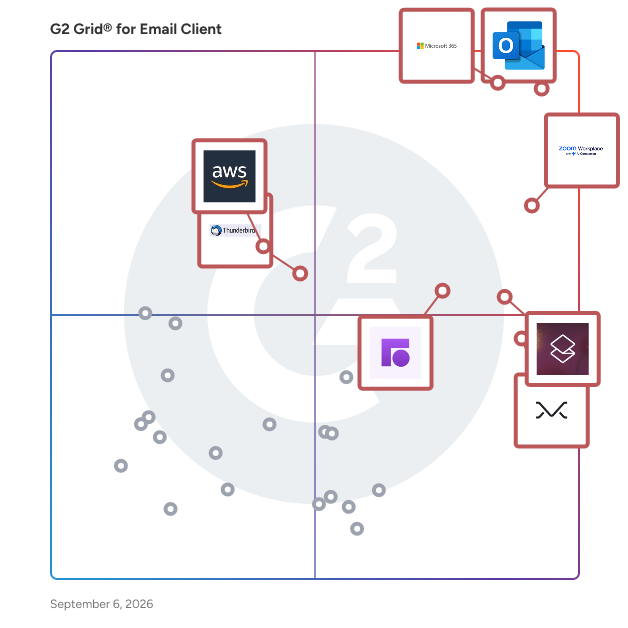
G2 Grid® for Email Client Software

G2 Grid® for Email Client Software plotting products by satisfaction and market presence

Highlighted products: Microsoft Outlook, Microsoft 365, Zoom Workplace, Superhuman Mail, Missive, Front, Thunderbird, and Amazon WorkMail.

Underlying data: [Grid® JSON](https://www.g2.com/categories/email-client/grids.json?focus%5B%5D=microsoft-outlook&focus%5B%5D=microsoft365&focus%5B%5D=zoom-workplace&focus%5B%5D=superhuman-mail&focus%5B%5D=missive&focus%5B%5D=front&focus%5B%5D=thunderbird&focus%5B%5D=amazon-workmail)

Microsoft 365

Launch and grow your business with Microsoft 365. Do more, faster, with intelligent tools to create, send, share, and store professional, branded documents with your customers and team - securely in the cloud. Microsoft 365 is a cloud-based suite of software tools designed to help you do more—with best-in-class communication, design, and data management apps, intelligent cloud services, and advanced security. Access your data from anywhere, collaborate with team members in real time, meet with people virtually, and use thousands of predesigned templates to better communicate with customers and manage your business - all with built-in security technology that safeguards your data and devices from anywhere. Get the latest Office apps, such as Microsoft Teams, Word, Excel, PowerPoint, Outlook, OneDrive, and more.

Average Rating: 4.6/5.0

Total Reviews: 5,547

How Do G2 Users Rate Microsoft 365?

  • Has the product been a good partner in doing business?: 8.8/10 (Category avg: 8.6/10)
  • Desktop Application: 9.3/10 (Category avg: 8.9/10)
  • Notifications: 9.0/10 (Category avg: 8.8/10)
  • Reminders: 9.0/10 (Category avg: 8.9/10)

Who Is the Company Behind Microsoft 365?

  • Seller: Microsoft
  • Year Founded: 1975
  • HQ Location: Redmond, Washington
  • Twitter: @microsoft
    13,091,739 Twitter followers
  • LinkedIn® Page: www.linkedin.com
    232,750 employees on LinkedIn®
  • Ownership: MSFT

Who Uses This Product?

  • Who Uses This: Owner, Software Engineer
  • Top Industries: Information Technology and Services, Education Management
  • Company Size: 37% Medium, 35% Small

What Do G2 Reviewers Say About Microsoft 365?

AI-generated summary from verified user reviews

Pros
  • Users highlight the ease of use in Microsoft 365, enjoying straightforward implementation and seamless navigation.
  • Users appreciate the seamless team collaboration in Microsoft 365, enhancing efficiency and communication across various applications.
  • Users value the easy integration with Microsoft apps, enhancing data access and collaboration across devices.
  • Users value the easy integration of Microsoft 365 with other tools, enhancing collaboration and accessibility across devices.
  • Users love the seamless integration of Microsoft 365 with other apps, enhancing accessibility and collaboration.
Cons
  • Users find Microsoft 365 too expensive for small teams, encountering frustrating limitations and issues with updates.
  • Users find the missing features frustrating, as essential tools are locked behind higher-priced plans and updates disrupt functionality.
  • Users find the learning curve daunting with Microsoft 365, often feeling overwhelmed by its complexity and features.
  • Users find Microsoft 365 lacking essential features, especially with frequent updates that disrupt established workflows and settings.
  • Users are frustrated by limited features in Microsoft 365, often requiring costly plans for full functionality.

What Are Recent G2 Reviews of Microsoft 365?

What Are G2 Users Discussing About Microsoft 365?

Zoom Workplace

Goodbye app overload. Hello effortless work. Work can be complicated. Your tools shouldn't be. Zoom Workplace connects all the ways you collaborate — from meetings to docs to chat and more — with built-in AI and seamless integrations that help teams focus and work flawlessly. Zoom Communications: Unified, Effortless Connection for Modern Work Bring every way your teams communicate—meetings, chat, calls, email, and scheduling—into one seamless experience. With Zoom, collaboration happens faster and more naturally across channels, without switching apps or losing context. From spontaneous chats to scheduled meetings and calls, everything stays connected, searchable, and secure—powered by one intuitive platform built for how modern teams work. Zoom Productivity: Workflows Connected, Work Effortless Transform how work gets done with AI-first collaboration that keeps people, content, and actions in one place. From brainstorming on whiteboards to co-creating in docs, sharing clips, and automating follow-ups, Zoom connects every step of your workflow. With Zoom Hub and integrated video management, knowledge stays organized, accessible, and actionable—so teams can move from idea to outcome without friction. Zoom Spaces: Smarter, Connected Workplaces for Every Team Bring your physical and hybrid environments to life with intelligent, connected spaces. Zoom Spaces unifies meeting rooms, desk reservations, digital signage, and visitor management into one seamless experience—making it simple to collaborate, navigate, and manage the workplace. Whether employees are remote, hybrid, or on-site, Zoom creates a consistent, secure, and flexible environment that keeps teams connected wherever work happens. Zoom Employee Engagement: Connect, Inspire, and Empower Every Employee Foster belonging and alignment with Workvivo by Zoom—a modern employee experience platform that unites communication, culture, and community in one place. From company-wide updates to recognition, feedback, and social engagement, Workvivo gives every employee a voice and a sense of connection. Built right into Zoom Workplace, it helps organizations strengthen culture, boost engagement, and keep teams informed and inspired—no matter where they work.

Average Rating: 4.5/5.0

Total Reviews: 53,606

How Do G2 Users Rate Zoom Workplace?

  • Has the product been a good partner in doing business?: 9.1/10 (Category avg: 8.6/10)
  • Desktop Application: 9.1/10 (Category avg: 8.9/10)
  • Notifications: 8.8/10 (Category avg: 8.8/10)
  • Reminders: 8.7/10 (Category avg: 8.9/10)

Who Is the Company Behind Zoom Workplace?

  • Seller: Zoom
  • Company Website:
  • Year Founded: 2011
  • HQ Location: San Jose, CA
  • Twitter: @zoom
    1,042,714 Twitter followers
  • LinkedIn® Page: www.linkedin.com
    14,013 employees on LinkedIn®

Who Uses This Product?

  • Who Uses This: Owner, Software Engineer
  • Top Industries: Information Technology and Services, Computer Software
  • Company Size: 51% Small, 31% Medium

What Do G2 Reviewers Say About Zoom Workplace?

AI-generated summary from verified user reviews

Pros
  • Users love the ease of use of Zoom Workplace, enjoying seamless access to features with just a click.
  • Users enjoy the easy-to-use video conferencing features of Zoom, facilitating smooth communication and collaboration in hybrid work settings.
  • Users appreciate the excellent video quality of Zoom Workplace, enhancing communication and making meetings more effective.
  • Users value the reliability of Zoom Workplace, ensuring seamless connectivity and stability even during adverse conditions.
  • Users appreciate the ease of collaboration in Zoom Workplace, especially with breakout rooms and seamless screen sharing.
Cons
  • Users note the limited features of Zoom Workplace, expressing a need for improved built-in collaboration tools.
  • Users experience Zoom issues like fatigue, connectivity problems, and confusing configurations that hinder their overall meeting effectiveness.
  • Users experience Zoom fatigue, notification overload, and connectivity issues, making long meetings feel overwhelming and impersonal.
  • Users often face connection issues with Zoom Workplace, leading to a frustrating and less seamless experience.
  • Users face video quality issues and discomfort with camera usage, impacting the overall experience of Zoom meetings.

What Are Recent G2 Reviews of Zoom Workplace?

What Are G2 Users Discussing About Zoom Workplace?

Missive

Are you double sending emails? Not knowing who's responding to what, or whether they've responded at all? Losing the thread when the person who owns it is out? What if your business could manage all your email accounts, including its shared inboxes like support@, sales@, info@, and accounting@, along with SMS, WhatsApp, Messenger, and Instagram—all in one place? Missive is inbox collaboration for teams that run on email. Every conversation gets an owner, so nobody replies twice and nothing sits unread for a week. Teammates discuss a thread in private comments right beside it instead of forwarding it around, and when someone's away, whoever picks it up gets the full history. Missive's AI assistant works inside the inbox. It reads a thread and drafts a reply in your voice, searches your email, contacts and calendar, and reads attachments. Through MCP it pulls context from tools like ClickUp, Todoist and Stripe—and the reverse, letting Claude, ChatGPT or Cursor act on your conversations, contacts and drafts from outside Missive. Bring your own Claude, OpenAI or Gemini key, or use Missive AI credits. You approve before anything sends. Used by over 6000 businesses, including accounting firms, manufacturers, property management companies, travel agencies, legal practices, and logistics teams. -- Key features • Team Inboxes: Shared addresses the whole team works from, with assignment so every conversation has a clear owner and coverage when someone's out. • Internal comments and @mentions: Discuss a thread in a private sidebar next to the actual email. The customer never sees it. • AI assistant: Drafts replies in your voice, searches your inbox, contacts and calendar, and reads attachments. Labels, events and sends happen only after you approve. • MCP in both directions: Missive AI connects out to tools like ClickUp, Todoist and Stripe, and Missive's MCP server lets Claude, ChatGPT or Cursor work on your inbox from outside. • Automated Workflows: Create customizable rules to automate repetitive tasks and use AI to get even more efficiency. Popular use cases include auto-categorization of emails, auto-follow-up emails, automatic forwarding of receipts, and out-of-office auto-responses. • Canned responses: Save time with pre-written replies to customer inquiries, sales pitches, or to include that PDF you always need to attach when signing up a new client. • Integrations: Pipedrive, HubSpot, Shopify, Airtable, ClickUp, Asana, Dialpad, Twilio, Aircall, Zapier, and a REST API for building your own.

Average Rating: 4.7/5.0

Total Reviews: 850

How Do G2 Users Rate Missive?

  • Has the product been a good partner in doing business?: 9.6/10 (Category avg: 8.6/10)
  • Desktop Application: 9.1/10 (Category avg: 8.9/10)
  • Notifications: 9.0/10 (Category avg: 8.8/10)
  • Reminders: 8.7/10 (Category avg: 8.9/10)

Who Is the Company Behind Missive?

  • Seller: Missive
  • Company Website:
  • Year Founded: 2015
  • HQ Location: Quebec, QC
  • Twitter: @missiveapp
    2,667 Twitter followers
  • LinkedIn® Page: www.linkedin.com
    12 employees on LinkedIn®

Who Uses This Product?

  • Who Uses This: CEO, Owner
  • Top Industries: Accounting, Marketing and Advertising
  • Company Size: 87% Small, 12% Medium

What Do G2 Reviewers Say About Missive?

AI-generated summary from verified user reviews

Pros
  • Users value the seamless team collaboration in Missive, enhancing productivity through integrated chat and task assignment.
  • Users appreciate the team collaboration features of Missive, which streamline workflow and enhance productivity significantly.
  • Users find Missive's intuitive interface and seamless collaboration features make email management effortless and efficient.
  • Users appreciate the collaborative features of Missive that enhance team productivity and streamline email management.
  • Users value the collaborative features of Missive, enhancing teamwork and improving email organization effortlessly.
Cons
  • Users note the missing features in Missive, such as offline support and an improved search and labeling system.
  • Users find the learning curve challenging initially, requiring time to become familiar with advanced features and setups.
  • Users find the search functionality lacking, especially for specific and older messages, despite some improvements over time.
  • Users find the search difficulty frustrating, particularly with older messages, though improvements are underway.
  • Users find the steep learning curve of Missive challenging initially, making setup and feature integration feel daunting.

What Are Recent G2 Reviews of Missive?

What Are G2 Users Discussing About Missive?

Front

Front is a modern customer experience (CX) platform designed to help businesses prioritize customer interactions. This solution provides a unified workspace for managing all customer conversations, including individual inboxes and internal collaboration tools. By offering a single pane-of-glass view of customer interactions, Front enhances agent productivity by minimizing the need for app switching, ensuring that responses are not only fast but also accurate and personalized. The platform is particularly beneficial for customer-first organizations that require a streamlined approach to communication. Front is tailored for businesses of all sizes, from startups to established enterprises, enabling them to manage customer inquiries efficiently. Specific use cases include handling customer support tickets, managing sales inquiries, and facilitating team collaboration on customer-related tasks. This versatility makes Front an essential tool for any organization looking to improve its customer engagement strategies. One of the key features of Front is its advanced AI capabilities. Unlike traditional customer service AI solutions that often adopt a mistakes-first approach, Front AI is designed to start intelligently and continuously improve over time. It learns from every customer interaction in real time, allowing businesses to scale their operations safely from day one. This proactive learning capability ensures that agents have access to relevant insights and suggestions, enhancing their ability to provide exceptional service. Additionally, Front stands out due to its user-friendly interface and ease of configuration. Businesses can customize the platform to fit their unique workflows without the need for extensive IT resources or third-party consultants. This level of control over the customer experience empowers organizations to adapt quickly to changing customer needs and preferences, ultimately fostering stronger relationships with their clients. With over 9,000 businesses, including notable names like ClickUp, Uber Freight, and Reed & Mackay, trusting Front for their customer engagement needs, the platform demonstrates its effectiveness in delivering efficiency and actionable insights. Front is committed to providing industry-leading customer service to all users, regardless of team size, ensuring that every organization can maintain a customer-first approach in their operations.

Average Rating: 4.7/5.0

Total Reviews: 2,457

How Do G2 Users Rate Front?

  • Has the product been a good partner in doing business?: 9.2/10 (Category avg: 8.6/10)
  • Desktop Application: 9.3/10 (Category avg: 8.9/10)
  • Notifications: 9.0/10 (Category avg: 8.8/10)
  • Reminders: 9.1/10 (Category avg: 8.9/10)

Who Is the Company Behind Front?

  • Seller: Front App
  • Company Website:
  • Year Founded: 2014
  • HQ Location: San Francisco, CA
  • Twitter: @FrontHQ
    9,411 Twitter followers
  • LinkedIn® Page: www.linkedin.com
    560 employees on LinkedIn®

Who Uses This Product?

  • Who Uses This: Customer Success Manager, Account Manager
  • Top Industries: Logistics and Supply Chain, Computer Software
  • Company Size: 48% Small, 42% Medium

What Do G2 Reviewers Say About Front?

AI-generated summary from verified user reviews

Pros
  • Users praise the ease of use of Front, enjoying its intuitive design and efficient email management features.
  • Users love Front for its seamless team collaboration, ensuring organized communication and efficient workflow across departments.
  • Users appreciate Front's clean interface and seamless collaboration features, enhancing team coordination and efficiency in managing inboxes.
  • Users appreciate the effective communication in Front, which seamlessly integrates email management and team collaboration.
  • Users find Front's smart commenting feature and organization tools essential for efficient communication and management.
Cons
  • Users face challenges due to missing features like improved search functionality and better folder organization in Front.
  • Users struggle with email tagging issues, finding it cumbersome to manage emails in their 'assigned to me' inbox.
  • Users find email searching and management confusing, often resulting in stress and difficulty locating important messages.
  • Users struggle with email management issues, including limited organization options and occasional system performance problems.
  • Users find the limited features of Front disappointing, especially in relation to its high pricing for small businesses.

What Are Recent G2 Reviews of Front?

What Are G2 Users Discussing About Front?

Shift

Shift is a customizable browser built for people who live in their browser all day. Unlike standard browsers, Shift lets you drag and drop apps, bars, and controls to build a layout that actually matches how you work. Choose from 6 starter templates or build from scratch. Either way, you end up with a browser that fits your workflow, not the other way around. Whether you're a freelancer juggling clients, a remote worker managing multiple tools, or an entrepreneur running several projects at once, Shift gives you the flexibility to shape your digital workspace around your life. Sign into 1,500+ web apps, stay logged into multiple accounts at once, and use Spaces to keep work, side hustles, and personal browsing completely separate. Shift AI is built right in, so you can summarize pages, draft content, and get answers without jumping between tools or losing your train of thought. Everything you need lives in one place — your calendar, email, project management tools, and favorite apps — all accessible without the tab overload that comes with a standard browser. No more context-switching chaos, just one calm, organized place to get things done and stay focused on what actually matters. Shift is a Certified B Corp, a pioneer in carbon-neutral browsing, and has been recognized as a top browser on G2, TrustRadius, and SourceForge. Founded in 2016 in Victoria, BC, and part of the Redbrick portfolio, Shift is reimagining what a browser can do, not just for productivity, but for the planet.

Average Rating: 4.4/5.0

Total Reviews: 262

How Do G2 Users Rate Shift?

  • Has the product been a good partner in doing business?: 8.8/10 (Category avg: 8.6/10)
  • Desktop Application: 9.4/10 (Category avg: 8.9/10)
  • Notifications: 8.5/10 (Category avg: 8.8/10)
  • Reminders: 7.9/10 (Category avg: 8.9/10)

Who Is the Company Behind Shift?

  • Seller: Redbrick
  • Company Website:
  • Year Founded: 2011
  • HQ Location: Victoria, British Columbia
  • Twitter: @rdbrck
    1,633 Twitter followers
  • LinkedIn® Page: www.linkedin.com
    162 employees on LinkedIn®

Who Uses This Product?

  • Who Uses This: Owner, CEO
  • Top Industries: Marketing and Advertising, Information Technology and Services
  • Company Size: 86% Small, 10% Medium

What Do G2 Reviewers Say About Shift?

AI-generated summary from verified user reviews

Pros
  • Users appreciate the ease of use of Shift, enhancing organization and streamlining their daily workflow effortlessly.
  • Users enjoy the easy accessibility of Shift, effectively managing multiple apps and workspaces for enhanced organization.
  • Users love the streamlined organization Shift provides, enhancing daily productivity and making multi-account management effortless.
  • Users love the easy access to all their tools in one place, enhancing organization and productivity effortlessly.
  • Users praise the all-in-one organization capabilities of Shift, maximizing productivity and simplifying their workflow seamlessly.
Cons
  • Users experience frequent app issues with Shift, including loading failures and bugs causing crashes, leading to frustration.
  • Users are frustrated by the missing features in Shift, impacting functionality and overall efficiency in their workflow.
  • Users experience frequent software bugs and crashes, leading to frustration with navigation and functionality in Shift.
  • Users experience slow performance with Shift, leading to freezes and high CPU usage that disrupts their workflow.
  • Users are frustrated by the limited customization options for account visuals and management in Shift.

What Are Recent G2 Reviews of Shift?

What Are G2 Users Discussing About Shift?

Spark for Teams

Spark for Teams is a collaborative email platform builds on the foundation of the Spark email app, which is widely recognized for its smart features that help users manage their email more efficiently. The primary goal of Spark for Teams is to enhance team productivity and streamline communication by offering several key features: 1. **Shared Inboxes**: Teams can collaborate on emails from shared addresses like support@ or info@, ensuring that all team members can access and respond to messages. 2. **Shared Emails**: Stop forwarding or screenshooting your emails to post them into Slack or Microsoft Teams — with Shared Emails you could paste a link and your team will have access to all the email conversations without noisy "adding to cc" emails. 3. **Email Delegation**: Assign emails to team members directly within the app, allowing for clear responsibility and follow-up on tasks. 4. **Team Comments**: Team members can discuss emails internally without forwarding or copying emails back and forth, making internal communication more efficient. 5. **Shared Drafts +AI**: Collaborate on email drafts in real-time, allowing multiple team members to contribute to the creation of important messages. 6. **Templates +AI**: Create and share email templates within the team to ensure consistent communication and save time on repetitive responses. 7. **+AI Meeting Notes** can transcribe and summarize your meeting to capture every point. Fully focus during every discussion and never miss a detail. No bots joining your call, works with any meeting tool. Access all your meeting notes anytime in Spark Mail App. 8. **Centralized Email Management**: Manage multiple email accounts from a single interface, which is particularly useful for teams handling multiple projects or client accounts. 9. **Smart Inbox +AI**: Prioritize important emails and filter out distractions with intelligent sorting and categorization of incoming messages. 10. **Integrations**: Connect Spark with other productivity tools like Trello, Asana, and more to streamline workflows and ensure that email communications integrate smoothly with other team activities. Spark for Teams aims to reduce the chaos often associated with team email management by providing a suite of tools that enhance collaboration, improve communication efficiency, and streamline workflows.

Average Rating: 4.4/5.0

Total Reviews: 22

How Do G2 Users Rate Spark for Teams?

  • Has the product been a good partner in doing business?: 9.6/10 (Category avg: 8.6/10)
  • Desktop Application: 10.0/10 (Category avg: 8.9/10)
  • Notifications: 8.3/10 (Category avg: 8.8/10)
  • Reminders: 10.0/10 (Category avg: 8.9/10)

Who Is the Company Behind Spark for Teams?

  • Seller: Spark Mail
  • Year Founded: 2007
  • HQ Location: Odessa, Ukraine
  • Twitter: @Readdle
    25,721 Twitter followers
  • LinkedIn® Page: www.linkedin.com
    335 employees on LinkedIn®

Who Uses This Product?

  • Top Industries: Marketing and Advertising
  • Company Size: 86% Small, 9% Medium

What Do G2 Reviewers Say About Spark for Teams?

AI-generated summary from verified user reviews

Pros
  • Users highlight the effective email management features of Spark, enhancing team collaboration and productivity significantly.
  • Users value the seamless collaboration features in Spark for Teams, enhancing productivity and email management significantly.
  • Users praise the ease of use of Spark for Teams, enhancing collaboration and productivity effortlessly.
  • Users value the efficient collaboration features in Spark for Teams, enhancing email management and teamwork seamlessly.
  • Users value the streamlined communication features of Spark for Teams, enhancing collaboration and efficiency significantly.
Cons
  • Users report bug issues with syncing delays and crashes, impacting usability and complicating user experience.
  • Users express frustration over missing features in Spark for Teams, impacting usability and experience across devices.
  • Users experience frequent software bugs with syncing delays and crashes, complicating their productivity and usability.
  • Users face challenges with infrequent updates, leading to unexpected changes that complicate management and team efficiency.
  • Users find the interface design lacking on Mac, preferring the native feel of previous versions for smoother performance.

What Are Recent G2 Reviews of Spark for Teams?

eM Client

BOOST YOUR EMAIL, SKYROCKET YOUR PRODUCTIVITY eM Client is a powerful email client for Windows and macOS with a clean and easy-to-use interface. It also offers features for calendars, tasks, contacts, notes and chat. eM Client supports all major services including Gmail, Exchange, iCloud, and Outlook and can set up everything automatically for most of the services as well. eM Client also efficiently imports your data from all major email clients (including Microsoft Outlook, Outlook Express, Windows Mail, Thunderbird and more).

Average Rating: 4.0/5.0

Total Reviews: 60

How Do G2 Users Rate eM Client?

  • Has the product been a good partner in doing business?: 7.8/10 (Category avg: 8.6/10)
  • Desktop Application: 8.9/10 (Category avg: 8.9/10)
  • Notifications: 8.3/10 (Category avg: 8.8/10)
  • Reminders: 8.3/10 (Category avg: 8.9/10)

Who Is the Company Behind eM Client?

  • Seller: eM Client
  • Year Founded: 2010
  • HQ Location: Prague 8, Czech Republic
  • Twitter: @emclient
    2,970 Twitter followers
  • LinkedIn® Page: www.linkedin.com
    24 employees on LinkedIn®

Who Uses This Product?

  • Top Industries: Information Technology and Services, Computer Software
  • Company Size: 43% Small, 36% Medium

What Do G2 Reviewers Say About eM Client?

AI-generated summary from verified user reviews

Pros
  • Users value the intuitive interface of eM Client, making email and task management a breeze.
  • Users praise the clean, modern interface of eM Client, enhancing productivity with a user-friendly design.
  • Users love the seamless connectivity of eM Client, praising its smooth synchronization across multiple platforms.
  • Users appreciate the smooth synchronization and strong performance of eM Client for efficient daily business tasks.
  • Users value the powerful features of eM Client, enjoying its unified inbox and seamless multi-account support.
Cons
  • Users often face a lack of integration, limiting flexibility and advanced functionalities compared to other email clients.
  • Users find eM Client's missing features restrictive, particularly with limited accounts and lack of advanced integrations.
  • Users often face sync issues with eM Client, particularly with Exchange and Google accounts, affecting usability.

What Are Recent G2 Reviews of eM Client?

What Are G2 Users Discussing About eM Client?

Spike

Spike is an AI-powered email and team communication platform that combines email, chat, meetings, and collaboration tools into a single, organized workspace. It is designed for professionals, small teams, and businesses that use email as their primary communication channel but want a faster, more streamlined way to manage daily interactions and tasks. By transforming traditional email into a chat-like format, Spike simplifies how users read and reply to messages. The platform removes repetitive headers, quoted text, and long chains, allowing conversations to appear as clean, continuous threads. Users can manage all email accounts, calendars, and contacts in one place while taking advantage of built-in AI to summarize conversations, draft replies, and organize the inbox automatically. Spike supports both individual and team use. Freelancers and professionals use it to manage clients and projects more efficiently, while teams rely on Spike to centralize communication, share files, and collaborate in real time without switching between multiple tools. Core Features: Conversational Email: Presents emails as natural chat-like conversations while remaining fully compatible with standard email protocols. AI Productivity Tools: Provides automatic summaries, suggested replies, translations, and content drafting to speed up workflow. Priority Inbox: Uses AI to sort incoming messages into relevant categories—Priority, Other, Notes, and Starred—helping users focus on what matters most. Integrated Meetings: Enables voice and video calls directly from email threads for faster coordination. Collaborative Notes and Docs: Allows users to create, edit, and share documents in real time within the inbox. Unified Inbox and Search: Consolidates multiple email accounts and calendars into a single interface with cross-account search. Shared Inbox: Helps teams manage customer and project communications collaboratively, ensuring faster response times. Compatibility: Works with Gmail, Outlook, iCloud, Office 365, Yahoo Mail, and all IMAP-supported accounts across desktop, mobile, and web platforms. Security and Privacy: Spike is ad-free and never sells or monetizes user data. All message data is encrypted using the AES-256 standard. Spike is suited for users seeking a unified communication platform that enhances productivity while maintaining the familiarity of email. It bridges the gap between traditional email clients and modern collaboration tools, offering a single, AI-enhanced workspace that helps individuals and teams stay focused and efficient.

Average Rating: 4.6/5.0

Total Reviews: 249

How Do G2 Users Rate Spike?

  • Has the product been a good partner in doing business?: 8.6/10 (Category avg: 8.6/10)
  • Desktop Application: 9.3/10 (Category avg: 8.9/10)
  • Notifications: 9.2/10 (Category avg: 8.8/10)
  • Reminders: 9.2/10 (Category avg: 8.9/10)

Who Is the Company Behind Spike?

  • Seller: Spike
  • Year Founded: 2014
  • HQ Location: Herzliya, IL
  • Twitter: @SpikeNowHQ
    3,036 Twitter followers
  • LinkedIn® Page: www.linkedin.com
    29 employees on LinkedIn®

Who Uses This Product?

  • Who Uses This: Owner, CEO
  • Top Industries: Information Technology and Services, Computer Software
  • Company Size: 72% Small, 15% Medium

What Do G2 Reviewers Say About Spike?

AI-generated summary from verified user reviews

Pros
  • Users find Spike's ease of use remarkable, simplifying communications and enhancing their productivity significantly.
  • Users love the easy email management of Spike, appreciating its simple interface and organized personal messages.
  • Users love Spike's modern chat-like communication, which simplifies email management and enhances productivity through its intuitive design.
  • Users appreciate the intuitive chat-style interface of Spike, enhancing email management and reducing inbox anxiety significantly.
  • Users love Spike's chat-style interface and unified inbox, significantly enhancing productivity and email management.
Cons
  • Users note a lack of essential features in Spike, particularly impacting usability for structured and professional environments.
  • Users highlight limited features in Spike, noting message history caps and lack of search for Japanese text as significant drawbacks.
  • Users note integration issues with Spike, citing limited third-party support and occasional syncing problems with external email providers.
  • Users find Spike expensive, particularly feeling pressured towards paid plans due to limitations on the free tier.
  • Users express frustration with the limited customization options in Spike, impacting notification management and overall experience.

What Are Recent G2 Reviews of Spike?

What Are G2 Users Discussing About Spike?

Canary Mail

Canary Mail helps users manage Gmail, Outlook, iCloud, Exchange, and IMAP accounts in one unified inbox across macOS, Windows, iPhone, iPad, and Android. It combines optional AI for writing, summaries, search, and triage with productivity tools like read receipts, Send Later, Snooze, templates, and Inbox Zero. For users who need stronger privacy and security, Canary Mail also includes PGP, SecureSend, tracker blocking, and security controls, without requiring users to switch email providers. Love Canary? Leave a review and help us improve.

Average Rating: 4.5/5.0

Total Reviews: 52

How Do G2 Users Rate Canary Mail?

  • Has the product been a good partner in doing business?: 9.2/10 (Category avg: 8.6/10)
  • Desktop Application: 9.0/10 (Category avg: 8.9/10)
  • Notifications: 9.0/10 (Category avg: 8.8/10)
  • Reminders: 8.2/10 (Category avg: 8.9/10)

Who Is the Company Behind Canary Mail?

  • Seller: Canary Mail
  • Year Founded: 2017
  • HQ Location: San Francisco, US
  • Twitter: @CanaryMailApp
    7,664 Twitter followers
  • LinkedIn® Page: www.linkedin.com
    22 employees on LinkedIn®

Who Uses This Product?

  • Top Industries: Marketing and Advertising, Consulting
  • Company Size: 85% Small, 9% Medium

What Do G2 Reviewers Say About Canary Mail?

AI-generated summary from verified user reviews

Pros
  • Users find the ease of use of Canary Mail invaluable for managing emails and calendars efficiently.
  • Users love the AI integration in Canary Mail, which efficiently manages emails like a personal assistant.
  • Users value the advanced features of Canary Mail, including encryption and read notifications, making it a top choice.
  • Users love the intuitive design of Canary Mail, combining simplicity with powerful features for an optimal experience.
  • Users admire the intuitive and aesthetically pleasing user interface of Canary Mail, enhancing email management and organization.
Cons
  • Users report email issues such as laggy swiping, address confusion, unread emails showing as read, and formatting problems.
  • Users feel that the AI "Summarize Email" feature needs improvement, providing only basic summaries for effective use.
  • Users report frustrations with email management, including issues with swiping and difficulty managing multiple accounts effectively.
  • Users desire a more minimalist and clearer interface for Canary Mail to enhance usability and customization.
  • Users note the outdated interface of Canary Mail, suggesting it needs modern updates for improved usability.

What Are Recent G2 Reviews of Canary Mail?

What Are G2 Users Discussing About Canary Mail?

Outlook4Gmail

Outlook4Gmail is an Outlook add-in that helps you to perform Google calendars sync with Outlook as well as the contacts and tasks sync. It also syncs Google calendars from multiple Google accounts with Outlook ones. The settings provide opportunities of duplicates check, their elimination and automatic data backup.

Average Rating: 4.2/5.0

Total Reviews: 72

How Do G2 Users Rate Outlook4Gmail?

  • Has the product been a good partner in doing business?: 9.0/10 (Category avg: 8.6/10)
  • Desktop Application: 10.0/10 (Category avg: 8.9/10)
  • Notifications: 10.0/10 (Category avg: 8.8/10)
  • Reminders: 10.0/10 (Category avg: 8.9/10)

Who Is the Company Behind Outlook4Gmail?

  • Seller: Scand Poland
  • Year Founded: 2000
  • HQ Location: Warszawa, PL
  • Twitter: @ScandLtd
    109 Twitter followers
  • LinkedIn® Page: www.linkedin.com
    210 employees on LinkedIn®

Who Uses This Product?

  • Top Industries: Information Technology and Services, Staffing and Recruiting
  • Company Size: 41% Medium, 32% Small

What Do G2 Reviewers Say About Outlook4Gmail?

AI-generated summary from verified user reviews

Pros
  • Users appreciate the ease of use of Outlook4Gmail, enjoying seamless synchronization without managing multiple systems.
  • Users value the seamless synchronization of Outlook4Gmail, effortlessly keeping calendars and tasks in sync automatically.
  • Users appreciate the user-friendly interface of Outlook4Gmail, making it easy to navigate and use effectively.
  • Users appreciate the user-friendly interface of Outlook4Gmail, finding it easy to navigate and use effectively.
Cons
  • Users find the limited free version restricts their ability to sync multiple accounts, causing frustration for heavy users.
  • Users miss the recall option in Outlook4Gmail, finding the email undo feature insufficient for their needs.
  • Users experience occasional sync errors, with contacts and events sometimes failing to sync properly, causing duplicates.

What Are Recent G2 Reviews of Outlook4Gmail?

What Are G2 Users Discussing About Outlook4Gmail?

Kiwi for Gmail

Kiwi For Gmail Now Offers M1 Functionality. Kiwi for Gmail is leading the charge in e-mail clients offering M1 support and functionality. With this newest release, users will harness the full power and industry-leading efficiency of the Apple M1 build, to supercharge their Gmail and Google Workspace experience. Now bridging the gap between the power of Microsoft Office - including Word, Excel, and Powerpoint - with the collaborative nature of Google Workspace (including Docs, Sheets and Slides), Kiwi for Gmail has become the default email and workspace client for professionals and freelancers all over the world. Unlike Shift, Superhuman, and other email applications, Kiwi for Gmail offers a dynamic, familiar Google Interface to interact with this powerful tool in the same way you would in a browser. No learning curve to navigate here, just pure productivity - and one of the highest email management apps out there! Did you know? Kiwi for Gmail has been named as a Top Performer for Productivity on the Mac App Store, G2, Capterra, and Software Advice? Don't take our word for it, take a peek at some of our glowing five-star reviews and client testimonials that speak to the life-changing, time-saving, productivity hacking power of Kiwi. Harnessing the power of a desktop application and the collaborative nature of cloud-workspaces, Kiwi for Gmail takes Gmail, Google Sheets, Google Slides, Google Docs, and Google Drive and makes them standalone desktop applications. No more fiddling between tabs in a browser. Break Free from Your Browser and Download Kiwi for Gmail Today. Need More Reasons to Download Kiwi? • Invest in Yourself and your Productivity Workflow - The primary benefit of Kiwi is it saves users time by making G Suite much more efficient to use and navigate. • Get more done with far less cognitive load - 70% of users report saving 30 minutes to 1 hour daily. • Partnered with Google - As a close Google partner, Kiwi has worked alongside Google to design Kiwi for users across hundreds of its large business clients as well as consumers in over 120 countries • Designed for Multitasking - Take full advantage of your multiple monitors or expanded screen size with our unique multi-windowed environment, with each window tailored to the application • Seamless Multiple Accounts - Access all your Gmail accounts in one place, always signed in, every time you launch • Greater Security, Isolated from the Browser - Kiwi was architected around Gmail accounts, fully isolating all data of each account. • Powerful Recent Documents - Far easier to get back to everything you were working on by opening recent documents from the File menu, across all Google accounts and all apps, in a powerful interface • Restore Workspace - Get back to exactly where you left off by restoring your desktop each time you restart Kiwi or your computer • Save Time with Global Shortcuts - Use global keyboard shortcuts to open a new email or calendar entry instantly, even when not in Kiwi • Notifications - True desktop notifications, and control notifications per account • Do Not Disturb - Rather than turning off notifications for everything in Windows, in Kiwi you can turn off notifications only for your email • Gmail Offline - Perfectly pairs with Gmail’s offline feature across every account • Contacts Pane - Streamlined Contacts interface to put all your contacts at your fingertips • Plugin Support - Access popular third-party plugins like Grammarly and Boomerang Developed by a close partner of Google and now used in hundreds of Google's large enterprise clients and consumers across 120 countries, Kiwi takes all of Gmail and Google Docs and puts it on the desktop as a robust, standalone application outside the web browser. Kiwi for Gmail provides an even better way to use Google's products on your Mac or Windows PC by adding powerful new features and letting you tailor them to the way you work - saving time and making your daily workflow a little easier.

Average Rating: 4.4/5.0

Total Reviews: 57

How Do G2 Users Rate Kiwi for Gmail?

  • Has the product been a good partner in doing business?: 9.3/10 (Category avg: 8.6/10)
  • Desktop Application: 9.7/10 (Category avg: 8.9/10)
  • Notifications: 8.8/10 (Category avg: 8.8/10)
  • Reminders: 9.0/10 (Category avg: 8.9/10)

Who Is the Company Behind Kiwi for Gmail?

  • Seller: Kiwi for Gmail
  • Year Founded: 2013
  • HQ Location: N/A
  • Twitter: @KiwiforGmail
    3,950 Twitter followers
  • LinkedIn® Page: www.linkedin.com
    1 employees on LinkedIn®

Who Uses This Product?

  • Top Industries: Marketing and Advertising, Information Technology and Services
  • Company Size: 71% Small, 16% Medium

What Do G2 Reviewers Say About Kiwi for Gmail?

AI-generated summary from verified user reviews

Pros
  • Users appreciate the ease of use of Kiwi for Gmail, praising its clean interface and efficient email management.
  • Users admire the intuitive interface of Kiwi for Gmail, enhancing email management and organization effortlessly.
  • Users praise Kiwi for Gmail's ease of use, which enhances email management and keeps inboxes organized efficiently.
  • Users love the easy setup of Kiwi for Gmail, facilitating seamless management of Google Suite applications.
  • Users find Kiwi for Gmail easy to use, greatly enhancing their email management and organization.
Cons
  • Users express frustration over the lack of dark mode in some apps, affecting their overall experience with Kiwi for Gmail.

What Are Recent G2 Reviews of Kiwi for Gmail?

What Are G2 Users Discussing About Kiwi for Gmail?

Helpwise

Helpwise is an easy to setup customer service platform that empowers customer facing teams to drive revenue for businesses. The all-in-one platform streamlines customer conversations across various channels, including email, SMS, calls, social media, and live chat. Helpwise eliminates the need for shared logins and passwords, allowing your team to establish individual accountability. Collaborate easily on customer conversations by leaving notes or sharing drafts. Use self-service features such as help center and chatbots to reduce inbound customer queries and promote a culture of self serve among your customers. Setup Automation rules to reduce manual tasks and boost agent productivity. You can also gain insights into team productivity and CSAT with reporting & analytics. Helpwise integrates with 50+ tools so that the agents can have complete context about customers within the conversation.

Average Rating: 4.6/5.0

Total Reviews: 178

How Do G2 Users Rate Helpwise?

  • Has the product been a good partner in doing business?: 9.4/10 (Category avg: 8.6/10)
  • Desktop Application: 5.8/10 (Category avg: 8.9/10)
  • Notifications: 8.5/10 (Category avg: 8.8/10)
  • Reminders: 8.7/10 (Category avg: 8.9/10)

Who Is the Company Behind Helpwise?

  • Seller: Saas Labs
  • Year Founded: 2016
  • HQ Location: Palo Alto, California
  • Twitter: @saas_labs
    319 Twitter followers
  • LinkedIn® Page: www.linkedin.com
    416 employees on LinkedIn®

Who Uses This Product?

  • Who Uses This: CEO, Owner
  • Top Industries: Marketing and Advertising, Computer Software
  • Company Size: 90% Small, 10% Medium

What Do G2 Reviewers Say About Helpwise?

AI-generated summary from verified user reviews

Pros
  • Users value the excellent customer management of Helpwise, noting responsive support that resolves issues effectively.
  • Users value the supportive customer service provided by Helpwise, enhancing satisfaction and problem resolution.
  • Users value the easy access to exceptional support from Helpwise, enhancing their overall experience with the platform.
  • Users value the exceptional support provided by Helpwise, making problem-solving efficient and effective.
  • Users commend the platform usability of Helpwise, appreciating its seamless support and recommendation as a primary mailing solution.

What Are Recent G2 Reviews of Helpwise?

What Are G2 Users Discussing About Helpwise?

intheloop.io

Loop Email is a simple yet powerful team inbox. It's been built with the familiarity of an email client, so it's easy to set up and use for any teams that are used to handling customer messages via email. It's hard being productive when you spend half your time reading emails, and the other half flipping between platforms to tell your team about said emails. You need a single app that's going to help you move faster and keep everything and everyone on the same page. This is Loop. It simplifies and organizes all your incoming work communication into one inbox and gives you and your team back order, control and focus. With Loop no messages get missed and your team can assign ownership, chat about customer emails, exchange files, automate workflows and manage shared inboxes with ease. Why not try it today?

Average Rating: 4.9/5.0

Total Reviews: 19

How Do G2 Users Rate intheloop.io?

  • Has the product been a good partner in doing business?: 10.0/10 (Category avg: 8.6/10)
  • Desktop Application: 10.0/10 (Category avg: 8.9/10)
  • Notifications: 9.3/10 (Category avg: 8.8/10)
  • Reminders: 10.0/10 (Category avg: 8.9/10)

Who Is the Company Behind intheloop.io?

  • Seller: Loop Email
  • Year Founded: 2006
  • HQ Location: London, London
  • Twitter: @loop_email
    2,240 Twitter followers
  • LinkedIn® Page: www.linkedin.com
    10 employees on LinkedIn®

Who Uses This Product?

  • Company Size: 89% Small, 11% Medium

What Do G2 Reviewers Say About intheloop.io?

AI-generated summary from verified user reviews

Pros
  • Users appreciate the effective communication in intheloop.io, enhancing accuracy and improving client care in real-time.
  • Users value the communication efficiency of intheloop.io, enhancing accuracy and client care in real-time.
  • Users praise the exceptional customer support at intheloop.io, enhancing communication and care for clients in real-time.
  • Users appreciate the ease of use of intheloop.io, enhancing communication and improving client care in real-time.
  • Users value the easy communication in intheloop.io, enhancing real-time client care and reducing redundancy.

What Are Recent G2 Reviews of intheloop.io?

What Are G2 Users Discussing About intheloop.io?

Drag

Drag is the AI-powered inbox platform built for teams. Used by 200,000+ users since 2017. Drag turns Gmail into a shared workspace where teams collaborate on email, support tickets, sales pipelines, and operational workflows - without leaving the inbox. The platform includes shared inboxes, AI agents that resolve tickets end-to-end, AI Intelligence grounded in your team's knowledge, live chat, kanban boards, automations, internal notes, and assignments. Teams use Drag for: • Customer support: Shared inboxes for support@, info@, and help@ addresses. Assign emails, leave internal notes, track SLAs, automate triage. • Sales pipelines: Convert inbound emails into deal pipelines. Track conversations, assign reps, monitor close rates. • Operations: Manage finance@, hr@, ops@ and other shared addresses. Route requests, automate handoffs, keep a single source of truth. • AI-first workflows: Drag Agents resolve tickets autonomously using your help center, past tickets, and team knowledge. Connect agents via MCP to Claude, ChatGPT, Cursor and other tools. Drag is available as a webapp, Chrome extension, desktop app, MCP server, and API. Backed by Techstars (Class of 2019) and other investors. Featured by Google on the Chrome Store. Shared inboxes — Multiple team members manage email together inside Gmail AI Agents — Resolve tickets end-to-end using your knowledge base and history AI Intelligence — Grounded responses from your team's docs, tickets, and chat Live chat — Customer chat that lands in the same inbox as email Kanban boards — Visual pipelines for tickets, deals, and tasks Automations — Trigger-based workflows for routing, replies, and escalations Internal notes — Private team discussions inside each email thread Assignments — Owner tracking and accountability per email/thread Email templates — Shared, AI-enhanced response libraries Reporting — Team performance, response times, and volume metrics MCP server — Connect Drag to Claude, ChatGPT, and other AI tools REST API — Build custom integrations and automations Chrome extension — Native Gmail integration, zero context switching Webapp & desktop — Use Drag outside Gmail when needed Google integration — SSO, Calendar, Workspace native

Average Rating: 4.5/5.0

Total Reviews: 254

How Do G2 Users Rate Drag?

  • Has the product been a good partner in doing business?: 9.2/10 (Category avg: 8.6/10)
  • Notifications: 9.2/10 (Category avg: 8.8/10)
  • Reminders: 9.2/10 (Category avg: 8.9/10)

Who Is the Company Behind Drag?

  • Seller: DragApp.com
  • Year Founded: 2018
  • HQ Location: London
  • Twitter: @lovedragapp
    913 Twitter followers
  • LinkedIn® Page: www.linkedin.com
    9 employees on LinkedIn®

Who Uses This Product?

  • Who Uses This: CEO
  • Top Industries: Non-Profit Organization Management, Leisure, Travel & Tourism
  • Company Size: 85% Small, 11% Medium

What Do G2 Reviewers Say About Drag?

AI-generated summary from verified user reviews

Pros
  • Users value the real-time collaboration features of Drag, enhancing teamwork and streamlining communication within shared inboxes.
  • Users love the real-time information sharing in Drag, greatly enhancing team collaboration and overall productivity.
  • Users appreciate the ease of organization with Drag, enhancing collaboration and streamlining workflow efficiently.
  • Users find Drag's ease of use invaluable for navigating workflows and enhancing team collaboration effortlessly.
  • Users find Drag to be remarkably efficient, significantly enhancing team productivity and simplifying email management.
Cons
  • Users find the difficult setup process daunting, especially for those new to Kanban-style boards and automations.
  • Users find the learning curve steep, particularly for new users unfamiliar with Kanban boards and advanced features.
  • Users feel that the product lacks adequate customization options that could enhance their overall experience.
  • Users find the steep learning curve challenging, especially with advanced features and unfamiliar interfaces for newcomers.
  • Users face technical issues with Drag, experiencing frequent glitches, slow performance, and the need to refresh often.

What Are Recent G2 Reviews of Drag?

What Are G2 Users Discussing About Drag?

Trengo

Trengo is an AI-first customer communication platform used by 17,000+ people worldwide. WhatsApp Business API, email, live chat, voice, and social channels connect into one shared inbox where AI agents resolve up to 80% of repetitive conversations automatically, in 70+ languages, 24/7. AI agents handle FAQs, qualify leads, update contact details, and escalate to humans when needed across every channel, without code. Native integrations include HubSpot, Salesforce, Shopify, WooCommerce, Magento, Lightspeed, and Klaviyo. As an official WhatsApp Business Solution Provider and Meta Business Partner, Trengo supports WhatsApp CRM and WhatsApp marketing at scale. Used across eCommerce, hospitality, travel, leisure, and automotive as a leading alternative to Zendesk, Freshdesk, Intercom, Front, Gorgias, Tidio, Respond.io, and WATI.

Average Rating: 4.3/5.0

Total Reviews: 244

How Do G2 Users Rate Trengo?

  • Has the product been a good partner in doing business?: 8.8/10 (Category avg: 8.6/10)
  • Desktop Application: 7.6/10 (Category avg: 8.9/10)
  • Notifications: 7.5/10 (Category avg: 8.8/10)
  • Reminders: 7.3/10 (Category avg: 8.9/10)

Who Is the Company Behind Trengo?

  • Seller: Trengo
  • Year Founded: 2017
  • HQ Location: Utrecht, Utrecht, Netherlands
  • Twitter: @TrengoHQ
    284 Twitter followers
  • LinkedIn® Page: www.linkedin.com
    102 employees on LinkedIn®

Who Uses This Product?

  • Top Industries: Leisure, Travel & Tourism, Apparel & Fashion
  • Company Size: 73% Small, 26% Medium

What Do G2 Reviewers Say About Trengo?

AI-generated summary from verified user reviews

Pros
  • Users love the ease of use of Trengo, appreciating its straightforward implementation and intuitive design.
  • Users find Trengo's helpful customer support and automation features invaluable for managing their workflows efficiently.
  • Users commend Trengo for its exceptional customer support and seamless onboarding experience, enhancing overall satisfaction.
  • Users value the seamless integration of multiple channels in Trengo, enhancing chat management and efficiency significantly.
  • Users appreciate the streamlined communication in Trengo, highlighting its intuitive interface and excellent customer support.
Cons
  • Users feel that the missing features in Trengo hinder their experience and limit functionality in important areas.
  • Users criticize the limited features of Trengo, noting missing functionalities and difficulties in usage and setup.
  • Users face significant messaging issues with Trengo, including slow loading times and limitations on WhatsApp interactions.
  • Users find the chat functionality difficult to use with limitations on WhatsApp and missing features affecting communication.
  • Users report frequent bug issues with Trengo, leading to frustrations and inefficiencies in usage and coordination.

What Are Recent G2 Reviews of Trengo?

What Are G2 Users Discussing About Trengo?

Neeraja Prakash
NP
Researched and written by Neeraja Prakash
Updated October 3, 2024