Best Digital Adoption Platforms - Page 2

How Many Digital Adoption Platforms Products Does G2 Track?

Total Products under this Category: 116

Category Stats (Sep 2026)

  • Average Rating: 4.62/5 The average rating of products in this category, based on all submitted ratings
  • Top Trending Product: Frigade (+1.83%) - Among all products in this category, Frigade recorded the largest rating increase compared to last month

Last updated: September 01, 2026

How Does G2 Rank Digital Adoption Platforms Products?

Why You Can Trust G2's Software Rankings:

  • 30 Analysts and Data Experts
  • 19,700+ Authentic Reviews
  • 116+ Products
  • Unbiased Rankings

G2's software rankings are built on verified user reviews, rigorous moderation, and a consistent research methodology maintained by a team of analysts and data experts. Each product is measured using the same transparent criteria, with no paid placement or vendor influence. While reviews reflect real user experiences, which can be subjective, they offer valuable insight into how software performs in the hands of professionals. Together, these inputs power the G2 Score, a standardized way to compare tools within every category.

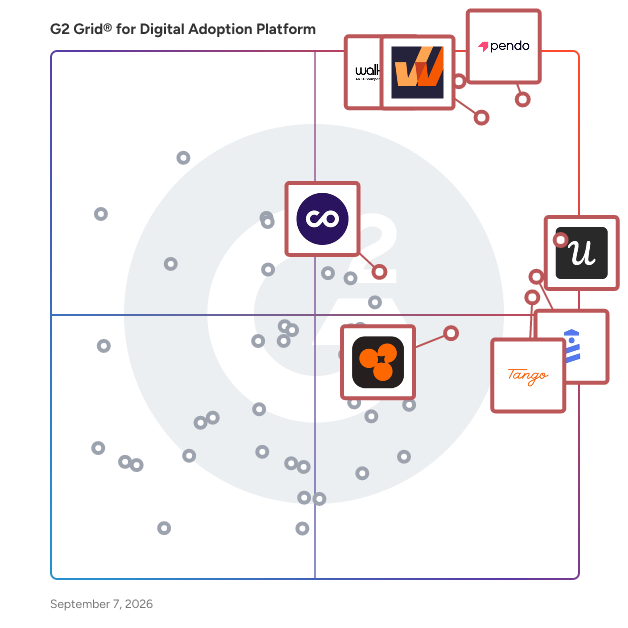
G2 Grid® for Digital Adoption Platforms

G2 Grid® for Digital Adoption Platforms plotting products by satisfaction and market presence

Highlighted products: Pendo, WalkMe, Whatfix, Userpilot, UserGuiding, Tango, Product Fruits, and ChurnZero.

Underlying data: [Grid® JSON](https://www.g2.com/categories/digital-adoption-platform/grids.json?focus%5B%5D=pendo-io-pendo&focus%5B%5D=walkme&focus%5B%5D=whatfix&focus%5B%5D=userpilot&focus%5B%5D=userguiding&focus%5B%5D=tango-tango&focus%5B%5D=product-fruits&focus%5B%5D=churnzero)

iorad

Capture once. Reach everyone. Train anything. iorad automatically captures any workflow on any desktop or web application and transforms it into interactive, step-by-step training content. No screenshots, no manual editing, no production work necessary. Instantly ready to use with Storyteller AI. One recording. No editing. No production. While other tools give you one static output, iorad generates six learning modes: ✅ Try — fully interactive, guided walkthrough ✅ Watch — auto-generated video ✅ Slide — slideshow format ✅ Scroll — scannable step-by-step list ✅ Quiz — graded learning experience ✅ Do — in-app guided experience Every learner is different. iorad covers all of them. Built for scale with unlimited learners. iorad doesn't charge per viewer. Whether you're training 10 employees or 10,000 customers, your costs don't grow with your audience, making it the most cost-efficient tutorial platform for organizations that need broad reach. One platform for employee training, digital adoption, and customer education. Teams use iorad for onboarding, SOPs, knowledge base content, sales enablement, customer training, and self-service support. Every tutorial is instantly ready to share via link, embed, or integration within your existing tech stack. Global-ready from day one. Deliver guidance in any language, embedded within the tools your learners use every day. ✨ Trusted by 45K+ organizations · 1M+ tutorials created · 30M+ learners reached

Average Rating: 4.7/5.0

Total Reviews: 51

How Do G2 Users Rate iorad?

  • User Segmentation: 5.0/10 (Category avg: 8.8/10)
  • Ease of Use: 9.3/10 (Category avg: 9.0/10)
  • Text Bubble Walkthroughs: 8.8/10 (Category avg: 9.1/10)
  • Audio-visual Walkthroughs: 9.8/10 (Category avg: 8.9/10)

Who Is the Company Behind iorad?

  • Seller: iorad
  • Company Website:
  • Year Founded: 2007
  • HQ Location: Boston, US
  • Twitter: @iorad
    1,176 Twitter followers
  • LinkedIn® Page: www.linkedin.com
    18 employees on LinkedIn®

Who Uses This Product?

  • Top Industries: Computer Software, Education Management
  • Company Size: 61% Medium, 25% Large

What Are Recent G2 Reviews of iorad?

What Are G2 Users Discussing About iorad?

Appcues

Appcues is a customer engagement platform that turns your product into the best place to reach, encourage, and engage your customers. Marketing and product teams use Appcues to publish dynamic content, surveys and multi-step guides without ongoing engineering resources. Most in-app tools focus solely on onboarding new users. Appcues runs campaigns across the full customer lifecycle: helping you build awareness of new features, drive adoption, encourage advocacy, and inform what you build next, all through targeted in-app messaging. When a user hits an activation moment, drifts from a key workflow, or crosses a usage threshold, Appcues helps you respond automatically across in-app, email, and push. Appcues connects engagement to real business outcomes: custom analytics dashboards show how users move through your product, and funnels surface exactly where they fall off. Inside Appcues, you can describe what you want in plain language: build a campaign, create an experience, ask a question, and Appcues AI does the work: building experiences, flagging what's underperforming, and suggesting fixes automatically. Segments let you target the right audience down to a single user, so every experience reaches exactly who it should. Campaigns tie it all to a named goal you can track. Founded in 2013 in Boston, Appcues has spent over a decade helping companies close the gap between building products and helping customers get real value from them. Trusted by HubSpot, G2, Airbase, and Wayfair, Appcues has powered billions of in-product experiences across thousands of products worldwide.

Average Rating: 4.6/5.0

Total Reviews: 357

How Do G2 Users Rate Appcues?

  • User Segmentation: 8.5/10 (Category avg: 8.8/10)
  • Ease of Use: 8.6/10 (Category avg: 9.0/10)
  • Text Bubble Walkthroughs: 8.9/10 (Category avg: 9.1/10)
  • Audio-visual Walkthroughs: 8.1/10 (Category avg: 8.9/10)

Who Is the Company Behind Appcues?

  • Seller: Appcues
  • Company Website:
  • Year Founded: 2013
  • HQ Location: Boston, MA
  • Twitter: @appcues
    5,121 Twitter followers
  • LinkedIn® Page: www.linkedin.com
    59 employees on LinkedIn®

Who Uses This Product?

  • Who Uses This: Product Manager, Customer Success Manager
  • Top Industries: Computer Software, Information Technology and Services
  • Company Size: 58% Medium, 33% Small

What Do G2 Reviewers Say About Appcues?

AI-generated summary from verified user reviews

Pros
  • Users find Appcues to be exceptionally easy to use, streamlining onboarding and feedback collection seamlessly.
  • Users find the easy setup of Appcues to be straightforward and user-friendly, enhancing their onboarding experience.
  • Users value the easy creation process of Appcues, significantly improving trial user retention and engagement.
  • Users commend the outstanding customer support of Appcues, noting quick and helpful responses to all requests.
  • Users value the intuitive interface of Appcues, enhancing their ability to create effective workflows effortlessly.
Cons
  • Users face limitations in customization and integration, hindering the overall effectiveness of Appcues.
  • Users express frustration over poor customer support, particularly regarding the lack of timely assistance and resolutions.
  • Users find the pricing of Appcues to be a bit high, making it less accessible for smaller teams.
  • Users feel there is a need for improvement in metrics, organization of flows, and tracking features in Appcues.

What Are Recent G2 Reviews of Appcues?

What Are G2 Users Discussing About Appcues?

Supered

Supered is a sales enablement software platform based in the United States that helps sales teams improve sales playbook adoption and sales process execution directly inside their CRM. Designed primarily for sales enablement leaders, Supered also supports sales leaders, RevOps, and sales operations teams responsible for driving consistent execution across the sales organization. Supered works natively with HubSpot and Salesforce and addresses a common sales enablement challenge: playbooks and training materials that exist outside the CRM and are not consistently applied during live selling. As a CRM-native sales enablement platform, Supered embeds just-in-time, in-app guidance directly into HubSpot and Salesforce workflows so reps can learn while they sell. Rather than relying on static documentation or external training portals, Supered delivers contextual guidance during real deal execution based on CRM context such as deal stage, role, or activity. Core sales enablement functionality includes: - Executable sales playbooks that live inside the CRM - Contextual, in-app sales guidance delivered at the moment of need - Manager visibility into sales process adherence - Role-aware guidance aligned to CRM permissions Supered supports ongoing sales enablement instead of one-time onboarding. Because it operates entirely inside the CRM, reps do not log into a separate tool or change how they work. Sales enablement teams can update playbooks and guidance centrally and see changes reflected immediately in execution, without redistributing documents or retraining teams. Sales leaders and managers use Supered to inspect and coach deal execution based on observable behavior rather than self-reported updates. Managers can see whether key steps are followed, where processes break down, and where coaching is needed while deals are still active. Manager and leadership use cases include: - Coaching reps based on real execution, not anecdotes - Inspecting deal execution without manual audits or spreadsheets - Identifying process breakdowns before deals are lost Supered is commonly used to enforce sales playbooks, onboard new reps, and manage ongoing sales process changes. Sales enablement teams use it to reinforce best practices and reduce reliance on static content. RevOps and sales ops teams use Supered to standardize workflows, support CRM data integrity, and ensure sales processes are followed as designed across teams and regions. Operational value for enablement, RevOps, and sales ops teams includes: - Improved consistency across deals and teams - Reduced process drift over time - Cleaner CRM data through enforced execution - Less time maintaining documentation that goes unused The primary value of Supered is helping organizations shift sales enablement from content distribution to behavior change. By making sales processes observable and enforceable inside the CRM, Supered helps teams improve consistency, strengthen execution, and get more value from their sales enablement strategy and sales technology stack. Supered supports secure, enterprise-ready deployment, including SOC 2 compliance, GDPR alignment, and respect for existing CRM permissions. It is not a learning management system, content library, or offline training tool. Supered is built for teams that want sales enablement to happen where selling actually occurs and to drive consistent execution through real-time guidance and visibility.

Average Rating: 4.9/5.0

Total Reviews: 79

How Do G2 Users Rate Supered?

  • User Segmentation: 10.0/10 (Category avg: 8.8/10)
  • Ease of Use: 9.2/10 (Category avg: 9.0/10)
  • Text Bubble Walkthroughs: 10.0/10 (Category avg: 9.1/10)
  • Audio-visual Walkthroughs: 10.0/10 (Category avg: 8.9/10)

Who Is the Company Behind Supered?

  • Seller: Supered
  • Company Website:
  • Year Founded: 2023
  • HQ Location: Atlanta, US
  • LinkedIn® Page: www.linkedin.com
    17 employees on LinkedIn®

Who Uses This Product?

  • Top Industries: Consulting, Information Technology and Services
  • Company Size: 55% Small, 23% Medium

What Do G2 Reviewers Say About Supered?

AI-generated summary from verified user reviews

Pros
  • Users highlight the ease of use of Supered, seamlessly integrating task management and training within HubSpot.
  • Users appreciate the easy setup of Supered, highlighting the smooth onboarding process and supportive guidance from the team.
  • Users value the CRM efficiency of Supered, seamlessly integrating guidance and reducing coaching time for better performance.
  • Users value the data centralization offered by Supered, enhancing clarity and efficiency in training and communication.
  • Users appreciate the simplicity and efficiency of Supered, enhancing task management and team consistency in HubSpot.
Cons
  • Users experience a steep learning curve with Supered due to its complex object interactions and interface adjustments.
  • Users face challenges with update issues in Supered, requiring diligent monitoring to capitalize on new features effectively.
  • Users find a steep learning curve in using Supered, requiring time to grasp its interface and functionalities.
  • Users find Supered's platform non-intuitive, requiring extra time to understand object interactions and navigate the UI.
  • Users find the user experience lacking, requiring time to learn the platform's interactions and navigate effectively.

What Are Recent G2 Reviews of Supered?

Userflow

Userflow is a Product Adoption Engine built for customer-obsessed SaaS teams running self-serve products. Many teams rely on engineering to ship in-app onboarding, announcements, and user education, slowing iteration and limiting visibility into what drives activation. Userflow removes those bottlenecks with a flexible, AI-powered platform for in-app onboarding and in-app guidance that helps turn users into champions. Build product tours, onboarding checklists, surveys, feature announcements, and a customizable resource center without code. Personalize experiences by behavior or segment to drive product adoption and feature adoption across the entire lifecycle. Userflow goes beyond surface-level guidance. Real-time product signals power segmentation, targeting, and continuous optimization. With built-in analytics and product analytics integrations— including Amplitude, Mixpanel, and cohort sync via Segment— teams can stream events, sync cohorts, and measure impact without stitching together multiple tools. A standard chatbot tells users what to do—or points them to a doc. Adoption Agent reads the question, picks the most relevant flow from your library, and walks the user through it in-app. That’s the difference between in-app AI as support overhead and in-app AI as a growth driver. Userflow installs as a lightweight layer on top of your app and supports modern data workflows with event streaming, two-way integrations, and CRM sync, helping teams close the loop between insight and action. Whether you’re improving trial-to-paid conversion, scaling onboarding across personas, or optimizing feature adoption in a complex product, Userflow helps teams move from guesswork to guided, measurable growth. Learn more at www.userflow.com

Average Rating: 4.8/5.0

Total Reviews: 125

How Do G2 Users Rate Userflow?

  • User Segmentation: 8.6/10 (Category avg: 8.8/10)
  • Ease of Use: 9.4/10 (Category avg: 9.0/10)
  • Text Bubble Walkthroughs: 9.8/10 (Category avg: 9.1/10)
  • Audio-visual Walkthroughs: 9.4/10 (Category avg: 8.9/10)

Who Is the Company Behind Userflow?

  • Seller: Joincube, Inc. (DBA Beamer)
  • Company Website:
  • Year Founded: 2011
  • HQ Location: Austin, Texas
  • Twitter: @joincube
    488 Twitter followers
  • LinkedIn® Page: www.linkedin.com
    3 employees on LinkedIn®

Who Uses This Product?

  • Who Uses This: CEO, Product Manager
  • Top Industries: Computer Software, Information Technology and Services
  • Company Size: 58% Small, 34% Medium

What Do G2 Reviewers Say About Userflow?

AI-generated summary from verified user reviews

Pros
  • Users find Userflow to be incredibly easy to use, especially for non-technical individuals, enhancing their experience.
  • Users find Userflow to be intuitive, enabling effortless onboarding and seamless user experiences without technical expertise.
  • Users love the easy setup of Userflow, allowing quick onboarding for non-technical staff and efficient use of resources.
  • Users highlight the incredibly quick and helpful customer support from Userflow, enhancing their overall experience.
  • Users praise Userflow for its easy implementation, making it accessible even for non-technical users and enhancing flexibility.
Cons
  • Users find content management cumbersome due to missing translations and difficulties in sharing unpublished flows.
  • Users find Userflow's pricing expensive, especially for small companies and AI Assistant usage.
  • Users express frustration over the lack of integration options in Userflow, limiting in-depth analytics and organization.
  • Users find Userflow's limited functionality challenging for complex flows due to automation and low-code constraints.
  • Users wish for missing functionality like access to private articles and native "Back" buttons in Userflow.

What Are Recent G2 Reviews of Userflow?

What Are G2 Users Discussing About Userflow?

Lemon Learning

Lemon Learning is a Digital Adoption Platform (DAP) that empowers millions users worldwide in their use of digital tools. Lemon Learning is like GPS navigation for any web-based software, whether market-leading solutions or unique tools developed in-house. Interactive, in-app walkthroughs guide users step by step through any business process or functionality. From small businesses to major global enterprises, Lemon Learning helps teams across the globe to boost adoption of digital tools. The international organizations and stock market leaders we work with include KPMG, Martin Bower, Chanel, Randstad, Aéroports de Paris, among many others.

Average Rating: 4.8/5.0

Total Reviews: 44

How Do G2 Users Rate Lemon Learning?

  • User Segmentation: 9.6/10 (Category avg: 8.8/10)
  • Ease of Use: 9.6/10 (Category avg: 9.0/10)
  • Text Bubble Walkthroughs: 9.2/10 (Category avg: 9.1/10)
  • Audio-visual Walkthroughs: 9.9/10 (Category avg: 8.9/10)

Who Is the Company Behind Lemon Learning?

  • Seller: Lemonlearning
  • Company Website:
  • Year Founded: 2014
  • HQ Location: Paris, France
  • LinkedIn® Page: www.linkedin.com
    54 employees on LinkedIn®

Who Uses This Product?

  • Top Industries: Manufacturing
  • Company Size: 44% Medium, 38% Large

What Are Recent G2 Reviews of Lemon Learning?

What Are G2 Users Discussing About Lemon Learning?

Netcore Customer Engagement Platform

Netcore is a comprehensive agentic marketing platform designed to assist businesses in achieving profitable growth through data-driven customer connections. This innovative solution is tailored for a diverse range of industries, including eCommerce, retail, banking, financial services and insurance (BFSI), enterprises, and direct-to-consumer (D2C) brands. By co-owning marketing outcomes with its users, Netcore establishes a partnership that empowers organizations to enhance their customer engagement strategies effectively. The platform's unified stack integrates several critical components, including Customer Engagement, Product Discovery, Personalization, Customer Data Platform (CDP), Email Marketing, and Communication Platform as a Service (CPaaS) channels. This integration allows businesses to create a cohesive view of their customers and their journeys, ensuring that marketing efforts are both targeted and relevant. The Netcore Context Layer and Governance Layer work in tandem to provide insights that drive informed decision-making, making it easier for marketing teams to understand customer behavior and preferences. Netcore's standout feature is its seven AI agents, which leverage a unified view of every customer across multiple channels and signals. These agents autonomously plan, execute, analyze, and optimize hyper-personalized marketing campaigns, allowing businesses to deliver tailored messages that resonate with their audience. This level of automation not only saves time but also enhances the effectiveness of marketing initiatives, ensuring that each interaction is meaningful and impactful. On a global scale, Netcore demonstrates its capabilities by powering over 50 billion emails, 5 billion push notifications, 200 million WhatsApp messages, and 1 million AI-driven interactions each month. This extensive reach underscores the platform's ability to deliver the right message on the right channel at the right time, ultimately driving customer engagement and loyalty. By utilizing Netcore, organizations can expect to enhance their marketing strategies, improve customer relationships, and achieve measurable results in their growth objectives.

Average Rating: 4.5/5.0

Total Reviews: 566

How Do G2 Users Rate Netcore Customer Engagement Platform?

  • User Segmentation: 8.9/10 (Category avg: 8.8/10)
  • Ease of Use: 8.9/10 (Category avg: 9.0/10)
  • Text Bubble Walkthroughs: 8.2/10 (Category avg: 9.1/10)
  • Audio-visual Walkthroughs: 8.4/10 (Category avg: 8.9/10)

Who Is the Company Behind Netcore Customer Engagement Platform?

  • Seller: Netcore Private Limited
  • Company Website:
  • Year Founded: 1998
  • HQ Location: Mumbai, IN
  • Twitter: @netcore_cloud
    1,828 Twitter followers
  • LinkedIn® Page: www.linkedin.com
    1,280 employees on LinkedIn®

Who Uses This Product?

  • Who Uses This: Marketing Manager, Digital Marketing Manager
  • Top Industries: Financial Services, Insurance
  • Company Size: 49% Medium, 33% Large

What Do G2 Reviewers Say About Netcore Customer Engagement Platform?

AI-generated summary from verified user reviews

Pros
  • Users value the ease of use of Netcore's platform, particularly its intuitive drag-and-drop journey builder.
  • Users commend the exceptional customer support of Netcore, ensuring effective solutions and assistance at all times.
  • Users appreciate the intelligent automation and personalization in Netcore's platform, enhancing real-time customer engagement across channels.
  • Users value the exceptional customer support from Netcore, appreciating their proactive assistance and valuable insights for engagement.
  • Users value the intelligent automation and personalization capabilities of Netcore's platform, enhancing multi-channel customer engagement.
Cons
  • Users experience slow performance with report generation and campaign execution, affecting overall efficiency and satisfaction.
  • Users find the missing features such as AI automation and detailed reporting hinder effective campaign execution.
  • Users find the platform has a slight learning curve, with challenges in interface and journey creation clarity.
  • Users experience slow loading times that hinder accessing reports and delay data uploads effectively.
  • Users find the limited features of Netcore Customer Engagement Platform hinder their overall usability and efficiency.

What Are Recent G2 Reviews of Netcore Customer Engagement Platform?

What Are G2 Users Discussing About Netcore Customer Engagement Platform?

Apty

Apty is an enterprise-grade Digital Adoption Platform (DAP) built to work across your entire software stack—including custom apps. While other DAPs stop at tooltips and walkthroughs, Apty drives execution: faster onboarding, fewer errors, and measurable ROI in weeks. No guesswork. No bloat. No hand-holding required. Just software that works the way your business does—without retraining or IT overload.

Average Rating: 4.7/5.0

Total Reviews: 138

How Do G2 Users Rate Apty?

  • User Segmentation: 8.9/10 (Category avg: 8.8/10)
  • Ease of Use: 9.1/10 (Category avg: 9.0/10)
  • Text Bubble Walkthroughs: 9.2/10 (Category avg: 9.1/10)
  • Audio-visual Walkthroughs: 8.8/10 (Category avg: 8.9/10)

Who Is the Company Behind Apty?

  • Seller: Apty
  • Year Founded: 2018
  • HQ Location: Austin, Texas
  • LinkedIn® Page: www.linkedin.com
    66 employees on LinkedIn®

Who Uses This Product?

  • Top Industries: Information Technology and Services, Computer Software
  • Company Size: 42% Medium, 36% Large

What Do G2 Reviewers Say About Apty?

AI-generated summary from verified user reviews

Pros
  • Users find Apty's interface easy to use, allowing quick implementation of workflows without technical expertise.
  • Users value the easy implementation of Apty, allowing quick setup for non-technical individuals.
  • Users value the easy integrations of Apty, enabling quick setup and implementation without technical expertise.
  • Users find Apty's easy setup intuitive, allowing quick implementation of workflows even without technical skills.
Cons
  • Users experience occasional glitches and manual translation issues with Apty, affecting their overall efficiency.
  • Users report occasional software glitches with Apty, though it typically recovers quickly and needs better auto-translation features.

What Are Recent G2 Reviews of Apty?

What Are G2 Users Discussing About Apty?

MeltingSpot

Not a chatbot. A coach. MeltingSpot is the Learning Agent that lives inside your software, spots where users get stuck, and coaches them right inside their workflow, without ever pulling them out of the tool. Where a chatbot waits to be asked, our agent is proactive: it detects friction in real time and guides each user at the right moment, inside the software they already use. The result: adoption goes up, support tickets go down, and training actually sticks. I - The same Learning Agent plays three roles, depending on what you need. 🔵 Digital CS Manager (for SaaS vendors) Gives your Customer Success team backup that onboards and grows your customers inside your product, from first login to expansion, without putting a CSM on the front line of every account. - New accounts activate on their own, no CSM on the front line. - You catch stall signals before they turn into churn. - You turn activation into expansion revenue. 🟢 Digital Change Manager (for large enterprises) Keeps adoption alive through your CRM, ERP or AI rollouts, consistent across every country and entity, long after go-live. - Users are ready before go-live, not just after. - Adoption stops decaying six months after launch. - You prove transformation ROI to the steering committee. 🟣 Digital Corporate Trainer (for large enterprises) Delivers your training straight into your teams' flow of work, from onboarding to building skills on everything they do (tools, process, and their craft), so content gets used, not just published. - New joiners ramp up without a buddy or a classroom. - Sales enablement lives in the CRM, not in a kickoff deck. - Training that sticks because it happens where the work happens. II - What makes MeltingSpot different - Proactive, not reactive: it acts before users get stuck, instead of waiting for a question. - Inside the workflow, not next to it: training arrives in the tool already in use. - Cross-platform, in hours not months: a JS snippet for the web, a browser extension for the enterprise, no dev team required. - Personalized delivery based on each user's activity, behavior, and skills. - AI-powered content engine: turn existing PDFs, videos, or documents into ready-to-use in-app learning. - Pay for impact, not for seats. - Live in minutes, not months. What users get - Faster software and feature adoption. - Higher confidence and autonomy, with knowledge that lasts. - Fewer support tickets and less manual enablement. Trusted at scale 500+ companies. 2M+ users guided.

Average Rating: 4.6/5.0

Total Reviews: 61

How Do G2 Users Rate MeltingSpot?

  • User Segmentation: 9.3/10 (Category avg: 8.8/10)
  • Ease of Use: 9.2/10 (Category avg: 9.0/10)
  • Text Bubble Walkthroughs: 9.1/10 (Category avg: 9.1/10)
  • Audio-visual Walkthroughs: 9.1/10 (Category avg: 8.9/10)

Who Is the Company Behind MeltingSpot?

  • Seller: MeltingSpot
  • Year Founded: 2021
  • HQ Location: Paris , FR
  • Twitter: @MeltingSpot_EU
    41 Twitter followers
  • LinkedIn® Page: www.linkedin.com
    21 employees on LinkedIn®

Who Uses This Product?

  • Top Industries: Computer Software
  • Company Size: 52% Small, 36% Medium

What Do G2 Reviewers Say About MeltingSpot?

AI-generated summary from verified user reviews

Pros
  • Users highlight the user-friendly interface of MeltingSpot, making content creation and delivery effortless and efficient.
  • Users love the intuitive experience of MeltingSpot, enabling seamless content integration and effortless user engagement.
  • Users appreciate the user-friendly interface of MeltingSpot, which simplifies content creation and enhances engagement.
  • Users commend the responsive and helpful support from MeltingSpot, enhancing their overall experience and satisfaction.
  • Users love the variety of learning formats offered by MeltingSpot, catering to diverse learning preferences seamlessly.
Cons
  • Users find limited customization options for advanced features, but appreciate the improvements being made over time.
  • Users note that advanced features are limited and still under development, but improvements are on the way.
  • Users face a lack of intuitiveness with MeltingSpot, particularly in managing multilingual content and text formatting.
  • Users note bug issues with MeltingSpot, but appreciate the quick responses to problems as development progresses.
  • Users desire improved communication tools for monitoring posts, like approval systems and flagged word features.

What Are Recent G2 Reviews of MeltingSpot?

VisualSP

VisualSP is a fully customizable digital adoption platform that provides in context learning as an overlay on top of your enterprise web applications like Microsoft 365, Dynamics 365, Salesforce, ServiceNow, Workday, SuccessFactors, NetSuite, Nintex, HubSpot and other custom web applications. VisualSP supports corporate employees at the moment of their need and when they are in the flow of their work by providing in-app contextual guidance and training. It delivers hundreds of regularly updated, and completely customizable, guided walkthroughs, tips, videos, and articles in their own web environment. Employees are empowered with readily available contextual training and guidance which in turn speeds up onboarding, and improves efficiency from within the digital workplace. Empowering employees with contextual microlearning increases user adoption of web applications while decreasing frustration and support tickets as a result. Learning by doing is at the core of how VisualSP provides the support to your employees for better utilization of enterprise web applications. VisualSP is available across the following countries: USA, Canada, Germany, France, UK, Bermuda, Switzerland, Netherlands, Belgium, Australia, and more.

Average Rating: 4.9/5.0

Total Reviews: 34

How Do G2 Users Rate VisualSP?

  • User Segmentation: 9.1/10 (Category avg: 8.8/10)
  • Ease of Use: 9.2/10 (Category avg: 9.0/10)
  • Text Bubble Walkthroughs: 9.8/10 (Category avg: 9.1/10)
  • Audio-visual Walkthroughs: 9.3/10 (Category avg: 8.9/10)

Who Is the Company Behind VisualSP?

  • Seller: VisualSP
  • Year Founded: 2005
  • HQ Location: Plainfield, IL
  • Twitter: @sharepointvideo
    2,195 Twitter followers
  • LinkedIn® Page: www.linkedin.com
    10 employees on LinkedIn®

Who Uses This Product?

  • Top Industries: Information Technology and Services
  • Company Size: 38% Large, 35% Small

What Do G2 Reviewers Say About VisualSP?

AI-generated summary from verified user reviews

Pros
  • Users value the ease of use of VisualSP, enjoying intuitive guidance that enhances productivity and streamlines onboarding.
  • Users find efficiency in VisualSP's streamlined onboarding and in-app guidance, enhancing productivity and reducing support needs.
  • Users value the responsive and helpful customer support from VisualSP, enhancing productivity and digital adoption effectively.
  • Users value the step-by-step guidance from VisualSP, which streamlines onboarding and enhances productivity effectively.
  • Users value the seamless integrations of VisualSP with Microsoft tools, enhancing productivity and support efficiency.
Cons
  • Users face compatibility issues with VisualSP, as it is limited to web applications and excludes desktop use.
  • Users note a lack of integration with client applications, which slightly diminishes the overall experience but remains manageable.
  • Users note a lack of integration with client applications, yet find browser functionality valuable despite this drawback.
  • Users find the mobile app limitations of VisualSP frustrating, as it restricts usage to web applications only.
  • Users find the poor user experience in VisualSP due to complex navigation and excessive window management frustrating.

What Are Recent G2 Reviews of VisualSP?

What Are G2 Users Discussing About VisualSP?

Frigade

Frigade is an AI-native digital adoption platform for product onboarding, in-app guidance, and customer support deflection. Where legacy digital adoption tools require teams to script tours, build decision trees, and rewrite docs every time the product changes, Frigade ships an AI assistant that learns the product itself and guides users through real workflows. The result is in-app help that stays accurate as your product ships, with no scheduled audits and no maintenance backlog. Frigade ships as two products that work independently or together: Frigade Assistant and Frigade Engage. Frigade Assistant is an AI agent for in-app user onboarding, customer onboarding, and product adoption. Rather than ingesting documentation and answering questions in a chat sidebar, Assistant deploys agents that use your product the way real users do. Setup is no different from adding a new user account: provide credentials and a URL, and the agent starts mapping the product. It learns your app end to end by navigating it, documenting workflows step-by-step, and reconciling that experience against your existing knowledge base. When the live product diverges from the docs, the agent prefers the live behavior, because that is what your users will actually encounter. Once live, Assistant runs inside your product as an in-app overlay. It answers user questions in context, walks multi-step setups, fills forms with the user, navigates the UI on the user's behalf, and takes actions across your product instead of just describing the steps. When a question genuinely needs a human, Assistant hands off to your support team with full session context: what the user was trying to do, what they had already tried, and where they got stuck. The hand-off includes far more than a chat transcript, so the receiving rep can pick up immediately. Assistant also shows up proactively. Suggestions are AI-generated product tours and magic links that surface for the specific user who needs them at the right moment, rather than blasting the same flow at every new signup. Anyone on the team can write a Suggestion in plain language: when a customer success lead notices a pattern, they describe the desired help in a sentence, and the Assistant runs the walkthrough at the right moment for the right account. There are no decision trees to configure and no triggers to hand-build. The targeting holds up because the agent reads the actual product state, not a recorded flow. Common Assistant use cases include in-app customer support, support deflection, user activation, customer onboarding, feature adoption, product adoption, in-app surveys, virtual CSM coverage, and expansion or upsell flows. Product teams use Assistant to get new users to first value faster. Support teams use it to absorb the long tail of repetitive how-do-I questions before they hit the inbox. Growth teams use it to surface the next relevant feature at the moment a user takes a related action. The same in-app assistant handles every audience without re-configuration, because the agent is reading the live product and adapting to what the user is doing. The dashboard that ships with Assistant gives teams visibility into what users are actually asking about, how the AI is responding, and whether those responses resolve their issues. Insights are auto-categorized themes from every conversation, so you can see why users get stuck and where the product itself needs work. Everything can be exported to existing analytics tools, connecting AI insights with broader user data. Most teams install Assistant in hours and go live with their customers within a day or two. As the product changes, the agent re-learns automatically. Ship a new feature: it gets discovered. Move a button: the agent updates its mental model. There are no flow files to maintain and no help docs to keep in sync. Teams replacing legacy DAPs like Pendo, WalkMe, Appcues, Userpilot, and Whatfix come to Frigade specifically because the maintenance burden that broke their previous tool disappears: the agent stays current on its own. Frigade Engage is the deterministic, code-first side of Frigade. It is a drop-in React component library for engineering teams that want code-level control over guided onboarding, feature adoption, interactive walkthroughs, and onboarding tooltips. Engage ships polished defaults for checklists, product tours, banners, announcements, and in-app surveys. The defaults (animation curves, empty states, the way a checklist collapses on the last step) are sweat-tested, so teams can install on a Friday and ship something polished by Monday. Every component, animation, and copy line is overridable in code. Install in 15 minutes. Engage fits teams who want customer onboarding that is deterministic, version-controlled, and lives in their own codebase. It is the right pick when engineering needs explicit guarantees about exactly when a checklist shows up, what step the user is on, and how the flow integrates with the rest of their app state. Some teams pair Engage with Assistant: Engage handles the strict, version-controlled flows (the first checklist on day one, the regulated banners), and Assistant handles everything conversational, contextual, and emergent (the long tail of how-do-I questions, the proactive Suggestions, and the action-taking on the user's behalf). Frigade integrates with the tools customer-facing teams already use. On analytics, that is PostHog, Amplitude, Segment, Mixpanel, Heap, RudderStack, and Google Analytics. On CRM and help desk, that is HubSpot, Salesforce, Intercom, Zendesk, Pylon, Freshdesk, Front, and Help Scout. On communication, Slack, Microsoft Teams, and Discord. On developer documentation, Frigade can ingest help center content from Mintlify, ReadMe, GitBook, and Notion to inform agent behavior. There is a REST API, a JavaScript SDK, a React SDK, a Mobile SDK on Enterprise plans, and webhooks for custom work. The goal is not to replace your support stack. It is to handle routine cases inside the product so your team can focus on the questions that genuinely need a human. Security and compliance: Frigade is SOC 2 Type II certified and GDPR compliant. Data is encrypted in transit with TLS 1.2+ and at rest with AES-256. EU data residency is available for teams that need it. There is a zero-retention policy on LLM providers, so customer data is never used for model training. Personally identifiable information is automatically scrubbed on inputs and outputs. Enterprise customers can self-host Frigade on their own infrastructure with their own LLM keys for

Average Rating: 4.8/5.0

Total Reviews: 24

How Do G2 Users Rate Frigade?

  • User Segmentation: 9.8/10 (Category avg: 8.8/10)
  • Ease of Use: 9.5/10 (Category avg: 9.0/10)
  • Text Bubble Walkthroughs: 9.4/10 (Category avg: 9.1/10)

Who Is the Company Behind Frigade?

  • Seller: Frigade
  • Year Founded: 2022
  • HQ Location: San Francisco, US
  • LinkedIn® Page: www.linkedin.com
    5 employees on LinkedIn®

Who Uses This Product?

  • Top Industries: Computer Software, Information Technology and Services
  • Company Size: 71% Small, 29% Medium

What Are Recent G2 Reviews of Frigade?

Tidio

Tidio is an all-in-one customer support software suite comprising (1) help desk, (2) live chat, (3) chatbot automation, and (4) AI agent features. Over 300,000 businesses across ecommerce, services, and tech use Tidio to streamline communication, resolve issues faster, and drive more sales. With Tidio, support teams can engage customers in real time via live chat, automate responses to FAQs with Flows (rules-based chatbots), and manage conversations from multiple channels like email, Messenger, Instagram, WhatsApp, and email in one unified dashboard. At the heart of the platform is Lyro, Tidio’s conversational AI agent and chatbot, capable of resolving up to 67% of common customer inquiries without human involvement. With a single click, Lyro starts using your company’s existing help content to provide accurate and brand-consistent responses without making up answers. When in doubt, the AI agent will hand over the ticket to your team, enhancing trust between users and your brand. Tidio empowers businesses to scale their support without overwhelming their teams. It reduces missed chats, shortens response times, and frees up agents to focus on complex issues. Start free and get 50 AI-powered conversations with Lyro. No credit card required. 💬 Live Chat • Real-Time Support – Engage with visitors instantly through a lightweight chat widget. • Live Typing Preview – See what users are typing before they hit send. • Canned Responses – Use pre-written replies for quick, consistent answers. • AI Reply Assistant – Enhance responses with GPT-4 suggestions. • User Management – Ban users by IP, view live visitor lists. • Chat Transcripts – Save or email conversation history. • Attachments – Support for sending files (images, docs, videos). ⚙️ Flows (Chatbot Automation) • Visual Automation Builder – No-code drag & drop builder for custom flows. • Pre-designed Templates – 40+ templates designed for eCommerce. • Data Collection – Auto-capture contact info and feedback. • Abandoned Cart Recovery – Send timed offers/discounts. • Third-Party Integrations – Sync data with external tools and platforms. 🤖 Lyro (AI Agent) • Conversational AI – Automatically resolve up to 70% of questions. • Product Recommendations – Suggest items based on Shopify product data. • Multichannel Support – Works across live chat, WhatsApp, Instagram, Messenger. • Multilingual Capabilities – Respond in English, Spanish, French, Portuguese, German. • Analytics – Review AI performance and conversation stats. 🛒 Order Management (for Shopify) • Cart Preview – See what's in the customer's cart in real time. • Order History Access – View past orders for personalized help. • Direct Product Recommendations – Suggest products inside the chat. • Order Management – Cancel, update, or refund orders via chat. • Discount Offering – Share coupon codes live in conversation. 🎫 Ticketing System • Unified Ticket Creation – Convert emails/chats into support tickets. • Tagging and Prioritization – Organize and prioritize tasks. • Operator Tracking – Know who’s assigned to what. • Advanced Filtering – Quickly sort through tickets. • Spam Management – Auto-detect and filter irrelevant messages. 📡 Communication Channels Manage all in one dashboard: • Live Chat – Real-time website conversations. • Email – Integrate multiple inboxes. • Instagram – Reply to DMs and reactions. • Messenger – Chat with Facebook users. 🎨 Customization • Branding – Match chat widget to your site's look & feel. • Visibility Settings – Customize widget display by time/device. • Offline Messaging – Capture leads when you're offline. 📊 Analytics • Performance Monitoring – Track response times, satisfaction, missed chats. • Team Insights – Evaluate individual/team productivity. • Flow Analysis – Optimize automations based on performance data. 🔒 Privacy & Compliance • SOC 2 Type 2 • GDPR • CCPA • EU-US DPF • CPRA • AI Pact

Average Rating: 4.6/5.0

Total Reviews: 1,897

G2 Deal: Get 15% off any paid plan after signing up for a 7 day free trial

Tidio combines live chat and chatbot tools to help you connect with your customers and generate more sales with outstanding instant support.

Price: ~~$25-54/month~~ → $21-46/month

View this exclusive G2 deal

How Do G2 Users Rate Tidio?

  • User Segmentation: 10.0/10 (Category avg: 8.8/10)
  • Ease of Use: 9.3/10 (Category avg: 9.0/10)
  • Text Bubble Walkthroughs: 10.0/10 (Category avg: 9.1/10)
  • Audio-visual Walkthroughs: 10.0/10 (Category avg: 8.9/10)

Who Is the Company Behind Tidio?

  • Seller: Tidio
  • Company Website:
  • Year Founded: 2013
  • HQ Location: San Francisco, California
  • Twitter: @tidiocx
    1,306 Twitter followers
  • LinkedIn® Page: www.linkedin.com
    182 employees on LinkedIn®

Who Uses This Product?

  • Who Uses This: Owner, CEO
  • Top Industries: Retail, Marketing and Advertising
  • Company Size: 90% Small, 9% Medium

What Do G2 Reviewers Say About Tidio?

AI-generated summary from verified user reviews

Pros
  • Users find Tidio's ease of use exceptional, enhancing communication with customers effectively and effortlessly.
  • Users appreciate Tidio for its immediate customer support, enhancing engagement and satisfaction in service delivery.
  • Users value the efficient AI chatbots of Tidio, ensuring quick customer responses and smooth communication.
  • Users find Tidio's easy setup incredibly helpful, enabling a smooth start and efficient configuration.
  • Users appreciate Tidio's real-time answers and easy setup, enhancing customer engagement and overall experience dramatically.
Cons
  • Users find Tidio expensive, especially for freelancers seeking customizable pricing and features to fit their needs.
  • Users find the missing features in Tidio, such as geolocation, limiting its affordability and usability across plans.
  • Users find the limited customization options frustrating, wishing for more control over chat features and workflows.
  • Users find Tidio's pricing model expensive, suggesting a need for more affordable options for small businesses.
  • Users desire more features from Tidio, such as additional styles, mobile capabilities, and editing options for chat responses.

What Are Recent G2 Reviews of Tidio?

What Are G2 Users Discussing About Tidio?

Userlane

Userlane helps healthcare, financial services, manufacturing, and pharma organizations see where software and AI create friction, get the right help to people inside every application, and prove the impact. The platform delivers two integrated capabilities: Application Intelligence for analytics and decisions, and Contextual Assistance for in-app help and automation. Application Intelligence shows how work actually happens across the software estate. It maps which applications and AI services people actually use, scores each one by adoption, engagement, and task success, and rolls up the results into a prioritized view of where to invest, where to cut, and where to act. Contextual Assistance connects people to the right help inside any application. In-app assistance, workflow automation, field-level validation, and change communications reach people in the flow of work, not in a training session or an email they never open. Business teams create and update content without IT involvement. The same intelligence extends to AI tools. Userlane shows which AI services are deployed across the organization, who uses them, and whether they deliver value. The result: employees spend more time getting things done and less time in training. Data quality improves in compliance-critical workflows. IT teams spend less time on repetitive support requests. Unused licenses get reclaimed. And when the board asks whether software and AI investments are working, there is a dashboard with the answer. Userlane is independent, vendor-neutral, and built for environments where compliance, audit trails, and data residency matter. The platform deploys without a heavy IT project, so teams see results in weeks rather than months.

Average Rating: 4.7/5.0

Total Reviews: 80

How Do G2 Users Rate Userlane?

  • User Segmentation: 9.2/10 (Category avg: 8.8/10)
  • Ease of Use: 8.9/10 (Category avg: 9.0/10)
  • Text Bubble Walkthroughs: 9.2/10 (Category avg: 9.1/10)
  • Audio-visual Walkthroughs: 9.0/10 (Category avg: 8.9/10)

Who Is the Company Behind Userlane?

  • Seller: Userlane
  • Year Founded: 2016
  • HQ Location: Munich, Bavaria
  • Twitter: @UserlaneHQ
    7,327 Twitter followers
  • LinkedIn® Page: www.linkedin.com
    70 employees on LinkedIn®

Who Uses This Product?

  • Top Industries: Computer Software, Automotive
  • Company Size: 40% Large, 38% Medium

What Do G2 Reviewers Say About Userlane?

AI-generated summary from verified user reviews

Pros
  • Users appreciate the ease of creating guides and tool tips, enhancing their onboarding experience and user understanding.
  • Users appreciate the easy creation of guides and tools, enhancing their ability to onboard and engage effectively.
  • Users love the easy setup of Userlane, enabling quick creation of guides and seamless onboarding experiences.
  • Users appreciate the ease of creating guides and tooltips, enhancing the clarity of user interactions on the platform.
  • Users appreciate the intuitive guidebuilding features of Userlane, making onboarding and support seamless and effective.
Cons
  • Users experience bugs in the interface for managers, which hinders usability and independence from customer support.
  • Users find that missing simple functions lead to complicated workarounds and buggy manager interfaces, limiting independence from CS.
  • Users find the missing features frustrating, often requiring complicated workarounds for basic functionality.
  • Users find the missing functionality in Userlane frustrating, often requiring complex workarounds for basic tasks.
  • Users experience software bugs in the manager interface, hindering independence and usability of the tool.

What Are Recent G2 Reviews of Userlane?

EdCast MyGuide

MyGuide by EdCast is a leading digital adoption platform that provides in-app guidance to users & employees and helps organizations secure a smooth digital transformation journey. MyGuide works like a GPS for software and provides its users contextual in-app audio/video help at the moment of need and help your users and employees complete complex app workflow. It acts like navigation for users on any web page or software and makes him/her perform complex steps in easy ways. It's easy to install and simple to use tool which can help companies achieve the adoption goals for their digital spend. Key Highlights of MyGuide: 1) Automation: MyGuide offers powerful automation mode which allows Machine to auto-create tours (in more than 10 languages) and AI-assisted mode which can auto-suggest tours based on customer workflow. MyGuide even offers self-driving software mode to enterprise customers. This ensures accurate process completion and productivity soaring. 2) Insights: MyGuide enables change managers to gain full visibility via reports & powerful dashboards into all user activities and provide adoption metrics so that decision-makers can make strategic & data-driven decisions to accelerate digital adoption. 3) Enterprise-Grade Security: The security needs of Enterprise customers are met by our certified, secure, reliable and scalable platform which is specific to the user's role, hierarchies, tasks, and device. MyGuide is available for Enterprise-grade customers where the users are spread across organization, SMB edition for small & medium businesses and lastly Freemium edition for freelancers focused on creating How-to Guides. In digital adoption life-cycle, MyGuide caters to different role levels like Trainers/Program Designers, Software End Users and Digital Transformation leaders/managers. 1. MyGuide Creator for Trainers/Program Designers - A typical day in the life of trainers revolves around creating program, content & providing training sessions. In spite of all the hard inputs by these roles, digital adoption at times is slow due to the absence of "in the moment" help or trainee retention. To solve this problem, we have MyGuide creator mode in our product using which trainers can create digital "how-to guides" by installing the MyGuide extension on Google Chrome. Creators can create interactive in-app guides for providing "in the moment" assistance to complete a specific software process task. Creators can create different types of steps like inline, message, video and branch steps to aid digital navigation for users. Creators can link guides, create push notifications and beacons when a user lands on a web page. For understanding the working of MyGuide creator in a better way, please request a demo by clicking on - https://ed.edcast.com/myguide-demo/ 2. MyGuide Player for End Users- The MyGuide player works at the user’s end as it helps the user to understand how a website or software flow works. A user can play the step by step guides for understanding how to complete any given task on any software. Alternatively, users can see the workflow beforehand in slide shows, videos or GIFs. It is available as an App exchange app and browser extension for Google Chrome, Internet Explorer, Firefox, Safari, and .JS file. Also, a user can download these guides in the following formats i.e. video file, ppt, gif, pdf, HTML and plain text. 3. MyGuide Insights- MyGuide Insights is used for analytics purposes and keeps a record of user behavior when they are using MyGuide. Whether creating guides or playing the guides, MyGuide analyzer keeps a track record of each and every activity. It helps the change managers have full visibility via reports & powerful dashboards into all user activities and adoption metrics so that you can make strategic & data-driven decisions to accelerate digital adoption. Schedule a demo today and see how MyGuide can add enormous value to your business - https://ed.edcast.com/myguide-demo/ MyGuide provides multilingual support for the player mode in 40+ languages which helps companies create guides in English and roll out to a global audience rapidly.

Average Rating: 4.9/5.0

Total Reviews: 21

How Do G2 Users Rate EdCast MyGuide?

  • User Segmentation: 10.0/10 (Category avg: 8.8/10)
  • Ease of Use: 9.4/10 (Category avg: 9.0/10)
  • Text Bubble Walkthroughs: 10.0/10 (Category avg: 9.1/10)
  • Audio-visual Walkthroughs: 9.8/10 (Category avg: 8.9/10)

Who Is the Company Behind EdCast MyGuide?

  • Seller: EdCast
  • Year Founded: 2014
  • HQ Location: Mountain View, CA
  • Twitter: @EdCast
    7,013 Twitter followers
  • LinkedIn® Page: www.linkedin.com
    163 employees on LinkedIn®

Who Uses This Product?

  • Top Industries: Information Technology and Services
  • Company Size: 45% Small, 27% Medium

What Do G2 Reviewers Say About EdCast MyGuide?

AI-generated summary from verified user reviews

Pros
  • Users find EdCast MyGuide easy to use, thanks to its intuitive setup and in-app guidance features.
  • Users value the easy-to-use documentation of EdCast MyGuide, enhancing their experience with seamless integration and support.
  • Users find the easy implementation of EdCast MyGuide a significant improvement over more complicated solutions.
  • Users value the easy integrations of EdCast MyGuide, enhancing productivity across web, mobile, and desktop platforms.
  • Users find the easy setup of EdCast MyGuide beneficial, making it simpler to transition from previous solutions.
Cons
  • Users find difficult customization in EdCast MyGuide, especially when compared to its competitor, WalkMe.
  • Users report integration issues with EdCast MyGuide, as event management is largely vendor-dependent and costly.
  • Users express concerns about lack of integration, with event management mostly dependent on the vendor and limited reporting options.
  • Users note the limited deep customization in EdCast MyGuide compared to its competitor, WalkMe.
  • Users express concerns over limited features in EdCast MyGuide, especially regarding event integration and reporting capabilities.

What Are Recent G2 Reviews of EdCast MyGuide?

What Are G2 Users Discussing About EdCast MyGuide?

Gainsight Product Experience

Gainsight Product Experience (PX) is an all-in-one platform where product, CS, and revenue teams can understand how users engage with their product, guide them to value, and collect feedback in one connected workspace. Today's SaaS businesses win by orchestrating precise, data-driven experiences. Gainsight PX empowers teams to see exactly where users succeed or struggle through deep usage analytics, funnel analysis, and user-level insights so every decision is backed by data, not guesswork. Gainsight PX enhances both the user and admin experience through native integrations with Gainsight Customer Success, Gainsight Customer Communities, Skilljar by Gainsight, and your broader tech stack, connecting in-app behavior directly to health scores, playbooks, and renewal workflows. With AI supporting hyper-personalized in-app engagements, path analysis, segmentation, and feedback loops, Gainsight PX turns every user action into a business advantage, reducing engineering dependency and accelerating time to value. By bridging the gap between product analytics and customer outcomes, Gainsight PX drives stronger adoption, lower cost-to-serve, and the retention and expansion growth that keeps businesses ahead.

Average Rating: 4.4/5.0

Total Reviews: 239

How Do G2 Users Rate Gainsight Product Experience?

  • User Segmentation: 8.2/10 (Category avg: 8.8/10)
  • Ease of Use: 7.7/10 (Category avg: 9.0/10)
  • Text Bubble Walkthroughs: 8.5/10 (Category avg: 9.1/10)
  • Audio-visual Walkthroughs: 8.3/10 (Category avg: 8.9/10)

Who Is the Company Behind Gainsight Product Experience?

  • Seller: Gainsight Inc.
  • Year Founded: 2009
  • HQ Location: San Francisco, CA
  • Twitter: @GainsightHQ
    13,119 Twitter followers
  • LinkedIn® Page: www.linkedin.com
    1,144 employees on LinkedIn®

Who Uses This Product?

  • Who Uses This: Customer Success Manager, Product Manager
  • Top Industries: Computer Software, Information Technology and Services
  • Company Size: 61% Medium, 21% Small

What Do G2 Reviewers Say About Gainsight Product Experience?

AI-generated summary from verified user reviews

Pros
  • Users find Gainsight Product Experience to provide ease of use, streamlining customer engagement and tracking success effortlessly.
  • Users value the high-quality customer engagement features of Gainsight, enhancing their understanding and support for clients.
  • Users value the automation and organization Gainsight provides, enhancing their ability to personalize customer experiences efficiently.
  • Users value the real-time reporting and dashboards of Gainsight, enhancing client engagement and retention efforts effectively.
  • Users value the real-time analytics in Gainsight, enhancing customer retention and informed decision-making.
Cons
  • Users face a steep learning curve with Gainsight, complicating the utilization of its extensive features and functionalities.
  • Users find the learning difficulty with Gainsight Product Experience to be a challenge due to its complexity and intricacies.
  • Users note a steep learning curve with Gainsight Product Experience, making full utilization challenging and time-consuming.
  • Users find missing features in Gainsight Product Experience hinder effective engagement and reporting functionalities.
  • Users find the missing functionality in Gainsight Product Experience limits engagement effectiveness and complicates custom workflows.

What Are Recent G2 Reviews of Gainsight Product Experience?

What Are G2 Users Discussing About Gainsight Product Experience?

Inline Manual

Engage and support customers through in-app tutorials Inline Manual provides a service to guide, support and engage prospects and customers right within an application. Easily create product walkthroughs, on-boarding guides, new features announcements, tooltips and manageable product documentation. Used and loved by small and big companies to get customers up to speed in no time, available for any web based product. All this without any coding.

Average Rating: 4.6/5.0

Total Reviews: 22

How Do G2 Users Rate Inline Manual?

  • User Segmentation: 10.0/10 (Category avg: 8.8/10)
  • Ease of Use: 8.2/10 (Category avg: 9.0/10)
  • Text Bubble Walkthroughs: 9.2/10 (Category avg: 9.1/10)
  • Audio-visual Walkthroughs: 8.9/10 (Category avg: 8.9/10)

Who Is the Company Behind Inline Manual?

  • Seller: Inline Manual
  • Year Founded: 2014
  • HQ Location: London, United Kingdom
  • Twitter: @InlineManual
    1,165 Twitter followers
  • LinkedIn® Page: www.linkedin.com
    7 employees on LinkedIn®

Who Uses This Product?

  • Top Industries: Computer Software
  • Company Size: 48% Small, 35% Medium

What Are Recent G2 Reviews of Inline Manual?

What Are G2 Users Discussing About Inline Manual?

Neeraja Prakash
NP
Researched and written by Neeraja Prakash
Updated April 9, 2026