Best CMMS Software

How Many CMMS Software Products Does G2 Track?

Total Products under this Category: 538

Category Stats (Sep 2026)

  • Average Rating: 4.39/5 (↑0.01 vs Aug 2026) The average rating of products in this category, based on all submitted ratings
  • Top Trending Product: Mitti (by SafetyCulture) (+1.55%) - Among all products in this category, Mitti (by SafetyCulture) recorded the largest rating increase compared to last month

Last updated: September 01, 2026

How Does G2 Rank CMMS Software Products?

Why You Can Trust G2's Software Rankings:

  • 30 Analysts and Data Experts
  • 10,300+ Authentic Reviews
  • 538+ Products
  • Unbiased Rankings

G2's software rankings are built on verified user reviews, rigorous moderation, and a consistent research methodology maintained by a team of analysts and data experts. Each product is measured using the same transparent criteria, with no paid placement or vendor influence. While reviews reflect real user experiences, which can be subjective, they offer valuable insight into how software performs in the hands of professionals. Together, these inputs power the G2 Score, a standardized way to compare tools within every category.

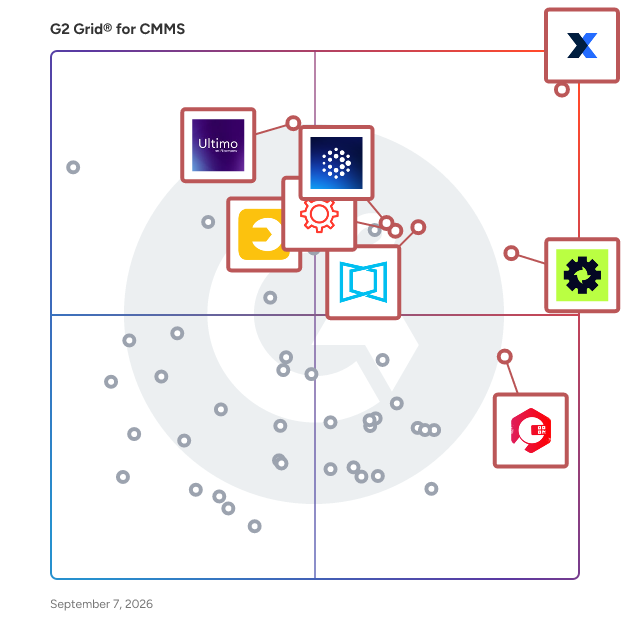
G2 Grid® for CMMS Software

G2 Grid® for CMMS Software plotting products by satisfaction and market presence

Highlighted products: MaintainX, Limble, ServiceChannel, Ultimo, Fracttal One, UpKeep, Cryotos, and eMaint.

Underlying data: [Grid® JSON](https://www.g2.com/categories/cmms/grids.json?focus%5B%5D=maintainx&focus%5B%5D=limble&focus%5B%5D=servicechannel&focus%5B%5D=ultimo&focus%5B%5D=fracttal-one&focus%5B%5D=upkeep&focus%5B%5D=cryotos&focus%5B%5D=emaint)

MaintainX

MaintainX is an AI-powered, mobile-first maintenance and asset management platform built for the new industrial workforce. It empowers frontline teams to manage maintenance, assets, parts inventory, and purchase orders more efficiently, reducing unplanned downtime and boosting operational efficiency. MaintainX manages over 50 million work orders across 10 million assets. It’s used by hundreds of thousands of workers globally, and serves some of the world’s largest enterprises, including Univar, Cintas, Michaels, Duracell, Titan America, Dollar General, Magna, and many more. The MaintainX platform leverages AI and IT/OT connections to create a unified and accessible record of asset and work data, providing real-time insights that drive proactive maintenance and operational excellence for 13,000+ customers. By combining intuitive design, enterprise scalability, and AI-driven workflows, MaintainX enables customers to achieve measurable results: 32% reduction in unplanned downtime 34% reduction in parts inventory costs 38% increase in equipment uptime 53% increase in work order completion *Averages reported by MaintainX customers, 2026. To learn more, visit www.getmaintainx.com.

Average Rating: 4.8/5.0

Total Reviews: 1,555

How Do G2 Users Rate MaintainX?

  • Has the product been a good partner in doing business?: 9.6/10 (Category avg: 9.1/10)
  • Work Order Management: 9.5/10 (Category avg: 8.6/10)
  • Preventative Maintenance (PM): 9.4/10 (Category avg: 8.7/10)
  • Equipment Breakdown Reports: 8.8/10 (Category avg: 8.3/10)

Who Is the Company Behind MaintainX?

  • Seller: MaintainX, an Autodesk company
  • Company Website:
  • Year Founded: 2018
  • HQ Location: San Francisco, California
  • Twitter: @maintainx
    891 Twitter followers
  • LinkedIn® Page: www.linkedin.com
    966 employees on LinkedIn®

Who Uses This Product?

  • Who Uses This: Maintenance Manager, Facilities Manager
  • Top Industries: Manufacturing, Facilities Services
  • Company Size: 50% Medium, 41% Small

What Do G2 Reviewers Say About MaintainX?

AI-generated summary from verified user reviews

Pros
  • Users find MaintainX extremely user-friendly, appreciating its intuitive design and excellent support from the team.
  • Users rave about MaintainX's top-notch customer support, emphasizing its user-friendliness and tailored assistance for seamless implementation.
  • Users love the efficiency of work orders in MaintainX, streamlining communication and enhancing maintenance scheduling effortlessly.
  • Users appreciate the user-friendly interface and comprehensive features of MaintainX, enhancing operational management and integration.
  • Users find MaintainX significantly improves efficiency in communication and task management, greatly enhancing productivity and workflow.
Cons
  • Users find the missing features frustrating, particularly the lack of auto integration and support for inventory management.
  • Users find work order issues frustrating, particularly with integration, tagging, and prioritization for efficient task completion.
  • Users note that the limited features of MaintainX hinder their ability to effectively manage inventory and jobs.
  • Users express a desire for limited customization options in MaintainX, particularly for workflow and procedure personalization.
  • Users find the user interface cluttered and face difficulties due to limited functionality in work order management.

What Are Recent G2 Reviews of MaintainX?

What Are G2 Users Discussing About MaintainX?

Limble

Limble is a mobile-first CMMS (Computerized Maintenance Management System) that helps teams take control of their maintenance operations — no paperwork, no chaos, no guesswork. From preventive maintenance to spare parts inventory, Limble gives maintenance teams the clarity and control they need to get more done, with less stress. Trusted by over 50,000 maintenance professionals at companies like Nike, Sony, Mitsubishi, General Mills, and Unilever, and recipient of 40+ G2 Winter 2026 awards, including Easiest To Do Business With and Best Usability. Limble helps you: - Eliminate 100% of your paper clutter with a fully mobile experience - Boost team productivity by 41% with smart task scheduling and prioritization - Cut equipment downtime by 37% with preventive and predictive maintenance - Reduce spare parts costs by 29% with built-in inventory management - Extend asset lifespan by 23% using powerful EAM capabilities Key Features: - Work Request Portal - Automated Preventive & Predictive Maintenance - Interactive SOP Checklists - Mobile Work Order Management - Asset & Spare Parts Tracking - Purchasing & Vendor Management - Custom Dashboards & Reports - 24/7 Tech Support with a Dedicated Rep Want to connect with other maintenance leaders? Join us at the Maintenance Hero Summit — a free virtual event bringing maintenance and reliability professionals together for expert-led sessions, real-world case studies, and networking with peers tackling the same challenges you are. Happening October 7th at 12 PM EST. [Save your spot →] https://limble.com/heroes-summit

Average Rating: 4.8/5.0

Total Reviews: 688

How Do G2 Users Rate Limble?

  • Has the product been a good partner in doing business?: 9.8/10 (Category avg: 9.1/10)
  • Work Order Management: 9.4/10 (Category avg: 8.6/10)
  • Preventative Maintenance (PM): 9.3/10 (Category avg: 8.7/10)
  • Equipment Breakdown Reports: 8.6/10 (Category avg: 8.3/10)

Who Is the Company Behind Limble?

  • Seller: Limble
  • Company Website:
  • Year Founded: 2015
  • HQ Location: Lehi, UT
  • Twitter: @LimbleCMMS
    461 Twitter followers
  • LinkedIn® Page: www.linkedin.com
    240 employees on LinkedIn®

Who Uses This Product?

  • Who Uses This: Maintenance Manager, Maintenance Supervisor
  • Top Industries: Manufacturing, Food Production
  • Company Size: 56% Medium, 30% Small

What Do G2 Reviewers Say About Limble?

AI-generated summary from verified user reviews

Pros
  • Users highlight the ease of use of Limble, making implementation and operation straightforward and efficient.
  • Users commend Limble's responsive customer support, quickly resolving issues to ensure efficient operation and compliance.
  • Users find Limble's implementation ease exceptional, allowing quick setup and effortless user adoption across teams.
  • Users love Limble's intuitive design, enabling easy adoption and efficient management of maintenance tasks.
  • Users commend Limble for its efficiency, streamlining operations and facilitating user-friendly integration and support.
Cons
  • Users highlight the missing features in Limble, expressing the need for improved reports, mapping, and performance enhancements.
  • Users find the reporting and mapping limitations of Limble hinder effective asset and task management.
  • Users find the limited customization options frustrating, making it difficult to tailor the system effectively.
  • Users find the learning curve challenging due to complex setup and difficulty in navigating menus initially.
  • Users face data management issues with Limble, finding scheduling and customization options limited and sometimes confusing.

What Are Recent G2 Reviews of Limble?

What Are G2 Users Discussing About Limble?

ServiceChannel

ServiceChannel is the #1 facilities management system, helping you deliver an outstanding customer experience at every location. Over 600 leading global brands use ServiceChannel daily to conduct business with 70,000+ contractors at 330,000+ locations in 66 countries. Our service provider marketplace helps you source top providers in every market based on proven performance while optimizing for the metrics you care most about, such as speed and cost. By automating the work order process with Managed Services, you can keep your locations in top-notch shape and keep your customers happy.

Average Rating: 4.2/5.0

Total Reviews: 152

How Do G2 Users Rate ServiceChannel?

  • Has the product been a good partner in doing business?: 8.4/10 (Category avg: 9.1/10)
  • Work Order Management: 9.2/10 (Category avg: 8.6/10)
  • Preventative Maintenance (PM): 8.1/10 (Category avg: 8.7/10)
  • Equipment Breakdown Reports: 10.0/10 (Category avg: 8.3/10)

Who Is the Company Behind ServiceChannel?

  • Seller: ServiceChannel
  • Company Website:
  • Year Founded: 1999
  • HQ Location: Greenville, SC
  • Twitter: @ServiceChannel
    1,141 Twitter followers
  • LinkedIn® Page: www.linkedin.com
    438 employees on LinkedIn®

Who Uses This Product?

  • Who Uses This: Project Manager, Account Manager
  • Top Industries: Retail, Facilities Services
  • Company Size: 45% Large, 35% Small

What Do G2 Reviewers Say About ServiceChannel?

AI-generated summary from verified user reviews

Pros
  • Users appreciate the ease of use of ServiceChannel, enjoying simple updates and straightforward client communication.
  • Users commend the efficiency of ServiceChannel, simplifying workflows and enhancing communication and task management dramatically.
  • Users appreciate the ease of use in ServiceChannel, enabling efficient communication and streamlined workflows with minimal effort.
  • Users love the easy setup of ServiceChannel, enabling a smooth start and efficient job management.
  • Users value the GPS tracking and ease of communication with clients that enhance work order management efficiency.
Cons
  • Users face work order issues such as outdated information, manual clock-ins affecting IVR scores, and scheduling limitations.
  • Users find the poor interface design of ServiceChannel outdated and confusing, complicating access to essential information.
  • Users experience slow performance with ServiceChannel, citing delays in response times and sluggish system refresh rates.
  • Users struggle with the complexity of ServiceChannel, facing confusion from terminology and inconsistent user experience.
  • Users report poor customer support, highlighting rude representatives and frustrating service during critical issues with work orders.

What Are Recent G2 Reviews of ServiceChannel?

What Are G2 Users Discussing About ServiceChannel?

Ultimo

Ultimo Enterprise Asset Management (EAM) Ultimo is a leading AI-augmented Enterprise Asset Management solution, designed to help organizations in manufacturing, utilities, healthcare and logistics maximize the performance, reliability, and safety of their physical assets. By bringing together maintenance, safety, and operations in one integrated, data-driven platform, Ultimo enables organizations to work smarter, safer, and more efficiently. Ultimo supports the complete lifecycle of physical assets, from commissioning and operation to maintenance and replacement. It provides full visibility into asset performance, costs, and risks, enabling organizations to increase uptime, extend asset life, and make informed strategic decisions. AI-powered efficiency Ultimo enhances traditional EAM with AI-augmented capabilities that streamline daily operations and enable predictive insights. The AI embedded in Ultimo supports faster incident registration, intelligent work order generation, optimized planning based on skills and availability, and data-driven maintenance recommendations. This reduces administrative workload, minimizes downtime, and helps teams shift from reactive to proactive maintenance strategies. Integrated processes across maintenance, safety, and operations Ultimo supports essential processes, including preventive and corrective maintenance, work order and resource management, asset lifecycle management, spare parts and inventory control, and EHS (Environment, Health & Safety) management such as incident reporting and compliance tracking. By integrating these domains, Ultimo breaks down silos and creates a single source of truth for technical and operational teams. User-friendly, flexible, and connected Designed with usability at its core, Ultimo offers an intuitive interface that drives adoption across all user roles, from technicians to management. The mobile-enabled platform allows field teams to work anytime, anywhere. As a flexible SaaS solution, Ultimo scales with business growth and integrates seamlessly with ERP, BI, and other enterprise systems. Clear business impact With Ultimo, organizations achieve higher asset availability, lower maintenance costs, improved safety performance, and faster ROI. More than 150.000 users worldwide benefit from streamlined workflows, real-time insights, and greater control. This empowers them to optimize operations and drive sustainable performance of more than 22 million managed assets.

Average Rating: 4.5/5.0

Total Reviews: 48

How Do G2 Users Rate Ultimo?

  • Has the product been a good partner in doing business?: 9.0/10 (Category avg: 9.1/10)
  • Work Order Management: 8.5/10 (Category avg: 8.6/10)
  • Preventative Maintenance (PM): 9.6/10 (Category avg: 8.7/10)
  • Equipment Breakdown Reports: 9.2/10 (Category avg: 8.3/10)

Who Is the Company Behind Ultimo?

  • Seller: IFS
  • Company Website:
  • Year Founded: 1983
  • HQ Location: Linkoping , Sweden
  • Twitter: @ifs
    18,002 Twitter followers
  • LinkedIn® Page: www.linkedin.com
    9,233 employees on LinkedIn®

Who Uses This Product?

  • Top Industries: Food Production
  • Company Size: 63% Medium, 24% Large

What Do G2 Reviewers Say About Ultimo?

AI-generated summary from verified user reviews

Pros
  • Users love the customizability of Ultimo, allowing easy and flexible adjustments for streamlined application management.
  • Users praise the customization options in Ultimo, allowing for easy and flexible application management.
  • Users appreciate the ease of use of Ultimo, enjoying quick loading screens and extensive customization options.
  • Users value the flexibility of Ultimo, allowing easy customization and quick loading of screens.
Cons
  • Users find Ultimo to be lacking essential features like native change management, making it feel basic.

What Are Recent G2 Reviews of Ultimo?

UpKeep

UpKeep is the CMMS platform trusted by 4,000+ companies - from small operations to global giants like McDonald’s, Caterpillar, and Chevron to manage maintenance, safety, and reliability. UpKeep provides a singular platform to extend asset life and reduce downtime making it the preferred solution for leaders in manufacturing, food & beverage, healthcare, and facilities management. * Unified CMMS: Centralize your asset registry, work orders, parts, inventory, checklists, inspections, and reporting in one place. * Edge IIoT sensors: Connect your physical assets to the cloud with remote sensors that trigger automated work orders based on real-time machine health and anomalies. * Technician-First Design: Built to support front-line teams where they work with intuitive mobile tools, like voice-to-note CAPA reporting, that maximize wrench time. * AI & Customization: Built-in AI tools accelerate data processing, while Studio allow you to build custom app workflows tailored entirely to your business logic. * Safety & Compliance: Mitigate risk with native modules for LMS safety training and EHS compliance designed to keep your operations permanently audit-ready By bringing asset operations into a single, unified platform, UpKeep CMMS empowers teams to drive a 26%+ decrease in downtime and an 11% increase in asset life.

Average Rating: 4.5/5.0

Total Reviews: 1,099

How Do G2 Users Rate UpKeep?

  • Has the product been a good partner in doing business?: 9.0/10 (Category avg: 9.1/10)
  • Work Order Management: 9.2/10 (Category avg: 8.6/10)
  • Preventative Maintenance (PM): 8.8/10 (Category avg: 8.7/10)
  • Equipment Breakdown Reports: 8.2/10 (Category avg: 8.3/10)

Who Is the Company Behind UpKeep?

  • Seller: UpKeep
  • Company Website:
  • Year Founded: 2014
  • HQ Location: Los Angeles, CA
  • Twitter: @OnUpKeep
    4,547 Twitter followers
  • LinkedIn® Page: www.linkedin.com
    154 employees on LinkedIn®

Who Uses This Product?

  • Who Uses This: Maintenance Manager, Facilities Manager
  • Top Industries: Facilities Services, Hospitality
  • Company Size: 50% Medium, 44% Small

What Do G2 Reviewers Say About UpKeep?

AI-generated summary from verified user reviews

Pros
  • Users value the ease of use of UpKeep, noting its user-friendly interface fosters quick adaptation and efficiency.
  • Users value the ease of tracking work orders and asset management, streamlining communication and maintenance processes efficiently.
  • Users praise UpKeep's intuitive design, making navigation and organization easy for all stakeholders.
  • Users value the maintenance efficiency of UpKeep, enhancing control and tracking of facility assets effectively.
  • Users commend UpKeep for its efficiency, enabling smooth operations and rapid response times across departments.
Cons
  • Users face work order issues including glitches, lacking filters, and limited sorting options that hinder report generation.
  • Users express concern over the missing features in UpKeep, including inadequate filters and formatting options.
  • Users report experiencing slow performance during peak hours, leading to frustration and lost productivity.
  • Users experience frequent software bugs in UpKeep, impacting usability and causing frustration during regular tasks.
  • Users find UpKeep expensive, especially for smaller organizations needing multiple licenses, as costs can quickly accumulate.

What Are Recent G2 Reviews of UpKeep?

What Are G2 Users Discussing About UpKeep?

Fracttal One

🥇 𝗧𝗵𝗲 𝗮𝗹𝗹-𝗶𝗻-𝗼𝗻𝗲 𝘀𝗼𝗹𝘂𝘁𝗶𝗼𝗻 𝗳𝗼𝗿 𝘆𝗼𝘂𝗿 𝗺𝗮𝗶𝗻𝘁𝗲𝗻𝗮𝗻𝗰𝗲 𝗺𝗮𝗻𝗮𝗴𝗲𝗺𝗲𝗻𝘁⁣ We create a tailored solution to meet your challenges and needs by combining our Fracttal One software with AI, IoT, integrations, and automations — so you only pay for what you truly need.⁣ ⁣ 𝗧𝘂𝗿𝗻 𝗺𝗮𝗶𝗻𝘁𝗲𝗻𝗮𝗻𝗰𝗲 𝗶𝗻𝘁𝗼 𝗮 𝗰𝗼𝗺𝗽𝗲𝘁𝗶𝘁𝗶𝘃𝗲 𝗮𝗱𝘃𝗮𝗻𝘁𝗮𝗴𝗲:⁣ 🔹 Centralize information to improve collaboration across departments and third parties⁣ 🔹 Seamlessly integrate with your current business systems: ERP, MES, BMS, SCADA, and more⁣ 🔹 Digitize your data to ensure full traceability⁣ 🔹 Anticipate failures and extend the lifespan of your assets⁣ 🔹 Manage multiple locations, warehouses, and equipment from one place⁣ 🔹 Track KPIs and team performance in real time⁣ 🔹 Automate task scheduling and preventive alerts⁣ ⁣ ✅ Boost your company’s overall productivity and stay ahead of the competition⁣ ⁣ 𝘄𝗵𝗼 𝘂𝘀𝗲𝘀 𝗙𝗿𝗮𝗰𝘁𝘁𝗮𝗹 𝗢𝗻𝗲?⁣ Fracttal is designed for companies across a wide range of industries, including manufacturing, services, facility management, mining, transportation, hospitality, technology, education, healthcare, and energy

Average Rating: 4.6/5.0

Total Reviews: 535

How Do G2 Users Rate Fracttal One?

  • Has the product been a good partner in doing business?: 8.9/10 (Category avg: 9.1/10)
  • Work Order Management: 9.2/10 (Category avg: 8.6/10)
  • Preventative Maintenance (PM): 9.1/10 (Category avg: 8.7/10)
  • Equipment Breakdown Reports: 8.8/10 (Category avg: 8.3/10)

Who Is the Company Behind Fracttal One?

  • Seller: Fracttal
  • Year Founded: 2015
  • HQ Location: Madrid, Comunidad de Madrid
  • Twitter: @FracttalApp
    38 Twitter followers
  • LinkedIn® Page: www.linkedin.com
    253 employees on LinkedIn®

Who Uses This Product?

  • Who Uses This: Supervisor de mantenimiento, Coordinador de mantenimiento
  • Top Industries: Mechanical or Industrial Engineering, Facilities Services
  • Company Size: 43% Small, 43% Medium

What Do G2 Reviewers Say About Fracttal One?

AI-generated summary from verified user reviews

Pros
  • Users commend Fracttal One for its ease of use, facilitating seamless management and operation of maintenance tasks.
  • Users value the ease of data management in Fracttal One, enjoying seamless integration and efficient maintenance task handling.
  • Users commend Fracttal One for its efficiency in managing tasks and equipment, enhancing overall maintenance operations.
  • Users value the ease of maintenance management with Fracttal One, appreciating its simplicity and efficient asset integration.
  • Users praise the intuitive task management of Fracttal One, enhancing clarity and productivity in their maintenance processes.
Cons
  • Users experience difficulty with initial configuration and asset editing, complicating maintenance planning and data management.
  • Users find the complexity of configuration and task exporting a significant barrier to efficient use of Fracttal One.
  • Users find the complex setup of Fracttal One challenging, particularly for asset hierarchy and maintenance plan configuration.
  • Users find the difficult setup of Fracttal One challenges their initial configuration and can hinder smooth operation.
  • Users find the feature limitations frustrating, as key functionalities hinder effective management and increase costs.

What Are Recent G2 Reviews of Fracttal One?

What Are G2 Users Discussing About Fracttal One?

Redzone

Redzone is the #1 connected workforce solution on a mission to empower frontline teams with AI-powered manufacturing software. As a whole-plant solution, it digitizes and simplifies work for production, maintenance, and quality teams on a single platform, focusing on manufacturers' strategic goals for deployment. Factories using Redzone connect and engage the frontline, equipping them with communication, collaboration, and AI tools specifically designed for manufacturing. Redzone Productivity Solutions Redzone empowers manufacturers with a comprehensive suite designed to enhance efficiency through Champion AI. Our solutions include: * OEE Monitoring: Track and optimize Overall Equipment Effectiveness in real time * Real-Time Dashboards: Gain immediate visibility into operations * Communication Tools: Facilitate collaboration with chats, huddles, and collaboration, all with live translation capabilities * Action Management: Streamline task execution and follow-up * Continuous Improvement (CI) Routines: Foster ongoing operational enhancements By leveraging these tools, manufacturers can enhance processes, drive digital and lean transformations, enable paperless quality and compliance, execute Total Productive Maintenance (TPM) programs, and accelerate frontline training and onboarding. Key Benefits * 26% Productivity Improvement: Achieve this in just 90 days, with ROI in 3 to 6 months * 81% Increase in Frontline Engagement: Supported by our connected Learning Management System, along with a 35% reduction in employee turnover * 24% Reduction in Unplanned Downtime: Enabled by our connected Computerized Maintenance Management System (CMMS) * Stay Audit-Ready: Always prepared with our connected Quality Management System (QMS) Who We Serve Redzone supports over 2000 global manufacturers, enhancing engagement and purpose among hundreds of thousands of frontline workers across sectors, including Food & Beverage, CPG, Automotive, Pharmaceuticals, and Industrial. Platform Redzone is a mobile-first solution (iOS, Android, Google) designed for the plant floor, featuring TV display capabilities for real-time visibility. Reporting and administration are browser-based and accessible on any device. Integrations Redzone seamlessly integrates with ERP systems like SAP, S4Hana, Oracle, D365, Sage X3, and QAD, as well as CMMS, MES, EAM, and QMS platforms via standard API integration. Company Overview: Redzone, a subsidiary of QAD, is a privately held company headquartered in Miami, Florida. We serve manufacturers worldwide, providing innovative solutions to enhance operational efficiency and productivity.

Average Rating: 4.8/5.0

Total Reviews: 620

How Do G2 Users Rate Redzone?

  • Has the product been a good partner in doing business?: 9.6/10 (Category avg: 9.1/10)
  • Work Order Management: 10.0/10 (Category avg: 8.6/10)
  • Preventative Maintenance (PM): 10.0/10 (Category avg: 8.7/10)
  • Equipment Breakdown Reports: 10.0/10 (Category avg: 8.3/10)

Who Is the Company Behind Redzone?

  • Seller: QAD
  • Company Website:
  • Year Founded: 1979
  • HQ Location: Santa Barbara, CA
  • Twitter: @QAD_Community
    3,248 Twitter followers
  • LinkedIn® Page: www.linkedin.com
    1,563 employees on LinkedIn®

Who Uses This Product?

  • Who Uses This: Plant Manager, Continuous Improvement Manager
  • Top Industries: Food Production, Food & Beverages
  • Company Size: 78% Medium, 12% Large

What Do G2 Reviewers Say About Redzone?

AI-generated summary from verified user reviews

Pros
  • Users find RedZone's ease of use notable, facilitating quick onboarding and effective team communication.
  • Users value the effective plant-wide communication in Redzone, enhancing team support and operational efficiency.
  • Users praise the efficiency improvement with Redzone, noting quick processes and effective team communication.
  • Users value the expert coaching support provided by Redzone, ensuring quick adaptation and effective implementation for teams.
  • Users value the significant productivity improvement Redzone provides through real-time data and efficient communication tools.
Cons
  • Users find the learning curve steep, as mastering features and setup requires time and adjustments for optimal use.
  • Users struggle with the platform compatibility of Redzone, wishing for broader support beyond just iOS devices.
  • Users find the complex setup of RedZone to be time-consuming and frustrating, impacting overall usability.
  • Users find data management limitations in Redzone frustrating, as it complicates compliance and customization processes.
  • Users express frustration with limited features in Redzone, affecting functionality and integration with maintenance processes.

What Are Recent G2 Reviews of Redzone?

Cryotos

Cryotos is an advanced, AI-powered Computerized Maintenance Management System (CMMS) solution designed to assist modern maintenance teams in achieving peak operational efficiency. This innovative software enables users to effectively plan, track, and optimize their facilities, assets, and work orders, ultimately aiming to reduce downtime, enhance asset longevity, and maximize overall performance. Targeted primarily at maintenance teams across various industries, Cryotos caters to organizations that prioritize efficiency and reliability in their operations. The software is particularly beneficial for facilities managers, maintenance technicians, and operational leaders who need a robust tool to streamline their maintenance processes. With its comprehensive features, Cryotos addresses a wide range of use cases, from proactive maintenance scheduling to advanced workflow automation, ensuring that teams can respond swiftly to maintenance needs and compliance requirements. One of the standout features of Cryotos is its built-in AI knowledge base, which provides instant answers to complex maintenance queries. This capability significantly reduces the time spent searching for information, allowing maintenance teams to resolve issues more quickly and efficiently. Additionally, the software supports seamless integration with existing ERP systems, PLCs, and Overall Equipment Effectiveness (OEE) tools, further enhancing its utility in diverse operational environments. Cryotos offers a comprehensive suite of features designed to optimize maintenance operations. These include proactive maintenance scheduling and execution, advanced workflow automation, and full asset lifecycle tracking. The powerful Maintenance, Repair, and Operations (MRO) inventory control system manages everything from purchasing to issuance, ensuring that teams have the necessary resources at their fingertips. Furthermore, customizable business intelligence (BI) dashboards and reports provide valuable insights into operational performance, enabling data-driven decision-making. The built-in Kaizen system fosters a culture of continuous improvement, allowing organizations to refine their processes and enhance efficiency over time. By leveraging these features, Cryotos empowers maintenance teams to work smarter, reduce costs, and achieve measurable results. The integration of AI technology not only streamlines operations but also positions organizations to adapt to evolving maintenance challenges, making Cryotos a vital tool for any maintenance-focused organization.

Average Rating: 4.6/5.0

Total Reviews: 346

How Do G2 Users Rate Cryotos?

  • Has the product been a good partner in doing business?: 9.4/10 (Category avg: 9.1/10)
  • Work Order Management: 9.2/10 (Category avg: 8.6/10)
  • Preventative Maintenance (PM): 8.9/10 (Category avg: 8.7/10)
  • Equipment Breakdown Reports: 8.9/10 (Category avg: 8.3/10)

Who Is the Company Behind Cryotos?

  • Seller: PiqoTech
  • Company Website:
  • Year Founded: 2013
  • HQ Location: Katy, US
  • Twitter: @cryotos
    31 Twitter followers
  • LinkedIn® Page: www.linkedin.com
    16 employees on LinkedIn®

Who Uses This Product?

  • Top Industries: Manufacturing, Chemicals
  • Company Size: 20% Medium, 8% Small

What Do G2 Reviewers Say About Cryotos?

AI-generated summary from verified user reviews

Pros
  • Users find Cryotos very easy to use, making inventory updates and record tracking a breeze.
  • Users appreciate the easy tracking functionality of Cryotos, enhancing efficiency and accountability in maintenance operations.
  • Users value the maintenance efficiency of Cryotos, appreciating streamlined processes and improved data tracking capabilities.
  • Users value the efficient task management of Cryotos, simplifying data capture and streamlining machine maintenance activities.
  • Users value the interactive dashboards and predictive maintenance features of Cryotos for effective work order management.
Cons
  • Users experience slow performance with Cryotos, encountering delays and errors that hinder usability, especially on mobile devices.
  • Users report experiencing minor software bugs that occasionally disrupt usage and cause data loss.
  • Users find the interface not user-friendly, making navigation and language options difficult to manage effectively.
  • Users find feature limitations in Cryotos frustrating, particularly with dashboard graphs and lack of response during submissions.
  • Users struggle with poor mobile functionality, experiencing slow task assignment and software shutdowns, especially on iOS.

What Are Recent G2 Reviews of Cryotos?

eMaint

eMaint is a configurable, enterprise-scale Computerized Maintenance Management System (CMMS) and Enterprise Asset Management (EAM) solution designed to assist organizations in standardizing maintenance practices across multiple sites. Its primary focus is to enhance operational uptime and maintain audit readiness without disrupting the workflow of technicians. By providing a centralized platform, eMaint ensures that maintenance processes are streamlined and efficient, catering to the specific needs of diverse industries. Targeted at multi-site operations, eMaint addresses the common challenge of data silos that can hinder effective maintenance management. The platform enforces governance and facilitates consistent processes and reporting across global facilities while still allowing for local flexibility. This adaptability makes eMaint suitable for various sectors, including regulated industries such as life sciences, automotive, oil and gas, energy, and food and beverage, where compliance and traceability are paramount. With features like built-in audit trails, e-signatures compliant with 21 CFR Part 11, and validation support, eMaint enables teams to maintain continuous audit readiness and mitigate risks associated with non-compliance. One of the standout features of eMaint is its ability to adapt to real-world maintenance processes. The platform offers configurable workflows, mobile tools, and role-based dashboards, which contribute to strong technician adoption and precise data capture. This flexibility allows organizations to tailor the system to their specific operational needs, ensuring that maintenance activities are conducted efficiently and effectively. The user-friendly interface and mobile capabilities empower technicians to access vital information and complete tasks on the go, further enhancing productivity. Additionally, eMaint is backed by Fluke and Fortive, providing users with an open and connected ecosystem that integrates seamlessly with ERP, IoT, and other enterprise systems. This connectivity enables organizations to transition from reactive to proactive maintenance strategies, ultimately leading to improved asset reliability and performance. The combination of advanced technology, industry expertise, and ongoing support positions eMaint as a comprehensive solution for organizations looking to enhance their maintenance operations and scale reliability with confidence.

Average Rating: 4.5/5.0

Total Reviews: 297

How Do G2 Users Rate eMaint?

  • Has the product been a good partner in doing business?: 9.1/10 (Category avg: 9.1/10)
  • Work Order Management: 8.9/10 (Category avg: 8.6/10)
  • Preventative Maintenance (PM): 8.7/10 (Category avg: 8.7/10)
  • Equipment Breakdown Reports: 7.8/10 (Category avg: 8.3/10)

Who Is the Company Behind eMaint?

  • Seller: Fluke Corporation
  • Company Website:
  • Year Founded: 1948
  • HQ Location: Everett, WA
  • Twitter: @emaintCMMS
    1,279 Twitter followers
  • LinkedIn® Page: www.linkedin.com
    3,363 employees on LinkedIn®

Who Uses This Product?

  • Who Uses This: Maintenance Manager, Facilities Manager
  • Top Industries: Manufacturing, Food Production
  • Company Size: 53% Medium, 24% Small

What Do G2 Reviewers Say About eMaint?

AI-generated summary from verified user reviews

Pros
  • Users value the ease of use of eMaint, finding it intuitive and simple to navigate across multiple plants.
  • Users value the customizability of eMaint, enabling tailored workflows and enhanced insights into maintenance operations.
  • Users value the customization options in eMaint, which enhance insights and streamline maintenance and production processes.
  • Users value the efficient data management of eMaint, enabling easy access and centralized storage for all information.
  • Users value the centralized work order management in eMaint, enhancing functionality, visibility, and resource allocation.
Cons
  • Users express concerns about feature limitations in eMaint, desiring more comprehensive options for enhanced capabilities.
  • Users highlight the limited features of eMaint, particularly with form development and configurable fields.
  • Users find the complexity of eMaint challenging, especially during implementation and while building reports.
  • Users note missing features in eMaint, with limitations in form development and configuration options affecting usability.
  • Users find poor reporting capabilities in eMaint, as output formats are limited and lack necessary upgrades.

What Are Recent G2 Reviews of eMaint?

What Are G2 Users Discussing About eMaint?

Zapium

Zapium an AI and IoT powered maintenance management software suite that helps facilities and their contractors achieve the next level of efficiency, transparency, and operational effectiveness with our software products. The outcome is reduced downtime and operational costs. Our software suite consists of- - CMMS (https://www.zapium.com/software/cmms/) - Field Service Management (https://www.zapium.com/software/field-service-management/) - Facility Maintenance (https://www.zapium.com/software/facilities-maintenance-management/) - Asset Management (https://www.zapium.com/software/asset-management/)

Average Rating: 5.0/5.0

Total Reviews: 158

How Do G2 Users Rate Zapium?

  • Has the product been a good partner in doing business?: 10.0/10 (Category avg: 9.1/10)
  • Work Order Management: 10.0/10 (Category avg: 8.6/10)
  • Preventative Maintenance (PM): 9.7/10 (Category avg: 8.7/10)
  • Equipment Breakdown Reports: 9.2/10 (Category avg: 8.3/10)

Who Is the Company Behind Zapium?

  • Seller: Zapium
  • Company Website:
  • Year Founded: 2021
  • HQ Location: Irving, Texas
  • Twitter: @ZapiumHQ
  • LinkedIn® Page: www.linkedin.com
    17 employees on LinkedIn®

Who Uses This Product?

  • Top Industries: Facilities Services, Financial Services
  • Company Size: 8% Small, 6% Medium

What Do G2 Reviewers Say About Zapium?

AI-generated summary from verified user reviews

Pros
  • Users value the maintenance efficiency of Zapium, enjoying automated scheduling that reduces unexpected equipment failures.
  • Users appreciate the task management automation of Zapium, enhancing efficiency in scheduling and tracking maintenance tasks.
  • Users value the effective task tracking capabilities of Zapium, enhancing efficiency in work order management.
  • Users appreciate the efficient work order management of Zapium, enhancing task tracking and maintenance planning.
  • Users find the efficient asset management of Zapium streamlines work order processes and enhances tracking capabilities.
Cons
  • Users express the need for customized reports in Zapium to enhance their reporting capabilities and meet specific requirements.
  • Users feel that Zapium suffers from inadequate reporting options, lacking the customizable features they require for effective analysis.
  • Users suggest that the custom alerts and notifications of Zapium need to be improved for better usability.
  • Users note that custom alerts and notifications in Zapium are lacking, seeking more options for better customization.
  • Users express a need for customized reports in Zapium, citing that current reporting features are inadequate.

What Are Recent G2 Reviews of Zapium?

What Are G2 Users Discussing About Zapium?

Fiix CMMS

Fiix CMMS by Rockwell Automation is a premier, cloud-based maintenance management platform designed to help organizations plan, track, and optimize maintenance work. It combines asset, work order, scheduling, and parts management tools all in one place, providing a consumer-grade experience on both desktop and mobile. The Fiix CMMS mobile app empowers maintenance technicians to access work orders, view asset information, and update parts records in real time from anywhere— even offline. Advanced features like AI-powered analytics dashboards generate insights to help teams understand performance, costs, and KPIs to support better decision-making. And a highly open API integrates the CMMS with business, ERP, and operational systems to keep data synced. Most recently, Fiix has partnered with FactoryTalk Optix to make hardware integrations and condition-based maintenance accessible for the average team. Fiix CMMS also boasts numerous quality-of-life tools for maintenance departments, such as a comprehensive Audit Trail feature that makes standards compliance easier. Founded in 2008 in Toronto, Canada by a team of former maintenance professionals, Fiix CMMS was built from the ground up with a “by maintenance, for maintenance” philosophy. Its founders strongly believed that maintenance teams need their own dedicated digital tools, and spreadsheets or borrowed ERPs won’t cut it. The company’s focus on in-house maintenance expertise continues to this day, with over 400 years of industry experience on staff. A core belief is that partnership is just as important as product. In 2020, Fiix was acquired by Rockwell Automation, the world’s largest company dedicated to industrial automation, bringing over 120 years of tech leadership and new resources to the growing CMMS platform. No matter where you are in your maintenance journey, from beginner to advanced, Fiix CMMS provides tools to facilitate and transform operations. Over 4,200 companies use Fiix CMMS to increase uptime, reduce costs, and plan maintenance based on real data instead of guesswork. Find out more at www.fiixsoftware.com.

Average Rating: 4.6/5.0

Total Reviews: 473

How Do G2 Users Rate Fiix CMMS?

  • Has the product been a good partner in doing business?: 9.2/10 (Category avg: 9.1/10)
  • Work Order Management: 9.2/10 (Category avg: 8.6/10)
  • Preventative Maintenance (PM): 9.2/10 (Category avg: 8.7/10)
  • Equipment Breakdown Reports: 8.3/10 (Category avg: 8.3/10)

Who Is the Company Behind Fiix CMMS?

  • Seller: Rockwell Automation
  • Company Website:
  • Year Founded: 1903
  • HQ Location: Milwaukee, WI
  • Twitter: @ROKAutomation
    44,405 Twitter followers
  • LinkedIn® Page: www.linkedin.com
    22,901 employees on LinkedIn®

Who Uses This Product?

  • Who Uses This: Tech Consultant, SSE
  • Top Industries: Manufacturing, Computer Software
  • Company Size: 58% Medium, 27% Small

What Do G2 Reviewers Say About Fiix CMMS?

AI-generated summary from verified user reviews

Pros
  • Users find Fiix CMMS easy to navigate, enhancing efficiency and reducing manual workload for maintenance management.
  • Users highlight the excellent customer support from the Fiix team, making implementation and setup seamless and efficient.
  • Users value the ease of data management in Fiix CMMS, facilitating navigation and comprehensive tracking with minimal effort.
  • Users value the efficient asset management of Fiix CMMS, enhancing workflows and ensuring accurate record-keeping.
  • Users commend the efficiency of Fiix CMMS, significantly enhancing workflow and reducing time spent on tasks.
Cons
  • Users face data management issues with slow loading times and difficulties in task assignment and error correction.
  • Users face work order issues such as slow loading times and lack of multiple-signature functionality, impacting efficiency.
  • Users desire more functionality and customization in Fiix CMMS, particularly for reporting and data analysis features.
  • Users express frustration over limited customization, hindering flexibility in creating assets and analyzing data effectively.
  • Users find the missing features in Fiix CMMS limit functionality, complicating tasks like analytics and multiple signatures.

What Are Recent G2 Reviews of Fiix CMMS?

What Are G2 Users Discussing About Fiix CMMS?

TRACTIAN

Tractian is the AI-powered platform for Predictive Maintenance and Production Performance chosen by 1,500 of the world’s most demanding manufacturers. We provide an end-to-end "Plug & Play" ecosystem that combines IoT sensors, software, and patented AI to protect operations and cut unplanned downtime. Trusted by global leaders like Bosch, KraftHeinz, Stellantis, Whirlpool, and Cummins, Tractian enables maintenance, reliability, and production teams to: ✔️Catch failures weeks in advance with real-time machine health monitoring ✔️Have full visibility of the plant through high-fidelity data sampled by industrial-grade sensors ✔️Meet demand and hit production goals with performance tracking ✔️Unify the shop floor with tools for maintenance and production teams Backed by its own security management system certified with ISO 27001 and SOC 2 Type II, Tractian can deliver up to 7x ROI in the first year and reduce unplanned downtime by 43%.

Average Rating: 4.7/5.0

Total Reviews: 53

How Do G2 Users Rate TRACTIAN?

  • Has the product been a good partner in doing business?: 8.8/10 (Category avg: 9.1/10)
  • Work Order Management: 9.0/10 (Category avg: 8.6/10)
  • Preventative Maintenance (PM): 9.0/10 (Category avg: 8.7/10)
  • Equipment Breakdown Reports: 9.1/10 (Category avg: 8.3/10)

Who Is the Company Behind TRACTIAN?

  • Seller: Tractian
  • Company Website:
  • Year Founded: 2019
  • HQ Location: Atlanta, GA
  • Twitter: @tractian
    523 Twitter followers
  • LinkedIn® Page: www.linkedin.com
    889 employees on LinkedIn®

Who Uses This Product?

  • Top Industries: Manufacturing, Food & Beverages
  • Company Size: 42% Medium, 21% Small

What Do G2 Reviewers Say About TRACTIAN?

AI-generated summary from verified user reviews

Pros
  • Users commend the ease of use of TRACTIAN, highlighting its clear information and user-friendly integration process.
  • Users highlight the timely and precise customer support of TRACTIAN, enhancing their overall experience and satisfaction.
  • Users appreciate TRACTIAN for its real-time monitoring capabilities, enhancing equipment management and reducing downtime effectively.
  • Users appreciate TRACTIAN for its real-time monitoring, enhancing equipment maintenance and reducing unplanned downtime effectively.
  • Users value the efficiency of TRACTIAN, enhancing productivity and minimizing delays with easy-to-use machine health sensors.
Cons
  • Users find the complex usability of TRACTIAN challenging, particularly in setup and mobile interface navigation.
  • Users find the difficult learning curve of TRACTIAN hampers efficient use, especially for occasional users needing training.
  • Users feel the product is a bit expensive, requiring a budget increase and staff training for effective use.
  • Users find the learning curve steep, requiring extra training and adjustment time for effective use of TRACTIAN.
  • Users find the usability issues of TRACTIAN frustrating, especially on mobile devices and during setup.

What Are Recent G2 Reviews of TRACTIAN?

FMX

FMX: CMMS and Facilities Operations Software for Education, Government, and Commercial Organizations FMX is a cloud-based Computerized Maintenance Management System (CMMS) and facilities management platform designed to help organizations across K-12 and higher education, property management, manufacturing, state and local government, healthcare, hospitality, and faith-based organizations improve operational efficiency, extend asset lifespan, and make data-driven decisions about capital investments. What FMX Does FMX centralizes work order management, preventive maintenance scheduling, asset tracking, fleet management, warehouse management, IT management, capital planning, event management, and rental and reservation management into a single, configurable platform. It is purpose-built for facility and maintenance teams who need actionable data to prioritize work, justify budgets, and demonstrate their department's impact to leadership. Core Capabilities - Work Order Management: Facility staff and end users can submit maintenance requests through intuitive, configurable forms on any device. Technicians resolve tickets in the field via mobile app, logging labor time, parts used, and costs. All resolution data rolls up automatically to asset-level reporting. - Preventive Maintenance: Schedule time-based or meter-based PMs for any asset or piece of equipment. Attach unique inspection checklists to each task to reduce process variation, ensure compliance, and extend equipment lifespan. - Asset Management: Maintain a complete digital record of every asset, including location, condition, acquisition cost, expected useful life, and associated documents, images, and service history, in one searchable system of record. - Capital Planning and Forecasting: FMX's capital planning dashboard aggregates asset data to project replacement timelines and costs by year. Facilities directors can model multiple budget scenarios, identify funding gaps, and present defensible capital expenditure forecasts to finance and leadership. - Mapping: Visualize assets, work orders, inventory and spaces on custom floor plan or geo-based maps. Color-coded pins mark exact locations while active work orders and PMs display geographically so technicians can plan efficient routes. Community members can report issues through a public, map-based portal without an FMX account. - Rental and Reservation Management: Allow staff and community members to book rooms, spaces, and equipment directly through FMX. Manage event logistics, coordinate cross-departmental needs, and process payments, all in one system. - Inventory and Parts Management: Manage parts, supplies, and consumables across one or multiple storerooms. Technicians log parts used directly on work orders, triggering automatic inventory deductions. Low-stock alerts, reorder thresholds, and vendor records keep critical parts available and purchasing workflows on track. - Fleet Management: Track and maintain vehicles alongside facility assets in a single system. Schedule meter-based or time-based PMs for vehicles, log mileage and fuel usage, manage repair history, and control fleet-related costs without managing a separate system. - IT Asset Management: Extend request and asset tracking beyond physical facilities to IT. Staff can submit technology-related service requests, IT teams can manage hardware and software asset records, and all IT work flows through the same configurable platform used for facilities operations. - Reporting and Analytics: Generate configurable reports and dashboards across work orders, assets, labor, costs, and maintenance history. Facilities directors can track team performance, identify recurring issues, and pull the operational data needed to justify budgets and support leadership decisions. Who Uses FMX - K-12 and higher education: School districts and universities use FMX to manage facilities across multiple campuses, streamline community requests, coordinate events, and meet compliance requirements. - Property management: Commercial and residential property managers use FMX to track tenant work orders, manage preventive maintenance across properties, and reduce deferred maintenance costs. - Manufacturing: Facilities and maintenance teams in manufacturing environments use FMX to reduce equipment downtime, enforce PM schedules, and support audit-ready record-keeping. - State and local government: Municipal and county facilities teams use FMX to manage public buildings, parks, and infrastructure, improving service request transparency, maintaining compliance documentation, and making the case for capital budget allocations to elected officials and administrators. - Other private sector organizations: Healthcare systems, faith-based organizations, hospitality groups, and other multi-site commercial organizations use FMX to centralize facilities operations, reduce equipment downtime, manage work across locations, and generate the reporting needed to control costs and support budget decisions. Key Differentiators - Intuitive, easy-to-use interface that drives adoption across both maintenance teams and non-technical staff - One configurable platform for facilities, maintenance, IT, and fleet teams to manage their operations, assets, and long-range planning without stitching together multiple systems - Mobile experience built for technicians in the field - Built-in reporting that surfaces the data facility leaders need to advocate for their teams and budgets - Fast implementation with dedicated onboarding support - Highly configurable without IT involvement - Outstanding customer service reflected in a 98% customer satisfaction rating, 97% renewal rate, and 2-hour support response time Bottom Line FMX moves facility, maintenance, IT, and fleet teams from reactive to proactive operations, giving them one platform to manage work, events, and long-range planning while controlling costs and demonstrating their department's impact to leadership. With a 98% customer satisfaction rating and 97% renewal rate, it is a proven choice for organizations in K-12 and higher education, state and local government, property management, manufacturing, healthcare, hospitality, and faith-based organizations.

Average Rating: 4.8/5.0

Total Reviews: 44

How Do G2 Users Rate FMX?

  • Has the product been a good partner in doing business?: 9.3/10 (Category avg: 9.1/10)
  • Work Order Management: 9.2/10 (Category avg: 8.6/10)
  • Preventative Maintenance (PM): 9.1/10 (Category avg: 8.7/10)
  • Equipment Breakdown Reports: 7.1/10 (Category avg: 8.3/10)

Who Is the Company Behind FMX?

  • Seller: Facilities Management eXpress
  • Company Website:
  • Year Founded: 2012
  • HQ Location: Grandview Heights, Ohio
  • Twitter: @FMXpress
    189 Twitter followers
  • LinkedIn® Page: www.linkedin.com
    230 employees on LinkedIn®

Who Uses This Product?

  • Top Industries: Education Management, Primary/Secondary Education
  • Company Size: 82% Medium, 9% Large

What Do G2 Reviewers Say About FMX?

AI-generated summary from verified user reviews

Pros
  • Users appreciate the ease of use of FMX, finding it intuitive and efficient for managing work orders.
  • Users commend the outstanding customer support of FMX, noting quick responses and seamless implementation.
  • Users value the efficient task management of FMX, enhancing productivity and organization with real-time updates.
  • Users love the high customizability of FMX, allowing tailored solutions for both simple and complex needs.
  • Users find FMX to be a highly efficient tool that enhances productivity and streamlines facility management processes.
Cons
  • Users report feature overload in FMX, making it challenging to fully utilize the platform and receive support.
  • Users feel the missing features in FMX limit its usability, particularly in maintenance and reporting functionalities.
  • Users are frustrated with the work order issues and lack of responsive customer support from FMX.
  • Users find FMX to be very expensive, making it difficult for small schools to manage costs effectively.
  • Users experience implementation delays that could improve with more flexible customer support options during the setup process.

What Are Recent G2 Reviews of FMX?

What Are G2 Users Discussing About FMX?

WebTMA

WebTMA is an enterprise CMMS and enterprise asset management (EAM) platform built for mid-size to large organizations managing complex, multi-site facilities and maintenance operations across sectors such as healthcare, education, manufacturing, retail, government, and more. Backed by more than 30 years of industry experience, WebTMA provides real-time visibility, mobile access, and configurable tools for managing work orders, preventive maintenance, asset lifecycles, and compliance—adapting to how organizations operate rather than forcing rigid workflows. Key capabilities and benefits: • Asset & Maintenance Management • Mobile Workforce Enablement • Work Order Management • Inventory & Procurement Control • Reporting & Capital Planning Learn more at tmasystems.com

Average Rating: 4.5/5.0

Total Reviews: 36

How Do G2 Users Rate WebTMA?

  • Has the product been a good partner in doing business?: 9.7/10 (Category avg: 9.1/10)
  • Work Order Management: 9.7/10 (Category avg: 8.6/10)
  • Preventative Maintenance (PM): 9.2/10 (Category avg: 8.7/10)
  • Equipment Breakdown Reports: 9.8/10 (Category avg: 8.3/10)

Who Is the Company Behind WebTMA?

  • Seller: TMA Systems
  • Year Founded: 1988
  • HQ Location: Tulsa, Oklahoma
  • Twitter: @TMA_Systems
    120 Twitter followers
  • LinkedIn® Page: www.linkedin.com
    213 employees on LinkedIn®

Who Uses This Product?

  • Top Industries: Higher Education, Facilities Services
  • Company Size: 53% Medium, 39% Large

What Do G2 Reviewers Say About WebTMA?

AI-generated summary from verified user reviews

Pros
  • Users find WebTMA to be easy to use, making it an essential tool for efficient facilities management.
  • Users praise the helpful and responsive customer support team of WebTMA, enhancing their experience significantly.
  • Users value the excellent reporting capabilities of WebTMA, appreciating its ease of use and extensive features.
  • Users appreciate the tracking ease of WebTMA, making it simple to find and manage work orders efficiently.
  • Users find WebTMA to be an affordable solution that offers great value and ease of use for facilities management.
Cons
  • Users find the lack of meter integration in work orders hinders easy access to service history for assets.
  • Users face billing problems with vague SLAs and lengthy ticket resolution times impacting overall experience.
  • Users face issues with vague SLAs and prolonged ticket resolutions that hinder efficient use of WebTMA.
  • Users find the complexity of WebTMA's SLAs and reporting hindered by vague communication and lengthy ticket resolutions.
  • Users experience data inaccuracy issues due to vague SLAs and unclear reporting, complicating their workflows significantly.

What Are Recent G2 Reviews of WebTMA?

Corrigo

The World's Most Intelligent Facilities Run on Corrigo CMMS. Corrigo is the world's most powerful and proven CMMS solution. Corrigo helps Facility Managers move from the chaos of high-volume, reactive facilities maintenance to strategic preventive maintenance. Whether it's Work Order Management, Asset Management, or Service Provider Management, Corrigo turns facilities from cost centers into value drivers. Corrigo is deployed across 1 million properties in over 160 countries, processing 23M+ work orders annually, representing $8.5B in transactional spend. Corrigo connects facility managers to a private network of more than 70K+ service provider connections in network to ensure quality service that's delivered on-time and on-budget. Corrigo’s promise to the market is to transform facilities management from reactive maintenance to strategic, data-driven operations. Corrigo offers: • Industry-specific best practice templates • Scalable, configurable AI-enabled workflows • Mobile-first, analytics-driven decisioning • Robust system integrations creating the ultimate single pane of glass for FM • Managed services & asset tagging delivering complete visibility and data-driven decisions Corrigo empowers businesses to transform their facility operations with: • Proactive maintenance automation that prevents costly breakdowns and extends asset life • Real-time mobile connectivity for seamless team, technician, and vendor communication • Smart task routing that matches technician skills to jobs for maximum efficiency • Performance-driven dispatch with built-in SLA tracking and compliance monitoring • Streamlined financial management through integrated invoicing and warranty tracking Corrigo transforms facilities management from reactive firefighting into strategic asset optimization. Advanced analytics turn your operational data into actionable insights that cut costs, extend asset life, and improve performance across your entire portfolio. Predictive intelligence identifies maintenance issues before they become expensive problems, while real-time dashboards give you the visibility to make data-driven decisions that directly impact your bottom line. Complete mobile functionality ensures your team stays connected whether in boardrooms or boiler rooms. Seamless integrations eliminate data silos, creating a unified platform that works with your existing technology stack.

Average Rating: 4.5/5.0

Total Reviews: 140

How Do G2 Users Rate Corrigo?

  • Has the product been a good partner in doing business?: 9.1/10 (Category avg: 9.1/10)
  • Work Order Management: 9.3/10 (Category avg: 8.6/10)
  • Preventative Maintenance (PM): 9.2/10 (Category avg: 8.7/10)
  • Equipment Breakdown Reports: 7.3/10 (Category avg: 8.3/10)

Who Is the Company Behind Corrigo?

  • Seller: Jones Lang Lasalle, IP
  • Company Website:
  • HQ Location: Chicago, Illinois, United States
  • Twitter: @JLLGTASubOffice
  • LinkedIn® Page: www.linkedin.com
    100,540 employees on LinkedIn®
  • Ownership: NYSE: JLL

Who Uses This Product?

  • Who Uses This: Facilities Manager
  • Top Industries: Facilities Services, Restaurants
  • Company Size: 43% Medium, 38% Large

What Do G2 Reviewers Say About Corrigo?

AI-generated summary from verified user reviews

Pros
  • Users love the ease of use of Corrigo, finding it intuitive and simple for daily tasks and report creation.
  • Users value the real-time tracking of work orders in Corrigo, enhancing communication and simplifying workflow management.
  • Users value the quick and knowledgeable customer support of Corrigo, enhancing their Facility Management experience significantly.
  • Users value the tracking efficiency of Corrigo, enhancing asset management and budgeting capabilities for informed decision-making.
  • Users find Corrigo to be user-friendly, making it easy to learn and adapt for various business needs.
Cons
  • Users find the user interface and navigation challenging in Corrigo, noting a need for improved usability and appearance.
  • Users face customization difficulties with Corrigo, as changes affect all sites and editing properties is challenging.
  • Users find the learning curve steep, struggling to fully utilize Corrigo's extensive features and navigate effectively.
  • Users find Corrigo lacking essential features, leading to confusion and difficulties in customization and integration.
  • Users report poor customer support, with escalations often leading to unresolved issues and limited expertise in handling concerns.

What Are Recent G2 Reviews of Corrigo?

What Are G2 Users Discussing About Corrigo?

Nathan Calabrese
NC
Researched and written by Nathan Calabrese
Updated April 9, 2026

Learn More About CMMS Software

What is CMMS Software?

Computerized maintenance management systems (CMMS) help companies track and manage the fixed assets, tools, and equipment used in their day-to-day operations. CMMS software is usually delivered as a combination of modules for equipment data management, maintenance planning and scheduling, work order management, inventory control, and asset tracking. There are also many point solutions that focus exclusively on one or a few of the features mentioned above. These tools are sold as standalone products, and while they integrate with CMMS, they are not considered to be CMMS software.

While the terms CMMS and enterprise asset management (EAM) are often used interchangeably, the two types of software are quite different. As the term implies, EAM focuses on servicing large companies that have more complex maintenance needs. CMMS usually offers features that are geared toward small- and medium-sized businesses (SMBs). Some CMMS products can include more advanced features that can be used by large companies, like predictive maintenance, but the scope of EAM software is generally too complicated for SMBs.

What Does CMMS Stand For?

CMMS stands for computerized maintenance management systems, which describes the main scope of this type of software: define, manage, and monitor maintenance procedures and operations.

What Types of CMMS Software Exist?

CMMS software varies depending on the functionality it includes, as follows:

Core CMMS

Core CMMS software includes features for maintenance, asset tracking, and work order management. It is usually delivered as a single standalone package.

Advanced CMMS

Advanced CMMS delivers additional functionality such as purchasing, billing, and labor management. These features are provided as add-ons or separate modules that can be used together with the core CMMS software.

What are the Common Features of CMMS Software?

The following are some core features within CMMS software that can help users manage the lifecycle of fixed assets and equipment:

Asset tracking: Asset tracking uses technology like barcodes, RFID, or GPS to monitor the physical locations of multiple assets, which are often distributed across various physical locations. This type of functionality also helps companies define different kinds of assets and the relationships between them. Furthermore, asset tracking maintains a history of all operations, such as maintenance and repairs, to identify potential issues.

Work orders: Work order management defines what needs to be done, by whom, and how. Work orders can be created based on the type of activity (such as repairs or calibration needs), the locations of equipment, or the service level agreements specified in contracts.

Inventory: Inventory refers to both the equipment and the spare parts required for equipment maintenance. Inventory management is essential for technicians and managers to accurately define which spare parts can be used for which type of asset and to maintain an inventory level that can help maintenance teams address emergencies.

Maintenance: Maintenance features are at the core of all CMMS software products. There are two types of maintenance: preventive (or scheduled), which aims to prevent issues before they happen, and corrective, which occurs when assets malfunction and need to be repaired. Predictive maintenance is an advanced methodology that uses sensor data and information provided by complex equipment to predict potential issues without human intervention.

Warranties: Warranties help maintenance managers identify the operations required for various categories of assets, which may also vary by customer or contract. Warranty management functionality maintains the information on service contracts for fixed assets. Warranties and contracts also include service level agreements that maintenance teams need to comply with.

Other Features of CMMS Software: Approval management, Compliance auditing, Materials management, Vendor management 

What are the Benefits of CMMS Software?

The main benefits of CMMS software are:

Maintenance: CMMS software helps companies streamline maintenance activities. This is particularly important for complex maintenance operations that need to be managed for multiple assets across multiple locations.

Productivity: CMMS software can increase employee productivity by planning and scheduling maintenance activities based on resource availability. Since travel is often required for field maintenance, CMMS can also help reduce the idle time spent by technicians on the road or between jobs.

Uptime: CMMS software helps improve uptime and optimize the use of fixed assets. Maintenance activities should reduce equipment downtime, which means that fixed assets can be used to their full potential. Since equipment can be expensive, optimizing its use is critical to achieving a positive return on investment.

Who Uses CMMS Software?

CMMS benefits all employees involved in any operations related to fixed assets and industrial equipment, such as:

Maintenance teams: Maintenance departments use CMMS to track fixed assets, monitor their performance, and perform maintenance operations. Maintenance managers use CMMS to plan and schedule maintenance activities, generate and assign work orders, and track the performance of their technicians.

Field technicians: Field service technicians use CMMS to plan their schedules, identify which type of maintenance is required for different types of equipment, and access technical specifications of the fixed assets they are responsible for. Mobile CMMS is particularly important for field service employees who need to be able to communicate with their managers and customers, as well as send regular updates about the status of their work.

What are the Alternatives to CMMS Software?

The following alternatives to CMMS software can replace this type of software, either partially or completely:

Enterprise asset management (EAM) software: EAM software can overlap in functionality with CMMS but can also complement it. EAM and CMMS can be used together by companies that must manage multiple locations. For example, a manufacturer may use EAM to manage the fixed assets at its manufacturing facility and CMMS to manage the equipment at its repair shops.

Aviation MRO software: Aviation maintenance, repair, and operations (MRO) software focuses exclusively on aviation maintenance. CMMS software does not provide advanced functionality to manage aircraft maintenance, which is why some vendors have developed MRO software to take advantage of such a large industry.

Facility management software: This type of software provides features to manage facilities such as warehouses, factories, or retail stores. Standard CMMS is not the right choice for facility management as it does not include functionality like space management and access control to facilities. Some CMMS vendors included these features in their offering, and their products can be used to maintain both facilities and equipment.

Calibration software: Calibration software measures values delivered by devices and compares them to standards to identify the equipment's accuracy. Since calibration is an essential part of asset maintenance, this functionality is usually included in CMMS software. There are also standalone calibration tools, which can be an excellent alternative to CMMS for SMBs that don't use complicated equipment.

Software Related to CMMS Software

Related solutions that can be used together with CMMS software include:

Predictive maintenance software: Also known as condition-based maintenance, this type of software uses artificial intelligence and machine learning to identify potential problems with assets before they occur. As opposed to preventative maintenance, which relies on regular inspections to lessen the likelihood of failure, predictive maintenance monitors equipment in real time. 

Asset leasing software: Asset leasing software automates the process of finding and processing leasing options to acquire assets. This type of software can be used by asset leasing companies and by businesses who need to lease equipment.

Field service management software: Field service management software can help technicians and managers schedule and track work orders that require traveling to customers’ sites. CMMS can also provide field technicians with the technical specifications and work instructions required for different types of assets.

Services: Used asset marketplaces are used by companies who prefer to acquire equipment at lower prices. This service can also help companies sell old equipment instead of disposing of it. Disposition usually means that the value of the asset is considered a loss for the company, while selling it allows businesses to recover a part of their investment.

Fixed asset rentals are being used by companies in industries like construction and for projects that do not justify the acquisition of equipment. This service can be a good option when companies only require certain assets for a limited time.

Challenges with CMMS Software

CMMS software solutions can come with their own set of challenges. 

Functionality: Functionality can become a challenge for large companies that require more advanced features than a normal CMMS can provide. While some CMMS products include functionality suitable for enterprises, EAM systems are usually a better option for complex asset management requirements. Conversely, small companies may be overwhelmed by the features offered by CMMS and the complexity of this type of software. It is therefore preferable that small companies with basic asset management needs to adopt point solutions, like asset tracking or calibration software, that are more focused in scope.

Integration: Seamless integration with third-party solutions like ERP systems and accounting software is critical when tracking the costs of fixed assets. While new technologies like the cloud make it easier for CMMS vendors to integrate with other solutions, tracking asset depreciation in multiple systems can still be a challenge because the data needs to be consolidated and deduplicated to be accurate.

Data accuracy: Effective asset data capture and management can become an issue when equipment information isn’t up to date. If maintenance professionals do not have accurate details on fixed assets, such outdated or duplicated information makes it harder for managers to track assets and their status, which can also disrupt maintenance operations.

Which Companies Should Buy CMMS Software?

All companies that use fixed assets and equipment can benefit from using CMMS software, the most important being:

Manufacturers: Manufacturers use fixed assets in production, and maintain equipment to avoid downtime, accidents, and maximize their lifespan. Since manufacturing equipment is expensive, tracking the costs of the fixed assets is also essential.

Retailers: Retail companies and distributors require several major types of equipment: facilities like warehouses and stores, and equipment used in facilities, such as forklifts and handheld devices. 

Maintenance providers: This type of company provides maintenance and repair services to its customers but rarely owns fixed assets. Maintenance providers use a multitude of tools for measurements and calibration, as well as inspections and repairs.

How to Buy CMMS Software

Requirements Gathering (RFI/RFP) for CMMS Software

CMMS selection requirements should cover all asset lifecycle stages, from acquisition and installation to maintenance and obsolescence. The maintenance team is mainly responsible for creating requirements, but other departments should also be involved, such as accounting and logistics. Accountants rely on CMMS data to track asset amortization and the cost of maintenance. Procurement teams need to know what spare parts to order and when to ensure that repairs are performed on time. 

CMMS requirements should take into account the present and future needs of the company. This is critical for companies planning to modernize their equipment by replacing existing fixed assets. For example, modern equipment often requires connectivity to the internet of things (IoT) or industrial internet of things (IIoT) networks, which isn't always supported by CMMS software.

Finally, technical requirements refer to the flexibility and ease of use of the software and its ability to integrate with other ERP or accounting software. The flexibility impacts software adoption which in turn increases the productivity of the maintenance team, and integration streamlines data exchange between systems which provides visibility into how fixed assets are used across the company.

Compare CMMS Software Products

Create a long list

A long list of CMMS software products should only include the options that provide the buyer's high-level functionality. For instance, a company that relies on preventive maintenance should eliminate all solutions that don't have this module. Industry-specific requirements such as facility management for retail can also be used to exclude software vendors from the selection process.

The long list should not have more than 10 products with similar modules. If there are more than 10 products that seem to be good options for the long list, buyers need to find additional criteria to differentiate between them. A few examples include the vendor's geographical presence and the integration between CMMS and other software such as ERP.

Create a short list

The RFI mentioned above is sent to the vendors from the long list who need to provide detailed information on each requirement. For each criterion, vendors should note how they deliver the features (out of the box, through integration or customization). For example, facility management can be a module of the CMMS system or a separate product provided by a vendor's partner.

Besides functional criteria, buyers should request customer references and use software review platforms to get objective feedback on the CMMS software. It is preferable to compare customer feedback with the information provided by the vendor to identify discrepancies. For instance, a vendor may claim to provide predictive maintenance out of the box, but some customers may argue that the functionality required extensive customization. 

Buyers must find references and user feedback from companies similar to theirs. A large manufacturer selecting CMMS doesn't need customer references from small companies in the retail or construction industries.

Finally, the cost of the software is an essential factor to consider when creating a short list. 

Conduct demos

Demos should follow a script and scenarios meant to show how the CMMS helps users manage real-life operations. Vendors should use the buyer's data and try to simulate their workflows, which are familiar to users. Furthermore, demos should show how field service technicians can use CMMS on their mobile devices, online and offline.

The selection team members need to attend all demos and rate the performance of the software. Along with the CMMS system, vendors may use add-ons or partner solutions during demos, which users also need to evaluate. When comparing the demos, buyers should differentiate between multiple ways to deliver functionality, such as spare parts inventory out of the box versus third-party add-ons.

Selection of CMMS Software

Choose a selection team

A CMMS selection team includes members of the maintenance team, executives, and managers from other departments that benefit from using this type of software, such as accounting and logistics. External consultants with experience in asset management and CMMS knowledge can provide an objective perspective.

The selection team is usually led by a project manager who oversees the entire process, and sometimes the implementation. 

Negotiation

Pricing negotiations often decide the choice of software, but there are other factors that buyers need to consider when choosing a CMMS system, such as:

  • Service level agreements for the software (such as uptime) and the services provided by the vendor and its partners: Buyers need legal guarantees that the software won't cause significant disruptions, which can be costly and even dangerous in industries like construction.
  • The ability of the vendor to continuously deliver new features and adapt to market changes: As IoT and robotics become mainstream in industries such as manufacturing and retail, CMMS software needs to be compatible with these types of technologies.

Final decision

The final decision should be based on all the information mentioned above: requirements, demos, customer references, costs, etc. When CMMS vendors work with partners for implementation, training, and support, their performance should also be evaluated. 

What Does CMMS Software Cost?

A successful CMMS implementation requires two types of costs:

  • Direct costs for software licenses, services such as customization, and the employees in charge of managing the system. 
  • Indirect costs refer to any investments that help the buyer optimize the use of the system. A few examples are hardware and sensors to capture asset data or mobile devices used by field service technicians.

Return on Investment (ROI)

To achieve positive ROI, CMMS buyers need to realize benefits that surpass the costs mentioned above. Some of the essential benefits of CMMS software include equipment downtime reduction, increased employee productivity, and reduced maintenance costs. To compare them with costs, these benefits should be measured as a monetary value—for instance, a 10% decrease in downtime from 100 to 90 hours would represent savings of $1000 per month if the cost of equipment unavailability is $100/hour.

While some of the benefits can be realized shortly after implementation, CMMS solutions achieve ROI after six months to one year of use. This is because buyers need to make adjustments to the system to find the best configuration, and the learning curve of CMMS software can be steep.

Implementation of CMMS Software

How is CMMS Software Implemented?

CMMS can be implemented together with other software, such as ERP, or separately. When asset-intensive companies decide to upgrade their technology stack, it is preferable to replace all critical systems. Using a modern ERP and an outdated CMMS system isn't efficient since the legacy system's shortcomings will impact the other software.

Companies using multiple separate solutions for asset tracking, inspections, and maintenance, should replace them all with a single CMMS software that provides these features and more. 

Who is Responsible for CMMS Software Implementation?

The maintenance department should always be in charge of implementing CMMS. Other teams such as IT should help with deployment, configuration, and integration, but maintenance professionals are ultimately responsible. This includes creating or revising business processes, managing roles and user access, and ensuring that users get the training and support they need to be productive.

What Does the Implementation Process Look Like for CMMS Software?

A typical CMMS implementation process has four phases:

Planning: The first step entails planning what should be done, when, how, and by whom. While planning is straightforward for small companies, it may get very complicated for medium and large organizations with multiple locations. This phase should include the CMMS vendor and its partners, the implementation team on the buyer side, and external contributors such as consultants and project managers. 

Execution: The execution step implements the plan defined previously but often needs to adjust it based on delays or bottlenecks. This phase includes training and testing, ideally in a production environment. For best results, CMMS should be connected to fixed assets and integrated with other enterprise software during testing.

Go live: Go live means that any software used previously for maintenance is discontinued, and the new company starts using the new CMMS solution. Using multiple systems in parallel is not recommended since it may generate duplicate and inaccurate data. 

Adjustments: The final step, adjustments after the go-live are unavoidable, and both the buyer and vendor need to address them promptly. Changes are more likely to occur when the system is implemented in multiple locations with different assets.

When Should You Implement CMMS Software?

There is no perfect time for a CMMS implementation, but buyers should avoid deploying it during peak season, such as winter holidays for retailers. CMMS implementations are very likely to cause business disruption, and companies should try to limit their impact on their operations. For the same reason, companies with multiple locations should gradually implement the CMMS software, starting with the main facility. 

Where can I find the best CMMS app for contractors?

If you are looking for the best CMMS app for contractors, it's important to understand what features work best with your goal. Some important factors to consider are: Asset Management, Preventive Maintenance, Mobile-First CMMS, and Vendor Management. With that in mind, here is a list of a few options that cover these features:

Which is the best CMMS provider for large corporations?

For large corporations, it's important to consider specifications like Enterprise Asset management, scalability, IoT integration, and preventive maintenance when it comes to large projects. Some top CMMS software to consider are: 

  • IBM Maximo - Known for its robust enterprise asset management capabilities, IBM Maximo uses IoT technology to manage the lifecycle of company assets. It offers real-time data and action items on each asset, preventing unnecessary downtime.
  • Facilio - is an IoT-driven facilities management software that aims to streamline and consolidate operations for commercial real estate. It serves to optimize facility management by combining various operations into a single unified platform. 
  • Limble CMMS - simplifies maintenance through easy task management and tracking, with features like preventive maintenance and asset lifespan increase.

Computerized Maintenance Management Systems (CMMS) FAQs

Small Business FAQs

What is the most affordable CMMS software for SMBs?

For SMBs, affordable usually means low starting cost, fast setup, and enough depth to avoid switching again too soon.

  • Coast: Coast is one of the easiest places to start because it has a free plan and keeps work orders, PMs, and assets in a simple mobile-first setup.
  • Click Maint CMMS: Click Maint CMMS fits smaller teams that want a budget-friendly tool that is easy to implement, easy to train on, and still strong on work orders and PMs.
  • MaintainX: MaintainX is a solid value pick for small teams because its free plan covers core work-order digitization and the paid tiers scale up cleanly.

What is the best CMMS software for startups?

For startups, I would look for a CMMS that quickly eliminates manual tracking and does not take months to become part of daily use.

  • Click Maint CMMS: Click Maint CMMS is a strong startup choice for teams that want quick implementation, easy navigation, and a lighter path into digital maintenance.
  • MaintainX: MaintainX works well for startups that want a modern mobile experience, fast setup, and a clear way to manage work orders and assets from day one.
  • Limble: Limble fits startups that want strong PM scheduling, spare-parts tracking, and a system that still feels approachable for a small team.

Which CMMS software is the most user-friendly for startups?

For startup teams, the easiest product is the one that staff can learn fast and use every day without much admin work.

  • Coast: Coast is the clearest answer here because G2 marks it as the easiest to use in the category.
  • Cryotos: A good fit for startup teams that want a user-friendly interface and straightforward maintenance tracking and reporting.
  • FMX: FMX works well for smaller teams that want staff-friendly request workflows and quick training across facilities or operations groups.

Which CMMS is best for facilities teams with multiple small sites?

For multi-site facilities work, I would prioritize products that make location tracking, work requests, and asset visibility easier across buildings.

  • AkitaBox: A good fit for facilities teams that want asset data, work orders, and building records in one place, with minimal training.
  • FMX: FMX works well for small site networks that need to manage maintenance requests, PMs, maps, and capital planning in a single system.
  • WebTMA: WebTMA makes sense for teams that want configurable tools, mobile access, work-order tracking, and chargeback or cost visibility across locations.

Which CMMS is best for field service or facilities service teams?

Field and service teams usually need mobile execution first, with clear communication and fast status updates carrying significant weight.

  • UpKeep: UpKeep is a strong fit for dispersed service teams because it is mobile-first and gives technicians one place for work, inventory, and asset updates.
  • ServiceChannel: ServiceChannel works well for facilities service teams that need better vendor communication, work-order control, and spend tracking.
  • OpenWrench: A good option for multi-location teams that need real-time communication within work orders and better alignment among stores, internal teams, and vendors.

Enterprise FAQs

What is the best-rated CMMS software for tech enterprises?

For tech enterprises, I would favor CMMS products that can handle integrations, larger datasets, and broad operational visibility without forcing a clunky user experience.

  • Oracle Maintenance Cloud: Oracle Maintenance Cloud is a strong fit for enterprises that want maintenance tied closely to the wider Oracle environment and centralized asset management.
  • MaintainX: MaintainX works well for tech-forward enterprises that want modern mobile workflows, control over parts and purchasing, and a strong frontline user experience.
  • Fracttal One: Fracttal One makes sense for enterprises that want cloud access, system integrations, and centralized control across assets, locations, and warehouses.

What is the most reliable CMMS tool for enterprises?

At enterprise scale, reliability comes down to workflow control, reporting depth, and whether the platform can support a high volume of daily maintenance over time.

  • Ultimo: Ultimo is a dependable option for enterprises seeking flexible configuration and a single system for maintenance, safety, and operations.
  • Accruent Maintenance Connection: Accruent Maintenance Connection is for enterprises that want mature work-order management, asset history, inventory control, and offline mobile access.
  • eMaint CMMS: a good fit for enterprises seeking strong configurability, PM control, and support across large operations.

What is the best-reviewed CMMS software for enterprise app integration?

If integration is the deciding factor, I would start with products that already show clear depth around ERP, BMS, SCADA, BI, or broader business systems.

  • Oracle Maintenance Cloud: It's the clearest fit for Oracle-led enterprises that want maintenance tied to the broader Fusion stack.
  • eMaint CMMS: eMaint CMMS works well for enterprises that want a configurable CMMS with ties into ERP, BI, SCADA, PLC, and building systems.
  • WebTMA: WebTMA is worth a look for enterprises that want mobile access, configurable workflows, and integration support across facilities and purchasing workflows.

Which CMMS is best for multi-site industrial operations?

For multi-site industrial work, I prioritize products that standardize maintenance across locations while still allowing each site to retain useful local control.

  • Fracttal One: Fracttal One is a strong option for multi-site industrial teams that need one cloud system for assets, warehouses, maintenance tasks, and KPI tracking.
  • Ultimo: Ultimo works well for operations that want broad asset lifecycle control and one platform across maintenance and operations teams.
  • Megamation: Megamation makes sense for industrial groups that want custom workflows, KPI tracking, and close support during rollout and process tuning.

Which CMMS is best for mobile technicians at enterprise scale?

For large technician teams, I would favor products that let people update work, parts, and asset records right where the job is happening.

  • UpKeep: A strong option for enterprise technician teams that need mobile-first work execution and fast access to work orders, inventory, and asset data.
  • Accruent Maintenance Connection: Accruent Maintenance Connection fits enterprise teams that want true mobile freedom, offline work execution, and field access to asset records and work history.
  • Cryotos: Cryotos works well for technician-heavy teams that want a user-friendly mobile workflow for maintenance tracking, asset monitoring, and reporting.

Last updated on April 27, 2026