Best Complaint Management Software for Small Business

How Many Complaint Management Software Products Does G2 Track?

Total Products under this Category: 116

Category Stats (Nov 2026)

  • Average Rating: 4.45/5 The average rating of products in this category, based on all submitted ratings
  • Top Trending Product: AskSpot (+0.18%) - Among all products in this category, AskSpot recorded the largest rating increase compared to last month

Last updated: November 10, 2026

How Does G2 Rank Complaint Management Software Products?

Why You Can Trust G2's Software Rankings:

  • 30 Analysts and Data Experts
  • 39,400+ Authentic Reviews
  • 116+ Products
  • Unbiased Rankings

G2's software rankings are built on verified user reviews, rigorous moderation, and a consistent research methodology maintained by a team of analysts and data experts. Each product is measured using the same transparent criteria, with no paid placement or vendor influence. While reviews reflect real user experiences, which can be subjective, they offer valuable insight into how software performs in the hands of professionals. Together, these inputs power the G2 Score, a standardized way to compare tools within every category.

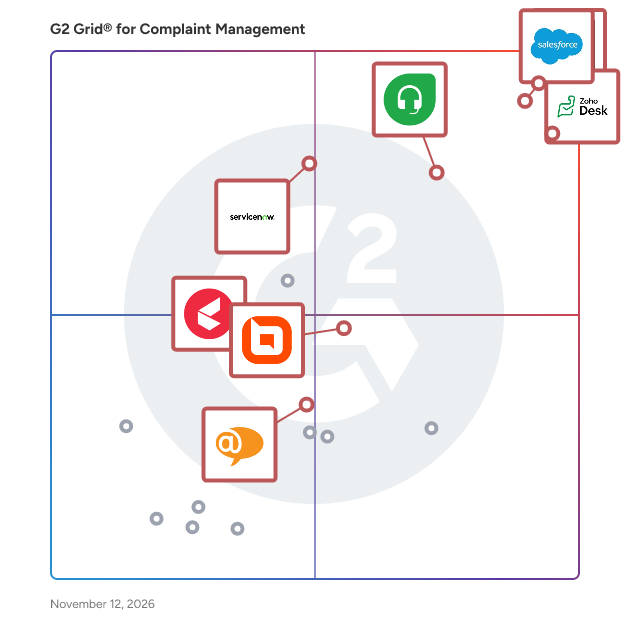
G2 Grid® for Complaint Management Software

G2 Grid® for Complaint Management Software plotting products by satisfaction and market presence

Highlighted products: Zoho Desk, Zendesk for Customer Service, Freshdesk, Salesforce Service Cloud, BoldDesk, ServiceNow Customer Service Management, LiveAgent, and Kapture CX.

Underlying data: [Grid® JSON](https://www.g2.com/categories/complaint-management/grids.json?focus%5B%5D=zoho-desk&focus%5B%5D=zendesk-for-customer-service&focus%5B%5D=freshdesk&focus%5B%5D=agentforce-service-formerly-salesforce-service-cloud&focus%5B%5D=bolddesk&focus%5B%5D=servicenow-customer-service-management&focus%5B%5D=liveagent&focus%5B%5D=kapture-cx&segment=small-business)

Zoho Desk

Zoho Desk is a web-based help desk software solution designed to assist organizations in providing exceptional customer support experiences. This platform serves as a centralized hub for managing customer interactions across multiple channels, allowing businesses to streamline their support processes and enhance overall customer satisfaction. By focusing on the needs of both customers and support agents, Zoho Desk aims to create a more efficient and effective help desk environment. Targeted primarily at businesses of all sizes, Zoho Desk caters to customer support teams looking to improve their service delivery and operational efficiency. The software is particularly beneficial for organizations that require a robust system to manage inquiries from various communication channels, including email, chat, social media, and phone. With its comprehensive feature set, Zoho Desk is well-suited for industries such as retail, technology, healthcare, and finance, where customer engagement and support are critical to success. One of the standout features of Zoho Desk is its omnichannel support capability, which allows businesses to engage with customers seamlessly across different platforms. This ensures that customers receive consistent and timely responses, regardless of how they choose to reach out. Additionally, the platform enhances agent productivity through automation tools that handle repetitive tasks, enabling support teams to focus on more complex customer issues. The integration of AI capabilities further empowers agents by providing them with insights and suggestions based on historical data and customer interactions. Zoho Desk also offers extensive customization options, allowing organizations to tailor the help desk experience to their specific needs. Users can create custom workflows, set up automated responses, and design personalized dashboards to monitor performance metrics. This level of customization ensures that businesses can adapt the software to fit their unique operational requirements, ultimately leading to improved service delivery and customer satisfaction. Furthermore, Zoho Desk provides real-time performance insights, enabling support managers to track key metrics and make data-driven decisions. The ability to analyze customer interactions and agent performance helps organizations identify areas for improvement and optimize their support strategies. With its cost-effective pricing model, Zoho Desk stands out as a practical solution for businesses seeking to enhance their customer support capabilities without incurring excessive expenses.

Average Rating: 4.4/5.0

Total Reviews: 7,830

G2 Deal: 50% discount on your first year with Zoho Desk

With Zoho Desk, you can deliver seamless omnichannel support, improve agent productivity at scale, customize your help desk, leverage powerful AI capabilities, automate mundane tasks, get live performance insights, and deeply integrate with apps you use daily - all without spending a fortune.

Price: ~~$14-40/agent/month~~ → $7-20/agent/month

View this exclusive G2 deal

How Do G2 Users Rate Zoho Desk?

  • Has the product been a good partner in doing business?: 8.4/10 (Category avg: 9.1/10)
  • All-Employee Access: 8.3/10 (Category avg: 8.8/10)
  • Priority Case Alerts: 8.3/10 (Category avg: 8.5/10)
  • Two-Way Communication: 8.4/10 (Category avg: 8.5/10)

Who Is the Company Behind Zoho Desk?

  • Seller: Zoho
  • Company Website:
  • Year Founded: 1996
  • HQ Location: Austin, TX
  • LinkedIn® Page: www.linkedin.com
    30,913 employees on LinkedIn®
  • Phone: +1 (888) 900-9646

Who Uses This Product?

  • Who Uses This: CEO, Director
  • Top Industries: Information Technology and Services, Computer Software
  • Company Size: 74% Small, 23% Medium

What Do G2 Reviewers Say About Zoho Desk?

AI-generated summary from verified user reviews

Pros
  • Users appreciate the user-friendly interface of Zoho Desk, enabling quick navigation and effective ticket management.
  • Users appreciate the user-friendly interface and strong automation tools of Zoho Desk, enhancing efficiency and navigation.
  • Users value the efficient ticket management of Zoho Desk, enhancing their workflow with organized and automated processes.
  • Users value the seamless integrations with Zoho products, enhancing workflow and collaboration across platforms.
  • Users find Zoho Desk to have an intuitive interface, simplifying navigation and ticket management effortlessly.
Cons
  • Users experience a learning curve with Zoho Desk, making it challenging to quickly feel comfortable and effective.
  • Users face a steep learning curve when setting up Zoho Desk, which can be challenging for new users.
  • Users find limited customization in Zoho Desk, making setup and advanced features challenging for newcomers.
  • Users find the initial setup and advanced customization of Zoho Desk complex, leading to a steep learning curve.
  • Users find the interface not intuitive, making navigation and functionality more challenging than desired.

What Are Recent G2 Reviews of Zoho Desk?

What Are G2 Users Discussing About Zoho Desk?

Zendesk for Customer Service

"Zendesk for Customer Service is an AI-powered service solution that’s easy to set up, use, and scale. It offers out-of-the-box functionality that’s simple to modify, helping businesses move faster. Leveraging AI built on billions of CX interactions, Zendesk enhances the entire service experience—from self-service to agents and admins—improving efficiency at scale. Zendesk equips agents with tools, insights, and context to deliver personalized service across all channels, including social messaging, phone, and email. It unifies personalized conversations, omnichannel case management, AI workflows, automation, and a Marketplace of 1800+ apps under one platform. Zendesk QA uses AI to evaluate and improve agent performance, while Workforce Management optimizes scheduling and productivity to ensure readiness during peak times. The solution is easy to implement and adjust without needing IT or developers. Zendesk’s mission is to simplify business complexity and enable meaningful customer connections for companies of all sizes. Serving 130K+ global brands in 30+ languages, Zendesk is headquartered in San Francisco with offices worldwide."

Average Rating: 4.3/5.0

Total Reviews: 6,755

G2 Deal: Experience the power of Zendesk with a free trial

Start your free trial of the leading AI-powered customer experience platform chosen by 100,000+ users. Whether you’re a small business looking to streamline customer service tickets or an enterprise-grade business that needs support software designed to scale as you grow, Zendesk is your solution.

Price: ~~$19 per agent/month~~ → $0 for 14 days

View this exclusive G2 deal

How Do G2 Users Rate Zendesk for Customer Service?

  • Has the product been a good partner in doing business?: 8.4/10 (Category avg: 9.1/10)
  • All-Employee Access: 8.3/10 (Category avg: 8.8/10)
  • Priority Case Alerts: 8.3/10 (Category avg: 8.5/10)
  • Two-Way Communication: 8.4/10 (Category avg: 8.5/10)

Who Is the Company Behind Zendesk for Customer Service?

  • Seller: Zendesk
  • Company Website:
  • Year Founded: 2007
  • HQ Location: San Francisco, CA
  • LinkedIn® Page: www.linkedin.com
    7,537 employees on LinkedIn®
  • Ownership: NYSE: ZEN

Who Uses This Product?

  • Who Uses This: Customer Success Manager, CEO
  • Top Industries: Computer Software, Information Technology and Services
  • Company Size: 45% Medium, 40% Small

What Do G2 Reviewers Say About Zendesk for Customer Service?

AI-generated summary from verified user reviews

Pros
  • Users find the interface intuitive and easy to navigate, helping them handle day-to-day support work with less effort.
  • Users value organized ticket management and easy handling, which help them track customer issues from creation through resolution.
  • Users value the unified support workspace, which brings conversations from multiple channels into one place for easier customer service management.
  • Users value flexible workflow customization that adapts to their processes, from configuring views and settings to automating ticket handling.
  • Users appreciate broad integrations and easy connections to business tools, helping streamline workflows without switching between apps.
Cons
  • Users find the pricing expensive, especially for small teams, and say costs rise as they add agents, features, or scale.
  • Users find the system complex and overwhelming, with advanced features and settings requiring time and training to learn.
  • Users find reporting and analytics confusing to use and limited in flexibility, detail, and available metrics.
  • Users find initial setup and configuration complex and time-consuming, often requiring technical expertise or trial and error.
  • Users find the interface dated and visually plain, with clutter and settings that can be difficult to locate.

What Are Recent G2 Reviews of Zendesk for Customer Service?

What Are G2 Users Discussing About Zendesk for Customer Service?

Freshdesk

Freshdesk (a product of Freshworks Inc.) helps customer service teams move from their first AI agent to AI-powered customer service, without a drawn-out transformation program. Freshdesk unifies channels, conversations, AI, and customer context into one place, so agents always have the full picture before responding. Ready-to-use AI agents understand intent, take action, and resolve requests across channels, not just route them. AI Copilot helps every agent work faster and with more confidence, and AI Insights turns service data into decisions instead of dashboards. Guided rollout and prebuilt templates mean teams can launch quickly and expand at their own pace, whether they're a support team of 10 or 500. Freshdesk is quick to set up, easy to use, and designed for rapid impact—it delivers 60% improved agent productivity, a 97% first-contact resolution rate, and up to 80% of resolutions with AI agents.

Average Rating: 4.4/5.0

Total Reviews: 3,891

How Do G2 Users Rate Freshdesk?

  • Has the product been a good partner in doing business?: 8.7/10 (Category avg: 9.1/10)
  • All-Employee Access: 8.8/10 (Category avg: 8.8/10)
  • Priority Case Alerts: 8.6/10 (Category avg: 8.5/10)
  • Two-Way Communication: 8.7/10 (Category avg: 8.5/10)

Who Is the Company Behind Freshdesk?

  • Seller: Freshworks
  • Company Website:
  • Year Founded: 2010
  • HQ Location: San Mateo, CA
  • LinkedIn® Page: www.linkedin.com
    7,783 employees on LinkedIn®
  • Ownership: NASDAQ: FRSH

Who Uses This Product?

  • Who Uses This: Manager, Owner
  • Top Industries: Information Technology and Services, Computer Software
  • Company Size: 48% Small, 40% Medium

What Do G2 Reviewers Say About Freshdesk?

AI-generated summary from verified user reviews

Pros
  • Users find the interface intuitive and easy to use, helping new team members get started quickly.
  • Users appreciate structured ticket management that organizes queries and helps agents resolve them efficiently.
  • Users find setup straightforward and quick, with minimal configuration needed to get started.
  • Users like task automation that streamlines support workflows and handles routine ticket actions, reducing manual effort and saving time.
  • Users like having customer conversations, tickets, and support information in one central place, making interactions easier to manage and share.
Cons
  • Users find reporting lacks flexibility and analytical depth, while building or customizing reports can feel complicated.
  • Users report slow loading and lag, especially during peak periods or when handling large ticket volumes.
  • Users find customization too limited for tailoring fields, ticket views, portals, and workflows.
  • Users find pricing high for small teams, with costs rising as they add agents, advanced features, or higher-tier plans.
  • Users find the interface cluttered and unintuitive, with dated design and frequent changes making it harder to navigate.

What Are Recent G2 Reviews of Freshdesk?

What Are G2 Users Discussing About Freshdesk?

AI can help you find the answers. G2 helps you trust them.

Connect G2 to Claude or ChatGPT for answers grounded in G2's trusted reviews, comparisons, and pricing from real user insights.

How it works

Salesforce Service Cloud

Salesforce Service Cloud is the world's #1 AI CRM for service, where humans with AI agents drive customer success together. Service Cloud enables seamless collaboration between AI agents and humans, for every type of service, on any channel, and across any industry to deliver effortless experiences from first contact to final resolution. With autonomous agents, you can transform low-touch, high-volume interactions into no-touch experiences, seamlessly handing them off to your human agents only when needed for high-touch more complex interactions. AI integrated into the flow of work helps your service teams achieve new levels of productivity, drive better customer satisfaction and to drive growth. All of these capabilities are built on the Salesforce Platform with Agentforce and Data Cloud allowing service organizations around the world to : - Deliver proactive support with data from your products, assets & services - Provide 24/7 cross-channel service & resolve issues fast with AI agents - Boost productivity and accelerate growth with one integrated platform

Average Rating: 4.4/5.0

Total Reviews: 8,010

How Do G2 Users Rate Salesforce Service Cloud?

  • Has the product been a good partner in doing business?: 8.7/10 (Category avg: 9.1/10)
  • All-Employee Access: 8.6/10 (Category avg: 8.8/10)
  • Priority Case Alerts: 8.7/10 (Category avg: 8.5/10)
  • Two-Way Communication: 8.7/10 (Category avg: 8.5/10)

Who Is the Company Behind Salesforce Service Cloud?

  • Seller: Salesforce
  • Company Website:
  • Year Founded: 1999
  • HQ Location: San Francisco, CA
  • LinkedIn® Page: www.linkedin.com
    89,711 employees on LinkedIn®
  • Ownership: NYSE:CRM

Who Uses This Product?

  • Who Uses This: Salesforce Administrator, Salesforce Developer
  • Top Industries: Information Technology and Services, Computer Software
  • Company Size: 42% Medium, 37% Large

What Do G2 Reviewers Say About Salesforce Service Cloud?

AI-generated summary from verified user reviews

Pros
  • Users appreciate the ease of use of Salesforce Service Cloud, benefiting from intuitive features and seamless management.
  • Users appreciate the excellent functionality of Salesforce Service Cloud, enhancing case management and customer feedback tracking seamlessly.
  • Users commend the effective case management of Salesforce Service Cloud, enhancing efficiency in handling customer issues and tasks.
  • Users value the efficiency of Salesforce Service Cloud, enhancing case management and streamlining call center operations effortlessly.
  • Users value the ease of customization in Salesforce Service Cloud, enabling effective case management and efficient customer support.
Cons
  • Users find the complexity of setup and usage challenging, particularly for new users unfamiliar with Salesforce.
  • Users find the learning curve steep, as setup and licensing can complicate the initial experience with Salesforce Service Cloud.
  • Users face a steep learning curve with Salesforce Service Cloud, requiring significant time and understanding for effective use.
  • Users find Salesforce Service Cloud expensive, especially with add-on costs making budgeting difficult.
  • Users find the missing features in Salesforce Service Cloud can clutter the interface and complicate configuration.

What Are Recent G2 Reviews of Salesforce Service Cloud?

What Are G2 Users Discussing About Salesforce Service Cloud?

BoldDesk

An AI-native customer service platform built to automate up to 90% of support. It unifies AI Agents, ticketing, live chat, and omnichannel support in one complete help desk, so AI resolves issues instead of deflecting them. AI Agents resolve requests end to end on every channel, take action through API tools and MCP, and hand off to humans with context. With 40+ integrations, enterprise-grade governance, and AI-first pricing that includes unlimited human agents, it scales effortlessly from startups to large enterprises, making it the ideal choice for AI-native support.

Average Rating: 4.5/5.0

Total Reviews: 154

G2 Deal: Get a 15% Discount on BoldDesk for Your First Year

BoldDesk is an AI-native customer service platform. AI agents resolve requests autonomously 24/7 and automate up to 90% of support. Connect APIs and MCP servers so agents can check orders or issue refunds. Includes ticketing, knowledge base, and live chat.

Price: ~~Starting at $99 per month with 500 AI Credits and Unlimited Agents~~ → Starting at $84.15 per month with 500 AI Credits and Unlimited Agents

View this exclusive G2 deal

How Do G2 Users Rate BoldDesk?

  • Has the product been a good partner in doing business?: 8.8/10 (Category avg: 9.1/10)

Who Is the Company Behind BoldDesk?

  • Seller: Syncfusion
  • Company Website:
  • Year Founded: 2001
  • HQ Location: Morrisville, North Carolina
  • LinkedIn® Page: www.linkedin.com
    2,739 employees on LinkedIn®

Who Uses This Product?

  • Who Uses This: IT Manager, CEO
  • Top Industries: Computer Software, Information Technology and Services
  • Company Size: 48% Small, 36% Medium

What Do G2 Reviewers Say About BoldDesk?

AI-generated summary from verified user reviews

Pros
  • Users love the ease of use of BoldDesk, appreciating its simple setup and intuitive interface.
  • Users appreciate the easy GUI and setup of BoldDesk, enhancing usability and streamlining their workflows effectively.
  • Users praise the excellent customer support from BoldDesk, highlighting its promptness and helpfulness in resolving issues.
  • Users praise the easy setup of BoldDesk, appreciating its seamless integration and user-friendly interface.
  • Users appreciate the ease of use and affordability of BoldDesk, alongside effective call tracking and analytics features.
Cons
  • Users note the absence of a built-in RMM feature, limiting device monitoring and management capabilities in BoldDesk.
  • Users find the learning curve steep with BoldDesk, citing confusion and difficulty in the UI and customer portal.
  • Users feel the limited customization options in BoldDesk restrict personalization and flexibility in their experience.
  • Users find the interface not intuitive, making navigation and usability challenging during the transition to BoldDesk.
  • Users face ticketing issues, such as needing to open every ticket to view and lack of customization in the interface.

What Are Recent G2 Reviews of BoldDesk?

ServiceNow Customer Service Management

ServiceNow's Customer Service Management (CSM) transforms customer service experiences with AI-powered workflows and AI agents that help you accelerate customer self-service, boost agent productivity, and speed up resolution time. With CSM, your organization can: - Deflect calls and increase satisfaction by enabling customers to self-serve answers and actions via an AI-powered conversational chat. - Increase capacity to handle more cases, extend business hours, and manage routine tasks with AI agents. - Save agents time with AI-generated case histories, case summaries, and suggested resolutions. - Integrate with top CCaaS solutions to unify routing, centralize call and work management, and boost agent efficiency on one AI-powered workspace. - Resolve issues quickly and consistently by automating tasks, uncovering bottlenecks, and improving processes. - Get up and running quickly and maintain a low TCO with continuous innovation in one extensible AI platform. Harness the power of AI, data and workflows to delight customers and deliver on what they want quickly, drive unprecedented agent productivity, and foster a whole new level of customer loyalty.

Average Rating: 4.4/5.0

Total Reviews: 509

How Do G2 Users Rate ServiceNow Customer Service Management?

  • Has the product been a good partner in doing business?: 8.6/10 (Category avg: 9.1/10)
  • All-Employee Access: 10.0/10 (Category avg: 8.8/10)
  • Priority Case Alerts: 9.2/10 (Category avg: 8.5/10)

Who Is the Company Behind ServiceNow Customer Service Management?

  • Seller: ServiceNow
  • Company Website:
  • Year Founded: 2004
  • HQ Location: Santa Clara, CA
  • LinkedIn® Page: www.linkedin.com
    35,078 employees on LinkedIn®
  • Ownership: NYSE:NOW

Who Uses This Product?

  • Who Uses This: Associate Consultant, Senior Software Engineer
  • Top Industries: Information Technology and Services, Telecommunications
  • Company Size: 45% Large, 28% Medium

What Do G2 Reviewers Say About ServiceNow Customer Service Management?

AI-generated summary from verified user reviews

Pros
  • Users value the ease of use and customization of ServiceNow CSM, streamlining workflows across various departments.
  • Users value the centralized platform of ServiceNow Customer Service Management for streamlining customer interactions and automating workflows.
  • Users appreciate the efficiency of ServiceNow Customer Service Management in centralizing interactions and automating case management.
  • Users value the smoother workflow provided by ServiceNow's case management features, enhancing agent efficiency and case handling.
  • Users commend the automation features of ServiceNow Customer Service Management for maximizing efficiency and reducing manual efforts significantly.
Cons
  • Users find the learning curve steep, with complicated setups and configurations for workflows and routing rules.
  • Users face a steep learning curve with complex setup and configuration for workflows and routing in ServiceNow.
  • Users experience limited customization options in ServiceNow Customer Service Management, hindering their ability to tailor solutions effectively.
  • Users find the setup and configuration quite complicated, often requiring extensive time and effort to tailor workflows.
  • Users highlight the need for improvements in updates, visual design, and user experience in ServiceNow Customer Service Management.

What Are Recent G2 Reviews of ServiceNow Customer Service Management?

What Are G2 Users Discussing About ServiceNow Customer Service Management?

LiveAgent

LiveAgent is an AI help desk for support teams of any size, from a single agent to enterprise contact centers. AI agents answer chats and handle tickets alongside your team in one shared inbox for email, live chat, phone calls and social messages. AI is included in every plan with no per-resolution fees. Plans start at $15 per agent seat per month billed annually, with a 30-day free trial and no credit card required. LiveAgent ranks #3 of 9 customer service AI agents in G2's AI Agent Evaluation, with 195 of 230 points. Customer data is hosted on AWS in Europe, the US or Asia, with GDPR-compliant processing, and single sign-on is available on every plan, and larger teams get audit logs and a dedicated account manager. You choose which AI provider processes your data. LiveAgent integrates with Shopify, Salesforce, Slack, Jira, Zapier, & more. To discuss the Enterprise plan, contact Team LiveAgent at liveagent.com. AI in every LiveAgent plan AI agents, the AI Chatbot and the AI Answer Assistant are included in every plan. The number of AI agents depends on the plan: 1 on Starter, 5 on Team, 50 on Business and unlimited on Enterprise. You choose the AI provider (OpenAI, Anthropic, Google Gemini or others), can connect several providers and pick one per AI agent, and pay the provider directly at its own rates; LiveAgent adds no per-resolution fees and no token markup. Admins can monitor AI agent work and tool-call usage. The AI Chatbot currently runs on FlowHunt, Quality Unit's own AI platform. • AI agents that work on and distribute tickets • AI Chatbot for your website, answering from your knowledge base • AI Answer Assistant that drafts and improves agent replies • AI ticket summaries • Transcription of live and recorded calls • Built-in MCP server to connect external AI tools such as Claude (Business and Enterprise plans) One inbox for email, chat, phone and social LiveAgent brings email tickets, live chat, calls and social messages into one shared inbox. Every plan includes email ticketing, live chat, contact forms, a customer portal and a knowledge base. From the Team plan you add a call center (inbound and outbound calls, IVR, queues and call recording, with your own SIP provider), video calls, and Facebook Messenger, Instagram, WhatsApp, Viber, Telegram and X posts and mentions. Automation, SLA and time rules, canned responses and reporting with CSAT help teams keep response times under control. LiveAgent plans and pricing Four plans: Starter, Team, Business and Enterprise, from $15 per agent seat per month billed annually. Enterprise includes 80 agent seats, unlimited AI agents and a dedicated account manager. No contract, no setup fee, cancel any time. Migration from other help desks Free self-service migration with built-in migration plugins for many help desks, including Zendesk, Freshdesk, Freshservice, Help Scout, Intercom, Jira and Kayako. On any paid plan, the LiveAgent team moves your Zendesk data for free, usually in 1–2 days for accounts under 10,000 tickets: tickets, contacts and the knowledge base, with Zendesk triggers rebuilt as rules. Security, GDPR and data residency LiveAgent is hosted on Amazon Web Services (AWS), whose data centers are ISO 27001 certified (the certification is held by AWS). Choose where your data lives at sign-up: Europe (Frankfurt), the US (Northern Virginia) or Asia (Singapore). LiveAgent is GDPR compliant, with a Data Protection Officer and DPA templates. Connections use HTTPS/TLS. 2-step verification and single sign-on (Google, Microsoft, Facebook, Okta) are available on every plan, and an audit log from Business. LiveAgent integrations Shopify, WooCommerce, Magento, PrestaShop, WordPress, Wix, Salesforce, Pipedrive, Slack, Jira, GitHub, Google Analytics 4, Zapier (including HubSpot via Zapier), Microsoft and Google email accounts, FlowHunt and many more, plus a REST API. Start your 30-day free trial at liveagent.com, no credit card required, or book a free demo call with our team.

Average Rating: 4.5/5.0

Total Reviews: 1,481

How Do G2 Users Rate LiveAgent?

  • Has the product been a good partner in doing business?: 9.1/10 (Category avg: 9.1/10)
  • All-Employee Access: 10.0/10 (Category avg: 8.8/10)
  • Priority Case Alerts: 7.8/10 (Category avg: 8.5/10)
  • Two-Way Communication: 10.0/10 (Category avg: 8.5/10)

Who Is the Company Behind LiveAgent?

  • Seller: Quality Unit
  • Company Website:
  • Year Founded: 2004
  • HQ Location: Bratislava, Slovakia
  • LinkedIn® Page: www.linkedin.com
    61 employees on LinkedIn®

Who Uses This Product?

  • Who Uses This: CEO, Owner
  • Top Industries: Information Technology and Services, Computer Software
  • Company Size: 68% Small, 29% Medium

What Do G2 Reviewers Say About LiveAgent?

AI-generated summary from verified user reviews

Pros
  • Users find LiveAgent exceptionally easy to use, enabling straightforward management of support tickets and seamless team collaboration.
  • Users value the reliable multi-site live chat system of LiveAgent, enhancing effective customer response management seamlessly.
  • Users praise the reliable customer support of LiveAgent, enhancing their ability to manage inquiries effectively.
  • Users appreciate the reliability of LiveAgent's functions, enabling effective multi-channel customer response management.
  • Users love the efficiency of LiveAgent, as it streamlines customer support and enhances productivity across all channels.
Cons
  • Users find the learning curve steep, requiring significant training to utilize LiveAgent's powerful features effectively.
  • Users are frustrated by the missing features in LiveAgent, especially regarding mobile app integration and functionality.
  • Users find LiveAgent's interface not intuitive, with disappointing UX and slow page loading affecting productivity.
  • Users find a steep learning curve with LiveAgent, requiring significant time to master its extensive features and reporting.
  • Users express concerns about integration issues, noting that it affects productivity and mobile app performance negatively.

What Are Recent G2 Reviews of LiveAgent?

What Are G2 Users Discussing About LiveAgent?

Kapture CX

Kapture is an enterprise-grade, generative AI-powered omnichannel customer experience management platform designed to enhance customer support and engagement. This innovative solution empowers businesses to adapt to the evolving expectations of their customers, transforming standard interactions into exceptional experiences. By leveraging advanced technology and a customer-centric approach, Kapture ensures that every engagement is personalized and relevant, addressing the unique needs of each individual. Targeted primarily at businesses in sectors such as retail, banking, financial services and insurance (BFSI), travel, and consumer durables, Kapture serves over 1,000 organizations across 16 countries. This diverse clientele benefits from Kapture's ability to streamline customer interactions across various channels, including social media, email, chat, and voice. The platform is particularly valuable for companies aiming to enhance their customer service capabilities, improve satisfaction rates, and foster lasting relationships with their customers. Kapture's key features include intelligent routing, real-time analytics, and a unified dashboard that provides a comprehensive view of customer interactions. The intelligent routing system ensures that inquiries are directed to the most suitable agents based on their expertise, leading to quicker and more effective resolutions. Real-time analytics empower businesses to monitor performance metrics, identify trends, and make data-driven decisions to enhance service quality. The unified dashboard consolidates information from multiple channels, enabling support teams to respond promptly and effectively to customer needs. Utilizing Kapture offers benefits that extend beyond improved customer satisfaction. By providing tailored experiences and leveraging AI-driven insights, businesses can increase operational efficiency and reduce response times. Kapture's focus on context and intelligence in every resolution helps organizations not only meet but exceed customer expectations. This capability is particularly crucial in competitive markets where customer loyalty is paramount. Kapture distinguishes itself in the customer experience management category by combining advanced technology with a deep understanding of customer needs. Its omnichannel approach ensures that businesses can engage with their customers seamlessly, regardless of the platform, while its generative AI capabilities facilitate continuous improvement in service delivery. This makes Kapture an essential tool for organizations looking to elevate their customer support and create meaningful, lasting connections with their clientele.

Average Rating: 4.5/5.0

Total Reviews: 334

How Do G2 Users Rate Kapture CX?

  • Has the product been a good partner in doing business?: 8.9/10 (Category avg: 9.1/10)
  • All-Employee Access: 8.6/10 (Category avg: 8.8/10)
  • Priority Case Alerts: 8.8/10 (Category avg: 8.5/10)
  • Two-Way Communication: 9.0/10 (Category avg: 8.5/10)

Who Is the Company Behind Kapture CX?

Who Uses This Product?

  • Who Uses This: Team Leader, Assistant Manager
  • Top Industries: Consumer Services, Pharmaceuticals
  • Company Size: 59% Medium, 30% Small

What Do G2 Reviewers Say About Kapture CX?

AI-generated summary from verified user reviews

Pros
  • Users appreciate the ease of use of Kapture CX, finding it user-friendly and efficient for managing communications.
  • Users value the user-friendly interface of Kapture CX, enhancing efficient communication and streamlined email management.
  • Users love the user-friendly interface of Kapture CX, which simplifies customer communication and boosts efficiency.
  • Users appreciate the user-friendly interface of Kapture CX, enhancing their customer communication and support efficiency.
  • Users love the efficiency of Kapture CX, appreciating its user-friendly interface and seamless customer communication features.
Cons
  • Users experience slow performance, especially during high ticket volumes, impacting their overall efficiency and satisfaction.
  • Users experience slow loading times during peak hours, impacting their overall satisfaction with Kapture CX.
  • Users experience slow speed during peak hours, which impacts efficiency and overall system usability.
  • Users experience notification delays and slow support, causing frustration and hindering efficient use of Kapture CX.
  • Users find the reporting section confusing, making it difficult to gain clear insights and track performance effectively.

What Are Recent G2 Reviews of Kapture CX?

What Are G2 Users Discussing About Kapture CX?

DevRev

DevRev Computer is an AI-powered work platform that connects structured data (CRM records, tickets, log data) and unstructured data (documents, emails, meeting notes) into a unified knowledge graph. Data is synced from existing tools through a connector layer called AirSync. Computer searches across all connected systems, takes actions on behalf of users, automates workflows, and generates insights grounded in business context. It supports automated ticket resolution, customer account research, sales pipeline analysis, and cross-team reporting through purpose-built apps and custom AI agents. Available as a desktop app, mobile app, and browser interface.

Average Rating: 4.3/5.0

Total Reviews: 209

How Do G2 Users Rate DevRev?

  • Has the product been a good partner in doing business?: 9.3/10 (Category avg: 9.1/10)
  • All-Employee Access: 8.3/10 (Category avg: 8.8/10)
  • Priority Case Alerts: 7.7/10 (Category avg: 8.5/10)
  • Two-Way Communication: 8.2/10 (Category avg: 8.5/10)

Who Is the Company Behind DevRev?

  • Seller: DevRev
  • Company Website:
  • Year Founded: 2020
  • HQ Location: Palo Alto, CA
  • LinkedIn® Page: www.linkedin.com
    901 employees on LinkedIn®

Who Uses This Product?

  • Who Uses This: HR Specialist, Product Manager
  • Top Industries: Computer Software, Financial Services
  • Company Size: 53% Medium, 33% Small

What Do G2 Reviewers Say About DevRev?

AI-generated summary from verified user reviews

Pros
  • Users laud the intuitive design of DevRev, making workflows and communication seamless and efficient for daily tasks.
  • Users value the high efficiency of DevRev, seamlessly integrating tools and streamlining workflows for better productivity.
  • Users appreciate the intuitive features of DevRev, enhancing communication, automation, and integration for streamlined workflows.
  • Users appreciate the intuitive and powerful features of DevRev that enhance daily workflows and efficiency.
  • Users appreciate the excellent customer support from DevRev, highlighted by prompt, intelligent responses via both bots and humans.
Cons
  • Users express frustration over missing features, hindering user friendliness and essential functionalities in DevRev.
  • Users struggle with limited features, such as ineffective AI responses and inadequate ticket management capabilities.
  • Users indicate a lack of features in DevRev, hindering operations and making the platform feel incomplete.
  • Users find the learning curve steep, as some features and fields lack user-friendliness and require time to master.
  • Users find the navigation unintuitive, with difficulty in rearranging elements and a steep learning curve.

What Are Recent G2 Reviews of DevRev?

Hiver in Gmail

Hiver in Gmail transforms Gmail into a powerful agentic helpdesk. Teams can manage shared inboxes, collaborate on conversations, automate workflows, and use AI to handle requests more efficiently, all without leaving the comfort and familiarity of their Gmail inbox. Hiver also offers Hiver Omni, an omnichannel customer service platform that brings email, chat, voice, Slack, SMS, and social into one queue. Unlike Hiver in Gmail, which works inside Gmail, Hiver Omni is a standalone platform with its own interface. Key features of Hiver in Gmail: - Shared Inbox Management: Shared inboxes like support@, info@, or help@ can be managed directly inside Gmail. Every incoming email can be assigned to a specific person, and teammates can collaborate through internal notes without a single forward or CC. - Cross-team collaboration: Resolve complex requests without losing context between teams. Hiver keeps conversation history, private notes, handoffs, and Slack discussions connected to the customer thread, so everyone involved works from the same picture. - Ticketing: Give every request clear ownership and structure, with status, priority, custom fields, queues, SLAs, and a complete history of every action. Teams can configure ticket fields and define SLAs in natural language, while built-in audit trails keep work accountable and reporting-ready. -AI Agents: AI Agents take customer requests from intent to resolution. They understand what the customer needs, gather relevant context, follow your team’s procedures, take actions across connected systems, and respond. They resolve requests autonomously and bring in your team when human judgment is needed. - AI Copilot: When a request needs a person, Copilot does the groundwork. It finds similar issues, gathers context, drafts replies in your team’s tone, recommends next steps, and takes directed actions, such as updating Salesforce or retrieving information from Confluence. Your team stays in control, reviewing and approving what goes out. - Self-updating help center: Turn every resolution into knowledge that compounds. Hiver AI turns resolved conversations into help center articles and flags existing content when it becomes outdated or conflicts with how your team actually resolves issues. - Integrations & Workflows: Connect the tools your team already uses and automate the work between them. Workflows route, assign, tag, triage, and escalate requests using conditions and data from your apps. Teams can build workflows, define triage rules, and trigger actions across connected systems using natural language. - Analytics: Reporting covers volume, response and resolution times, SLA attainment, and satisfaction, broken out by channel, team, and individual. It also tracks quality and customer health, and surfaces trends across conversations. Your team can query the data in natural language, inside Hiver or through MCP. - Customer Intelligence: Build a living understanding of every customer account. Hiver brings together conversations, CRM data, product usage, and calls to continuously assess health, sentiment, and churn risk. Ask AI answers deeper questions about each account, while AI Agents and your team use that intelligence to make every interaction more informed, relevant, and personal. Support teams at 10,000+ organizations, including the likes of Bynder, Epic Games, and Flexport, trust Hiver to run their support function. Part of what drives that trust is knowing Hiver in Gmail comes with 24x7 product support led by humans, on all its plans, regardless of what tier you’re on.

Average Rating: 4.6/5.0

Total Reviews: 1,267

How Do G2 Users Rate Hiver in Gmail?

  • Has the product been a good partner in doing business?: 9.2/10 (Category avg: 9.1/10)
  • All-Employee Access: 8.3/10 (Category avg: 8.8/10)
  • Priority Case Alerts: 8.3/10 (Category avg: 8.5/10)
  • Two-Way Communication: 8.3/10 (Category avg: 8.5/10)

Who Is the Company Behind Hiver in Gmail?

  • Seller: Hiver
  • Company Website:
  • Year Founded: 2011
  • HQ Location: San Jose, CA
  • LinkedIn® Page: www.linkedin.com
    276 employees on LinkedIn®

Who Uses This Product?

  • Who Uses This: CEO, Owner
  • Top Industries: Computer Software, Information Technology and Services
  • Company Size: 66% Small, 27% Medium

What Do G2 Reviewers Say About Hiver in Gmail?

AI-generated summary from verified user reviews

Pros
  • Users value the ease of use of Hiver in Gmail, appreciating customizable features and efficient automation options.
  • Users benefit from the enhanced team collaboration features in Hiver, streamlining workload and improving communication tracking.
  • Users commend the intuitive and user-friendly email management of Hiver, enhancing efficiency within Gmail.
  • Users find communication capabilities of Hiver in Gmail effective, notably appreciating task assignments and automation features.
  • Users appreciate the collaborative features of Hiver for enhancing teamwork and streamlining shared inbox management.
Cons
  • Users find email issues frustrating, as tagging and separating emails can be confusing and error-prone.
  • Users feel the missing features of Hiver limit its effectiveness compared to more comprehensive help desk solutions.
  • Users find Hiver's limited features in the free plan restrict productivity and hinder effective management of emails.
  • Users find the slow loading can hinder quick actions and create frustration during high-paced tasks.
  • Users experience bug issues that hinder quick actions and can lead to disconnects during use.

What Are Recent G2 Reviews of Hiver in Gmail?

Case IQ

As compliance, risk, and regulatory requirements grow more complex, organizations need purpose-built solutions to address and manage them effectively. Case IQ offers a comprehensive suite of AI-powered compliance and risk management solutions designed to support HR, fraud, ethics, and compliance teams. Case IQ's solutions enable organizations to capture and detect incidents, manage investigations, and proactively prevent and remediate risk—all from a single, trusted vendor. Its suite of solutions includes: • AI-powered case management • 24/7 whistleblower hotline • AI-powered compliance monitoring • Approvals and disclosures software • Third-party risk management platform Trusted by global organizations, including Fortune 500 companies, Case IQ is built to be configurable, scalable, and adaptable across a wide range of regulatory environments, unique use cases, and internal policies. As a leader in AI for investigations, Case IQ offers an AI-powered case management solution, designed to support thorough, timely, and fair investigations across the full case lifecycle. Central to this is Clairia, the AI assistant purpose-built for investigations, which delivers contextual insights, recommendations, and guidance to help teams work more efficiently while maintaining oversight and accountability. With built-in Playbooks, organizations can tailor how AI is applied to align with internal processes, policies, and governance standards, supporting responsible and consistent AI adoption. Configurable workflows, automation, reporting dashboards, and collaboration tools further enhance efficiency, visibility, and coordination across stakeholders, while enterprise-grade security ensures sensitive data is protected. Supporting case management is a 24/7/365 live-answer whistleblower hotline that empowers employees to report concerns securely and anonymously in over 100 languages. Every report is captured in real time and routed directly into the case management system, helping organizations respond faster and strengthen oversight. Beyond investigations and whistleblowing, Case IQ helps organizations proactively prevent risk through AI-powered compliance monitoring. Using AI and machine learning, the solution detects and identifies suspicious transactions related to bribery, corruption, and fraud, allowing compliance teams to take action before they escalate. To further strengthen compliance programs, Case IQ offers an approvals and disclosures solution that centralizes and automates conflict-of-interest workflows including gifts, hospitality, donations, etc. With configurable and automated workflows, built-in risk logic, real-time analytics, and full audit trails, organizations gain greater visibility and control, enabling faster, more consistent decision-making. Additionally, Case IQ's third-party management solution allows organizations to manage external risk across the full lifecycle of vendor relationships. By automating onboarding, due diligence, ongoing monitoring, and screening within a single system, teams can reduce manual effort, improve oversight, and maintain consistent risk governance across all third parties.

Average Rating: 4.5/5.0

Total Reviews: 124

How Do G2 Users Rate Case IQ?

  • Has the product been a good partner in doing business?: 9.3/10 (Category avg: 9.1/10)
  • All-Employee Access: 8.5/10 (Category avg: 8.8/10)
  • Priority Case Alerts: 8.4/10 (Category avg: 8.5/10)
  • Two-Way Communication: 7.5/10 (Category avg: 8.5/10)

Who Is the Company Behind Case IQ?

  • Seller: Case IQ
  • Company Website:
  • Year Founded: 1999
  • HQ Location: Ottawa, CA
  • LinkedIn® Page: www.linkedin.com
    185 employees on LinkedIn®

Who Uses This Product?

  • Top Industries: Higher Education, Education Management
  • Company Size: 52% Large, 22% Small

What Do G2 Reviewers Say About Case IQ?

AI-generated summary from verified user reviews

Pros
  • Users find CaseIQ to be very intuitive and easy to use, facilitating quick navigation and efficient reporting.
  • Users value the user-friendly design of Case IQ, enhancing case management confidence and efficiency.
  • Users value the easy implementation of Case IQ, facilitating a smooth transition and daily usage of the database.
  • Users value the customizability and user-friendly features of CaseIQ, enhancing tracking and reporting for investigators.
  • Users appreciate the excellent tracking and reporting features of Case IQ, enhancing their efficiency and confidence.
Cons
  • Users find Case IQ to be not user-friendly, struggling with navigation and complicated initial setup processes.
  • Users find the complexity of navigation and setup in Case IQ makes the experience frustrating and time-consuming.
  • Users find the learning curve steep, particularly with complex features and unfamiliar reporting systems in Case IQ.
  • Users find complex navigation frustrating in Case IQ, which leads to a challenging and cumbersome experience.
  • Users face data management issues with Case IQ, citing difficulties in organizing files and complex reporting systems.

What Are Recent G2 Reviews of Case IQ?

What Are G2 Users Discussing About Case IQ?

Front

Front is an AI customer operations platform built for the complexity of B2B customer relationships. It connects customer conversations, teams, AI agents, and tools on one platform so organizations can coordinate customer work across support, operations, customer success, account management, and other customer-facing teams. Front brings conversations across email, SMS, WhatsApp, live chat, social channels, and other connected channels into a shared workspace. Teams can assign clear ownership, collaborate directly alongside customer conversations, automate routing and workflows, coordinate handoffs across teams, and access relevant customer context without moving work across disconnected inboxes and tools. This gives teams greater visibility into the work behind each customer interaction while helping them respond accurately and efficiently. Front is particularly suited to complex B2B customer operations, where resolving a customer request may require multiple people, teams, systems, and steps. Rather than treating every interaction as an isolated support ticket, Front keeps the conversation connected to the context, ownership, and workflows required to move the customer's request forward. Integrations and APIs connect Front with the systems teams already use, helping relevant customer and operational information stay available where the work happens. AI works within the same workflows as your team. Autopilot, Front's omnichannel AI agent, runs complex customer work from end to end, and teams can build custom Autopilot agents for their brands, teams, and processes. Customers can also bring in external AI agents to join Front as teammates and set their scope and permissions. Copilot gives teams the context, the draft, and the prep for every customer conversation. Organizations decide where AI agents take on work, where human judgment is needed, and how both operate with shared context and clear guardrails. Front combines customer conversations with workflow automation, collaboration, analytics, integrations, and AI so teams can manage complex customer work without losing visibility or control as they scale. More than 9,300 businesses, including Uber Freight, Stripe, and OpenAI use Front to coordinate customer operations and keep teams, tools, and customer conversations in sync.

Average Rating: 4.7/5.0

Total Reviews: 2,476

How Do G2 Users Rate Front?

  • Has the product been a good partner in doing business?: 9.1/10 (Category avg: 9.1/10)
  • All-Employee Access: 8.8/10 (Category avg: 8.8/10)
  • Priority Case Alerts: 8.3/10 (Category avg: 8.5/10)
  • Two-Way Communication: 8.9/10 (Category avg: 8.5/10)

Who Is the Company Behind Front?

  • Seller: Front App
  • Company Website:
  • Year Founded: 2014
  • HQ Location: San Francisco, CA
  • LinkedIn® Page: www.linkedin.com
    560 employees on LinkedIn®

Who Uses This Product?

  • Who Uses This: Customer Success Manager, Account Manager
  • Top Industries: Logistics and Supply Chain, Computer Software
  • Company Size: 48% Small, 42% Medium

What Do G2 Reviewers Say About Front?

AI-generated summary from verified user reviews

Pros
  • Users value Front's ease of use, praising its intuitive setup and efficient handling of team communications.
  • Users value the streamlined communication in Front, enhancing workflow and ensuring efficient management of customer interactions.
  • Users love the team collaboration features in Front, enhancing workflow and ensuring efficient message handling.
  • Users value Front's customizable rules and organization, enhancing workflow and improving communication effectively.
  • Users appreciate the efficiency of Front's email management, benefiting from integrated replies and collaborative features.
Cons
  • Users find missing features frustrating, including API limitations, layout confusion, and calendar update issues.
  • Users report email delivery delays and complications with tag management, leading to confusion and frustration.
  • Users find the cost and occasional system issues of Front to be significant drawbacks in their experience.
  • Users experience email management issues with delays and confusing tag functionalities, affecting daily productivity.
  • Users experience email communication issues with mixed emails and minor API rough edges that hinder automation.

What Are Recent G2 Reviews of Front?

What Are G2 Users Discussing About Front?

Qualio

Qualio is a quality management and compliance platform built exclusively for life sciences companies. It helps medical device, pharmaceutical, biotech, and digital health organizations accelerate regulatory approvals, stay audit-ready, and scale compliance operations without adding headcount. Our platform manages the full range of quality processes, including document control, training, CAPA, change control, supplier management, risk management, and design controls, all in one validated system, supporting FDA 21 CFR Part 11, ISO 13485, EU MDR, MDSAP, GxP, ICH Q10, and other life sciences requirements. Move faster without compliance as the bottleneck. Qualio connects regulatory affairs, quality, and R&D in one platform, with deep integrations into Jira, Azure DevOps, GitHub, Salesforce, and other tools teams already use, removing the handoffs and manual documentation that typically slow product development down. Get to market faster. Automated gap analysis and multi-framework compliance mapping cut audit preparation time by 80%. Reusing evidence across FDA, ISO, and EU submissions has helped customers shrink market entry timelines from 9 months to 3-4 months, while cross-mapped documentation accelerates 510(k) submissions, CE marking, and international expansion. Scale without growing your compliance overhead. Customers report a 99% reduction in quality administrative time and have eliminated $150K-$300K in annual consulting costs by replacing manual processes, driving 5X ROI within 2 months. See risk before it becomes a finding. End-to-end traceability connects requirements, risk assessments, CAPAs, and product changes, with risk-based alerting that flags gaps before they turn into FDA 483 observations, warning letters, or audit findings. Customers have passed ISO 13485 certifications and sponsor audits with zero major nonconformances using this always-on monitoring. Qualio serves life sciences companies from pre-market startups to established enterprises, with the SOC 2, HIPAA, and pharmacovigilance capabilities growth-stage companies need, deploying faster than legacy eQMS vendors while maintaining the validation rigor required for FDA inspections and notified body audits.

Average Rating: 4.4/5.0

Total Reviews: 776

How Do G2 Users Rate Qualio?

  • Has the product been a good partner in doing business?: 9.1/10 (Category avg: 9.1/10)
  • All-Employee Access: 10.0/10 (Category avg: 8.8/10)
  • Priority Case Alerts: 10.0/10 (Category avg: 8.5/10)

Who Is the Company Behind Qualio?

  • Seller: Qualio
  • Company Website:
  • Year Founded: 2012
  • HQ Location: San Francisco, California
  • LinkedIn® Page: www.linkedin.com
    124 employees on LinkedIn®

Who Uses This Product?

  • Who Uses This: Quality Manager, Clinical Data Associate
  • Top Industries: Medical Devices, Pharmaceuticals
  • Company Size: 52% Medium, 40% Small

What Do G2 Reviewers Say About Qualio?

AI-generated summary from verified user reviews

Pros
  • Users appreciate the ease of use of Qualio, finding it user-friendly and convenient for managing documents and training.
  • Users praise Qualio for its user-friendly document management, making it easy to store, update, and track files securely.
  • Users find training easy and convenient with Qualio's user-friendly interface and helpful quizzes for onboarding.
  • Users appreciate the user-friendly document control in Qualio, enhancing accessibility and organization of important documents.
  • Users find Qualio intuitive and user-friendly, facilitating effortless training and onboarding experiences with excellent support.
Cons
  • Users experience document management challenges with multiple change requests and a clunky editor affecting usability.
  • Users find feature limitations in Qualio, particularly in user rights and missing essential editing tools.
  • Users find the difficult usability of Qualio frustrating, especially when navigating document editing and personal preferences.
  • Users find Qualio to be not user-friendly, especially struggling with navigation and specific features like Design Control.
  • Users feel that UX improvement is needed, particularly in usability, template control, and document editing functionalities.

What Are Recent G2 Reviews of Qualio?

What Are G2 Users Discussing About Qualio?

UsefulFeedback!

UsefulFeedback! is a cloud-based, highly configurable complaints management system designed to help organizations effectively capture, manage, and report on customer complaints and feedback across their entire business network. By automating the interaction and engagement process across all enterprise channels—including frontline employees, customer service teams, and external service providers—UsefulFeedback! enables businesses to enhance customer experience, improve service levels, and comply with regulatory requirements. Key Features and Functionality: - Case Management: Streamlines the receipt, allocation, and response to complaints and feedback, ensuring efficient handling across the organization. - Complaint Classification: Categorizes complaints to facilitate targeted analysis and resolution strategies. - Corrective Actions (CAPA): Implements corrective and preventive actions to address root causes of complaints. - Customer Complaint Tracking: Monitors the progress and status of each complaint to ensure timely resolution. - Feedback Management: Collects and analyzes customer feedback to drive continuous improvement. - Issue Tracking: Identifies and monitors issues to prevent recurrence and enhance service quality. - Quality Assurance Management: Ensures compliance with quality standards and regulatory requirements. - Routing: Directs complaints to the appropriate personnel or departments for efficient handling. - Self-Service Portal: Provides customers with a platform to submit and track their complaints and feedback. - Social Media Monitoring: Monitors and manages comments and complaints on social media platforms to maintain brand reputation. Primary Value and Solutions Provided: UsefulFeedback! offers a scalable, secure, and user-friendly platform that enables organizations to: - Enhance Customer Experience: By efficiently managing complaints and feedback, businesses can address customer concerns promptly, leading to increased satisfaction and loyalty. - Improve Service Levels: The system's comprehensive tracking and reporting capabilities allow organizations to identify service gaps and implement improvements. - Ensure Regulatory Compliance: With industry-specific templates and configurations, UsefulFeedback! helps organizations adhere to relevant regulations and standards. - Facilitate Root Cause Analysis: The platform's analytics and reporting tools provide insights into the underlying causes of complaints, enabling proactive measures to prevent future issues. By integrating UsefulFeedback! into their operations, organizations can transform customer complaints into opportunities for improvement, fostering a culture of continuous enhancement and customer-centricity.

Average Rating: 4.5/5.0

Total Reviews: 38

How Do G2 Users Rate UsefulFeedback!?

  • Has the product been a good partner in doing business?: 9.3/10 (Category avg: 9.1/10)
  • All-Employee Access: 7.9/10 (Category avg: 8.8/10)
  • Priority Case Alerts: 8.2/10 (Category avg: 8.5/10)
  • Two-Way Communication: 8.2/10 (Category avg: 8.5/10)

Who Is the Company Behind UsefulFeedback!?

Who Uses This Product?

  • Top Industries: Computer Software, Information Technology and Services
  • Company Size: 50% Small, 35% Medium

What Do G2 Reviewers Say About UsefulFeedback!?

AI-generated summary from verified user reviews

Pros
  • Users value the ease of use of UsefulFeedback!, appreciating its intuitive interface and efficient feedback management.
  • Users value the clarity and control UsefulFeedback! provides by centralizing feedback channels and ensuring accountability.
  • Users value the simple and intuitive interface of UsefulFeedback!, which provides clear insights efficiently from various channels.
  • Users value the clarity and support provided by UsefulFeedback!, aiding effective management of feedback processes.
  • Users appreciate the seamless integrations of UsefulFeedback!, enhancing workflow efficiency and centralizing feedback visibility.
Cons
  • Users face a steeper learning curve with UsefulFeedback!, making the extensive features daunting for new clients.
  • Users note that UsefulFeedback! can be expensive for smaller businesses, making it less accessible compared to alternatives.
  • Users report slow performance with UsefulFeedback!, particularly during multiple feedback processing and loading times.
  • Users find the lack of resources burdensome, making it challenging for efficiency and productivity in their tasks.
  • Users highlight high costs and limited features that restrict access for small businesses and hinder effective feedback collection.

What Are Recent G2 Reviews of UsefulFeedback!?

What Are G2 Users Discussing About UsefulFeedback!?

Inia Debnath
ID
Researched and written by Inia Debnath
Updated
Reviews & FAQs

Reviews Summary: The Best Complaint Management Software for Small-Business Businesses

Thanks to 34603 Complaint Management software reviews and associated data from users working for small-sized companies, at G2 we have some of the most definitive data on the best Complaint Management software for the smaller space. We have identified 14 individual Complaint Management products offering the features, pricing and support that Small-Business companies look for when comparing Complaint Management software and solutions. These reviews are generated using the qualitative and quantitative feedback from G2 members working in small-sized companies and who have used these Complaint Management software products.

When G2 reviewers submit their Complaint Management software reviews, they often provide information on the type of company they work for and what market segment they belong to. We break these different market segments into three distinct groups:

  • Small Business Complaint Management Software Reviews (< 50 employees)
  • smaller Complaint Management Software Reviews (51-1,000 employees)
  • Enterprise Complaint Management Software Reviews (1,001+ employees)

smaller businesses have their own unique requirements when it comes to Complaint Management software compared to small or enterprise companies. That is why these individual small-sized company Complaint Management software reviews are especially helpful when comparing product set up, ease of use and overall cost.

Below you will find FAQs and review snippets for Complaint Management software products that work well in smaller environments. These reviews are written by real G2 users working for these Small-Business companies who have real-world experience with these Complaint Management software products.

FAQs About Complaint Management Software for Small-Business Businesses

Q. What are the best Complaint Management software products for small-sized businesses, according to G2 reviewers?
  • Zoho Desk - 4.5-stars, 702 reviews (71% from smaller reviewers)
  • Zendesk for Customer Service - 4.3-stars, 816 reviews (43% from smaller reviewers)
  • Salesforce Service Cloud - 4.5-stars, 197 reviews (15% from smaller reviewers)
  • Freshdesk - 4.4-stars, 242 reviews (41% from smaller reviewers)
  • ServiceNow Customer Service Management - 4.2-stars, 20 reviews (9% from smaller reviewers)
Q. What are the least-liked Complaint Management software products for professionals at small-sized companies, based on the overall G2 rating?
  • UsefulFeedback! - 4.3-stars, 10 reviews (50% from smaller reviewers)
  • Cirrus Complaints Handling System - 4.4-stars, 10 reviews (48% from smaller reviewers)
  • Qualio - 4.5-stars, 23 reviews (43% from smaller reviewers)
  • Case IQ - 4.6-stars, 13 reviews (19% from smaller reviewers)
  • DevRev - 4.4-stars, 40 reviews (35% from smaller reviewers)
Q. What are the highest-rated Complaint Management software tool features according to employees at Small-Business companies?
  • Two-Way Communication - 4.2-stars
  • All-Employee Access - 4.2-stars
  • Supporting Documents - 4.2-stars
Q. What are the features that are rated lowest by employees at Small-Business companies?
  • AI Text Generation - 3.7-stars
  • AI Text Summarization - 3.7-stars
  • Trend Analysis - 4.1-stars
Q. How many Complaint Management software reviews are from users working in smaller companies?

2264 out of all Complaint Management software reviews on G2 are from users working in Small-Business companies (7%).

Here's What Reviewers Working at smaller Businesses Have to Say About Complaint Management Software

What Small-Business Professionals Liked What Small-Business Professionals Disliked

Freshdesk: “It's features are extremely helpful from ticket creation to report generation.”

Read Review

Freshdesk: “Freshdesk is the worst of the worst, they dont back up your data, have no contingency plan for data centre failure and then leave us hanging for 4+ days without any communications for our business. The level of incompetency is unreal. The worst support, zero accountability and not to be trusted. DO NOT GO WITH THIS COMPANY.”

Read Review

BoldDesk: “It instantly improved the quality, compliance and features of our support desk. Previously we were running an old version of a non-supported custom Django app that no one could modify anymore. BoldDesk is 100x better then that. Social Login also works well for both us and our customers, who use different IDPs.”

Read Review

Front: “When you dig in it doesn't do what it says it does, the AI generation is awful, and connections don't compare to even the newer competitors. THEY CHARGED MY CREDIT CARD AFTER CANCELLATION.”

Read Review

Freshdesk: “Ticket management and Sorting of the tickets with ease. It is very easy to implement in a company. And is the very good tool for Customer support job roles.”

Read Review

Zendesk for Customer Service: “What I don't like about Zendesk is its value. By Brazilian standards, it is relatively expensive and requires a high investment. Furthermore, sometimes I need to look for a long time for the tool I need to carry out my activities.”

Read Review

Recommendations To Others Problems Solved & Benefits

Zoho Desk: “I tried Zen desk and Zoho desk. Zoho desk has more functions”

Read Review

Zendesk for Customer Service: “Improvement of ticket routing, use of AI to reduce support load, and automation and synchronization of some actions. A big plus is also access to ticket history for all agents, which makes it easier to continue cases and maintain consistency in service.”

Read Review

Zendesk for Customer Service: “Set up views to organize tickets Set up SLAs to create catgories of priority Configure phone to use if you'd like to make calls from cell phone Lean into Answerbot as much as possible!”

Read Review

Zoho Desk: “Zoho Desk has helped reduce human errors and keeps track of user complaints.”

Read Review

Zendesk for Customer Service: “Zendesk is worth it! Onboarding has been so simple and straightforward thanks to this platform”

Read Review

Zoho Desk: “Zoho Desk is helping us centralize customer support and manage queries in a more structured way. Instead of handling customer issues across different channels and manually tracking follow-ups, we can organize tickets, assign them to the right team members, set priorities, and create escalation workflows. It is also useful for separating responsibilities between our customer support and compliance teams through roles and permissions. This gives us better visibility, accountability, and control over how customer issues are handled. As we grow, having these processes in one system should help us respond faster and scale our support operations more efficiently.”

Read Review