# Best Video Conferencing Software

  *By [Nana Serwah Nkrahene](https://research.g2.com/insights/author/nana-nkrahene)*

   Video conferencing software enables online communication through audio calls, video meetings, and virtual seminars, offering built-in capabilities such as chat, screen sharing, and recording to support long-distance collaboration and reduce travel costs. These tools allow employees, partners, and customers to meet virtually from any location while maintaining consistent and effective communication.

### Core Capabilities of Video Conferencing Software

To qualify for inclusion in the Video Conferencing category, a product must:

- Provide online video and audio communication between two or more parties
- Allow video conference hosts to modify meeting specifications and invite guests
- Offer features such as screen sharing and chat within individual conferences
- Offer recording capabilities for future reference or presentations

### How Video Conferencing Software Differs from Other Tools

Video conferencing platforms reduce the need for in-person meetings by supporting both quick internal discussions and formal client sessions. Unlike broader collaboration or communication suites, these tools focus specifically on real-time visual and audio interaction. Some systems also integrate with related tools like [Marketing Automation Software](https://www.g2.com/categories/marketing-automation) and [CRM Software](https://www.g2.com/categories/crm), syncing key business data to streamline follow-up actions and account updates.

### Insights from G2 on Video Conferencing Software

Based on category trends on G2, the convenience of eliminating travel, the ability to connect dispersed teams, and the improved consistency of client and internal communication stand out as primary benefits.


## Category Overview

**Total Products under this Category:** 214


## Trust & Credibility Stats

**Why You Can Trust G2's Software Rankings:**

- 30 Analysts and Data Experts
- 193,700+ Authentic Reviews
- 214+ Products
- Unbiased Rankings

G2's software rankings are built on verified user reviews, rigorous moderation, and a consistent research methodology maintained by a team of analysts and data experts. Each product is measured using the same transparent criteria, with no paid placement or vendor influence. While reviews reflect real user experiences, which can be subjective, they offer valuable insight into how software performs in the hands of professionals. Together, these inputs power the G2 Score, a standardized way to compare tools within every category.


## Top Video Conferencing Software at a Glance
| # | Product | Rating | Best For | What Users Say |
|---|---------|--------|----------|----------------|
| 1 | [Google Workspace](https://www.g2.com/products/google-workspace/reviews) | 4.6/5.0 (45,366 reviews) | Integrated collaboration workspace | "[All-in-One Solution for Communication and Collaboration](https://www.g2.com/survey_responses/google-workspace-review-12774997)" |
| 2 | [Microsoft Teams](https://www.g2.com/products/microsoft-teams/reviews) | 4.4/5.0 (16,951 reviews) | Enterprise chat and meetings | "[A solid hub for daily work and meetings.](https://www.g2.com/survey_responses/microsoft-teams-review-12765609)" |
| 3 | [Webex Suite](https://www.g2.com/products/cisco-webex-suite/reviews) | 4.2/5.0 (17,643 reviews) | Structured enterprise meetings | "[Reliable Tool for Team Communication and Collaboration](https://www.g2.com/survey_responses/webex-suite-review-12695498)" |
| 4 | [Zoom Workplace](https://www.g2.com/products/zoom-workplace/reviews) | 4.5/5.0 (53,360 reviews) | Easy video meetings with recording | "[All-in-One Platform with Reliable Quality and a Time-Saving AI Companion](https://www.g2.com/survey_responses/zoom-workplace-review-12784528)" |
| 5 | [JioMeet](https://www.g2.com/products/jiomeet/reviews) | 4.4/5.0 (407 reviews) | Simple video calls | "[Smooth Experience For Daily Professional Communication](https://www.g2.com/survey_responses/jiomeet-review-12772427)" |
| 6 | [Microsoft 365](https://www.g2.com/products/microsoft365/reviews) | 4.6/5.0 (5,494 reviews) | Productivity suite with meeting access | "[Multi functional, All in one App](https://www.g2.com/survey_responses/microsoft-365-review-12753510)" |
| 7 | [GoTo Meeting](https://www.g2.com/products/goto-meeting/reviews) | 4.2/5.0 (16,563 reviews) | Simple remote meeting access | "[Reliable and Cost-Efficient with Room for UI Improvement](https://www.g2.com/survey_responses/goto-meeting-review-12505009)" |
| 8 | [Amazon Chime](https://www.g2.com/products/amazon-chime/reviews) | 4.3/5.0 (629 reviews) | AWS-aligned meeting communication | "[Convenient but Lacks Competitor Features](https://www.g2.com/survey_responses/amazon-chime-review-12724879)" |
| 9 | [Zoho Meeting](https://www.g2.com/products/zoho-meeting/reviews) | 4.5/5.0 (1,132 reviews) | Webinars and online meetings | "[Makes Online Consultations and Health Webinars More Smooth and Organized](https://www.g2.com/survey_responses/zoho-meeting-review-12780407)" |
| 10 | [RingEX](https://www.g2.com/products/ringex/reviews) | 4.2/5.0 (1,320 reviews) | Voice-led business communication | "[Seamless Integration and Exceptional Support](https://www.g2.com/survey_responses/ringex-review-12608346)" |


## Best Video Conferencing Software At A Glance

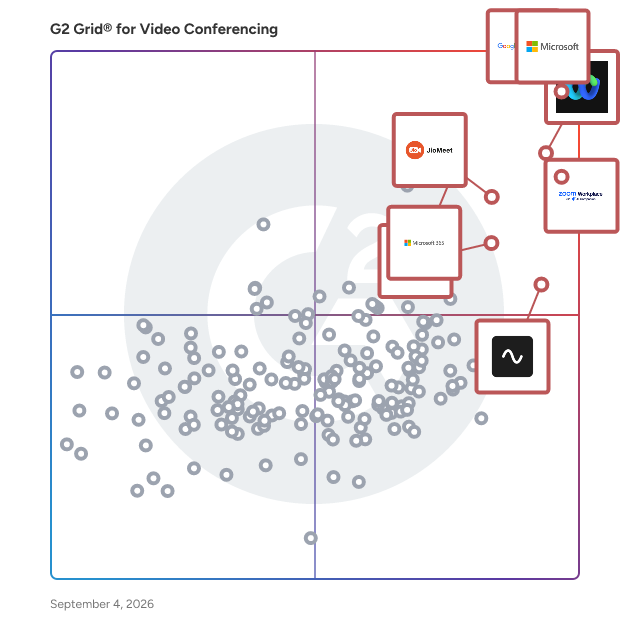
- **Leader:** [Google Workspace](https://www.g2.com/products/google-workspace/reviews)
- **Highest Performer:** [3CX](https://www.g2.com/products/3cx/reviews)
- **Easiest to Use:** [Google Workspace](https://www.g2.com/products/google-workspace/reviews)
- **Top Trending:** [Google Workspace](https://www.g2.com/products/google-workspace/reviews)
- **Best Free Software:** [Zoom Workplace](https://www.g2.com/products/zoom-workplace/reviews)


## Which Type of Video Conferencing Software Tools Are You Looking For?
  - [Video Conferencing Software](https://www.g2.com/categories/video-conferencing) *(current)*
  - [VoIP Providers](https://www.g2.com/categories/voip-providers)
  - [Webinar Platforms](https://www.g2.com/categories/webinar)
  - [Virtual Workspaces](https://www.g2.com/categories/virtual-workspaces)
  - [UCaaS Platforms](https://www.g2.com/categories/ucaas-platforms)
  - [Screen Sharing Software](https://www.g2.com/categories/screen-sharing)
  - [Business Instant Messaging Software](https://www.g2.com/categories/business-instant-messaging)
  - [Cloud PBX Platforms Software](https://www.g2.com/categories/cloud-pbx-platforms)


---

**Sponsored**

### Ultatel

Ultatel delivers a powerful yet easy-to-use cloud communications suite that scales with your business—combining voice, SMS, chat, video, online fax, and contact center capabilities in one platform. Our service includes unlimited calling in the US/Canada, advanced IVRs, auto attendants, and robust integrations with top CRMs and help desks. Every plan is powered by AI capabilities that transform how teams work: voicemail transcription, call sentiment and topic analysis, AI-generated post-call summaries, and live coaching in our top-tier plan. The Ultimate plan unlocks real-time sentiment alerts, advanced topic trends, full call transcription, and smart action-item suggestions—helping you reduce support costs and elevate customer experience without extra integrations. Explore Ultatel to see how our intelligent, integrated cloud communications—which thoughtfully balance pricing, AI, and support—can deliver immediate value and long-term growth.


[Visit website](https://www.g2.com/external_clickthroughs/record?secure%5Bad_program%5D=ppc&amp;secure%5Bad_slot%5D=category_product_list&amp;secure%5Bcategory_id%5D=19&amp;secure%5Bdisplayable_resource_id%5D=19&amp;secure%5Bdisplayable_resource_type%5D=Category&amp;secure%5Bmedium%5D=sponsored&amp;secure%5Bplacement_reason%5D=page_category&amp;secure%5Bplacement_resource_ids%5D%5B%5D=19&amp;secure%5Bprioritized%5D=false&amp;secure%5Bproduct_id%5D=1206636&amp;secure%5Bresource_id%5D=19&amp;secure%5Bresource_type%5D=Category&amp;secure%5Bsource_type%5D=category_page&amp;secure%5Bsource_url%5D=https%3A%2F%2Fwww.g2.com%2Fcategories%2Fvideo-conferencing&amp;secure%5Btoken%5D=9c24b3549d7b2e0b904a2202ff922935dd5f048bad418c67a632d439f5169ec6&amp;secure%5Burl%5D=https%3A%2F%2Fwww.ultatel.com%2Fplans-prices%2F%3Futm_source%3DG2&amp;secure%5Burl_type%5D=book_demo)

---


## Buyer Guide: Key Questions for Choosing Video Conferencing Software Software
  ### What does Video Conferencing Software do?
  I describe video conferencing software as a set of tools that enables real-time virtual communication through video, audio, and chat. It acts as an operational layer that keeps meetings, remote collaboration, and distributed communication structured and accessible. These platforms centralize meeting hosting, screen sharing, session recording, team discussions, and collaboration workflows, ensuring individuals and teams can stay connected regardless of location. They enable users to manage everything through a single digital environment that supports efficient communication across remote and hybrid teams.


  ### Why do businesses use Video Conferencing Software?
  When I reviewed G2 feedback, I found that users often turn to video conferencing tools to solve challenges related to remote collaboration, communication delays, and meeting accessibility.

Common benefits highlighted in G2 feedback include:

- Improved communication across remote or hybrid teams.
- Reduced need for travel and in-person meetings.
- Easier scheduling and joining of meetings.
- Real-time collaboration through screen sharing and chat.
- Better meeting documentation through recording features.
- Increased flexibility for global or distributed teams.


  ### Who uses Video Conferencing Software primarily?
  From the reviewer patterns I evaluated, G2 users span a wide range of roles and industries:

- **Team managers and department leaders** who need to run check-ins, planning sessions, reviews, and cross-functional meetings.
- **Sales and customer success teams** who need to host demos, discovery calls, onboarding sessions, and customer conversations.
- **HR and recruiting professionals** who need to conduct interviews, employee orientations, training sessions, and internal communications.
- **Educators and trainers** who need to deliver virtual classes, workshops, webinars, and learning sessions.
- **IT and operations teams** who need to support secure, reliable communication across the organization.


  ### What types of Video Conferencing Software should I consider?
  Based on G2 reviewer sentiment, buyers typically evaluate these categories:

- **Standalone meeting tools:** Focused on video calls, ease of joining, and meeting stability.
- **Collaboration suites with video:** Combine messaging, file sharing, and meetings in one platform.
- **Enterprise-grade conferencing platforms:** Designed for large meetings, webinars, and advanced controls.
- **Lightweight, browser-based tools:** Prioritized for quick access without installation.
- **Integrated communication ecosystems:** Connect video with calendars, email, and productivity tools.


  ### What are the core features to look for in Video Conferencing Software?
  From the G2 feedback I reviewed, users consistently highlight these key capabilities:

- Reliable video and audio quality that holds up across varying network conditions.
- A straightforward meeting setup and join experience with minimal steps for all participants.
- Screen sharing and presentation tools that support clean, uninterrupted delivery.
- Meeting recording and playback with easy access and sharing after the call.
- In-meeting chat and messaging for communication that doesn&#39;t interrupt the main discussion.
- Calendar and productivity integrations that reduce scheduling friction.
- Security controls and access management to protect meetings and participant data.
- Scalability that supports everything from one-on-ones to large group sessions.
- Consistent mobile and cross-device performance for users outside of a desktop environment.


  ### What trends are shaping Video Conferencing Software right now?
  From the G2 reviewer patterns I evaluated, several themes are shaping how users experience these tools:

- **Workflow integrations** are becoming a baseline expectation across calendars, messaging, and project tools.
- **Hybrid work support** is expanding to close the gap between in-room and remote participants.
- **Meeting recordings** are evolving into a core workflow feature, with usability and searchability getting more attention.
- **In-meeting collaboration** is broadening as teams expect shared tools built into the session.
- **Mobile and cross-platform performance** is emerging as a differentiator as multi-device usage grows.


  ### How should I choose Video Conferencing Software?
  For me, the strongest video conferencing software is the kind that makes meetings reliable, easy to join, and clear for every participant. When strong audio and video quality, simple usability, smooth integrations, and dependable screen sharing or recording come together, video conferencing software becomes a trusted way to keep teams connected from anywhere.


---

## Top-Rated Products (Ranked by G2 Score)
### 1. [Google Workspace](https://www.g2.com/products/google-workspace/reviews)
**Average Rating:** 4.6/5.0
**Total Reviews:** 45,366
**Why buyers love it?:** Google Workspace’s G2 feedback gave me a clear view of a connected workspace for meetings, files, email, and day-to-day collaboration. Reviewers highlight real-time editing, easy access, and the convenience of keeping key apps in one place. Users appear to value how naturally the tools fit into shared work. I also saw shared-drive organization, lower-tier feature limits, and large-sheet handling come up as recurring considerations.


### Quick AI Summary Based on G2 Reviews
*Generated from real user reviews*

**Pros:**

- Users value the **ease of use** of Google Workspace, enhancing productivity with its seamless integration and centralization.
- Users value the **seamless collaboration** of Google Workspace, enhancing productivity and communication effortlessly among teams.
- Users appreciate the **seamless integrations** within Google Workspace, enhancing efficiency and organization for quick access to tools.
- Users appreciate the **ease of use and seamless integrations** of Google Workspace, greatly enhancing daily productivity and collaboration.
- Users value the **intuitive design** of Google Workspace, simplifying productivity and centralizing various important tools effortlessly.

**Cons:**

- Users are frustrated by **missing features** , such as offline access limitations and restricted capabilities without admin approval.
- Many users find the **limited features** of Google Workspace unsuitable for small teams, lacking essential functionalities.
- Users find Google Workspace **lacking in advanced features** compared to competitors, especially in CRM and spreadsheet capabilities.
- Users feel the **lack of features** in Google Workspace limits customization and advanced functionalities compared to other tools.
- Users find the **limited customization options** in Google Workspace frustrating, especially for tools like Google Calendar and Forms.

#### Recent Reviews

**"[Google Workspace: Seamless, Feature-Rich Suite That Keeps Our Small Business Organized](https://www.g2.com/survey_responses/google-workspace-review-12776578)"**

**Rating:** 5.0/5.0 stars
*— Marisa M.*

[Read full review](https://www.g2.com/survey_responses/google-workspace-review-12776578)

---

**"[All-in-One Solution for Communication and Collaboration](https://www.g2.com/survey_responses/google-workspace-review-12774997)"**

**Rating:** 5.0/5.0 stars
*— Kunal N.*

[Read full review](https://www.g2.com/survey_responses/google-workspace-review-12774997)

---


#### Trending Discussions

- [What tips do you have for effectively using Google Meet’s advanced features for large virtual meetings?](https://www.g2.com/discussions/what-tips-do-you-have-for-effectively-using-google-meet-s-advanced-features-for-large-virtual-meetings) - 16 comments, 10 upvotes
- [What is Google Surveys used for?](https://www.g2.com/discussions/what-is-google-surveys-used-for) - 8 comments, 2 upvotes
- [What does G Suite do?](https://www.g2.com/discussions/what-does-g-suite-do) - 8 comments, 5 upvotes
### 2. [Microsoft Teams](https://www.g2.com/products/microsoft-teams/reviews)
**Average Rating:** 4.4/5.0
**Total Reviews:** 16,951
**Why buyers love it?:** Microsoft Teams read to me as a central hub for daily communication across chat, meetings, and shared workspaces. Reviewers point to ease of use, video meetings, file sharing, and team collaboration as core strengths. The feedback shows that users value it for keeping conversations and work activity connected. Slow performance, notification friction, and occasional complexity also appear in the review patterns.


### Quick AI Summary Based on G2 Reviews
*Generated from real user reviews*

**Pros:**

- Users appreciate the **ease of use** in Microsoft Teams for seamless communication and integration with Microsoft 365 tools.
- Users find Microsoft Teams to greatly enhance **team collaboration** , streamlining meetings, chats, and task management in one platform.
- Users value the **seamless communication** features of Microsoft Teams, enhancing collaboration and productivity effortlessly.
- Users appreciate the **easy file sharing** capabilities in Microsoft Teams, enhancing collaboration and communication with team members.
- Users appreciate the **easy communication** in Microsoft Teams, facilitating seamless interactions and efficient teamwork.

**Cons:**

- Users experience **slow loading** issues with Microsoft Teams, resulting in frustration and delays during use.
- Users often report **performance issues** with Teams, citing heavy resource usage and slowdowns during multitasking.
- Users often criticize the **cluttered and unintuitive user interface** of Microsoft Teams, hindering their overall experience.
- Users often face **connectivity issues** with Microsoft Teams, leading to disconnections and performance problems in low-bandwidth situations.
- Users experience **performance delays** with Microsoft Teams, leading to frustration and inefficiencies during use.

#### Recent Reviews

**"[Centralized, Intuitive Hub for Collaboration with Microsoft 365 Integration](https://www.g2.com/survey_responses/microsoft-teams-review-12772084)"**

**Rating:** 5.0/5.0 stars
*— Yonis A.*

[Read full review](https://www.g2.com/survey_responses/microsoft-teams-review-12772084)

---

**"[A solid hub for daily work and meetings.](https://www.g2.com/survey_responses/microsoft-teams-review-12765609)"**

**Rating:** 4.5/5.0 stars
*— Akash B.*

[Read full review](https://www.g2.com/survey_responses/microsoft-teams-review-12765609)

---


#### Trending Discussions

- [What software do you need for Microsoft teams?](https://www.g2.com/discussions/what-software-do-you-need-for-microsoft-teams) - 18 comments, 10 upvotes
- [What is the use of Microsoft teams?](https://www.g2.com/discussions/what-is-the-use-of-microsoft-teams) - 19 comments, 6 upvotes
- [What are the best features of Microsoft teams?](https://www.g2.com/discussions/what-are-the-best-features-of-microsoft-teams) - 20 comments, 7 upvotes
### 3. [Webex Suite](https://www.g2.com/products/cisco-webex-suite/reviews)
**Average Rating:** 4.2/5.0
**Total Reviews:** 17,643
**Why buyers love it?:** The strongest Webex Suite feedback I reviewed centered on structured meetings, video, and collaboration features. Reviewers value its usefulness for communication and team coordination. I saw it fit best in contexts where teams need a dependable environment for formal virtual sessions. Interface friction, app issues, and feature complexity also show up in the feedback.


### Quick AI Summary Based on G2 Reviews
*Generated from real user reviews*

**Pros:**

- Users appreciate the **ease of use** of Webex Suite, valuing its all-in-one functionality for seamless collaboration.
- Users praise the **high-quality video and audio** of Webex Suite, enhancing collaboration across various industries.
- Users value the **reliability** of Webex Suite, enjoying seamless connections for their collaborative needs.
- Users value the **excellent video and audio quality** of Webex Suite, enhancing remote collaboration seamlessly across teams.
- Users commend the **excellent video quality** of Webex Suite, enhancing their collaboration experience seamlessly.

**Cons:**

- Users experience **slow loading** times and lag, affecting usability and response during important tasks.
- Users find Webex Suite to be **not user-friendly** , often struggling with its unintuitive interface and complex setup.
- Users experience **performance issues** with Webex Suite, including lagging, cluttered interface, and mobile app freezing.
- Users find the **lack of intuitiveness** in Webex Suite can lead to a steep learning curve and user frustration.
- Users find the **user interface cluttered and less intuitive** , leading to a frustrating experience, especially for newcomers.

#### Recent Reviews

**"[Webex Suite: Reliable All-in-One Collaboration with Great Audio/Video Quality](https://www.g2.com/survey_responses/webex-suite-review-12654772)"**

**Rating:** 4.0/5.0 stars
*— Arkajit D.*

[Read full review](https://www.g2.com/survey_responses/webex-suite-review-12654772)

---

**"[Reliable Tool for Team Communication and Collaboration](https://www.g2.com/survey_responses/webex-suite-review-12695498)"**

**Rating:** 5.0/5.0 stars
*— Anbuselvam S.*

[Read full review](https://www.g2.com/survey_responses/webex-suite-review-12695498)

---


#### Trending Discussions

- [How has the Webex App evolved to meet the demands of hybrid work environments and virtual collaboration?](https://www.g2.com/discussions/how-has-the-webex-app-evolved-to-meet-the-demands-of-hybrid-work-environments-and-virtual-collaboration) - 4 comments, 5 upvotes
- [How has Webex Meetings catered to the evolving needs of global virtual teams and large-scale webinars?](https://www.g2.com/discussions/how-has-webex-meetings-catered-to-the-evolving-needs-of-global-virtual-teams-and-large-scale-webinars) - 1 comment, 5 upvotes
- [What is Webex Meetings used for?](https://www.g2.com/discussions/what-is-webex-meetings-used-for) - 4 comments, 3 upvotes
### 4. [Zoom Workplace](https://www.g2.com/products/zoom-workplace/reviews)
**Average Rating:** 4.5/5.0
**Total Reviews:** 53,360
**Why buyers love it?:** Zoom Workplace’s reviews consistently framed it around easy video meetings and reliable meeting access. Reviewers highlight recordings, AI-supported features, integrations, and productivity gains. I found that users value it for making meetings simple to run and revisit. Connectivity issues, audio or video quality concerns, and complexity in certain settings also appear in the feedback.


### Quick AI Summary Based on G2 Reviews
*Generated from real user reviews*

**Pros:**

- Users appreciate the **ease of use** of Zoom Workplace, highlighting its smooth interface and effective teaching tools.
- Users value the **excellent video conferencing quality** in Zoom Workplace, enhancing communication and collaboration with minimal lag.
- Users praise the **excellent video quality** of Zoom Workplace, enhancing communication and collaboration during meetings.
- Users value the **reliability** of Zoom Workplace, noting seamless connectivity and minimal disruptions during calls and meetings.
- Users find the **screen sharing and whiteboard features** in Zoom Workplace essential for effective remote collaboration.

**Cons:**

- Users find Zoom Workplace has **limited features** , affecting usability and making it less appealing than competitors.
- Users experience **background noise and compatibility issues** , along with security measures complicating access for newcomers.
- Users often face **meeting issues** like abrupt time limits and audio glitches, disrupting the overall experience.
- Users face **connection issues** with Zoom Workplace, leading to a less seamless and user-friendly experience.
- Users face **video quality issues** and discomfort on camera, complicating the overall Zoom experience.

#### Recent Reviews

**"[All-in-One Platform with Reliable Quality and a Time-Saving AI Companion](https://www.g2.com/survey_responses/zoom-workplace-review-12784528)"**

**Rating:** 5.0/5.0 stars
*— Akash K.*

[Read full review](https://www.g2.com/survey_responses/zoom-workplace-review-12784528)

---

**"[Quick, Reliable Meetings Anywhere with Zoom Workplace](https://www.g2.com/survey_responses/zoom-workplace-review-12773213)"**

**Rating:** 5.0/5.0 stars
*— Bobbi S.*

[Read full review](https://www.g2.com/survey_responses/zoom-workplace-review-12773213)

---


#### Trending Discussions

- [Is Zoom Workplace worth it?](https://www.g2.com/discussions/is-zoom-workplace-worth-it) - 25 comments, 36 upvotes
- [What are your tips for using Zoom Workplace effectively?](https://www.g2.com/discussions/what-are-your-tips-for-using-zoom-workplace-effectively) - 10 comments, 11 upvotes
- [What does Zoom do?](https://www.g2.com/discussions/what-does-zoom-do) - 28 comments, 11 upvotes
### 5. [JioMeet](https://www.g2.com/products/jiomeet/reviews)
**Average Rating:** 4.4/5.0
**Total Reviews:** 407
**Why buyers love it?:** JioMeet’s G2 feedback showed me a product focused on simple setup and accessible video meeting use. Reviewers highlight call quality and basic communication needs. Users appear to value it for straightforward video calls. Requests for more advanced features and occasional audio or video issues also come through in the reviews.


### Quick AI Summary Based on G2 Reviews
*Generated from real user reviews*

**Pros:**

- Users find JioMeet to be **incredibly easy to use** , enhancing their online meeting experiences effortlessly.
- Users find the **easy setup** of JioMeet allows for quick and convenient video conferencing with minimal hassle.
- Users commend the **high-definition video quality** of JioMeet, enhancing their online meetings and communication experience.
- Users commend the **reliability** of JioMeet, enjoying seamless connectivity and high-quality performance even on mobile data.
- Users appreciate the **excellent audio quality** of JioMeet, ensuring smooth and uninterrupted communication during calls.

**Cons:**

- Users find JioMeet has **limited features** , particularly in advanced collaboration tools compared to larger video conferencing platforms.
- Users find JioMeet lacking in **advanced features** , such as breakout rooms and a robust whiteboard tool compared to competitors.
- Users experience frequent **audio connectivity issues** with JioMeet, leading to frustrating disruptions during calls and meetings.
- Users report **poor video and audio quality** with JioMeet, particularly on slower or unstable internet connections.
- Users find the **user interface lacking** in polish and features compared to competitors, affecting overall satisfaction.

#### Key Features
  - Screen Sharing
  - Scheduling
  - Mobile
  - Autonomous Task Execution

#### Recent Reviews

**"[Smooth Experience For Daily Professional Communication](https://www.g2.com/survey_responses/jiomeet-review-12772427)"**

**Rating:** 4.5/5.0 stars
*— Ishan S.*

[Read full review](https://www.g2.com/survey_responses/jiomeet-review-12772427)

---

**"[Flawless for Long Calls; Needs Better Visual Collaboration Tools](https://www.g2.com/survey_responses/jiomeet-review-12716579)"**

**Rating:** 4.0/5.0 stars
*— Sohan C.*

[Read full review](https://www.g2.com/survey_responses/jiomeet-review-12716579)

---


#### Trending Discussions

- [What is JioMeet used for?](https://www.g2.com/discussions/what-is-jiomeet-used-for) - 10 comments, 6 upvotes
### 6. [Microsoft 365](https://www.g2.com/products/microsoft365/reviews)
**Average Rating:** 4.6/5.0
**Total Reviews:** 5,494
**Why buyers love it?:** Microsoft 365 came through in the G2 feedback as a connected productivity suite spanning Teams, files, and core work apps. Reviewers highlight real-time collaboration, OneDrive access, and application integration. I read the strongest value as the convenience of having everyday productivity tools work together. Subscription cost, internet dependence, frequent updates, and the complexity of its broad feature set also come up in the reviews.


### Quick AI Summary Based on G2 Reviews
*Generated from real user reviews*

**Pros:**

- Users value the **ease of use** of Microsoft 365, enjoying seamless access across devices for better collaboration.
- Users value the **seamless team collaboration** in Microsoft 365, enhancing productivity and communication effortlessly across various applications.
- Users value the **seamless integration** with Microsoft apps, ensuring accessibility and top-notch communication for their needs.
- Users appreciate the **seamless integration** of Microsoft 365 apps, enhancing collaboration and accessibility across all devices.
- Users appreciate the **seamless integration** of Microsoft 365 apps, enhancing accessibility and collaboration across platforms.

**Cons:**

- Users feel that Microsoft 365 is **expensive** , particularly when compared to free alternatives like Google Workspace.
- Users are frustrated by **missing features** and inconsistent updates that disrupt workflow and functionality in Microsoft 365.
- Users report a **daunting learning curve** for non-technical individuals, making initial setup and tool usage challenging.
- Users are frustrated by the **limited features** of Microsoft 365, feeling they often require higher-priced plans.
- Users find Microsoft 365 **lacking features** on lower-priced plans, which can limit functionality for small teams.

#### Recent Reviews

**"[Multi functional, All in one App](https://www.g2.com/survey_responses/microsoft-365-review-12753510)"**

**Rating:** 4.5/5.0 stars
*— Sharon M.*

[Read full review](https://www.g2.com/survey_responses/microsoft-365-review-12753510)

---

**"[Effortless Collaboration and Seamless Integration](https://www.g2.com/survey_responses/microsoft-365-review-12687705)"**

**Rating:** 4.5/5.0 stars
*— Chris Z.*

[Read full review](https://www.g2.com/survey_responses/microsoft-365-review-12687705)

---


#### Trending Discussions

- [What are the uses of Microsoft software?](https://www.g2.com/discussions/what-are-the-uses-of-microsoft-software) - 2 comments, 1 upvote
- [What kind of software is Microsoft Office?](https://www.g2.com/discussions/what-kind-of-software-is-microsoft-office) - 1 comment
- [What programs are in Microsoft Office suite?](https://www.g2.com/discussions/what-programs-are-in-microsoft-office-suite) - 1 comment
### 7. [GoTo Meeting](https://www.g2.com/products/goto-meeting/reviews)
**Average Rating:** 4.2/5.0
**Total Reviews:** 16,563
**Why buyers love it?:** GoTo Meeting stood out to me for straightforward online meeting access. Reviewers value easy joining, screen sharing, video meetings, and remote communication. The feedback points to a practical fit for teams that need a simple way to meet virtually. Feature limitations, video concerns, and usability issues in some workflows also appear in reviewer comments.


### Quick AI Summary Based on G2 Reviews
*Generated from real user reviews*

**Pros:**

- Users love the **ease of use** of GoTo Meeting, making setup and communication seamless across teams.
- Users rave about the **easy setup** of GoTo Meeting, enabling quick and efficient virtual collaboration from the start.
- Users appreciate the **reliability** of GoTo Meeting, benefiting from effortless scheduling and seamless collaboration in their remote work.
- Users enjoy the **intuitive interface** of GoTo Meeting, which simplifies setup and enhances meeting management efficiency.
- Users find **screen sharing easy and effective** with GoTo Meeting, enhancing collaboration during online sessions.

**Cons:**

- Users feel the **user interface is outdated and cluttered** , hindering navigation and overall meeting effectiveness.
- Users express concern over **integration issues** with GoTo Meeting, limiting functionality and reliance on separate tools.
- Users find GoTo Meeting offers **limited features** compared to competitors like Zoom and Microsoft Teams.
- Users often report **poor quality** in GoTo Meeting, especially with audio/video performance and dated UI compared to competitors.
- Users find the **high cost** of GoTo Meeting to be a significant drawback compared to competitors.

#### Key Features
  - Group Live Chat
  - Live Preview
  - Password Protection
  - Screen Sharing
  - Scheduling

#### Recent Reviews

**"[Reliable and Cost-Efficient with Room for UI Improvement](https://www.g2.com/survey_responses/goto-meeting-review-12505009)"**

**Rating:** 4.0/5.0 stars
*— Ronald K.*

[Read full review](https://www.g2.com/survey_responses/goto-meeting-review-12505009)

---

**"[Great Software for Video Collaboration!](https://www.g2.com/survey_responses/goto-meeting-review-4989332)"**

**Rating:** 4.5/5.0 stars
*— SAMUEL K.*

[Read full review](https://www.g2.com/survey_responses/goto-meeting-review-4989332)

---


#### Trending Discussions

- [What makes join.me a go-to choice for online meetings and team collaboration?](https://www.g2.com/discussions/what-makes-join-me-a-go-to-choice-for-online-meetings-and-team-collaboration) - 2 comments
- [What unique features make GoTo Meeting stand out in comparison to other video conferencing tools?](https://www.g2.com/discussions/what-unique-features-make-goto-meeting-stand-out-in-comparison-to-other-video-conferencing-tools) - 2 comments
- [How is join.me being used to enhance operational efficiency and user experience in its specific field?](https://www.g2.com/discussions/how-is-join-me-being-used-to-enhance-operational-efficiency-and-user-experience-in-its-specific-field) - 1 comment
### 8. [Amazon Chime](https://www.g2.com/products/amazon-chime/reviews)
**Average Rating:** 4.3/5.0
**Total Reviews:** 629
**Why buyers love it?:** Amazon Chime’s review patterns tied it most closely to simple meetings, video quality, and team communication. Reviewers highlight ease of use and practical meeting access. I read the product as useful for direct communication without a heavy setup process. Interface limitations, feature gaps, and comparisons to broader conferencing tools also surface in the feedback.


### Quick AI Summary Based on G2 Reviews
*Generated from real user reviews*

**Pros:**

- Users enjoy the **ease of use** of Amazon Chime, appreciating its simple interface and seamless setup for meetings.
- Users highlight the **easy setup** process of Amazon Chime, allowing seamless entry into meetings across devices.
- Users appreciate the **clear audio and video quality** of Amazon Chime, enhancing their communication experience significantly.
- Users appreciate the **reliable audio and HD video quality** of Amazon Chime, enhancing clarity and smoothness during discussions.
- Users commend the **high-quality video meetings** provided by Amazon Chime, enhancing communication and collaboration effortlessly.

**Cons:**

- Users find Amazon Chime&#39;s **basic interface** lacking compared to competitors, limiting overall collaboration effectiveness.
- Users note the **limited features** of Amazon Chime, finding it basic compared to competitors like Zoom and Teams.
- Users notice the **missing advanced collaboration features** in Amazon Chime, hindering productivity and creativity during meetings.
- Users report **connectivity issues** with Amazon Chime, including dropped calls and poor connection quality during meetings.
- Users often note the **limited integrations** of Amazon Chime, which hinders team collaboration compared to competitors.

#### Key Features
  - Screen Sharing
  - Scheduling
  - Mobile
  - Autonomous Task Execution

#### Recent Reviews

**"[Convenient but Lacks Competitor Features](https://www.g2.com/survey_responses/amazon-chime-review-12724879)"**

**Rating:** 5.0/5.0 stars
*— Mahan R.*

[Read full review](https://www.g2.com/survey_responses/amazon-chime-review-12724879)

---

**"[Seamless Interview Management with Room for Improvement](https://www.g2.com/survey_responses/amazon-chime-review-12703359)"**

**Rating:** 4.0/5.0 stars
*— Albert (Aamir) P.*

[Read full review](https://www.g2.com/survey_responses/amazon-chime-review-12703359)

---


#### Trending Discussions

- [What is Amazon Chime used for?](https://www.g2.com/discussions/what-is-amazon-chime-used-for) - 2 comments
- [Who can use Amazon chime?](https://www.g2.com/discussions/amazon-chime-who-can-use-amazon-chime) - 2 comments
- [Does chime work with Amazon?](https://www.g2.com/discussions/does-chime-work-with-amazon) - 2 comments
### 9. [Zoho Meeting](https://www.g2.com/products/zoho-meeting/reviews)
**Average Rating:** 4.5/5.0
**Total Reviews:** 1,132
**Why buyers love it?:** Zoho Meeting appeared strongest to me where online meetings and webinar-style sessions matter. Reviewers highlight ease of use, recording, team connection, and meeting management. The feedback suggests value in organizing virtual sessions without unnecessary complexity. Video quality, app experience, and opportunities for smoother workflows also appear as common review themes.


### Quick AI Summary Based on G2 Reviews
*Generated from real user reviews*

**Pros:**

- Users find Zoho Meeting to be **exceptionally easy to use** , making it accessible even for those with no prior experience.
- Users find the **easy setup** of Zoho Meeting remarkable, enabling seamless meeting arrangements for everyone, regardless of tech skills.
- Users value the **cost-effective essential features** of Zoho Meeting, appreciating its functionality and performance in low-bandwidth situations.
- Users praise the **affordability** of Zoho Meeting, noting it offers great quality and essential features at a low cost.
- Users find Zoho Meeting to be **simple and fast** , making daily meetings much easier to conduct and review.

**Cons:**

- Users experience frequent **video quality issues** , with lag and choppy streams detracting from overall satisfaction.
- Users often face **audio issues** that detract from the meeting quality, impacting overall experience significantly.
- Users are frustrated with the **missing features** in Zoho Meeting, particularly limited customization and engagement tools.
- Users are frustrated by the **missing functionality** in Zoho Meeting, especially regarding time zone handling and app dependency.
- Users experience **poor quality** with lagging video and streaming issues, impacting overall satisfaction with Zoho Meeting.

#### Key Features
  - Branding
  - Polls and Surveys
  - Event Analytics
  - Software Integrations
  - File Sharing

#### Recent Reviews

**"[Makes Online Consultations and Health Webinars More Smooth and Organized](https://www.g2.com/survey_responses/zoho-meeting-review-12780407)"**

**Rating:** 5.0/5.0 stars
*— Ishan S.*

[Read full review](https://www.g2.com/survey_responses/zoho-meeting-review-12780407)

---

**"[Cost-Efficient and Secure Meeting Solution Built for Structured Workflows](https://www.g2.com/survey_responses/zoho-meeting-review-12774399)"**

**Rating:** 5.0/5.0 stars
*— Fisnabconcept E.*

[Read full review](https://www.g2.com/survey_responses/zoho-meeting-review-12774399)

---


#### Trending Discussions

- [What is Zoho Meeting used for?](https://www.g2.com/discussions/zoho-meeting-what-is-zoho-meeting-used-for) - 1 comment
- [How do I host a Zoho Meeting?](https://www.g2.com/discussions/how-do-i-host-a-zoho-meeting) - 1 comment
- [Is Zoho Meeting free?](https://www.g2.com/discussions/is-zoho-meeting-free) - 2 comments, 1 upvote
### 10. [RingEX](https://www.g2.com/products/ringex/reviews)
**Average Rating:** 4.2/5.0
**Total Reviews:** 1,320
**Why buyers love it?:** RingEX’s G2 feedback positioned it as a communications platform centered on phone, calls, messaging, and video. Reviewers highlight ease of use, support, and practical calling features. I saw its value in keeping business communication channels connected. Support friction, feature concerns, and call-related issues also show up in reviewer feedback.


### Quick AI Summary Based on G2 Reviews
*Generated from real user reviews*

**Pros:**

- Users find RingEX exceptionally **easy to use** , making communication and collaboration seamless for their teams.
- Users value the **helpful customer support** of RingEX, finding it easy to use and reliable for their needs.
- Users praise the **high-quality phone calls** of RingEX, noting its ease of use and helpful features for support.
- Users value the **reliable connection and helpful support** of RingEX, enhancing their overall communication experience.
- Users highlight the **reliability** of RingEX, appreciating its consistent performance and effective support services.

**Cons:**

- Users find **poor customer support** challenging, often facing unnecessary steps and complications when seeking assistance.
- Users find the **complex processes** of RingEX challenging, often requiring support for troubleshooting known issues.
- Users find the **customer service challenging** at times, with unnecessary steps complicating support for known issues.
- Users often face **call issues** with RingEX, including inadequate logs and poor customer support affecting functionality.
- Users find the **customer support difficult to deal with** at times, causing frustration during troubleshooting.

#### Recent Reviews

**"[Unified Workflow with AI: Reliable and Highly Efficient](https://www.g2.com/survey_responses/ringex-review-12725076)"**

**Rating:** 4.5/5.0 stars
*— Youcef A.*

[Read full review](https://www.g2.com/survey_responses/ringex-review-12725076)

---

**"[Seamless Integration and Exceptional Support](https://www.g2.com/survey_responses/ringex-review-12608346)"**

**Rating:** 5.0/5.0 stars
*— Javier M.*

[Read full review](https://www.g2.com/survey_responses/ringex-review-12608346)

---


#### Trending Discussions

- [What is RingCentral MVP used for?](https://www.g2.com/discussions/what-is-ringcentral-mvp-used-for)
- [Is RingCentral good?](https://www.g2.com/discussions/is-ringcentral-good) - 1 comment
- [What are the three RingCentral plans products?](https://www.g2.com/discussions/what-are-the-three-ringcentral-plans-products)
### 11. [Adobe Connect](https://www.g2.com/products/adobe-connect/reviews)
**Average Rating:** 4.0/5.0
**Total Reviews:** 919
**Why buyers love it?:** Adobe Connect’s feedback led me to view it as most relevant for structured virtual communication and learning environments. Reviewers highlight digital collaboration, meetings, and professional session delivery. Users appear to value it for more formal online sessions that require structure. Performance needs and resource requirements also show up in the reviews.


### Quick AI Summary Based on G2 Reviews
*Generated from real user reviews*

**Pros:**

- Users find Adobe Connect to be **extremely user-friendly** , facilitating efficient communication and collaboration for business meetings.
- Users value the **versatile features** of Adobe Connect for effective collaboration and seamless communication in work presentations.
- Users highlight the **high video quality** of Adobe Connect, enhancing communication and virtual meeting experiences significantly.
- Users find Adobe Connect to be a **highly efficient** platform for collaboration, enhancing their ability to present ideas effectively.
- Users value the **high security** of Adobe Connect, ensuring confidentiality and controlled access during virtual meetings.

**Cons:**

- Users find Adobe Connect to be **expensive** , especially for smaller organizations looking for accessible meeting solutions.
- Users find the **mobile app performance lacking** , with a clunky interface and fewer features than desktop versions.
- Users face **inconsistent audio/video quality** and dislike the lack of control for mic access during webinars.
- Users experience **admin control issues** , leading to frustrations with mic access and conducting sessions effectively.
- Users experience **application instability** on mobile devices and older laptops, affecting their overall usage and satisfaction.

#### Key Features
  - Session Recording
  - Hand Raising
  - Markup Tools
  - Role-based Access
  - Registration

#### Recent Reviews

**"[Adobe Connect: A Top-Performing Platform for Webinars and Secure Virtual Meetings](https://www.g2.com/survey_responses/adobe-connect-review-12786557)"**

**Rating:** 5.0/5.0 stars
*— Ahmed M.*

[Read full review](https://www.g2.com/survey_responses/adobe-connect-review-12786557)

---

**"[Share your stories and work projects using Adobe Connect&#39;s virtual communication features.](https://www.g2.com/survey_responses/adobe-connect-review-12717016)"**

**Rating:** 5.0/5.0 stars
*— Amir S.*

[Read full review](https://www.g2.com/survey_responses/adobe-connect-review-12717016)

---


#### Trending Discussions

- [What is Adobe Connect used for?](https://www.g2.com/discussions/what-is-adobe-connect-used-for) - 1 comment
- [What is step away in Adobe Connect?](https://www.g2.com/discussions/what-is-step-away-in-adobe-connect) - 1 comment
- [How do I use Adobe Connect?](https://www.g2.com/discussions/how-do-i-use-adobe-connect)
### 12. [Avaya Unified Communications](https://www.g2.com/products/avaya-unified-communications/reviews)
**Average Rating:** 4.2/5.0
**Total Reviews:** 38
**Why buyers love it?:** Avaya Unified Communications showed more depth in the review set once I looked across call quality, remote access, and unified communication workflows. Reviewers highlight clear calls, call transfer settings, VoIP, texting, faxing, video meetings, instant messaging, documentation, and the ability to connect from desk or mobile devices. I read the strongest value around keeping business calling, meetings, and messaging in one communication environment. Feedback also mentions small app buttons, configuration needs, dropped calls or audio glitches, licensing cost, compatibility updates, and provider limitations.


### Quick AI Summary Based on G2 Reviews
*Generated from real user reviews*

**Pros:**

- Users appreciate the **ease of use** of Avaya Unified Communications, finding it intuitive and straightforward to implement.
- Users value the **seamless communication** capabilities of Avaya UCaaS, enhancing collaboration through various integrated features.
- Users love the **customization options** in Avaya Unified Communications, enhancing their communication efficiency and flexibility.
- Users value the **extensive customization** options in Avaya UCaaS, enhancing their communication experience and flexibility.
- Users appreciate the **easy implementation** of Avaya Unified Communications, praising its intuitive operation for seamless use.

**Cons:**

- Users report frequent **call drops** due to configuration issues and internet quality affecting communication reliability.
- Users often face **connection issues** with Avaya, including dropped calls and audio glitches that disrupt communication.
- Users report **audio issues** with missed calls and glitches, affecting the quality of communication in Avaya Unified Communications.
- Users report **audio problems** such as missed calls and glitches, impacting the overall communication experience with Avaya.
- Users often face **call connectivity issues** with Avaya Unified Communications, requiring careful configuration to minimize errors and drops.

#### Key Features
  - Scheduling

#### Recent Reviews

**"[Crystal-Clear Calls with Flexible Call Settings](https://www.g2.com/survey_responses/avaya-unified-communications-review-12316055)"**

**Rating:** 5.0/5.0 stars
*— Jose Pablo P.*

[Read full review](https://www.g2.com/survey_responses/avaya-unified-communications-review-12316055)

---

**"[superb](https://www.g2.com/survey_responses/avaya-unified-communications-review-3175470)"**

**Rating:** 4.5/5.0 stars
*— Verified User in Banking*

[Read full review](https://www.g2.com/survey_responses/avaya-unified-communications-review-3175470)

---

### 13. [Gather](https://www.g2.com/products/gather-town-gather/reviews)
**Average Rating:** 4.8/5.0
**Total Reviews:** 315
**Why buyers love it?:** Gather stood out in my review for remote team presence and informal collaboration. Reviewers highlight the virtual office feel, team communication, easy meetings, and a more engaging remote-work setup. Users appear to value it for making distributed work feel more connected. Performance concerns, app friction, and usability limits for some users also come through in the feedback.


### Quick AI Summary Based on G2 Reviews
*Generated from real user reviews*

**Pros:**

- Users enjoy the **engaging and seamless remote interactions** Gather provides, enhancing their home office experience significantly.
- Users love how Gather fosters **natural team collaboration** , enhancing connection and engagement even in remote settings.
- Users commend the **ease of use** of Gather, facilitating spontaneous interactions and seamless team connectivity.
- Users enjoy the **easy navigation and event flow** of Gather, enhancing remote collaboration and connectivity among team members.
- Users value the **interactive virtual environment** of Gather, fostering engaging and natural collaboration in remote settings.

**Cons:**

- Users note a lack of **read receipts and activity tracking** in Gather, leading to more follow-up work through Slack.
- Users experience **slow performance** with Gather, facing lag, crashes, and resource-heavy operations on older devices.
- Users report **technical issues** such as lag, especially on browsers, impacting performance during gameplay on Gather.
- Users report a challenging **learning curve** that complicates onboarding and frustrates those seeking a straightforward experience.
- Users experience **performance issues** on slower devices, affecting usability and making it challenging for newcomers.

#### Key Features
  - Templates
  - Simultaneous Screen Sharing
  - Office Decor
  - Guest Links
  - Participant Permissions

#### Recent Reviews

**"[Natural “Bump-Into” Chats That Make Collaboration Feel Effortless](https://www.g2.com/survey_responses/gather-review-12696501)"**

**Rating:** 4.5/5.0 stars
*— balaji s.*

[Read full review](https://www.g2.com/survey_responses/gather-review-12696501)

---

**"[Fun, Efficient Platform for Easier Meetings and Team Visibility](https://www.g2.com/survey_responses/gather-review-12624012)"**

**Rating:** 4.5/5.0 stars
*— Konjengbam  M.*

[Read full review](https://www.g2.com/survey_responses/gather-review-12624012)

---

### 14. [3CX](https://www.g2.com/products/3cx/reviews)
**Average Rating:** 4.4/5.0
**Total Reviews:** 428
**Why buyers love it?:** 3CX stood out as a communications system that combines calling, chat, and video workflows. Reviewers highlight setup, multiple-user support, phone access, and customer communication. I found that users value it for bringing core business communication into one system. Technical configuration, onboarding, and connection issues also appear in the feedback.


### Quick AI Summary Based on G2 Reviews
*Generated from real user reviews*

**Pros:**

- Users highlight the **simplicity and ease of use** of 3CX, making it a reliable choice for communication needs.
- Users value the **reliability** of 3CX, appreciating its straightforward configuration and strong customer support.
- Users appreciate the **flexibility** of 3CX, enabling seamless communication for remote and on-site teams alike.
- Users love the **flexibility and user-friendliness** of 3CX, making remote communication seamless and efficient.
- Users appreciate the **easy setup** of 3CX, finding implementation straightforward and customer support very helpful.

**Cons:**

- Users find **complex processes** in 3CX challenging, especially for non-technical admins requiring extra support for configuration.
- Users find the **difficult configuration** process challenging, especially when managing extensions and advanced settings.
- Users experience a **steep learning curve** with 3CX, particularly in admin settings and advanced feature configurations.
- Users find the **limited features** of 3CX frustrating, especially regarding CRM integrations and SMS setup difficulties.
- Users find the **license fees expensive** , especially non-profits seeking more affordable pricing options for sustainable use.

#### Key Features
  - Instant Messaging
  - Automated Attendants
  - Software Pairing
  - Voice
  - Session Routing

#### Recent Reviews

**"[Easy Setup, Flexible SIP Trunk Extensions, and Strong Business Messaging](https://www.g2.com/survey_responses/3cx-review-12707768)"**

**Rating:** 4.5/5.0 stars
*— Matthew W.*

[Read full review](https://www.g2.com/survey_responses/3cx-review-12707768)

---

**"[Comprehensive VoIP Solution, Slight Learning Curve](https://www.g2.com/survey_responses/3cx-review-12656492)"**

**Rating:** 4.5/5.0 stars
*— Fernando F.*

[Read full review](https://www.g2.com/survey_responses/3cx-review-12656492)

---


#### Trending Discussions

- [What is 3CX used for?](https://www.g2.com/discussions/what-is-3cx-used-for) - 1 comment, 1 upvote
### 15. [ClickMeeting](https://www.g2.com/products/clickmeeting/reviews)
**Average Rating:** 4.2/5.0
**Total Reviews:** 266
**Why buyers love it?:** ClickMeeting came through to me as a tool for webinars, online sessions, and training delivery. Reviewers highlight simple use, smooth events, and communication with remote audiences. The feedback suggests value in running browser-based sessions without heavy setup. Recording needs and platform improvement areas also appear in reviewer comments.


### Quick AI Summary Based on G2 Reviews
*Generated from real user reviews*

**Pros:**

- Users find ClickMeeting to be **extremely user-friendly** , making it simple to host engaging webinars and events.
- Users find ClickMeeting to be **intuitive and reliable** , making professional webinars easy and engaging for all participants.
- Users appreciate the **intuitive design** of ClickMeeting, finding it easy to organize and engage in webinars and events.
- Users value the **reliability** of ClickMeeting, ensuring seamless events and webinars even with large participation.
- Users value the **prompt and personal customer support** from ClickMeeting, enhancing their overall webinar experience.

**Cons:**

- Users face occasional **connection issues** that can hinder participation, but occurrences are generally infrequent.
- Users experience **connectivity issues** occasionally with ClickMeeting, impacting the overall smoothness of their online meetings.
- Users find ClickMeeting&#39;s pricing to be **expensive** , especially for smaller businesses needing higher attendee limits.
- Users note the **limited customization** options for branding and design in ClickMeeting, affecting user experience and flexibility.
- Users note the **missing features** in ClickMeeting&#39;s mobile experience, limiting some functionalities compared to the desktop version.

#### Key Features
  - Recording
  - Registration
  - Event Analytics
  - Social Media Integration
  - Screen Sharing

#### Recent Reviews

**"[All-in-One Webinar Platform That Saves Time and Streamlines Events](https://www.g2.com/survey_responses/clickmeeting-review-12409808)"**

**Rating:** 5.0/5.0 stars
*— Mirosława S.*

[Read full review](https://www.g2.com/survey_responses/clickmeeting-review-12409808)

---

**"[A flexible and accessible solution for global online events](https://www.g2.com/survey_responses/clickmeeting-review-12234272)"**

**Rating:** 5.0/5.0 stars
*— Emilia B.*

[Read full review](https://www.g2.com/survey_responses/clickmeeting-review-12234272)

---


#### Trending Discussions

- [What is ClickMeeting used for?](https://www.g2.com/discussions/what-is-clickmeeting-used-for)
- [Which webinar software is the best?](https://www.g2.com/discussions/clickmeeting-which-webinar-software-is-the-best)
- [Is ClickMeeting safe?](https://www.g2.com/discussions/is-clickmeeting-safe)
### 16. [net2phone](https://www.g2.com/products/net2phone-g2/reviews)
**Average Rating:** 4.4/5.0
**Total Reviews:** 184
**Product Description:** net2phone is a cloud-based business phone service provider, helping businesses drive performance through powerful Unified Communications software and tools. Trusted by clients and partners across the globe, net2phone has disrupted the telecommunications market by delivering the highest quality phone solutions, a diverse range of advanced features, locally-based technical support, and innovations beyond a business phone connection. Request a demo of the net2phone product to see how our leading business communications tool can empower your organization. Unite, net2phone&#39;s flagship solution for businesses, offers an all-in-one solution for voice, video, and messaging, offering seamless communications. Manage teams, effectively collaborate, and support customers no matter where you are.With over 40 innovative VoIP features, you’ll keep your customers happy while boosting overall business communication. Manage teams, effectively collaborate, and support customers no matter where you are. Stay flexible and make and receive calls using a browser, mobile app or desk phone from anywhere in the world. Get more done with teams and clients using our included video conferencing tool, Huddle. Use video recording, screen sharing, break-out rooms, and other productivity-enhancing features without additional subscriptions. Use included SMS and chat to keep your personal number private and maintain your business identity when communicating with teams and partners. Send updates, photos, videos and files to quickly share information. Integrate your business phone system with your existing tools to streamline processes and create structured workflows. Seamlessly integrate with top productivity apps or create your own with our open API. Streamline, improve customer satisfaction and lower costs with our feature-rich business communication solutions.


### Quick AI Summary Based on G2 Reviews
*Generated from real user reviews*

**Pros:**

- Users appreciate the **ease of use** of net2phone, enjoying its simple interface and multiple tracking options.
- Users commend **Net2Phone&#39;s outstanding customer service** , consistently praising their prompt and helpful support team.
- Users commend Net2Phone for their **exceptional customer support** , highlighting prompt responses and dedicated assistance throughout the experience.
- Users appreciate the **affordable pricing** of net2phone, significantly cutting costs compared to competitors.
- Users value the **responsive and helpful customer service** of net2phone, ensuring a great experience throughout.

**Cons:**

- Users frequently face **connection issues** with net2phone, impacting usability and integration with other systems.
- Users face **minimal customer service** with net2phone, leaving them frustrated by unsupported integrations and unclear billing.
- Users experience **poor customer support** from net2phone, facing unresponsive communication and unresolved billing inquiries.
- Users find net2phone to have a **lack of intuitiveness** , complicating basic tasks and diminishing user experience.
- Users frequently experience **long wait times** for support and face unresolved issues, causing frustration and workflow interruptions.

#### Recent Reviews

**"[Effortless Call Tracking and Remote Work Made Easy](https://www.g2.com/survey_responses/net2phone-review-12000748)"**

**Rating:** 4.0/5.0 stars
*— Jennifer C.*

[Read full review](https://www.g2.com/survey_responses/net2phone-review-12000748)

---

**"[Superior product, exceptional service](https://www.g2.com/survey_responses/net2phone-review-10486200)"**

**Rating:** 5.0/5.0 stars
*— Heather S.*

[Read full review](https://www.g2.com/survey_responses/net2phone-review-10486200)

---


#### Trending Discussions

- [What is net2phone Canada used for?](https://www.g2.com/discussions/what-is-net2phone-canada-used-for) - 1 comment
- [Is net2phone free?](https://www.g2.com/discussions/is-net2phone-free) - 2 comments
- [Is net2phone reliable?](https://www.g2.com/discussions/is-net2phone-reliable) - 4 comments
### 17. [Ringover](https://www.g2.com/products/ringover/reviews)
**Average Rating:** 4.6/5.0
**Total Reviews:** 457
**Product Description:** Ringover is the easy-to-use multichannel cloud communication solution (calls, SMS, video calls, emails...), designed to enhance your customers&#39; experience, and maximize your sales. Give your clients and prospects a personalized experience and boost the productivity of your sales and customer service teams thanks to an intuitive and easy-to-manage interface. Our advanced supervision and coaching features allow you to closely monitor operations and train your team members fast. Ringover integrates with over 80 business tools (CRM, helpdesk...), streamlining tasks for increased efficiency.


### Quick AI Summary Based on G2 Reviews
*Generated from real user reviews*

**Pros:**

- Users value the **ease of use** of Ringover, praising its intuitive interface and seamless communication experience.
- Users praise the **fast and reliable customer support** of Ringover, enhancing their overall experience with the app.
- Users value the **reliable support and call quality** of Ringover, enhancing productivity and user experience daily.
- Users commend Ringover for its **helpful features** that enhance CRM integration and streamline communication efficiency.
- Users find Ringover to be **intuitive and user-friendly** , making communication seamless and efficient for businesses.

**Cons:**

- Users find Ringover **expensive** , especially with limited support and upfront yearly payment requirements compared to competitors.
- Users are frustrated by the **high cost** of Ringover, feeling it&#39;s not justified for the service quality provided.
- Users experience **glitches** with the Ringover platform, such as bugs after updates and issues with call tracking.
- Users note several **missing features** , such as CRM integration and improved SMS synchronization, affecting overall satisfaction.
- Users note the **mobile app issues** with SMS sync and limitations on obtaining a UK mobile number.

#### Recent Reviews


**Rating:** 4.5/5.0 stars
*— Verified User in E-Learning*

[Read full review](https://www.g2.com/survey_responses/ringover-review-12674627)

---

**"[A Reliable and Easy-to-Use Communication Platform](https://www.g2.com/survey_responses/ringover-review-12264587)"**

**Rating:** 5.0/5.0 stars
*— Carlos G.*

[Read full review](https://www.g2.com/survey_responses/ringover-review-12264587)

---


#### Trending Discussions

- [What does Ringover do?](https://www.g2.com/discussions/what-does-ringover-do) - 1 comment
- [How do I cancel my Ringover account?](https://www.g2.com/discussions/how-do-i-cancel-my-ringover-account) - 1 comment
- [How does Ringover work?](https://www.g2.com/discussions/how-does-ringover-work) - 1 comment
### 18. [Intermedia Unite](https://www.g2.com/products/intermedia-unite/reviews)
**Average Rating:** 4.5/5.0
**Total Reviews:** 501
**Product Description:** Intermedia Unite® brings business communications, collaboration, and customer engagement into one easy-to-use platform—keeping teams connected, productive, and responsive from anywhere. It replaces fragmented tools by combining business phone service, video conferencing, team chat, and file sharing into one seamless experience, so employees can collaborate without switching apps. Unite delivers enterprise-grade calling with 100+ features, integrated customer engagement, and enhanced Microsoft Teams experiences. With mobile and desktop apps, users can call, meet, message, and engage customers from anywhere while maintaining a consistent business identity. AI-powered transcription, summaries, and insights help teams capture details and follow up efficiently. Backed by 99.999% uptime and J.D. Power-certified support, Unite ensures reliable performance—resulting in simpler communications, more productive teams, and better customer engagement.


### Quick AI Summary Based on G2 Reviews
*Generated from real user reviews*

**Pros:**

- Users value the **quick and responsive customer support** of Intermedia Unite, enhancing their overall experience and satisfaction.
- Users find the **ease of use** in Intermedia Unite to be greatly beneficial, enhancing their communication experience.
- Users praise the **knowledgeable and responsive customer support** of Intermedia Unite, ensuring smooth transitions and quick resolutions.
- Users value the **intuitive interface** of Intermedia Unite, making communication seamless and accessible for all ages.
- Users highlight the **reliability** of Intermedia Unite, appreciating its efficient communication and excellent support services.

**Cons:**

- Users experience high **internet dependency** issues with Intermedia Unite, leading to dropped calls and connectivity problems.
- Users face **administrative complexities** in Intermedia Unite, which can disrupt new admins and lead to frustration.
- Users report **admin control issues** in Intermedia Unite, affecting navigation and causing disruptions for new administrators.
- Users face **connection issues** with Intermedia Unite, resulting in dropped calls and network-related challenges during use.
- Users face **ineffective customer service** due to repeated transfers and unresolved technical issues impacting their experience.

#### Recent Reviews

**"[Seamless, Reliable Communication Across Devices with Powerful Texting and Integrations](https://www.g2.com/survey_responses/intermedia-unite-review-12654701)"**

**Rating:** 4.5/5.0 stars
*— Verified User in Non-Profit Organization Management*

[Read full review](https://www.g2.com/survey_responses/intermedia-unite-review-12654701)

---

**"[Clean, Easy, and Perfect for Simple Setup](https://www.g2.com/survey_responses/intermedia-unite-review-12603745)"**

**Rating:** 5.0/5.0 stars
*— Bruce H.*

[Read full review](https://www.g2.com/survey_responses/intermedia-unite-review-12603745)

---


#### Trending Discussions

- [What is Intermedia Unite used for?](https://www.g2.com/discussions/what-is-intermedia-unite-used-for) - 1 comment
- [What is Anymeeting Video Conferencing used for?](https://www.g2.com/discussions/what-is-anymeeting-video-conferencing-used-for) - 2 comments, 1 upvote
- [What is the most used video conferencing software?](https://www.g2.com/discussions/what-is-the-most-used-video-conferencing-software) - 1 comment, 1 upvote
### 19. [Boardable](https://www.g2.com/products/boardable/reviews)
**Average Rating:** 4.5/5.0
**Total Reviews:** 273
**Product Description:** Boardable is a type of board management software solution designed to help nonprofit organizations enhance their operational efficiency and foster collaboration among board members. By streamlining various processes, Boardable empowers boards to focus on their mission and drive positive change within their communities. This software is tailored specifically for the unique needs of nonprofits, ensuring that they can manage their governance responsibilities effectively while maximizing engagement and productivity. The primary target audience for Boardable includes nonprofit organizations of all sizes, ranging from small community groups to larger foundations. These organizations often encounter challenges related to communication, meeting coordination, and document management. Boardable addresses these issues by providing a centralized platform where board members can easily schedule meetings, share agendas, and collaborate on important documents. This is particularly beneficial for organizations that rely on volunteers or have members located in different geographical areas, as it facilitates seamless communication and collaboration regardless of location. Key features of Boardable include comprehensive meeting management capabilities, which allow users to schedule and conduct meetings efficiently. Users can build and share agendas, draft minutes, and even conduct digital voting, all within the same platform. This not only saves time but also ensures that all relevant information is easily accessible and organized. Additionally, Boardable integrates with existing email, file-sharing, and calendar platforms, centralizing all meeting content and communications in one place. This integration reduces the need for multiple tools and helps streamline operations, making it easier for boards to stay organized and focused. Another standout feature of Boardable is its built-in virtual conferencing tool, Boardable Video. This functionality enables users to record meetings, ensuring that governance best practices are adhered to and that important discussions are documented for future reference. The software is designed for accessibility, offering both desktop and mobile applications that provide secure access to meeting details, documents, discussions, and tasks from any device. This flexibility is crucial for busy board members who may need to access information on the go, allowing them to stay engaged and informed no matter where they are. Boardable serves as a vital resource for nonprofit organizations looking to enhance their board management processes. By removing friction and renewing focus, it allows boards to concentrate on their core mission and make a greater impact in their communities. The combination of centralized content, integrated tools, and robust meeting management features positions Boardable as a valuable asset for any nonprofit striving to do more for others.


### Quick AI Summary Based on G2 Reviews
*Generated from real user reviews*

**Pros:**

- Users find Boardable&#39;s **ease of use** essential for simplifying boards&#39; activities and enhancing meeting organization.
- Users find Boardable&#39;s **document management capabilities** enhance organization and facilitate effective collaboration among board members.
- Users commend Boardable for its **simplified board governance** , enhancing organization and reducing stress in meeting preparation.
- Users value how Boardable enhances **meetings management** , streamlining scheduling, documentation, and collaboration for better productivity.
- Users value the **simple agenda management** of Boardable, enhancing meeting preparation and collaboration effortlessly.

**Cons:**

- Users experience **cumbersome document management** in Boardable, often facing slow loading and lack of real-time collaboration.
- Users find the **lack of customization** in Boardable limits flexibility and usability for their specific needs.
- Users find Boardable&#39;s **limited features** hinder communication and functionality, complicating tasks and collaboration efforts.
- Users face **limited functionality** with Boardable, struggling with customization, reporting, and task management beyond meetings.
- Users find the **mobile app inadequate** , needing better design and functionality for efficient board management on the go.

#### Recent Reviews

**"[Simple, Secure All-in-One Board Management with Powerful Document Handling](https://www.g2.com/survey_responses/boardable-review-12753649)"**

**Rating:** 4.5/5.0 stars
*— Konjengbam  M.*

[Read full review](https://www.g2.com/survey_responses/boardable-review-12753649)

---

**"[Engagement Insights and Google Workspace Integration Make Meetings Run Smoothly](https://www.g2.com/survey_responses/boardable-review-12451735)"**

**Rating:** 4.5/5.0 stars
*— Hamzah A.*

[Read full review](https://www.g2.com/survey_responses/boardable-review-12451735)

---

### 20. [StartMeeting](https://www.g2.com/products/startmeeting/reviews)
**Average Rating:** 4.5/5.0
**Total Reviews:** 62
**Product Description:** StartMeeting® offers unlimited audio and video conferencing services for the enterprise space. Because we are a carrier and a conferencing network we are able to disrupt the market with truly transformative pricing. We offer an industry-leading $12.95/month/host pricing package for the small to medium-sized business space, and we also have a truly revolutionary $6,000/month package for large enterprise clients. The $6,000/month package allows enterprises of any size to have an unlimited number of hosts all for a flat monthly rate. With both the per host and unlimited hosts pricing, you’ll get an easy-to-use collaboration tool that will provide you and your teams unlimited HD quality audio &amp; video conferencing and screen sharing. Every account also includes: • HD Audio &amp; Video conferencing for up to 1,000 participants • Screen sharing and drawing • Meeting recording and playback • 10 gigs of storage • Custom hold music and greetings • Custom meeting wall • In-country dial-in numbers for 65 countries… and counting With StartMeeting® you are gaining access to one of the largest companies in conferencing. Since 2001 our network has carried more than two billion conference calls around the world, making us the world’s 2nd largest conferencing network. This size and scale are what lets us offer the pricing that we do and also what has helped us build such a streamlined, enterprise-grade application. For more information, visit www.startmeeting.com or call (844) 800-4000.


### Quick AI Summary Based on G2 Reviews
*Generated from real user reviews*

**Pros:**

- Users appreciate the **ease of use** of StartMeeting, enjoying hassle-free scheduling and smooth meeting experiences.
- Users praise the **excellent audio and video quality** of StartMeeting, ensuring reliable communication in meetings.
- Users appreciate the **easy setup** of StartMeeting, enabling quick and hassle-free hosting of virtual meetings.
- Users value the **reliability** of StartMeeting, ensuring smooth video conferences for business and family gatherings.
- Users highlight the **seamless screen sharing** of StartMeeting, enhancing collaboration during virtual meetings and webinars.

**Cons:**

- Users find the **interface outdated and lacking creativity** , wishing for more advanced features and customization options.
- Users desire **more advanced features** in StartMeeting, citing limitations in customization and modern functionality.
- Users note the **limited customization** options in StartMeeting, which restricts advanced functionalities and integrations compared to larger platforms.
- Users note the **missing advanced features** and customization options in StartMeeting, limiting its effectiveness for complex workflows.
- Users note StartMeeting&#39;s **limited integrations** , which hinder advanced feature use and complex workflow collaboration.

#### Recent Reviews

**"[Reliable Meetings for Patient Consultations and Webinars](https://www.g2.com/survey_responses/startmeeting-review-12740253)"**

**Rating:** 4.5/5.0 stars
*— Ishan S.*

[Read full review](https://www.g2.com/survey_responses/startmeeting-review-12740253)

---

**"[Cost-Effective, Scales for Large Webinars, and Easy to Use with New AI Features and collaboration.](https://www.g2.com/survey_responses/startmeeting-review-12578341)"**

**Rating:** 4.5/5.0 stars
*— Karansinh J.*

[Read full review](https://www.g2.com/survey_responses/startmeeting-review-12578341)

---


#### Trending Discussions

- [Is StartMeeting free?](https://www.g2.com/discussions/is-startmeeting-free)
- [How do you use StartMeeting?](https://www.g2.com/discussions/how-do-you-use-startmeeting)
- [What is StartMeeting app?](https://www.g2.com/discussions/what-is-startmeeting-app)
### 21. [Zoho Webinar](https://www.g2.com/products/zoho-webinar/reviews)
**Average Rating:** 4.5/5.0
**Total Reviews:** 78
**Product Description:** Zoho Webinar is a secure online platform designed to facilitate large-scale virtual conferences, webinars, and online workshops. It enables businesses to conduct impactful events such as training sessions, marketing webinars, online courses, and workshops, ensuring seamless communication and engagement with a global audience. Key Features and Functionality: - Interactive Engagement: Enhance attendee participation through immersive Q&amp;A sessions, audience polls, and interactive features like the &quot;Raise Hand&quot; option and emoji reactions. - Personalized Branding: Customize webinar registration links, promote events across various social platforms, and livestream sessions on platforms like YouTube to extend reach and visibility. - Advanced Analytics: Monitor attendee lists, generate detailed reports on participant information, analyze audience engagement levels, and export analytical data for further insights. - Lead Generation: Integrate seamlessly with Zoho CRM to push attendee information as leads, nurture them using Zoho Marketing Automation, and focus on the most promising prospects to boost sales. - Scalability: Host webinars accommodating up to 5,000 attendees without compromising performance, making it suitable for corporate events, global conferences, and large-scale training sessions. Primary Value and Solutions: Zoho Webinar addresses the need for a comprehensive, user-friendly, and scalable solution for conducting virtual events. It simplifies the process of hosting webinars by offering an intuitive interface, eliminating the need for downloads, and providing flexible pricing structures with no hidden fees. By integrating with other Zoho applications and third-party tools, it enhances lead generation and marketing efforts, ensuring businesses can effectively engage with their audience, expand their reach, and achieve better returns on investment for their virtual events.


### Quick AI Summary Based on G2 Reviews
*Generated from real user reviews*

**Pros:**

- Users find Zoho Webinar to be **incredibly easy to use** , appreciating its flexibility and excellent support team.
- Users value the **impactful webinar hosting** of Zoho Webinar, facilitated by excellent quality and an intuitive interface.
- Users appreciate the **robust feature set** of Zoho Webinar, enhancing engagement and making webinars easy to host.
- Users value the **seamless integration** of Zoho Webinar with Zoho CRM, enhancing workflow and attendee management efficiently.
- Users highlight the **affordability** of Zoho Webinar, providing excellent features without compromising quality or support.

**Cons:**

- Users find **limited customization** in Zoho Webinar, particularly for promotional emails and registration processes.
- Users find the **missing features** in Zoho Webinar, such as payment integration and advanced tools, quite limiting.
- Users find Zoho Webinar **expensive** , especially for small startups, with advanced features requiring costly upgrades.
- Users find the **user interface cumbersome** , noting complications with deactivating webinars and unintuitive functionalities.
- Users find the **delay issues** with Zoho Webinar frustrating, complicating the rescheduling and integration processes.

#### Recent Reviews

**"[Affordable Live Events with Seamless Zoho Integration](https://www.g2.com/survey_responses/zoho-webinar-review-12196294)"**

**Rating:** 4.0/5.0 stars
*— Naren B.*

[Read full review](https://www.g2.com/survey_responses/zoho-webinar-review-12196294)

---

**"[Affordable, Easy-to-Use Webinar Tool with Top-Notch Support](https://www.g2.com/survey_responses/zoho-webinar-review-12611217)"**

**Rating:** 5.0/5.0 stars
*— Verified User in Information Technology and Services*

[Read full review](https://www.g2.com/survey_responses/zoho-webinar-review-12611217)

---

### 22. [Lark](https://www.g2.com/products/lark-lark/reviews)
**Average Rating:** 4.5/5.0
**Total Reviews:** 167
**Product Description:** Lark is an all-in-one collaboration platform for teams looking to streamline workflows and achieve business results faster. With a seamless user experience across desktop and mobile devices, Lark ensures that teams can work efficiently from anywhere. Lark is the super app for work that consolidates chats, workflows, emails, documents, sheets, project management, and meetings in one place. Your team can plan, execute, and sync on work without disruption and focus on what matters to your business.


### Quick AI Summary Based on G2 Reviews
*Generated from real user reviews*

**Pros:**

- Users appreciate the **ease of use** of Lark, enabling seamless collaboration and productivity across various features.
- Users appreciate the **comprehensive and user-friendly features** of Lark that streamline collaboration and enhance productivity.
- Users value the **seamless team collaboration** in Lark, enabling effective communication and integration of various tools in one platform.
- Users love the **real-time collaboration** features of Lark, enhancing productivity during meetings and teamwork.
- Users value Lark&#39;s **all-in-one functionality** , combining collaboration tools, files, and communication seamlessly in one platform.

**Cons:**

- Users experience a **steep learning curve** with Lark&#39;s extensive features, making initial usage and customization challenging.
- Users face significant **integration issues** with Lark, disrupting workflow and complicating platform connectivity.
- Users experience **slow performance** with Lark, especially during video conferences and screen sharing, despite occasional resolutions from restarts.
- Users face **limited features** in Lark, making essential tasks and integrations challenging to manage effectively.
- Users find Lark&#39;s interface to be **not intuitive** , often feeling overwhelmed by its numerous and complex features.

#### Recent Reviews

**"[Feature-Rich and Stable, A Top Choice for Team Collaboration](https://www.g2.com/survey_responses/lark-review-11952160)"**

**Rating:** 5.0/5.0 stars
*— Surendra B.*

[Read full review](https://www.g2.com/survey_responses/lark-review-11952160)

---

**"[Lark: An All-in-One Powerhouse](https://www.g2.com/survey_responses/lark-review-12704712)"**

**Rating:** 5.0/5.0 stars
*— Karol Z.*

[Read full review](https://www.g2.com/survey_responses/lark-review-12704712)

---


#### Trending Discussions

- [Is Lark a Chinese app?](https://www.g2.com/discussions/is-lark-a-chinese-app)
- [How good is Lark?](https://www.g2.com/discussions/lark-how-good-is-lark)
- [How does Lark app work?](https://www.g2.com/discussions/lark-how-does-lark-app-work) - 1 comment
### 23. [Whereby Meetings](https://www.g2.com/products/whereby-meetings/reviews)
**Average Rating:** 4.6/5.0
**Total Reviews:** 1,117
**Product Description:** Whereby is a video conferencing platform providing easy to use, beautiful video calls. Whereby Meetings Create a fully branded virtual meeting experience with memorable room URLs, accessed directly in your browser, no downloads or logins for guests. - No app downloads or installs - No logins for guests - Up to 200 participants - Custom branding - Loads of features including co-location groups, breakout groups, recording, screen sharing, virtual whiteboard and more.


### Quick AI Summary Based on G2 Reviews
*Generated from real user reviews*

**Pros:**

- Users celebrate the **ease of use** of Whereby Meetings, making it accessible for everyone, even non-tech savvy users.
- Users love the **seamless video conferencing** experience of Whereby Meetings, appreciating its ease of use and functionality.
- Users commend the **solid video quality** of Whereby Meetings, enhancing their conferencing experience across devices and browsers.
- Users value the **simple and easy-to-use interface** of Whereby Meetings, facilitating seamless interactions and efficient meeting setups.
- Users appreciate the **easy setup** of Whereby Meetings, allowing for quick and hassle-free connections.

**Cons:**

- Users feel the **limited features** of Whereby Meetings restrict functionality, especially in free plans and mobile app usage.
- Users experience frequent **connectivity issues** with Whereby, affecting call quality and access for some participants.
- Users face **limited access** with Whereby, restricting external calls and downloads, impacting its overall utility as a conferencing tool.
- Users experience **connection issues** and limitations in features, affecting the overall quality of Whereby Meetings.
- Users find the **limited customization** of Whereby Meetings restricts functionality compared to more advanced conferencing platforms.

#### Recent Reviews

**"[Simple way to handle online consultation and Smooth Video meetings](https://www.g2.com/survey_responses/whereby-meetings-review-12756052)"**

**Rating:** 5.0/5.0 stars
*— Ishan S.*

[Read full review](https://www.g2.com/survey_responses/whereby-meetings-review-12756052)

---

**"[Whereby’s Permanent Rooms Make Budget Meetings Fast and Effortless](https://www.g2.com/survey_responses/whereby-meetings-review-12400559)"**

**Rating:** 4.5/5.0 stars
*— Eric S.*

[Read full review](https://www.g2.com/survey_responses/whereby-meetings-review-12400559)

---


#### Trending Discussions

- [What is Whereby used for?](https://www.g2.com/discussions/what-is-whereby-used-for) - 2 comments
- [How do I join a room in Whereby?](https://www.g2.com/discussions/how-do-i-join-a-room-in-whereby) - 2 comments
- [How do I use whereby com?](https://www.g2.com/discussions/how-do-i-use-whereby-com) - 2 comments, 1 upvote
### 24. [Streem](https://www.g2.com/products/streem/reviews)
**Average Rating:** 4.6/5.0
**Total Reviews:** 69
**Product Description:** StreemCore® is an enterprise-class, remote visual assistance tool using out-of-the-box augmented reality (AR) capabilities. By adding an interactive, no-download video collaboration tool, companies can quickly see and solve remotely - accelerating diagnosis and support resolution times. With Streem&#39;s APIs or SDK, remote AR-enabled video tools can embed and/or integrate into native apps and existing workflows


### Quick AI Summary Based on G2 Reviews
*Generated from real user reviews*

**Pros:**

- Users appreciate the **ease of use** of Streem, allowing quick setup and intuitive navigation for effective collaboration.
- Users endorse the **easy setup** of Streem, enabling quick access to features and seamless streaming experiences.
- Users appreciate the **seamless real-time visual collaboration** of Streem, enhancing communication and problem-solving efficiency.
- Users value the **easy access** with Streem, allowing quick streaming and seamless collaboration without technical hassles.
- Users value the **time-saving features** of Streem, enabling efficient communication and quick problem resolution without delays.

**Cons:**

- Users often face **connectivity issues** with Streem, particularly in low-signal areas, affecting overall performance and experience.
- Users find the **limited customization options** in Streem restrict their ability to tailor experiences effectively.
- Users face **delays** with video lags and session drops, which disrupt workflows and hinder user experience.
- Users experience a **steep learning curve** with Streem, making it challenging for new users to navigate effectively.
- Users report **poor quality** in Streem, noting issues with lag, disconnects, and inadequate document capture clarity.

#### Recent Reviews

**"[A Core Tool for Field Activity Insights](https://www.g2.com/survey_responses/streem-review-12631363)"**

**Rating:** 5.0/5.0 stars
*— Vaijnath K.*

[Read full review](https://www.g2.com/survey_responses/streem-review-12631363)

---

**"[Effective Real-Time Visual Collaboration for Teams](https://www.g2.com/survey_responses/streem-review-12735624)"**

**Rating:** 4.5/5.0 stars
*— Savin H.*

[Read full review](https://www.g2.com/survey_responses/streem-review-12735624)

---


#### Trending Discussions

- [What is stream used for?](https://www.g2.com/discussions/streem-what-is-stream-used-for) - 1 comment
- [Which streaming software is best?](https://www.g2.com/discussions/which-streaming-software-is-best)
- [What is a stream software?](https://www.g2.com/discussions/what-is-a-stream-software)
### 25. [BigMarker](https://www.g2.com/products/bigmarker/reviews)
**Average Rating:** 4.7/5.0
**Total Reviews:** 431
**Product Description:** BigMarker is the world&#39;s most customizable platform for webinars, virtual, and in-person events. We combine cutting-edge video technology with advanced marketing and interactive tools to deliver one-of-a-kind, fully branded event experiences. Thousands of companies worldwide trust BigMarker’s all-in-one platform to create immersive, interactive, and high-impact events. With seamless integrations, APIs, and white-label solutions, we empower organizations to embed interactive video experiences into their marketing, sales, and learning ecosystems. Founded in 2010 and headquartered in Chicago, BigMarker powers events for leading brands and organizations around the globe. Let’s bring your vision to life and build an event experience like no other.


### Quick AI Summary Based on G2 Reviews
*Generated from real user reviews*

**Pros:**

- Users appreciate the **responsive customer support** from BigMarker, ensuring seamless webinars and ongoing improvements.
- Users appreciate the **ease of use** of BigMarker, enjoying its intuitive interface and customizable features for webinars.
- Users appreciate the **user-friendly interface and extensive features** that enhance their webinar experience with BigMarker.
- Users value the **customization options** of BigMarker, enabling tailored and engaging webinar experiences effortlessly.
- Users appreciate the **user-friendly interface** of BigMarker, enhancing their webinar experience with customizable features.

**Cons:**

- Users often face **integration issues** with BigMarker, wishing for better compatibility with CRM and marketing tools.
- Users note the **limited features** in customization and integrations, impacting overall flexibility and performance of BigMarker.
- Users find the **difficult learning curve** challenging, particularly due to its complex settings and feature-rich interface.
- Users note **limited branding customization** options on BigMarker, hindering their ability to fine-tune webinar presentations.
- Users find the **confusing processes** of BigMarker challenging, particularly in navigating the complex admin and webinar settings.

#### Recent Reviews

**"[Jack of All Trades Event Platform](https://www.g2.com/survey_responses/bigmarker-review-11584202)"**

**Rating:** 5.0/5.0 stars
*— Cecily P.*

[Read full review](https://www.g2.com/survey_responses/bigmarker-review-11584202)

---

**"[Highly Customizable Events with Powerful Production and Analytics](https://www.g2.com/survey_responses/bigmarker-review-12244876)"**

**Rating:** 5.0/5.0 stars
*— Will S.*

[Read full review](https://www.g2.com/survey_responses/bigmarker-review-12244876)

---


#### Trending Discussions

- [What is BigMarker used for?](https://www.g2.com/discussions/what-is-bigmarker-used-for) - 1 comment


## Parent Category

[Collaboration &amp; Productivity Software](https://www.g2.com/categories/collaboration-productivity)


## Related Categories

- [VoIP Providers](https://www.g2.com/categories/voip-providers)
- [Webinar Platforms](https://www.g2.com/categories/webinar)
- [Virtual Workspaces](https://www.g2.com/categories/virtual-workspaces)
- [UCaaS Platforms](https://www.g2.com/categories/ucaas-platforms)
- [Screen Sharing Software](https://www.g2.com/categories/screen-sharing)
- [Business Instant Messaging Software](https://www.g2.com/categories/business-instant-messaging)
- [Cloud PBX Platforms Software](https://www.g2.com/categories/cloud-pbx-platforms)


---

## Buyer Guide

### What You Should Know About Video Conferencing Software

### What is Video Conferencing Software?

Video conferencing software enables online communication for audio meetings, video meetings, and seminars, with built-in features such as chat, screen sharing, and recording. This software can be an incredibly flexible tool in a business’s software ecosystem. Video conferencing solutions eliminate the need for in-person attendance, adding convenience to daily schedules for all involved, improving client relationships, and ensuring open and consistent communication between teams.

These solutions can be used for internal check-ins, conference calls, external meetings, and presentations. Many video conferencing tools also offer additional functionality outside of video conferencing itself, providing file sharing and instant communication features that support collaboration within teams.&amp;nbsp;Some video conferencing systems offer integrations with [marketing automation software](https://www.g2.com/categories/marketing-automation) and [CRM software](https://www.g2.com/categories/crm) to sync critical business data into relevant conferences and allow for streamlined follow-up communications and updates to contact accounts.

Outside of the straightforward video calling capability, many video conferencing products come with extensive feature sets that support collaboration and communication on several fronts. This can include the option for simple audio calling without video, whiteboarding and screen sharing, and call recording tools. Understanding which of these features the business might need outside of video conferencing is key to finding the best product.

### What are the Common Features of Video Conferencing Software?

The following are some core features within video conferencing software that enable users to communicate and collaborate in real time:

**Video calling:** Apart from face-to-face meetings, high-quality video calls are the next best thing for one-on-ones or team meetings. Video calling not only enhances collaboration but helps teams feel more connected when they are unable to meet in person.

**Audio calling** : Many video conferencing tools will offer the option to attend a video conference via audio only by joining via a dial-in number. These calls are akin to a typical phone call or phone system, and utilize VoIP software. Similarly, most products will give participants the option to join a conference call with either audio only or video and audio.

**Recording:** Products with this feature will allow users to record a video or audio conference call so it can be reviewed later. Some products will even host the recorded video within the platform with the option to download it to share either within or outside of the organization.

**Screen sharing:** This feature allows participants to share their screens alongside, or instead of, a webcam feed. [Screen sharing software](https://www.g2.com/categories/screen-sharing) is a great collaborative tool, especially for remote or hybrid teams that participate in frequent online meetings.&amp;nbsp;

**Document sharing:** Document sharing features will occasionally be built inside of a text chat function, but this is not a hard-and-fast rule. Some video conferencing software will offer straightforward document sharing without a text chat.

**Scheduling:** The ability to schedule meetings in-app comes with some video conferencing tools. Others will integrate with external scheduling or [calendar software](https://www.g2.com/categories/calendar).

**Text chat:** Some video conferencing tools provide a live text chat for participants to use alongside or instead of audio. These text chats can be recorded and referred to later. Some video conferencing products will allow for peer-to-peer or peer-to-group instant messaging outside of video meetings as well.

**Presentations:** While some video conferencing tools will allow for presentation hosting via integration with external [presentation software](https://www.g2.com/categories/presentation), others will allow users to build and present slideshows within the application.

**Subtitles and closed captions:** Some video conferencing products offer subtitles and closed captions, which is not only inclusive but allows global teams to reduce friction around language barriers or cultural differences. In some cases, live transcription may be available as well. However, the supported languages may differ from one product to another.

**Other Features of Video Conferencing Software:** [Hand Raising](https://www.g2.com/categories/video-conferencing/f/hand-raising), [Presentations](https://www.g2.com/categories/video-conferencing/f/presentations), [Whiteboarding](https://www.g2.com/categories/video-conferencing/f/whiteboarding)

### What are the Benefits of Video Conferencing Software?

**Save costs:** Video conferencing software can be a financially beneficial tool as it can save users the costs associated with long distance and international calls. For businesses, this means no hiccups in communication for remote employees, potential prospects, or outside stakeholders, regardless of travel capability. Video conferencing software can also reduce travel costs by allowing employees to attend meetings from the comfort of their office. This can be especially useful for small businesses looking to grow without exorbitant travel costs.

Another financial benefit of some video conferencing platforms is the ability to utilize this software in replacement of traditional [webinar software](https://www.g2.com/categories/webinar). If a company needs to host a webinar or virtual event but doesn’t necessarily need all of the bells and whistles of a traditional webinar tool, using video conferencing software can result in substantial savings. Furthermore, savings can increase significantly if a company can get by on a free plan vs paid plan as many video conferencing tools offer free plans (with limitations, of course).

**Maximize time and resources:** By utilizing video conferencing software, colleagues can easily meet for a quick one-on-one or hold a last-minute virtual meeting. Others can boost team collaboration by screen sharing, file sharing, and using collaborative whiteboards—all without leaving their desks or having to book meeting rooms unnecessarily. This can save time and free up conference rooms for those who need them.&amp;nbsp;

**Empower remote and hybrid teams:** In addition to enhancing collaboration, video conferencing enables teams to work together while working remotely. Employees are no longer required to work from the same office building or even the same state, or country, for that matter. In a post-pandemic world that is shifting to remote and hybrid teams, video conferencing tools are critical for connection and collaboration. Additionally, these tools allow companies to pursue prospects outside of a specific location, which can boost talent acquisition.

### Who Uses Video Conferencing Software?

**Most businesses:** A variety of businesses and industries, regardless of size, can benefit from video conferencing tools. Client-facing businesses, such as consulting and advisory firms, legal firms, and other services providers, can leverage these tools as a means to reduce unnecessary travel and work with clients near and far.&amp;nbsp;Video conferencing software is also used by growing businesses to expand their prospects and check in with employees, regardless of location. Even mid-market and enterprise-level businesses use video conferencing in their daily operations to connect with stakeholders and prospects.&amp;nbsp;&amp;nbsp;

**Freelancers:** Many free video conferencing options are available as well, making them an appealing tool for small businesses, freelancers, and other self-employed individuals. Free versions of video conferencing offerings usually provide less extensive functionality and limit the number of participants, making these plans more suitable for single users or small teams.

**Schools:** Video conferencing tools are sometimes built into [online learning platforms](https://www.g2.com/categories/online-learning-platform) or [learning management systems](https://www.g2.com/categories/learning-management-system-lms) as a medium to connect teachers with their students. These offerings are more specialized to the online learning environment, often providing additional collaboration tools such as file sharing, polling, and whiteboarding capability to effectively simulate a physical learning space.

### Challenges with Video Conferencing Software&amp;nbsp;

Video conferencing solutions can come with their own set of challenges, including:&amp;nbsp;

**Call quality:** One of the most common issues with video conferencing software is call quality. While the software itself can be robust, the quality of the video or audio itself is highly dependent on the internet speed of the users involved. It’s critical to ensure that users have access to reliable internet when using video conferencing software to prevent potential frustration.

**Security concerns:** As with any software used for internal and confidential communication, buyers need to assess a product’s security protocol. While video conferencing tools have been the subject of security breaches in the past, vendors have taken steps to enhance meeting security, such as requiring passcodes to enter a meeting, implementing the use of waiting rooms, and strengthening administrative controls.

### What are the top video conferencing software options for remote teams?

For remote teams, the best video conferencing software offers reliability, strong collaboration features, and seamless integration across devices and tools. Based on G2 reviews, these platforms are top choices for distributed workforces:

- [Google Meet](https://www.g2.com/products/google-meet/reviews): A simple, browser-based solution that integrates with Google Workspace, offering real-time captions, screen sharing, and easy calendar-based scheduling for remote collaboration.
- [Skype](https://www.g2.com/products/skype/reviews): Known for its familiarity and ease of use, Skype supports HD video and chat for smaller teams needing a straightforward communication tool without added complexity.
- [Microsoft Teams](https://www.g2.com/products/microsoft-teams/reviews): Combines video conferencing, team chat, file sharing, and app integrations in one platform, ideal for remote teams already using Microsoft 365.
- [Zoom Workplace](https://www.g2.com/products/zoom-workplace/reviews): Delivers consistently high-quality video and audio, along with breakout rooms, recordings, and strong security controls, making it a remote work staple for businesses of all sizes.

### What is the best video conferencing app for small businesses?

For everyday meetings and client calls, [small businesses](https://www.g2.com/categories/video-conferencing/small-business) value simplicity, reliability, and strong core features. According to G2 reviews, these tools deliver exactly that:

- [Zoho Meeting](https://www.g2.com/products/zoho-meeting/reviews): A browser-based platform that offers secure video meetings, screen sharing, and webinar tools—well-suited for small teams looking for affordability and ease of use without sacrificing essential features.
- [Webex Suite](https://www.g2.com/products/cisco-webex-suite/reviews): Provides HD video, built-in AI enhancements (like background noise removal), and whiteboarding tools, all in a scalable package that supports small businesses as they grow.
- [BlueJeans Meetings](https://www.g2.com/products/bluejeans-meetings/reviews): Delivers crisp audio and video quality with Dolby Voice, along with meeting analytics and calendar integrations,ideal for small businesses prioritizing call clarity and professionalism.

### How to Buy Video Conferencing Software&amp;nbsp;

#### Requirements Gathering (RFI/RFP) for Video Conferencing Software

Whether a company is just starting to explore video conferencing software or looking for a more appropriate solution for its needs, G2.com can help inform buyers of the market and assist them in selecting the best software for their business.

The first step in deciding what kind of video conferencing software a buyer should look at is to assess the needs of the organization as a whole. Does the organization already use this kind of software? If so, what works and what doesn’t? Is this the first time the organization will be using video conferencing software? If that’s the case, buyers will need to determine how they plan to implement this software and whether or not their current systems are compatible. Some points to consider are:

**Company size:** Buyers will need to ensure that the products they are looking at will suit the size and need of the organization. When purchasing software, it’s important to ensure the product has the appropriate scalability to adapt to changing needs.&amp;nbsp;

**Integrations:** Many companies need to leverage adaptable solutions that easily fit into an existing software ecosystem. To ensure that a new product is adopted and properly utilized by employees, it’s critical to ensure that the new tool is compatible with a company’s devices and applications, such as calendars, [email software](https://www.g2.com/categories/email), [CRM software](https://www.g2.com/categories/crm), and [project management software](https://www.g2.com/categories/project-management). Additionally, buyers must confirm that the new conferencing system is compatible with existing technology such as room systems, mobile devices (iOS and Android), operating systems such as PC and Mac, as well as common web browsers such as Safari and Chrome. This will help to reduce any potential friction users frequently face when implementing new technology.&amp;nbsp;

#### Compare Video Conferencing Software Products

**Create a long list**

The first step to finding the perfect video conferencing software is to create a preliminary list of products that fit the buyer’s general needs. The next step is to narrow down the list by selecting specific features that are must haves or requirements for the buyer. G2.com provides information about the best video conferencing software, allowing buyers to filter options as well as user reviews to help narrow down the product list to a more relevant selection.

**Create a short list**

Creating a short list of products is an important step in the buying process. While it may be daunting to filter through various products, users can get help by utilizing G2’s compare feature. This feature will take products of choice and display them side by side so the buyer can easily determine which software ticks the important boxes on the list.

**Conduct demos**

Once the buyer has narrowed down the product list, the next step is to conduct a demo. Demos allow buyers to see a product and its features in more detail. To ensure a buyer gets the most out of a demo, it’s important to go in prepared. Buyers should have a business scenario ready that will fully test each product in consideration. Additionally, buyers should inquire about cost, vendor support, and any concerns they have about the product. Adequate preparation will make it easier for a buyer to compare products after the demos are completed.

#### Selection of Video Conferencing Software

**Choose a selection team**

Video conferencing software is very practical and widely used in many businesses. With that in mind, a good starting point would be to select three to five team members from various departments and seniority levels (such as IT, upper management, and associates) to be part of the selection team. The more varied the selection team is, the better a company can assess how well a product will meet its needs.

**Negotiation**

Once the selection team has narrowed down their software picks, it’s time to discuss customization options, pricing, and the type of support needed from the vendor. It’s always important to address pricing options, even when they are listed on a vendor’s website. Many software vendors will provide discounts and custom pricing options based on what the buyer is looking to purchase.&amp;nbsp;

**Final decision**

Once a buyer has made the final decision on a product and is ready to move forward with a purchase, it is recommended that they conduct a final demo, inquire about a trial run, and determine what the next steps are if the product doesn’t ultimately fit their needs. It&#39;s also important to look into the kind of support the vendor provides following implementation. Most vendors will provide customer support services, such as video chat, to ensure ease of use as well as a pleasant customer experience. These steps can provide a buyer with an additional sense of security and confidence when making a final decision.

### Video Conferencing Software Trends

**Focus on security and privacy**

Due to remote work and hybrid teams becoming more common, companies will begin to permanently rely on video conferencing software for everyday communications. As a result, privacy and security are becoming increasingly important to businesses. Following some well-known security concerns in 2020, such as the infamous [FBI warning](https://www.fbi.gov/contact-us/field-offices/boston/news/press-releases/fbi-warns-of-teleconferencing-and-online-classroom-hijacking-during-covid-19-pandemic) about hackers and the hijacking of online meetings, software vendors are continuing to implement changes to ensure customers are protected from outside threats. Features such as end-to-end encryption, passcodes, and multi-factor authentication are becoming more common across various video conferencing tools.&amp;nbsp;

**Enhanced user experience**

Vendors are utilizing advanced artificial intelligence (AI) and machine learning to enhance audio and video functionality and quality, which is vital now that so many people are working from home who rely on these tools daily. For example, natural language processing, a subset of AI, can automatically detect unwanted sounds, toning down the background noise for those who are not on mute and enhancing the speaker’s voice. Visually, computer vision is used to blur the user’s background or add a virtual backdrop, adjust color and lighting, and even touch up the user’s appearance. These advanced features take HD video conferencing solutions to a new level.