

Introducing G2.ai, the future of software buying.Try now
Product Avatar Image
G2 recognized Looker
Looker

By Google

4.4 out of 5 stars

How would you rate your experience with Looker?

Looker Reviews & Product Details

Value at a Glance

Averages based on real user reviews.

Time to Implement

2 months

Looker Media

Looker Demo - Graphical dashboards are drillable.
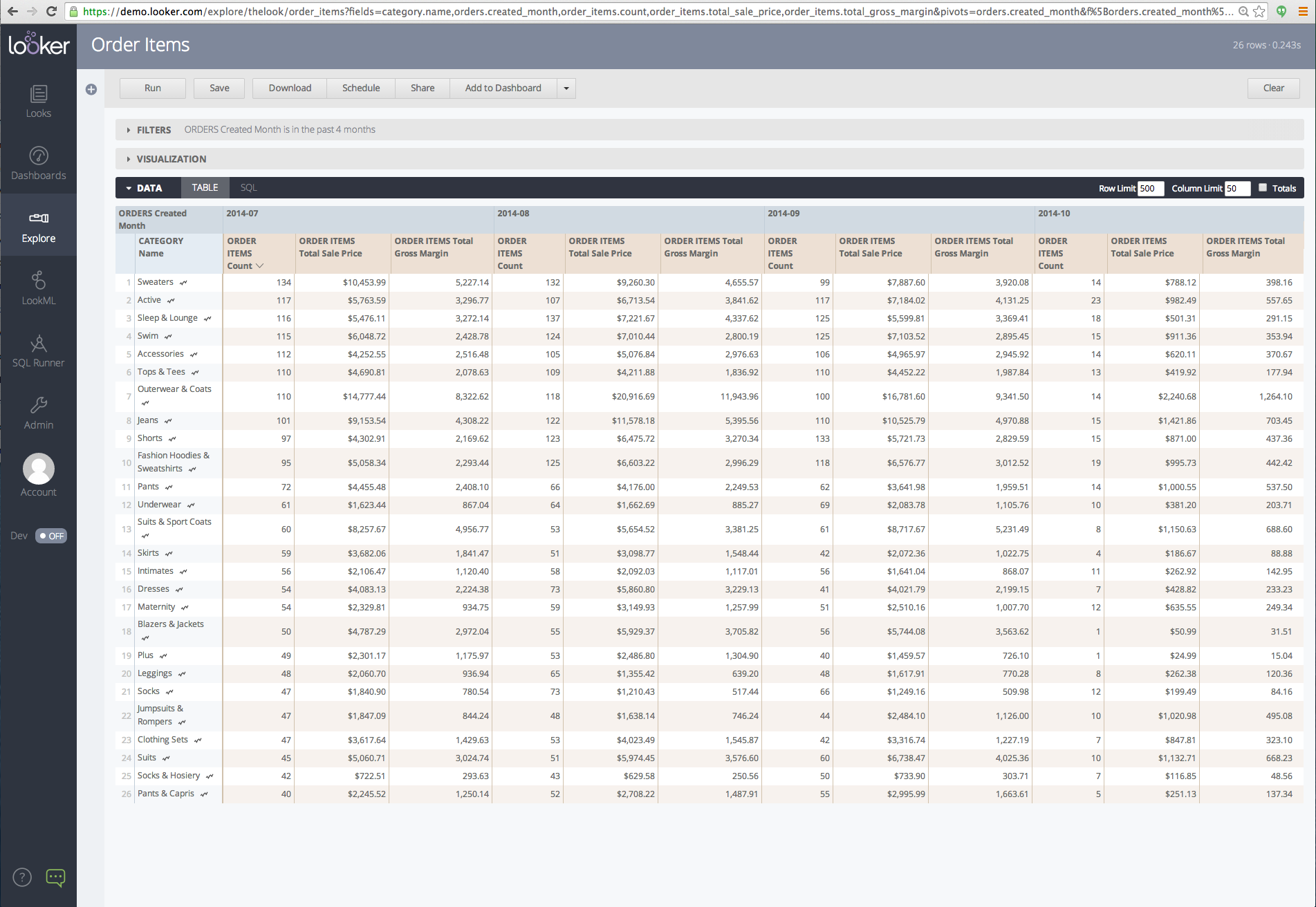
Because you're connected to the source data when working with Looker, each chart is automatically capable of drilling down as far as you'd like to go.
Looker Demo - East to build dashboards.
Search and explore through your data, build dashboards and reports, and share everything easily and quickly.
Looker Demo - Queries and reports are drag & drop.
Select measures and dimensions to sort the data you want, filter, drill down and pivot to refine the results, and quickly flip through visualization types to arrive at the best presentation.
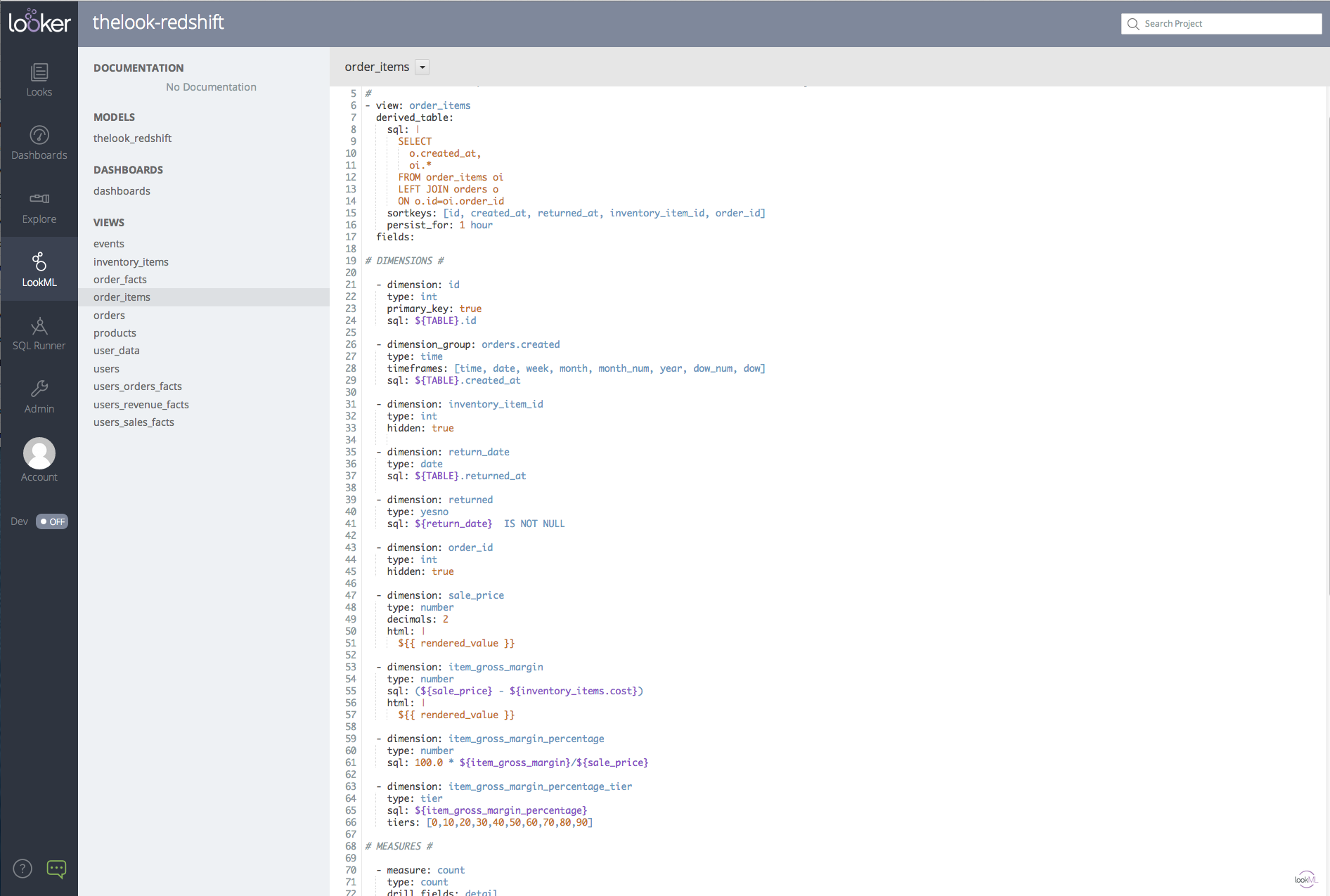
Looker Demo - LookML means no more hand coding SQL.
LookML is a easy-to-use modeling language for encapsulating business logic, defining important metrics once and then reusing them throughout the model. It provides an agile data environment where your data keeps up with your ever-evolving business.
Play Looker Video
Play Looker Video
Play Looker Video
Play Looker Video
Product Avatar Image

Have you used Looker before?

Answer a few questions to help the Looker community

Looker Reviews (1,562)

View 2 Video Reviews
Reviews

Looker Reviews (1,562)

View 2 Video Reviews
4.4
1,563 reviews

Pros & Cons

Generated from real user reviews
View All Pros and Cons
Search reviews
Filter Reviews
Clear Results
G2 reviews are authentic and verified.
Avyan S.
AS
Software Developer
Small-Business (50 or fewer emp.)
"Putting our analytics under one roof - Looker helped us bake it, not just stir it."
What do you like best about Looker?

What impressed me first is how Looker let us model our metrics once (using LookML) and the let everyone, from engineers to product leads to content folks use those same canonical definitions. The consistency cut down "which report has the right number?" arguments. The "self-service" fron-end and business users was a win: Once the data team defined the model, product/marketing folks could explore and build their own dashboards without needing to learn SQL - accelerating insights. Review collected by and hosted on G2.com.

What do you dislike about Looker?

While self-service aspect is strong onboarding non-technical users still required training: concepts like "views", "explores", "joins" are slightly abstract and some stakeholders got frustrated with what does this drop-down actually mean, moments. Review collected by and hosted on G2.com.

Vishal D.
VD
QA Tester
Small-Business (50 or fewer emp.)
"Excellent for Data Exploration Once You Get Past the Learning Curve"
What do you like best about Looker?

I like that Looker makes it easy to explore and understand data. LookML helps keep reports and metrics consistent, and the connection with Google Cloud makes managing data smoother. I also like that you can dig into the details right from dashboards to find insights quickly. Review collected by and hosted on G2.com.

What do you dislike about Looker?

Looker can be hard to learn at first, especially with LookML. Some charts and visuals are limited, and it can slow down with big datasets. The interface isn’t always friendly for beginners, and setup usually needs help from a developer. Better self-service guides would also make it easier to get started. Review collected by and hosted on G2.com.

Brij  M.
BM
Technical Product Manager
Management Consulting
Enterprise (> 1000 emp.)
"It was a decent product for analytics reporting"
What do you like best about Looker?

Looker is a highly convenient tool for anyone looking to begin their analytics journey. It makes it simple and even enjoyable to compare different user journeys across various stages. While working as a product analytics engineer and reporting on digital sales journeys, I found it much easier to use. The drag-and-drop functionality allowed me to quickly create the reporting dashboards I needed within minutes. Review collected by and hosted on G2.com.

What do you dislike about Looker?

Integrating with platforms outside the Google ecosystem can sometimes be a bit challenging. While there are various methods to address and overcome these issues, the process often takes longer to set up. I have also noticed that if your flows are not properly optimized, you might experience latency problems. On several occasions, I found it quite inconvenient to wait for the data to load on the dashboard. Review collected by and hosted on G2.com.

deneth p.
DP
Product Development Engineer
Small-Business (50 or fewer emp.)
"Powerful Business Intelligence Tool for Data-Driven Decisions"
What do you like best about Looker?

What I like best about Looker is its ability to turn complex datasets into clear, interactive dashboards and reports. It makes data exploration much easier and allows me to drill down into details without needing advanced SQL skills. The platform helps teams collaborate by sharing insights quickly, and the customizable dashboards give a clear view of business performance. Its integration with Google Cloud also makes it scalable and reliable. Review collected by and hosted on G2.com.

What do you dislike about Looker?

Looker can feel overwhelming for new users because of its steep learning curve, especially when working with LookML. The setup and implementation require technical expertise, which might not be ideal for smaller teams. At times, the loading speed for very large datasets can be slow. More intuitive drag-and-drop features would make it easier for non-technical users. Review collected by and hosted on G2.com.

Atul S.
AS
Software Engineer
Computer Software
Mid-Market (51-1000 emp.)
"From Data Chaos to Clarity: My Experience with Looker Studio"
What do you like best about Looker?

Looker Studio is very easy to use and simple to implement — I was able to build dashboards quickly without much setup. I use it frequently because of the wide range of features and smooth integration with Google tools. Sharing is effortless, and while customer support is mostly community-driven, it’s usually enough for common issues. Review collected by and hosted on G2.com.

What do you dislike about Looker?

Sometimes Looker Studio can feel a bit slow, especially when handling large datasets or complex dashboards. While the basic features are great, some advanced customizations take extra effort or aren’t very straightforward. Also, customer support isn’t very direct — it’s mostly community-driven, so finding solutions can take time. Aside from that, it’s a solid tool once you get used to it. Review collected by and hosted on G2.com.

Sidath P.
SP
Software Engineer
Small-Business (50 or fewer emp.)
"Powerful Data Visualization and Analytics Platform"
What do you like best about Looker?

Looker’s ability to turn raw data into interactive dashboards and clear visualizations is its strongest point. The modeling layer with LookML allows for consistent metrics definitions across the organization, reducing discrepancies in reporting. I also like how seamless it is to share reports with non-technical colleagues, ensuring decision-making is always based on the same source of truth. Its integration with cloud databases and the ability to embed dashboards into applications is extremely helpful. Review collected by and hosted on G2.com.

What do you dislike about Looker?

The initial learning curve for LookML can be steep for new users who don’t have technical backgrounds. Dashboard loading times can sometimes be slow when handling large datasets. Additionally, pricing can be high for smaller organizations, and some advanced customizations require deeper technical knowledge, which reduces accessibility for non-technical users. Review collected by and hosted on G2.com.

Pradhyum U.
PU
Data Analyst
Accounting
Small-Business (50 or fewer emp.)
"Easy-to-use platform with seamless integration and clear visualizations"
What do you like best about Looker?

What I like most about Looker is its ease of use — the interface feels intuitive, so even non-technical users on my team can create and understand dashboards without heavy training. The ease of implementation was impressive too; once data sources were connected, we were able to start building dashboards quickly. I also value the ease of integration — Looker connects seamlessly with Google tools like BigQuery, Analytics, and Sheets, while also working well with external sources such as Excel or SQL databases. The number of features strikes a good balance: from filters and drill-downs to LookML for reusable data models, it’s powerful without being overwhelming.I find myself using Looker regularly, often on a daily basis, which shows how naturally it fits into my workflow and decision-making process. Review collected by and hosted on G2.com.

What do you dislike about Looker?

The main challenge is the learning curve with LookML. While it’s incredibly powerful, less technical users may struggle at first. Large datasets can sometimes slow dashboard load times, and certain advanced visualizations don’t feel as polished compared to other BI tools. I’d also like to see more documentation and faster customer support responses on complex issues. Review collected by and hosted on G2.com.

Mitusha  A.
MA
Conversation AI Developer
Enterprise (> 1000 emp.)
"Great tool to visualise data from BigQuery"
What do you like best about Looker?

I have been using Looker for a long time for a project

1. It is a great tool to visualise data of chatlogs from Dialogflow CX

2. Great tools, but using SQL querying knowledge

3. The paid looker has AI features

4. Easy to use for tech users with SQL proficiency and integration with BigQuery Review collected by and hosted on G2.com.

What do you dislike about Looker?

1. Not feasible for non-tech users because of the SQL query, connection

2. The calculations for x, y axes, drag and drop, are a bit complicated

3. The data source pulling from the BigQuery bucket could be a bit complicated for beginners Review collected by and hosted on G2.com.

Verified User in Computer Software
UC
Mid-Market (51-1000 emp.)
"Flexible Visualizations and Strong Integrations, But UI Feels Outdated"
What do you like best about Looker?

One aspect I really appreciate is the flexibility in data visualization, as it allows you to select the type of graphic or view that best fits the specific report you are working on.

Additionally, the integration with other systems, such as Salesforce, is a significant advantage. This feature makes it possible to use Salesforce as a data provider for our queries, which greatly enhances the overall functionality and quality of insights provided. Review collected by and hosted on G2.com.

What do you dislike about Looker?

The UI and UX feel somewhat outdated, especially when compared to other tools such as Metabase. It would benefit from a more modern design. Review collected by and hosted on G2.com.

Raghunath S.
RS
Digital Marketing Executive
Small-Business (50 or fewer emp.)
"Great for Building Custom Reports and It's Free"
What do you like best about Looker?

As an SEO professional, what I like best about Looker Studio is its ability to combine data from multiple sources like GSC, GA4, and Google Sheets into a single unified dashboard. This helps me track keyword performance, landing page metrics, and traffic trends all in one place. The ability to create automated, client friendly SEO reports that update in real-time saves a lot of manual effort. Plus, the flexibility to customize charts, tables, and scorecards helps present complex SEO data in clean and visual way. Review collected by and hosted on G2.com.

What do you dislike about Looker?

It can get frustrating when dealing with large datasets or multiple connectors. Reports tend to load slowly or even break if the data source is too heavy, especially when working with GA4 or BigQuery. Review collected by and hosted on G2.com.

Pricing Insights

Averages based on real user reviews.

Time to Implement

2 months

Return on Investment

11 months

Average Discount

15%

Perceived Cost

$$$$$

How much does Looker cost?

Data powered by BetterCloud.

Estimated Price

$$k - $$k

Per Year

Based on data from 66 purchases.

Looker Comparisons
Product Avatar Image
Sisense
Compare Now
Product Avatar Image
Looker Studio
Compare Now
Product Avatar Image
Domo
Compare Now
Looker Features
Reports Interface
Steps to Answer
Graphs and Charts
Calculated Fields
Data Column Filtering
Data Discovery
Predictive Analytics
Data Visualization
Big Data Services
Data Modeling
Product Avatar Image