Best Document Databases

How Many Document Databases Products Does G2 Track?

Total Products under this Category: 65

Category Stats (Sep 2026)

  • Average Rating: 4.23/5 The average rating of products in this category, based on all submitted ratings
  • Top Trending Product: Elastic Stack (+0.11%) - Among all products in this category, Elastic Stack recorded the largest rating increase compared to last month

Last updated: September 26, 2026

How Does G2 Rank Document Databases Products?

Why You Can Trust G2's Software Rankings:

  • 30 Analysts and Data Experts
  • 3,300+ Authentic Reviews
  • 65+ Products
  • Unbiased Rankings

G2's software rankings are built on verified user reviews, rigorous moderation, and a consistent research methodology maintained by a team of analysts and data experts. Each product is measured using the same transparent criteria, with no paid placement or vendor influence. While reviews reflect real user experiences, which can be subjective, they offer valuable insight into how software performs in the hands of professionals. Together, these inputs power the G2 Score, a standardized way to compare tools within every category.

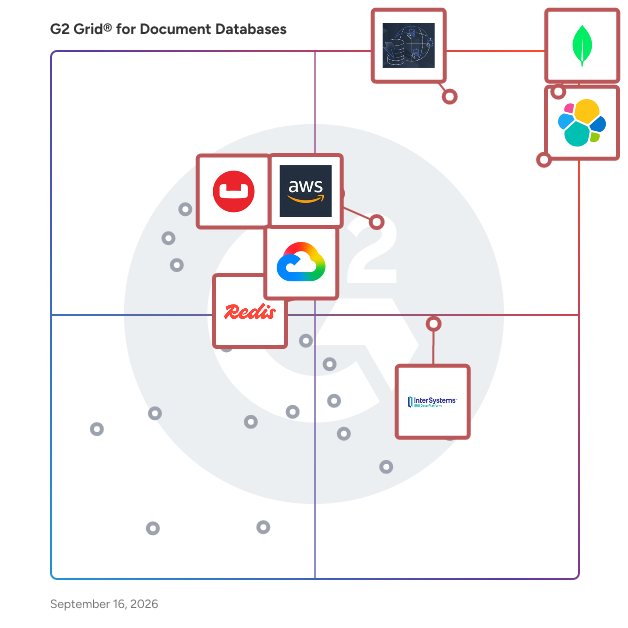
G2 Grid® for Document Databases

G2 Grid® for Document Databases plotting products by satisfaction and market presence

Highlighted products: MongoDB Atlas, Elasticsearch, Amazon DynamoDB, Amazon DocumentDB, Google Cloud Firestore, InterSystems IRIS, Redis Software, and Couchbase.

Underlying data: [Grid® JSON](https://www.g2.com/categories/document-databases/grids.json?focus%5B%5D=mongodb-atlas&focus%5B%5D=elastic-elasticsearch&focus%5B%5D=amazon-web-services-aws-amazon-dynamodb&focus%5B%5D=amazon-documentdb&focus%5B%5D=google-cloud-firestore&focus%5B%5D=intersystems-iris&focus%5B%5D=redis-software&focus%5B%5D=couchbase)

MongoDB Atlas

MongoDB Atlas is a developer data platform that provides a tightly integrated collection of data and application infrastructure building blocks to enable enterprises to quickly deploy bespoke architectures to address any application need. Atlas supports transactional, full-text search, vector search, time series and stream processing application use cases across mobile, distributed, event-driven, and serverless architectures.

Average Rating: 4.5/5.0

Total Reviews: 852

How Do G2 Users Rate MongoDB Atlas?

  • Has the product been a good partner in doing business?: 8.6/10 (Category avg: 8.5/10)
  • Query Optimization: 8.5/10 (Category avg: 8.0/10)
  • Data Model: 9.0/10 (Category avg: 8.5/10)
  • Operating Systems: 9.0/10 (Category avg: 8.3/10)

Who Is the Company Behind MongoDB Atlas?

  • Seller: MongoDB
  • Year Founded: 2007
  • HQ Location: New York
  • Twitter: @MongoDB
    503,172 Twitter followers
  • LinkedIn® Page: www.linkedin.com
    8,041 employees on LinkedIn®
  • Ownership: NASDAQ: MDB

Who Uses This Product?

  • Who Uses This: Software Engineer, Senior Software Engineer
  • Top Industries: Computer Software, Information Technology and Services
  • Company Size: 46% Small, 29% Large

What Do G2 Reviewers Say About MongoDB Atlas?

AI-generated summary from verified user reviews

Pros
  • Users appreciate the intuitive UI of MongoDB Atlas, enhancing their database management experience significantly.
  • Users value the scalability of MongoDB Atlas, noting its ease in managing clusters and diverse data structures.
  • Users appreciate the intuitive UI of MongoDB Atlas, which simplifies database management and enhances user experience.
  • Users appreciate the intuitive UI and documentation of MongoDB Atlas, enhancing user-friendly database management and efficiency.
  • Users highly value the reliability of MongoDB Atlas, consistently appreciating its excellent uptime and seamless performance.
Cons
  • Users find the pricing of MongoDB Atlas excessively high, leading to frustration with unexpected costs and poor performance.
  • Users express frustration over unclear pricing structures, leading to unexpected costs and insufficient support throughout their experience.
  • Users find MongoDB Atlas expensive, citing high costs for performance, support, and complex billing issues.
  • Users experience high memory usage with MongoDB Atlas, leading to performance issues and unexpected costs.
  • Users frequently report latency issues and unwanted slowdowns in performance during data operations with MongoDB Atlas.

What Are Recent G2 Reviews of MongoDB Atlas?

What Are G2 Users Discussing About MongoDB Atlas?

Elasticsearch

Build next generation search experiences for your customers and employees that support your organization’s technology objectives. Elasticsearch gives developers a flexible toolkit to build AI-powered search applications with an extensible platform that also provides out of the box capabilities Save development cycles and get upgraded search to market faster. Elasticsearch is the world’s most popular search engine, backed by a robust developer community. Elastic’s platform lets you ingest any data source, build modern search experiences that integrate with large language models and generative AI, and visualize analytics for data-driven decision-making and insights. Our consistent investments in machine learning help developers stay ahead of the curve with the fast, highly relevant search, at scale. -- Flexible platform and toolkit to deliver powerful search functionality regardless of development resources and technology objectives. Our open platform delivers consistent functionality for cloud, hybrid, or on-prem deployments with exceptional performance, reliability, and scalability. -- Built-in search analytics and visualization tools give teams access to search data and real-time dashboards for optimizing search results and operations. Non-tech teams can tune search experiences too–no development team needed. -- Next level search relevance using textual search, vector search, hybrid, and semantic search and machine learning model flexibility. Powerful capabilities like a vector database provide the foundation for creating, storing, and searching embeddings to capture the context of your unstructured data. Use machine-learning enabled inference at data ingestion, and bring your own model - open or proprietary - to deliver the best, industry-specific results.

Average Rating: 4.5/5.0

Total Reviews: 289

How Do G2 Users Rate Elasticsearch?

  • Has the product been a good partner in doing business?: 8.9/10 (Category avg: 8.5/10)
  • Query Optimization: 8.9/10 (Category avg: 8.0/10)
  • Data Model: 9.5/10 (Category avg: 8.5/10)
  • Operating Systems: 9.0/10 (Category avg: 8.3/10)

Who Is the Company Behind Elasticsearch?

  • Seller: Elastic
  • Company Website:
  • Year Founded: 2012
  • HQ Location: San Francisco, CA
  • Twitter: @elastic
    65,200 Twitter followers
  • LinkedIn® Page: www.linkedin.com
    10,457 employees on LinkedIn®

Who Uses This Product?

  • Who Uses This: Software Engineer, Senior Software Engineer
  • Top Industries: Computer Software, Information Technology and Services
  • Company Size: 38% Medium, 33% Large

What Do G2 Reviewers Say About Elasticsearch?

AI-generated summary from verified user reviews

Pros
  • Users highlight the ease of use of Elasticsearch, making integration and application monitoring seamless and efficient.
  • Users commend the impressive speed of Elasticsearch, allowing efficient handling of large datasets and quick queries.
  • Users love the fast search capabilities of Elasticsearch, allowing for efficient troubleshooting and real-time analytics.
  • Users appreciate the blazing fast performance of Elasticsearch, enhancing their search experiences significantly.
  • Users value Elasticsearch for its powerful search and aggregation capabilities, enhancing performance and workflow efficiency immensely.
Cons
  • Users find Elasticsearch expensive to scale, especially with high data volumes and necessary commercial licenses.
  • Users find Elasticsearch's required expertise challenging, citing complexity and resource-intensive setup as significant hurdles.
  • Users find the learning difficulty of Elasticsearch overwhelming, especially for beginners navigating its complexity and configuration.
  • Users find Elasticsearch's interface to be not user-friendly, complicating search functionality and requiring extensive tuning for performance.
  • Users find difficult learning with Elasticsearch due to its complex configuration and confusing documentation, especially for beginners.

What Are Recent G2 Reviews of Elasticsearch?

Amazon DynamoDB

Amazon DynamoDB is a pioneering NoSQL, fully managed, serverless database with limitless scalability and single-digit millisecond latency performance enabling customers to develop modern, microservice-based applications through a simple API. Customers enjoy the benefits of DynamoDB’s fully-managed service including broad compliance standards, security integration with AWS Identity and Access Management and numerous disaster recovery services. With DynamoDB Global Tables, customers have a 99.999% highly available, multi-Region, multi-active database supporting local reads and writes for globally distributed users. DynamoDB provides cost management features such as scale-to-zero, Time to Live (TTL) for aging data out, and multiple pricing models including a free tier.

Average Rating: 4.4/5.0

Total Reviews: 498

How Do G2 Users Rate Amazon DynamoDB?

  • Has the product been a good partner in doing business?: 8.9/10 (Category avg: 8.5/10)
  • Query Optimization: 8.4/10 (Category avg: 8.0/10)
  • Data Model: 8.8/10 (Category avg: 8.5/10)
  • Operating Systems: 8.4/10 (Category avg: 8.3/10)

Who Is the Company Behind Amazon DynamoDB?

  • Seller: Amazon Web Services (AWS)
  • Year Founded: 2006
  • HQ Location: Seattle, WA
  • Twitter: @awscloud
    2,232,483 Twitter followers
  • LinkedIn® Page: www.linkedin.com
    147,094 employees on LinkedIn®
  • Ownership: NASDAQ: AMZN

Who Uses This Product?

  • Who Uses This: Software Engineer, Senior Software Engineer
  • Top Industries: Computer Software, Information Technology and Services
  • Company Size: 35% Large, 34% Medium

What Do G2 Reviewers Say About Amazon DynamoDB?

AI-generated summary from verified user reviews

Pros
  • Users value the exceptional scalability of Amazon DynamoDB, enabling consistent performance during unpredictable workloads and high traffic.
  • Users appreciate the ease of use of Amazon DynamoDB, benefiting from its fully managed and scalable features.
  • Users appreciate the cost efficiency of Amazon DynamoDB, saving time and reducing operational efforts significantly.
  • Users value the low-latency performance of Amazon DynamoDB, ensuring rapid responses for high-traffic applications.
  • Users value the fully managed services of Amazon DynamoDB, significantly reducing operational burdens and enhancing efficiency.
Cons
  • Users express concerns about the expensive costs associated with DynamoDB's pay-per-request model and configuration complexities.
  • Users face challenges with query complexity, as inefficient designs can lead to high costs and throttling issues.
  • Users find Amazon DynamoDB complex for newcomers, requiring extensive learning and proper data modeling to avoid issues.
  • Users find the learning curve steep, making data modeling and queries challenging for newcomers to DynamoDB.
  • Users face cost management challenges with DynamoDB, needing careful optimization to prevent unexpected expenses.

What Are Recent G2 Reviews of Amazon DynamoDB?

What Are G2 Users Discussing About Amazon DynamoDB?

Amazon DocumentDB

Amazon DocumentDB (with MongoDB compatibility) is a database service that is purpose-built for JSON data management at scale, fully managed and integrated with AWS, and enterprise-ready with high durability. Amazon DocumentDB is designed from the ground-up to give you the scalability and durability you need when operating mission-critical MongoDB workloads. In Amazon DocumentDB, storage scales automatically up to 64TiB without any impact to your application. It supports millions of requests per second with up to 15 low latency read replicas in minutes, without any application downtime, regardless of the size of your data. Amazon DocumentDB now supports Global Clusters. Global Clusters is a new feature that provides disaster recovery from region-wide outages and enables low-latency global reads by allowing reads from the nearest Amazon DocumentDB cluster. Amazon DocumentDB is designed for 99.99% availability and replicates six copies of your data across three AWS Availability Zones (AZs). You can use AWS Database Migration Service (DMS) for free (for six months) to easily migrate your self-managed MongoDB databases to Amazon DocumentDB with virtually no downtime.

Average Rating: 4.3/5.0

Total Reviews: 42

How Do G2 Users Rate Amazon DocumentDB?

  • Has the product been a good partner in doing business?: 8.5/10 (Category avg: 8.5/10)
  • Query Optimization: 8.7/10 (Category avg: 8.0/10)
  • Data Model: 9.4/10 (Category avg: 8.5/10)
  • Operating Systems: 8.7/10 (Category avg: 8.3/10)

Who Is the Company Behind Amazon DocumentDB?

  • Seller: Amazon Web Services (AWS)
  • Year Founded: 2006
  • HQ Location: Seattle, WA
  • Twitter: @awscloud
    2,232,483 Twitter followers
  • LinkedIn® Page: www.linkedin.com
    147,094 employees on LinkedIn®
  • Ownership: NASDAQ: AMZN

Who Uses This Product?

  • Top Industries: Information Technology and Services, Computer Software
  • Company Size: 39% Small, 34% Large

What Do G2 Reviewers Say About Amazon DocumentDB?

AI-generated summary from verified user reviews

Pros
  • Users value the reliable cloud computing services provided by Amazon DocumentDB for their data management needs.
  • Users appreciate the easy integration with AWS services that enhances their experience and functionality with DocumentDB.
  • Users value the easy integration with AWS services offered by Amazon DocumentDB, enhancing overall functionality and flexibility.
  • Users value the reliable cloud computing services provided by Amazon DocumentDB, ensuring consistent performance and uptime.
Cons
  • Users find it very complicated to understand Amazon DocumentDB, which can hinder effective usage and implementation.
  • Users point out the dependency issues with Amazon DocumentDB, making migration to other databases challenging and costly.
  • Users find Amazon DocumentDB to be expensive compared to other DBaaS providers, complicating migration and increasing operational challenges.

What Are Recent G2 Reviews of Amazon DocumentDB?

What Are G2 Users Discussing About Amazon DocumentDB?

FAQs About Document Databases

Generated using AI

Last updated: June 3, 2026

Which Document Databases platforms support ACID transactions and data consistency guarantees at scale

Based on G2 reviews, these products are most often mentioned for consistency, transactions, or reliable scaling needs.

  • MongoDB — flexible schema with replication and sharding.
  • Amazon DynamoDB — transactional workloads with managed high availability.
  • Elasticsearch — resilient distributed indexing and scalable search.
  • MongoDB Atlas — managed clusters with backups and autoscaling.

Which Document Databases platforms offer the fastest query performance and automatic sharding capabilities

Based on G2 reviews, these products stand out for fast retrieval, scaling behavior, and distributed data handling.

Finding Document Databases platforms that handle unstructured JSON data and eliminate the need for complex schema redesigns

According to verified users, this is one of the clearest strengths of document databases. Reviewers repeatedly describe storing JSON-like or semi-structured data without rigid tables, which helps teams move faster when requirements change. Across the recent reviews, buyers highlight easier iteration, fewer schema migrations, simpler API alignment, and less time spent reshaping application data. They also mention tradeoffs: governance can become harder without strong validation, joins may feel less natural than in relational systems, and indexing still matters for performance. For teams working with evolving application data, logs, profiles, events, or mixed document structures, flexibility is the most consistent benefit described.

What are document databases

Document databases are systems built to store data as flexible documents rather than fixed tables. In the recent G2 reviews for this category, users most often describe working with JSON-like or BSON-style records that can evolve without constant schema redesign. That makes them useful when application data changes frequently, when teams want faster development cycles, or when they need to store semi-structured and unstructured information more naturally. Reviewers also connect document databases with horizontal scaling, replication, indexing, aggregation, and easier alignment between application objects and stored data. At the same time, users note they can require careful indexing, data governance, and planning for relationships or strict consistency needs.

How do teams use Document Databases for real-time analytics

G2 reviewers mention using document databases for real-time analytics by storing operational data in flexible document formats and then querying it quickly with indexes, aggregations, or search features. Recent reviews describe teams analyzing logs, event streams, dashboards, API data, customer activity, and application records without repeatedly redesigning schemas as inputs change. Buyers also highlight faster iteration because data can stay close to the structures used in code, which reduces transformation work before analysis. Across the review set, real-time analytics use cases are usually tied to quick retrieval, scalable clustering or sharding, and support for evolving datasets. The main caution reviewers raise is that sustained performance depends on thoughtful indexing and query design.

Google Cloud Firestore

Cloud Firestore is a NoSQL document database that lets you easily store, sync, and query data for your mobile and web apps—at global scale.

Average Rating: 4.2/5.0

Total Reviews: 96

How Do G2 Users Rate Google Cloud Firestore?

  • Has the product been a good partner in doing business?: 8.4/10 (Category avg: 8.5/10)
  • Query Optimization: 7.9/10 (Category avg: 8.0/10)
  • Data Model: 8.7/10 (Category avg: 8.5/10)
  • Operating Systems: 8.9/10 (Category avg: 8.3/10)

Who Is the Company Behind Google Cloud Firestore?

  • Seller: Google
  • Year Founded: 1998
  • HQ Location: Mountain View, CA
  • Twitter: @google
    31,899,995 Twitter followers
  • LinkedIn® Page: www.linkedin.com
    301,144 employees on LinkedIn®
  • Ownership: NASDAQ:GOOG

Who Uses This Product?

  • Top Industries: Computer Software, Information Technology and Services
  • Company Size: 53% Small, 30% Medium

What Do G2 Reviewers Say About Google Cloud Firestore?

AI-generated summary from verified user reviews

Pros
  • Users find the API integration fast and efficient, allowing seamless app connections and real-time updates.
  • Users value the scalability and wide service offerings of Google Cloud Firestore, enhancing flexibility for diverse applications.
  • Users value the flexibility of Google Cloud Firestore, enabling customized solutions for diverse application needs.
  • Users highlight the commitment to innovation in Google Cloud Firestore, enhancing their development experience and efficiency.
  • Users benefit from the seamless integration with Google products, enhancing their overall workflow and productivity.
Cons
  • Users find the pricing expensive, especially when needing to upgrade beyond the free tier of Firestore.
  • Users find the unclear pricing of Firestore confusing, especially when costs increase after the free tier.

What Are Recent G2 Reviews of Google Cloud Firestore?

What Are G2 Users Discussing About Google Cloud Firestore?

InterSystems IRIS

InterSystems IRIS is a complete cloud-first data platform that includes a multi-model transactional data management engine, an application development platform, and interoperability engine, and an open analytics platform. It is the next generation of our proven data management software.It includes the capabilities of InterSystems Cache and Ensemble, plus a wealth of exciting new capabilities to make it easy to build and deploy cloud based, analytics-intensive enterprise applications with even greater performance and scalability. InterSystems IRIS provides a set of APIs to operate with transactional persistent data simultaneously: key-value, relational, object, document, multidimensional. Data can be managed by SQL, Java, node.js, .NET, C++, Python, and native server-side ObjectScript language. InterSystems IRIS includes an Interoperability engine and modules to build AI solutions. InterSystems IRIS provides features for horizontal scalability (sharding, ECP) and provides High Availability features, Business intelligence, transaction support, and backup.

Average Rating: 4.6/5.0

Total Reviews: 61

How Do G2 Users Rate InterSystems IRIS?

  • Has the product been a good partner in doing business?: 8.8/10 (Category avg: 8.5/10)
  • Query Optimization: 9.7/10 (Category avg: 8.0/10)
  • Data Model: 9.4/10 (Category avg: 8.5/10)
  • Operating Systems: 8.9/10 (Category avg: 8.3/10)

Who Is the Company Behind InterSystems IRIS?

  • Seller: InterSystems
  • Year Founded: 1978
  • HQ Location: Cambridge, MA
  • Twitter: @InterSystems
    61,310 Twitter followers
  • LinkedIn® Page: www.linkedin.com
    2,151 employees on LinkedIn®

Who Uses This Product?

  • Top Industries: Computer Software, Hospital & Health Care
  • Company Size: 46% Small, 32% Medium

What Do G2 Reviewers Say About InterSystems IRIS?

AI-generated summary from verified user reviews

Pros
  • Users value the powerful features and flexibility of InterSystems IRIS, enhancing overall performance and user experience.
  • Users find InterSystems IRIS to be very easy to use, with a clean interface and helpful documentation.
  • Users commend the excellent performance and resource efficiency of InterSystems IRIS, enhancing reliability and speed in data handling.
  • Users praise the excellent customer support from InterSystems IRIS, appreciating timely responses and helpful assistance.
  • Users value the easy integrations of InterSystems IRIS, enabling seamless connectivity with various systems and flexibility.
Cons
  • Users find the difficult learning curve of InterSystems IRIS challenging, particularly for those new to the platform.
  • Users note that IRIS is not cheap, with licensing costs and hardware requirements posing challenges for smaller projects.
  • Users find the insufficient documentation for advanced scenarios complicates learning and effective use of InterSystems IRIS.
  • Users find the learning curve steep, particularly with advanced features and complex configurations, which can hinder initial experiences.
  • Users find the poor documentation for advanced scenarios challenging, making it hard to navigate complex features.

What Are Recent G2 Reviews of InterSystems IRIS?

What Are G2 Users Discussing About InterSystems IRIS?

Redis Software

Redis Software is our advanced solution delivering unmatched speed and reliability for on-prem and private cloud environments. It gives you full control over your deployment, ensuring high performance and scalability to meet your specific needs. Redis Software builds on the speed and reliability of Redis Community Edition with advanced features like active-active geo-distribution, advanced query and search capabilities, automated data synchronization, and superior security features. These enhancements provide enterprise-grade performance, reliability, and security, making Redis Software the ideal choice for production-grade applications.

Average Rating: 4.5/5.0

Total Reviews: 132

How Do G2 Users Rate Redis Software?

  • Has the product been a good partner in doing business?: 8.5/10 (Category avg: 8.5/10)
  • Query Optimization: 9.2/10 (Category avg: 8.0/10)
  • Data Model: 8.3/10 (Category avg: 8.5/10)
  • Operating Systems: 8.8/10 (Category avg: 8.3/10)

Who Is the Company Behind Redis Software?

  • Seller: Redis
  • Year Founded: 2011
  • HQ Location: San Francisco, CA
  • Twitter: @Redisinc
    44,002 Twitter followers
  • LinkedIn® Page: www.linkedin.com
    1,542 employees on LinkedIn®

Who Uses This Product?

  • Who Uses This: Software Engineer, Senior Software Engineer
  • Top Industries: Computer Software, Information Technology and Services
  • Company Size: 54% Small, 26% Medium

What Do G2 Reviewers Say About Redis Software?

AI-generated summary from verified user reviews

Pros
  • Users love Redis Software as a main cache provider, highlighting its ease of implementation in various projects.
  • Users appreciate the cost efficiency of Redis Software, benefiting from reduced RAM usage and smooth setup processes.
  • Users appreciate the customizability of Redis Software, allowing seamless integration and efficient management of resources and traffic.
  • Users appreciate the efficient data storage capabilities of Redis Software, enabling seamless handling of high traffic and large datasets.
  • Users find the ease of setup with Redis Software ideal for Python, Data, and Large Language Model projects.
Cons
  • Users express concerns over data size limitations in Redis, affecting backup capabilities and large-scale application performance.
  • Users find the expensive licensing fees of Redis Software challenging for SMBs compared to open-source alternatives.
  • Users find limited chart features hinder effective data visualization and analysis within Redis Software.
  • Users find the poor UI of Redis Software struggles with scalability, impacting deployment efficiency and requiring additional tools.
  • Users report slow performance during embedding with large data sets, impacting the efficiency of semantic search.

What Are Recent G2 Reviews of Redis Software?

What Are G2 Users Discussing About Redis Software?

Couchbase

Couchbase’s operational data platform for AI is a scalable foundation for enterprise operational, analytical, mobile and AI workloads that replaces legacy infrastructure and data services.

Average Rating: 4.3/5.0

Total Reviews: 142

How Do G2 Users Rate Couchbase?

  • Has the product been a good partner in doing business?: 8.3/10 (Category avg: 8.5/10)
  • Query Optimization: 8.8/10 (Category avg: 8.0/10)
  • Data Model: 8.8/10 (Category avg: 8.5/10)
  • Operating Systems: 8.6/10 (Category avg: 8.3/10)

Who Is the Company Behind Couchbase?

  • Seller: Couchbase
  • Company Website:
  • Year Founded: 2009
  • HQ Location: San Jose, CA
  • Twitter: @couchbase
    136,110 Twitter followers
  • LinkedIn® Page: www.linkedin.com
    849 employees on LinkedIn®

Who Uses This Product?

  • Who Uses This: Senior Software Engineer, Software Engineer
  • Top Industries: Computer Software, Information Technology and Services
  • Company Size: 39% Small, 34% Large

What Do G2 Reviewers Say About Couchbase?

AI-generated summary from verified user reviews

Pros
  • Users find Couchbase easy to use, appreciating its simple implementation and fast real-time data access.
  • Users appreciate the scalability of Couchbase, enabling efficient data management and exceptional performance across applications.
  • Users love the incredible speed of Couchbase, significantly enhancing performance for large datasets and transactions.
  • Users value the flexibility of Couchbase, enabling diverse data storage and seamless integration for various applications.
  • Users value the MongoDB compatibility of Couchbase, appreciating its ease of use and smooth integration.
Cons
  • Users find the complex configuration of Couchbase challenging, especially without dedicated database administrators or expertise.
  • Users find the difficult learning curve of Couchbase challenging, which can complicate setup and usage for novices.
  • Users find the complexity of setup and management in Couchbase to be a significant challenge and hurdle.
  • Users find the limited community growth of Couchbase hampers support and implementation efforts for new users.
  • Users feel the UI is complicated, highlighting a need for improvements to enhance the overall user experience.

What Are Recent G2 Reviews of Couchbase?

What Are G2 Users Discussing About Couchbase?

AceBase realtime database

A fast, low memory, transactional, index & query enabled NoSQL database engine and server for node.js and browser with realtime data change notifications.

Average Rating: 4.6/5.0

Total Reviews: 17

How Do G2 Users Rate AceBase realtime database?

  • Has the product been a good partner in doing business?: 8.3/10 (Category avg: 8.5/10)
  • Query Optimization: 8.8/10 (Category avg: 8.0/10)
  • Data Model: 9.2/10 (Category avg: 8.5/10)
  • Operating Systems: 9.4/10 (Category avg: 8.3/10)

Who Is the Company Behind AceBase realtime database?

Who Uses This Product?

  • Top Industries: Computer Software
  • Company Size: 44% Medium, 39% Small

What Are Recent G2 Reviews of AceBase realtime database?

What Are G2 Users Discussing About AceBase realtime database?

RavenDB

RavenDB is a fully ACID-compliant, multi-model NoSQL document database designed for developers building high-performance, distributed applications. It delivers fast reads and writes, native full-text and vector search for AI workloads, and automatic indexing for low-latency queries. With real-time data replication, horizontal scaling, built-in data encryption, and seamless cloud or on-premise deployment options, RavenDB supports mission-critical systems with minimal operational overhead. Trusted by over 12,000 organizations—including Toyota, Verizon, and Rakuten Kobo—RavenDB is ideal for teams that need a reliable, developer-friendly database for microservices, cloud-native architectures, and AI-powered search.

Average Rating: 4.4/5.0

Total Reviews: 13

How Do G2 Users Rate RavenDB?

  • Has the product been a good partner in doing business?: 8.6/10 (Category avg: 8.5/10)
  • Query Optimization: 8.0/10 (Category avg: 8.0/10)
  • Data Model: 8.7/10 (Category avg: 8.5/10)
  • Operating Systems: 8.3/10 (Category avg: 8.3/10)

Who Is the Company Behind RavenDB?

  • Seller: RavenDB
  • Year Founded: 2008
  • HQ Location: Hadera, IL
  • Twitter: @RavenDB
    2,159 Twitter followers
  • LinkedIn® Page: www.linkedin.com
    65 employees on LinkedIn®

Who Uses This Product?

  • Company Size: 57% Small, 21% Medium

What Do G2 Reviewers Say About RavenDB?

AI-generated summary from verified user reviews

Pros
  • Users find that RavenDB's speed significantly enhances development efficiency and reduces system complexity.
  • Users appreciate the well-designed features of RavenDB, which simplify development and reduce stack complexity.

What Are Recent G2 Reviews of RavenDB?

What Are G2 Users Discussing About RavenDB?

Amazon WorkDocs

Amazon WorkDocs is a secure enterprise storage and sharing service with strong administrative controls and feedback capabilities that improve user productivity, users can comment on files, send to others for feedback, and upload new versions without having to resort to emailing multiple versions of files as attachments.

Average Rating: 4.1/5.0

Total Reviews: 36

How Do G2 Users Rate Amazon WorkDocs?

  • Has the product been a good partner in doing business?: 6.7/10 (Category avg: 8.5/10)
  • Query Optimization: 10.0/10 (Category avg: 8.0/10)
  • Data Model: 10.0/10 (Category avg: 8.5/10)
  • Operating Systems: 10.0/10 (Category avg: 8.3/10)

Who Is the Company Behind Amazon WorkDocs?

  • Seller: Amazon Web Services (AWS)
  • Year Founded: 2006
  • HQ Location: Seattle, WA
  • Twitter: @awscloud
    2,232,483 Twitter followers
  • LinkedIn® Page: www.linkedin.com
    147,094 employees on LinkedIn®
  • Ownership: NASDAQ: AMZN

Who Uses This Product?

  • Company Size: 45% Small, 29% Medium

What Are Recent G2 Reviews of Amazon WorkDocs?

What Are G2 Users Discussing About Amazon WorkDocs?

IBM Cloudant

Fully Managed — IBM Cloud service provides a fully managed, distributed JSON document database. Instantly deploy an instance, create databases, and independently scale throughput capacity and data storage to meet your application requirements. IBM expertise takes away the pain of hardware and software provisioning, patching and upgrades, while offering a 99.95 percent SLA. Secure — Cloudant is ISO27001, SOC 2 Type 2 compliant and HIPAA ready. All data is encrypted over the wire and at rest with optional user-defined key management through IBM Key Protect. Cloudant also offers an EU-managed service, that ensures all data and operations are handled solely by EU citizens. Global Availability — Available in all IBM Cloud regions and 55+ data centers across the world, Cloudant can easily be set up for disaster recovery between continents or scaling an app for a global release through a horizontal scaling architecture that can handle millions of users and terabytes of data to grow seamlessly alongside your business. All Cloudant instances are deployed on clusters that span availability zones in regions that support them, for added durability at no extra cost. Data flexibility — Leverage a flexible JSON schema and powerful API that is compatible with Apache CouchDB™, enabling you to access an abundance of language libraries and tools to rapidly build new applications and features. Durable replication — Move application data closer to all the places it needs to be — for uninterrupted data access, offline or on. Cloudant helps teams build Progressive Web Apps, develop with an offline-first architecture or manipulate data on edge devices. Powerful serverless API — Enhance your applications with built-in key-value, MapReduce, full-text search and geospatial querying that go beyond simple bounding boxes. Stream the changes feed for seamless integration with event-driven applications and IBM Cloud functions.

Average Rating: 3.8/5.0

Total Reviews: 39

How Do G2 Users Rate IBM Cloudant?

  • Has the product been a good partner in doing business?: 8.2/10 (Category avg: 8.5/10)
  • Query Optimization: 8.8/10 (Category avg: 8.0/10)
  • Data Model: 9.0/10 (Category avg: 8.5/10)
  • Operating Systems: 9.0/10 (Category avg: 8.3/10)

Who Is the Company Behind IBM Cloudant?

  • Seller: IBM
  • Year Founded: 1911
  • HQ Location: Armonk, New York, United States
  • Twitter: @IBMSecurity
    74,660 Twitter followers
  • LinkedIn® Page: www.linkedin.com
    344,328 employees on LinkedIn®
  • Ownership: SWX:IBM

Who Uses This Product?

  • Top Industries: Computer Software, Information Technology and Services
  • Company Size: 48% Small, 31% Large

What Are Recent G2 Reviews of IBM Cloudant?

What Are G2 Users Discussing About IBM Cloudant?

Arango

Arango provides a trusted data foundation for Contextual AI — transforming enterprise data into a System of Context that truly represents the business, so LLMs can deliver better outcomes with unlimited scale and cost efficiency. The Arango AI Data Platform gives developers a single, integrated environment to build and scale AI-powered applications without the complexity of stitching together multiple databases and tools. At its core is a massively scalable multi-model database that unifies graph, vector, document, and key-value data with full-text, geospatial, and vector search — creating the System of Context, the bridge between enterprise data and LLMs. The Arango AI Suite includes automated data pipelines, multimodal data ingestion, AIOps and MLOps, LLM integrations, Graph Analytics, agentic frameworks for context-aware Hybrid/GraphRAG, GraphML, natural-language support, and GPU acceleration — enabling repeatable ROI and faster innovation. Trusted by NVIDIA, HPE, the London Stock Exchange, the U.S. Air Force, NIH, Siemens, Synopsys and Articul8, Arango powers enterprise AI with context, confidence, and scale. We are a proud member of the NVIDIA Inception Program and the AWS ISV Accelerate Program. Learn more at arango.ai, LinkedIn, YouTube, and G2.

Average Rating: 4.6/5.0

Total Reviews: 115

How Do G2 Users Rate Arango?

  • Has the product been a good partner in doing business?: 9.0/10 (Category avg: 8.5/10)
  • Query Optimization: 8.4/10 (Category avg: 8.0/10)
  • Data Model: 9.2/10 (Category avg: 8.5/10)
  • Operating Systems: 8.4/10 (Category avg: 8.3/10)

Who Is the Company Behind Arango?

  • Seller: Arango
  • Year Founded: 2015
  • HQ Location: San Francisco, CA
  • LinkedIn® Page: www.linkedin.com
    128 employees on LinkedIn®

Who Uses This Product?

  • Who Uses This: Senior Software Engineer
  • Top Industries: Information Technology and Services, Computer Software
  • Company Size: 57% Small, 23% Medium

What Do G2 Reviewers Say About Arango?

AI-generated summary from verified user reviews

Pros
  • Users find Arango remarkably easy to use, appreciating its intuitive interface and quick learning curve for AQL.
  • Users value Arango's seamless data handling, combining graph, document, and key-value seamlessly with excellent documentation.
  • Users appreciate the straightforward query language of Arango, making complex queries accessible and easy to learn.
  • Users praise ArangoDB for its intuitive query language, making it easy for new developers to learn and use effectively.
  • Users value the customization potential of Arango DB, appreciating its flexible query language and versatile design.
Cons
  • Users find the poor usability of ArangoDB challenging, citing complexity in operations and setup as major issues.
  • Users find the difficult learning process challenging, particularly with complex queries and limited community support.
  • Users find the improvement needed for the graphical interface and setup process, wishing for a more intuitive experience.
  • Users find the learning curve steep, especially for complex queries and building new databases with limited support.
  • Users find the steep learning curve challenging, particularly for building complex queries and databases.

What Are Recent G2 Reviews of Arango?

What Are G2 Users Discussing About Arango?

Progress MarkLogic

Progress MarkLogic is an enterprise-grade multi-model data management platform that unlocks value from complex data. It works with the full breadth of a company's information and makes it easily discoverable and ready to power high-value applications, decision intelligence and trustworthy AI. Organizations leverage integrated capabilities to integrate, harmonize, search and visualize multi-model data to build a connected data ecosystem as the secure and scalable foundation for the AI era.

Average Rating: 4.3/5.0

Total Reviews: 65

How Do G2 Users Rate Progress MarkLogic?

  • Has the product been a good partner in doing business?: 8.7/10 (Category avg: 8.5/10)
  • Query Optimization: 8.1/10 (Category avg: 8.0/10)
  • Data Model: 8.3/10 (Category avg: 8.5/10)
  • Operating Systems: 8.3/10 (Category avg: 8.3/10)

Who Is the Company Behind Progress MarkLogic?

  • Seller: Progress Software
  • Company Website:
  • Year Founded: 1981
  • HQ Location: Burlington, MA.
  • Twitter: @ProgressSW
    48,773 Twitter followers
  • LinkedIn® Page: www.linkedin.com
    4,242 employees on LinkedIn®

Who Uses This Product?

  • Top Industries: Information Technology and Services, Computer Software
  • Company Size: 53% Large, 24% Small

What Are Recent G2 Reviews of Progress MarkLogic?

What Are G2 Users Discussing About Progress MarkLogic?

Azure Cosmos DB

Azure Cosmos DB is a fully managed, globally distributed NoSQL and vector database service designed to support mission-critical applications with ultra-low latency and elastic scalability. It enables developers to build AI-powered applications and agents by providing seamless integration with AI services, allowing for efficient storage and querying of both NoSQL data and vectors. With its schema-agnostic JSON document model, Azure Cosmos DB simplifies the development process by automatically indexing all data, eliminating the need for manual schema or index management. The service offers comprehensive Service Level Agreements (SLAs), ensuring less than 10-millisecond read and write latencies and 99.999% availability, making it a reliable choice for applications requiring high performance and global reach. Key Features and Functionality: - Global Distribution: Azure Cosmos DB allows for turnkey global distribution, enabling data to be replicated across multiple regions worldwide, providing high availability and low latency access to data. - Elastic Scalability: The service offers elastic scaling of throughput and storage, allowing developers to scale resources up or down based on demand without downtime. - Multi-Model Support: It natively supports multiple data models, including document, key-value, graph, and column-family, catering to diverse application needs. - AI Integration: Built-in vector search capabilities simplify the development of AI applications by efficiently storing and querying vectors alongside NoSQL data. - Automatic Indexing: All data is automatically indexed, facilitating fast and efficient queries without the need for manual index management. - Comprehensive SLAs: Azure Cosmos DB provides industry-leading SLAs covering throughput, latency, availability, and consistency, ensuring predictable performance. Primary Value and Solutions Provided: Azure Cosmos DB addresses the challenges of building and managing globally distributed applications by offering a fully managed database service that ensures high availability, low latency, and elastic scalability. Its integration with AI services and support for multiple data models empower developers to create intelligent, responsive applications without the complexity of managing infrastructure. By automatically handling data distribution, scaling, and indexing, Azure Cosmos DB allows organizations to focus on innovation and delivering value to their users, making it an ideal solution for applications requiring real-time data access and global reach.

Average Rating: 4.2/5.0

Total Reviews: 59

How Do G2 Users Rate Azure Cosmos DB?

  • Has the product been a good partner in doing business?: 8.3/10 (Category avg: 8.5/10)
  • Query Optimization: 6.7/10 (Category avg: 8.0/10)
  • Data Model: 8.3/10 (Category avg: 8.5/10)
  • Operating Systems: 7.8/10 (Category avg: 8.3/10)

Who Is the Company Behind Azure Cosmos DB?

  • Seller: Microsoft
  • Year Founded: 1975
  • HQ Location: Redmond, Washington
  • Twitter: @microsoft
    13,091,739 Twitter followers
  • LinkedIn® Page: www.linkedin.com
    232,750 employees on LinkedIn®
  • Ownership: MSFT

Who Uses This Product?

  • Top Industries: Information Technology and Services, Computer Software
  • Company Size: 44% Large, 28% Medium

What Do G2 Reviewers Say About Azure Cosmos DB?

AI-generated summary from verified user reviews

Pros
  • Users appreciate the ease of use of Azure Cosmos DB, finding it simple to configure and effective for teams.
  • Users value the seamless scalability of Azure Cosmos DB, allowing instant resource management without hassle.
  • Users praise the fast performance and vast features of Azure Cosmos DB, enhancing flexibility and integration options.
  • Users find Azure Cosmos DB offers seamless integrations, making it easy to connect with various Microsoft services and APIs.
  • Users value the robust security features of Azure Cosmos DB, ensuring data security and privacy globally.
Cons
  • Users find Azure Cosmos DB to be expensive, often leading to high costs if not managed properly.
  • Users are concerned about the high costs of Azure Cosmos DB, especially with unoptimized storage and partitioning.
  • Users find the complexity issues of Azure Cosmos DB challenging, especially with confusing cost structures and limitations.
  • Users find the complex usage of Azure Cosmos DB challenging, especially for those without advanced database skills.
  • Users find that Azure Cosmos DB can become expensive if storage is not optimized and partitioned effectively.

What Are Recent G2 Reviews of Azure Cosmos DB?

What Are G2 Users Discussing About Azure Cosmos DB?

Shalaka Joshi
SJ
Researched and written by Shalaka Joshi
Updated October 3, 2024

Learn More About Document Databases

What are Document Databases Software?

Document databases are a class of non-relational databases (NoSQL databases). Document databases store related data in a document format. They are used to design, query, and store the data in a document format (JSON document, XML, YAML, or binary formats such as BSON and PDF). The software is used for storing, retrieving, and managing document-oriented information also known as semi-structured data. Document databases software, also known as document-oriented databases software, is a subclass of key-value stores, which is a NoSQL database concept. In a key-value store or key-value database, data is managed (stored, received) by using associative arrays. This type of data structure is called a “dictionary”. Dictionaries are a collection of objects, and objects are the central data storage repository that store different fields that contain the data. Some of the key examples include MongoDB, Amazon DynamoDB, Google Cloud Firestore, Couchbase Server, Apache CouchDB, among several others. Many of these databases such as MongoDB and Couchbase server are open source in nature. Document databases performance at thousands of concurrent connections in production is the benchmark serious buyers test against, since schema flexibility means little if the platform degrades under real traffic. Based on G2 reviews, backend engineers and database administrators evaluate document databases by comparing query latency at scale, how much operational overhead the managed service removes, and whether schema changes ship without migration work.

To call the data when required, a key is used, which acts as the unique identifier for the record within the entire database. When talking about document databases, it’s important to identify what exactly is a “document”. A document stores or encodes all the data in a standard format. These formats include JSON, XML, YAML, and others.

Document databases differ greatly from traditional relational SQL databases. The major cause of difference between the two types of databases is that relational databases store data models as a relation—tables, rows, and an object could be a part of numerous tables. However, document databases store all the related information of an object within a single instance of the database, and each object can be stored uniquely. Document databases do not have any restrictions as relational databases do.

CRUD operation

The core operations for document databases are abbreviated as CRUD—create, retrieve, update, and delete. These are the four basic operations that all document databases support.

What is a key?

As stated earlier, a key acts as a unique identifier that is representative of the document. It is used to retrieve the data from the document database. There is usually an index of keys available, which makes it easier for the user to refer to and call back the data represented by that particular key. In case a user needs to add or delete a document within the document database, a key can be used for the same.

Data retrieval

Although a key-to-document method is enough for data retrieval, the document database offers an API that users can use to query data based on content. The set of query language or query APIs vary significantly between different data model implementations. In this, document databases make use of the metadata of the content to classify the content and differentiate it from one another.

Data organization

There are several ways to arrange documents within document databases software. A document can exist as single or multiple collections.

  • Hierarchy: Documents are grouped in a tree-like structure and have a typical path.
  • Collections: Group of documents within the software.
  • Data tags: Documents or additional data located outside the content.

Why use document databases?

Since the data is stored in a format that is very close to the application development code used by developers, there is much less translation required for the data to be used by an application. These types of databases give developers the freedom and the flexibility to rework various documents in the format suited for that application. In turn, their application needs to change over time, the document database can also be modeled in the same data format as required by the application.

When can a user opt for document databases?

Document databases software is used to store large volumes of data in a key-value, making it easy for the user to access the data. Considering the significant amount of data to be processed, some of the key uses of the software include content management, user profiles for a company, catalogs, and several other documents.

What are the Common Features of Document Databases Software?

The need for document databases has become imminent with the rise of unstructured data. The following section covers the core features of document databases software that can help users in several ways:

Document databases software are NoSQL: NoSQL database software was created to meet the needs of the internet era, with the rise of unstructured data. NoSQL document databases have been attributed with increasing the pace of app development and supporting data scaling and new application structures and paradigms. Since document databases are NoSQL in nature, several elements can be indexed and called faster by application developers. The data structure in this software is designed for unstructured data or big data, allowing it to plow through large amounts of data while being able to maintain its efficiency and flexibility.

Schema support: Document databases software can support several different schemas of data because there are no restrictions in the structure of the data. The schema is flexible and can be used for different types of document formats to process queries faster.

Richness of indexing: Several document databases support ad hoc queries, indexing, full-text search, and real-time data collections to ensure that users can access, analyze, and transform data as required.

Distributed database: Document databases software are distributed as their central principle, unlike monolithic relational databases. Since the documents are individual and independent, they can be located or distributed on multiple servers across the globe. This is very useful for companies such as e-commerce that have locations across the globe. It also supports replication and self-healing capabilities to ensure that all applications support high availability. The software also supports data sharding (a data partitioning technique) to ensure scalability across numerous independent servers.

What are the Benefits of Document Databases?

The inclusion of document databases software within a firm can help manage thousands of documents that exist within a company. Some of the key benefits of document database software include:

Easy availability: The data is not spread out or linked over different databases but rather is available in a single database. This is one of the main benefits of document databases. Although interlinking of documents is possible, it is not usually recommended since it would make the database relational in nature and also add to the complexity of managing the database.

No foreign keys: Having no foreign keys indicates that there is no relationship formed between the data. Without the existence of this dynamic, documents can be created, managed, and deleted independently making it much faster to process data for several applications querying it.

Open formats: One of the key benefits of using document databases is that they support several open formats. The process can use XML, JSON, and several other formats for the data.

Supports scalability: As the amount of data generated increases every minute, the database software being used by customers also needs to ensure flexibility and scalability. Document databases allow users to easily add datasets to scale up, which means more future-proof features.

New integration support: Since document databases are much more flexible and scalable compared to traditional relational databases, integrating new data into the database software is easy. There is no need for consistency in data formats, and large amounts of unstructured data or big data can be stored.

Fast query nature: One of the key features of document databases software is its nature to improve the speed of queries. Using document databases can enable several app developers to store and query requested data in the same document-model format that is being used in the code being developed. For example, in the healthcare field where time is of the essence, a user can immediately get access to health records instead of facing any delays or issues.

Who Uses Document Databases Software?

Some of the main users of document databases software have been listed below:

Database administrator (DBA): Key persona handling the software. The schema is determined by the DBA. They are also responsible for setting up different user IDs and rights for those who can access the database. This persona also monitors the database, ensures security is maintained, ensures backup and recovery plans are active, tracks errors or failures, provides database support, and several other requirements.

Software developers: Programmers and software developers would need access to data when developing a software application or making changes to one. This persona will have access to the document database to ensure that the software application development process goes smoothly. In addition, document databases have a long list of supported programming languages which includes Perl, Java, C, C++, Python, and Javascript.

Managers: Managers can use the database temporarily or whenever they require new information. This persona doesn't use it daily as the other personas, only when the requirement arises.

Other users: This includes users such as analysts and scientists who do not write a code, but use the document databases software to query some information as and when required. They have interactions with the database as per their data requirements.

Challenges with Document Databases Software

Document databases solutions can come with their own set of challenges.

Consistency issues: A major challenge that comes with document databases is data consistency and limitations to the checking process. Since the data is not related to other data points as in relational database service there are chances of duplicated data, redundant data, unrelated data being collected together, among several other possibilities. This could hamper the performance of the database.

Security challenges: Since document databases are primarily focused on the numerous unstructured data stores available from several sources which include web applications, it leads to several points to be exposed where data hackers can get through and breach system security. This could lead to data leaks and unintended personnel getting their hands on critical data.

Issue with atomicity: In database management systems (DBMS) software, atomicity is one of the ACID transactions. Atomicity is the guarantee that each transaction of data is treated as a single unit that either completely succeeds or fails; there is no in-between. A single command is given to make changes to the data, and all subsequent queries will also reflect these changes. However, in document databases, a change that affects two data collections will need to be run twice which does not follow the principle of atomicity.

Data loss issues: A key challenge with document databases is data loss. Data loss issues could arise due to wrong configurations since a single node is not being used.

How to Buy Document Databases Software

Requirements Gathering (RFI/RFP) for Document Databases Software

When choosing a document databases software, some important criteria need to be considered. Factors such as flexibility, usability, functionality, security are key criteria that cannot be compromised. Having features such as dashboards and visualizations is a great benefit to ensure ease of analyzing the data storage and keeping track of several queries. Other important features to look out for are support and development—the hours customer support is available, if they are open to solving queries, and continuous information on updates on the latest new additions and developments in the document databases software, among several other features.

As a business grows, scalability is an important criterion to keep in mind. With tons of unstructured data or big data being generated, the document databases software should be able to manage millions of columns of data. Another key feature to ensure that the document databases software has is integration support. Application developers with several different software and this software should be able to easily call data from the document database as required. How these integrations are managed and how the company ensures all these software connect with the document databases software is critical for the smooth flow of data. Checking on what programming languages are supported by the document database is a good factor to look into.

Compare Document Databases Software Products

Create a long list

In this step, buyers should keep their options open to consider the full range of products. Buyers have the freedom to explore numerous offerings that this software market has. The long list can be made much more concise and smaller by addressing the goals.

Create a short list

Buyers can make much more granular comparisons on this step. In addition to this, buyers can use the G2 reviews to further narrow this list down.

Conduct demos

Once the list has been reduced to a couple of vendors, buyers may begin to request a demo. During the demo, buyers should seek out information that is related to their non-negotiable terms. This is a good stage where the buyer can delve more deeply into understanding how secure their document database will be, high-performance support availability, what the features are—latency in loading document databases, after-service support, staff training, and other additional features that can be provided when opting for their document databases solution.

Selection of Document Databases Software

Choose a selection team

Choosing the right team to work together to decide the right document databases software is a critical part of the process since several personas would need to access the database applications as per requirements. The team should include a mix of different personas who have the required skills, the interest, and the time. Some roles include database admins, application developers, key management leaders, IT heads, and others

Negotiation

A buyer can choose to negotiate to trim costs. The buyer needs to note that if in the future there is a requirement for scaling, there would be additional costs or an increase to the subscription pricing. It is a good practice to check with the document database vendor if they offer any cloud support, training, and other factors. Keeping such factors in mind will help the buyer to put forward better negotiation tactics for the specific functions that matter.

Final decision

Once all the steps are complete, the final decision is made weighing all factors and scenarios. Having a trial run of the software is a good place to start by using smaller document databases. A small group of database admins can pass on their views to the team making the final decision.

Document Databases Software FAQs

Most Popular FAQs

Which Document Databases software has the best reviews?

Based on verified user ratings, these platforms consistently earn top marks:

  • MongoDB Atlas: The flagship document database, rated for schema flexibility, managed operations, and developer productivity.
  • Elasticsearch: Search-optimized document storage reviewers rely on at billion-document scale.
  • Amazon DynamoDB: Serverless NoSQL with consistent low latency and automatic scaling.
  • Couchbase: Low-latency document access for real-time application data.

Is Redis a NoSQL database?

Yes. Redis is a NoSQL database, originally built as an in-memory key-value store and now supporting JSON document workloads, which is why Redis Software appears in G2's Document Databases category alongside document-native platforms. Teams typically reach for Redis when speed matters most, using it for caching, session storage, and real-time data alongside a primary document database.

Which document databases support ACID transactions and data consistency at scale?

Document databases historically traded strict consistency for flexibility, and reviewers still treat this as the category's honest limitation. MongoDB Atlas supports multi-document transactions, though reviewers note relational databases remain stronger for systems where consistency is non-negotiable, with one user putting it plainly: for something like a bank, the flexible schema's consistency risk becomes a real concern. The practical guidance from reviews: match the platform's consistency guarantees to the workload, and enforce schema validation where document shape matters.

What are the most reliable document databases for fast-growing SaaS companies?

  • MongoDB Atlas: Replica sets with automatic failover that reviewers credit for zero-downtime operation.
  • Amazon DynamoDB: Automatic scaling through traffic spikes with high availability and minimal operational overhead.
  • Elasticsearch: Nodes added without meaningful downtime while the cluster redistributes shards itself.

What is the difference between a document database and a key-value database?

A key-value database stores and retrieves records only by their unique key, treating the value as opaque. A document database extends that concept: it understands the internal structure of each document, so developers can query, index, and update individual fields inside the document rather than fetching whole records by key alone. That field-level awareness is what makes document databases suitable as primary application databases, while pure key-value stores excel at caching and lookup workloads.

Which document databases offer the fastest query performance with automatic sharding?

The fastest document databases pair consistently low query latency with automatic sharding that distributes data across nodes without manual partition management. Based on G2 reviews:

  • MongoDB Atlas: Users describe sub-100ms real-time retrieval on large datasets, with horizontal scaling through sharding absorbing growing data volumes without performance drops.
  • Amazon DynamoDB: Comparing Atlas against Amazon DynamoDB, reviewers point to DynamoDB's consistent low latency even during traffic spikes, with one team describing an e-commerce catalog holding up through festive-sale load with no downtime and no manual intervention.
  • Elasticsearch: Administrators mention query speed holding across billions of documents, with the cluster managing shard distribution by itself as nodes are added.

Which document databases enable rapid iteration with flexible schemas?

The highest rated document databases for engineering teams pair schema-less design and flexible schemas with rapid iteration, letting teams ship product changes without the migration work that slows relational stacks. Based on G2 reviews:

  • MongoDB Atlas: Reviewers describe shipping features without locking into a strict schema early, adding new fields and reorganizing stored data without repeatedly restructuring the database, which one user credits with faster iteration and reduced rework.
  • Amazon DynamoDB: Reviewers call the schema flexible and beneficial during development when data structures are still evolving, though they advise planning partition keys up front because access patterns are hard to change later.
  • Arango: Reviewers describe handling documents, graphs, and key-value pairs in one engine, with flexibility that simplifies architecture for mixed data models, though newcomers report a steep learning curve when building a new database

The flexibility cuts both ways: MongoDB Atlas reviewers report mixed document structures causing production bugs until they added validation, so enforce document shape rules from the first sprint.

What are the best document databases for SaaS teams that need developer-friendly APIs and horizontal scaling?

The best document databases for SaaS teams combine developer friendly APIs, strong community support, and horizontal scaling that grows without schema migration projects, which is the evaluation stack for multi-tenant SaaS applications where one database serves every customer. Based on G2 reviews:

  • MongoDB Atlas: Developers describe the JSON document model as eliminating conversion work because data lives in the same shape their APIs return, with cluster setup and application connection taking minutes through standard libraries.
  • Google Cloud Firestore: Reviewers say they can plug an app in and start building without touching server or database setup, with real-time sync mirroring changes across connected devices for collaborative features.
  • Elasticsearch: Strong community support shows up as a deciding factor in reviews, with users pointing to documentation quality, accessible technical support, and free community events as what shortens the path from problem to fix.

Watch the cost curve as tenants grow: MongoDB Atlas reviewers flag the steep pricing jump from the free tier to dedicated clusters, and Firestore reviewers note the free entry gets expensive once usage climbs.

Small Business FAQs

For smaller teams, you can compare options on the small business Document Databases software page.

What is the most affordable Document Databases software for SMBs?

  • Amazon DynamoDB: Reviewers call the cost phenomenal, scaling cheaply to large databases while holding performance.
  • MongoDB Atlas: A free entry tier for small projects, though reviewers flag the price jump when moving to dedicated clusters.
  • Google Cloud Firestore: Free to start, with costs arriving only as usage grows.

What is the best document database for startups?

  • MongoDB Atlas: Reviewers who started as novices describe moving from local development to production without configuration hurdles.
  • Google Cloud Firestore: One reviewer describes it letting them operate as a one-person developer team, with authentication and security rules handled in one place.
  • Amazon DynamoDB: Serverless from day one, with a free tier and no infrastructure to manage.

Which document database is the most user-friendly?

  • MongoDB Atlas: Cluster creation and application connection in minutes, with a web GUI covering maintenance from any device.
  • Elasticsearch: An interface reviewers say new team members can operate, backed by documentation that makes setup easy.

Which document databases run without managing servers?

  • MongoDB Atlas: Fully managed clusters with backups and security updates handled by the platform.
  • Amazon DynamoDB: Serverless architecture reviewers credit for removing patching and maintenance entirely.
  • Google Cloud Firestore: No server setup, with apps connecting directly to the managed store.

Which document databases offer free tiers for small projects?

  • Amazon DynamoDB: A free tier plus scale-to-zero cost controls for aging data out.
  • MongoDB Atlas: The M0 free cluster tier reviewers use for personal and early-stage projects.
  • Google Cloud Firestore: Free entry point reviewers use to launch before committing to paid usage.

Enterprise FAQs

For larger deployments, you can compare options on the enterprise Document Databases software page.

What is the best-rated Document Databases software for tech enterprises?

  • Elasticsearch: The strongest enterprise reviewer representation in the category's recent window, spanning telecom, banking, and energy.
  • Amazon DynamoDB: Multi-region availability through global tables with event-driven pipeline integration.
  • MongoDB Atlas: Managed security, scaling, and CDC streaming reviewers run production web applications on.

What is the most reliable document database for enterprises?

  • Amazon DynamoDB: High availability with minimal operational overhead across distributed, event-driven applications.
  • MongoDB Atlas: Automatic failover to secondary nodes that reviewers credit for zero downtime.
  • Elasticsearch: Reviewers in telecom run inventory, monitoring, and alerting for large IoT device fleets on it.

Which document databases reduce operational overhead for enterprise teams?

  • Amazon DynamoDB: Multiple reviewers independently cite minimal operational overhead as the deciding factor, with no servers or patching to manage.
  • MongoDB Atlas: Database maintenance managed through a web GUI accessible from any device.
  • Elasticsearch: Lifecycle management policies that handle data growth across hot, warm, and cold tiers without constant re-indexing.

Which document databases handle enterprise-scale log and event data?

  • Elasticsearch: Centralized logs with fast queries across billions of documents and anomaly detection through dashboards.
  • MongoDB Atlas: Reviewers manage large volumes of meter and event data with sharding absorbing growth.

What is the best-reviewed document database for enterprise app integration?

  • Amazon DynamoDB: Reviewers connect Lambda and EC2 within the same infrastructure with minimal setup.
  • Elasticsearch: Built-in integrations reviewers describe as compatible across their stack, paired with Kibana for visualization.
  • MongoDB Atlas: Standard library integrations reviewers wire into authentication and backend services in minutes.