Introducing G2.ai, the future of software buying.Try now

Best Employee Scheduling Software - Page 3

Jeffrey Lin
JL
Researched and written by Jeffrey Lin

Employee scheduling software automates the process of creating, maintaining, and tracking employee schedules. Implementing an employee scheduling software system can help improve productivity and team collaboration, allowing for greater visibility into bandwidth on a company-wide scale. These systems typically track vacations, sick days, and other personal days. Some employee scheduling tools also include features such as automatic alerts to prevent scheduling conflicts. Scheduling data that is accumulated over time can be pulled into financial systems like payroll software. Employee scheduling software also offers some form of analytics that help manage and coordinate the tasks.

Employee scheduling software is not as robust as workforce management software, which typically fits into larger HRMS & HCM software or core HR software. These systems are often utilized in retail and other such industries for scheduling employee shifts.

To qualify for inclusion in the Employee Scheduling category, a product must:

Automate the creation and maintenance of schedules
Help manage and provide visibility into employee tasks
Include ability for employees to have self-service functionality for access to schedules, with tools such as messaging and shift swapping
Show More
Show Less

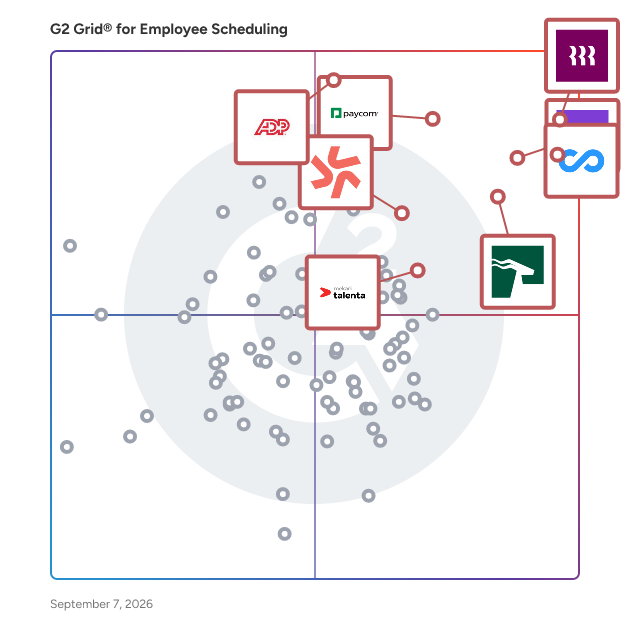
Best Employee Scheduling Software At A Glance

Leader:
Highest Performer:
Easiest to Use:
Top Trending:
Best Free Software:
Show LessShow More
Easiest to Use:
Top Trending:
Best Free Software:

G2 takes pride in showing unbiased reviews on user satisfaction in our ratings and reports. We do not allow paid placements in any of our ratings, rankings, or reports. Learn about our scoring methodologies.

No filters applied
277 Listings in Employee Scheduling Available
  • Overview
    Expand/Collapse Overview
  • Product Description
    How are these determined?Information
    This description is provided by the seller.

    ZoomShift is a comprehensive employee scheduling software designed to streamline workforce management for businesses with hourly employees. It enables managers to create work schedules efficiently, tr

    Users
    No information available
    Industries
    No information available
    Market Segment
    • 51% Small-Business
    • 49% Mid-Market
  • Pros and Cons
    Expand/Collapse Pros and Cons
  • ZoomShift Pros and Cons
    How are these determined?Information
    Pros and Cons are compiled from review feedback and grouped into themes to provide an easy-to-understand summary of user reviews.
    Pros
    Ease of Use
    13
    Scheduling Ease
    8
    Customer Support
    7
    Helpful
    6
    Scheduling
    6
    Cons
    Inefficient Reporting
    2
    Limited Customization
    2
    Login Issues
    2
    Poor Customer Support
    2
    Scheduling Issues
    2
  • User Satisfaction
    Expand/Collapse User Satisfaction
  • ZoomShift features and usability ratings that predict user satisfaction
    9.5
    Has the product been a good partner in doing business?
    Average: 9.0
    8.8
    Reporting
    Average: 8.5
    4.7
    Portal
    Average: 8.4
    8.5
    Automation
    Average: 8.4
  • Seller Details
    Expand/Collapse Seller Details
  • Seller Details
    Seller
    ZoomShift
    Year Founded
    2011
    HQ Location
    Milwaukee, WI
    Twitter
    @ZoomShift
    584 Twitter followers
    LinkedIn® Page
    www.linkedin.com
    3 employees on LinkedIn®
Product Description
How are these determined?Information
This description is provided by the seller.

ZoomShift is a comprehensive employee scheduling software designed to streamline workforce management for businesses with hourly employees. It enables managers to create work schedules efficiently, tr

Users
No information available
Industries
No information available
Market Segment
  • 51% Small-Business
  • 49% Mid-Market
ZoomShift Pros and Cons
How are these determined?Information
Pros and Cons are compiled from review feedback and grouped into themes to provide an easy-to-understand summary of user reviews.
Pros
Ease of Use
13
Scheduling Ease
8
Customer Support
7
Helpful
6
Scheduling
6
Cons
Inefficient Reporting
2
Limited Customization
2
Login Issues
2
Poor Customer Support
2
Scheduling Issues
2
ZoomShift features and usability ratings that predict user satisfaction
9.5
Has the product been a good partner in doing business?
Average: 9.0
8.8
Reporting
Average: 8.5
4.7
Portal
Average: 8.4
8.5
Automation
Average: 8.4
Seller Details
Seller
ZoomShift
Year Founded
2011
HQ Location
Milwaukee, WI
Twitter
@ZoomShift
584 Twitter followers
LinkedIn® Page
www.linkedin.com
3 employees on LinkedIn®
Entry Level Price:Free
  • Overview
    Expand/Collapse Overview
  • Product Description
    How are these determined?Information
    This description is provided by the seller.

    Sling is a scheduling, time tracking and communication software for companies where employees work in shifts. Sling incorporates scheduling, messaging, time tracking, task management and reporting fun

    Users
    No information available
    Industries
    • Hospital & Health Care
    • Education Management
    Market Segment
    • 61% Small-Business
    • 30% Mid-Market
  • Pros and Cons
    Expand/Collapse Pros and Cons
  • Sling Pros and Cons
    How are these determined?Information
    Pros and Cons are compiled from review feedback and grouped into themes to provide an easy-to-understand summary of user reviews.
    Pros
    Communication Efficiency
    3
    Ease of Use
    3
    Efficiency
    2
    Intuitive
    2
    Notifications
    2
    Cons
    Limited Features
    2
    Poor Interface Design
    2
    Difficult Navigation
    1
    Mobile App
    1
    Mobile App Issues
    1
  • User Satisfaction
    Expand/Collapse User Satisfaction
  • Sling features and usability ratings that predict user satisfaction
    9.1
    Has the product been a good partner in doing business?
    Average: 9.0
    8.5
    Reporting
    Average: 8.5
    8.5
    Portal
    Average: 8.4
    8.2
    Automation
    Average: 8.4
  • Seller Details
    Expand/Collapse Seller Details
  • Seller Details
    Seller
    Sling
    Year Founded
    2015
    HQ Location
    Brooklyn, NY
    Twitter
    @Sling
    53,671 Twitter followers
    LinkedIn® Page
    www.linkedin.com
    22 employees on LinkedIn®
Product Description
How are these determined?Information
This description is provided by the seller.

Sling is a scheduling, time tracking and communication software for companies where employees work in shifts. Sling incorporates scheduling, messaging, time tracking, task management and reporting fun

Users
No information available
Industries
  • Hospital & Health Care
  • Education Management
Market Segment
  • 61% Small-Business
  • 30% Mid-Market
Sling Pros and Cons
How are these determined?Information
Pros and Cons are compiled from review feedback and grouped into themes to provide an easy-to-understand summary of user reviews.
Pros
Communication Efficiency
3
Ease of Use
3
Efficiency
2
Intuitive
2
Notifications
2
Cons
Limited Features
2
Poor Interface Design
2
Difficult Navigation
1
Mobile App
1
Mobile App Issues
1
Sling features and usability ratings that predict user satisfaction
9.1
Has the product been a good partner in doing business?
Average: 9.0
8.5
Reporting
Average: 8.5
8.5
Portal
Average: 8.4
8.2
Automation
Average: 8.4
Seller Details
Seller
Sling
Year Founded
2015
HQ Location
Brooklyn, NY
Twitter
@Sling
53,671 Twitter followers
LinkedIn® Page
www.linkedin.com
22 employees on LinkedIn®

This is how G2 Deals can help you:

  • Easily shop for curated – and trusted – software
  • Own your own software buying journey
  • Discover exclusive deals on software
(231)4.6 out of 5
Optimized for quick response
Save to My Lists
Entry Level Price:Contact Us
  • Overview
    Expand/Collapse Overview
  • Product Description
    How are these determined?Information
    This description is provided by the seller.

    WorkInSync is an AI-powered SaaS solution designed to help companies manage hybrid workplaces while optimising CRE Costs and improving Employee experience. This innovative platform addresses the evolv

    Users
    • Associate
    • Software Engineer
    Industries
    • Information Technology and Services
    • Computer Software
    Market Segment
    • 48% Mid-Market
    • 42% Enterprise
    User Sentiment
    How are these determined?Information
    These insights, currently in beta, are compiled from user reviews and grouped to display a high-level overview of the software.
    • WorkInSync is a software application that provides features for booking desks, meeting rooms, and wayfinding.
    • Users like the ease of use, the number of features, and the ability to see who is coming to the office, which aids in planning, and the reduction of conflicts due to desk and meeting room booking.
    • Reviewers experienced issues with the user interface not being seamless between different features, glitches with integrations, a lack of user-friendliness and navigation orientation, and a desire for improvements in user experience and WhatsApp integration for notifications.
  • Pros and Cons
    Expand/Collapse Pros and Cons
  • WorkInSync Pros and Cons
    How are these determined?Information
    Pros and Cons are compiled from review feedback and grouped into themes to provide an easy-to-understand summary of user reviews.
    Pros
    Easy Booking
    29
    Convenience
    22
    Ease of Use
    21
    Reservation Ease
    16
    Scheduling Ease
    16
    Cons
    Booking Issues
    7
    Slow Loading
    6
    User Interface Issues
    5
    Check-in Issues
    4
    Parking Issues
    4
  • User Satisfaction
    Expand/Collapse User Satisfaction
  • WorkInSync features and usability ratings that predict user satisfaction
    9.4
    Has the product been a good partner in doing business?
    Average: 9.0
    9.5
    Reporting
    Average: 8.5
    9.3
    Portal
    Average: 8.4
    9.4
    Automation
    Average: 8.4
  • Seller Details
    Expand/Collapse Seller Details
  • Seller Details
    Company Website
    Year Founded
    2009
    HQ Location
    Bangalore
    LinkedIn® Page
    www.linkedin.com
    819 employees on LinkedIn®
Product Description
How are these determined?Information
This description is provided by the seller.

WorkInSync is an AI-powered SaaS solution designed to help companies manage hybrid workplaces while optimising CRE Costs and improving Employee experience. This innovative platform addresses the evolv

Users
  • Associate
  • Software Engineer
Industries
  • Information Technology and Services
  • Computer Software
Market Segment
  • 48% Mid-Market
  • 42% Enterprise
User Sentiment
How are these determined?Information
These insights, currently in beta, are compiled from user reviews and grouped to display a high-level overview of the software.
  • WorkInSync is a software application that provides features for booking desks, meeting rooms, and wayfinding.
  • Users like the ease of use, the number of features, and the ability to see who is coming to the office, which aids in planning, and the reduction of conflicts due to desk and meeting room booking.
  • Reviewers experienced issues with the user interface not being seamless between different features, glitches with integrations, a lack of user-friendliness and navigation orientation, and a desire for improvements in user experience and WhatsApp integration for notifications.
WorkInSync Pros and Cons
How are these determined?Information
Pros and Cons are compiled from review feedback and grouped into themes to provide an easy-to-understand summary of user reviews.
Pros
Easy Booking
29
Convenience
22
Ease of Use
21
Reservation Ease
16
Scheduling Ease
16
Cons
Booking Issues
7
Slow Loading
6
User Interface Issues
5
Check-in Issues
4
Parking Issues
4
WorkInSync features and usability ratings that predict user satisfaction
9.4
Has the product been a good partner in doing business?
Average: 9.0
9.5
Reporting
Average: 8.5
9.3
Portal
Average: 8.4
9.4
Automation
Average: 8.4
Seller Details
Company Website
Year Founded
2009
HQ Location
Bangalore
LinkedIn® Page
www.linkedin.com
819 employees on LinkedIn®
  • Overview
    Expand/Collapse Overview
  • Product Description
    How are these determined?Information
    This description is provided by the seller.

    OnTheClock is a comprehensive employee time clock, scheduling, and payroll solution specifically designed for small and medium-sized businesses. It enhances timecard accuracy and ensures compliance wi

    Users
    • Office Manager
    Industries
    • Hospital & Health Care
    • Medical Practice
    Market Segment
    • 82% Small-Business
    • 16% Mid-Market
    User Sentiment
    How are these determined?Information
    These insights, currently in beta, are compiled from user reviews and grouped to display a high-level overview of the software.
    • OnTheClock Employee Time Clock is a software that allows users to track their work hours and manage their time effectively.
    • Reviewers frequently mention the ease of use, the intuitive interface, the ability to clock in and out from various devices, and the accuracy of the time tracking as key benefits of the software.
    • Users reported issues such as inability to edit time entries, occasional system lags, the requirement to be at a specific location to clock out, and the lack of a feature to add notes to time entries.
  • Pros and Cons
    Expand/Collapse Pros and Cons
  • OnTheClock Employee Time Clock Pros and Cons
    How are these determined?Information
    Pros and Cons are compiled from review feedback and grouped into themes to provide an easy-to-understand summary of user reviews.
    Pros
    Ease of Use
    56
    Time Tracking
    35
    Tracking Ease
    31
    Simple
    26
    Time-saving
    19
    Cons
    Clocking Issues
    16
    Punching Issues
    12
    Slow Loading
    10
    Time Tracking Issues
    9
    Limited Features
    8
  • User Satisfaction
    Expand/Collapse User Satisfaction
  • OnTheClock Employee Time Clock features and usability ratings that predict user satisfaction
    9.2
    Has the product been a good partner in doing business?
    Average: 9.0
    8.3
    Reporting
    Average: 8.5
    8.7
    Portal
    Average: 8.4
    9.0
    Automation
    Average: 8.4
  • Seller Details
    Expand/Collapse Seller Details
  • Seller Details
    Company Website
    Year Founded
    2004
    HQ Location
    Clinton Township, Michigan
    Twitter
    @OnTheClockLLC
    231 Twitter followers
    LinkedIn® Page
    www.linkedin.com
    30 employees on LinkedIn®
Product Description
How are these determined?Information
This description is provided by the seller.

OnTheClock is a comprehensive employee time clock, scheduling, and payroll solution specifically designed for small and medium-sized businesses. It enhances timecard accuracy and ensures compliance wi

Users
  • Office Manager
Industries
  • Hospital & Health Care
  • Medical Practice
Market Segment
  • 82% Small-Business
  • 16% Mid-Market
User Sentiment
How are these determined?Information
These insights, currently in beta, are compiled from user reviews and grouped to display a high-level overview of the software.
  • OnTheClock Employee Time Clock is a software that allows users to track their work hours and manage their time effectively.
  • Reviewers frequently mention the ease of use, the intuitive interface, the ability to clock in and out from various devices, and the accuracy of the time tracking as key benefits of the software.
  • Users reported issues such as inability to edit time entries, occasional system lags, the requirement to be at a specific location to clock out, and the lack of a feature to add notes to time entries.
OnTheClock Employee Time Clock Pros and Cons
How are these determined?Information
Pros and Cons are compiled from review feedback and grouped into themes to provide an easy-to-understand summary of user reviews.
Pros
Ease of Use
56
Time Tracking
35
Tracking Ease
31
Simple
26
Time-saving
19
Cons
Clocking Issues
16
Punching Issues
12
Slow Loading
10
Time Tracking Issues
9
Limited Features
8
OnTheClock Employee Time Clock features and usability ratings that predict user satisfaction
9.2
Has the product been a good partner in doing business?
Average: 9.0
8.3
Reporting
Average: 8.5
8.7
Portal
Average: 8.4
9.0
Automation
Average: 8.4
Seller Details
Company Website
Year Founded
2004
HQ Location
Clinton Township, Michigan
Twitter
@OnTheClockLLC
231 Twitter followers
LinkedIn® Page
www.linkedin.com
30 employees on LinkedIn®
(904)4.2 out of 5
View top Consulting Services for Dayforce
Save to My Lists
  • Overview
    Expand/Collapse Overview
  • Product Description
    How are these determined?Information
    This description is provided by the seller.

    Dayforce is the global people platform for the modern workforce. An enterprise HCM solution, Dayforce combines payroll, HR, benefits, talent management, workforce management, and more in a single clou

    Users
    • Payroll Manager
    • Payroll Specialist
    Industries
    • Retail
    • Hospital & Health Care
    Market Segment
    • 47% Mid-Market
    • 47% Enterprise
    User Sentiment
    How are these determined?Information
    These insights, currently in beta, are compiled from user reviews and grouped to display a high-level overview of the software.
    • Dayforce is a software that allows users to manage employee information, payroll, and timekeeping.
    • Users frequently mention the software's ease of use, its ability to provide organized information, and its functionality in managing multiple locations and processing large-scale payroll.
    • Reviewers noted issues with system responsiveness and speed, difficulty in integrating with other apps, complex login methods, and a lack of straightforward reporting.
  • Pros and Cons
    Expand/Collapse Pros and Cons
  • Dayforce Pros and Cons
    How are these determined?Information
    Pros and Cons are compiled from review feedback and grouped into themes to provide an easy-to-understand summary of user reviews.
    Pros
    Ease of Use
    139
    Features
    66
    Comprehensive Features
    64
    Helpful
    61
    Payroll Management
    59
    Cons
    Poor Customer Support
    61
    Missing Features
    49
    Reporting Issues
    45
    Limited Features
    44
    Limited Customization
    43
  • User Satisfaction
    Expand/Collapse User Satisfaction
  • Dayforce features and usability ratings that predict user satisfaction
    8.1
    Has the product been a good partner in doing business?
    Average: 9.0
    7.8
    Reporting
    Average: 8.5
    7.1
    Portal
    Average: 8.4
    7.6
    Automation
    Average: 8.4
  • Seller Details
    Expand/Collapse Seller Details
  • Seller Details
    Seller
    Dayforce
    Year Founded
    2012
    HQ Location
    Minneapolis, MN
    Twitter
    @Ceridian
    16,654 Twitter followers
    LinkedIn® Page
    www.linkedin.com
    4,349 employees on LinkedIn®
    Ownership
    NYSE: CDAY
Product Description
How are these determined?Information
This description is provided by the seller.

Dayforce is the global people platform for the modern workforce. An enterprise HCM solution, Dayforce combines payroll, HR, benefits, talent management, workforce management, and more in a single clou

Users
  • Payroll Manager
  • Payroll Specialist
Industries
  • Retail
  • Hospital & Health Care
Market Segment
  • 47% Mid-Market
  • 47% Enterprise
User Sentiment
How are these determined?Information
These insights, currently in beta, are compiled from user reviews and grouped to display a high-level overview of the software.
  • Dayforce is a software that allows users to manage employee information, payroll, and timekeeping.
  • Users frequently mention the software's ease of use, its ability to provide organized information, and its functionality in managing multiple locations and processing large-scale payroll.
  • Reviewers noted issues with system responsiveness and speed, difficulty in integrating with other apps, complex login methods, and a lack of straightforward reporting.
Dayforce Pros and Cons
How are these determined?Information
Pros and Cons are compiled from review feedback and grouped into themes to provide an easy-to-understand summary of user reviews.
Pros
Ease of Use
139
Features
66
Comprehensive Features
64
Helpful
61
Payroll Management
59
Cons
Poor Customer Support
61
Missing Features
49
Reporting Issues
45
Limited Features
44
Limited Customization
43
Dayforce features and usability ratings that predict user satisfaction
8.1
Has the product been a good partner in doing business?
Average: 9.0
7.8
Reporting
Average: 8.5
7.1
Portal
Average: 8.4
7.6
Automation
Average: 8.4
Seller Details
Seller
Dayforce
Year Founded
2012
HQ Location
Minneapolis, MN
Twitter
@Ceridian
16,654 Twitter followers
LinkedIn® Page
www.linkedin.com
4,349 employees on LinkedIn®
Ownership
NYSE: CDAY
(136)4.9 out of 5
Optimized for quick response
Save to My Lists
Entry Level Price:$10.99
  • Overview
    Expand/Collapse Overview
  • Product Description
    How are these determined?Information
    This description is provided by the seller.

    CAVU HCM by IRIS is a comprehensive Human Capital Management solution offering services designed to streamline payroll and HR processes for US-based businesses. With an intuitive platform, CAVU HCM au

    Users
    • Owner
    • President
    Industries
    • Construction
    • Hospital & Health Care
    Market Segment
    • 82% Small-Business
    • 17% Mid-Market
    User Sentiment
    How are these determined?Information
    These insights, currently in beta, are compiled from user reviews and grouped to display a high-level overview of the software.
    • CAVU HCM is a payroll processing system that is used by businesses for efficient payroll management.
    • Reviewers frequently mention the exceptional customer service, the system's ease of use, and the flexibility it offers in choosing between different payroll schedules.
    • Reviewers mentioned occasional technical errors and suggested that the software needs to be updated and could benefit from more 'How To' segments on using the payroll dashboard.
  • Pros and Cons
    Expand/Collapse Pros and Cons
  • Cavu HCM Pros and Cons
    How are these determined?Information
    Pros and Cons are compiled from review feedback and grouped into themes to provide an easy-to-understand summary of user reviews.
    Pros
    Customer Support
    17
    Helpful
    17
    Ease of Use
    16
    Payroll Management
    15
    Payroll
    12
    Cons
    Payroll Issues
    3
    Slow Loading
    2
    Account Management Issues
    1
    Billing Issues
    1
    Dashboard Issues
    1
  • User Satisfaction
    Expand/Collapse User Satisfaction
  • Cavu HCM features and usability ratings that predict user satisfaction
    9.8
    Has the product been a good partner in doing business?
    Average: 9.0
    0.0
    No information available
    0.0
    No information available
    0.0
    No information available
  • Seller Details
    Expand/Collapse Seller Details
  • Seller Details
    Company Website
    Year Founded
    1978
    HQ Location
    Alpharetta, GA
    Twitter
    @IRISSoftwareGrp
    1,341 Twitter followers
    LinkedIn® Page
    www.linkedin.com
    2,926 employees on LinkedIn®
Product Description
How are these determined?Information
This description is provided by the seller.

CAVU HCM by IRIS is a comprehensive Human Capital Management solution offering services designed to streamline payroll and HR processes for US-based businesses. With an intuitive platform, CAVU HCM au

Users
  • Owner
  • President
Industries
  • Construction
  • Hospital & Health Care
Market Segment
  • 82% Small-Business
  • 17% Mid-Market
User Sentiment
How are these determined?Information
These insights, currently in beta, are compiled from user reviews and grouped to display a high-level overview of the software.
  • CAVU HCM is a payroll processing system that is used by businesses for efficient payroll management.
  • Reviewers frequently mention the exceptional customer service, the system's ease of use, and the flexibility it offers in choosing between different payroll schedules.
  • Reviewers mentioned occasional technical errors and suggested that the software needs to be updated and could benefit from more 'How To' segments on using the payroll dashboard.
Cavu HCM Pros and Cons
How are these determined?Information
Pros and Cons are compiled from review feedback and grouped into themes to provide an easy-to-understand summary of user reviews.
Pros
Customer Support
17
Helpful
17
Ease of Use
16
Payroll Management
15
Payroll
12
Cons
Payroll Issues
3
Slow Loading
2
Account Management Issues
1
Billing Issues
1
Dashboard Issues
1
Cavu HCM features and usability ratings that predict user satisfaction
9.8
Has the product been a good partner in doing business?
Average: 9.0
0.0
No information available
0.0
No information available
0.0
No information available
Seller Details
Company Website
Year Founded
1978
HQ Location
Alpharetta, GA
Twitter
@IRISSoftwareGrp
1,341 Twitter followers
LinkedIn® Page
www.linkedin.com
2,926 employees on LinkedIn®
  • Overview
    Expand/Collapse Overview
  • Product Description
    How are these determined?Information
    This description is provided by the seller.

    Put simply, we provide app-based workforce management and scheduling solutions that help you plan labour to demand more efficiently. Whether you're scheduling staff on the shop floor or rostering doct

    Users
    No information available
    Industries
    • Retail
    Market Segment
    • 54% Enterprise
    • 32% Small-Business
  • User Satisfaction
    Expand/Collapse User Satisfaction
  • Rotageek features and usability ratings that predict user satisfaction
    9.8
    Has the product been a good partner in doing business?
    Average: 9.0
    9.0
    Reporting
    Average: 8.5
    9.4
    Portal
    Average: 8.4
    8.6
    Automation
    Average: 8.4
  • Seller Details
    Expand/Collapse Seller Details
  • Seller Details
    Seller
    Rotageek
    HQ Location
    London, United Kingdom
    Twitter
    @Rotageek
    1,538 Twitter followers
    LinkedIn® Page
    www.linkedin.com
    45 employees on LinkedIn®
Product Description
How are these determined?Information
This description is provided by the seller.

Put simply, we provide app-based workforce management and scheduling solutions that help you plan labour to demand more efficiently. Whether you're scheduling staff on the shop floor or rostering doct

Users
No information available
Industries
  • Retail
Market Segment
  • 54% Enterprise
  • 32% Small-Business
Rotageek features and usability ratings that predict user satisfaction
9.8
Has the product been a good partner in doing business?
Average: 9.0
9.0
Reporting
Average: 8.5
9.4
Portal
Average: 8.4
8.6
Automation
Average: 8.4
Seller Details
Seller
Rotageek
HQ Location
London, United Kingdom
Twitter
@Rotageek
1,538 Twitter followers
LinkedIn® Page
www.linkedin.com
45 employees on LinkedIn®
(311)4.6 out of 5
Optimized for quick response
Save to My Lists
Entry Level Price:$8.00
  • Overview
    Expand/Collapse Overview
  • Product Description
    How are these determined?Information
    This description is provided by the seller.

    ClockShark is a cloud-based timekeeping and scheduling software built for construction and other field service companies to track time, schedule shifts, see who’s working, and manage jobs from start t

    Users
    • Owner
    • Office Manager
    Industries
    • Construction
    • Information Technology and Services
    Market Segment
    • 88% Small-Business
    • 12% Mid-Market
  • Pros and Cons
    Expand/Collapse Pros and Cons
  • ClockShark Pros and Cons
    How are these determined?Information
    Pros and Cons are compiled from review feedback and grouped into themes to provide an easy-to-understand summary of user reviews.
    Pros
    Ease of Use
    1
    Time-saving
    1
    Time Tracking
    1
    Cons
    Attendance Issues
    1
    Clocking Issues
    1
  • User Satisfaction
    Expand/Collapse User Satisfaction
  • ClockShark features and usability ratings that predict user satisfaction
    9.4
    Has the product been a good partner in doing business?
    Average: 9.0
    8.9
    Reporting
    Average: 8.5
    8.7
    Portal
    Average: 8.4
    8.4
    Automation
    Average: 8.4
  • Seller Details
    Expand/Collapse Seller Details
  • Seller Details
    Company Website
    Year Founded
    2013
    HQ Location
    Chico, California
    Twitter
    @getclockshark
    1,128 Twitter followers
    LinkedIn® Page
    www.linkedin.com
    46 employees on LinkedIn®
Product Description
How are these determined?Information
This description is provided by the seller.

ClockShark is a cloud-based timekeeping and scheduling software built for construction and other field service companies to track time, schedule shifts, see who’s working, and manage jobs from start t

Users
  • Owner
  • Office Manager
Industries
  • Construction
  • Information Technology and Services
Market Segment
  • 88% Small-Business
  • 12% Mid-Market
ClockShark Pros and Cons
How are these determined?Information
Pros and Cons are compiled from review feedback and grouped into themes to provide an easy-to-understand summary of user reviews.
Pros
Ease of Use
1
Time-saving
1
Time Tracking
1
Cons
Attendance Issues
1
Clocking Issues
1
ClockShark features and usability ratings that predict user satisfaction
9.4
Has the product been a good partner in doing business?
Average: 9.0
8.9
Reporting
Average: 8.5
8.7
Portal
Average: 8.4
8.4
Automation
Average: 8.4
Seller Details
Company Website
Year Founded
2013
HQ Location
Chico, California
Twitter
@getclockshark
1,128 Twitter followers
LinkedIn® Page
www.linkedin.com
46 employees on LinkedIn®
30% Off: $3.49 per user/month
  • Overview
    Expand/Collapse Overview
  • Product Description
    How are these determined?Information
    This description is provided by the seller.

    WebWork is an intelligent time tracking software that automates workforce management from clock-in to payroll, delivering enterprise-grade capabilities at just $3.99/month. As comprehensive employee t

    Users
    • Front Desk Representative
    Industries
    • Information Technology and Services
    • Computer Software
    Market Segment
    • 37% Small-Business
    • 34% Mid-Market
  • Pros and Cons
    Expand/Collapse Pros and Cons
  • WebWork Time Tracker Pros and Cons
    How are these determined?Information
    Pros and Cons are compiled from review feedback and grouped into themes to provide an easy-to-understand summary of user reviews.
    Pros
    Time Tracking
    24
    Time-saving
    17
    Helpful
    16
    Features
    15
    Ease of Use
    13
    Cons
    Time Tracking Issues
    5
    Improvement Needed
    4
    Learning Curve
    4
    Screenshot Issues
    4
    Slow Loading
    4
  • User Satisfaction
    Expand/Collapse User Satisfaction
  • WebWork Time Tracker features and usability ratings that predict user satisfaction
    9.7
    Has the product been a good partner in doing business?
    Average: 9.0
    10.0
    Reporting
    Average: 8.5
    8.8
    Portal
    Average: 8.4
    9.3
    Automation
    Average: 8.4
  • Seller Details
    Expand/Collapse Seller Details
  • Seller Details
    Company Website
    Year Founded
    2016
    HQ Location
    Yerevan, Armenia
    Twitter
    @WebWork_Tracker
    724 Twitter followers
    LinkedIn® Page
    www.linkedin.com
    21 employees on LinkedIn®
Product Description
How are these determined?Information
This description is provided by the seller.

WebWork is an intelligent time tracking software that automates workforce management from clock-in to payroll, delivering enterprise-grade capabilities at just $3.99/month. As comprehensive employee t

Users
  • Front Desk Representative
Industries
  • Information Technology and Services
  • Computer Software
Market Segment
  • 37% Small-Business
  • 34% Mid-Market
WebWork Time Tracker Pros and Cons
How are these determined?Information
Pros and Cons are compiled from review feedback and grouped into themes to provide an easy-to-understand summary of user reviews.
Pros
Time Tracking
24
Time-saving
17
Helpful
16
Features
15
Ease of Use
13
Cons
Time Tracking Issues
5
Improvement Needed
4
Learning Curve
4
Screenshot Issues
4
Slow Loading
4
WebWork Time Tracker features and usability ratings that predict user satisfaction
9.7
Has the product been a good partner in doing business?
Average: 9.0
10.0
Reporting
Average: 8.5
8.8
Portal
Average: 8.4
9.3
Automation
Average: 8.4
Seller Details
Company Website
Year Founded
2016
HQ Location
Yerevan, Armenia
Twitter
@WebWork_Tracker
724 Twitter followers
LinkedIn® Page
www.linkedin.com
21 employees on LinkedIn®
30% Off: $7 USD / user monthly
  • Overview
    Expand/Collapse Overview
  • Product Description
    How are these determined?Information
    This description is provided by the seller.

    DeskTime is an automatic time tracking app that helps teams measure productivity and manage workflows. Easy-to-use features help you oversee your team's work habits, follow project progress, plan

    Users
    • CEO
    • Software Engineer
    Industries
    • Information Technology and Services
    • Computer Software
    Market Segment
    • 66% Small-Business
    • 31% Mid-Market
  • Pros and Cons
    Expand/Collapse Pros and Cons
  • DeskTime Pros and Cons
    How are these determined?Information
    Pros and Cons are compiled from review feedback and grouped into themes to provide an easy-to-understand summary of user reviews.
    Pros
    Time Tracking
    65
    Ease of Use
    51
    Time-saving
    43
    Efficiency
    36
    Tracking Ease
    36
    Cons
    Limited Features
    14
    Missing Features
    14
    Inaccurate Tracking
    13
    Expensive
    11
    Limited Customization
    11
  • User Satisfaction
    Expand/Collapse User Satisfaction
  • DeskTime features and usability ratings that predict user satisfaction
    9.0
    Has the product been a good partner in doing business?
    Average: 9.0
    8.7
    Reporting
    Average: 8.5
    8.2
    Portal
    Average: 8.4
    7.8
    Automation
    Average: 8.4
  • Seller Details
    Expand/Collapse Seller Details
  • Seller Details
    Company Website
    Year Founded
    2004
    HQ Location
    Rīga, Rīgas rajons
    LinkedIn® Page
    www.linkedin.com
    45 employees on LinkedIn®
Product Description
How are these determined?Information
This description is provided by the seller.

DeskTime is an automatic time tracking app that helps teams measure productivity and manage workflows. Easy-to-use features help you oversee your team's work habits, follow project progress, plan

Users
  • CEO
  • Software Engineer
Industries
  • Information Technology and Services
  • Computer Software
Market Segment
  • 66% Small-Business
  • 31% Mid-Market
DeskTime Pros and Cons
How are these determined?Information
Pros and Cons are compiled from review feedback and grouped into themes to provide an easy-to-understand summary of user reviews.
Pros
Time Tracking
65
Ease of Use
51
Time-saving
43
Efficiency
36
Tracking Ease
36
Cons
Limited Features
14
Missing Features
14
Inaccurate Tracking
13
Expensive
11
Limited Customization
11
DeskTime features and usability ratings that predict user satisfaction
9.0
Has the product been a good partner in doing business?
Average: 9.0
8.7
Reporting
Average: 8.5
8.2
Portal
Average: 8.4
7.8
Automation
Average: 8.4
Seller Details
Company Website
Year Founded
2004
HQ Location
Rīga, Rīgas rajons
LinkedIn® Page
www.linkedin.com
45 employees on LinkedIn®
(35)4.7 out of 5
12th Easiest To Use in Employee Scheduling software
Save to My Lists
Entry Level Price:Contact Us
  • Overview
    Expand/Collapse Overview
  • Product Description
    How are these determined?Information
    This description is provided by the seller.

    The original scheduling program built for healthcare. Created 15 years ago by an RN, EasyShifts has continued to grow and adapt to the unique scheduling needs found in healthcare. Create your own

    Users
    No information available
    Industries
    • Hospital & Health Care
    Market Segment
    • 51% Small-Business
    • 37% Mid-Market
  • Pros and Cons
    Expand/Collapse Pros and Cons
  • EasyShifts Pros and Cons
    How are these determined?Information
    Pros and Cons are compiled from review feedback and grouped into themes to provide an easy-to-understand summary of user reviews.
    Pros
    Ease of Use
    4
    Scheduling Ease
    4
    Intuitive
    2
    Mobile Access
    2
    Shift Management
    2
    Cons
    Limited Features
    1
    Login Problems
    1
    Mobile App Issues
    1
  • User Satisfaction
    Expand/Collapse User Satisfaction
  • EasyShifts features and usability ratings that predict user satisfaction
    9.8
    Has the product been a good partner in doing business?
    Average: 9.0
    8.9
    Reporting
    Average: 8.5
    8.8
    Portal
    Average: 8.4
    9.2
    Automation
    Average: 8.4
  • Seller Details
    Expand/Collapse Seller Details
  • Seller Details
    Year Founded
    2007
    HQ Location
    Appleton, US
    Twitter
    @easyshifts
    11 Twitter followers
    LinkedIn® Page
    www.linkedin.com
    8 employees on LinkedIn®
Product Description
How are these determined?Information
This description is provided by the seller.

The original scheduling program built for healthcare. Created 15 years ago by an RN, EasyShifts has continued to grow and adapt to the unique scheduling needs found in healthcare. Create your own

Users
No information available
Industries
  • Hospital & Health Care
Market Segment
  • 51% Small-Business
  • 37% Mid-Market
EasyShifts Pros and Cons
How are these determined?Information
Pros and Cons are compiled from review feedback and grouped into themes to provide an easy-to-understand summary of user reviews.
Pros
Ease of Use
4
Scheduling Ease
4
Intuitive
2
Mobile Access
2
Shift Management
2
Cons
Limited Features
1
Login Problems
1
Mobile App Issues
1
EasyShifts features and usability ratings that predict user satisfaction
9.8
Has the product been a good partner in doing business?
Average: 9.0
8.9
Reporting
Average: 8.5
8.8
Portal
Average: 8.4
9.2
Automation
Average: 8.4
Seller Details
Year Founded
2007
HQ Location
Appleton, US
Twitter
@easyshifts
11 Twitter followers
LinkedIn® Page
www.linkedin.com
8 employees on LinkedIn®
(149)4.6 out of 5
Optimized for quick response
Save to My Lists
Entry Level Price:Contact Us
  • Overview
    Expand/Collapse Overview
  • Product Description
    How are these determined?Information
    This description is provided by the seller.

    Assembled is the all-in-one support platform that unifies AI agents and intelligent workforce management to help companies deliver superhuman support. With Assembled, teams can forecast with over 90%

    Users
    No information available
    Industries
    • Financial Services
    • Consumer Services
    Market Segment
    • 60% Mid-Market
    • 23% Small-Business
  • Pros and Cons
    Expand/Collapse Pros and Cons
  • Assembled WFM Pros and Cons
    How are these determined?Information
    Pros and Cons are compiled from review feedback and grouped into themes to provide an easy-to-understand summary of user reviews.
    Pros
    Ease of Use
    40
    Scheduling
    29
    Scheduling Ease
    27
    Intuitive
    19
    Efficiency
    18
    Cons
    Scheduling Issues
    15
    Missing Features
    10
    Limited Features
    9
    Slow Loading
    9
    Lagging Issues
    8
  • User Satisfaction
    Expand/Collapse User Satisfaction
  • Assembled WFM features and usability ratings that predict user satisfaction
    9.5
    Has the product been a good partner in doing business?
    Average: 9.0
    8.5
    Reporting
    Average: 8.5
    8.2
    Portal
    Average: 8.4
    8.1
    Automation
    Average: 8.4
  • Seller Details
    Expand/Collapse Seller Details
  • Seller Details
    Seller
    Assembled
    Company Website
    Year Founded
    2018
    HQ Location
    San Francisco, California
    Twitter
    @assembledhq
    384 Twitter followers
    LinkedIn® Page
    www.linkedin.com
    158 employees on LinkedIn®
Product Description
How are these determined?Information
This description is provided by the seller.

Assembled is the all-in-one support platform that unifies AI agents and intelligent workforce management to help companies deliver superhuman support. With Assembled, teams can forecast with over 90%

Users
No information available
Industries
  • Financial Services
  • Consumer Services
Market Segment
  • 60% Mid-Market
  • 23% Small-Business
Assembled WFM Pros and Cons
How are these determined?Information
Pros and Cons are compiled from review feedback and grouped into themes to provide an easy-to-understand summary of user reviews.
Pros
Ease of Use
40
Scheduling
29
Scheduling Ease
27
Intuitive
19
Efficiency
18
Cons
Scheduling Issues
15
Missing Features
10
Limited Features
9
Slow Loading
9
Lagging Issues
8
Assembled WFM features and usability ratings that predict user satisfaction
9.5
Has the product been a good partner in doing business?
Average: 9.0
8.5
Reporting
Average: 8.5
8.2
Portal
Average: 8.4
8.1
Automation
Average: 8.4
Seller Details
Seller
Assembled
Company Website
Year Founded
2018
HQ Location
San Francisco, California
Twitter
@assembledhq
384 Twitter followers
LinkedIn® Page
www.linkedin.com
158 employees on LinkedIn®
  • Overview
    Expand/Collapse Overview
  • Product Description
    How are these determined?Information
    This description is provided by the seller.

    Evolia makes it easier to hire, schedule and track time worked by frontline in medium and large-sized businesses. Gone are the days of working in silos and having to play the telephone game findin

    Users
    No information available
    Industries
    No information available
    Market Segment
    • 52% Mid-Market
    • 45% Small-Business
  • User Satisfaction
    Expand/Collapse User Satisfaction
  • Evolia features and usability ratings that predict user satisfaction
    8.4
    Has the product been a good partner in doing business?
    Average: 9.0
    7.7
    Reporting
    Average: 8.5
    0.0
    No information available
    8.0
    Automation
    Average: 8.4
  • Seller Details
    Expand/Collapse Seller Details
  • Seller Details
    Seller
    Evolia
    Year Founded
    2016
    HQ Location
    Québec, CA
    LinkedIn® Page
    www.linkedin.com
    41 employees on LinkedIn®
Product Description
How are these determined?Information
This description is provided by the seller.

Evolia makes it easier to hire, schedule and track time worked by frontline in medium and large-sized businesses. Gone are the days of working in silos and having to play the telephone game findin

Users
No information available
Industries
No information available
Market Segment
  • 52% Mid-Market
  • 45% Small-Business
Evolia features and usability ratings that predict user satisfaction
8.4
Has the product been a good partner in doing business?
Average: 9.0
7.7
Reporting
Average: 8.5
0.0
No information available
8.0
Automation
Average: 8.4
Seller Details
Seller
Evolia
Year Founded
2016
HQ Location
Québec, CA
LinkedIn® Page
www.linkedin.com
41 employees on LinkedIn®
Entry Level Price:Free
  • Overview
    Expand/Collapse Overview
  • Product Description
    How are these determined?Information
    This description is provided by the seller.

    Coast is a leading maintenance and asset management software, designed to help the deskless workforce succeed. Our all-in-one, adaptable software makes it easy for companies to set up maintenance mana

    Users
    • CEO
    • Chief Maintenance Officer
    Industries
    • Information Technology and Services
    • Computer Software
    Market Segment
    • 58% Mid-Market
    • 31% Small-Business
    User Sentiment
    How are these determined?Information
    These insights, currently in beta, are compiled from user reviews and grouped to display a high-level overview of the software.
    • Coast is a maintenance management platform that integrates work orders, asset tracking, and maintenance in a single system, providing a comprehensive view of physical assets across multiple properties.
    • Reviewers frequently mention the platform's ease of use, real-time dashboards, and automation features, which save significant time and improve operational efficiency.
    • Users reported some issues with the mobile app being slow with high volume files, and a need for more integrations with IoT and legacy warehouse systems.
  • Pros and Cons
    Expand/Collapse Pros and Cons
  • Coast Pros and Cons
    How are these determined?Information
    Pros and Cons are compiled from review feedback and grouped into themes to provide an easy-to-understand summary of user reviews.
    Pros
    Ease of Use
    88
    Solution Comprehensive
    57
    Maintenance Efficiency
    56
    Real-time Monitoring
    52
    Efficiency
    49
    Cons
    Limited Features
    38
    Missing Features
    35
    Poor Reporting
    33
    Difficult Setup
    26
    Improvement Needed
    26
  • User Satisfaction
    Expand/Collapse User Satisfaction
  • Coast features and usability ratings that predict user satisfaction
    9.5
    Has the product been a good partner in doing business?
    Average: 9.0
    9.4
    Reporting
    Average: 8.5
    9.0
    Portal
    Average: 8.4
    9.0
    Automation
    Average: 8.4
  • Seller Details
    Expand/Collapse Seller Details
  • Seller Details
    Company Website
    Year Founded
    2020
    HQ Location
    N/A
    Twitter
    @CoastAppHQ
    50 Twitter followers
    LinkedIn® Page
    www.linkedin.com
    40 employees on LinkedIn®
Product Description
How are these determined?Information
This description is provided by the seller.

Coast is a leading maintenance and asset management software, designed to help the deskless workforce succeed. Our all-in-one, adaptable software makes it easy for companies to set up maintenance mana

Users
  • CEO
  • Chief Maintenance Officer
Industries
  • Information Technology and Services
  • Computer Software
Market Segment
  • 58% Mid-Market
  • 31% Small-Business
User Sentiment
How are these determined?Information
These insights, currently in beta, are compiled from user reviews and grouped to display a high-level overview of the software.
  • Coast is a maintenance management platform that integrates work orders, asset tracking, and maintenance in a single system, providing a comprehensive view of physical assets across multiple properties.
  • Reviewers frequently mention the platform's ease of use, real-time dashboards, and automation features, which save significant time and improve operational efficiency.
  • Users reported some issues with the mobile app being slow with high volume files, and a need for more integrations with IoT and legacy warehouse systems.
Coast Pros and Cons
How are these determined?Information
Pros and Cons are compiled from review feedback and grouped into themes to provide an easy-to-understand summary of user reviews.
Pros
Ease of Use
88
Solution Comprehensive
57
Maintenance Efficiency
56
Real-time Monitoring
52
Efficiency
49
Cons
Limited Features
38
Missing Features
35
Poor Reporting
33
Difficult Setup
26
Improvement Needed
26
Coast features and usability ratings that predict user satisfaction
9.5
Has the product been a good partner in doing business?
Average: 9.0
9.4
Reporting
Average: 8.5
9.0
Portal
Average: 8.4
9.0
Automation
Average: 8.4
Seller Details
Company Website
Year Founded
2020
HQ Location
N/A
Twitter
@CoastAppHQ
50 Twitter followers
LinkedIn® Page
www.linkedin.com
40 employees on LinkedIn®
(53)4.4 out of 5
View top Consulting Services for Zendesk for Employee Service
Save to My Lists
  • Overview
    Expand/Collapse Overview
  • Product Description
    How are these determined?Information
    This description is provided by the seller.

    Zendesk for Employee Service is an easy to use, AI-powered solution designed to streamline internal service delivery across IT Service Management (ITSM), Human Resources Service Management (HRSM), and

    Users
    No information available
    Industries
    • Information Technology and Services
    Market Segment
    • 49% Mid-Market
    • 38% Small-Business
  • Pros and Cons
    Expand/Collapse Pros and Cons
  • Zendesk for Employee Service Pros and Cons
    How are these determined?Information
    Pros and Cons are compiled from review feedback and grouped into themes to provide an easy-to-understand summary of user reviews.
    Pros
    Communication Efficiency
    4
    Ease of Use
    4
    Features
    4
    Customer Support
    3
    Customization
    2
    Cons
    Limited Features
    2
    Limited Options
    2
    Missing Features
    2
    Challenging Reporting
    1
    Clocking Issues
    1
  • User Satisfaction
    Expand/Collapse User Satisfaction
  • Zendesk for Employee Service features and usability ratings that predict user satisfaction
    8.6
    Has the product been a good partner in doing business?
    Average: 9.0
    8.8
    Reporting
    Average: 8.5
    8.3
    Portal
    Average: 8.4
    8.1
    Automation
    Average: 8.4
  • Seller Details
    Expand/Collapse Seller Details
  • Seller Details
    Seller
    Zendesk
    Company Website
    Year Founded
    2007
    HQ Location
    San Francisco, CA
    Twitter
    @Zendesk
    103,114 Twitter followers
    LinkedIn® Page
    www.linkedin.com
    7,692 employees on LinkedIn®
Product Description
How are these determined?Information
This description is provided by the seller.

Zendesk for Employee Service is an easy to use, AI-powered solution designed to streamline internal service delivery across IT Service Management (ITSM), Human Resources Service Management (HRSM), and

Users
No information available
Industries
  • Information Technology and Services
Market Segment
  • 49% Mid-Market
  • 38% Small-Business
Zendesk for Employee Service Pros and Cons
How are these determined?Information
Pros and Cons are compiled from review feedback and grouped into themes to provide an easy-to-understand summary of user reviews.
Pros
Communication Efficiency
4
Ease of Use
4
Features
4
Customer Support
3
Customization
2
Cons
Limited Features
2
Limited Options
2
Missing Features
2
Challenging Reporting
1
Clocking Issues
1
Zendesk for Employee Service features and usability ratings that predict user satisfaction
8.6
Has the product been a good partner in doing business?
Average: 9.0
8.8
Reporting
Average: 8.5
8.3
Portal
Average: 8.4
8.1
Automation
Average: 8.4
Seller Details
Seller
Zendesk
Company Website
Year Founded
2007
HQ Location
San Francisco, CA
Twitter
@Zendesk
103,114 Twitter followers
LinkedIn® Page
www.linkedin.com
7,692 employees on LinkedIn®

Frequently asked questions about Employee Scheduling Software

Generated using AI