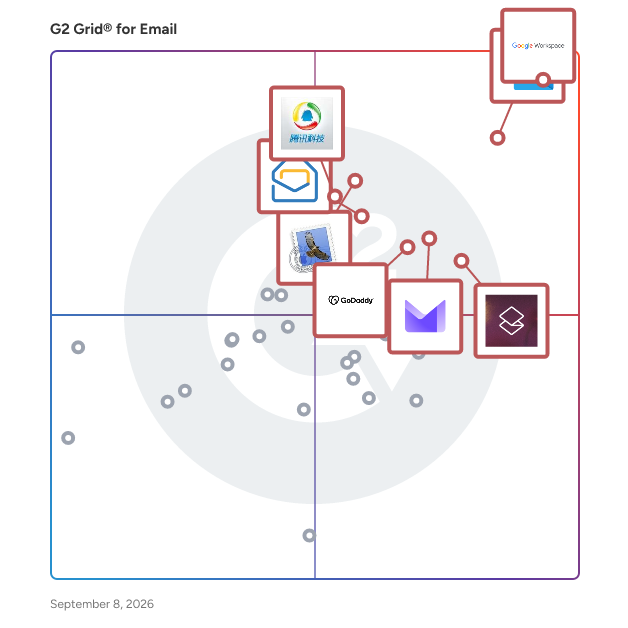
# Best Email Software

  *By [Nana Serwah Nkrahene](https://research.g2.com/insights/author/nana-nkrahene)*

   Email software facilitates the transmission of electronic mail from one user to another. Email provides businesses a fast, accessible way to communicate important information and conduct business with clients, prospective buyers, and coworkers.

Email software includes a web-based or desktop email client that manages and formats emails by communicating with an email server. This software facilitates various business tasks, including disseminating promotional information, distributing company newsletters, and sharing onboarding information.

Email enables the secure transmission of documents, contact information, and other large-scale attachments internally and externally. It remains one of the most efficient means of internal and external communication and is used by all personnel within a business regardless of their team. Usually, the company email system is managed by IT specialists who help block spam and unwanted senders, ensure secure gateways for internal communication, and monitor for any security issues that may arise.

Email software integrates with products such as [email management](https://www.g2.com/categories/email-management) software and [email verification](https://www.g2.com/categories/email-verification) software, which add functionality to the basic features of email. [email marketing](https://www.g2.com/categories/email-marketing) software enables marketing teams to leverage email for promoting campaigns. Tools like [secure email gateway](https://www.g2.com/categories/secure-email-gateway) software, [email anti-spam](https://www.g2.com/categories/email-anti-spam) software, and [intelligent email protection](https://www.g2.com/categories/intelligent-email-protection) software are integrated with email platforms to enhance security.

To qualify for inclusion in the Email category, a product must:

- Have an inbox where messages can be received, searched, sorted, and managed
- Allow the transmission of both text and attachments
- Allow a user to archive messages
- Have an address book or contact list feature
- Alert users about a message’s delivery status
- Integrate with calendar, instant messaging, reminder, or note-taking software


## Category Overview

**Total Products under this Category:** 126


## Trust & Credibility Stats

**Why You Can Trust G2's Software Rankings:**

- 30 Analysts and Data Experts
- 56,300+ Authentic Reviews
- 126+ Products
- Unbiased Rankings

G2's software rankings are built on verified user reviews, rigorous moderation, and a consistent research methodology maintained by a team of analysts and data experts. Each product is measured using the same transparent criteria, with no paid placement or vendor influence. While reviews reflect real user experiences, which can be subjective, they offer valuable insight into how software performs in the hands of professionals. Together, these inputs power the G2 Score, a standardized way to compare tools within every category.


## Best Email Software At A Glance

- **Leader:** [Google Workspace](https://www.g2.com/products/google-workspace/reviews)
- **Highest Performer:** [Neo](https://www.g2.com/products/neo-email/reviews)
- **Easiest to Use:** [Google Workspace](https://www.g2.com/products/google-workspace/reviews)
- **Top Trending:** [Google Workspace](https://www.g2.com/products/google-workspace/reviews)
- **Best Free Software:** [Google Workspace](https://www.g2.com/products/google-workspace/reviews)


---

**Sponsored**

### Convesio

Convesio is a modern commerce platform specifically designed for high-growth WooCommerce businesses, providing a comprehensive solution that goes beyond traditional hosting. It combines scalable infrastructure, integrated payment systems, built-in marketing tools, and HIPAA-compliant features tailored for regulated industries. This all-in-one platform is crafted to help serious brands scale their operations more intelligently and efficiently. Targeted primarily at fast-moving brands, Convesio addresses common challenges associated with growth in eCommerce. The platform automatically scales during traffic spikes, ensuring that websites maintain optimal performance and speed at all times. This capability translates into higher conversion rates, enhanced user experiences, and a significant reduction in lost sales opportunities. By managing performance intricacies such as downtime, caching plugins, and server upgrades, Convesio allows businesses to concentrate on their core operations and growth strategies. Beyond hosting, Convesio offers a suite of features designed to enhance business operations. With ConvesioPay, merchants gain immediate access to their funds without holds or additional fees, which significantly improves cash flow and operational flexibility. Additionally, the platform incorporates integrated marketing automation, thanks to its acquisition of Growmatik, enabling businesses to convert more visitors into customers through intelligent personalization and segmentation. This functionality eliminates the need for external tools or complicated setups, streamlining the marketing process. For healthcare and wellness brands, Convesio provides specialized support for HIPAA-compliant websites. The platform ensures enhanced data isolation, robust security measures, and stringent control over third-party access, making it an ideal choice for medical clinics, telehealth providers, and eCommerce businesses that handle sensitive health information. This focus on compliance and security allows brands in these sectors to operate confidently while meeting regulatory requirements. Whether a business is launching its first product or managing a multi-million dollar storefront, Convesio offers a solid foundation for scalable growth. With its fast, secure, and automated infrastructure, along with built-in revenue tools and a knowledgeable support team, Convesio empowers modern commerce businesses to unlock their full potential and thrive in a competitive landscape.


[Visit website](https://www.g2.com/external_clickthroughs/record?secure%5Bad_program%5D=ppc&amp;secure%5Bad_slot%5D=category_product_list&amp;secure%5Bcategory_id%5D=44&amp;secure%5Bdisplayable_resource_id%5D=1005525&amp;secure%5Bdisplayable_resource_type%5D=Category&amp;secure%5Bmedium%5D=sponsored&amp;secure%5Bplacement_reason%5D=neighbor_category&amp;secure%5Bplacement_resource_ids%5D%5B%5D=1005525&amp;secure%5Bprioritized%5D=false&amp;secure%5Bproduct_id%5D=134749&amp;secure%5Bresource_id%5D=44&amp;secure%5Bresource_type%5D=Category&amp;secure%5Bsource_type%5D=category_page&amp;secure%5Bsource_url%5D=https%3A%2F%2Fwww.g2.com%2Fcategories%2Femail%3Fpage%3D2&amp;secure%5Btoken%5D=72b261eb0436816d8549cce66239f3c5e598730efb3ff47745b655adc9a8fd2c&amp;secure%5Burl%5D=https%3A%2F%2Fconsole.convesio.com%2Fregister&amp;secure%5Burl_type%5D=free_trial)

---

## Top-Rated Products (Ranked by G2 Score)
### 1. [Google Workspace](https://www.g2.com/products/google-workspace/reviews)
  Google Workspace is a comprehensive productivity and collaboration solution designed to help users streamline their work processes by integrating essential tools such as email, chat, file storage, and video conferencing into a unified platform. This suite of applications is tailored for businesses, educational institutions, and individuals looking to enhance their communication and collaboration efforts, all while leveraging the power of Google’s artificial intelligence. Targeted at a diverse audience, Google Workspace caters to teams of all sizes, from small startups to large enterprises. It is particularly beneficial for remote teams and organizations that prioritize collaboration across different locations. The platform supports various use cases, including project management, team communication, document sharing, and virtual meetings, making it an ideal choice for professionals who need to work together efficiently, regardless of their physical location. One of the key features of Google Workspace is its seamless integration of applications such as Gmail, Google Meet, Google Drive, and Google Docs. This interconnectedness allows users to switch effortlessly between tasks, whether they are sending emails, participating in video calls, or collaborating on documents in real-time. The AI capabilities embedded within the platform enhance user experience by providing smart suggestions, automating repetitive tasks, and improving search functionalities, ultimately saving time and increasing productivity. Additionally, Google Workspace prioritizes security and data protection, offering robust features such as two-factor authentication, advanced phishing protection, and customizable access controls. These measures ensure that sensitive information remains secure while allowing teams to collaborate freely. The platform also supports third-party integrations, enabling users to connect their favorite applications and tools, further enhancing their workflow. In summary, Google Workspace stands out in the productivity software category by providing a holistic approach to collaboration. Its user-friendly interface, combined with powerful AI-driven features and strong security protocols, makes it a valuable tool for anyone looking to improve their work processes and foster effective teamwork. Whether for managing projects, communicating with colleagues, or sharing files, Google Workspace is designed to meet the diverse needs of its users, making it an essential resource in today’s digital workplace.


  **Average Rating:** 4.6/5.0
  **Total Reviews:** 45,339

**User Satisfaction Scores:**

- **Has the product been a good partner in doing business?:** 9.0/10 (Category avg: 8.6/10)
- **Ease of Use:** 9.3/10 (Category avg: 8.5/10)
- **Quality of Support:** 8.6/10 (Category avg: 8.4/10)
- **Ease of Admin:** 9.0/10 (Category avg: 8.4/10)


**Seller Details:**

- **Seller:** [Google](https://www.g2.com/sellers/google)
- **Year Founded:** 1998
- **HQ Location:** Mountain View, CA
- **Twitter:** @google (31,885,216 Twitter followers)
- **LinkedIn® Page:** https://www.linkedin.com/company/1441/ (336,169 employees on LinkedIn®)
- **Ownership:** NASDAQ:GOOG

**Reviewer Demographics:**
  - **Who Uses This:** Student, Teacher
  - **Top Industries:** Information Technology and Services, Education Management
  - **Company Size:** 46% Small-Business, 35% Mid-Market


#### Pros & Cons

**Pros:**

- Ease of Use (2240 reviews)
- Team Collaboration (1359 reviews)
- Integrations (1270 reviews)
- Features (1152 reviews)
- Intuitive (1070 reviews)

**Cons:**

- Missing Features (910 reviews)
- Limited Features (843 reviews)
- Lacking Features (503 reviews)
- Lack of Features (351 reviews)
- Limited Customization (347 reviews)

### 2. [Microsoft Outlook](https://www.g2.com/products/microsoft-outlook/reviews)
  Microsoft Outlook is a comprehensive email and calendar application designed to help users stay connected and organized across various devices. It integrates email, calendar, contacts, and tasks into a single platform, enabling efficient management of communications and schedules. With a Microsoft 365 subscription, users can share attachments directly from OneDrive, access contacts, and view LinkedIn profiles, enhancing productivity and collaboration. Key Features and Functionality: - Unified Communication: Combines email, calendar, contacts, and tasks in one application, streamlining workflow and reducing the need to switch between different apps. - Calendar Management: Allows booking of conference rooms, tracking RSVPs, and sharing calendars to coordinate schedules effectively. - Enterprise-Grade Security: Provides robust security measures to protect confidential information, ensuring peace of mind for users. - Intelligent Assistance: Automatically adds travel and bill payment details to the calendar and offers intelligent reminders to keep users on track. Primary Value and User Solutions: Microsoft Outlook addresses the need for a centralized platform to manage emails, schedules, and tasks efficiently. By integrating these functions, it reduces the complexity of juggling multiple applications, thereby enhancing productivity. Its security features ensure that sensitive information remains protected, while intelligent tools assist in planning and organization, allowing users to focus on their priorities without missing important events or communications.


  **Average Rating:** 4.5/5.0
  **Total Reviews:** 3,348

**User Satisfaction Scores:**

- **Has the product been a good partner in doing business?:** 8.8/10 (Category avg: 8.6/10)
- **Ease of Use:** 9.0/10 (Category avg: 8.5/10)
- **Quality of Support:** 8.6/10 (Category avg: 8.4/10)
- **Ease of Admin:** 8.6/10 (Category avg: 8.4/10)


**Seller Details:**

- **Seller:** [Microsoft](https://www.g2.com/sellers/microsoft)
- **Year Founded:** 1975
- **HQ Location:** Redmond, Washington
- **Twitter:** @microsoft (13,105,844 Twitter followers)
- **LinkedIn® Page:** https://www.linkedin.com/company/microsoft/ (227,697 employees on LinkedIn®)
- **Ownership:** MSFT

**Reviewer Demographics:**
  - **Who Uses This:** Software Engineer, Project Manager
  - **Top Industries:** Information Technology and Services, Computer Software
  - **Company Size:** 39% Enterprise, 38% Mid-Market


#### Pros & Cons

**Pros:**

- Ease of Use (267 reviews)
- Calendar Integration (139 reviews)
- Integrations (139 reviews)
- Scheduling (128 reviews)
- Features (98 reviews)

**Cons:**

- Slow Performance (92 reviews)
- Slow Loading (91 reviews)
- Missing Features (74 reviews)
- Sync Issues (49 reviews)
- Email Management (48 reviews)

### 3. [Superhuman Mail](https://www.g2.com/products/superhuman-mail/reviews)
  Superhuman Mail is the AI-native email app that helps high-performing teams fly through their inboxes and focus on what matters. Built for speed, clarity, and collaboration, Superhuman helps professionals save four hours per person, per week. Smart triage, lightning-fast UX, and powerful integrations let you move through messages in record time without losing context or control. Whether you&#39;re following up with prospects, clearing internal threads, or managing projects via email, Superhuman gives you the tools to work faster and stay responsive. Superhuman Mail is part of Superhuman, the AI productivity platform on a mission to unlock the superhuman potential in everyone. Superhuman’s suite of apps and agents brings AI wherever people work, helping over 40 million individuals and 50,000 organizations focus on what matters.


  **Average Rating:** 4.7/5.0
  **Total Reviews:** 1,177

**User Satisfaction Scores:**

- **Has the product been a good partner in doing business?:** 9.4/10 (Category avg: 8.6/10)
- **Ease of Use:** 9.2/10 (Category avg: 8.5/10)
- **Quality of Support:** 9.6/10 (Category avg: 8.4/10)
- **Ease of Admin:** 9.3/10 (Category avg: 8.4/10)


**Seller Details:**

- **Seller:** [Superhuman](https://www.g2.com/sellers/superhuman-888da3d1-51f7-4603-8d73-08989f8a7db1)
- **Company Website:** https://superhuman.com/
- **HQ Location:** San Francisco, California
- **LinkedIn® Page:** https://www.linkedin.com/company/superhuman-co/ (195 employees on LinkedIn®)

**Reviewer Demographics:**
  - **Who Uses This:** CEO, Founder
  - **Top Industries:** Computer Software, Information Technology and Services
  - **Company Size:** 77% Small-Business, 17% Mid-Market


#### Pros & Cons

**Pros:**

- Time-saving (244 reviews)
- Ease of Use (224 reviews)
- Speed (173 reviews)
- Keyboard Shortcuts (169 reviews)
- Inbox Management (129 reviews)

**Cons:**

- Learning Curve (73 reviews)
- Expensive (60 reviews)
- Steep Learning Curve (60 reviews)
- Missing Features (59 reviews)
- Email Management (40 reviews)

### 4. [GoDaddy Email &amp; Office](https://www.g2.com/products/godaddy-email-office/reviews)
  When you sign up for Professional Email, every time you send @your business.com emails, you&#39;re getting your business name and website out there.


  **Average Rating:** 3.8/5.0
  **Total Reviews:** 51

**User Satisfaction Scores:**

- **Has the product been a good partner in doing business?:** 9.1/10 (Category avg: 8.6/10)
- **Ease of Use:** 8.3/10 (Category avg: 8.5/10)
- **Quality of Support:** 8.1/10 (Category avg: 8.4/10)
- **Ease of Admin:** 8.9/10 (Category avg: 8.4/10)


**Seller Details:**

- **Seller:** [GoDaddy](https://www.g2.com/sellers/godaddy)
- **Year Founded:** 1997
- **HQ Location:** Scottsdale, AZ
- **Twitter:** @GoDaddy (275,213 Twitter followers)
- **LinkedIn® Page:** https://www.linkedin.com/company/7846/ (8,990 employees on LinkedIn®)
- **Ownership:** NYSE:GDDY

**Reviewer Demographics:**
  - **Who Uses This:** Owner
  - **Top Industries:** Marketing and Advertising
  - **Company Size:** 85% Small-Business, 15% Mid-Market


#### Pros & Cons

**Pros:**

- Cloud Storage (1 reviews)
- Ease of Use (1 reviews)
- Efficiency (1 reviews)
- Storage Capacity (1 reviews)
- Syncing Capabilities (1 reviews)

**Cons:**

- Access Limitations (1 reviews)
- Inefficient Search Functionality (1 reviews)
- Poor Customer Support (1 reviews)
- Pricing Issues (1 reviews)
- Spam Issues (1 reviews)

### 5. [Apple Mail](https://www.g2.com/products/apple-mail/reviews)
  Apple Mail is a comprehensive email client developed by Apple Inc., seamlessly integrated across macOS, iOS, iPadOS, watchOS, and visionOS platforms. Originating from NeXTMail, it has evolved to offer a user-friendly interface and robust functionality, catering to both personal and professional communication needs. Key Features and Functionality: - Unified Inbox: Manage multiple email accounts from various providers, including iCloud, Gmail, Yahoo, and Outlook, within a single, organized inbox. - Email Categorization: Automatically sorts incoming emails into categories such as Primary, Transactions, Updates, and Promotions, enhancing inbox organization. - Priority Messages: Highlights urgent emails, like same-day invitations or boarding passes, ensuring critical information is promptly accessible. - Smart Reply and Summarization: Utilizes Apple Intelligence to suggest context-aware responses and provide concise summaries of emails and threads, streamlining communication. - Scheduling and Undo Send: Allows users to schedule emails for later delivery and offers a brief window to undo sent messages, adding flexibility and control. - Integration with Apple Ecosystem: Seamlessly connects with Contacts, Calendar, and other Apple applications, facilitating a cohesive user experience. Primary Value and User Solutions: Apple Mail enhances email management by providing a centralized platform that integrates multiple accounts and organizes messages efficiently. The incorporation of Apple Intelligence introduces advanced features like email categorization, priority highlighting, and smart replies, which collectively reduce the time and effort required to manage communications. The ability to schedule emails and undo sends offers users greater control over their correspondence. By integrating deeply with the Apple ecosystem, Apple Mail ensures a seamless and productive experience across all Apple devices.


  **Average Rating:** 3.9/5.0
  **Total Reviews:** 154

**User Satisfaction Scores:**

- **Has the product been a good partner in doing business?:** 7.8/10 (Category avg: 8.6/10)
- **Ease of Use:** 8.5/10 (Category avg: 8.5/10)
- **Quality of Support:** 8.0/10 (Category avg: 8.4/10)
- **Ease of Admin:** 7.9/10 (Category avg: 8.4/10)


**Seller Details:**

- **Seller:** [Apple](https://www.g2.com/sellers/apple)
- **Year Founded:** 1976
- **HQ Location:** Cupertino, CA
- **Twitter:** @Apple (9,940,472 Twitter followers)
- **LinkedIn® Page:** https://www.linkedin.com/company/162479/ (180,534 employees on LinkedIn®)
- **Ownership:** NASDAQ:AAPL

**Reviewer Demographics:**
  - **Top Industries:** Computer Software, Information Technology and Services
  - **Company Size:** 58% Small-Business, 32% Mid-Market


#### Pros & Cons

**Pros:**

- Ease of Use (3 reviews)
- Integrations (2 reviews)
- Intuitive (2 reviews)
- Clean Interface (1 reviews)
- Navigation Ease (1 reviews)

**Cons:**

- Poor Interface Design (2 reviews)
- Inefficient Search Functionality (1 reviews)
- Missing Features (1 reviews)
- Update Issues (1 reviews)

### 6. [Zoho Mail](https://www.g2.com/products/zoho-mail/reviews)
  What does Zoho Mail offer? With 16 million happy users and more than a decade of experience, Zoho Mail is packed with useful features. It nails down the basics and also caters to demanding businesses. Below are some of the bells and whistles that comprise Zoho Mail. ☑️ Custom domain as unique as you Give your brand or business that authentic exterior and increase brand awareness with the option to create a custom domain for your business email. Zoho Mail lets you purchase your own domain and set it up, if you don&#39;t own one already. ☑️ Supercharged email with a suite of apps Crush emails, keep an eye on your calendar, create contextual notes from emails, tick off your to-dos, and more with the suite of apps Zoho Mail comes with. These apps are tightly integrated and talk well with each other so that your workflow is frictionless. ☑️ A truck-load of integrations Zoho Mail cooperates with a host of other third-party applications. Now you can get your project details from Asana, jump into a Zoom meeting, or encrypt your emails using PGP, all within your Zoho Mail inbox. These integrations stay right inside your inbox so that you can quickly access them. ☑️ Take your collaboration up a notch Zoho Mail has a nifty feature called Streams that adds a flavor of social media to your emails. Everyone can come together, ideate, and execute a plan without the hassle of unending email threads. Email delegation ☑️ Delegate and conquer your day with the email delegation feature in Zoho Mail. You can assign people to take care of your inbox while maintaining control by giving role-based access to ensure security and privacy. ☑️ AI assistance Everyone needs a helping hand in their life and Zia does just that. Zia with Zoho Mail is your AI version of a knight in shining armor. With Zia by your side, email efficiency can vastly improve because it can help you with drafting responses and summarizing messages. ☑️ Robust security With great power comes great responsibility. This is where Zoho Mail takes much pride in following best-in-class security, compliance, and privacy practices. These make sure that your emailing experience is secure and your data remains yours truly. ✔️Other features ✔️Admin control ✔️Easy migration ✔️Offline emailing ✔️Native desktop and mobile apps ✔️24/7 support With a privacy-first approach, Zoho Mail can transform the way you go about your emails. Get started with Zoho Mail now!


  **Average Rating:** 4.4/5.0
  **Total Reviews:** 681

**User Satisfaction Scores:**

- **Has the product been a good partner in doing business?:** 8.8/10 (Category avg: 8.6/10)
- **Ease of Use:** 9.0/10 (Category avg: 8.5/10)
- **Quality of Support:** 8.4/10 (Category avg: 8.4/10)
- **Ease of Admin:** 8.7/10 (Category avg: 8.4/10)


**Seller Details:**

- **Seller:** [Zoho](https://www.g2.com/sellers/zoho-b00ca9d5-bca8-41b5-a8ad-275480841704)
- **Year Founded:** 1996
- **HQ Location:** Austin, TX
- **Twitter:** @Zoho (137,251 Twitter followers)
- **LinkedIn® Page:** https://www.linkedin.com/company/38373/ (30,531 employees on LinkedIn®)
- **Phone:** +1 (888) 900-9646 

**Reviewer Demographics:**
  - **Who Uses This:** Founder, CEO
  - **Top Industries:** Information Technology and Services, Marketing and Advertising
  - **Company Size:** 75% Small-Business, 20% Mid-Market


#### Pros & Cons

**Pros:**

- Ease of Use (51 reviews)
- Email Management (35 reviews)
- Integrations (27 reviews)
- User Interface (25 reviews)
- Intuitive (20 reviews)

**Cons:**

- Slow Performance (19 reviews)
- Slow Loading (14 reviews)
- Email Issues (13 reviews)
- Limited Storage (13 reviews)
- Learning Curve (11 reviews)

### 7. [Tencent Exmail](https://www.g2.com/products/tencent-exmail/reviews)
  Tencent Exmail is a professional email service developed by Tencent, designed to meet the communication needs of businesses of all sizes. Leveraging Tencent&#39;s extensive experience in managing large-scale email systems, Exmail offers a stable, user-friendly, and efficient platform that integrates seamlessly with various enterprise applications. This service enhances organizational productivity by providing tools for resource sharing, message dissemination, and organizational management. Notably, Tencent Exmail is deeply integrated with the WeChat ecosystem, offering a convenient and effective mobile email solution. Key Features and Functionality: - Enterprise-Level Security: Exmail employs advanced security measures, including enterprise-level encryption and intelligent spam filtering, to ensure the confidentiality and integrity of communications. - Seamless Integration with WeChat: Users can send and receive emails directly within WeChat, facilitating efficient communication without the need to switch between applications. - Custom Domain Support: Businesses can use their own domains for email addresses, reinforcing brand identity and professionalism. - Cross-Device Accessibility: Exmail supports synchronization across multiple devices, ensuring users have access to their emails anytime, anywhere. - Administrative Controls: The platform offers robust administrative tools for managing user accounts, permissions, and organizational structures. Primary Value and Solutions Provided: Tencent Exmail addresses the critical need for secure, reliable, and integrated email communication within the corporate environment. By offering a platform that combines advanced security features with seamless integration into widely used tools like WeChat, Exmail enhances operational efficiency and collaboration. Its support for custom domains and cross-device accessibility ensures that businesses maintain a professional image and that employees can stay connected, regardless of their location. Furthermore, the administrative controls provided by Exmail enable organizations to effectively manage their communication infrastructure, ensuring compliance and streamlined operations.


  **Average Rating:** 4.0/5.0
  **Total Reviews:** 13

**User Satisfaction Scores:**

- **Has the product been a good partner in doing business?:** 9.4/10 (Category avg: 8.6/10)
- **Ease of Use:** 7.8/10 (Category avg: 8.5/10)
- **Quality of Support:** 8.3/10 (Category avg: 8.4/10)
- **Ease of Admin:** 7.5/10 (Category avg: 8.4/10)


**Seller Details:**

- **Seller:** [QQ Mail](https://www.g2.com/sellers/qq-mail)
- **HQ Location:** N/A
- **LinkedIn® Page:** https://www.linkedin.com/company/No-Linkedin-Presence-Added-Intentionally-By-DataOps (1 employees on LinkedIn®)
- **Ownership:** OTC: TCEHY

**Reviewer Demographics:**
  - **Company Size:** 54% Small-Business, 38% Mid-Market


#### Pros & Cons

**Pros:**

- Clean Interface (1 reviews)
- Ease of Use (1 reviews)
- Efficiency (1 reviews)
- Integrations (1 reviews)
- Intuitive (1 reviews)

**Cons:**

- Limited Functionality (1 reviews)
- Mobile App Limitations (1 reviews)
- Poor Customer Support (1 reviews)
- Poor Interface Design (1 reviews)
- User Interface (1 reviews)

### 8. [Proton Mail For Business](https://www.g2.com/products/proton-mail-for-business/reviews)
  Proton Mail for Business is a secure email and calendar solution tailored specifically for small and medium-sized businesses (SMBs). This platform enables users to send, receive, organize, and manage professional email and calendar communications while ensuring built-in privacy and encryption. Designed to support critical business communication workflows, Proton Mail for Business protects sensitive information from unauthorized access and assists organizations in meeting data privacy and compliance requirements. Its features cater to SMBs looking to enhance email security, centralize user management, and integrate encrypted messaging with productivity tools like calendar scheduling. The product&#39;s core capabilities focus on providing a robust business email experience. With end-to-end encryption, email content remains confidential, ensuring that only the intended senders and recipients can read messages. Proton Mail cannot decrypt stored emails, even for compliance or support purposes, which reinforces its commitment to user privacy. Additionally, businesses can utilize custom domains for branded email addresses, enhancing professionalism and brand identity. Integrated calendar tools allow teams to create, share, and schedule events seamlessly alongside email, reducing the need for multiple disparate applications. Proton Mail for Business also includes a variety of productivity and workflow features designed to streamline communication. Advanced inbox organization tools, such as filters and folders, automatically sort incoming mail, while labels help categorize messages for efficient workflow management. Email automation capabilities enable users to schedule messages, create autoresponders, and snooze emails, which is particularly beneficial for managing busy inboxes. Furthermore, the AI-assisted writing support, Proton Scribe, aids in drafting and proofreading messages without compromising privacy, ensuring that sensitive content remains secure. Security and compliance are paramount in Proton Mail for Business, which is why it offers strong regulatory support for GDPR, HIPAA, CCPA, and other privacy regulations through its default end-to-end encryption and zero-access architecture. Hosted under Swiss privacy laws, the platform provides additional legal protections compared to other jurisdictions, safeguarding user data from forced access. The centralized admin panel allows for efficient user management, enabling administrators to add or remove users, enforce two-factor authentication, and manage permissions across the business domain. Advanced threat protection through Proton Sentinel combines AI and human analysis to identify and block potential account breaches and other security threats. By combining encrypted communication with practical organizational tools and administrative oversight, Proton Mail for Business positions itself as a comprehensive and secure email platform for SMBs. Its focus on privacy and compliance, along with its ability to enhance professional communication continuity and improve team productivity, makes it a valuable solution for businesses prioritizing secure digital communications.


  **Average Rating:** 4.5/5.0
  **Total Reviews:** 159

**User Satisfaction Scores:**

- **Has the product been a good partner in doing business?:** 9.3/10 (Category avg: 8.6/10)
- **Ease of Use:** 8.9/10 (Category avg: 8.5/10)
- **Quality of Support:** 8.4/10 (Category avg: 8.4/10)
- **Ease of Admin:** 9.1/10 (Category avg: 8.4/10)


**Seller Details:**

- **Seller:** [Proton AG](https://www.g2.com/sellers/proton-ag)
- **Company Website:** https://proton.me/
- **Year Founded:** 2014
- **HQ Location:** Plan-les-Ouates, Geneva, Switzerland
- **Twitter:** @ProtonPrivacy (359,691 Twitter followers)
- **LinkedIn® Page:** https://www.linkedin.com/company/protonprivacy/ (844 employees on LinkedIn®)

**Reviewer Demographics:**
  - **Top Industries:** Information Technology and Services, Internet
  - **Company Size:** 46% Small-Business, 26% Mid-Market


#### Pros & Cons

**Pros:**

- Ease of Use (3 reviews)
- Encryption (2 reviews)
- Reliability (2 reviews)
- Security (2 reviews)
- Clean Interface (1 reviews)

**Cons:**

- Compatibility Issues (1 reviews)
- Complex Processes (1 reviews)
- Email Issues (1 reviews)
- Improvement Needed (1 reviews)
- Inefficient Search Functionality (1 reviews)

### 9. [Neo](https://www.g2.com/products/neo-email/reviews)
  Neo is an email and growth suite designed to accelerate the online growth of small businesses and entrepreneurs. Over 130,000 small businesses trust Neo. Neo is an all-in-one business email platform where you get a custom business email address (yourname@yourcompany.com) that matches your brand name and powerful features that help grow your brand. A business email address adds credibility and instills trust in your clients and customers for your brand. And the best part? We&#39;ll help you with a domain name if you don&#39;t already have one! Neo also includes an AI designed website and requires no setup or coding. Neo is packed with a range of tools along with rich webmail, including integrated Calendar and Contacts apps, email marketing, appointment scheduling, an AI email assistant to write and respond to any email, read receipts, and a host of other productivity and security features. Ideal for: Small businesses, entrepreneurs, and startups seeking a comprehensive email suite to engage with clients and teammates effectively.


  **Average Rating:** 4.6/5.0
  **Total Reviews:** 135

**User Satisfaction Scores:**

- **Has the product been a good partner in doing business?:** 9.4/10 (Category avg: 8.6/10)
- **Ease of Use:** 9.5/10 (Category avg: 8.5/10)
- **Quality of Support:** 9.1/10 (Category avg: 8.4/10)
- **Ease of Admin:** 9.4/10 (Category avg: 8.4/10)


**Seller Details:**

- **Seller:** [Neo](https://www.g2.com/sellers/neo-7ea572cd-246e-423f-9719-43c5925a82ba)
- **Company Website:** https://www.neo.space
- **HQ Location:** Boston, US
- **LinkedIn® Page:** https://www.linkedin.com/company/neo-email/ (3 employees on LinkedIn®)

**Reviewer Demographics:**
  - **Who Uses This:** Director, CEO
  - **Top Industries:** Marketing and Advertising, Consulting
  - **Company Size:** 88% Small-Business, 4% Mid-Market


#### Pros & Cons

**Pros:**

- Ease of Use (48 reviews)
- Pricing (20 reviews)
- Easy Setup (18 reviews)
- Setup Ease (18 reviews)
- Affordable (16 reviews)

**Cons:**

- Pricing Issues (8 reviews)
- Expensive (7 reviews)
- Limited Features (7 reviews)
- Difficult Setup (6 reviews)
- Missing Features (6 reviews)

### 10. [HostArmada](https://www.g2.com/products/hostarmada/reviews)
  HostArmada is a privately owned and independently funded web hosting provider that started in November 2019 with a team dedicated to providing fast, secure, and reliable web hosting services. HostArmada is more than just a web hosting company. We are a team of passionate individuals committed to providing exceptional hosting services to our customers. Our focus is on delivering fast, secure, and reliable web hosting services that meet the unique needs of businesses and individuals worldwide. At HostArmada, we understand that every business is different, and that&#39;s why we offer a wide range of hosting solutions to cater to the needs of companies of all sizes, from small startups to large enterprises. Our hosting services include shared hosting WordPress hosting, reseller hosting, VPS hosting, and Cloud hosting, all backed by a robust infrastructure that ensures high performance and uptime for your website. With HostArmada, you can choose the hosting plan that best suits your needs and scale it up or down as your business grows. Our control panel makes it easy for you to manage your hosting account and website, even if you don&#39;t have technical expertise. You can easily manage your website files, databases, domains, and email accounts with just a few clicks. At HostArmada, we believe that customer support is just as important as the quality of our hosting services. That&#39;s why we have a dedicated customer support team that is available 24/7 to assist you with any hosting-related questions or issues you may encounter. Our team is highly trained and knowledgeable, and we pride ourselves on delivering fast and reliable assistance through various channels such as live chat, email, and phone. We understand that pricing is a crucial factor when it comes to choosing a web hosting provider. That&#39;s why we offer affordable pricing and transparent billing. You can rest assured that there are no hidden fees or surprises when it comes to your hosting bill. Additionally, we offer a hassle-free 45-day money-back guarantee demonstrating our commitment to customer satisfaction. HostArmada is a reliable and customer-oriented web hosting company that offers top-notch web hosting services to businesses and individuals worldwide. With our wide range of hosting solutions, user-friendly control panel, and exceptional customer support, you can be sure that your website is in good hands. We invite you to join our community of satisfied customers and experience the difference for yourself.


  **Average Rating:** 4.9/5.0
  **Total Reviews:** 294

**User Satisfaction Scores:**

- **Has the product been a good partner in doing business?:** 9.8/10 (Category avg: 8.6/10)
- **Ease of Use:** 9.7/10 (Category avg: 8.5/10)
- **Quality of Support:** 10.0/10 (Category avg: 8.4/10)
- **Ease of Admin:** 9.7/10 (Category avg: 8.4/10)


**Seller Details:**

- **Seller:** [HostArmada.com](https://www.g2.com/sellers/hostarmada-com)
- **Year Founded:** 2019
- **HQ Location:** Delaware, Wilmington
- **Twitter:** @HostArmada (165 Twitter followers)
- **LinkedIn® Page:** https://www.linkedin.com/company/hostarmada/ (14 employees on LinkedIn®)

**Reviewer Demographics:**
  - **Who Uses This:** Owner, CEO
  - **Top Industries:** Marketing and Advertising, Computer Software
  - **Company Size:** 98% Small-Business, 2% Mid-Market


#### Pros & Cons

**Pros:**

- Customer Support (124 reviews)
- Helpful (82 reviews)
- Quick Response (75 reviews)
- Technical Support (54 reviews)
- Reliability (52 reviews)

**Cons:**

- Expensive (13 reviews)
- High Cost (10 reviews)
- Pricing Issues (9 reviews)
- High Pricing (6 reviews)
- High Renewal Costs (6 reviews)

### 11. [Titan](https://www.g2.com/products/titan-titan/reviews)
  Titan is the first customer-centric email suite created specifically for professionals and small business owners, with features designed to enable deeper, more meaningful relationships with customers. With useful built-in tools such as Email templates, the ability to Schedule sends, Follow-up reminders, and more, Titan provides an email experience that streamlines productivity. Titan’s calendar, contact list, and storage offers efficiency from right within the inbox. Titan can be integrated with Webhosts, Domain Registrars, and Website Builders to offer a full-package solution to customers. Titan Email is available on Webmail, iOS, and Android devices. Best For: Professionals or small businesses looking for a comprehensive email suite that enables meaningful customer relationships.


  **Average Rating:** 4.6/5.0
  **Total Reviews:** 558

**User Satisfaction Scores:**

- **Has the product been a good partner in doing business?:** 9.4/10 (Category avg: 8.6/10)
- **Ease of Use:** 9.3/10 (Category avg: 8.5/10)
- **Quality of Support:** 9.4/10 (Category avg: 8.4/10)
- **Ease of Admin:** 9.3/10 (Category avg: 8.4/10)


**Seller Details:**

- **Seller:** [Titan](https://www.g2.com/sellers/titan)
- **Year Founded:** 2018
- **HQ Location:** Mumbai, IN
- **Twitter:** @TitanEmail (640 Twitter followers)
- **LinkedIn® Page:** https://www.linkedin.com/company/titan-email/ (577 employees on LinkedIn®)

**Reviewer Demographics:**
  - **Who Uses This:** CEO, Owner
  - **Top Industries:** Marketing and Advertising, Computer Software
  - **Company Size:** 98% Small-Business, 2% Mid-Market


#### Pros & Cons

**Pros:**

- Customer Support (4 reviews)
- Customer Experience (2 reviews)
- Ease of Use (2 reviews)
- Inbox Management (2 reviews)
- Intuitive (2 reviews)

**Cons:**

- Difficult Setup (1 reviews)
- Folder Management (1 reviews)
- Inbox Management (1 reviews)
- Learning Curve (1 reviews)
- Limited Features (1 reviews)

### 12. [Spark for Teams](https://www.g2.com/products/spark-for-teams/reviews)
  Spark for Teams is a collaborative email platform builds on the foundation of the Spark email app, which is widely recognized for its smart features that help users manage their email more efficiently. The primary goal of Spark for Teams is to enhance team productivity and streamline communication by offering several key features: 1. \*\*Shared Inboxes\*\*: Teams can collaborate on emails from shared addresses like support@ or info@, ensuring that all team members can access and respond to messages. 2. \*\*Shared Emails\*\*: Stop forwarding or screenshooting your emails to post them into Slack or Microsoft Teams — with Shared Emails you could paste a link and your team will have access to all the email conversations without noisy &quot;adding to cc&quot; emails. 3. \*\*Email Delegation\*\*: Assign emails to team members directly within the app, allowing for clear responsibility and follow-up on tasks. 4. \*\*Team Comments\*\*: Team members can discuss emails internally without forwarding or copying emails back and forth, making internal communication more efficient. 5. \*\*Shared Drafts +AI\*\*: Collaborate on email drafts in real-time, allowing multiple team members to contribute to the creation of important messages. 6. \*\*Templates +AI\*\*: Create and share email templates within the team to ensure consistent communication and save time on repetitive responses. 7. \*\*+AI Meeting Notes\*\* can transcribe and summarize your meeting to capture every point. Fully focus during every discussion and never miss a detail. No bots joining your call, works with any meeting tool. Access all your meeting notes anytime in Spark Mail App. 8. \*\*Centralized Email Management\*\*: Manage multiple email accounts from a single interface, which is particularly useful for teams handling multiple projects or client accounts. 9. \*\*Smart Inbox +AI\*\*: Prioritize important emails and filter out distractions with intelligent sorting and categorization of incoming messages. 10. \*\*Integrations\*\*: Connect Spark with other productivity tools like Trello, Asana, and more to streamline workflows and ensure that email communications integrate smoothly with other team activities. Spark for Teams aims to reduce the chaos often associated with team email management by providing a suite of tools that enhance collaboration, improve communication efficiency, and streamline workflows.


  **Average Rating:** 4.4/5.0
  **Total Reviews:** 19

**User Satisfaction Scores:**

- **Has the product been a good partner in doing business?:** 9.6/10 (Category avg: 8.6/10)
- **Ease of Use:** 9.4/10 (Category avg: 8.5/10)
- **Quality of Support:** 9.9/10 (Category avg: 8.4/10)
- **Ease of Admin:** 9.8/10 (Category avg: 8.4/10)


**Seller Details:**

- **Seller:** [Spark Mail](https://www.g2.com/sellers/spark-mail)
- **Year Founded:** 2007
- **HQ Location:** Odessa, Ukraine
- **Twitter:** @Readdle (25,786 Twitter followers)
- **LinkedIn® Page:** https://www.linkedin.com/company/629551/ (340 employees on LinkedIn®)

**Reviewer Demographics:**
  - **Top Industries:** Marketing and Advertising
  - **Company Size:** 84% Small-Business, 11% Mid-Market


#### Pros & Cons

**Pros:**

- Email Management (11 reviews)
- Collaboration (9 reviews)
- Ease of Use (9 reviews)
- Conversations (8 reviews)
- Communication (7 reviews)

**Cons:**

- Bug Issues (3 reviews)
- Missing Features (3 reviews)
- Software Bugs (3 reviews)
- Infrequent Updates (2 reviews)
- Poor Interface Design (2 reviews)

### 13. [Yahoo! Mail](https://www.g2.com/products/yahoo-mail/reviews)
  Yahoo Mail is a web-based email app accessible on desktops and mobile devices, including iOS and Android devices. Users can stay connected to their email with one-tap access to their inbox, multiple Yahoo account support, and instant email alerts from any device. Users can access contrast themes, text resizing, and screen reader support within the web app. Yahoo Mail includes many helpful features including document and image storage, travel confirmations, package delivery tracking, and more. Yahoo Mail allows users to add Gmail, Outlook, and AOL email accounts for easier access.


  **Average Rating:** 3.8/5.0
  **Total Reviews:** 101

**User Satisfaction Scores:**

- **Has the product been a good partner in doing business?:** 7.2/10 (Category avg: 8.6/10)
- **Ease of Use:** 9.0/10 (Category avg: 8.5/10)
- **Quality of Support:** 8.0/10 (Category avg: 8.4/10)
- **Ease of Admin:** 8.6/10 (Category avg: 8.4/10)


**Seller Details:**

- **Seller:** [Verizon Media](https://www.g2.com/sellers/verizon-media)
- **Year Founded:** 2005
- **HQ Location:** San Francisco, CA
- **Twitter:** @FlurryMobile (16,249 Twitter followers)
- **LinkedIn® Page:** https://www.linkedin.com/company/430650/ (12 employees on LinkedIn®)

**Reviewer Demographics:**
  - **Top Industries:** Marketing and Advertising, Information Technology and Services
  - **Company Size:** 66% Small-Business, 17% Mid-Market


#### Pros & Cons

**Pros:**

- Ease of Use (5 reviews)
- Intuitive (3 reviews)
- Storage Capacity (2 reviews)
- Clean Interface (1 reviews)
- Daily Usage (1 reviews)

**Cons:**

- Spam Issues (5 reviews)
- Slow Performance (2 reviews)
- Connectivity Issues (1 reviews)
- Mobile App Limitations (1 reviews)
- Scheduling Issues (1 reviews)

### 14. [Canary Mail](https://www.g2.com/products/canary-mail/reviews)
  Canary is a secure, privacy-first email client that adapts to how you work. Use AI to write emails, prioritize what matters, and reduce noise or turn it off anytime. With a unified inbox, built-in PGP encryption, and no data mining, your email stays yours. Love Canary? Leave a review and help us improve.


  **Average Rating:** 4.5/5.0
  **Total Reviews:** 51

**User Satisfaction Scores:**

- **Has the product been a good partner in doing business?:** 9.1/10 (Category avg: 8.6/10)
- **Ease of Use:** 9.2/10 (Category avg: 8.5/10)
- **Quality of Support:** 9.2/10 (Category avg: 8.4/10)
- **Ease of Admin:** 9.3/10 (Category avg: 8.4/10)


**Seller Details:**

- **Seller:** [Canary Mail](https://www.g2.com/sellers/canary-mail)
- **Year Founded:** 2017
- **HQ Location:** San Francisco, US
- **Twitter:** @CanaryMailApp (7,685 Twitter followers)
- **LinkedIn® Page:** https://www.linkedin.com/company/canary-mail/ (23 employees on LinkedIn®)

**Reviewer Demographics:**
  - **Top Industries:** Marketing and Advertising, Consulting
  - **Company Size:** 85% Small-Business, 10% Mid-Market


#### Pros & Cons

**Pros:**

- AI Integration (1 reviews)
- Customer Support (1 reviews)
- Ease of Use (1 reviews)
- Easy Implementation (1 reviews)
- Easy Integrations (1 reviews)

**Cons:**

- Attachment Issues (1 reviews)
- Confusing Interface (1 reviews)
- Email Management (1 reviews)
- Learning Curve (1 reviews)

### 15. [MDaemon Email Server](https://www.g2.com/products/mdaemon-technologies/reviews)
  The MDaemon Email Server was one of the first Microsoft Exchange alternatives offered to businesses around the world. It has been developed with the ongoing input from IT professionals seeking an easy-to-use, reliable, and secure mail server that does not require expensive administration or impose high per-user costs. It simplifies messaging and collaboration with a focus on security and privacy, an intuitive, user-friendly web mail design and by offering administrators Mobile Device Management, Business Instant Messaging, Document Sharing, and other enterprise-class features that can be managed with minimal support.


  **Average Rating:** 4.7/5.0
  **Total Reviews:** 173

**User Satisfaction Scores:**

- **Has the product been a good partner in doing business?:** 9.2/10 (Category avg: 8.6/10)
- **Ease of Use:** 9.0/10 (Category avg: 8.5/10)
- **Quality of Support:** 8.8/10 (Category avg: 8.4/10)
- **Ease of Admin:** 9.0/10 (Category avg: 8.4/10)


**Seller Details:**

- **Seller:** [MDaemon Technologies](https://www.g2.com/sellers/mdaemon-technologies-7f262fab-7ecc-43c0-b150-624f5ec008c6)
- **Company Website:** https://mdaemon.com/
- **Year Founded:** 1996
- **HQ Location:** Grapevine, TX
- **Twitter:** @MDaemon_Email (645 Twitter followers)
- **LinkedIn® Page:** https://www.linkedin.com/company/mdaemon-technologies (34 employees on LinkedIn®)

**Reviewer Demographics:**
  - **Who Uses This:** IT Manager, President
  - **Top Industries:** Computer Software, Information Technology and Services
  - **Company Size:** 47% Mid-Market, 44% Small-Business


#### Pros & Cons

**Pros:**

- Email Automation (1 reviews)
- Security (1 reviews)
- Team Collaboration (1 reviews)

**Cons:**

- Inefficient Search Functionality (1 reviews)
- Poor Customer Support (1 reviews)
- Pricing Issues (1 reviews)

### 16. [BlackBerry UEM](https://www.g2.com/products/blackberry-uem/reviews)
  BlackBerry UEM is a suite of solutions that all rely on the same foundation of security to secure the digital workplace. It keeps employees productive on any device, anywhere, while allowing your security team to manage diverse devices, ensure data security, support remote work, and reduce operational costs. Gain comprehensive control, enhance security, and streamline your IT operations.


  **Average Rating:** 3.8/5.0
  **Total Reviews:** 363

**User Satisfaction Scores:**

- **Has the product been a good partner in doing business?:** 7.8/10 (Category avg: 8.6/10)
- **Ease of Use:** 8.0/10 (Category avg: 8.5/10)
- **Quality of Support:** 7.9/10 (Category avg: 8.4/10)
- **Ease of Admin:** 7.8/10 (Category avg: 8.4/10)


**Seller Details:**

- **Seller:** [BlackBerry](https://www.g2.com/sellers/blackberry)
- **Company Website:** https://www.blackberry.com/
- **Year Founded:** 1984
- **HQ Location:** Waterloo, Ontario
- **Twitter:** @BlackBerry (2,772,921 Twitter followers)
- **LinkedIn® Page:** https://www.linkedin.com/company/2828/ (2,030 employees on LinkedIn®)

**Reviewer Demographics:**
  - **Who Uses This:** Consultant
  - **Top Industries:** Financial Services, Information Technology and Services
  - **Company Size:** 55% Enterprise, 27% Small-Business


#### Pros & Cons

**Pros:**

- Administration Management (2 reviews)
- Ease of Use (2 reviews)
- Organization (2 reviews)
- Reliability (2 reviews)
- Security (2 reviews)

**Cons:**

- Learning Curve (2 reviews)
- Complex Features (1 reviews)
- Complexity (1 reviews)
- Complex Setup (1 reviews)
- Development Challenges (1 reviews)

### 17. [Spike](https://www.g2.com/products/spike/reviews)
  Spike is an AI-powered email and team communication platform that combines email, chat, meetings, and collaboration tools into a single, organized workspace. It is designed for professionals, small teams, and businesses that use email as their primary communication channel but want a faster, more streamlined way to manage daily interactions and tasks. By transforming traditional email into a chat-like format, Spike simplifies how users read and reply to messages. The platform removes repetitive headers, quoted text, and long chains, allowing conversations to appear as clean, continuous threads. Users can manage all email accounts, calendars, and contacts in one place while taking advantage of built-in AI to summarize conversations, draft replies, and organize the inbox automatically. Spike supports both individual and team use. Freelancers and professionals use it to manage clients and projects more efficiently, while teams rely on Spike to centralize communication, share files, and collaborate in real time without switching between multiple tools. Core Features: Conversational Email: Presents emails as natural chat-like conversations while remaining fully compatible with standard email protocols. AI Productivity Tools: Provides automatic summaries, suggested replies, translations, and content drafting to speed up workflow. Priority Inbox: Uses AI to sort incoming messages into relevant categories—Priority, Other, Notes, and Starred—helping users focus on what matters most. Integrated Meetings: Enables voice and video calls directly from email threads for faster coordination. Collaborative Notes and Docs: Allows users to create, edit, and share documents in real time within the inbox. Unified Inbox and Search: Consolidates multiple email accounts and calendars into a single interface with cross-account search. Shared Inbox: Helps teams manage customer and project communications collaboratively, ensuring faster response times. Compatibility: Works with Gmail, Outlook, iCloud, Office 365, Yahoo Mail, and all IMAP-supported accounts across desktop, mobile, and web platforms. Security and Privacy: Spike is ad-free and never sells or monetizes user data. All message data is encrypted using the AES-256 standard. Spike is suited for users seeking a unified communication platform that enhances productivity while maintaining the familiarity of email. It bridges the gap between traditional email clients and modern collaboration tools, offering a single, AI-enhanced workspace that helps individuals and teams stay focused and efficient.


  **Average Rating:** 4.6/5.0
  **Total Reviews:** 250

**User Satisfaction Scores:**

- **Has the product been a good partner in doing business?:** 8.6/10 (Category avg: 8.6/10)
- **Ease of Use:** 9.3/10 (Category avg: 8.5/10)
- **Quality of Support:** 9.0/10 (Category avg: 8.4/10)
- **Ease of Admin:** 8.7/10 (Category avg: 8.4/10)


**Seller Details:**

- **Seller:** [Spike](https://www.g2.com/sellers/spike)
- **Year Founded:** 2014
- **HQ Location:** Herzliya, IL
- **Twitter:** @SpikeNowHQ (3,041 Twitter followers)
- **LinkedIn® Page:** https://www.linkedin.com/company/3240452/ (31 employees on LinkedIn®)

**Reviewer Demographics:**
  - **Who Uses This:** CEO, Owner
  - **Top Industries:** Information Technology and Services, Computer Software
  - **Company Size:** 72% Small-Business, 15% Mid-Market


#### Pros & Cons

**Pros:**

- Ease of Use (47 reviews)
- Email Management (35 reviews)
- Communication (33 reviews)
- Helpful (27 reviews)
- Features (24 reviews)

**Cons:**

- Missing Features (19 reviews)
- Limited Features (12 reviews)
- Integration Issues (10 reviews)
- Expensive (9 reviews)
- Limited Customization (9 reviews)

### 18. [Namecheap email](https://www.g2.com/products/namecheap-email/reviews)
  Namecheap&#39;s Professional Business Email hosting offers a secure, reliable, and feature-rich email solution tailored for businesses seeking to establish a professional online presence. By utilizing your own domain name, you can create custom email addresses (e.g., yourname@yourdomain.com, enhancing brand credibility and trust. The service includes robust security measures, ample storage, and seamless integration with various devices and email clients, ensuring efficient communication and collaboration within your organization. Key Features and Functionality: - Custom Domain Email Addresses: Create personalized email addresses using your own domain, reinforcing your brand identity. - Multiple Pricing Plans: Choose from Starter, Pro, and Ultimate plans, each offering varying numbers of mailboxes and storage capacities to suit different business needs. - Generous Storage: Depending on the plan, receive between 5GB to 75GB of email storage, accommodating businesses of all sizes. - Full Mobile Sync Support: Ensure complete synchronization of emails, contacts, calendars, and tasks across all your devices, accessible even offline. - Collaboration Tools: Pro and Ultimate plans include Docs, Sheets, and Presentations, facilitating real-time collaboration among team members. - Advanced Security Measures: Benefit from end-to-end SSL encryption, two-factor authentication (2FA, and Jellyfish Spam Protection to safeguard your communications. - Webmail Access: Manage your emails through a user-friendly web interface, accessible from any browser. - Compatibility with Major Email Clients: Seamlessly integrate with popular email clients such as Microsoft Outlook, Mozilla Thunderbird, and others. - 24/7 Customer Support: Access round-the-clock assistance via live chat and email to resolve any issues promptly. Primary Value and Solutions Provided: Namecheap&#39;s Professional Business Email hosting empowers businesses to project a professional image through custom domain email addresses, enhancing brand recognition and customer trust. The service&#39;s robust security features protect sensitive communications from potential threats, ensuring data integrity and confidentiality. With ample storage and comprehensive synchronization capabilities, teams can collaborate effectively, accessing emails and shared documents from any device, anywhere. The inclusion of productivity tools like Docs, Sheets, and Presentations in higher-tier plans further streamlines workflows, fostering a collaborative and efficient work environment. Additionally, the 24/7 customer support ensures that any technical issues are addressed promptly, minimizing downtime and maintaining business continuity.


  **Average Rating:** 3.9/5.0
  **Total Reviews:** 12

**User Satisfaction Scores:**

- **Has the product been a good partner in doing business?:** 6.1/10 (Category avg: 8.6/10)
- **Ease of Use:** 9.2/10 (Category avg: 8.5/10)
- **Quality of Support:** 8.3/10 (Category avg: 8.4/10)
- **Ease of Admin:** 7.2/10 (Category avg: 8.4/10)


**Seller Details:**

- **Seller:** [namecheap](https://www.g2.com/sellers/namecheap)
- **Year Founded:** 2001
- **HQ Location:** Phoenix , Arizona
- **Twitter:** @Namecheap (124,468 Twitter followers)
- **LinkedIn® Page:** https://www.linkedin.com/company/486932/ (1,623 employees on LinkedIn®)

**Reviewer Demographics:**
  - **Company Size:** 83% Small-Business, 8% Mid-Market


### 19. [IceWarp](https://www.g2.com/products/icewarp/reviews)
  IceWarp is an all-in-one business email and collaboration platform that combines email, TeamChat, video conferencing, document collaboration, folder storage, and AI tools in one secure, cost-effective solution. Made in the EU, IceWarp is designed for organizations that value flexibility, control, and data privacy. A modern alternative to Microsoft 365 and Google Workspace, IceWarp is available via web, desktop, and mobile apps and offers flexible deployment options including cloud, self-hosted, and hybrid. Full compatibility with the Microsoft ecosystem ensures easy migration, minimal retraining, and seamless integration.


  **Average Rating:** 4.3/5.0
  **Total Reviews:** 19

**User Satisfaction Scores:**

- **Has the product been a good partner in doing business?:** 9.3/10 (Category avg: 8.6/10)
- **Ease of Use:** 8.7/10 (Category avg: 8.5/10)
- **Quality of Support:** 8.2/10 (Category avg: 8.4/10)
- **Ease of Admin:** 9.4/10 (Category avg: 8.4/10)


**Seller Details:**

- **Seller:** [IceWarp](https://www.g2.com/sellers/icewarp)
- **Year Founded:** 2001
- **HQ Location:** Springfield, US
- **LinkedIn® Page:** https://www.linkedin.com/company/1958187/ (117 employees on LinkedIn®)

**Reviewer Demographics:**
  - **Company Size:** 58% Mid-Market, 42% Small-Business


### 20. [Gaggle Mail](https://www.g2.com/products/gaggle-mail/reviews)
  Gaggle Mail is a group email platform designed to facilitate seamless email communication among teams, members, and communities. It allows users to create a dedicated group email address, add members effortlessly, and enables anyone within the group to send messages to all members without the need for additional training, app installations, or account creations. Gaggle Mail leverages the existing email services that members already use, ensuring an intuitive and straightforward experience. This platform is particularly beneficial for organizations such as professional associations, educational institutions, healthcare organizations, nonprofits, and community groups. With over 2,500 organizations relying on Gaggle Mail, it is tailored for groups that prioritize reliable email delivery and simplicity. The ease of use is a significant advantage, as it eliminates the need for members to navigate yet another complex platform, allowing them to focus on communication rather than technology. Gaggle Mail offers a range of key features that enhance its functionality. Moderation and approval workflows ensure that messages are vetted before distribution, maintaining the integrity of group communications. The searchable message archives provide users with easy access to past communications, which can be invaluable for reference and record-keeping. Additionally, the platform includes bounce and unsubscribe management tools, allowing administrators to maintain an up-to-date member list. Custom branding options enable organizations to personalize their group email address, reinforcing their identity in communications. Detailed delivery tracking offers insights into message engagement, helping groups understand their communication effectiveness. Setting up a group on Gaggle Mail is a quick process that requires no technical expertise, making it accessible for users of all skill levels. The platform offers a free plan for groups of up to 1,000 members, with paid plans starting at $10 per month based on group size. With over a decade of operational experience and millions of messages sent monthly, Gaggle Mail stands out as a reliable solution for organizations seeking efficient group email communication without the complications of traditional email systems.


  **Average Rating:** 4.8/5.0
  **Total Reviews:** 11

**User Satisfaction Scores:**

- **Has the product been a good partner in doing business?:** 10.0/10 (Category avg: 8.6/10)
- **Ease of Use:** 9.7/10 (Category avg: 8.5/10)
- **Quality of Support:** 10.0/10 (Category avg: 8.4/10)
- **Ease of Admin:** 10.0/10 (Category avg: 8.4/10)


**Seller Details:**

- **Seller:** [Gaggle Mail](https://www.g2.com/sellers/gaggle-mail)
- **Company Website:** https://gaggle.email/
- **HQ Location:** London, United Kingdom
- **Twitter:** @GaggleMail (22 Twitter followers)
- **LinkedIn® Page:** https://www.linkedin.com/company/No-Linkedin-Presence-Added-Intentionally-By-DataOps (1 employees on LinkedIn®)

**Reviewer Demographics:**
  - **Company Size:** 64% Small-Business, 36% Mid-Market


### 21. [home.pl](https://www.g2.com/products/home-pl/reviews)
  home.pl provides Internet services for small and medium-sized enterprises.


  **Average Rating:** 4.3/5.0
  **Total Reviews:** 12

**User Satisfaction Scores:**

- **Has the product been a good partner in doing business?:** 10.0/10 (Category avg: 8.6/10)
- **Ease of Use:** 9.0/10 (Category avg: 8.5/10)
- **Quality of Support:** 8.1/10 (Category avg: 8.4/10)
- **Ease of Admin:** 9.4/10 (Category avg: 8.4/10)


**Seller Details:**

- **Seller:** [home.pl](https://www.g2.com/sellers/home-pl)
- **Year Founded:** 1997
- **HQ Location:** Szczecin, PL
- **Twitter:** @home_pl (1,854 Twitter followers)
- **LinkedIn® Page:** https://www.linkedin.com/company/home-pl/ (324 employees on LinkedIn®)

**Reviewer Demographics:**
  - **Company Size:** 69% Small-Business, 23% Mid-Market


### 22. [OpenText GroupWise](https://www.g2.com/products/opentext-groupwise/reviews)
  Micro Focus GroupWise is a complete collaboration software solution that provides email, scheduling, instant messaging, task management, contact management, and document management functions.


  **Average Rating:** 3.4/5.0
  **Total Reviews:** 22

**User Satisfaction Scores:**

- **Has the product been a good partner in doing business?:** 8.3/10 (Category avg: 8.6/10)
- **Ease of Use:** 7.7/10 (Category avg: 8.5/10)
- **Quality of Support:** 7.5/10 (Category avg: 8.4/10)
- **Ease of Admin:** 9.0/10 (Category avg: 8.4/10)


**Seller Details:**

- **Seller:** [OpenText](https://www.g2.com/sellers/opentext)
- **Year Founded:** 1991
- **HQ Location:** Waterloo, ON
- **Twitter:** @OpenText (21,588 Twitter followers)
- **LinkedIn® Page:** https://www.linkedin.com/company/2709/ (23,339 employees on LinkedIn®)
- **Ownership:** NASDAQ:OTEX

**Reviewer Demographics:**
  - **Company Size:** 43% Mid-Market, 30% Small-Business


### 23. [Zimbra Collaboration Enterprise Collaboration](https://www.g2.com/products/zimbra-collaboration-enterprise-collaboration/reviews)
  Zimbra, a Synacor product, is an email and collaboration platform that includes contacts, calendar, tasks, instant messaging, and file sharing, plus add-ons such as videoconferencing, document creation, and file storage. Zimbra powers hundreds of millions of mailboxes in 140+ countries and is offered through more than 500 BSPs and 2000 channel partners. Enterprises, governments, and service providers trust Zimbra. Zimbra can be deployed in the cloud, on-premises (private cloud), or as a hybrid service. The Zimbra Business Solution Provider Network offers it as a Hosted Service. Synacor operates a turnkey, fully hosted/managed, and monetized solution for Service Providers.


  **Average Rating:** 3.6/5.0
  **Total Reviews:** 123

**User Satisfaction Scores:**

- **Has the product been a good partner in doing business?:** 7.9/10 (Category avg: 8.6/10)
- **Ease of Use:** 8.2/10 (Category avg: 8.5/10)
- **Quality of Support:** 7.7/10 (Category avg: 8.4/10)
- **Ease of Admin:** 7.7/10 (Category avg: 8.4/10)


**Seller Details:**

- **Seller:** [Synacor](https://www.g2.com/sellers/synacor)
- **Year Founded:** 1998
- **HQ Location:** Buffalo, NY
- **Twitter:** @synacor (1,597 Twitter followers)
- **LinkedIn® Page:** https://www.linkedin.com/company/17024/ (181 employees on LinkedIn®)
- **Ownership:** NASDAQ:SYNC

**Reviewer Demographics:**
  - **Top Industries:** Information Technology and Services, Higher Education
  - **Company Size:** 49% Mid-Market, 31% Enterprise


#### Pros & Cons

**Pros:**

- Daily Usage (1 reviews)


### 24. [MailEnable](https://www.g2.com/products/mailenable/reviews)
  MailEnable is a mail server providing secure email and collaboration services, comparable to Microsoft Exchange.


  **Average Rating:** 4.3/5.0
  **Total Reviews:** 15

**User Satisfaction Scores:**

- **Has the product been a good partner in doing business?:** 8.7/10 (Category avg: 8.6/10)
- **Ease of Use:** 8.3/10 (Category avg: 8.5/10)
- **Quality of Support:** 7.8/10 (Category avg: 8.4/10)
- **Ease of Admin:** 9.7/10 (Category avg: 8.4/10)


**Seller Details:**

- **Seller:** [MailEnable](https://www.g2.com/sellers/mailenable)
- **Year Founded:** 2001
- **HQ Location:** Medfield, MA
- **Twitter:** @mailenable (637 Twitter followers)
- **LinkedIn® Page:** https://www.linkedin.com/company/824880/ (2 employees on LinkedIn®)

**Reviewer Demographics:**
  - **Company Size:** 47% Mid-Market, 41% Small-Business


### 25. [SmarterMail](https://www.g2.com/products/smartermail/reviews)
  SmarterMail, available on Linux, as a Docker container, and Windows, is the only business email server with native support for Exchange protocols such as MAPI, EWS, and EAS, eliminating the need for extra software or plug-ins. SmarterMail delivers full Exchange-level functionality at a fraction of the cost, with lower hardware requirements, greater stability, and reduced maintenance. SmarterMail also includes built-in team collaboration tools like audio/video chat and Online Meetings at no additional charge. SmarterMail‘s Marketplace makes it easy to extend functionality with integrations such as OnlyOffice, Collabora, and AI platforms like ChatGPT. Plus, SmarterMail&#39;s High Availability solution ensures redundancy and fault tolerance across multiple servers.


  **Average Rating:** 3.7/5.0
  **Total Reviews:** 25

**User Satisfaction Scores:**

- **Has the product been a good partner in doing business?:** 8.3/10 (Category avg: 8.6/10)
- **Ease of Use:** 7.5/10 (Category avg: 8.5/10)
- **Quality of Support:** 7.3/10 (Category avg: 8.4/10)
- **Ease of Admin:** 8.7/10 (Category avg: 8.4/10)


**Seller Details:**

- **Seller:** [SmarterTools](https://www.g2.com/sellers/smartertools)
- **Year Founded:** 2003
- **HQ Location:** Phoenix, Arizona
- **Twitter:** @SmarterMail (89 Twitter followers)
- **LinkedIn® Page:** https://www.linkedin.com/company/149262/ (26 employees on LinkedIn®)

**Reviewer Demographics:**
  - **Company Size:** 85% Small-Business, 15% Mid-Market


## Parent Category

[Collaboration &amp; Productivity Software](https://www.g2.com/categories/collaboration-productivity)


## Related Categories

- [Domain Registrars](https://www.g2.com/categories/domain-registrars)
- [Website Builder Software](https://www.g2.com/categories/website-builder)
- [WordPress Hosting Platforms](https://www.g2.com/categories/wordpress-hosting)


---

## Buyer Guide

### What You Should Know About Email Software

### What is Email Software?

Email is the main gateway for internal and external communication within a company. As such, it’s crucial to implement a software that is intuitive, organized, secure, and efficient.

Email software can achieve a variety of other tasks for your company, such as deploying marketing campaigns, engaging consumers, setting task reminders, chatting with other employees, keeping a schedule for meetings, and more. Considerations for what email software to use should depend on your company size, business industry, security requirements, storage space, and pricing.

Key Benefits of Email Software:

- Send and receive important business messages between employees 
- Improve outreach with email marketing campaigns 
- Keep a permanent record of all messages that are sent and received 
- Send and receive important business messages from anywhere at any time

### Why Use Email Software?

There are infinite reasons to implement email software at your company, but the most important one is communication. Whether this means conveying an important message to coworkers or delivering your brand message to prospective customers, the main function is to relay a message.

Email can also help with customer engagement. Customizable email platforms allow companies to illustrate their brand and communicate their company’s mission statement. When a client or a prospective lead receives an email from your company, you can deliver your marketing message with taglines, logos, and customizable email signatures. This helps keep your brand in the spotlight.

Email software is also the vehicle for all of your [email marketing](https://learn.g2crowd.com/free-email-marketing-software? __hstc=171774463.71aa7467ba29034ef139e95f7e426396.1609780029190.1610644079203.1610684980335.37&amp;__ hssc=171774463.98.1610684980335&amp;__hsfp=669407890) campaigns, which can help generate leads and drive more business to your company. [Email marketing tactics](https://learn.g2crowd.com/how-to-create-a-newsletter?__hstc=171774463.71aa7467ba29034ef139e95f7e426396.1609780029190.1610644079203.1610684980335.37&amp; __hssc=171774463.98.1610684980335&amp;__ hsfp=669407890) such as customer targeting and calls to action can help gain more subscribers and translate to a higher ROI.

### Who Uses Email Software?

All employees in your company can benefit from email software, since it’s the main form of communication for important documents and messages. However, some employees will be sending out more emails than others. Those employees may work in departments such as:

**Marketing**

Email has the built-in capability of being sent in bulk, which makes it the perfect software to use for [mass marketing campaigns](https://learn.g2crowd.com/email-marketing-best-practices? __hstc=171774463.71aa7467ba29034ef139e95f7e426396.1609780029190.1610644079203.1610684980335.37&amp;__ hssc=171774463.98.1610684980335&amp;__hsfp=669407890). Marketing teams often gather leads from the company’s CRM and send out marketing campaigns. This is a great way to elicit a meaningful call to action for prospective buyers. Oftentimes, email marketing is also integrated with [AI software](https://www.g2.com/categories/ai-platforms) to automate email marketing on a scheduled basis. This benefits the marketing team by making the process less tedious and more efficient.

**Customer Service**

Customer service and success teams constantly answer inquiries via email. A business’ email software should include auto-generated responses these teams can use to alert customers that their inquiry will be answered promptly. Most email software will vary with their ability to customize auto-generated responses, so make sure to evaluate this before choosing an email software.

**HR**

HR teams use email to inform employees of any updates related to the office. This can include calendar updates, payroll changes, and much more. HR teams need a streamlined email solution so they can easily prioritize their schedules.

### Kinds of Email Software

**Email Client**

An email client is a software platform that allows you to access your email without logging onto the web. Email client software works through POP3 and IMAP addressing. This means that you can access your email through your desktop programs. Email clients offer the benefit of extra security with more encryption to protect your emails. The main drawback here is that users will find it difficult to access their email from other computers, since an email client is usually installed on the user’s desktop.

**Webmail**

Webmail is a software platform that allows users to access emails through a web browser. The main benefit of webmail is mobile access. If you are travelling somewhere and forget to bring your laptop, you can easily access your email on any other computer as long as you have internet access. Furthermore, most webmail software has built-in suites that feature document creation, video conferencing, and other tools that can be accessed via the internet.

### Email Features

**Storage Space**

Most email software offers a free amount of storage space just by signing up for the software. This can typically range between 15 and 50 GB. Depending on your budget and company size, email software will offer your company more or less storage space for varying prices. The main aspect to consider here is the amount of email you receive on a daily basis and how that quantity of email can overwhelm your server over time. If your email software only offers a limited amount of free space, this can easily burden the server and cause it to slow down.

**Address Books**

Having a list of all your client contacts is a great way for your company to stay organized. Client information and email lists can easily be kept within an email solution’s built-in address book.

**Email Filters**

A key feature of most email platforms is the ability to filter your inbox so you can easily find the most relevant messages. The main benefit for businesses is to block any potential threats from entering the company’s server as well as filter out any unwanted messages.

**App-Based Integration Tools**

Many forms of email software provide productivity and collaboration suites that are beneficial additions to signing up for their software. Lots of these features can help increase office efficiency with tools such as [video conferencing](https://www.g2.com/categories/video-conferencing), spreadsheets, and document creation. Depending on your company’s size, this can be a great way to centralize all of your office needs in one place.

**File Attachment**

Email software allows users to attach files when sending messages. Files can range from simple Word documents to detailed presentations and videos. The major benefit to businesses is the removal of the need for a USB to transport data. Instead, anyone can send large files via the internet to accelerate efficiency.

**Email Automation**

An example of email automation is when a new user receives a welcome email when they sign up, which may indicate instructions on how to start using the site as well as any new features that the company has been working on. This is a great benefit for businesses, as they no longer have to manually send out emails to every new user. It also helps grow your company’s subscriber list, which will help improve sales.

**IMAP**

An Internet Message Access Protocol (IMAP) is responsible for the mobile access that virtually every email solution provides. This feature is vital to organizations with a remote workforce or employees who travel frequently.

### Trends Related to Email Software

**Email Interactivity**

More email solutions are beginning to support animation, which can allow businesses to insert interactive videos and GIFs. GIFs can benefit businesses by communicating their brand message in an engaging and relatable way. If your business is selling a product that is better displayed through video, then a GIF can relate your product more effectively than words and pictures can. The process of using interactive messages can help lead to higher consumer engagement, as people are more likely to click on your email and connect with your brand.

**Email Automation and Segmentation**

A major [trend within email automation](https://learn.g2.com/email-marketing-trends) is allowing users to select which type of marketing content they receive from your company. Instead of customers quickly getting annoyed by your marketing campaigns that don’t apply to them, they can segment what kind of email content they would like to receive. The major benefit of this is a higher chance of converting leads into sales and keeping your customers on your mailing list for a long period of time.

### Potential Issues with Email Software

Businesses looking for email software should be mindful of these potential issues:

**Spam**

Perhaps the biggest issue with using email software is the potential for receiving unsolicited emails, also known as spam. Spam emails can range from unwanted commercial emails to malicious emails that try to spread viruses to your computer. This issue can be harmful to the security of your messages.

**Email Attachment Size**

It is sometimes critical to send emails with large attachments. Some email software does not allow for emails to send attachments over 25–30 MB, while other solutions allow emails to be up to 300 MB. If your company sends emails that use lots of space, you may want to consider email software that allows for larger limits on attachments.

**Security**

The biggest issue with sending mail electronically is the potential for malware. This invasive and threatening software, also referred to as ransomware, is a type of virus that can only be eradicated through monetary payment. Companies should ensure they have an active security team in order to stay vigilant, or they need to install proper precautions.

**Deliverability**

Email deliverability is the number of emails you send that actually reach an inbox. This is important for business initiatives (like marketing campaigns) that need to reach a long list of prospective buyers. Reputable email software will be more likely to send emails through trusted ISPs. This will ensure emails are not bouncing and have a high deliverability rate.

### Software and Services Related to Email Software

Email software is the starting point for a variety of marketing tools that can accompany the software. These can range from software that aid in user engagement, lead generation, and mass marketing campaigns.

**Email Marketing**

The marketing team at a company can use email to send out promotions, updates, and newsletter subscriptions to infinite prospective buyers. Without having email software already in place, email marketing software tools cannot be added into your company’s marketing initiatives. As stated previously, email marketing consistently provides the highest ROI, so it’s important for the marketing team to utilize this software.

**Email Tracking**

[Email tracking software](https://www.g2.com/categories/email-tracking) allows users to track emails and collect analytics, such as email open rates, the volume of clicks on links in emails, and the number of downloads of email attachments. This is most commonly used to improve customer engagement, increase sales, and maximize the potential for prospect engagement.

**Transactional Email**

[Transactional email software](https://www.g2.com/categories/transactional-email) refers to tools that send emails in response to pre-established actions taken by recipients. Some examples include a welcome email after creating a new social media account, an email receipt from an e-commerce transaction, or an email for a new newsletter subscription. Businesses use these tools for automating personalized emails as transactions occur. Organizations use transactional email software to track metrics such as emails sent, received, opened, and bounced. Transactional email tools are useful for customer retention, sales, marketing, and public relations teams.

**A/B Testing**

[A/B testing software](https://www.g2.com/categories/a-b-testing) can be used to test which of the two email campaign options will be more successful. During this process, two variations of an email campaign are sent out to two different pools of recipients. Whichever pool has the higher click rate on your email campaign will indicate which one will be more successful. The results can indicate the open rate, click-through rate, and the number of subscribers that were influenced by your email campaign. This is a great tool to guarantee that you put out an [effective marketing campaign](https://learn.g2crowd.com/email-marketing-campaigns-tips? __hstc=171774463.71aa7467ba29034ef139e95f7e426396.1609780029190.1610644079203.1610684980335.37&amp;__ hssc=171774463.98.1610684980335&amp;__hsfp=669407890) that will generate more revenue and happier customers.


