Best Billing Software - Page 4

How Many Billing Software Products Does G2 Track?

Total Products under this Category: 911

Category Stats (Nov 2026)

  • Average Rating: 4.41/5 The average rating of products in this category, based on all submitted ratings
  • Top Trending Product: Pennylane (+3.38%) - Among all products in this category, Pennylane recorded the largest rating increase compared to last month

Last updated: November 01, 2026

How Does G2 Rank Billing Software Products?

Why You Can Trust G2's Software Rankings:

  • 30 Analysts and Data Experts
  • 34,900+ Authentic Reviews
  • 911+ Products
  • Unbiased Rankings

G2's software rankings are built on verified user reviews, rigorous moderation, and a consistent research methodology maintained by a team of analysts and data experts. Each product is measured using the same transparent criteria, with no paid placement or vendor influence. While reviews reflect real user experiences, which can be subjective, they offer valuable insight into how software performs in the hands of professionals. Together, these inputs power the G2 Score, a standardized way to compare tools within every category.

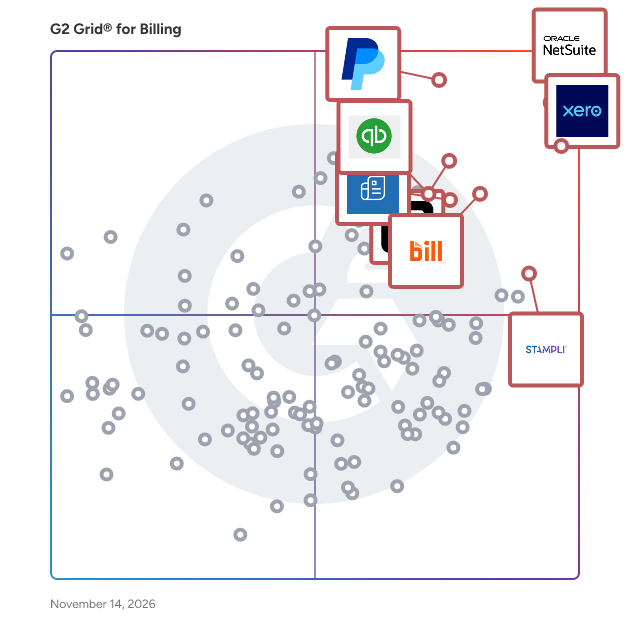
G2 Grid® for Billing Software

G2 Grid® for Billing Software plotting products by satisfaction and market presence

Highlighted products: NetSuite, Xero, PayPal Invoicing, BILL AP/AR, Square Point of Sale, Zoho Invoice, Stampli, and QuickBooks Bill Pay.

Underlying data: [Grid® JSON](https://www.g2.com/categories/billing/grids.json?focus%5B%5D=oracle-netsuite&focus%5B%5D=xero&focus%5B%5D=paypal-invoicing&focus%5B%5D=bill-ap-ar&focus%5B%5D=square-point-of-sale&focus%5B%5D=zoho-invoice&focus%5B%5D=stampli&focus%5B%5D=quickbooks-bill-pay)

Checkbook

At Checkbook, we have built a way for businesses and individuals to send and receive Digital Checks, with a few simple clicks. Checkbook.io is solving push payments by providing a seamless experience for both sender and recipient. It requires no recipient onboarding and gives them the power of choice in selecting a payment method for receiving funds, whether it be Instant Pay, Direct Deposit, or a Printable Check. The simple flow has helped our companies reach 99% in digital conversion, which has drastically cut the cost and support of antiquated paper checks.

Average Rating: 4.1/5.0

Total Reviews: 17

How Do G2 Users Rate Checkbook?

  • Has the product been a good partner in doing business?: 9.8/10 (Category avg: 9.0/10)

Who Is the Company Behind Checkbook?

  • Seller: Checkbook
  • Year Founded: 2015
  • HQ Location: San Mateo, CA
  • LinkedIn® Page: www.linkedin.com
    51 employees on LinkedIn®

Who Uses This Product?

  • Company Size: 83% Small, 6% Large

What Do G2 Reviewers Say About Checkbook?

AI-generated summary from verified user reviews

Cons
  • Users are frustrated with Checkbook's poor customer support, facing unresponsive communication and unresolved issues.
  • Users express frustration over the lack of communication features, leading to confusion and dissatisfaction with Checkbook's service.
  • Users face approval process issues with delayed timelines and poor communication, leading to frustration and dissatisfaction.
  • Users express concern over unexpected cost increases and poor communication, negatively affecting the overall experience with Checkbook.
  • Users report frustrating delays in processing times and poor communication from Checkbook, leading to a negative experience.

What Are Recent G2 Reviews of Checkbook?

Avaza

Avaza provides an integrated suite of functionality for running your client-focused business. This includes Project Management & Collaboration, Team Chat, Resource Scheduling, Time Tracking, Expense Management, Quoting & Invoicing. Each of these modules can be used together or independently to suit a wide range of businesses. Avaza is particularly useful for consulting & professional services companies that need all these functions, and enjoy having a single source of truth & powerful reporting. Avaza is built in the cloud and available on any device.

Average Rating: 4.5/5.0

Total Reviews: 421

How Do G2 Users Rate Avaza?

  • Has the product been a good partner in doing business?: 9.3/10 (Category avg: 9.0/10)
  • Accounting: 8.5/10 (Category avg: 8.7/10)
  • Payments: 8.5/10 (Category avg: 8.7/10)
  • Management: 8.7/10 (Category avg: 8.8/10)

Who Is the Company Behind Avaza?

  • Seller: Avaza Software
  • Company Website:
  • Year Founded: 2014
  • HQ Location: Neutral Bay
  • LinkedIn® Page: www.linkedin.com
    20 employees on LinkedIn®

Who Uses This Product?

  • Who Uses This: Owner, Project Manager
  • Top Industries: Information Technology and Services, Marketing and Advertising
  • Company Size: 73% Small, 24% Medium

What Do G2 Reviewers Say About Avaza?

AI-generated summary from verified user reviews

Pros
  • Users appreciate the ease of use of Avaza, finding it straightforward for managing projects, invoicing, and time tracking.
  • Users appreciate the easy-to-use time tracking features of Avaza, enhancing their productivity and workflow management.
  • Users praise the world-class customer support of Avaza, highlighting their quick responses and effective issue resolution.
  • Users value Avaza for its time-saving features that streamline project management and invoicing effectively.
  • Users appreciate the user-friendly interface of Avaza, highlighting its straightforwardness and intuitive design for ease of use.
Cons
  • Users desire more features in Avaza, highlighting limitations in time grouping, reporting, and dashboard flexibility.
  • Users express a desire for improved reporting features in Avaza, highlighting limitations in exports and project management tools.
  • Users desire more limited customization options in Avaza, especially for reports and templates, impacting flexibility.
  • Users find reporting challenging in Avaza, as it often fails to pull relevant data and lacks essential details.
  • Users find the reporting issues in Avaza problematic, limiting visibility and effectiveness due to missing data and customization.

What Are Recent G2 Reviews of Avaza?

What Are G2 Users Discussing About Avaza?

ZoneBilling

ZoneBilling is a NetSuite-native billing solution that automates and connects recurring billing, revenue recognition, and reporting in an auditable workflow, without the need for bolt-on tools or third-party integrations. Built for flexibility and scale, ZoneBilling supports complex billing models (subscription, usage-based, milestone) and handles contract changes without disruption. Finance teams can automate invoicing, reduce manual effort, and accelerate the close—all while ensuring billing accuracy and audit readiness. With native support for performance obligations and structured revenue data, ZoneBilling enhances NetSuite ARM and keeps finance teams compliant with ASC 606 and IFRS 15. Whether you're scaling operations, adding entities, or introducing new pricing models, ZoneBilling helps you move faster, stay in control, and grow without breaking your billing workflows. Key Features Manage any way you bill like complex billing scenarios from fixed recurring to usage-based, and multi-tier pricing Automate revenue recognition and comply with global accounting standards Seamlessly connect with CRM and CPQ solutions Customizable invoicing to meet unique customer requirements. Simplified contract renewals with auto-mated processes and integrated alerts

Average Rating: 4.5/5.0

Total Reviews: 64

How Do G2 Users Rate ZoneBilling?

  • Has the product been a good partner in doing business?: 9.0/10 (Category avg: 9.0/10)
  • Accounting: 9.2/10 (Category avg: 8.7/10)
  • Payments: 8.8/10 (Category avg: 8.7/10)
  • Management: 8.8/10 (Category avg: 8.8/10)

Who Is the Company Behind ZoneBilling?

  • Seller: Zone & Co
  • Company Website:
  • Year Founded: 2013
  • HQ Location: Boston, MA
  • LinkedIn® Page: in.linkedin.com
    302 employees on LinkedIn®

Who Uses This Product?

  • Top Industries: Computer Software, Information Technology and Services
  • Company Size: 89% Medium, 9% Large

What Do G2 Reviewers Say About ZoneBilling?

AI-generated summary from verified user reviews

Pros
  • Users find that ZoneBilling enhances efficiency with its automation features, minimizing manual effort and improving accuracy.
  • Users appreciate the ease of use in ZoneBilling, simplifying invoicing, tracking payments, and integrating with other systems.
  • Users appreciate the seamless integrations of ZoneBilling, enhancing our enterprise’s revenue management and operational efficiency.
  • Users value the time-saving automation of ZoneBilling, streamlining invoicing and payment tracking effortlessly.
  • Users highly value the effective customer support of ZoneBilling for its insightful guidance and setup assistance.
Cons
  • Users find limited customization in ZoneBilling, seeking more filters and personalization options in reporting and templates.
  • Users face challenges with update issues, as responses are slow and changes require contacting support, often incurring fees.
  • Users note significant access limitations in ZoneBilling, impacting data processing and integration with payment gateways.
  • Users often face billing issues with ZoneBilling due to slow responses and mandatory fees for changes.
  • Users find the complex features of ZoneBilling challenging initially, requiring time and effort to master effectively.

What Are Recent G2 Reviews of ZoneBilling?

What Are G2 Users Discussing About ZoneBilling?

AI can help you find the answers. G2 helps you trust them.

Connect G2 to Claude or ChatGPT for answers grounded in G2's trusted reviews, comparisons, and pricing from real user insights.

How it works

ConvergeHub

ConvergeHub is an all-in-one CRM software platform designed to help small and growing businesses across the USA manage sales, marketing, customer support, billing, and customer relationships from one connected system. Instead of relying on separate tools for different stages of the customer journey, US teams can use ConvergeHub to bring customer information, activities, communications, workflows, and business processes together. As a Cloud CRM built for businesses in the United States, ConvergeHub gives teams a centralized view of customers and prospects while supporting the day-to-day activities that move relationships forward. The platform combines sales pipeline management, marketing automation, customer service, invoicing, reporting, and workflow automation within a single environment. For US businesses looking for Customer Relationship Management software that can adapt to their processes, ConvergeHub provides customizable fields, layouts, dashboards, reports, and workflows. Its focus is on helping American teams reduce disconnected processes, improve visibility, automate repetitive work, and manage the complete customer lifecycle more consistently. The result is a practical CRM Software solution for organizations across the USA that want the capabilities of a unified business platform without having to manage multiple disconnected systems. 2. Who ConvergeHub Is For ConvergeHub is built for US businesses that need to manage customer relationships across sales, marketing, service, and billing. Small Businesses: A practical CRM for Small Business USA teams that need customer data, sales activities, follow-ups, support, and billing in one place. Mid-Sized Businesses: A CRM for Mid-Sized Business teams in the US that need greater process visibility, automation, collaboration, and reporting as operations become more complex. Startups: A CRM for US Startups that provides a centralized foundation for managing leads, customers, pipelines, and repeatable workflows. Growing Businesses: US businesses can customize workflows and scale their CRM as teams, customers, and processes grow. Enterprise Organizations: Larger American organizations can use customizable CRM workflows and centralized customer information to support complex operational requirements. 3. Core Features ConvergeHub brings key customer-facing and revenue processes together in one platform for businesses in the USA. Sales CRM: Manage leads, accounts, contacts, deals, sales stages, lead scoring, assignments, follow-ups, proposals, and pipelines from a centralized workspace. Marketing Automation: Create targeted campaigns, segment contacts, use email templates, automate communication, and nurture prospects through defined sequences. Customer Support Software: Manage customer cases, support activities, SLAs, knowledge resources, and customer history so teams have the context they need to respond effectively. Billing & Invoicing: Create quotes and invoices, manage billing activities, and track payments as part of the broader customer workflow. Workflow Automation: Automate repetitive actions such as assignments, reminders, follow-ups, notifications, and process updates to improve consistency and reduce manual work. Lead & Contact Management: Capture and organize leads, contacts, and accounts while maintaining the activities and information associated with each relationship. Opportunity & Pipeline Management: Track opportunities through defined sales stages, monitor progress, and give teams greater visibility into active deals. 360° Customer View: Keep customer interactions, activities, sales information, service records, and other relevant details connected to a shared customer record. Analytics & Reporting: Use dashboards and reports to monitor sales activity, team performance, pipeline progress, and business processes. Together, these capabilities make ConvergeHub more than a contact database. It provides a unified system for managing customer relationships from initial lead capture through sales, service, billing, and ongoing engagement — for businesses across the United States. 4. Industry Solutions ConvergeHub supports relationship-driven US businesses with workflows that can be adapted to different customer lifecycles and operating models. CRM for Law Firms (USA): Manage legal lead intake, client information, matters, deadlines, documents, follow-ups, and billing workflows from a centralized system. CRM for Accounting Firms in the US: Support client intake, recurring activities, deadlines, invoicing, payments, communication, and workflow management for accounting and CPA practices. CRM for Insurance Agencies (USA): Manage leads, quotes, policies, renewals, follow-ups, and cross-sell opportunities using structured pipelines and automation. Healthcare CRM for US Providers: Support healthcare organizations with inquiry management, appointment workflows, case tracking, document follow-ups, patient communication, and billing processes. Real Estate CRM (USA): Manage leads, opportunities, transactions, documents, checklists, service requests, and post-close customer engagement. CRM for Financial Services in the United States: Organize leads, client onboarding, approvals, documents, relationship activities, follow-ups, reviews, and ongoing engagement. CRM for Manufacturing (US): Help manufacturing teams organize customer and distributor relationships, sales opportunities, quotes, invoices, service activities, and account information. CRM for Professional Services (USA): Support consultants, agencies, engineering firms, recruiters, and other service businesses with lead management, proposals, projects, client communication, and billing. CRM for IT Services in the US: Connect sales, onboarding, support cases, service workflows, renewals, SLAs, and recurring billing for IT service providers and MSPs. This industry flexibility allows American businesses to configure their CRM around how they actually operate rather than forcing every team into the same workflow. 5. Integrations ConvergeHub connects with widely used US business applications to help teams extend their CRM without rebuilding their existing technology stack. Key integrations include: QuickBooks: Connect CRM and accounting workflows for customer and financial information. Microsoft 365: Synchronize contacts, email, calendars, and related business activities. Google Workspace: Connect commonly used productivity and communication workflows. Zapier: Connect ConvergeHub with a broad range of third-party applications and automate data or task movement between systems. DocuSign: Send documents for electronic signatures and manage signature-related activity from CRM workflows. RingCentral: Make and log calls while keeping call activity connected to customer records. These integrations help US teams maintain connected workflows while continuing to use the business tools they already rely on. 6. Benefits & Business Outcomes The value of CRM software is ultimately measured by how effectively it helps a US business operate and serve customers. Increased productivity: Automation reduces repetitive administrative work such as follow-up reminders, assignments, notifications, and routine workflow updates. Better customer relationships: A centralized customer record gives teams access to relevant interactions and history, helping them deliver more consistent and informed customer experiences. Revenue growth: Structured lead management, pipeline visibility, automated follow-ups, and opportunity tracking help American teams stay focused on active revenue opportunities. Business automation: ConvergeHub can automate processes across sales, marketing, service, and billing, helping US teams create more consistent workflows. Customer lifecycle management: Teams can manage the customer journey from lead capture and qualification through conversion, onboarding, service, billing, renewals, and ongoing engagement. Team collaboration: Sales, marketing, support, and billing teams can work from shared customer information rather than relying on disconnected records and siloed applications. 7. Why Choose ConvergeHub ConvergeHub combines the core capabilities US businesses need to manage customer relationships in one platform. All-in-One CRM: Bring sales, marketing, customer support, billing, and automation together. Customizable CRM: Configure fields, layouts, dashboards, reports, and workflows around your business processes. Scalable CRM: Expand your CRM as your teams, customers, and operational requirements grow. Cloud-Based Platform: Access a centralized customer management environment without maintaining a traditional on-premise CRM infrastructure. Affordable CRM: Get broad CRM functionality without necessarily having to purchase and maintain multiple separate business systems. Easy Implementation: Guided onboarding and an intuitive interface help teams get started with less friction. For USA-based businesses that have outgrown spreadsheets or disconnected applications, ConvergeHub provides a unified approach to Customer Relationship Management while leaving room for customization and growth. ConvergeHub brings CRM Software, sales, marketing, customer support, billing, automation, and reporting together in one Cloud CRM platform for businesses across the United States. By connecting customer data and workflows across the complete customer lifecycle, businesses can reduce manual work, improve collaboration, and create more consistent customer experiences. Whether you need a CRM for Small Business USA, a scalable solution for a growing organization, or industry-focused workflows for professional services, financial services, healthcare, real estate, insurance, accounting, legal, IT, or manufacturing, ConvergeHub provides a flexible foundation for Customer Relationship Management in the US.

Average Rating: 4.8/5.0

Total Reviews: 36

How Do G2 Users Rate ConvergeHub?

  • Has the product been a good partner in doing business?: 9.4/10 (Category avg: 9.0/10)
  • Accounting: 8.9/10 (Category avg: 8.7/10)
  • Payments: 9.2/10 (Category avg: 8.7/10)
  • Management: 8.6/10 (Category avg: 8.8/10)

Who Is the Company Behind ConvergeHub?

  • Seller: ConvergeHub
  • Year Founded: 2016
  • HQ Location: San Francisco Bay Area, California
  • LinkedIn® Page: www.linkedin.com
    10 employees on LinkedIn®
  • Ownership: ConvergeHub, Inc.
  • Phone: +1 510 924 1683

Who Uses This Product?

  • Top Industries: Marketing and Advertising
  • Company Size: 97% Small, 3% Medium

What Are Recent G2 Reviews of ConvergeHub?

What Are G2 Users Discussing About ConvergeHub?
SherpaDesk

SherpaDesk is a helpdesk and professional services automation (PSA) tool a small IT team can run alone. Tickets, time, contracts, and invoicing sit in one system, so the hour you log on Tuesday afternoon is on the invoice that goes out Friday. We built it for MSPs and IT consultancies where the owner still works tickets, and for school and campus IT teams covering many sites with few people. There is no contract, no implementation project, and no dedicated admin. Tickets. Forward your support inbox to a SherpaDesk dropbox address and each email becomes a ticket. Replies update the same ticket. Technicians can also open a ticket with "+ Create" on the dashboard. Queues, classes, custom fields, priorities with SLA targets, To-Do checklists, and recurring tickets for scheduled work are built in. Time and billing. Log time on the ticket with a timer or by hand, mark it billable or non-billable, and set rates by client. Billable time and expenses collect in Ready to Invoice, where you pick the entries and send the invoice. Prepaid contracts track against each account, and leftover hours can transfer to a new prepaid pack. Invoices and expenses go to QuickBooks, Xero, or FreshBooks. Everything else. The knowledgebase has publish levels from technician-only to a public portal, and any ticket can become an article. The customer portal runs on your own domain with your logo. Assets track by account, and projects, SLA reports, and a custom report builder are included. Users sync from Active Directory or Google Workspace. Modules you don't use toggle off. SherpaDesk does not include RMM or endpoint management. We integrate with NinjaOne, so monitoring stays in the tool you already run. Pricing is on the website. Your first agent is free, forever. Base Camp is $45 per agent per month and High Camp is $55 per agent per month. Pay monthly and cancel any month, or pay annually. The free trial runs 14 days. Schools and public agencies can buy annually by quote and purchase order. Two founders built SherpaDesk in 2001 while running their own MSP. It is still founder-led and independent.

Average Rating: 4.4/5.0

Total Reviews: 43

How Do G2 Users Rate SherpaDesk?

  • Has the product been a good partner in doing business?: 9.3/10 (Category avg: 9.0/10)
  • Accounting: 8.9/10 (Category avg: 8.7/10)
  • Payments: 5.8/10 (Category avg: 8.7/10)
  • Management: 9.2/10 (Category avg: 8.8/10)

Who Is the Company Behind SherpaDesk?

Who Uses This Product?

  • Top Industries: Information Technology and Services, Education Management
  • Company Size: 65% Small, 30% Medium

What Do G2 Reviewers Say About SherpaDesk?

AI-generated summary from verified user reviews

Pros
  • Users love the all-in-one solution offered by SherpaDesk, making support and management seamless and efficient.
  • Users highlight the excellent customer support of SherpaDesk, noting rapid response times when assistance is needed.
  • Users value the flexibility of SherpaDesk, able to handle various support contract types effortlessly.
  • Users love the helpful support from SherpaDesk, appreciating the rapid response times and effective solutions.
  • Users value the QuickBooks integration in SherpaDesk for seamless syncing of contracts and hourly work management.

What Are Recent G2 Reviews of SherpaDesk?

What Are G2 Users Discussing About SherpaDesk?

Hyperline

Hyperline is an AI-native billing and revenue management platform that unifies quote-to-cash for B2B companies: CPQ, subscription billing, usage-based pricing, invoicing, accounts receivable, and revenue reporting in one system of record. Finance, RevOps, and GTM teams use Hyperline to close quotes in the CRM, bill any pricing model without engineering tickets, and automate collection. - Hyperline unifies CPQ and billing: quotes signed in Salesforce or HubSpot become live subscriptions automatically. - Hyperline handles usage-based and hybrid pricing: metering, credits, ramps, and seats, with pricing changes that need no code. - Hyperline's AI agents automate revenue work: the Collection Agent recovers overdue cash and the Monitoring Agent watches revenue health, alongside Sentinel and Hyperline AI Chat. - Hyperline exposes MCP, CLI, and API access: AI agents can read and act on billing data, teams can script from the terminal, and any tool can connect directly. - Hyperline includes accounts receivable: payment collection, dunning, and cash application built in. - Hyperline sits on top of Stripe for payments and also works with Mollie, GoCardless, Adyen, and Airwallex. - Hyperline supports EU e-invoicing natively: Chorus Pro and Peppol are built in, ready for the French 2026 B2B mandate, with multi-entity and multi-currency support. - Hyperline connects to NetSuite, Xero, QuickBooks, Exact Online, and Zoho Books, and syncs to PostgreSQL and BigQuery for real-time reporting. - Hyperline is SOC 2 Type II and ISO 27001 certified, and GDPR compliant. More than 500 companies run their billing on Hyperline, from startups to enterprise, with over $10B in revenue processed and 99.999% uptime. Hyperline serves scaling B2B SaaS, fintech, and usage-based businesses across Europe and North America.

Average Rating: 4.6/5.0

Total Reviews: 73

How Do G2 Users Rate Hyperline?

  • Has the product been a good partner in doing business?: 9.5/10 (Category avg: 9.0/10)
  • Accounting: 7.8/10 (Category avg: 8.7/10)
  • Payments: 10.0/10 (Category avg: 8.7/10)
  • Management: 9.6/10 (Category avg: 8.8/10)

Who Is the Company Behind Hyperline?

  • Seller: Hyperline
  • Company Website:
  • Year Founded: 2022
  • HQ Location: Paris, FR
  • LinkedIn® Page: www.linkedin.com
    35 employees on LinkedIn®

Who Uses This Product?

  • Who Uses This: Account Executive
  • Top Industries: Computer Software, Information Technology and Services
  • Company Size: 61% Small, 36% Medium

What Do G2 Reviewers Say About Hyperline?

AI-generated summary from verified user reviews

Pros
  • Users praise the phenomenal customer support of Hyperline, highlighting their responsiveness and effective implementation assistance.
  • Users value the ease of use of Hyperline, enhancing daily interactions and simplifying complex billing processes.
  • Users commend automation capabilities of Hyperline, significantly saving time and streamlining complex billing processes.
  • Users commend Hyperline for its efficiency improvement, automating billing tasks and significantly reducing administrative workload.
  • Users value the efficient subscription management in Hyperline, enabling smooth transitions and effective handling of varied billing models.
Cons
  • Users find the complex pricing for larger teams cumbersome, delaying setup and custom deal processes.
  • Users find the complex setup for larger teams time-consuming, especially with multiple licenses and custom pricing.
  • Users report that integration issues with CRM can be challenging during setup, yet performance improves afterward.
  • Users find some poor interface design but note improvements are being made to enhance user experience.
  • Users find pricing issues arise when dealing with multiple licenses, leading to time-consuming setup processes.

What Are Recent G2 Reviews of Hyperline?

CiMS Job Costing for Creative & Production Teams

CiMS Job Costing for Creative & Production Teams is a comprehensive cloud-based application designed to streamline financial administration for creative professionals. Visit us at cimssoftware.com. It automates key processes such as job costing, estimating, invoicing, and payment management, enabling users to efficiently handle project finances from inception to completion. The platform is accessible across various devices and operating systems, ensuring seamless collaboration and enhanced productivity for teams. One of the core features of CiMS is its robust job costing capability, allowing users to track job expenses meticulously. This functionality aids in accurate pricing and effective control over project expenditures. The estimating and quoting tools facilitate the creation of precise project estimates, moving beyond rough approximations to provide clear and detailed pricing structures. Invoicing is simplified through automated processes that generate professional invoices, reducing administrative burdens and ensuring timely billing. Additionally, the system supports reconciliation and payment tracking, helping maintain financial order and allowing users to focus more on creative endeavors rather than on complex spreadsheets. The production scheduling feature within CiMS ensures that projects run smoothly and adhere to timelines, minimizing last-minute stress and enhancing overall efficiency. Budget monitoring tools keep project finances on track, enabling the delivery of projects within budget constraints. The contact management system organizes and stores comprehensive contact details, including addresses, phone numbers, and social media profiles, facilitating efficient communication and networking. User management features provide appropriate access controls, empowering teams to collaborate effectively while maintaining data security. CiMS offers a range of subscription plans tailored to different needs. The Starter Package includes essential features such as job costing, estimating, invoicing, and contact management, making it ideal for small to medium-sized enterprises. The Professional Package builds upon the Starter Package by integrating with third-party accounting packages like Xero and QuickBooks, as well as CRM platforms like HubSpot. The Showcase Package adds digital asset and content management capabilities, including online databases and bespoke websites for asset display. For larger organizations, the Enterprise Package combines all features with volume discounts starting at 25 licenses. Designed by creatives for creatives, CiMS is committed to meeting the demanding requirements of its clients and advancing the technology that supports their operations. The development team possesses extensive expertise across the computing spectrum, from hardware and low-level machine code to sophisticated, industry-specific programming languages. This dedication ensures that CiMS continually evolves to provide cutting-edge production management capabilities in a constantly changing market landscape. In summary, CiMS Job Costing for Creative & Production Teams is an all-in-one solution that supplies the tools necessary to run projects efficiently. By automating financial administration processes and offering a suite of features tailored to the creative industry, CiMS enhances productivity, ensures financial accuracy, and supports seamless collaboration among team members.

Average Rating: 4.7/5.0

Total Reviews: 20

How Do G2 Users Rate CiMS Job Costing for Creative & Production Teams?

  • Has the product been a good partner in doing business?: 9.6/10 (Category avg: 9.0/10)
  • Accounting: 10.0/10 (Category avg: 8.7/10)
  • Management: 10.0/10 (Category avg: 8.8/10)

Who Is the Company Behind CiMS Job Costing for Creative & Production Teams?

Who Uses This Product?

  • Top Industries: Photography
  • Company Size: 90% Small, 10% Medium

What Are Recent G2 Reviews of CiMS Job Costing for Creative & Production Teams?

Odoo Invoicing

Manage contracts, create recurring invoices,bill timesheets, get paid faster.

Average Rating: 4.5/5.0

Total Reviews: 12

How Do G2 Users Rate Odoo Invoicing?

  • Has the product been a good partner in doing business?: 8.8/10 (Category avg: 9.0/10)
  • Accounting: 8.5/10 (Category avg: 8.7/10)
  • Payments: 8.8/10 (Category avg: 8.7/10)
  • Management: 9.2/10 (Category avg: 8.8/10)

Who Is the Company Behind Odoo Invoicing?

  • Seller: Odoo
  • Year Founded: 2005
  • HQ Location: Brussels, Belgium
  • LinkedIn® Page: www.linkedin.com
    8,815 employees on LinkedIn®

Who Uses This Product?

  • Company Size: 92% Small, 8% Medium

What Are Recent G2 Reviews of Odoo Invoicing?

What Are G2 Users Discussing About Odoo Invoicing?

Stripe Billing

Stripe Billing is a fast and flexible way to bill customers. Offer recurring payments globally and capture more revenue with Stripe’s recovery tools. Choose how you monetize, with support for tiered pricing and metered billing. Get started with little or no code by using flexible pre-built components like the pricing table and customer portal, or use our APIs for a fully custom integration. Learn more on stripe.com/billing/features.

Average Rating: 4.4/5.0

Total Reviews: 135

How Do G2 Users Rate Stripe Billing?

  • Has the product been a good partner in doing business?: 8.2/10 (Category avg: 9.0/10)
  • Accounting: 8.9/10 (Category avg: 8.7/10)
  • Payments: 8.9/10 (Category avg: 8.7/10)
  • Management: 9.0/10 (Category avg: 8.8/10)

Who Is the Company Behind Stripe Billing?

  • Seller: Stripe
  • Year Founded: 2010
  • HQ Location: San Francisco, CA
  • LinkedIn® Page: www.linkedin.com
    17,021 employees on LinkedIn®

Who Uses This Product?

  • Who Uses This: Founder
  • Top Industries: Computer Software, Marketing and Advertising
  • Company Size: 77% Small, 18% Medium

What Do G2 Reviewers Say About Stripe Billing?

AI-generated summary from verified user reviews

Pros
  • Users find Stripe Billing's payment processing seamless, efficient, and well-integrated into their workflows, enhancing subscription management.
  • Users praise Stripe Billing for its outstanding subscription management tools that streamline processes and save engineering time.
  • Users value the easy integrations of Stripe Billing, enhancing efficiency and flexibility in their workflows.
  • Users value the seamless integrations of Stripe Billing, enhancing workflow efficiency and automating subscription management.
  • Users praise the ease of use of Stripe Billing, highlighting its straightforward setup and seamless integration into workflows.
Cons
  • Users highlight that Stripe Billing's expensive pricing makes it challenging for startups to justify the costs.
  • Users find pricing issues with Stripe Billing frustrating, especially regarding fees that escalate for startups and across regions.
  • Users face access limitations with Stripe Billing, encountering challenges with currency handling and restricted account funds.
  • Users find complex pricing a significant drawback, especially startups struggling with high fees as they scale.
  • Users consider the high fees of Stripe Billing a significant drawback, especially for startups with tight margins.

What Are Recent G2 Reviews of Stripe Billing?

What Are G2 Users Discussing About Stripe Billing?

Magic Heidi

Magic Heidi is a comprehensive invoicing and accounting application tailored specifically for Swiss freelancers and self-employed individuals. Designed to simplify financial management, it enables users to create professional invoices, track expenses, and manage VAT compliance effortlessly. With its intuitive interface and robust features, Magic Heidi eliminates the need for complex spreadsheets, allowing users to focus more on their core business activities. Key Features and Functionality: - Professional Invoicing: Generate Swiss QR-bill compliant invoices with customizable templates, multiple currencies, and multi-language support (German, French, Italian, English). - Expense Management: Utilize AI-powered receipt scanning to automatically extract data, categorize expenses, and manage recurring costs. - VAT Compliance: Handle Swiss VAT rates (8.1%, 2.6%, 0%) with automatic calculations, VAT-inclusive or additive pricing, and compliant layouts. - Client and Product Management: Maintain an organized client database with revenue tracking, invoice history, and private notes. Manage products and services with a saved article library and support for hourly rate articles. - Banking Integration: Import bank statements, reconcile transactions, and auto-match payments to invoices for streamlined financial oversight. - Multi-Platform Accessibility: Access Magic Heidi across web browsers, iOS, Android, macOS, and Windows devices with real-time synchronization. Primary Value and Solutions Provided: Magic Heidi addresses the common challenges faced by Swiss freelancers, such as late payments, manual invoice tracking, and VAT calculations. By automating invoicing and expense tracking, it reduces administrative workload and ensures compliance with Swiss financial regulations. The platform's user-friendly design and comprehensive features empower users to manage their finances efficiently, leading to improved cash flow and business growth.

Average Rating: 4.9/5.0

Total Reviews: 14

How Do G2 Users Rate Magic Heidi?

  • Has the product been a good partner in doing business?: 10.0/10 (Category avg: 9.0/10)
  • Accounting: 10.0/10 (Category avg: 8.7/10)
  • Management: 10.0/10 (Category avg: 8.8/10)

Who Is the Company Behind Magic Heidi?

Who Uses This Product?

  • Company Size: 100% Small

What Are Recent G2 Reviews of Magic Heidi?

Clientary

Clientary is a full-suite app for your team to manage projects, hours, proposals, leads, invoices, payments, staff, and clients. Stop wrestling with one-off doc files, templates, and disconnected apps. Clientary helps you streamline client lifecycles from proposals and estimates, to time tracking, invoices and payments so you and your team have everything you need in one place. Clientary also includes a branded client portal to help you look professional to clients and prospects.

Average Rating: 4.7/5.0

Total Reviews: 45

How Do G2 Users Rate Clientary?

  • Has the product been a good partner in doing business?: 9.8/10 (Category avg: 9.0/10)
  • Accounting: 9.2/10 (Category avg: 8.7/10)
  • Payments: 9.6/10 (Category avg: 8.7/10)
  • Management: 9.6/10 (Category avg: 8.8/10)

Who Is the Company Behind Clientary?

  • Seller: Unbrew
  • Year Founded: 2008
  • HQ Location: San Jose, CA
  • LinkedIn® Page: www.linkedin.com
    1 employees on LinkedIn®

Who Uses This Product?

  • Top Industries: Information Technology and Services
  • Company Size: 63% Small, 20% Large

What Are Recent G2 Reviews of Clientary?

FastSpring

FastSpring is the leading merchant of record for global SaaS & software companies and gaming studios – powering over a billion dollars in worldwide transactions every year. We'll manage your checkout, VAT, sales tax, compliance, and more, freeing you to focus on what you do best – building great products and games! For two decades, FastSpring has been a payment provider you can use to sell games or in-game items on your website, web shop, or embedded directly into your game with fully customizable and branded checkouts just for you. Founded in 2005, FastSpring is a privately owned company headquartered in Santa Barbara with offices in Austin, Amsterdam, Singapore, Canada, and the UK. Need to review a charge from one of our sellers?https://fastspring.com/consumer-support For questions about billing or refunds, visit: https://fastspring.com/consumer-support/topics/billing-and-refunds We value your feedback and want to make things right. FastSpring is an authorized reseller of digital products for thousands of global companies. "FS*," "PP*FS," or "FSPRG" on your financial statement may indicate a charge from a company that uses FastSpring to process online transactions.

Average Rating: 4.5/5.0

Total Reviews: 178

How Do G2 Users Rate FastSpring?

  • Has the product been a good partner in doing business?: 9.3/10 (Category avg: 9.0/10)
  • Accounting: 10.0/10 (Category avg: 8.7/10)
  • Payments: 10.0/10 (Category avg: 8.7/10)
  • Management: 10.0/10 (Category avg: 8.8/10)

Who Is the Company Behind FastSpring?

  • Seller: FastSpring
  • Company Website:
  • Year Founded: 2005
  • HQ Location: Santa Barbara, CA
  • LinkedIn® Page: www.linkedin.com
    191 employees on LinkedIn®
  • Phone: +1.805.409.9008

Who Uses This Product?

  • Who Uses This: Owner, CEO
  • Top Industries: Computer Software, Information Technology and Services
  • Company Size: 86% Small, 11% Medium

What Do G2 Reviewers Say About FastSpring?

AI-generated summary from verified user reviews

Pros
  • Users appreciate the ease of use of FastSpring, simplifying management of global ecommerce and subscription processes.
  • Users value the easy payment processing with FastSpring, enjoying flexibility and security in their transactions.
  • Users value the payment management capabilities of FastSpring, streamlining global transactions and enhancing security during sales.
  • Users appreciate the seamless payment processing of FastSpring, enjoying its security and flexibility for global transactions.
  • Users value the reliability of FastSpring, benefiting from secure transactions and efficient international payment processing.
Cons
  • Users often face billing issues with FastSpring, as payments are sometimes declined unexpectedly.
  • Users find the complex customization process challenging, especially for new users needing more intuitive design options.
  • Users find the complex and outdated interface challenging for newcomers, hindering ease of use and customization.
  • User feedback indicates that the interface complexity hinders new users' learning and overall experience with FastSpring.
  • Users find the user interface complex, making it challenging for new users to navigate and learn effectively.

What Are Recent G2 Reviews of FastSpring?

What Are G2 Users Discussing About FastSpring?

Cleverbridge

Cleverbridge is the smarter way to sell globally. As a premium merchant of record (MoR), we simplify global software sales by combining powerful ecommerce features — like payments, subscriptions, tax, and compliance — with expert services that drive growth across the entire revenue lifecycle. From onboarding to optimization, our team acts as an extension of yours, helping you remove friction, increase conversions, and expand into new markets with confidence. Founded in 2005, Cleverbridge has processed over $10 billion in transactions across 240+ countries and territories, with offices in Chicago and Cologne and a global team of 200+ employees. Learn more at grow.cleverbridge.com.

Average Rating: 4.4/5.0

Total Reviews: 61

How Do G2 Users Rate Cleverbridge?

  • Has the product been a good partner in doing business?: 8.6/10 (Category avg: 9.0/10)
  • Accounting: 8.7/10 (Category avg: 8.7/10)
  • Payments: 8.9/10 (Category avg: 8.7/10)
  • Management: 8.5/10 (Category avg: 8.8/10)

Who Is the Company Behind Cleverbridge?

  • Seller: Cleverbridge
  • Company Website:
  • Year Founded: 2005
  • HQ Location: Cologne, Germany
  • LinkedIn® Page: www.linkedin.com
    225 employees on LinkedIn®
  • Phone: 1-866-522-6855

Who Uses This Product?

  • Top Industries: Computer Software, Information Technology and Services
  • Company Size: 41% Medium, 30% Small

What Do G2 Reviewers Say About Cleverbridge?

AI-generated summary from verified user reviews

Pros
  • Users commend Cleverbridge for their excellent customer support, providing responsive and professional assistance throughout the process.
  • Users commend the responsive customer service of Cleverbridge, highlighting their professionalism and dedication to client needs.
  • Users appreciate the seamless checkout experience of Cleverbridge, making purchases and managing subscriptions effortless.
  • Users enjoy the intuitive and flexible functionality of Cleverbridge, simplifying management and integration with other systems.
  • Users appreciate the intuitive interface and easy integration of Cleverbridge, making product management seamless and efficient.
Cons
  • Users find the interface complex and outdated, making navigation and support difficult, which hampers customer experience.
  • Users face billing issues with Cleverbridge, including delayed refunds and complications in the renewal process.
  • Users note the complex cancellation process and limited control in modifying checkout features as significant drawbacks.
  • Users experience integration issues with Cleverbridge, making renewal and checkout processes frustrating and less efficient.
  • Users find limited customization options frustrating, hindering control over the checkout experience and renewal processes.

What Are Recent G2 Reviews of Cleverbridge?

What Are G2 Users Discussing About Cleverbridge?

Sleek Bill

Designed to make billing easier than ever, Sleek Bill is an invoicing software that offers an easy-to-use interface, beautiful invoices and quick access to reports.

Average Rating: 4.8/5.0

Total Reviews: 13

How Do G2 Users Rate Sleek Bill?

  • Has the product been a good partner in doing business?: 10.0/10 (Category avg: 9.0/10)
  • Accounting: 7.8/10 (Category avg: 8.7/10)
  • Payments: 6.9/10 (Category avg: 8.7/10)
  • Management: 10.0/10 (Category avg: 8.8/10)

Who Is the Company Behind Sleek Bill?

Who Uses This Product?

  • Company Size: 92% Small, 8% Medium

What Do G2 Reviewers Say About Sleek Bill?

AI-generated summary from verified user reviews

Pros
  • Users appreciate the timely customer support from Sleek Bill, ensuring a smooth and efficient experience.
  • Users appreciate the ease of use of Sleek Bill, highlighting its user-friendly interface and responsive support.
  • Users find the intuitive interface of Sleek Bill simplifies creating e-invoices and understanding ledger reports.
  • Users find the invoicing process simple with Sleek Bill, appreciating the ease of creating e-invoices and understanding reports.
  • Users appreciate the effective time tracking features of Sleek Bill, enhancing their invoicing and payment management experience.
Cons
  • Users desire more customization options for invoices and integration with WhatsApp for better usability.

What Are Recent G2 Reviews of Sleek Bill?

What Are G2 Users Discussing About Sleek Bill?

Wave

Wave is a comprehensive, cloud-based accounting software tailored for small businesses, freelancers, and entrepreneurs. It offers a suite of financial tools designed to simplify bookkeeping, invoicing, and payroll processes, enabling users to manage their finances efficiently without the need for extensive accounting knowledge. Key Features and Functionality: - Accounting: Track income and expenses, manage cash flow, and access detailed financial reports such as profit and loss statements and balance sheets. - Invoicing: Create and send professional, customizable invoices with ease. - Payments: Accept online payments through credit cards and bank transfers, facilitating faster transactions. - Payroll: Run payroll for employees and contractors, with automatic tax calculations and filings in supported regions. - Receipts: Scan and store receipts to track and organize expenses efficiently. - Mobile App: Manage invoices, expenses, and receipts on-the-go, ensuring financial oversight anytime, anywhere. Primary Value and Solutions Provided: Wave addresses the common challenges faced by small business owners in managing their finances by offering an integrated platform that combines accounting, invoicing, and payroll functionalities. Its user-friendly interface and automation features reduce the time and effort required for financial management, allowing users to focus more on growing their businesses. Additionally, Wave's commitment to security ensures that sensitive financial data is protected, providing peace of mind to its users.

Average Rating: 4.3/5.0

Total Reviews: 323

How Do G2 Users Rate Wave?

  • Has the product been a good partner in doing business?: 8.5/10 (Category avg: 9.0/10)
  • Accounting: 7.9/10 (Category avg: 8.7/10)
  • Payments: 8.0/10 (Category avg: 8.7/10)
  • Management: 8.3/10 (Category avg: 8.8/10)

Who Is the Company Behind Wave?

  • Seller: Wave
  • Year Founded: 2009
  • HQ Location: Ontario, Canada
  • LinkedIn® Page: www.linkedin.com
    278 employees on LinkedIn®

Who Uses This Product?

  • Who Uses This: Owner, President
  • Top Industries: Marketing and Advertising, Accounting
  • Company Size: 93% Small, 4% Medium

What Do G2 Reviewers Say About Wave?

AI-generated summary from verified user reviews

Pros
  • Users enjoy the easy-to-use interface of Wave, facilitating client contact and efficient management of services.
  • Users value the ease of invoicing and automatic reminders offered by Wave, streamlining their billing process effectively.
  • Users value the easy setup of Wave, enabling quick onboarding and seamless profile sharing with clients.
  • Users appreciate the numerous and easy integrations in Wave, enhancing their overall experience and connectivity.
  • Users appreciate the easy invoicing and payment features of Wave, valuing the convenience and efficiency they provide.
Cons
  • Users are frustrated with the missing features like 1099 filing and limited customer support, impacting overall satisfaction.
  • Users express frustration over poor customer support, highlighting limited hours and unresponsive communication when issues arise.
  • Many users find Wave too expensive due to subscription requirements and high add-on costs for essential features.
  • Users face limited integration issues with Wave, which hampers connectivity and overall efficiency.
  • Users face approval process issues that hinder accessing advertised banking features, leading to frustration and lack of support.

What Are Recent G2 Reviews of Wave?

What Are G2 Users Discussing About Wave?

Nathan Calabrese
NC
Researched and written by Nathan Calabrese
Updated April 9, 2026