Best Customer Self-Service Software

How Many Customer Self-Service Software Products Does G2 Track?

Total Products under this Category: 432

Category Stats (Sep 2026)

  • Average Rating: 4.51/5 The average rating of products in this category, based on all submitted ratings
  • Top Trending Product: Fluid Topics (+0.69%) - Among all products in this category, Fluid Topics recorded the largest rating increase compared to last month

Last updated: September 01, 2026

How Does G2 Rank Customer Self-Service Software Products?

Why You Can Trust G2's Software Rankings:

  • 30 Analysts and Data Experts
  • 80,700+ Authentic Reviews
  • 432+ Products
  • Unbiased Rankings

G2's software rankings are built on verified user reviews, rigorous moderation, and a consistent research methodology maintained by a team of analysts and data experts. Each product is measured using the same transparent criteria, with no paid placement or vendor influence. While reviews reflect real user experiences, which can be subjective, they offer valuable insight into how software performs in the hands of professionals. Together, these inputs power the G2 Score, a standardized way to compare tools within every category.

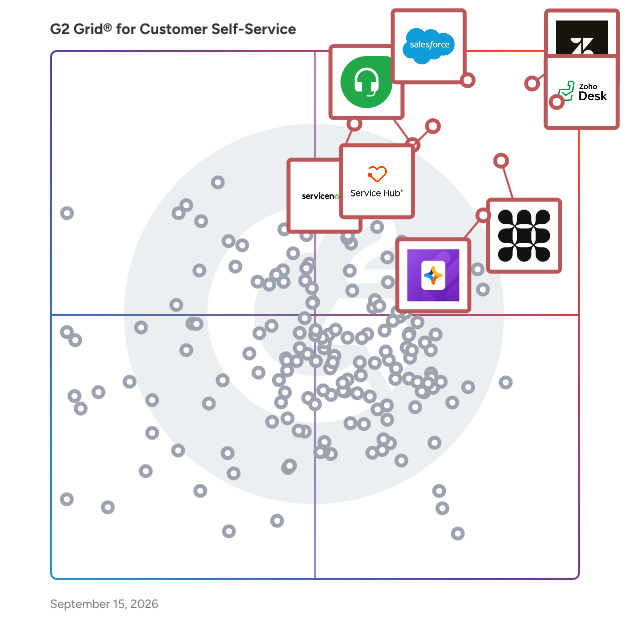
G2 Grid® for Customer Self-Service Software

G2 Grid® for Customer Self-Service Software plotting products by satisfaction and market presence

Highlighted products: Zendesk for Customer Service, Zoho Desk, Agentforce Service (formerly Salesforce Service Cloud), Fin, HubSpot Service Hub, Freshdesk, Jotform AI Agents, and ServiceNow Customer Service Management.

Underlying data: [Grid® JSON](https://www.g2.com/categories/customer-self-service/grids.json?focus%5B%5D=zendesk-for-customer-service&focus%5B%5D=zoho-desk&focus%5B%5D=agentforce-service-formerly-salesforce-service-cloud&focus%5B%5D=fin&focus%5B%5D=hubspot-service-hub&focus%5B%5D=freshdesk&focus%5B%5D=jotform-ai-agents&focus%5B%5D=servicenow-customer-service-management)

Zoho Desk

Zoho Desk is a web-based help desk software solution designed to assist organizations in providing exceptional customer support experiences. This platform serves as a centralized hub for managing customer interactions across multiple channels, allowing businesses to streamline their support processes and enhance overall customer satisfaction. By focusing on the needs of both customers and support agents, Zoho Desk aims to create a more efficient and effective help desk environment. Targeted primarily at businesses of all sizes, Zoho Desk caters to customer support teams looking to improve their service delivery and operational efficiency. The software is particularly beneficial for organizations that require a robust system to manage inquiries from various communication channels, including email, chat, social media, and phone. With its comprehensive feature set, Zoho Desk is well-suited for industries such as retail, technology, healthcare, and finance, where customer engagement and support are critical to success. One of the standout features of Zoho Desk is its omnichannel support capability, which allows businesses to engage with customers seamlessly across different platforms. This ensures that customers receive consistent and timely responses, regardless of how they choose to reach out. Additionally, the platform enhances agent productivity through automation tools that handle repetitive tasks, enabling support teams to focus on more complex customer issues. The integration of AI capabilities further empowers agents by providing them with insights and suggestions based on historical data and customer interactions. Zoho Desk also offers extensive customization options, allowing organizations to tailor the help desk experience to their specific needs. Users can create custom workflows, set up automated responses, and design personalized dashboards to monitor performance metrics. This level of customization ensures that businesses can adapt the software to fit their unique operational requirements, ultimately leading to improved service delivery and customer satisfaction. Furthermore, Zoho Desk provides real-time performance insights, enabling support managers to track key metrics and make data-driven decisions. The ability to analyze customer interactions and agent performance helps organizations identify areas for improvement and optimize their support strategies. With its cost-effective pricing model, Zoho Desk stands out as a practical solution for businesses seeking to enhance their customer support capabilities without incurring excessive expenses.

Average Rating: 4.4/5.0

Total Reviews: 7,673

G2 Deal: 50% discount on your first year with Zoho Desk

With Zoho Desk, you can deliver seamless omnichannel support, improve agent productivity at scale, customize your help desk, leverage powerful AI capabilities, automate mundane tasks, get live performance insights, and deeply integrate with apps you use daily - all without spending a fortune.

Price: ~~$14-40/agent/month~~ → $7-20/agent/month

View this exclusive G2 deal

How Do G2 Users Rate Zoho Desk?

  • Has the product been a good partner in doing business?: 8.4/10 (Category avg: 9.1/10)
  • Automation: 8.3/10 (Category avg: 8.7/10)
  • Integrations: 8.2/10 (Category avg: 8.6/10)
  • Personalization: 8.3/10 (Category avg: 8.5/10)

Who Is the Company Behind Zoho Desk?

  • Seller: Zoho
  • Company Website:
  • Year Founded: 1996
  • HQ Location: Austin, TX
  • Twitter: @Zoho
    137,880 Twitter followers
  • LinkedIn® Page: www.linkedin.com
    30,913 employees on LinkedIn®

Who Uses This Product?

  • Who Uses This: CEO, Director
  • Top Industries: Information Technology and Services, Computer Software
  • Company Size: 73% Small, 23% Medium

What Do G2 Reviewers Say About Zoho Desk?

AI-generated summary from verified user reviews

Pros
  • Users appreciate the ease of use of Zoho Desk, finding setup simple and customization straightforward.
  • Users appreciate the customization features and email integration of Zoho Desk, enhancing team efficiency and visibility.
  • Users love the efficient ticket management in Zoho Desk, streamlining support and enhancing team collaboration effortlessly.
  • Users value the extensive integrations of Zoho Desk, facilitating seamless communication across various platforms and enhancing productivity.
  • Users value the intuitive interface of Zoho Desk, enhancing organization and simplifying customer support management.
Cons
  • Users find the learning curve steep due to a busy interface and complex setup, making navigation challenging.
  • Users experience a steep learning curve due to a busy interface and complex setup for new features.
  • Users note the limited customization options can be confusing and restrict functionality in certain features of Zoho Desk.
  • Users find the complexity of Zoho Desk's UI and reporting features hampers their daily workflow and efficiency.
  • Users find the interface not intuitive, feeling overwhelmed by many options and hidden elements that complicate navigation.

What Are Recent G2 Reviews of Zoho Desk?

What Are G2 Users Discussing About Zoho Desk?

Zendesk for Customer Service

"Zendesk for Customer Service is an AI-powered service solution that’s easy to set up, use, and scale. It offers out-of-the-box functionality that’s simple to modify, helping businesses move faster. Leveraging AI built on billions of CX interactions, Zendesk enhances the entire service experience—from self-service to agents and admins—improving efficiency at scale. Zendesk equips agents with tools, insights, and context to deliver personalized service across all channels, including social messaging, phone, and email. It unifies personalized conversations, omnichannel case management, AI workflows, automation, and a Marketplace of 1800+ apps under one platform. Zendesk QA uses AI to evaluate and improve agent performance, while Workforce Management optimizes scheduling and productivity to ensure readiness during peak times. The solution is easy to implement and adjust without needing IT or developers. Zendesk’s mission is to simplify business complexity and enable meaningful customer connections for companies of all sizes. Serving 130K+ global brands in 30+ languages, Zendesk is headquartered in San Francisco with offices worldwide."

Average Rating: 4.3/5.0

Total Reviews: 6,711

G2 Deal: Experience the power of Zendesk with a free trial

Start your free trial of the leading AI-powered customer experience platform chosen by 100,000+ users. Whether you’re a small business looking to streamline customer service tickets or an enterprise-grade business that needs support software designed to scale as you grow, Zendesk is your solution.

Price: ~~$19 per agent/month~~ → $0 for 14 days

View this exclusive G2 deal

How Do G2 Users Rate Zendesk for Customer Service?

  • Has the product been a good partner in doing business?: 8.4/10 (Category avg: 9.1/10)
  • Automation: 8.2/10 (Category avg: 8.7/10)
  • Integrations: 8.2/10 (Category avg: 8.6/10)
  • Personalization: 8.0/10 (Category avg: 8.5/10)

Who Is the Company Behind Zendesk for Customer Service?

  • Seller: Zendesk
  • Company Website:
  • Year Founded: 2007
  • HQ Location: San Francisco, CA
  • Twitter: @Zendesk
    102,672 Twitter followers
  • LinkedIn® Page: www.linkedin.com
    7,537 employees on LinkedIn®

Who Uses This Product?

  • Who Uses This: Customer Success Manager, CEO
  • Top Industries: Computer Software, Information Technology and Services
  • Company Size: 45% Medium, 40% Small

What Do G2 Reviewers Say About Zendesk for Customer Service?

AI-generated summary from verified user reviews

Pros
  • Users appreciate the ease of use with Zendesk, benefiting from organized workflows and seamless functionality.
  • Users value the centralized communication and automation features of Zendesk, enhancing efficiency and personalized support.
  • Users value the efficient organization and speedy responses facilitated by Zendesk's centralized customer support system.
  • Users find Zendesk's ease of use invaluable, appreciating its intuitive interface and efficient task management.
  • Users benefit from the easy management of support tickets in Zendesk, enhancing collaboration and efficiency.
Cons
  • Users find Zendesk lacking in missing features, like customizable ticket statuses and commenting options for agents.
  • Users find the limited features of Zendesk frustrating, leading to complex workarounds and time-consuming setups.
  • Users find the learning curve steep due to advanced features, making setup and customization challenging for non-experts.
  • Users find limited customization in Zendesk, requiring significant time and effort to achieve desired setups and configurations.
  • Users find Zendesk's complexity overwhelming for beginners, with a steep learning curve for advanced features and reports.

What Are Recent G2 Reviews of Zendesk for Customer Service?

What Are G2 Users Discussing About Zendesk for Customer Service?

Agentforce Service (formerly Salesforce Service Cloud)

Salesforce Service Cloud is the world's #1 AI CRM for service, where humans with AI agents drive customer success together. Service Cloud enables seamless collaboration between AI agents and humans, for every type of service, on any channel, and across any industry to deliver effortless experiences from first contact to final resolution. With autonomous agents, you can transform low-touch, high-volume interactions into no-touch experiences, seamlessly handing them off to your human agents only when needed for high-touch more complex interactions. AI integrated into the flow of work helps your service teams achieve new levels of productivity, drive better customer satisfaction and to drive growth. All of these capabilities are built on the Salesforce Platform with Agentforce and Data Cloud allowing service organizations around the world to : - Deliver proactive support with data from your products, assets & services - Provide 24/7 cross-channel service & resolve issues fast with AI agents - Boost productivity and accelerate growth with one integrated platform

Average Rating: 4.4/5.0

Total Reviews: 6,994

How Do G2 Users Rate Agentforce Service (formerly Salesforce Service Cloud)?

  • Has the product been a good partner in doing business?: 8.7/10 (Category avg: 9.1/10)
  • Automation: 8.7/10 (Category avg: 8.7/10)
  • Integrations: 8.5/10 (Category avg: 8.6/10)
  • Personalization: 8.4/10 (Category avg: 8.5/10)

Who Is the Company Behind Agentforce Service (formerly Salesforce Service Cloud)?

  • Seller: Salesforce
  • Company Website:
  • Year Founded: 1999
  • HQ Location: San Francisco, CA
  • Twitter: @salesforce
    579,511 Twitter followers
  • LinkedIn® Page: www.linkedin.com
    89,711 employees on LinkedIn®

Who Uses This Product?

  • Who Uses This: Salesforce Administrator, Salesforce Developer
  • Top Industries: Information Technology and Services, Computer Software
  • Company Size: 41% Medium, 37% Large

What Do G2 Reviewers Say About Agentforce Service (formerly Salesforce Service Cloud)?

AI-generated summary from verified user reviews

Pros
  • Users find Agentforce Service to be easy to configure and use, enhancing productivity and supporting service requirements effectively.
  • Users appreciate the user-friendly UI of Agentforce Service, facilitating easy setup and streamlined case management.
  • Users appreciate the streamlined case management of Agentforce Service, making it easy to keep cases organized and efficient.
  • Users value the efficiency of Agentforce Service, benefiting from its easy setup and seamless integration capabilities.
  • Users value the ease of setup and helpful features in Salesforce Service Cloud, enhancing overall efficiency and support speed.
Cons
  • Users find the complexity of Agentforce Service challenging, especially for new users and custom integrations.
  • Users find the learning curve steep for new users, particularly in configuring automation and workflows effectively.
  • Users find the steep learning curve of Agentforce Service challenging, requiring significant time and training for proficiency.
  • Users find the service to be expensive, especially with additional licensing and feature costs adding up quickly.
  • Users find the complex usability of Agentforce Service challenging, requiring technical expertise for optimal setup and customization.

What Are Recent G2 Reviews of Agentforce Service (formerly Salesforce Service Cloud)?

What Are G2 Users Discussing About Agentforce Service (formerly Salesforce Service Cloud)?

Fin

Fin is a single Customer Agent that can take on different roles, depending on what the conversation needs. Fin can handle sales, service, and more - all as part of one continuous experience for the customer. Key benefits of Fin: - Automates complex tasks such as refunds, transaction disputes, and technical troubleshooting. - Easy to configure with a no-code experience that anyone on your team can manage. - Works with any helpdesk, including Salesforce, HubSpot, and Freshdesk – no migration required. - Affordable at scale with pricing starting at just $0.99 per outcome. - Provides complete visibility and control through tools to analyze, train, test, and deploy Fin across all channels. - Engages buyers as they explore your site, providing instant, relevant answers when intent is highest. - Moves prospects closer to a decision, answering questions about pricing and features, addressing objections, and matching solutions to their needs. - Closes opportunities by guiding qualified buyers to the right next step – booking meetings, starting trials, or handing off to sales with full context. How it works: Fin combines generative AI with deterministic rules to act just like your best human agents. You can give Fin detailed, step-by-step instructions, and it will follow them with speed and reliability – reducing time to resolution and improving customer satisfaction. Fin runs on Apex 1.0 and Apex Flash, models that are custom trained on billions of customer experience interactions. Every layer is optimized for accuracy, speed, and reliability, so Fin can handle high volumes and complex queries with confidence. Proof of performance: - Fin has industry leading resolution rates, averaging 76%, with many companies seeing over 85%. - Trusted by 12,000+ customers, including Anthropic, Kalshi, Vanta and many more. - In independent tests, Fin consistently outperformed competitors, delivering higher resolution rates than Forethought, Decagon, and others.

Average Rating: 4.5/5.0

Total Reviews: 3,745

How Do G2 Users Rate Fin?

  • Has the product been a good partner in doing business?: 8.8/10 (Category avg: 9.1/10)
  • Automation: 8.8/10 (Category avg: 8.7/10)
  • Integrations: 8.6/10 (Category avg: 8.6/10)
  • Personalization: 8.4/10 (Category avg: 8.5/10)

Who Is the Company Behind Fin?

  • Seller: Fin
  • Company Website:
  • Year Founded: 2011
  • HQ Location: San Francisco, CA
  • Twitter: @fin_ai
    45,225 Twitter followers
  • LinkedIn® Page: www.linkedin.com
    1,238 employees on LinkedIn®

Who Uses This Product?

  • Who Uses This: Customer Success Manager, CEO
  • Top Industries: Computer Software, Information Technology and Services
  • Company Size: 56% Small, 37% Medium

What Do G2 Reviewers Say About Fin?

AI-generated summary from verified user reviews

Pros
  • Users appreciate the powerful query resolution capabilities of Fin, highlighting its quick access to helpful resources.
  • Users find Fin to be incredibly easy to use and appreciate its quick and efficient responses.
  • Users appreciate Fin's speed and reliability in resolving queries, enjoying its intuitive UI and seamless integration.
  • Users enjoy the efficiency of Fin, benefiting from seamless navigation and effective AI handling of customer queries.
  • Users value the quick and helpful customer support from Intercom, enhancing their overall service experience and satisfaction.
Cons
  • Users find the missing features in Fin, particularly for procedure visibility and conversation simulation, frustrating and limiting.
  • Users find AI limitations in Fin, struggling with unique formats and providing unhelpful responses at times.
  • Users express frustration with limited features in Fin, citing a need for better integration and simulation options.
  • Users find the learning curve challenging, struggling with setup and the need for constant monitoring and attention.
  • Users express concerns over Fin's high pricing, with many features requiring additional payment, leading to unexpected bills.

What Are Recent G2 Reviews of Fin?

What Are G2 Users Discussing About Fin?

FAQs About Customer Self-Service Software

Generated using AI

Last updated: June 3, 2026

Top self-service platforms with analytics dashboards

Based on G2 reviews, these products are frequently associated with analytics dashboards, reporting, and self-service workflows.

Top-rated platforms for community-driven customer support

Based on G2 reviews, these products are commonly linked to knowledge sharing, help content, and community-style support experiences.

Which self-service platform offers AI-powered content suggestions?

Based on G2 reviews, these products are associated with AI-assisted suggestions, knowledge support, and automated answer recommendations.

What should buyers look for in customer self-service software

According to verified users, the strongest patterns in recent reviews center on a unified place for help content, ticket history, and multichannel requests, plus automation that reduces repetitive work. Buyers should look for search that helps users find articles quickly, workflows that route issues clearly when self-service is not enough, and reporting that helps teams understand recurring questions. Reviews also repeatedly mention the value of AI-assisted answers, customizable help centers, and integrations with existing systems. At the same time, several products are described as easier for daily use once setup is complete, so implementation effort and admin complexity are worth evaluating alongside self-service capabilities.

What features define modern customer self-service

Modern customer self-service is defined by a mix of searchable knowledge, guided help, and smooth escalation when customers still need assistance. Across recent G2 reviews, users repeatedly mention help centers, knowledge bases, FAQs, chat-based help, AI-assisted answers, automated routing, and centralized conversation history as the most useful elements. The strongest solutions also support customers across channels like chat, email, portals, and messaging while keeping information organized in one place. Reviewers also value reporting and analytics because they help teams spot common issues and improve content over time. In practice, modern customer self-service is not just article publishing. It is an experience that helps users solve simple issues quickly and hands off complex ones efficiently.

HubSpot Service Hub

Service Hub delivers AI-powered customer service at scale by unifying customer insights, providing omnichannel support tools, and enabling efficient self-service options within a single platform. Core Value Proposition: Service Hub addresses three critical customer service challenges: scaling support teams without proportional headcount increases, maintaining service quality across multiple communication channels, and leveraging customer data to drive retention and growth. The platform connects customer service data with information from sales and marketing, providing support representatives with complete customer context. Key Capabilities: Omnichannel Help Desk: Service Hub consolidates support requests from multiple communication channels into a single interface. Teams manage all customer communications without switching between tools, ensuring consistent response quality across channels. AI-Powered Efficiency: The platform includes AI features that automate ticket routing, suggest relevant knowledge base articles, and identify patterns in customer issues to improve resolution speed and support team productivity. Self-Service Tools: Service Hub provides knowledge base creation, chatbot functionality, and customer portal capabilities enabling customers to find answers independently. This reduces ticket volume and support team workload while improving customer satisfaction. Data-Driven Retention: The platform offers customer health scoring, efficiency reporting, and trend analysis that help service leaders identify at-risk accounts, optimize team performance, and connect support activities to business growth metrics. Service Hub vs. Alternatives: Unlike standalone ticketing systems operating in isolation, Service Hub shares customer data with sales and marketing platforms, enabling support teams to see complete customer journey context. Representatives can access purchase history, marketing interactions, and sales conversations without needing to request information from other departments. Service Hub eliminates the need to purchase and integrate separate tools for live chat, knowledge base management, customer feedback collection, and service analytics by providing these capabilities within the unified HubSpot platform. Who Should Use Service Hub: Service Hub serves customer experience leaders seeking to scale support efficiently, support teams needing complete customer context for quality service delivery, and organizations wanting to connect service metrics to retention and growth outcomes. The platform enables CX leaders to focus on efficient reps empowered by AI. Outcome: Service Hub helps teams deliver delightful support at scale with unified customer insights, create efficient reps empowered by AI, and scale their company, not complexity.

Average Rating: 4.4/5.0

Total Reviews: 2,827

G2 Deal: Get the HubSpot Growth CRM Suite - 20% off HubSpot plans for the first year, then 10% off in perpetuity

20% off HubSpot plans for the first year, then 10% off in perpetuity

View this exclusive G2 deal

How Do G2 Users Rate HubSpot Service Hub?

  • Has the product been a good partner in doing business?: 8.8/10 (Category avg: 9.1/10)
  • Automation: 8.5/10 (Category avg: 8.7/10)
  • Integrations: 8.3/10 (Category avg: 8.6/10)
  • Personalization: 8.3/10 (Category avg: 8.5/10)

Who Is the Company Behind HubSpot Service Hub?

  • Seller: HubSpot
  • Company Website:
  • Year Founded: 2006
  • HQ Location: Cambridge, Massachusetts, United States
  • Twitter: @HubSpot
    784,270 Twitter followers
  • LinkedIn® Page: www.linkedin.com
    17,628 employees on LinkedIn®

Who Uses This Product?

  • Who Uses This: Customer Success Manager, Customer Success Specialist
  • Top Industries: Computer Software, Information Technology and Services
  • Company Size: 60% Small, 37% Medium

What Do G2 Reviewers Say About HubSpot Service Hub?

AI-generated summary from verified user reviews

Pros
  • Users commend the ease of use of HubSpot Service Hub, streamlining communication and enhancing decision-making effortlessly.
  • Users love the seamless integration of features in HubSpot Service Hub, enhancing communication and accessibility of insights.
  • Users highly value the responsive customer support of HubSpot Service Hub, ensuring quick assistance for any inquiries.
  • Users appreciate the efficiency of HubSpot Service Hub, streamlining tasks and enhancing productivity effectively.
  • Users appreciate the convenient ticketing system of HubSpot Service Hub, efficiently managing all customer interactions in one place.
Cons
  • Users find missing features in HubSpot Service Hub, especially in customization and advanced functionalities requiring higher plans.
  • Users find limited customization in contacts and reporting features, hindering their ability to effectively manage multiple properties.
  • Users feel the limited features of HubSpot Service Hub hinder customization and efficiency in their workflows.
  • Users report a lack of features in HubSpot Service Hub, hindering usability and cross-team collaboration.
  • Users face limited email processing options and struggle with ticket management inefficiencies in HubSpot Service Hub.

What Are Recent G2 Reviews of HubSpot Service Hub?

What Are G2 Users Discussing About HubSpot Service Hub?

Freshdesk

Freshdesk (a product of Freshworks Inc.) helps customer service teams move from their first AI agent to AI-powered customer service, without a drawn-out transformation program. Freshdesk unifies channels, conversations, AI, and customer context into one place, so agents always have the full picture before responding. Ready-to-use AI agents understand intent, take action, and resolve requests across channels, not just route them. AI Copilot helps every agent work faster and with more confidence, and AI Insights turns service data into decisions instead of dashboards. Guided rollout and prebuilt templates mean teams can launch quickly and expand at their own pace, whether they're a support team of 10 or 500. Freshdesk is quick to set up, easy to use, and designed for rapid impact—it delivers 60% improved agent productivity, a 97% first-contact resolution rate, and up to 80% of resolutions with AI agents.

Average Rating: 4.4/5.0

Total Reviews: 3,691

How Do G2 Users Rate Freshdesk?

  • Has the product been a good partner in doing business?: 8.8/10 (Category avg: 9.1/10)
  • Automation: 8.6/10 (Category avg: 8.7/10)
  • Integrations: 8.5/10 (Category avg: 8.6/10)
  • Personalization: 8.4/10 (Category avg: 8.5/10)

Who Is the Company Behind Freshdesk?

  • Seller: Freshworks
  • Company Website:
  • Year Founded: 2010
  • HQ Location: San Mateo, CA
  • Twitter: @FreshworksInc
    19,020 Twitter followers
  • LinkedIn® Page: www.linkedin.com
    7,783 employees on LinkedIn®

Who Uses This Product?

  • Who Uses This: Manager, Owner
  • Top Industries: Information Technology and Services, Computer Software
  • Company Size: 48% Small, 40% Medium

What Do G2 Reviewers Say About Freshdesk?

AI-generated summary from verified user reviews

Pros
  • Users love the ease of use of Freshdesk, making implementation and daily management effortless and efficient.
  • Users appreciate the ease of use in Freshdesk, enabling quick management of tickets with minimal training.
  • Users appreciate the automation features of Freshdesk, which streamline workflows and enhance focus on customer satisfaction.
  • Users praise the efficient ticket management of Freshdesk, finding it easy to track and prioritize support requests.
  • Users appreciate the efficiency of Freshdesk, as it simplifies ticket management and enhances productivity.
Cons
  • Users feel that Freshdesk lacks essential features such as live chat, impacting its overall functionality and user satisfaction.
  • Users find Freshdesk has limited features compared to competitors, particularly in customization and omnichannel capabilities.
  • Users face limited customization options in Freshdesk, impacting their ability to tailor workflows and agent roles effectively.
  • Users find ticket management cumbersome, needing features for automated follow-ups and facing performance issues during peak times.
  • Users experience frustrating slow loading times, especially when adding ticket fields or updating user roles.

What Are Recent G2 Reviews of Freshdesk?

What Are G2 Users Discussing About Freshdesk?

Jotform AI Agents

Jotform AI Agents are automated real-time assistants designed to help your users at any time of day or night. AI Agents are the future of customer service. Train and customize your own personal AI Agent to enhance user engagement, improve response times, and streamline support operations. With Jotform’s intuitive, no-code AI builder, you can easily train and customize your own AI Agent to match your brand voice, support workflows, and respond with the exact information your users need. Simply provide key details, documents, FAQs, or form data, and your AI Agent will learn from this context to deliver accurate, personalized interactions. This level of customization helps teams improve response times, boost user satisfaction, and streamline support operations across every stage of the customer journey. One of the platform’s most powerful advantages is its extensive library of 7,000+ customizable AI Agent templates. These ready-made templates provide an easy starting point for a wide variety of use cases, including customer support, onboarding, lead qualification, appointment scheduling, product education, internal training, and more. Each template can be fully personalized with your own instructions, tone, workflows, and industry-specific knowledge—allowing you to deploy high-performing AI Agents in minutes. Jotform AI Agents provide 24/7 automated assistance, ensuring your customers receive instant support even outside of business hours. While you sleep, your AI Agents continue working—handling inquiries, resolving issues, collecting information, and providing accurate responses around the clock. This continuous availability reduces wait times, increases engagement, and helps teams keep up with growing demand. With multichannel support, Jotform AI Agents can operate wherever your users are. Deploy your agents across web, chat widgets, email, phone, WhatsApp, Messenger, Gmail, WordPress, and other communication channels for a unified, consistent support experience. This omnichannel flexibility ensures that your users always receive real-time assistance—no matter the device or platform. For teams requiring voice-based interactions, Jotform offers powerful phone and SMS capabilities. AI Agents can handle incoming calls, conduct natural voice conversations, answer questions, and transcribe spoken messages—all with a friendly, human-like tone. This makes Jotform AI Agents ideal for customer service hotlines, appointment reminders, phone-based support, and automated phone menus. AI Agents can also perform customizable actions based on your workflows. Define specific behaviors, triggers, follow-up steps, or automated tasks for your agent to execute. Whether you want it to qualify leads, send emails, update CRM records, route inquiries, generate reports, or collect data through forms, your AI Agent follows your rules precisely. By combining real-time automation, no-code customization, multichannel support, and intelligent communication, Jotform AI Agents help organizations scale their customer experience effortlessly. Whether you’re a small business or a global enterprise, AI Agents provide the speed, accuracy, and availability needed to support users at every moment.

Average Rating: 4.5/5.0

Total Reviews: 686

How Do G2 Users Rate Jotform AI Agents?

  • Has the product been a good partner in doing business?: 8.7/10 (Category avg: 9.1/10)
  • Automation: 8.8/10 (Category avg: 8.7/10)
  • Integrations: 8.5/10 (Category avg: 8.6/10)
  • Personalization: 8.7/10 (Category avg: 8.5/10)

Who Is the Company Behind Jotform AI Agents?

  • Seller: Jotform
  • Company Website:
  • Year Founded: 2006
  • HQ Location: San Francisco, California
  • Twitter: @Jotform
    39,289 Twitter followers
  • LinkedIn® Page: www.linkedin.com
    925 employees on LinkedIn®

Who Uses This Product?

  • Who Uses This: Owner, CEO
  • Top Industries: Information Technology and Services, Computer Software
  • Company Size: 74% Small, 11% Medium

What Do G2 Reviewers Say About Jotform AI Agents?

AI-generated summary from verified user reviews

Pros
  • Users value the ease of use of Jotform AI Agents, enhancing productivity and simplifying onboarding processes.
  • Users find the easy setup of Jotform AI Agents simplifies onboarding and ongoing training for clients.
  • Users highlight the easy setup of Jotform AI Agents, enabling quick onboarding and efficient client interaction.
  • Users find Jotform AI Agents to be extremely helpful in streamlining tasks and enhancing productivity in various settings.
  • Users value the superior setup ease of Jotform AI Agents, facilitating a smooth onboarding process and enhanced efficiency.
Cons
  • Users find the AI limitations frustrating, with issues in flexibility and understanding user specifications effectively.
  • Users find the AI's limited capabilities affect its flexibility and accuracy in executing workflows and understanding requests.
  • Users express frustration with the limited features of Jotform AI Agents, hindering their ability to customize workflows effectively.
  • Users find inadequate AI features in Jotform AI Agents, as it often hallucinates and misunderstands user requests.
  • Users experience poor understanding from Jotform AI Agents, leading to frustration and confusion in interpreting queries and instructions.

What Are Recent G2 Reviews of Jotform AI Agents?

ServiceNow Customer Service Management

ServiceNow's Customer Service Management (CSM) transforms customer service experiences with AI-powered workflows and AI agents that help you accelerate customer self-service, boost agent productivity, and speed up resolution time. With CSM, your organization can: - Deflect calls and increase satisfaction by enabling customers to self-serve answers and actions via an AI-powered conversational chat. - Increase capacity to handle more cases, extend business hours, and manage routine tasks with AI agents. - Save agents time with AI-generated case histories, case summaries, and suggested resolutions. - Integrate with top CCaaS solutions to unify routing, centralize call and work management, and boost agent efficiency on one AI-powered workspace. - Resolve issues quickly and consistently by automating tasks, uncovering bottlenecks, and improving processes. - Get up and running quickly and maintain a low TCO with continuous innovation in one extensible AI platform. Harness the power of AI, data and workflows to delight customers and deliver on what they want quickly, drive unprecedented agent productivity, and foster a whole new level of customer loyalty.

Average Rating: 4.4/5.0

Total Reviews: 484

How Do G2 Users Rate ServiceNow Customer Service Management?

  • Has the product been a good partner in doing business?: 8.5/10 (Category avg: 9.1/10)
  • Automation: 8.1/10 (Category avg: 8.7/10)
  • Integrations: 8.2/10 (Category avg: 8.6/10)
  • Personalization: 7.9/10 (Category avg: 8.5/10)

Who Is the Company Behind ServiceNow Customer Service Management?

  • Seller: ServiceNow
  • Company Website:
  • Year Founded: 2004
  • HQ Location: Santa Clara, CA
  • Twitter: @servicenow
    55,548 Twitter followers
  • LinkedIn® Page: www.linkedin.com
    35,078 employees on LinkedIn®

Who Uses This Product?

  • Who Uses This: Senior Software Engineer, Associate Consultant
  • Top Industries: Information Technology and Services, Telecommunications
  • Company Size: 45% Large, 27% Medium

What Do G2 Reviewers Say About ServiceNow Customer Service Management?

AI-generated summary from verified user reviews

Pros
  • Users value the ease of use in ServiceNow Customer Service Management, streamlining customer interactions through automation and organization.
  • Users value the seamless integration with ITIL processes, enabling efficient workflows and enhanced customer lifecycle management.
  • Users appreciate the smooth workflow of case management in ServiceNow, enhancing efficiency for both agents and customers.
  • Users value the efficiency of ServiceNow CSM for significantly speeding up issue resolution through streamlined processes and automation.
  • Users value the automation capabilities of ServiceNow, enhancing efficiency in case management and improving customer satisfaction.
Cons
  • Users find the learning curve complicated, needing time to adapt to ServiceNow's customer onboarding and customizations.
  • Users find the steep learning curve of ServiceNow CSM challenging, especially without proper onboarding and training.
  • Users find the complexity of ServiceNow Customer Service Management challenging, especially with its high configurability and steep learning curve.
  • Users find the limited customization in ServiceNow Customer Service Management impacts tracking and communication effectiveness.
  • Users find the interface of ServiceNow Customer Service Management to be not intuitive, making navigation and usability challenging.

What Are Recent G2 Reviews of ServiceNow Customer Service Management?

What Are G2 Users Discussing About ServiceNow Customer Service Management?

WalkMe

WalkMe, an SAP company, is the critical layer that makes enterprise AI work. Copilots and AI agents are powerful, but incomplete. They can't see what's on an employee's screen, move across applications, or act where work actually happens. WalkMe can. Built on over a decade of experience in enterprise deployments, WalkMe gives AI the real-time context, cross-application reach, and workflow execution it needs to deliver results. WalkMe helps organizations adapt faster, make better decisions, and build a workforce that learns continuously. Trusted by global leaders including IBM, Nestlé, ThermoFisher Scientific, and the U.S. federal government, WalkMe turns AI investments into business outcomes. Visit www.walkme.com.

Average Rating: 4.5/5.0

Total Reviews: 569

How Do G2 Users Rate WalkMe?

  • Has the product been a good partner in doing business?: 8.9/10 (Category avg: 9.1/10)
  • Automation: 8.2/10 (Category avg: 8.7/10)
  • Integrations: 7.6/10 (Category avg: 8.6/10)
  • Personalization: 8.1/10 (Category avg: 8.5/10)

Who Is the Company Behind WalkMe?

  • Seller: SAP
  • Company Website:
  • Year Founded: 1972
  • HQ Location: Walldorf
  • Twitter: @SAP
    297,052 Twitter followers
  • LinkedIn® Page: www.linkedin.com
    149,349 employees on LinkedIn®

Who Uses This Product?

  • Who Uses This: Instructional Designer, Digital Adoption Specialist
  • Top Industries: Computer Software, Financial Services
  • Company Size: 60% Large, 28% Medium

What Do G2 Reviewers Say About WalkMe?

AI-generated summary from verified user reviews

Pros
  • Users find WalkMe's ease of use invaluable for navigating tools and minimizing training time and resources.
  • Users appreciate the intuitive guidance and support WalkMe provides, significantly improving user experience and productivity.
  • Users value the responsive customer support of WalkMe, ensuring quick resolution of any issues encountered.
  • Users value WalkMe for its intuitive training and easy setup, enhancing user engagement and support efficiency.
  • Users appreciate the intuitive interface of WalkMe, enabling seamless integration and powerful, context-aware in-app guidance.
Cons
  • Users face a significant learning curve with WalkMe, particularly regarding advanced features and managing large-scale environments.
  • Users find the initial setup complexity of WalkMe challenging, requiring time and technical skills for effective management.
  • Users face a steep learning curve with WalkMe, particularly regarding advanced features and customization challenges.
  • Users find the setup process for WalkMe time-consuming, especially with complex or customized workflows.
  • Users find WalkMe's struggle with dynamic elements and clunky interface challenging, despite the availability of free training.

What Are Recent G2 Reviews of WalkMe?

What Are G2 Users Discussing About WalkMe?

Helpjuice

Helpjuice's AI knowledge base is an industry-leading playform designed to supercharge your team and customers by enhancing knowledge sharing across your organization. With Helpjuice, you can capture, create, and share critical information effortlessly, making it the ideal knowledge base tool for training employees, onboarding new customers, enabling self-service, and sharing knowledge within and outside your company. Our powerful platform allows users to create new content directly in our easy-to-use editor as well as upload content in multiple formats, ensuring that essential information is accessible anytime and anywhere. Helpjuice's powerful, Google-like search functionality makes it easy for users to find the right information they need quickly and efficiently. Trusted by major organizations such as Amazon, Change.org, Wells Fargo, the World Health Organization, Shipt, TCL, and thousands of others, Helpjuice is dedicated to breaking down information silos and fostering a culture of knowledge sharing.

Average Rating: 4.7/5.0

Total Reviews: 381

How Do G2 Users Rate Helpjuice?

  • Has the product been a good partner in doing business?: 9.4/10 (Category avg: 9.1/10)
  • Automation: 8.1/10 (Category avg: 8.7/10)
  • Integrations: 8.1/10 (Category avg: 8.6/10)
  • Personalization: 8.8/10 (Category avg: 8.5/10)

Who Is the Company Behind Helpjuice?

  • Seller: Helpjuice
  • Year Founded: 2011
  • HQ Location: Miami, FL
  • Twitter: @HelpJuice
    769 Twitter followers
  • LinkedIn® Page: www.linkedin.com
    36 employees on LinkedIn®

Who Uses This Product?

  • Who Uses This: Customer Success Manager, Technical Writer
  • Top Industries: Computer Software, Information Technology and Services
  • Company Size: 49% Medium, 39% Small

What Do G2 Reviewers Say About Helpjuice?

AI-generated summary from verified user reviews

Pros
  • Users find Helpjuice's ease of use exceptional, facilitating quick setup and efficient management of knowledge bases.
  • Users highlight the helpful customer support of Helpjuice, significantly enhancing their knowledge base experience and efficiency.
  • Users praise the exceptional customer support from Helpjuice, highlighting their proactive assistance and helpful resources.
  • Users enjoy the customization options of Helpjuice, enhancing the usability and organization of their knowledge base.
  • Users appreciate the intuitive interface and robust features of Helpjuice, enhancing efficiency and content management.
Cons
  • Users find editing difficulties due to the outdated design and bugs when handling long articles and file uploads.
  • Users feel limited by restricted customization options, often requiring expert help for changes and facing unclear pricing.
  • Users face formatting issues that complicate documentation usage and hinder their overall experience with Helpjuice.
  • Users face missing features, such as buggy multi-language support, limited editing functions, and navigation issues.
  • Users note the limitations of AI in Helpjuice, expressing a desire for more functionality beyond basic search.

What Are Recent G2 Reviews of Helpjuice?

What Are G2 Users Discussing About Helpjuice?

UserGuiding

UserGuiding is a no-code product adoption platform for teams who need users to reach value on their own, without a support ticket or a training call. You build in-app guidance inside your own product using a visual editor and a Chrome extension, with no engineering ticket. Interactive guides and walkthroughs, onboarding checklists, tooltips, hotspots, banners and announcement modals, each targeted to segments you define from user attributes and events. One platform for the whole adoption loop. Onboard users, see where they stall, ask them why, collect what they want built next, show them what you committed to, then announce it in-app when it ships. Self-serve help: a standalone multilingual Knowledge Base, a Resource Center widget inside your product, and an AI Assistant that answers your users' questions conversationally from your own content. Deflect tickets without adding headcount. Feedback and evidence: in-app surveys and NPS targeted to the right users at the right moment, analytics on every guide, checklist and survey, and Session Replay to see exactly where users stall. Custom Alerts flag a material that stops performing, instead of you finding out at the monthly review. Feature requests and public roadmap: your users submit ideas inside your product and vote on each other's. Everything lands in an inbox you approve before anything goes public. What you pick moves onto a public roadmap in status columns you name yourself, and when it ships it becomes an update post on the same page the request started on. AI-native access: UserGuiding ships an MCP server, so you can query your own adoption data straight from Claude, Cursor or any MCP client rather than exporting spreadsheets. The 1:1 onboarding program: twelve weeks, one hour a week, someone from our team on a call with yours, building in your account instead of handing you a plan. Each session takes one piece of your user journey and gets something live. UserGuiding is the only product adoption platform that includes a weekly 1:1 onboarding program at no additional fee. Everywhere else, hands-on implementation is a paid services engagement or reserved for enterprise contracts. You can see what UserGuiding costs without booking a call. Plans start at $174 per month billed annually. Enterprise adds SAML SSO, activity logs, migration support, and SOC 2, GDPR and HIPAA compliance. More than 1,000 companies use UserGuiding, which holds 4.7 stars across 772 G2 reviews, most often praised for how quickly it goes live.

Average Rating: 4.7/5.0

Total Reviews: 777

How Do G2 Users Rate UserGuiding?

  • Has the product been a good partner in doing business?: 9.4/10 (Category avg: 9.1/10)
  • Automation: 8.5/10 (Category avg: 8.7/10)
  • Integrations: 8.4/10 (Category avg: 8.6/10)
  • Personalization: 8.6/10 (Category avg: 8.5/10)

Who Is the Company Behind UserGuiding?

  • Seller: UserGuiding
  • Company Website:
  • Year Founded: 2017
  • HQ Location: Istanbul, TR
  • Twitter: @UserGuiding
    1,755 Twitter followers
  • LinkedIn® Page: www.linkedin.com
    24 employees on LinkedIn®

Who Uses This Product?

  • Who Uses This: Product Manager, Product Designer
  • Top Industries: Computer Software, Information Technology and Services
  • Company Size: 55% Small, 36% Medium

What Do G2 Reviewers Say About UserGuiding?

AI-generated summary from verified user reviews

Pros
  • Users appreciate the ease of use of UserGuiding, finding it simple and intuitive for onboarding and setup.
  • Users value the responsive and helpful customer support of UserGuiding, enhancing their overall experience and satisfaction.
  • Users find the easy setup of UserGuiding highly beneficial for onboarding and managing customer updates efficiently.
  • Users find the intuitive interface of UserGuiding essential for quickly understanding and utilizing new features independently.
  • Users appreciate the helpful onboarding features of UserGuiding, enhancing customer experience and driving business success.
Cons
  • Users find the limited customization options challenging, requiring additional code changes for desired features.
  • Users find missing features in UserGuiding, such as limited customization options and lack of comprehensive analytics.
  • Users note the limitations of mobile app support in UserGuiding, impacting their overall experience and insights.
  • Users find the learning curve challenging due to tricky custom setup and language barriers for non-English speakers.
  • Users experience editing difficulties with UserGuiding, facing lag and challenges when navigating the Rich Text Editor and changes.

What Are Recent G2 Reviews of UserGuiding?

What Are G2 Users Discussing About UserGuiding?

Re:amaze

Re:amaze is a helpdesk and customer messaging platform designed for websites, stores, and apps. Use Re:amaze to provide exceptional customer support through live chat, email, social media, mobile SMS/MMS, VOIP, and FAQ Knowledge Bases. Businesses of all shapes and sizes also rely on Re:amaze for sales and marketing automation using features such as Re:amaze Cues (a way to automatically message online customers), Re:amaze Chatbots, Re:amaze Live Dashboard (to monitor online customer activity in real time), and send customer satisfaction surveys (to gauge service quality and gather feedback). Re:amaze offers native integrations with many popular 3rd party apps such as Slack, Shopify, BigCommerce, Stripe, MailChimp, Google (Analytics, Tag Manager, Suite), ShipStation, Klaviyo, and much more. Businesses can also use a single Re:amaze account to manage customer service for multiple businesses or stores with the Multi-Brand feature.

Average Rating: 4.6/5.0

Total Reviews: 137

How Do G2 Users Rate Re:amaze?

  • Has the product been a good partner in doing business?: 9.6/10 (Category avg: 9.1/10)
  • Automation: 8.9/10 (Category avg: 8.7/10)
  • Integrations: 8.9/10 (Category avg: 8.6/10)
  • Personalization: 7.8/10 (Category avg: 8.5/10)

Who Is the Company Behind Re:amaze?

  • Seller: GoDaddy
  • Year Founded: 1997
  • HQ Location: Scottsdale, AZ
  • Twitter: @GoDaddy
    274,844 Twitter followers
  • LinkedIn® Page: www.linkedin.com
    9,052 employees on LinkedIn®
  • Ownership: NYSE:GDDY

Who Uses This Product?

  • Who Uses This: Owner, President
  • Top Industries: Retail, Sporting Goods
  • Company Size: 81% Small, 17% Medium

What Do G2 Reviewers Say About Re:amaze?

AI-generated summary from verified user reviews

Pros
  • Users value the great customer support of Re:amaze, appreciating its flexibility and helpful AI features.
  • Users value the flexibility of Re:amaze, appreciating the variety of options and supportive AI features.

What Are Recent G2 Reviews of Re:amaze?

What Are G2 Users Discussing About Re:amaze?

SAP Service Cloud

SAP Service Cloud is a customer service solution for the agentic era. It enables you to turn complex requests into effortless, personalized experiences for every customer, with the power and efficiency of AI With SAP Service Cloud you can: * Get to the right resolution faster: Automate routine requests and guide agents with AI‑driven summaries, recommendations, and next‑best actions to reduce effort and time to resolution. * Personalize support at scale: Use unified customer and business data with AI insights to deliver context‑aware interactions on every channel. * Turn service into a growth driver: Proactively reduce escalations, improve retention, identify revenue opportunities, and lower cost to serve with outcome‑focused analytics and automation.

Average Rating: 4.4/5.0

Total Reviews: 248

How Do G2 Users Rate SAP Service Cloud?

  • Has the product been a good partner in doing business?: 8.8/10 (Category avg: 9.1/10)
  • Automation: 8.7/10 (Category avg: 8.7/10)
  • Integrations: 8.4/10 (Category avg: 8.6/10)
  • Personalization: 8.4/10 (Category avg: 8.5/10)

Who Is the Company Behind SAP Service Cloud?

  • Seller: SAP
  • Company Website:
  • Year Founded: 1972
  • HQ Location: Walldorf
  • Twitter: @SAP
    297,052 Twitter followers
  • LinkedIn® Page: www.linkedin.com
    149,349 employees on LinkedIn®

Who Uses This Product?

  • Who Uses This: Software Engineer, Consultant
  • Top Industries: Information Technology and Services, Computer Software
  • Company Size: 39% Medium, 34% Large

What Do G2 Reviewers Say About SAP Service Cloud?

AI-generated summary from verified user reviews

Pros
  • Users value the excellent customer support provided by SAP Service Cloud, enhancing service efficiency and user experience.
  • Users appreciate the simple and interactive UI of SAP Service Cloud, enhancing their customer service efficiency significantly.
  • Users value the user-friendly design of SAP Service Cloud, enhancing efficiency in managing expenses and client responses.
  • Users enjoy the ease of use of SAP Service Cloud, streamlining communication and improving organization efficiently.
  • Users value the customization tools of SAP Service Cloud, enhancing functionality and eliminating the need for additional licenses.
Cons
  • Users find the complexity of setup and configuration in SAP Service Cloud to be a significant hurdle.
  • Users experience slow performance with SAP Service Cloud, especially when managing large volumes of data or tickets.
  • Users find the steep learning curve of SAP Service Cloud daunting, complicating configuration and customization for newcomers.
  • Users find SAP Service Cloud has a steep learning curve, making configuration and customization challenging for newcomers.
  • Users find the interface issues challenging, noting its complexity and outdated design affect usability and navigation.

What Are Recent G2 Reviews of SAP Service Cloud?

What Are G2 Users Discussing About SAP Service Cloud?

Tidio

Tidio is an all-in-one customer support software suite comprising (1) help desk, (2) live chat, (3) chatbot automation, and (4) AI agent features. Over 300,000 businesses across ecommerce, services, and tech use Tidio to streamline communication, resolve issues faster, and drive more sales. With Tidio, support teams can engage customers in real time via live chat, automate responses to FAQs with Flows (rules-based chatbots), and manage conversations from multiple channels like email, Messenger, Instagram, WhatsApp, and email in one unified dashboard. At the heart of the platform is Lyro, Tidio’s conversational AI agent and chatbot, capable of resolving up to 67% of common customer inquiries without human involvement. With a single click, Lyro starts using your company’s existing help content to provide accurate and brand-consistent responses without making up answers. When in doubt, the AI agent will hand over the ticket to your team, enhancing trust between users and your brand. Tidio empowers businesses to scale their support without overwhelming their teams. It reduces missed chats, shortens response times, and frees up agents to focus on complex issues. Start free and get 50 AI-powered conversations with Lyro. No credit card required. 💬 Live Chat • Real-Time Support – Engage with visitors instantly through a lightweight chat widget. • Live Typing Preview – See what users are typing before they hit send. • Canned Responses – Use pre-written replies for quick, consistent answers. • AI Reply Assistant – Enhance responses with GPT-4 suggestions. • User Management – Ban users by IP, view live visitor lists. • Chat Transcripts – Save or email conversation history. • Attachments – Support for sending files (images, docs, videos). ⚙️ Flows (Chatbot Automation) • Visual Automation Builder – No-code drag & drop builder for custom flows. • Pre-designed Templates – 40+ templates designed for eCommerce. • Data Collection – Auto-capture contact info and feedback. • Abandoned Cart Recovery – Send timed offers/discounts. • Third-Party Integrations – Sync data with external tools and platforms. 🤖 Lyro (AI Agent) • Conversational AI – Automatically resolve up to 70% of questions. • Product Recommendations – Suggest items based on Shopify product data. • Multichannel Support – Works across live chat, WhatsApp, Instagram, Messenger. • Multilingual Capabilities – Respond in English, Spanish, French, Portuguese, German. • Analytics – Review AI performance and conversation stats. 🛒 Order Management (for Shopify) • Cart Preview – See what's in the customer's cart in real time. • Order History Access – View past orders for personalized help. • Direct Product Recommendations – Suggest products inside the chat. • Order Management – Cancel, update, or refund orders via chat. • Discount Offering – Share coupon codes live in conversation. 🎫 Ticketing System • Unified Ticket Creation – Convert emails/chats into support tickets. • Tagging and Prioritization – Organize and prioritize tasks. • Operator Tracking – Know who’s assigned to what. • Advanced Filtering – Quickly sort through tickets. • Spam Management – Auto-detect and filter irrelevant messages. 📡 Communication Channels Manage all in one dashboard: • Live Chat – Real-time website conversations. • Email – Integrate multiple inboxes. • Instagram – Reply to DMs and reactions. • Messenger – Chat with Facebook users. 🎨 Customization • Branding – Match chat widget to your site's look & feel. • Visibility Settings – Customize widget display by time/device. • Offline Messaging – Capture leads when you're offline. 📊 Analytics • Performance Monitoring – Track response times, satisfaction, missed chats. • Team Insights – Evaluate individual/team productivity. • Flow Analysis – Optimize automations based on performance data. 🔒 Privacy & Compliance • SOC 2 Type 2 • GDPR • CCPA • EU-US DPF • CPRA • AI Pact

Average Rating: 4.6/5.0

Total Reviews: 1,898

G2 Deal: Get 15% off any paid plan after signing up for a 7 day free trial

Tidio combines live chat and chatbot tools to help you connect with your customers and generate more sales with outstanding instant support.

Price: ~~$25-54/month~~ → $21-46/month

View this exclusive G2 deal

How Do G2 Users Rate Tidio?

  • Has the product been a good partner in doing business?: 9.2/10 (Category avg: 9.1/10)
  • Automation: 9.0/10 (Category avg: 8.7/10)
  • Integrations: 8.8/10 (Category avg: 8.6/10)
  • Personalization: 8.9/10 (Category avg: 8.5/10)

Who Is the Company Behind Tidio?

  • Seller: Tidio
  • Company Website:
  • Year Founded: 2013
  • HQ Location: San Francisco, California
  • Twitter: @tidiocx
    1,306 Twitter followers
  • LinkedIn® Page: www.linkedin.com
    182 employees on LinkedIn®

Who Uses This Product?

  • Who Uses This: Owner, CEO
  • Top Industries: Retail, Marketing and Advertising
  • Company Size: 90% Small, 9% Medium

What Do G2 Reviewers Say About Tidio?

AI-generated summary from verified user reviews

Pros
  • Users find Tidio's ease of use exceptional, enhancing communication with customers effectively and effortlessly.
  • Users appreciate Tidio for its immediate customer support, enhancing engagement and satisfaction in service delivery.
  • Users value the efficient AI chatbots of Tidio, ensuring quick customer responses and smooth communication.
  • Users find Tidio's easy setup incredibly helpful, enabling a smooth start and efficient configuration.
  • Users appreciate Tidio's real-time answers and easy setup, enhancing customer engagement and overall experience dramatically.
Cons
  • Users find Tidio expensive, especially for freelancers seeking customizable pricing and features to fit their needs.
  • Users find the missing features in Tidio, such as geolocation, limiting its affordability and usability across plans.
  • Users find the limited customization options frustrating, wishing for more control over chat features and workflows.
  • Users find Tidio's pricing model expensive, suggesting a need for more affordable options for small businesses.
  • Users desire more features from Tidio, such as additional styles, mobile capabilities, and editing options for chat responses.

What Are Recent G2 Reviews of Tidio?

What Are G2 Users Discussing About Tidio?

Whatfix

Whatfix is the AI-native Digital Adoption Platform built for the modern enterprise. It’s the only platform to unify pre-production simulation training, in-workflow guidance and support, and adoption analytics for continuous optimization, driving business outcomes from enterprise software.

Average Rating: 4.5/5.0

Total Reviews: 540

How Do G2 Users Rate Whatfix?

  • Has the product been a good partner in doing business?: 9.5/10 (Category avg: 9.1/10)
  • Automation: 8.1/10 (Category avg: 8.7/10)
  • Integrations: 8.0/10 (Category avg: 8.6/10)
  • Personalization: 8.2/10 (Category avg: 8.5/10)

Who Is the Company Behind Whatfix?

  • Seller: Whatfix
  • Company Website:
  • Year Founded: 2013
  • HQ Location: San Jose, CA
  • Twitter: @whatfix
    3,096 Twitter followers
  • LinkedIn® Page: www.linkedin.com
    1,102 employees on LinkedIn®

Who Uses This Product?

  • Who Uses This: Product Manager, Project Manager
  • Top Industries: Computer Software, Information Technology and Services
  • Company Size: 45% Large, 36% Medium

What Do G2 Reviewers Say About Whatfix?

AI-generated summary from verified user reviews

Pros
  • Users appreciate the ease of use of Whatfix, allowing effortless content creation without coding expertise.
  • Users praise the unmatched customer support from Whatfix, facilitating smooth onboarding and effective tool implementation.
  • Users appreciate the user-friendly navigation of Whatfix, streamlining training and enhancing understanding of SaaS tools.
  • Users appreciate the ease of content creation with Whatfix, enjoying quick support and seamless implementation.
  • Users appreciate the intuitive no-code authoring of Whatfix, enabling seamless in-app guidance tailored to various user needs.
Cons
  • Users find the learning curve steep, requiring significant time and technical support for an effective setup.
  • Users find the complexity of setup and configuration challenging, often requiring technical support for advanced features.
  • Users find the steep learning curve of Whatfix challenging, often requiring additional support and time to master.
  • Users find content library maintenance clunky and analytics limitations hinder usability, affecting the overall experience.
  • Users find the translation process and enablement sessions to be time-consuming, impacting overall productivity and engagement.

What Are Recent G2 Reviews of Whatfix?

What Are G2 Users Discussing About Whatfix?

Inia Debnath
ID
Researched and written by Inia Debnath
Updated April 9, 2026

Learn More About Customer Self-Service Software

Customer self-service software buying insights at a glance

Customer self-service software refers to tools that allow customers to find answers, resolve issues, and complete support-related tasks without directly interacting with a support agent. Instead of submitting tickets or waiting for assistance, users can access knowledge bases, help centers, community forums, automated workflows, and AI-powered chatbots to troubleshoot problems independently.

Common use cases for customer self-service software include building searchable knowledge bases and branded help centers that allow customers to quickly find answers on their own. Many organizations also use these platforms to deflect repetitive support tickets through AI agents or chatbots, provide 24/7 assistance through automated portals and workflows, guide users through onboarding and troubleshooting processes, and centralize help content alongside ticket context and self-service interactions.

In recent buyer conversations, evaluations also cover how customer self-service tools handle data governance and access control, since portals, AI agents, and restricted help articles surface account data that must stay scoped to the right customer.

Based on G2 reviews, support administrators and operations teams evaluate customer self-service software by comparing setup complexity, knowledge base depth, and AI answer accuracy.

For buyers evaluating this category, the most important capabilities typically include strong knowledge base management, intuitive search experiences, integration with help desk systems, and flexible customer self-service portal software that can scale as support needs grow.

Pricing for customer self-service solutions varies by deployment model and feature depth. Entry-level products may start with lightweight monthly plans, while more advanced customer self-service portal software often layers in usage-based AI costs, admin seats, or enterprise pricing for workflow automation, analytics, and multichannel support

Top 5 FAQs from software buyers:

  • How well does the customer self-service software integrate with our existing CRM and helpdesk tools?
  • What AI and automation capabilities are included in the customer self-service software?
  • Is the knowledge base easy to create, search, and maintain in the customer self-service software?
  • How customizable is the user interface and branding of the customer self-service software?
  • How do customer self-service platforms improve user satisfaction?

G2’s top-rated customer self-service software, based on verified user reviews, includes Salesforce Service Cloud, Zoho Desk, Zendesk for Customer Service, HubSpot Service Hub, and Freshdesk (Source 2)

What are the top-reviewed customer self-service software on G2?

Salesforce Service Cloud

  • Reviews: 1433
  • Satisfaction: 98
  • Market Presence: 99
  • G2 Score: 99

Zoho Desk

  • Reviews: 3006
  • Satisfaction: 99
  • Market Presence: 91
  • G2 Score: 95

Zendesk for Customer Service

  • Reviews: 2981
  • Satisfaction: 87
  • Market Presence: 95
  • G2 Score: 91

HubSpot Service Hub

  • Reviews: 1433
  • Satisfaction: 84
  • Market Presence: 86
  • G2 Score: 85

Freshdesk

  • Reviews: 1549
  • Satisfaction: 80
  • Market Presence: 82
  • G2 Score: 81

Satisfaction reflects user-reported ratings across factors such as ease of use, feature fit, and quality of support. (Source 2)

Market Presence scores combine review volume, third-party signals, and overall market visibility. (Source 2)

G2 Score is a weighted composite of Satisfaction and Market Presence. (Source 1)

Learn how G2 scores products. (Source 1)

What I Often See in Customer Self-Service Software?

Feedback Pros: What Users Consistently Appreciate

  • Centralized knowledge bases that reduce repetitive support questions

“I really appreciate how robust the automation features are. It integrates seamlessly with our existing databases and tools, making it incredibly easy to centralize all our customer data in a single place. The Omni-Channel routing is also a great feature that helps distribute the workload efficiently.” - Angel B, Salesforce Service Cloud Review

  • Intuitive ticket management and automation improve support team efficiency

“The ease of managing tickets and automations. The tool is very intuitive, which facilitates adoption by the team, and the custom reporting features, dashboards, and automations greatly help in gaining efficiency in service. Support via partners greatly aids communication and simplified implementation through configurations.” - Ana S, Freshdesk Review

  • Fast implementation with straightforward setup and integrations

“Easy to use and to configure, very fast to set up.” - Lucas F, Freshdesk Review

Cons: Where Many Platforms Fall Short

  • Steep learning curves when configuring advanced workflows and features

“There is definitely a learning curve in the beginning. But I haven't found any major issues in this. But there are too many settings and options you see when you set up for the first time.” - Avyan S, Zoho Desk Review

  • Knowledge base navigation can hinder topic discovery

“Some options don’t feel intuitive enough. The reporting section has a lot of settings, but a few things seem to be missing, or they aren’t easy to find.” - Verified user, Freshdesk Review

  • Pricing structures and feature tiers can increase operational costs

“Honestly, Zendesk can be a bit of a headache to set up, often requiring a dedicated expert just to get the workflows right. Their pricing is also pretty frustrating, as they tend to lock the most useful features behind their most expensive plans. To top it off, the interface feels a bit disconnected, and for a company that sells support software, their own customer service can be surprisingly hard to reach.” - Sara M, Zendesk for Customer Service Review

My Expert Takeaway on Customer Self-Service Software in 2026

The customer self-service software category has an average net promoter score of 75, according to G2 Data. Core experience categories, such as Ease of Use, Ease of Setup, Ease of Administration, and Ease of Doing Business, all score highly, reinforcing that many of these tools deliver value quickly once implemented. An average of 92% users are likely to recommend the customer self-service tools reviewed on G2.

High-performing teams do not treat customer self-service solutions as a static help center. They treat them as an operational layer across support, onboarding, and issue prevention. Teams use customer self-service portal software to connect searchable content, AI-powered answers, routing, and omnichannel support experiences.

I noticed reviews from software, IT services, financial services, retail, and telecom industries, which suggests the category is especially valuable in environments with recurring questions, high interaction volume, and a need for consistent answers across channels. The best customer self-service software tends to create value when companies continuously tune content quality, search relevance, and workflow logic instead of launching a portal once and leaving it untouched.

Customer Self-Service Software FAQs

Most Popular FAQs

What are the best tools for combining self-service with live support escalation?

Platforms like Zendesk for Customer Service, Salesforce Service Cloud, and Freshdesk allow customers to start with self-service resources such as knowledge bases or chatbots and escalate unresolved issues to support agents through integrated ticketing, messaging, or routing workflows.

What are the best tools for multi-language customer self-service?

Zendesk for Customer Service, Freshdesk, Zoho Desk, and HubSpot Service Hub support multilingual knowledge bases and localized help centers, allowing companies to publish support content in multiple languages for global audiences.

Which customer self-service software integrates with chatbots?

All five platforms, Salesforce Service Cloud, Zendesk for Customer Service, Freshdesk, Zoho Desk, and HubSpot Service Hub, support chatbot integrations or built-in AI assistants that can answer common questions and route more complex inquiries to support teams.

Which is the best customer self-service platform for reducing support tickets?

Teams often use Zendesk for Customer Service, Freshdesk, and HubSpot Service Hub to reduce ticket volume by combining searchable knowledge bases, automation, and AI-driven responses that resolve routine customer questions without agent involvement.

Which customer self-service platform offers the most advanced search in self-service portals?

Platforms such as Zendesk for Customer Service, Salesforce Service Cloud, and Freshdesk provide advanced search capabilities in their knowledge bases, helping surface relevant articles and suggested answers when customers enter queries.

Which customer self-service platform offers AI-powered content suggestions?

Salesforce Service Cloud, Zendesk for Customer Service, and HubSpot Service Hub include AI features that suggest help articles, recommend responses to agents, or generate knowledge base content based on past support interactions.

What is self-service?

Self-service is the broader practice of letting people complete tasks and find answers on their own, without a human intermediary, and it spans more than customer support: employee self-service portals handle time off and pay statements, IT self-service manages access requests, and phone-based IVR menus handle routine account tasks. Customer self-service software is the customer-facing slice of that practice, combining knowledge bases, help centers, portals, communities, and AI agents so buyers and users of a product can resolve issues independently. The distinction matters when shopping: employee-facing and IT-facing self-service are served by HR and service desk categories, while the platforms in this category are built for external customers, where branding, access control, and deflection metrics carry the weight.

Can AI chatbots replace human agents in customer self-service?

Not fully, and the past year's reviews are unusually direct about where the line sits. On the deflection side, AI agents in this category genuinely resolve routine volume: reviewers describe bots answering how-to questions from the knowledge base, handling first contact around the clock, and freeing teams for complicated interactions. The limits are equally documented: two Fin reviewers report the AI sharing incorrect answers that left customers upset, with one asking for immediate rerouting to a human instead of a guessing game, and another noting hard rules occasionally get ignored. The working pattern in real deployments is AI-first triage with fast, honest escalation, and clear measurement of both resolution rate and wrong-answer rate. Buy for that pattern rather than for full replacement.

What is the best 3D parts catalog software for mobile customer self-service?

For manufacturers and equipment brands, parts lookup is a genuine self-service use case, and manufacturing reviewers wrote 127 of this category's past-year reviews. The best 3D parts catalog software itself, meaning interactive exploded-view catalogs for part identification, is a dedicated product type adjacent to this category rather than a feature of the platforms in it. What this category contributes is the other half of the mobile experience: branded customer portals for orders, account status, and support requests. Recent Zoho Desk reviewers run multi-department customer portals built without a developer and rely on the mobile app for on-the-go ticket handling, with one noting the app's UI still has room to improve. The working pattern for parts-heavy businesses is pairing a dedicated catalog tool for visual part identification with a customer self-service platform handling everything after the part number is found.

Which customer self-service tools offer the best embedded self-service connectors for B2B SaaS teams?

For B2B SaaS teams, the integration question goes deeper than CRM sync: the support platform has to plug into billing, project, and product systems the customer never sees. Buyers comparing dedicated embedded integration platforms are shopping an adjacent iPaaS category; within customer self-service, the connector story is about what each platform can reach on its own in the past year of G2 reviews:

  • Fin: The strongest evidence — reviewers describe data connectors between billing software and everyday business tools, an AI agent that pulls from the knowledge base and triggers actions in connected systems, and creating Asana tasks directly from conversations.
  • Zendesk for Customer Service: One reviewer built connections to SharePoint, Azure DevOps, and other internal tools on top of its marketplace, which the vendor puts at 1,800+ apps.
  • TeamSupport: Positions itself specifically for B2B SaaS support workflows, per the vendor.
  • Zoho Desk: The counterweight — integrations inside the Zoho ecosystem run deep, but one reviewer calls non-Zoho integrations reliant on laggy third-party connectors.

One boundary worth naming: these platforms do not run data-pipeline integration such as Azure Data Factory job orchestration, which is data engineering work outside this category; they offer API, webhook, and marketplace connectors that let support data flow into those downstream systems. Map your five most-used systems before the demo and make each vendor show the connector live.

What complexity and cost control challenges come with scaling customer self-service?

Complexity and cost control are the two challenges that show up most consistently once teams start scaling customer self-service beyond a first help center into clusters of portals, departments, and brands, and the past year's reviews name the specific mechanisms:

  • Zendesk for Customer Service: On cost, reviewers describe everything as an add-on, with real-time reporting sold separately.
  • Zoho Desk: One reviewer flags that the knowledge base itself, the core ticket-deflection feature, sits behind a paid plan starting around 16 pounds a month, and reviewers running multi-department portal setups note reports and customized views slowing as ticket volumes grow.
  • Fin: A customer of two years reports features that were once included now arriving as monthly extra fees, and another reviewer discovered multiple automated workflows firing on the same users because they were built at different times, a reminder that automation logic needs periodic cleanup.

The practical control is to price the full working configuration, including reporting, knowledge base, AI resolutions, and every add-on, at your projected two-year volume, and to schedule a quarterly automation audit from day one.

What are the highest rated customer self-service platforms for data teams in mid-sized organizations?

The highest rated customer self-service platforms for mid-sized organizations increasingly get judged by the data teams who live in their dashboards. Mid-market reviewers wrote 1,867 of the past year's reviews across this category's leading products, a larger base than enterprise, and among actively reviewed platforms two stand out:

  • Fin: Holds a 4.5 rating across 3,890 reviews, with one mid-market reviewer specifically crediting statistics that are easy to pull data from.
  • Zoho Desk: 4.4 across 7,798 reviews, earning repeated praise for reporting dashboards that show how teams are performing.

The data-team caveats are just as concrete: Zendesk locks real-time reporting behind a paid add-on, Zoho's heavily customized reports slow down as ticket volumes climb, and a Fin reviewer details first-response-time metrics being miscalculated when the AI agent answers first, a real problem for anyone reporting SLAs to leadership. Have whoever owns your support metrics rebuild one production report in the trial and check both the numbers and the load time.

Small Business FAQs

For buyers comparing options at smaller scale, the small business customer self-service category on G2 filters products by segment.

What is the most affordable customer self-service software for small businesses?

Sticker price and working price differ in this category, and recent small business reviewers document both:

  • Zoho Desk: Draws consistent value-for-money praise, with a feature-rich free plan, though one reviewer flags that the knowledge base, the feature that actually deflects tickets, requires a paid plan starting around 16 pounds a month.
  • Fin: Prices per resolved outcome, which small teams can start on quickly, but a two-year customer reports formerly included features turning into monthly extra fees.

The affordability test: price the configuration that includes your knowledge base, AI resolutions, and reporting, not the entry plan.

What is the best customer self-service software for startups?

For startups, speed to a working help center beats feature depth. Recent Fin reviewers describe setup that was surprisingly quick, with the AI agent answering from the help center within days, and Zoho Desk reviewers built multi-department portals with dedicated support emails and automated routing without needing a developer. Help Scout positions a 15-minute start with embedded support widgets, per the vendor. Whichever you pick, seed the knowledge base with your ten most-asked questions before launch; an empty help center deflects nothing.

Which customer self-service software is the most user-friendly?

The honest answer from recent reviews is that user-friendliness splits by role:

  • Zoho Desk: For end customers and day-to-day agents, reviewers repeatedly cite a clean, intuitive interface that new team members pick up quickly, while administrators describe settings spread across confusing menus and a real learning curve on advanced automation.
  • Zendesk for Customer Service: A reviewer says workflows often need a dedicated expert to get right.

Have the actual admin run the trial, not just the support team; the configuration screens are where user-friendliness is won or lost.

Enterprise FAQs

For large-organization buyers, the enterprise customer self-service category on G2 compares products at that scale.

What is the best-rated customer self-service software for large enterprises?

Enterprise reviewers wrote 955 of the past year's reviews across this category's leading products, so the segment has real evidence:

  • Agentforce Service: Formerly Salesforce Service Cloud, it carries the largest total review base at 4.4 across more than 7,300 reviews, with enterprise reviewers crediting automation depth and omnichannel routing.
  • Zendesk for Customer Service: An enterprise reviewer describes a unified workspace across email, chat, social, phone, and messaging with AI-assisted responses.
  • WalkMe: Adds in-app guidance layers that enterprises use for onboarding and self-service inside their own software.

The consistent enterprise tradeoff: setup complexity and pricing scale with capability, so plan for dedicated configuration time whichever platform wins.

What should enterprises evaluate before choosing customer self-service software?

Four things decide enterprise fit based on the past year's review evidence. Total configured cost, since reviewers report core capabilities like real-time reporting and knowledge bases arriving as paid add-ons. AI accuracy controls, because reviewers document AI agents giving wrong answers and ignoring hard rules, which at enterprise volume becomes a brand risk; ask how wrong answers are detected, measured, and corrected. Portal customization and access control depth, including how restricted content behaves for different customer tiers. And metrics integrity, since one reviewer details response-time SLAs being miscalculated when the AI answers first. Structured pilots with your own content and your own reporting stack surface all four faster than feature checklists.

Sources

G2 Scoring Methodologies

G2 Winter Reports

Researched by Jeffrey Lin

Last Updated on March 17, 2026