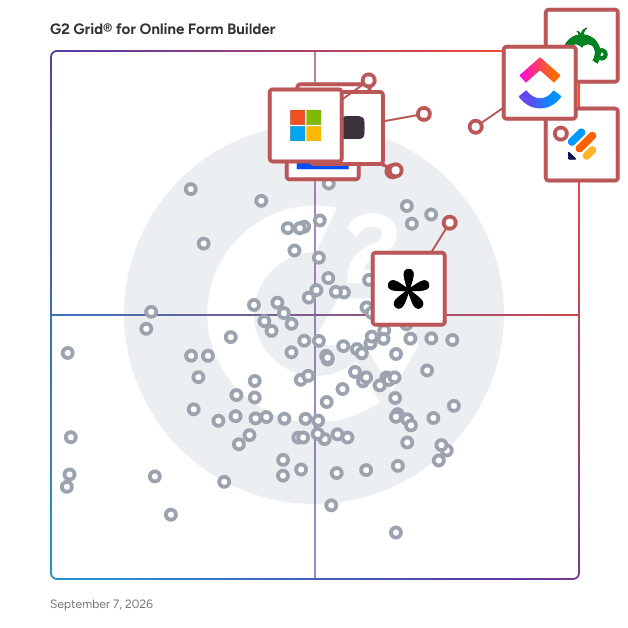
  # Best Enterprise Online Form Builder Software

  *By [Gauri Pawsey](https://research.g2.com/insights/author/gauri-pawsey)*

   Products classified in the overall Online Form Builder category are similar in many regards and help companies of all sizes solve their business problems. However, enterprise business features, pricing, setup, and installation differ from businesses of other sizes, which is why we match buyers to the right Enterprise Business Online Form Builder to fit their needs. Compare product ratings based on reviews from enterprise users or connect with one of G2&#39;s buying advisors to find the right solutions within the Enterprise Business Online Form Builder category.

In addition to qualifying for inclusion in the Online Form Builder Software category, to qualify for inclusion in the Enterprise Business Online Form Builder Software category, a product must have at least 10 reviews left by a reviewer from an enterprise business.


  ## How Many Online Form Builder Software Products Does G2 Track?
**Total Products under this Category:** 403

  
## How Does G2 Rank Online Form Builder Software Products?

**Why You Can Trust G2's Software Rankings:**

- 30 Analysts and Data Experts
- 103,400+ Authentic Reviews
- 403+ Products
- Unbiased Rankings

G2's software rankings are built on verified user reviews, rigorous moderation, and a consistent research methodology maintained by a team of analysts and data experts. Each product is measured using the same transparent criteria, with no paid placement or vendor influence. While reviews reflect real user experiences, which can be subjective, they offer valuable insight into how software performs in the hands of professionals. Together, these inputs power the G2 Score, a standardized way to compare tools within every category.

  
## Top Online Form Builder Software at a Glance
| # | Product | Rating | Best For | What Users Say |
|---|---------|--------|----------|----------------|
| 1 | [Jotform](https://www.g2.com/products/jotform/reviews) | 4.7/5.0 (4,858 reviews) | Multi-step forms with payment and e-signature | "[Do-It-All Forms and PDF Builder That Replaced Our Other Tools](https://www.g2.com/survey_responses/jotform-review-12822490)" |
| 2 | [SurveyMonkey](https://www.g2.com/products/surveymonkey/reviews) | 4.4/5.0 (23,180 reviews) | Survey feedback with built-in analytics and AI | "[Build with AI Makes Survey Creation Fast and Effortless](https://www.g2.com/survey_responses/surveymonkey-review-12696624)" |
| 3 | [Typeform](https://www.g2.com/products/typeform/reviews) | 4.5/5.0 (967 reviews) | Conversational forms with conditional logic and branding | "[Powerful AI Surveys with Automation and Seamless Integrations](https://www.g2.com/survey_responses/typeform-review-12747374)" |
| 4 | [Microsoft Forms](https://www.g2.com/products/microsoft-forms/reviews) | 4.4/5.0 (455 reviews) | Microsoft 365-native surveys with Excel integration | "[Simple and Practical Tool for Managing forms, Follow ups, and Daily Information Collection](https://www.g2.com/survey_responses/microsoft-forms-review-12786461)" |
| 5 | [ClickUp](https://www.g2.com/products/clickup/reviews) | 4.6/5.0 (11,863 reviews) | Form-triggered task automation across connected workflows | "—" |
| 6 | [ActiveCampaign](https://www.g2.com/products/activecampaign/reviews) | 4.4/5.0 (14,137 reviews) | Lead-capture forms wired into CRM automations | "[Clear UI and Best-in-Class Automations Make CRM Management Effortless](https://www.g2.com/survey_responses/activecampaign-review-12689317)" |
| 7 | [Laserfiche](https://www.g2.com/products/laserfiche/reviews) | 4.7/5.0 (1,204 reviews) | Government forms with automated retention workflows | "[Document Management and Automation](https://www.g2.com/survey_responses/laserfiche-review-3536890)" |
| 8 | [Adobe Acrobat Sign](https://www.g2.com/products/adobe-acrobat-sign/reviews) | 4.4/5.0 (1,015 reviews) | Multi-party contract signing with Adobe integration | "[Fraud-Proof Document Signing, Easy Setup](https://www.g2.com/survey_responses/adobe-acrobat-sign-review-12723943)" |
| 9 | [Tally](https://www.g2.com/products/tally-forms-tally/reviews) | 4.9/5.0 (125 reviews) | Notion-style form building with conditional logic | "[Fast, Minimalist Form Builder with Polished Results, Plus Unlimited Free Forms](https://www.g2.com/survey_responses/tally-review-12703783)" |
| 10 | [PandaDoc](https://www.g2.com/products/pandadoc/reviews) | 4.7/5.0 (3,309 reviews) | Contract workflows with e-signature and payment collection | "[Time-Saving Templates with Few Limitations](https://www.g2.com/survey_responses/pandadoc-review-12240403)" |


## Which Type of Online Form Builder Software Tools Are You Looking For?
  - [Online Form Builder Software](https://www.g2.com/categories/online-form-builder) *(current)*
  - [Survey Software](https://www.g2.com/categories/survey)
  - [Marketing Automation Software](https://www.g2.com/categories/marketing-automation)
  - [E-Signature Software](https://www.g2.com/categories/e-signature)
  - [CRM Software](https://www.g2.com/categories/crm)
  - [Lead Capture Software](https://www.g2.com/categories/lead-capture)
  - [Landing Page Builders](https://www.g2.com/categories/landing-page-builders)
  - [Pop-Up Builder Software](https://www.g2.com/categories/pop-up-builder)

  
---

**Sponsored**

### FormAssembly

FormAssembly is an enterprise data collection and automation platform that enables organizations to capture clean, compliant data from the start. FormAssembly turns secure web forms into governed data collection workflows. From the moment information is submitted, it is validated, structured, and routed reliably into systems of record, like Salesforce. With AI-assisted guidance from Fai, teams can design sophisticated workflows faster without sacrificing control or compliance.


[Visit website](https://www.g2.com/external_clickthroughs/record?secure%5Bad_program%5D=ppc&amp;secure%5Bad_slot%5D=category_product_list&amp;secure%5Bcategory_id%5D=1253&amp;secure%5Bdisplayable_resource_id%5D=1253&amp;secure%5Bdisplayable_resource_type%5D=Category&amp;secure%5Bmedium%5D=sponsored&amp;secure%5Bplacement_reason%5D=page_category&amp;secure%5Bplacement_resource_ids%5D%5B%5D=1253&amp;secure%5Bprioritized%5D=false&amp;secure%5Bproduct_id%5D=10596&amp;secure%5Bresource_id%5D=1253&amp;secure%5Bresource_type%5D=Category&amp;secure%5Bsource_type%5D=category_page&amp;secure%5Bsource_url%5D=https%3A%2F%2Fwww.g2.com%2Fcategories%2Fonline-form-builder%3Fpage%3D5&amp;secure%5Btoken%5D=3b193ef57122453b275974739b86f0742b671f3804ccb58bba7df3012433adc7&amp;secure%5Burl%5D=https%3A%2F%2Fwww.formassembly.com%2Fsign-up%2F%3Futm_source%3Dg2%26utm_medium%3Dlisting%26utm_campaign%3Dfree-trial&amp;secure%5Burl_type%5D=free_trial)

---

  
## Buyer Guide: Key Questions for Choosing Online Form Builder Software Software
  ### What does Online Form Builder software do?
  I define Online Form Builder software as a no-code system for creating, publishing, and managing digital forms that collect structured information. Across the G2 feedback I analyzed, users connect this category with surveys, questionnaires, intake forms, registration pages, order forms, payments, e-signatures, CRM sync, conditional logic, and response tracking. These tools help teams turn customer, employee, student, patient, or lead information into clean submissions that can be reviewed, routed, exported, or pushed into other systems. The category matters most when teams want to replace PDFs, email back-and-forth, handwritten details, and spreadsheet-based collection with forms that are easier to send, complete, and manage.


  ### Why do businesses use Online Form Builder software?
  The clearest pattern I saw in G2 reviews was faster data collection without technical help. Users want forms that can be built quickly, shared easily, and adjusted when the information they need changes.

- **Simple form creation:** G2 reviewers often praise drag-and-drop builders, templates, field options, and quick setup for surveys, requests, and questionnaires.
- **Cleaner data capture:** Teams use required fields, dropdowns, file uploads, and structured questions to reduce incomplete or messy submissions.
- **Workflow automation:** Users connect forms with notifications, approvals, email follow-ups, CRM records, and internal task flows.
- **Customer and client intake:** Forms help teams collect leads, applications, orders, feedback, consent, and service details before work begins.

Reviewers point to pricing tiers, response limits, branding restrictions, logic complexity, template edits, and reporting depth as areas to check closely.


  ### Who uses Online Form Builder software primarily?
  When I reviewed G2 reviewer profiles, I saw Online Form Builder software being used by teams that collect information from customers, employees, students, applicants, and internal requesters.

- **Marketing teams:** Create lead forms, surveys, event forms, feedback forms, and campaign intake pages.
- **Operations teams:** Manage internal requests, approvals, order forms, process intake, and recurring submissions.
- **HR and recruiting teams:** Collect applications, employee details, onboarding forms, and policy acknowledgments.
- **Education and training teams:** Build quizzes, polls, course feedback forms, registrations, and student information forms.
- **Small business and service teams:** Capture client details, appointment information, consent forms, payments, and project requests.


  ### What types of Online Form Builder software should I consider?
  G2 reviews show that Online Form Builder tools are usually separated by the level of design control, workflow depth, and data handling a team needs:

- **General form builders:** Suited to surveys, contact forms, request forms, registrations, and everyday data collection.
- **Conversational form tools:** Built around one-question-at-a-time forms, polished survey experiences, and higher-completion feedback flows.
- **Workflow form platforms:** Useful for approvals, routing, internal requests, task creation, and process automation.
- **Document and e-sign form tools:** Designed for PDFs, signatures, contracts, consent forms, and file-heavy workflows.
- **Payment and order form tools:** A strong match for bookings, donations, event fees, product orders, and paid submissions.


  ### What are the core features to look for in Online Form Builder software?
  When evaluating Online Form Builder software, these are the core features that users tend to look for:

- Form design and field control with templates, custom fields, conditional logic, branding, file uploads, and mobile-friendly layouts.
- Response management through submissions, filters, exports, dashboards, and searchable records.
- Automation and routing with notifications, approvals, confirmation emails, task creation, and conditional paths.
- Integrations and data sync across CRM, email, spreadsheets, payment tools, storage systems, and workflow platforms.
- Security and submission controls covering permissions, spam protection, consent, payment handling, e-signatures, and data access.


  ### What trends are shaping Online Form Builder software right now?
  My read of G2 themes and current market signals points to these shifts in Online Form Builder software:

- **AI-generated forms** are shortening setup by creating draft questions, fields, and layouts from prompts.
- **Conversational data collection** is gaining ground as teams use more guided, one-question-at-a-time form experiences.
- **Forms are moving closer to workflow automation** through approvals, routing, notifications, and follow-up tasks.
- **First-party data** is increasing the value of forms as companies collect their own customer, lead, and audience information.
- **Privacy and governance** are becoming buying checks as teams pay closer attention to collected data, access, consent, and storage.


  ### How should I choose an online form builder?
  I would suggest starting with the form your audience completes most often. Marketing teams should place more weight on design control, CRM sync, lead routing, and campaign reporting. Operations-heavy teams need stronger intake logic, approvals, notifications, and submission tracking. When payments, signatures, or sensitive data are involved, security controls, consent handling, file support, and admin permissions deserve closer review. I also advise checking pricing tiers, response limits, branding rules, template editing, and reporting depth because G2 reviewers often tie those details to how well the tool holds up after routine forms become business-critical.


---

  ## What Are the Top-Rated Online Form Builder Software Products in 2026?
### 1. [SurveyMonkey](https://www.g2.com/products/surveymonkey/reviews)
  **Average Rating:** 4.4/5.0
  **Total Reviews:** 23,180
  **Product Description:** SurveyMonkey is the world’s most popular platform for surveys and forms, built for business and loved by users. We combine powerful capabilities with intuitive design, effectively serving every use case, from customer experience to employee engagement, market research to payment and registration forms. With built-in research expertise and AI-assisted technology, it’s like having a team of expert researchers right at your fingertips. Trusted by millions—from startups to Fortune 500 companies—SurveyMonkey helps teams gather insights and information that inspire better decisions, create experiences people love, and drive business growth. Discover how at http://surveymonkey.com.


### What Do G2 Reviewers Say About SurveyMonkey?
*AI-generated summary from verified user reviews*

**Pros:**

- Users love the **ease of use** of SurveyMonkey, allowing them to create surveys quickly and intuitively.
- Users love the **ease of creation** with SurveyMonkey, finding it quick and user-friendly for building surveys.
- Users find SurveyMonkey **intuitive and user-friendly** , making it easy to create and understand surveys effortlessly.
- Users love how **simple** SurveyMonkey makes survey creation and analysis, even for those without technical skills.
- Users appreciate the **ease of use** of SurveyMonkey, which simplifies feedback collection and data analysis effectively.

**Cons:**

- Users find SurveyMonkey to be **expensive** , especially for additional features and customization options, which can deter new users.
- Users find the **free plan limitations** restrictive, making it difficult to fully utilize SurveyMonkey without upgrading.
- Users find SurveyMonkey&#39;s **survey issues** to be less engaging due to outdated features and limited customization options.
- Users find that the **limited features** in SurveyMonkey&#39;s free plans restrict their survey capabilities and customization options.
- Users find the **limited customization** options in SurveyMonkey restrictive, particularly for free and basic plans.

#### Key Features
  - Customer Service Channels
  - Survey Builder
  - Branding
  - Reporting &amp; Analytics
  - Conditional Logic
  #### What Are Recent G2 Reviews of SurveyMonkey?

**"[Build with AI Makes Survey Creation Fast and Effortless](https://www.g2.com/survey_responses/surveymonkey-review-12696624)"**

**Rating:** 4.5/5.0 stars
*— Chandra K.*

[Read full review](https://www.g2.com/survey_responses/surveymonkey-review-12696624)

---

**"[SurveyMonkey Makes Survey Creation and Analytics Effortless](https://www.g2.com/survey_responses/surveymonkey-review-12723986)"**

**Rating:** 4.5/5.0 stars
*— Rakshika S.*

[Read full review](https://www.g2.com/survey_responses/surveymonkey-review-12723986)

---

  #### What Are G2 Users Discussing About SurveyMonkey?

- [What is SurveyMonkey used for?](https://www.g2.com/discussions/what-is-surveymonkey-used-for) - 6 comments
- [What is SurveyMonkey Market Research Solutions used for?](https://www.g2.com/discussions/what-is-surveymonkey-market-research-solutions-used-for) - 3 comments, 2 upvotes
- [What is SurveyMonkey?](https://www.g2.com/discussions/what-is-surveymonkey) - 2 comments, 1 upvote
### 2. [Microsoft Forms](https://www.g2.com/products/microsoft-forms/reviews)
  **Average Rating:** 4.4/5.0
  **Total Reviews:** 455
  **Product Description:** Microsoft Forms is a, cloud-based application that enables users to create custom surveys, quizzes, polls, and questionnaires with ease. Integrated within the Microsoft 365 suite, it allows for seamless data collection and analysis, making it an ideal tool for educational institutions, businesses, and individual users. With its user-friendly interface, Microsoft Forms simplifies the process of gathering feedback, assessing knowledge, and organizing events. Key Features and Functionality: - Survey and Quiz Creation: Design engaging surveys and quizzes with various question types, including multiple-choice, text, rating, and more. - Real-Time Collaboration: Share forms with others to collaborate on content creation and editing in real time. - Response Collection: Distribute forms via email, a direct link, or embed them into web pages to collect responses from participants across different platforms. - Data Analysis: Utilize built-in analytics to evaluate responses, view automatic charts, and export data to Excel for further analysis. - Integration with Microsoft 365: Seamlessly integrate with other Microsoft 365 applications, enhancing productivity and data management. Primary Value and User Solutions: Microsoft Forms addresses the need for efficient and straightforward data collection and analysis. By providing a platform to create and distribute forms quickly, it enables users to gather valuable insights, assess performance, and make informed decisions. Its integration with Microsoft 365 ensures a cohesive experience, allowing users to leverage familiar tools and workflows. Whether for educational assessments, customer feedback, or event planning, Microsoft Forms streamlines the process, saving time and enhancing productivity.


### What Do G2 Reviewers Say About Microsoft Forms?
*AI-generated summary from verified user reviews*

**Pros:**

- Users find Microsoft Forms to be a **highly user-friendly tool** , making it easy to create and manage various forms.
- Users value the **ease of creation** in Microsoft Forms, enabling effortless survey and quiz development without technical skills.
- Users value the **excellent integrations** of Microsoft Forms with Microsoft tools, enhancing collaboration and data management.
- Users love Microsoft Forms for its **intuitive design** , making data collection and survey creation effortless and straightforward.
- Users appreciate the **ease of use** of Microsoft Forms, making it effective for quick edits and gathering feedback.

**Cons:**

- Users find the **limited customization** options of Microsoft Forms frustrating, as it restricts design and creativity.
- Users find Microsoft Forms lacking in **essential features** , including customization options and advanced logic capabilities.
- Users find that Microsoft Forms has **limited features** , restricting customization, question types, and advanced functionalities.
- Users highlight the **poor design** of Microsoft Forms, noting limitations in customization and usability compared to competitors.
- Users find the **limited integrations** with non-Microsoft applications a significant drawback for enhanced functionality.
  #### What Are Recent G2 Reviews of Microsoft Forms?

**"[Simple and Practical Tool for Managing forms, Follow ups, and Daily Information Collection](https://www.g2.com/survey_responses/microsoft-forms-review-12786461)"**

**Rating:** 4.5/5.0 stars
*— Ishan S.*

[Read full review](https://www.g2.com/survey_responses/microsoft-forms-review-12786461)

---

**"[Easy Survey Creation with Seamless Microsoft 365 Integration](https://www.g2.com/survey_responses/microsoft-forms-review-12374954)"**

**Rating:** 4.0/5.0 stars
*— Satish M.*

[Read full review](https://www.g2.com/survey_responses/microsoft-forms-review-12374954)

---

  #### What Are G2 Users Discussing About Microsoft Forms?

- [What is Microsoft Forms used for?](https://www.g2.com/discussions/what-is-microsoft-forms-used-for) - 2 comments
- [Is Microsoft form free?](https://www.g2.com/discussions/is-microsoft-form-free) - 2 comments
- [Is Microsoft Forms good?](https://www.g2.com/discussions/is-microsoft-forms-good) - 2 comments
### 3. [Jotform](https://www.g2.com/products/jotform/reviews)
  **Average Rating:** 4.7/5.0
  **Total Reviews:** 4,858
  **Product Description:** Trusted by more than 35 million users worldwide, Jotform is an AI-powered online form builder designed to help individuals and organizations create, customize, and publish forms in minutes, from any device. With an intuitive drag-and-drop interface, Jotform makes it simple for anyone to build professional, mobile-responsive forms without writing a single line of code. As a fully no-code platform, Jotform empowers users to automate workflows, streamline data collection, and digitize processes. Jotform offers one of the largest template libraries in the industry, featuring 10,000+ ready-made form templates tailored to every use case. Popular categories include payment forms, lead generation forms, event registration forms, application forms, surveys, order forms, onboarding forms, consent forms, and feedback forms. Each template is fully customizable, allowing users to adjust layouts, add conditional logic, collect e-signatures, upload files, apply branding, and incorporate advanced field types. This level of flexibility ensures every form is optimized for user experience and aligned with organizational goals. To streamline workflows, Jotform integrates seamlessly with over 200 popular third-party apps, including Google Sheets, Slack, Zoom, HubSpot, Salesforce, PayPal, Stripe, and numerous other business tools. These integrations automate data collection, payment processing, CRM updates, and team notifications. By connecting forms directly to the tools your team already uses, Jotform helps eliminate data silos and supports end-to-end process automation—all within a no-code environment. Security and compliance are at the core of Jotform’s platform. Features such as HIPAA compliance options, 256-bit SSL encryption, CAPTCHA, form access controls, and audit logs help organizations protect sensitive data and meet industry standards. Whether you&#39;re collecting healthcare information, financial data, or internal employee records, Jotform provides the reliability and safeguards needed to operate with confidence. With powerful features like automated emails, approval workflows, analytics dashboards, and embeddable widgets, Jotform delivers an all-in-one solution for organizations looking to simplify data collection and improve productivity. From small businesses to enterprises, educational institutions, healthcare providers, and nonprofits, millions of teams rely on Jotform to capture information efficiently and turn submissions into actionable results.


### What Do G2 Reviewers Say About Jotform?
*AI-generated summary from verified user reviews*

**Pros:**

- Users love the **ease of use** of Jotform, finding it simple to create versatile and effective forms.
- Users admire Jotform for its **ease of use and comprehensive templates** , enabling efficient client information collection and professional branding.
- Users appreciate the **ease of creation** with Jotform, highlighting its straightforward setup and user-friendly features.
- Users love the **flexibility and creativity** of Jotform, allowing easy form creation and effective data collection.
- Users find Jotform to be **extremely user-friendly** , allowing quick creation of customized forms with seamless integration.

**Cons:**

- Users find Jotform&#39;s pricing to be **too expensive** , especially when opting for monthly payments over annual subscriptions.
- Users feel that **missing features** hinder integration and customization options, complicating their use of Jotform.
- Users report **form issues** that hinder navigation and customization, affecting the overall usability of Jotform.
- Users find **limited customization** options in Jotform, making branding integration and field mapping challenging.
- Users find **form design options lacking** and report difficulties in navigation and customization for their needs.

#### Key Features
  - Integration APIs
  - Candidate Search
  - Candidate Evaluations
  - Survey Customization
  - Goal and Challenge Creation
  #### What Are Recent G2 Reviews of Jotform?

**"[Do-It-All Forms and PDF Builder That Replaced Our Other Tools](https://www.g2.com/survey_responses/jotform-review-12822490)"**

**Rating:** 5.0/5.0 stars
*— Meghan S.*

[Read full review](https://www.g2.com/survey_responses/jotform-review-12822490)

---

**"[My experience with Jotform Instagram Agent improved after direct technical support involvement](https://www.g2.com/survey_responses/jotform-review-12792028)"**

**Rating:** 4.0/5.0 stars
*— Meltem A.*

[Read full review](https://www.g2.com/survey_responses/jotform-review-12792028)

---

  #### What Are G2 Users Discussing About Jotform?

- [What innovative uses of Jotform are seen in data collection and management across various sectors?](https://www.g2.com/discussions/what-innovative-uses-of-jotform-are-seen-in-data-collection-and-management-across-various-sectors) - 1 upvote
- [What is Jotform used for?](https://www.g2.com/discussions/jotform-what-is-jotform-used-for) - 4 comments, 2 upvotes
- [Who uses JotForm?](https://www.g2.com/discussions/who-uses-jotform)
### 4. [Laserfiche](https://www.g2.com/products/laserfiche/reviews)
  **Average Rating:** 4.7/5.0
  **Total Reviews:** 1,204
  **Product Description:** Get work done faster with Laserfiche, the leading SaaS provider of AI-powered document management and process automation. Through powerful workflows, electronic forms, document management and analytics, Laserfiche accelerates processes across the enterprise. ✓ Organize Your Content with AI-Powered Document Management Optimize your operations and increase team productivity with AI-powered document management. Centralize your content, improve collaboration and maintain audit trails to support compliance needs. ✓ Boost Your Productivity with Intelligent Automation Increase efficiency by automating tasks with low-code process automation and prebuilt solution templates. Work smarter and shift your team’s focus to higher priority strategic goals. ✓ Unify Your Systems with Powerful Integrations Laserfiche is the backbone connecting hundreds of mission-critical applications. Users can access relevant documents from a single location, eliminating the need to search across multiple platforms. ✓ Elevate Your Work with Laserfiche AI Laserfiche AI enables organizations to simplify their work, take control of processes and supercharge productivity — all without losing sight of critical data privacy and security standards.


### What Do G2 Reviewers Say About Laserfiche?
*AI-generated summary from verified user reviews*

**Pros:**

- Users find Laserfiche to be exceptionally **easy to use** , greatly enhancing workflow and document management efficiency.
- Users value the **process automation** in Laserfiche for simplifying workflows and enhancing security in forms management.
- Users benefit from **efficient automation** of forms and enhanced security in Laserfiche, streamlining document management processes.
- Users value the **robust workflow management** of Laserfiche, enabling seamless automation and integration with other systems.
- Users praise the **streamlined document management** and exceptional support from Laserfiche, enhancing organization and accessibility.

**Cons:**

- Users find the **learning curve steep** , making it challenging to keep up with the rapid updates in Laserfiche.
- Users find the **learning difficulty** of Quickfield challenging, especially with its steep learning curve and coding requirements.
- Users wish for a **direct PDF workflow** in Laserfiche, citing limitations in features and conversion requirements.
- Users face **update issues** that can disrupt workflows and challenge new users despite available training resources.
- Users face **performance issues** with Laserfiche, including slow workflow processes and delays in feature implementation.
  #### What Are Recent G2 Reviews of Laserfiche?

**"[Document Management and Automation](https://www.g2.com/survey_responses/laserfiche-review-3536890)"**

**Rating:** 4.5/5.0 stars
*— Matthew D.*

[Read full review](https://www.g2.com/survey_responses/laserfiche-review-3536890)

---

**"[Robust and Reliable](https://www.g2.com/survey_responses/laserfiche-review-10968098)"**

**Rating:** 4.5/5.0 stars
*— Holly V.*

[Read full review](https://www.g2.com/survey_responses/laserfiche-review-10968098)

---

  #### What Are G2 Users Discussing About Laserfiche?

- [What is Laserfiche used for?](https://www.g2.com/discussions/what-is-laserfiche-used-for)
- [What is document imaging software?](https://www.g2.com/discussions/what-is-document-imaging-software) - 1 upvote
- [How much is laserfiche?](https://www.g2.com/discussions/how-much-is-laserfiche)
### 5. [Wrike](https://www.g2.com/products/wrike/reviews)
  **Average Rating:** 4.2/5.0
  **Total Reviews:** 4,448
  **Product Description:** Wrike is a comprehensive work management platform designed to help teams and organizations streamline their collaboration, project planning, and task execution. By centralizing all work-related activities in one accessible location, Wrike aims to simplify complex workflows, enhance productivity, and empower users to focus on their most impactful tasks. This platform caters to a diverse range of industries and team sizes, making it a versatile solution for any organization looking to improve its operational efficiency. The target audience for Wrike includes project managers, team leaders, and organizations of all sizes seeking to optimize their workflows. Whether in marketing, IT, or product development, teams can leverage Wrike&#39;s features to manage projects more effectively. Specific use cases encompass tracking project progress, assigning tasks, setting deadlines, and facilitating communication among team members. By providing a unified space for collaboration, Wrike helps eliminate silos and fosters a culture of transparency and accountability, which is crucial for successful project execution. Key features of Wrike include customizable dashboards, real-time collaboration tools, and advanced reporting capabilities. Users can create tailored workflows that align with their specific processes, ensuring that the platform adapts to their unique needs. The ability to visualize project timelines through Gantt charts and Kanban boards allows teams to monitor progress at a glance, making it easier to identify bottlenecks and adjust plans accordingly. Furthermore, Wrike&#39;s integration with popular tools such as Slack, Google Drive, and Microsoft Teams enhances its functionality, allowing users to work seamlessly across different applications and improving overall efficiency. The benefits of using Wrike extend beyond mere task management. By centralizing communication and documentation, teams can reduce the time spent on administrative tasks and focus on delivering results. The platform&#39;s scalability means that it can grow alongside an organization, accommodating increasing workloads and team expansions without compromising performance. With over 20,000 customers, including well-known brands like Estée Lauder and Siemens, Wrike has established itself as a reliable partner for organizations aiming to thrive in a competitive landscape, ensuring that teams can work smarter and achieve their goals more effectively.


### What Do G2 Reviewers Say About Wrike?
*AI-generated summary from verified user reviews*

**Pros:**

- Users appreciate the **project tracking and task management features** of Wrike for enhancing productivity and organization.
- Users appreciate the **seamless team collaboration** with Wrike, enhancing productivity through streamlined processes and integrations.
- Users value the **effective task management** in Wrike, enhancing productivity and ensuring clear team communication and organization.
- Users appreciate the **organization capabilities** of Wrike, enhancing team collaboration and streamlining task management effectively.
- Users find Wrike to be **extremely user-friendly** , making task management and team collaboration effortless and efficient.

**Cons:**

- Users find the **steep learning curve** challenging, noting complexity and difficulty in navigation at the start.
- Users find Wrike **not intuitive** , struggling with the interface and basic functions even after prolonged use.
- Users often face **missing features** like limited templates and integration shortcomings, impacting overall effectiveness with Wrike.
- Users often find **limited features** in Wrike, struggling with customizability and insufficient built-in templates for workflows.
- Users find Wrike&#39;s **complex usability** challenging, particularly for new users struggling to navigate its features effectively.
  #### What Are Recent G2 Reviews of Wrike?

**"[Managing design work smoothly while keeping projects on track](https://www.g2.com/survey_responses/wrike-review-12736078)"**

**Rating:** 5.0/5.0 stars
*— Ivy M.*

[Read full review](https://www.g2.com/survey_responses/wrike-review-12736078)

---

**"[Wrike Gives Great Visibility Across Projects, Tasks, and Team Workloads](https://www.g2.com/survey_responses/wrike-review-12644292)"**

**Rating:** 4.5/5.0 stars
*— Dresler Z.*

[Read full review](https://www.g2.com/survey_responses/wrike-review-12644292)

---

  #### What Are G2 Users Discussing About Wrike?

- [How is Wrike facilitating project management and team collaboration in fast-paced business environments?](https://www.g2.com/discussions/how-is-wrike-facilitating-project-management-and-team-collaboration-in-fast-paced-business-environments) - 1 comment
- [How is Wrike being used to enhance operational efficiency and user experience in its specific field?](https://www.g2.com/discussions/how-is-wrike-being-used-to-enhance-operational-efficiency-and-user-experience-in-its-specific-field)
- [What is Wrike used for?](https://www.g2.com/discussions/wrike-what-is-wrike-used-for) - 3 comments
### 6. [Typeform](https://www.g2.com/products/typeform/reviews)
  **Average Rating:** 4.5/5.0
  **Total Reviews:** 967
  **Product Description:** Typeform is a refreshingly different form builder. We help over 150,000 businesses collect the data they need with forms, surveys, and quizzes people enjoy. Designed to look striking and feel effortless to fill out, Typeform drives 500 million responses every year and integrates with essential tools like Slack, Zapier, and HubSpot.


### What Do G2 Reviewers Say About Typeform?
*AI-generated summary from verified user reviews*

**Pros:**

- Users love the **ease of use** in Typeform, simplifying complex pathways and enhancing user engagement.
- Users value the **intuitive design** of Typeform, which enhances user experience and simplifies complex surveys.
- Users love the **conversational format** of Typeform, making interactions feel engaging and personalized without overwhelming fields.
- Users love the **seamless integrations** of Typeform, enhancing efficiency with tools like Google Sheets and HubSpot.
- Users love the **ease of creation** with Typeform, thanks to its intuitive interface and helpful templates.

**Cons:**

- Users find Typeform **very expensive** , with too many essential features locked behind high paywalls and low submission limits.
- Users find **limited customization** options frustrating, often requiring significant time to achieve a polished and professional look.
- Users often find **limited features** with Typeform, especially regarding data handling and advanced reporting tools.
- Users find **missing features** like reporting and bulk export options hinder effective data management in Typeform.
- Users express concerns about **integration issues** , noting difficulties with exporting data and accessing advanced reporting features.

#### Key Features
  - Features
  - Mobile
  - Forms
  - Question Types
  - Branching/Skip Logic
  #### What Are Recent G2 Reviews of Typeform?

**"[Powerful AI Surveys with Automation and Seamless Integrations](https://www.g2.com/survey_responses/typeform-review-12747374)"**

**Rating:** 5.0/5.0 stars
*— Konjengbam  M.*

[Read full review](https://www.g2.com/survey_responses/typeform-review-12747374)

---

**"[imple and Professional Platform for Forms and Data Collection](https://www.g2.com/survey_responses/typeform-review-12799700)"**

**Rating:** 5.0/5.0 stars
*— Ishan S.*

[Read full review](https://www.g2.com/survey_responses/typeform-review-12799700)

---

  #### What Are G2 Users Discussing About Typeform?

- [What is Typeform used for?](https://www.g2.com/discussions/typeform-what-is-typeform-used-for) - 1 comment
- [Is Typeform secure?](https://www.g2.com/discussions/is-typeform-secure) - 1 comment
- [What is included in Typeform free plan?](https://www.g2.com/discussions/what-is-included-in-typeform-free-plan) - 1 comment
### 7. [Formstack Forms](https://www.g2.com/products/formstack-forms/reviews)
  **Average Rating:** 4.3/5.0
  **Total Reviews:** 462
  **Product Description:** Formstack Forms is a cloud-based solution that helps businesses automate processes of creating digital forms and collecting data for surveys, leads, registrations, and more. Key features include data routing, file uploads, data encryption, payment collection, and form analytics. Designed for businesses of all sizes, Formstack Forms allows users to collaborate with teams to approve, deny, and comment on data submitted through forms. With a drag-and-drop form builder, Formstack Forms empowers users across organizations to build branded forms, surveys, and workflows without needing to know code. For more technical users, Formstack Forms offers an open API that allows users and 3rd-party applications to access Formstack resources programmatically. Formstack allows integration with various third-party applications such as Mailchimp, Salesforce, PayPal, Amazon S3, PowerAutomate, and more. Formstack is available on a monthly subscription, and support is extended via documentation and other online measures.


### What Do G2 Reviewers Say About Formstack Forms?
*AI-generated summary from verified user reviews*

**Pros:**

- Users value the **ease of use** of Formstack Forms, appreciating its straightforward design and intuitive drag-and-drop builder.
- Users value the **powerful integrations** of Formstack Forms, enhancing data centralization and workflow efficiency across platforms.
- Users find **easy integrations** with Formstack Forms, simplifying customization and enhancing web form functionality effortlessly.
- Users appreciate the **ease of creation** with Formstack Forms, enjoying its customizable features for efficient form building.
- Users value the **efficiency** of Formstack Forms, allowing quick form creation and seamless integration for reduced manual work.

**Cons:**

- Users find the **limited customization** options in Formstack Forms somewhat frustrating, especially for branding and integrations.
- Users find the **form design limitations** challenging, especially regarding navigation and formatting without CSS knowledge.
- Users find the **interface not intuitive** , making navigation and troubleshooting forms a confusing experience.
- Users find the **learning curve challenging** , especially with complex logic and navigation within Formstack Forms.
- Users experience **poor customer support** , with slow response times and unhelpful service impacting overall satisfaction.
  #### What Are Recent G2 Reviews of Formstack Forms?

**"[Fast, No-Code Form Building with Powerful Logic, Integrations, and Branding](https://www.g2.com/survey_responses/formstack-forms-review-12239937)"**

**Rating:** 5.0/5.0 stars
*— Sanket P.*

[Read full review](https://www.g2.com/survey_responses/formstack-forms-review-12239937)

---

**"[Flexible, Reliable Forms with Seamless CMS Integration](https://www.g2.com/survey_responses/formstack-forms-review-10760618)"**

**Rating:** 5.0/5.0 stars
*— Thomas L.*

[Read full review](https://www.g2.com/survey_responses/formstack-forms-review-10760618)

---

  #### What Are G2 Users Discussing About Formstack Forms?

- [Is formstack Hipaa compliant?](https://www.g2.com/discussions/is-formstack-hipaa-compliant)
- [What is formstack documents?](https://www.g2.com/discussions/formstack-forms-what-is-formstack-documents)
- [Is formstack free?](https://www.g2.com/discussions/is-formstack-free) - 1 comment
### 8. [Alchemer Survey](https://www.g2.com/products/alchemer-survey/reviews)
  **Average Rating:** 4.4/5.0
  **Total Reviews:** 931
  **Product Description:** Alchemer Survey is a professional survey platform that helps organizations collect feedback, analyze results, and turn insights into action across customer experience, employee engagement, and market research programs. Designed for teams that need more power and flexibility than basic survey tools — without the complexity of enterprise research platforms — Alchemer Survey scales from a single project to organization-wide feedback programs. What is Alchemer Survey used for? Alchemer Survey is used to run customer satisfaction (CSAT) surveys, Net Promoter Score (NPS) programs, market research studies, employee engagement surveys, product feedback loops, and academic or organizational research. It supports both one-off surveys and ongoing, multi-wave feedback programs across industries including technology, healthcare, education, financial services, and retail. Who is Alchemer Survey for? Alchemer Survey is built for researchers, CX professionals, HR teams, marketers, and product managers who need advanced survey logic and reporting without requiring dedicated IT or data science support. It serves organizations of all sizes — from small teams running targeted studies to enterprises managing global, multi-language feedback programs. Key capabilities: - Advanced survey building with branching logic, piping, randomization, and skip patterns — enabling highly tailored respondent experiences - Pre-built templates for common use cases alongside full custom-build options, so teams can launch fast or go deep - Omnichannel distribution via email, web, SMS, embedded links, QR codes, and social media — maximizing reach and response rates - Real-time reporting and analytics with live dashboards, response filtering, cross-tabulation, and exportable reports for easy stakeholder sharing - Multi-language support for global research programs, with role-based permissions to manage access and data governance at scale - Scalable architecture that grows with organizational needs — from a single survey to enterprise-wide feedback operations How does Alchemer Survey compare to other survey platforms? Alchemer Survey sits between simple tools like SurveyMonkey and Google Forms and enterprise platforms like Qualtrics. It offers research-grade features — advanced logic, robust reporting, and flexible distribution — at a price point and implementation complexity accessible to mid-market teams. Organizations that have outgrown basic tools but don&#39;t need (or want to pay for) a full enterprise suite consistently cite Alchemer Survey as a preferred alternative. Bottom line: Alchemer Survey gives organizations the tools to ask smarter questions, reach the right audiences, and act on what they learn — whether running a quick pulse survey or a comprehensive global research program.


### What Do G2 Reviewers Say About Alchemer Survey?
*AI-generated summary from verified user reviews*

**Pros:**

- Users find Alchemer Survey to be **easy to use** , enabling quick survey creation and efficient report handling.
- Users greatly value the **accessible customer support** from Alchemer Survey, enhancing their productivity and confidence in handling issues.
- Users value the **accessible support staff** of Alchemer Survey, enhancing their overall experience and productivity.
- Users love the **intuitive survey builder** of Alchemer Survey, making survey creation straightforward and stress-free.
- Users appreciate the **ease of creation** with Alchemer, finding it simple to design and customize surveys efficiently.

**Cons:**

- The **learning curve** for Alchemer Survey can be steep, especially with its complex features and inadequate documentation.
- Users criticize the **clunky mobile survey experience** and inadequate feature support for diverse survey needs.
- Users find Alchemer Survey **expensive** , making it less accessible for those on tight budgets or needing simple surveys.
- Users find Alchemer&#39;s interface **not intuitive** , with hidden options and a cumbersome design process complicating usability.
- Users struggle with **poor design** , finding the interface unintuitive and options harder to locate than expected.
  #### What Are Recent G2 Reviews of Alchemer Survey?

**"[Impressive Customization for Complex Surveys with Useful Reporting Dashboards](https://www.g2.com/survey_responses/alchemer-survey-review-12494778)"**

**Rating:** 4.0/5.0 stars
*— Nolan T.*

[Read full review](https://www.g2.com/survey_responses/alchemer-survey-review-12494778)

---

**"[User-Friendly UI with Handy Drag-and-Drop and Strong Integrations](https://www.g2.com/survey_responses/alchemer-survey-review-12818599)"**

**Rating:** 4.0/5.0 stars
*— Maris B.*

[Read full review](https://www.g2.com/survey_responses/alchemer-survey-review-12818599)

---

  #### What Are G2 Users Discussing About Alchemer Survey?

- [What is Alchemer used for?](https://www.g2.com/discussions/what-is-alchemer-used-for) - 1 comment
### 9. [ClickUp](https://www.g2.com/products/clickup/reviews)
  **Average Rating:** 4.6/5.0
  **Total Reviews:** 11,863
  **Product Description:** ClickUp is the world’s first Converged AI Workspace, bringing together all work apps, data, and workflows. ClickUp eliminates all forms of work sprawl to provide 100% context and a single place for humans and agents to work, together. Trusted by more than 20 million users worldwide, ClickUp is on a mission to maximize human productivity.


### What Do G2 Reviewers Say About ClickUp?
*AI-generated summary from verified user reviews*

**Pros:**

- Users find ClickUp **extremely easy to use** , with intuitive features that simplify task management and collaboration.
- Users value the **flexible and customizable task management** features of ClickUp, enhancing their productivity and organization.
- Users appreciate the **ease of task management** in ClickUp, benefiting from features like checklists, reminders, and automations.
- Users value ClickUp for its **streamlined project management** , which enhances organization and efficiency across tasks and teams.
- Users value ClickUp for its **streamlined organization** , significantly enhancing task management and overall team efficiency.

**Cons:**

- Users are frustrated by **missing features** in ClickUp, such as basic options and cumbersome customization processes.
- Users experience a **steep learning curve** with ClickUp, often feeling overwhelmed by its extensive features and setup time.
- Users note **limited features** in ClickUp, making it challenging for new businesses and complicating navigation and setup.
- Users find ClickUp **not intuitive** , feeling overwhelmed by features and facing challenges during setup and performance issues.
- Users report a **slow loading** experience in ClickUp, impacting project navigation and overall efficiency.

#### Key Features
  - Electronic Payments
  - Time Tracking
  - Business Tool Integration
  - Chat
  - Kanban Board
  #### What Are Recent G2 Reviews of ClickUp?


**Rating:** 5.0/5.0 stars
*— Ana C.*

[Read full review](https://www.g2.com/survey_responses/clickup-review-12815886)

---

**"[ClickUp’s flexible hierarchy and automations keep our projects moving fast](https://www.g2.com/survey_responses/clickup-review-12820000)"**

**Rating:** 4.5/5.0 stars
*— Soumaya G.*

[Read full review](https://www.g2.com/survey_responses/clickup-review-12820000)

---

  #### What Are G2 Users Discussing About ClickUp?

- [What features of ClickUp make it a preferred choice for project management in agile teams?](https://www.g2.com/discussions/what-features-of-clickup-make-it-a-preferred-choice-for-project-management-in-agile-teams) - 6 comments, 6 upvotes
- [What is ClickUp used for?](https://www.g2.com/discussions/what-is-clickup-used-for) - 9 comments, 3 upvotes
- [Does Google use ClickUp?](https://www.g2.com/discussions/does-google-use-clickup) - 4 comments, 3 upvotes
### 10. [Wufoo](https://www.g2.com/products/wufoo/reviews)
  **Average Rating:** 4.2/5.0
  **Total Reviews:** 293
  **Product Description:** Wufoo is a web application that helps anybody build and customize amazing online forms. You can use Wufoo to collect contact information, RSVPs, applications, files, online payments and just about anything else. Wufoo integrates with hundreds of other tools so you can streamline and automate workflows, saving you precious time. And because we host everything, all you need is your web browser and a few short minutes to build a form and start using it right away. Sign up free and start building forms today.


### What Do G2 Reviewers Say About Wufoo?
*AI-generated summary from verified user reviews*

**Pros:**

- Users appreciate Wufoo&#39;s ability to enable **automation through Zapier** , enhancing efficiency with seamless data entry integration.
- Users love the **automation capabilities** of Wufoo, enabling seamless integration with apps for efficient data management.
- Users value the **easy integrations** of Wufoo, particularly with Zapier, enhancing their workflow through automation.
- Users love the **Zapier integrations** with Wufoo, enhancing automation and data entry across applications seamlessly.

**Cons:**

- Users experience **reliability issues** with Wufoo, as incomplete submissions hinder their ability to resume forms later.
- Users face **submission limitations** with Wufoo, as they can&#39;t return to incomplete forms after exiting.
  #### What Are Recent G2 Reviews of Wufoo?

**"[Seamless Wufoo + Zapier Integrations for Automated Data Entry](https://www.g2.com/survey_responses/wufoo-review-12222520)"**

**Rating:** 4.0/5.0 stars
*— Verified User in Non-Profit Organization Management*

[Read full review](https://www.g2.com/survey_responses/wufoo-review-12222520)

---

**"[Amazing platform!](https://www.g2.com/survey_responses/wufoo-review-11748264)"**

**Rating:** 5.0/5.0 stars
*— Verified User in Consumer Services*

[Read full review](https://www.g2.com/survey_responses/wufoo-review-11748264)

---

  #### What Are G2 Users Discussing About Wufoo?

- [What is Wufoo used for?](https://www.g2.com/discussions/wufoo-what-is-wufoo-used-for)
- [Is wufoo by SurveyMonkey legit?](https://www.g2.com/discussions/is-wufoo-by-surveymonkey-legit)
- [Are Wufoo forms anonymous?](https://www.g2.com/discussions/are-wufoo-forms-anonymous)
### 11. [ActiveCampaign](https://www.g2.com/products/activecampaign/reviews)
  **Average Rating:** 4.4/5.0
  **Total Reviews:** 14,137
  **Product Description:** ActiveCampaign is the autonomous marketing platform built to transform how marketers, agencies, and business owners work. Use Active Intelligence to power goal-aware automations and orchestrate personalized experiences across email, SMS, and WhatsApp. Effortlessly integrate with 1000+ apps, uncover deep performance insights, and optimize your workflows so you win every day. - Autonomous marketing Built on the foundation of marketing automation, fuel your marketing strategy and customer journeys with AI-driven execution, optimization, and insight at every step. - AI agents Run entire marketing campaigns through simple prompts, backed by Active Intelligence. - Cross-channel marketing Reach prospects and customers wherever they are, with email, SMS, WhatsApp, and more. - On-brand, personalized content Creative tools that deliver professional, conversion-ready designs for email and landing pages. - CRM Track, manage, and automate your sales process. - 1000+ apps &amp; integrations Connect ActiveCampaign to your favorite tools.


### What Do G2 Reviewers Say About ActiveCampaign?
*AI-generated summary from verified user reviews*

**Pros:**

- Users find ActiveCampaign to be **easy to use** , enabling effective communication and management of customer engagement effortlessly.
- Users praise the **automation capabilities** of ActiveCampaign, enhancing engagement and streamlining marketing efforts effectively.
- Users value the **automation features** of ActiveCampaign, enhancing engagement and streamlining email marketing efforts effectively.
- Users highlight the **powerful automation capabilities** of ActiveCampaign, enhancing customer engagement and streamlining workflows.
- Users value the **versatile features** of ActiveCampaign, facilitating effective customer engagement and easy integration with other tools.

**Cons:**

- Users experience a **steep learning curve** with ActiveCampaign, requiring assistance to understand various features and functionalities.
- Users find ActiveCampaign **expensive** , especially for startups seeking affordable plans and accessible features.
- Users feel the absence of **testing features** and limited audience segmentation restricts their automation effectiveness in ActiveCampaign.
- Users express frustration over **limited features** , including customization options and difficulties in managing client information effectively.
- Users find ActiveCampaign&#39;s interface **not intuitive** , making it challenging to navigate and implement effectively for specific needs.
  #### What Are Recent G2 Reviews of ActiveCampaign?

**"[Clear UI and Best-in-Class Automations Make CRM Management Effortless](https://www.g2.com/survey_responses/activecampaign-review-12689317)"**

**Rating:** 5.0/5.0 stars
*— Tomás Alejandro M.*

[Read full review](https://www.g2.com/survey_responses/activecampaign-review-12689317)

---

**"[Great email marketing tool for us](https://www.g2.com/survey_responses/activecampaign-review-7966871)"**

**Rating:** 4.0/5.0 stars
*— Ninni K.*

[Read full review](https://www.g2.com/survey_responses/activecampaign-review-7966871)

---

  #### What Are G2 Users Discussing About ActiveCampaign?

- [What are some creative ways businesses are using ActiveCampaign to automate their marketing efforts?](https://www.g2.com/discussions/what-are-some-creative-ways-businesses-are-using-activecampaign-to-automate-their-marketing-efforts) - 1 comment
- [How much does ActiveCampaign cost?](https://www.g2.com/discussions/how-much-does-activecampaign-cost) - 1 comment
- [What is ActiveCampaign CRM?](https://www.g2.com/discussions/what-is-activecampaign-crm) - 1 comment
### 12. [FormAssembly](https://www.g2.com/products/formassembly/reviews)
  **Average Rating:** 4.5/5.0
  **Total Reviews:** 387
  **Product Description:** FormAssembly is an enterprise data collection and automation platform that enables organizations to capture clean, compliant data from the start. FormAssembly turns secure web forms into governed data collection workflows. From the moment information is submitted, it is validated, structured, and routed reliably into systems of record, like Salesforce. With AI-assisted guidance from Fai, teams can design sophisticated workflows faster without sacrificing control or compliance.


### What Do G2 Reviewers Say About FormAssembly?
*AI-generated summary from verified user reviews*

**Pros:**

- Users appreciate the **ease of use** of FormAssembly, enabling quick and intuitive form creation without coding.
- Users commend the **outstanding customer support** at FormAssembly, noting their helpfulness and responsiveness throughout interactions.
- Users value the **seamless Salesforce integration** of FormAssembly, enhancing form creation and data management effortlessly.
- Users appreciate the **seamless Salesforce integration** of FormAssembly, enhancing data management and client experience effectively.
- Users value the **easy integrations** of FormAssembly, enabling seamless data collection and enhanced functionality with Salesforce.

**Cons:**

- Users are frustrated by the **limited customization** options in FormAssembly, affecting branding and advanced setups.
- Users note the **lack of advanced features** in FormAssembly, which often require higher-tier plans or additional costs.
- Users find FormAssembly **expensive** , as key features often require higher-tier plans and additional costs.
- Users face **limitations with advanced features** , as technical setups and higher-tier plans restrict flexibility for smaller teams.
- Users find **pricing issues** with FormAssembly, as advanced features are costly and limit accessibility for smaller teams.
  #### What Are Recent G2 Reviews of FormAssembly?

**"[Exceptional Client Support and Onboarding Experience](https://www.g2.com/survey_responses/formassembly-review-12670754)"**

**Rating:** 5.0/5.0 stars
*— Amy M.*

[Read full review](https://www.g2.com/survey_responses/formassembly-review-12670754)

---

**"[Great tool - doing better with support](https://www.g2.com/survey_responses/formassembly-review-8195232)"**

**Rating:** 4.5/5.0 stars
*— James P.*

[Read full review](https://www.g2.com/survey_responses/formassembly-review-8195232)

---

  #### What Are G2 Users Discussing About FormAssembly?

- [What is FormAssembly used for?](https://www.g2.com/discussions/what-is-formassembly-used-for)
### 13. [Intuit Mailchimp All-in-One Marketing Platform](https://www.g2.com/products/intuit-mailchimp-all-in-one-marketing-platform/reviews)
  **Average Rating:** 4.4/5.0
  **Total Reviews:** 5,191
  **Product Description:** Mailchimp is a marketing automation platform trusted by 11 million+ users worldwide to personalize every email and SMS for every customer using AI-powered insights and content creation tools. With a 99% delivery rate and over 300 integrations, Mailchimp helps businesses connect with their customers, foster repeat business, and build lasting brand loyalty while seamlessly fitting into their existing workflows. Our platform puts data-backed recommendations at the heart of your marketing so you can find and engage customers with multichannel campaigns. In 2021, Mailchimp was acquired by Intuit Inc. (Nasdaq: INTU), the global financial technology platform that makes Intuit TurboTax, Credit Karma, QuickBooks, and Mailchimp. Since then, we’ve released 100+ new features to help our customers continue to grow. Find out why more than 11+ million businesses trust Intuit Mailchimp to help them turn insights into action and their emails into revenue. Visit Mailchimp.com to get started today.


### What Do G2 Reviewers Say About Intuit Mailchimp All-in-One Marketing Platform?
*AI-generated summary from verified user reviews*

**Pros:**

- Users appreciate the **ease of use** of Intuit Mailchimp, finding campaign management and navigation seamless and flexible.
- Users appreciate the **intuitive and easy-to-use email marketing** features of Mailchimp, simplifying campaign management and tracking.
- Users love the **user-friendly email management** in Mailchimp, allowing easy access to various marketing tools in one place.
- Users appreciate the **intuitive and comprehensive marketing tools** of Mailchimp, simplifying campaign management and performance tracking.
- Users love the **easy creation** of campaigns on Mailchimp, finding the platform intuitive and user-friendly.

**Cons:**

- Users note that Mailchimp&#39;s **pricing can escalate quickly** with a growing subscriber list, posing a challenge for some.
- Users feel frustrated by the **limited features** in the free version of Intuit Mailchimp, hindering their experience.
- Users find the **importing process and social media link management inconvenient** , highlighting a need for improved features.
- Users find the **learning curve challenging** , particularly when importing contacts and creating manual onboarding forms.
- Users find **limited customization** options hinder their ability to tailor the experience to their needs.
  #### What Are Recent G2 Reviews of Intuit Mailchimp All-in-One Marketing Platform?

**"[It was really smooth and easy using Mailchimp, Best Email Marketing Platform.](https://www.g2.com/survey_responses/intuit-mailchimp-all-in-one-marketing-platform-review-8578060)"**

**Rating:** 5.0/5.0 stars
*— Hardik C.*

[Read full review](https://www.g2.com/survey_responses/intuit-mailchimp-all-in-one-marketing-platform-review-8578060)

---

**"[Intuitive Email Builder and Affordable Scaling for Small Businesses](https://www.g2.com/survey_responses/intuit-mailchimp-all-in-one-marketing-platform-review-12627025)"**

**Rating:** 5.0/5.0 stars
*— Kato M.*

[Read full review](https://www.g2.com/survey_responses/intuit-mailchimp-all-in-one-marketing-platform-review-12627025)

---

  #### What Are G2 Users Discussing About Intuit Mailchimp All-in-One Marketing Platform?

- [What advantages does the Mailchimp All-in-One Marketing Platform offer over traditional email marketing tools?](https://www.g2.com/discussions/mailchimp-all-in-one-marketing-platform-what-advantages-does-the-mailchimp-all-in-one-marketing-platform-offer-over-traditional-email-marketi) - 3 comments, 1 upvote
- [What advantages does the Mailchimp All-in-One Marketing Platform offer over traditional email marketing tools?](https://www.g2.com/discussions/what-advantages-does-the-mailchimp-all-in-one-marketing-platform-offer-over-traditional-email-marketing-tools) - 1 comment
- [What is Mailchimp All-in-One Marketing Platform used for?](https://www.g2.com/discussions/what-is-mailchimp-all-in-one-marketing-platform-used-for) - 3 comments
### 14. [Jebbit](https://www.g2.com/products/jebbit/reviews)
  **Average Rating:** 4.5/5.0
  **Total Reviews:** 104
  **Product Description:** Experience the most creative and compliant way to collect data directly from consumers. Create fun, engaging, interactive experiences that drive more sales, fuel engagement, and capture the valuable first-party data.


### What Do G2 Reviewers Say About Jebbit?
*AI-generated summary from verified user reviews*

**Pros:**

- Users appreciate the **ease of use** of Jebbit, finding it simple to create and integrate campaigns quickly.
- Users value Jebbit for its **easy-to-use interface** and effective engagement through interactive campaigns that collect valuable data.
- Users commend Jebbit&#39;s **responsive customer support** , consistently providing positive experiences and assistance tailored to their needs.
- Users highlight the **easy setup** of Jebbit, making it accessible for everyone to create impactful quizzes and surveys.
- Users find Jebbit **intuitive** , making it simple to create quizzes and personalized experiences without technical expertise.

**Cons:**

- Users find the **steep learning curve** of Jebbit challenging due to complex integrations and limited customization options.
- Users find Jebbit **not intuitive** , making navigation and self-serving updates a frustrating experience.
- Users find Jebbit **not user-friendly** , citing complications in quiz setup and difficulties with mobile functionality.
- Users find the **steep learning curve** of Jebbit challenging, particularly with path building and quiz setup.
- Users find the **difficult setup** of Jebbit challenging, complicating the mapping and implementation process significantly.
  #### What Are Recent G2 Reviews of Jebbit?

**"[Free From Code](https://www.g2.com/survey_responses/jebbit-review-6672488)"**

**Rating:** 5.0/5.0 stars
*— Verified User in Information Technology and Services*

[Read full review](https://www.g2.com/survey_responses/jebbit-review-6672488)

---

**"[Streamlined &amp; Effective Data Collection](https://www.g2.com/survey_responses/jebbit-review-10802280)"**

**Rating:** 4.0/5.0 stars
*— Verified User in Cosmetics*

[Read full review](https://www.g2.com/survey_responses/jebbit-review-10802280)

---

  #### What Are G2 Users Discussing About Jebbit?

- [What is Jebbit used for?](https://www.g2.com/discussions/what-is-jebbit-used-for) - 1 comment
### 15. [Pipedrive](https://www.g2.com/products/pipedrive/reviews)
  **Average Rating:** 4.3/5.0
  **Total Reviews:** 2,984
  **Product Description:** Pipedrive is an easy-to-use sales CRM (customer relationship management) tool that empowers teams of all sizes to close more deals. With its customizable sales pipelines, real-time insights and powerful AI features, it’s no wonder 100,000 companies worldwide use Pipedrive for smarter, faster sales.


### What Do G2 Reviewers Say About Pipedrive?
*AI-generated summary from verified user reviews*

**Pros:**

- Users appreciate the **ease of use** in Pipedrive, finding it intuitive and welcoming for both beginners and advanced users.
- Users praise Pipedrive&#39;s **intuitive interface** , allowing easy customization and seamless information capture without technical expertise.
- Users find Pipedrive **very easy to use** , with a user-friendly interface and organized activity tab for efficient navigation.
- Users appreciate the **helpful training resources** and responsive support from Pipedrive, enhancing their overall experience.
- Users value the **seamless integrations** of Pipedrive, enhancing campaign attribution and ensuring smooth organization across tools.

**Cons:**

- Users find the **missing features** disappointing, as essential tools come at a high cost or are removed entirely.
- Users find Pipedrive has **limited features** , making advanced analysis and functionality difficult without costly upgrades.
- Users feel that the **learning curve is steep** , requiring additional training and time to fully master Pipedrive.
- Users experience **integration issues** with Pipedrive, particularly with Google Calendar, complicating meeting details and accessibility.
- Users feel that Pipedrive is **expensive** with high costs for essential features and add-ons, impacting affordability.
  #### What Are Recent G2 Reviews of Pipedrive?

**"[Easy-to-Use Visual Pipeline That Keeps Deals Organized and Saves Time](https://www.g2.com/survey_responses/pipedrive-review-12703383)"**

**Rating:** 4.5/5.0 stars
*— Emmanuel C. J.*

[Read full review](https://www.g2.com/survey_responses/pipedrive-review-12703383)

---

**"[Essential for Customer Management, Easy to Use](https://www.g2.com/survey_responses/pipedrive-review-9534286)"**

**Rating:** 5.0/5.0 stars
*— Mark R.*

[Read full review](https://www.g2.com/survey_responses/pipedrive-review-9534286)

---

  #### What Are G2 Users Discussing About Pipedrive?

- [What features of Pipedrive are most beneficial for new sales professionals to track and optimize their sales pipeline?](https://www.g2.com/discussions/what-features-of-pipedrive-are-most-beneficial-for-new-sales-professionals-to-track-and-optimize-their-sales-pipeline) - 2 comments
- [What is Pipedrive used for?](https://www.g2.com/discussions/pipedrive-what-is-pipedrive-used-for) - 2 comments
- [Is Pipedrive free?](https://www.g2.com/discussions/is-pipedrive-free) - 2 comments
### 16. [Adobe Acrobat Sign](https://www.g2.com/products/adobe-acrobat-sign/reviews)
  **Average Rating:** 4.4/5.0
  **Total Reviews:** 1,015
  **Product Description:** At Adobe, we believe that documents are more than just a collection of information and proof. They are foundational to connecting people and ideas, pushing business forward. Adobe Acrobat Sign helps your business move faster. Acrobat Sign is the only intuitive e-signature solution that combines simple and secure e-signatures with the power of Adobe Acrobat. With Acrobat Sign, you can create, sign, send for signature, manage, and track documents – all from one Adobe platform. You can create delightful signing experiences for your customers and teams by enabling them to sign documents on any device or browser – anytime, anywhere. No additional software download or accounts are needed. As Microsoft’s preferred e-signature solution, Acrobat Sign seamlessly integrates with your favorite Microsoft apps. Save time by signing and requesting signatures – all right from Microsoft 365, Teams, Outlook, and more. Plus, you can access smart integrations for Salesforce, Workday, and many more apps you use every day. Minimize legal and compliance risks by choosing Acrobat Sign, designed to be globally compliant and legally-binding in nearly every country in the world.


### What Do G2 Reviewers Say About Adobe Acrobat Sign?
*AI-generated summary from verified user reviews*

**Pros:**

- Users love the **ease of use** of Adobe Acrobat Sign, enabling quick and secure document signing from anywhere.
- Users appreciate the **seamless integration** of Adobe Acrobat Sign with other Adobe software, enhancing document workflow efficiency.
- Users praise the **easy setup** of Adobe Acrobat Sign, making document management efficient and user-friendly from the start.
- Users admire the **quick and easy document management** features of Adobe Acrobat Sign that enhance professionalism and efficiency.
- Users highly value the **efficiency and ease of use** of Adobe Acrobat Sign for managing digital signatures swiftly.

**Cons:**

- Users find the **subscription pricing** of Adobe Acrobat Sign expensive, particularly for those on limited budgets.
- Users experience a **steep learning curve** with Adobe Acrobat Sign, making initial usage frustrating for new adopters.
- Users find the **signature feature limitations** an inconvenience, requiring additional software and lacking real-time updates.
- Users find Adobe Acrobat Sign to have a **non-intuitive interface** that complicates simple tasks and workflows.
- Users find Adobe Acrobat Sign **not user-friendly** due to compatibility issues, slow loading, and unclear navigation on mobile.

#### Key Features
  - Performance and Reliability
  - Document Signing
  - Regulatory Compliance
  - Contract Creation
  - Documents
  #### What Are Recent G2 Reviews of Adobe Acrobat Sign?

**"[Clean UI, Smooth Signing, and Seamless PDF Workflow Integration](https://www.g2.com/survey_responses/adobe-acrobat-sign-review-12770100)"**

**Rating:** 4.5/5.0 stars
*— Praveen M.*

[Read full review](https://www.g2.com/survey_responses/adobe-acrobat-sign-review-12770100)

---

**"[Fraud-Proof Document Signing, Easy Setup](https://www.g2.com/survey_responses/adobe-acrobat-sign-review-12723943)"**

**Rating:** 5.0/5.0 stars
*— Verified User in Legal Services*

[Read full review](https://www.g2.com/survey_responses/adobe-acrobat-sign-review-12723943)

---

  #### What Are G2 Users Discussing About Adobe Acrobat Sign?

- [What is Adobe Acrobat Sign used for?](https://www.g2.com/discussions/what-is-adobe-acrobat-sign-used-for) - 2 comments, 1 upvote
- [How do I electronically sign a document in Adobe?](https://www.g2.com/discussions/how-do-i-electronically-sign-a-document-in-adobe)
- [Is Adobe sign free?](https://www.g2.com/discussions/is-adobe-sign-free) - 2 comments, 1 upvote
### 17. [SurveySparrow](https://www.g2.com/products/surveysparrow/reviews)
  **Average Rating:** 4.4/5.0
  **Total Reviews:** 2,014
  **Product Description:** SurveySparrow is an AI-powered Customer Experience platform that goes further — bringing feedback from surveys, reviews, support conversations, calls, and social media into one place, and turning it into insights your team can act on the same day. Instead of managing a feedback program, you build a continuous system that improves customer satisfaction, retention, and growth. Try it free for 14 days. No credit card required. What Running CX on SurveySparrow Actually Looks Like: You want to run a survey — but not the kind that feels like a survey. With Conversational Surveys, it feels like a chat. Customers don&#39;t fill in a form; they have a conversation, and that changes everything. Response rates go up by 40%, and the answers actually mean something. But a good question only gets you so far. So Echo AI steps in mid-conversation, automatically asking the follow-ups your team would have asked anyway. The score comes with the story behind it. Now you&#39;ve got responses — hundreds of them, maybe thousands. CogniVue reads every single one. Sentiment, themes, and trends all surfaced automatically, before anyone on your team opens a dashboard. No spreadsheets. No manual tagging. No waiting. And you didn&#39;t have to spend days building the survey in the first place. The AI Survey Builder suggested the questions, the logic, and the flow based on what you were trying to find out. Auto-Translate made sure it ran in every language your customers speak, across every channel they use — surveys, reviews, social, support, calls. All of it lands in one place through Omnichannel Feedback Collection. Your NPS, CSAT, and CES dashboards now reflect the full picture. Leadership sees what&#39;s happening in real time. And when something needs action, Workflow Automation makes sure it gets it — triggering follow-ups, notifying the right teams, and pushing data directly into Salesforce, HubSpot, Slack, Jira, and 95+ other tools without anyone having to move a thing manually. For teams in the field, there are Offline Surveys. For research that needs a human face, Video Surveys. For regulated industries, HIPAA Compliance. And for companies that want the entire experience to feel theirs unmistakably, Add Your Own Brand keeps your brand front and centre across every survey, every communication, and every customer touchpoint. That&#39;s the full loop. From the first question to the last action handled.


### What Do G2 Reviewers Say About SurveySparrow?
*AI-generated summary from verified user reviews*

**Pros:**

- Users appreciate the **ease of use** of SurveySparrow, enjoying a quick setup and intuitive, engaging survey experience.
- Users find SurveySparrow to be **very helpful** for conducting engaging surveys that enhance customer satisfaction effectively.
- Users love the **clean and intuitive interface** of SurveySparrow, making survey creation quick and enjoyable.
- Users love the **conversational interface and automation features** of SurveySparrow, enhancing engagement and simplifying feedback collection.
- Users love the **intuitive interface** of SurveySparrow, making survey creation quick and engaging with chat-like interactions.

**Cons:**

- Users find the **reporting options limited** , complicating quick reviews and day-to-day survey management.
- Users find **difficult reporting** and limited customization options hinder their ability to efficiently analyze survey data.
- Users find **limited customization** options in SurveySparrow, requiring more effort for advanced features and reporting adjustments.
- Users find the **reporting limitations** frustrating, wishing for better analytics and customization options for deeper insights.
- Users find SurveySparrow **expensive** , especially for essential features that require higher-tier plans for full functionality.
  #### What Are Recent G2 Reviews of SurveySparrow?

**"[SurveySparrow Makes Survey Creation Simple, Engaging, and Automated](https://www.g2.com/survey_responses/surveysparrow-review-12566754)"**

**Rating:** 5.0/5.0 stars
*— Rishi S.*

[Read full review](https://www.g2.com/survey_responses/surveysparrow-review-12566754)

---

**"[SurveySparrow Makes Interactive, Easy Surveys and Streamlines Customer Feedback](https://www.g2.com/survey_responses/surveysparrow-review-12780059)"**

**Rating:** 5.0/5.0 stars
*— Sidharth B.*

[Read full review](https://www.g2.com/survey_responses/surveysparrow-review-12780059)

---

  #### What Are G2 Users Discussing About SurveySparrow?

- [What novel approaches are market researchers adopting with SurveySparrow to gain deeper insights?](https://www.g2.com/discussions/what-novel-approaches-are-market-researchers-adopting-with-surveysparrow-to-gain-deeper-insights)
- [What is SurveySparrow used for?](https://www.g2.com/discussions/what-is-surveysparrow-used-for) - 2 comments
### 18. [123FormBuilder](https://www.g2.com/products/123formbuilder/reviews)
  **Average Rating:** 4.5/5.0
  **Total Reviews:** 175
  **Product Description:** 123FormBuilder is a versatile and innovative form builder used by over 2 million individuals and businesses around the world to automate data collection processes and workflows. The forms are easy to build and even simpler to maintain, so you never have to worry about how to stay on top of things again. Here’s how it works: the drag &amp; drop interface allows you to easily create forms, surveys, polls, and quizzes, all without ever having to write a single line of code. (Phew, right?) Just add the fields, set up the custom email notifications, and distribute the form... That’s it! Data and payment collection and management have never been easier. And, know what else? 123FormBuilder integrates with more tools than any other online form builder, too. That means no more time spent exporting, importing, and manually entering data! Simply select the app or payment gateway you want, and integrate instantly. No need to worry about privacy, either. 123FormBuilder takes data protection and security seriously and is fully GDPR and HIPAA compliant, so you get both peace of mind and complete control over your data storage. Search through the 1,900+ templates and take what you need. It’s probably in there. If you still have tools all over the screen, this is your sign to put them all aside. 123FormBuilder has rolled it all into one and made it as easy as 1-2-3 to use. Whether you’re part of a small business looking to simplify your internal processes or a large company aiming for a customized Enterprise package, you’re covered now.


### What Do G2 Reviewers Say About 123FormBuilder?
*AI-generated summary from verified user reviews*

**Pros:**

- Users value the **ease of creation** with 123FormBuilder, finding it simple to design and publish forms quickly.
- Users value the **user-friendly interface** of 123FormBuilder, enabling quick and easy form creation without technical hassles.
- Users appreciate the **customizability** of 123FormBuilder, enjoying intuitive forms tailored to their specific needs.
- Users commend the **easy integrations** with 123FormBuilder, enhancing functionality without technical challenges.
- Users value the **intuitive design and robust integrations** of 123FormBuilder, enhancing form creation and data collection efficiency.

**Cons:**

- Users often face **delays** in integrating payment gateways and experience bugs that hinder their form development process.
- Users experience **limited form design flexibility** , encountering bugs and difficulties with URL redirects during development.
- Users find the **learning curve steep** when integrating features or adding users, particularly under time constraints.
- Users find **difficult customization** in 123FormBuilder, making it challenging to create highly personalized layouts.
- Users experience **form complexity** due to occasional bugs and difficulties with URL redirection during development updates.
  #### What Are Recent G2 Reviews of 123FormBuilder?


**Rating:** 4.5/5.0 stars
*— Evan d.*

[Read full review](https://www.g2.com/survey_responses/123formbuilder-review-12495067)

---

**"[Effortless Form Creation Without Coding](https://www.g2.com/survey_responses/123formbuilder-review-12053576)"**

**Rating:** 4.0/5.0 stars
*— Naafay M.*

[Read full review](https://www.g2.com/survey_responses/123formbuilder-review-12053576)

---

  #### What Are G2 Users Discussing About 123FormBuilder?

- [What is 123FormBuilder used for?](https://www.g2.com/discussions/what-is-123formbuilder-used-for) - 1 comment
### 19. [PandaDoc](https://www.g2.com/products/pandadoc/reviews)
  **Average Rating:** 4.7/5.0
  **Total Reviews:** 3,309
  **Product Description:** PandaDoc is a comprehensive document management solution designed to assist users in creating, managing, e-signing, and notarizing documents efficiently. This platform serves as a centralized workflow tool, streamlining the document lifecycle from inception to final approval. By digitizing traditional document processes, PandaDoc aims to reduce inefficiencies and enhance productivity for businesses of all sizes. Targeted primarily at professionals and organizations that rely heavily on documentation, PandaDoc is particularly beneficial for sales teams, legal departments, and project managers. These users often face the challenge of managing numerous documents, contracts, and agreements, which can be time-consuming and prone to errors when handled manually. With PandaDoc, users can automate repetitive tasks, ensuring that they can allocate more time to strategic activities that drive business growth. Key features of PandaDoc include customizable templates, an intuitive drag-and-drop editor, and robust e-signature capabilities. Users can create visually appealing documents quickly, using pre-built templates tailored for various industries. The platform also supports real-time collaboration, allowing multiple stakeholders to review and edit documents simultaneously. This feature is particularly valuable in fast-paced environments where timely feedback is crucial. Additionally, PandaDoc&#39;s e-signature functionality ensures that documents can be signed securely and legally, eliminating the need for physical signatures and expediting the approval process. Another significant advantage of PandaDoc is its integration capabilities. The platform seamlessly connects with popular CRM systems, payment processors, and other business tools, enabling users to manage their documents within their existing workflows. This integration reduces the friction often associated with switching between different applications, allowing for a more cohesive user experience. Furthermore, PandaDoc provides analytics and reporting features that help users track document performance, offering insights into how recipients interact with their documents, which can inform future strategies. Overall, PandaDoc stands out in the document management category by providing a user-friendly interface, powerful automation features, and extensive integration options. By addressing common pain points associated with document handling, PandaDoc empowers organizations to enhance their operational efficiency, reduce turnaround times, and ultimately focus on what matters most: achieving their business objectives.


### What Do G2 Reviewers Say About PandaDoc?
*AI-generated summary from verified user reviews*

**Pros:**

- Users appreciate the **ease of use** in PandaDoc, highlighting its user-friendly features and time-saving templates.
- Users value the **email delivery and easy document access** of PandaDoc, enhancing their workflow and proposal efficiency.
- Users love the **user-friendly platform** of PandaDoc, appreciating its ease of navigation and time-saving templates.
- Users value the **real-time tracking** of document progress and signatures with PandaDoc, enhancing communication and efficiency.
- Users appreciate the **intuitive interface** of PandaDoc, enabling quick document preparation and effortless client interaction.

**Cons:**

- Users find the **signature issue** in PandaDoc to be unclear and complicating their document signing experience.
- Users find the **missing features** of PandaDoc limiting, as essential functions like merging cells and dynamic dates are absent.
- Users find PandaDoc **expensive** , especially for small teams needing affordable solutions for customer-facing tasks.
- Users often face **difficult editing** issues, such as skipped sections and limited document modification capabilities during live reviews.
- Users face challenges with **invoicing and formatting issues** in PandaDoc, complicating document management and workflows.
  #### What Are Recent G2 Reviews of PandaDoc?

**"[Time-Saving Templates with Few Limitations](https://www.g2.com/survey_responses/pandadoc-review-12240403)"**

**Rating:** 4.5/5.0 stars
*— Verified User in Consumer Services*

[Read full review](https://www.g2.com/survey_responses/pandadoc-review-12240403)

---

**"[Effortlessly Streamlines Contract Management](https://www.g2.com/survey_responses/pandadoc-review-11157891)"**

**Rating:** 5.0/5.0 stars
*— Edward K.*

[Read full review](https://www.g2.com/survey_responses/pandadoc-review-11157891)

---

  #### What Are G2 Users Discussing About PandaDoc?

- [What are the innovative ways PandaDoc is being used to streamline document management and workflow automation?](https://www.g2.com/discussions/what-are-the-innovative-ways-pandadoc-is-being-used-to-streamline-document-management-and-workflow-automation) - 2 comments
- [What is PandaDoc used for?](https://www.g2.com/discussions/what-is-pandadoc-used-for) - 4 comments
- [What is PandaDoc com?](https://www.g2.com/discussions/what-is-pandadoc-com) - 3 comments
### 20. [Form.io](https://www.g2.com/products/form-io/reviews)
  **Average Rating:** 4.3/5.0
  **Total Reviews:** 37
  **Product Description:** Form.io is an enterprise class form-building and data management API creation platform for developers who are building form-centric, data collection, mobilized business process applications. The Form.io platform also provides non-developer form-builders, offline mode, fillable PDF forms, complex conditional logic, validations, and workflow, and can deploy API servers directly into customer on-premise or private cloud environments, providing 100% control of their form submission data.


  #### What Are Recent G2 Reviews of Form.io?

**"[Great Product With Many Options](https://www.g2.com/survey_responses/form-io-review-8698646)"**

**Rating:** 5.0/5.0 stars
*— Paul N.*

[Read full review](https://www.g2.com/survey_responses/form-io-review-8698646)

---

**"[Form.io - Ease of integration and customization](https://www.g2.com/survey_responses/form-io-review-4705822)"**

**Rating:** 5.0/5.0 stars
*— David P.*

[Read full review](https://www.g2.com/survey_responses/form-io-review-4705822)

---

  #### What Are G2 Users Discussing About Form.io?

- [What does Form.Io do?](https://www.g2.com/discussions/form-io-what-does-form-io-do)
- [Is Io form safe?](https://www.g2.com/discussions/is-io-form-safe)
- [Why use Formio?](https://www.g2.com/discussions/why-use-formio)
### 21. [forms.app](https://www.g2.com/products/forms-app/reviews)
  **Average Rating:** 4.5/5.0
  **Total Reviews:** 487
  **Product Description:** forms.app is an all-around online form builder that enables businesses to create online forms, surveys, and quizzes effortlessly. forms.app is an obvious choice for businesses of all sizes, from start-ups, small businesses, agencies, to government organizations and large enterprises who are looking for a reliable form building tool.


### What Do G2 Reviewers Say About forms.app?
*AI-generated summary from verified user reviews*

**Pros:**

- Users appreciate the **ease of use** of forms.app, seamlessly managing multiple forms and submissions in one place.
- Users value the **excellent customer support** and find both the website and app easy to use.
- Users appreciate the **ease of creation** with forms.app, enabling seamless management of various forms and submissions.
- Users appreciate the **convenience of having all forms in one place** , making management and monitoring easy and efficient.
- Users value the **intuitive design** of forms.app, enabling effortless creation and management of various forms in one place.

**Cons:**

- Users find the **form complexity** to be a drawback, preferring simpler options in building forms.
  #### What Are Recent G2 Reviews of forms.app?

**"[Great for professional-looking forms](https://www.g2.com/survey_responses/forms-app-review-12547888)"**

**Rating:** 5.0/5.0 stars
*— Jerry H.*

[Read full review](https://www.g2.com/survey_responses/forms-app-review-12547888)

---

**"[Exceptional Responsiveness, Easy Installation](https://www.g2.com/survey_responses/forms-app-review-12609328)"**

**Rating:** 5.0/5.0 stars
*— PIQUEMAL M.*

[Read full review](https://www.g2.com/survey_responses/forms-app-review-12609328)

---

  #### What Are G2 Users Discussing About forms.app?

- [What is forms.app used for?](https://www.g2.com/discussions/what-is-forms-app-used-for) - 1 comment
### 22. [GoFormz](https://www.g2.com/products/goformz/reviews)
  **Average Rating:** 4.7/5.0
  **Total Reviews:** 223
  **Product Description:** GoFormz is a platform used for creating digital forms and collecting data, used by teams of every industry and size. Using GoFormz&#39;s AI-powered online form builder, teams can digitize existing documents and build new forms from scratch – no code required. GoFormz is the only digital form solution that empowers users to create a digital version of an existing form, enabling any user (regardless of their technical proficiency) to effortlessly generate digital and online forms that meet their unique business needs. Use the GoFormz AI Form Builder to digitize your forms in seconds. Simply upload a form, and with just a click, AI will instantly analyze your form and automatically map and place key data fields, including text boxes, tables, checkboxes, signatures, and more. Your form fields can even be customized with dynamic fields, conditional logic, calculations, requirements, and more! Your digital forms can be filled out on mobile devices, like phones and tablets, and online from a computer. The GoFormz mobile apps are fully functional offline, allowing users to continue their work uninterrupted, no matter how remote their location. You can share forms with individuals outside of your organization, allowing them to fill them out and complete forms, even without a GoFormz login. GoFormz can also automate routine tasks and workflows, like sending completed forms to designated contacts, updating connected databases and dashboards, and uploading forms to integrated systems. By automating these tasks, businesses can rapidly implement streamlined processes for document approvals, authorizations, payroll activities, quality assurance, and numerous other activities quickly and efficiently. Your digital forms can also be directly integrated with your other business applications, like Salesforce, Google Suite, Microsoft 365, Procore, Box, and much more. Completed digital forms and collected data can be instantly uploaded to corresponding tools and records within connected systems, and data can even be pushed back to your digital forms, resulting in enhanced communication, improved operational efficiencies, and increased visibility. GoFormz’s award-winning Customer Support and Professional Services teams are readily available to help when you need it. Ready to jumpstart your digital transformation? Try GoFormz with a 14-day trial or request a demo today!


### What Do G2 Reviewers Say About GoFormz?
*AI-generated summary from verified user reviews*

**Pros:**

- Users find GoFormz exceptionally **easy to use** , enabling efficient form creation and digital transformation without coding skills.
- Users appreciate the **ease of form customization** in GoFormz, enhancing efficiency and accuracy in data collection.
- Users find GoFormz&#39;s **ease of creation** invaluable for transforming and automating their business processes efficiently.
- Users love the **extremely easy setup** of GoFormz, enabling quick and smooth transitions to paperless forms.
- Users love the **easy creation** of forms in GoFormz, enhancing efficiency and simplifying data collection processes.

**Cons:**

- Users find **difficult customization** with GoFormz, requiring more time and effort than anticipated for form modifications.
- Users find **limited customization** options frustrating, as modifying forms can be time-consuming and inflexible.
- Users experience **connectivity issues** with GoFormz, especially when lacking cell service, affecting usability in those situations.
- Users find **customization issues** with GoFormz, as forms lack flexibility and require more time to modify.
- Users are concerned about the **rapidly increasing costs** of GoFormz, making it less accessible for smaller teams.
  #### What Are Recent G2 Reviews of GoFormz?

**"[BEST EXPERIENCE](https://www.g2.com/survey_responses/goformz-review-8038709)"**

**Rating:** 5.0/5.0 stars
*— Michelle T.*

[Read full review](https://www.g2.com/survey_responses/goformz-review-8038709)

---

**"[Effortless Paperless Solutions with Stellar Support Ticking ALL The Boxes](https://www.g2.com/survey_responses/goformz-review-12220864)"**

**Rating:** 5.0/5.0 stars
*— Dave R.*

[Read full review](https://www.g2.com/survey_responses/goformz-review-12220864)

---

  #### What Are G2 Users Discussing About GoFormz?

- [What is Go forms?](https://www.g2.com/discussions/what-is-go-forms)
- [Is go Formz free?](https://www.g2.com/discussions/is-go-formz-free) - 3 comments
- [How do you use GoFormz?](https://www.g2.com/discussions/how-do-you-use-goformz) - 2 comments, 2 upvotes

    ## What Is Online Form Builder Software?
  [Content Management Systems](https://www.g2.com/categories/content-management)
  ## What Software Categories Are Similar to Online Form Builder Software?
    - [Survey Software](https://www.g2.com/categories/survey)
    - [Marketing Automation Software](https://www.g2.com/categories/marketing-automation)
    - [E-Signature Software](https://www.g2.com/categories/e-signature)
    - [CRM Software](https://www.g2.com/categories/crm)
    - [Lead Capture Software](https://www.g2.com/categories/lead-capture)
    - [Landing Page Builders](https://www.g2.com/categories/landing-page-builders)
    - [Pop-Up Builder Software](https://www.g2.com/categories/pop-up-builder)

  
---

## How Do You Choose the Right Online Form Builder Software?

### What You Should Know About Online Form Builder Software

### Online form builder software buying insights at a glance&amp;nbsp;

[Online form builder software](https://www.g2.com/categories/online-form-builder) helps teams capture requests and collect structured information by turning questions into shareable, mobile-friendly forms that feed directly into the systems where work happens. These platforms typically support templates, drag-and-drop form creation, conditional logic, and routing so submissions can trigger workflows across [CRMs](https://www.g2.com/categories/crm), [service desks,](https://www.g2.com/categories/service-desk) [onboarding processes](https://www.g2.com/categories/onboarding-software), approvals, and analytics. In practice, online form builder software bridges intake and execution—helping organizations move from “what do we need to collect?” to “where should this go next?” with less manual follow-up.

As more customer and internal workflows shift to self-serve experiences, expectations have risen around both polish and speed: forms need to look clean on any device and deliver data that’s immediately usable. That’s why the best online form builder software and modern online form builder platforms aren’t limited to simple surveys; they function as lightweight workflow engines that reduce back-and-forth and keep teams moving.

Based on G2 review data, buyers consistently reward form builder software that’s easy to learn and quick to deploy: the average star rating is 4.62/5, and the average “likely to recommend” score is 9.23/10. Ease scores are especially strong (average 6.46/7 for ease of use; 6.42/7 for ease of setup), reinforcing that the category delivers the most value when it removes friction for both form creators and respondents. While most reviewers didn’t switch tools, 21% did, signaling teams outgrowing basic online form builder tools and moving toward deeper logic, controls, and integrations that better align with how they operate.

**Common use cases (and how businesses benefit)**

- **Lead capture and qualification:** Route form submissions into sales pipelines automatically for faster follow-up.
- **Customer intake, onboarding, and documentation:** Standardize required details upfront to reduce rework and delays.
- **Internal request workflows (IT, HR, facilities, procurement):** Centralize requests with approvals and SLAs to keep work moving.
- **Event registration, payments, and waivers:** Collect attendee data cleanly while minimizing manual errors and reconciliation time.
- **Feedback loops and surveys:** Capture structured responses that can be tied back to teams, accounts, and outcomes.

Most online form builder software vendors offer a free plan or free trial, then tier pricing based on submissions, features (logic, branding, permissions), and integrations. On G2 listings, entry-level pricing for prominent tools often starts at roughly $15-$30/user/month, with higher tiers unlocking advanced logic, admin controls, and reporting.

### Top 5 FAQs from software buyers:

- What platform supports payment collection through forms?
- What tool provides real-time analytics for form submissions?
- Which platform supports multi-language form creation?
- Which vendor offers advanced conditional logic for form fields?
- Which vendor provides the most customizable form templates?

G2’s top-rated **Online Form Builder** software, based on verified reviews, includes [Jotform](https://www.g2.com/products/jotform/reviews) **,** [ActiveCampaign](https://www.g2.com/sellers/activecampaign) **,** [Survey Monkey](https://www.g2.com/products/surveymonkey/reviews) **, and** [Microsoft Forms.](https://www.g2.com/products/microsoft-forms/reviews)

### What are the top-reviewed Online Form Builder on G2?

[Jotform](https://www.g2.com/products/jotform/reviews)

- Number of Reviews: 3445
- Satisfaction: 99&amp;nbsp;
- Market Score: 88
- G2 Score: 94

[ActiveCampaign](https://www.g2.com/sellers/activecampaign)

- Number of Reviews: 2830
- Satisfaction: 89
- Market Score: 84
- G2 Score: 87

[Survey Monkey](https://www.g2.com/products/surveymonkey/reviews)

- Number of Reviews: 5326
- Satisfaction: 75
- Market Score: 94
- G2 Score: 84

[Microsoft Forms](https://www.g2.com/products/microsoft-forms/reviews)

- Number of Reviews: 335
- Satisfaction: 67
- Market Score: 99
- G2 Score: 83

[Click Up](https://www.g2.com/products/clickup/reviews)

- Number of Reviews: 1093
- Satisfaction: 75
- Market Score: 89
- G2 Score: 82

**Satisfaction score** reflects how positively users rate and feel about a product based on review-driven signals (beyond just a star average). ([Source 2](https://www.g2.com/reports))&amp;nbsp;

**Market Presence score** reflects a product’s reach and strength in the market using signals like market share, seller size, and broader visibility/impact indicators. ([Source 2](https://www.g2.com/reports))

**G2 Score** is calculated as a proprietary composite that (in simplified terms) averages Satisfaction and Market Presence to rank products within a category. ([Source 2](https://www.g2.com/reports))

Learn how G2 scores products. ([Source 1](https://documentation.g2.com/docs/research-scoring-methodologies?_gl=1*5vlk6s*_gcl_au*MTAwMzU5MzUxLjE3NjM0MTg0NzYuNjY0NTIxMTY0LjE3NjQ2MTc0NzcuMTc2NDYxNzQ3Nw..*_ga*NzY1MDU0NjE3LjE3NjM0NzQ3ODM.*_ga_MFZ5NDXZ5F*czE3NjYwODk1MTMkbzY3JGcxJHQxNzY2MDkyMjQyJGo1NyRsMCRoMA..))

### What I Often See in Online Form Builder Tools

#### Feedback Pros: What Users Consistently Appreciate

- **Drag-and-drop templates accelerate building branded multi-step forms**

_&quot;What I like best about Jotform is how intuitive and flexible it is. The platform makes it incredibly easy to build forms, collect responses, and streamline workflows without needing any technical background. The drag-and-drop builder is clean and user-friendly, and I love how quickly I can customize designs, add conditional logic, and automate follow-up emails. Jotform also integrates seamlessly with the tools I use every day, which saves me time and keeps everything organized in one place. Whether I need to create a simple sign-off form or a more complex registration workflow, Jotform makes the entire process smooth and efficient.”_

_-_ [_Allison C._](https://www.g2.com/products/jotform/reviews/jotform-review-12077608)_, Jotform Review_

- **Native integrations push submissions into spreadsheets, CRMs, and workflows**

_&quot;What is most helpful about ActiveCampaign is how automation-friendly and integration-ready the platform is. It is built in a way that doesn&#39;t fight me; it actually supports my mindset. The automation builder is honestly one of the cleanest I have used. The webhooks are reliable, the API documentation is solid, and syncing between systems doesn&#39;t feel fragile. The reporting dashboards provide the right level of details.”_

_-_ [_Sathya G._](https://www.g2.com/products/activecampaign/reviews/activecampaign-review-12373182)_,_ _ActiveCampaign Review_

- **Conditional logic and routing reduce manual follow-up and errors**

_“What I don’t like about SurveyMonkey is that many advanced features—such as deeper analytics, logic controls, and export options—are locked behind higher-priced plans. Because of this, the free and lower-tier versions can feel quite limiting if you need more detailed insights. Also, while the interface is easy to use, the design and branding customization options are fairly limited, which can be a downside for teams that want surveys to look more tailored or visually distinctive.”_

_-_ [_Tiwari S_](https://www.g2.com/products/surveymonkey/reviews/surveymonkey-review-12293707)_._ **_,_** _Survey Monkey Review_

#### Cons: Where Many Platforms Fall Short

- **Advanced logic, reporting, and design controls gated by tiers**

_“Many essential features are only available on higher-tier plans, which can become pretty spendy fast. It would also be helpful if the customization options were more flexible without requiring coding knowledge. You can apply some branding to your surveys, but achieving complete design control is difficult unless you upgrade or work directly with CSS. Finally, mastering some of the advanced logic features takes a fair amount of trial and error.”_

_-_ [_Julie K_](https://www.g2.com/products/surveymonkey/reviews/surveymonkey-review-11764117)_._ **_,_** _Survey Monkey Review_

- **Complex forms become clunky; learning curve for new admins**

_“While excellent for basic to intermediate surveys, it lacks the deep analytical and branding features of a dedicated platform like Qualtrics. The customisation options for fonts and themes are limited, which can be a minor drawback for customer-facing surveys that require a fully branded experience. It&#39;s a tool for gathering data efficiently, not for complex customer experience (CX) program management.”_

_-_ [_Krisztián T.,_](https://www.g2.com/products/microsoft-forms/reviews/microsoft-forms-review-11996308)_Microsoft Forms Review_

- **Integration setup can be inconsistent, especially for real-time syncing**

_“The API is great and solid, but the rate limits at times feel tight for high-volume operations when syncing large datasets. This requires batching strategies sometimes.”_

_-_ [_Ramesh K._](https://www.g2.com/products/activecampaign/reviews/activecampaign-review-12313091)_, ActiveCampaign Review_

### My Expert Takeaway on Online Form Builder in 2026

Based on G2 reviews, Online form builder tools score strongly on the signals that typically drive adoption: a 4.62/5 average star rating, 9.23/10 likelihood to recommend, 6.46/7 ease of use, and 6.42/7 ease of setup. That profile suggests the category works well for fast rollouts and quick launches, especially when the workflow is straightforward: collect a submission, route it, and notify the right person.

The differences show up after teams move past the first few forms. For basic intake, templates and drag-and-drop builders are usually enough. As usage expands across departments, requirements become more operational. Teams start needing multi-step flows, conditional logic, dependable data syncing, shared assets, and consistent branding. At that point, the question shifts from “How fast can we build?” to “How well can we run this at scale?” In reviews, friction tends to concentrate in two areas: advanced features are often tied to higher tiers, and administration effort increases as more teams share the same environment.

Teams that get the best long-term outcomes treat form builders as workflow infrastructure. They define where submissions land and who owns downstream systems, standardize repeatable patterns like intake, approvals, and handoffs, and enforce guardrails through permissions, templates, and brand controls. They also validate early with the people building the most complex forms, since platforms that feel simple for basic use cases can strain under heavier logic, reporting needs, and sync expectations.

If you’re choosing an Online form builder for a scaling organization, validate four things up front: conditional logic depth, admin controls and permissions, integration reliability, and pricing that stays predictable as volume and governance needs increase. Teams that confirm these early tend to land on a platform that supports both rapid launches and standardized intake across the business.

### Online Form Builder FAQs

#### **What is the best software to create forms?&amp;nbsp;**

[Jotform](https://www.g2.com/products/jotform/reviews) is known for its large template library, drag-and-drop builder, and support for payments and integrations, making it useful for registrations, intake workflows, and business forms. [Survey Monkey](https://www.g2.com/products/surveymonkey/reviews) is often chosen for surveys and feedback programs where analytics and reporting are important. Microsoft Forms is a strong option for teams already using Microsoft 365 that need quick internal surveys or simple forms.

#### **What is the easiest way to make a fillable form?&amp;nbsp;**

The easiest way to create a fillable form is to use a drag-and-drop online form builder that lets you add fields and publish forms without coding. [Microsoft Forms](https://www.g2.com/products/microsoft-forms/reviews) is often considered one of the simplest tools because of its streamlined interface and quick setup for surveys or quizzes. [Jotform](https://www.g2.com/products/jotform/reviews) also makes it easy to build forms with a drag-and-drop editor and prebuilt templates, which helps teams launch forms quickly.

#### **What is the best free online form builder?**

[Jotform](https://www.g2.com/products/jotform/reviews) provides a free plan with templates, integrations, and the ability to create forms for registrations or data collection. [Survey Monkey](https://www.g2.com/products/surveymonkey/reviews) is commonly used for free surveys and feedback collection with built-in reporting. Microsoft Forms is another free option included with Microsoft 365 and widely used for internal [surveys](https://www.g2.com/categories/survey) and quizzes.

#### **What is the best form builder for integrating with CRM systems?**

[ActiveCampaign](https://www.g2.com/products/activecampaign/reviews) includes built-in forms that connect directly to its [CRM](https://www.g2.com/categories/crm) and marketing automation platform, allowing teams to capture leads and trigger campaigns automatically. [Jotform](https://www.g2.com/products/jotform/reviews) integrates with many CRM systems, making it useful for collecting leads that sync into sales pipelines.

#### **What is the most affordable online form builder for small businesses?**

[Jotform](https://www.g2.com/products/jotform/reviews) is commonly used by small businesses because it offers a free plan and flexible paid options while still supporting features like payments and integrations. [Microsoft Forms](https://www.g2.com/products/microsoft-forms/reviews) can also be cost-effective for organizations already using Microsoft 365 since it’s included in the subscription. [Survey Monkey](https://www.g2.com/products/surveymonkey/reviews) provides entry-level plans that work well for teams focused on surveys and feedback collection.

#### Sources

- [G2 Research Hub](https://research.g2.com/insights/demo-automation)
- [G2 Research Scoring Methodologies](https://documentation.g2.com/docs/research-scoring-methodologies)
- [G2 Market Presence Score Overview](https://www.g2.com/reports)

Researched and written by[Gauri Pawsey](https://research.g2.com/insights/author/gauri-pawsey)[&amp;nbsp;](https://research.g2.com/insights/author/gauri-pawsey)

Date published: March 16, 2026


