# Best Business Instant Messaging Software - Page 2

*By [Neeraja Prakash](https://research.g2.com/insights/author/neeraja-prakash)*


Business instant messaging (BIM) software is a real-time, text-based internal messaging platform for businesses. It typically enables users to create small group chats for team collaboration, as well as larger channels for dispersing company-wide information.

The rapid nature of these instant messaging products provides an internal space to quickly address coworkers without using informal means such as texting from a personal phone number. This enables teams to share information faster and more efficiently, which can help enhance productivity across the enterprise. Regardless of the device used, BIM platforms provide security features via encrypted messages and channel access control. Similar to [email software](https://www.g2.com/categories/email), BIM software enables users to share files, thread messages, archive conversations, and search internally within chats.

A growing number of these products now have artificial intelligence (AI) capabilities, which enable smart replies and auto-responses when activated, as well as sentiment analysis for mood detection with responses.

BIM platforms often have integrations with [AI chatbots software](https://www.g2.com/categories/ai-chatbots) and virtual assistant software to amplify productivity, especially in strengthening search capabilities and real-time language translation. AI also reinforces such platforms’ security features by continually monitoring communication channels and detecting threats to the platform.

Businesses of all types and sizes use BIM solutions with other products, either alongside them or via integrations. This type of communication software allows for customization based on the company’s needs. It can often be integrated with [productivity bots software](https://www.g2.com/categories/productivity-bots), [video conferencing software](https://www.g2.com/categories/best-video-conferencing-software), [screen sharing software](https://www.g2.com/categories/screen-sharing), [project management tools](https://www.g2.com/categories/project-management-tools) and more. Business instant messaging tools can also be integrated with software such as [employee intranet software](https://www.g2.com/categories/employee-intranet) or [employee engagement software](https://www.g2.com/categories/employee-engagement) as ways to strengthen the employee experience. However, there are standalone BIM solutions available that can integrate other productivity software natively. This allows for further personalization based on the needs of the enterprise.

To qualify for inclusion in the Business Instant Messaging (BIM) category, a product must:

- Allow users to engage in peer-to-peer conversations, group chats, or channels in an instant messaging format
- Provide secure file sharing capabilities
- Enable users to search within the channels and chat histories
- Track conversation history
- Integrate with chatbots, employee intranet, video conferencing or productivity apps


## Top Business Instant Messaging Software at a Glance
| # | Product | Rating | Best For | What Users Say |
|---|---------|--------|----------|----------------|
| 1 | [Microsoft Teams](https://www.g2.com/products/microsoft-teams/reviews) | 4.4/5.0 (17,601 reviews) | Microsoft-365-native persistent team messaging | "[Microsoft Teams: All-in-One Communication Solution](https://www.g2.com/survey_responses/microsoft-teams-review-13115376)" |
| 2 | [Slack](https://www.g2.com/products/slack/reviews) | 4.5/5.0 (37,453 reviews) | Channel-based messaging with cross-app workflow integration | "[Intuitive Real-Time Collaboration with Powerful Integrations](https://www.g2.com/survey_responses/slack-review-13112760)" |
| 3 | [Google Workspace](https://www.g2.com/products/google-workspace/reviews) | 4.6/5.0 (45,629 reviews) | Cross-app messaging inside Google&#39;s productivity ecosystem | "[A Seamless Workspace Where Tasks Flow Naturally](https://www.g2.com/survey_responses/google-workspace-review-13127321)" |
| 4 | [Zoom Workplace](https://www.g2.com/products/zoom-workplace/reviews) | 4.5/5.0 (53,528 reviews) | Persistent team chat with AI-captured meeting context | "[Reliable Meetings with Smart AI Summaries and Seamless Collaboration](https://www.g2.com/survey_responses/zoom-workplace-review-12831216)" |
| 5 | [Microsoft 365](https://www.g2.com/products/microsoft365/reviews) | 4.6/5.0 (5,527 reviews) | Cross-app messaging inside Microsoft 365 ecosystem | "[Seamless Microsoft 365 Integration with Strong Security and Copilot Productivity Boost](https://www.g2.com/survey_responses/microsoft-365-review-13084482)" |
| 6 | [Webex Suite](https://www.g2.com/products/cisco-webex-suite/reviews) | 4.2/5.0 (17,661 reviews) | Unified messaging inside Cisco-anchored collaboration workflows | "[Dependable All-in-One Collaboration with Webex Suite](https://www.g2.com/survey_responses/webex-suite-review-13068771)" |
| 7 | [ClickUp](https://www.g2.com/products/clickup/reviews) | 4.6/5.0 (12,624 reviews) | Task-anchored team chat with cross-functional context | "[ClickUp’s Custom Fields &amp; Dashboards Make a Powerful Single Source of Truth](https://www.g2.com/survey_responses/clickup-review-13124992)" |
| 8 | [Connecteam](https://www.g2.com/products/connecteam/reviews) | 4.6/5.0 (3,491 reviews) | Deskless-team messaging with workforce operations consolidation | "[Connecteam Review](https://www.g2.com/survey_responses/connecteam-review-10735494)" |
| 9 | [RingCentral Video](https://www.g2.com/products/ringcentral-video/reviews) | 4.2/5.0 (494 reviews) | Unified calling, messaging, and AI-transcribed meetings | "[Instant On, Seamless Notetaking](https://www.g2.com/survey_responses/ringcentral-video-review-12585915)" |
| 10 | [Missive](https://www.g2.com/products/missive/reviews) | 4.7/5.0 (841 reviews) | In-thread team chat for shared inboxes | "[Managing Patient Follow Ups and Clinic Communication Became More Organized](https://www.g2.com/survey_responses/missive-review-12858905)" |

---
## What Are the Most Common Questions About Business Instant Messaging Software?
*AI-generated · Last updated: May 26, 2026*
### Which messaging platform integrates with project management tools?
Based on G2 reviews, Slack is the clearest fit when buyers want a messaging platform that connects closely with project management and developer workflows. According to verified users, Slack is frequently used with tools like Jira, GitHub, Google Drive, and CI/CD notifications, helping teams centralize updates and respond quickly inside channels. G2 reviewers mention that these integrations reduce app switching, keep conversations tied to ongoing work, and support faster coordination across engineering and cross-functional teams. Reviewers also note tradeoffs such as notification overload and pricing concerns, but recent feedback most consistently highlights Slack for integration-heavy collaboration.


### Top messaging platforms for customer support teams?
Based on G2 reviews, customer support teams often value tools that keep conversations organized, speed up responses, and reduce email back-and-forth. G2 reviewers mention shared inbox visibility, searchable history, fast internal coordination, and easier handoffs as important benefits. According to verified users, products in this category are especially helpful when teams need to manage customer questions, assign ownership, and keep context in one place. Reviews also show that support teams watch for tradeoffs like notification overload, search limitations, or basic reporting. The strongest patterns in recent feedback point to platforms that combine messaging with conversation organization and simple collaboration features.

**Here are some of the top-rated products on G2:**

- [Slack](https://www.g2.com/products/slack/reviews) – helps support and cross-functional teams keep conversations organized in channels and searchable threads
- [Microsoft Teams](https://www.g2.com/products/microsoft-teams/reviews) – supports internal coordination, meetings, file sharing, and quick stakeholder communication in one workspace
- [Zoom Workplace](https://www.g2.com/products/zoom-workplace/reviews) – brings chat, meetings, and collaboration together for faster customer and team communication


### Top-rated tools for real-time business messaging?
Based on G2 reviews, buyers looking for real-time business messaging consistently mention fast communication, searchable conversations, organized channels, and fewer email threads as key outcomes. According to verified users, the strongest products in this category help teams move quickly, share files, coordinate across locations, and stay aligned without switching among too many apps. G2 reviewers mention that notification control, search quality, and performance during busy workflows can shape the day-to-day experience just as much as chat itself. Across the recent review set, the most frequently praised options are the ones that combine immediate messaging with practical collaboration features for internal teamwork and cross-functional coordination.

**Here are some of the top-rated products on G2:**

- [Microsoft Teams](https://www.g2.com/products/microsoft-teams/reviews) – centralizes chat, meetings, file sharing, and channels for daily business communication
- [Slack](https://www.g2.com/products/slack/reviews) – organizes real-time discussions with channels, threads, reminders, and strong workflow integrations
- [Google Workspace](https://www.g2.com/products/google-workspace/reviews) – supports quick team communication through Chat alongside connected collaboration tools


### Best instant messaging tools for large organizations?
Based on G2 reviews, large organizations often prioritize centralized communication, broad integrations, and support for distributed teams. G2 reviewers mention Microsoft Teams most often in this context because it brings chats, meetings, channels, file sharing, and Microsoft ecosystem access into one platform for enterprise coordination. According to verified users, it helps reduce scattered communication across offices, campuses, and global teams while keeping projects and stakeholders connected. Reviewers also call out challenges such as notification volume, search friction, and heavier system use, but the overall pattern shows strong fit for large environments that need one broad collaboration hub rather than a lightweight point solution.

**Here are some of the top-rated products on G2:**

- [Microsoft Teams](https://www.g2.com/products/microsoft-teams/reviews) – supports enterprise-wide messaging, meetings, file sharing, and cross-office collaboration
- [Slack](https://www.g2.com/products/slack/reviews) – organizes high-volume team communication with channels, search, and integrations across departments
- [Google Workspace](https://www.g2.com/products/google-workspace/reviews) – keeps global teams connected with Chat plus linked docs, files, and calendars


### Top tools for secure corporate messaging?
Based on G2 reviews, secure corporate messaging buyers focus on privacy, centralized control, and keeping sensitive conversations in approved systems. According to verified users, security-related themes appear across products that emphasize encrypted communication, controlled workspaces, or enterprise administration. G2 reviewers mention that secure messaging is especially valuable when teams want to avoid fragmented tools, protect confidential information, and keep communication inside a managed environment. Review patterns also show that security alone is not enough; buyers still care about usability, file sharing, and reliable day-to-day collaboration. The best-reviewed secure options balance internal control with enough ease of use for broad employee adoption.

**Here are some of the top-rated products on G2:**

- [Microsoft Teams](https://www.g2.com/products/microsoft-teams/reviews) – keeps communication, files, and meetings in one monitored workplace for internal collaboration
- [Slack](https://www.g2.com/products/slack/reviews) – provides centralized team communication with organized channels and searchable history for internal work
- [Google Workspace](https://www.g2.com/products/google-workspace/reviews) – combines Chat with shared docs, email, and files in one managed collaboration suite


### Best instant messaging software for remote collaboration?
Based on G2 reviews, Microsoft Teams is the most frequently supported choice for remote collaboration in this dataset. According to verified users, it helps remote and hybrid teams keep chats, meetings, scheduling, channels, and file sharing in one place, which reduces the need to jump between tools. G2 reviewers mention reliable video meetings, threaded conversations, document collaboration, and easier coordination across offices and time zones. They also note common drawbacks like heavier performance, notification overload, and occasional search frustration. Even with those tradeoffs, the review volume and consistency most strongly point to Microsoft Teams for buyers who need one platform for everyday remote teamwork.


### Which platform offers the most robust mobile app?
Based on G2 reviews, Microsoft Teams shows the strongest mobile-related coverage in this category because reviewers repeatedly mention using it across devices for chats, meetings, scheduling, and daily communication. According to verified users, it is valued for keeping work accessible on desktop and mobile while supporting calls, file sharing, and calendar-based collaboration. G2 reviewers mention mobile convenience as a practical benefit for staying connected outside the desk, though some also report occasional sync delays or lag in certain situations. Overall, recent review volume and recurring cross-device feedback make Microsoft Teams the best-supported answer for buyers prioritizing mobile access.


### Best solutions for encrypted internal communications?
Based on G2 reviews, encrypted internal communication buyers care most about keeping messages, files, and team discussions inside secure, controlled environments. G2 reviewers mention this need most often when discussing workplace tools that reduce fragmented communication while keeping collaboration centralized. According to verified users, the strongest solutions also need to remain practical for daily work, offering simple messaging, searchable history, and file sharing rather than security that slows everyone down. In this review set, larger collaboration suites are more heavily represented than niche encrypted chat tools, so the most evidence-backed recommendations come from products that pair internal communication with broader workplace coordination and managed access.

**Here are some of the top-rated products on G2:**

- [Google Workspace](https://www.g2.com/products/google-workspace/reviews) – keeps chat, files, and collaboration linked in one managed workspace for internal teams
- [Microsoft Teams](https://www.g2.com/products/microsoft-teams/reviews) – supports internal messaging, meetings, and file sharing inside a centralized collaboration hub
- [Slack](https://www.g2.com/products/slack/reviews) – centralizes team discussions, searchable history, and workflow notifications for internal communication


### Which business messaging platform has the best file sharing features?
Based on G2 reviews, Microsoft Teams stands out most often for file sharing because reviewers repeatedly mention sending documents, screenshots, logs, PDFs, and shared resources directly inside conversations. According to verified users, its value comes from combining chat with document access and Microsoft ecosystem connections, making file collaboration easier during meetings, project work, and daily messaging. G2 reviewers mention quick sharing and centralized access as major benefits, though they also note that finding older files or organizing content can sometimes be less intuitive. Even with those limitations, the review evidence most strongly supports Microsoft Teams for business messaging tied closely to file sharing.


### Which is the best business instant messaging platform for teams?
Based on G2 reviews, Slack appears as the strongest overall fit when teams want a business instant messaging platform centered on organized communication. According to verified users, it helps replace long email chains with channels, threaded conversations, reminders, and searchable history that support both quick updates and ongoing collaboration. G2 reviewers mention that it works especially well for keeping departments, projects, and updates in one place while integrating with common tools teams already use. Some users do report notification fatigue, pricing pressure, or occasional performance concerns, but recent review coverage most consistently supports Slack as the best-supported team messaging choice in this category.


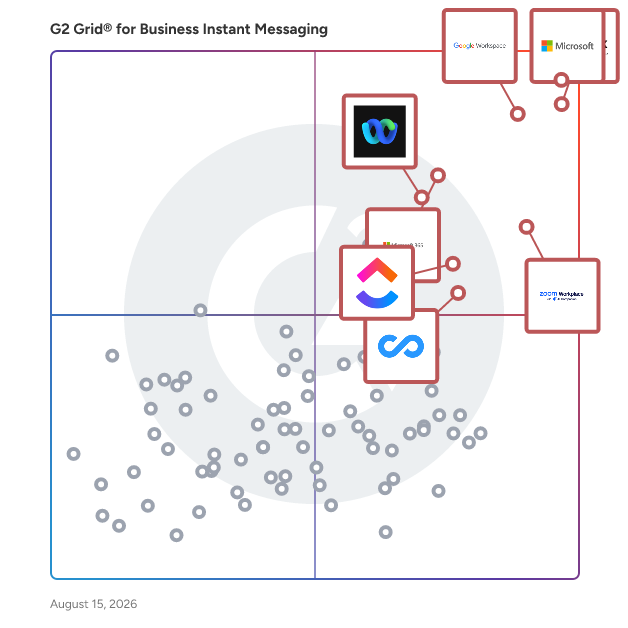
## G2 Grid® for Business Instant Messaging Software
![G2 Grid® for Business Instant Messaging Software plotting products by satisfaction and market presence](https://www.g2.com/categories/business-instant-messaging/grids.png?focus%5B%5D=25592&focus%5B%5D=3437&focus%5B%5D=1434&focus%5B%5D=7372&focus%5B%5D=663&focus%5B%5D=18255&focus%5B%5D=25675&focus%5B%5D=20433)
Highlighted products: Microsoft Teams, Slack, Google Workspace, Zoom Workplace, Microsoft 365, Webex Suite, ClickUp, and Connecteam.
Underlying data: [Grid® JSON](https://www.g2.com/categories/business-instant-messaging/grids.json?focus%5B%5D=microsoft-teams&amp;focus%5B%5D=slack&amp;focus%5B%5D=google-workspace&amp;focus%5B%5D=zoom-workplace&amp;focus%5B%5D=microsoft365&amp;focus%5B%5D=cisco-webex-suite&amp;focus%5B%5D=clickup&amp;focus%5B%5D=connecteam)


## How Many Business Instant Messaging Software Products Does G2 Track?
**Total Products under this Category:** 117

### Category Stats (Jul 2026)
- **Average Rating**: 4.45/5 The average rating of products in this category, based on all submitted ratings
- **Top Trending Product**: Jostle (+0.24%) - Among all products in this category, Jostle recorded the largest rating increase compared to last month
*Last updated: July 19, 2026*


## How Does G2 Rank Business Instant Messaging Software Products?

**Why You Can Trust G2's Software Rankings:**

- 30 Analysts and Data Experts
- 214,800+ Authentic Reviews
- 117+ Products
- Unbiased Rankings

G2's software rankings are built on verified user reviews, rigorous moderation, and a consistent research methodology maintained by a team of analysts and data experts. Each product is measured using the same transparent criteria, with no paid placement or vendor influence. While reviews reflect real user experiences, which can be subjective, they offer valuable insight into how software performs in the hands of professionals. Together, these inputs power the G2 Score, a standardized way to compare tools within every category.


## Which Business Instant Messaging Software Is Best for Your Use Case?

- **Leader:** [Microsoft Teams](https://www.g2.com/products/microsoft-teams/reviews)
- **Highest Performer:** [Missive](https://www.g2.com/products/missive/reviews)
- **Easiest to Use:** [morningmate](https://www.g2.com/products/morningmate/reviews)
- **Top Trending:** [Google Workspace](https://www.g2.com/products/google-workspace/reviews)
- **Best Free Software:** [Slack](https://www.g2.com/products/slack/reviews)


---

**Sponsored**

### Hive

Hive is an all-in-one project management software platform that helps teams plan, collaborate, automate workflows, and deliver projects faster. Designed for organizations of every size, Hive combines powerful project planning, task management, team collaboration, and workflow automation tools in one customizable workspace. Whether you&#39;re managing marketing campaigns, product launches, creative projects, client work, or cross-functional initiatives, Hive adapts to your team&#39;s unique processes. Unlike rigid project management tools, Hive offers flexible workflows, customizable dashboards, and multiple project views so every team can work the way they work best. Hive empowers marketing, operations, product, IT, creative, and remote teams with the tools they need to stay organized and aligned. With customizable workflows and powerful collaboration features, teams can centralize work, reduce manual tasks, and improve visibility across every project. Key capabilities include: - Multiple project views, including Kanban boards, Gantt charts, calendars, tables, and lists - Task management with custom fields, dependencies, milestones, and priorities - Workflow automation to eliminate repetitive work - Real-time team collaboration with messaging, comments, and file sharing - Time tracking, reporting, and analytics - Integrations with hundreds of popular business applications Every organization works differently, which is why Hive is built to be one of the most customizable project management platforms available. Teams can create workflows tailored to their business processes using custom fields, project templates, automations, approvals, and integrations. Instead of forcing teams to change how they work, Hive adapts to existing workflows — helping organizations improve efficiency without disrupting productivity. Hive gives teams the flexibility to manage projects from the perspective that works best for them. Switch seamlessly between: - Kanban boards for agile workflows - Gantt charts for timeline planning - Calendar views for scheduling - Table and List views for detailed task management These flexible project views help teams track deadlines, manage resources, identify bottlenecks, and keep projects moving forward. Hive brings projects, communication, and documentation together in one centralized workspace. Team members can collaborate in real time, assign tasks, share files, provide feedback, and monitor project progress without switching between multiple tools. By combining project planning, collaboration, automation, and reporting in a single platform, Hive helps teams reduce busywork and focus on delivering results. Hive is more than just task management software—it&#39;s a scalable work management platform built to evolve alongside your business. As your needs change, Hive continues to expand through new features, integrations, and customer-driven enhancements. With flexible customization, powerful automation, and dedicated customer support, Hive enables organizations to streamline workflows, improve cross-functional collaboration, and execute projects with greater speed and confidence.


[Visit website](https://www.g2.com/external_clickthroughs/record?secure%5Bad_program%5D=ppc&amp;secure%5Bad_slot%5D=category_product_list&amp;secure%5Bcategory_id%5D=2174&amp;secure%5Bchosen_at%5D=2026-07-20T06%3A44%3A19Z&amp;secure%5Bdisplayable_resource_id%5D=2174&amp;secure%5Bdisplayable_resource_type%5D=Category&amp;secure%5Bmedium%5D=sponsored&amp;secure%5Bplacement_reason%5D=page_category&amp;secure%5Bplacement_resource_ids%5D%5B%5D=2174&amp;secure%5Bprioritized%5D=false&amp;secure%5Bproduct_id%5D=27036&amp;secure%5Bresource_id%5D=2174&amp;secure%5Bresource_type%5D=Category&amp;secure%5Bsource_type%5D=category_page&amp;secure%5Bsource_url%5D=https%3A%2F%2Fwww.g2.com%2Fcategories%2Fbusiness-instant-messaging&amp;secure%5Btoken%5D=5896b8c706b20de11cfe9155ab050a620f0b7f81f850facd1d51cc6b55d03fa4&amp;secure%5Burl%5D=https%3A%2F%2Fhive.com%2F&amp;secure%5Burl_type%5D=company_website)

---

## What Are the Top-Rated Business Instant Messaging Software Products in 2026?
### 1. [Otter.ai](https://www.g2.com/products/otter-ai/reviews)
Otter.ai is the leading AI Meeting Assistant that helps sales, marketing, product, finance, operations design, customer success, customer support and cross functional teams automatically record, transcribe, and summarize all their meetings, making it easy to recall action items and easily share key insights. Otter integrates with leading video conference platforms, including Zoom, Microsoft Teams, and Google Meet, to automatically join and generate meeting notes. Otter AI Chat is like having ChatGPT for your meetings, it allows meeting participants to ask Otter questions about the meeting, including “what did I miss”, or “write a follow-up email to all participants”. Otter offers iOS and Android Apps to make it easy to record and transcribe in-person meetings. Otter also allows users to import and transcribe pre-recorded audio and video files. Designed specifically for the workflow of sales teams, OtterPilot for Sales shortens sales cycles by capturing critical information in real-time and automating follow-up emails and sentiment analysis. OtterPilot for Sales integrates with Salesforce and Hubspot to help automate call reporting. Improve win rates by sharing best practices and coaching reps based on data-driven insights. Boost productivity and free up time by automating tedious tasks like note-taking and data entry so SDRs, Sale Reps, Account Executives, Customer Success Managers, Sales Leaders and CROs can focus all of their attention on the customer and closing more deals. Otter.ai has over 15 million registered users and has transcribed over a billion meetings. Otter was named a top AI App by The Wall Street Journal in June 2023.


**Average Rating:** 4.4/5.0
**Total Reviews:** 497
**How Do G2 Users Rate Otter.ai?**

- **Has the product been a good partner in doing business?:** 8.5/10 (Category avg: 8.8/10)
- **Web Application:** 8.3/10 (Category avg: 9.0/10)
- **Integrations:** 8.5/10 (Category avg: 8.4/10)
- **File Sharing:** 8.3/10 (Category avg: 8.9/10)

**Who Is the Company Behind Otter.ai?**

- **Seller:** [Otter.ai](https://www.g2.com/sellers/otter-ai)
- **Company Website:** https://otter.ai/
- **HQ Location:** Mountain View, California
- **Twitter:** @otter_ai (17,074 Twitter followers)
- **LinkedIn® Page:** https://www.linkedin.com/company/35593855/ (282 employees on LinkedIn®)

**Who Uses This Product?**
- **Who Uses This:** CEO, Account Executive
- **Top Industries:** Computer Software, Marketing and Advertising
- **Company Size:** 70% Small-Business, 20% Mid-Market


#### What Are Otter.ai's Pros and Cons?

**Pros:**

- Ease of Use (121 reviews)
- Helpful (100 reviews)
- Accuracy (85 reviews)
- Transcription (85 reviews)
- Meetings (84 reviews)

**Cons:**

- Recording Issues (54 reviews)
- Accuracy Issues (48 reviews)
- Inaccuracy (42 reviews)
- AI Inaccuracy (39 reviews)
- Missing Features (38 reviews)


### What Do G2 Reviewers Say About Otter.ai?
*AI-generated summary from verified user reviews*

**Pros:**

- Users appreciate the **ease of use** of Otter.ai, enabling seamless transcription and effective summarization of discussions.
- Users appreciate the **helpfulness** of Otter.ai for effortless note-taking and easy access to meeting summaries.
- Users value the **high accuracy** of Otter.ai, appreciating its 95% accurate transcripts and speaker recognition capabilities.
- Users appreciate the **quick and accurate transcription** provided by Otter.ai, enhancing productivity and collaboration in meetings.
- Users value the **organized meeting summaries** of Otter.ai that enhance clarity and accessibility of key points.

**Cons:**

- Users face **recording issues** with agent participation confusion and occasional transcription failures, leading to manual recordings instead.
- Users experience **accuracy issues** with Otter.ai, especially with accents, background noise, and overlapping conversations.
- Users report **inaccuracy issues** with Otter.ai, especially with quick speech, heavy accents, and multiple speakers.
- Users encounter **AI inaccuracy** with Otter.ai, especially with accents, background noise, and multiple speakers, affecting transcript quality.
- Users note **missing features** in Otter.ai, especially regarding post-meeting summaries and speaker identification reliability.

#### What Are Recent G2 Reviews of Otter.ai?

**"[Effortless Meeting Notes with Searchable Transcripts and Action Items](https://www.g2.com/survey_responses/otter-ai-review-13040224)"**

**Rating:** 5.0/5.0 stars
*— Muzammil M.*

[Read full review](https://www.g2.com/survey_responses/otter-ai-review-13040224)

---

**"[Otter.ai Boosts Productivity with Real-Time Transcription and Automatic Summaries](https://www.g2.com/survey_responses/otter-ai-review-13091867)"**

**Rating:** 4.5/5.0 stars
*— Verified User in Oil &amp; Energy*

[Read full review](https://www.g2.com/survey_responses/otter-ai-review-13091867)

---


#### What Are G2 Users Discussing About Otter.ai?

- [What is Otter.ai used for?](https://www.g2.com/discussions/what-is-otter-ai-used-for) - 2 comments, 1 upvote
- [How good is Otter AI?](https://www.g2.com/discussions/how-good-is-otter-ai)
- [How do you transcribe on Otter AI?](https://www.g2.com/discussions/how-do-you-transcribe-on-otter-ai) - 1 comment, 1 upvote
- [Does Otter AI work with Microsoft teams?](https://www.g2.com/discussions/does-otter-ai-work-with-microsoft-teams) - 1 comment, 1 upvote
- [What does otter AI do?](https://www.g2.com/discussions/what-does-otter-ai-do) - 2 comments, 1 upvote

### 2. [TrueConf Server](https://www.g2.com/products/trueconf-server/reviews)
TrueConf Server is an on-premises corporate messenger with powerful video collaboration tools and webinar support. The solution is free for up to 1,000 lifetime users and also offers an enterprise edition tailored for large organizations, government institutions, and defense agencies. Deployed within LAN, it guarantees complete control over communications and access. Installation takes just 15 minutes on Windows or Linux. The platform ensures secure communication with a proprietary protocol and provides a user-friendly address book with presence statuses for colleagues. Its built-in corporate messenger supports peer-to-peer conversations, group chats, and channels in an instant messaging format, with file storage, mentions, chatbots, folders, archives, and favorites, keeping teamwork efficient and organized. Users can share files securely, search within channels and chat histories, and track full conversation history across devices. For meetings, TrueConf delivers 4K Ultra HD video conferencing and calls with up to 1,500 active participants and 49 on-screen video feeds. Cross-platform client applications for desktop and mobile systems ensure seamless access from anywhere. Integrated on-premises AI enhances user experience with smart tools such as meeting summaries, virtual backgrounds, noise suppression, face tracking, and real-time meeting management. TrueConf also features a flexible conference scheduler with moderation controls, automated invitations, waiting rooms, and support for both private and public meetings. Collaboration tools include screen and application sharing with annotations, slideshow support in multiple formats, remote desktop control, polling, meeting recording, and built-in media playback. Available 24/7, TrueConf keeps communication consistent across devices with full chat and draft synchronization. Its SDK and API toolkit enable automation, customization, and integration with chatbots, other video conferencing solutions, or productivity apps, making it a scalable and adaptable choice for businesses that require reliable and secure communication.


**Average Rating:** 4.6/5.0
**Total Reviews:** 53
**How Do G2 Users Rate TrueConf Server?**

- **Has the product been a good partner in doing business?:** 9.4/10 (Category avg: 8.8/10)
- **Web Application:** 9.2/10 (Category avg: 9.0/10)
- **Integrations:** 10.0/10 (Category avg: 8.4/10)
- **File Sharing:** 9.2/10 (Category avg: 8.9/10)

**Who Is the Company Behind TrueConf Server?**

- **Seller:** [TrueConf](https://www.g2.com/sellers/trueconf)
- **Year Founded:** 2003
- **HQ Location:** Moscow, Russia
- **Twitter:** @trueconf (474 Twitter followers)
- **LinkedIn® Page:** https://www.linkedin.com/company/2153117/ (104 employees on LinkedIn®)

**Who Uses This Product?**
- **Top Industries:** Information Technology and Services
- **Company Size:** 43% Mid-Market, 38% Small-Business


#### What Are TrueConf Server's Pros and Cons?

**Pros:**

- Reliability (9 reviews)
- Video Quality (9 reviews)
- Security (7 reviews)
- Communication (6 reviews)
- Easy Setup (5 reviews)

**Cons:**

- Difficult Setup (10 reviews)
- Learning Curve (7 reviews)
- Complexity (5 reviews)
- Not User-Friendly (5 reviews)
- User Interface (5 reviews)


### What Do G2 Reviewers Say About TrueConf Server?
*AI-generated summary from verified user reviews*

**Pros:**

- Users highlight the **reliability** of TrueConf Server in various environments, ensuring consistent performance during meetings.
- Users value the **high video quality** and stable connections of TrueConf Server for seamless meetings and collaborations.
- Users value the **strong security** of TrueConf Server, enjoying stable internal communication without reliance on external platforms.
- Users value the **effective communication** tools of TrueConf Server, enhancing collaboration and ensuring seamless team interactions.
- Users appreciate the **easy setup** of TrueConf Server, seamlessly integrating with existing tools for smooth operations.

**Cons:**

- Users find the **difficult setup** of TrueConf Server challenging, particularly when lacking technical support for configuration.
- Users find the **learning curve steep** for TrueConf Server, particularly in setup and configuration for non-technical users.
- Users find the **initial setup complex** , which can be challenging for non-technical users and smaller teams.
- Users find TrueConf Server **not user-friendly** due to complex setup and design that lacks modern intuitiveness.
- Users find the **user interface lacking** , suggesting it needs a more modern and intuitive design for better usability.

#### What Are Recent G2 Reviews of TrueConf Server?

**"[Reliable Self-Hosted Conferencing with Privacy Assurance](https://www.g2.com/survey_responses/trueconf-server-review-12910642)"**

**Rating:** 4.0/5.0 stars
*— Misener W.*

[Read full review](https://www.g2.com/survey_responses/trueconf-server-review-12910642)

---

**"[Secure, Reliable Video Conferencing with Room for UI Improvement](https://www.g2.com/survey_responses/trueconf-server-review-12573351)"**

**Rating:** 5.0/5.0 stars
*— Rajneesh M.*

[Read full review](https://www.g2.com/survey_responses/trueconf-server-review-12573351)

---


#### What Are G2 Users Discussing About TrueConf Server?

- [What is TrueConf Server used for?](https://www.g2.com/discussions/what-is-trueconf-server-used-for) - 1 comment
- [How do I set up a video conferencing server?](https://www.g2.com/discussions/how-do-i-set-up-a-video-conferencing-server)
- [Is TrueConf safe?](https://www.g2.com/discussions/is-trueconf-safe)
- [What are the features of video conferencing?](https://www.g2.com/discussions/what-are-the-features-of-video-conferencing)

### 3. [Brosix](https://www.g2.com/products/brosix/reviews)
An all-in-one secure instant messaging software, Brosix is a Chat App that helps businesses improve internal communication and optimize work processes while guaranteeing data security and privacy. Communication is the key to higher workplace efficiency. Brosix’s real-time messaging channels facilitate meaningful conversation in practically any situation. Chat one-to-one or in groups and make crystal clear Audio and Video Calls. Broadcast messages to handpicked audiences, create custom Chat Rooms, and chat on the go thanks to a versatile mobile app. Each Brosix Team Network features a suite of collaboration tools to enhance teamwork. Screen sharing with remote desktop control, file transfers, a virtual whiteboard, and instant screenshots pair seamlessly with communication channels to streamline workflows and collaboration. Brosix is a secure, fully administrable, and flexible solution. Team Networks are encrypted end-to-end. Manage everything from user access to the platform to communication spaces, features, and user data access. Web access and applications for Windows, Mac, Android, iOS, and Linux devices and operating systems enable instant communication from anywhere on any device. Multi-language support allows cross-cultural teams to convey their ideas to each other more efficiently, allowing them to work and collaborate on projects with ease.


**Average Rating:** 4.6/5.0
**Total Reviews:** 47
**How Do G2 Users Rate Brosix?**

- **Has the product been a good partner in doing business?:** 8.9/10 (Category avg: 8.8/10)
- **Web Application:** 8.8/10 (Category avg: 9.0/10)
- **Integrations:** 9.4/10 (Category avg: 8.4/10)
- **File Sharing:** 9.2/10 (Category avg: 8.9/10)

**Who Is the Company Behind Brosix?**

- **Seller:** [Brosix](https://www.g2.com/sellers/brosix)
- **Year Founded:** 2006
- **HQ Location:** , US
- **Twitter:** @BROSIX (2,806 Twitter followers)
- **LinkedIn® Page:** https://www.linkedin.com/company/306022/ (5 employees on LinkedIn®)

**Who Uses This Product?**
- **Top Industries:** Insurance, Financial Services
- **Company Size:** 71% Small-Business, 24% Mid-Market


#### What Are Brosix's Pros and Cons?

**Pros:**

- Daily Use (4 reviews)
- Communication (3 reviews)
- Ease of Use (3 reviews)
- Features (3 reviews)
- File Sharing (3 reviews)

**Cons:**

- Learning Curve (2 reviews)
- Limited Customization (2 reviews)
- Limited Features (2 reviews)
- Integration Issues (1 reviews)
- Lack of Clarity (1 reviews)


### What Do G2 Reviewers Say About Brosix?
*AI-generated summary from verified user reviews*

**Pros:**

- Users value Brosix for its **easy daily use** , enabling quick communication, file sharing, and seamless collaboration.
- Users value the **efficient and secure communication** that Brosix provides for seamless team collaboration and quick messaging.
- Users appreciate the **ease of use** of Brosix, facilitating seamless communication and collaboration with teammates.
- Users appreciate the **secure and efficient communication** features of Brosix, making teamwork seamless and private.
- Users benefit from the **fast and secure file sharing** capabilities of Brosix, enhancing collaboration and productivity.

**Cons:**

- Users find the **learning curve steep** with Brosix due to a less intuitive interface and lack of guidance.
- Users find the **limited customization** options of Brosix restrict their ability to enhance the user experience significantly.
- Users note the **limited features** of Brosix, wishing for more customization options and user capacity improvements.
- Users find **integration issues** with Brosix, feeling it lacks sufficient customization options and guidance for a smooth experience.
- Users find a **lack of clarity** in Brosix&#39;s interface, with features that may not be immediately obvious to them.

#### What Are Recent G2 Reviews of Brosix?

**"[Secure, Easy, and Efficient Team Communication](https://www.g2.com/survey_responses/brosix-review-12164582)"**

**Rating:** 4.5/5.0 stars
*— Joe T.*

[Read full review](https://www.g2.com/survey_responses/brosix-review-12164582)

---

**"[Secure Workspace for Professional Collaboration](https://www.g2.com/survey_responses/brosix-review-12156266)"**

**Rating:** 4.5/5.0 stars
*— Abhinav  S.*

[Read full review](https://www.g2.com/survey_responses/brosix-review-12156266)

---


#### What Are G2 Users Discussing About Brosix?

- [What are typical IM features?](https://www.g2.com/discussions/what-are-typical-im-features)
- [What is instant messaging IM software What are its feature?](https://www.g2.com/discussions/what-is-instant-messaging-im-software-what-are-its-feature)
- [How do I install Brosix?](https://www.g2.com/discussions/how-do-i-install-brosix) - 1 comment
- [Is brosix safe?](https://www.g2.com/discussions/is-brosix-safe) - 1 comment

### 4. [Flock](https://www.g2.com/products/flock/reviews)
Flock is a communication and collaboration app for modern teams and businesses. Flock empowers teams by providing them with a slew of in-built productivity tools such as shared notes, reminders, to-dos, polls. Users can talk to remote teams over audio and video calls. Screen sharing allows teams to collaborate and share information better. Flock also comes deeply integrated with Google Drive. Other popular third-party integrations include- Google Calendar, Analytics, JIRA, Asana, Github, Twitter, Facebook and lots more. Flock’s App Store allows teams to plug apps into Flock and eliminate the need to switch between multiple tools to get work done. Flock’s features like bubbling up of recent conversations, easy keyboard shortcuts, and last message preview let teams easily use chats, rather than individually clicking on chat tabs. Flock’s magic search automatically displays important private channels and contacts without any need for typing. Flock lets you easily switch between teams, conversations, apps and much more. Flock Apps blend seamlessly with the core product, allowing for a more integrated experience.


**Average Rating:** 4.4/5.0
**Total Reviews:** 294
**How Do G2 Users Rate Flock?**

- **Has the product been a good partner in doing business?:** 9.1/10 (Category avg: 8.8/10)
- **Web Application:** 9.0/10 (Category avg: 9.0/10)
- **Integrations:** 8.4/10 (Category avg: 8.4/10)
- **File Sharing:** 9.1/10 (Category avg: 8.9/10)

**Who Is the Company Behind Flock?**

- **Seller:** [Flock](https://www.g2.com/sellers/flock-ca1bb983-9bc8-4461-a550-f0cca1f5e0d7)
- **Year Founded:** 2005
- **HQ Location:** Menlo Park, US
- **Twitter:** @Flock (13,984 Twitter followers)
- **LinkedIn® Page:** https://www.linkedin.com/company/flock/ (30 employees on LinkedIn®)

**Who Uses This Product?**
- **Who Uses This:** Software Engineer, Inside sales specialist
- **Top Industries:** Information Technology and Services, Computer Software
- **Company Size:** 47% Small-Business, 39% Mid-Market


#### What Are Flock's Pros and Cons?

**Pros:**

- Ease of Use (19 reviews)
- Communication (18 reviews)
- Team Collaboration (15 reviews)
- File Sharing (10 reviews)
- Daily Use (9 reviews)

**Cons:**

- App Issues (8 reviews)
- Integration Issues (8 reviews)
- Slow Loading (7 reviews)
- Notification Management (6 reviews)
- Performance Issues (6 reviews)


### What Do G2 Reviewers Say About Flock?
*AI-generated summary from verified user reviews*

**Pros:**

- Users appreciate the **ease of use** of Flock, enjoying its user-friendly design and smooth communication features.
- Users value Flock for its **easy communication and collaboration** , enhancing their teamwork while minimizing email clutter.
- Users appreciate the **easy communication and collaboration** features of Flock, enhancing team connectivity and efficiency.
- Users appreciate the **streamlined file sharing** in Flock, enhancing collaboration and keeping communication efficient and organized.
- Users value Flock for its **effective communication tools** , helping them stay updated and organized effortlessly.

**Cons:**

- Users experience **app issues** including lag during video calls and slowness in the mobile version, affecting usability.
- Users find Flock&#39;s **integration issues** frustrating, as many third-party connections feel basic and limitations affect teamwork.
- Users experience **slow loading** and occasional lag during video calls and when switching channels, affecting usability slightly.
- Users find that **notification management can be overwhelming** in Flock, leading to a cluttered experience.
- Users report **performance issues** with Flock, including lag and notification delays, especially on iOS devices.

#### What Are Recent G2 Reviews of Flock?

**"[Simple and Effective Communication Tool for Team Collaboration](https://www.g2.com/survey_responses/flock-review-12723444)"**

**Rating:** 4.0/5.0 stars
*— Aman G.*

[Read full review](https://www.g2.com/survey_responses/flock-review-12723444)

---

**"[User-Friendly and Cost-Effective Communication, Needs More Integration](https://www.g2.com/survey_responses/flock-review-12731412)"**

**Rating:** 4.0/5.0 stars
*— Rahul P.*

[Read full review](https://www.g2.com/survey_responses/flock-review-12731412)

---


#### What Are G2 Users Discussing About Flock?

- [What is Flock team messenger?](https://www.g2.com/discussions/what-is-flock-team-messenger)
- [How do you use Flock app?](https://www.g2.com/discussions/how-do-you-use-flock-app)
- [What is Flock material?](https://www.g2.com/discussions/what-is-flock-material)
- [What is Flock app?](https://www.g2.com/discussions/what-is-flock-app) - 2 comments

### 5. [Pumble](https://www.g2.com/products/pumble/reviews)
Pumble is a team communication and collaboration platform that helps teams stay connected through messaging, meetings, and organized conversations. Pumble is used by companies that want to simplify communication and keep everything in one place. It supports use cases such as team messaging, project coordination, remote work collaboration, and knowledge sharing. Users can organize conversations into channels based on teams, projects, or topics, and communicate through direct messages and group chats. Voice calls and video meetings are also available, enabling real-time collaboration when needed. This structure helps reduce reliance on email and supports more efficient communication across workflows. It can be used across departments to support daily communication, coordination, and collaboration needs. The platform helps teams centralize communication and maintain consistent access to information, which is important for alignment and operation efficiency. Its features support both quick interactions and more structured discussions. By organizing communication into channels, Pumble helps reduce noise and makes it easier for teams to follow relevant discussions. Message history is stored and searchable, allowing users to quickly find past conversations, shared files, and important updates. This helps teams maintain transparency and avoid losing key information. Pumble also supports file sharing within conversation, so teams can exchange documents, links, and resources without switching tools. This makes collaboration more efficient and keeps work context in one place. The platform is suitable for both in-office and distributed teams, supporting real-time and asynchronous communication. It is available on web, desktop, and mobile platforms, allowing users to stay connected across different environments. Integration with project management and time tracking tools enables teams to connect communication with task execution and reporting. Centralizes communication through channels, direct messages, and threads. Supports voice and video meetings for real-time collaboration. Keeps message history searchable and accessible for reference. Enables file sharing within conversations to support teamwork. Supports remote and hybrid work with cross-platform access and integrations.


**Average Rating:** 4.5/5.0
**Total Reviews:** 41
**How Do G2 Users Rate Pumble?**

- **Has the product been a good partner in doing business?:** 9.2/10 (Category avg: 8.8/10)
- **Web Application:** 8.8/10 (Category avg: 9.0/10)
- **Integrations:** 8.2/10 (Category avg: 8.4/10)
- **File Sharing:** 9.2/10 (Category avg: 8.9/10)

**Who Is the Company Behind Pumble?**

- **Seller:** [CAKE.com](https://www.g2.com/sellers/cake-com)
- **Year Founded:** 2017
- **HQ Location:** Palo Alto, California
- **Twitter:** @cake_dot_com (837 Twitter followers)
- **LinkedIn® Page:** https://www.linkedin.com/company/cake-dot-com/mycompany (441 employees on LinkedIn®)

**Who Uses This Product?**
- **Top Industries:** Information Technology and Services
- **Company Size:** 59% Small-Business, 41% Mid-Market


#### What Are Pumble's Pros and Cons?

**Pros:**

- Ease of Use (12 reviews)
- Communication (10 reviews)
- File Sharing (7 reviews)
- Team Collaboration (7 reviews)
- Intuitive (6 reviews)

**Cons:**

- Integration Issues (7 reviews)
- Limited Customization (3 reviews)
- File Sharing Issues (2 reviews)
- Limited Features (2 reviews)
- Limited Options (2 reviews)


### What Do G2 Reviewers Say About Pumble?
*AI-generated summary from verified user reviews*

**Pros:**

- Users love Pumble&#39;s **user-friendly interface** , which simplifies team communication and enhances collaboration effortlessly.
- Users highlight Pumble&#39;s **efficient communication tools** , enabling quick discussions and secure connections for remote work.
- Users love the **seamless drag-and-drop file sharing** in Pumble, enhancing collaboration and saving valuable time.
- Users value the **enhanced team collaboration** features of Pumble, making communication and teamwork seamless and effective.
- Users love Pumble for its **intuitive interface** , making communication and navigation seamless and efficient for teams.

**Cons:**

- Users find Pumble&#39;s **limited integrations** challenging, making it harder to achieve a fully integrated workflow.
- Users find Pumble&#39;s **customization options limited** , which restricts their ability to personalize the interface and notifications.
- Users find **file sharing issues** with Pumble&#39;s restrictive limits on the free plan frustrating, especially for larger files.
- Users are disappointed by the **limited features** and integrations on Pumble, affecting its overall usability.
- Users find the **limited options** in Pumble&#39;s integrations and features restrict their collaborative capabilities.

#### What Are Recent G2 Reviews of Pumble?

**"[Budget-Friendly Communication Tool with Room for Improvement](https://www.g2.com/survey_responses/pumble-review-12719175)"**

**Rating:** 5.0/5.0 stars
*— Sourav B.*

[Read full review](https://www.g2.com/survey_responses/pumble-review-12719175)

---

**"[Effortless Team Collaboration with Time Tracking, Channels, and Seamless Calls](https://www.g2.com/survey_responses/pumble-review-12969489)"**

**Rating:** 4.5/5.0 stars
*— Konjengbam  M.*

[Read full review](https://www.g2.com/survey_responses/pumble-review-12969489)

---


#### What Are G2 Users Discussing About Pumble?

- [What does Pumble do?](https://www.g2.com/discussions/what-does-pumble-do)
- [Why Pumble is free?](https://www.g2.com/discussions/why-pumble-is-free)
- [What is Pumble?](https://www.g2.com/discussions/what-is-pumble)
- [Is Pumble free?](https://www.g2.com/discussions/is-pumble-free)

### 6. [DemandHub](https://www.g2.com/products/demandhub/reviews)
DemandHub enables customer interactions that drive business results. We improve how you communicate with your customers and capture valuable feedback. This enables your team to make better decisions that drive business results and improve your customer experience.


**Average Rating:** 4.8/5.0
**Total Reviews:** 58
**How Do G2 Users Rate DemandHub?**

- **Has the product been a good partner in doing business?:** 9.7/10 (Category avg: 8.8/10)
- **Web Application:** 10.0/10 (Category avg: 9.0/10)
- **Integrations:** 10.0/10 (Category avg: 8.4/10)
- **File Sharing:** 10.0/10 (Category avg: 8.9/10)

**Who Is the Company Behind DemandHub?**

- **Seller:** [DemandHub](https://www.g2.com/sellers/demandhub)
- **HQ Location:** Mississauga, Ontario
- **Twitter:** @DemandHub
- **LinkedIn® Page:** https://www.linkedin.com/company/demandhub/ (20 employees on LinkedIn®)

**Who Uses This Product?**
- **Top Industries:** Automotive, Hospital &amp; Health Care
- **Company Size:** 95% Small-Business, 3% Mid-Market


#### What Are DemandHub's Pros and Cons?

**Pros:**

- Helpful (3 reviews)
- Customer Support (2 reviews)
- Ease of Use (2 reviews)
- Effective (2 reviews)
- Efficiency (2 reviews)

**Cons:**

- Limited Features (1 reviews)
- Missing Features (1 reviews)


### What Do G2 Reviewers Say About DemandHub?
*AI-generated summary from verified user reviews*

**Pros:**

- Users appreciate the **responsive and efficient support** from DemandHub, resolving issues and saving time effectively.
- Users praise DemandHub for its **responsive and effective customer support** , resolving issues promptly and efficiently.
- Users appreciate the **ease of use** of DemandHub, finding it time-saving and user-friendly with helpful support options.
- Users appreciate the **quick responsiveness and effectiveness** of DemandHub, enhancing efficiency and saving valuable time.
- Users value the **efficiency** of DemandHub, as it resolves issues swiftly and automates tasks to save time.

**Cons:**

- Users are disappointed by the lack of **Dark Mode** in DemandHub, which limits personalization and comfort during use.
- Users desire a **Dark Mode** feature in DemandHub to improve usability and reduce eye strain.

#### What Are Recent G2 Reviews of DemandHub?

**"[Effortless Google Review Integration with Rapid Support](https://www.g2.com/survey_responses/demandhub-review-12404501)"**

**Rating:** 5.0/5.0 stars
*— Marion M.*

[Read full review](https://www.g2.com/survey_responses/demandhub-review-12404501)

---

**"[Automation and Quick Responses Elevate Our Practice](https://www.g2.com/survey_responses/demandhub-review-12310659)"**

**Rating:** 4.5/5.0 stars
*— Doug P.*

[Read full review](https://www.g2.com/survey_responses/demandhub-review-12310659)

---


#### What Are G2 Users Discussing About DemandHub?

- [What is DemandHub used for?](https://www.g2.com/discussions/what-is-demandhub-used-for)

### 7. [Mattermost](https://www.g2.com/products/mattermost/reviews)
Mattermost is an open source platform for secure collaboration across the entire software development lifecycle. Hundreds of thousands of developers around the globe trust Mattermost to increase their productivity by bringing together team communication, task and project management, and workflow orchestration into a unified platform for agile software development. Founded in 2016, Mattermost’s open source platform powers over 800,000 workspaces worldwide with the support of over 4,000 contributors from across the developer community. The company serves over 800 customers, including European Parliament, NASA, Nasdaq, Samsung, SAP, United States Air Force and Wealthfront, and is backed by world-class investors including Battery Ventures, Redpoint, S28 Capital, YC Continuity. To learn more, visit www.mattermost.com.


**Average Rating:** 4.3/5.0
**Total Reviews:** 353
**How Do G2 Users Rate Mattermost?**

- **Has the product been a good partner in doing business?:** 9.0/10 (Category avg: 8.8/10)
- **Web Application:** 8.9/10 (Category avg: 9.0/10)
- **Integrations:** 8.3/10 (Category avg: 8.4/10)
- **File Sharing:** 8.7/10 (Category avg: 8.9/10)

**Who Is the Company Behind Mattermost?**

- **Seller:** [Mattermost](https://www.g2.com/sellers/mattermost)
- **Year Founded:** 2016
- **HQ Location:** Palo Alto, CA
- **Twitter:** @mattermosthq (94 Twitter followers)
- **LinkedIn® Page:** https://www.linkedin.com/company/27670348/ (162 employees on LinkedIn®)

**Who Uses This Product?**
- **Who Uses This:** Senior Software Engineer, Software Engineer
- **Top Industries:** Information Technology and Services, Computer Software
- **Company Size:** 37% Mid-Market, 33% Enterprise


#### What Are Mattermost's Pros and Cons?

**Pros:**

- Ease of Use (15 reviews)
- Features (14 reviews)
- Integrations (11 reviews)
- Security (10 reviews)
- Team Collaboration (10 reviews)

**Cons:**

- Not Intuitive (8 reviews)
- Performance Issues (8 reviews)
- Integration Issues (7 reviews)
- Learning Curve (7 reviews)
- Missing Features (6 reviews)


### What Do G2 Reviewers Say About Mattermost?
*AI-generated summary from verified user reviews*

**Pros:**

- Users appreciate the **ease of use** of Mattermost, facilitating quick communication and seamless team coordination.
- Users love the **ease of use and versatility** of Mattermost, making internal communication seamless and efficient.
- Users appreciate the **seamless integrations** in Mattermost, enhancing team coordination and streamlining communication with various tools.
- Users value the **strong security and data ownership** provided by Mattermost, ensuring privacy and compliance in their communications.
- Users value the **effective team collaboration** provided by Mattermost through its organized channels and seamless integrations.

**Cons:**

- Users find the **interface not intuitive** , leading to a steeper learning curve and occasional inconsistency in usability.
- Users experience notable **performance issues** with Mattermost, including laggy mobile use, unreliable notifications, and subpar search functionality.
- Users struggle with **integration issues** , finding setup complicated and requiring technical knowledge, impacting overall usability.
- Users face a **steep learning curve** with Mattermost, complicating setup and leading to interface inconsistencies.
- Users find **missing features** like easy chat deletion and more intuitive UI detract from the overall Mattermost experience.

#### What Are Recent G2 Reviews of Mattermost?

**"[Effortless Communication with Stellar Flexibility](https://www.g2.com/survey_responses/mattermost-review-10509653)"**

**Rating:** 5.0/5.0 stars
*— giorgi d.*

[Read full review](https://www.g2.com/survey_responses/mattermost-review-10509653)

---

**"[Great secure alternative to Slack for tech-heavy teams](https://www.g2.com/survey_responses/mattermost-review-12484132)"**

**Rating:** 4.0/5.0 stars
*— Maximilian C.*

[Read full review](https://www.g2.com/survey_responses/mattermost-review-12484132)

---


#### What Are G2 Users Discussing About Mattermost?

- [What is Mattermost used for?](https://www.g2.com/discussions/mattermost-what-is-mattermost-used-for) - 2 comments
- [Is Slack a Mattermost?](https://www.g2.com/discussions/is-slack-a-mattermost) - 2 comments
- [Is Mattermost secure?](https://www.g2.com/discussions/is-mattermost-secure) - 2 comments
- [Who makes Mattermost?](https://www.g2.com/discussions/who-makes-mattermost) - 1 comment
- [What is Mattermost used for?](https://www.g2.com/discussions/what-is-mattermost-used-for) - 3 comments

### 8. [Odoo Discuss](https://www.g2.com/products/odoo-discuss/reviews)
Odoo Discuss is an integrated communication application designed to enhance internal collaboration within organizations. It consolidates various communication tools—such as messaging, file sharing, and video conferencing—into a single platform, ensuring seamless interaction across all Odoo applications. By providing a unified communication hub, Odoo Discuss eliminates the need for multiple fragmented apps, thereby improving efficiency and productivity. Key Features and Functionality: - Direct Messaging: Facilitate private conversations between team members with real-time messaging capabilities. - Channel Communication: Create customizable channels for broad or focused group discussions, enabling efficient dissemination of information to specific departments or project teams. - Video Conferencing: Host high-definition video meetings with internal and external participants directly through the app, supporting remote collaboration and client interactions. - WhatsApp Integration: Seamlessly integrate WhatsApp to manage all communications from a single interface, enhancing accessibility and convenience. - Voice Calls: Initiate voice calls with internal users to facilitate quick discussions without the need for external tools. - File Sharing: Share documents and files within chats and channels, ensuring all team members have access to necessary resources. - Notifications Dashboard: Centralize all system notifications, allowing users to monitor updates and actions across various Odoo applications from one dashboard. - Integration with Odoo Apps: Enjoy seamless communication across all Odoo applications, enabling context-specific discussions and collaborations within different modules. - Persistent Chat Window: Maintain ongoing conversations with a chat interface that remains accessible across various applications, ensuring continuous communication without disruption. - User-Friendly Interface: Navigate through a clean and intuitive design that simplifies the user experience and reduces the learning curve for new users. Primary Value and User Solutions: Odoo Discuss serves as a centralized communication hub, streamlining interactions within organizations by integrating multiple communication channels into a single platform. This consolidation reduces the reliance on disparate tools, minimizing miscommunication and enhancing overall productivity. By offering features like direct messaging, video conferencing, and file sharing, it addresses the need for efficient and effective internal communication, fostering better collaboration and decision-making among team members.


**Average Rating:** 4.3/5.0
**Total Reviews:** 36
**How Do G2 Users Rate Odoo Discuss?**

- **Has the product been a good partner in doing business?:** 8.2/10 (Category avg: 8.8/10)
- **Web Application:** 8.3/10 (Category avg: 9.0/10)
- **Integrations:** 7.8/10 (Category avg: 8.4/10)
- **File Sharing:** 8.5/10 (Category avg: 8.9/10)

**Who Is the Company Behind Odoo Discuss?**

- **Seller:** [Odoo](https://www.g2.com/sellers/odoo)
- **Year Founded:** 2005
- **HQ Location:** Brussels, Belgium
- **Twitter:** @Odoo (55,391 Twitter followers)
- **LinkedIn® Page:** https://www.linkedin.com/company/633558/ (8,467 employees on LinkedIn®)

**Who Uses This Product?**
- **Top Industries:** Information Technology and Services
- **Company Size:** 57% Small-Business, 30% Mid-Market


#### What Are Odoo Discuss's Pros and Cons?

**Pros:**

- Communication (7 reviews)
- Ease of Use (7 reviews)
- Integrations (6 reviews)
- Features (5 reviews)
- Customization (4 reviews)

**Cons:**

- Missing Features (4 reviews)
- Learning Curve (3 reviews)
- Not Intuitive (3 reviews)
- Slow Loading (3 reviews)
- Complexity (2 reviews)


### What Do G2 Reviewers Say About Odoo Discuss?
*AI-generated summary from verified user reviews*

**Pros:**

- Users value the **seamless communication** in Odoo Discuss, enhancing team collaboration and workflow integration.
- Users appreciate the **ease of use** of Odoo Discuss, valuing its simple interface and efficient onboarding process.
- Users benefit from the **seamless integration** of Odoo Discuss with other apps, enhancing team communication and efficiency.
- Users value the **seamless integration of communication** within workflows, enhancing collaboration and productivity across teams.
- Users enjoy the **customization capabilities** of Odoo Discuss, enhancing their communication experience with tailored features.

**Cons:**

- Users find the **missing features** in Odoo Discuss hinder usability, especially with search and reporting tools.
- Users note a **steep learning curve** with Odoo Discuss, making it challenging for newcomers to adapt quickly.
- Users find the interface **not intuitive** , making navigation and retrieving context more challenging compared to other tools.
- Users experience **slow loading** times with Odoo Discuss, especially when managing large databases or high user traffic.
- Users find the **complexity of implementations** challenging, especially without technical help and when navigating the UI.

#### What Are Recent G2 Reviews of Odoo Discuss?

**"[Seamless Odoo Integration That Keeps Team Communication in Context](https://www.g2.com/survey_responses/odoo-discuss-review-12582785)"**

**Rating:** 4.0/5.0 stars
*— Archit J.*

[Read full review](https://www.g2.com/survey_responses/odoo-discuss-review-12582785)

---

**"[Odoo Discuss Keeps Team Communication Organized in One Place](https://www.g2.com/survey_responses/odoo-discuss-review-12570958)"**

**Rating:** 4.5/5.0 stars
*— Aman R.*

[Read full review](https://www.g2.com/survey_responses/odoo-discuss-review-12570958)

---


#### What Are G2 Users Discussing About Odoo Discuss?

- [What are the benefits of Odoo?](https://www.g2.com/discussions/odoo-discuss-what-are-the-benefits-of-odoo)
- [What are the elements of Odoo ERP system?](https://www.g2.com/discussions/what-are-the-elements-of-odoo-erp-system)
- [What does Odoo software do?](https://www.g2.com/discussions/what-does-odoo-software-do)

### 9. [Teamwire](https://www.g2.com/products/teamwire/reviews)
Teamwire provides a comprehensive solution that consolidates all communication and collaboration requirements into a single application. The inconvenience of managing multiple applications is eliminated with Teamwire, as it streamlines workflow by offering a unified platform for messaging, file sharing, and encrypted video calls. This platform is particularly suitable for organizations with a large mobile workforce, particularly those with mobile frontline workers. Teamwire ensures secure connectivity for all team members, whether they are working remotely or in the field. Teamwire&#39;s exceptional feature is its unwavering commitment to security. It surpasses the highest police and military security standards, making it the preferred choice for organizations that prioritize data protection. For those in mission-critical operations, Teamwire is the fail-safe solution that guarantees secure and reliable communications when it matters most. By selecting Teamwire, you not only receive top-tier software, but also benefit from their dedication to customer satisfaction. Their prompt and personalized support ensures that you have a dependable partner to rely on in case of any issues. Moreover, Teamwire offers a straightforward and comprehensive administration system that enables centralized control of all users, devices, and data. This level of control empowers organizations to maintain the highest security standards while ensuring a seamless user experience. In conclusion, Teamwire is the ideal choice for businesses and organizations that demand the utmost in data privacy and security. With its all-in-one platform, stringent security standards, fail-safe reliability, and excellent support, it&#39;s a valuable asset for any company looking to enhance their secure messaging and collaboration capabilities. Choose Teamwire and experience the peace of mind that comes with knowing your sensitive data is protected while your team works efficiently.


**Average Rating:** 4.4/5.0
**Total Reviews:** 51
**How Do G2 Users Rate Teamwire?**

- **Has the product been a good partner in doing business?:** 9.1/10 (Category avg: 8.8/10)
- **Web Application:** 9.0/10 (Category avg: 9.0/10)
- **Integrations:** 8.6/10 (Category avg: 8.4/10)
- **File Sharing:** 9.0/10 (Category avg: 8.9/10)

**Who Is the Company Behind Teamwire?**

- **Seller:** [Teamwire](https://www.g2.com/sellers/teamwire)
- **Year Founded:** 2010
- **HQ Location:** München, DE
- **Twitter:** @teamwire_app (255 Twitter followers)
- **LinkedIn® Page:** https://www.linkedin.com/company/1487350/ (32 employees on LinkedIn®)

**Who Uses This Product?**
- **Top Industries:** Information Technology and Services
- **Company Size:** 50% Small-Business, 38% Mid-Market


#### What Are Teamwire's Pros and Cons?

**Pros:**

- Security (4 reviews)
- Ease of Use (3 reviews)
- File Sharing (3 reviews)
- Intuitive (3 reviews)
- Team Collaboration (3 reviews)

**Cons:**

- Limited Features (2 reviews)
- Missing Features (2 reviews)
- Complexity (1 reviews)
- Expensive (1 reviews)
- File Sharing Issues (1 reviews)


### What Do G2 Reviewers Say About Teamwire?
*AI-generated summary from verified user reviews*

**Pros:**

- Users value the **robust security features** of Teamwire, ensuring safe communication and data protection for sensitive information.
- Users appreciate the **ease of use** of Teamwire, enjoying its intuitive design and straightforward setup for all users.
- Users love the **secure file sharing** capabilities of Teamwire, enhancing collaboration and data protection seamlessly.
- Users find Teamwire&#39;s **intuitive interface** enhances collaboration, making secure communication and navigation seamless for everyone.
- Users enjoy the **intuitive collaboration tools** of Teamwire, enhancing secure communication and interaction within teams.

**Cons:**

- Users find Teamwire&#39;s **limited features** compared to other platforms may hinder their collaboration experience.
- Users note the **missing advanced features** in Teamwire, limiting integrations and customization for a smoother collaboration experience.
- Users find Teamwire&#39;s interface **complex for new users** , coupled with inadequate user support, causing frustration.
- Users find the pricing of Teamwire to be **high for smaller teams** , which can limit its accessibility and appeal.
- Users often face **file sharing issues** with unsupported file types, particularly Mac OS files and folders.

#### What Are Recent G2 Reviews of Teamwire?

**"[Effortless Team Communication, Needs Better Tool Integration](https://www.g2.com/survey_responses/teamwire-review-12557792)"**

**Rating:** 4.5/5.0 stars
*— AYUSH J.*

[Read full review](https://www.g2.com/survey_responses/teamwire-review-12557792)

---

**"[Secure, Streamlined Team Communication with Easy Adoption](https://www.g2.com/survey_responses/teamwire-review-12731862)"**

**Rating:** 4.0/5.0 stars
*— Alex K.*

[Read full review](https://www.g2.com/survey_responses/teamwire-review-12731862)

---


#### What Are G2 Users Discussing About Teamwire?

- [Which is better AnyDesk or TeamViewer?](https://www.g2.com/discussions/which-is-better-anydesk-or-teamviewer) - 2 comments, 1 upvote
- [How do I use TeamViewer software?](https://www.g2.com/discussions/how-do-i-use-teamviewer-software) - 1 comment, 1 upvote
- [What is TeamViewer and how it works?](https://www.g2.com/discussions/what-is-teamviewer-and-how-it-works) - 1 comment
- [What are the benefits of TeamViewer?](https://www.g2.com/discussions/what-are-the-benefits-of-teamviewer) - 1 comment

### 10. [Rocket.Chat](https://www.g2.com/products/rocket-chat/reviews)
Rocket.Chat Secure CommsO® is a communication platform that unifies messaging, voice, video, AI, and mission-critical applications—ensuring uncompromising security, compliance, and operational efficiency for governments, defense, and critical infrastructure organizations operating in high-stakes environments.


**Average Rating:** 4.2/5.0
**Total Reviews:** 348
**How Do G2 Users Rate Rocket.Chat?**

- **Has the product been a good partner in doing business?:** 8.2/10 (Category avg: 8.8/10)
- **Web Application:** 9.0/10 (Category avg: 9.0/10)
- **Integrations:** 8.5/10 (Category avg: 8.4/10)
- **File Sharing:** 8.6/10 (Category avg: 8.9/10)

**Who Is the Company Behind Rocket.Chat?**

- **Seller:** [Rocket.Chat Technologies](https://www.g2.com/sellers/rocket-chat-technologies)
- **Year Founded:** 2015
- **HQ Location:** Wilmington, Delaware
- **Twitter:** @RocketChat (24,290 Twitter followers)
- **LinkedIn® Page:** https://www.linkedin.com/company/9487844/ (189 employees on LinkedIn®)

**Who Uses This Product?**
- **Who Uses This:** Software Engineer
- **Top Industries:** Information Technology and Services, Computer Software
- **Company Size:** 49% Mid-Market, 36% Small-Business


#### What Are Rocket.Chat's Pros and Cons?

**Pros:**

- Ease of Use (14 reviews)
- Features (11 reviews)
- Communication (9 reviews)
- Easy Communication (9 reviews)
- Security (9 reviews)

**Cons:**

- Not User-Friendly (7 reviews)
- User Interface (7 reviews)
- Learning Curve (5 reviews)
- Not Intuitive (5 reviews)
- Poor Interface Design (5 reviews)


### What Do G2 Reviewers Say About Rocket.Chat?
*AI-generated summary from verified user reviews*

**Pros:**

- Users highlight the **ease of use** of Rocket.Chat, making communication smooth and adaptable for diverse team needs.
- Users value the **flexibility and control** offered by Rocket.Chat, enhancing usability and collaboration across diverse teams.
- Users value the **flexible and secure communication** offered by Rocket.Chat, enhancing collaboration and productivity effortlessly.
- Users appreciate the **easy communication** features of Rocket.Chat, enhancing collaboration across teams and departments efficiently.
- Users value the **robust security features** of Rocket.Chat, ensuring privacy and compliance in their communications.

**Cons:**

- Users find the **user interface not user-friendly** , causing complexity and slowing down adoption for new users.
- Users find the **user interface complex and dated** , hindering adoption and requiring continuous adjustments for optimal performance.
- Users find the **learning curve steep** , as the interface can be overwhelming and lacks intuitive guidance for new users.
- Users find the **interface not intuitive** , complicating navigation and slowing down adoption for new users.
- Users find the **poor interface design** of Rocket.Chat hampers adoption and can complicate setup and usage.

#### What Are Recent G2 Reviews of Rocket.Chat?

**"[Rocket.Chat: Flexible, Secure, and Built for Custom Workflows](https://www.g2.com/survey_responses/rocket-chat-review-12706525)"**

**Rating:** 4.5/5.0 stars
*— Maricela B.*

[Read full review](https://www.g2.com/survey_responses/rocket-chat-review-12706525)

---

**"[Intuitive, High-ROI Communication That Speeds Engineering Resolutions](https://www.g2.com/survey_responses/rocket-chat-review-12725883)"**

**Rating:** 4.5/5.0 stars
*— Steve H.*

[Read full review](https://www.g2.com/survey_responses/rocket-chat-review-12725883)

---


#### What Are G2 Users Discussing About Rocket.Chat?

- [What is Rocket.Chat used for?](https://www.g2.com/discussions/what-is-rocket-chat-used-for) - 1 comment

### 11. [MyChat](https://www.g2.com/products/mychat/reviews)
MyChat was developed in 2004 by the Ukrainian company Network Software Solutions. MyChat is a self-hosted corporate messenger for teams that need private communication, LAN/on-premise deployment, file sharing, calls, task boards, forums, integrations, and admin control without moving company conversations to a public cloud. MyChat has a suite of collaboration tools for working in teams: Project management, Bulletin board, Instant messaging, Voice/Video calls, Screen sharing, Remote control, Intranet forum (knowledge database). MyChat works reliably in areas with a slow Internet connection. The program does not require many resources.


**Average Rating:** 4.6/5.0
**Total Reviews:** 49
**How Do G2 Users Rate MyChat?**

- **Has the product been a good partner in doing business?:** 8.3/10 (Category avg: 8.8/10)
- **Web Application:** 9.0/10 (Category avg: 9.0/10)
- **Integrations:** 8.5/10 (Category avg: 8.4/10)
- **File Sharing:** 9.2/10 (Category avg: 8.9/10)

**Who Is the Company Behind MyChat?**

- **Seller:** [NetworkSoftwareSolutions](https://www.g2.com/sellers/networksoftwaresolutions)
- **Year Founded:** 2004
- **HQ Location:** Kyiv, Ukraine
- **Twitter:** @NSS_MyChat (143 Twitter followers)
- **LinkedIn® Page:** https://www.linkedin.com/company/network-software-solutions/ (4 employees on LinkedIn®)

**Who Uses This Product?**
- **Top Industries:** Higher Education, Information Technology and Services
- **Company Size:** 44% Small-Business, 40% Mid-Market


#### What Are MyChat's Pros and Cons?

**Pros:**

- Ease of Use (7 reviews)
- File Sharing (5 reviews)
- Communication (3 reviews)
- Security (3 reviews)
- Team Collaboration (3 reviews)

**Cons:**

- File Sharing Issues (4 reviews)
- Missing Features (2 reviews)
- Expensive (1 reviews)
- Frequent Updates (1 reviews)
- Group Management (1 reviews)


### What Do G2 Reviewers Say About MyChat?
*AI-generated summary from verified user reviews*

**Pros:**

- Users find MyChat&#39;s **ease of use** excellent for seamless communication and secure file sharing on local networks.
- Users value the **secure and easy file sharing** capabilities of MyChat, enhancing collaboration in local networks.
- Users appreciate the **integrated collaboration features** of MyChat, enhancing internal communication and connectivity among team members.
- Users praise MyChat for its **secure file transfer** , ensuring safe collaboration across offshore and onshore teams.
- Users value the **easy collaboration** features of MyChat, facilitating seamless teamwork across global teams.

**Cons:**

- Users face significant **file sharing issues** with MyChat, including slow transfers and lack of cloud storage integration.
- Users find **missing features** in MyChat, as it lacks the depth of dedicated project management tools.
- Users find the pricing of MyChat to be **a little costly** , which impacts their overall satisfaction.
- Users find the **frequent updates** of MyChat frustrating, as they hinder access without the latest version installed.
- Users find **file sharing limited** in MyChat, noting slow transfer speeds and lack of cloud storage integration.

#### What Are Recent G2 Reviews of MyChat?

**"[A reasonable solution for small teams](https://www.g2.com/survey_responses/mychat-review-9902282)"**

**Rating:** 4.0/5.0 stars
*— BOONLERT S.*

[Read full review](https://www.g2.com/survey_responses/mychat-review-9902282)

---

**"[Easy &amp; Efficient for internal communications](https://www.g2.com/survey_responses/mychat-review-5393639)"**

**Rating:** 4.0/5.0 stars
*— Neha Y.*

[Read full review](https://www.g2.com/survey_responses/mychat-review-5393639)

---


#### What Are G2 Users Discussing About MyChat?

- [What is MyChat used for?](https://www.g2.com/discussions/what-is-mychat-used-for) - 1 comment, 1 upvote

### 12. [Zenzap](https://www.g2.com/products/zenzap/reviews)
Zenzap is the professional work chat app trusted by 10,000+ businesses worldwide. Other team communication tools make you choose between something your team will actually use and something your business can control. Zenzap gives you both: as easy to use as texting, with the security and admin control that businesses need. Every employee can use it from day one without training or complicated setup. And that sits on top of everything a business actually needs: - Clear separation between work and personal life - Complete ownership of your company data - Full structure and control across the organization - Integrations with 5,000+ business tools When someone leaves, you remove their access in one click and everything stays with your business. That&#39;s what it means to finally have a work chat that works for everyone.


**Average Rating:** 4.6/5.0
**Total Reviews:** 85
**How Do G2 Users Rate Zenzap?**

- **Has the product been a good partner in doing business?:** 8.9/10 (Category avg: 8.8/10)
- **Web Application:** 8.8/10 (Category avg: 9.0/10)
- **Integrations:** 8.5/10 (Category avg: 8.4/10)
- **File Sharing:** 8.7/10 (Category avg: 8.9/10)

**Who Is the Company Behind Zenzap?**

- **Seller:** [Zenzap](https://www.g2.com/sellers/zenzap)
- **Company Website:** https://www.zenzap.co
- **Year Founded:** 2022
- **HQ Location:** Tel Aviv
- **LinkedIn® Page:** https://www.linkedin.com/company/zenzap/ (53 employees on LinkedIn®)

**Who Uses This Product?**
- **Who Uses This:** Director, Owner
- **Top Industries:** Health, Wellness and Fitness, Computer Software
- **Company Size:** 91% Small-Business, 9% Mid-Market


#### What Are Zenzap's Pros and Cons?

**Pros:**

- Ease of Use (32 reviews)
- Features (24 reviews)
- Communication (18 reviews)
- Organization (14 reviews)
- Simple (14 reviews)

**Cons:**

- Missing Features (13 reviews)
- Organizational Issues (5 reviews)
- Connectivity Issues (4 reviews)
- Limitations (4 reviews)
- Not Intuitive (4 reviews)


### What Do G2 Reviewers Say About Zenzap?
*AI-generated summary from verified user reviews*

**Pros:**

- Users find ZenZap&#39;s **intuitive interface** and organization features enhance communication and simplify team collaboration.
- Users enjoy the **user-friendly design and comprehensive organization features** of Zenzap, enhancing productivity and communication.
- Users value the **effective management of employee communication groups** in ZenZap, enhancing clarity and organization.
- Users value the **organization features** of Zenzap, enabling efficient communication and task management within teams.
- Users find Zenzap to be **extremely easy to use** , enhancing communication and organization for employees.

**Cons:**

- Users wish for **missing features** like message deletion, reminders, and advanced organizational roles to enhance functionality.
- Users are frustrated with the **organizational issues** , including slow support responses and cluttered communication affecting workflow.
- Users experience **connectivity issues** with Zenzap, causing communication breakdowns and reliance on alternative platforms like WhatsApp.
- Users note the **crowded interface** and **inefficient notification system** as significant limitations of Zenzap.
- Users find Zenzap **not intuitive** , citing frustrations with navigation and difficulty in searching through conversations.

#### What Are Recent G2 Reviews of Zenzap?

**"[Seamless Team Communication with Clear To‑Do Lists That Boost Productivity](https://www.g2.com/survey_responses/zenzap-review-12718210)"**

**Rating:** 5.0/5.0 stars
*— Imperial A.*

[Read full review](https://www.g2.com/survey_responses/zenzap-review-12718210)

---

**"[Centralised Communication, Needs Minor Refinements](https://www.g2.com/survey_responses/zenzap-review-12783077)"**

**Rating:** 4.5/5.0 stars
*— Kieran B.*

[Read full review](https://www.g2.com/survey_responses/zenzap-review-12783077)

---


### 13. [Flip](https://www.g2.com/products/getflip-flip/reviews)
Flip is the AI-native employee experience platform built for the 80% of the global workforce that doesn&#39;t sit at a desk. Retail, manufacturing, logistics, construction, and services companies use Flip to connect their frontline workforce to everything they need — in one touch. Unlike traditional internal communication tools, Flip is a system of action. Frontline workers don&#39;t just read messages in Flip — they complete real work: submitting absence requests, confirming shifts, onboarding, running safety checks, looking up payslips, and accessing core HR and operational systems directly in the app. Flip replaces a fragmented stack of intranet, comms tool, HR self-service portal, task manager, and identity provider with a single platform that&#39;s business-critical to daily operations. The Flip platform includes: Flip Comms — News, channels, chats, and knowledge base designed for low-digital-literacy users. Replaces WhatsApp, paper notice boards, and unread email. Flip Flows — No-code workflow automation for HR and operations. Absence requests, shift confirmations, onboarding, safety checks — executed inside Flip. Flip Identity — Digital identity and one-touch access for frontline workers. Secure access without corporate email addresses, removing the gap that traditional IdPs and SSO never solved for deskless teams. Flip Agents / Ask AI — The AI orchestration layer. Goes beyond Q&amp;A to execute workflows, retrieve system data, and automate repetitive tasks through chat and voice. Mini Apps — Pre-built, native deep integrations with Workday, UKG, SAP SuccessFactors, and other systems of record. No middleware. Flip is German-engineered, EU-hosted, GDPR- and works-council-ready, and trusted by some of Europe&#39;s largest frontline employers — including Bosch, REWE, and Porsche — to run daily operations across multi-site organizations with 1,000 to 100,000+ employees. Three capabilities set Flip apart: AI that executes tasks rather than just answering questions; Flip Identity, which solves the frontline-access problem that SSO vendors never built for; and deep native HR/Ops integrations where competitors rely on middleware. One touch. One app. Every system.


**Average Rating:** 4.8/5.0
**Total Reviews:** 33
**How Do G2 Users Rate Flip?**

- **Has the product been a good partner in doing business?:** 9.3/10 (Category avg: 8.8/10)
- **Web Application:** 9.4/10 (Category avg: 9.0/10)
- **Integrations:** 7.8/10 (Category avg: 8.4/10)
- **File Sharing:** 8.2/10 (Category avg: 8.9/10)

**Who Is the Company Behind Flip?**

- **Seller:** [Flip](https://www.g2.com/sellers/flip-00c9f77e-f5c3-4a08-8c8c-28d5e2a17c48)
- **Year Founded:** 2018
- **HQ Location:** Stuttgart, Germany
- **LinkedIn® Page:** https://www.linkedin.com/company/flip-app/ (175 employees on LinkedIn®)

**Who Uses This Product?**
- **Company Size:** 43% Enterprise, 43% Mid-Market


#### What Are Flip's Pros and Cons?

**Pros:**

- Access Ease (1 reviews)
- Communication (1 reviews)
- Communication Efficiency (1 reviews)
- Coworker Recognition (1 reviews)
- Customer Support (1 reviews)

**Cons:**

- Expensive (1 reviews)
- Subscription Costs (1 reviews)


### What Do G2 Reviewers Say About Flip?
*AI-generated summary from verified user reviews*

**Pros:**

- Users value the **access ease** of Flip, effectively reaching all staff and improving internal communication effortlessly.
- Users value the **intuitive communication features** of Flip, enhancing accessibility and information flow for employees.
- Users value the **communication efficiency** of Flip, enhancing accessibility and information flow through its intuitive design.
- Users commend the **effective coworker recognition** feature in Flip, enhancing communication and keeping all staff informed.
- Users praise the **outstanding customer support** of Flip, highlighting quick and courteous issue resolution.

**Cons:**

- Users find the **costs of Flip to be quite high** , especially for small companies with limited staff usage.
- Users find the **subscription costs high** , especially for smaller companies with limited app usage among staff.

#### What Are Recent G2 Reviews of Flip?

**"[secured information intranet for staff](https://www.g2.com/survey_responses/flip-review-6532503)"**

**Rating:** 5.0/5.0 stars
*— Verified User in Marketing and Advertising*

[Read full review](https://www.g2.com/survey_responses/flip-review-6532503)

---

**"[Flip for &quot;Deskless&quot; Worker](https://www.g2.com/survey_responses/flip-review-10695629)"**

**Rating:** 4.5/5.0 stars
*— Jonas S.*

[Read full review](https://www.g2.com/survey_responses/flip-review-10695629)

---


#### What Are G2 Users Discussing About Flip?

- [What is the best free flipbook maker?](https://www.g2.com/discussions/flip-what-is-the-best-free-flipbook-maker)
- [Are flipbooks outdated?](https://www.g2.com/discussions/are-flipbooks-outdated)
- [What is flip format?](https://www.g2.com/discussions/what-is-flip-format)
- [What is Flip software?](https://www.g2.com/discussions/what-is-flip-software)

### 14. [Swit](https://www.g2.com/products/swit/reviews)
Swit is every team&#39;s work hub that consolidates collaboration essentials in one place - task, chat, goals, approvals, and integrations with Google Workspace and Microsoft 365. It&#39;s purpose-built to drive Employee Connection Where It Counts. Bring your entire company together on a unified platform that supports communication, work management, task tracking, goal setting, and so much more! Swit is flexible and scalable to meet the needs of any organization of any size. Drag and drop emails into Channels or convert them into task cards. Drag and drop task cards into Channels or DMs. Attach Approvals or OKRs directly to task cards. See why Swit is loved by organizations of all sizes from Small Businesses to Enterprise customers.


**Average Rating:** 4.7/5.0
**Total Reviews:** 349
**How Do G2 Users Rate Swit?**

- **Has the product been a good partner in doing business?:** 8.9/10 (Category avg: 8.8/10)
- **Web Application:** 9.1/10 (Category avg: 9.0/10)
- **Integrations:** 9.0/10 (Category avg: 8.4/10)
- **File Sharing:** 9.0/10 (Category avg: 8.9/10)

**Who Is the Company Behind Swit?**

- **Seller:** [Swit](https://www.g2.com/sellers/swit)
- **Year Founded:** 2018
- **HQ Location:** San Francisco, California
- **Twitter:** @GetSwit (207 Twitter followers)
- **LinkedIn® Page:** https://www.linkedin.com/company/18707183/ (178 employees on LinkedIn®)

**Who Uses This Product?**
- **Who Uses This:** CEO, Deputy General Manager
- **Top Industries:** Airlines/Aviation, Computer Software
- **Company Size:** 50% Small-Business, 42% Mid-Market


#### What Are Recent G2 Reviews of Swit?

**"[Swit - A very practical upgrade](https://www.g2.com/survey_responses/swit-review-10033940)"**

**Rating:** 5.0/5.0 stars
*— Chad P.*

[Read full review](https://www.g2.com/survey_responses/swit-review-10033940)

---

**"[Efficient project collaboration tool.](https://www.g2.com/survey_responses/swit-review-9705526)"**

**Rating:** 4.5/5.0 stars
*— Hany I.*

[Read full review](https://www.g2.com/survey_responses/swit-review-9705526)

---


#### What Are G2 Users Discussing About Swit?

- [What is Swit used for?](https://www.g2.com/discussions/what-is-swit-used-for) - 1 comment

### 15. [Symphony](https://www.g2.com/products/symphony-symphony/reviews)
Symphony Communication software is designed for the financial services industry. There are 4 interconnected platforms; Messaging, Voice, Directory, Analytics. Symphony is trusted by over ½ million users and 1,000 institutions, including 10/10 of the world&#39;s largest investment banks. Symphony Messaging is an internal &amp; external workplace chat app. The Federation feature enables off-channel messaging over WhatsApp, SMS, WeChat, and LINE, in compliance with financial industry requirements. The desktop and mobile app enables flexible working. Symphony Voice is the voice communication platform made for global finance. This includes the Cloud9 trader voice product which connects traders and trader-adjacent teams. The award-winning wireless turret phone alternative offers seamless deployment, rich features, in a fully cloud-native software as a service. The interconnected Symphony Directory feature enables you to search, find and contact financial counterparties in seconds.


**Average Rating:** 4.2/5.0
**Total Reviews:** 42
**How Do G2 Users Rate Symphony?**

- **Has the product been a good partner in doing business?:** 9.3/10 (Category avg: 8.8/10)
- **Web Application:** 9.0/10 (Category avg: 9.0/10)
- **Integrations:** 8.4/10 (Category avg: 8.4/10)
- **File Sharing:** 8.2/10 (Category avg: 8.9/10)

**Who Is the Company Behind Symphony?**

- **Seller:** [Symphony.com](https://www.g2.com/sellers/symphony-com)
- **Year Founded:** 2014
- **HQ Location:** New York, NY
- **Twitter:** @Symphony (4,987 Twitter followers)
- **LinkedIn® Page:** https://www.linkedin.com/company/symphonycomm/ (785 employees on LinkedIn®)

**Who Uses This Product?**
- **Who Uses This:** Software Engineer
- **Top Industries:** Financial Services, Banking
- **Company Size:** 76% Enterprise, 16% Mid-Market


#### What Are Symphony's Pros and Cons?

**Pros:**

- Ease of Use (6 reviews)
- Customer Support (4 reviews)
- Features (4 reviews)
- Communication (3 reviews)
- Helpful (3 reviews)

**Cons:**

- Missing Features (4 reviews)
- Learning Curve (2 reviews)
- Connection Issues (1 reviews)
- Connectivity Issues (1 reviews)
- Difficult Navigation (1 reviews)


### What Do G2 Reviewers Say About Symphony?
*AI-generated summary from verified user reviews*

**Pros:**

- Users appreciate the **ease of use** of Symphony, praising its intuitive interface and seamless communication capabilities.
- Users commend Symphony for its **excellent customer support** , noting swift responses and tailored assistance from the support team.
- Users value the **easy-to-use interface** of Symphony, appreciating its robust features for efficient enterprise communication.
- Users value Symphony for its **easy and secure communication** , enhancing collaboration across teams and organizations effectively.
- Users value the **exceptional customer support** from Symphony, enhancing their overall experience with quick and engaged assistance.

**Cons:**

- Users note that Symphony has **missing features** compared to competitors, making certain tasks less efficient.
- Users find the **learning curve challenging** , with a complicated UI and insufficient web index impacting usability.
- Users experience **connection issues** with Symphony, often missing notifications unless they log in daily.
- Users experience **connectivity issues** with Symphony, facing downtime and the absence of a group call feature.
- Users struggle with **difficult navigation** in Symphony, finding the UI challenging and search results often inadequate.

#### What Are Recent G2 Reviews of Symphony?

**"[A Powerful Platform](https://www.g2.com/survey_responses/symphony-review-11947207)"**

**Rating:** 5.0/5.0 stars
*— Christian C.*

[Read full review](https://www.g2.com/survey_responses/symphony-review-11947207)

---

**"[Highly recommend to an Asset Manager](https://www.g2.com/survey_responses/symphony-review-11941384)"**

**Rating:** 5.0/5.0 stars
*— Andy R.*

[Read full review](https://www.g2.com/survey_responses/symphony-review-11941384)

---


#### What Are G2 Users Discussing About Symphony?

- [Is symphony an open source?](https://www.g2.com/discussions/is-symphony-an-open-source) - 1 upvote
- [How does Symphony chat work?](https://www.g2.com/discussions/how-does-symphony-chat-work) - 1 upvote
- [What is Symphony product?](https://www.g2.com/discussions/what-is-symphony-product) - 1 upvote
- [What does Symphony software do?](https://www.g2.com/discussions/what-does-symphony-software-do) - 1 upvote

### 16. [Workstorm](https://www.g2.com/products/workstorm/reviews)
Workstorm is a productivity platform built to protect privacy and confidentiality, connect teams, and streamline projects.


**Average Rating:** 4.4/5.0
**Total Reviews:** 40
**How Do G2 Users Rate Workstorm?**

- **Has the product been a good partner in doing business?:** 9.0/10 (Category avg: 8.8/10)
- **Web Application:** 9.3/10 (Category avg: 9.0/10)
- **Integrations:** 8.9/10 (Category avg: 8.4/10)
- **File Sharing:** 9.1/10 (Category avg: 8.9/10)

**Who Is the Company Behind Workstorm?**

- **Seller:** [Workstorm](https://www.g2.com/sellers/workstorm)
- **Year Founded:** 2015
- **HQ Location:** Chicago, Illinois
- **Twitter:** @WorkstormHQ (102 Twitter followers)
- **LinkedIn® Page:** https://www.linkedin.com/company/27227548/ (21 employees on LinkedIn®)

**Who Uses This Product?**
- **Top Industries:** Online Media, Information Technology and Services
- **Company Size:** 45% Mid-Market, 43% Small-Business


#### What Are Workstorm's Pros and Cons?

**Pros:**

- Ease of Use (2 reviews)
- File Sharing (2 reviews)
- Screen Sharing (2 reviews)
- Video Conferencing (2 reviews)
- Video Quality (2 reviews)

**Cons:**

- Expensive (2 reviews)
- Limited Features (1 reviews)
- Missing Features (1 reviews)
- Slow Loading (1 reviews)
- Subscription Costs (1 reviews)


### What Do G2 Reviewers Say About Workstorm?
*AI-generated summary from verified user reviews*

**Pros:**

- Users find the **ease of use** in Workstorm exceptional, especially for scheduling and collaboration tasks.
- Users love the **smooth file sharing** experience in Workstorm, enhancing collaboration and efficiency in their workflows.
- Users praise the **real-time screen sharing** feature of Workstorm, enhancing collaboration and productivity securely.
- Users appreciate the **seamless video conferencing** capabilities in Workstorm, enhancing communication and collaboration efficiency.
- Users appreciate the **superior video quality** of Workstorm, enhancing their video conferencing experience significantly.

**Cons:**

- Users note the **high cost** of Workstorm&#39;s plans, which seem less competitive compared to similar tools.
- Users note the **limited features** in the trial version, prompting an upgrade for full benefits.
- Users find that **missing features** slow down navigation and hinder their ability to utilize the platform effectively.
- Users face **slow loading times** that hinder app navigation and limit feature utilization on Workstorm.
- Users find the **subscription costs** of Workstorm to be relatively high compared to similar tools, lacking a trial version.

#### What Are Recent G2 Reviews of Workstorm?

**"[Efficient Team Communication, Needs More Integrations](https://www.g2.com/survey_responses/workstorm-review-12631170)"**

**Rating:** 4.0/5.0 stars
*— Aayush D.*

[Read full review](https://www.g2.com/survey_responses/workstorm-review-12631170)

---

**"[Secure, All-in-One Collaboration That Keeps Work Organised](https://www.g2.com/survey_responses/workstorm-review-12725798)"**

**Rating:** 4.5/5.0 stars
*— Syed I.*

[Read full review](https://www.g2.com/survey_responses/workstorm-review-12725798)

---


#### What Are G2 Users Discussing About Workstorm?

- [What is Workstorm used for?](https://www.g2.com/discussions/what-is-workstorm-used-for)

### 17. [Trillian](https://www.g2.com/products/trillian/reviews)
Trillian is a powerful business and clinical communication platform used by companies and healthcare systems of all sizes. Whether you&#39;re a business still relying on texting or a healthcare organization that needs HIPAA-compliant secure messaging, Trillian&#39;s modern and secure business instant messaging will help modernize employee communication without compromising on security or control. Chat privately or in group chats, share files and images, and leverage status and presence features so co-workers know when you&#39;re available. Trillian offers native desktop clients on Windows, Mac, and Linux, and offers mobile clients on iOS and Android so that everyone stays connected even when on-the-go.


**Average Rating:** 4.4/5.0
**Total Reviews:** 122
**How Do G2 Users Rate Trillian?**

- **Has the product been a good partner in doing business?:** 9.5/10 (Category avg: 8.8/10)
- **Web Application:** 9.4/10 (Category avg: 9.0/10)
- **Integrations:** 7.7/10 (Category avg: 8.4/10)
- **File Sharing:** 8.3/10 (Category avg: 8.9/10)

**Who Is the Company Behind Trillian?**

- **Seller:** [Cerulean Studios](https://www.g2.com/sellers/cerulean-studios)
- **Company Website:** https://www.trillian.im/
- **Year Founded:** 1998
- **HQ Location:** Brookfield, CT
- **Twitter:** @trillianastra (7,805 Twitter followers)
- **LinkedIn® Page:** https://www.linkedin.com/company/141951/ (4 employees on LinkedIn®)

**Who Uses This Product?**
- **Top Industries:** Computer Software, Information Technology and Services
- **Company Size:** 50% Small-Business, 44% Mid-Market


#### What Are Trillian's Pros and Cons?

**Pros:**

- Ease of Use (5 reviews)
- Communication (4 reviews)
- Security (4 reviews)
- Easy Communication (3 reviews)
- Reliability (3 reviews)

**Cons:**

- Limited Features (3 reviews)
- Not User-Friendly (3 reviews)
- Missing Features (2 reviews)
- Difficult Setup (1 reviews)
- Integration Issues (1 reviews)


### What Do G2 Reviewers Say About Trillian?
*AI-generated summary from verified user reviews*

**Pros:**

- Users find Trillian&#39;s **ease of use** exceptional, allowing seamless access and synchronization across multiple devices effortlessly.
- Users value the **secure and reliable communication** provided by Trillian, appreciating its ease of use and accessibility.
- Users value the **strong security and privacy measures** of Trillian, enhancing their communication experience with confidence.
- Users appreciate the **easy communication** features of Trillian, allowing quick and efficient messaging on-the-go.
- Users value the **reliable performance** of Trillian, enjoying seamless communication without experiencing downtime.

**Cons:**

- Users note the **limited features** of Trillian, which hinder its effectiveness compared to more advanced messaging platforms.
- Users find Trillian **not user-friendly** due to its outdated interface and complications in managing contacts and features.
- Users feel the **missing features** in Trillian make it inadequate for complex communication and limit expression options.
- Users find the **difficult setup** of Trillian frustrating, making it hard to manage contacts and utilize features effectively.
- Users experience **integration issues** with Trillian, encountering delays and difficulties that hinder seamless use.

#### What Are Recent G2 Reviews of Trillian?

**"[Cheap, lightweight business IM with weak ecosystem](https://www.g2.com/survey_responses/trillian-review-12701583)"**

**Rating:** 4.0/5.0 stars
*— Jaylen H.*

[Read full review](https://www.g2.com/survey_responses/trillian-review-12701583)

---

**"[Trillian is our primary form of internal communication](https://www.g2.com/survey_responses/trillian-review-3088685)"**

**Rating:** 5.0/5.0 stars
*— Jason L.*

[Read full review](https://www.g2.com/survey_responses/trillian-review-3088685)

---


#### What Are G2 Users Discussing About Trillian?

- [What are the benefits and challenges of using Trillian for secure messaging?](https://www.g2.com/discussions/what-are-the-benefits-and-challenges-of-using-trillian-for-secure-messaging)
- [What is Trillian used for?](https://www.g2.com/discussions/what-is-trillian-used-for)

### 18. [Bopup](https://www.g2.com/products/bopup/reviews)
Bopup is a secure instant messaging solution designed for businesses and organizations seeking efficient and reliable communication within their networks. It offers a centralized messaging platform that ensures data security and compliance with corporate policies, facilitating seamless collaboration among team members. Key Features and Functionality: - Centralized Management: Administrators can control and monitor messaging activities, manage user permissions, and enforce security policies from a single console. - Secure Communication: Utilizes strong encryption protocols to protect messages and file transfers, ensuring confidentiality and data integrity. - Offline Messaging: Messages sent to offline users are stored on the server and delivered once the recipient is online, ensuring no communication is lost. - File Transfer: Supports secure file sharing between users, enhancing collaboration and productivity. - Group Messaging: Enables the creation of user groups for targeted communication, streamlining information dissemination. - Message Logging: Maintains a comprehensive log of all messages and file transfers for auditing and compliance purposes. Primary Value and Solutions Provided: Bopup addresses the need for secure and efficient internal communication within organizations. By offering a centralized and encrypted messaging platform, it mitigates the risks associated with external messaging services, such as data breaches and compliance violations. The solution enhances team collaboration, ensures message delivery regardless of user availability, and provides administrators with the tools to manage and monitor communication effectively. This results in improved operational efficiency, data security, and adherence to corporate communication policies.


**Average Rating:** 4.0/5.0
**Total Reviews:** 32
**How Do G2 Users Rate Bopup?**

- **Has the product been a good partner in doing business?:** 7.9/10 (Category avg: 8.8/10)
- **Web Application:** 7.2/10 (Category avg: 9.0/10)
- **Integrations:** 7.0/10 (Category avg: 8.4/10)
- **File Sharing:** 8.1/10 (Category avg: 8.9/10)

**Who Is the Company Behind Bopup?**

- **Seller:** [B Labs](https://www.g2.com/sellers/b-labs)
- **HQ Location:** Berwyn, Pennsylvania
- **Twitter:** @BCorporation (69,655 Twitter followers)
- **LinkedIn® Page:** https://www.linkedin.com/company/1049599/ (197 employees on LinkedIn®)

**Who Uses This Product?**
- **Company Size:** 73% Mid-Market, 24% Small-Business


#### What Are Bopup's Pros and Cons?

**Pros:**

- Ease of Use (2 reviews)
- Security (2 reviews)
- Simple (2 reviews)
- Reliability (1 reviews)
- Setup Ease (1 reviews)

**Cons:**

- Frequent Updates (1 reviews)
- Lack of Clarity (1 reviews)
- Missing Features (1 reviews)
- Slow Loading (1 reviews)
- Zoom Issues (1 reviews)


### What Do G2 Reviewers Say About Bopup?
*AI-generated summary from verified user reviews*

**Pros:**

- Users appreciate the **ease of use** of Bopup, finding it reliable and simple for secure internal messaging.
- Users value the **robust security measures** of Bopup, ensuring safe and encrypted communications within the organization.
- Users value the **reliability and simplicity** of Bopup for secure internal messaging, making it easy to manage.
- Users praise the **reliability** of Bopup, highlighting its straightforward deployment and consistent performance for secure messaging.
- Users appreciate the **setup ease** of Bopup, finding it reliable and straightforward for secure messaging deployment.

**Cons:**

- Users find the **frequent updates** necessary but wish for more emphasis on UI improvements and cross-platform capabilities.
- Users find Bopup&#39;s UI to be **old-fashioned and lacking clarity** compared to modern messaging platforms.
- Users find the **missing features** of Bopup, particularly in UI and cross-platform support, limiting their experience.
- Users find Bopup **slow loading** , which slightly hinders their overall experience with the product.
- Users note the **dated user interface** of Bopup, wishing for a more modern and polished experience.

#### What Are Recent G2 Reviews of Bopup?

**"[Secure, Reliable Messaging for Organizations That Need Control](https://www.g2.com/survey_responses/bopup-review-11935346)"**

**Rating:** 4.5/5.0 stars
*— Verified User in Information Technology and Services*

[Read full review](https://www.g2.com/survey_responses/bopup-review-11935346)

---

**"[Secure, Safe Team Messaging That Delivers](https://www.g2.com/survey_responses/bopup-review-12579571)"**

**Rating:** 4.0/5.0 stars
*— Verified User in Financial Services*

[Read full review](https://www.g2.com/survey_responses/bopup-review-12579571)

---


#### What Are G2 Users Discussing About Bopup?

- [What is Bopup used for?](https://www.g2.com/discussions/what-is-bopup-used-for) - 1 comment

### 19. [Office Chat](https://www.g2.com/products/office-chat/reviews)
Office Chat is a desktop &amp; mobile HIPAA-compliant messaging solution for small &amp; medium businesses. It comes with features like message delivery confirmation, priority messaging, group messaging, 1-to-1 messaging, broadcast messaging, secure attachments, built-in integrations and full administrative control for a broad range of industries from medical services, insurance, real estate, repair services, cleaning services, travel, legal, automotive, manufacturing, educational institutes &amp; not-for-profit.


**Average Rating:** 4.3/5.0
**Total Reviews:** 65
**How Do G2 Users Rate Office Chat?**

- **Has the product been a good partner in doing business?:** 8.3/10 (Category avg: 8.8/10)
- **Web Application:** 8.7/10 (Category avg: 9.0/10)
- **Integrations:** 8.5/10 (Category avg: 8.4/10)
- **File Sharing:** 9.3/10 (Category avg: 8.9/10)

**Who Is the Company Behind Office Chat?**

- **Seller:** [MangoApps](https://www.g2.com/sellers/mangoapps)
- **Year Founded:** 2008
- **HQ Location:** Issaquah, WA
- **Twitter:** @mangoappsinc (1,254 Twitter followers)
- **LinkedIn® Page:** https://www.linkedin.com/company/83913/ (169 employees on LinkedIn®)

**Who Uses This Product?**
- **Top Industries:** Information Technology and Services, Computer Software
- **Company Size:** 50% Small-Business, 30% Mid-Market


#### What Are Office Chat's Pros and Cons?

**Pros:**

- Ease of Use (7 reviews)
- Communication (5 reviews)
- Simple (4 reviews)
- File Sharing (2 reviews)
- Organization (2 reviews)

**Cons:**

- Missing Features (3 reviews)
- Integration Issues (1 reviews)
- Lack of Clarity (1 reviews)
- Limited Customization (1 reviews)
- Overwhelming Experience (1 reviews)


### What Do G2 Reviewers Say About Office Chat?
*AI-generated summary from verified user reviews*

**Pros:**

- Users appreciate the **ease of use** of Office Chat, finding it simple and fast for effective communication.
- Users commend Office Chat for its **swift and organized communication** , enhancing collaboration while minimizing unnecessary meetings.
- Users value the **simplicity and speed** of Office Chat, enhancing clear communication and efficient teamwork.
- Users enjoy the **easy file sharing** in Office Chat, enhancing team collaboration and streamlining communication effectively.
- Users value the **organization and speed of communication** in Office Chat, enhancing collaboration and efficiency across teams.

**Cons:**

- Users find Office Chat has **missing features** , particularly in search functionality and customization options, impacting usability.
- Users suggest that **integration issues** hinder the search functionality and organization within Office Chat, complicating file retrieval.
- Users experience **inconsistent notifications** and limited search capabilities, affecting their overall experience with Office Chat.
- Users find **limited customization options** in Office Chat, impacting functionality like notifications and search for older conversations.
- Users find Office Chat can become **overwhelming and distracting** due to constant notifications and buried important messages.

#### What Are Recent G2 Reviews of Office Chat?

**"[User-Friendly, Secure Platform with Fast Communication and Great Mobility](https://www.g2.com/survey_responses/office-chat-review-12883772)"**

**Rating:** 4.5/5.0 stars
*— Konjengbam  M.*

[Read full review](https://www.g2.com/survey_responses/office-chat-review-12883772)

---

**"[Officechat Simplifies Team Communication with an All-in-One Clean Interface](https://www.g2.com/survey_responses/office-chat-review-12553864)"**

**Rating:** 4.0/5.0 stars
*— Verified User in Oil &amp; Energy*

[Read full review](https://www.g2.com/survey_responses/office-chat-review-12553864)

---


#### What Are G2 Users Discussing About Office Chat?

- [What is the example of chat software?](https://www.g2.com/discussions/what-is-the-example-of-chat-software) - 1 upvote
- [How does chat system work?](https://www.g2.com/discussions/how-does-chat-system-work) - 3 comments, 1 upvote
- [What are the five features of instant messaging?](https://www.g2.com/discussions/what-are-the-five-features-of-instant-messaging)
- [What is a good office chat app?](https://www.g2.com/discussions/what-is-a-good-office-chat-app)

### 20. [Talkspirit](https://www.g2.com/products/talkspirit/reviews)
Talkspirit is a collaborative platform for teamwork. Providing a full range of features to connect, communicate and collaborate in one simple overview. All the features are located right were you’d expect them to be, and cover three essential areas: 1) Collaboration Provide a collaborative workspace through groups: organise projects, gather feedback, create events and share ideas, knowledge &amp; documents. 2) Communication Provide instant communication through work chat: ask questions, brainstorm ideas, form decisions, launch video chats, quickly send files and occasionally send GIFS to lighten the mood. 3) Connectivity Provide a personalized information hub through the newsfeed: every co-worker is always on top of new relevant information as soon as it happens, ready to take action. talkspirit works together seamlessly with all the apps, tools and services that your business already uses. It provides a bunch of native integrations that are easy to set up and easy to use – over 500 integrations are available. All content is searchable too, secure and available while on the move through the mobile app for Android and iOS. Available in 8 languages (FR, EN, DE, IT, PT, ES, NL &amp; PL).


**Average Rating:** 4.6/5.0
**Total Reviews:** 116
**How Do G2 Users Rate Talkspirit?**

- **Has the product been a good partner in doing business?:** 8.9/10 (Category avg: 8.8/10)
- **Web Application:** 8.9/10 (Category avg: 9.0/10)
- **Integrations:** 8.5/10 (Category avg: 8.4/10)
- **File Sharing:** 9.0/10 (Category avg: 8.9/10)

**Who Is the Company Behind Talkspirit?**

- **Seller:** [Talkspirit](https://www.g2.com/sellers/talkspirit)
- **Year Founded:** 2004
- **HQ Location:** Paris, Ile de France
- **Twitter:** @talkSpirit (9,346 Twitter followers)
- **LinkedIn® Page:** https://www.linkedin.com/company/690632/ (26 employees on LinkedIn®)

**Who Uses This Product?**
- **Top Industries:** Information Technology and Services, Computer Software
- **Company Size:** 40% Small-Business, 40% Mid-Market


#### What Are Talkspirit's Pros and Cons?

**Pros:**

- Communication (6 reviews)
- Ease of Use (6 reviews)
- Connectivity (4 reviews)
- Access Ease (3 reviews)
- Easy Setup (3 reviews)

**Cons:**

- File Sharing Issues (3 reviews)
- Limited Features (2 reviews)
- Integration Issues (1 reviews)
- Lacking Features (1 reviews)
- Lack of Communication Features (1 reviews)


### What Do G2 Reviewers Say About Talkspirit?
*AI-generated summary from verified user reviews*

**Pros:**

- Users value the **effective communication** capabilities of Talkspirit, enhancing teamwork and real-time collaboration across departments.
- Users praise the **ease of use** in Talkspirit, enhancing team communication and streamlining project discussions effectively.
- Users value the **fast networking** and efficient communication features of Talkspirit that enhance collaboration and connectivity.
- Users value the **easy onboarding process** of Talkspirit, facilitating quick integration and effective collaboration for teams.
- Users highlight the **easy setup** of Talkspirit, allowing teams to get started quickly and efficiently.

**Cons:**

- Users experience **slow file sharing** and reliability issues with Talkspirit, impacting their overall user experience.
- Users find Talkspirit&#39;s **limited features** to be a drawback, hindering its overall effectiveness and user experience.
- Users face **integration issues** with limited third-party connections and occasional lag in real-time updates.
- Users find that Talkspirit&#39;s features are **lacking maturity** , affecting usability and reliability in various aspects.
- Users find Talkspirit&#39;s **lack of communication features** frustrating, as the slide editor and file sharing have limitations.

#### What Are Recent G2 Reviews of Talkspirit?

**"[Streamlined Communication and Up-to-Date Alerts](https://www.g2.com/survey_responses/talkspirit-review-12096470)"**

**Rating:** 4.5/5.0 stars
*— Sanchit J.*

[Read full review](https://www.g2.com/survey_responses/talkspirit-review-12096470)

---

**"[Effortless Onboarding and Seamless Collaboration for Teams](https://www.g2.com/survey_responses/talkspirit-review-12117858)"**

**Rating:** 4.5/5.0 stars
*— Shailesh S.*

[Read full review](https://www.g2.com/survey_responses/talkspirit-review-12117858)

---


#### What Are G2 Users Discussing About Talkspirit?

- [What is Talkspirit used for?](https://www.g2.com/discussions/what-is-talkspirit-used-for) - 1 comment, 1 upvote

### 21. [IRCCloud](https://www.g2.com/products/irccloud/reviews)
IRCCloud is a modern, always-connected IRC client designed for teams, friends, and communities to communicate seamlessly across devices. By maintaining persistent connections to IRC servers, IRCCloud ensures users never miss a message, even when offline. Its intuitive interface and cross-platform support make real-time group communication more accessible and efficient. Key Features and Functionality: - Persistent Connectivity: Stay connected to IRC channels continuously, allowing users to catch up on conversations upon reconnection. - Cross-Platform Support: Access IRCCloud via web browsers, as well as dedicated iOS and Android applications, ensuring seamless communication across devices. - Organized Communication: Engage in public or private channels and one-on-one conversations, helping users stay focused on relevant discussions. - File Sharing and Media Integration: Easily share files, code snippets, and embed rich media such as images and videos directly within chat conversations. - Customizable Notifications: Receive push notifications for mentions and private messages, ensuring timely responses. - Enhanced Team Collaboration: For teams, IRCCloud offers private hosted IRC servers with features like reply threading, message editing, reactions, and typing indicators. Primary Value and User Solutions: IRCCloud addresses common challenges in group communication by providing a reliable, always-on platform that keeps users connected to their IRC channels without the need for constant data access. This ensures that important messages are never missed, reducing reliance on emails and meetings. The platform&#39;s user-friendly design and cross-device synchronization enhance productivity and collaboration for teams and communities.


**Average Rating:** 4.6/5.0
**Total Reviews:** 25
**How Do G2 Users Rate IRCCloud?**

- **Has the product been a good partner in doing business?:** 8.3/10 (Category avg: 8.8/10)
- **Web Application:** 9.4/10 (Category avg: 9.0/10)
- **Integrations:** 8.9/10 (Category avg: 8.4/10)
- **File Sharing:** 9.0/10 (Category avg: 8.9/10)

**Who Is the Company Behind IRCCloud?**

- **Seller:** [IRCCloud](https://www.g2.com/sellers/irccloud)
- **Year Founded:** 2010
- **HQ Location:** London, GB
- **Twitter:** @IRCCloud (4,106 Twitter followers)
- **LinkedIn® Page:** https://www.linkedin.com/company/10069278/ (3 employees on LinkedIn®)

**Who Uses This Product?**
- **Top Industries:** Accounting
- **Company Size:** 69% Mid-Market, 31% Small-Business


#### What Are IRCCloud's Pros and Cons?

**Pros:**

- Team Collaboration (2 reviews)
- Communication (1 reviews)
- File Sharing (1 reviews)
- Integrations (1 reviews)
- Intuitive (1 reviews)

**Cons:**

- Export Issues (1 reviews)
- Limited Customization (1 reviews)


### What Do G2 Reviewers Say About IRCCloud?
*AI-generated summary from verified user reviews*

**Pros:**

- Users value the **real-time collaboration** of IRCCloud, enhancing team communication with its user-friendly interface and cross-platform support.
- Users value the **real-time discussions and collaboration** that IRCCloud facilitates, enhancing team communication and community engagement.
- Users love the **file sharing support** in IRCCloud, enhancing chat collaboration across all platforms seamlessly.
- Users appreciate the **cross-platform integrations** of IRCCloud, enhancing collaboration and making navigation seamless across devices.
- Users appreciate the **intuitive user interface** of IRCCloud, enhancing navigation and overall communication efficiency.

**Cons:**

- Users face **export issues** with IRCCloud, as messages are stored in the cloud without local backup options.
- Users find the **limited customization** of IRCCloud lacking compared to other IRC clients, affecting usability and personalization.

#### What Are Recent G2 Reviews of IRCCloud?

**"[IRCCloud Always-Online IRC Across Devices with a Clean, Modern UI](https://www.g2.com/survey_responses/irccloud-review-12769518)"**

**Rating:** 5.0/5.0 stars
*— Vikash K.*

[Read full review](https://www.g2.com/survey_responses/irccloud-review-12769518)

---

**"[IRCCloud Modernizes IRC with a Clean Interface, Reliable History, and Seamless Access](https://www.g2.com/survey_responses/irccloud-review-12554024)"**

**Rating:** 4.0/5.0 stars
*— Arulmurugan K.*

[Read full review](https://www.g2.com/survey_responses/irccloud-review-12554024)

---


#### What Are G2 Users Discussing About IRCCloud?

- [What is IRCCloud used for?](https://www.g2.com/discussions/what-is-irccloud-used-for)

### 22. [Group Chat App](https://www.g2.com/products/group-chat-app/reviews)
A Group Chat App for Internal Communication is a software solution that helps teams talk, share files, and work together in one place. It makes it easy to have quick conversations, share updates, and stay connected, helping everyone work better and faster. https://www.logicspice.com/group-chat-internal-communication


**Average Rating:** 4.7/5.0
**Total Reviews:** 18
**How Do G2 Users Rate Group Chat App?**

- **Has the product been a good partner in doing business?:** 7.3/10 (Category avg: 8.8/10)
- **Web Application:** 8.8/10 (Category avg: 9.0/10)
- **Integrations:** 6.9/10 (Category avg: 8.4/10)
- **File Sharing:** 9.0/10 (Category avg: 8.9/10)

**Who Is the Company Behind Group Chat App?**

- **Seller:** [Logicspice Consultancy](https://www.g2.com/sellers/logicspice-consultancy-0d21b7e8-b705-48ce-a234-aab4ec6eb229)
- **Year Founded:** 2006
- **HQ Location:** Jaipur, Rajasthan
- **Twitter:** @LogicSpice (678 Twitter followers)
- **LinkedIn® Page:** https://www.linkedin.com/company/712516 (47 employees on LinkedIn®)

**Who Uses This Product?**
- **Company Size:** 42% Small-Business, 32% Mid-Market


#### What Are Group Chat App's Pros and Cons?

**Pros:**

- Ease of Use (10 reviews)
- Communication (7 reviews)
- Easy Sharing (3 reviews)
- Organization (3 reviews)
- Setup Ease (3 reviews)

**Cons:**

- Missing Features (4 reviews)
- Overwhelming Experience (3 reviews)
- Limited Options (2 reviews)
- Status Issues (2 reviews)
- File Sharing Issues (1 reviews)


### What Do G2 Reviewers Say About Group Chat App?
*AI-generated summary from verified user reviews*

**Pros:**

- Users appreciate the **ease of use** of the Group Chat App, making communication straightforward and efficient.
- Users love the **easy and efficient communication** facilitated by Group Chat App, keeping everyone connected seamlessly.
- Users enjoy the **easy sharing** capabilities of the Group Chat App, enhancing connection and coordination among friends and teams.
- Users appreciate the **efficient organization** of Group Chat App, enhancing team collaboration and quick communication.
- Users value the **easy setup process** of Group Chat App, allowing for seamless communication and collaboration with minimal downtime.

**Cons:**

- Users find the **missing features** in Group Chat App hinder effective communication and support team operations.
- Users find the **overwhelming notifications** in group chats distracting and pressure-inducing, complicating their communication experience.
- Users find the **limited options for organizing messages** in Group Chat App hinder effective communication and information retrieval.
- Users often face **status issues** with tracking updates and delayed notifications, impacting the overall experience.
- Users find **file sharing slow** , especially with larger attachments, which hampers troubleshooting and overall efficiency in communication.

#### What Are Recent G2 Reviews of Group Chat App?

**"[Seamless Team Coordination, Needs Improved Features](https://www.g2.com/survey_responses/group-chat-app-review-12408507)"**

**Rating:** 4.5/5.0 stars
*— Daniel R.*

[Read full review](https://www.g2.com/survey_responses/group-chat-app-review-12408507)

---

**"[Affordable, Easy-to-Use Group Chat App with Great Support and Smart Writing Help](https://www.g2.com/survey_responses/group-chat-app-review-12703726)"**

**Rating:** 5.0/5.0 stars
*— sydney n.*

[Read full review](https://www.g2.com/survey_responses/group-chat-app-review-12703726)

---


### 23. [Oneteam](https://www.g2.com/products/oneteam-oneteam/reviews)
An intro to Oneteam: It might not surprise you that connecting with your deskless workforce is a major challenge. They are spread out over multiple locations, don’t sit behind a computer, don’t have a business email address, and often only work part-time, to name a few reasons. Old-school methods like intranets, email blasts, paper guides, and bulletin boards just don&#39;t cut it anymore. They create what we dub the &quot;Deskless Gap.&quot; And guess what? This gap can drain your team&#39;s engagement, loyalty, and success, pushing your best talents out the door and negatively influencing your business growth. At Oneteam, we&#39;ve crafted the ultimate app to bridge this gap. Think of it as your all-in-one toolkit: seamless communication, smooth onboarding, interactive eLearning, insightful surveys, and handy checklists: everything you need, all in Oneteam. Today, Oneteam seeks to unleash the full potential of deskless workers worldwide and has already achieved success in bridging the deskless gap for organizations including H&amp;M, Toolstation, Ibis, WestCord Hotels, and DPD. Learn more about Oneteam ► https://www.oneteam.io


**Average Rating:** 4.5/5.0
**Total Reviews:** 80
**How Do G2 Users Rate Oneteam?**

- **Has the product been a good partner in doing business?:** 9.3/10 (Category avg: 8.8/10)
- **Web Application:** 8.8/10 (Category avg: 9.0/10)
- **Integrations:** 8.0/10 (Category avg: 8.4/10)
- **File Sharing:** 8.4/10 (Category avg: 8.9/10)

**Who Is the Company Behind Oneteam?**

- **Seller:** [Oneteam](https://www.g2.com/sellers/oneteam-cda00b4c-39a1-450c-ad7f-806b38dde413)
- **Year Founded:** 2014
- **HQ Location:** Rotterdam, Zuid-Holland
- **Twitter:** @OneTeam (24 Twitter followers)
- **LinkedIn® Page:** https://www.linkedin.com/company/oneteam-platform/ (31 employees on LinkedIn®)

**Who Uses This Product?**
- **Top Industries:** Retail, Hospitality
- **Company Size:** 72% Mid-Market, 15% Enterprise


#### What Are Oneteam's Pros and Cons?

**Pros:**

- Ease of Use (8 reviews)
- Easy Communication (6 reviews)
- Features (6 reviews)
- Navigation Ease (4 reviews)
- Access Ease (3 reviews)

**Cons:**

- Lack of Features (3 reviews)
- Limited Features (3 reviews)
- Missing Features (3 reviews)
- Not Intuitive (3 reviews)
- Reporting Issues (3 reviews)


### What Do G2 Reviewers Say About Oneteam?
*AI-generated summary from verified user reviews*

**Pros:**

- Users value the **ease of use** of OneTeam, facilitating quick onboarding and enhancing collaboration among all team members.
- Users praise Oneteam for its **easy communication** , making team interactions smooth and efficient without hassle.
- Users praise Oneteam for its **integrated features** that enhance communication and collaboration in a user-friendly platform.
- Users value the **navigation ease** of Oneteam, simplifying communication and boosting collaboration across teams effectively.
- Users value the **easy access across multiple platforms** with Oneteam, enhancing collaboration within hybrid and remote teams.

**Cons:**

- Users find the **lack of features** in Oneteam disappointing, especially for automation and advanced functionalities.
- Users find Oneteam&#39;s **limited features** disappointing, especially the absence of essential automation and advanced functionalities.
- Users are disappointed by the **missing features** in Oneteam, such as customizable workflows and advanced analytics tools.
- Users find Oneteam&#39;s interface **not intuitive** , leading to confusion and frustration with navigation and layout.
- Users often deal with **technical reliability challenges** in Oneteam, affecting communication and overall user experience.

#### What Are Recent G2 Reviews of Oneteam?

**"[Oneteam Makes Team Communication and Task Coordination Effortless](https://www.g2.com/survey_responses/oneteam-review-12870511)"**

**Rating:** 4.5/5.0 stars
*— Audie C.*

[Read full review](https://www.g2.com/survey_responses/oneteam-review-12870511)

---

**"[Oneteam Keeps Communication Fast, Organized, and All in One Place](https://www.g2.com/survey_responses/oneteam-review-12732799)"**

**Rating:** 5.0/5.0 stars
*— Priyankar O.*

[Read full review](https://www.g2.com/survey_responses/oneteam-review-12732799)

---


#### What Are G2 Users Discussing About Oneteam?

- [What is Oneteam used for?](https://www.g2.com/discussions/what-is-oneteam-used-for) - 1 comment

### 24. [Crait](https://www.g2.com/products/crait/reviews)
Crait is a secure communication platform designed to enhance collaboration and productivity for workgroups. It offers a comprehensive suite of tools, including instant messaging, voice and video calls, and file-sharing capabilities, all safeguarded by end-to-end encryption to ensure the confidentiality of business communications. Key Features and Functionality: - Secure Messaging: Facilitates one-on-one and group chats, supporting conversations with up to 1,000 participants. - Voice and Video Calls: Enables secure audio and video conferencing for effective remote collaboration. - File Sharing: Allows users to share documents and files securely within the platform. - Self-Destructing Messages: Offers messages that automatically delete after being read, enhancing privacy. - End-to-End Encryption: Ensures that all communications are encrypted from sender to recipient, with encryption keys remaining solely on user devices. - Cross-Platform Availability: Accessible on multiple platforms, including iOS, Android, and web browsers, providing flexibility for users. Primary Value and User Solutions: Crait addresses the critical need for secure and efficient communication within businesses. By integrating various communication tools into a single, encrypted platform, it protects digital assets from cyber threats and unauthorized access. This comprehensive approach not only safeguards sensitive information but also streamlines workflows, fostering a more productive and collaborative work environment.


**Average Rating:** 4.4/5.0
**Total Reviews:** 20
**How Do G2 Users Rate Crait?**

- **Has the product been a good partner in doing business?:** 7.5/10 (Category avg: 8.8/10)
- **Web Application:** 8.3/10 (Category avg: 9.0/10)
- **Integrations:** 9.0/10 (Category avg: 8.4/10)
- **File Sharing:** 8.8/10 (Category avg: 8.9/10)

**Who Is the Company Behind Crait?**

- **Seller:** [Crait](https://www.g2.com/sellers/crait)
- **HQ Location:** N/A
- **LinkedIn® Page:** https://www.linkedin.com/company/No-Linkedin-Presence-Added-Intentionally-By-DataOps (1 employees on LinkedIn®)

**Who Uses This Product?**
- **Company Size:** 50% Mid-Market, 20% Enterprise


#### What Are Crait's Pros and Cons?

**Pros:**

- Ease of Use (4 reviews)
- Security (4 reviews)
- File Sharing (3 reviews)
- Intuitive (3 reviews)
- Features (2 reviews)

**Cons:**

- Missing Features (2 reviews)
- Difficult Navigation (1 reviews)
- File Sharing Issues (1 reviews)
- Limited Options (1 reviews)
- Slow Loading (1 reviews)


### What Do G2 Reviewers Say About Crait?
*AI-generated summary from verified user reviews*

**Pros:**

- Users appreciate the **ease of use** of Crait, enjoying its intuitive setup and user-friendly interface for secure communication.
- Users value Crait for its **robust security** , featuring end-to-end encryption and user-friendly interfaces for seamless communication.
- Users value Crait for its **secure and efficient file sharing** , enhancing collaboration and protecting sensitive information.
- Users find Crait&#39;s **intuitive design** makes secure communication effortless, enhancing productivity and user experience across devices.
- Users love Crait for its **strong security features** , ensuring safe communication and seamless collaboration across various platforms.

**Cons:**

- Users find the **missing features** in Crait&#39;s file management hinder organizing and sharing large files effectively.
- Users struggle with **difficult navigation** due to unpolished file management and limited organization tools on Crait.
- Users face **file sharing issues** with Crait due to slow upload speeds and limited file management capabilities.
- Users find the **limited reporting options** of Crait challenging, often struggling to obtain the specific data they need.
- Users experience **slow loading times** for large file uploads, causing frustration and inefficiency in file management.

#### What Are Recent G2 Reviews of Crait?

**"[Crait&#39;s Perfect Blend of Security and Usability](https://www.g2.com/survey_responses/crait-review-12273862)"**

**Rating:** 4.5/5.0 stars
*— bonnett g.*

[Read full review](https://www.g2.com/survey_responses/crait-review-12273862)

---

**"[Streamlined Project Management with Custom Workflows](https://www.g2.com/survey_responses/crait-review-12273096)"**

**Rating:** 5.0/5.0 stars
*— Ferguson V.*

[Read full review](https://www.g2.com/survey_responses/crait-review-12273096)

---


#### What Are G2 Users Discussing About Crait?

- [What is Crait used for?](https://www.g2.com/discussions/what-is-crait-used-for)

### 25. [Ryver](https://www.g2.com/products/ryver/reviews)
Ryver enables you to organize your team’s communication IN ONE APP with group chat, task management, and voice &amp; video calls.


**Average Rating:** 4.4/5.0
**Total Reviews:** 156
**How Do G2 Users Rate Ryver?**

- **Has the product been a good partner in doing business?:** 8.8/10 (Category avg: 8.8/10)
- **Web Application:** 9.0/10 (Category avg: 9.0/10)
- **Integrations:** 8.5/10 (Category avg: 8.4/10)
- **File Sharing:** 8.8/10 (Category avg: 8.9/10)

**Who Is the Company Behind Ryver?**

- **Seller:** [Ryver](https://www.g2.com/sellers/ryver)
- **Year Founded:** 2015
- **HQ Location:** Scottsdale, AZ
- **Twitter:** @RyverApp (2,807 Twitter followers)
- **LinkedIn® Page:** https://www.linkedin.com/company/10001654/ (3 employees on LinkedIn®)

**Who Uses This Product?**
- **Who Uses This:** Owner
- **Top Industries:** Computer Software, Information Technology and Services
- **Company Size:** 65% Small-Business, 27% Mid-Market


#### What Are Ryver's Pros and Cons?

**Pros:**

- Team Collaboration (5 reviews)
- Communication (3 reviews)
- Ease of Use (3 reviews)
- Project Management (3 reviews)
- Setup Ease (3 reviews)

**Cons:**

- Learning Curve (2 reviews)
- Missing Features (2 reviews)
- Audio Issues (1 reviews)
- Difficult Navigation (1 reviews)
- Expensive (1 reviews)


### What Do G2 Reviewers Say About Ryver?
*AI-generated summary from verified user reviews*

**Pros:**

- Users value the **seamless team collaboration** in Ryver, enhancing task management and communication efficiency in one app.
- Users appreciate the **seamless communication** within Ryver, effectively linking chat, tasks, and files for improved collaboration.
- Users appreciate the **ease of use** of Ryver, enjoying a unified platform for messaging and task management.
- Users appreciate the **integrated project management** features of Ryver, streamlining team communication and task tracking.
- Users appreciate the **straightforward initial setup** of Ryver, allowing teams to quickly create accounts and channels.

**Cons:**

- Users find the **learning curve steep** , making it hard to understand Ryver initially and affecting usability.
- Users note the **missing features** in Ryver, highlighting the need for advanced tools and improved user experience.
- Users report **degrading audio quality** with Ryver, impacting their overall experience during video conferences.
- Users find **difficult navigation** challenging, needing time to adapt to the interface and locate files effectively.
- Users find Ryver to be **expensive** , which impacts their decision to purchase and limits its perceived value.

#### What Are Recent G2 Reviews of Ryver?

**"[Powerful Collaboration Tool with Room for Improvement](https://www.g2.com/survey_responses/ryver-review-12642369)"**

**Rating:** 4.5/5.0 stars
*— Abiola O.*

[Read full review](https://www.g2.com/survey_responses/ryver-review-12642369)

---

**"[Ryver Keeps Chat, Tasks, and Files Perfectly Organized in One Place](https://www.g2.com/survey_responses/ryver-review-12737491)"**

**Rating:** 4.0/5.0 stars
*— Verified User in Computer Software*

[Read full review](https://www.g2.com/survey_responses/ryver-review-12737491)

---


#### What Are G2 Users Discussing About Ryver?

- [What is Ryver used for?](https://www.g2.com/discussions/what-is-ryver-used-for)


## What Is Business Instant Messaging Software?

[Internal Communications Software](https://www.g2.com/categories/internal-communications)

## What Software Categories Are Similar to Business Instant Messaging Software?

- [Video Conferencing Software](https://www.g2.com/categories/video-conferencing)
- [Employee Intranet Software](https://www.g2.com/categories/employee-intranet)
- [Project Collaboration Software](https://www.g2.com/categories/project-collaboration)


---

## How Do You Choose the Right Business Instant Messaging Software?

### What You Should Know About Business Instant Messaging Software

### What is Business Instant Messaging Software?

Business instant messaging software provide users with instant messaging platforms that allow direct and group messaging capabilities within an organization. These tools aim to facilitate quick conversations between team members. Business messaging tools make communicating with coworkers as easy as chatting with friends on social media or via text. Most business instant messaging options include emoji and GIF capability to promote authentic and natural conversation within the workplace.

Key Benefits of Business Instant Messaging Software

- Offer instant communication capability between team members
- Allow teams to connect regardless of location
- Make messages easily searchable
- Provide a less formal virtual space for team communication
- Connect an organization horizontally and vertically

### Why Use Business Instant Messaging Software?

Most modern businesses leverage some type of business instant messaging software. They provide a cornucopia of benefits, making them a mainstay of the modern software stack.

**Rapid —** Business messaging tools support employees by bringing instant messaging to a workforce. Teams can rapidly communicate with one another, facilitating collaboration between remote employees, across teams, or across offices.

**Informal —** Email etiquette is notoriously difficult to master and can feel unnecessarily formal for simple questions. Business messaging tools allow teams to toss out overly professional decorum and focus on content over etiquette.

**Mobile —** All competitive business instant messaging products tout a robust, intuitive mobile application to pair with their desktop offering. Today, business requires people to reachable to support their peers at all times. Business instant messaging platforms are easy to use at work and on the go.

**Adoptable —** Instant messaging feels natural for most users at this point. Millennials now constitute the bulk of the workforce, and business instant messaging software is a natural step for this generation. Adoption rates are high since business messengers feel familiar.

### Who Uses Business Instant Messaging Software?

Organizations across industries use business instant messengers to connect their employees. The software equips users with a quick, streamlined method of communicating with peers for all topics These platforms provide a time-effective alternative to passive mediums such as email or intrusive in-person meetings. The benefits provided by business instant messaging software are useful to businesses of any size—from three people to 3,000 people. Whether coordinating shifts in a university’s psychology lab or meetings in a Fortune 500 company, efficient communication is paramount.

### Kinds of Business Instant Messaging Software

**Stand-alone —** Many business instant messengers are stand-alone products integrations. Dedicated business instant messaging tools sometimes provide additional features like video conferencing, limited VoIP capability, and employee directories to create a comprehensive communication hub.

**Embedded —** Instant messaging might come as an additional feature in other types of software or larger collaboration suites. Business instant messaging functionality is often found in [employee intranet software](https://www.g2.com/categories/employee-intranet), [employee engagement software](https://www.g2.com/categories/employee-engagement), or virtual workspaces. Other types of communication software, like [video conferencing software](https://www.g2.com/categories/video-conferencing), can also provide instant messaging.

**Industry-specific —** Some business instant messengers are built for specific industries with their unique needs in mind. For example, business instant messaging tools for manufacturing and field service will often include [push-to-talk (PTT) software](https://www.g2.com/categories/push-to-talk-ptt) built in so remote employees have multiple instant communication channels. There are also [clinical communication and collaboration platforms](https://www.g2.com/categories/clinical-communication-and-collaboration) and [HIPAA compliant messaging software](https://www.g2.com/categories/hipaa-compliant-messaging) built specifically for health care organizations. These platforms take patient confidentiality into consideration. Some popular, generalized business messengers have started to create industry-specific solutions or build compliance into their product so they’re available for specific industries.

### Business Instant Messaging Software Features

Business instant messaging software share a few basic features across all products. As the space continues to become more competitive, some vendors have added additional communication and productivity features to help their product stand out.

**Instant messaging —** Instant, direct messaging is the main feature of business messenger applications. Users can instantly send direct or group messages. Depending on the administrator’s permissions, additional groups can be made by users or administrators.

**Status updates —** Users can leave a status attached to their profile to indicate their availability.

**Activity feed —** An activity feed is available to update users on new direct messages sent to them or new messages in groups. The feed will sometimes present replies to posts made by the user.

**Notifications —** Business messaging tools provide notifications when a user receives a direct message or a message is posted in a group. Additionally, users can turn notifications off or set certain permissions for notifications.

**Emojis —** Business messaging apps will often come loaded with emojis. Some applications even allow users to create their own.

**Search —** A search bar enables users to use keywords to easily find old messages.

**File sharing —** One of the main benefits of business messaging is the ability to easily and quickly share files and documents. Users can send links to documents hosted in the cloud or attach files saved on a desktop. Some tools even integrate with file repositories for streamlined file sharing.

**Surveys and polls —** Business messengers often provide simple survey and polling features allowing users to rapidly make decisions within the app.

#### Additional Business Instant Messaging Features

**Conferencing —** There has been increased effort to include audio and video conferencing functionality within business instant messaging products. When users can quickly move between text-based and audio-based communications, problems are resolved and questions are answered more efficiently.

**Knowledge base integration —** Some knowledge management tools serve as connectors between business instant messaging apps and knowledge bases. This type of integration attaches questions to answers then sends both to a searchable knowledge base.

**Automatic translation —** Some business messaging applications can automatically translate messages from one language into another via [machine translation software](https://www.g2.com/categories/machine-translation).

**Screen sharing —** Business messengers with video conferencing capability often allow screen sharing between conference participants.

**AI assistants —** AI assistants are sometimes included in business messaging apps. They guide users to behaviors based on the messages they’ve sent. For example, if a user types to another that they need to meet at a certain date or time, an embedded AI assistant can open a prompt for the user to add an event to their calendar.

### Trends Related to Business Instant Messaging Software

**Addition of conferencing features —** Traditionally, businesses relied on one tool for instant messaging and another for video and audio conferencing. This was beneficial since conferencing often includes external entities without access to internal tools. However, more businesses are recognizing the benefits of video conferencing and VoIP for internal use cases. It’s inconvenient for users having a conversation in one application to move to another, even if it would be a more fruitful exchange if they did so.

Subsequently, more businesses are looking for instant messaging tools that provide avenues for voice and video conferencing. More business messengers include video conferencing and VoIP capability in their offering, albeit not the best of breed since they’re not the main feature of the product. This may change as more vendors prioritize audio and video conferencing within their products.

### Potential Issues with Business Instant Messaging Software

**Contextual inappropriateness —** The convenience of instant messaging in the workplace is often a boon. As useful as business instant messaging software is, it is not always the most efficient or appropriate channel for certain situations. Problems can arise when individuals haven’t created clear distinctions for when it is appropriate to use a business messenger over email or another communication channel. While one-line emails could easily be relayed in an instant messenger, long-form messages with potential external participants aren’t appropriate on a business instant messaging platform.

This potential problem can be avoided with the implementation of clear guidelines identifying which communication channels should be used in a given situation. Businesses and organizations should include these guidelines in their onboarding and training process and make them available in a knowledge base for reference. Individuals who don’t use the appropriate channels should be gently reminded to break these habits.

### Software and Services Related to Business Instant Messaging Software

[**Productivity bots**](https://www.g2.com/categories/productivity-bots) **—** There are productivity bots built for specific instant messaging software to extend their functionality. Productivity bots can serve as AI assistants if a product doesn’t have one embedded, or provide helpful features that aren’t otherwise available to users on the native platform. For example, productivity bots can add polls or surveys to products that don’t offer them natively, or connect the app to other tools.

[**Employee intranet**](https://www.g2.com/categories/employee-intranet) **—** Some employee intranet solutions provide a business instant messaging tool within their product. If one isn’t provided, products often integrate with other popular business messaging options to fill this gap. Users benefit from having instant messaging tools deployed within their intranet since the intranet can serve as a consolidated collaboration and communication suite.