# Best Screen and Video Capture Software

*By [Neeraja Prakash](https://research.g2.com/insights/author/neeraja-prakash)*


Screen and video capture software enables users to take screenshots or record video of their computer desktop, capturing desktop activity as image files or video recordings to help teams share visual information, create tutorials, record demonstrations, and support troubleshooting processes.

### Core Capabilities of Screen and Video Capture Software

To qualify for inclusion in the Screen and Video Capture category, a product must:

- Capture or record any area of the computer screen, either the whole desktop or only a portion, as an image or video file
- Have adjustable editing and customization capabilities

### Common Use Cases for Screen and Video Capture Software

Individuals and teams use screen and video capture tools to document, share, and explain what is happening on their screens. Common use cases include:

- Recording product demonstrations and how-to tutorials for internal or external audiences
- Capturing screenshots or screen recordings to illustrate bugs, errors, or UI feedback
- Creating training materials and troubleshooting sessions for onboarding or support purposes

### How Screen and Video Capture Software Differs from Other Tools

Screen and video capture tools focus on recording and sharing what a user sees on their screen, distinguishing them from [remote desktop software](https://www.g2.com/categories/remote-desktop), which replicates a desktop experience for full remote control and access. Unlike [screen sharing software](https://www.g2.com/categories/screen-sharing), which enables live screen display for presentations or web conferencing, screen and video capture is built for asynchronous use, producing files that can be shared, stored, and viewed on demand.

### Insights from G2 on Screen and Video Capture Software

Based on category trends on G2, ease of capture and editing flexibility stand out as standout features. Time savings in creating instructional content and clearer async communication stand out as primary benefits of adoption.


## Top Screen and Video Capture Software at a Glance
| # | Product | Rating | Best For | What Users Say |
|---|---------|--------|----------|----------------|
| 1 | [Zoom Workplace](https://www.g2.com/products/zoom-workplace/reviews) | 4.5/5.0 (53,489 reviews) | Recorded meetings with AI-summarized transcripts | "[Zoom Workplace: Seamless All-in-One Hub That Streamlines My Workflow](https://www.g2.com/survey_responses/zoom-workplace-review-13045001)" |
| 2 | [Loom](https://www.g2.com/products/atlassian-loom/reviews) | 4.7/5.0 (2,397 reviews) | Async video walkthroughs replacing meetings | "[Seamless Video Sharing with Loom](https://www.g2.com/survey_responses/loom-review-12844537)" |
| 3 | [Snagit](https://www.g2.com/products/snagit/reviews) | 4.7/5.0 (5,859 reviews) | Annotated screenshots and step-by-step documentation | "[Easy, Fast, and Great Value—Snagit Is a Daily Essential](https://www.g2.com/survey_responses/snagit-review-12950040)" |
| 4 | [Scribe](https://www.g2.com/products/scribe/reviews) | 4.8/5.0 (868 reviews) | Step-by-step process documentation with auto-capture | "[Detailed Screenshots, User-Friendly, and a Huge Upgrade from Manual Documentation](https://www.g2.com/survey_responses/scribe-review-12968483)" |
| 5 | [Storylane](https://www.g2.com/products/storylane/reviews) | 4.7/5.0 (1,500 reviews) | — | "[Intuitive, Clean UI with Solid Performance and Helpful AI Features](https://www.g2.com/survey_responses/storylane-review-13022553)" |
| 6 | [Riverside](https://www.g2.com/products/riverside/reviews) | 4.8/5.0 (1,729 reviews) | Remote podcast recording with local track capture | "[Effortless Recording and Amazing Text-Based Editing](https://www.g2.com/survey_responses/riverside-review-13034561)" |
| 7 | [Camtasia](https://www.g2.com/products/camtasia/reviews) | 4.6/5.0 (1,702 reviews) | Screen tutorial editing with cursor control | "[Intuitive, Medium-Weight Editor That Delivers Professional Results](https://www.g2.com/survey_responses/camtasia-review-12891940)" |
| 8 | [Tango](https://www.g2.com/products/tango-tango/reviews) | 4.7/5.0 (503 reviews) | Auto-captured step-by-step workflow documentation | "[Tango Makes Process Training Effortless](https://www.g2.com/survey_responses/tango-review-12665989)" |
| 9 | [Vimeo](https://www.g2.com/products/vimeo/reviews) | 4.3/5.0 (699 reviews) | Ad-free video hosting with privacy controls | "[Reliable Video Hosting and Website Embedding with Vimeo](https://www.g2.com/survey_responses/vimeo-review-5026186)" |
| 10 | [Claap](https://www.g2.com/products/claap/reviews) | 4.6/5.0 (416 reviews) | — | "[Great tool for asynchronous team communication](https://www.g2.com/survey_responses/claap-review-12975710)" |

---
## What Are the Most Common Questions About Screen and Video Capture Software?
*AI-generated · Last updated: May 26, 2026*
### Which tool supports screen capture for compliance purposes?
Based on G2 reviews, several products in the screen and video capture software category are used in compliance-sensitive workflows, but [Zoom Workplace](https://www.g2.com/products/zoom-workplace/reviews) appears most often in recent review data. According to verified users, it supports controlled screen sharing, meeting passwords, waiting rooms, role-based permissions, and recording for audit or follow-up needs. G2 reviewers mention using it for compliance-related interactions, secure internal meetings, and capturing sessions where regulated information needs to be handled carefully. Reviewers also note that secure setup matters, since some protections depend on how meetings are configured. For teams documenting conversations or walkthroughs in regulated environments, recent reviews show Zoom Workplace being used in that context most consistently.


### Which solution supports multi-format video exporting?
Based on G2 reviews, [Camtasia](https://www.g2.com/products/camtasia/reviews) is frequently mentioned for exporting videos into multiple formats for sharing and reuse. According to verified users, it combines screen recording and editing in one place, then makes it easier to create shareable outputs for training, tutorials, shorts, and other content types. G2 reviewers mention using it to export content for online courses, YouTube, and internal training, which makes it useful when teams need flexibility after recording. Reviews also highlight that it is approachable for non-specialists while still offering enough functionality for polished output. That combination makes it one of the clearest recent matches for buyers who need multi-format exporting support.


### What platform provides analytics on video engagement?
Based on G2 reviews, video engagement analytics show up most clearly in feedback for platforms focused on hosted or shared video experiences. According to verified users, Vidyard, Wistia, Vimeo, and Consensus are all used to understand who watched, how long they stayed engaged, and which parts of videos mattered most. G2 reviewers mention using these insights for follow-up, lead qualification, content performance tracking, and improving sales or training materials. Reviews for Vidyard and Consensus especially emphasize viewer-level activity, while Wistia is often mentioned for marketing analytics and Vimeo for review and sharing workflows. For buyers prioritizing engagement visibility, recent reviews point to these products as the strongest fit.

**Here are some of the top-rated products on G2:**

- [Vidyard](https://www.g2.com/products/vidyard/reviews) – used to track who watched videos, how long they watched, and which content drove follow-up
- [Wistia](https://www.g2.com/products/wistia/reviews) – used for branded video hosting with viewer analytics for webinars, campaigns, and training content
- [Consensus](https://www.g2.com/products/consensus/reviews) – used for demo sharing with detailed viewing insights that help qualify buyer interest


### Which vendor offers AI-powered video transcription?
Based on G2 reviews, AI-powered transcription is a recurring theme across several vendors in this category. According to verified users, Loom, Zoom Workplace, Riverside, Descript, VEED, and Claap all receive mentions for automatically turning recordings into searchable text or summaries. G2 reviewers mention using these capabilities to review meetings, create SOPs, speed up editing, share knowledge asynchronously, and reduce manual note-taking. Some reviews also point out that transcription accuracy can vary with accents or technical vocabulary, but the core value is saving time and making recorded content easier to reuse. If transcription is a buying priority, recent reviews suggest these vendors are among the strongest options to evaluate first.

**Here are some of the top-rated products on G2:**

- [Loom](https://www.g2.com/products/atlassian-loom/reviews) – used to generate transcripts for SOPs, tutorials, and async team communication
- [Zoom Workplace](https://www.g2.com/products/zoom-workplace/reviews) – used for meeting transcription, summaries, and reviewing calls later
- [Riverside](https://www.g2.com/products/riverside/reviews) – used for podcast and interview transcription to speed editing and clip creation


### Which screen and video capture software offers the highest resolution?
Based on G2 reviews, buyers asking about the highest resolution usually care about capture quality, clarity, and dependable output rather than a universal technical maximum. According to verified users, Riverside, VEED, OBS Studio, and Vidyard are all praised for strong recording quality in recent reviews. G2 reviewers mention high-quality local recording, strong screen capture output, sharp video for demos, and clear visuals for webinars, podcasts, and walkthroughs. Some reviews call out settings such as high-definition or 4K-related workflows, while others emphasize consistently strong output across devices. Because recent reviews describe quality in different ways, the safest takeaway is that these products stand out most often when users talk about producing sharper, more professional-looking video.

**Here are some of the top-rated products on G2:**

- [Riverside](https://www.g2.com/products/riverside/reviews) – used for high-quality local audio and video recording for podcasts, interviews, and webinars
- [VEED](https://www.g2.com/products/veed/reviews) – used to create polished videos with strong visual quality for social, training, and marketing content
- [OBS Studio](https://www.g2.com/products/obs-studio/reviews) – used for high-resolution screen capture and streaming with flexible recording controls


### What is the most affordable screen capture software for SMBs?
Based on G2 reviews, affordable options for SMBs usually balance simple setup, everyday usefulness, and lower perceived cost. According to verified users, Loom, Snagit, and Scribe are commonly described as easy to adopt for small teams, with reviews calling out time savings, approachable pricing, or good value for practical documentation and async sharing. G2 reviewers mention Loom for quick linked video sharing, Snagit for affordable screenshot editing and documentation, and Scribe for faster SOP creation without heavy manual work. Review sentiment also shows that affordability is often tied to how much production time a tool removes. For SMB buyers focused on practical value, these are among the most consistently referenced recent options.

**Here are some of the top-rated products on G2:**

- [Loom](https://www.g2.com/products/atlassian-loom/reviews) – used for quick async updates, walkthroughs, and link-based video sharing without meeting overhead
- [Snagit](https://www.g2.com/products/snagit/reviews) – used for low-friction screenshot capture, markup, and documentation for support or training teams
- [Scribe](https://www.g2.com/products/scribe/reviews) – used to create fast step-by-step guides and SOPs for onboarding and process documentation


### What is the top-rated screen and video capture software for enterprises?
Based on G2 reviews, enterprise buyers in this category often prioritize broad collaboration workflows, security controls, integrations, and support for large-scale communication. According to verified users, Zoom Workplace, Loom, and Snagit appear frequently in recent review data for these use cases. G2 reviewers mention Zoom Workplace for meetings, webinars, recording, and admin controls across distributed teams; Loom for scalable async communication, demos, and internal knowledge sharing; and Snagit for enterprise documentation, markup, and support workflows. Reviews also suggest that different enterprise teams use these tools for different jobs rather than expecting one product to cover everything. For large organizations, recent feedback points to these as some of the most commonly trusted options on G2.

**Here are some of the top-rated products on G2:**

- [Zoom Workplace](https://www.g2.com/products/zoom-workplace/reviews) – used for enterprise meetings, webinars, screen sharing, recording, and distributed collaboration
- [Loom](https://www.g2.com/products/atlassian-loom/reviews) – used to scale internal updates, feedback, and training without relying on live meetings
- [Snagit](https://www.g2.com/products/snagit/reviews) – used for enterprise documentation, issue reporting, and visual communication across teams


### What is the best tool for recording webinars and tutorials?
Based on G2 reviews, the best fit for webinars and tutorials depends on whether teams want live event delivery, post-production editing, or both. According to verified users, Zoom Workplace, Riverside, and Camtasia are repeatedly used for these jobs. G2 reviewers mention Zoom Workplace for webinars, virtual classes, and team training; Riverside for recording webinar-style sessions, interviews, and polished remote content; and Camtasia for tutorial videos, training modules, and reusable educational content. Reviews consistently highlight ease of setup, recording quality, and the ability to create resources people can revisit later. For buyers comparing tools in the screen and video capture software category, these three show up most often in recent reviews tied directly to webinar and tutorial workflows.

**Here are some of the top-rated products on G2:**

- [Zoom Workplace](https://www.g2.com/products/zoom-workplace/reviews) – used for webinars, virtual classes, recordings, and collaborative training sessions
- [Riverside](https://www.g2.com/products/riverside/reviews) – used for webinar-style recordings, interviews, and polished tutorial content with editing support
- [Camtasia](https://www.g2.com/products/camtasia/reviews) – used to create tutorial videos, training modules, and reusable educational walkthroughs


### What platform integrates screen capture with cloud storage?
Based on G2 reviews, several products connect screen capture with cloud-based access, storage, or link sharing so teams can avoid passing files around manually. According to verified users, Loom, Vimeo, and Wistia are often used this way, with links and hosted content becoming part of the workflow right after recording. G2 reviewers mention Loom for instant shareable links, Vimeo for hosted screen recordings and sharable video links, and Wistia for centrally managed video libraries and embedded content across sites or apps. Reviews frame cloud integration less as a single feature and more as a smoother handoff from capture to distribution. For teams that want capture plus hosted access in one flow, these products stand out in recent review feedback.

**Here are some of the top-rated products on G2:**

- [Loom](https://www.g2.com/products/atlassian-loom/reviews) – used to record quickly and share cloud-hosted links without exporting files manually
- [Vimeo](https://www.g2.com/products/vimeo/reviews) – used for hosting, sharing, and organizing screen recordings and video content in one place
- [Wistia](https://www.g2.com/products/wistia/reviews) – used to manage hosted video libraries and embed training or marketing content across channels


### Which vendor provides real-time video annotation features?
Based on G2 reviews, real-time annotation is most commonly associated with tools used for training, troubleshooting, and process explanation while recording or marking up content. According to verified users, Snagit, Camtasia, and ScreenPal all support this style of workflow. G2 reviewers mention Snagit for arrows, callouts, blur, and markup on screenshots; Camtasia for adding highlights, callouts, and instructional elements to videos; and ScreenPal for annotations during recording that make tutorials easier to follow. Reviews emphasize that these features help replace long written explanations with clearer visual guidance. For buyers who need annotation built into their screen and video capture software workflow, these products appear most consistently in recent G2 feedback.

**Here are some of the top-rated products on G2:**

- [Snagit](https://www.g2.com/products/snagit/reviews) – used to add arrows, blur, callouts, and other visual markups to screenshots quickly
- [Camtasia](https://www.g2.com/products/camtasia/reviews) – used to add callouts, overlays, and training-focused edits to screen-recorded videos
- [ScreenPal](https://www.g2.com/products/screenpal/reviews) – used for screen recordings with annotations and educational walkthroughs that are easy to share


## How Many Screen and Video Capture Software Products Does G2 Track?
**Total Products under this Category:** 224

### Category Stats (Jun 2026)
- **Average Rating**: 4.53/5 The average rating of products in this category, based on all submitted ratings
- **Top Trending Product**: FocuSee (+1.23%) - Among all products in this category, FocuSee recorded the largest rating increase compared to last month
*Last updated: June 30, 2026*


## How Does G2 Rank Screen and Video Capture Software Products?

**Why You Can Trust G2's Software Rankings:**

- 30 Analysts and Data Experts
- 88,600+ Authentic Reviews
- 224+ Products
- Unbiased Rankings

G2's software rankings are built on verified user reviews, rigorous moderation, and a consistent research methodology maintained by a team of analysts and data experts. Each product is measured using the same transparent criteria, with no paid placement or vendor influence. While reviews reflect real user experiences, which can be subjective, they offer valuable insight into how software performs in the hands of professionals. Together, these inputs power the G2 Score, a standardized way to compare tools within every category.


## Which Screen and Video Capture Software Is Best for Your Use Case?

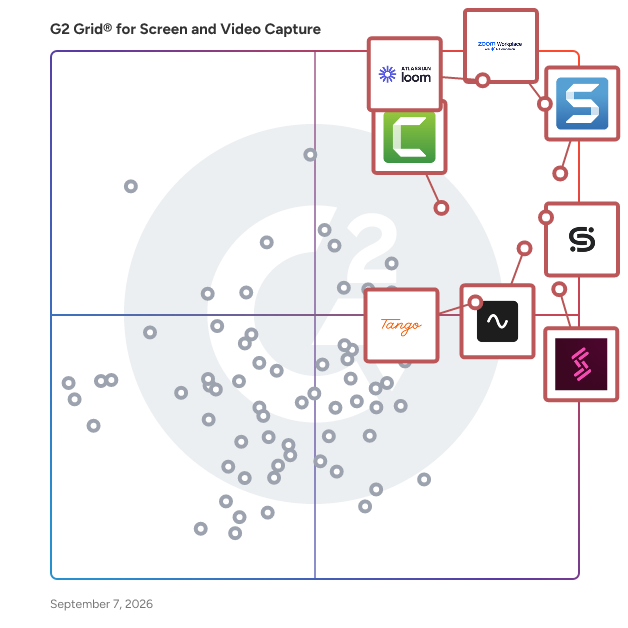
- **Leader:** [Zoom Workplace](https://www.g2.com/products/zoom-workplace/reviews)
- **Highest Performer:** [Supademo](https://www.g2.com/products/supademo/reviews)
- **Easiest to Use:** [Riverside](https://www.g2.com/products/riverside/reviews)
- **Top Trending:** [Storylane](https://www.g2.com/products/storylane/reviews)
- **Best Free Software:** [Snagit](https://www.g2.com/products/snagit/reviews)


---

**Sponsored**

### Vyond

Vyond is an all-in-one AI video platform designed to empower organizations in creating secure, compliant, and engaging business content at scale. With a history spanning over 15 years, Vyond has established itself as a trusted solution for more than 20,000 companies, including 65% of the Fortune 500. Vyond is particularly suited for enterprises looking to enhance their internal communications, training programs, sales enablement, and marketing efforts through high-quality video content. Vyond serves a diverse range of use cases. It is particularly beneficial for companies aiming to streamline onboarding processes, improve training completion rates, and enhance compliance training. By integrating seamlessly with existing tools such as Slack, Learning Management Systems (LMS), and Customer Relationship Management (CRM) systems, Vyond allows employees to create brand-safe content without the need to switch between multiple applications. This integration not only fosters a more efficient workflow but also ensures that video content aligns with organizational branding and compliance standards. Key features of Vyond include AI avatars, AI-assisted scripting, instant translation, and text-to-speech capabilities, which collectively enhance the video creation process. Users can develop custom characters and utilize various animation styles, including animated, photorealistic, mixed-media, and live-action formats, all within a single platform. This versatility allows organizations to cater to different audience preferences and learning styles, making their content more engaging and effective. Additionally, Vyond’s SCORM-compliant LMS integration ensures that training materials can be easily tracked and measured, providing valuable insights into employee engagement and learning outcomes. Vyond stands out in the market by simplifying the technology stack for enterprises while expanding their creative capabilities. The platform’s focus on measurable outcomes—such as faster onboarding, higher training completion, and improved sales enablement—enables organizations to track return on investment (ROI) within their existing systems of record. This emphasis on data-driven results allows businesses to make informed decisions about their video content strategies and optimize their communication efforts. With a commitment to ongoing innovation and customer trust, Vyond is dedicated to evolving its platform to meet the needs of modern enterprises. By bringing next-generation AI capabilities into a compliant and governed environment, Vyond enables organizations to create content more efficiently, communicate more effectively, and reduce their reliance on fragmented solutions. This positions Vyond as a comprehensive tool for any organization looking to leverage video as a key component of their business strategy.


[Visit website](https://www.g2.com/external_clickthroughs/record?secure%5Bad_program%5D=ppc&amp;secure%5Bad_slot%5D=category_product_list&amp;secure%5Bcategory_id%5D=172&amp;secure%5Bdisplayable_resource_id%5D=172&amp;secure%5Bdisplayable_resource_type%5D=Category&amp;secure%5Bmedium%5D=sponsored&amp;secure%5Bplacement_reason%5D=page_category&amp;secure%5Bplacement_resource_ids%5D%5B%5D=172&amp;secure%5Bprioritized%5D=false&amp;secure%5Bproduct_id%5D=7533&amp;secure%5Bresource_id%5D=172&amp;secure%5Bresource_type%5D=Category&amp;secure%5Bsource_type%5D=category_page&amp;secure%5Bsource_url%5D=https%3A%2F%2Fwww.g2.com%2Fcategories%2Fscreen-and-video-capture&amp;secure%5Btoken%5D=2d4cdafe40b60fd5cdfde8d45dfef57025c78e01f5d5854cce4e895159b732b2&amp;secure%5Burl%5D=https%3A%2F%2Fthink.vyond.com%2Fsignup%3Futm_source%3Dg2%26utm_medium%3Dppc%26utm_campaign%3Dfree_trial&amp;secure%5Burl_type%5D=free_trial)

---

## What Are the Top-Rated Screen and Video Capture Software Products in 2026?
### 1. [Zoom Workplace](https://www.g2.com/products/zoom-workplace/reviews)
Goodbye app overload. Hello effortless work. Work can be complicated. Your tools shouldn&#39;t be. Zoom Workplace connects all the ways you collaborate — from meetings to docs to chat and more — with built-in AI and seamless integrations that help teams focus and work flawlessly. Zoom Communications: Unified, Effortless Connection for Modern Work Bring every way your teams communicate—meetings, chat, calls, email, and scheduling—into one seamless experience. With Zoom, collaboration happens faster and more naturally across channels, without switching apps or losing context. From spontaneous chats to scheduled meetings and calls, everything stays connected, searchable, and secure—powered by one intuitive platform built for how modern teams work. Zoom Productivity: Workflows Connected, Work Effortless Transform how work gets done with AI-first collaboration that keeps people, content, and actions in one place. From brainstorming on whiteboards to co-creating in docs, sharing clips, and automating follow-ups, Zoom connects every step of your workflow. With Zoom Hub and integrated video management, knowledge stays organized, accessible, and actionable—so teams can move from idea to outcome without friction. Zoom Spaces: Smarter, Connected Workplaces for Every Team Bring your physical and hybrid environments to life with intelligent, connected spaces. Zoom Spaces unifies meeting rooms, desk reservations, digital signage, and visitor management into one seamless experience—making it simple to collaborate, navigate, and manage the workplace. Whether employees are remote, hybrid, or on-site, Zoom creates a consistent, secure, and flexible environment that keeps teams connected wherever work happens. Zoom Employee Engagement: Connect, Inspire, and Empower Every Employee Foster belonging and alignment with Workvivo by Zoom—a modern employee experience platform that unites communication, culture, and community in one place. From company-wide updates to recognition, feedback, and social engagement, Workvivo gives every employee a voice and a sense of connection. Built right into Zoom Workplace, it helps organizations strengthen culture, boost engagement, and keep teams informed and inspired—no matter where they work.


**Average Rating:** 4.5/5.0
**Total Reviews:** 53,489
**How Do G2 Users Rate Zoom Workplace?**

- **Has the product been a good partner in doing business?:** 9.1/10 (Category avg: 9.2/10)
- **Quality of Support:** 8.7/10 (Category avg: 8.7/10)
- **Ease of Use:** 9.1/10 (Category avg: 9.2/10)
- **Ease of Admin:** 9.0/10 (Category avg: 9.1/10)

**Who Is the Company Behind Zoom Workplace?**

- **Seller:** [Zoom](https://www.g2.com/sellers/zoom-a5000ea1-6d30-4ab4-b591-20723189ac97)
- **Company Website:** https://www.zoom.com
- **Year Founded:** 2011
- **HQ Location:** San Jose, CA
- **Twitter:** @zoom (1,042,714 Twitter followers)
- **LinkedIn® Page:** https://www.linkedin.com/company/2532259/ (13,494 employees on LinkedIn®)

**Who Uses This Product?**
- **Who Uses This:** Owner, Software Engineer
- **Top Industries:** Information Technology and Services, Computer Software
- **Company Size:** 51% Small-Business, 31% Mid-Market


#### What Are Zoom Workplace's Pros and Cons?

**Pros:**

- Ease of Use (4634 reviews)
- Video Conferencing (2761 reviews)
- Features (1641 reviews)
- Meetings (1519 reviews)
- Team Collaboration (1414 reviews)

**Cons:**

- Limited Features (1266 reviews)
- Zoom Issues (1210 reviews)
- Connection Issues (877 reviews)
- Missing Features (803 reviews)
- Audio Issues (747 reviews)


### What Do G2 Reviewers Say About Zoom Workplace?
*AI-generated summary from verified user reviews*

**Pros:**

- Users find Zoom Workplace&#39;s **ease of use** exceptional, with intuitive features easily accessible for seamless collaboration.
- Users value the **easy-to-use video conferencing** features of Zoom Workplace, enhancing collaboration and productivity in a hybrid work environment.
- Users love the **ease of collaboration** in Zoom Workplace, highlighting breakout rooms and seamless screen sharing for meetings.
- Users enjoy the **ease of use for meetings** , seamlessly connecting with colleagues and enhancing collaboration through various features.
- Users value the **seamless team collaboration** enabled by Zoom Workplace’s AI-driven features and excellent communication tools.

**Cons:**

- Users find the **limited features** of Zoom Workplace hinder collaboration, especially lacking built-in tools and efficient notifications.
- Users often experience **Zoom issues** like fatigue and connectivity problems that hinder their overall meeting experience.
- Users face frequent **connection issues** that hinder the user experience, especially on weaker internet connections.
- Users express concerns about **missing features** like chat access after calls and seamless recording sharing.
- Users report frequent **audio problems** during meetings, affecting clarity and collaboration, especially with many participants involved.

#### What Are Recent G2 Reviews of Zoom Workplace?

**"[Zoom Workplace: Seamless All-in-One Hub That Streamlines My Workflow](https://www.g2.com/survey_responses/zoom-workplace-review-13045001)"**

**Rating:** 5.0/5.0 stars
*— Raghav h.*

[Read full review](https://www.g2.com/survey_responses/zoom-workplace-review-13045001)

---

**"[All-in-One Communication Hub with Reliable Meetings and Recordings](https://www.g2.com/survey_responses/zoom-workplace-review-13041207)"**

**Rating:** 5.0/5.0 stars
*— Anjaly T.*

[Read full review](https://www.g2.com/survey_responses/zoom-workplace-review-13041207)

---


#### What Are G2 Users Discussing About Zoom Workplace?

- [Is Zoom Workplace worth it?](https://www.g2.com/discussions/is-zoom-workplace-worth-it) - 30 comments, 39 upvotes
- [What are your tips for using Zoom Workplace effectively?](https://www.g2.com/discussions/what-are-your-tips-for-using-zoom-workplace-effectively) - 10 comments, 12 upvotes
- [What does Zoom do?](https://www.g2.com/discussions/what-does-zoom-do) - 30 comments, 13 upvotes
- [What are the features offered by Zoom?](https://www.g2.com/discussions/what-are-the-features-offered-by-zoom) - 5 comments, 2 upvotes
- [How do you add features in Zoom?](https://www.g2.com/discussions/how-do-you-add-features-in-zoom) - 17 comments, 1 upvote

### 2. [Loom](https://www.g2.com/products/atlassian-loom/reviews)
Loom is video communication that moves work forward. Think of Loom as a tool that transforms how you share and understand ideas. Record your screen and camera bubble, then share your video instantly with a link. Sending a Loom saves time and enhances clarity compared to scheduling live meetings or crafting lengthy emails. You get more focus time (fewer meetings), with the clarity and nuance that comes with live conversation. And when you do need to meet live, Loom AI for meetings automatically records, organizes, and delivers AI-powered recaps, creating a searchable library of knowledge and insights. Key Features: ✔ Free screenshots: capture, edit, &amp; share high-quality screenshots with a link ✔ AI-powered transcriptions and closed captions: available in 50+ distinct languages ✔ Video-to-text: automate documentation, messages, bug reports and more with a single click ✔ Loom AI for meetings- meeting notes, action items, and recap emails ✔ Instant screen and camera recording ✔ Easy editing: trim and stitch, edit like a word doc, annotate, and add overlays to your videos ✔ Viewer insights &amp; engagement tracking ✔ Secure sharing with password protection &amp; domain management Loom is for all kinds of teams, helping everyone from remote collaborators to educators communicate effectively. Whether your team is five or 50,000 strong, millions across 400,000 companies choose Loom to stay connected and share information effortlessly.


**Average Rating:** 4.7/5.0
**Total Reviews:** 2,397
**How Do G2 Users Rate Loom?**

- **Has the product been a good partner in doing business?:** 9.3/10 (Category avg: 9.2/10)
- **Quality of Support:** 8.9/10 (Category avg: 8.7/10)
- **Ease of Use:** 9.3/10 (Category avg: 9.2/10)
- **Ease of Admin:** 9.2/10 (Category avg: 9.1/10)

**Who Is the Company Behind Loom?**

- **Seller:** [Atlassian](https://www.g2.com/sellers/atlassian)
- **Company Website:** https://www.atlassian.com/
- **Year Founded:** 2002
- **HQ Location:** Sydney and San Francisco
- **Twitter:** @Atlassian (106,496 Twitter followers)
- **LinkedIn® Page:** https://www.linkedin.com/company/atlassian (21,081 employees on LinkedIn®)

**Who Uses This Product?**
- **Who Uses This:** Customer Success Manager, Owner
- **Top Industries:** Computer Software, Marketing and Advertising
- **Company Size:** 61% Small-Business, 31% Mid-Market


#### What Are Loom's Pros and Cons?

**Pros:**

- Ease of Use (330 reviews)
- Easy Recording (260 reviews)
- Screen Recording (207 reviews)
- Easy Sharing (192 reviews)
- Video Recording (170 reviews)

**Cons:**

- Recording Issues (147 reviews)
- Limited Features (82 reviews)
- Slow Loading (64 reviews)
- Limited Free Version (61 reviews)
- Slow Performance (56 reviews)


### What Do G2 Reviewers Say About Loom?
*AI-generated summary from verified user reviews*

**Pros:**

- Users value Loom for its **intuitive ease of use** , enhancing communication and simplifying video creation and sharing.
- Users love the **easy recording** feature of Loom, streamlining communication and enhancing clarity in task explanations.
- Users love the **easy screen recording** features of Loom, enabling quick sharing of personalized videos without hassle.
- Users love Loom for its **easy sharing** , enabling seamless video communication and reducing email back-and-forth significantly.
- Users love the **quick and efficient video recording** capabilities of Loom, simplifying communication and enhancing productivity.

**Cons:**

- Users often face **recording issues** with Loom, such as slow start times and confusion about the active screen being recorded.
- Users are frustrated by **limited features** in Loom, including restricted downloads and a short trial period.
- Users experience **slow loading** times with Loom, particularly when uploading longer videos, hindering efficiency during busy periods.
- Users find the **limited free version** restricts recording length and features, impacting content quality and editing options.
- Users experience **slow performance** with Loom, particularly during internet disruptions and lengthy video processing times.

#### What Are Recent G2 Reviews of Loom?

**"[Seamless Video Sharing with Loom](https://www.g2.com/survey_responses/loom-review-12844537)"**

**Rating:** 4.0/5.0 stars
*— Nitin V.*

[Read full review](https://www.g2.com/survey_responses/loom-review-12844537)

---

**"[Quick Screen Recording Makes Explaining Work and Sharing Updates Effortless](https://www.g2.com/survey_responses/loom-review-12917192)"**

**Rating:** 4.0/5.0 stars
*— Abhishan M.*

[Read full review](https://www.g2.com/survey_responses/loom-review-12917192)

---


#### What Are G2 Users Discussing About Loom?

- [How can I best use Loom&#39;s video recording features to create engaging content for team communication?](https://www.g2.com/discussions/how-can-i-best-use-loom-s-video-recording-features-to-create-engaging-content-for-team-communication) - 2 comments
- [Is Valant ONC certified?](https://www.g2.com/discussions/loom-is-valant-onc-certified)
- [What is Behavioral Health EHR?](https://www.g2.com/discussions/loom-what-is-behavioral-health-ehr)
- [What is Loom software used for?](https://www.g2.com/discussions/what-is-loom-software-used-for) - 4 comments, 1 upvote
- [What are the features of loom?](https://www.g2.com/discussions/what-are-the-features-of-loom)

### 3. [Snagit](https://www.g2.com/products/snagit/reviews)
TechSmith Snagit is a powerful screen capture and recording tool that makes it easier than ever to collect and share information. With intuitive editing features and access to a library of templates, anyone can transform simple captures into professional-quality images, GIFs, and videos.


**Average Rating:** 4.7/5.0
**Total Reviews:** 5,859
**How Do G2 Users Rate Snagit?**

- **Has the product been a good partner in doing business?:** 9.4/10 (Category avg: 9.2/10)
- **Quality of Support:** 9.1/10 (Category avg: 8.7/10)
- **Ease of Use:** 9.3/10 (Category avg: 9.2/10)
- **Ease of Admin:** 9.3/10 (Category avg: 9.1/10)

**Who Is the Company Behind Snagit?**

- **Seller:** [TechSmith](https://www.g2.com/sellers/techsmith)
- **Company Website:** https://www.techsmith.com
- **Year Founded:** 1987
- **HQ Location:** Okemos, MI
- **Twitter:** @TechSmith (29,513 Twitter followers)
- **LinkedIn® Page:** https://www.linkedin.com/company/16448/ (350 employees on LinkedIn®)

**Who Uses This Product?**
- **Who Uses This:** Owner, President
- **Top Industries:** Computer Software, Information Technology and Services
- **Company Size:** 37% Small-Business, 32% Mid-Market


#### What Are Snagit's Pros and Cons?

**Pros:**

- Ease of Use (253 reviews)
- Screenshot Functionality (167 reviews)
- Easy Editing (148 reviews)
- Features (138 reviews)
- Screen Recording (130 reviews)

**Cons:**

- Technical Issues (42 reviews)
- Slow Performance (39 reviews)
- Screenshot Issues (38 reviews)
- Expensive (37 reviews)
- Recording Issues (30 reviews)


### What Do G2 Reviewers Say About Snagit?
*AI-generated summary from verified user reviews*

**Pros:**

- Users appreciate the **simple and easy-to-use interface** of Snagit, making communication and documentation effortless.
- Users find the **screenshot functionality** of Snagit essential for creating impactful emails and presentations.
- Users love Snagit for its **easy editing capabilities** , making communication and documentation effortless and efficient.
- Users appreciate the **streamlined communication and rich features** of Snagit, enhancing collaboration and productivity effortlessly.
- Users love the **easy screen recording** with Snagit, enabling fast, intuitive captures and effective communication.

**Cons:**

- Users report frequent **technical issues** with Snagit, including crashes and problems with the startup widget.
- Users find Snagit has **slow performance** , often experiencing delays in processing images and videos, impacting usability.
- Users report **screenshot issues** , including glitches and problems with scrolling capture that hinder usability and efficiency.
- Users find Snagit&#39;s pricing to be **expensive** , especially with its subscription model feeling like a one-time purchase.
- Users experience **recording issues** with Snagit, including glitches, unwanted captures, and setup complexities for multiple screens.

#### What Are Recent G2 Reviews of Snagit?

**"[Easy, Fast, and Great Value—Snagit Is a Daily Essential](https://www.g2.com/survey_responses/snagit-review-12950040)"**

**Rating:** 5.0/5.0 stars
*— Hillary R.*

[Read full review](https://www.g2.com/survey_responses/snagit-review-12950040)

---

**"[My &quot;desert island&quot; software](https://www.g2.com/survey_responses/snagit-review-5234493)"**

**Rating:** 5.0/5.0 stars
*— Dana T.*

[Read full review](https://www.g2.com/survey_responses/snagit-review-5234493)

---


#### What Are G2 Users Discussing About Snagit?

- [How is Snagit being used by professionals to improve communication through visual content?](https://www.g2.com/discussions/how-is-snagit-being-used-by-professionals-to-improve-communication-through-visual-content) - 4 comments, 1 upvote
- [How is Snagit being used to enhance operational efficiency and user experience in its specific field?](https://www.g2.com/discussions/how-is-snagit-being-used-to-enhance-operational-efficiency-and-user-experience-in-its-specific-field) - 3 comments
- [What is Snagit used for?](https://www.g2.com/discussions/what-is-snagit-used-for) - 3 comments
- [How good is Snagit?](https://www.g2.com/discussions/how-good-is-snagit) - 12 comments, 1 upvote
- [What is the difference between Snagit and Snagit Editor?](https://www.g2.com/discussions/what-is-the-difference-between-snagit-and-snagit-editor) - 5 comments, 1 upvote

### 4. [Scribe](https://www.g2.com/products/scribe/reviews)
See the work. Scale the best. Improve the rest. Scribe’s Workflow AI platform helps organizations ensure work gets done right, and shows how work can be done better. Trusted by teams at New York Life, T-Mobile, LinkedIn, HubSpot, and Northern Trust, Scribe is used by 94% of the Fortune 500 to work smarter, faster, and deliver exceptional results. Scribe Capture puts the best ways of working at everyone’s fingertips. It automatically creates and shares step-by-step guides, complete with text and screenshots — no more tedious screenshotting and manual documentation. ✅ Document your processes 12x faster ✅ Find answers to your questions 63% faster ✅ 98% of teams make fewer mistakes Scribe Optimize helps your organization make work even better. It continuously mines workflows to identify the biggest opportunities to improve and drive transformation. Scribe empowers your whole organization — from new hires to your most experienced team members — to do their best work. Every single day. ✨ Loved by over 5 million users ✨ Trusted by 600,000 organizations ✨ Forbes Next Billion-Dollar Startup &amp; LinkedIn Top Startup Learn more at scribe.com


**Average Rating:** 4.8/5.0
**Total Reviews:** 868
**How Do G2 Users Rate Scribe?**

- **Has the product been a good partner in doing business?:** 9.4/10 (Category avg: 9.2/10)
- **Quality of Support:** 9.3/10 (Category avg: 8.7/10)
- **Ease of Use:** 9.4/10 (Category avg: 9.2/10)
- **Ease of Admin:** 9.4/10 (Category avg: 9.1/10)

**Who Is the Company Behind Scribe?**

- **Seller:** [Scribe](https://www.g2.com/sellers/scribe-d2b56002-72d7-4b19-8ae1-eaba5e791638)
- **Company Website:** https://scribe.com
- **Year Founded:** 2019
- **HQ Location:** San Francisco, US
- **Twitter:** @ScribeHow (7,248 Twitter followers)
- **LinkedIn® Page:** https://www.linkedin.com/company/scribehow/ (336 employees on LinkedIn®)

**Who Uses This Product?**
- **Who Uses This:** Operations Manager, Project Manager
- **Top Industries:** Computer Software, Information Technology and Services
- **Company Size:** 48% Small-Business, 37% Mid-Market


#### What Are Scribe's Pros and Cons?

**Pros:**

- Ease of Use (358 reviews)
- Time-saving (179 reviews)
- Easy Editing (175 reviews)
- Time-Saving (158 reviews)
- Easy Creation (156 reviews)

**Cons:**

- Editing Difficulties (69 reviews)
- Screenshot Issues (43 reviews)
- Limited Features (38 reviews)
- Difficulty (27 reviews)
- Limited Customization (27 reviews)


### What Do G2 Reviewers Say About Scribe?
*AI-generated summary from verified user reviews*

**Pros:**

- Users love the **ease of use** of Scribe, effortlessly creating and updating instructional content quickly and efficiently.
- Users value the **time-saving automation** of Scribe, enabling fast and efficient documentation creation without manual effort.
- Users love the **easy editing tools** in Scribe, enabling efficient SOP creation and client training.
- Users love Scribe for its **time-saving abilities** , allowing for quick and efficient creation of documentation and guides.
- Users love how Scribe offers **easy creation** of step-by-step documentation, saving time and simplifying the process.

**Cons:**

- Users face **editing difficulties** with Scribe, as changing or adding steps can be cumbersome at times.
- Users experience issues with **incomplete screenshot captures** , impacting functionality and flexibility during usage.
- Users find Scribe&#39;s **limited features** frustrating, particularly its cumbersome sharing and file upload processes.
- Users express frustration over **limited customization** , wishing for more options to enhance their experience with Scribe.
- Users experience **slow performance** with Scribe, including laggy loading times and occasional crashes in Chrome.

#### What Are Recent G2 Reviews of Scribe?

**"[Detailed Screenshots, User-Friendly, and a Huge Upgrade from Manual Documentation](https://www.g2.com/survey_responses/scribe-review-12968483)"**

**Rating:** 5.0/5.0 stars
*— Angie F.*

[Read full review](https://www.g2.com/survey_responses/scribe-review-12968483)

---

**"[Effortless Walkthroughs and Smarter Onboarding with AI-Powered Guides](https://www.g2.com/survey_responses/scribe-review-12925105)"**

**Rating:** 5.0/5.0 stars
*— Hannah D.*

[Read full review](https://www.g2.com/survey_responses/scribe-review-12925105)

---


### 5. [Storylane](https://www.g2.com/products/storylane/reviews)
Killer demos for every stage of buying. Storylane is the #1 rated demo automation platform for B2B marketing, sales, and presales teams. Trusted by 5,000+ companies, Storylane gives every team the demos they need and the AI sales agent to convert them. 1/ Demo Suite: Demos built for every channel, every conversation Build, personalize, and share interactive product demos across every stage of the buying journey. Interactive Demos: Create product demos in minutes using screenshot, video, or HTML capture. Personalize with one-click editing, add AI-generated voiceovers and avatars, and translate into 25+ languages. Embed on your website, attach to emails, share as leave-behinds, present at conferences, and more. Sandbox Demos: Stable, responsive product environments for live calls and POCs. No engineering, staging setup, or data injection needed. Hubs: One destination for everything your buyers need: interactive demos, product videos, and sales collateral, complete with choose-your-own-interest screens, engagement tracking, and champion identification. 2/ RepX Chat: Turn your website into your best sales rep Conversational sales agents trained on your product documentation and sales resources. RepX handles discovery, qualifies prospects, and hands off sales-ready accounts to your team 24/7. AI video &amp; voice: Conversational agents that engage visitors around the clock in the kind of interaction people actually stay for. Discovery questions: Asks the questions your top SDRs would (pain points, timing, budget, decision makers) and shares context with your team. Qualification workflows: Define the criteria; RepX handles the routing every time, without a rep in the room. Storylane is built for every team in your GTM engine 1/ Marketing: Convert website visitors into qualified leads, improve pipeline from inbound traffic, generate demand at events 2/ Sales: Share demo leave-behinds to accelerate deals, multi-thread deals with personalized content, run live calls without technical risk 3/ Presales: Scale demo output without engineering lift, personalize environments at scale 4/ CX &amp; Product: Onboard customers faster, drive feature adoption, reduce support load with interactive walkthroughs Why teams choose Storylane: Loved for ease-of-use, trusted for rapid innovation, and proven across the entire GTM engine. #1 rated on G2 in demo automation with a 99/100 satisfaction score.


**Average Rating:** 4.7/5.0
**Total Reviews:** 1,500
**How Do G2 Users Rate Storylane?**

- **Has the product been a good partner in doing business?:** 9.4/10 (Category avg: 9.2/10)
- **Quality of Support:** 9.3/10 (Category avg: 8.7/10)
- **Ease of Use:** 9.2/10 (Category avg: 9.2/10)
- **Ease of Admin:** 9.3/10 (Category avg: 9.1/10)

**Who Is the Company Behind Storylane?**

- **Seller:** [Storylane](https://www.g2.com/sellers/storylane)
- **Company Website:** https://www.storylane.io
- **Year Founded:** 2021
- **HQ Location:** San Francisco, US
- **Twitter:** @storylaneio (230 Twitter followers)
- **LinkedIn® Page:** https://www.linkedin.com/company/storylane-io/ (76 employees on LinkedIn®)

**Who Uses This Product?**
- **Who Uses This:** Marketing Manager, Product Marketing Manager
- **Top Industries:** Computer Software, Information Technology and Services
- **Company Size:** 48% Small-Business, 42% Mid-Market


#### What Are Storylane's Pros and Cons?

**Pros:**

- Ease of Use (558 reviews)
- Demos (289 reviews)
- Easy Creation (262 reviews)
- Intuitive (236 reviews)
- Ease of Creation (222 reviews)

**Cons:**

- Demos Management (96 reviews)
- Demo Issues (82 reviews)
- Limited Options (69 reviews)
- Editing Difficulties (68 reviews)
- Limited Customization (65 reviews)


### What Do G2 Reviewers Say About Storylane?
*AI-generated summary from verified user reviews*

**Pros:**

- Users find Storylane exceptionally **easy to use and integrate** , making the creation of guides and training content effortless.
- Users appreciate the **user-friendly experience** of Storylane, allowing seamless integration and easy demonstration of products.
- Users love the **easy creation** of platform tours, enabling fast and straightforward tutorial development without developer involvement.
- Users praise Storylane for its **intuitive interface** , enabling quick learning and professional demo creation in minutes.
- Users love the **ease of creation** with Storylane, enabling quick and effective demo building without technical hassles.

**Cons:**

- Users find the **cost of multiple demos** to be a barrier, as it becomes expensive with extensive usage.
- Users note **demo issues** with mobile optimization and HTML recordings affecting the quality and convenience of their experiences.
- Users find the **limited options** in Storylane restrict flexibility and complicate minor adjustments during presentations.
- Users face **editing difficulties** due to longer loading times and challenges with auto segmentation adjustments.
- Users find the **limited customization options** in Storylane restrict their design freedom and advanced editing capabilities.

#### What Are Recent G2 Reviews of Storylane?

**"[An essential tool for interactive product marketing](https://www.g2.com/survey_responses/storylane-review-13029793)"**

**Rating:** 4.0/5.0 stars
*— Maciek J.*

[Read full review](https://www.g2.com/survey_responses/storylane-review-13029793)

---

**"[Intuitive, Clean UI with Solid Performance and Helpful AI Features](https://www.g2.com/survey_responses/storylane-review-13022553)"**

**Rating:** 5.0/5.0 stars
*— Giacomo P.*

[Read full review](https://www.g2.com/survey_responses/storylane-review-13022553)

---


#### What Are G2 Users Discussing About Storylane?

- [What is Storylane used for?](https://www.g2.com/discussions/what-is-storylane-used-for) - 1 comment

### 6. [Riverside](https://www.g2.com/products/riverside/reviews)
Riverside (formerly Riverside.fm) is the all-in-one platform for recording, live streaming, editing, repurposing, and publishing studio-quality videos and podcasts. Creators and businesses use it to produce broadcast-quality content without the production maze of multiple tools, expensive studios, or technical expertise. Record up to 4K video and uncompressed audio locally on every participant’s device, so quality holds up even on bad internet. Edit by editing the transcript. Turn long recordings into clips, captions, show notes, and translations with AI. Webinars scale to 10,000 attendees. Trusted by independent podcasters like Tim Ferriss, Mel Robbins, and Guy Raz, and by brands including Spotify, Marvel, HubSpot, Microsoft, and Intuit. What are Riverside&#39;s core benefits? - All-in-one: Record, live stream, edit, repurpose, host, and publish from one platform. Studio-quality results, no studio needed: Up to 4K video and uncompressed audio, recorded locally so quality doesn’t depend on the internet connection. - AI that does the heavy lifting: Edit by chatting or by editing text, clip automatically, enhance audio, translate, and generate show notes in seconds. - Speed without compromising quality: Cut hours of post-production into minutes. - Maximum reach from every recording: Built-in repurposing into clips, captions, transcripts, translations, and social formats. - No learning curve: Easy enough for first-timers, deep enough for pros. Guests join from a browser link. What are Riverside&#39;s main features? - Record crystal-clear audio and video regardless of internet connection - Edit content with intuitive, time-saving tools leveraging AI - Repurpose content automatically for multiple channels - Live stream to any social platforms (YouTube, Facebook, Instagram, Twitch, and more) - Transcribe audio and video files in 100+ languages with 99% accuracy - Host and distribute your podcast to major directories like Spotify, Apple, and YouTube. What is Riverside best used for? For creators: - Podcast recording, editing, hosting, and publishing - Remote video interviews with guests anywhere in the world - YouTube videos and long-form content - Live shows and live podcasts - Solo recordings, screen capture, and tutorials For businesses and teams: - Marketing video: testimonials, case studies, social content, brand podcasts - Webinars and virtual events up to 10,000 attendees - Internal communications: town halls, executive updates, all-hands - Learning and development: training, onboarding, internal knowledge - Sales: demos, prospect calls, customer stories - Product: demos, recorded user calls, walkthroughs - Producers and agencies: multi-guest remote production with full producer control What does Riverside offer for businesses? Full production control: - Producer Mode: Run the session without appearing in the recording. Control guests’ mics, cameras, layouts, and teleprompters. - Studio branding: Lock fonts, colors, logos, and overlays so content stays on-brand at scale. Team collaboration: - Workspaces, roles, and permissions: Organize teams, assign access, share files inside/outside the company. - In-editor comments: Feedback without Slack threads or screen recordings. - Riverside API Scale and speed: - Unlimited recording, storage, and exports. - Simultaneous team editing. Enterprise-grade security and support: - End-to-end encryption. SSO available. - 24/7 live support - Dedicated Customer Success Manager. - Producer on demand


**Average Rating:** 4.8/5.0
**Total Reviews:** 1,729
**How Do G2 Users Rate Riverside?**

- **Has the product been a good partner in doing business?:** 9.5/10 (Category avg: 9.2/10)
- **Quality of Support:** 9.4/10 (Category avg: 8.7/10)
- **Ease of Use:** 9.4/10 (Category avg: 9.2/10)
- **Ease of Admin:** 9.5/10 (Category avg: 9.1/10)

**Who Is the Company Behind Riverside?**

- **Seller:** [Riverside](https://www.g2.com/sellers/riverside)
- **Company Website:** https://riverside.com/
- **Year Founded:** 2020
- **HQ Location:** Palo Alto, California
- **Twitter:** @RiversidedotFM (10,509 Twitter followers)
- **LinkedIn® Page:** https://www.linkedin.com/company/riverside-fm/ (450 employees on LinkedIn®)

**Who Uses This Product?**
- **Who Uses This:** Founder, Owner
- **Top Industries:** Entertainment, Media Production
- **Company Size:** 89% Small-Business, 10% Mid-Market


#### What Are Riverside's Pros and Cons?

**Pros:**

- Ease of Use (1084 reviews)
- Quality (781 reviews)
- High Quality (729 reviews)
- Recording (671 reviews)
- Video Quality (657 reviews)

**Cons:**

- Recording Issues (248 reviews)
- Missing Features (216 reviews)
- Feature Deficiency (212 reviews)
- Audio Issues (155 reviews)
- Editing Issues (142 reviews)


### What Do G2 Reviewers Say About Riverside?
*AI-generated summary from verified user reviews*

**Pros:**

- Users love the **ease of use** of Riverside, simplifying remote podcast recordings and enhancing content focus.
- Users praise Riverside for its **high-quality audio and video** , enhancing the podcasting experience with seamless remote recordings.
- Users value the **high quality** of Riverside, enjoying its efficient, professional recording capabilities and excellent support resources.
- Users appreciate the **efficient and professional recording platform** of Riverside, highlighting its intuitive design and excellent support.
- Users admire the **high video quality** of Riverside, enabling them to create professional-looking recordings effortlessly.

**Cons:**

- Users face **recording issues** with Riverside, including audio quality problems and difficulties with aspect ratio and transcription accuracy.
- Users miss **essential features** like green screen capabilities and collaborative tools, limiting their editing and recording experience.
- Users desire **native green screen capabilities** and Zapier integration in Riverside for improved production flexibility and efficiency.
- Users report **audio issues** , including missing tracks and unwanted noise, impacting overall recording quality and experience.
- Users experience **editing issues** with Riverside, finding disconnection between recording and post-production tools frustrating.

#### What Are Recent G2 Reviews of Riverside?

**"[Easy to Use and Makes Podcast Production and Editing a Breeze](https://www.g2.com/survey_responses/riverside-review-12976238)"**

**Rating:** 4.5/5.0 stars
*— David G.*

[Read full review](https://www.g2.com/survey_responses/riverside-review-12976238)

---

**"[Effortless Recording and Amazing Text-Based Editing](https://www.g2.com/survey_responses/riverside-review-13034561)"**

**Rating:** 5.0/5.0 stars
*— Gabriel G.*

[Read full review](https://www.g2.com/survey_responses/riverside-review-13034561)

---


#### What Are G2 Users Discussing About Riverside?

- [How do I record on Riverside FM?](https://www.g2.com/discussions/how-do-i-record-on-riverside-fm)
- [Can you screen share on Riverside FM?](https://www.g2.com/discussions/can-you-screen-share-on-riverside-fm) - 2 comments
- [What is Riverside FM?](https://www.g2.com/discussions/what-is-riverside-fm) - 2 comments
- [How does Riverside FM work?](https://www.g2.com/discussions/how-does-riverside-fm-work) - 1 comment

### 7. [Camtasia](https://www.g2.com/products/camtasia/reviews)
The Camtasia Product Suite is a powerful, AI-powered ecosystem for video creation and screen recording. Built to deliver professional results fast, Camtasia makes it easy to produce high-quality content—even if you’ve never edited a video before. Our advanced AI features—including Camtasia Rev, script generation, text-to-speech, and automatic translations—streamline your entire workflow. Plus, with our new Zoom integration, you can instantly turn meeting recordings into reusable training content. Pull Zoom cloud recordings directly into your timeline, edit screen and camera feeds as independent layers, and apply dynamic layouts so your camera never blocks critical onscreen content. Whether you choose our Free, Essentials, Plus, or Pro plan, the Camtasia Editor is easy enough for beginners yet versatile enough to be your video solution for life. Explore our plans today and accelerate your production journey.


**Average Rating:** 4.6/5.0
**Total Reviews:** 1,702
**How Do G2 Users Rate Camtasia?**

- **Has the product been a good partner in doing business?:** 9.0/10 (Category avg: 9.2/10)
- **Quality of Support:** 8.8/10 (Category avg: 8.7/10)
- **Ease of Use:** 9.0/10 (Category avg: 9.2/10)
- **Ease of Admin:** 9.0/10 (Category avg: 9.1/10)

**Who Is the Company Behind Camtasia?**

- **Seller:** [TechSmith](https://www.g2.com/sellers/techsmith)
- **Company Website:** https://www.techsmith.com
- **Year Founded:** 1987
- **HQ Location:** Okemos, MI
- **Twitter:** @TechSmith (29,513 Twitter followers)
- **LinkedIn® Page:** https://www.linkedin.com/company/16448/ (350 employees on LinkedIn®)

**Who Uses This Product?**
- **Who Uses This:** Owner, Founder
- **Top Industries:** Computer Software, Information Technology and Services
- **Company Size:** 53% Small-Business, 27% Mid-Market


#### What Are Camtasia's Pros and Cons?

**Pros:**

- Ease of Use (194 reviews)
- Easy Editing (120 reviews)
- Video Editing (117 reviews)
- Features (104 reviews)
- Easy Creation (93 reviews)

**Cons:**

- Learning Curve (37 reviews)
- Slow Rendering (36 reviews)
- Expensive (31 reviews)
- Limited Features (30 reviews)
- Feature Limitations (28 reviews)


### What Do G2 Reviewers Say About Camtasia?
*AI-generated summary from verified user reviews*

**Pros:**

- Users praise Camtasia for its **ease of use** , allowing for efficient and professional video editing and recording.
- Users admire the **easy editing capabilities** of Camtasia, streamlining video creation and enhancing overall productivity.
- Users praise Camtasia for its **intuitive and user-friendly video editing** capabilities, allowing quick learning and efficient content creation.
- Users highlight the **intuitive features** of Camtasia, making video editing efficient and accessible for beginners.
- Users love the **easy creation** process of Camtasia, enabling efficient video recording and editing with minimal effort.

**Cons:**

- Users experience a **steep learning curve** with Camtasia, especially when mastering advanced features and tools.
- Users experience **slow rendering** with Camtasia, especially for longer videos, affecting their editing efficiency.
- Users find Camtasia&#39;s subscription model **too expensive** , especially those preferring a more affordable, perpetual license option.
- Users find Camtasia&#39;s tools **limited** , and resource consumption affects overall performance and editing capabilities.
- Users note **feature limitations** in Camtasia, wishing for better background removal and advanced editing tools.

#### What Are Recent G2 Reviews of Camtasia?

**"[Intuitive, Medium-Weight Editor That Delivers Professional Results](https://www.g2.com/survey_responses/camtasia-review-12891940)"**

**Rating:** 4.5/5.0 stars
*— Brian M.*

[Read full review](https://www.g2.com/survey_responses/camtasia-review-12891940)

---

**"[Easy and Reliable Tool for Creating Professional Training Videos](https://www.g2.com/survey_responses/camtasia-review-12251107)"**

**Rating:** 5.0/5.0 stars
*— Vivek G.*

[Read full review](https://www.g2.com/survey_responses/camtasia-review-12251107)

---


#### What Are G2 Users Discussing About Camtasia?

- [What is Camtasia used for?](https://www.g2.com/discussions/what-is-camtasia-used-for) - 4 comments
- [What is Audiate used for?](https://www.g2.com/discussions/what-is-audiate-used-for) - 1 comment
- [What does Camtasia cost?](https://www.g2.com/discussions/what-does-camtasia-cost) - 3 comments
- [Is Camtasia easy to use?](https://www.g2.com/discussions/is-camtasia-easy-to-use) - 6 comments, 1 upvote
- [Can you get Camtasia for free?](https://www.g2.com/discussions/can-you-get-camtasia-for-free) - 5 comments

### 8. [Tango](https://www.g2.com/products/tango-tango/reviews)
Tango is a platform for workflow documentation and digital adoption that makes knowledge sharing simple and reliable. By clicking through a process once, anyone can generate a polished, step-by-step guide in seconds, complete with screenshots and instructions. Each guide can also be turned into an interactive, on-screen walkthrough. Since its founding, Tango has powered the creation of over 3 million process guides, helping organizations reduce errors, accelerate onboarding, and standardize SOPs across teams. Today, Tango is trusted by global enterprises including Salesforce, Gusto, and Rockwell Automation. Our intuitive platform empowers IT, Operations, and Enablement teams to document workflows in seconds and ensures every teammate can follow them with in-app guidance. The outcome: processes that are consistently followed, instantly accessible, and always up to date.


**Average Rating:** 4.7/5.0
**Total Reviews:** 503
**How Do G2 Users Rate Tango?**

- **Has the product been a good partner in doing business?:** 9.6/10 (Category avg: 9.2/10)
- **Quality of Support:** 9.2/10 (Category avg: 8.7/10)
- **Ease of Use:** 9.5/10 (Category avg: 9.2/10)
- **Ease of Admin:** 9.4/10 (Category avg: 9.1/10)

**Who Is the Company Behind Tango?**

- **Seller:** [Tango](https://www.g2.com/sellers/tango-10f84662-d611-43f9-b2a7-e475aaea559c)
- **Company Website:** https://www.tango.ai/
- **Year Founded:** 2020
- **HQ Location:** Los Angeles, CA
- **LinkedIn® Page:** https://www.linkedin.com/company/trytango/ (70 employees on LinkedIn®)

**Who Uses This Product?**
- **Who Uses This:** Consultant, Customer Success Manager
- **Top Industries:** Computer Software, Information Technology and Services
- **Company Size:** 52% Small-Business, 32% Mid-Market


#### What Are Tango's Pros and Cons?

**Pros:**

- Ease of Use (203 reviews)
- Time-saving (115 reviews)
- Easy Creation (84 reviews)
- Intuitive (76 reviews)
- Setup Ease (73 reviews)

**Cons:**

- Limitations (34 reviews)
- Limited Features (28 reviews)
- Editing Difficulties (26 reviews)
- Limited Functionality (26 reviews)
- Limited Customization (24 reviews)


### What Do G2 Reviewers Say About Tango?
*AI-generated summary from verified user reviews*

**Pros:**

- Users love the **ease of use** of Tango, enabling effortless sharing and editing for team collaboration.
- Users cherish the **time-saving features** of Tango, allowing focus on meaningful tasks without logistical concerns.
- Users love the **easy creation** features of Tango, simplifying tutorials and sharing workflows effortlessly.
- Users love Tango for its **intuitive design** , effortlessly streamlining process documentation and saving valuable time.
- Users praise Tango&#39;s **setup ease** , highlighting simple and clear instructions for quick reward redemption.

**Cons:**

- Users find **editing and screenshot options limited** , hindering document work and complicating the guidance experience.
- Users note the **limited features** of Tango, particularly in interactive guidance and video capture, hindering their documentation process.
- Users face **editing difficulties** with Tango, needing more flexibility and customization in the workflow process.
- Users express frustration with Tango&#39;s **limited functionality** , especially regarding desktop recording and advanced features on free plans.
- Users are frustrated by the **limited customization options** , expressing a desire for more flexibility in the final product.

#### What Are Recent G2 Reviews of Tango?

**"[Must-Have: Simple Guides That Save Teams Time](https://www.g2.com/survey_responses/tango-review-12618681)"**

**Rating:** 4.5/5.0 stars
*— Daniel R.*

[Read full review](https://www.g2.com/survey_responses/tango-review-12618681)

---

**"[Tango Makes Process Training Effortless](https://www.g2.com/survey_responses/tango-review-12665989)"**

**Rating:** 5.0/5.0 stars
*— Chayse C.*

[Read full review](https://www.g2.com/survey_responses/tango-review-12665989)

---


### 9. [Vimeo](https://www.g2.com/products/vimeo/reviews)
Vimeo is the world&#39;s most innovative video experience platform. We enable anyone to create high-quality video experiences to better connect and bring ideas to life. We proudly serve our community of millions of users – from creative storytellers to globally distributed teams at the world&#39;s largest companies – whose videos receive billions of views each month.


**Average Rating:** 4.3/5.0
**Total Reviews:** 699
**How Do G2 Users Rate Vimeo?**

- **Has the product been a good partner in doing business?:** 8.5/10 (Category avg: 9.2/10)
- **Quality of Support:** 8.4/10 (Category avg: 8.7/10)
- **Ease of Use:** 9.0/10 (Category avg: 9.2/10)
- **Ease of Admin:** 8.6/10 (Category avg: 9.1/10)

**Who Is the Company Behind Vimeo?**

- **Seller:** [Vimeo](https://www.g2.com/sellers/vimeo)
- **Company Website:** https://vimeo.com
- **Year Founded:** 2004
- **HQ Location:** New York
- **Twitter:** @Vimeo (205,088 Twitter followers)
- **LinkedIn® Page:** https://www.linkedin.com/company/167813/ (934 employees on LinkedIn®)

**Who Uses This Product?**
- **Who Uses This:** Owner, Marketing Manager
- **Top Industries:** Marketing and Advertising, Computer Software
- **Company Size:** 64% Small-Business, 27% Mid-Market


#### What Are Vimeo's Pros and Cons?

**Pros:**

- Ease of Use (106 reviews)
- Video Quality (63 reviews)
- Features (58 reviews)
- Video Management (57 reviews)
- Quality (54 reviews)

**Cons:**

- Expensive (43 reviews)
- Limited Features (28 reviews)
- Subscription Cost (26 reviews)
- Limited Free Version (18 reviews)
- Limited Customization (17 reviews)


### What Do G2 Reviewers Say About Vimeo?
*AI-generated summary from verified user reviews*

**Pros:**

- Users love the **ease of use** of Vimeo, finding it intuitive and accessible for embedding and training others.
- Users value the **high video quality** on Vimeo, enhancing the overall viewing and professional experience.
- Users value the **diverse tools and features** of Vimeo, enhancing content presentation, engagement tracking, and collaboration.
- Users value the **comprehensive video management tools** provided by Vimeo, enhancing privacy and engagement tracking for content.
- Users value the **high-quality playback and advanced tools** offered by Vimeo, enhancing their viewing and content presentation experience.

**Cons:**

- Users find Vimeo to be **expensive** , especially with limited customer support and high costs for advanced features.
- Users are frustrated by the **limited features** of Vimeo, particularly regarding social options and monetization restrictions.
- Users find the **subscription costs prohibitively high** , making it difficult for average individuals to access Vimeo&#39;s features.
- Users find the **limited free version** of Vimeo restrictive, hindering serious video uploading without a paid plan.
- Users find Vimeo&#39;s **limited customization** options frustrating, especially regarding email branding and niche content offerings.

#### What Are Recent G2 Reviews of Vimeo?

**"[Reliable Video Hosting and Website Embedding with Vimeo](https://www.g2.com/survey_responses/vimeo-review-5026186)"**

**Rating:** 5.0/5.0 stars
*— Tom P.*

[Read full review](https://www.g2.com/survey_responses/vimeo-review-5026186)

---

**"[Vimeo stocks](https://www.g2.com/survey_responses/vimeo-review-9098885)"**

**Rating:** 5.0/5.0 stars
*— SAIKRISHNA M.*

[Read full review](https://www.g2.com/survey_responses/vimeo-review-9098885)

---


#### What Are G2 Users Discussing About Vimeo?

- [What is Vimeo used for?](https://www.g2.com/discussions/vimeo-what-is-vimeo-used-for) - 1 comment
- [What is Vimeo Livestream used for?](https://www.g2.com/discussions/what-is-vimeo-livestream-used-for) - 1 comment
- [What is Vimeo Record used for?](https://www.g2.com/discussions/what-is-vimeo-record-used-for) - 2 comments
- [Can you live stream from Vimeo?](https://www.g2.com/discussions/can-you-live-stream-from-vimeo) - 1 comment
- [Is Livestream Studio free?](https://www.g2.com/discussions/is-livestream-studio-free)

### 10. [Claap](https://www.g2.com/products/claap/reviews)
Claap records every sales conversation and automatically structures it into rich, labeled data - speakers, objections, pain points, next steps, and more. That structured context becomes the fuel for AI agents to take over the rest: updating your CRM, drafting follow-up emails and sales decks, surfacing coaching insights, and triggering workflows across your stack. Claap delivers agent-ready conversation intelligence: pre-labeled, structured for retrieval, and open to any AI agent via MCP (Model Context Protocol). Video calls, phone calls, all captured in one platform without bots or friction. On average, sales reps save 30 minutes after each meeting with workflow automations, and revenue leaders increase their win rate up to 30% with deal insights and AI-assisted coaching. Claap is part of the lemlist group, and trusted by 1,000+ companies including Revolut, Qonto, 360Learning, Figures, and OpenClassrooms.


**Average Rating:** 4.6/5.0
**Total Reviews:** 416
**How Do G2 Users Rate Claap?**

- **Has the product been a good partner in doing business?:** 9.0/10 (Category avg: 9.2/10)
- **Quality of Support:** 9.1/10 (Category avg: 8.7/10)
- **Ease of Use:** 9.4/10 (Category avg: 9.2/10)
- **Ease of Admin:** 8.9/10 (Category avg: 9.1/10)

**Who Is the Company Behind Claap?**

- **Seller:** [Claap](https://www.g2.com/sellers/claap)
- **Year Founded:** 2021
- **HQ Location:** Hempstead, New York
- **Twitter:** @claap_io (335 Twitter followers)
- **LinkedIn® Page:** https://www.linkedin.com/company/claap-io/ (52 employees on LinkedIn®)

**Who Uses This Product?**
- **Who Uses This:** Software Engineer, Manager
- **Top Industries:** Computer Software, Information Technology and Services
- **Company Size:** 46% Small-Business, 39% Mid-Market


#### What Are Claap's Pros and Cons?

**Pros:**

- Ease of Use (179 reviews)
- Time-saving (157 reviews)
- Easy Recording (128 reviews)
- Helpful (125 reviews)
- Efficiency (121 reviews)

**Cons:**

- Slow Performance (55 reviews)
- Slow Loading (54 reviews)
- Recording Limitations (51 reviews)
- Recording Issues (48 reviews)
- Delays (47 reviews)


### What Do G2 Reviewers Say About Claap?
*AI-generated summary from verified user reviews*

**Pros:**

- Users find Claap&#39;s **ease of use** remarkable, allowing seamless recording and sharing without any hassle.
- Users appreciate the **time-saving** features of Claap, facilitating efficient communication and reducing the need for meetings.
- Users love Claap&#39;s **easy recording** features, facilitating seamless communication and quick video updates without friction.
- Users commend Claap for its **intuitive interface** , effective video updates, and seamless integration into daily workflows.
- Users appreciate the **efficiency** of Claap, streamlining communication and automating tasks to save valuable time.

**Cons:**

- Users experience **slow performance** , particularly with video processing and interface lag, impacting overall usability and efficiency.
- Users often face **slow loading times** for videos and interface, impacting their overall experience with Claap.
- Users note the **recording limitations** of Claap, highlighting challenges with processing delays and speaker identification in larger meetings.
- Users report **recording issues** , including slow processing and glitches, impacting the overall functionality of Claap.
- Users report **delays** in video uploads and processing, impacting their ability to view and refine content quickly.

#### What Are Recent G2 Reviews of Claap?

**"[Great tool for asynchronous team communication](https://www.g2.com/survey_responses/claap-review-12975710)"**

**Rating:** 4.0/5.0 stars
*— Prem K.*

[Read full review](https://www.g2.com/survey_responses/claap-review-12975710)

---

**"[Massive Time Saver: Clean UI and Spot-On AI Meeting Summaries](https://www.g2.com/survey_responses/claap-review-12803356)"**

**Rating:** 4.0/5.0 stars
*— Dipangsu B.*

[Read full review](https://www.g2.com/survey_responses/claap-review-12803356)

---


### 11. [VEED](https://www.g2.com/products/veed/reviews)
VEED is an AI-powered video creation and editing platform that helps creators, marketers, teams and enterprises generate and edit video content at scale. The platform combines advanced AI video generation with simple but powerful editing tools, allowing users to produce professional videos without technical expertise or expensive equipment. From Idea to Video in One Unified Workflow VEED brings video generation and editing together in a single platform so users can create original content through AI video generation, then refine it with professional editing features—all in one workspace. Users no longer need to juggle tools, struggle with editing skills, or deal with production bottlenecks. This integrated approach helps teams scale content production, localize videos across markets, and maintain brand consistency across campaigns. The platform is designed for content creators producing social media and educational videos, marketing teams developing campaign assets, small business owners creating promotional content, and enterprises managing video content at scale. VEED&#39;s browser-based interface requires no downloads or installations, making professional video creation accessible from any device with an internet connection. Teams can collaborate on projects in real-time, share feedback, and manage multiple video projects simultaneously. AI Video Generation VEED&#39;s video generation capabilities are powered by industry-leading AI from OpenAI, Google, and ElevenLabs and integrated with the latest releases, including Sora and Veo. The platform also features Fabric 1.0, VEED&#39;s proprietary AI video model that delivers natural lip-sync synchronization between generated avatars and audio, creating more realistic and engaging video content. Users can: • Transform text scripts into complete videos with AI avatars and dynamic scenes • Generate professional voiceovers in multiple languages and voices using neural text-to-speech technology • Create talking videos with precise lip-sync accuracy using Fabric 1.0 • Create custom visuals, animations, and motion graphics from text prompts • Produce multiple video variations optimized for different platforms and target audiences The video generation workflow allows users to start from scratch with just a text prompt, eliminating the need for filming equipment, studios, or professional on-camera skills. Videos can be customized with brand colors, logos, and style preferences to maintain visual consistency across content. AI-Powered Editing Tools The platform lets creators automate complex editing tasks traditionally requiring professional skills and software expertise. Key editing capabilities include: • Generate and translate automatic subtitles in over 125 languages, with fully customizable styling • Translate spoken audio into multiple languages using AI dubbing. • Intuitive background removal for videos and images—no green screen needed • Detect and remove filler words for cleaner, more professional dialogue • Automatically trim scenes, improve pacing, and remove dead space with Magic Cut • Clean audio and reduce background noise in one click These editing features work alongside traditional video editing tools like timeline editing, transitions, text overlays, and color correction, giving users both AI-powered automation and manual creative control.


**Average Rating:** 4.6/5.0
**Total Reviews:** 2,132
**How Do G2 Users Rate VEED?**

- **Has the product been a good partner in doing business?:** 9.0/10 (Category avg: 9.2/10)
- **Quality of Support:** 8.4/10 (Category avg: 8.7/10)
- **Ease of Use:** 9.1/10 (Category avg: 9.2/10)
- **Ease of Admin:** 9.2/10 (Category avg: 9.1/10)

**Who Is the Company Behind VEED?**

- **Seller:** [VEED](https://www.g2.com/sellers/veed-bdac6289-d6d6-4f09-b842-7bac70643e49)
- **Company Website:** https://www.veed.io/
- **Year Founded:** 2018
- **HQ Location:** London, GB
- **Twitter:** @veedstudio (22,690 Twitter followers)
- **LinkedIn® Page:** https://www.linkedin.com/company/veedhq/ (176 employees on LinkedIn®)

**Who Uses This Product?**
- **Who Uses This:** Founder, Owner
- **Top Industries:** Marketing and Advertising, Computer Software
- **Company Size:** 81% Small-Business, 9% Mid-Market


#### What Are VEED's Pros and Cons?

**Pros:**

- Ease of Use (1240 reviews)
- Features (833 reviews)
- Easy Editing (763 reviews)
- Video Editing (713 reviews)
- Easy Creation (670 reviews)

**Cons:**

- Slow Performance (280 reviews)
- Limited Features (263 reviews)
- Expensive (232 reviews)
- AI Limitations (212 reviews)
- Limited Options (202 reviews)


### What Do G2 Reviewers Say About VEED?
*AI-generated summary from verified user reviews*

**Pros:**

- Users value the **ease of use** of VEED, finding it intuitive for quick and efficient video editing.
- Users love the **AI-integrated tools** for quick content repurposing and extensive customization options, enhancing their video creation experience.
- Users praise VEED for its **easy editing** tools, making video creation fast and intuitive without much guidance.
- Users love how VEED&#39;s **user-friendly interface** makes video editing quick, easy, and efficient for everyone.
- Users love the **easy creation** of videos with VEED, enhancing productivity and creativity effortlessly.

**Cons:**

- Users experience **slow performance** with VEED, leading to frustrating playback issues and decreased computer efficiency.
- Users find the **limited features** of VEED restrict creativity and hinder the quality of their video creations.
- Users find VEED&#39;s pricing to be **expensive** , especially when using AI functions or starting simple projects.
- Users find the **AI limitations** in VEED hinder their creative vision, requiring adjustments for better results.
- Users find the **limited options** for customization and graphics in VEED restrict their creative potential and efficiency.

#### What Are Recent G2 Reviews of VEED?

**"[Easy Video Editing with Quick Turnaround](https://www.g2.com/survey_responses/veed-review-11784336)"**

**Rating:** 4.0/5.0 stars
*— Josh K.*

[Read full review](https://www.g2.com/survey_responses/veed-review-11784336)

---

**"[Great results without the editing headache](https://www.g2.com/survey_responses/veed-review-12923657)"**

**Rating:** 5.0/5.0 stars
*— Tamas B.*

[Read full review](https://www.g2.com/survey_responses/veed-review-12923657)

---


#### What Are G2 Users Discussing About VEED?

- [Is VEED good for editing?](https://www.g2.com/discussions/is-veed-good-for-editing) - 7 comments, 3 upvotes
- [What are the features of video editing software?](https://www.g2.com/discussions/veed-what-are-the-features-of-video-editing-software) - 1 comment, 1 upvote
- [What can VEED do?](https://www.g2.com/discussions/what-can-veed-do) - 1 comment

### 12. [Vidcast](https://www.g2.com/products/vidcast/reviews)
Vidcast is an innovative AI-powered video engagement platform designed specifically for enterprises. By adopting a video-first strategy, Vidcast transforms the way you engage and communicate, ensuring that the depth and richness of information are preserved while delivering actionable insights. Effortlessly engage, discover, and create compelling video content that audiences want to watch.


**Average Rating:** 4.7/5.0
**Total Reviews:** 128
**How Do G2 Users Rate Vidcast?**

- **Has the product been a good partner in doing business?:** 9.6/10 (Category avg: 9.2/10)
- **Quality of Support:** 9.3/10 (Category avg: 8.7/10)
- **Ease of Use:** 9.4/10 (Category avg: 9.2/10)
- **Ease of Admin:** 9.3/10 (Category avg: 9.1/10)

**Who Is the Company Behind Vidcast?**

- **Seller:** [Cisco](https://www.g2.com/sellers/cisco)
- **Company Website:** https://www.cisco.com
- **Year Founded:** 1984
- **HQ Location:** San Jose, CA
- **Twitter:** @Cisco (720,366 Twitter followers)
- **LinkedIn® Page:** https://www.linkedin.com/company/cisco/ (95,545 employees on LinkedIn®)

**Who Uses This Product?**
- **Top Industries:** Information Technology and Services, Consumer Services
- **Company Size:** 45% Mid-Market, 40% Small-Business


#### What Are Vidcast's Pros and Cons?

**Pros:**

- Ease of Use (19 reviews)
- Easy Sharing (16 reviews)
- Easy Creation (11 reviews)
- Communication (9 reviews)
- Easy Recording (9 reviews)

**Cons:**

- Limited Editing Options (8 reviews)
- Slow Loading (8 reviews)
- Difficult Editing (6 reviews)
- Slow Production (6 reviews)
- Limited Features (5 reviews)


### What Do G2 Reviewers Say About Vidcast?
*AI-generated summary from verified user reviews*

**Pros:**

- Users highlight the **ease of use** of Vidcast, allowing quick recording and simple editing without complexities.
- Users love the **easy sharing** feature of Vidcast, enabling quick communication through video messages without hassle.
- Users appreciate the **easy creation** features of Vidcast, enabling quick edits and seamless video sharing for collaboration.
- Users highlight the **user-friendly interface** of Vidcast, making communication and training recordings effortless and accessible.
- Users value the **easy recording** features of Vidcast, enhancing communication and collaboration, especially for remote work.

**Cons:**

- Users are frustrated by the **limited in-app video editing** , hindering precision and advanced editing needs.
- Users experience **slow loading times** with Vidcast, particularly when dealing with large video files and limited internet speeds.
- Users are frustrated with the **difficult editing** tools in Vidcast, lacking precision and advanced options for customization.
- Users are frustrated by the **limited features** in Vidcast, especially the lack of comprehensive video editing tools.
- Users often face **software glitches** that disrupt their video capturing experience and limit editing capabilities.

#### What Are Recent G2 Reviews of Vidcast?

**"[Vidcast Makes Asynchronous Updates Fast, Intuitive, and Remote-Friendly](https://www.g2.com/survey_responses/vidcast-review-12739133)"**

**Rating:** 4.0/5.0 stars
*— Arkajit D.*

[Read full review](https://www.g2.com/survey_responses/vidcast-review-12739133)

---

**"[Essential Tool for Effortless Team Collaboration](https://www.g2.com/survey_responses/vidcast-review-12196203)"**

**Rating:** 5.0/5.0 stars
*— Charles B.*

[Read full review](https://www.g2.com/survey_responses/vidcast-review-12196203)

---


### 13. [DocSend](https://www.g2.com/products/dropbox-docsend/reviews)
Dropbox DocSend helps business professionals like you to securely share and control the content that drives your business forward. Dropbox DocSend&#39;s powerful link-based system makes it easy to set security preferences for each stakeholder, receive notifications each time someone views your file, analyze content performance on a page-by-page basis, and create modern virtual deal rooms. With DocSend, business can offload administrative burdens and securely share the most impactful proprietary information faster. DocSend’s Virtual Data Rooms manage sensitive documents securely and gets team real-time deal insights, simplying the entire deal process from initial pitch to final signature. Join over 34,000 companies that rely on Dropbox DocSend to share and manage sensitive information.


**Average Rating:** 4.6/5.0
**Total Reviews:** 559
**How Do G2 Users Rate DocSend?**

- **Has the product been a good partner in doing business?:** 8.8/10 (Category avg: 9.2/10)
- **Quality of Support:** 8.9/10 (Category avg: 8.7/10)
- **Ease of Use:** 9.0/10 (Category avg: 9.2/10)
- **Ease of Admin:** 8.6/10 (Category avg: 9.1/10)

**Who Is the Company Behind DocSend?**

- **Seller:** [Dropbox](https://www.g2.com/sellers/dropbox)
- **Year Founded:** 2007
- **HQ Location:** San Francisco, California
- **Twitter:** @Dropbox (3,279,477 Twitter followers)
- **LinkedIn® Page:** https://www.linkedin.com/company/167251/ (4,149 employees on LinkedIn®)
- **Ownership:** NASDAQ: DBX

**Who Uses This Product?**
- **Who Uses This:** CEO, Founder
- **Top Industries:** Computer Software, Information Technology and Services
- **Company Size:** 76% Small-Business, 21% Mid-Market


#### What Are DocSend's Pros and Cons?

**Pros:**

- Ease of Use (53 reviews)
- Document Management (45 reviews)
- Features (37 reviews)
- Tracking Features (35 reviews)
- Security (32 reviews)

**Cons:**

- Expensive (17 reviews)
- App Functionality (10 reviews)
- Lacking Features (10 reviews)
- Limited Features (9 reviews)
- Limitations (8 reviews)


### What Do G2 Reviewers Say About DocSend?
*AI-generated summary from verified user reviews*

**Pros:**

- Users value the **ease of use** of DocSend, appreciating its intuitive features for secure document sharing and insights.
- Users appreciate the **visibility into document engagement** that DocSend provides, enhancing decision-making and content strategy.
- Users value the **real-time visibility and analytics** of DocSend, enhancing document sharing and collaboration capabilities.
- Users appreciate the **real-time tracking features** of DocSend, allowing insights into document engagement and audience interest.
- Users value the **robust security features** of DocSend, ensuring safe document sharing while tracking engagement insights.

**Cons:**

- Users find DocSend to be **expensive** , especially with high pricing tiers and no free trial available.
- Users find the **app functionality lacking** due to slow loading and limited file type support, affecting usability.
- Users find **lacking features** in DocSend, including limited analytics and poor mobile optimization for document reading.
- Users find DocSend&#39;s **limited features** unworthy of the high cost, especially without a startup program.
- Users face **limitations** with advanced features locked behind higher tiers, slow loading, and a less intuitive mobile experience.

#### What Are Recent G2 Reviews of DocSend?

**"[Effortless Controlled Document Sharing with One Always-Up-to-Date Link](https://www.g2.com/survey_responses/docsend-review-12503276)"**

**Rating:** 4.0/5.0 stars
*— Vikram A.*

[Read full review](https://www.g2.com/survey_responses/docsend-review-12503276)

---

**"[Easy Onboarding and User-Friendly E‑Signing That Streamlines Contracts](https://www.g2.com/survey_responses/docsend-review-12740184)"**

**Rating:** 4.5/5.0 stars
*— Konjengbam  M.*

[Read full review](https://www.g2.com/survey_responses/docsend-review-12740184)

---


#### What Are G2 Users Discussing About DocSend?

- [Is DocSend safe?](https://www.g2.com/discussions/is-docsend-safe)
- [How do I use DocSend?](https://www.g2.com/discussions/how-do-i-use-docsend)
- [What is DocSend?](https://www.g2.com/discussions/what-is-docsend)

### 14. [Vidyard](https://www.g2.com/products/vidyard/reviews)
Vidyard is an AI-powered video platform built for modern revenue teams to personalize buyer engagement at scale. It helps sales, marketing, and customer success teams create, automate, and deliver personalized video messages across the entire customer journey without adding manual work or headcount. In a world of crowded inboxes and declining response rates, Vidyard turns key revenue moments into meaningful, human interactions. From prospecting and meeting follow-ups to onboarding and renewals, teams use Vidyard to engage buyers more effectively, build trust faster, and keep deals moving forward. Unlike traditional video tools, Vidyard goes beyond recording. With automation, CRM-native workflows, and AI-generated video, teams can trigger personalized videos based on real buyer actions such as booking a meeting, downloading content, or reaching a deal stage. This ensures every touchpoint feels timely, relevant, and personal. Vidyard also makes it easy to get started with AI-powered video by creating your own AI Avatar for free. With a single recording, users can generate personalized, on-brand videos without needing to record every message manually. AI Avatars help revenue teams save time, stay consistent, and scale personalized video across prospecting, follow-ups, onboarding, and customer communications, while still delivering a human, face-to-face experience. Key capabilities include: • Video messaging and hosting: Record, host, and share personal video messages across email, LinkedIn, and the web, with secure playback and branded viewing experiences. • AI Avatars and personalized video: Create realistic, on-brand videos using your own AI Avatar, allowing you to record once and reuse personalized messages at scale. • Video Agent (AI automation): Automatically generate and send personalized videos in response to buyer actions across your CRM, sales engagement, or marketing automation tools. • Campaigns and bulk personalization: Launch proven video plays for prospecting, nurturing, onboarding, and renewals using dynamic variables. • Video analytics and buyer intent signals: Track views, engagement, and drop-off, with activity logged directly into your CRM to prioritize follow-up. • Native integrations: Connect seamlessly with HubSpot, Salesforce, Salesloft, Marketo, Zapier, and more. With Vidyard, revenue teams can: • Break through crowded inboxes with personalized video outreach that drives higher reply rates and more meetings booked • Prioritize high-intent buyers using real engagement data • Reduce no-shows and stalled deals with timely, automated follow-ups • Build trust and relationships with multiple stakeholders even without live meetings • Scale best-performing behavior across the entire team Vidyard is trusted by thousands of B2B revenue teams to turn video into a repeatable, measurable growth lever that helps sellers engage more buyers, close deals faster, and drive revenue more efficiently.


**Average Rating:** 4.5/5.0
**Total Reviews:** 791
**How Do G2 Users Rate Vidyard?**

- **Has the product been a good partner in doing business?:** 9.3/10 (Category avg: 9.2/10)
- **Quality of Support:** 9.0/10 (Category avg: 8.7/10)
- **Ease of Use:** 8.9/10 (Category avg: 9.2/10)
- **Ease of Admin:** 8.7/10 (Category avg: 9.1/10)

**Who Is the Company Behind Vidyard?**

- **Seller:** [Vidyard](https://www.g2.com/sellers/vidyard)
- **Company Website:** https://www.vidyard.com
- **Year Founded:** 2011
- **HQ Location:** Kitchener, Ontario
- **Twitter:** @vidyard (11,784 Twitter followers)
- **LinkedIn® Page:** https://www.linkedin.com/company/2086508/ (162 employees on LinkedIn®)

**Who Uses This Product?**
- **Who Uses This:** Account Executive, Customer Success Manager
- **Top Industries:** Computer Software, Marketing and Advertising
- **Company Size:** 44% Mid-Market, 35% Small-Business


#### What Are Vidyard's Pros and Cons?

**Pros:**

- Ease of Use (59 reviews)
- Easy Sharing (38 reviews)
- Features (29 reviews)
- Personalization (29 reviews)
- Communication (27 reviews)

**Cons:**

- Limited Features (19 reviews)
- Limited Editing (16 reviews)
- Limited Options (15 reviews)
- Video Issues (14 reviews)
- Difficult Editing (12 reviews)


### What Do G2 Reviewers Say About Vidyard?
*AI-generated summary from verified user reviews*

**Pros:**

- Users value the **ease of use** of Vidyard, enabling straightforward recording and sharing of personalized videos for better engagement.
- Users appreciate the **easy sharing** features of Vidyard, allowing seamless recording and customization for effective communication.
- Users love the **simple recording and sharing** of personalized videos, enhancing engagement and clarity in communications.
- Users appreciate the **personalization features** of Vidyard, allowing for branded videos and tailored content for better engagement.
- Users value the **effortless and personal communication** offered by Vidyard, enhancing connections with insights and video engagement.

**Cons:**

- Users find the **limited features** of Vidyard restricts their ability to create professional-quality videos effectively.
- Users find the **limited editing options** of Vidyard restrictive, hindering their ability to create polished videos.
- Users find the free version of Vidyard **a bit limited** and desire more templates and features for better functionality.
- Users experience **limitations on video creation** and challenges with tracking viewer engagement and multi-monitor setup.
- Users find **difficult editing** on Vidyard frustrating, often opting for other platforms for better control over video creation.

#### What Are Recent G2 Reviews of Vidyard?

**"[Powerful, User-Friendly Platform for Personalized Avatar Videos](https://www.g2.com/survey_responses/vidyard-review-12587699)"**

**Rating:** 4.5/5.0 stars
*— Konjengbam  M.*

[Read full review](https://www.g2.com/survey_responses/vidyard-review-12587699)

---

**"[Vidyard: Effortless Screen Recording, Smooth Sharing, and Powerful Engagement Insights](https://www.g2.com/survey_responses/vidyard-review-13047233)"**

**Rating:** 5.0/5.0 stars
*— Muzammil M.*

[Read full review](https://www.g2.com/survey_responses/vidyard-review-13047233)

---


#### What Are G2 Users Discussing About Vidyard?

- [What is Vidyard used for?](https://www.g2.com/discussions/what-is-vidyard-used-for)
- [How long can Vidyard videos be?](https://www.g2.com/discussions/how-long-can-vidyard-videos-be) - 2 comments
- [Who owns Vidyard?](https://www.g2.com/discussions/who-owns-vidyard)
- [How do you use Vidyard?](https://www.g2.com/discussions/how-do-you-use-vidyard)
- [What is Vidyard com?](https://www.g2.com/discussions/what-is-vidyard-com) - 1 comment

### 15. [Supademo](https://www.g2.com/products/supademo/reviews)
Supademo is the agentic demo platform that helps teams sell, convert, support, and onboard faster. With Supademo, companies can create AI Demo Agents, interactive product demos, sandbox demos, videos, demo hubs, and smart demo routing: all in one, easy-to-use platform. From self-serve product discovery to sales enablement, customer onboarding, training, and support, Supademo helps teams deliver the right product experience to every buyer, customer, or user. Trusted by over 200,000 professionals and 3,000+ paying organizations across 100+ countries, Supademo is used by sales, marketing, customer success, product, and enablement teams to accelerate deals, increase product adoption, and scale personalized demo experiences. How It Works: 1. Record: Capture any web, desktop, mobile, or product workflow using the Supademo Chrome extension, desktop app, or manual upload. 2. Personalize: Use AI to enhance your demo, add chapters, branching, CTAs, variables, translations, AI voiceovers, and custom branding. 3. Route: Guide viewers to the right demo, resource, or next step using smart routing, demo hubs, Showcase collections, or AI Demo Agents. 4. Share: Embed Supademos across websites, help docs, knowledge bases, sales follow-ups, onboarding flows, LMS platforms, or share them as trackable links. 5. Analyze: Track engagement, viewer behavior, completion rates, drop-offs, and individual interactions across demos, hubs, and collections. Standout features you&#39;ll love: - Create AI Demo Agents that answer questions, qualify visitors, and recommend the right demos or resources in real time. - Build interactive product demos, sandbox demos, video demos, GIFs, SOP guides, and Showcase collections from a single recording. - Record web, mobile, desktop, and product workflows using the Chrome extension, desktop app, or manual uploads. - Capture demos in multiple formats, including HTML/CSS, screenshot-based, video-based, sandbox, and multi-demo Showcase formats. - Personalize demos at scale with dynamic variables, custom branding, custom domains, conditional branching, chapters, CTAs, and trackable share links. - Use RouteHub and smart routing to guide prospects, customers, or employees to the right demo based on role, use case, industry, or intent. - Create demo centers, onboarding hubs, enablement libraries, and in-app demo experiences for sales, marketing, success, support, and training teams. - Repurpose one demo into multiple formats, including interactive walkthroughs, videos, GIFs, PDFs, SOPs, and help center guides. - Integrate Supademo with tools your team already uses, including HubSpot, Salesforce, Google Analytics, LMS platforms, knowledge bases, and sales enablement tools. - Leverage Supademo AI to auto-generate hotspot text, translate demos into multiple languages, apply AI voiceovers, and speed up demo creation. - Analyze aggregate performance and individual viewer engagement across Supademos, Showcase collections, AI Demo Agents, and demo hubs. Supademo is built for modern go-to-market teams that want to replace static screenshots, generic videos, and repetitive live demos with personalized, interactive, and AI-powered product experiences.


**Average Rating:** 4.7/5.0
**Total Reviews:** 558
**How Do G2 Users Rate Supademo?**

- **Has the product been a good partner in doing business?:** 9.7/10 (Category avg: 9.2/10)
- **Quality of Support:** 9.5/10 (Category avg: 8.7/10)
- **Ease of Use:** 9.3/10 (Category avg: 9.2/10)
- **Ease of Admin:** 9.6/10 (Category avg: 9.1/10)

**Who Is the Company Behind Supademo?**

- **Seller:** [Supademo](https://www.g2.com/sellers/supademo)
- **Company Website:** https://supademo.com
- **Year Founded:** 2023
- **HQ Location:** New York, US
- **Twitter:** @SupademoHQ (308 Twitter followers)
- **LinkedIn® Page:** https://www.linkedin.com/company/supademo-hq/ (18 employees on LinkedIn®)

**Who Uses This Product?**
- **Who Uses This:** CEO, Founder
- **Top Industries:** Computer Software, Information Technology and Services
- **Company Size:** 48% Small-Business, 16% Mid-Market


#### What Are Supademo's Pros and Cons?

**Pros:**

- Ease of Use (224 reviews)
- Easy Creation (105 reviews)
- Demos (101 reviews)
- Intuitive (87 reviews)
- Interactive Demos (60 reviews)

**Cons:**

- Missing Features (35 reviews)
- Recording Issues (30 reviews)
- Demos Management (22 reviews)
- Limited Customization (22 reviews)
- Limited Options (22 reviews)


### What Do G2 Reviewers Say About Supademo?
*AI-generated summary from verified user reviews*

**Pros:**

- Users highlight the **ease of use** of Supademo, making demo creation and editing effortless and efficient.
- Users love the **easy creation** feature of Supademo, streamlining video production and enhancing customer engagement effortlessly.
- Users appreciate how Supademo offers **a straightforward approach to creating demos** , enhancing clarity and saving time in training.
- Users value the **intuitive design** of Supademo, making it easy to use and integrate into their workflow.
- Users love the **interactive demos** of Supademo, enabling quick and polished product walkthroughs effortlessly.

**Cons:**

- Users note the **missing features** in Supademo, wishing for better customization and advanced options for their needs.
- Users experience **recording issues** with Supademo, encountering glitches and inconsistent capture during their demos.
- Users find the **demos management limitations** frustrating, impacting efficiency and privacy during their demo creation process.
- Users find the **limited customization** options in Supademo restrict their creative control over slides.
- Users find the **limited functionality** of Supademo restricting, particularly with language and editing options.

#### What Are Recent G2 Reviews of Supademo?

**"[Versatile Input Options and Effortless Setup for Interactive Tutorials](https://www.g2.com/survey_responses/supademo-review-12806492)"**

**Rating:** 5.0/5.0 stars
*— Yong C.*

[Read full review](https://www.g2.com/survey_responses/supademo-review-12806492)

---

**"[Intuitive, Fast Implementation That Transformed Our User Onboarding](https://www.g2.com/survey_responses/supademo-review-12788412)"**

**Rating:** 5.0/5.0 stars
*— Keisha C.*

[Read full review](https://www.g2.com/survey_responses/supademo-review-12788412)

---


### 16. [guidde](https://www.g2.com/products/guidde/reviews)
Guidde is a market-leading Generative AI platform designed to facilitate video documentation and serve as a comprehensive Digital Adoption Platform (DAP). This innovative solution enables modern organizations to capture, manage, and distribute step-by-step instructions efficiently, bridging the gap between complex software workflows and user comprehension. Guidde stands out as a premier AI-driven alternative to traditional screen recording tools and labor-intensive manual Standard Operating Procedure (SOP) documentation methods. The target audience for Guidde includes a diverse range of professionals across various sectors, including Customer Success (CS), IT Operations, and Human Resources (HR). These teams often face challenges in creating effective training materials and documentation that can keep pace with rapid technological changes. Guidde addresses these challenges by automating the documentation process, allowing organizations to scale their training efforts without the need for additional resources. This platform is particularly useful for onboarding new employees, reducing churn, and streamlining software rollouts, making it an essential tool for organizations aiming to enhance their operational efficiency. One of the key features of Guidde is its one-click AI video generation capability, which allows users to instantly convert on-screen actions into high-definition video guides. This automation significantly reduces the time required for video content creation by up to 70%, making it easier for teams to produce high-quality instructional materials. Additionally, Guidde offers global localization and translation services, generating native-sounding AI narration and synchronized subtitles in over 40 languages. This feature ensures that organizations can maintain training consistency across diverse geographical locations. Security and compliance are critical considerations for enterprises, and Guidde addresses these concerns with its &quot;Smart Redaction&quot; feature. This machine learning-driven capability automatically detects and blurs sensitive Personally Identifiable Information (PII) during the capture process, ensuring that organizations can create documentation without compromising data security. Furthermore, Guidde supports omnichannel distribution and integration, allowing users to embed their &quot;Guiddes&quot; into help centers, internal wikis, or share them via instant links, thereby enhancing accessibility and support ticket resolution. Lastly, Guidde provides insightful analytics that track user engagement and completion rates. This data enables organizations to identify areas where users may struggle, allowing for real-time optimization of documentation. By transforming knowledge management strategies into a visual, AI-first powerhouse, Guidde empowers organizations to enhance productivity and improve user experience effectively.


**Average Rating:** 4.8/5.0
**Total Reviews:** 82
**How Do G2 Users Rate guidde?**

- **Has the product been a good partner in doing business?:** 9.6/10 (Category avg: 9.2/10)
- **Quality of Support:** 9.7/10 (Category avg: 8.7/10)
- **Ease of Use:** 9.5/10 (Category avg: 9.2/10)
- **Ease of Admin:** 9.6/10 (Category avg: 9.1/10)

**Who Is the Company Behind guidde?**

- **Seller:** [guidde](https://www.g2.com/sellers/guidde)
- **Company Website:** https://www.guidde.com/
- **Year Founded:** 2020
- **HQ Location:** Belmont, CA
- **Twitter:** @GuiddeCo (1,835 Twitter followers)
- **LinkedIn® Page:** https://www.linkedin.com/company/guidde/ (101 employees on LinkedIn®)

**Who Uses This Product?**
- **Top Industries:** Computer Software, Information Technology and Services
- **Company Size:** 44% Small-Business, 28% Mid-Market


#### What Are guidde's Pros and Cons?

**Pros:**

- Ease of Use (28 reviews)
- Easy Creation (26 reviews)
- Time-saving (23 reviews)
- Customer Support (16 reviews)
- AI Features (10 reviews)

**Cons:**

- Limited Customization (5 reviews)
- Limited Language Support (2 reviews)
- Organizational Issues (2 reviews)
- Poor File (2 reviews)
- Screenshot Issues (2 reviews)


### What Do G2 Reviewers Say About guidde?
*AI-generated summary from verified user reviews*

**Pros:**

- Users praise the **ease of use** of Guidde, enabling quick creation of engaging documentation without complex processes.
- Users appreciate the **easy creation** of video guides with Guidde, making knowledge sharing smooth and engaging.
- Users love that Guidde offers **time-saving features** , enabling quick video creation and streamlined documentation processes.
- Users value the **exceptional customer support** offered by Guidde, enhancing overall satisfaction and confidence in the product.
- Users praise the **AI-generated content** of Guidde for its precision and time-saving benefits in guide creation.

**Cons:**

- Users note **limited customization** options in Guidde, making fine-tuning content a challenge despite frequent updates.
- Users find the **limited language support** in Guidde time-consuming, affecting personalization and overall content quality.
- Users find **organizational issues** frustrating, wishing for a more streamlined, single-tool solution for easier access management.
- Users face **poor file handling** issues, leading to saving problems during collaborative video editing and frame timing loss.
- Users note significant **screenshot issues** due to lag and recording limitations, affecting the overall quality of presentations.

#### What Are Recent G2 Reviews of guidde?

**"[Guidde Makes Engaging Documentation Fast—No Scripts, Editing, or Third Party Installs Needed](https://www.g2.com/survey_responses/guidde-review-12245277)"**

**Rating:** 5.0/5.0 stars
*— Andy E.*

[Read full review](https://www.g2.com/survey_responses/guidde-review-12245277)

---

**"[Instant, Professional Video Guides That Scale Effortlessly](https://www.g2.com/survey_responses/guidde-review-11944787)"**

**Rating:** 5.0/5.0 stars
*— Dennis L.*

[Read full review](https://www.g2.com/survey_responses/guidde-review-11944787)

---


### 17. [Consensus](https://www.g2.com/products/consensus/reviews)
More than half of the world’s top 30 software companies leverage Consensus to close deals 30% faster, double their win rates, and increase deal sizes by 1.5X. Consensus is a Product Experience Platform that transforms complex buyer’s journeys into easy, interactive product experiences. We help companies satisfy the modern buyer’s craving to watch, try, and explore products throughout the entire buyer’s journey, making it easier for them to evaluate products and build buying consensus with their peers. Our patented demo automation technology combines video demos, product tours, and simulated environments to give each stakeholder a personalized experience with your product, while simultaneously giving revenue teams access to unique buyer intent data that empowers them to multiply their impact across the entire funnel. Best of all, you create these experiences in minutes rather than months. G2 rates us #1 in demo automation, the only enterprise-hardened solution, and one of the top 15 sales software solutions for 2025.


**Average Rating:** 4.7/5.0
**Total Reviews:** 1,754
**How Do G2 Users Rate Consensus?**

- **Has the product been a good partner in doing business?:** 9.5/10 (Category avg: 9.2/10)
- **Quality of Support:** 9.2/10 (Category avg: 8.7/10)
- **Ease of Use:** 8.9/10 (Category avg: 9.2/10)
- **Ease of Admin:** 8.8/10 (Category avg: 9.1/10)

**Who Is the Company Behind Consensus?**

- **Seller:** [Consensus](https://www.g2.com/sellers/consensus)
- **Company Website:** https://www.goconsensus.com
- **Year Founded:** 2013
- **HQ Location:** Orem, UT
- **Twitter:** @goconsensus (2,990 Twitter followers)
- **LinkedIn® Page:** https://www.linkedin.com/company/3540957/ (293 employees on LinkedIn®)

**Who Uses This Product?**
- **Who Uses This:** Account Executive, Account Manager
- **Top Industries:** Computer Software, Information Technology and Services
- **Company Size:** 49% Enterprise, 33% Mid-Market


#### What Are Consensus's Pros and Cons?

**Pros:**

- Ease of Use (510 reviews)
- Demos (433 reviews)
- Time-saving (340 reviews)
- Easy Sharing (250 reviews)
- Features (233 reviews)

**Cons:**

- Demos Management (155 reviews)
- Demo Issues (151 reviews)
- Usability Issues (108 reviews)
- Demo Management (106 reviews)
- Time-Consumption (89 reviews)


### What Do G2 Reviewers Say About Consensus?
*AI-generated summary from verified user reviews*

**Pros:**

- Users love the **ease of use** of Consensus, enhancing engagement and streamlining communications with prospects effectively.
- Users love the **ease of sending demos** with Consensus, seamlessly integrating with browsers and Outlook for convenience.
- Users value the **time-saving features** of Consensus, enhancing efficiency across teams and improving customer interactions.
- Users benefit from the **ease of sharing** video content, enabling efficient demos and effective communication with prospects.
- Users value the **efficient video indexing and tracking features** of Consensus, enhancing customer service and sales processes.

**Cons:**

- Users find **demos management challenging** , with difficulties in organizing content and options for sending videos easily.
- Users find **demo organization and uploading challenging** , with risks of lost content and a steep learning curve.
- Users find **usability issues** with Consensus, citing challenges in setup and subpar search functionality.
- Users experience **too many clicks and confusion** in creating demos, which hinders efficiency and user-friendliness.
- Users experience **time-consumption issues** with Consensus, finding simulations and demo creation processes to be inefficient.

#### What Are Recent G2 Reviews of Consensus?

**"[Simple, Engaging Customer Enablement Across the Entire Journey](https://www.g2.com/survey_responses/consensus-review-12884200)"**

**Rating:** 5.0/5.0 stars
*— Ethan J.*

[Read full review](https://www.g2.com/survey_responses/consensus-review-12884200)

---

**"[Incredibly Simple Video Sending for Prospects](https://www.g2.com/survey_responses/consensus-review-12886878)"**

**Rating:** 5.0/5.0 stars
*— Karina T.*

[Read full review](https://www.g2.com/survey_responses/consensus-review-12886878)

---


#### What Are G2 Users Discussing About Consensus?

- [What is Consensus used for?](https://www.g2.com/discussions/what-is-consensus-used-for) - 1 comment

### 18. [HeyGen](https://www.g2.com/products/heygen/reviews)
HeyGen is the leading AI video generation platform designed to assist users in creating visually engaging videos effortlessly. This innovative solution caters to a wide range of users, from small business owners to large corporations, enabling them to produce high-quality videos without the need for extensive technical skills or expensive production resources. By simplifying the video creation process, HeyGen empowers users to effectively communicate their messages and enhance their brand presence, without the traditional bottlenecks. The platform is particularly beneficial for marketers, L&amp;D professionals, soloprenuers, and content creators who seek to engage their audiences through dynamic visual storytelling. HeyGen simplifies the video creation process in several key ways. Users can generate professional, polished videos from just a single prompt, making it suitable for various applications such as marketing campaigns, sales presentations, and internal communications. Additionally, the platform allows users to transform written content, such as blogs and articles, into vibrant videos, significantly reducing the time spent on content creation. This feature enables users to share their messages more efficiently, maximizing their outreach. Another standout feature of HeyGen is its ability to turn scripts into lifelike videos featuring realistic AI avatars and authentic voiceovers. This capability not only captivates audiences but also enhances the overall viewing experience. Furthermore, HeyGen breaks down language barriers by offering localization options in over 175 languages and dialects, allowing users to connect with global audiences in a meaningful way. With a user-friendly interface and a robust set of features, HeyGen stands out as a comprehensive solution for video creation. It has already garnered the trust of over 90,000 businesses, including renowned brands like OpenAI, HubSpot, and Ogilvy. By leveraging HeyGen&#39;s capabilities, users can produce a wide array of videos, from marketing promotions to educational content, all while ensuring their stories are told in a compelling and memorable way. Your story matters. Make it unforgettable with HeyGen.


**Average Rating:** 4.8/5.0
**Total Reviews:** 1,861
**How Do G2 Users Rate HeyGen?**

- **Has the product been a good partner in doing business?:** 9.1/10 (Category avg: 9.2/10)
- **Quality of Support:** 9.0/10 (Category avg: 8.7/10)
- **Ease of Use:** 9.2/10 (Category avg: 9.2/10)
- **Ease of Admin:** 9.1/10 (Category avg: 9.1/10)

**Who Is the Company Behind HeyGen?**

- **Seller:** [HeyGen](https://www.g2.com/sellers/heygen)
- **Company Website:** https://www.heygen.com/
- **Year Founded:** 2020
- **HQ Location:** Los Angeles, California
- **LinkedIn® Page:** https://www.linkedin.com/company/heygen/ (382 employees on LinkedIn®)

**Who Uses This Product?**
- **Who Uses This:** CEO, Owner
- **Top Industries:** Marketing and Advertising, Consulting
- **Company Size:** 87% Small-Business, 8% Mid-Market


#### What Are HeyGen's Pros and Cons?

**Pros:**

- Ease of Use (459 reviews)
- Quality (363 reviews)
- Realistic Avatars (350 reviews)
- Video Creation (334 reviews)
- High Quality (287 reviews)

**Cons:**

- Pricing Issues (147 reviews)
- Expensive (132 reviews)
- Avatar Limitations (116 reviews)
- Expensive Cost (103 reviews)
- AI Limitations (94 reviews)


### What Do G2 Reviewers Say About HeyGen?
*AI-generated summary from verified user reviews*

**Pros:**

- Users find HeyGen&#39;s platform to be **incredibly easy to use** , requiring minimal time to learn and integrate.
- Users rave about the **high-quality visuals and accurate lip sync** of HeyGen, enhancing their video creation experience.
- Users value the **realistic avatars** generated by HeyGen, enhancing their video production experiences swiftly and effectively.
- Users praise HeyGen for its **ease of use** in creating video content quickly and efficiently.
- Users praise HeyGen for its **easy creation** of professional videos, saving time and eliminating the need for expensive equipment.

**Cons:**

- Users find HeyGen&#39;s pricing **too high and unfair** , especially with charges rounding up usage minutes, affecting affordability.
- Users feel that HeyGen&#39;s **pricing is expensive** , especially for small creators needing more flexible plans.
- Users find the **limitations of Avatar IV generations** disappointing, affecting personal connection and emotional nuance in videos.
- Users find the **cost of HeyGen to be prohibitively high** , especially for regular use, limiting accessibility.
- Users find HeyGen&#39;s **high costs and limited trial period** challenging, especially for budget-conscious artists.

#### What Are Recent G2 Reviews of HeyGen?

**"[Unique Speech-to-Video with Reliable Audio Upload and Transcription](https://www.g2.com/survey_responses/heygen-review-13039371)"**

**Rating:** 4.5/5.0 stars
*— Christella .*

[Read full review](https://www.g2.com/survey_responses/heygen-review-13039371)

---

**"[HeyGen Makes Professional Training Videos Fast—Intuitive, Flexible, and Scalable](https://www.g2.com/survey_responses/heygen-review-12991292)"**

**Rating:** 5.0/5.0 stars
*— Randy R.*

[Read full review](https://www.g2.com/survey_responses/heygen-review-12991292)

---


### 19. [AKOOL](https://www.g2.com/products/akool/reviews)
AKOOL is a complete AI Video Generation Suite, transforming how professional video content is created. Our multimodal platform combines cutting-edge generation tools with enterprise-grade production infrastructure to deliver studio-quality results at scale. We believe exceptional video content should be effortless to produce. That&#39;s why we&#39;ve reimagined traditional workflows with intuitive AI tools that empower teams—from marketing, sales to HR, e-commerce and more—to create professional videos in minutes, not weeks. Create with Unmatched Ease 🎥 AI-Generated Avatars &amp; Voices – Bring stories to life with diverse presenters or custom avatars in 175+ languages ✂️ Smart Editing Tools – Automatically generate scenes, transitions and polished edits in seconds 🚀 Hyper-Personalization – Dynamically tailor videos with names, offers and localized messaging More than just a tool, AKOOL is your partner in visual storytelling. Whether launching your first campaign or scaling global content, we give you the power to create without limits—faster, smarter and with greater impact. Join 40,000+ businesses transforming their video strategy with AKOOL.


**Average Rating:** 4.8/5.0
**Total Reviews:** 564
**How Do G2 Users Rate AKOOL?**

- **Has the product been a good partner in doing business?:** 9.5/10 (Category avg: 9.2/10)
- **Quality of Support:** 9.3/10 (Category avg: 8.7/10)
- **Ease of Use:** 9.6/10 (Category avg: 9.2/10)
- **Ease of Admin:** 9.5/10 (Category avg: 9.1/10)

**Who Is the Company Behind AKOOL?**

- **Seller:** [Akool Inc.](https://www.g2.com/sellers/akool-inc-c7e693d5-e4f3-4237-908f-7a667403d511)
- **Company Website:** https://akool.com/
- **HQ Location:** 471 Emerson St Palo Alto, CA 94301
- **Twitter:** @AkoolInc (53,664 Twitter followers)
- **LinkedIn® Page:** https://www.linkedin.com/company/akool/ (113 employees on LinkedIn®)

**Who Uses This Product?**
- **Who Uses This:** Marketing Manager, Manager
- **Top Industries:** Marketing and Advertising, Information Technology and Services
- **Company Size:** 81% Small-Business, 16% Mid-Market


#### What Are AKOOL's Pros and Cons?

**Pros:**

- Ease of Use (256 reviews)
- Quality (240 reviews)
- Video Creation (230 reviews)
- Features (197 reviews)
- High Quality (151 reviews)

**Cons:**

- Slow Performance (67 reviews)
- Expensive (61 reviews)
- Slow Rendering (61 reviews)
- AI Limitations (58 reviews)
- Expensive Cost (54 reviews)


### What Do G2 Reviewers Say About AKOOL?
*AI-generated summary from verified user reviews*

**Pros:**

- Users find AKOOL remarkably **easy to use** , allowing even beginners to create engaging, professional AI videos effortlessly.
- Users are impressed with the **high-quality AI features** of AKOOL, enabling efficient and effective video creation.
- Users appreciate the **AI avatar features** of AKOOL, enhancing trust and engagement through personalized video content.
- Users love the **awesome AI features** of Akool, enabling fast personalized video editing and seamless content creation.
- Users commend the **high-quality output** of AKOOL, enhancing trust and engagement in their video content.

**Cons:**

- Users experience **slow performance** during exporting, leading to frustration when generating high-quality images quickly.
- Users find the **pricing excessive** for the features offered, suggesting improvements for better value.
- Users report **slow rendering** times when importing large data and generating 4K content, impacting overall performance.
- Users find the **AI limitations** of AKOOL frustrating, highlighting issues with voice quality and accuracy.
- Users find the **expensive cost** of AKOOL unjustified for the limited features and templates offered.

#### What Are Recent G2 Reviews of AKOOL?

**"[AKOOL Makes AI Video Creation Fast, Cinematic, and Creator-Friendly](https://www.g2.com/survey_responses/akool-review-12883103)"**

**Rating:** 5.0/5.0 stars
*— Tirunamala A.*

[Read full review](https://www.g2.com/survey_responses/akool-review-12883103)

---

**"[All-in-One, User-Friendly AI Content Creation With Realistic Face Swap &amp; Avatars](https://www.g2.com/survey_responses/akool-review-12927887)"**

**Rating:** 4.5/5.0 stars
*— Konjengbam  M.*

[Read full review](https://www.g2.com/survey_responses/akool-review-12927887)

---


### 20. [Wistia](https://www.g2.com/products/wistia/reviews)
Wistia is a complete video marketing platform that helps teams create, host, market, and measure their videos and webinars—all in one place. With Wistia, you can easily create professional videos, host webinars, collect and send leads to your marketing automation platform, and more. As you level up your video marketing strategy, Wistia has your back with educational resources and world-class support.


**Average Rating:** 4.6/5.0
**Total Reviews:** 1,128
**How Do G2 Users Rate Wistia?**

- **Has the product been a good partner in doing business?:** 9.2/10 (Category avg: 9.2/10)
- **Quality of Support:** 9.1/10 (Category avg: 8.7/10)
- **Ease of Use:** 9.3/10 (Category avg: 9.2/10)
- **Ease of Admin:** 9.3/10 (Category avg: 9.1/10)

**Who Is the Company Behind Wistia?**

- **Seller:** [Wistia](https://www.g2.com/sellers/wistia)
- **Company Website:** https://www.wistia.com
- **Year Founded:** 2006
- **HQ Location:** Cambridge, MA
- **Twitter:** @wistia (28,640 Twitter followers)
- **LinkedIn® Page:** https://www.linkedin.com/company/1316084/ (206 employees on LinkedIn®)

**Who Uses This Product?**
- **Who Uses This:** Marketing Manager, Digital Marketing Manager
- **Top Industries:** Computer Software, Marketing and Advertising
- **Company Size:** 48% Mid-Market, 35% Small-Business


#### What Are Wistia's Pros and Cons?

**Pros:**

- Ease of Use (302 reviews)
- Features (189 reviews)
- Video Quality (125 reviews)
- Video Management (115 reviews)
- Integrations (100 reviews)

**Cons:**

- Limited Customization (67 reviews)
- Expensive (57 reviews)
- Missing Features (56 reviews)
- Expensive Cost (50 reviews)
- Feature Limitations (48 reviews)


### What Do G2 Reviewers Say About Wistia?
*AI-generated summary from verified user reviews*

**Pros:**

- Users find Wistia&#39;s platform to be **incredibly easy to use** , enhancing video management and integration seamlessly.
- Users value the **powerful video editing and customization features** of Wistia, enhancing brand presentation and integration.
- Users value the **high video quality** of Wistia, appreciating its seamless integration and user-friendly features.
- Users appreciate the **centralized video management** of Wistia, making sharing and editing videos simple and efficient.
- Users appreciate the **seamless integrations** of Wistia, enhancing their media strategy and boosting productivity.

**Cons:**

- Users express a desire for more **customization options** in Wistia, particularly for the live webinar experience.
- Users find Wistia&#39;s pricing to be **expensive** , leading to challenges in accessing certain features and archiving videos.
- Users find the **missing playlist feature** and limited customization options frustrating, hindering their video sharing experience.
- Users express concern over Wistia&#39;s **high pricing** , especially as costs increase with more videos.
- Users are frustrated with **feature limitations** in Wistia, specifically regarding landing page updates and recurring events.

#### What Are Recent G2 Reviews of Wistia?

**"[Wistia Makes Video Management Simple, Customizable, and Efficient](https://www.g2.com/survey_responses/wistia-review-12960803)"**

**Rating:** 5.0/5.0 stars
*— Mikalla C.*

[Read full review](https://www.g2.com/survey_responses/wistia-review-12960803)

---

**"[Seamless Video Hosting with User-Friendly Interface](https://www.g2.com/survey_responses/wistia-review-4364873)"**

**Rating:** 5.0/5.0 stars
*— Josh W.*

[Read full review](https://www.g2.com/survey_responses/wistia-review-4364873)

---


#### What Are G2 Users Discussing About Wistia?

- [What is Wistia used for?](https://www.g2.com/discussions/wistia-what-is-wistia-used-for)
- [How do I download wistia?](https://www.g2.com/discussions/how-do-i-download-wistia) - 1 comment
- [How much does wistia cost?](https://www.g2.com/discussions/how-much-does-wistia-cost)
- [What is wistia?](https://www.g2.com/discussions/what-is-wistia)
- [What is wistia used for?](https://www.g2.com/discussions/what-is-wistia-used-for) - 1 comment

### 21. [Vyond](https://www.g2.com/products/vyond/reviews)
Vyond is an all-in-one AI video platform designed to empower organizations in creating secure, compliant, and engaging business content at scale. With a history spanning over 15 years, Vyond has established itself as a trusted solution for more than 20,000 companies, including 65% of the Fortune 500. Vyond is particularly suited for enterprises looking to enhance their internal communications, training programs, sales enablement, and marketing efforts through high-quality video content. Vyond serves a diverse range of use cases. It is particularly beneficial for companies aiming to streamline onboarding processes, improve training completion rates, and enhance compliance training. By integrating seamlessly with existing tools such as Slack, Learning Management Systems (LMS), and Customer Relationship Management (CRM) systems, Vyond allows employees to create brand-safe content without the need to switch between multiple applications. This integration not only fosters a more efficient workflow but also ensures that video content aligns with organizational branding and compliance standards. Key features of Vyond include AI avatars, AI-assisted scripting, instant translation, and text-to-speech capabilities, which collectively enhance the video creation process. Users can develop custom characters and utilize various animation styles, including animated, photorealistic, mixed-media, and live-action formats, all within a single platform. This versatility allows organizations to cater to different audience preferences and learning styles, making their content more engaging and effective. Additionally, Vyond’s SCORM-compliant LMS integration ensures that training materials can be easily tracked and measured, providing valuable insights into employee engagement and learning outcomes. Vyond stands out in the market by simplifying the technology stack for enterprises while expanding their creative capabilities. The platform’s focus on measurable outcomes—such as faster onboarding, higher training completion, and improved sales enablement—enables organizations to track return on investment (ROI) within their existing systems of record. This emphasis on data-driven results allows businesses to make informed decisions about their video content strategies and optimize their communication efforts. With a commitment to ongoing innovation and customer trust, Vyond is dedicated to evolving its platform to meet the needs of modern enterprises. By bringing next-generation AI capabilities into a compliant and governed environment, Vyond enables organizations to create content more efficiently, communicate more effectively, and reduce their reliance on fragmented solutions. This positions Vyond as a comprehensive tool for any organization looking to leverage video as a key component of their business strategy.


**Average Rating:** 4.8/5.0
**Total Reviews:** 498
**How Do G2 Users Rate Vyond?**

- **Has the product been a good partner in doing business?:** 9.2/10 (Category avg: 9.2/10)
- **Quality of Support:** 9.4/10 (Category avg: 8.7/10)
- **Ease of Use:** 9.2/10 (Category avg: 9.2/10)
- **Ease of Admin:** 9.4/10 (Category avg: 9.1/10)

**Who Is the Company Behind Vyond?**

- **Seller:** [Vyond](https://www.g2.com/sellers/vyond)
- **Company Website:** https://www.vyond.com/
- **Year Founded:** 2007
- **HQ Location:** San Mateo, California
- **Twitter:** @VyondVideo (136 Twitter followers)
- **LinkedIn® Page:** https://www.linkedin.com/company/vyond/ (274 employees on LinkedIn®)

**Who Uses This Product?**
- **Who Uses This:** Instructional Designer, Senior Instructional Designer
- **Top Industries:** E-Learning, Hospital &amp; Health Care
- **Company Size:** 51% Enterprise, 26% Small-Business


#### What Are Vyond's Pros and Cons?

**Pros:**

- Ease of Use (185 reviews)
- Video Creation (124 reviews)
- Features (111 reviews)
- Easy Creation (107 reviews)
- Versatility (92 reviews)

**Cons:**

- Limited Customization (45 reviews)
- Limited Features (33 reviews)
- Limited Options (32 reviews)
- Limited Selection (27 reviews)
- Learning Curve (26 reviews)


### What Do G2 Reviewers Say About Vyond?
*AI-generated summary from verified user reviews*

**Pros:**

- Users love the **ease of use** of Vyond, enabling quick video creation with helpful templates and resources.
- Users love Vyond for its **quick and simple video creation** , enabling fast script development and easy animation.
- Users love Vyond for its **quick and easy transformation of complex ideas into engaging visual stories** , enhancing their content creation experience.
- Users love the **easy creation process** with Vyond, allowing quick video production and enjoyable customization.
- Users love the **versatility** of Vyond, appreciating its ease of use for various video projects and e-learning.

**Cons:**

- Users express dissatisfaction with **limited customization** in Vyond, hindering creativity and expression in their projects.
- Users express frustration with **limited features** in Vyond, particularly regarding timeline management and scene variety.
- Users criticize the **limited options** in character customization and asset availability, impacting their creative experience.
- Users express frustration with the **limited selection** of clothing and character options, restricting creative possibilities.
- Users find the **learning curve steep** , needing to invest time to grasp Vyond&#39;s limited editing features effectively.

#### What Are Recent G2 Reviews of Vyond?

**"[Saves Hours with Reusable Characters, Scenes, and Flexible Styles](https://www.g2.com/survey_responses/vyond-review-12781412)"**

**Rating:** 5.0/5.0 stars
*— Emma C.*

[Read full review](https://www.g2.com/survey_responses/vyond-review-12781412)

---

**"[Engaging Course Videos Within Tight Timelines](https://www.g2.com/survey_responses/vyond-review-13053276)"**

**Rating:** 5.0/5.0 stars
*— Liz F.*

[Read full review](https://www.g2.com/survey_responses/vyond-review-13053276)

---


#### What Are G2 Users Discussing About Vyond?

- [What is Vyond used for?](https://www.g2.com/discussions/what-is-vyond-used-for) - 1 comment

### 22. [Kaltura Video Cloud](https://www.g2.com/products/kaltura-video-cloud/reviews)
Kaltura provides both live and on-demand video solutions that boost engagement, maximize ROI, and foster closer connections between brands and audiences. From virtual and hybrid events to webinars and video hubs, Kaltura’s AI-enhanced off-the-shelf products offer unparalleled flexibility, modularity, and ease of integration. Our products empower any size business to create personalized digital experiences and end-to-end video workflows that are enterprise-grade, immensely scalable, and 100% on-brand.


**Average Rating:** 4.3/5.0
**Total Reviews:** 116
**How Do G2 Users Rate Kaltura Video Cloud?**

- **Has the product been a good partner in doing business?:** 8.7/10 (Category avg: 9.2/10)
- **Quality of Support:** 8.1/10 (Category avg: 8.7/10)
- **Ease of Use:** 8.5/10 (Category avg: 9.2/10)
- **Ease of Admin:** 8.3/10 (Category avg: 9.1/10)

**Who Is the Company Behind Kaltura Video Cloud?**

- **Seller:** [Kaltura](https://www.g2.com/sellers/kaltura)
- **Company Website:** https://corp.kaltura.com/
- **Year Founded:** 2006
- **HQ Location:** New York, NY
- **Twitter:** @Kaltura (8,954 Twitter followers)
- **LinkedIn® Page:** https://www.linkedin.com/company/92413/ (726 employees on LinkedIn®)

**Who Uses This Product?**
- **Top Industries:** Higher Education, Education Management
- **Company Size:** 43% Mid-Market, 32% Enterprise


#### What Are Kaltura Video Cloud's Pros and Cons?

**Pros:**

- Ease of Use (13 reviews)
- Features (13 reviews)
- Integrations (9 reviews)
- Quality (9 reviews)
- Reliability (9 reviews)

**Cons:**

- Improvement Needed (5 reviews)
- Difficult Setup (4 reviews)
- Integration Issues (4 reviews)
- Technical Issues (4 reviews)
- Complexity (3 reviews)


### What Do G2 Reviewers Say About Kaltura Video Cloud?
*AI-generated summary from verified user reviews*

**Pros:**

- Users love the **ease of use** of Kaltura Video Cloud, facilitating smooth video creation and management across business needs.
- Users appreciate the **robust feature set** of Kaltura Video Cloud, enhancing video creation and management for businesses.
- Users praise Kaltura Video Cloud for its **seamless integrations** , enhancing video creation and management across business needs.
- Users highlight the **high-quality video support** of Kaltura Video Cloud, enhancing communication and engagement effectively.
- Users value the **high reliability** of Kaltura Video Cloud, ensuring a smooth and efficient video experience for education.

**Cons:**

- Users find that Kaltura Video Cloud requires **improvement in accessibility and insights** due to its complex setup and reporting system.
- Users find the **difficult setup** process for Kaltura Video Cloud cumbersome and requires proper internal team readiness.
- Users report **integration issues** with Kaltura Video Cloud, indicating a need for technical support and ongoing improvements.
- Users experience **technical issues** with Kaltura, particularly regarding slow uploads and buffering during live streaming.
- Users find Kaltura Video Cloud&#39;s setup to be **complicated** , often requiring developer assistance for updates and integration.

#### What Are Recent G2 Reviews of Kaltura Video Cloud?

**"[Great video servicing integration into Canvas](https://www.g2.com/survey_responses/kaltura-video-cloud-review-9895585)"**

**Rating:** 4.5/5.0 stars
*— Chris L.*

[Read full review](https://www.g2.com/survey_responses/kaltura-video-cloud-review-9895585)

---

**"[Cloud video storage that is easy!](https://www.g2.com/survey_responses/kaltura-video-cloud-review-10632919)"**

**Rating:** 5.0/5.0 stars
*— Eli R.*

[Read full review](https://www.g2.com/survey_responses/kaltura-video-cloud-review-10632919)

---


#### What Are G2 Users Discussing About Kaltura Video Cloud?

- [What is your experience regarding pricing and costs for Kaltura Video Cloud, and how does it compare to other video platforms?](https://www.g2.com/discussions/what-is-your-experience-regarding-pricing-and-costs-for-kaltura-video-cloud-and-how-does-it-compare-to-other-video-platforms)
- [What is Kaltura tool?](https://www.g2.com/discussions/what-is-kaltura-tool) - 1 comment
- [Is Kaltura a software?](https://www.g2.com/discussions/is-kaltura-a-software) - 1 comment
- [What is Kaltura Video Platform?](https://www.g2.com/discussions/what-is-kaltura-video-platform)
- [What can Kaltura do?](https://www.g2.com/discussions/what-can-kaltura-do)

### 23. [Movavi Screen Recorder](https://www.g2.com/products/movavi-screen-recorder/reviews)
If you think that capturing video from your computer screen demands extra hardware or cumbersome programs, think again. Movavi Screen Recorder can capture any type of screen activity and save it to any popular video format. No matter what you want to record: a screencast for a video tutorial, online video, Flash animation from a website, or a video chat with your family and friends, Screen Recorder will help you to record it as a high quality video at a speed of up to 60 frames per second. Select one of the ready-made capture modes or adjust the settings manually. Save the result in most popular video formats. Movavi Screen Recorder allows to take screenshots and edit them. —Record video chats, screencasts, online video, and other kinds of screen activity —Record sound from multiple audio devices simultaneously —Take screenshots and edit them —Highlight the cursor, set your own click sound, capture keyboard actions —Save captured video in any popular media format —Save videos in mere seconds in the SuperSpeed mode —Share your creations online on YouTube or upload to Google Drive


**Average Rating:** 4.5/5.0
**Total Reviews:** 55
**How Do G2 Users Rate Movavi Screen Recorder?**

- **Has the product been a good partner in doing business?:** 9.2/10 (Category avg: 9.2/10)
- **Quality of Support:** 8.7/10 (Category avg: 8.7/10)
- **Ease of Use:** 9.4/10 (Category avg: 9.2/10)
- **Ease of Admin:** 9.6/10 (Category avg: 9.1/10)

**Who Is the Company Behind Movavi Screen Recorder?**

- **Seller:** [Movavi](https://www.g2.com/sellers/movavi)
- **Year Founded:** 2004
- **HQ Location:** Limassol, Limassol
- **Twitter:** @Movavi (4,241 Twitter followers)
- **LinkedIn® Page:** https://www.linkedin.com/company/movavi/about (251 employees on LinkedIn®)

**Who Uses This Product?**
- **Company Size:** 77% Small-Business, 21% Mid-Market


#### What Are Movavi Screen Recorder's Pros and Cons?

**Pros:**

- Audio Quality (1 reviews)
- Video Quality (1 reviews)


### What Do G2 Reviewers Say About Movavi Screen Recorder?
*AI-generated summary from verified user reviews*

**Pros:**

- Users praise the **clear audio quality** of Movavi Screen Recorder, enhancing their overall recording experience.
- Users praise the **excellent video quality** and clear audio, noting the lightweight file sizes of Movavi Screen Recorder.


#### What Are Recent G2 Reviews of Movavi Screen Recorder?

**"[Excellent Video Quality and Clear Audio](https://www.g2.com/survey_responses/movavi-screen-recorder-review-12005796)"**

**Rating:** 5.0/5.0 stars
*— Eli B.*

[Read full review](https://www.g2.com/survey_responses/movavi-screen-recorder-review-12005796)

---

**"[Efficient Screen Recording, Limited Editing](https://www.g2.com/survey_responses/movavi-screen-recorder-review-12578706)"**

**Rating:** 4.0/5.0 stars
*— Luke M.*

[Read full review](https://www.g2.com/survey_responses/movavi-screen-recorder-review-12578706)

---


#### What Are G2 Users Discussing About Movavi Screen Recorder?

- [What is Movavi Screen Recorder used for?](https://www.g2.com/discussions/what-is-movavi-screen-recorder-used-for)
- [What is Screen Recorder feature?](https://www.g2.com/discussions/movavi-screen-recorder-what-is-screen-recorder-feature)
- [Is Movavi Screen Recorder Free?](https://www.g2.com/discussions/is-movavi-screen-recorder-free) - 1 comment
- [Is Movavi Screen Recorder good?](https://www.g2.com/discussions/is-movavi-screen-recorder-good)
- [How do I record my screen on movavi?](https://www.g2.com/discussions/how-do-i-record-my-screen-on-movavi)

### 24. [Trupeer](https://www.g2.com/products/trupeer/reviews)
Create studio-quality product videos and documentation instantly with Trupeer Trupeer is an end to end product content creation platform that lets you generate professional grade videos, guides and documentation for your product, with ease. Our AI-powered platform automatically refines scripts, adds professional voiceovers, engaging AI avatars, and stunning visual effects—all while maintaining your brand identity. Teams can now deliver exceptional content to customers and internal audiences at one-hundredth the traditional time and cost. Need content in multiple languages? Trupeer instantly transforms your videos into hundreds of languages and styles, ensuring global reach without additional production.


**Average Rating:** 4.8/5.0
**Total Reviews:** 52
**How Do G2 Users Rate Trupeer?**

- **Has the product been a good partner in doing business?:** 9.5/10 (Category avg: 9.2/10)
- **Quality of Support:** 9.0/10 (Category avg: 8.7/10)
- **Ease of Use:** 9.5/10 (Category avg: 9.2/10)
- **Ease of Admin:** 9.7/10 (Category avg: 9.1/10)

**Who Is the Company Behind Trupeer?**

- **Seller:** [Trupeer](https://www.g2.com/sellers/trupeer)
- **Year Founded:** 2023
- **HQ Location:** Bengaluru, IN
- **Twitter:** @TrupeerAI (916 Twitter followers)
- **LinkedIn® Page:** https://www.linkedin.com/company/trupeer-ai (36 employees on LinkedIn®)

**Who Uses This Product?**
- **Top Industries:** Computer Software, Information Technology and Services
- **Company Size:** 62% Small-Business, 31% Mid-Market


#### What Are Trupeer's Pros and Cons?

**Pros:**

- Time-saving (24 reviews)
- Ease of Use (20 reviews)
- Easy Creation (16 reviews)
- AI Features (15 reviews)
- Features (13 reviews)

**Cons:**

- Limited Features (3 reviews)
- Meeting Limitations (3 reviews)
- Limited Language Support (2 reviews)
- Plan Limitations (2 reviews)
- Recording Issues (2 reviews)


### What Do G2 Reviewers Say About Trupeer?
*AI-generated summary from verified user reviews*

**Pros:**

- Users love the **time-saving** abilities of Trupeer, transforming lengthy video production into a brief 10-minute process.
- Users find Trupeer&#39;s **ease of use** outstanding, enabling quick video creation without technical hassles or setup costs.
- Users admire the **easy creation** process with Trupeer, enabling professional-quality videos without extensive editing or hassle.
- Users appreciate the **effortless AI documentation** features of Trupeer that significantly reduce demo preparation time.
- Users praise Trupeer for its **impressive speed and ease of use** , enhancing video quality effortlessly and efficiently.

**Cons:**

- Users find the **limited features** of Trupeer restrictive, especially regarding voice options and background music variety.
- Users find the **meeting limitations** of Trupeer frustrating, hindering their ability to fully utilize the product.
- Users find the **limited language support** inadequate, feeling restricted by the few available voice options.
- Users find the **plan limitations** restrictive, including voice options and lack of flexibility in editing features.
- Users face **recording issues** as they cannot re-record specific video parts without redoing the entire content.

#### What Are Recent G2 Reviews of Trupeer?

**"[Revolutionizing User Manuals with AI and Avatars](https://www.g2.com/survey_responses/trupeer-review-12224898)"**

**Rating:** 5.0/5.0 stars
*— Augusto C.*

[Read full review](https://www.g2.com/survey_responses/trupeer-review-12224898)

---

**"[Affordable and Comprehensive Video Editing Tool](https://www.g2.com/survey_responses/trupeer-review-12637789)"**

**Rating:** 5.0/5.0 stars
*— Arpit B.*

[Read full review](https://www.g2.com/survey_responses/trupeer-review-12637789)

---


### 25. [Zight](https://www.g2.com/products/zight/reviews)
Zight: AI-Powered Visual Communication for Faster, Smarter Work Zight is the leading AI-powered platform that transforms the way teams collaborate and communicate. With seamless screen recording, GIF creation, screenshots, and file sharing, Zight helps users capture and share information effortlessly—reducing meetings, cutting down emails, and improving productivity. With Zight AI &amp; Smart Actions, users can take their workflow to the next level by instantly transcribing and summarizing videos, generating step-by-step documentation, and automating repetitive tasks. Whether you&#39;re creating SOPs, FAQs, bug reports, or training materials, Zight makes it easier than ever to turn video content into actionable insights. Key Features: ✔ AI-powered transcriptions &amp; summaries—skip long playback and get to the key points ✔ Smart Actions—automate documentation, FAQs, SOPs, and more with a single click ✔ Instant screen recording, screenshots, GIFs, and file sharing ✔ Advanced analytics &amp; engagement tracking ✔ Secure sharing with password protection &amp; domain management From customer support and sales teams to educators and marketers, Zight is trusted by thousands of businesses to communicate visually, work smarter, and move faster.


**Average Rating:** 4.6/5.0
**Total Reviews:** 1,200
**How Do G2 Users Rate Zight?**

- **Has the product been a good partner in doing business?:** 9.2/10 (Category avg: 9.2/10)
- **Quality of Support:** 8.9/10 (Category avg: 8.7/10)
- **Ease of Use:** 9.2/10 (Category avg: 9.2/10)
- **Ease of Admin:** 9.2/10 (Category avg: 9.1/10)

**Who Is the Company Behind Zight?**

- **Seller:** [Zight ](https://www.g2.com/sellers/zight)
- **Year Founded:** 2016
- **HQ Location:** San Francisco, California
- **Twitter:** @cloudapp (13 Twitter followers)
- **LinkedIn® Page:** https://www.linkedin.com/company/6461700/ (32 employees on LinkedIn®)

**Who Uses This Product?**
- **Who Uses This:** CEO, Founder
- **Top Industries:** Computer Software, Information Technology and Services
- **Company Size:** 53% Small-Business, 39% Mid-Market


#### What Are Zight's Pros and Cons?

**Pros:**

- Easy Recording (5 reviews)
- Easy Sharing (5 reviews)
- Screen Recording (5 reviews)
- Ease of Use (4 reviews)
- Time-saving (4 reviews)

**Cons:**

- Compatibility Issues (3 reviews)
- Limitations (3 reviews)
- Link Issues (3 reviews)
- Mobile Compatibility (3 reviews)
- Limited Customization (2 reviews)


### What Do G2 Reviewers Say About Zight?
*AI-generated summary from verified user reviews*

**Pros:**

- Users love the **easy recording and sharing** features of Zight, enhancing efficiency in communication and file management.
- Users love the **easy sharing** feature of Zight, making file transfers and screenshot sharing quick and efficient.
- Users love the **efficient screen recording and sharing** capabilities of Zight, enhancing productivity and collaboration.
- Users find Zight to be a **super convenient** tool for effortless screenshot captures and annotations, enhancing productivity.
- Users find Zight to be a **time-saving tool** that simplifies capturing and annotating screenshots efficiently.

**Cons:**

- Users face significant **compatibility issues** with Android, limiting functionality and overall experience on mobile devices.
- Users express frustration over the **lack of Android support** , limiting functionality and usability on mobile devices.
- Users face **link issues** and limited functionality with account switching, impacting usability and reliability of shared resources.
- Users express frustration over the **lack of mobile compatibility** , particularly for Android, limiting functionality and usability.
- Users find the **limited customization options** of Zight restrictive, particularly for account management and text effects.

#### What Are Recent G2 Reviews of Zight?

**"[Zight Makes Sharing Videos and Screenshots Simple on Our Branded Domain](https://www.g2.com/survey_responses/zight-review-12712599)"**

**Rating:** 4.5/5.0 stars
*— Bryan M.*

[Read full review](https://www.g2.com/survey_responses/zight-review-12712599)

---

**"[Efficient Screenshots and Easy Sharing](https://www.g2.com/survey_responses/zight-review-4122945)"**

**Rating:** 4.0/5.0 stars
*— Çağrı P.*

[Read full review](https://www.g2.com/survey_responses/zight-review-4122945)

---


#### What Are G2 Users Discussing About Zight?

- [What is CloudApp used for?](https://www.g2.com/discussions/what-is-cloudapp-used-for)
- [How do I download an app from the cloud?](https://www.g2.com/discussions/how-do-i-download-an-app-from-the-cloud) - 2 comments
- [What is CloudApp net?](https://www.g2.com/discussions/what-is-cloudapp-net)
- [How does cloud app work?](https://www.g2.com/discussions/how-does-cloud-app-work) - 1 comment
- [How do I use CloudApp?](https://www.g2.com/discussions/how-do-i-use-cloudapp)


## What Is Screen and Video Capture Software?

[Collaboration &amp; Productivity Software](https://www.g2.com/categories/collaboration-productivity)

## What Software Categories Are Similar to Screen and Video Capture Software?

- [Video Editing Software](https://www.g2.com/categories/video-editing)
- [Video Email Software](https://www.g2.com/categories/video-email)
- [Video Communications Software](https://www.g2.com/categories/video-communications)


---

## How Do You Choose the Right Screen and Video Capture Software?

### What You Should Know About Screen and Video Capture Software

### What is Screen and Video Capture Software?

Simplicity is the name of the game for modern screen recorder products. These programs are built to serve users across widely different industries without demanding a large investment of time or energy to deploy and master. Many products in the screen capture software category are defined by a user-friendly interface, easy-to-learn hotkeys, and smooth performance. There are advanced features, depending on the platform you choose, that can deepen your team’s abilities in screen capturing. But the common thread in these products is a barebones core featureset designed to turn an active window or windows on your screen into practical media objects and learning resources.

If you use [social media](https://www.g2.com/categories/social-networks), you’ve likely seen these tools put to use toward the DIY [graphic design](https://www.g2.com/categories/graphic-design) of memes, .GIFs, and bite-sized clips. The same can be said if you’ve ever watched a homemade tutorial video or vlog, with the content stitched together from modified screenshots. This software space has a significant overlap between B2B and B2C functionality. That being said, the cultural application of these products does not diminish their potential positive impact throughout your company.

### Why Use Screen Capture software?

There are undoubtedly some casual benefits of freeze-framing what’s on your screen, be it for filing away parts of an email conversation or clipping web videos to share with colleagues—along the the aforementioned meme and .GIF creation. But desktop screenshots have an ever-growing utility in the professional world. Recording these images and videos can translate to countless bits of content for spreading awareness, building process alignment, and reaching customers and coworkers alike with personalized, helpful content. You can easily save footage from video conferences or streamed meetings to be accessed and analyzed at a later time, by anyone who could use it. You can add valuable, one-of-a-kind media to client-facing emails or social media posts. You can ensure brand training materials or other important documentation is rich with helpful, true-to-life visualizations rather than attempted renderings (or nothing at all).

The right captured image or video can go a very long way in today’s workplace, and with these solutions, anyone can be a screenshot captor and contribute to the conversation.

### Who Uses Screen Capture software?

Screen capture software can come in handy for any individual within an organization to capture screenshots or record video to be shared and discussed. There are certain teams, though, who may find screen recorder tools a more integral part of their daily program. These roles have become far more efficient thanks to screen recording and editing tools.

**Training managers –** Both company-wide and department-focused training managers can greatly benefit from screen recorder and video recorder technology. These allow for consistent, relevant visual aides as supplements to generalized training, whether walking through a new software tool, going over options related to common challenges, or helping your team master a complicated process.

**IT support specialists –** As computer applications become increasingly vital to global workplaces, so do the IT teams tasked with answering questions and resolving issues. A quality capture tool can streamline communications between the staff and support team, allowing for issues and solutions to be conveniently visualized and not lost in translation.

**Technical writers –** With screen recording software, technical writers can create limitless reference points to aid their process, whether a full screen or multiple windows of content. With the basic editing options included in even some free screen recorder software, these writers can eliminate the need for handwritten notes or browser bookmarks en route to drafting important materials for their company.

### Potential Issues with Screen and Video Capture Software

**Crashing –** According to user reviews of various products in this category, an occasional downfall involves the software conflicting with other open applications, causing one or both to crash. You can minimize the risk of this by closing extraneous applications to free up bandwidth on your device, and double-checking the software’s compatibility with your preferred browser and [operating system](https://www.g2.com/categories/operating-system). If you are planning an important instance of screen or video capture, close as many of your open applications as possible, and do research on which web browser works best with your chosen product. Even if it doesn’t crash entirely, a slight lag due to excessive activity on your computer can disrupt your intended captures.

**Cutting off content –** Both full-screen and region-specific image captures can be precarious in terms of precision. It’s not uncommon for these applications to freeze-frame objects and lose or add millimeters to your intended capture. Unfortunately, you may notice that important images or videos are awkwardly cropped, costing you the complete finished product you were hoping to achieve. Some reviews also mention that the captured content occasionally turns out black or distorted due to a brief glitch in the program. This is not a major issue if you are working with evergreen content that you can just capture again, but if you are working with live-streaming video or images, this can be a stressful turn of events. It is advisable to practice using your screen capture application so you are confident in your timing and sizing of future captures. You can also program and master different hotkeys to improve your accuracy.

### Software and Services Related to Screen and Video Capture Software

A number of the capture and recording solutions in this category provide editing tools for images and videos, including cropping, layering, or basic visual effects. To get the most out of this content, though, you may consider a separate software platform for [photo editing](https://www.g2.com/categories/photo-editing), [video editing](https://www.g2.com/categories/video-editing), or [video effects](https://www.g2.com/categories/video-effects). In some cases, [audio editing](https://www.g2.com/categories/audio-editing), [animation](https://www.g2.com/categories/animation), or [drawing software](https://www.g2.com/categories/drawing) may be used to supplement or amplify different elements into the finished product you desire. Once projects are completed, your team can utilize [photo management](https://www.g2.com/categories/photo-management), [video hosting](https://www.g2.com/categories/video-hosting), or certain [content management systems](https://www.g2.com/categories/content-management) to keep files secure and accessible for the intended audience. Files can also be shared via [team collaboration](https://www.g2.com/categories/content-management), [web conferencing](https://www.g2.com/categories/web-conferencing), or [email software](https://www.g2.com/categories/email).

Some teams also use [remote desktop software](https://www.g2.com/categories/remote-desktop) to connect and access files from remote devices. These solutions are helpful for remote IT issue resolution, product demonstration, and user support.&amp;nbsp;

For help in creating the desired media content for your company, you may consider a [graphic design firm](https://www.g2.com/categories/graphic-design-services) or [video production company](https://www.g2.com/categories/video-production-companies).