# Best Photo Management Software

  *By [Gauri Pawsey](https://research.g2.com/insights/author/gauri-pawsey)*

   Photo management software organizes and maintains repositories of image files for organizations and users. Photo management tools are used to help users easily find the image files they are looking for. Organizations use photo management programs to organize large number of digital images, avoid duplicate files, and to share images in a central location. These tools are most commonly implemented by marketing, creative, or media departments or individuals with a large volume of images to manage, such as professional photographers. Photo management tools are often incorporated into the workflows of people using images and are used alongside [graphic design](https://www.g2.com/categories/graphic-design) or [photo editing](https://www.g2.com/categories/photo-editing) tools.

To qualify as a photo editing tool, a product must:

- Import and export image files in a variety of formats (i.e. JPEG, PNG, GIF)
- Allow users to create folders and subfolders
- Have image tagging capabilities
- Offer fields for image descriptions
- Have image search functionality


## Category Overview

**Total Products under this Category:** 138


## Trust & Credibility Stats

**Why You Can Trust G2's Software Rankings:**

- 30 Analysts and Data Experts
- 4,200+ Authentic Reviews
- 138+ Products
- Unbiased Rankings

G2's software rankings are built on verified user reviews, rigorous moderation, and a consistent research methodology maintained by a team of analysts and data experts. Each product is measured using the same transparent criteria, with no paid placement or vendor influence. While reviews reflect real user experiences, which can be subjective, they offer valuable insight into how software performs in the hands of professionals. Together, these inputs power the G2 Score, a standardized way to compare tools within every category.


## Best Photo Management Software At A Glance

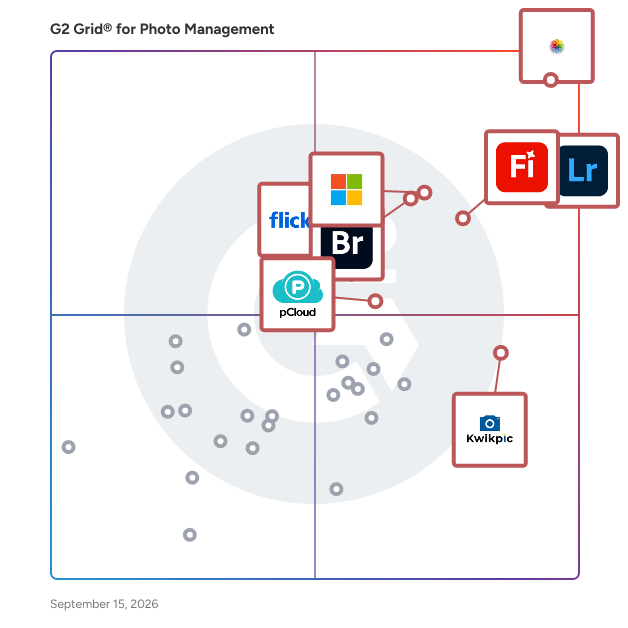
- **Leader:** [Photos](https://www.g2.com/products/photos/reviews)
- **Highest Performer:** [Kwikpic](https://www.g2.com/products/kwikpic/reviews)
- **Easiest to Use:** [Photos](https://www.g2.com/products/photos/reviews)
- **Top Trending:** [Photos](https://www.g2.com/products/photos/reviews)
- **Best Free Software:** [ACDSee](https://www.g2.com/products/acdsee/reviews)


## Top-Rated Products (Ranked by G2 Score)
### 1. [Photos](https://www.g2.com/products/photos/reviews)
  Apple Photos is a comprehensive photo management and editing application developed by Apple Inc., designed to seamlessly integrate with macOS, iOS, iPadOS, watchOS, tvOS, and visionOS. It serves as a centralized hub for users to store, organize, edit, and share their digital photographs and videos across all Apple devices. Key Features and Functionality: - Intelligent Organization: Photos automatically organizes your library into categories such as Years, Months, and Days, highlighting significant events and memories. It employs on-device machine learning to curate your best shots, reducing clutter by hiding duplicates, screenshots, and receipts. - Advanced Editing Tools: The app offers a suite of intuitive editing tools, including color correction, cropping, and filters. Users can enhance images with features like Portrait mode adjustments and Live Photo effects. - iCloud Photos Integration: With iCloud Photos, your entire photo and video library is stored securely in iCloud, ensuring that your media is up to date and accessible across all your Apple devices. - Memories and Sharing: The Memories feature curates collections of photos and videos into shareable movies, complete with music and transitions. Additionally, Photos suggests sharing options based on who appears in your images and the context of your interactions. Primary Value and User Solutions: Apple Photos simplifies the complexities of digital photo management by providing a unified platform that integrates storage, organization, editing, and sharing functionalities. Its intelligent features help users effortlessly relive cherished moments, enhance their images with professional-quality tools, and share their experiences with friends and family. By leveraging iCloud Photos, users benefit from seamless synchronization across devices, ensuring their media is always accessible and up to date.


  **Average Rating:** 4.5/5.0
  **Total Reviews:** 776

**User Satisfaction Scores:**

- **Ease of Admin:** 8.9/10 (Category avg: 9.0/10)
- **Has the product been a good partner in doing business?:** 8.5/10 (Category avg: 8.7/10)
- **Quality of Support:** 8.7/10 (Category avg: 8.5/10)
- **Ease of Use:** 9.2/10 (Category avg: 8.9/10)


**Seller Details:**

- **Seller:** [Apple](https://www.g2.com/sellers/apple)
- **Year Founded:** 1976
- **HQ Location:** Cupertino, CA
- **Twitter:** @Apple (9,943,577 Twitter followers)
- **LinkedIn® Page:** https://www.linkedin.com/company/162479/ (180,534 employees on LinkedIn®)
- **Ownership:** NASDAQ:AAPL

**Reviewer Demographics:**
  - **Who Uses This:** Student, Owner
  - **Top Industries:** Photography, Marketing and Advertising
  - **Company Size:** 67% Small-Business, 18% Mid-Market


#### Pros & Cons

**Pros:**

- Ease of Use (31 reviews)
- Features (17 reviews)
- Search Functionality (11 reviews)
- Photo Editing (10 reviews)
- Efficiency (9 reviews)

**Cons:**

- Limited Storage (10 reviews)
- Expensive (6 reviews)
- Limited Customization (6 reviews)
- Limited Editing (6 reviews)
- Limited Features (6 reviews)

### 2. [Adobe Photoshop Lightroom Classic](https://www.g2.com/products/adobe-photoshop-lightroom-classic/reviews)
  Adobe Photoshop Lightroom Classic is a comprehensive desktop application designed for photographers seeking advanced tools to edit, organize, and share their images. It offers a robust suite of features that enable users to enhance photo quality, manage extensive photo libraries, and streamline their workflow efficiently. Key Features and Functionality: - Advanced Editing Tools: Lightroom Classic provides powerful editing capabilities, including precise color correction, exposure adjustments, and the ability to enhance details. Users can apply effects like Texture, Clarity, and Dehaze to achieve the desired look. - Content-Aware Remove: This feature allows for the quick removal of unwanted objects or blemishes from photos. By selecting the area to be removed, Lightroom Classic intelligently samples nearby parts of the image to seamlessly blend and fill the space. - Adaptive Presets: Users can apply presets to specific areas of a photo with a single click, such as enhancing skies or making subjects stand out, facilitating efficient and consistent editing. - Organizational Tools: The software offers comprehensive tools for organizing photos, including collections, keywords, face recognition, flags, stars, and color labels. These features help users manage and locate images effectively. - Non-Destructive Editing: All edits in Lightroom Classic are non-destructive, meaning the original image remains unaltered. This allows users to experiment with various edits and revert to the original at any time without loss of quality. Primary Value and User Solutions: Lightroom Classic addresses the needs of photographers who prefer a desktop-centric workflow with local storage. It provides advanced editing tools and organizational features that enhance productivity and creative control. By offering non-destructive editing and efficient management of large photo libraries, Lightroom Classic enables users to produce high-quality images while maintaining an organized and streamlined workflow.


  **Average Rating:** 4.6/5.0
  **Total Reviews:** 854

**User Satisfaction Scores:**

- **Ease of Admin:** 8.7/10 (Category avg: 9.0/10)
- **Has the product been a good partner in doing business?:** 8.8/10 (Category avg: 8.7/10)
- **Quality of Support:** 8.5/10 (Category avg: 8.5/10)
- **Ease of Use:** 8.6/10 (Category avg: 8.9/10)


**Seller Details:**

- **Seller:** [Adobe](https://www.g2.com/sellers/adobe)
- **Year Founded:** 1982
- **HQ Location:** San Jose, CA
- **Twitter:** @Adobe (959,279 Twitter followers)
- **LinkedIn® Page:** https://www.linkedin.com/company/1480/ (41,539 employees on LinkedIn®)
- **Ownership:** NASDAQ:ADBE

**Reviewer Demographics:**
  - **Who Uses This:** Graphic Designer, Photographer
  - **Top Industries:** Photography, Marketing and Advertising
  - **Company Size:** 76% Small-Business, 15% Mid-Market


#### Pros & Cons

**Pros:**

- Features (42 reviews)
- Ease of Use (37 reviews)
- Photo Editing (34 reviews)
- Efficiency (32 reviews)
- Quality (20 reviews)

**Cons:**

- Learning Curve (16 reviews)
- Slow Performance (16 reviews)
- Learning Difficulty (15 reviews)
- Performance Issues (7 reviews)
- Confusing Interface (6 reviews)

### 3. [Microsoft Photos](https://www.g2.com/products/microsoft-photos/reviews)
  Microsoft Photos is a comprehensive image viewer and organizer developed by Microsoft, designed to provide users with an intuitive platform for managing, editing, and sharing their digital photos and videos. Integrated seamlessly into Windows operating systems, it offers a user-friendly interface that caters to both casual users and photography enthusiasts. Key Features and Functionality: - Photo Management: Organize your digital media effortlessly with features like album creation, tagging, and metadata support. The app&#39;s gallery view allows sorting by date, album, or folder, providing flexible navigation options. - Photo Editing: Enhance your images using built-in editing tools that support cropping, rotating, exposure correction, color adjustments, and noise reduction. Advanced features include AI-powered background blur, object removal, and integration with Microsoft Designer for creative enhancements. - AI-Powered Auto-Categorization: Leverage artificial intelligence to automatically sort photos into meaningful categories such as screenshots, receipts, identity documents, and notes, making it easier to locate specific images. - Optical Character Recognition (OCR): Extract text from images and perform web searches directly from the app, enhancing productivity and information retrieval. - Super Resolution: Upscale low-resolution images using AI to enhance detail and clarity without compromising quality. - Seamless Integration: Sync with OneDrive for cloud storage, share photos directly to social media platforms, and utilize the app&#39;s integration with File Explorer for quick access and management. Primary Value and User Solutions: Microsoft Photos addresses the need for a unified platform that combines photo viewing, organization, and editing within a single application. By integrating AI-driven features, it simplifies the management of extensive photo libraries, enhances image quality, and streamlines the sharing process. This all-in-one solution eliminates the need for multiple third-party applications, offering users a cohesive and efficient experience for their digital media needs.


  **Average Rating:** 4.3/5.0
  **Total Reviews:** 291

**User Satisfaction Scores:**

- **Ease of Admin:** 9.3/10 (Category avg: 9.0/10)
- **Has the product been a good partner in doing business?:** 9.0/10 (Category avg: 8.7/10)
- **Quality of Support:** 8.6/10 (Category avg: 8.5/10)
- **Ease of Use:** 9.2/10 (Category avg: 8.9/10)


**Seller Details:**

- **Seller:** [Microsoft](https://www.g2.com/sellers/microsoft)
- **Year Founded:** 1975
- **HQ Location:** Redmond, Washington
- **Twitter:** @microsoft (13,114,353 Twitter followers)
- **LinkedIn® Page:** https://www.linkedin.com/company/microsoft/ (227,697 employees on LinkedIn®)
- **Ownership:** MSFT

**Reviewer Demographics:**
  - **Who Uses This:** Student, Software Engineer
  - **Top Industries:** Information Technology and Services, Computer Software
  - **Company Size:** 60% Small-Business, 25% Mid-Market


#### Pros & Cons

**Pros:**

- Ease of Use (3 reviews)
- Features (2 reviews)
- Organization (2 reviews)
- Photo Editing (2 reviews)
- User Interface (2 reviews)

**Cons:**

- Lack of Advanced Features (1 reviews)
- Limited Editing (1 reviews)
- Limited Editing Capabilities (1 reviews)
- Limited Features (1 reviews)
- Limited Format Support (1 reviews)

### 4. [Adobe Firefly](https://www.g2.com/products/adobe-firefly/reviews)
  Adobe Firefly is an advanced generative AI platform designed to empower creatives by streamlining content creation across various media types. Integrated seamlessly into Adobe&#39;s Creative Cloud suite, Firefly offers tools for generating images, videos, audio, and vector graphics from simple text prompts, enabling users to produce high-quality, customizable content efficiently. Key Features and Functionality: - Text-to-Image and Text-to-Video Generation: Transform textual descriptions into compelling visuals and videos, facilitating rapid ideation and content development. - Vector Graphic Creation: Utilize the Firefly Vector Model to generate editable vector graphics, enhancing design flexibility and precision. - Audio and Video Editing: Leverage AI-powered tools for translating audio and video into multiple languages, maintaining authentic voice and tone, and upscaling video content to higher resolutions. - 3D to 2D Image Conversion: Convert 3D sketches into high-resolution images, allowing for dynamic perspective adjustments and detailed visual guides. - Mobile Accessibility: Access Firefly&#39;s capabilities on mobile devices, enabling content creation on-the-go without compromising functionality. Primary Value and User Solutions: Adobe Firefly addresses the growing demand for rapid, high-quality content creation by automating complex processes and reducing the time required to produce diverse media assets. By integrating generative AI into familiar tools, Firefly enhances creative workflows, allowing users to focus on innovation and storytelling. Its commercially safe models ensure that generated content is suitable for professional use, providing peace of mind regarding copyright and licensing concerns. Whether for marketing campaigns, design projects, or multimedia productions, Firefly equips users with the tools to generate personalized, on-brand content at scale, thereby accelerating time-to-market and enhancing audience engagement.


  **Average Rating:** 4.4/5.0
  **Total Reviews:** 325

**User Satisfaction Scores:**

- **Ease of Admin:** 9.2/10 (Category avg: 9.0/10)
- **Has the product been a good partner in doing business?:** 8.6/10 (Category avg: 8.7/10)
- **Quality of Support:** 8.7/10 (Category avg: 8.5/10)
- **Ease of Use:** 8.6/10 (Category avg: 8.9/10)


**Seller Details:**

- **Seller:** [Adobe](https://www.g2.com/sellers/adobe)
- **Company Website:** https://adobe.com
- **Year Founded:** 1982
- **HQ Location:** San Jose, CA
- **Twitter:** @Adobe (959,279 Twitter followers)
- **LinkedIn® Page:** https://www.linkedin.com/company/1480/ (41,539 employees on LinkedIn®)

**Reviewer Demographics:**
  - **Who Uses This:** Graphic Designer
  - **Top Industries:** Marketing and Advertising, Graphic Design
  - **Company Size:** 47% Small-Business, 23% Mid-Market


#### Pros & Cons

**Pros:**

- Ease of Use (126 reviews)
- Creativity (103 reviews)
- Features (71 reviews)
- Artificial Intelligence (57 reviews)
- Integrations (53 reviews)

**Cons:**

- Inaccuracy (71 reviews)
- Inaccurate Results (55 reviews)
- AI Limitations (44 reviews)
- Poor Results (37 reviews)
- Prompt Issues (36 reviews)

### 5. [Adobe Bridge](https://www.g2.com/products/adobe-bridge/reviews)
  Adobe Bridge is a comprehensive digital asset management application designed to streamline the organization, previewing, editing, and publishing of creative assets. Serving as a centralized hub, it facilitates efficient workflows for creative professionals by integrating seamlessly with Adobe Creative Cloud applications. Key Features and Functionality: - Metadata Editing: Modify and manage metadata to enhance asset organization and retrieval. - Asset Organization: Utilize collections, labels, ratings, and keywords to systematically arrange assets. - Advanced Search and Filters: Employ powerful filters and metadata search capabilities to locate specific assets swiftly. - Creative Cloud Integration: Collaborate through Creative Cloud Libraries and publish directly to Adobe Stock. - Multi-Window Support: Manage multiple folders simultaneously with the ability to open several content panels within each workspace. - Customizable Keyboard Shortcuts: Tailor keyboard commands to suit individual workflow preferences. - Batch Processing: Automate tasks by combining various actions into a single workflow for efficiency. - 3D Design Workflow: Open files directly in Substance 3D Stager from Bridge to create photorealistic 3D scenes. Primary Value and User Solutions: Adobe Bridge addresses the challenges of managing extensive collections of creative assets by providing a centralized platform that enhances organization, accessibility, and collaboration. Its integration with Adobe Creative Cloud applications ensures a cohesive workflow, allowing users to efficiently manage and edit assets without leaving the Bridge environment. By offering advanced search capabilities, batch processing, and customizable features, Bridge significantly reduces the time and effort required in asset management, thereby boosting productivity for creative professionals.


  **Average Rating:** 4.3/5.0
  **Total Reviews:** 346

**User Satisfaction Scores:**

- **Ease of Admin:** 8.8/10 (Category avg: 9.0/10)
- **Has the product been a good partner in doing business?:** 8.4/10 (Category avg: 8.7/10)
- **Quality of Support:** 8.1/10 (Category avg: 8.5/10)
- **Ease of Use:** 8.1/10 (Category avg: 8.9/10)


**Seller Details:**

- **Seller:** [Adobe](https://www.g2.com/sellers/adobe)
- **Year Founded:** 1982
- **HQ Location:** San Jose, CA
- **Twitter:** @Adobe (959,279 Twitter followers)
- **LinkedIn® Page:** https://www.linkedin.com/company/1480/ (41,539 employees on LinkedIn®)
- **Ownership:** NASDAQ:ADBE

**Reviewer Demographics:**
  - **Who Uses This:** Graphic Designer, Photographer
  - **Top Industries:** Photography, Design
  - **Company Size:** 64% Small-Business, 20% Mid-Market


#### Pros & Cons

**Pros:**

- Ease of Use (6 reviews)
- Asset Management (3 reviews)
- Features (3 reviews)
- Metadata Management (3 reviews)
- Easy Organization (2 reviews)

**Cons:**

- Slow Performance (4 reviews)
- Feature Limitations (2 reviews)
- Limited Options (2 reviews)
- Performance Issues (2 reviews)
- Asset Management (1 reviews)

### 6. [Kwikpic](https://www.g2.com/products/kwikpic/reviews)
  Kwikpic is an AI-powered photo management platform for photographers, event organizers, and businesses. It automates photo sorting, delivery, and client management, simplifying workflows. With advanced facial recognition (up to 99.9% accuracy), Kwikpic instantly delivers event photos directly to attendees via personalized galleries. Use cases include professional event photography, weddings, conferences, corporate gatherings, and festivals requiring quick and accurate photo delivery. Key Features: AI Facial Recognition for quick and accurate photo sorting Customizable digital galleries for easy access Branding tools for professional presentation Client collaboration and approval tools Integrated online sales for direct photo purchases Benefits: Reduces manual effort Provides instant photo access Scalable for events of any size Enhances brand consistency Kwikpic simplifies photo sharing and client interactions.


  **Average Rating:** 4.9/5.0
  **Total Reviews:** 23

**User Satisfaction Scores:**

- **Ease of Admin:** 10.0/10 (Category avg: 9.0/10)
- **Has the product been a good partner in doing business?:** 9.8/10 (Category avg: 8.7/10)
- **Quality of Support:** 9.4/10 (Category avg: 8.5/10)
- **Ease of Use:** 9.5/10 (Category avg: 8.9/10)


**Seller Details:**

- **Seller:** [Kwikpic](https://www.g2.com/sellers/kwikpic)
- **Year Founded:** 2019
- **HQ Location:** Mumbai, IN
- **LinkedIn® Page:** https://www.linkedin.com/company/kwikpic-in/ (15 employees on LinkedIn®)

**Reviewer Demographics:**
  - **Top Industries:** Photography
  - **Company Size:** 96% Small-Business


#### Pros & Cons

**Pros:**

- Ease of Use (7 reviews)
- Accuracy (6 reviews)
- Facial Recognition (6 reviews)
- Features (4 reviews)
- Photo Sharing (4 reviews)

**Cons:**

- Limited Functionality (4 reviews)
- Access Issues (2 reviews)
- Limited Storage (2 reviews)
- Organizational Issues (2 reviews)
- Accuracy Issues (1 reviews)

### 7. [Flickr](https://www.g2.com/products/flickr/reviews)
  Flickr is the largest global community united by photography in the world. Fueled by passionate photographers, Flickr offers users the best place for inspiration, connection, storing, and sharing of photos and videos with others. Unlimited Uploads and Worry-Free Photo Backup Upload as many photos as you can take, always at true full resolution. With Auto-Uploadr, quickly and easily back up your entire photo collection from your phone, computer, hard drives, Dropbox, Adobe Lightroom, and more. Advanced Stats Gain an understanding of how people are discovering your Flickr Photos. See which of your photos are trending now, and which have performed the best over the life of your Flickr Pro account. Ad-Free Browsing Enjoy a fully ad-free experience across all of Flickr. Visitors to your account will never see an ad on your photostream, albums, profile, or any of your photos. Premier Product Support Why wait in line for help? Flickr Pros receive top-priority assistance from our world-class support heroes, so you can resolve your questions and get back to your photography. Detailed Privacy Settings Got albums you want to share with friends, family, or no-one at all? Flickr Pros get complete control over privacy settings for all their photos (free accounts are limited to 1,000 uploads, only 50 of which can be private). High-Resolution Uploads Give your content the Pro treatment with 6k photo display options, 10-minute video uploads, and sales links to wherever you host your photo business.


  **Average Rating:** 4.1/5.0
  **Total Reviews:** 329

**User Satisfaction Scores:**

- **Ease of Admin:** 8.5/10 (Category avg: 9.0/10)
- **Has the product been a good partner in doing business?:** 8.5/10 (Category avg: 8.7/10)
- **Quality of Support:** 8.3/10 (Category avg: 8.5/10)
- **Ease of Use:** 8.7/10 (Category avg: 8.9/10)


**Seller Details:**

- **Seller:** [Flickr](https://www.g2.com/sellers/flickr)
- **Year Founded:** 2002
- **HQ Location:** San Francisco, California
- **Twitter:** @Flickr (932,172 Twitter followers)
- **LinkedIn® Page:** https://www.linkedin.com/company/flickr/ (412 employees on LinkedIn®)

**Reviewer Demographics:**
  - **Who Uses This:** CEO
  - **Top Industries:** Photography, Marketing and Advertising
  - **Company Size:** 74% Small-Business, 20% Mid-Market


#### Pros & Cons

**Pros:**

- Community Engagement (1 reviews)
- Ease of Use (1 reviews)
- Editing Tools (1 reviews)
- Helpful (1 reviews)
- Navigation Ease (1 reviews)

**Cons:**

- Cost (1 reviews)
- Excessive Advertising (1 reviews)
- Limited Storage (1 reviews)
- Pop-up Ads (1 reviews)
- Price Issues (1 reviews)

### 8. [pCloud](https://www.g2.com/products/pcloud/reviews)
  pCloud is Swiss cloud storage that provides access to all your digital content including images, video, audio, documents, and more- anytime, anywhere, on any device. Our security approach focuses on making sure your data is safe and you&#39;re as much in control as possible. When you sign up for pCloud, you choose the data region, where your files and personal data are stored - either in the United States (Dallas, Texas) or the European Union (Luxembourg). Test pCloud with a free account with up to 10GB storage space! Keep all of your important files safe and centralized in one place. You can share with team members, clients, etc. across the globe and give them controlled access and permissions to your digital library. It has a user-friendly interface that clearly shows where everything is located and what it does. The software is available for multiple platforms – iOS and Android devices, Mac, Windows, and Linux. By installing pCloud on your computer (through its desktop application pCloud Drive), the app creates a secure virtual drive that expands your local storage space. Every change you make in your pCloud can be seen immediately on your computer, phone, or tablet. All your devices are instantly synchronized and you have direct file access to any update you make. pCloud&#39;s latest feature Branded links allows you to customize download links with your brand&#39;s style and logo. pCloud Crypto is the highest level of security for your files. You could save your sensitive information, and your private documents in the cloud, and have them on any device. Nobody has access to these files, including the administrators of pCloud. With client-side encryption, your files are encrypted locally on your computer, and only the encrypted information is uploaded to the cloud. The files never leave your device without the encryption Since 2013, more than 16,000,000+ users worldwide trusted us. We believe in creating reliable and safe cloud storage for both individuals and businesses.


  **Average Rating:** 4.3/5.0
  **Total Reviews:** 163

**User Satisfaction Scores:**

- **Ease of Admin:** 8.5/10 (Category avg: 9.0/10)
- **Has the product been a good partner in doing business?:** 7.5/10 (Category avg: 8.7/10)
- **Quality of Support:** 8.1/10 (Category avg: 8.5/10)
- **Ease of Use:** 8.7/10 (Category avg: 8.9/10)


**Seller Details:**

- **Seller:** [pCloud](https://www.g2.com/sellers/pcloud)
- **Year Founded:** 2013
- **HQ Location:** Baar, Switzerland
- **Twitter:** @pCloudapp (13,973 Twitter followers)
- **LinkedIn® Page:** https://www.linkedin.com/company/3726623/ (49 employees on LinkedIn®)

**Reviewer Demographics:**
  - **Who Uses This:** Software Engineer
  - **Top Industries:** Information Technology and Services, Marketing and Advertising
  - **Company Size:** 53% Small-Business, 25% Mid-Market


#### Pros & Cons

**Pros:**

- Cloud Storage (6 reviews)
- Ease of Use (6 reviews)
- Large Files (3 reviews)
- Reliability (3 reviews)
- Security (3 reviews)

**Cons:**

- Lacking Features (2 reviews)
- Performance Issues (2 reviews)
- Poor Customer Support (2 reviews)
- Slow Loading (2 reviews)
- Limited Social Interaction (1 reviews)

### 9. [ACDSee](https://www.g2.com/products/acdsee/reviews)
  Between creating the first digital asset manager and, more recently, the world’s first digital asset manager and RAW editor with layers, ACDSee has led the innovation of creative software solutions since 1994. Extending beyond the realms of image viewing, digital asset management, relational databases, format conversion, and cataloging, ACDSee has expanded into image editing, online functionality, plug-ins, image manipulation, support for RAW images, layered editing, video, and much more, growing and changing every year since. Lately, for instance, ACDSee has branched into image editing mobile apps on Android and iOS.


  **Average Rating:** 4.4/5.0
  **Total Reviews:** 277

**User Satisfaction Scores:**

- **Ease of Admin:** 8.9/10 (Category avg: 9.0/10)
- **Has the product been a good partner in doing business?:** 8.6/10 (Category avg: 8.7/10)
- **Quality of Support:** 8.3/10 (Category avg: 8.5/10)
- **Ease of Use:** 8.6/10 (Category avg: 8.9/10)


**Seller Details:**

- **Seller:** [ACD Systems](https://www.g2.com/sellers/acd-systems)
- **Year Founded:** 1993
- **HQ Location:** Victoria, Canada
- **Twitter:** @ACDSee (4,908 Twitter followers)
- **LinkedIn® Page:** https://www.linkedin.com/company/12995/ (80 employees on LinkedIn®)

**Reviewer Demographics:**
  - **Who Uses This:** Owner, Photographer
  - **Top Industries:** Photography, Computer Software
  - **Company Size:** 79% Small-Business, 13% Mid-Market


#### Pros & Cons

**Pros:**

- Photo Editing (3 reviews)
- Ease of Use (2 reviews)
- Features (2 reviews)
- Simple (2 reviews)
- AI Technology (1 reviews)

**Cons:**

- Slow Loading (1 reviews)
- Slow Performance (1 reviews)
- Software Bugs (1 reviews)

### 10. [Pickit](https://www.g2.com/products/pickit/reviews)
  Pickit aims to be the smartest, simplest DAM platform on the planet, making it easier than ever to source, store, share, organize, and optimize digital assets. Statistically, 70% of digital assets are underused or never used at all due to scattered files, multiple storage systems, and complicated DAMs nobody wants to use. Pickit solves that with a single source of truth for all your visual assets, documents, templates, and guidelines, all integrated with your favorite applications. The award-winning Microsoft 365 and the Google workspace integration by Pickit takes your file management to the next level by making it faster, smarter, and more intuitive to import and discover assets from M365, Pickit Stock, and all other assets in Pickit without leaving M365 or Google apps. DAM smart. DAM simple.™


  **Average Rating:** 4.5/5.0
  **Total Reviews:** 116

**User Satisfaction Scores:**

- **Ease of Admin:** 9.0/10 (Category avg: 9.0/10)
- **Has the product been a good partner in doing business?:** 9.3/10 (Category avg: 8.7/10)
- **Quality of Support:** 9.2/10 (Category avg: 8.5/10)
- **Ease of Use:** 8.9/10 (Category avg: 8.9/10)


**Seller Details:**

- **Seller:** [Pickit](https://www.g2.com/sellers/pickit)
- **Company Website:** https://pickit.com/
- **Year Founded:** 2013
- **HQ Location:** Visby
- **Twitter:** @pickit (6,407 Twitter followers)
- **LinkedIn® Page:** https://www.linkedin.com/company/pickit/ (24 employees on LinkedIn®)

**Reviewer Demographics:**
  - **Top Industries:** Information Technology and Services, Computer Software
  - **Company Size:** 43% Small-Business, 42% Mid-Market


#### Pros & Cons

**Pros:**

- Ease of Use (15 reviews)
- Organization (11 reviews)
- Asset Management (10 reviews)
- Content Management (9 reviews)
- Intuitive (8 reviews)

**Cons:**

- Software Bugs (4 reviews)
- Storage Limitations (4 reviews)
- Access Issues (3 reviews)
- Access Permissions (3 reviews)
- Complex Workflows (3 reviews)

### 11. [Imgur](https://www.g2.com/products/imgur/reviews)
  The most awesome images on the Internet.


  **Average Rating:** 4.3/5.0
  **Total Reviews:** 40

**User Satisfaction Scores:**

- **Has the product been a good partner in doing business?:** 10.0/10 (Category avg: 8.7/10)
- **Quality of Support:** 8.5/10 (Category avg: 8.5/10)
- **Ease of Use:** 9.1/10 (Category avg: 8.9/10)


**Seller Details:**

- **Seller:** [Imgur](https://www.g2.com/sellers/imgur)
- **Year Founded:** 2009
- **HQ Location:** San Francisco, California
- **Twitter:** @imgur (161,329 Twitter followers)
- **LinkedIn® Page:** https://www.linkedin.com/company/2274539/ (25 employees on LinkedIn®)

**Reviewer Demographics:**
  - **Top Industries:** Marketing and Advertising
  - **Company Size:** 68% Small-Business, 22% Enterprise


### 12. [ShootProof](https://www.g2.com/products/shootproof/reviews)
  Focus on what matters most, and let ShootProof handle the rest. Featuring beautiful photo galleries, simple selling solutions, and powerful studio management tools, ShootProof streamlines photo delivery, proofing, and sales, so photographers can do what they do best. KEY FEATURES: ShootProof makes it easy to deliver, share, proof, and sell photos — all in one place. Plus, Digital Contracts and Invoicing, Online Booking and Scheduling, and studio management tools to help you scale your photography business. Secure Archiving with instant access to archived galleries, providing a safe backup solution. All paid plans include: - Beautiful client galleries for effortless, polished photo delivery - A simple, out-of-the-box portfolio that’s up in seconds - Sell prints, lab products, and photo gifts directly from galleries - Digital download delivery and custom controls - Full control over pricing and products - Easy client proofing with favorites and labels - Integrated invoices and payment processing - Customizable, fill-in-the-blank contracts clients can sign online - Full integration with your favorite photo labs - Client email campaigns NEW! Online Booking and Scheduling! Head to shootproof.com/signup to start your free, 14-day trial today!


  **Average Rating:** 4.9/5.0
  **Total Reviews:** 90

**User Satisfaction Scores:**

- **Ease of Admin:** 9.9/10 (Category avg: 9.0/10)
- **Has the product been a good partner in doing business?:** 9.9/10 (Category avg: 8.7/10)
- **Quality of Support:** 9.7/10 (Category avg: 8.5/10)
- **Ease of Use:** 9.7/10 (Category avg: 8.9/10)


**Seller Details:**

- **Seller:** [ShootProof](https://www.g2.com/sellers/shootproof)
- **Year Founded:** 2009
- **HQ Location:** Atlanta, US
- **Twitter:** @ShootProof (10,508 Twitter followers)
- **LinkedIn® Page:** https://www.linkedin.com/company/1480285/ (29 employees on LinkedIn®)

**Reviewer Demographics:**
  - **Who Uses This:** Owner, Photographer
  - **Top Industries:** Photography
  - **Company Size:** 99% Small-Business, 1% Mid-Market


#### Pros & Cons

**Pros:**

- Ease of Use (1 reviews)
- User Interface (1 reviews)

**Cons:**

- Expensive (1 reviews)

### 13. [Nero](https://www.g2.com/products/nero/reviews)
  Nero develops software applications and platforms that enable users to smartly edit, organize, backup, convert, or share their photos, videos, and music. From the famous Nero Burning ROM to the latest AI powered solution like Nero Score, Nero AI Photo Tagger and Nero AI Image Tagger, from state-of-the art photo and video editing to Nero USBxCopy and Nero BackItUp we solve all your digital media needs.


  **Average Rating:** 4.5/5.0
  **Total Reviews:** 29

**User Satisfaction Scores:**

- **Ease of Admin:** 8.3/10 (Category avg: 9.0/10)
- **Has the product been a good partner in doing business?:** 8.3/10 (Category avg: 8.7/10)
- **Quality of Support:** 8.6/10 (Category avg: 8.5/10)
- **Ease of Use:** 9.1/10 (Category avg: 8.9/10)


**Seller Details:**

- **Seller:** [Nero](https://www.g2.com/sellers/nero)
- **Year Founded:** 1995
- **HQ Location:** Glendale, CA
- **Twitter:** @NeroSolutions (4 Twitter followers)
- **LinkedIn® Page:** https://www.linkedin.com/company/13470/ (136 employees on LinkedIn®)

**Reviewer Demographics:**
  - **Top Industries:** Information Technology and Services
  - **Company Size:** 41% Mid-Market, 38% Small-Business


### 14. [Photo Mechanic](https://www.g2.com/products/photo-mechanic/reviews)
  Photo Mechanic is a powerful photo management software designed to streamline the workflow of professional photographers. It enables rapid ingestion, culling, tagging, and organization of large volumes of images, significantly reducing the time spent on post-processing tasks. By facilitating quick selection and metadata addition, Photo Mechanic allows photographers to focus more on capturing images and less on managing them. Key Features and Functionality: - Fast Ingestion and Culling: Quickly import photos from memory cards and efficiently review them to select the best shots without delay. - Metadata Management: Easily add, edit, and manage metadata such as captions, keywords, and copyright information to individual or batches of images. - Advanced Organization: Rename files, create folders, and move images seamlessly to keep your photo library organized. - Integration with Editing Software: Directly transfer selected images to external editing applications for further processing. - Cross-Platform Compatibility: Available for both macOS and Windows, supporting a wide range of operating systems. Primary Value and Solutions Provided: Photo Mechanic addresses the common challenges faced by photographers in managing extensive photo collections. By offering rapid ingestion and culling capabilities, it minimizes the time required to sort through images. Its robust metadata management tools ensure that photos are accurately labeled and easily searchable. The software&#39;s seamless integration with various editing platforms and its cross-platform compatibility make it a versatile tool for photographers aiming to enhance their productivity and maintain an organized workflow.


  **Average Rating:** 4.8/5.0
  **Total Reviews:** 29

**User Satisfaction Scores:**

- **Ease of Admin:** 7.8/10 (Category avg: 9.0/10)
- **Has the product been a good partner in doing business?:** 10.0/10 (Category avg: 8.7/10)
- **Quality of Support:** 9.5/10 (Category avg: 8.5/10)
- **Ease of Use:** 9.1/10 (Category avg: 8.9/10)


**Seller Details:**

- **Seller:** [Camerabits](https://www.g2.com/sellers/camerabits)
- **Year Founded:** 1996
- **HQ Location:** Hillsboro, US
- **Twitter:** @CameraBits (4,214 Twitter followers)
- **LinkedIn® Page:** https://www.linkedin.com/company/260015 (12 employees on LinkedIn®)

**Reviewer Demographics:**
  - **Top Industries:** Photography, Higher Education
  - **Company Size:** 76% Small-Business, 14% Enterprise


#### Pros & Cons

**Pros:**

- Speed (1 reviews)


### 15. [Photobucket](https://www.g2.com/products/photobucket/reviews)
  Photobucket is a global leader in photo hosting, sharing and printing.


  **Average Rating:** 3.7/5.0
  **Total Reviews:** 37

**User Satisfaction Scores:**

- **Ease of Admin:** 7.2/10 (Category avg: 9.0/10)
- **Has the product been a good partner in doing business?:** 8.3/10 (Category avg: 8.7/10)
- **Quality of Support:** 7.3/10 (Category avg: 8.5/10)
- **Ease of Use:** 7.3/10 (Category avg: 8.9/10)


**Seller Details:**

- **Seller:** [Photobucket](https://www.g2.com/sellers/photobucket)
- **Year Founded:** 2003
- **HQ Location:** Denver, CO
- **Twitter:** @photobucket (42,751 Twitter followers)
- **LinkedIn® Page:** https://www.linkedin.com/company/33795/ (158 employees on LinkedIn®)

**Reviewer Demographics:**
  - **Top Industries:** Photography
  - **Company Size:** 70% Small-Business, 22% Mid-Market


### 16. [Picflow](https://www.g2.com/products/picflow/reviews)
  Picflow is an image and video collaboration platform for creative professionals. Create proofing galleries with flexible layout controls and choose from various review options to accelerate approvals.


  **Average Rating:** 4.4/5.0
  **Total Reviews:** 12

**User Satisfaction Scores:**

- **Ease of Admin:** 9.6/10 (Category avg: 9.0/10)
- **Has the product been a good partner in doing business?:** 9.2/10 (Category avg: 8.7/10)
- **Quality of Support:** 8.8/10 (Category avg: 8.5/10)
- **Ease of Use:** 9.4/10 (Category avg: 8.9/10)


**Seller Details:**

- **Seller:** [Nusign](https://www.g2.com/sellers/nusign)
- **Year Founded:** 2020
- **HQ Location:** Zürich, CH
- **LinkedIn® Page:** https://linkedin.com/company/picflow (3 employees on LinkedIn®)

**Reviewer Demographics:**
  - **Top Industries:** Photography
  - **Company Size:** 100% Small-Business


#### Pros & Cons

**Pros:**

- Ease of Use (4 reviews)
- Easy Sharing (3 reviews)
- Sharing Ease (3 reviews)
- Photo Sharing (2 reviews)
- Team Collaboration (2 reviews)

**Cons:**

- Connectivity Issues (1 reviews)
- Expensive (1 reviews)
- Image Management (1 reviews)
- Integration Issues (1 reviews)
- Limited Options (1 reviews)

### 17. [500px](https://www.g2.com/products/500px/reviews)
  500px is a global online photography community and marketplace that enables photographers to showcase, discover, and license high-quality images. Founded in 2009, it has grown into a platform where both amateur and professional photographers can share their work, gain exposure, and connect with a worldwide audience. Key Features and Functionality: - Photo Sharing and Discovery: Users can upload their photographs and explore a vast collection of images across various categories, including landscapes, portraits, and fine art. - Community Engagement: The platform fosters interaction through features like commenting, liking, and following, allowing photographers to receive feedback and build a network. - Licensing Opportunities: 500px offers photographers the chance to monetize their work by licensing images through partnerships with agencies like Getty Images. - Pulse Algorithm: An algorithm evaluates recently uploaded photos based on views, likes, and comments, assigning a &#39;Pulse&#39; score that determines a photo&#39;s visibility on the platform. - Mobile Accessibility: Dedicated mobile applications for iOS and Android devices enable users to upload, browse, and engage with the community on the go. Primary Value and User Solutions: 500px addresses the needs of photographers seeking a platform to display their work in high resolution without compression, ensuring that every detail is preserved. It provides a space for creative expression, learning, and professional growth by connecting photographers with peers and potential clients. The licensing feature offers a pathway for photographers to earn income from their images, transforming passion into profit. Additionally, the community-driven environment encourages feedback and inspiration, helping users to refine their skills and gain recognition in the photography world.


  **Average Rating:** 4.1/5.0
  **Total Reviews:** 24

**User Satisfaction Scores:**

- **Ease of Admin:** 10.0/10 (Category avg: 9.0/10)
- **Has the product been a good partner in doing business?:** 10.0/10 (Category avg: 8.7/10)
- **Quality of Support:** 8.7/10 (Category avg: 8.5/10)
- **Ease of Use:** 8.9/10 (Category avg: 8.9/10)


**Seller Details:**

- **Seller:** [500px](https://www.g2.com/sellers/500px)
- **Year Founded:** 2009
- **HQ Location:** Toronto, CA
- **Twitter:** @500px (2,908,676 Twitter followers)
- **LinkedIn® Page:** https://www.linkedin.com/company/376139/ (195 employees on LinkedIn®)

**Reviewer Demographics:**
  - **Company Size:** 92% Small-Business, 4% Enterprise


### 18. [Stencil](https://www.g2.com/products/stencil/reviews)
  Stencil is the web&#39;s favorite graphic design tool! It is the fastest and easiest way to create engaging visuals for small business owners, bloggers, social media marketers and more! No need to hire expensive designers or take time to learn complicated software. Stencil is the one tool you need to source beautiful stock photos, fonts and icons to create beautiful images faster than you ever thought possible.


  **Average Rating:** 4.5/5.0
  **Total Reviews:** 25

**User Satisfaction Scores:**

- **Ease of Admin:** 10.0/10 (Category avg: 9.0/10)
- **Has the product been a good partner in doing business?:** 10.0/10 (Category avg: 8.7/10)
- **Quality of Support:** 9.5/10 (Category avg: 8.5/10)
- **Ease of Use:** 9.8/10 (Category avg: 8.9/10)


**Seller Details:**

- **Seller:** [Getstencil](https://www.g2.com/sellers/getstencil)
- **HQ Location:** N/A
- **Twitter:** @getstencil (8,196 Twitter followers)
- **LinkedIn® Page:** https://www.linkedin.com/company/16254714/ (2 employees on LinkedIn®)

**Reviewer Demographics:**
  - **Top Industries:** Marketing and Advertising, Information Technology and Services
  - **Company Size:** 96% Small-Business, 4% Mid-Market


#### Pros & Cons

**Pros:**

- Creativity (1 reviews)
- Ease of Use (1 reviews)
- Tools (1 reviews)

**Cons:**

- Limited Storage (1 reviews)
- Outdated Design (1 reviews)

### 19. [Gihosoft Free Photo Recovery](https://www.g2.com/products/gihosoft-free-photo-recovery/reviews)
  Gihosoft Free Photo Recovery helps to recover deleted/formatted/lost photos, videos, and audios from computer hard disk, USB drive, SD card, memory card, digital camera, etc.


  **Average Rating:** 4.3/5.0
  **Total Reviews:** 14

**User Satisfaction Scores:**

- **Quality of Support:** 9.1/10 (Category avg: 8.5/10)
- **Ease of Use:** 9.5/10 (Category avg: 8.9/10)


**Seller Details:**

- **Seller:** [Gihosoft](https://www.g2.com/sellers/gihosoft)
- **Year Founded:** 2013
- **HQ Location:** Shenzhen, China
- **Twitter:** @Gihosoft (123 Twitter followers)
- **LinkedIn® Page:** https://www.linkedin.com/company/7965721/ (6 employees on LinkedIn®)

**Reviewer Demographics:**
  - **Company Size:** 53% Small-Business, 40% Mid-Market


### 20. [Shutter Stream](https://www.g2.com/products/shutter-stream/reviews)
  Iconasys is a developer of product photography software and hardware for eCommerce product photography. Our software solutions are designed to enable users of any skill level to efficiently create high quality still &amp; 360 product images in-house. Product photography is often a pain point for many eCommerce Vendors as it is a resource intensive and time consuming task. Shutter Stream Photography Software solves this by integrating image composition, camera control, image editing and image processing tools into a single stand-alone application that really helps to automate and batch process standard imaging tasks (on average customers increase efficiencies by about 800%). To give you a better idea of how Shutter Stream works please take a look at either of the following videos: Apparel Photography Video: http://iconasys.com/shutter-stream-photography-software-industy/fashion-and-clothing-photography/ Small Product Photography Video: http://iconasys.com/shutter-stream-product-photography-software-overview/how-shutter-stream-product-photography-software-works/ Our line of 360 Product Photography Software and hardware feature a stand alone application for 360 Product Photography that can work with a wide variety of photography turntables to streamline and automate the 360 Product Photography Workflow. We also manufacture a line of USB controlled Product Photography Turntables that automate 360 image capture in a turn, stop, snap automated workflow. Output from our 360 Product Photography Software is an interactive 360 View in HTML5 output that can be self hosted and easily embed into any website. Additional info can be found at: http://iconasys.com/shutter-stream-360-product-photography-software-overview/


  **Average Rating:** 4.9/5.0
  **Total Reviews:** 15

**User Satisfaction Scores:**

- **Ease of Admin:** 10.0/10 (Category avg: 9.0/10)
- **Has the product been a good partner in doing business?:** 10.0/10 (Category avg: 8.7/10)
- **Quality of Support:** 9.4/10 (Category avg: 8.5/10)
- **Ease of Use:** 9.6/10 (Category avg: 8.9/10)


**Seller Details:**

- **Seller:** [Iconasys](https://www.g2.com/sellers/iconasys)
- **Year Founded:** 2013
- **HQ Location:** Irvine, CA
- **Twitter:** @Iconasys (615 Twitter followers)
- **LinkedIn® Page:** https://www.linkedin.com/company/3631558/ (3 employees on LinkedIn®)

**Reviewer Demographics:**
  - **Company Size:** 87% Small-Business, 7% Mid-Market


### 21. [Magix Photo Manager](https://www.g2.com/products/magix-photo-manager/reviews)
  MAGIX, a market-leading provider of high-quality multimedia software.


  **Average Rating:** 3.7/5.0
  **Total Reviews:** 13

**User Satisfaction Scores:**

- **Ease of Admin:** 10.0/10 (Category avg: 9.0/10)
- **Has the product been a good partner in doing business?:** 10.0/10 (Category avg: 8.7/10)
- **Quality of Support:** 8.3/10 (Category avg: 8.5/10)
- **Ease of Use:** 9.4/10 (Category avg: 8.9/10)


**Seller Details:**

- **Seller:** [Magix](https://www.g2.com/sellers/magix)
- **Year Founded:** 1993
- **HQ Location:** Berlin, Germany
- **Twitter:** @MAGIX_INT (6,627 Twitter followers)
- **LinkedIn® Page:** https://www.linkedin.com/company/vegas-creative-software/ (5 employees on LinkedIn®)

**Reviewer Demographics:**
  - **Company Size:** 77% Small-Business, 23% Mid-Market


### 22. [SmugMug](https://www.g2.com/products/smugmug/reviews)
  For over 20 years, photographers across the globe have trusted SmugMug with more than just their photos. They trust us with their memories, their passion, and their businesses. SmugMug provides individual photographers and organizations of any size a platform to effortlessly sell, securely store, globally access, and beautifully share their photos. We are committed to continually thrilling our customers and building a better world through the power of photography.


  **Average Rating:** 4.2/5.0
  **Total Reviews:** 39

**User Satisfaction Scores:**

- **Ease of Admin:** 8.8/10 (Category avg: 9.0/10)
- **Has the product been a good partner in doing business?:** 8.5/10 (Category avg: 8.7/10)
- **Quality of Support:** 8.0/10 (Category avg: 8.5/10)
- **Ease of Use:** 8.6/10 (Category avg: 8.9/10)


**Seller Details:**

- **Seller:** [SmugMug](https://www.g2.com/sellers/smugmug-a3df7616-5ae9-47be-adcb-bada944e69b7)
- **Year Founded:** 2002
- **HQ Location:** Mountain View, Ca, US
- **Twitter:** @SmugMug (43,580 Twitter followers)
- **LinkedIn® Page:** https://www.linkedin.com/company/smugmug/ (117 employees on LinkedIn®)

**Reviewer Demographics:**
  - **Top Industries:** Photography
  - **Company Size:** 59% Small-Business, 36% Mid-Market


#### Pros & Cons

**Pros:**

- Customer Support (1 reviews)
- Customization (1 reviews)
- Ease of Use (1 reviews)
- Management Ease (1 reviews)
- Photo Sharing (1 reviews)

**Cons:**

- Confusing Interface (1 reviews)
- Excessive Advertising (1 reviews)
- Not User-Friendly (1 reviews)
- Photo Editing Issues (1 reviews)
- Poor Interface Design (1 reviews)

### 23. [PhotoPrism](https://www.g2.com/products/photoprism/reviews)
  PhotoPrism® is an AI-Powered Photos App for the Decentralized Web. It makes use of the latest technologies to tag and find pictures automatically without getting in your way. You can run it at home, on a private server, or in the cloud.


  **Average Rating:** 4.3/5.0
  **Total Reviews:** 10

**User Satisfaction Scores:**

- **Quality of Support:** 8.3/10 (Category avg: 8.5/10)
- **Ease of Use:** 8.8/10 (Category avg: 8.9/10)


**Seller Details:**

- **Seller:** [PhotoPrism](https://www.g2.com/sellers/photoprism)
- **Year Founded:** 2018
- **HQ Location:** Berlin
- **Twitter:** @photoprism_app (2,312 Twitter followers)
- **LinkedIn® Page:** https://www.linkedin.com/company/photoprism (3 employees on LinkedIn®)

**Reviewer Demographics:**
  - **Company Size:** 50% Small-Business, 40% Mid-Market


### 24. [PhotoShelter for Photographers](https://www.g2.com/products/photoshelter-for-photographers/reviews)
  Founded in 2005, PhotoShelter for Photographers is an industry-leading technology solution that helps photographers manage and grow their business with confidence. Showcase your professional work, sell your photographs, deliver and distribute high-res files, and create a secure and easily searchable archive all from one, centralized platform. With 5+ billion assets securely managed and nearly 100 million annual downloads, PhotoShelter makes it easy to impress your clients and earn more – so you can spend less time on your business and more time doing what you love.


  **Average Rating:** 3.6/5.0
  **Total Reviews:** 30

**User Satisfaction Scores:**

- **Ease of Admin:** 9.0/10 (Category avg: 9.0/10)
- **Has the product been a good partner in doing business?:** 6.3/10 (Category avg: 8.7/10)
- **Quality of Support:** 7.5/10 (Category avg: 8.5/10)
- **Ease of Use:** 8.0/10 (Category avg: 8.9/10)


**Seller Details:**

- **Seller:** [PhotoShelter](https://www.g2.com/sellers/photoshelter)
- **Year Founded:** 2005
- **HQ Location:** New York
- **Twitter:** @photoshelter (64,758 Twitter followers)
- **LinkedIn® Page:** https://www.linkedin.com/company/749729/ (280 employees on LinkedIn®)

**Reviewer Demographics:**
  - **Top Industries:** Photography
  - **Company Size:** 70% Small-Business, 20% Mid-Market


#### Pros & Cons

**Pros:**

- Photo Storage (1 reviews)
- Storage Capacity (1 reviews)

**Cons:**

- Confusing Interface (1 reviews)
- Not User-Friendly (1 reviews)

### 25. [Corel AfterShot Pro](https://www.g2.com/products/corel-aftershot-pro/reviews)
  Corel AfterShot Pro is a powerful, non-destructive photo editing software designed for photographers seeking efficient RAW image processing and comprehensive photo management. It offers a streamlined workflow that enables users to import, process, and output images rapidly, allowing more time behind the camera and less in front of the computer. Key Features and Functionality: - Advanced Non-Destructive Editing: Make adjustments to photos without altering the original files, ensuring image integrity. - Flexible Photo Management: Organize and view all photos in one place with customizable file management options, eliminating the need for importing. - Ultra-Fast Workflow: Experience significantly faster loading, selecting, editing, and output, with performance up to four times faster than leading competitors. - Powerful Batch Processing: Edit and perfect multiple photos simultaneously using robust batch processing controls and presets. - Comprehensive Watermarking: Protect images with customizable watermarks to maintain ownership and brand identity. - Enhanced Highlight Recovery: Recover more detail in overexposed areas, ensuring balanced and natural-looking photos. - Blemish Remover Tools: Easily remove imperfections from photos to achieve flawless results. - Image Preset Library: Access a variety of presets to apply quick adjustments and creative effects to images. Primary Value and Solutions Provided: Corel AfterShot Pro addresses the need for a fast, efficient, and affordable photo editing solution that doesn&#39;t compromise on quality. By offering a non-destructive editing environment, it ensures that original images remain untouched, providing peace of mind to photographers. The software&#39;s advanced features, such as comprehensive watermarking and enhanced highlight recovery, cater to both professional and amateur photographers aiming to produce high-quality images. Its ultra-fast workflow and powerful batch processing capabilities significantly reduce editing time, allowing users to focus more on capturing moments rather than being bogged down by post-processing tasks.


  **Average Rating:** 4.1/5.0
  **Total Reviews:** 46

**User Satisfaction Scores:**

- **Ease of Admin:** 9.6/10 (Category avg: 9.0/10)
- **Has the product been a good partner in doing business?:** 8.7/10 (Category avg: 8.7/10)
- **Quality of Support:** 7.9/10 (Category avg: 8.5/10)
- **Ease of Use:** 8.0/10 (Category avg: 8.9/10)


**Seller Details:**

- **Seller:** [Corel Corporation](https://www.g2.com/sellers/corel-corporation-10b41cd4-0594-4f58-8f0a-212c911385c6)
- **Year Founded:** 2006
- **HQ Location:** Bellevue, WA
- **Twitter:** @corelsoftware (84 Twitter followers)
- **LinkedIn® Page:** https://www.linkedin.com/showcase/mindmanagerglobal/ (1 employees on LinkedIn®)

**Reviewer Demographics:**
  - **Top Industries:** Design
  - **Company Size:** 74% Small-Business, 23% Mid-Market


#### Pros & Cons

**Pros:**

- Ease of Use (2 reviews)
- Efficiency (2 reviews)
- Features (2 reviews)
- Management Ease (2 reviews)
- Photo Editing (2 reviews)

**Cons:**

- Confusing Interface (1 reviews)
- Lack of Advanced Features (1 reviews)
- Lack of Tutorials (1 reviews)
- Learning Difficulty (1 reviews)
- Limited Customization (1 reviews)


## Parent Category

[Photography Software](https://www.g2.com/categories/photography)


## Related Categories

- [Photo Editing Software](https://www.g2.com/categories/photo-editing)


---

## Buyer Guide

### What You Should Know About Photo Management Software

### What is Photo Management Software?

Photo management software organizes and maintains an archive of image files for organizations and users. Photo management tools help users easily find the image files they are looking for. Organizations use photo management programs to organize a large number of digital images, avoid duplicate photos, and share photos in a central location. These tools are most commonly implemented by marketing, creative, or media departments or individuals with a large volume of images to manage, such as professional photographers. Many photo management tools are categorized as digital asset management (DAM) software, and there is typically an overlap between these two software categories.

### What are the Common Features of Photo Management Software?

Photo management software, sometimes called image management software, is fairly straightforward. However, depending on the individual product, there may be varying feature sets available. Listed below are some of the key features offered by photo management solutions, but this list is by no means exhaustive.

**Storage:** Photo management software allows users to store large amounts of images for safekeeping. This storage is often cloud based, ensuring that photos remain safe regardless of any issues that may arise with a user’s hard drive. These cloud-based photo libraries are perfect for professionals who need to manage thousands of images and beginners who want to manage their personal photo collections. Cloud storage tools allow users to store many files without worrying about clearing disk space on a hard drive.

**Image editing:** While the primary function of photo management software is to organize and structure raw files, some photo management tools provide extensive editing features. These features may include basic photo enhancement functionality&amp;nbsp; (brightness, contrast, saturation, resizing, red-eye removal, etc.) to more advanced editing capabilities, like image manipulation, editing metadata, batch processing, batch editing, and applying presets. These tools allow users to save files in various formats (such as jpeg, png, gif)&amp;nbsp; and rename images in the photo library.

**Facial recognition** : Some photo management tools include facial recognition, powered by artificial intelligence, to recognize faces and organize and sort photos into albums based on the people captured within them. This is great for photographers who capture many portraits or group photos. Face recognition is an unexpected yet brilliant organizational tool for users.

**Advanced organization and search:** Photo management tools provide advanced search functionality, saving users time and effort when looking for a particular image. Some tools may include features such as image tagging, color labels, facial recognition (powered by artificial intelligence), star rating, etc., to help organize, identify, and sort images. This software also allows users to create various subfolders within a photo library, detects duplicate images to eliminate unnecessary files when users import images, and performs batch renaming.&amp;nbsp;

**Privacy options:** Many photo management tools allow users to add watermarks to images, control access and privacy settings, and password-protect images. These features help organizations and individuals maintain control over who has access to certain files as well as who can edit or manipulate them.

### What are the Benefits of Photo Management Software?

Photo management software provides creative teams and professionals with tactical features to help them organize, manage, and edit a large number of digital assets. While the individual features of these software tools vary depending on the product, the overall benefits remain the same. Below are the most basic benefits of photo management software.

**Excellent organization and viewing options:** Photo management software provides users with the ultimate organizational solution for digital assets. These tools allow users to organize a high volume of images with as little effort as possible. Users can organize pictures based on location, camera type (such as digital camera vs. analog camera), file size, image content, and more. Photo management tools also allow users to organize and view albums in different views, including thumbnails, full-screen, and slide shows. This is particularly helpful for photographers and creative teams that handle many image files daily.

**Editing options:** One of the benefits of photo management software is that there are often basic editing tools built into the software, even though editing isn’t the primary use case of photo management tools. Depending on the product, some tools have advanced editing and manipulation capabilities that users won’t need to buy additional photo editing software. Other products may have very basic or limited editing features, which may be better suited for users who are primarily looking for an organizational tool and don’t require the extra features.

**Enhanced security options:** Photo management software provides a secure way to store and share images between individuals or across teams in an organization. Digital assets often need to be protected while also being accessible to those who need them. Photo management tools provide the necessary security while giving users the flexibility to share and distribute photos in a variety of image formats, manage digital rights, and collaborate.

### Who Uses Photo Management Software?

The need for organization is universal, and most businesses have digital assets requiring management. Marketing and media teams, for example, frequently use and share a significant amount of photos and videos. On the other hand, photo management software isn’t limited to enterprises. Individuals, such as photographers, designers, and other creative professionals, often require image management tools. Many photo management tools have pricing tiers, making the software accessible to various buyers regardless of budget.&amp;nbsp;

### Challenges with Photo Management Software

**Slow:** One of the main complaints users have about photo management software is that these tools can sometimes be slow, unresponsive, or lagged. This could be due to the sheer volume of images uploaded to a user’s photo album, or the tool may consume a lot of resources when running on a user’s machine. Machine requirements should be taken into consideration when purchasing a photo management tool.

**Needs a computer:** To get the most out of photo management software, users will likely need a laptop or desktop computer. While some photo management software tools can be used on an android or Apple iOS mobile device, most tools will need to be used on a computer. Many tools are operable on both Windows and macOS. Individuals looking for a personal photo management tool can import photos from their mobile device or digital camera.

### How to Buy Photo Management Software

#### Requirements Gathering (RFI/RFP) for Photo Management Software

Whether a company is just starting to explore photo management software or looking for a more appropriate solution for its needs, g2.com can help inform buyers of the market and assist them in selecting the best software for their business.

The first step in deciding which kind of photo management software a buyer should look at is assessing the organization&#39;s needs as a whole. Does the organization already use this kind of software? If so, what works and what doesn’t? Is this the first time the organization will be using photo management software? If that’s the case, buyers will need to determine if they only need it for storage and organization or if they are looking for additional features. Some points to consider are:

**Company size:** Buyers will need to ensure that the products they are looking at will suit the size and needs of the organization. When purchasing software, it’s important to ensure the product has the appropriate scalability to adapt to changing needs. Some free photo management software options are available if an individual is looking for a personal photo management tool. These free options may or may not include basic photo editing features.&amp;nbsp;

**Feature set:** Buyers will need to determine if photo editing features are an important part of their decision-making process when selecting photo management tools. As mentioned earlier, many photo management software products come with basic photo editing functionality. However, some products come with robust photo editing features, potentially eliminating the need to purchase separate photo editor software. Knowing the organization’s upfront requirements will help save time and money when assessing software needs in the future.

#### Compare Photo Management Software Products

**Create a long list**

The first step to finding the perfect software is to create a preliminary list of products that fit the buyer’s general needs. The next step is to narrow down the list by selecting key features that are must haves or requirements for the buyer. G2.com provides information about the best photo management software, allowing buyers to filter options and user reviews to help narrow the product list to a more relevant selection.

**Create a short list**

Creating a short list of products is an important step in the buying process. While it may be daunting to filter through various products, users can get help by utilizing G2’s compare feature. This feature will take products of choice and display them side by side so the buyer can easily determine which software ticks the important boxes on the list.&amp;nbsp;

**Conduct demos**

Once the buyer has narrowed down the product list, the next step is to conduct a demo. Demos allow buyers to see a product and its features in more detail. To ensure a buyer gets the most out of a demo, it’s essential to prepare. Buyers should have a business scenario ready that will fully test each product in consideration. Additionally, buyers should inquire about cost, vendor support, and any concerns they have about the product. Adequate preparation will make it easier for a buyer to compare products after demos have been completed.

#### Selection of Photo Management Software

**Choose a selection team**

Photo management software is very useful for creative professionals and teams within organizations that use and manage digital assets. While individual contributors only need to assess products for themselves, enterprises should select three to five team members from various teams and seniority levels to be part of the selection team. The more varied the selection team is, the better a company can assess how well a product will meet its needs.&amp;nbsp;

**Negotiation**

Once the selection team has narrowed down their software picks, it’s time to discuss customization options, pricing, and the type of support needed from the vendor. It’s always important to address pricing options, even when they are listed on a vendor’s website. Many software vendors will provide discounts and custom pricing options based on what the buyer is looking to purchase.&amp;nbsp;

**Final decision**

Once a buyer has made the final decision on a product and is ready to move forward with a purchase, it is recommended that the buyer conducts a final demo, inquires about a trial run, and determines what the next steps are if the product doesn’t ultimately fit their needs. It&#39;s also important to look into the kind of support the vendor provides following implementation. Most vendors will provide customer support services to ensure a pleasant customer experience. These steps can give a buyer an additional sense of security and confidence when making a final decision.